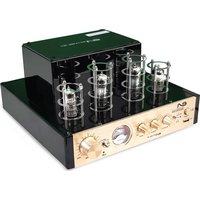
50TUBE-BT - Receiver EA - Free user manual and instructions
Find the device manual for free 50TUBE-BT EA in PDF.


| Product Type | Stereo Tube Amplifier |
| Brand | EA |
| Model | 50TUBE-BT |
| Power Supply | AC 220-240V, 50/60Hz, 80W |
| Output Power | 40 W |
| Input Impedance | 47 kOhms |
| Input Sensitivity | <600 mV |
| Signal-to-Noise Ratio | >85 dB |
| Bandwidth | 20 Hz - 20 kHz ±2 dB |
| Bluetooth Version | 2.1 |
| Bluetooth Range | 10 m |
| Bluetooth Compatibility | HFP, HSP, A2DP, AVRCP, OPP, PBAP |
| Audio Inputs | DVD, CD, Line (RCA), USB |
| Audio Outputs | Speakers (2 x SP), Headphone (3.5 mm jack) |
| Controls | Volume, Treble, Bass, Input Selector, MP3 (play/pause, next/previous track) |
| Display | VU meter |
| Dimensions (W x D x H) | 270 x 280 x 140 mm |
| Protection Class | Class II |
| Remote Control Batteries | Button cell (included) |
| Maintenance | Disconnect before cleaning; use a dry cloth |
| Safety | Do not expose to moisture; minimum ventilation 50 cm; do not block openings |
Frequently Asked Questions - 50TUBE-BT EA
User questions about 50TUBE-BT EA
0 question about this device. Answer the ones you know or ask your own.
Ask a new question about this device
Download the instructions for your Receiver in PDF format for free! Find your manual 50TUBE-BT - EA and take your electronic device back in hand. On this page are published all the documents necessary for the use of your device. 50TUBE-BT by EA.
USER MANUAL 50TUBE-BT EA
Read this manual carefully, which contains information important on the installation.
- Keep the manual for future reference. If the device changes ownership on a day,
make sure the new user has the manual. - Make sure that the mains voltage is suitable for this device and that it does not exceed the supply voltage indicated on the rating plate of the device.
- For indoor use only!
- To reduce the risk of fire or electric shock, do not expose this apparatus to rain or moisture.
Make sure that there are no flammable objects near the device during operation.
- Install the device in a well ventilated place at a minimum distance of 50cm from any surface. Make sure the ventilation slots are not blocked.
- Disconnect the appliance from the mains before any handling or maintenance. When you replace
fuse, only use a fuse that has exactly the same characteristics as the old one.
- The ambient temperature must not exceed 40^ . Do not operate the device at higher temperatures.
- In the event of a malfunction, stop the device immediately. Never try to repair the device yourself. Improper repair can lead to damage and malfunction. Contact an authorized technical service. Use only spare parts identical to the original parts.
- Do not connect the device to a dimmer.
- Make sure that the power cord is never crushed or damaged.
- Never unplug the appliance by pulling on the cord.
- Do not expose your eyes for too long in the direction of the light source.

Classroom equipment II :
This device, by design, does not require a secure connection to an electrical grounding system.
Danger of electric shock! Never attempt to repair this device yourself. In the event of a malfunction, repairs should only be carried out by qualified personnel.


AVIS DE CHOC ÉLECTRIQUE - NE PAS OUVRIR
AC 220-240V | 50/60Hz
CAUTION : TO REDUCE THE RISK OF ELECTRIC SHOCK DO NOT REMOVE COVER OR BACK. NO USER SERVICEABLE PARTS INSIDE, REFER SERVICING TO QUALIFIED SERVICE PERSONNEL.
Dangerous Voltages, that may be of sufficient magnitude to constitute a risk of electric shock to persons is present within this product's enclosure.
Some Do's and Don'ts on the safe use of this electrical appliance :
This equipment has been designed and manufactured to meet international safety standards, but like any electrical equipment care must be taken if you are to obtain the best results and safety is to be assured.
DO read the operating instruction before you attempt to use the equipment.
DO ensure that all electrical connections (including the mains plug, extension leads and enter-connections between the pieces of equipment) are properly made and in accordance with the manufacturer's instructions.
DO switch off and remove the mains plug before making or changing any connections to this unit.
DO consult your dealer if you are ever in doubt about the installation, operating or safety of your equipment.
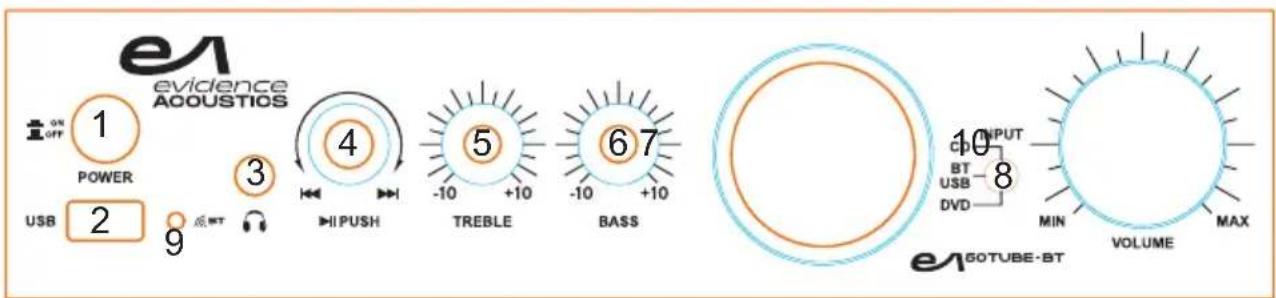
1 Power Button
MP3 controls
Vu meter
10 Volume control
2 USB interface
5 Treble control
8 Input selector
3 Earphone socket
Bass control
9 Bluetooth LED light
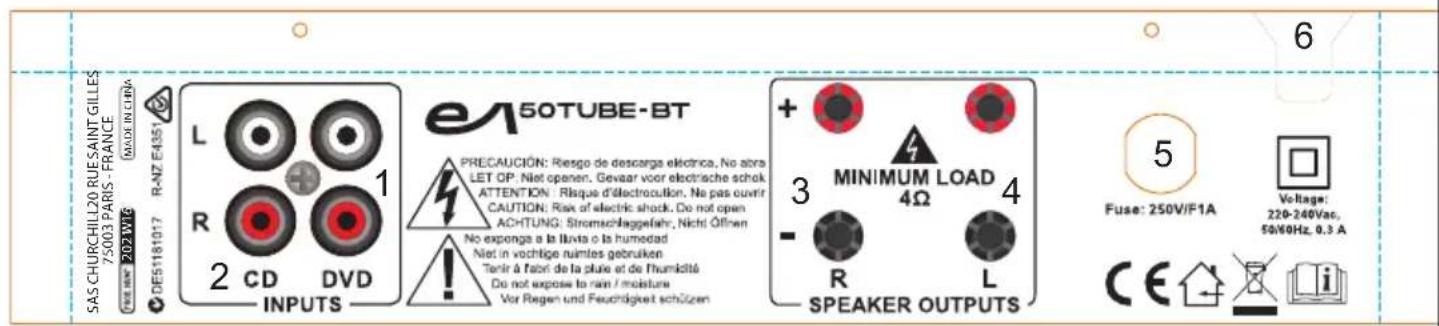
DVD input
Left speaker output
CD input
5 Fuse
Right speaker output
AC power cord
Rear Panel Connections :
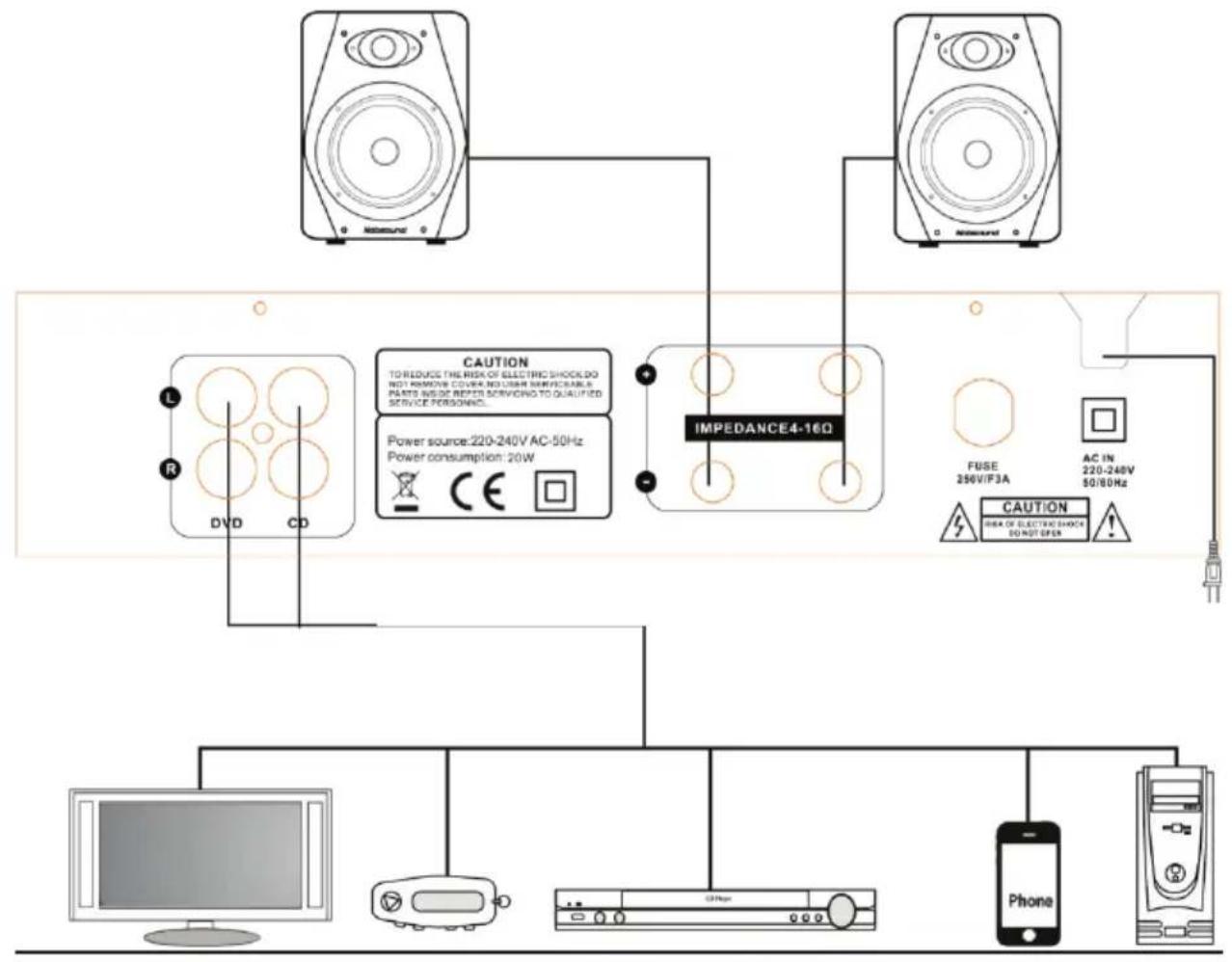
Television
MP3 player
CD/DVD player
Mobile phone
PC
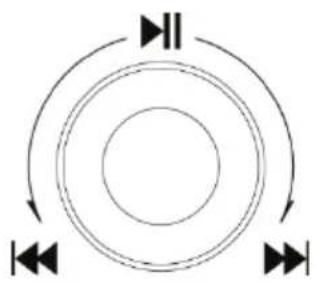
Control Panel Operation
Press this button to Play or Pause
- Left turn to select previous track
Right turn to select next track
- Turn the button slowly to select more tracks
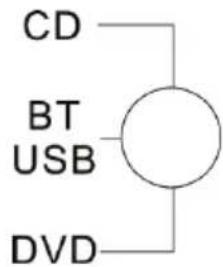
Input Selector Switch
There are 3 input positions. In BT/USB mode, the unit is in USB mode when a USB stick is connected. When no USB stick is plugged in or the USB stick is unplugged, the unit will scan automatically for Bluetooth devices.
RCA LINE INPUT
This system has a L/R stereo RCA line input on the rear panel. It is compatible with any common line output signal audio component such as a TV set, CD/DVD player or MP3 player.
- Connect the RCA stereo leads from your home audio component to the red and white LINE IN jacks on the rear panel.
Control the volume via the volume control on the front panel.
Earphone Connection
This system has a 3.5mm stereo earphone output. It is a direct Plug & Play connection
Volume and track can be controlled via the control panel of this system.
- When an earphone is plugged in, the speaker output is disabled.
Playing a Bluetooth device
This system can connect to a Bluetooth compatible device such as a smartphone or portable music player and play wirelessly audio tracks that are stored in your smartphone or music player.
Basic operation steps :
- Turn the system on.
- Set the input switch to BLUETOOTH. The BT LED is now flashing.
- Make sure that no USB stick is inserted!
Pairing a new device
The EA50TUBE-BT is only discoverable when the input selected is Bluetooth. After selecting Bluetooth input mode on the EA50TUBE-BT, turn on the Bluetooth function on the cell phone and search the EA50TUBE-BT. Its Bluetooth device name is "EA50TUBE-BT". Pair and connect after search. There is no pairing code.
Reconnect to an existing paired device
The system automatically reconnects to the last connected device.
- Enter the Bluetooth menu of your smartphone or music player and select 'EA50TUBE-BT' from the list of previously connected devices and select CONNECT.
- Your device is now reconnected to your system.
Playback control
The remote can control following functions:
Volume up/down
Next/previous track
Play/pause
Notes:
If pairing fails the first time, turn off your system and back on. Then follow the procedure from the beginning of this section.
If you are unable to reconnect to a previously connected device, remove or erase the EA50TUBE-BT from the list of paired devices from your smartphone and follow the instructions of 'Pairing a new device'.
Specifications :
| ITEM | SPECIFICATIONS |
| Description : | Tube amplifier |
| Power Requirements : | AC 220-240V/ 50/60 HZ 80W |
| Bluetooth specification | Version 2.1 Receiver support : HFP 1.5, HSP, A2DP 1.0 , AVRCP 1.0, OPP, PBAP Frequencies : 2402-2480MHz Maxc. RF emission power: 2.95dBm Range : 10m |
| Amplifier output | 40W |
| Impedance | 47kOhms |
| Sensitivity | <600mV |
| Treble/Bass | +/-10dB |
| Signal to Noise Ratio : | >85dB |
| Main Channel (1KHz) : | 0.01% |
| Frequency | 20Hz-20KHz+2dB |
| Dimensions : | 270 x 280 x 140mm |
Electric products must not be put into household waste. Please bring them to a recycling centre. Ask your local authorities or your dealer about the way to proceed.
CHURCHILL
Certify and declare under our sole responsibility only the following products:
The purpose of the statement described above is consistent with applicable union harmonization legislation:
For the provision of radio equipment on the market.
ROHS 2011/65/UE, Amendment 2015/863/UE / 2017/2102

Relative is the limitation of certain substances dangereuses in the team of teams and electroniques.
A full compliance statement is available by download or email at:
direction@churchill.world
http://www.churchill.world/ notices
SAS CHURCHILL
20 RUE SAINT GILLES
75003 PARIS - FRANCE
FR0581221894 / RCS Paris 811 221 894
Email: direction@churchill.world
- Read this manual carefully, which contains information important on the installation.
- Classroom equipment II :
- CAUTION : TO REDUCE THE RISK OF ELECTRIC SHOCK DO NOT REMOVE COVER OR BACK. NO USER SERVICEABLE PARTS INSIDE, REFER SERVICING TO QUALIFIED SERVICE PERSONNEL.
- Rear Panel Connections :
- Control Panel Operation
- Input Selector Switch
- RCA LINE INPUT
- Earphone Connection
- Playing a Bluetooth device
- Basic operation steps :
- Pairing a new device
- Reconnect to an existing paired device
- Playback control
- Notes:
- CHURCHILL
Brand : EA
Model : 50TUBE-BT
Category : Receiver