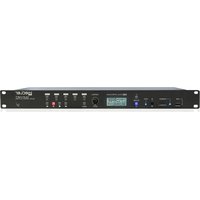
DUO-NET PLAYER - Audio player Ecler - Free user manual and instructions
Find the device manual for free DUO-NET PLAYER Ecler in PDF.


| Product type | Audio player / dual streaming receiver |
| Brand | Ecler |
| Model | DUO-NET PLAYER |
| Dimensions (W x H x D) | 482.6 x 44 x 200 mm (19" rack mount, 1U) |
| Weight | Approximately 2 kg |
| Power supply | External power supply 100-240 VAC, 50-60 Hz, with interchangeable connectors |
| Audio outputs | 2 stereo balanced outputs (PLAYER A and B) on Euroblock connectors |
| Supported audio formats | MP3, OGG, AAC, WAV, FLAC |
| Local readers | 1 USB 2.0 port (up to 32 GB, FAT16/32) and 1 SD/SDHC card reader (up to 32 GB, FAT16/32) |
| Network connectivity | Ethernet RJ45 (10/100 Mbps) for EclerNet, TP-NET and Internet/LAN streaming |
| Remote control | IR (infrared) included, with keys for PLAYER A and B |
| Control inputs | 4 GPI ports (DC 0-10 V) and 1 RS-232 port (DB9, 57600 baud) |
| Display and controls | LCD screen, digital CONTROL encoder, 7 fixed backlit keys, 5 programmable keys (F1-F5) |
| Priority management | Priority audio messages or files (announcements, calls) |
| Internal clock | Battery backup up to 84 h, NTP synchronization |
| Configuration software | EclerNet Manager (Windows, downloadable from www.ecler.com) |
| Maintenance | Clean with a damp cloth only; do not use solvents or abrasives |
| Safety | Do not expose to water or humidity; disconnect before cleaning; mandatory grounding |
| Warranty | See www.ecler.com or the provided warranty card |
Frequently Asked Questions - DUO-NET PLAYER Ecler
User questions about DUO-NET PLAYER Ecler
0 question about this device. Answer the ones you know or ask your own.
Ask a new question about this device
Download the instructions for your Audio player in PDF format for free! Find your manual DUO-NET PLAYER - Ecler and take your electronic device back in hand. On this page are published all the documents necessary for the use of your device. DUO-NET PLAYER by Ecler.
USER MANUAL DUO-NET PLAYER Ecler
16.1 How to discover streaming URLs included in websites: 34
16.2 Playing internet radios via AirPlay (ePLAYER1): 39
1 REMARQUE IMPORTANTE

WARNING: SHOCK HAZARD - DO NOT OPEN
AVIS: RISQUE DE CHOC ÉLECTRIQUE - NE PAS OUVRIR

| ETHERNET | |
| Connector | RJ45 |
| Speed | 10/100Mbps |
| AUDIO OUTPUT | |
| Nominal output level | +6dB (balanced) |
| Max Output Level/Minimum Load | 0db (unbalanced) |
| Freq. Response | +12dBV / 5kΩ |
| Balanced output header | 5Hz - 24kHz (-3dB) |
| Output impedance | 4 x 3 pin terminal block |
| MEDIA PLAYER | |
| Audio DAC | 24bit / 48kHz |
| Output Noise Floor (FFT) | -100dB (from 20Hz to 20kHz) |
| THD + Noise | < 0.005% (1kHz, 1Vrms) |
| Compatible file formats | mp3, ogg, WAV, AAC, FLAC, OPUS |
| SOURCES | |
| Network locations (Samba protocol) | |
| USB content | |
| SD content | |
| Internet Radio Streams | |
| GPI | |
| Number/input voltage | 4 ports / 0 - 10VDC |
| Output header | 6 pin Terminal block |
| RS232 | |
| SubD female connector 9 pin | TP-net protocol |
| RTC | |
| Time and date retention (battery) | 84 hours aprox. |
| RTC accuracy | ±1 min. / month |
| PANEL | |
| MATRIX DISPLAY | 160x64 pixels |
| Led indicator | USB, SD, NETWORK, PLAYER A/B, F1-F5, PLAY/PAUSE |
| Direct buttons | ENCODER, F1-F5, MENU, PREV, NEXT, PLAY, STOP, PLAYER A/B |
| SUPPLY | |
| DC supply | ±17,5 VDC |
| Mains | 100-240VAC + External PSU 17,5VDC |
| Power consumption | 15VA |
| MECHANICAL | |
| Dimensions WxHxD | 482.6x44x120mm |
| Weight | 1800gr |
| USB and SD card interfaces | |
| USB host interface | USB 2.0 High Speed (480 Mbps) |
| Supports mass storage class devices (externally powered above 500mA current draw) | |
| Up to 2TB | |
| Micro SD card interface | Supports SD ver1.0, SDHC |
| Up to 32GB | |
| Supports FAT16, FAT 32 and VFAT | |
| Multi-partition up to 1 | |
| FAT and files analysis | 65354 playable folders |
| 65354 playable folders within each folder | |
| 65354 playable files within each folder | |
| Folder hierarchy | Up to 8 containing the root directory |
| Playable extensions | mp3, wav, ogg, AAC, flac |
| UNICODE | |
| Sorting in alphabetical order | Up to 100 folders |
| Up to 100 files by folder | |
| (Folders/files over 100 sorted in the FAT order) | |
| ACCESSORIES SUPPLIED | |
| Main power cable, IR remote control unit | |
| Remote control battery | 2 x AAA, LR-03 1,5V |
TP-NET PROTOCOL
SOFTWARE
Third-Party NET
13 TP-NET PROTOCOL INTRODUCTION
The TP-NET protocol lets a client device (control device) get and/or set the values of several parameters of the EclerNet compatible devices (MIMO and MIMO SG series digital matrices, DUO-NET PLAYER, NXA digital audio manager series, NZA amplifier series, NPA amplifier series, etc.), like volumes, mutes, alarms, etc. It's as well available for eMIMO1616 digital matrix, HUB series digital zoner, MIMO7272DN and MIMO4040CDN digital matrix.
The communication with these digital audio devices can be established using Ethernet and the UDP/IP transport protocol, always by means of the 5800 UDP port.
A second option for this communication is using the RS-232 interface that some of these compatible devices do also have (MIMO series, DUO-NET PLAYER, NXA series, etc.). In this case, the serial connection must fulfil the following specifications:
- Baud rate: 57600 (fixed, no autonegotiation) for all the devices, except for DUO-NET PLAYER, eMIMO1616, HUB series and MIMO4040CDN, which use 115200 baud rate).
Data bits: 8 - Parity: None
- Stop bits: 1
- Flow control: None
In case the Ecler device has an Euroblock connector for the RS-232 interface, the serial cable wiring, from the device's connector to a standard DB9 serial interface connector, must be the following:
| WIRING RS232 - DB9 | |
| RS232 | DB9 |
| Tx | Pin 2 (RxD) |
| Rx | Pin 3 (TxD) |
| Gnd | Pin 5 (Signal Gnd) |
The protocol is simple and direct, making it easy to read, write and modify the generated code. It is based on messages with no begin and end delimiter: each message is self-delimited by the UDP packet size, which is defined with a maximum of 80 characters. All the messages must be written in capital letters.
To let some control systems (like CRESTRON®, EXTRON®, AMX®, RTI®, VITY®, MEDIALON®, etc.) process the messages more easily, the EclerNet device adds the character LF (0x0A) to the end of each message. This way the client can buffer the messages to process them, if it's required. The EclerNet device can also handle several messages received in a single message packet by using the LF delimiter.
The available messages are built with one or more fields separated with blank spaces ( = blank space):
The first field (TYPE) defines the message type and then, the required parameters for it (each kind of message requires a given number of parameters). The field TYPE can have these values:
SYSTEM
GET
SET
INC
DEC
- SUBSCRIBE
- UNSUBSCRIBE
DATA
- ERROR
At the end of this document you'll find all the available messages and their parameters for each model of the EclerNet compatible devices.
The SYSTEM, GET, SET, INC, DEC, SUBSCRIBE & UNSUBSCRIBE messages can be sent from the client to the EclerNet device. The DATA & ERROR messages can be sent from the device to the client. The only exception is the SYSTEM PING message, that is a SYSTEM type message that is sent from the EclerNet device when the initial message from the client to the device was SYSTEM CONNECT PINGPONG.
The communication (using UDP or RS-232) starts when a client sends the message SYSTEM CONNECT to the EclerNet device. As far as the UDP communication requires no connection (unlike the TCP), the EclerNet device stores this client's IP address, and then uses it as the destination IP address for the messages that it generates (DATA & ERROR). After receiving the SYSTEM CONNECT message, the device dumps its entire configuration using several consecutive DATA messages.
Note: if the configuration data dump process (usually a huge list of parameters & values) wants to be avoided after a SYSTEM CONNECT message, a SYSTEM CONNECT ONCE message can be used instead.
The communication can be terminated by two methods:
- Manually: when the client sends the SYSTEM DISCONNECT message, cancelling all the subscriptions and stopping the DATA & ERROR messages
- Automatically: in case the initial message was SYSTEM CONNECT PINGPONG and the client didn't get any SYSTEM PONG message in a period longer than 10 seconds (presuming a communication breakdown)
The SET messages don't have an automatic acknowledgement with a DATA message sent from the EclerNet device after it has processed the SET command. The client must update the values itself and must send the needed GET message if it requires confirmation from the device.
NOTES:
- The numerical values are always integer numbers without +, - , comma or dot symbols.
- [PINGPONG] is an optional parameter used to configure the device-client communication with a periodical check, to see whether the client or the device have terminated it. When configured this way, the device sends a SYSTEM PING once per second, and the client must answer with a SYSTEM PONG message. If anyone doesn't get these messages along a 10 seconds period, the communication will be considered terminated.
- [ONCE] is an optional parameter used to start the device-client communication without a full data dump process (usually a huge list of parameters & values).
- &
is a numerical value that identifies one available Preset stored in the EclerNet device's memory:
For the DUO-NET PLAYER it can be within the [1..20] range.
, y
are numerical values in the [0..100] range that define values in a scale equivalent to [-inf..0] dB - <GPI> \& <GPO> are numerical values within the [1..8] range.
is a numerical value within the [0..100] range that indicates the value of an analogue GPI input. For a digital input only 0 or 100 are the possible values is a numerical value within the [0..1] range: it can only be 0 or 1 (opened or closed GPO). is a numerical value within the [1..10] range that sets the VU-meter refresh rate, or the number of times the vumeters' values are sent per second (by default = 3). - "Device Name" is the device name inside double quotation marks, to allow for names with blank spaces.
-
is a numerical value for an error code. -
“
” is a text chain inside double quotation marks, containing an error description. is a numerical value that identifies a Virtual Control.
14 DUO-NET PLAYER AUDIO PLAYER & STREAMING RECEIVER
IMPORTANT NOTE: The communication must be started with the client sending the first message SYSTEM CONNECT or SYSTEM CONNECT ONCE to the EclerNet device. Otherwise, the commands from the client to the EclerNet device will be ignored. See TP-NET PROTOCOL INTRODUCTION chapter for additional information.
| TYPE | PARAM1 | PARAM2 | PARAM3 | PARAM4 | DESCRIPTION |
| SYSTEM | CONNECT | [MASTER] | [PINGPONG] | [ONCE] | • MASTER: this parameter, applied in SYSTEM CONNECT, is used to disconnect all clients currently connected to the device, releasing all open and not correctly closed connections, opening a new connection. In this way we guarantee that the client that has set the MASTER option is the only one connected by TP-NET to the device. • PINGPONG: this parameter can be used with the MASTER parameter, the difference is that this parameter performs a periodic check to see if the communication is still open (PING PONG) or if after 10 seconds with no response, the communication has ended (PING). • ONCE: this parameter is used to prevent the device status dump. |
| DISCONNECT | Cancel subscriptions and terminates communication | ||||
| SUBSCRIPTION_RATE | Alive message from device | ||||
| PING | Alive message from device | ||||
| PONG | Alive ACK message from client | ||||
| PING_interval | |||||
| GET | ALL | Dumps current device status (with DATA messages) | |||
| PRESENT_INDEX | Gets the current PRESET number | ||||
| PRESENT_NAME | Gets the current PRESET name | ||||
| DEVICE_NAME | Gets the Device Name | ||||
| INFO_MODEL | Gets the Device Model | ||||
| INFO_VERSION | Gets the Firmware Version | ||||
| INFO_MAC | Gets the Device MAC address | ||||
| INFO_IPILIST | Gets the IP parameters of the connected client devices | ||||
| IP_CONFIG | Shows the DUO-NET unit's current IP configuration | ||||
| PLAYER_NAME | Gets the PLAYER A or B NAME | ||||
| PLAYER_MUTE | Gets the MUTE status of PLAYER A or B | ||||
| PLAYER_VOLUME | Gets the VOLUME level of PLAYER A or B | ||||
| PLAYER_VUMETER | Gets the VUMETER level of PLAYER A or B | ||||
| PLAYER_TIME | Gets PLAYER A or B elapsed, remaining and total time of the current media playback | ||||
| PLAYER_TRANSPORT_STATUS | Gets PLAYER A or B current playback status | ||||
| PLAYER.PlayLIST_INDEX | Gets PLAYER A or B loaded playlist number, from the 99 available in the playlist bank | ||||
| PLAYER.PlayLIST_NAME | Gets PLAYER A or B loaded playlist name, from the 99 available in the playlist bank | ||||
| PLAYER_queue_INFO | Gets PLAYER A or B current playback queue position (index) and total number of items in it (count) | ||||
| PLAYERPlay_MODE | Gets PLAYER A or B current playback order mode | ||||
| PLAYER_REPEAT_MODE | Gets PLAYER A or B current playback repeat mode |

| PLAYER_FADE_MODE | Gets PLAYER A or B current tracks playback transition mode | ||||
| PLAYER_VARISPEED | Gets PLAYER A or B current playback tempo variation value | ||||
| PRIORITY_STATUS | Gets PRIORITY MODULE 1 or 2 status | ||||
| PLAYER_ITEM-tags | Gets PLAYER A or B current playback ALIAS, TITLE, ARTIST, ALBUM and NAME tags |
| SET | PRESET_INDEX | <1..20> | Sets the current PRESET number | |||
| PLAYER_MUTE | <PLAYER:A/B> | <YES/NO> | Sets the MUTE status of PLAYER A or B | |||
| PLAYER_volume | <PLAYER:A/B> | <0..100> | Sets the VOLUME level of PLAYER A or B | |||
| PLAYER_TRANSPORT_CONTROL | <PLAYER:A/B> | <STOP/PLAY/P/AUSE/NEXT/PREV> | Sets PLAYER A or B transport controls | |||
| PLAYER.PlayLIST_INDEX | <PLAYER:A/B> | <1..99> | Sets (loads) PLAYER A or B playlist number, from the 99 available in the playlist bank | |||
| PLAYERPlay_MODE | <PLAYER:A/B> | <SEQUENTIAL/RANDOM> | Sets PLAYER A or B playback order mode | |||
| PLAYER_REPEAT_MODE | <PLAYER:A/B> | <PLAY_ALL/PLAY_ONE/REPEAT_ALL/REPEAT_ONE> | Sets PLAYER A or B current playback repeat mode | |||
| PLAYER_FADE_MODE | <PLAYER:A/B> | <NONE/XFADE/FADE/HFADE> | Sets PLAYER A or B current tracks playback transition mode | |||
| PLAYER_VARISPEED | <PLAYER:A/B> | <VARISPEED:-50..50> | Sets the current Varispeed (track's tempo) variation value, from -50% to +50% | |||
| INC | PLAYERVolumes | PLAYER:A/B> | <0..100> | INCREASEs the current VOLUME of a PLAYER, a value from ±1 to ±100 | ||
| PLAYER_VARISPEED | PLAYER:A/B> | <VARISPEED:-50..50> | INCrements the current Varispeed (track's tempo) variation value, from -50% to +50% | |||
| DEC | PLAYERVolumes | PLAYER:A/B> | <0..100> | DECreases the current VOLUME of a PLAYER, a value from ±1 to ±100 | ||
| PLAYER_VARISPEED | PLAYER:A/B> | <VARISPEED:-50..50> | DECrements the current Varispeed (track's tempo) variation value, from -50% to +50% | |||
| SUBSCRIBE | ALL | Subscribes to all VU-meters and player times | ||||
| PLAYER_VUMETER | PLAYER:A/B> | Subscribes to the VUMETER level of PLAYER A or B | ||||
| PLAYER_TIME | PLAYER:A/B> | Subscribers to the TIME values ( elapsed, remaining, total) of PLAYER A or B | ||||
| UNSUBSCRIBE | ALL | Unsubscribers to all VU-meters and player times | ||||

| PLAYER_VUMETER | PLAYER:A/B> | Unsubscribers to the VUMETER level of PLAYER A or B | |||
| PLAYER_TIME | PLAYER:A/B> | Unsubscribers to the TIME values ( elapsed, remaining, total) of PLAYER A or B |
| DATA | PRESET_INDEX | <1..20> | Shows the current PRESET number | ||
| PRESET_NAME | " | Shows the current PRESET name | |||
| DEVICE_NAME | " | Shows the Device Name | |||
| INFO_MODEL | <Device Model> | Shows the Device Model | |||
| INFO_VERSION | <Firmware Version> | Shows the Firmware Version | |||
| INFO_MAC | <Device MAC address> | Shows the Device MAC address | |||
| INFO_IPLIST | <N> | <IP> | <PORT> | Shows the IP parameters of the connected client devices, where N is an incremental number assigned to each one, followed by the IP:port it has Example with 2 clients : DATA INFO_IPLIST 1 192.168.1.2 55229 DATA INFO_IPLIST 2 192.168.1.2 55231 |

ecler
| IP_CONFIG | IP> | <PORT> | <NETMASK> | <GATEWAY> | Shows the DUO-NET unit's current IP configuration. Example: DATA IP_CONFIG 192.168.0.6 5000 255.255.0.0 192.168.0.1 | |
| PLAYER_NAME | <PLAYER:A/B> | "NAME" | Shows the PLAYER A or B NAME | |||
| PLAYER_MUTE | <PLAYER:A/B> | "MUTE:YES/NO" | Shows the MUTE status of PLAYER A or B | |||
| PLAYER_VOLUME | <PLAYER:A/B> | <VOL:0..100> | Shows the VOLUME level of PLAYER A or B | |||
| PLAYER_VUMETER | <PLAYER:A/B> | <VOL:0..100> | Shows the VUMETER level of PLAYER A or B | |||
| PLAYER_TIME | <PLAYER:A/B> | <ELAPSED> | <REMAIN> | <TOTAL> | Shows PLAYER A or B elapsed, remaining and total time of the current media playback | |
| PLAYER_TRANSPORT_STATUS | <PLAYER:A/B> | <STATUS:STOPPED/PLAYING/PAUSE> | Shows PLAYER A or B current playback status | |||
| PLAYER.PlayLIST_INDEX | <PLAYER:A/B> | <INDEX:1..99> | Shows PLAYER A or B loaded playlist number, from the 99 available in the playlist bank | |||
| PLAYER.PlayLIST_NAME | <PLAYER:A/B> | "NAME" | Shows PLAYER A or B loaded playlist name, from the 99 available in the playlist bank | |||
| PLAYER Queue_INFO | <PLAYER:A/B> | <QUEUE_INDEX> | <QUEUE_COUNT> | Shows PLAYER A or B current playback queue position (index) and total number of items in it (count) | ||

| PLAYER.Play_MODE | <PLAYER:A/B> | <MODE:SEQUENTIAL/RANDOM> | Shows PLAYER A or B current playback order mode | ||
| PLAYER_REPEAT_MODE | <PLAYER:A/B> | <MODE:PLAY_ALL/PLAY_ONE/REPEAT_ALL/REPEAT_ONE> | Shows PLAYER A or B current playback repeat mode | ||
| PLAYER_FADE_MODE | <PLAYER:A/B> | <MODE:NONE/XFADE/FADE/HFADE> | Shows PLAYER A or B current tracks playback transition mode | ||
| PLAYER_VARISPEED | <PLAYER:A/B> | <VALUE:-50..50> | Shows PLAYER A or B current playback tempo variation value | ||
| PRIORITY_STATUS | <PRIORITY:1/2> | <STATUS:RUNNING/STOPPED> | Shows PRIORITY MODULE 1 or 2 status | ||
| PLAYER_ITEM_TAG_ALIAS | <PLAYER:A/B> | "alisas" | Shows PLAYER A or B current playlist ALIAS field | ||
| PLAYER_ITEM_TAG_TITLE | <PLAYER:A/B> | "TITLE" | Shows PLAYER A or B current playback title tag | ||
| PLAYER_ITEM_TAG_ARTIST | <PLAYER:A/B> | "ARTIST" | Shows PLAYER A or B current playback artist tag | ||
| PLAYER_ITEM_TAG_ALBUM | <PLAYER:A/B> | "ALBUM" | Shows PLAYER A or B current playback album tag | ||
| PLAYER_ITEM_TAG_NAME | <PLAYER:A/B> | "NAME" | Shows PLAYER A or B current playback name tag | ||
15 ERROR CODES FOR ECLERNET DEVICES
15.1 COMMON ERROR CODES (to all EclerNet - TP-NET compatible devices)
| ERROR ID | DESCRIPTION |
| 0 | TPNET_ERROR_NONE = 0, |
| 1 | TPNET_ERROR_INVALID_FIELD_TYPE, |
| 2 | TPNET_ERROR_INVALID_FIELD_PARAM1, |
| 3 | TPNET_ERROR_INVALID_FIELD_PARAM2, |
| 4 | TPNET_ERROR_INVALID_FIELD_PARAM3, |
| 5 | TPNET_ERROR_INVALID_FIELD_PARAM4, |
15.2 DUO-NET PLAYER SPECIFIC ERROR CODES
| ERROR ID | DESCRIPTION |
| 6 | TPNET_ERROR_INVALID_FIELD_PARAMETER5, |
| 7 | TPNET_ERROR_TIMEOUT_PONG, |
| 8 | TPNET_ERROR_connectivity_CONNECTED, |
| 9 | TPNET_ERROR_DISCONNECTIVITY_UNCONNECTED, |
| 10 | TPNET_ERROR_INVALID_client_IP, |
| 11 | TPNET_ERROR_MESSAGE_TOO_long, |
| 12 | TPNET_ERROR_UN SUPPORTED_MESSAGE, |
| 13 | TPNET_ERROR_INVALID_RATE_VALUE, |
| 14 | TPNET_ERROR_MAX_USERS_REACHED, |
| 15 | TPNET_ERRORMASTER_MODE, |
16 HOW TO IDENTIFY INTERNET RADIO URL STREAMS
This document shows how to identify internet radio streams in order to play them in audio streaming players such as Ecler ePLAYER1 or Ecler DUO-NET PLAYER. Few examples are given, but there are a lot of different options. Feel free to find your favourite internet radio websites!
IMPORTANT NOTE:
A valid audio stream looks like this:
http://www.my_favourite_radio.mp3
http://111.111.11.1:8080
http://listen-radio/rock.m3u
etc.
An address such as "http://www.my_radio.com" is not directly an audio streaming, but a generic website address. This website could include a real audio streaming service, which will have its own URL.
16.1 How to discover streaming URLs included in websites:
- EXAMPLE 1:
- Open your favourite web browser.
- Type (or search for) a live radio manager website. Listenlive.eu is used in this example.
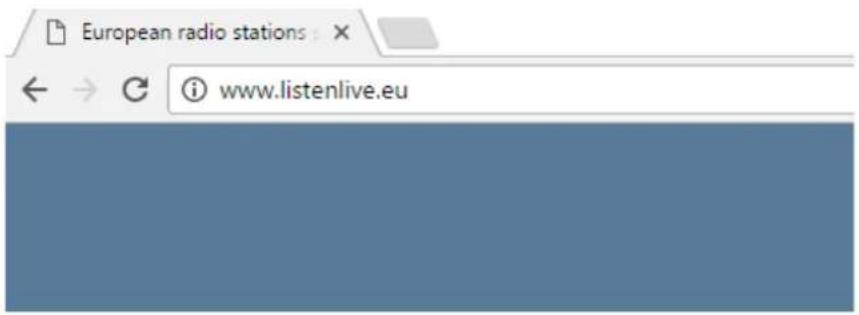
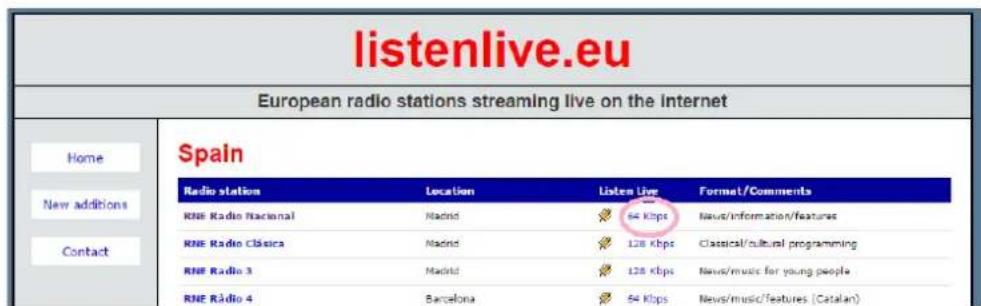
- In this website, look for your radio and click on the bitrate. An ".m3u" will be downloaded.
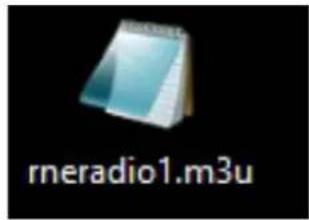
- Open this ".m3u" with a text editor. You will see the audio streaming URL.
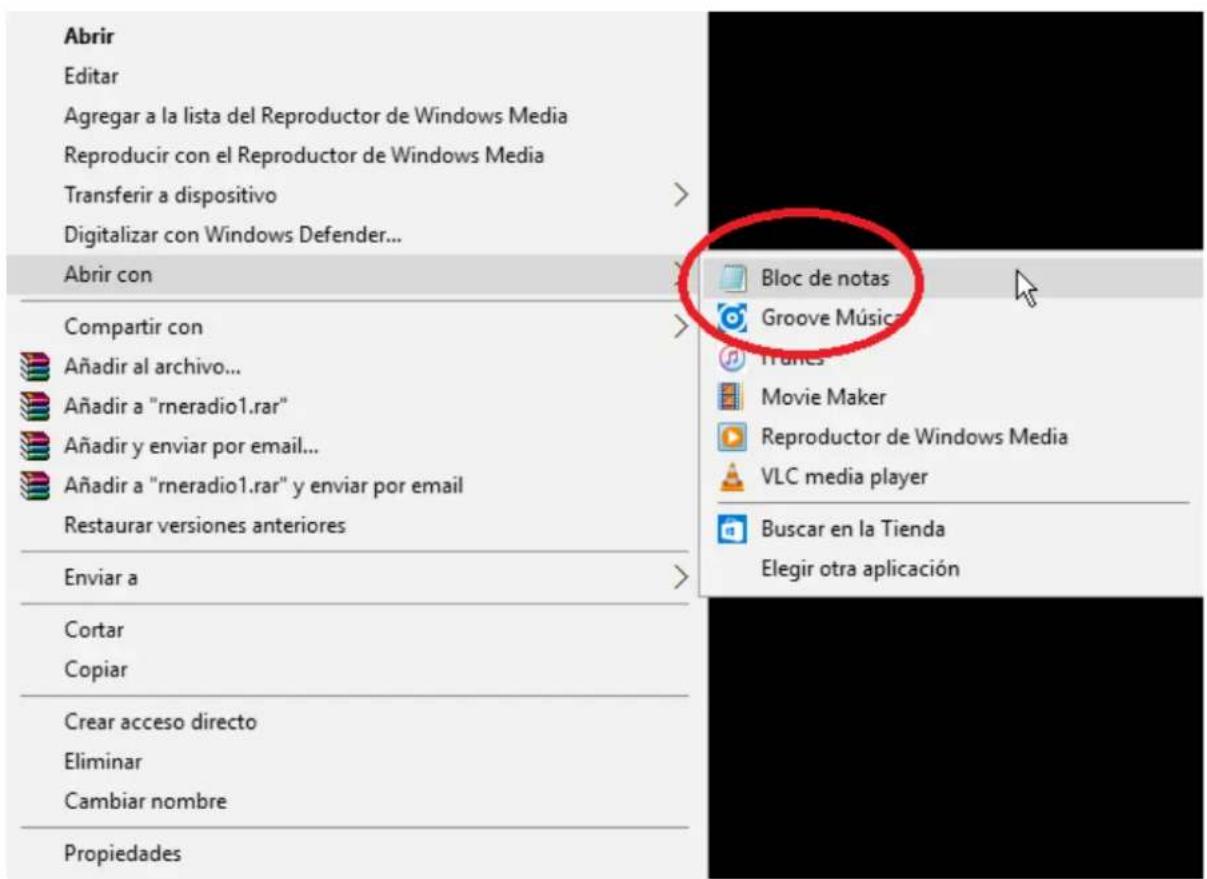
- To check it, open a new tab in your web browser and copy & paste this URL. If it is valid, it will start to play.

rmeradio1.m3u: Bloc de notas
- Finally, save this address in your audio streaming player (ePLAYER1/DUO-NET PLAYER).
PARAMETERS
Name
News
Enabled Events

1
GPI2
SILENCE
Playlist

Path
http://rme.rtfveradio.cires21.com/m
Media alias
RNE
EXAMPLE 2:
- Open your favourite web browser.
- Type (or search for) a live radio manager website. Internet-radio.com is used in this example.
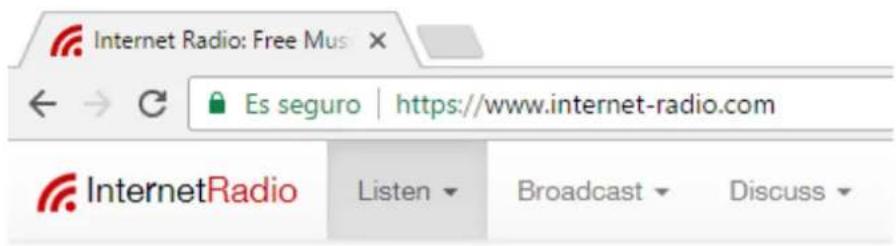
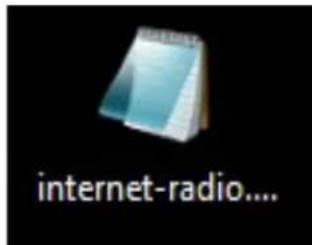
- In this website, search your radio and click on“.m3u” or“.pls” link. An“.m3u” or “pls” file will be downloaded.

- Open this ".m3u" with a text editor. You will see the audio streaming URL.
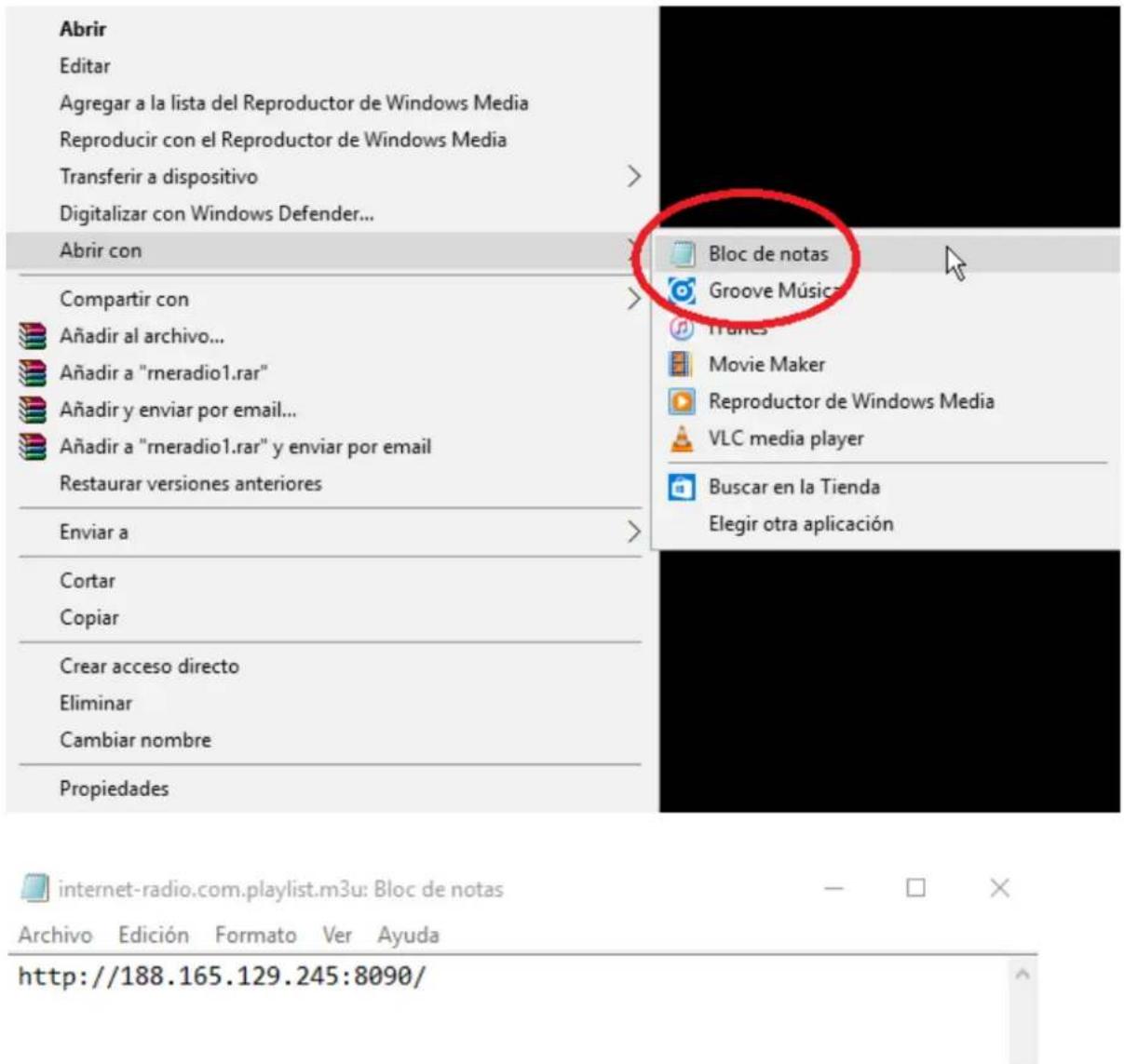
- To check it, open a new tab in your web browser and copy & paste this URL. If it is valid, it will start to play.
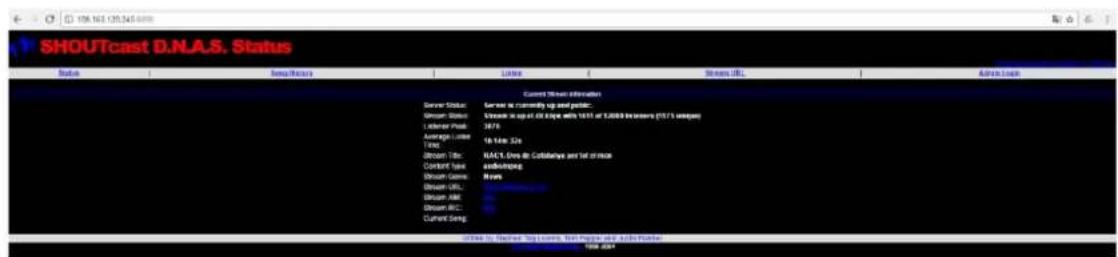
- Finally, save this address in your audio streaming player (ePLAYER1/DUO-NET PLAYER).
PARAMETERS
Name
News
Enabled Events


SILENCE
Playlist

Path
http://188.165.129.245:8090/
Media alias
RAC1
16.2 Playing internet radios via AirPlay (ePLAYER1):
ePLAYER1 must be in AirPlay Mode. Please, consult the user manual to know more about it.
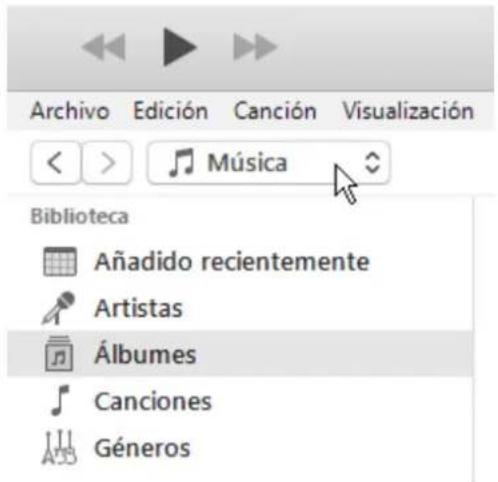
- Download and install iTunes. Once is installed in your PC, open it and click on Music/Edit Menu.
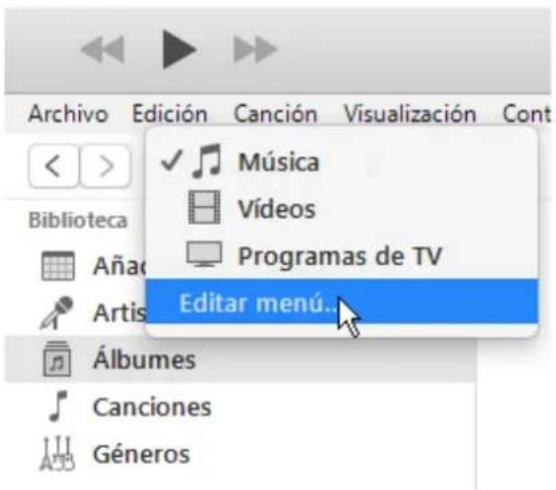
- Check "Internet Radios".
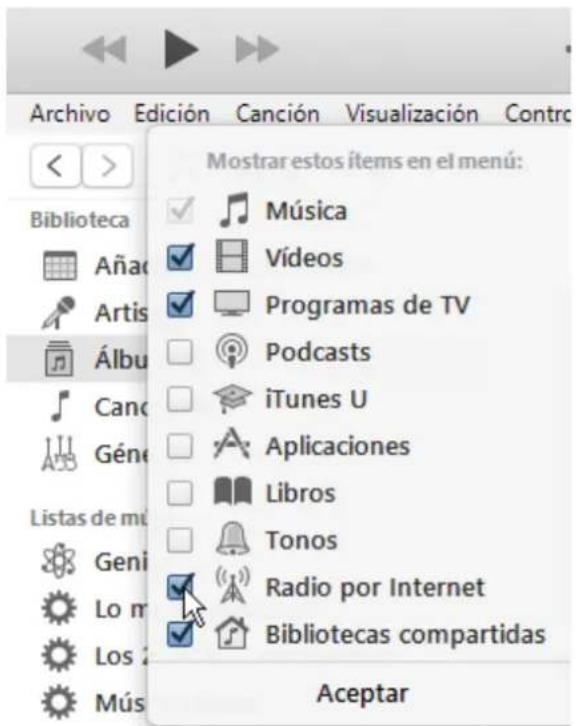
- Now, select "Internet Radios". You will see a wide catalogue of internet radio streamings.
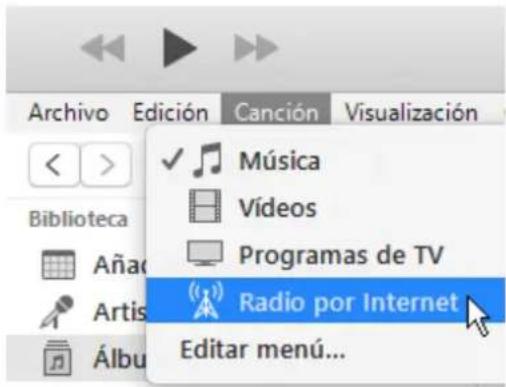
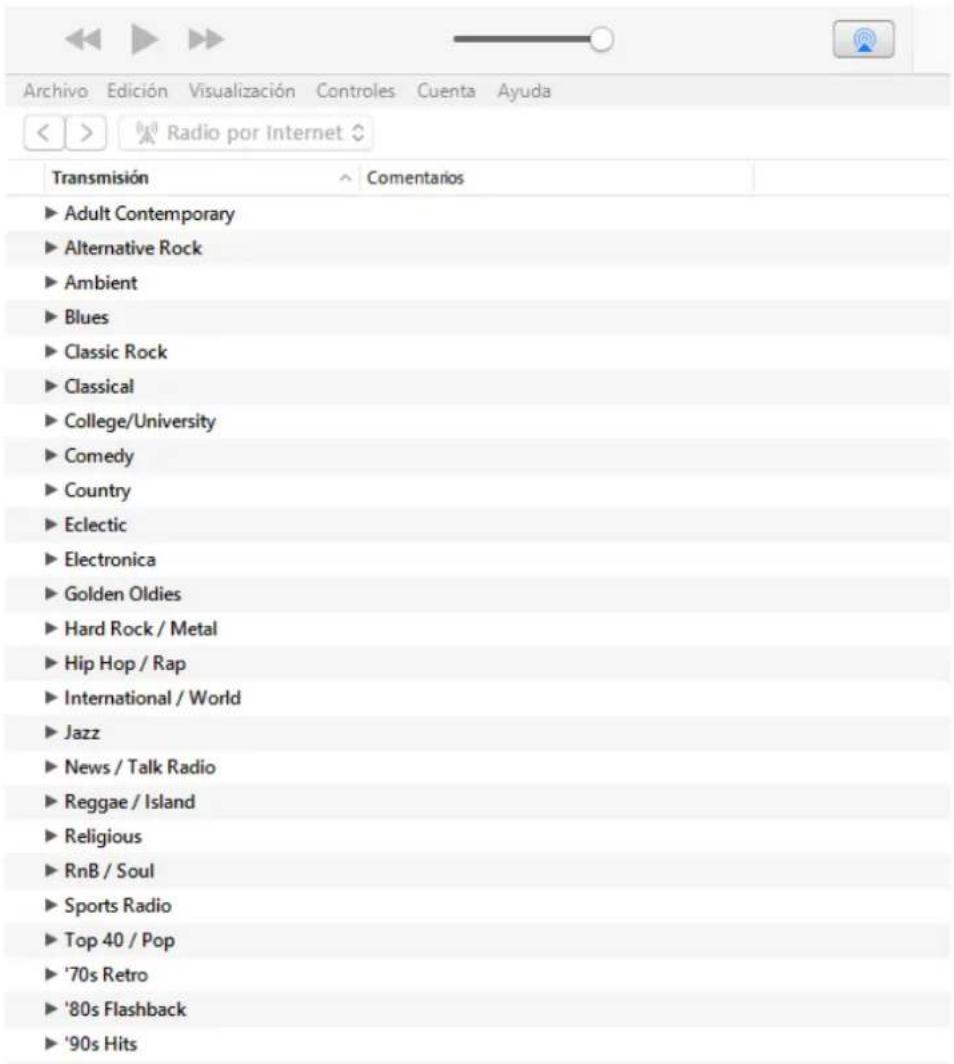
- Select your favourite radio and click on it. Check on iTunes that ePLAYER1 is selected as the AirPlay device.
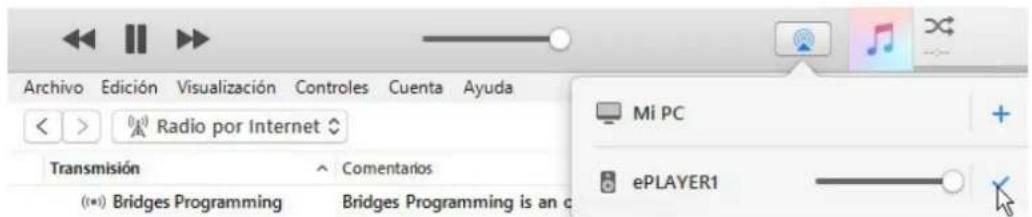
- ePLAYER1 will start to play.
- REMARQUE IMPORTANTE
- TP-NET PROTOCOL
- TP-NET PROTOCOL INTRODUCTION
- NOTES:
- DUO-NET PLAYER AUDIO PLAYER & STREAMING RECEIVER
- ERROR CODES FOR ECLERNET DEVICES
- COMMON ERROR CODES (to all EclerNet - TP-NET compatible devices)
- DUO-NET PLAYER SPECIFIC ERROR CODES
- HOW TO IDENTIFY INTERNET RADIO URL STREAMS
- IMPORTANT NOTE:
- How to discover streaming URLs included in websites:
- - EXAMPLE 1:
- PARAMETERS
- EXAMPLE 2:
- Playing internet radios via AirPlay (ePLAYER1):
Brand : Ecler
Model : DUO-NET PLAYER
Category : Audio player