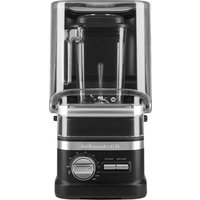
KSBC1B2 - Blender KITCHENAID - Free user manual and instructions
Find the device manual for free KSBC1B2 KITCHENAID in PDF.


| Product Type | Commercial Blender |
| Brand | KitchenAid |
| Model | KSBC1B2 |
| Motor Power | 3.0 hp |
| Voltage | 120 V |
| Frequency | 60 Hz |
| Current | 15.0 A |
| Maximum Container Capacity | 60 oz (1.75 L) |
| Container Material | Polycarbonate (estimated) |
| Speeds | Low, Medium, High, Pulse, Variable Timer (5-60 s) |
| Preset Programs | Frozen Drinks (22 s) |
| Plug Type | 3 prong with ground |
| Power Cord | Removable, storage on base |
| Included Parts | Container, lid with measuring cap, Talon™ blade, pusher, front and back covers |
| Maintenance | Hand wash; do not immerse base; sanitize with bleach |
| Safety | Grounding required; sharp blades; do not use without lid; supervise children |
| Base Warranty | 2 years (hassle-free replacement in US and Canada) |
| Container Warranty | 1 year |
| Customer Service (US) | 1 855 845-9684 |
| Customer Service (Canada) | 1 800 807-6777 |
Frequently Asked Questions - KSBC1B2 KITCHENAID
User questions about KSBC1B2 KITCHENAID
0 question about this device. Answer the ones you know or ask your own.
Ask a new question about this device
Download the instructions for your Blender in PDF format for free! Find your manual KSBC1B2 - KITCHENAID and take your electronic device back in hand. On this page are published all the documents necessary for the use of your device. KSBC1B2 by KITCHENAID.
USER MANUAL KSBC1B2 KITCHENAID
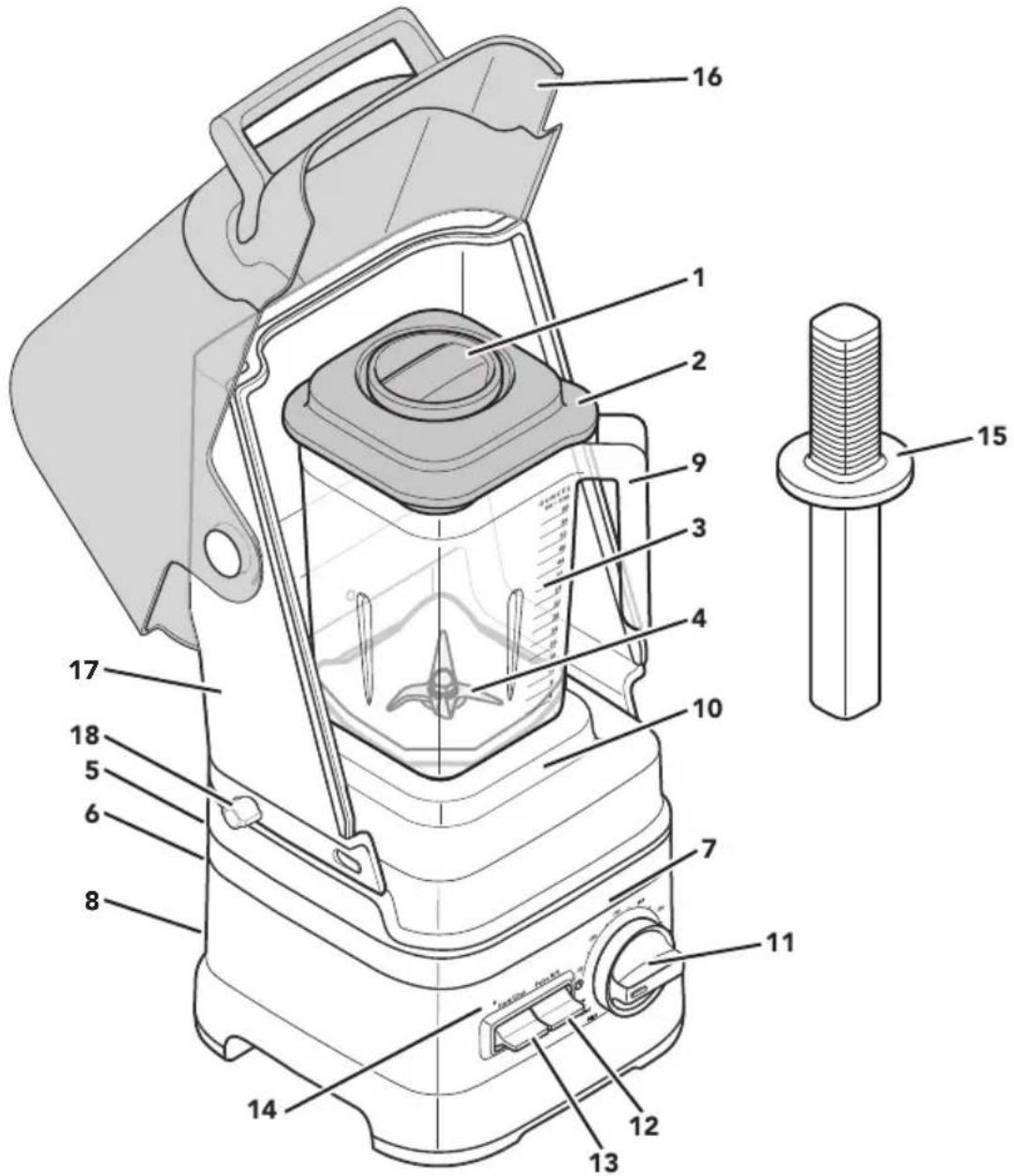
natural_image
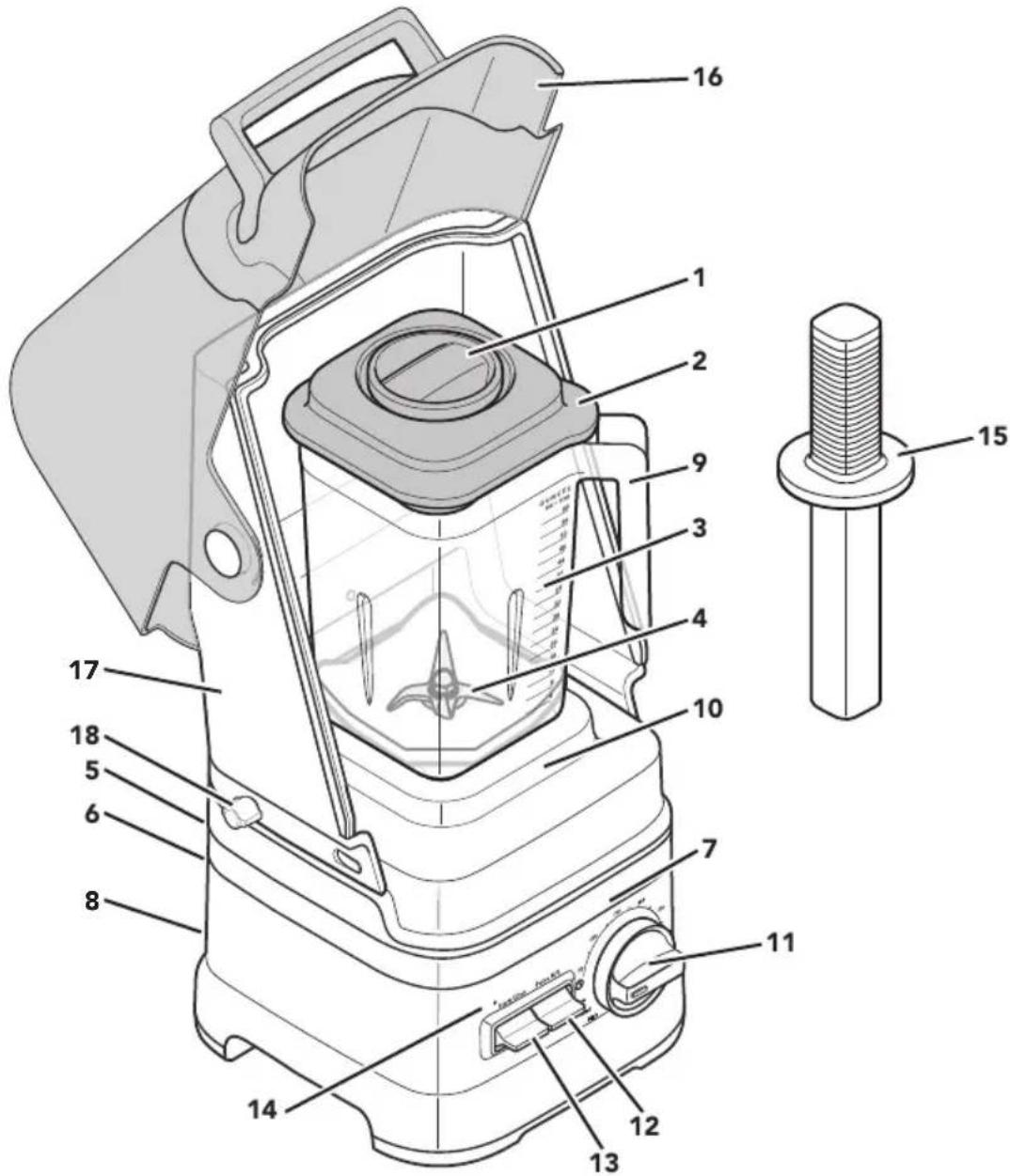
Exterior view of a kitchen aid blender with control knobs and a clear lid (no text or symbols on the device itself)PARTS AND FEATURES
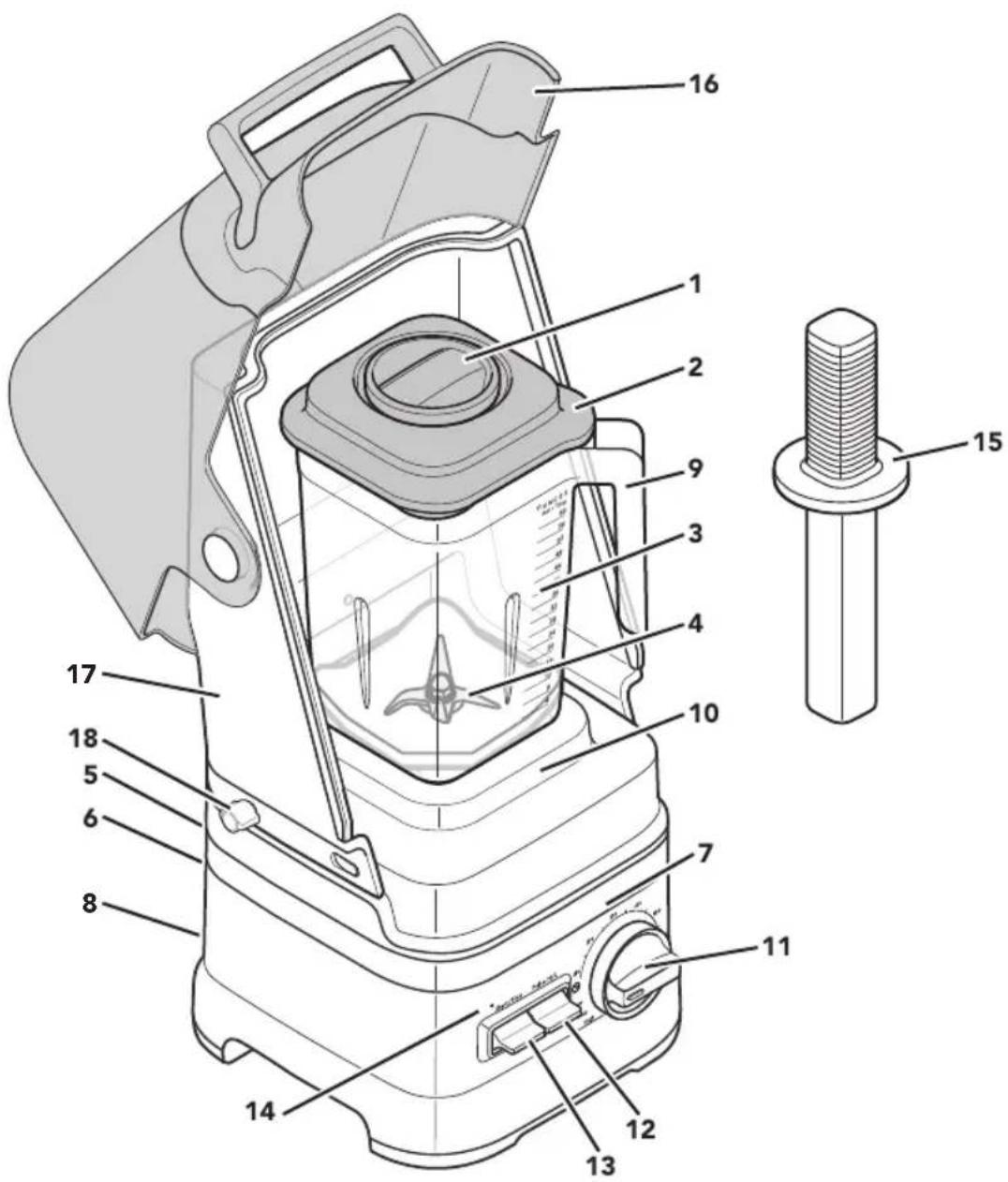
1 Ingredient cap with measuring cup
2 Lid
3 Blender jar
4 Talon ™ blade
5 Power cord socket and removable power cord (not shown)
6 Cord cleat (not shown): To store the cord.
7 Base
8 On/off switch (not shown)
9 Open handle for easy stackability
10 Removable blender jar pad
11 Control dial
12 Pulse toggle switch
13 Start/Stop toggle switch
14 Status indicator light
15 Tamper
16 Front cover with Handle
17 Back cover
18 Thumb Screw
Your safety and the safety of others are very important.
We have provided many important safety messages in this manual and on your appliance. Always read and obey all safety messages.

This is the safety alert symbol.
This symbol alerts you to potential hazards that can kill or hurt you and others.
All safety messages will follow the safety alert symbol and either the word "DANGER" or "WARNING." These words mean:
! DANGER
You can be killed or seriously injured if you don't immediately follow instructions.
WARNING
You can be killed or seriously injured if you don't follow instructions.
All safety messages will tell you what the potential hazard is, tell you how to reduce the chance of injury, and tell you what can happen if the instructions are not followed.
IMPORTANT SAFEGUARDS
When using electrical appliances, basic safety precautions should always be followed, including the following:
- Read all instructions.
- To protect against risk of electrical shock, do not put Blender in water or other liquid.
-
This appliance is not intended for use by persons (including children) with reduced physical, sensory, or mental capabilities, or lack of experience and knowledge, unless they are closely supervised and instructed concerning use of the appliance by a person responsible for their safety. Close supervision is necessary when any appliance is used by or near children. Children should be supervised to ensure that they do not play with the appliance.
-
Turn the appliance OFF, then unplug from the outlet when not in use, before assembling or disassembling parts and before cleaning. To unplug, grasp the plug and pull from the outlet. Never pull from the power cord.
-
Avoid contact with moving parts.
-
Do not operate any appliance with a damaged cord or plug or after the appliance malfunctions, or is dropped or damaged in any manner. Contact the manufacturer at their customer service telephone number for information on examination, repair or adjustment.
-
Do not use outdoors.
-
Do not let cord hang over edge of table or counter.
-
Keep hands and utensils, other than the tamper provided, out of the container while blending to reduce the risk of severe injury to persons or damage to the blender. The cover must remain in place when using the tamper through the cover opening. A scraper may be used but must be used only when the blender is not running.
-
Blades are sharp. Handle carefully.
-
Always operate Blender with cover in place.
COMMERCIAL BLENDER SAFETY
- The use of attachments, including canning blender jars, not recommended by KitchenAid may cause a risk of injury to persons.
- Do not use appliance for other than intended use.
- When blending hot liquids or ingredients, Ingredient Cap should remain in place over the lid opening. Always start on lowest speed and slowly ramp to desired speed when blending hot liquids or ingredients.
SAVE THESE INSTRUCTIONS
This product is designed for commercial use.
ELECTRICAL REQUIREMENTS
WARNING

Electrical Shock Hazard
Plug into a grounded 3 prong outlet.
Do not remove ground prong.
Do not use an adapter.
Do not use an extension cord.
Failure to follow these instructions can result in death, fire, or electrical shock.
Voltage: 120 V
Frequency: 60 HZ
Amps: 15.0 A
NOTE: If the plug does not fit in the outlet, contact a qualified electrician. Do not modify the plug in any way. Do not use an adapter.
Do not use an extension cord. If the power supply cord is too short, have a qualified electrician or serviceman install an outlet near the appliance.
MOTOR HORSEPOWER
Motor horsepower for the blender motor was measured using a dynamometer, a machine that laboratories routinely use to measure the mechanical power of motors. Our 3.0 peak horsepower (HP) motor reference reflects the horsepower output of the motor itself and not the Blender's horsepower output in the blender jar. As with any blender, the power output in the jar is not the same as the horsepower of the motor itself.
GETTING STARTED
First, clean all parts and accessories (see "Care and Cleaning" section). Place the blender in a dry and clean area.
BLENDER FUNCTION GUIDE
The Blender has a preset recipe program: Icy Drinks, Variable speeds, and Pulse functions.
| Setting | Description | Blending Time (in min:sec) | Suggested Items to Blend |
| Icy Drinks | Incorporates icy drink ingredients at low speed, then ramps up to high speed for a complete blend. | 0:22 | Ice, whole fruits or vegetables, or frozen fruits. Drinks such as Margaritas, Daiquiris, and blended ice coffee drinks. |
| Low | The Blender will run on low speed until the Start/stop is pressed, or will stop after 6 minutes. | N/A | |
| Med | The Blender will run on medium speed until the Start/stop is pressed, or will stop after 6 minutes. | N/A | |
| High | The Blender will run on high speed until the Start/stop is pressed, or will stop after 6 minutes. | N/A | |
| Pulse H/L | Use Pulse during manual operation to add a boost of power. | N/A | |
| Variable Times | Starts at a slow speed and ramps up to a high speed for optimal blending results. | 0:05-0:60 |
PRODUCT ASSEMBLY
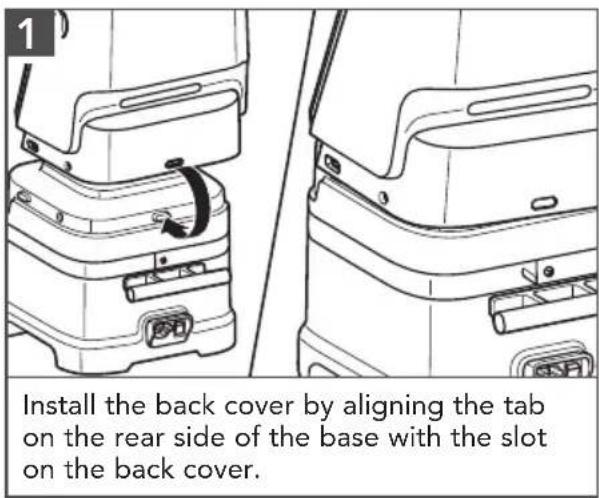
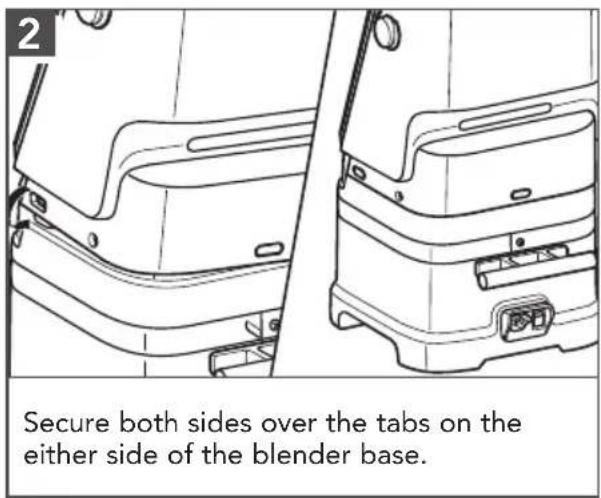
GETTING STARTED
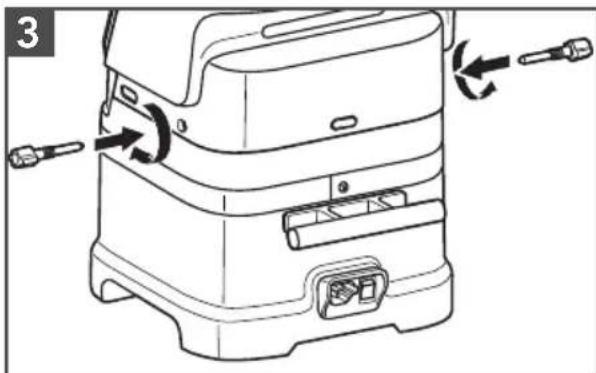
Install and secure the thumb screws on both sides by hand.
natural_image
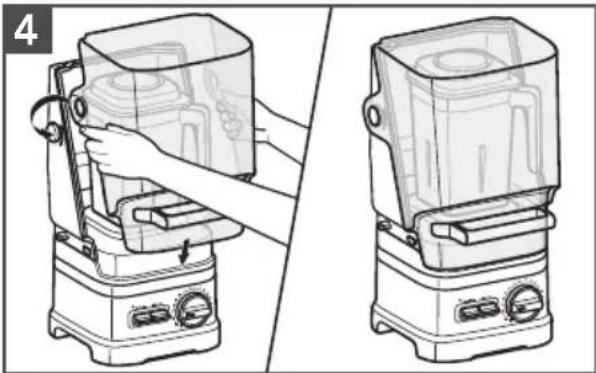
Line drawing of a kitchen appliance being handled, showing front and side views (no text or symbols)Secure the front cover to the back cover.

WARNING
Electrical Shock Hazard
Plug into a grounded 3 prong outlet.
Do not remove ground prong.
Do not use an adapter.
Do not use an extension cord.
Failure to follow these instructions can result in death, fire, or electrical shock.
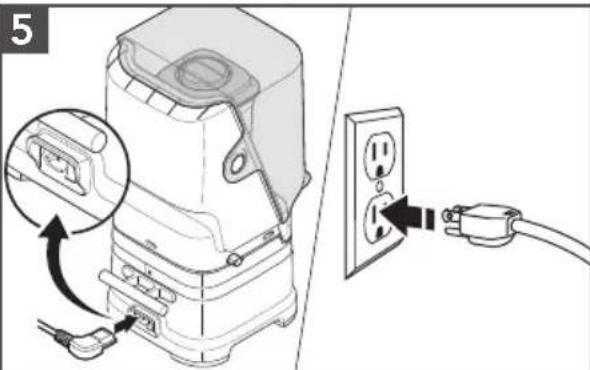
Make sure the power switch is OFF. Securely attach the removable power cord into the back of blender. Plug the Blender into a grounded 3 prong outlet.
natural_image
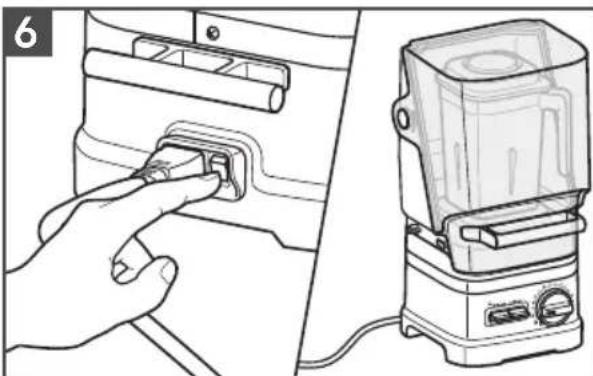
Illustration showing a hand pressing a button on a device panel, next to a portable blender (no text or symbols visible)Flip the power switch to ON (I). The status indicator light will flash, indicating that the Blender is in Standby mode and ready to operate.
IMPORTANT : When moving your Blender, always close the Front cover and support/lift from the Blender base. Base will become disengaged from jar if carried by Blender jar or Blender jar handle only. Do not lift by the cover or cover handle.
natural_image
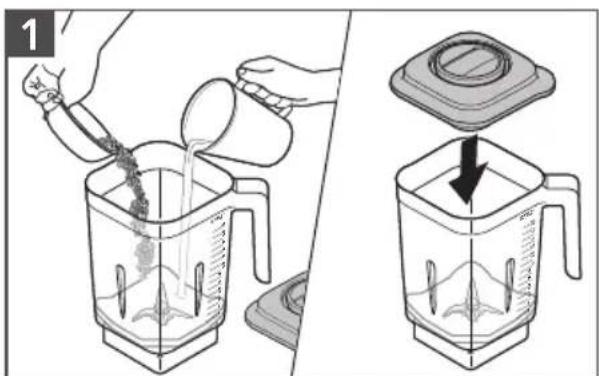
Illustration showing a cooking process: pouring liquid into a blender with a lid removed (no text or symbols)Add items (max. 60oz). Add liquids first, then soft foods, then leafy greens, and ice or frozen items last. Secure the lid.
natural_image
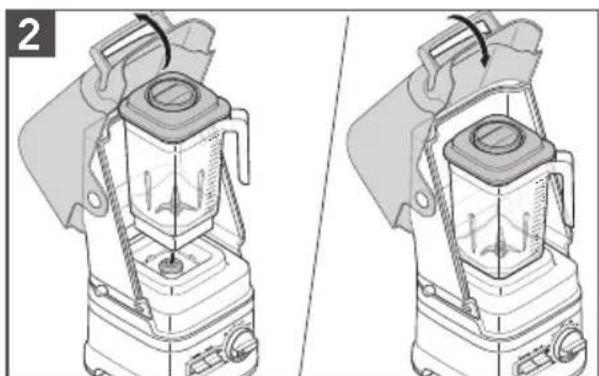
Illustration of a blender with two views showing internal components and heat distribution (no text or symbols)Open the front cover. Place the blender jar on the base, aligning with the jar pad. Close the Front cover.
natural_image
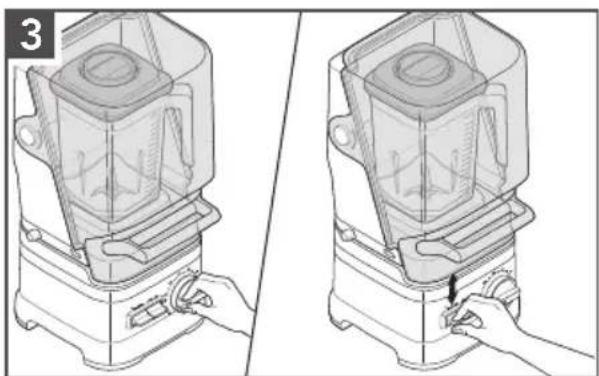
Illustration of a blender with a hand operating the lid, showing two steps (no text or symbols present)Turn the control dial to your desired speed, time, or program.
Flip the START/STOP toggle switch up or down to start. See the "Blender function guide" for more details.
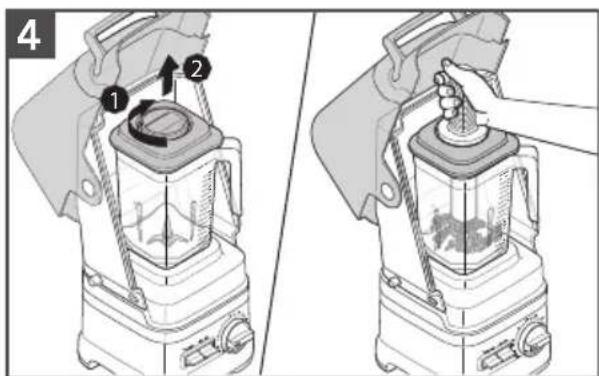
Using the Tamper (optional): Open front cover. Remove the Ingredient cap only. Stir or press contents down towards the blade. When finished, replace the Ingredient cap before resuming blending.
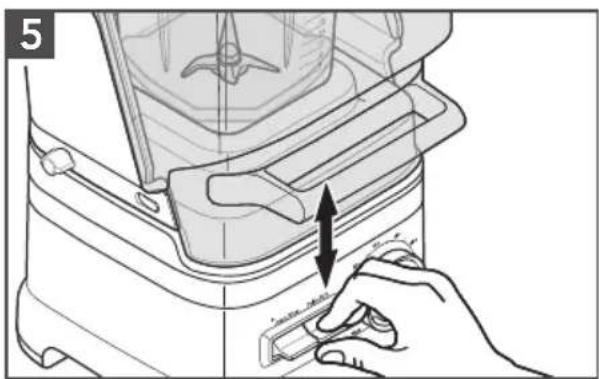
Using the Pulse mode (optional): Press and hold the PULSE toggle switch up for a faster pulse, or down for a slower pulse.
NOTE: The Pulse function may also be used on its own as a separate blending function while the Blender is in Standby mode.
natural_image
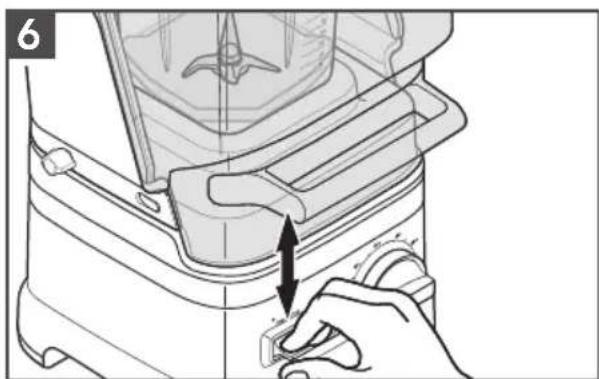
Line drawing of a blender with a hand pressing a button (no text or symbols)When finished, flip the START/STOP toggle switch up or down to stop.
Allow the Blender to completely stop before removing the lid or pouring out the blended ingredients.
NOTE: Icy Drink cycle and variable timer cycles will stop automatically at the completion of the cycle.
CARE AND CLEANING
NOTE: Do not immerse the Blender base or cord in water. Do not use abrasive cleansers or scouring pads to avoid scratching.
natural_image
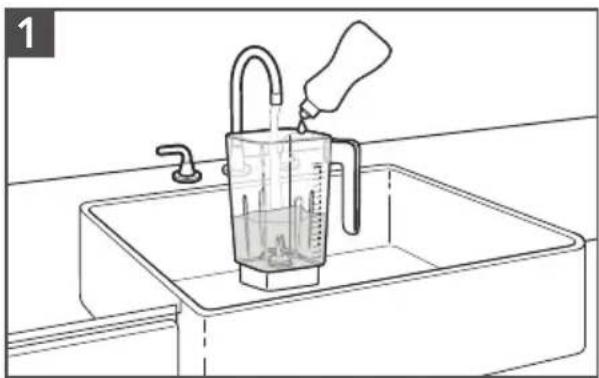
Line drawing of a kitchen sink with a beaker filled with liquid and a hand pouring liquid from a bottle (no text or symbols)Fill half of the jar with warm water and add 1 or 2 drops of dish-washing liquid. Secure the Lid and Ingredient Cap. Place the jar on the base. Close the front cover.
natural_image
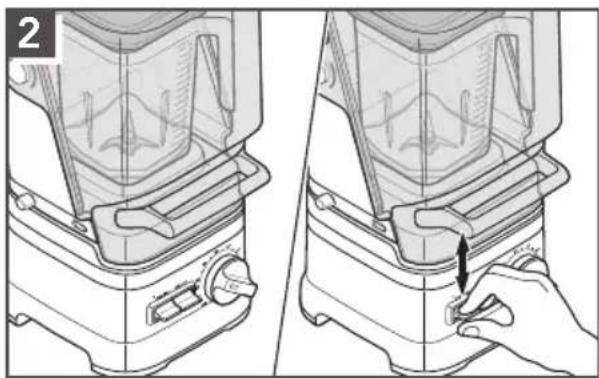
Illustration of a blender being placed on top, showing the blade and handle (no text or symbols)Rotate the control dial to 50 seconds. Flip the START/STOP toggle switch up or down. When the timer finishes, remove and empty contents and rinse with warm water and dry thoroughly.
natural_image
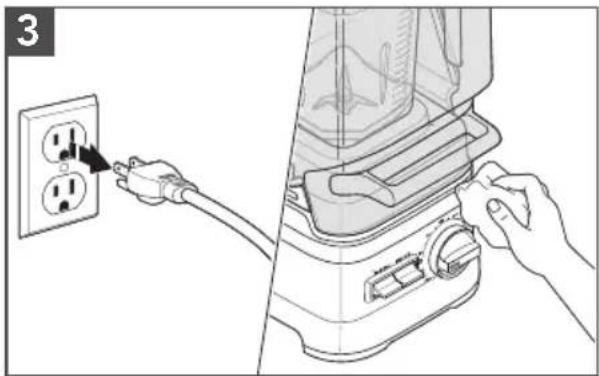
Illustration of a hand inserting power into an electrical outlet, showing the plug and switch mechanism (no text or symbols)Unplug before cleaning. Wipe the base and the cord with a warm, damp cloth and dry with a soft cloth.
natural_image
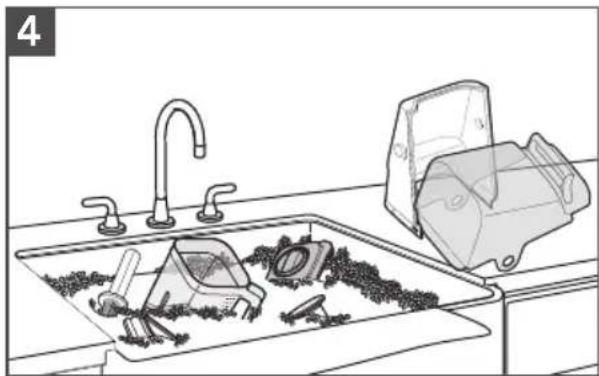
Line drawing of a kitchen sink with tools and a washing machine (no text or symbols)Wash the blender jar, jar pad, lid, front cover, back cover, handle, and ingredient cap by hand with a damp cloth and warm soapy water; rinse with warm water, and dry with a soft cloth.
NOTE: Handle must be removed from the front cover prior to cleaning by removing the two screws inside the front cover.
SANITIZING THE BLENDER JAR
- Remove all contents from the blender jar.
- Fill 34 of the jar with a sanitizing solution mix of 1.5 tsp. (7.4 mL) institutional or household bleach in 60 oz (1.75 L) water. Place the lid, and securely place the blender jar onto the blender base.
- Run the blender on the High Speed setting for 35 seconds.
- Turn off to let the sanitizing mix sit in the blender jar for an additional 2 minutes.
- Pour out the solution. Do not rinse the blender jar.
- Place the lid on the blender jar. Make sure the empty blender jar is fully in place on the blender base. Run the empty Blender for an additional 10 seconds. Do not rinse the jar after sanitizing.
- Allow the blender jar to air dry.

WARNING
Electrical Shock Hazard
Plug into a grounded 3 prong outlet.
Do not remove ground prong.
Do not use an adapter.
Do not use an extension cord.
Failure to follow these instructions can result in death, fire, or electrical shock.
| Problem Solution | |
| Status indicator light is off while unit is plugged in and On/Off switch is in On position: | After 10 minutes of no activity, the blender will go into Sleep mode. Flip START/STOP toggle switch up or down to bring the blender back into Standby mode. |
| Status indicator light is flashing orange color: | Indicates error mode. This can be caused by: using a spatula or any other utensil that could obstruct the blade to freely spin, or having an ice cube or hard food in a location that locks up the blade.Unplug the blender and remove the jar from the base, and clear the items. Place the jar back on the base, and then turn on the blender to continue regular use. |
| Blender stops after continuously running for 6 minutes: | This is normal operation for variable speed functions.Refer to “Blender function guide” for details. |
| Blender stops while blending: | If blender stops prior to the completion of the selected function, contact an authorized service center for assistance. |
| If the ingredients of a recipe aren’t blending: | An air pocket can be created around the blade causing the ingredients to miss the blade. Use the tamper to push ingredients down into the blade. Refer to “Using the commercial blender” section. For certain recipes, adding more liquid may also assist in incorporating the ingredients. |
| Blender jar overflows: | Unplug and remove the jar pad from the housing to make sure the base is fully dry. The control dial can be detached by pulling it off with force. Wipe dry, and then replace it back. |
| Troubleshooting does not solve the problem: | See the “Warranty and service” section. Contact an Authorized Service Center for assistance.Do not return the Blender to the retailer – retailers do not provide service. |
WARRANTY AND SERVICE
KITCHENAID® COMMERCIAL BLENDER WARRANTY FOR THE 50 UNITED STATES, THE DISTRICT OF COLUMBIA, AND CANADA
This warranty extends to the purchaser and any succeeding owner for Commercial Blenders operated in the 50 United States, the District of Columbia, and Canada.
| Length of Warranty: Two Year Full Warranty for Blender Base, Front cover, and Back cover and One Year Full Warranty for Blender Jar from date of purchase. | |
KitchenAid Will Pay for Your Choice of: | Hassle-Free Replacement of your Commercial Blender.See the next page for details on how to arrange for service, or call the Customer eXperience Center toll-free at 1-855-845-9684.ORThe replacement parts and repair labor costs to correct defects in materials and workmanship. Service must be provided by an Authorized KitchenAid Service Center.See the KitchenAid® Commercial Blender Warranty for Puerto Rico for details on how to arrange for service. |
| KitchenAid Will Not Pay for: | A. Damage resulting from accident, alteration, misuse or abuse.B. Replacement parts or repair labor costs for Blender operated outside the 50 United States and District of Columbia.C. Replacement of the jar or base unit due to cosmetic issues. |
| DISCLAIMER OF IMPLIED WARRANTIES; LIMITATION OF REMEDIESIMPLIED WARRANTIES, INCLUDING TO THE EXTENT APPLICABLE WARRANTIES OF MERCHANTABILITY OR FITNESS FOR A PARTICULAR PURPOSE, ARE EXCLUDED TO THE EXTENT LEGALLY PERMISSIBLE. ANY IMPLIED WARRANTIES THAT MAY BE IMPOSED BY LAW ARE LIMITED TO ONE YEAR, OR THE SHORTEST PERIOD ALLOWED BY LAW. SOME STATES AND PROVINCES DO NOT ALLOW LIMITATIONS OR EXCLUSIONS ON HOW LONG AN IMPLIED WARRANTY OF MERCHANTABILITY OR FITNESS LASTS, SO THE ABOVE LIMITATIONS OR EXCLUSIONS MAY NOT APPLY TO YOU.IF THIS PRODUCT FAILS TO WORK AS WARRANTED, CUSTOMER'S SOLE AND EXCLUSIVE REMEDY SHALL BE REPAIR OR REPLACEMENT ACCORDING TO THE TERMS OF THIS LIMITED WARRANTY. KITCHENAID AND KITCHENAID CANADA DO NOT ASSUME ANY RESPONSIBILITY FOR INCIDENTAL OR CONSEQUENTIAL DAMAGES. This warranty gives you specific legal rights and you may also have other rights which vary from state to state or province to province. | |
WARRANTY AND SERVICE
KITCHENAID® COMMERCIAL BLENDER BASE WARRANTY FOR PUERTO RICO
A limited two year warranty extends to the purchaser and any succeeding owner for Commercial Blender Bases operated in Puerto Rico. During the warranty period, all service must be handled by an Authorized KitchenAid Service Center. Please bring the Commercial Blender Base, or ship it prepaid and insured, to the nearest Authorized Service Center. Call toll-free 1-855-845-9684 to learn the location of a Service Center near you. Your repaired Commercial Blender Base will be returned to you prepaid and insured.
HASSLE-FREE REPLACEMENT WARRANTY — 50 UNITED STATES AND DISTRICT OF COLUMBIA
We're so confident the quality of our products meets the exacting standards of KitchenAid that, if your Commercial Blender Base should fail within the first two years of ownership, KitchenAid will arrange to deliver an identical or comparable replacement to your door free of charge and arrange to have your original Commercial Blender Base returned to us. Your replacement unit will also be covered by our two year limited warranty. Please follow these instructions to receive this quality service. If your Commercial Blender Base should fail within the first two years of ownership, simply call our toll-free Customer eXperience Center at 1-855-845-9684 Monday through Friday, 8 a.m. to 8 p.m. (Eastern Time). Give the consultant your complete shipping address. (No P.O. Box numbers, please.)
When you receive your replacement Commercial Blender Base, use the carton and packing materials to pack up your original Commercial Blender Base.
HASSLE-FREE REPLACEMENT WARRANTY — CANADA
We're so confident the quality of our products meets the exacting standards of the KitchenAid brand that, if your Commercial Blender Base should fail within the first two years of ownership, KitchenAid Canada will replace your Commercial Blender Base with an identical or comparable replacement. Your replacement unit will also be covered by our two year limited warranty. Please follow these instructions to receive this quality service.
If your Commercial Blender Base should fail within the first two years of ownership, take the Commercial Blender Base or ship collect to an Authorized KitchenAid Service Centre. In the carton include your name and complete shipping address along with a copy of the proof of purchase (register receipt, credit card slip, etc.). Your replacement Commercial Blender Base will be returned prepaid and insured. If you are unable to obtain satisfactory service in this manner call our toll-free Customer eXperience Centre at 1-800-807-6777.
Or write to us at: Customer eXperience Centre KitchenAid Canada 200 - 6750 Century Ave. Mississauga, ON L5N 0B7
WARRANTY AND SERVICE
KITCHENAID® COMMERCIAL BLENDER JAR WARRANTY FOR PUERTO RICO
A limited one year warranty extends to the purchaser and any succeeding owner for Commercial Blender Jars operated in Puerto Rico. During the warranty period, all service must be handled by an Authorized KitchenAid Service Center. Please bring the Commercial Blender
Jar, or ship it prepaid and insured, to the nearest Authorized Service Center. Call toll-free 1-855-845-9684 to learn the location of a Service Center near you. Your repaired Commercial Blender Jar will be returned to you prepaid and insured.
HASSLE-FREE REPLACEMENT WARRANTY — 50 UNITED STATES AND DISTRICT OF COLUMBIA
We're so confident the quality of our products meets the exacting standards of KitchenAid that, if your Commercial Blender Jar should fail within the first one year of ownership, KitchenAid will arrange to deliver an identical or comparable replacement to your door free of charge and arrange to have your original Commercial Blender Jar returned to us. Your replacement unit will also be covered by our one year limited warranty. Please follow these instructions to receive this quality service.
If your Commercial Blender Jar should fail within the first one year of ownership, simply call our toll-free Customer eXperience Center at 1-855-845-9684 Monday through Friday, 8 a.m. to 8 p.m. (Eastern Time). Give the consultant your complete shipping address. (No P.O. Box numbers, please.)
When you receive your replacement Commercial Blender Jar, use the carton and packing materials to pack up your original Commercial Blender Jar.
HASSLE-FREE REPLACEMENT WARRANTY - CANADA
We're so confident the quality of our products meets the exacting standards of the KitchenAid brand that, if your Commercial Blender Jar should fail within the first one year of ownership, KitchenAid Canada will replace your Commercial Blender Jar with an identical or comparable replacement. Your replacement unit will also be covered by our one year limited warranty. Please follow these instructions to receive this quality service.
If your Commercial Blender Jar should fail within the first one year of ownership, take the Commercial Blender Jar or ship
collect to an Authorized KitchenAid Service Centre. In the carton include your name and complete shipping address along with a copy of the proof of purchase (register receipt, credit card slip, etc.). Your replacement Commercial Blender Jar will be returned prepaid and insured. If you are unable to obtain satisfactory service in this manner call our toll-free Customer eXperience Centre at 1-800-807-6777.
Or write to us at: Customer eXperience Centre KitchenAid Canada 200 - 6750 Century Ave. Mississauga, ON L5N 0B7
WARRANTY AND SERVICE
ARRANGING FOR SERVICE AFTER THE WARRANTY EXPIRES, OR ORDERING ACCESSORIES AND REPLACEMENT PARTS
In the United States and Puerto Rico:
For service information, or to order accessories or replacement parts, call toll-free at 1-855-845-9684 or write to: Customer eXperience Center, KitchenAid Small Appliances, P.O. Box 218, St. Joseph, MI 49085-0218
Outside the United States and Puerto Rico:
Consult your local KitchenAid dealer or the store where you purchased the Commercial Blender for information on how to obtain service.
For service information in Canada:
Call toll-free 1-800-807-6777.
Or write to:
Customer eXperience Centre
KitchenAid Canada
200 - 6750 Century Ave.
Mississauga, ON L5N 0B7
PIÈCES ET CARACTÉRISTIQUES
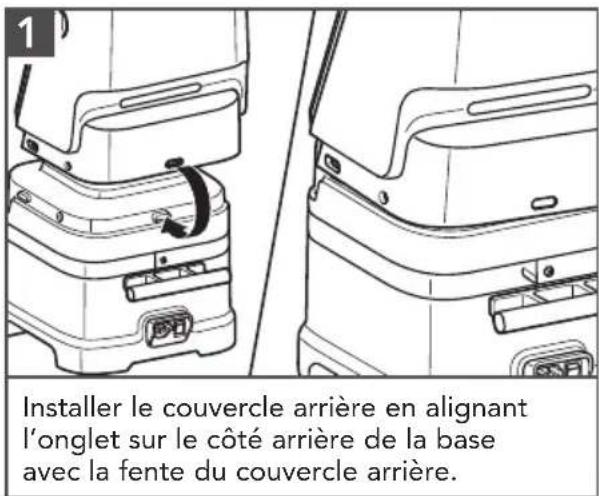
ASSEMBLAGE DU PRODUIT
natural_image
Line drawing of a mechanical device with screw fasteners and adjustment arrows (no text or symbols)natural_image
Line drawing of a portable kitchen appliance being handled, showing front and side views (no text or symbols)natural_image
Illustration of a hand pressing a button on a device panel, next to a portable electronic device (no text or symbols visible)natural_image
Illustration of a blender being poured into a container, showing the process with a lid and arrow (no text or symbols)natural_image
Technical illustration of a blender with two views showing internal components (no text or symbols)natural_image
Illustration of a blender with hands operating the lid and base, showing two views (no text or symbols present)natural_image
Diagram of a blender with a hand pressing a button, showing mechanical components and a directional arrow (no text or symbols)natural_image
Line drawing of a laboratory setup with a beaker and syringe, no text or symbols presentnatural_image
Illustration of a blender being opened with a hand, showing the blade and handle (no text or symbols present)natural_image
Illustration of a blender with two outlets and a hand inserting a plug into the power socket (no text or symbols)natural_image
Line drawing of a kitchen sink with laundry and tools, no text or symbols presentCustomer eXperience Center, KitchenAid Small Appliances, P.O. Box 218, St. Joseph, MI 49085-0218
Customer eXperience Centre
KitchenAid Canada
200 - 6750 Century Ave.
Mississauga, ON L5N 0B7
PIEZAS Y CARACTERÍSTICAS
natural_image
Illustration of a kitchen appliance being handled, showing front and side views (no text or symbols)natural_image
Black and white illustration of a hand with a lightning bolt symbol (no text or labels)ADVERTENCIA
natural_image
Illustration of a hand inserting a plug into a device, showing the next step (no text or symbols present)natural_image
Illustration of a cooking process showing pouring liquid into a blender with a lid and arrow indicating the step (no text or symbols)natural_image
Illustration of a portable blender with two views showing internal components and mounting brackets (no text or symbols)natural_image
Illustration of a portable blender with hands operating the lid and base (no text or symbols)natural_image
Line drawing of a kitchen sink with a beaker filled with liquid and a hand pouring liquid from a bottle (no text or symbols)natural_image
Illustration of a blender being inserted into a slot, showing the blade and handle (no text or symbols)natural_image
Illustration of a hand inserting a power outlet into a blender with a handle (no text or symbols)natural_image
Line drawing of a kitchen sink with tools and a washing machine (no text or symbols)Customer eXperience Center, KitchenAid Small Appliances, P.O. Box 218, St. Joseph, MI 49085-0218
Customer eXperience Centre
KitchenAid Canada
200 - 6750 Century Ave.
Mississauga, ON L5N 0B7
DISCOVER MORE. DÉCOUVREZ PLUS. DESCUBRA MÁS. KITCHENAID.COM/QUICKSTART

natural_image
White silhouette of a telephone handset on black background (no text or symbols)PRODUCT QUESTIONS OR RETURNS
QUESTIONS SUR LE PRODUIT OU LES RETOURS
MEXICO: KitchenAid.com.mx
LATIN AMERICA: KitchenAid-Latam.com

natural_image
Silhouette of a kitchen mixer with a bowl (no text or symbols)KitchenAid®
COMMERCIAL
®/™ ©2019 KitchenAid. All rights reserved. KITCHENAID and the design of the stand mixer are trademarks in the U.S. and elsewhere. Used under license in Canada.

- PARTS AND FEATURES
- Your safety and the safety of others are very important.
- ! DANGER
- WARNING
- IMPORTANT SAFEGUARDS
- When using electrical appliances, basic safety precautions should always be followed, including the following:
- COMMERCIAL BLENDER SAFETY
- SAVE THESE INSTRUCTIONS
- MOTOR HORSEPOWER
- GETTING STARTED
- BLENDER FUNCTION GUIDE
- PRODUCT ASSEMBLY
- Electrical Shock Hazard
- CARE AND CLEANING
- SANITIZING THE BLENDER JAR
- WARRANTY AND SERVICE
- HASSLE-FREE REPLACEMENT WARRANTY — 50 UNITED STATES AND DISTRICT OF COLUMBIA
- HASSLE-FREE REPLACEMENT WARRANTY — CANADA
- HASSLE-FREE REPLACEMENT WARRANTY - CANADA
- In the United States and Puerto Rico:
- Outside the United States and Puerto Rico:
- For service information in Canada:
- PIÈCES ET CARACTÉRISTIQUES
- ASSEMBLAGE DU PRODUIT
- PIEZAS Y CARACTERÍSTICAS
- ADVERTENCIA
- DISCOVER MORE. DÉCOUVREZ PLUS. DESCUBRA MÁS. KITCHENAID.COM/QUICKSTART
- KitchenAid®
Brand : KITCHENAID
Model : KSBC1B2
Category : Blender