B-Lively - Stroller BRITAX - Free user manual and instructions
Find the device manual for free B-Lively BRITAX in PDF.


| Product Type | Stroller |
| Brand | Britax |
| Model | B-Lively |
| Maximum child weight | 25 kg (55 lb) |
| Maximum child height | 111.8 cm (44 in) |
| Stroller weight (approximate) | 8 kg |
| Number of wheels | 4 (1 swivel front, 2 fixed rear) |
| Parking brake | Yes, on rear wheels |
| Safety harness | 5-point adjustable height |
| Sun canopy | With pocket and ventilation flap |
| Storage basket | Under seat, capacity 4.5 kg (10 lb) |
| Footrest | Liftable for basket access |
| Car seat compatibility | Yes, with Click & Go receivers (Britax car seats) or adapter for other brands |
| Fold | Compact with chassis lock |
| Swivel front wheel | With lock |
| Care and cleaning | Hand wash, cold water and mild soap; do not machine wash |
| Warranty | 2-year limited |
| Recommended age | From birth (with car seat) up to approximately 3 years |
Frequently Asked Questions - B-Lively BRITAX
User questions about B-Lively BRITAX
0 question about this device. Answer the ones you know or ask your own.
Ask a new question about this device
Download the instructions for your Stroller in PDF format for free! Find your manual B-Lively - BRITAX and take your electronic device back in hand. On this page are published all the documents necessary for the use of your device. B-Lively by BRITAX.
USER MANUAL B-Lively BRITAX
natural_image
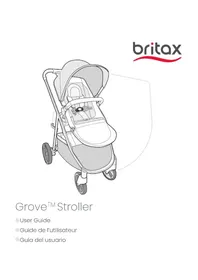
Illustration of a baby stroller with a canopy and wheels, no text or symbols presentUser Guide
Safety Information......2
Features......4
In The Box ....5
Assembly....6
Stroller Frame....6
Front Wheel....6
Rear Wheels....7
Canopy....8
Operation....9
Using the Stroller 9
Adjusting the Seat....10
Using the Parking Brake 11
Using the Front Wheel Swivel Lock 11
Using the Front Basket Access....11
Canopy Vent 12
Using the Harness 12
Securing Your Child....14
Infant Car Seat Mode 15
Using the Infant Car Seat Receivers....15
Using a Britax Infant Car Seat 17
Care and Maintenance....18
Warranty 19
B-LIVELY®, BRITAX®, and CLICK & GO™ are trademarks owned by Britax Child Safety, Inc. All rights reserved. ©2021 Britax Child Safety, Inc. This product and its components are subject to change without notice. P06319300_B:02.21
Safety Information
WARNING!
Failure to follow all warnings and instructions could result in SERIOUS INJURY or DEATH.
Read these instructions carefully before using this product. To ensure proper use, store this user guide in a convenient place so it can be consulted often.
- Never leave child unattended.
- Do not use stroller with a child taller than 44 inches (111.8 cm).
- Do not use stroller with a child who weighs more than 55 lbs (25 kg). Exceeding this limit may cause stroller to become unstable.
- Avoid serious injury from falling or sliding out. Always use harness to secure child.
- Avoid finger entrapment or injury. Always ensure any child occupants or bystanders are away from the stroller while folding or unfolding.
- Stroller appropriate from birth, however, Britax recommends use only with an infant car seat until child has head and neck control.
- Do not overload under-seat storage basket – Maximum weight in basket is 10 lbs (4.5 kg). Overloading the basket may cause the stroller to become unstable and tip over.
- Do not overload the canopy pockets - Maximum weight in canopy pockets is 1 lb (0.45 kg). Overloading the canopy pockets may cause the stroller to become unstable and tip over.
-
Do not attach parcels, bags, or other items to the handlebar or frame of stroller except those recommended by Britax, as stroller can become unstable and tip over.
-
Always make certain that the stroller is fully open and locked before use.
- Assembly of this stroller must be performed only by an adult.
- Only use Britax approved child restraints, car seats, accessories and replacement parts with this stroller.
- Do not allow children to climb on or play with the stroller.
- Do not use the stroller on stairs, escalators, moving vehicles, or steep inclines. Stroller can tip over.
- Stroller is intended for walking speed only. Do not use while jogging, skating, or any activity other than walking.
- Always set the parking brake when stroller is not moving. Never load or unload the stroller without the parking brake set.
- Do not park on inclines. The parking brake is intended to park the stroller on flat surfaces only. Parking on inclines may result in tip over or runaway stroller.
- Do not exceed the manufacturer's maximum weight limit when using an infant car seat with this product. See infant car seat user guide for maximum occupant weight and other instructions.
- All infant car seats MUST be installed rear facing.
- Do not modify the stroller or any labels. Doing so voids the warranty and could lead to a dangerous condition.
- Failure to regularly inspect this product and its components to make sure they are in good condition and good working order can result in injury. Discontinue use of stroller if damaged or any parts are missing.
Features
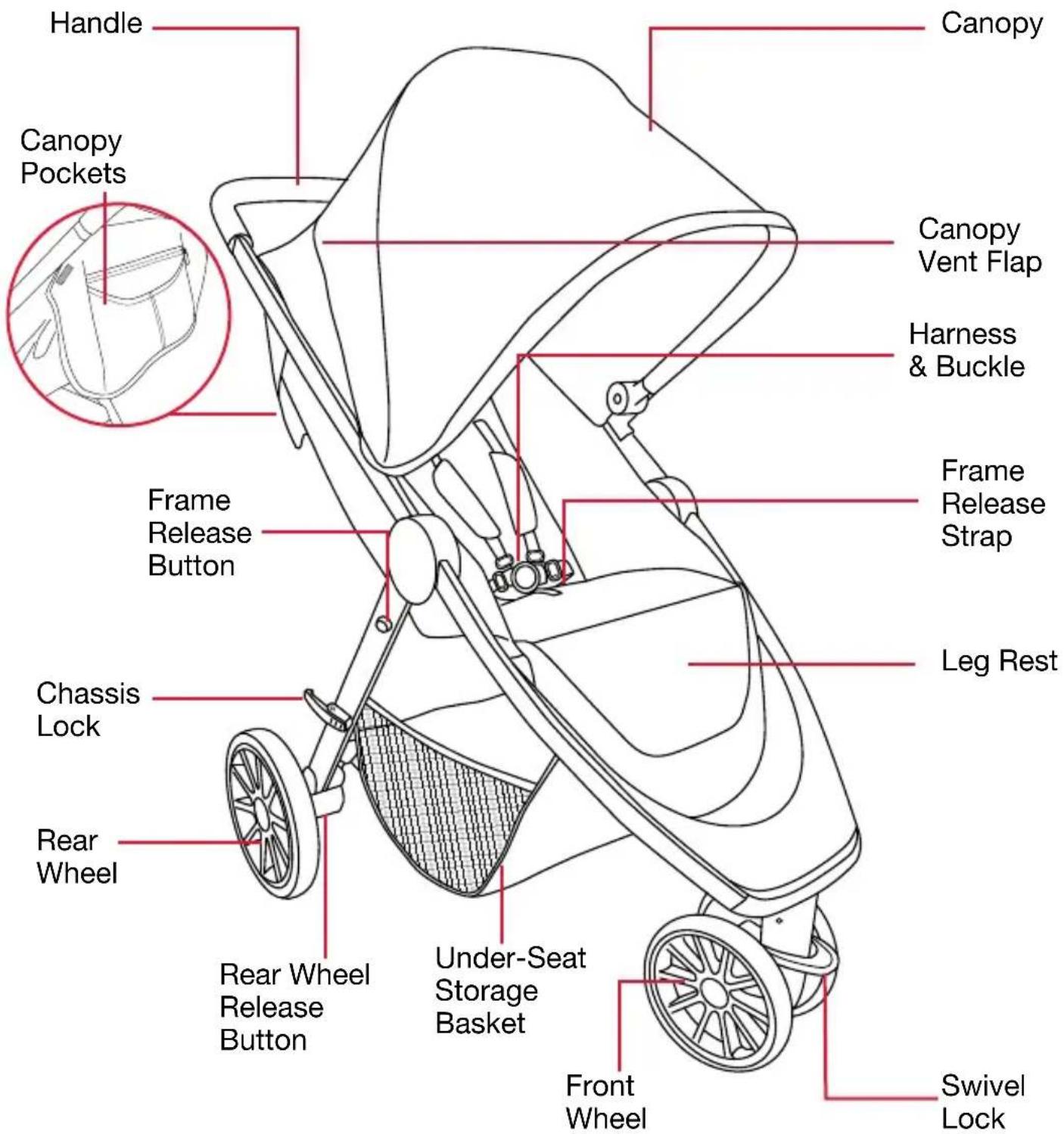
Actual product may vary from images.
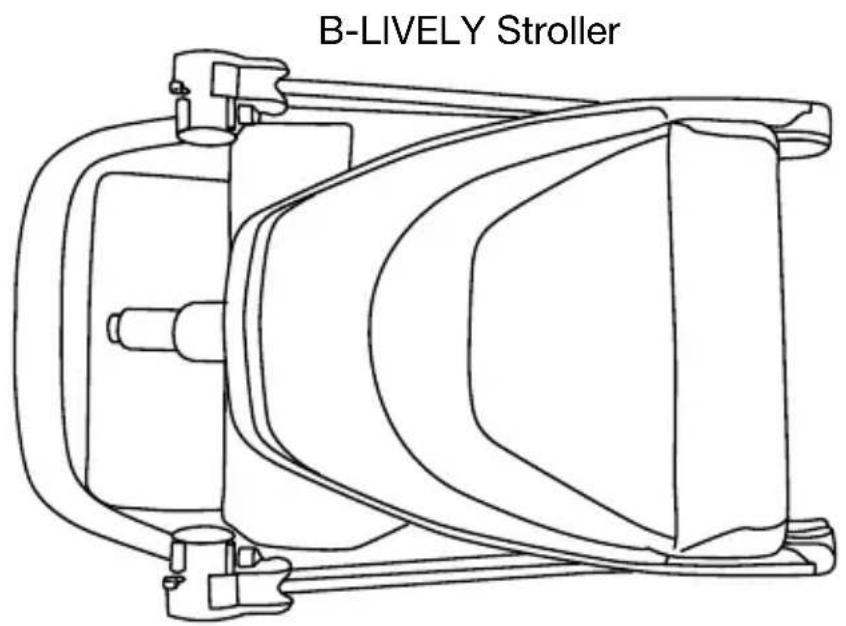
In The Box
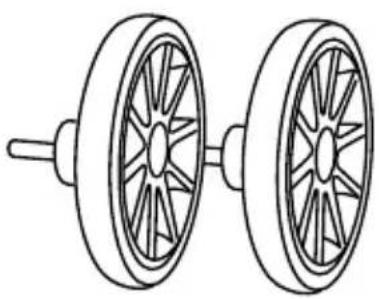
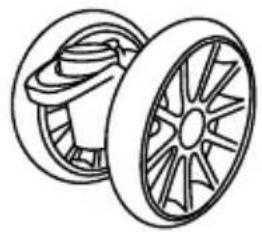
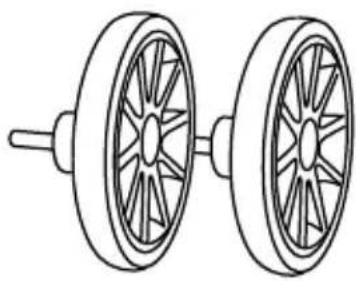
Rear Wheels
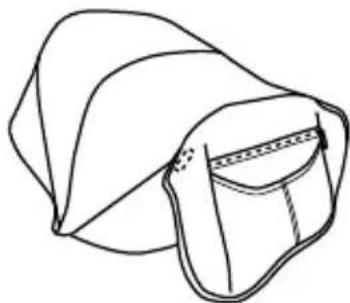
Canopy with Pockets
natural_image
Line drawing of two wheels with spokes, no text or symbols present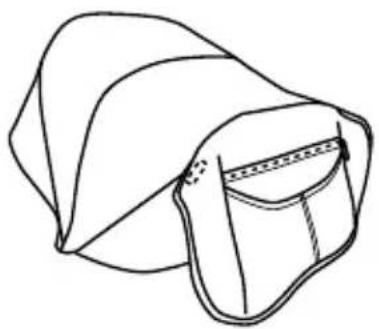
natural_image
Line drawing of a folded garment with a zipper and collar (no text or symbols)Infant Car Seat Click & Go ReceiversFront Whee
natural_image
Line drawing of two wheel rim components with spokes (no text or symbols)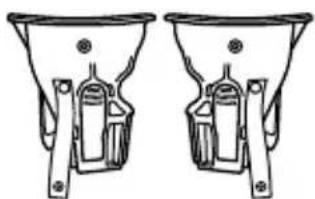
natural_image
Technical line drawing of two identical funnel-shaped components with internal brackets (no text or symbols)Actual product may vary from images.
Assembly
Stroller Frame
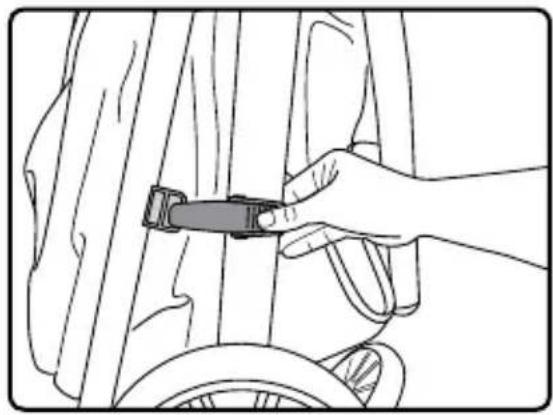
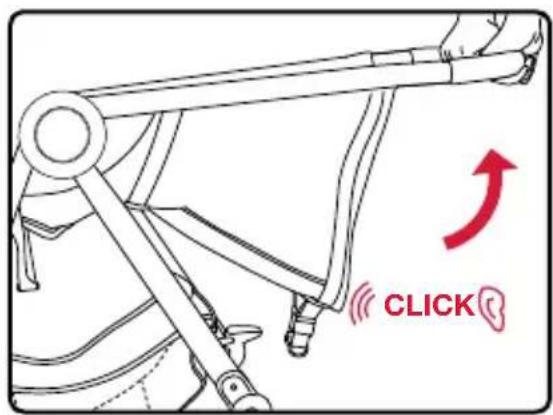
- Push the release on the chassis lock and open the frame.
natural_image
Line drawing of a hand adjusting a bicycle seatbelt on a wheel (no text or symbols)- Lift handle until frame locks into upright position.
NOTE: After stroller is upright, push down on handle to make sure frame is locked in open position.
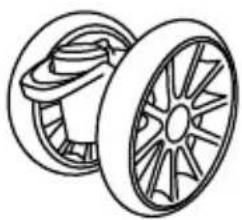
Front Wheel
Installing the Front Wheel
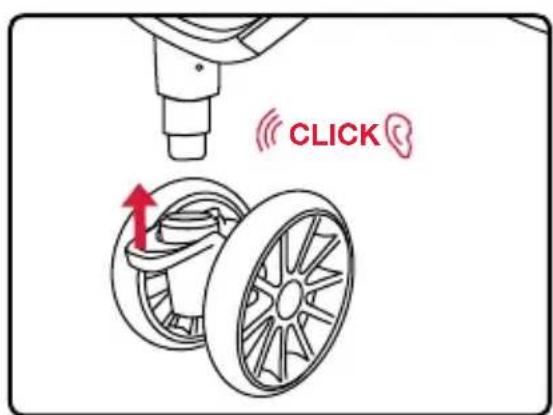
- Slide the front wheel assembly onto the mounting post at the front of the stroller.
IMPORTANT: Ensure the swivel lock is at the top of the assembly when installing.
- Pull wheel to ensure that it is secure.
Removing the Front Wheel
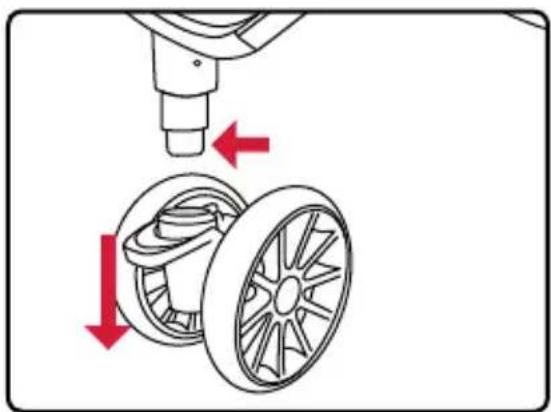
- Press the release buttons at the bottom of the mounting post and pull the wheel away from the stroller.
natural_image
Diagram showing a car wheel assembly with red arrows indicating motion direction (no text or symbols)Rear Wheels
Installing the Real Wheels
-
Slide the rear wheel axle into the rear wheel hub mounting bracket until it locks into place.
-
Pull wheel to ensure that it is secure.

natural_image
Diagram showing a bicycle's wheel and suspension mechanism with a red arrow indicating motion (no text or symbols)Removing the Rear Wheels
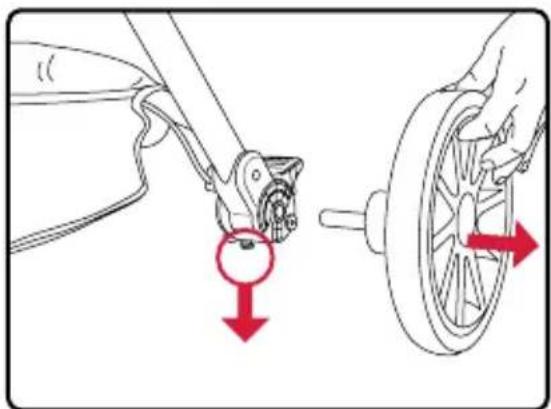
- Pull and hold the release lever at the bottom of the rear wheel hub while pulling the rear wheel away from the stroller.
natural_image
Diagram showing a bicycle wheel being adjusted to a bicycle's seat, with red arrows indicating the motion direction (no text or symbols present)Canopy
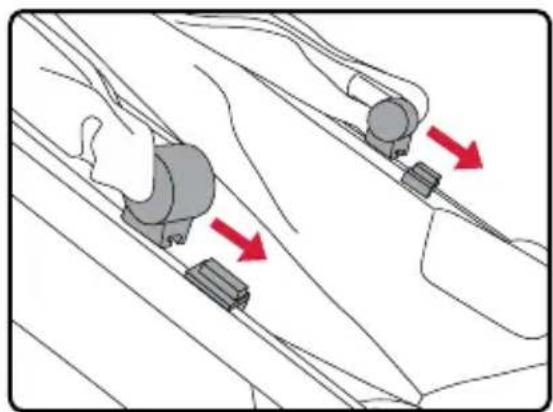
- Slide the canopy stay brackets into the stroller frame mounts until they are in place.
- Pull the inner canopy flap over the back of the stroller and secure the hook and loop fasteners to the stroller.
- Drape the outer canopy back flap over the inner canopy flap and secure the hook and loop fasteners under each side of the outer canopy flap to the stroller seat.
- Attach the hook and loop fasteners on each side of the canopy to the inside of the stroller frame.
natural_image
Diagram showing two car wheel levers with red arrows indicating motion direction (no text or symbols)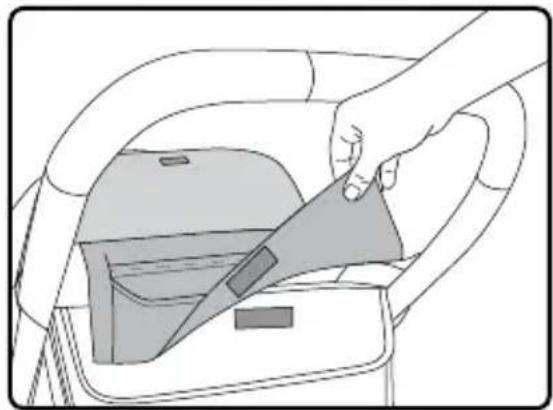
natural_image
Illustration of a hand inserting a seatbelt into a car interior (no text or symbols)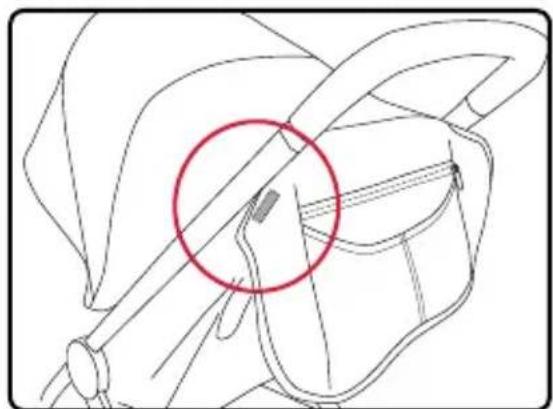
natural_image
Line drawing of a mechanical component with a red circle highlighting a specific area (no text or symbols present)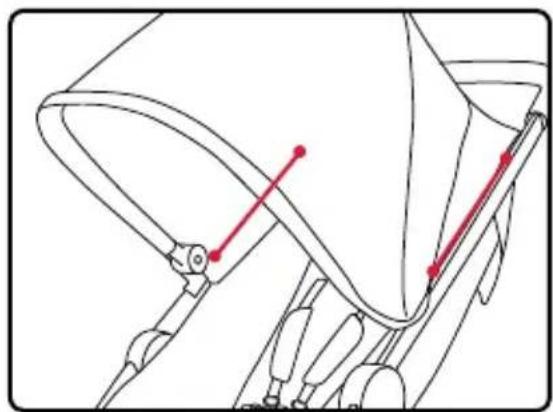
natural_image
Technical line drawing of a mechanical component with red alignment markers (no text or symbols)Operation
IMPORTANT:
- Before and during use, always make sure the child's hands and feet are away from wheels.
- Protect stroller when transporting and shipping to prevent damage to stroller and stroller components. Check closely for damage after transporting and shipping.
Using the Stroller
Folding the Stroller
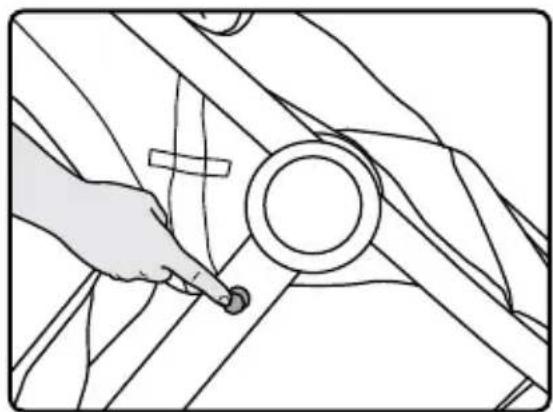
IMPORTANT: Always apply brake and remove children before folding the stroller.
- Press the frame release button.
NOTE: Do not continue to hold the frame release button once pressed.
natural_image
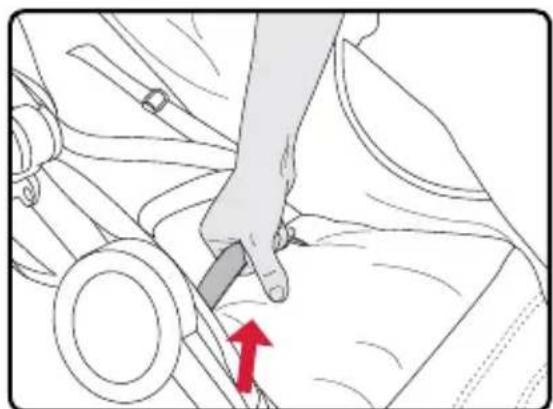
Line drawing of a hand holding a circular component against a striped background (no text or symbols)- Remove your hand from stroller frame and hinge area and lift the frame release strap in the middle of the seat until the stroller collapses and the chassis lock engages.
natural_image
Illustration of a hand pressing down on a car wheel, with a red arrow indicating the motion direction (no text or symbols present)Unfolding the Stroller
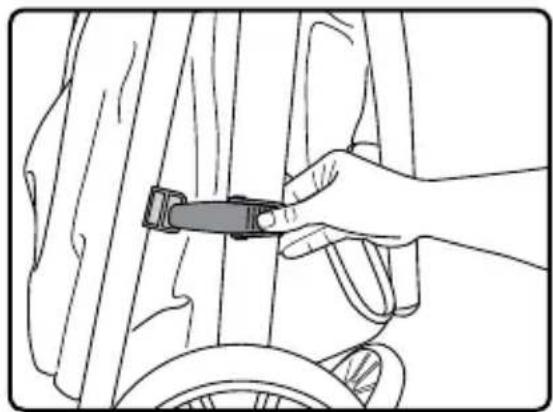
-
Push the release on the chassis lock and open the frame.
-
Lift the handle until frame locks into upright position.
NOTE: After stroller is upright, push down on handle to make sure frame is locked in open position.
natural_image
Line drawing of a hand adjusting a bicycle seatbelt on a wheel (no text or symbols)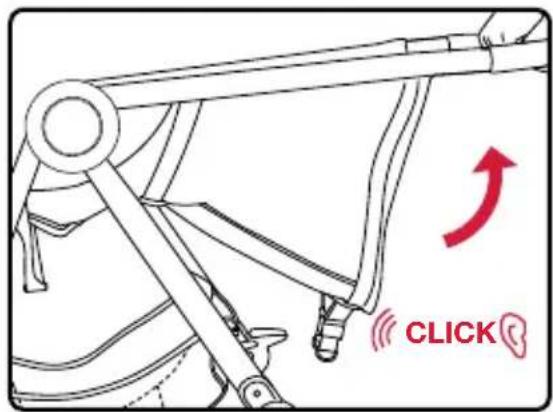
Adjusting the Seat
-
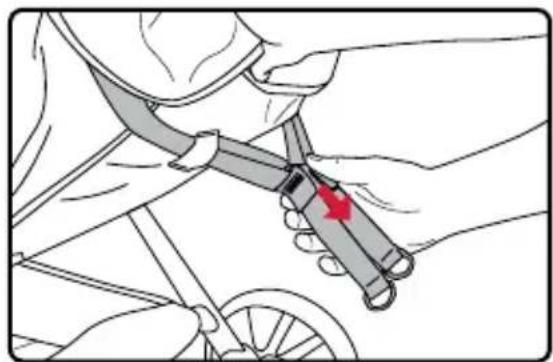
To recline, pull the recline adjuster release lever and slide it away from the seat.
-
To raise, pull both straps apart.
natural_image
Illustration of a hand holding a bicycle seatbelt with a red arrow indicating the handle (no text or symbols present)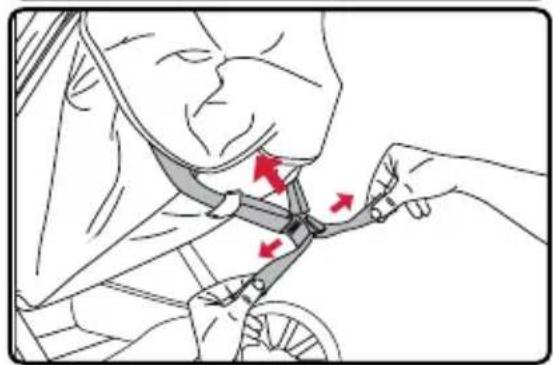
natural_image
Illustration of a person adjusting a bicycle seatbelt with red arrows indicating movement (no text or symbols present)Using the Parking Brake
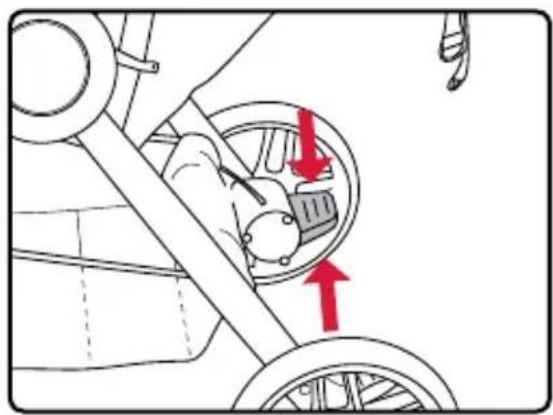
- Press the brake pedal down to lock the brake.
NOTE: Pressing the brake locks both back wheels.
- Lift the brake pedal to release the brake.
natural_image
Diagram of a car's steering wheel and dashboard with red arrows indicating direction (no text or symbols)Using the Front Wheel Swivel Lock
-
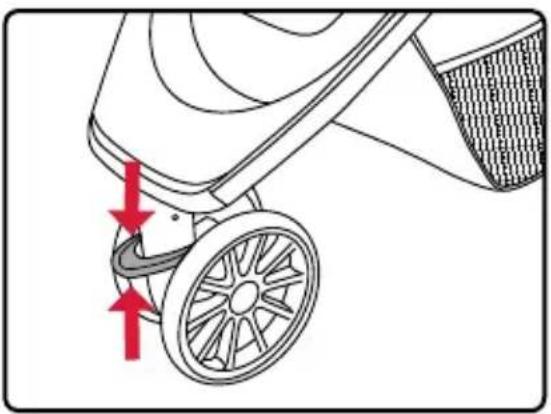
Press the swivel lock lever down to lock the front wheel.
-
Lift the swivel lock lever to allow the wheel to swivel.
natural_image
Diagram of a motor stroller with red arrows indicating motion direction (no text or symbols)Using the Front Basket Access
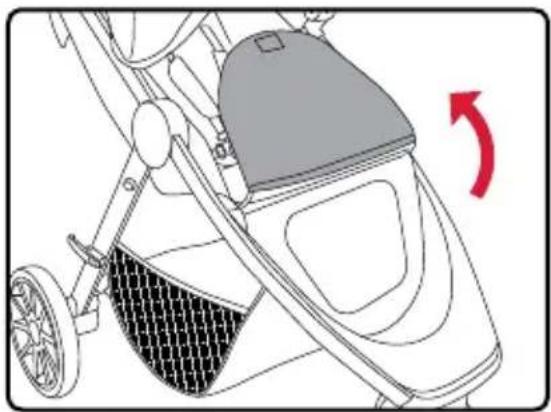
- Pull up on the leg rest to access the under-seat storage basket from the front of the stroller.
NOTE: Leg rest is not intended to be used as an adjustable leg rest.
- Secure the hook and loop fasteners to close.
natural_image
Line drawing of a stroller with a mesh seat and handle, showing no text or symbolsCanopy Vent
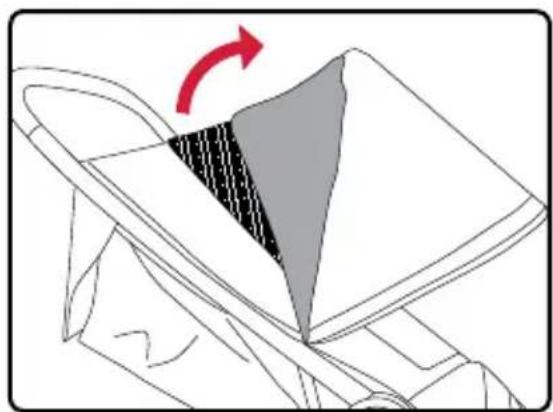
- Fold the canopy vent forward to access additional ventilation.
natural_image
Diagram showing a folded garment with a shaded triangular section and red arrow indicating rotation (no text or symbols)Using the Harness
IMPORTANT: Shoulder and waist straps separate for care and maintenance, but should always be used together to secure your child.
-
Align the tongues on the waist straps with the retainers of the shoulder straps and slide through until they lock into place.
-
Insert the tongues into the buckle assembly until a click is heard.

Adjusting the Harness
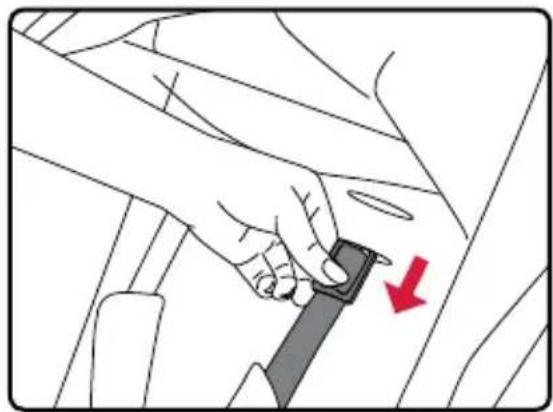
IMPORTANT: The harness can be adjusted to three different heights. Always ensure proper adjustment at or above your child's shoulders.
- Pull the harness strap retainer away from the seat back and turn 90 degrees to feed it through the harness slot.
natural_image
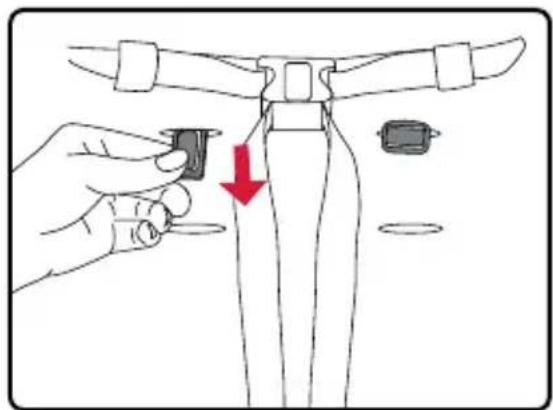
Illustration of a hand adjusting a car seatbelt with a red arrow indicating the down-left corner (no text or symbols present)- Push the harness retainer through the appropriate harness slot to the back of the seat.
natural_image
Illustration of a hand holding a small component with a red arrow indicating downward motion, next to a mechanical component (no text or symbols)- Turn the harness retainer to its original position as shown so it properly retains the harness.
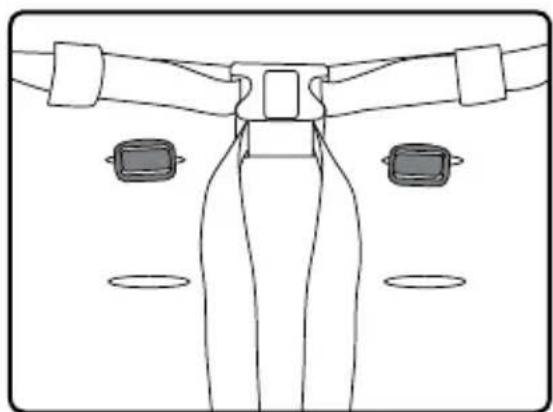
natural_image
Line drawing of a mechanical component with three circular features and connecting rods (no text or symbols)Securing Your Child
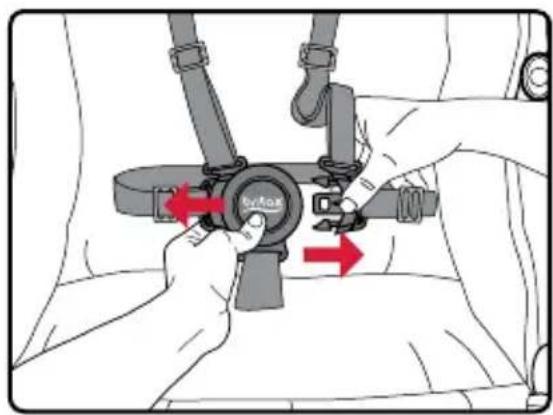
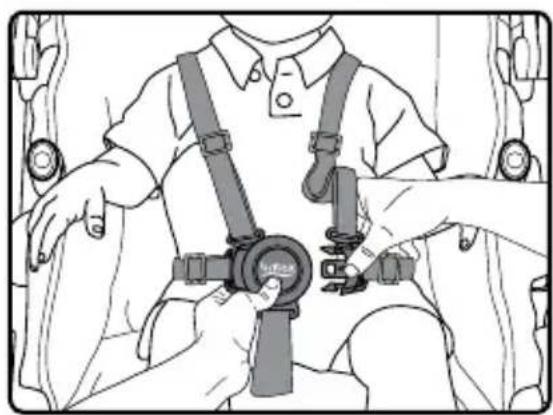
-
Release the harness by depressing the button in the center of the buckle while pulling the two tongues away from the buckle assembly.
-
Fasten the harness by inserting the tongues on the harness straps into the buckle assembly.
-
Tighten or loosen the harness straps by sliding the harness adjusters.
natural_image
Line drawing of a person wearing a seatbelt and harness, holding a car seatbelt device (no text or symbols present)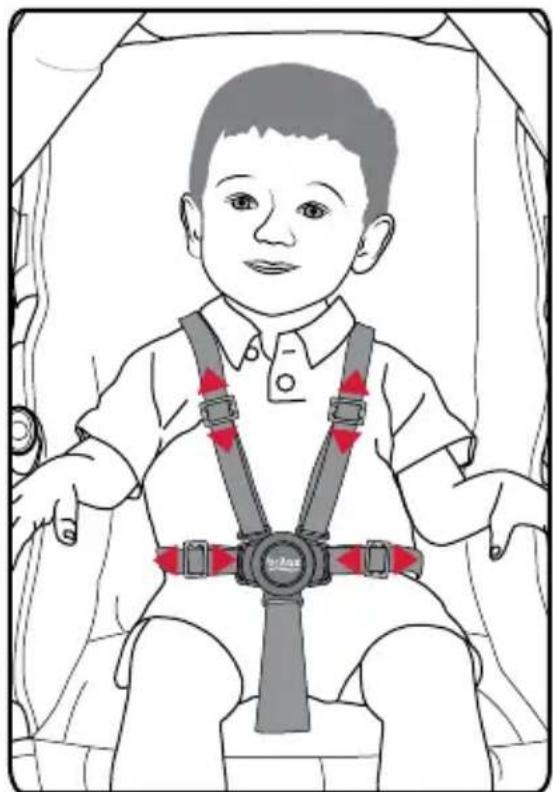
natural_image
Illustration of a child wearing a seatbelt and safety harness, seated in a vehicle (no text or symbols)Infant Car Seat Mode
WARNING!
- All infant car seats MUST be installed rear facing.
- Always remove the infant car seat receivers when not in use. Failure to do so may result in injury.
IMPORTANT: For non-Britax infant car seats, an infant car seat adapter frame must be used. This adapter frame is sold separately at select retailers and on us.britax.com.
Using the Infant Car Seat Receivers
Attaching the Infant Car Seat Receivers
NOTE: Receivers are marked left and right. Attach each from the position of the occupant.
- Set the parking brake.
-
Align the receiver with the mount on the inside frame of the stroller, then push down until a click is heard. Pull up on the receiver to ensure it is secure.
-
Attach the snap on the receiver strap to the snap on the stroller seat strap inside the stroller frame.
-
Repeat for the other side.
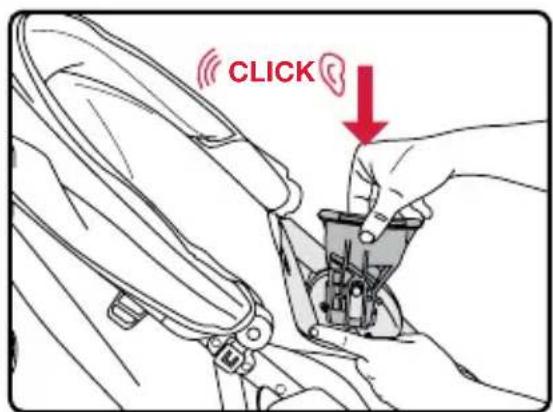
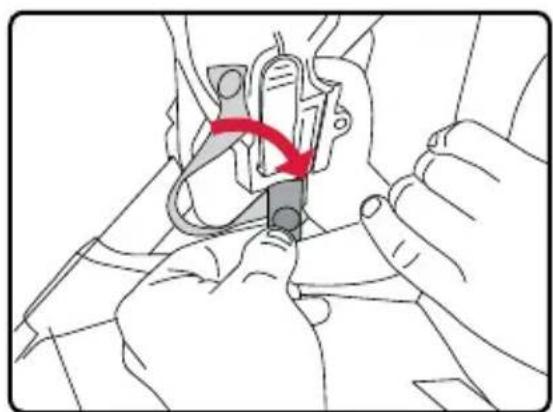
natural_image
Illustration of hands using a tool to adjust or install a mechanical component, with a red arrow indicating the motion (no text or symbols present)Removing the Infant Car Seat Receivers
- Unsnap the receiver strap from the stroller seat snap.
NOTE: Ensure seat strap stays attached to stroller frame.
-
Press the button on the receiver and lift upward.
-
Repeat for the other side.
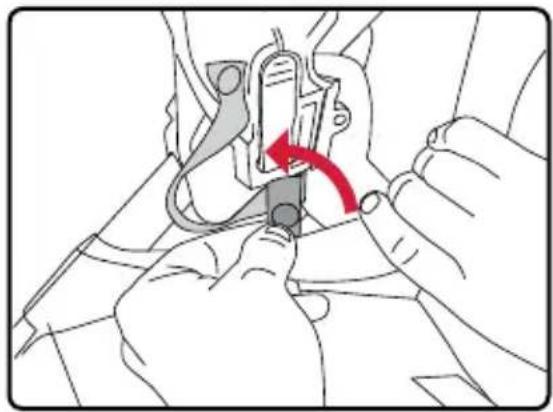
natural_image
Illustration of hands using a tool to adjust or install a mechanical component, with a red arrow indicating the motion direction (no text or symbols present)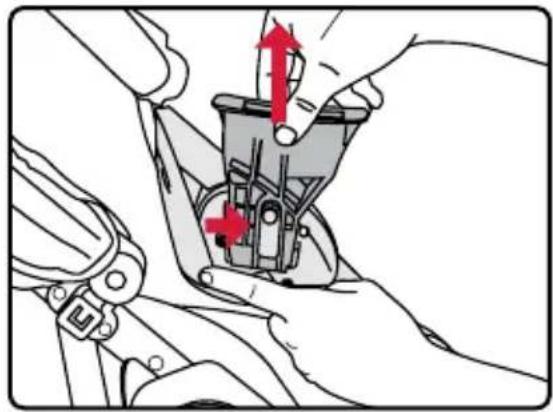
natural_image
Mechanical assembly diagram showing hands adjusting a component with red arrows indicating motion (no text or symbols)Using a Britax Infant Car Seat
Attaching a Britax Infant Car Seat
- Set the parking brake.
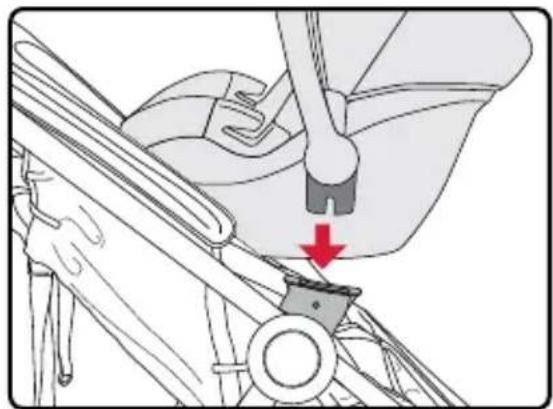
- Line up the adapter on the infant car seat with the receivers on the stroller.
-
Press down until locked into place.
-
Lift up on both sides of the infant car seat to ensure that it is secure.
natural_image
Mechanical assembly diagram showing a lever and bracket with a red arrow indicating a downward motion (no text or symbols present)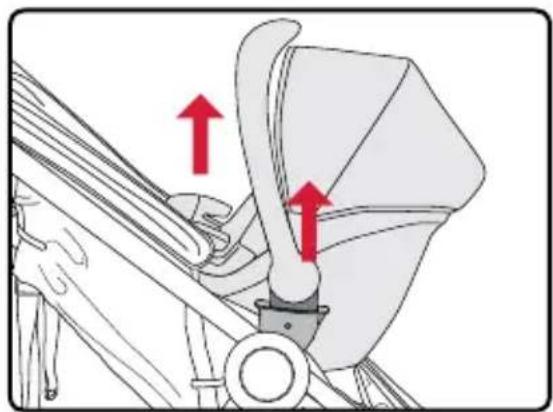
natural_image
Mechanical diagram showing a belt drive mechanism with red arrows indicating direction (no text or symbols present)Removing a Britax Infant Car Seat
Refer to your infant car seat user guide for information on the removal instructions for your specific model.
Care and Maintenance
IMPORTANT: Before each use, check the stroller and its components to make sure they are in good condition and good working order.
Parking Brake
- Periodically check that the parking brake works properly and locks both wheels securely.
- Clean out any dirt or debris that may prevent the brake from working.
Frame • Wipe the frame with a damp cloth and mild soap. Use clean, dry cloth or towel to wipe away excess water and soap.
Fabric and Harness
- Do not machine wash or dry the cover.
- Hand wash with cold water and mild soap. Air dry to prevent shrinking.
- Do not iron.
Plastic Parts
- Wipe with a damp cloth and mild soap. Use a clean, dry cloth or towel to wipe away excess water and soap.
- Do not use abrasives, solvents, strong detergents, or household cleaners. These products can scratch, discolor, and weaken plastic or cause corrosion on metal surfaces.
Maintenance • If the stroller gets wet, wipe with a clean cloth or towel to prevent corrosion.
- Do not fold the stroller when wet or damp. Always make sure that the stroller is dry before storing.
Storage • To prevent damage to plastic parts, store away from extreme heat.
- Cover the stroller to prevent dust build-up and exposure to sunlight.
- Do not stack other items on top of the stroller.
Warranty
This product is distributed by Britax Child Safety, Inc. (“Britax”). To the extent allowed by law, Britax warrants this product to the original retail purchaser as follows:
LIMITED TWO-YEAR WARRANTY
This product is warranted against defective materials or workmanship for two years from the date of original purchase. Proof of purchase is required. Your exclusive remedy for this warranty is that Britax will, at its option, provide repair or replacement components to the original purchaser for this product or replace the product. Britax reserves the right to discontinue or change fabrics, parts, models or products, or to make substitutions. Labor and shipping costs for returns are not included. Britax products purchased from unauthorized retailers, online auction sites, or as second hand items are not covered under warranty.
To make a claim under this Warranty, you must contact Britax Customer Services Department at 1-888-427-4829 or 704-409-1699 or write to 4140 Pleasant Road, Fort Mill, SC 29708. Proof of purchase is required.
PLEASE COMPLETE AND MAIL THE REGISTRATION CARD WITHIN 30 DAYS OF PURCHASE
You may also register online at us.britax.com/registration.
WARRANTY LIMITATIONS
This warranty does not include damages which arise from negligence, misuse, salt corrosion, or use not in accordance with the user guide.
The use of non-Britax accessories is not approved by Britax. The use of unapproved accessories could cause this product to become damaged or dangerous. Their use may void the Britax warranty.
LIMITATIONS OF DAMAGES
The warranty and remedies as set forth above are exclusive and in lieu of all others, oral or written, express or implied. In no event will Britax or the retailer selling this product be liable for any damages, including incidental or consequential damages, arising out of the use or inability to use this product.
OTHER WARRANTY TERMS AND STATE LAW RIGHTS
Any implied warranties, including implied warranties of merchantability and fitness for a particular purpose, shall be limited to the duration and terms of the express written warranty. Some states do not allow certain exclusions or limitations on warranties, so the above may not apply to you. This warranty gives you specific legal rights, and you may have other rights, which vary from state to state. Neither Britax, nor the retailer selling this product, authorizes any person to create for it any other warranty, obligation, or liability in connection with this product.

Table des matières
natural_image
Technical line drawing of a mechanical component with no visible text or symbolsRoues arrière
natural_image
Line drawing of two wheels with spokes, no text or symbols presentRoue avant
natural_image
Line drawing of two wheel rim components with spokes (no text or symbols)natural_image
Line drawing of a folded garment with a zipper and stitching (no text or symbols)natural_image
Technical line drawing of two identical funnel-shaped components with internal brackets (no text or symbols)natural_image
Line drawing of a hand adjusting a car seatbelt on a wheel (no text or symbols)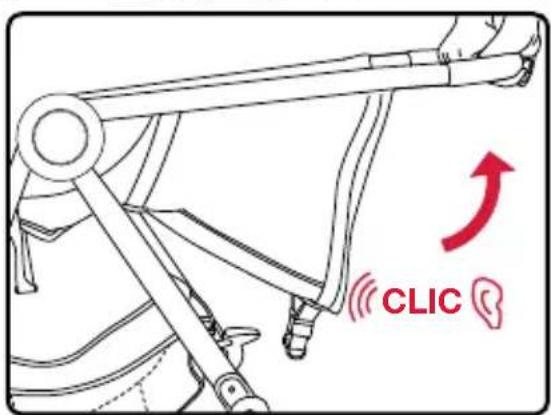
Roue avant
natural_image
Diagram showing a car wheel assembly with two wheels and a tool inserted, no text or symbols presentRoues arrières
natural_image
Diagram showing a bicycle wheel being adjusted to a bicycle's seat, with a red arrow indicating the motion direction (no text or symbols present)natural_image
Diagram showing a bicycle suspension mechanism with red arrows indicating direction of motion (no text or symbols present)Pare-soleil
natural_image
Diagram showing two car seatbelt components with red arrows indicating movement or force direction (no text or symbols present)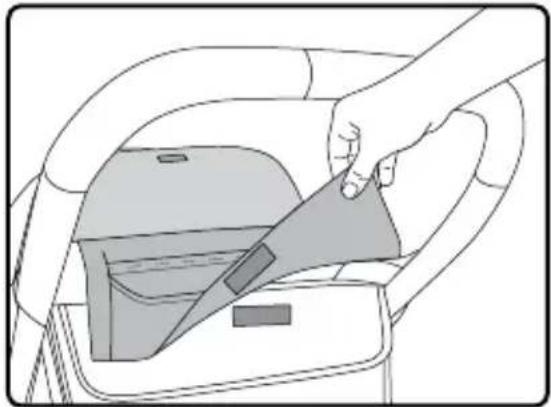
natural_image
Illustration of a hand using a tool to lift a car's seatbelt (no text or symbols present)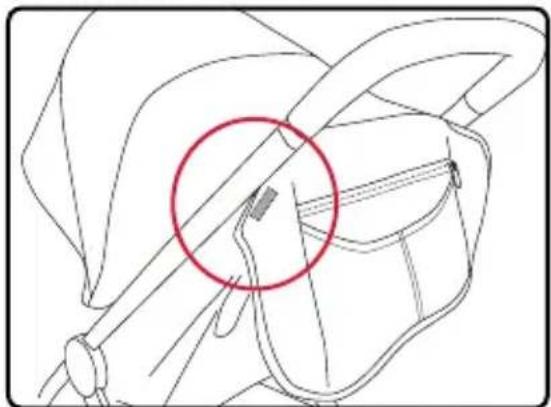
natural_image
Technical line drawing of a mechanical component with a red circle highlighting a specific area (no text or symbols present)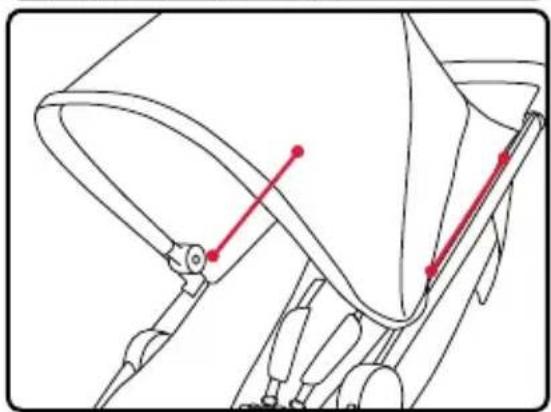
natural_image
Technical line drawing of a mechanical component with red alignment markers (no text or symbols)Opération
IMPORTANT :
natural_image
Line drawing of a hand adjusting a circular component on a mechanical assembly (no text or symbols)natural_image
Illustration of a hand pressing down on a car wheel, with a red arrow indicating the motion direction (no text or symbols present)natural_image
Line drawing of a hand adjusting a bicycle seatbelt on a wheel (no text or symbols)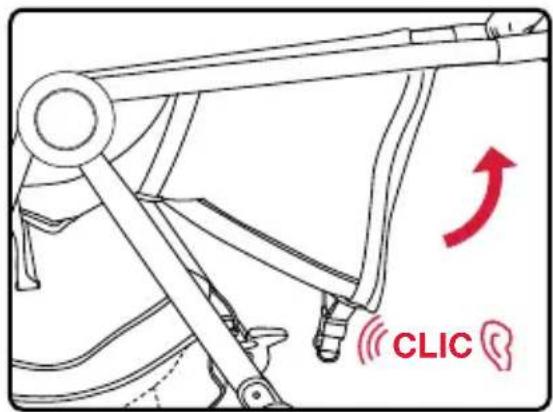
Ajuster le siège
natural_image
Illustration of a hand using a tool to adjust a car's seatbelt, showing no text or symbols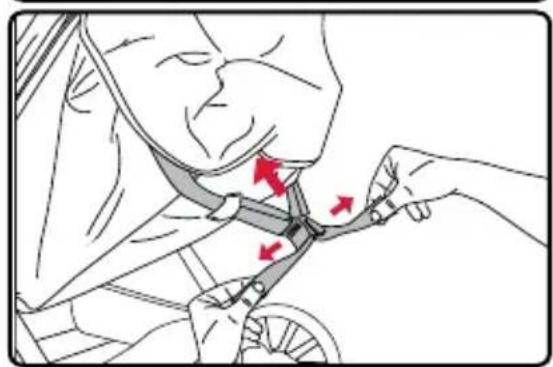
natural_image
Illustration of a person using a bicycle seatbelt with red arrows indicating movement or force (no text or symbols present)natural_image
Mechanical component diagram showing a wheel assembly with red arrows indicating direction (no text or symbols)natural_image
Diagram of a motor stroller with red arrows indicating motion or force direction (no text or symbols)natural_image
Line drawing of a stroller with a mesh seat and a gray cover, showing no text or symbolsnatural_image
Diagram showing a folded garment with a shaded triangular section and red arrow indicating rotation (no text or symbols)Utiliser le harnais
Ajuster le harnais
natural_image
Illustration of a hand using a belt switch to adjust the seat area (no text or symbols present)natural_image
Illustration of a hand holding a small object with a red arrow pointing to a mechanical component (no text or symbols)natural_image
Line drawing of a mechanical component with two circular components and connecting arms (no text or symbols)natural_image
Line drawing of a person wearing a seatbelt and harness, holding a car seatbelt device (no text or symbols present)natural_image
Illustration of a child wearing a seatbelt and harness, seated in a vehicle (no text or symbols)natural_image
Illustration of hands adjusting a mechanical component with a red arrow indicating motion (no text or symbols present)natural_image
Illustration of hands adjusting a mechanical component with red arrows indicating motion (no text or symbols)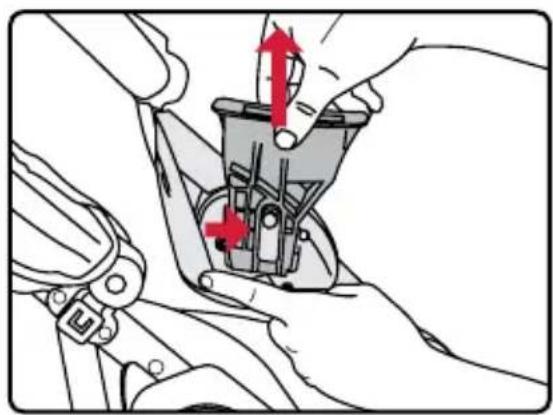
natural_image
Mechanical assembly diagram showing hands fastening a component with red arrows indicating motion (no text or symbols)natural_image
Mechanical assembly diagram showing a lever and bracket with a red arrow indicating motion (no text or symbols)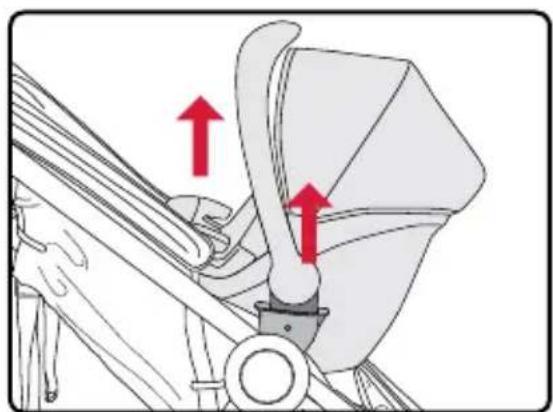
natural_image
Mechanical assembly diagram showing a belt drive mechanism with red arrows indicating direction (no text or symbols present)LIMITATIONS DES DOMMAGES
natural_image
Technical line drawing of a mechanical component with no visible text or symbolsnatural_image
Line drawing of two wheels with spokes, no text or symbols presentRueda delantera
natural_image
Line drawing of a folded garment with a zipper and pleated skirt (no text or symbols)natural_image
Line drawing of two wheel rim components (no text or symbols)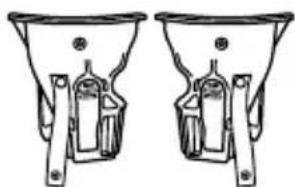
natural_image
Technical line drawing of two identical funnel-shaped components with internal brackets (no text or symbols)natural_image
Line drawing of a hand adjusting a bicycle seatbelt on a wheel (no text or symbols)natural_image
Mechanical assembly diagram showing a wheel with red arrows indicating motion direction (no text or symbols)Ruedas traseras
natural_image
Diagram showing a bicycle wheel being adjusted to a bicycle's seat, with a red arrow indicating the motion direction (no text or symbols present)natural_image
Diagram showing a bicycle steering wheel and its impact on the wheel rim, with red arrows indicating direction of motion (no text or symbols present)Capota
natural_image
Diagram showing two car seats with red arrows indicating movement or force direction (no text or symbols present)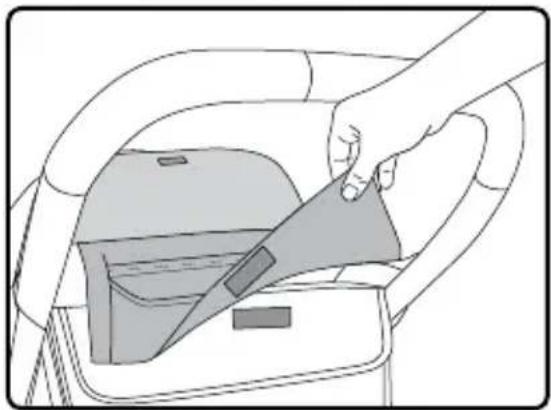
natural_image
Line drawing of a hand inserting a card into a car interior (no text or symbols)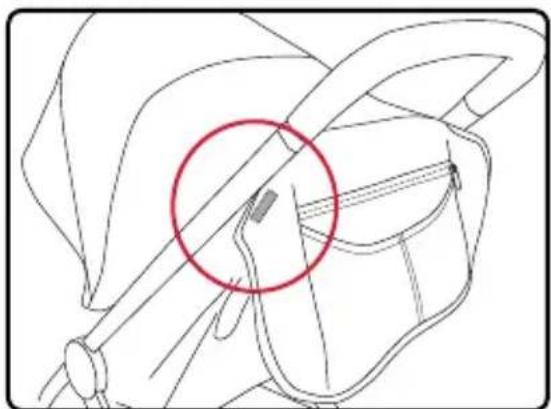
natural_image
Technical line drawing of a mechanical component with a red circle highlighting a specific feature (no text or symbols present)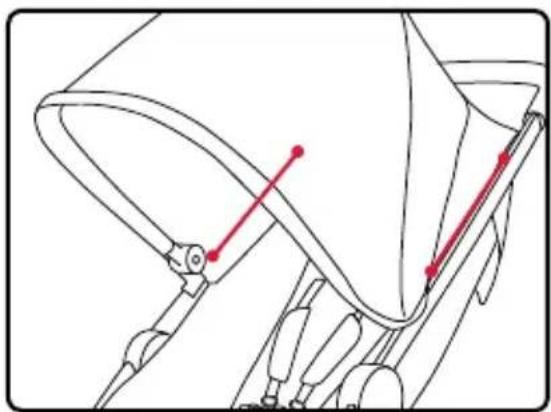
natural_image
Technical line drawing of a mechanical component with red alignment markers (no text or symbols)Operación
IMPORTANTE:
natural_image
Line drawing of a hand holding a circular component, no text or symbols presentnatural_image
Line drawing of a hand pressing down on a car wheel, with a red arrow indicating the motion direction (no text or symbols)natural_image
Line drawing of a hand adjusting a bicycle seatbelt on a wheel (no text or symbols)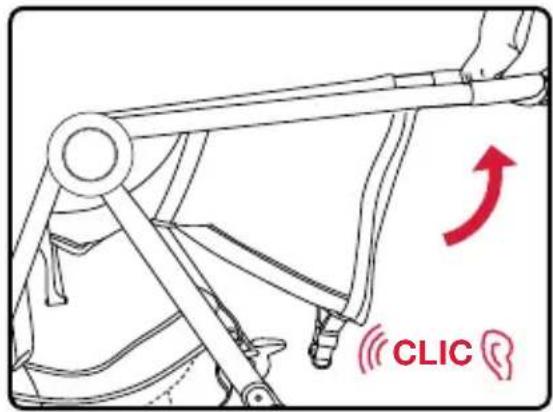
Ajuste del asiento
natural_image
Illustration of a hand using a tool to adjust a car's seatbelt, showing a red arrow indicating the handle (no text or symbols present)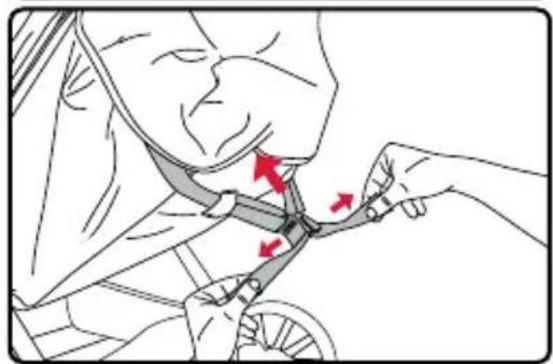
natural_image
Illustration of a person adjusting a bicycle seatbelt with red arrows indicating movement (no text or symbols)natural_image
Diagram of a car wheel assembly with directional arrows indicating motion (no text or symbols)natural_image
Diagram of a motor stroller with red arrows indicating motion direction (no text or symbols)natural_image
Diagram of a stroller with a curved seat and bucket, showing a red directional arrow (no text or symbols)natural_image
Diagram showing a folded garment with a shaded triangular section and red arrow indicating rotation (no text or symbols)Ajustando el arnés
natural_image
Line drawing of a car seatbelt being adjusted for a hand (no text or symbols)natural_image
Illustration of a hand holding a small mechanical component with a red arrow indicating a downward motion (no text or symbols present)natural_image
Diagram of a mechanical assembly with two arms and three circular components, no text or symbols presentSujeción del niño
natural_image
Illustration of a car seatbelt buckle being adjusted for a seatbelt, showing red directional arrows indicating movement (no text or symbols present)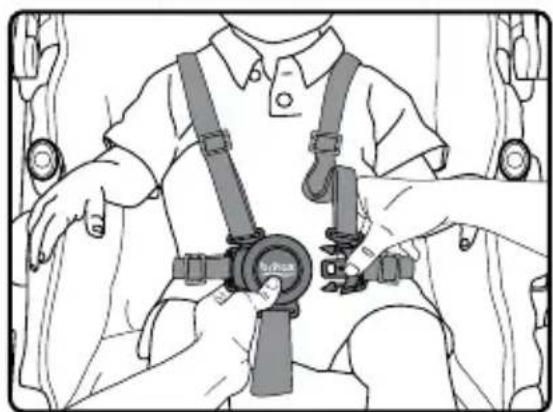
natural_image
Line drawing of a person wearing a seatbelt and harness, holding a device with no visible text or symbols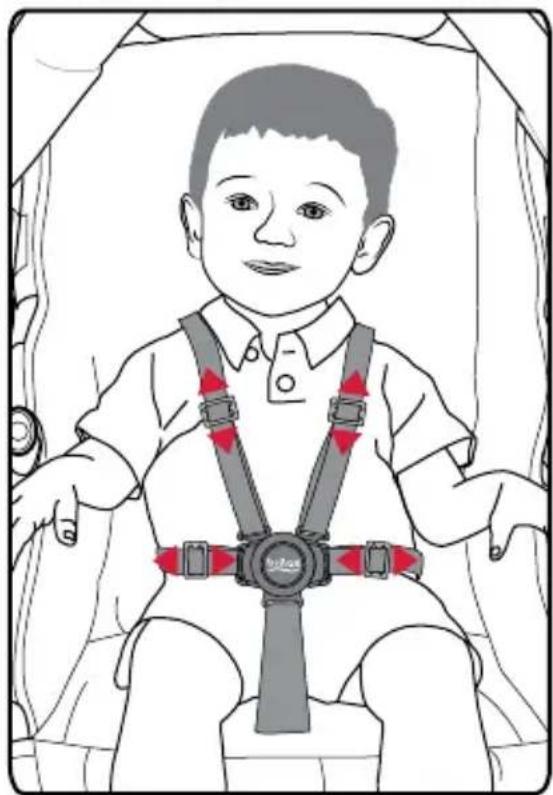
natural_image
Illustration of a child wearing a seatbelt and harness, with red safety belt and 'Sulzer' logo on the chest (no text or symbols on the diagram itself)natural_image
Illustration of hands assembling a mechanical component with a red arrow indicating motion (no text or symbols present)natural_image
Illustration of hands adjusting a mechanical component with a red arrow indicating rotation (no text or symbols present)natural_image
Mechanical assembly diagram showing a belt buckle mechanism with red arrows indicating motion direction (no text or symbols)natural_image
Mechanical assembly diagram showing a lever mechanism with a red arrow indicating motion direction (no text or symbols present)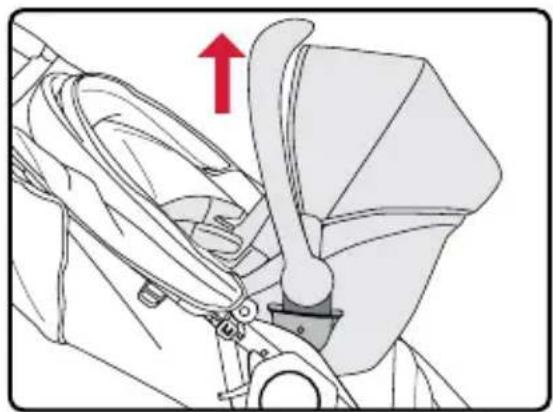
natural_image
Mechanical assembly diagram showing a belt switch mechanism with a red upward arrow (no text or symbols)Britax Child Safety, Inc.
4140 Pleasant Road
Fort Mill, SC 29708
USA
A Britax Childcare
Group Limited company
Tel.: 1-888-427-4829
Tel.: 1-704-409-1699
www.Britax.com
- Safety Information......2
- Features......4
- In The Box ....5
- Assembly....6
- Operation....9
- Securing Your Child....14
- Infant Car Seat Mode 15
- Care and Maintenance....18
- Warranty 19
- Safety Information
- WARNING!
- Read these instructions carefully before using this product. To ensure proper use, store this user guide in a convenient place so it can be consulted often.
- Features
- In The Box
- Assembly
- Stroller Frame
- Front Wheel
- Installing the Front Wheel
- Removing the Front Wheel
- Rear Wheels
- Installing the Real Wheels
- Removing the Rear Wheels
- Canopy
- Operation
- IMPORTANT:
- Using the Stroller
- Folding the Stroller
- Unfolding the Stroller
- Adjusting the Seat
- Using the Parking Brake
- Using the Front Wheel Swivel Lock
- Using the Front Basket Access
- Canopy Vent
- Using the Harness
- Adjusting the Harness
- Securing Your Child
- Infant Car Seat Mode
- Using the Infant Car Seat Receivers
- Attaching the Infant Car Seat Receivers
- Removing the Infant Car Seat Receivers
- Using a Britax Infant Car Seat
- Attaching a Britax Infant Car Seat
- Removing a Britax Infant Car Seat
- Care and Maintenance
- Parking Brake
- Fabric and Harness
- Plastic Parts
- Warranty
- LIMITED TWO-YEAR WARRANTY
- PLEASE COMPLETE AND MAIL THE REGISTRATION CARD WITHIN 30 DAYS OF PURCHASE
- WARRANTY LIMITATIONS
- LIMITATIONS OF DAMAGES
- OTHER WARRANTY TERMS AND STATE LAW RIGHTS
- Table des matières
- Roue avant
- Roues arrières
- Pare-soleil
- Opération
- IMPORTANT :
- Ajuster le siège
- Utiliser le harnais
- Ajuster le harnais
- LIMITATIONS DES DOMMAGES
- Ruedas traseras
- Capota
- Operación
- IMPORTANTE:
- Ajuste del asiento
- Ajustando el arnés
- Sujeción del niño
Brand : BRITAX
Model : B-Lively
Category : Stroller