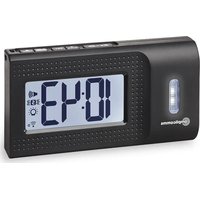
TCL 250 - Digital Alarm Clock Amplicomms - Free user manual and instructions
Find the device manual for free TCL 250 Amplicomms in PDF.


User questions about TCL 250 Amplicomms
0 question about this device. Answer the ones you know or ask your own.
Ask a new question about this device
Download the instructions for your Digital Alarm Clock in PDF format for free! Find your manual TCL 250 - Amplicomms and take your electronic device back in hand. On this page are published all the documents necessary for the use of your device. TCL 250 by Amplicomms.
USER MANUAL TCL 250 Amplicomms
text_image
10:43 amplicommsTCL 250
Operating Instructions (UK)
Mode d'emploi (FR)
text_image
1 amplicomms 2 3 4 5 6 7 8 9 AM PM 00:00 ALTCL 250
natural_image
Diagram of a computer rear panel showing three battery cells with positive and negative charges, no text or symbols present.natural_image
Recycling symbol with a triangular base and a vertical letter 'D' on the right side (no text or numbers present)Pflegehinweise
1 Flash/strobe light
2 Indicator "AM/PM"
3 Indicator "Low battery"
4 Time
5 Alarm Set Mode
6 Indicator "Sound alarm on"
7 Indicator "Shaker alarm on"
8 Indicator "Flash/strobe light alarm on"
9 Indicator "Radio controlled signal reception"
10 Snooze/backlight button
11 WAVE/▼ button
12 SET button
13 AL SET/SELECT button
14 DEMO/▲ button
15 Fixing eyelet for lanyard
Box contents
- Alarm clock
- Lanyard with clamp (for attachment eg to the pillow)
- (fabric) travel pouch
- User guide
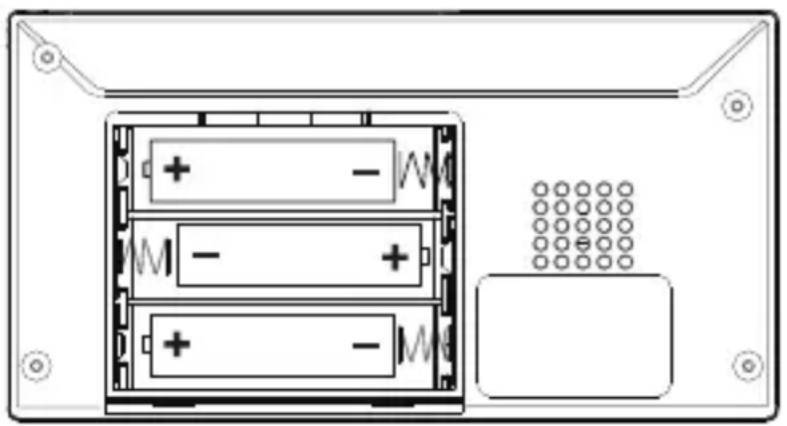
Insert batteries
To operate, your alarm clock requires 3 x AA alkaline batteries (not included).
- Lay the device face down on a soft, flat surface.
- Slide down the battery cover on the bottom of the device and remove it.
- Insert 3 x AA alkaline batteries by observing the correct polarity marks "+" and "-" in the battery compartment.
natural_image
Diagram of a computer RAM module showing three main modules with battery and resistor connections, no text or symbols present.- Replace the battery cover.
Notes:
- Frequent use of the vibration alarm, strobe light / flashlight, and loud alarm will significantly affect battery life.
- The empty battery icon appears between the time digits when the battery is low.
- Dispose of used batteries according to the instructions.
Environmental reception effects
Your radio controlled clock obtains the accurate time with wireless technology. Same as all wireless devices, the receiving ability may be affected by, but not limited to, the following circumstances:
- Long transmitting distance
• Nearby mountains and valleys - Among tall buildings
- Near railway, high voltage cable etc.
- Near freeway, airport, etc
- Near construction site
- Inside concrete buildings
• Near electrical appliances - Near computers and TV's
- Inside moving vehicles
- Near metallic structures.
Place your clock at a location with optimal signal, i.e. close to a window and away from metal surfaces or electrical appliances.
Note: please keep your clock one meter / three feet away from any other electronics for best DCF / MSF reception.
Radio controlled time signal reception
After your clock is powered up, it starts to receive radio controlled time signal. The 📞 indicator flashes.
• Receiving signal (indicator flashing)
- Successful reception (indicator becomes static)
- Failed reception ( indicator disappear).
Automatic reception and manual reception Automatic reception
Your clock starts automatic reception everyday at 1:00, 2:00, and 3:00. If it fails to receive the radio controlled time time signal at 3:00, it will start reception at 4:00. If it fails again, it will start reception at 5:00. If it fails again, it will start automatic reception at 1:00 again in the next day.
During reception, all buttons do not function except the

button.
Manual reception
Simply press and hold WAVE/▼ to enter manual setting mode. Your alarm clock will start manual reception with a short beep. To stop the function, press and hold the WAVE/▼ button again.
To set time and the snooze duration
(default time at 0:00 and 24Hr time format)
- Press and hold down SET, "00" flash, press ▲/▼ to set the time zone (up to ±12 hours).
$$ " 0 0" = \text { GMT } + 1 \text { hour (e.g. Germany) } $$
$$ " 0 1" = \text { GMT } + 2 \text { hours (e.g. Finland) } $$
$$ " - 0 1" = \text { GMT } 0 0 \text { hour (e.g. U.K.) } $$
-
Press SET again, the hour digits flash. Press ▲ or ▼ to set the time in hours (hold ▲/▼ to advance rapidly).
-
Press SET again, the minute digits "00" flash. Press ▲ or ▼ to set the time in minutes (hold ▲/▼ to advance rapidly).
-
Press SET again, the display shows time format and flashes. Press ▲ or ▼ to select “12HR” or “24Hr” time format.
If "12Hr" is selected, the AM/PM indicator will appear.
-
Press SET again, the display shows "05" and flashes. Press ▲ or ▼ to select your snooze time from 5 to 60 minutes.
-
Press SET once again or no button around 10 seconds to exit the setting mode.
To set the alarm
- Press and hold AL SET/SELECT, the AL indicator appears and the alarm's hour digits flash. Press ▲ or ▼ to set the alarm in hours (hold ▲/▼ to advance rapidly).
- Press AL SET/SELECT once again, the alarm's minute digits flash. Press ▲ or ▼ to set the alarm in minutes (hold ▲/▼ to advance rapidly).
- Press AL SET/SELECT again, the indicator flashes and the LCD displays "HI" (vibration at HI level). Press ▲ or ▼ to select the vibration level.
• HI (strong vibration level)
- LO (soft vibration level)
-
Press AL SET/SELECT once again, the indicator flashes and the LCD displays "HI". Press ▲ or ▼ to select the alarm tone volume.
-
LO (soft)
• HI (loud) -
Press AL SET/SELECT once again or no button around 10 seconds to exit the alarm setting mode.
To select the alarm mode
- At normal time display mode, press AL SET/SELECT one at a time to activate the alarm(s), the corresponding alarm indicator(s) in the display will be on:
: only shaker alarm is activated
: both sound and shaker alarm are activated
: both probe light and shaker alarm are activated
: strobe light, sound and shaker alarm are activated.
- Press AL SET/SELECTonce more to turn off all the alarms, all , and alarm indicators disappear.
To stop and reset the alarm
When alarm is sounding, the corresponding alarm indicator flashes. Press AL SET/SELECT once to stop the alarm and reset it to come on the following day. After that, the corresponding alarm indicator stays on the display.
To use snooze
When alarm is sounding, press once, the alarm will be stopped temporarily and the corresponding alarm indicator keeps flashing. Alarm will come on again after the set snooze duration is over.
To use the backlight
During the normal time display, briefly press to turn on the display backlight for 5 seconds. This function is not available when the device is currently giving a wake-up signal.
To use the demo mode
Press and hold the ▲/DEMO button for 2 seconds to trigger the buzzer, stroke light and shaker.
To use the flashlight
During normal time display, press and hold to turn on the flashlight.
To turn it off, press and hold again.
Battery status indicator
When the battery level is low, the vibration level, alarm tone and brightness are reduced. The symbol appears between the time digits. Replace the batteries with new AA alkaline batteries.
Technical data / features
Functions: Clock, Alarm clock
Alarm modes: Buzzer, Vibration, Strobe light
Batteries (not included): 3 x AA
Specifications
RCC Frequency 77.5 KHz
Alarm duration 1 minute
Snooze duration 5 to 60 minutes
Default settings:
Time format 24 hour
Time 0:00
Alarm 6:00 (AM)
Alarm and shaker level HI
Snooze duration 05 (5 minutes)
Safety Information
- Read this manual carefully and keep it for future reference.
- Place your device on a stable surface, away from sources of direct sunlight or excessive heat or moisture.
- Protect the device from dripping or spraying water.
- Protect your furniture when placing your units on a natural wood and lacquered finish by using a cloth or protective material between it and the furniture.
Disposal
You are obliged to dispose of consumable goods properly in accordance with the applicable legal regulations. The symbol on this product indicates that electrical and electro nic apparatus must be disposed of separately from domestic waste at suitable collection points provided by the public waste authorities. Packaging materials must be disposed of according to local regulations.


Maintenance
- Clean your unit with a soft cloth moistened only with mild soap and water. Stronger agents such as Benzene, thinner or similar materials can damage the surface of the unit.
- If the unit is not to be used for a prolonged period, such as a month or longer, remove the batteries to prevent possible corrosion. Should the battery compartment become corroded or dirty, clean the compartment thoroughly and replace the batteries.
Troubleshooting
If your clock displays irrelevant time or does not function properly, possibly due to electrostatic charge or discharged batteries, remove the batteries of your alarm clock. Wait a few minutes, then reinsert the batteries or replace them with new batteries.
The alarm clock will reset to factory settings and you will need to reset it.
Guarantee
AMPLICOMMS equipment is produced and tested according to the latest production methods. The implementation of carefully chosen materials and highly developed technologies ensure trouble free functioning and a long service life.
The period of guarantee is 24 months from the date of purchase. The terms of the guarantee do not apply to the rechargeable batteries or power packs used in the products. All deficiencies resulting from material of production faults which occur during the period of guarantee will be eliminated free of charge. Rights to claims under the terms of guarantee are annulled following intervention by the purchaser or third parties. Damage caused as a result of improper handling or operation, incorrect positioning or storing, improper connection or installation, Acts of God or other external influence are not covered by the terms of guarantee.
In the case of complaints, we reserve the right to repair or replace defect parts or provide a replacement device.
Replacement parts or devices become our property. Rights to compensation in the case of damage are excluded where there is no evidence or intent or gross negligence by the manufacturer.
If your equipment shows signs of defect during the period of guarantee, please return to the sales outlet in which you purchased the AMPLICOMMS equipment together with the purchase receipt. All rights to claims under the terms of guarantee in accordance with this agreement must be asserted exclusively with regard to your sales outlet.
Two years after the purchase of our products, claims under the terms of guarantee can no longer be asserted.
Helpline
If you need some help and you're in the UK, please call us on 0844 800 6503 (using an UK landline, at the time of going to print: calls cost 6p for connection charge and then 5p a minute. Mobile costs may vary). Lines are open Monday to Friday, 9am to 5pm, excluding public holidays. If you've a claim on your 2-year guarantee, please contact your supplier.
Declaration of conformity
This device fulfils the requirements stipulated in the EU directive: 2014/53/EU.
Conformity with the above mentioned directive is confirmed by the CE symbol on the device.
To view the complete Declaration of Conformity, please refer to the free download available on our website www.amplicomms.com.
CE
GB
TCL 250
natural_image
Diagram of a computer RAM module showing three main modules with battery and resistor connections, no text or symbols present.LL
natural_image
Diagram of a computer rear panel showing battery, resistor, and socket (no text or labels)natural_image
Diagram of a computer rear panel showing battery, resistor, and socket (no text or labels)Batterie (non fornite): 3 x AA
Specifiche
Frequenza RCC 77,5 kHz
Durata allarme 1 minuto