DB 200plus - Wireless Earbuds Amplicomms - Free user manual and instructions
Find the device manual for free DB 200plus Amplicomms in PDF.


User questions about DB 200plus Amplicomms
0 question about this device. Answer the ones you know or ask your own.
Ask a new question about this device
Download the instructions for your Wireless Earbuds in PDF format for free! Find your manual DB 200plus - Amplicomms and take your electronic device back in hand. On this page are published all the documents necessary for the use of your device. DB 200plus by Amplicomms.
USER MANUAL DB 200plus Amplicomms
natural_image
White portable electronic device with open lid and control buttons (no visible text or symbols)DB 200plus
text_image
EU plug UK plug
text_image
Warning symbols for electrical hazard, including warning triangle, crossed-out electrical components, and lightning bolt symbolGBThe power adapter is equipped with interchangeable plugs for Europe and the UK. Please attach the appropriate plug before operating your device.
Hersteller: Golden profit Electronics Ltd., Shijie Town, Dongguan City, Guangdong Province, China
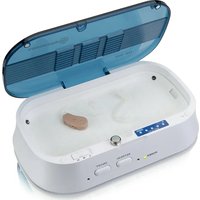
1 Drying compartment
2 Battery Tester indicators
3 Battery Tester
4 Magnetized area for battery parking during drying / refreshing cycle
5 Humidity selector "Low Humidity"/"Normal Humidity"/"High Humidity"
6 Power indicator
7 "Refresh" indicator
8 Refresh-button
9 On/Off-button
10 "Drying in progress" indicator
Operation
Drying Cycle
- Plug AC power adapter into the unit and also to your power socket.
Verify power indicator (6) is ON.
Helpline UK 0844 800 6503
(See page 14 for costs and hours of operation)
-
Set humidity selector (5) for the following drying times:
-
"Low Humidity" (left position) = 2 hours
- "Normal Humidity" (central position) = 4 hours
-
"High Humidity" (right position) = 8 hours
-
Open the hearing aid battery cover to expose the battery. You can remove the batteries during the drying / refreshing cycle. Remember to replace the batteries in your hearing aid after completion of the drying / refreshing cycle.
-
Place hearing aids in the main compartment (1) and close the cover.
- Press ON / OFF button (9) to start the selected drying time. The indicator (10) is ON.
Important notes:
This product helps to dry excess moisture from hearing aids and CI receivers using gentle heat. The UV light function helps reduce bacteria growth. The product does not clean your instrument. Cleaning from solid debris must still be done separately in accordance with your hearing aid manufacturer's instructions. The frequency of using the product is a personal preference. You may use the product daily, weekly, or as often as you find appropriate. This also differs according to the type of instrument you use. Use the 3 timer settings to determine the most suitable length of treatment for your device. This differs from one instrument to another, and depends on varied factors such as humidity level present, type of
Helpline UK 0844 800 6503
(See page 14 for costs and hours of operation)
instrument. Trying the different settings will help you know your preferred cycle length.
If required press the REFRESH button to activate the UV light for one hour. This may be repeated as required. When the UV lights are on, the indicator light (8) is ON. The UV lights help inhibit bacteria growth in the hearing aids, which can be caused by excess humidity during normal use.
CAUTION: Do not look directly at the two UV lights located in the corners of the main compartment.
The unit has an automatic shut-off when the lid is opened. If the drying process is to be continued, please close the lid and restart as described above.
Battery test
- Place a battery on the battery tester. Ensure the smaller round battery contact (-) is placed on the gold disc of the tester.
- Press the battery so that its body (+) is pressed against the vertical gold terminal.
- Battery capacity (power) is indicated by the number of indicators that light up.
4 or 5 indicators means the battery has good capacity remaining.
1 or 2 indicators means the battery has marginal capacity and should be replaced soon.
Note: Before testing a new battery, remove battery tab and wait two minutes.
Appendix
Safety notes
- Please make sure you read this user guide carefully and keep it for further use.
- Only use the power adapter plug supplied as other power supplies could damage the appliance.
- Ensure access to the power adapter plug is free from obstructions.
• To reduce the risk of injury, close supervision is necessary when an appliance is used near children. - Do not look directly at the two UV lights located on the front corners of the drying compartment.
- Do not use outdoors. Do not use near water.
- To disconnect, turn all controls to the off position, then remove plug from outlet.
- Unplug from outlet when not in use and before servicing or cleaning.
- Do not unplug by pulling on cord. To unplug, grasp the plug, not the cord.
- Do not operate any appliance with a damaged cord or plug, or after the appliance malfunctions or is dropped or damaged in any manner.
Return appliance to the nearest authorized service facility for examination, repair, or electrical or mechanical adjustment.
Helpline UK 0844 800 6503
(See page 14 for costs and hours of operation)
Power supply
The included mains adapter meets the eco-design requirements of the
European Union (Directive 2005/32/EG). Thus, its power consumption is considerably lower, both in operated as well as in non-operated mode, compared with the mains adapter of previous design.
Disposal
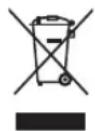
You are obliged to dispose of consumable goods properly in accordance with the applicable legal regulations. The symbol on this product indicates that electrical and electronic apparatus and batteries must be disposed of separately from domestic waste at suitable collection points provided by the public waste authorities. Batteries can also often be disposed of at the point of sale. Packaging materials must be disposed of according to local regulations.

Maintenance
- Please clean your equipment's surfaces with a soft, fluff-free cloth.
- Never use cleaning agents or solvents.
Guarantee
AMPLICOMMS equipment is produced and tested according to the latest production methods. The implementation of carefully chosen materials and highly developed technologies ensure trouble free functioning and a long service life. The terms of the guarantee do not apply where the cause of the equipment malfunction is the fault of the telephone network operator or any interposed private branch extension system. The terms of the guarantee do not apply to the rechargeable batteries or power packs used in the products. The period of guarantee is 24 months from the date of purchase.
All deficiencies resulting from material of production faults which occur during the period of guarantee will be eliminated free of charge. Rights to claims under the terms of guarantee are annulled following intervention by the purchaser or third parties. Damage caused as a result of improper handling or operation, incorrect positioning or storing, improper connection or installation, Acts of God or other external influence are not covered by the terms of guarantee.
In the case of complaints, we reserve the right to repair or replace defect
parts or provide a replacement device. Replacement parts or devices become our property. Rights to compensation in the case of damage are excluded where there is no evidence or intent or gross negligence by the manufacturer.
Helpline UK 0844 800 6503
(See page 14 for costs and hours of operation)
If your equipment shows signs of defect during the period of guarantee, please return to the sales outlet in which you purchased the AMPLICOMMS equipment together with the purchase receipt. All rights to claims under the terms of guarantee in accordance with this agreement must be asserted exclusively with regard to your sales outlet.
Two years after the purchase of our products, claims under the terms of guarantee can no longer be asserted.
Helpline
If you need some help and you're in the UK, please first check and see if your problem can be solved using the troubleshooting guide below. If it can't, please call us on 0844 800 6503 (using a UK landline, at the time of going to print: calls cost 6p for connection charge and then 5p a minute. Mobile costs may vary). Lines are open Monday to Friday, 9am to 5pm, excluding public holidays. If you've a claim on your 2-year guarantee, please contact your supplier.
Helpline UK 0844 800 6503
(See page on this page for costs and hours of operation)
Declaration of conformity

This device fulfils the requirements stipulated in the EU directive:
2014/30/EU. Conformity with the above mentioned directive is confirmed by the CE symbol on the device. To view the complete Declaration of Conformity, please refer to the free download available on our website www.amplicomms.com
Specifications
- Compartment temperature 45^ + / - 5^
- UV light (max on time=1 hr.) 400 nm / <100 mW
• Drying cycle timer 2 / 4 / 8 hours - Switching AC adapter Model: GPE125H-120100-Z (EU plug) / GPE125H-120100-2 (UK plug)
Input: 100 - 240 V\~ / 50/60 Hz
Output: 12 V = / 1000 mA
Manufacturer: Golden profit Electronics Ltd., Shijie Town, Dongguan City, Guangdong Province, China
- Redundant over-temp control PTC and thermostat
- Operating temperature 0 - 40°C
Helpline UK 0844 800 6503
(See page 14 for costs and hours of operation)
Aperçu
Fabricant: Golden profit Electronics Ltd., Shijie Town,
Dongguan City, Guangdong Province, China
Fabrikant: Golden profit Electronics Ltd., Shijie Town, Dongguan City, Guangdong Province, China
fabricante: Golden profit Electronics Ltd., Shijie Town, Dongguan City, Guangdong Province, China
Fabbricante: Golden profit Electronics Ltd., Shijie Town, Dongguan City, Guangdong Province, China
Tillverkare: Golden profit Electronics Ltd., Shijie Town, Dongguan City, Guangdong Province, China
Fabricante: Golden profit Electronics Ltd., Shijie Town, Dongguan City, Guangdong Province, China
Produsent: Golden profit Electronics Ltd., Shijie Town, Dongguan City, Guangdong Province, China
producent: Golden profit Electronics Ltd., Shijie
Town, Dongguan City, Guangdong Province, China