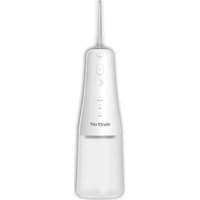
MX-HD2412 - Water flosser Mx Onda - Free user manual and instructions
Find the device manual for free MX-HD2412 Mx Onda in PDF.


| Product type | Portable dental irrigator |
| Brand | Mx Onda |
| Model | MX-HD2412 |
| Dimensions (without nozzle) | 70 x 79 x 220 mm (L x W x H) |
| Weight | 290 g |
| Reservoir capacity | 300 ± 10 ml |
| Water pressure | 0.14 - 0.8 N (20-115 psi) |
| Pulsations per minute | 1200 - 1400 pulsations/min |
| Power supply | Lithium-Ion battery 3.7 V / 2000 mAh |
| Charging | USB-C, 5 V / 1 A max. |
| Charging time | Approximately 4 hours |
| Autonomy | Approximately 2 hours of continuous use |
| Operating modes | Normal, Soft, Pulse |
| Automatic timer | Shuts off after 2 minutes |
| LED indicators | Battery level (3 levels) and selected mode |
| Reservoir material | Transparent plastic |
| Nozzle included | Yes, standard nozzle with release button |
| Recommended water temperature | Up to 40 °C |
| Cleaning | Clean the exterior with a damp cloth; do not immerse |
| Safety | Do not use by children without supervision; do not direct the jet into ears, nose, or under the tongue |
| Usage | Household use only |
| Compliance | European directives 2014/30/EU (EMC) and RoHS |
| Warranty | See MX ONDA conditions; void if used incorrectly |
| Customer service | +34 902 551 501 / mxsat@mxonda.es |
Frequently Asked Questions - MX-HD2412 Mx Onda
User questions about MX-HD2412 Mx Onda
0 question about this device. Answer the ones you know or ask your own.
Ask a new question about this device
Download the instructions for your Water flosser in PDF format for free! Find your manual MX-HD2412 - Mx Onda and take your electronic device back in hand. On this page are published all the documents necessary for the use of your device. MX-HD2412 by Mx Onda.
USER MANUAL MX-HD2412 Mx Onda
natural_image
White electric toothpaste (Mx Onda) device with a single toothbrush and digital display, no visible text or symbols on the body.CE
natural_image
Line drawing of a hand holding an electric shaver and a cup (no text or symbols)MANUAL DE INSTRUÇÕES
Mx Onda
JET MOBILE DENTAL ÁGUA
MODELO: MX-HD2412
natural_image
White electric toothbrush with brand logo and model number 3010 (no text-heavy elements)CE
natural_image
Line drawing of a hand holding an electric toothbrush and a cup (no text or symbols)Inserir e remover o bocal
MANUEL D'INSTRUCTIONS
Mx Onda
PORTABLE IRRIGATEUR DENTAIRE
MODÉLE: MX-HD2412
natural_image
White electric toothbrush with digital display and brand logo (Mix Ondo) on the base, no visible text or symbols on body beyond branding.CE
natural_image
Line drawing of a hand holding an electric shaver and a cup (no text or symbols)natural_image
White electric toothbrush with 'Mix Ondo' branding and external antenna (no other text or symbols visible)CE
natural_image
Line drawing of a hand holding a handheld electric shaver or power supply device (no text or symbols present)natural_image
White electric toothpaste (MIXOnda) device with a single toothbrush and control buttons, no visible text or symbols on the body.CE
Management-irrigator
natural_image
White electric toothpaste (no text or symbols visible on body)CE
Waste electrical products must not be disposed of with household waste.
This equipment should be taken to your local recycling centre for safe treatment.
This product complies with European Directives RoHS (2011/65/UE), on the restriction of use of certain dangerous substances in electrical and electronic appliances.
INTRODUCTION
MX ONDA Thank You deference has had to purchase this product. Use of this dental water jet, will help you keep in perfect health both your teeth and gums.
BASIC DENTAL CARE
Failure to clean only the surface of the teeth, and no gums or interdental space, other than cause halitosis, causes the accumulation of plaque and tartar on the teeth. Continued poor dental hygiene can lead to periodontal diseases such as gingivitis or periodontitis.
Given the importance of proper dental cleaning, the continued use of this device after every meal, it is a first step to get a perfect dental hygiene. With the dental irrigator can effectively clean the teeth, the interdental space, the gumline and if any, the orthodontia's.
Thanks to the pressure with which the water is projected, while cleaning the teeth produce a pleasant massage of the gums, helping improving blood circulation and preventing dental diseases.
If a slight bleeding gums occurs during the use of this product it means you could have a periodontal problem.
Continue to use a couple of weeks this irrigator, bleeding gums should disappear, otherwise stop using this product and consult your usual dentist.
If the user has implemented an orthodontic appliance, it is recommended that you clean in a way, even more thoroughly, than other users.
For proper dental care to use this device, after each meal, you should also visit a regular basis to your regular dentist.
BEFORE CONNECTING THE DENTAL WATER JET
When using electrical appliances, they should always be followed basic safety measures to reduce the risk of fire, electric shock and / or personal injury. These measures include the following:
- Read these instructions and save them for later use carefully.
- After removing the packaging, check that the appliance is not damaged. If in doubt use it; contact the technical support staff.
- Packaging materials (plastic bags, etc.) must not be left within reach of children as they are a potential source of danger.
- If you are following some type of oral treatment or suffer from any periodontal disease, talk with your regular dentist before using this device.
- To prevent battery, drain and extend the life of it, when not using the portable dental irrigator for an extended period of time, you must perform a full charge at least once a month.
SECURITY MEASURES
- This device cannot be used by children or children under 8 years or people with or without experience and knowledge reduced physical, sensory, or mental capabilities, unless they have received appropriate instructions on the use of the device and be supervised by an adult or responsible person.
- This appliance is designed for household use only MX ONDA will not accept any responsibility and warranty is void in case of misuse or failure to follow instructions.
- Do not insert the device in water or any other liquid, nor leave it exposed to the weather (rain, sun, etc.).
- Do not use any accessory not recommended by the manufacturer.
- Do not use if damaged or clogged nozzles.
- Do not allow children to use this appliance without adult supervision.
- If the dental water jet is used by several people, for hygiene reasons it is recommended that each person use your own mouthpiece.
- This product is only for oral and dental hygiene. Please do not apply to other areas.
- Do not apply water jet directly under the tongue, inside the ears or insert it into the nostrils. High blood pressure can damage the most sensitive areas.
- In case of failure, anomalies, if the device is dropped, the plug or other parts have impaired or network cable is damaged, do not attempt to repair it yourself. Contact our Customer Service nearest MX ONDA.
CONTROLS AND ELEMENTS
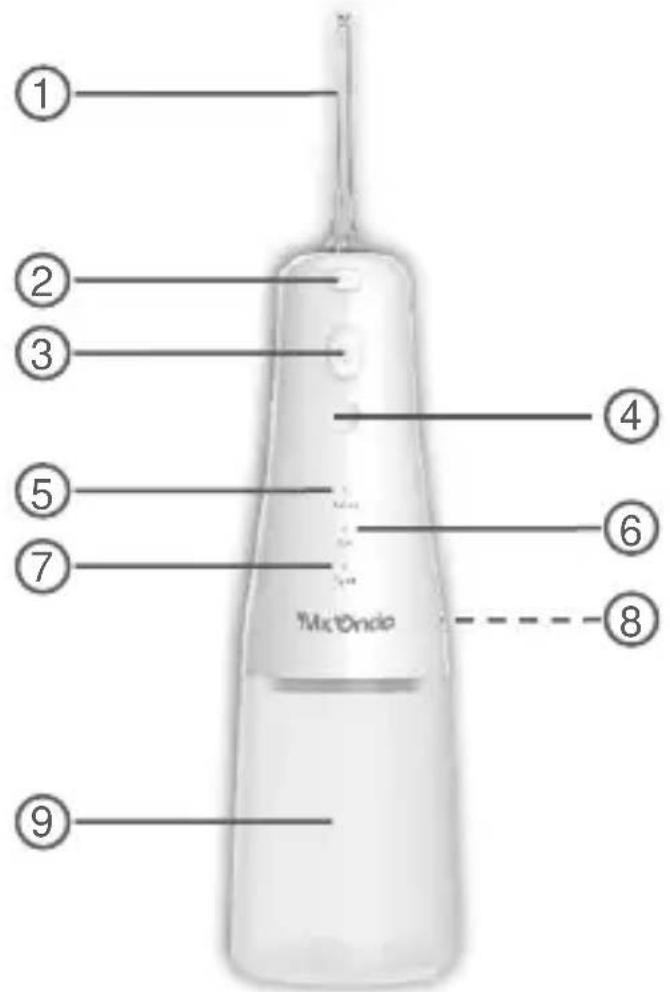
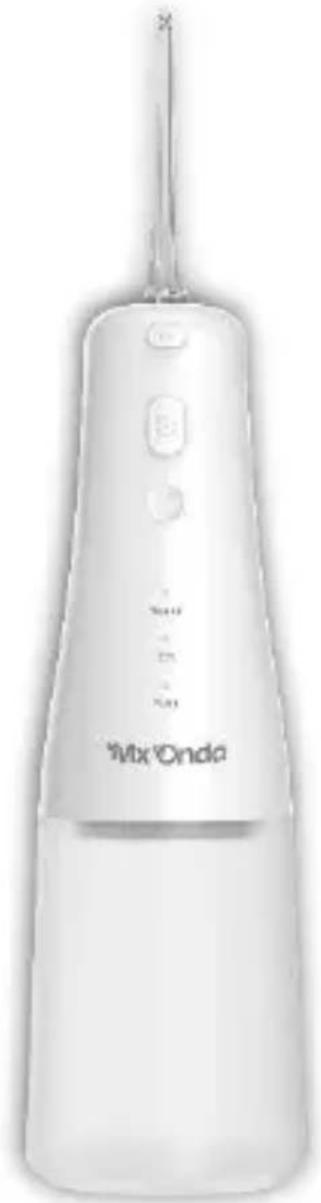
- Nozzle
- Nozzle release
- On/off button
- Operating mode selector
- Normal operating mode indicator
- Smooth operation mode indicator
- Pulse operating mode indicator
- USB Type C connector for battery charging
- Water or solution tank
BATTERY (charge and recommendations for use)
Battery is shipped with a partial charge and before first use the dental water jet, charge the battery as follows:
Battery charge
-
With the dental water jet in off mode, remove the cover that protects the connector 8 USB-C for charging the battery.
-
Using the adapter cable (USB-C - USB) included, connect the dental water jet to a USB port on your computer (which must be on) or use a power adapter with USB output whose voltage is 5 V and is capable of providing 1 A (in the case of supplying less current the battery will be slower).
- Indicators 5, 6 and 7 show the charge level, indicator 7 shows the minimum charge level, indicator 6 shows the medium charge level and indicator 5 shows the maximum charge level, during charging the indicator will flash of the current state of charge. When it finishes charging, the three indicators will appear constantly shining.
- Charging is complete, remove the USB-C connector and replace the cap that protects the connector 8.
When the battery needs to be recharged?
When you observe pressure decreases drastically or the dental water jet is turned off before two minutes, it will be a sign that the battery is discharged and needs to be recharged as soon as possible.
USE OF DENTAL WATER JET Filling the water tank
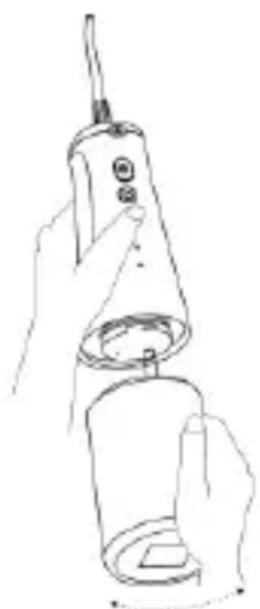
- With the irrigator turned off, remove the reservoir 9 by turning it slightly to the right and pulling it downwards.
- Fill the tank without exceeding its maximum capacity, you can use seasonal water, hot water (without its temperature exceeding 40irc C) or mixed with some type of mouthwash or liquid mouthwash.
- Insert the reservoir matching the hole in the reservoir with the base of the irrigator and turn it slightly to the left.
natural_image
Line drawing of a hand holding a handheld electric shaver or power supply device (no text or symbols present)Inserting and removing the nozzle
To insert or remove the nozzle, the dental water jet must be in off mode.
To insert the nozzle, insert it into the hole on the dental water jet by the thickest part of the nozzle and then press it firmly until you hear a "click" indicating that the nozzle is properly retained.
To remove the nozzle, press the release button 2 and pull the nozzle.
Using the dental wáter jet
- Check that the battery is charged.
- The dental water jet must be turned off, a full tank of water or solution and the nozzle inserted.
- Stand over the sink and tilt your head at an angle of about 45 degrees, then enter the nozzle outlet in the mouth.
- Press and hold the on/off button 3 (☐) for one second and the irrigator will operate in the last selected operating mode.
- During cleaning you can change the operating mode using button 4, by repeatedly pressing this button you can choose between normal mode (Normal), soft mode (Soft) or pulse mode (Pulse) (mix normal mode and soft mode).
- To remove the irrigator from the mouth to rinse, rest or finish cleaning, you must turn off the irrigator by pressing and holding the on/off button 3 ( ⏻ ) for one second. Never remove the irrigator from the mouth without first turning it off.
Very important:
- Do not use this device continuously for more than 5 minutes. Remember that the irrigator has a timer that switches off after 2 minutes.
- To prevent overheating of the pump, never operate the irrigator without water or solution for a long time.
CLEANING
• After each use, empty the water tank.
- Clean the surface irrigator with a damp cloth and dry with another dry. Do not use alcohol or abrasive products.
- Do not insert the device in water or any other liquid.
TECHNICAL SPECIFICATIONS
Water tank capacity 300 ±10 ml
Pressure 0.14 \~ 0.8N (20-115psi)
Pulses per minute 1200 \~ 1400
Lithium-ion battery 3.7 V / 2000 mAh
Battery charge 5 V / 1000 mA max.
Charging connector USB type C
Battery Charging time < 4 hours approx.
Autonomy > 2 hours approx.
Dimensions without nozzle 70 x 79 x 220 mm (l, w, h)
Weight 290 grams
Specifications subject to change without notice.
This product complies with the European Directives 2014/30/EC (EMC – Electromagnetic Compatibility).
“MX, MX ONDA” and its logos are trademarks of MX ONDA, S.A.
Telephone of information and Technical Service: +34 902 551 501
MX ONDA, S.A.
C / Matabueyes, 7 nave 1 a
19171 - Cabanillas del Campo (Guadalajara - Spain)

natural_image
Icon of a person reading a book inside a circle (no text or symbols)- MANUAL DE INSTRUÇÕES
- Mx Onda
- JET MOBILE DENTAL ÁGUA
- Inserir e remover o bocal
- MANUEL D'INSTRUCTIONS
- PORTABLE IRRIGATEUR DENTAIRE
- Management-irrigator
- INTRODUCTION
- BASIC DENTAL CARE
- BEFORE CONNECTING THE DENTAL WATER JET
- SECURITY MEASURES
- CONTROLS AND ELEMENTS
- BATTERY (charge and recommendations for use)
- Battery charge
- When the battery needs to be recharged?
- USE OF DENTAL WATER JET Filling the water tank
- Inserting and removing the nozzle
- Using the dental wáter jet
- Very important:
- CLEANING
- TECHNICAL SPECIFICATIONS
Brand : Mx Onda
Model : MX-HD2412
Category : Water flosser