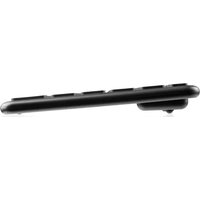
MC-TPK2 VOYAGER - Keyboard ModeCom - Free user manual and instructions
Find the device manual for free MC-TPK2 VOYAGER ModeCom in PDF.


| Product type | Wireless keyboard with touchpad and backlight |
| Brand | ModeCom |
| Model | MC-TPK2 VOYAGER |
| Dimensions | 330 × 104 × 15.8 mm |
| Net weight | 450 g |
| Power supply | Integrated Li-Poly battery 3.7 V, 450 mAh |
| Interface | USB nano-receiver, wireless 2.4 GHz (2403-2480 MHz, 1 mW) |
| Range | Up to 10 m |
| Number of keys | 79 |
| Shortcut keys | 12 (multimedia, browser, messaging, etc.) |
| Backlight | Yes, adjustable via Fn + up/down arrow |
| Touchscreen functions | Cursor movement, left/right click, double-click, drag, scroll, pinch/zoom |
| Cleaning | With a dry cloth |
| Usage precautions | Avoid humidity, extreme temperatures, prolonged sun exposure, open flames, sharp objects |
| Recycling | Compliant with WEEE directive 2012/19/EU, do not dispose of with household waste |
| Declaration of conformity | Available at deklaracje.modecom.eu |
Frequently Asked Questions - MC-TPK2 VOYAGER ModeCom
User questions about MC-TPK2 VOYAGER ModeCom
0 question about this device. Answer the ones you know or ask your own.
Ask a new question about this device
Download the instructions for your Keyboard in PDF format for free! Find your manual MC-TPK2 VOYAGER - ModeCom and take your electronic device back in hand. On this page are published all the documents necessary for the use of your device. MC-TPK2 VOYAGER by ModeCom.
USER MANUAL MC-TPK2 VOYAGER ModeCom
MODECOM
natural_image
Simple line drawing of a 3D object on a plane, no text or symbols presentnatural_image
Simple line drawing of a V-shaped object interacting with a flat surface (no text or symbols)natural_image
Simple line drawing of a V-shaped object resting on a flat surface (no text or symbols)natural_image
Simple line drawing of a V-shaped object with a lightning bolt and sparkles, resting on a flat surface (no text or symbols)Fn + F7 = play / pause
Fn + F8 = stop
Attention: Please read the following manual carefully in order to make sure you use the device properly.
Setup
Plug the USB receiver to an available USB port. Turn the switch to the ON position. The switch is placed at the back of the keyboard. Blue LED diode will flicker slowly several times. Keyboard will be automatically detected and installed by the operating system. The device is ready to be used.
Backlight
The backlight has five levels of brightness. Press Fn + arrow down or arrow up to set the desired level or to turn it off.
Shortcut functions
Fn + F1 = launch default multimedia player application
Fn + F2 = volume down
Fn + F3 = volume up
Fn + F4 = mute
Fn + F5 = previous track
Fn + F6 = next track
Fn + F7 = play/pause
Fn + F8 = stop
Fn + F9 = launch default web browser application
Fn + F10 = launch default mail client software
Attention: All multimedia player hotkeys are compatible with Windows Media Player and various other applications. However, if the hotkeys are not compatible with your multi-media player, refer to the application developer's help desk.
TOUCHPANEL FUNCTION
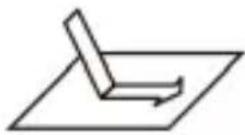
Mouse pointer control: finger slide
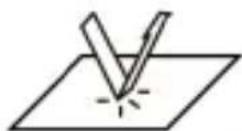
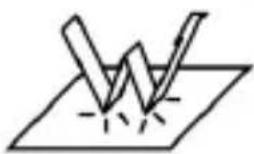
Left mouse button click: single finger tap
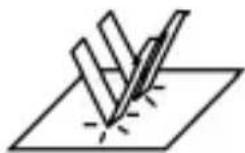
Right mouse button click: two-finger double tap
natural_image
Simple line drawing of a lightning bolt striking a surface with a spark (no text or symbols)Open file/application: single finger double tap
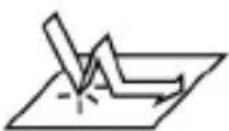
Drag: one finger put and one sliding
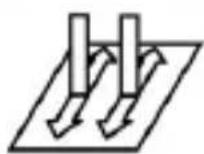
Scroll: two fingers slide up and down
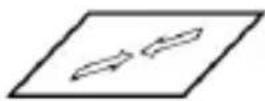
Zoom out: two-finger pinch-in
TECHNICAL SPECIFICATIONS:
Dimensions: 330 * 104 * 15.8 mm
Number of keys: 79
Number of hotkeys: 12
Interface: USB (nano-receiver), 2.4 GHz wireless connection 2403 - 2480MHz - 1mW
Range: up to 10m
Power: 3.7 V, built-in battery 450 mAh Li-Poly
Net weight: 450 g
TERMS OF USE
-
Do not open any part of the keyboard housing. Do not attempt to repair the keyboard yourself.
-
Do not use the keyboard in wet or damp conditions - do not expose it to rain, do not immerse or pour liquids on it, do not use in saunas, steam chambers, swimming pools.
-
Do not use in very high or very low temperatures.
-
Do not expose to direct sunlight for long time.
-
Keep away from open flames (fireplace), candle's flame, cooking appliances.
-
Do not use sharp objects to operate the keyboard - do not scratch the touch panel, keypad, casing.
-
Keep away from children.
-
Use a dry cloth for cleaning.
This device was designed and made of high-quality reusable materials and coamponents. If the device, its packaging, user's manual, etc. are marked with crossed waste container, it means they are subject to segregated household waste collection in compliance with the Directive 2012/19/UE of the European Parliament and of the Council. This marking informs that electric and electronic equipment shall not be thrown away together with household waste after it's been utilised. The user is obliged to bring the utilised equipment to electric and electronic waste collection point. Those running such collection points, including local collection points, shops or commune units, provide convenient system enabling to scrap such equipment. Appropriate waste management aids in avoiding consequences which are harmful for people and environment and result from dangerous materials used in the device, as well as improper storage and processing. Segregated household waste collection aids recycle materials and components of which the device was made. A household plays crucial role in contributing to recycling and reusing the waste equipment. This is the stage where the basics are shaped which largely influence the environment being our common good. Households are also one of the biggest users of small electrical equipment. Reasonable management at this stage aids and favours recycling. In the case of improper waste management, fixed penalties may be imposed in accordance with national legal regulations.
Hereby, MODECOM POLSKA Sp. z o.o. declares that the radio equipment type Wireless Keyboard MC-TPK2 is in compliance with Directive 2014/53/EU. The full text of the EU declaration of conformity is available at the following internet address: deklaracje.modecom.eu
CLAVIER SANS FIL RÉTRO-ÉCLAIRÉ AVEC PAD
Alimentacao: 3.7 V, built-in battery 450 mAh Li-Poly
Peso líquido: 450 g
Termos de uso
natural_image
Simple line drawing of a lightning bolt striking a surface with a lightning bolt (no text or symbols)natural_image
Simple line drawing of a lightning bolt striking a surface with a lightning bolt (no text or symbols)Brand : ModeCom
Model : MC-TPK2 VOYAGER
Category : Keyboard