MC-SK1 - Keyboard ModeCom - Free user manual and instructions
Find the device manual for free MC-SK1 ModeCom in PDF.


| Product Type | Keyboard |
| Brand | ModeCom |
| Model | MC-SK1 |
| Connection | Wired USB |
| Dimensions (W x D x H) | 440 x 140 x 30 mm |
| Weight | Approx. 500 g |
| Cable Length | 1.5 m |
| Key Layout | 104 keys (US layout) |
| Multimedia Keys | Yes (12 keys) |
| Key Switch Type | Membrane |
| Operating Systems | Windows, macOS, Linux |
| Power Supply | USB (5V, 100mA) |
| Compliance | CE, FCC |
| Cleaning | Wipe with a soft, dry cloth |
| Safety Warning | Keep away from liquids |
| Spare Parts Available | No (keyboard is not user-serviceable) |
| Repairability | Not intended for repair; replace if faulty |
| Warranty | 2 years |
Frequently Asked Questions - MC-SK1 ModeCom
User questions about MC-SK1 ModeCom
0 question about this device. Answer the ones you know or ask your own.
Ask a new question about this device
Download the instructions for your Keyboard in PDF format for free! Find your manual MC-SK1 - ModeCom and take your electronic device back in hand. On this page are published all the documents necessary for the use of your device. MC-SK1 by ModeCom.
USER MANUAL MC-SK1 ModeCom
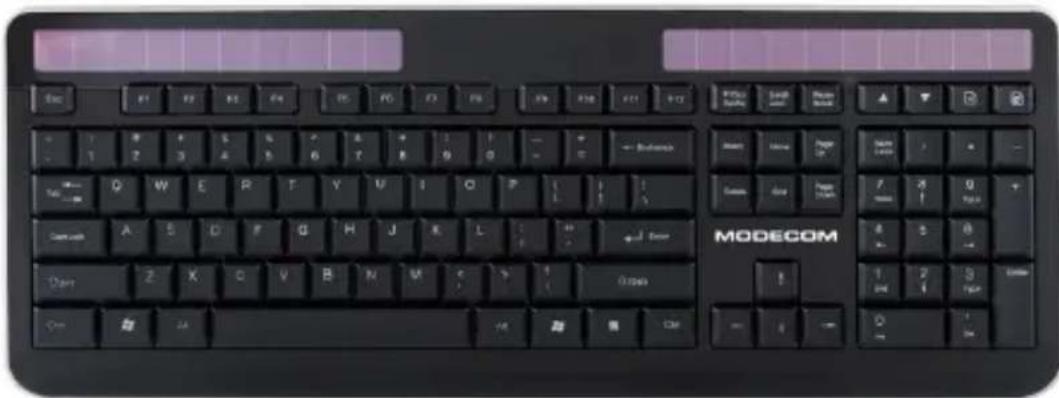
Wireless Solar Keyboard
user's manual
MODECOM
MC-SK1
GB
Wireless Solar Keyboard
Introduction.
MODECOM MC-SK1 Wireless Solar Keyboard is extremely convenient solution for those who look for wireless keyboard device.
Its key feature is the solar power technology that allows to charge the device at all times when there is access to any light source. It allows to prolong the wireless work time and to save the environment by reducing the power taken from external traditional sources. Despite of the solar panels power it can also work without access to light for as long as 3 months.
As the keyboard is equipped with rechargeable li-ion battery you can forget about the typical batteries. Even the battery runs out of power you can easily re-charge it with USB port of your PC to enjoy it for even 6 months of uncompromised freedom.
Keyboard comes with nano type radio receiver working in 2.4GHz frequency band. Because receiver is nano type, you can connect it to your laptop without need to remove it for transportation as it is small enough to leave it in your USB port at all times.
Specification.
• Dimensions: 458.5×172.9×15.9mm
• Number of keys: 108
• Power: Built-In 480mAh Lithium battery
• Net weight: 600g
• Operating frequency: 2.405---2.476 GHz
• Receiver interface: USB
System requirements.
Before proceeding with installation make sure your system fulfils below system requirements.
• Windows 2000/XP/Vista/7 Operating System
• Available free USB port
Installation
Locate available USB port and connect the USB receiver to that port. Set should be automatically detected and installed. Once the installation process is finished set should be ready to use.
MC-SK1
PL
Wireless Solar Keyboard
Wstep.
Wireless Solar Keyboard
Úvod.
Wireless Solar Keyboard
Úvod.
Wireless Solar Keyboard
HU
Bevezetés.
Wireless Solar Keyboard
DE
Einleitung.
Wireless Solar Keyboard
Introducere.
Wireless Solar Keyboard
Вступление.
Wireless Solar Keyboard
Uvod.
MODECOM MC-SK1 Wireless Solar Keyboard je izuzetno pogodno rješenje za one koji traže bežičnu tipkovnicu.
Wireless Solar Keyboard
SI
Uvod.
Environment protection:
This symbol on our product nameplates proves its compatibility with the EU Directive 2002/96 concerning proper disposal of waste electric and electronic equipment (WEEE). By using the appropriate disposal systems you prevent the potential negative consequences of wrong product take-back that can pose risks to the environment and human health. The symbol indicates that this product must not be disposed of with your other waste. You must hand it over to a designated collection point for the recycling of electrical and electronic equipment waste. The disposal of the product should obey all the specific Community waste management legislations. Contact your local city office, your waste disposal service or the place of purchase for more information on the collection. Weight of the device: 600g
Ochrona środowiska:
DEKLARACJA ZGODNOŚCI WE
Nr 08/2012
EN 60950-1:2005 (2nd Edition)
EN 60950-1:2006/A11:2009
Copyright© 2012. MODECOM S.A. All rights reserved. MODECOM Logo is a registered trademark of MODECOM S.A.
MODECOM
Brand : ModeCom
Model : MC-SK1
Category : Keyboard