Professional VJE1412SW 0202 - Vacuum Cleaner Vacmaster - Free user manual and instructions
Find the device manual for free Professional VJE1412SW 0202 Vacmaster in PDF.


| Product Type | Wet and Dry Shop Vacuum |
| Brand | Vacmaster |
| Model | Professional VJE1412SW 0202 |
| Power Supply | 120 V~, 60 Hz |
| Hose Diameter | 2-1/2 in (6.4 cm) |
| Tank Capacity | Not specified (actual tank size) |
| Main Functions | Vacuuming dust, vacuuming liquids, blowing |
| Dry Filter | Cartridge Filter |
| Wet Filter | Foam Filter for Wet Materials |
| Dust Collection Bag | Optional, for fine dust |
| Double Insulation | Yes |
| Warranty | 5 years home use, 90 days commercial use |
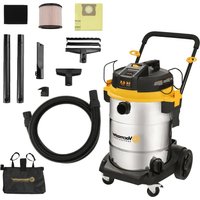
| Box Contents | Vacuum assembly, hose, 2 extension tubes, floor brush/squeegee, crevice tool, multi-purpose tool, foam filter, cartridge filter, caster set, noise diffuser, wheels, tool storage bag, manual |
| Safety | Polarized plug, float valve for liquids, static discharge chain |
| Maintenance and Cleaning | Washable filters, tank drainable via drain plug |
| Spare Parts | Available via Vacmaster.com, parts list with reference numbers in manual |
| Intended Use | Household (commercial use limited to 90 days warranty) |
Frequently Asked Questions - Professional VJE1412SW 0202 Vacmaster
User questions about Professional VJE1412SW 0202 Vacmaster
0 question about this device. Answer the ones you know or ask your own.
Ask a new question about this device
Download the instructions for your Vacuum Cleaner in PDF format for free! Find your manual Professional VJE1412SW 0202 - Vacmaster and take your electronic device back in hand. On this page are published all the documents necessary for the use of your device. Professional VJE1412SW 0202 by Vacmaster.
USER MANUAL Professional VJE1412SW 0202 Vacmaster
14 Gallon / 14 Galones / 53 L
Read and understand this manual before use. Keep this manual for future reference.
POR SU SEGURIDAD
Important Safety Instructions.... 4
Double Insulation Instructions.... 5
Extension Cords.... 6
Symbols.... 6
Unpacking & Checking Carton Contents.... 7
General Assembly Instructions.... 8
Dry Vacuum Operation....10
Liquid Vacuum Operation....11
Blower Operation....12
Maintenance.... 13
Installing & Cleaning Cartridge Filter.... 14
Installing Dust Collection Bag.... 15
Installing & Cleaning Foam Wet Filter.... 15
Troubleshooting....16
Exploded View....17
Parts List 18
Thank you for purchasing this Vacmaster ® wet/dry vacuum cleaner. Feel confident that with Vacmaster ® you are obtaining a high-quality product engineered for optimal performance. This vacuum is capable of picking up liquids and dry materials.

IMPORTANT INFORMATION
GALLONS
"Tank Size" refers to the actual tank volume and does not reflect capacity available during operation.
PEAK HP
"Peak Horsepower" is a term used in the wet-dry vac industry for consumer comparison purposes. It does not denote the operational horsepower output of a wet-dry vac, but rather the horsepower output of a motor, including the motor's inertial contribution, achieved in laboratory testing. In actual use, motors do not operate at the peak horsepower shown.
FOR YOUR SAFETY: CAREFULLY READ AND UNDERSTAND ALL INSTRUCTIONS.
WARRANTY
We take pride in producing a high-quality, durable product. This Vacmaster ® product carries a limited five (5) year warranty against defects in workmanship and materials from date of purchase under normal household use. If product is to be used for commercial, industrial, or rental use, a 90-day limited warranty will apply. Please keep your receipt as proof of purchase. This warranty gives you specific legal rights, which may vary from state to state. For product service call Customer Service at 1-866-384-8432.
Not Covered by Warranty:
- Any part that has become inoperative due to misuse, negligence, direct/indirect abuse, accidents, improper maintenance, repairs, or alterations;
- Consumables such as filters and accessories;
- Normal wear and tear of parts and attachments, such as hose, nozzles, or casters;
- Normal deterioration of the exterior finish due to use or exposure;
- Any product where serial number/data label is tampered with or removed;
- Any product purchased from an unauthorized retailer.
IMPORTANT SAFETY INSTRUCTIONS
READ AND UNDERSTAND ALL INSTRUCTIONS BEFORE USING THIS VACUUM.
Read and understand this operator's manual and all labels on the vacuum cleaner before operating. Safety is a combination of common sense, staying alert and knowing how your vacuum works. Use this vacuum only as described in this manual. To reduce the risk of personal injury or damage to your vacuum, use only manufacturer recommended accessories.
SAVE THIS MANUAL FOR FUTURE REFERENCE
When using a vacuum, basic precautions should always be followed including the following. Failure to follow the warnings and instructions may result in explosion, fire and/or serious injury.

WARNING: TO REDUCE THE RISK OF FIRE, ELECTRIC SHOCK, OR INJURY:
- Do not run vacuum unattended.
- Do not use to pick up flammable or combustible liquids, such as gasoline, or use in areas where they may be present.
- Do not vacuum, or use this vacuum near flammable liquids, gases, or explosive vapors like gasoline or other fuels, lighter fluids, cleaners, oil-based paints, natural gas, hydrogen, or explosive dust like coal dust, magnesium dust, grain dust, or gun powder. Sparks inside the motor can ignite flammable vapors or dust.
- To reduce the risk of health hazards from vapors or dust, do not vacuum toxic materials.
- Do not use or store near hazardous materials.
- Do not pick up anything that is burning or smoking, such as cigarettes, matches, or hot ashes.
- Do not expose to rain. Store indoors.
- If vacuum is not working as it should, has been dropped, damaged, left outdoors, or dropped into water, return it to a service center.
- Do not unplug by pulling on cord. To unplug, grasp the plug, not the cord.
- Do not use with damaged cord or plug.
- Do not pull or carry by cord, use cord as a handle, close a door on cord, or pull cord around sharp edges or corners.
- Keep cord away from heated surfaces.
- Do not run the vacuum over cord.
- Do not handle plug or vacuum with wet hands.
- Do not use without dust bag and/or filters in place.
- Do not allow to be used as a toy. Close attention is necessary when used by or near children.
- To reduce the risk of injury from accidental starting, unplug power cord before changing or cleaning filter.
- Do not leave vacuum when plugged in. Unplug from outlet when not in use and before servicing.
- Turn off all controls before unplugging.
- Unplug before connecting or disconnecting hose, or any other accessories.
- Do not put any object into openings. Do not use with any opening blocked; keep free of dust, lint, hair, and anything that may reduce air flow.
- Keep hair, loose clothing, fingers, and all parts of body away from openings and moving parts.
- Use extra care when cleaning on stairs.
- Use only as described in this manual. Use only manufacturer's recommended attachments.
- This vacuum is provided with double insulation. Use only identical replacement parts. See DOUBLE INSULATION INSTRUCTIONS.

CAUTION: To reduce the risk of injury from moving parts - Unplug before servicing.

WARNING: To reduce the risk of electric shock - Unplug before cleaning or servicing.
When using as blower:
- Direct air discharge only at work area.
- Do not use Wet/Dry Vacuum as a sprayer.
- Do not direct air at bystanders.
- Keep children away when blowing.
- Wear safety goggles.
SAVE THESE INSTRUCTIONS
For Household Use Only
DOUBLE INSULATION INSTRUCTIONS
This Wet/Dry Vacuum is double insulated, eliminating the need for a separate grounding system. Use only identical replacement parts. Read the instructions for Servicing Double-Insulated Wet/Dry Vacuums before servicing. Use this vacuum as described in this manual. Observe the following warnings that appear on the motor housing of your vacuum.

DOUBLE INSULATED - GROUNDING NOT REQUIRED - WHEN SERVICING USE ONLY IDENTICAL REPLACEMENT PARTS.

WARNING: TO REDUCE THE RISK OF ELECTRIC SHOCK - DO NOT EXPOSE TO RAIN. STORE INDOORS.

WARNING: FOR YOUR OWN SAFETY, READ AND UNDERSTAND THE OPERATOR'S MANUAL. DO NOT RUN UNATTENDED. DO NOT PICK UP HOT ASHES, COALS, TOXIC, FLAMMABLE OR OTHER HAZARDOUS MATERIALS. DO NOT USE AROUND EXPLOSIVE LIQUIDS OR VAPORS.

CAUTION: DO NOT VACUUM DRYWALL DUST, FIREPLACE SOOT, OR ASH WITH STANDARD WET/DRY FILTER. THIS TYPE OF DUST IS VERY FINE WHICH MAY NOT BE CAPTURED BY THE FILTER AND CAUSE DAMAGE TO MOTOR. WHEN VACUUMING FINE DUST USE A FINE DUST FILTER.

WARNING: SERVICING OF DOUBLE-INSULATED WET/DRY VACUUM WITH A DOUBLE-INSULATED WET/DRY VACUUM, TWO SYSTEMS OF INSULATION ARE PROVIDED INSTEAD OF GROUNDING. NO GROUNDING MEANS IS PROVIDED ON A DOUBLE-INSULATED APPLIANCE, NOR SHOULD A MEANS FOR GROUNDING BE ADDED. SERVICING A DOUBLE-INSULATED WET/DRY VACUUM REQUIRES EXTREME CARE AND KNOWLEDGE OF THE SYSTEM AND SHOULD BE DONE ONLY BY QUALIFIED SERVICE PERSONNEL. REPLACEMENT PARTS FOR A DOUBLE-INSULATED WET/DRY VACUUM MUST BE IDENTICAL TO THE PARTS THEY REPLACE. YOUR DOUBLE-INSULATED WET/DRY VAC IS MARKED WITH THE WORDS 'DOUBLE INSULATED' AND THE SYMBOL (SQUARE WITHIN A SQUARE) MAY ALSO BE MARKED ON THE APPLIANCE.
EXTENSION CORDS
When using an extension cord with your Wet/Dry Vacuum refer to the following table to determine the required A.W.G. wire size. Before using the cleaner make sure the power cord and extension cord are in good working condition. Make repairs or replacements before using the vacuum cleaner. Only use extension cords that are rated for outdoor use.
| Length of Extension Cord | |||||
| 120V 25ft (7.62m) | 50ft (15.24m) | 100ft (30.48m) | 150ft (45.72m) | ||
| Ampere rating | A.W.G. Wire Size | ||||
| More than Not more than | |||||
| 0 6 18 16 16 14 | |||||
| 6 | 1 | 0 | 1 | 8 | 1 |
| 10 12 | 16 16 14 12 | ||||
| 12 16 | 14 12 | Not recommended | |||
SYMBOLS
| The following signal words and meanings are intended to explain the levels of risk associated with this product. | ||
| SYMBOL | SIGNAL | MEANING |
 | DANGER | Indicates an imminently hazardous situation, which, if not avoided, will result in death or serious injury. |
 | WARNING | Indicates a potentially hazardous situation, which, if not avoided, could result in death or serious injury. |
 | CAUTION | Indicates a potentially hazardous situation, which, if not avoided, may result in minor or moderate injury. |
| NOTICE | (Without Safety Alert Symbol) Indicates a situation that may result in property damage. | |
UNPACKING & CHECKING CARTON CONTENTS
A
B
C
D
E

F
G

H
1

J


L


N

0
P

Q
R

S


W

U
V

Remove all contents from the box. Remove the powerhead and take out any contents inside the collection tank. Check each item against the carton contents list.
Carton Contents List:
Key Description......Qty.
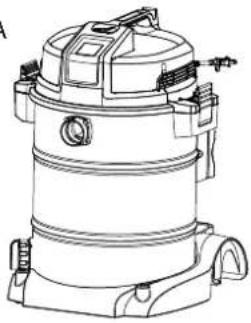
A Vacuum Assembly 1
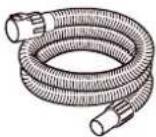
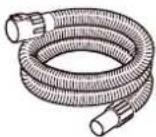
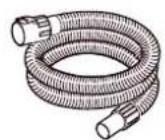
B Hose 1
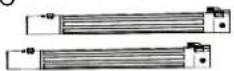
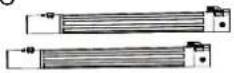
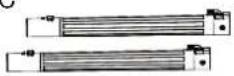
C Locking Extension Wand 2
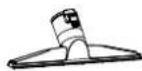
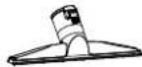
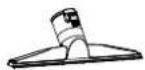
D Locking Floor/Brush Squeegee Nozzle . 1
E Locking Crevice Tool 1
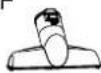
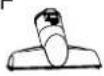
F Locking Utility Nozzle 1
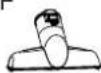
G Foam Wet Filter 1
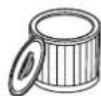
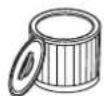
H Cartridge Filter 1
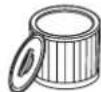
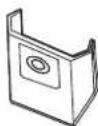
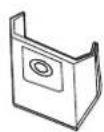
I Hose Storage Rack 2
J MNoise Diffuser 1
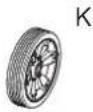
K Front Caster....2
L Washer 4
M Rear Wheel....2
N Hub Cap 2
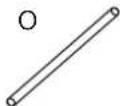
O Wheel Axle....1
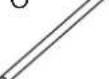
P 'R' (Lock Pin) 2
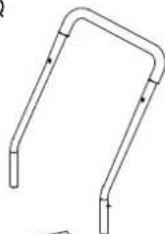
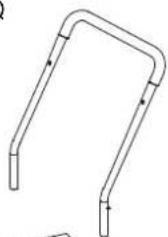
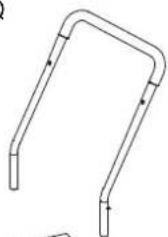
Q Push/Pull Handle 1
R Cord Wrap Hook 2
S Bolt 2
T 8 Screws (Bag)....1
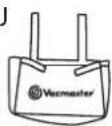
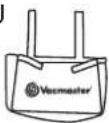
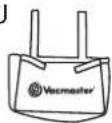
U Tool Storage Bag 1
V Dust Collection Bag 1
W Operator's Manual 1
NOTE: The hose and accessories for this vacuum are 2-1/2" (64mm) diameter.
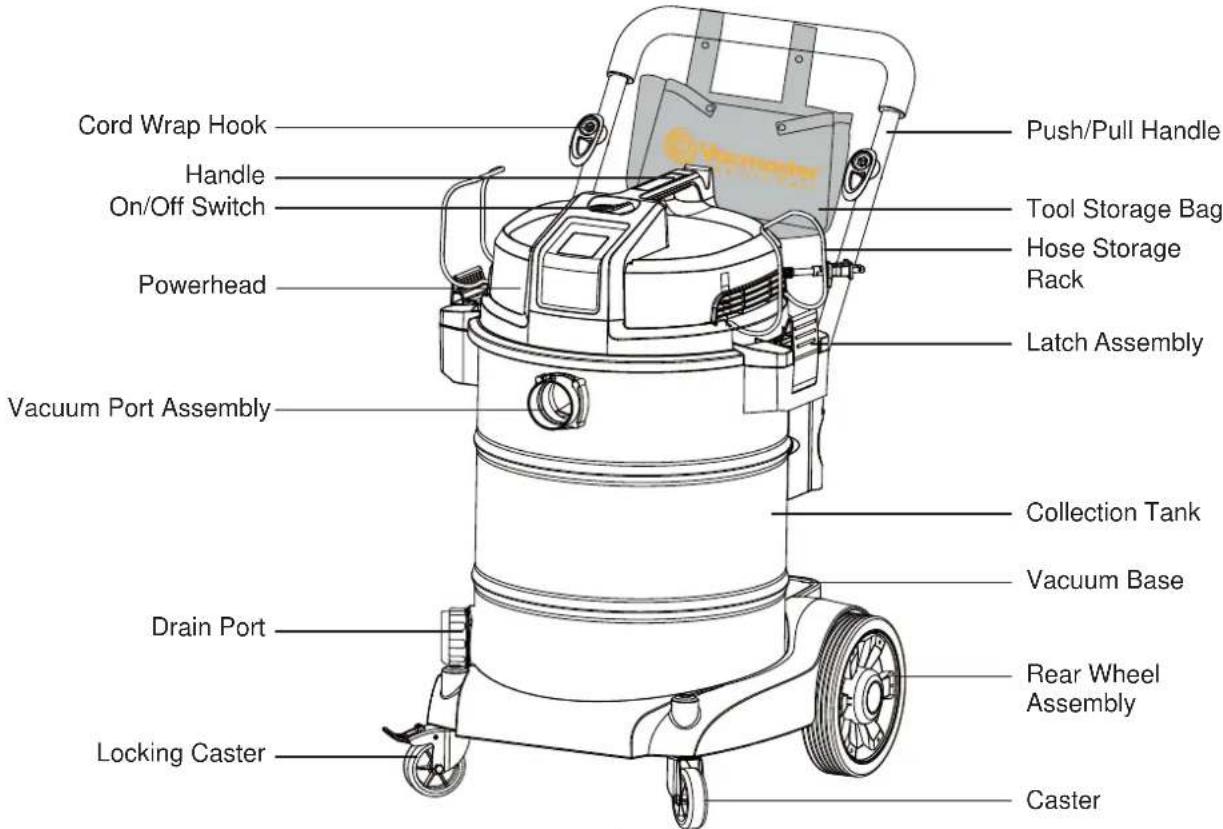
GENERAL ASSEMBLY INSTRUCTIONS
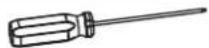
A Phillips head screwdriver is required.


WARNING: DO NOT PLUG THE POWER CORD INTO A POWER OUTLET. MAKE SURE THE PLUG IS DISCONNECTED BEFORE ASSEMBLING THE WET/DRY VACUUM. TO REDUCE THE RISK OF ELECTRIC SHOCK, DO NOT EXPOSE TO RAIN.
UNPACKING YOUR WET/DRY VACUUM & GENERAL ASSEMBLY
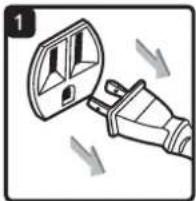
- Verify that the power cord is disconnected from the outlet (Fig. 1).
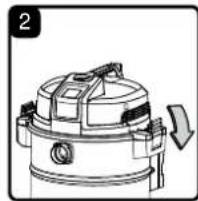
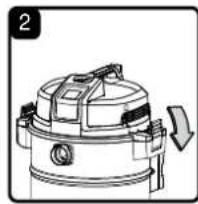
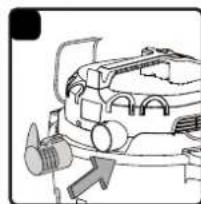
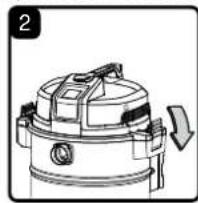
- Undo the latches (Fig. 2).
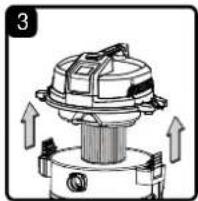
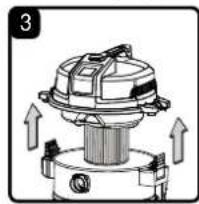
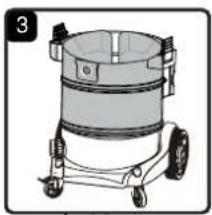
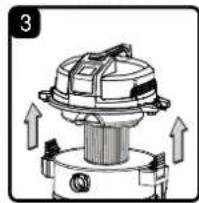
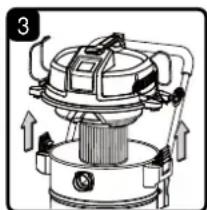
- Lift the powerhead off the collection tank (Fig. 3).
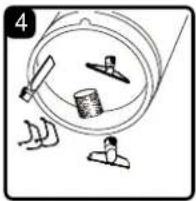
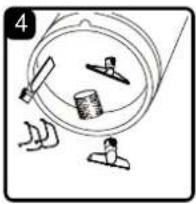
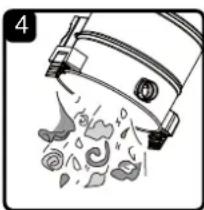
- Remove the contents from inside the collection tank. Make sure you have all contents as listed on page 7 (Fig. 4).
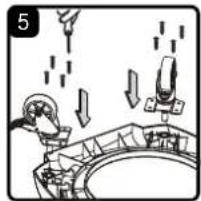
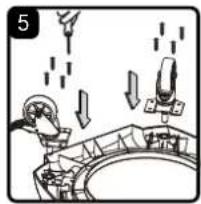
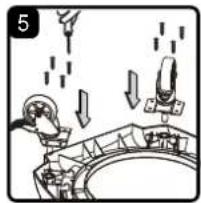
- Turn the collection tank on its side and insert the two casters into the sockets on the bottom of the base and tighten with supplied screws. Verify that the casters are mounted correctly. Do not over-tighten screws (Fig. 5).
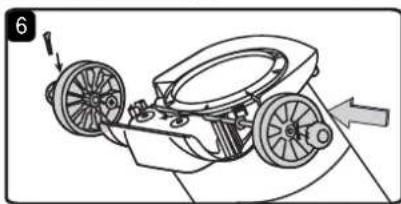
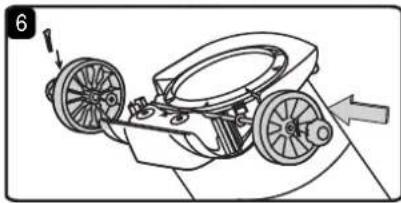
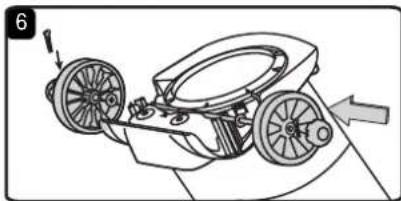
- Insert the wheel axle into the rear wheel housing on the vacuum base. Insert a washer onto the axle followed by a rear-wheel and insert another washer. Insert the locking pin into the hole on the end of the axle to lock the wheel. Snap the hub cap onto the wheel. Repeat the same steps at the other end of the axle (Fig. 6).
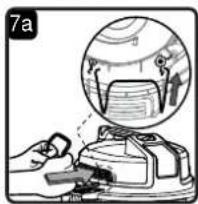
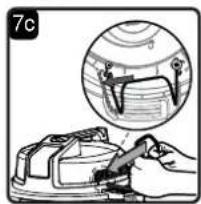
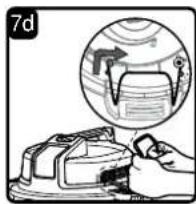
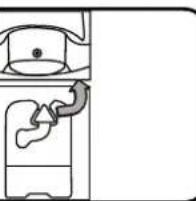
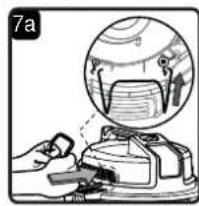
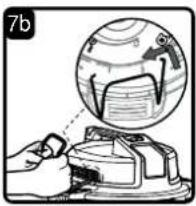
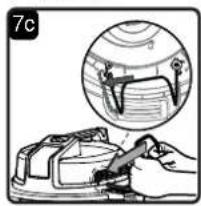
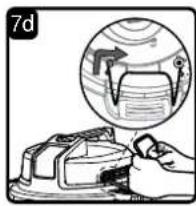
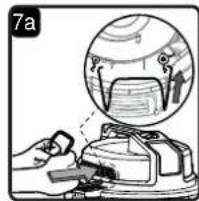
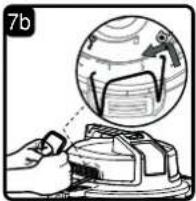
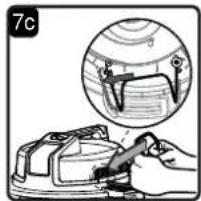
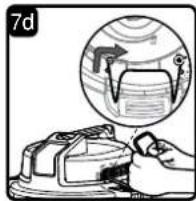
- Position the hose storage rack as illustrated. Fully insert one end of the hose storage rack into the slot illustrated by the arrow, then pull the other end of the hose storage rack to align with the corresponding arrow and insert into the slot until it is secured in place (Fig. 7a - 7d).
NOTE: Hose storage rack may come pre-installed on some models.
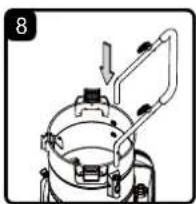
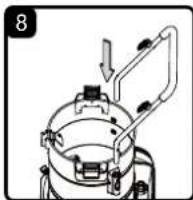
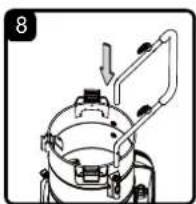
- Insert the push/pull handle into the handle socket mounted on the tank body. Push down until the lock pin clicks in place (Fig. 8).
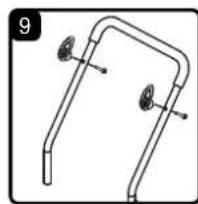
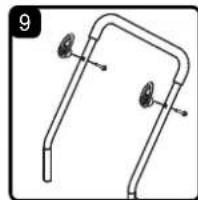
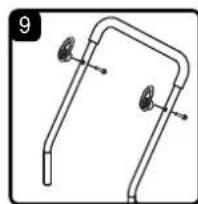
- Align the two cord wrap hooks with the mounting holes on the push/pull handle, and secure the hooks onto the handle with supplied bolts (Fig. 9).
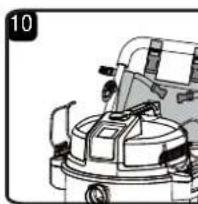
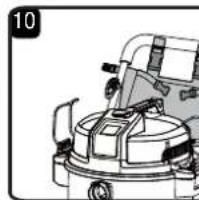
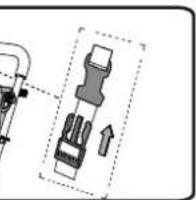
- For convenient accessory storage, install the tool storage bag onto the push/pull handle. Attach the tool storage bag onto the handle as shown (Fig. 10).
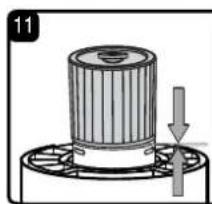
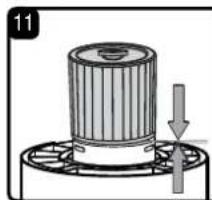
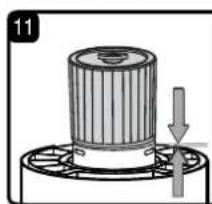
- Your vacuum comes ready for dry vacuum cleaning. If the cartridge filter is not installed, refer to page 14 for installation instructions (Fig. 11).
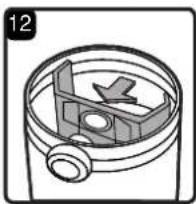
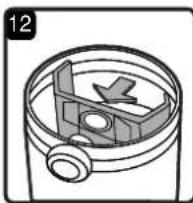
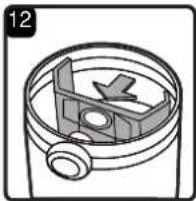
- Optional: For improved dust filtration, fit the dust bag flange onto the inlet port, taking care not to damage the bag. For installation instructions, see page 15 (Fig. 12).
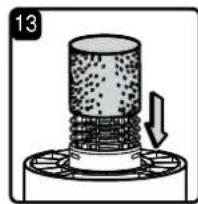
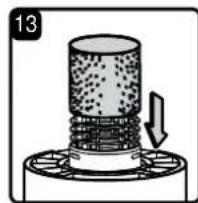
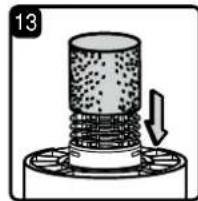
- For wet vacuum cleaning, remove the cartridge filter, and install the supplied foam wet filter. See page 15 for the foam wet filter installation instructions (Fig. 13).
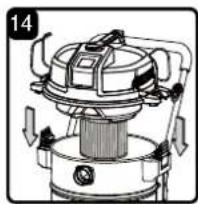
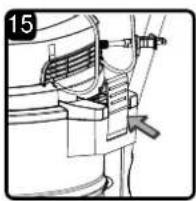
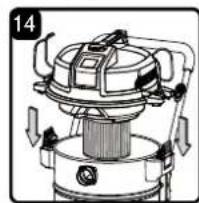
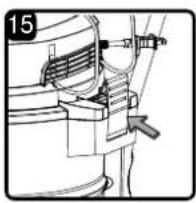
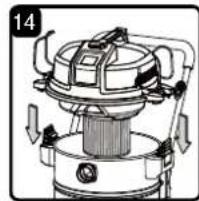
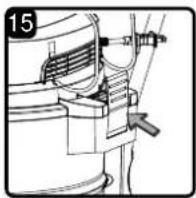
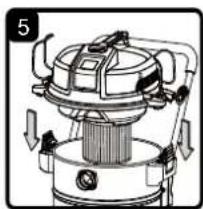
- Place the powerhead back on the collection tank and secure into place using the latches (Fig. 14 & 15).
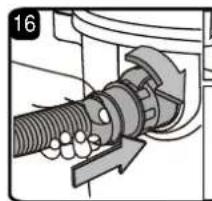
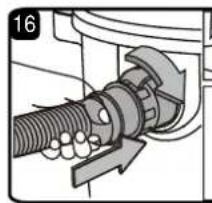
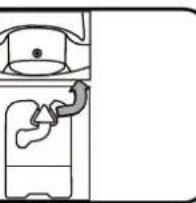
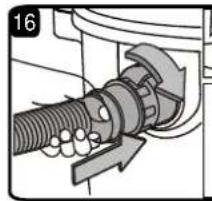
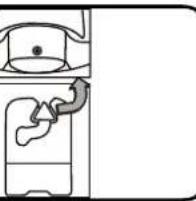
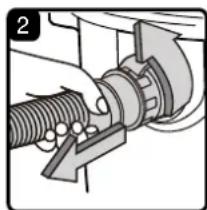
- Insert the locking end of the hose into the vacuum port on the collection tank and turn to lock into place (Fig. 16).
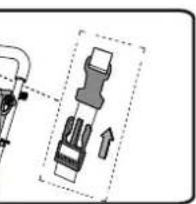
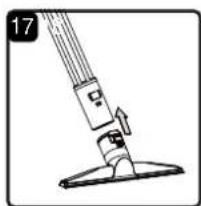
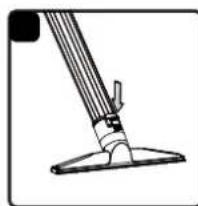
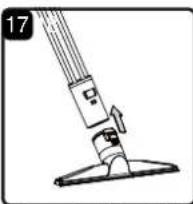
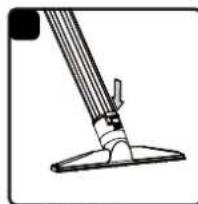
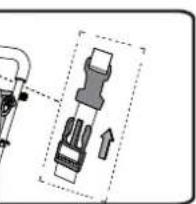
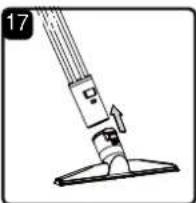
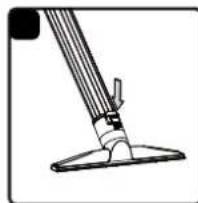
- The included attachments lock together to prevent them from detaching during use. Connect the desired attachment onto the end of the hose or extension wand by aligning the tabs and push together until they lock into place (Fig. 17). To remove the attachment, press down on the locking tab and slide it off (Fig. 18).
Note that a static discharge chain is attached to the bottom of the tank. It is normal for this chain to drag on the ground. Operating the vacuum in dry conditions can build up static, and the chain helps dissipate any build-up by allowing it a path of least resistance to the ground.
NOISE DIFFUSER
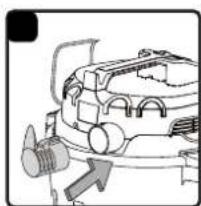
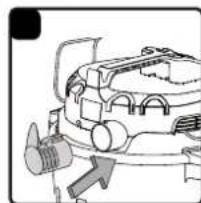
For quiet operation during vacuuming, install the noise diffuser into the blower port by inserting the locking end of the diffuser into the blower port and turning clockwise to lock into place (Fig. 19).
POLARIZED PLUG
To reduce the risk of electrical shock, this appliance has a polarized plug (one blade wider than the other). This plug will fit in a polarized outlet only one way. If the plug does not fit fully in the outlet, reverse the plug. If it still does not fit, contact a qualified electrician to install the proper outlet.
Do not change the plug in any way. Double insulation ☐ eliminates the need for the three-wire grounded power cord and grounded power supply system.

DRY VACUUMING

WARNING: BE SURE TO READ, UNDERSTAND, AND APPLY INFORMATION ENTITLED "IMPORTANT SAFETY INSTRUCTIONS". DO NOT VACUUM IN AREAS WITH FLAMMABLE GASES, VAPORS, OR EXPLOSIVE DUST IN THE AIR. FLAMMABLE GASES OR VAPORS INCLUDE BUT ARE NOT LIMITED TO: LIGHTER FLUID, SOLVENT TYPE CLEANERS, OIL-BASED PAINTS, GASOLINE, ALCOHOL, OR AEROSOL SPRAYS. EXPLOSIVE DUST INCLUDE BUT ARE NOT LIMITED TO: COAL, MAGNESIUM, GRAIN, OR GUN POWDER. TO REDUCE THE RISK OF HEALTH HAZARDS FROM VAPORS OR DUST, DO NOT VACUUM TOXIC MATERIALS.

WARNING: DO NOT PLUG THE POWER CORD INTO A POWER OUTLET. MAKE SURE THE PLUG IS DISCONNECTED BEFORE CHANGING THE FILTERS.

CAUTION: DO NOT VACUUM DRYWALL DUST, FIREPLACE SOOT, OR ASH WITH STANDARD WET/DRY FILTER. THIS IS A VERY FINE DUST WHICH WILL NOT BE CAPTURED BY THE FILTER AND MAY CAUSE DAMAGE TO MOTOR. WHEN VACUUMING FINE DUST USE A FINE DUST FILTER (INCLUDED).
- Verify that the power cord is disconnected from the outlet (Fig. 1).
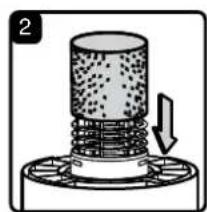
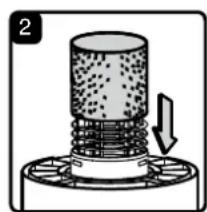
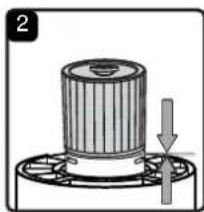
- In order to prepare your vacuum for dry vacuuming, make sure the cartridge filter completely covers the filter cage against the powerhead. Your wet/dry vacuum comes with the cartridge filter pre-installed. For installation instructions, see page 14 (Fig. 2).
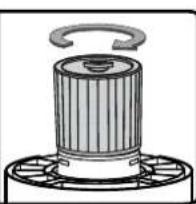
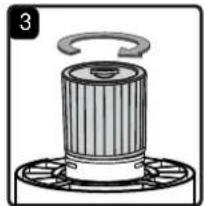
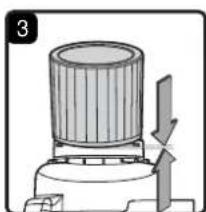
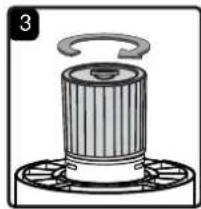
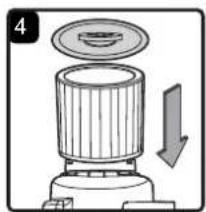
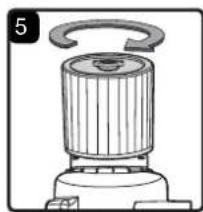
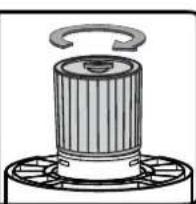
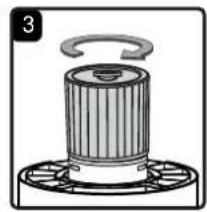
- Place the filter retainer on the top of the cartridge filter and tighten down by turning the retainer handle clockwise (Fig. 3).
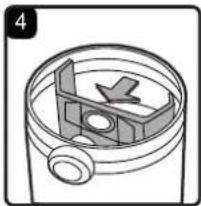
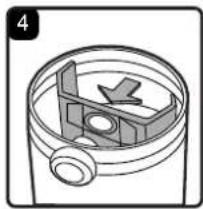
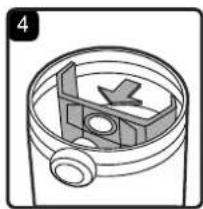
- Optional: For improved dust filtering, fit the dust bag flange onto the inlet port, taking care not to damage the bag. For installation instructions, see page 15 (Fig. 4).
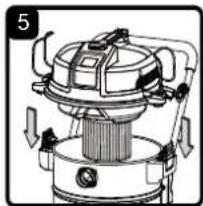
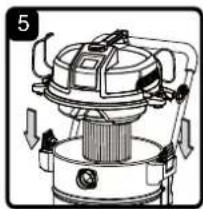
- Place the powerhead back on the collection tank and secure it in place using the latches (Fig. 5).
OPERATING INSTRUCTIONS: DRY VACUUMING
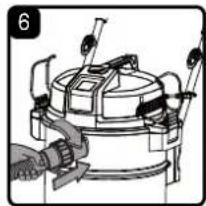
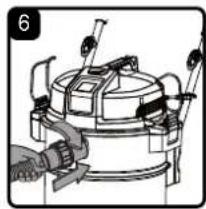
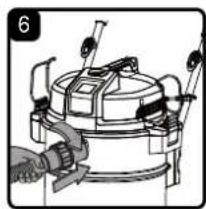
- Insert the locking end of the hose into the vacuum port on the collection tank and lock into place (Fig. 6).
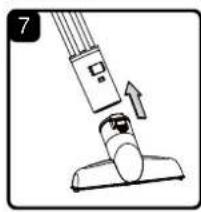
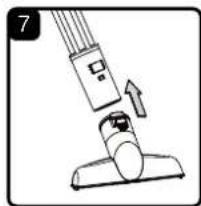
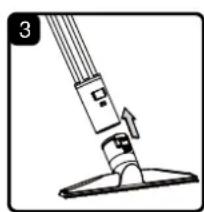
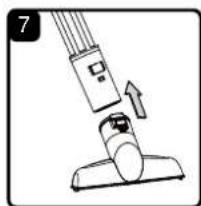
- The included attachments lock together to prevent them from detaching during use. Connect the desired attachment onto the end of the hose or extension wand by aligning the tabs and push together until they lock into place (Fig. 7)
-
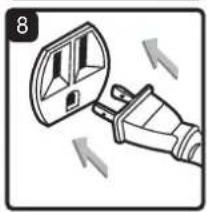
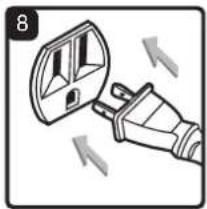
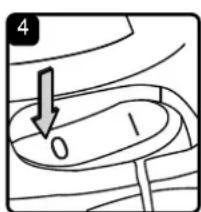
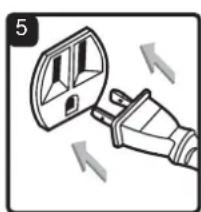
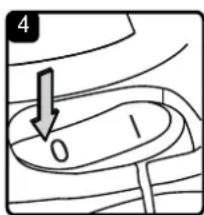
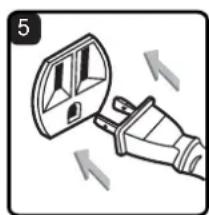
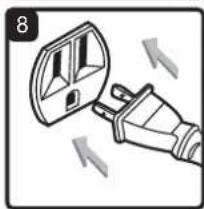
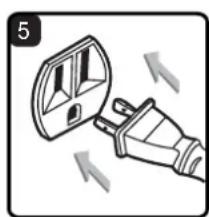
Verify that the switch is in the 'O' OFF position before plugging the power cord into the outlet. Plug the power cord into the outlet (Fig. 8).
-
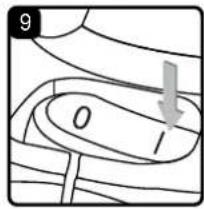
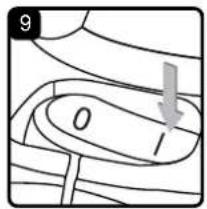
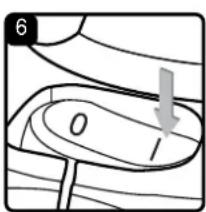
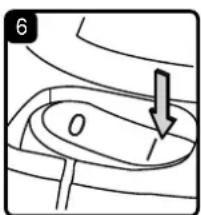
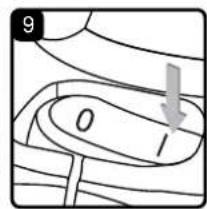
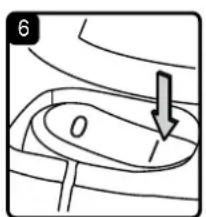
Turn the vacuum on by flipping the switch to the 'I' ON position and begin vacuuming (Fig. 9).
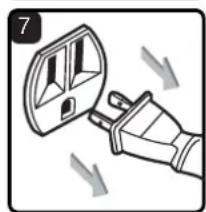
- Once you have completed vacuuming, flip the on/off switch to the 'O' OFF position and unplug the power cord from the outlet.
O = OFF I = ON
DO NOT USE THE CARTRIDGE FILTER FOR LIQUID VACUUMING. DO NOT USE THE DUST BAG FOR LIQUID VACUUMING.
LIQUID VACUUMING

WARNING: BE SURE TO READ, UNDERSTAND, AND APPLY INFORMATION ENTITLED "IMPORTANT SAFETY INSTRUCTIONS". DO NOT VACUUM IN AREAS WITH FLAMMABLE GASES, VAPORS, OR EXPLOSIVE DUST IN THE AIR. FLAMMABLE GASES OR VAPORS INCLUDE BUT ARE NOT LIMITED TO: LIGHTER FLUID, SOLVENT TYPE CLEANERS, OIL-BASED PAINTS, GASOLINE, ALCOHOL, OR AEROSOL SPRAYS. EXPLOSIVE DUST INCLUDE BUT ARE NOT LIMITED TO: COAL, MAGNESIUM, GRAIN, OR GUN POWDER. TO REDUCE THE RISK OF HEALTH HAZARDS FROM VAPORS OR DUST, DO NOT VACUUM TOXIC MATERIALS.

WARNING: DO NOT PLUG THE POWER CORD INTO A POWER OUTLET. MAKE SURE THE PLUG IS DISCONNECTED BEFORE CHANGING THE FILTERS.
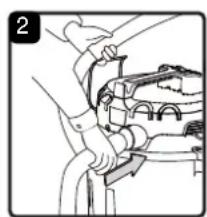
- Verify that the power cord is disconnected from the outlet. Make sure that the collection tank is clean and free of dust and dirt (Fig. 1).
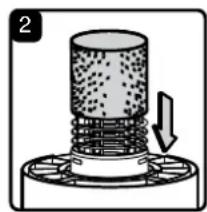
- Remove the cartridge filter, then carefully install the foam wet filter over the filter cage and place the powerhead back on the collection tank. For foam wet filter installation instructions, see page 15 (Fig. 2).
DO NOT USE THE CARTRIDGE FILTER OR DUST COLLECTION BAG FOR LIQUID VACUUMING.
OPERATING INSTRUCTIONS: WET VACUUMING
-
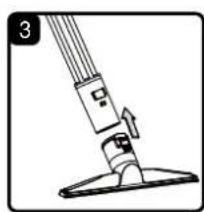
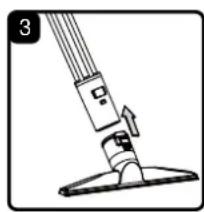
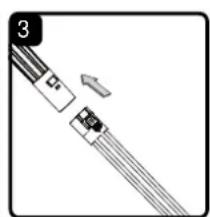
The included attachments lock together to prevent them from detaching during use. Connect the desired attachment onto the end of the hose or extension wand by aligning the tabs and push together until they lock into place (Fig. 3).
-
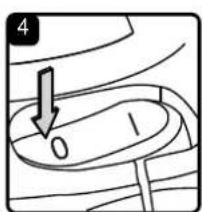
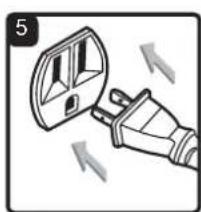
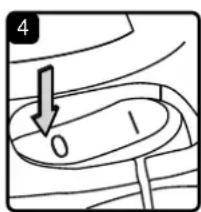
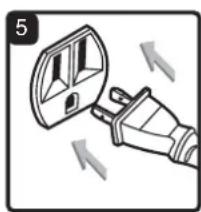
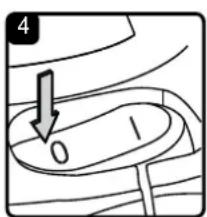
Verify that the on/off switch is in the 'O' OFF position before plugging the power cord into the power outlet. Plug the power cord into the outlet (Fig. 4 & 5).
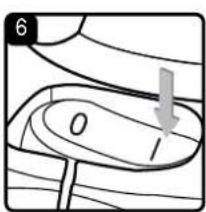
- Turn the vacuum on by flipping the switch to the 'I' ON position and begin vacuuming (Fig. 6).
- Once you have completed vacuuming, flip the on/off switch to the 'O' OFF position and unplug the power cord from the outlet.
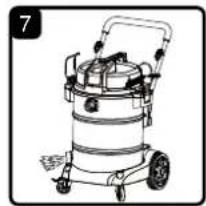
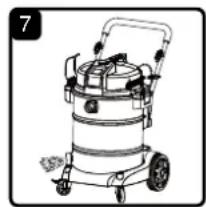
- After use, empty the collection tank by unscrewing the drain cap. Drain liquids into a suitable receptacle or drain. Remember to refit the drain cap to the collection tank (Fig. 7).
IMPORTANT! When vacuuming large quantities of liquids, do not immerse the nozzle completely in the liquid; leave a gap at the tip of the nozzle opening to allow air inflow. The machine is fitted with a float valve that stops the suction action when the collection tank reaches its maximum capacity. You will notice an increase in motor speed. When this happens, turn off the machine, disconnect from power supply, and drain the liquid into a suitable receptacle or drain. To continue vacuuming, refit the collection tank with the drain cap. After wet vacuuming, turn the machine off and remove plug from power supply. Empty the collection tank, clean, and dry the inside and outside before storage.
REMEMBER! The foam wet filter must be removed after wet vacuuming and the cartridge filter must be installed before dry vacuuming again.
BLOWER OPERATION
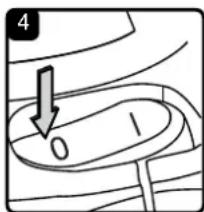
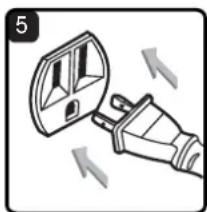
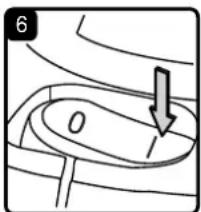
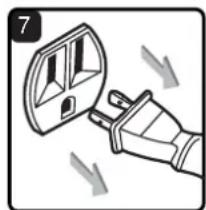
This Wet/Dry vacuum has blowing capabilities. To use the blower feature, follow the instructions listed below.

WARNING: ALWAYS WEAR SAFETY GOGGLES COMPLYING WITH ANSI Z87.1 (OR IN CANADA, CSAZ94.3) BEFORE USING BLOWER.

CAUTION: KEEP BYSTANDERS CLEAR FROM BLOWING DEBRIS.

WARNING: WEAR A DUST MASK IF BLOWING CREATES DUST THAT MIGHT BE INHALED.
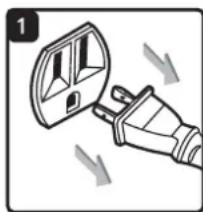
- Verify that the power cord is disconnected from the outlet (Fig. 1).
- Make sure the collection tank is empty before using as a blower. Clear all dirt and debris from the hose and collection tank.
- Remove the hose from the vacuum port. Remove noise diffuser from blower port.
-
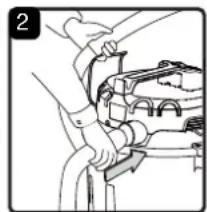
Insert the locking end of the hose into the blower port on the back side of the powerhead and lock into place (Fig. 2).
-
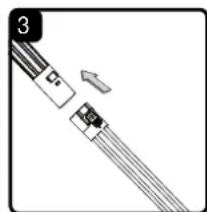
The included attachments lock together to prevent them from detaching during use. Connect the desired attachment onto the end of the hose or extension wand by aligning the tabs and push together until they lock into place (Fig. 3)
- Verify that the switch is in the 'O' OFF position before plugging the power cord into the power outlet. Plug the power cord into the outlet (Fig. 4 & 5).
- Before turning on the vacuum, firmly hold the loose end of the hose. Turn the vacuum on by flipping the switch to the 'I' ON position (Fig. 6).
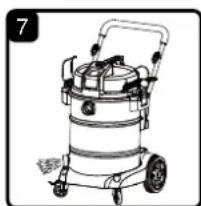
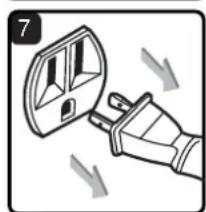
- Once you have completed blowing, flip the on/off switch to the 'O' OFF position and unplug the power cord from the outlet (Fig. 7).
MAINTENANCE
EMPTYING THE COLLECTION TANK

WARNING: ALWAYS DISCONNECT THE PLUG FROM THE POWER OUTLET BEFORE REMOVING THE POWERHEAD FROM THE COLLECTION TANK.
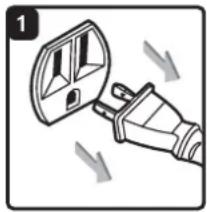
- Verify that the power cord is disconnected from the outlet (Fig. 1).
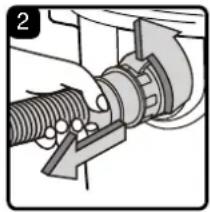
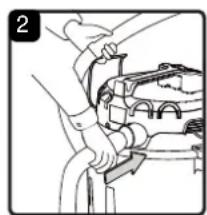
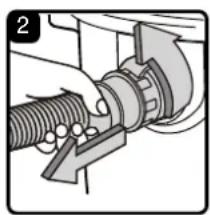
- Disconnect the hose from the vacuum (Fig. 2).
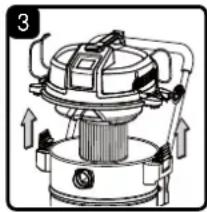
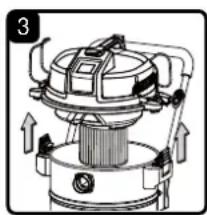
- Undo the latches and remove the powerhead from the collection tank (Fig. 3). Place the powerhead on a soft, clean surface upside down.
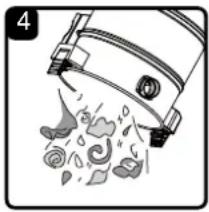
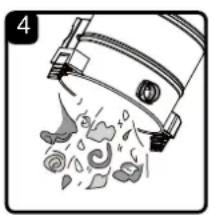
- Clear all dirt or debris from the collection tank and hose into a proper waste container (Fig. 4).
- Clean or replace the filters.
- Check the hose, accessories, and power cord to ensure that they have not been damaged.
- Place the powerhead back onto the collection tank and secure latches.
IMPORTANT! Clean or change the cartridge filter regularly for best performance. ALWAYS USE THE CARTRIDGE FILTER FOR DRY VACUUMING. If the machine is used without the cartridge filter, the motor will burn out and the warranty will be voided. Always keep spare filters on hand.
NOTICE! The filters included are made of high-quality materials designed to stop small dust particles. The cartridge filter should be used for dry pick-up only. A dry cartridge filter is necessary to pick up dust. If the cartridge filter is wet, it will clog quickly and be very difficult to clean. Handle the filter carefully when removing it for cleaning and replacing it. Check the filters for tears or small holes. A small hole can let dust pass through and out of the filter. Do not use a filter with holes or tears; replace it immediately.
STORAGE
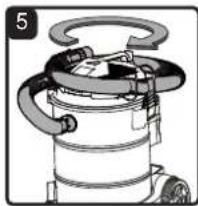
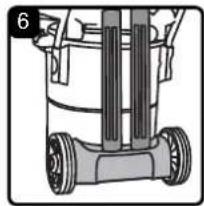
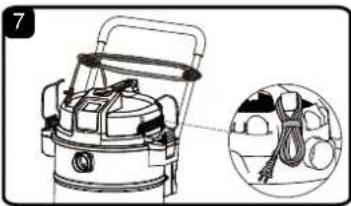
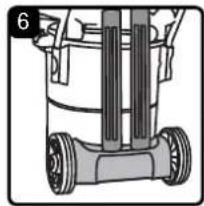
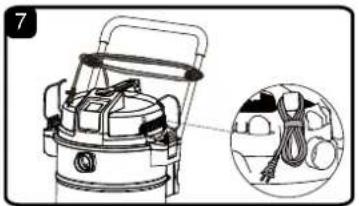
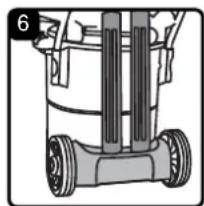
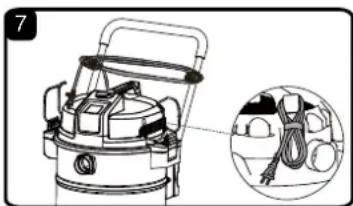
Before storing your vacuum, the collection tank should be emptied and cleaned. The cord should be wrapped then hung on the hook of the carry handle or wrapped around the cord hooks on the push/pull handle. The hose and accessories should be stored as illustrated so they can be readily available when needed (Fig. 5 - 7). Store the wet/dry vacuum indoors.
REPAIRS
Repairs for this wet/dry vacuum should be performed only by qualified service personnel using only identical replacement parts.
INSTALLING & CLEANING CARTRIDGE FILTER

INSTALLING CARTRIDGE FILTER
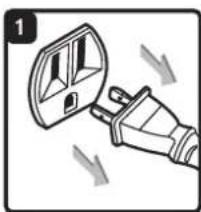
- Verify that the power cord is disconnected from the outlet (Fig. 1).
- Remove the powerhead and place in an upside-down position.
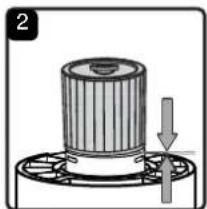
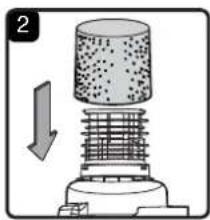
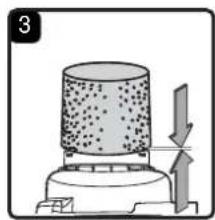
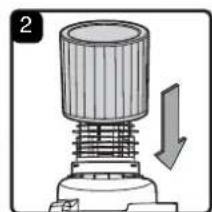
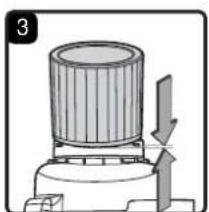
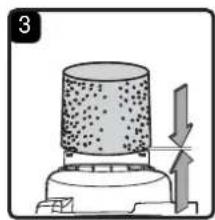
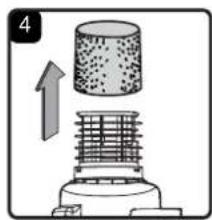
- Install the cartridge filter over the filter cage making sure the cage is completely covered (Fig. 2 & 3).
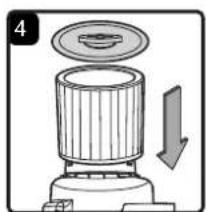
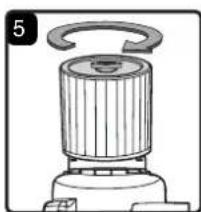
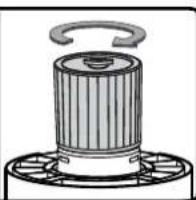
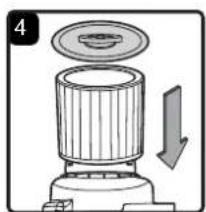
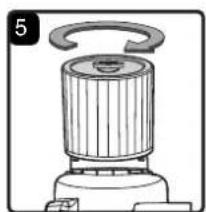
- Place the filter retainer on the top of the cartridge filter over the raised lip and tighten down by turning the retainer clockwise; do not over-tighten (Fig. 4 & 5).
- Place the powerhead back onto the collection tank.
REMOVING & CLEANING CARTRIDGE FILTER
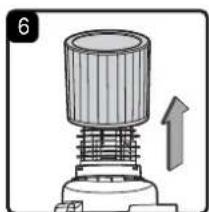
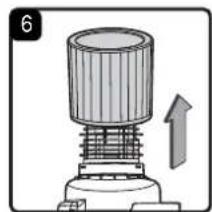
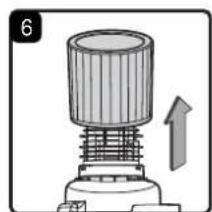
- Unlock and remove the filter retainer by turning the retainer handle counterclockwise.
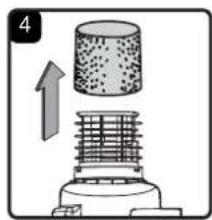
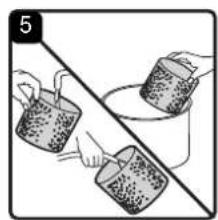
- With the removed powerhead in an upside-down position, carefully remove the cartridge filter from the filter cage (Fig. 6).
- Clean the cartridge filter by gently tapping or brushing dirt off. Cleaning should not be done indoors in living areas. For optimal performance, a new filter is recommended.
- Install cleaned or new filter as above in steps 2-4 of Installing Cartridge Filter.
INSTALLING DUST COLLECTION BAG
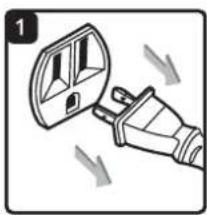
- Verify that the power cord is disconnected from the outlet (Fig. 1).
- Remove the powerhead and place in an upside-down position.
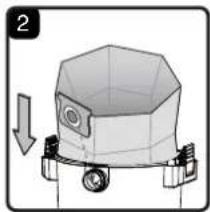
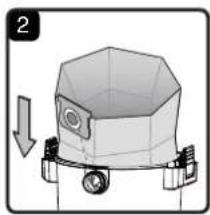
- Slide the cardboard dust bag flange onto inlet port until it stops (Fig. 2).
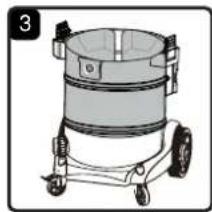
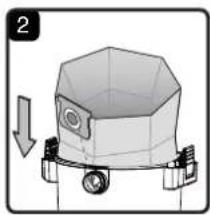
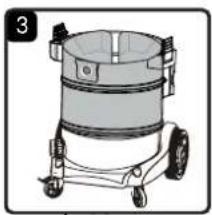
- Unfold the dust bag so that it is evenly distributed around the inside of the tank (Fig. 3).
- Place the powerhead back onto the collection tank.
INSTALLING & CLEANING FOAM WET FILTER

INSTALLING FOAM WET FILTER
- Verify that the power cord is disconnected from the outlet (Fig. 1).
- Remove the powerhead and place in an upside-down position. Follow instructions to remove the cartridge filter on page 14.
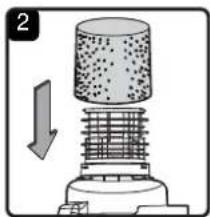
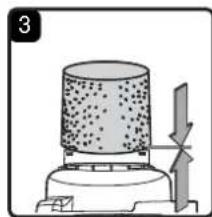
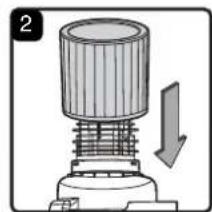
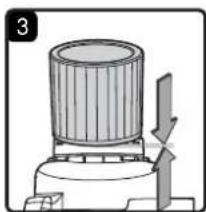
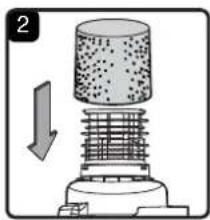
- Carefully slide the foam wet filter down over the filter cage making sure the cage is completely covered (Fig. 2 & 3).
- Place the powerhead back onto the collection tank.
CLEANING FOAM WET FILTER
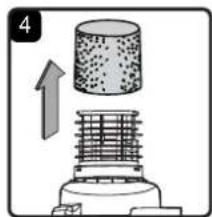
- With the removed powerhead in an upside-down position, carefully remove the foam wet filter (Fig. 4).
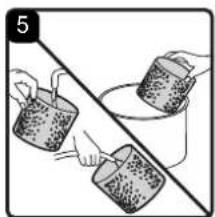
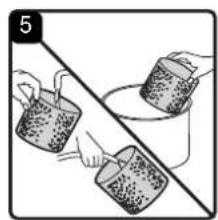
- Use a mild soap and water solution to wash the foam wet filter and rinse with clean water (Fig. 5).
- Allow the wet filter to air dry completely before storing or installing onto the filter cage.
TROUBLESHOOTING

WARNING: TO REDUCE THE RISK OF ELECTRIC SHOCK, UNPLUG BEFORE TROUBLESHOOTING.
| PROBLEM POSSIBLE CAUSE SOLUTION | ||
| The wet/dry vacuum will not operate. | No power supply. | Check the power supply, cord, breakers, and fuses. |
| Faulty power cord. | Unplug and check the power cord. If damaged, have it repaired by a professional. | |
| Collection tank is full. Empty the collection tank. | Press the ON ‘I’ button on the powerhead. | |
| Switch in the wrong position. | ||
| The dust comes out from the motor cover. | The cartridge filter is missing or damaged. | Attach or replace the cartridge filter. |
| Vacuum has been used to collect fine dust, such as dry wall dust, fireplace soot, or ash, without a fine dust filter. | Remove the standard cartridge filter and install the appropriate fine dust cartridge filter. | |
| Reduced efficiency and motor/speed vibration. | There are blockages in the nozzle, or hose, or the collection tank inlets. | Unplug and check nozzle, hose, and collection tank inlets for blockages. |
| The cartridge filter is clogged by fine dust. | Take off the filter and clean it or install a new cartridge filter. | |
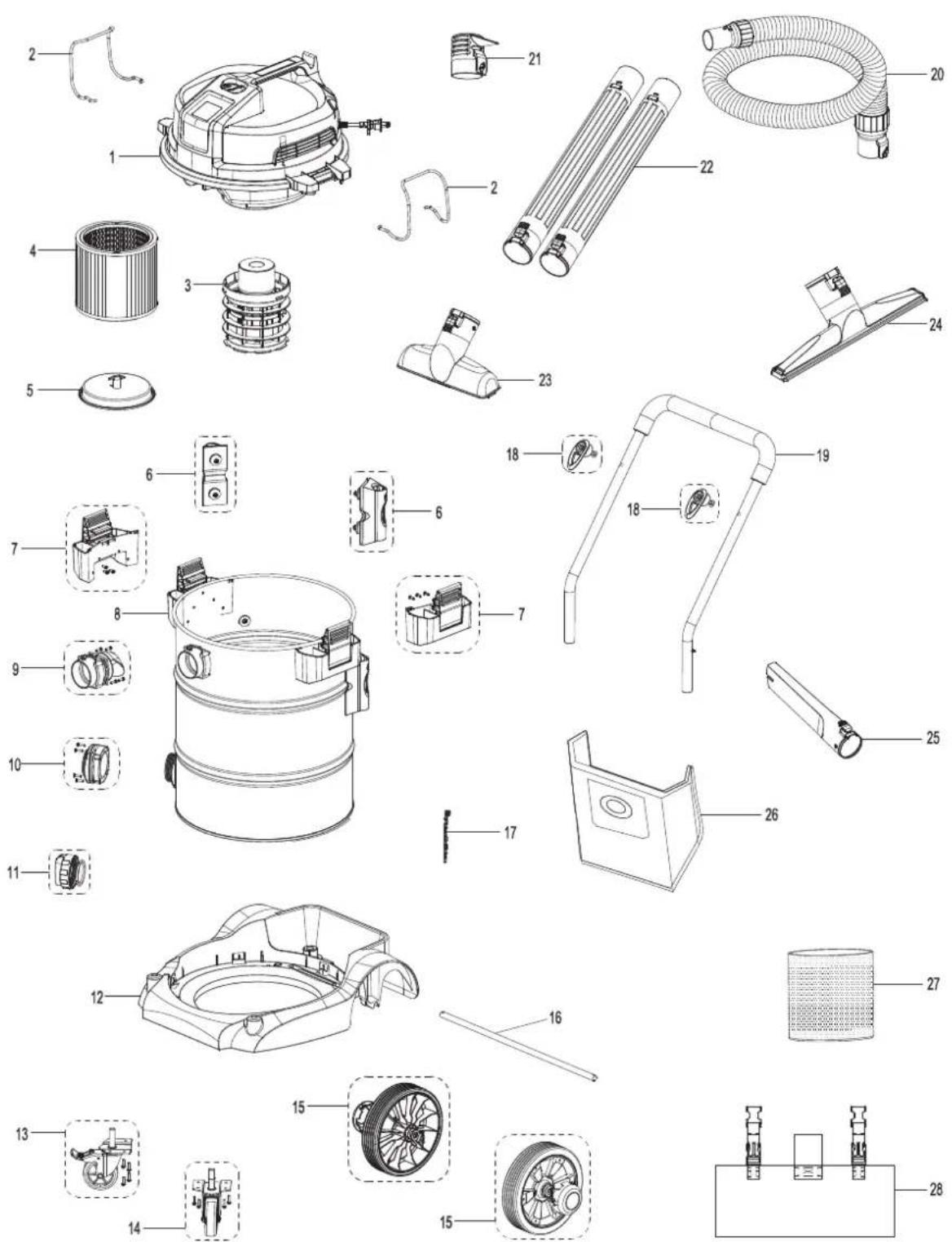
EXPLODED VIEW
PARTS LIST
| Part | Part Number | Description | Quantity | |
| 1 Powerhead Assembly 1 | ||||
| 2 55 | 1006102 Hose Storage Rack 2 | |||
| 3 55 | 1120118 Filter Cage 1 | |||
| 4 55 | 1254103 Cartridge Filter 1 | |||
| 5 55 | 1437107 Filter Retainer 1 | |||
| 6 55 | 1645102 Push/Pull Handle | Receiver | 2 | |
| 7 | 551741102 Latch Assembly | 2 | ||
| 8 Collection Tank | 1 | |||
| 9 55 | 1016105 Vacuum Port Assembly | 1 | ||
| 10 | 551271102 Drain Assembly | 1 | ||
| 11 | 551002110 Drain Cap | 1 | ||
| 12 | 551113107 Vacuum Base | 1 | ||
| 13 | 551008123 Locking Caster Assembly | 1 | ||
| 14 | 551044118 Caster Assembly | 1 | ||
| 15 | 551061108 Rear Wheel Assembly | 2 | ||
| 16 | 551034112 Wheel Axle | 1 | ||
| 17 | 551152114 Static Discharge Chain | 1 | ||
| 18 | 551303105 Cord Wrap Hook Assembly | 2 | ||
| 19 | 551061107 Push/Pull Handle Assembly | 1 | ||
| 20 | 551736103 Hose | 1 | ||
| 21 | 551002117 Noise Diffuser | 1 | ||
| 22 | 551736104 Locking Extension Wand | 2 | ||
| 23 | 551736107 Locking Utility Nozzle | 1 | ||
| 24 | 551736106 Locking Floor Brush /Squeegee Nozzle | 1 | ||
| 25 | 551736105 Locking Crevice Tool | 1 | ||
| 26 | 551641102 Dust Collection Bag | 1 | ||
| 27 | 551002118 Foam Wet Filter | 1 | ||
| 28 | 551303106 Tool Storage Bag | 1 | ||
NOTE: An adapter is needed to use Vacmaster locking attachments or extension wands with the friction fit hose. The part number for this adapter is 551736109. Please call customer service at 866-384-8432.
TABLA DE CONTENIDOS
SECCIÓN
PÁGINA
Garantía.... 3
B
C
D
E

F
G

H
1

J


L

N

O

P

Q
R

S

T

W

U
V

ASPIRADO EN SECO

ASPIRADO EN MOJADO

ALMACENAMIENTO
LISTA DE PARTES
B
C
D
E

F
G

H
1

J


L


N

P

Q
R

S

T

W

U
V
INSTRUCTIONS RELATIVES AU MONTAGE GÉNÉRAL



AVERTISSEMENT: NE PAS BRANCHER LE CORDON D'ALIMENTATION À UNE PRISE DE COURANT. ASSUREZ-VOUS QUE LA FICHE EST DÉBRANCHÉE AVANT DE MONTER L'ASPIRATEUR D'ATELIER SEC ET HUMIDE. AFIN DE RÉDUIRE TOUS RISQUES D'ÉLECTROCUTION, NE PAS EXPOSER CE PRODUIT À LA PLUIE.
DÉBALLAGE DE VOTRE ASPIRATEUR D'ATELIER SEC ET HUMIDE ET MONTAGE GÉNÉRAL
ASPIRATION DE POUSSIÈRES

AVERTISSEMENT: VEILLEZ À LIRE, À ASSIMILER ET À METTRE EN APPLICATION LES CONSIGNES INTITULÉES « CONSIGNES IMPORTANTES DE SÉCURITÉ ». NE PAS UTILISER L'ASPIRATEUR DANS DES ZONES OÙ L'AIR CONTIENT DES GAZ ET VAPEURS INFLAMMABLES OU DES POUSSIÈRES EXPLOSIVES. LES GAZ OU VAPEURS INFLAMMABLES COMPRENNENT, SANS POUR AUTANT S'Y LIMITER : L'ESSENCE POUR BRIQUETS, LES PRODUITS DE NETTOYAGE DE TYPE SOLVANTS, LA PEINTURE À L'HUILE, L'ESSENCE, L'ALCOOL OU LES SPRAYS AÉROSOLS. LES POUSSIÈRES EXPLOSIVES COMPRENNENT, SANS POUR AUTANT S'Y LIMITER : LE CHARBON, LE MAGNÉSIUM, LES GRAINS OU LA POUDRE À CANON. AFIN DE RÉDUIRE LES RISQUES POUR LA SANTÉ PROVENANT DES VAPEURS OU POUSSIÈRES, N'ASPIREZ PAS DE MATIÈRES TOXIQUES.

AVERTISSEMENT: NE PAS BRANCHER LE CORDON D'ALIMENTATION À UNE PRISE DE COURANT. ASSUREZ-VOUS QUE LA FICHE EST DÉBRANCHÉE AVANT DE REMPLACER LES FILTRES.

ATTENTION: NE PAS ASPIRER DE LA POUSSIÈRE DE PLACOPLÂTRE, DE LA SUIE OU DES CENDRES DE CHEMINÉE À L'AIDE D'UN FILTRE POUR MATÉRIAUX HUMIDES/SECS ORDINAIRES. CES POUSSIÈRES SONT TRÈS FINES ET NE SERONT PAS RETENUES PAR LE FILTRE, CE QUI POURRAIT ENTRAÎNER DES DOMMAGES DU MOTEUR. POUR ASPIRER DES POUSSIÈRES FINES, UTILISEZ UN FILTRE À POUSSIÈRES FINES (INCLUS). POUR ACHETER DES FILTRES POUR POUSSIÈRES FINES SUPPLÉMENTAIRES, VEUILLEZ COMPOSER LE NUMÉRO : 1-866-384-8432 OU PROCUREZ-VOUS-LES CHEZ VOTRE REVENDEUR VACMASTER® LOCAL OU EN LIGNE.

ASPIRATION DE LIQUIDES

AVERTISSEMENT: VEILLEZ À LIRE, À ASSIMILER ET À METTRE EN APPLICATION LES CONSIGNES INTITULÉES « CONSIGNES IMPORTANTES DE SÉCURITÉ ». NE PAS UTILISER L'ASPIRATEUR DANS DES ZONES OÙ L'AIR CONTIENT DES GAZ ET VAPEURS INFLAMMABLES OU DES POUSSIÈRES EXPLOSIVES. LES GAZ OU VAPEURS INFLAMMABLES COMPRENNENT, SANS POUR AUTANT S'Y LIMITER : L'ESSENCE POUR BRIQUETS, LES PRODUITS DE NETTOYAGE DE TYPE SOLVANTS, LA PEINTURE À L'HUILE, L'ESSENCE, L'ALCOOL OU LES SPRAYS AÉROSOLS. LES POUSSIÈRES EXPLOSIVES COMPRENNENT, SANS POUR AUTANT S'Y LIMITER : LE CHARBON, LE MAGNÉSIUM, LES GRAINS OU LA POUDRE À CANON. AFIN DE RÉDUIRE LES RISQUES POUR LA SANTÉ PROVENANT DES VAPEURS OU POUSSIÈRES, N'ASPIREZ PAS DE MATIÈRES TOXIQUES.

AVERTISSEMENT: NE PAS BRANCHER LE CORDON D'ALIMENTATION À LA PRISE DE COURANT. ASSUREZ-VOUS QUE LA FICHE EST DÉBRANCHÉE AVANT DE REMPLACER LES FILTRES.
VIDANGE DU RÉSERVOIR COLLECTEUR

AVERTISSEMENT: DÉBRANCHEZ TOUJOURS LA FICHE DE LA PRISE DE COURANT AVANT DE RETIRER LE BLOC MOTEUR DU RÉSERVOIR COLLECTEUR.
RANGEMENT
INSTALLATION DU FILTRE À CARTOUCHE
INSTALLATION DU FILTRE EN MOUSSE POUR MATÉRIAUX HUMIDES
LISTE DES PIÈCES
- IMPORTANT INFORMATION
- GALLONS
- PEAK HP
- WARRANTY
- NOT COVERED BY WARRANTY
- IMPORTANT SAFETY INSTRUCTIONS
- READ AND UNDERSTAND ALL INSTRUCTIONS BEFORE USING THIS VACUUM
- SAVE THIS MANUAL FOR FUTURE REFERENCE
- WARNING: TO REDUCE THE RISK OF FIRE, ELECTRIC SHOCK, OR INJURY
- CAUTION: TO REDUCE THE RISK OF INJURY FROM MOVING PARTS - UNPLUG BEFORE SERVICING
- WARNING: TO REDUCE THE RISK OF ELECTRIC SHOCK - UNPLUG BEFORE CLEANING OR SERVICING
- WHEN USING AS BLOWER
- SAVE THESE INSTRUCTIONS
- DOUBLE INSULATION INSTRUCTIONS
- EXTENSION CORDS
- SYMBOLS
- UNPACKING & CHECKING CARTON CONTENTS
- CARTON CONTENTS LIST
- GENERAL ASSEMBLY INSTRUCTIONS
- UNPACKING YOUR WET/DRY VACUUM & GENERAL ASSEMBLY
- NOISE DIFFUSER
- POLARIZED PLUG
- DRY VACUUMING
- OPERATING INSTRUCTIONS: DRY VACUUMING
- LIQUID VACUUMING
- DO NOT USE THE CARTRIDGE FILTER OR DUST COLLECTION BAG FOR LIQUID VACUUMING
- OPERATING INSTRUCTIONS: WET VACUUMING
- BLOWER OPERATION
- MAINTENANCE
- EMPTYING THE COLLECTION TANK
- WARNING: ALWAYS DISCONNECT THE PLUG FROM THE POWER OUTLET BEFORE REMOVING THE POWERHEAD FROM THE COLLECTION TANK
- IMPORTANT! CLEAN OR CHANGE THE CARTRIDGE FILTER REGULARLY FOR BEST PERFORMANCE. ALWAYS USE THE CARTRIDGE FILTER FOR DRY VACUUMING. IF THE MACHINE IS USED WITHOUT THE CARTRIDGE FILTER, THE MOTOR WILL BURN OUT AND THE WARRANTY WILL BE VOIDED. ALWAYS KEEP SPARE FILTERS ON HAND
- STORAGE
- REPAIRS
- INSTALLING & CLEANING CARTRIDGE FILTER
- INSTALLING CARTRIDGE FILTER
- REMOVING & CLEANING CARTRIDGE FILTER
- INSTALLING DUST COLLECTION BAG
- INSTALLING & CLEANING FOAM WET FILTER
- INSTALLING FOAM WET FILTER
- CLEANING FOAM WET FILTER
- TROUBLESHOOTING
- WARNING: TO REDUCE THE RISK OF ELECTRIC SHOCK, UNPLUG BEFORE TROUBLESHOOTING
- EXPLODED VIEW
- PARTS LIST
- TABLA DE CONTENIDOS
- SECCIÓN
- PÁGINA
- ASPIRADO EN SECO
- ASPIRADO EN MOJADO
- ALMACENAMIENTO
- LISTA DE PARTES
- INSTRUCTIONS RELATIVES AU MONTAGE GÉNÉRAL
- DÉBALLAGE DE VOTRE ASPIRATEUR D'ATELIER SEC ET HUMIDE ET MONTAGE GÉNÉRAL
- ASPIRATION DE POUSSIÈRES
- ASPIRATION DE LIQUIDES
- VIDANGE DU RÉSERVOIR COLLECTEUR
- RANGEMENT
- INSTALLATION DU FILTRE À CARTOUCHE
- INSTALLATION DU FILTRE EN MOUSSE POUR MATÉRIAUX HUMIDES
- LISTE DES PIÈCES
Brand : Vacmaster
Model : Professional VJE1412SW 0202
Category : Vacuum Cleaner