VKB10 - Keyboard Getac - Free user manual and instructions
Find the device manual for free VKB10 Getac in PDF.


| Product type | Keyboard |
| Brand | Getac |
| Model | VKB10 |
| Dimensions | 307.7 x 194 x 32 mm (12.11" x 7.64" x 1.26") |
| Weight | 0.87 kg (1.92 lb) |
| Structure | Membrane IP65 |
| Backlight | Red LED, 5 brightness levels |
| Touchpad | Sliding touchpad, left and right buttons |
| Smart card reader | FIPS 201 compliant |
| Mutually exclusive options | HID HF/LF RFID reader or USB 2.0 Type A connector |
| Interface | USB 2.0, 1.83 m coiled cable |
| VESA mount | 75 mm x 75 mm holes |
| Operating temperature | -21 °C to 60 °C |
| Storage temperature | -40 °C to 85 °C |
| Relative humidity | 100% |
| Keys | Standard with numeric keypad, 12 function keys, Fn key, and Windows keys |
| Indicators | Caps lock, num lock |
| Power | Via USB (bus-powered) |
| Cleaning | Use a soft, dry cloth; do not apply water or detergent directly |
| Safety | Do not insert metal objects into ports; disconnect if damaged, smoking, or unusual odor |
| Repairability | Do not disassemble; contact technical support for detached or missing keys |
Frequently Asked Questions - VKB10 Getac
User questions about VKB10 Getac
0 question about this device. Answer the ones you know or ask your own.
Ask a new question about this device
Download the instructions for your Keyboard in PDF format for free! Find your manual VKB10 - Getac and take your electronic device back in hand. On this page are published all the documents necessary for the use of your device. VKB10 by Getac.
USER MANUAL VKB10 Getac
Getac Technology Corporation
5F., Building A, No. 209, Sec.1, Nangang Road
Nangang Dist., Taipei City 11568
Taiwan
English....1
Deutsch 4
Español....6
Français 8
Italiano....11
Product Specifications
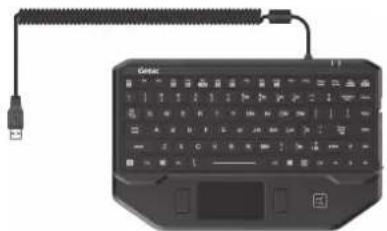
natural_image
Black keyboard with attached cable and connector, no visible text or symbols on the device itselfItem Specifications
| Keyboard | Standard keys with embedded numeric pad keys, 12 function keys, special Fn (Function) key, Windows keys |
| Indicators | Caps LockNum Lock |
| Structure | IP65 membrane |
| Backlight | Red LED backlight, 5-level brightness |
| Touchapd | Glide touchpad, left and right buttons |
| Smart card reader | FIPS 201 compliant |
| Mutually exclusive option | HID HF/LF RFID reader orUSB 2.0 Type A connector |
| Cable USB | 2.0 interface, 1.83 m (6 ft)coiled cable |
| VESA 75mm | x 75mm hole pattern |
| Environment | Operating temperature:-21 °C (-5.8 °F) ~ 60 °C (140 °F) |
| Storage temperature:-40 °C (-40 °F) ~ 85 °C (185 °F) | |
| Relative humidity: 100% | |
| Dimensions | 307.7 x 194 x 32 mm (12.11" x 7.64" x 1.26") |
| Weight 0.8 | 7 kg (1.92 lb) |
Using the Keyboard
The keyboard has all the standard functions of a full-sized computer keyboard plus an Fn key added for specific functions.
Hot Keys
- Fn + Esc switches the keyboard backlight on or off.
- Fn + F3 decreases the sound volume.
- Fn + F4 increases the sound volume.
- Fn + F5 switches the display output to the next choice if an external display is connected.
- Fn + F6 decreases the keyboard backlight.
- Fn + F7 increases the keyboard backlight.
- Fn + F9 switches the touchpad off or on.
- Fn + F10 switches the system sound output off (mute) or on.
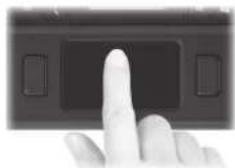
Using the Touchpad
The touchpad consists of a rectangular pad (work surface) and left and right buttons. As you slide your fingertip across the pad, the pointer (also called cursor) on the screen moves accordingly.
natural_image
Close-up of a finger pressing a button on a dark electronic device (no visible text or symbols)Using Peripherals
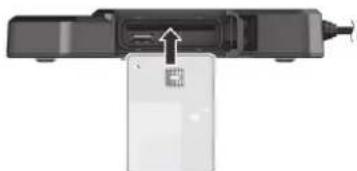
The smart card slot and USB connector (if existing) are inside the protective cover. Slide the cover to open it.

Using a Smart Card
Slide the card, with its label and embedded chip facing up, all the way into the slot.
natural_image
Diagram of a device with an arrow pointing to a card slot (no text or symbols visible)To remove a smart card, slightly push the card to release and then pull it out of the slot.
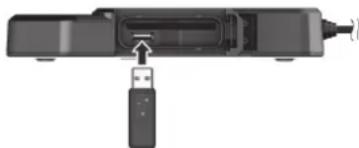
Connecting a USB Device
If your model has the USB 2.0 port, you can connect a USB device.
NOTE: The power consumption of the USB device must not exceed 100mA.

natural_image
Diagram of a USB device with an attached USB port (no text or symbols visible)Using the NFC/RFID Reader
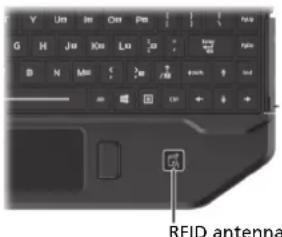
If your model has the NFC/RFID reader module, you can read data from NFC (Near Field Communication) and RFID (Radio Frequency Identification) tags.
For optimal results when reading an NFC/RFID tag, have the tag face the antenna in the same orientation as indicated by the icon on the exterior of the product.
NOTE:
- When not using an NFC/RFID card, do not leave it within or near the antenna area.
- For enhanced applications and customization of the module, contact your authorized Getac dealer.
- The NFC reader requires specialized applications. For further information, ask your system administrator.
- To download the latest smart card/RFID drivers, visit the Getac website at http://www.getac.com → Support.
Safety Instructions
- DO NOT insert any foreign object in any I/O port.
- DO NOT place metal objects or containers of liquid on top of the product. If metal objects (such as paper clips and coins) or any liquid spills get inside the product, fire or electric shock may result.
- Detach the keyboard if any of the following occurs:
– the keyboard is damaged - smoke is emitted
- an unusual smell is emitted
– the keyboard is unusually hot
Continuing to use the keyboard while any of the above conditions are present may result in fire or electric shock.
• DO NOT apply water or detergent directly. - DO NOT expose your skin to this product when operating it in a very hot or cold environment.
- DO NOT force detached key caps back into place or insert objects into the keyboard. Contact technical support to repair or replace detached or missing keys.
• DO NOT disassemble the product.
Related documents (including this one) are available at the Getac website: https://support.getac.com/Portal/Page/809
Regulatory Information
Europe

Getac hereby declares that this product complies with the EU Directive 2014/30/EU and 2014/35/EU. The full text of the EU declaration of conformity is available at:
https://support.getac.com/Portal/Page/809
| Company name | Getac Technology GmbH. |
| Address | Kanzlerstrasse 440472 Dusseldorf, Germany |
| Phone +49 (0) 21 | 11-984819-0 |
EU RoHS
Getac products meet the requirements of Directive 2011/65/EU on the restriction of the use of certain hazardous substances in electrical and electronic equipment. For more information about RoHS, go to:
https://www.getac.com/us/environment/
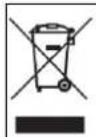
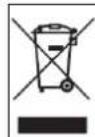
Waste Electrical and Electronic Equipment (WEEE) This symbol means that according to local laws and regulations your product shall be disposed of separately from household waste. When this product reaches its end of life, take it to a collection point designated by local authorities. Proper recycling of your product will protect human health and the environment.
UK CA
| Company name | Getac UK Ltd. |
| Address | Getac House, Stafford Park 12,Telford, Shropshire, TF3 3BJ, UK |
| Phone +44 (0) 1952-207-222 | |
USA
FC
Federal Communications Commission Radio Frequency Interference Statement
NOTE:
This equipment has been tested and found to comply with the limits for a Class B digital device pursuant to Part 15 of the FCC Rules. These limits are designed to provide reasonable protection against harmful interference in a residential installation. This equipment generates, uses, and can radiate radio frequency energy and, if not installed and used in accordance with the instructions, may cause harmful interference to radio communications. However, there is no guarantee that interference will not occur in a particular installation. If this equipment does cause harmful interference to radio or television reception, which can be determined by turning the equipment off and on, the user is encouraged to try to correct the interference by one or more of the following measures:
- Reorient or relocate the receiving antenna.
- Increase the separation between the equipment and receiver.
- Connect the equipment into an outlet on a circuit different from that to which the receiver is connected.
- Consult the dealer or an experienced radio/TV technician for help.
Any changes or modifications not expressly approved by the manufacturer could void the user's authority to operate the equipment.
Please note:
The use of a non-shielded interface cable with this equipment is prohibited.
This device complies with Part 15 of the FCC Rules. Operation is subject to the following two conditions: (1) This device may not cause harmful interference. (2) This device must accept any interference received, including interference that may cause undesired operation.
| Company name | Getac Inc. |
| Address | 15495 Sand Canyon Rd., Suite 350 Irvine, CA 92618 USA |
| Phone +1-949-68 | 81-2900 |
Canada
Canadian ICES-003
CAN ICES-3(B)/NMB-3(B)
This device contains licence-exempt transmitter(s)/receiver(s) that comply with Innovation, Science and Economic Development Canada's licence-exempt RSS(s). Operation is subject to the following two conditions: (1) This device may not cause interference. (2) This device must accept any interference, including interference that may cause undesired operation of the device.
natural_image
Black ergonomic keyboard with attached cable and connector, no visible text or symbols on the device itselfDeutsch
natural_image
Diagram of a device with an arrow pointing to a rectangular component (no text or symbols visible)natural_image
Diagram of a device with an attached USB port and cable, showing no text or symbolshttps://support.getac.com/Portal/Page/846
| Firmenname Getac Technology GmbH. | |
| Firmenanschrift | Kanzlerstrasse 440472 Dusseldorf, Germany |
| Telefonnummer | +49 (0) 211-984819-0 |
EU RoHS
https://www.getac.com/us/environment/
natural_image
Black Gelac keyboard with USB cable and connector, no visible text or symbols on the device itselfEspañol
natural_image
Diagram of a device with an arrow pointing to a card slot (no text or symbols visible)natural_image
Diagram of a device with an inserted port and USB cable (no text or symbols visible)Utilizar el lector NFC/RFID
https://support.getac.com/Portal/Page/866
natural_image
Black ergonomic keyboard with USB cable and connector, no visible text or symbols on the device itselfFrançais
natural_image
Hand pointing at a black electronic device with two buttons (no visible text or symbols)natural_image
Diagram of a device with an arrow pointing to a screen, showing no text or symbols.natural_image
Diagram of a device with an inserted port and USB cable (no text or symbols visible)natural_image
Black Getac keyboard with USB cable and connector, no visible text or symbols on the device itselfnatural_image
Close-up of a finger pressing a button on a digital device (no visible text or symbols)natural_image
Top-down view of a device with a highlighted internal component and an arrow pointing to it (no text or symbols visible)natural_image
Diagram of a device with an external port and a USB port, showing no text or symbols.https://support.getac.com/Portal/Page/892
https://support.getac.com/Portal/Page/892
| Nome della ditta Getac Technology GmbH. | |
| Indirizzo | Kanzlerstrasse 440472 Dusseldorf, Germany |
| Telefono +49 (0) 2 | 11-984819-0 |
RoHS EU
natural_image
Simple horizontal bar with two shades of gray, no text or symbols present
natural_image
Two solid color blocks side by side: dark gray on the left and light gray on the right, with no text or symbols.
-
- Using the Keyboard
- Hot Keys
- Using the Touchpad
- Using Peripherals
- Using a Smart Card
- Connecting a USB Device
- Using the NFC/RFID Reader
- NOTE:
- Safety Instructions
- Regulatory Information
- Europe
- EU RoHS
- UK CA
- FC
- Federal Communications Commission Radio Frequency Interference Statement
- Please note:
- Canada
- Canadian ICES-003
- CAN ICES-3(B)/NMB-3(B)
- Utilizar el lector NFC/RFID
- RoHS EU
Brand : Getac
Model : VKB10
Category : Keyboard