
VCM 7180 T - Vacuum Cleaner BEKO - Free user manual and instructions
Find the device manual for free VCM 7180 T BEKO in PDF.
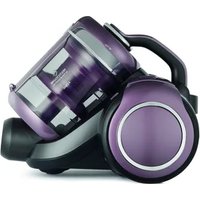


| Brand | Beko |
| Model | VCM 7180 T |
| Product type | Canister vacuum cleaner |
| Nominal power | 800 W |
| Power supply voltage | 220-240 V ~ 50-60 Hz |
| Dust tank capacity | 2.8 L |
| Operating radius | 11 m |
| Filter | HEPA 13 |
| Floor modes | Hard floor / carpet (adjustable) |
| Turbo nozzle | Included (for pet hair) |
| Parquet/carpet brush | Yes, with adjustment |
| Furniture brush | Included |
| Dusting brush | Included |
| Telescopic tube | Adjustable |
| Automatic cord winder | Yes |
| Full bag indicator | Yes (red light) |
| Energy class | Not specified (EN60312-1 compliant) |
| Weight | Approximately 5 kg (estimate) |
| Dimensions (L x W x H) | Approximately 40 x 25 x 30 cm (estimate) |
| Bag type | Reusable dust bag (with cyclone separator) |
| Noise level | Not specified |
Frequently Asked Questions - VCM 7180 T BEKO
User questions about VCM 7180 T BEKO
0 question about this device. Answer the ones you know or ask your own.
Ask a new question about this device
Download the instructions for your Vacuum Cleaner in PDF format for free! Find your manual VCM 7180 T - BEKO and take your electronic device back in hand. On this page are published all the documents necessary for the use of your device. VCM 7180 T by BEKO.
USER MANUAL VCM 7180 T BEKO
VCM 7180 T
EN FR RO SL SV
CS BG HU PL RU
01M-8835763200-3117-04

Please read this manual first!
Dear Valued Customer,
Thank you for preferring this Beko appliance. We hope that you get the best results from your appliance which has been manufactured with high quality and state-of-the-art technology. For this reason, please read this user manual and all other provided documents carefully before using the appliance and keep it as a reference for future use. If you hand over the appliance to someone else, give the user manual as well. Follow the instructions by paying attention to all the information and warnings in the user manual.
Meanings of the Symbols
Following symbols are used in various sections of this manual:

Important information and useful hints about usage.

WARNING: Warnings against dangerous situations concerning the security of life and property.

Protection class for electric shock.

This product has been produced in environmentally friendly, modern facilities.
CONTENTS
| ENGLISH | 4-11 |
| FRANÇAIS | 12-20 |
| ROMÂNĂ | 21-31 |
| SLOVENŠČINA | 32-40 |
| SVENSKA | 41-49 |
| ČESKY | 50-58 |
| БЪЛГАРСКИ | 59-68 |
| MAGYAR | 69-77 |
| POLSKI | 78-91 |
| РУССКИЙ 92-103 | |
1 Important safety and environmental instructions
This section contains safety instructions that will help protect from risk of personal injury or property damage.
Failure to follow these instructions invalidates the granted warranty.
1.1 General safety
• This appliance complies with international safety standards.
- This appliance can be used by children aged from 8 years and above and persons with reduced physical, sensory or mental capabilities or lack of experience and knowledge if they have been given supervision or instruction concerning use of the appliance in a safe way and understand the hazards involved. Children shall not play with the appliance. Cleaning and user maintenance shall not be made by children without supervision.
- If the power cable or the appliance itself is damaged, do not use it. Contact an authorized service.
- Your mains power supply should comply with the information on the rating plate of the appliance.
- The mains supply on which you will use the appliance must be secured with a 16 A fuse minimum.
- Do not use the appliance with an extension cable.
- To avoid any damage to the power cable, prevent it from being squeezed, bent or rubbed on sharp edges.
- Do not touch the plug when the appliance is plugged in if your hands are damp or wet.
- Do not pull the power cable when unplugging the appliance.
- Do not vacuum flammable materials and when vacuuming cigarette ash, make sure that it has cooled down.
- Do not vacuum water or other liquids.
- Protect the appliance from rain, humidity and heat sources.
Never use the appliance in or near places where combustible or inflammable ambience or places are present.
1 Important safety and environmental instructions
- Unplug the appliance before cleaning and maintenance.
- Do not immerse the appliance or its power cable in water for cleaning.
- Check the hose of the appliance regularly. Do not use if it is damaged and contact an authorised service. • Do not dismantle the appliance
- Only use the original parts or parts recommended by the manufacturer.
- Do not use the appliance without filters; otherwise, it can get damaged.
- When vacuum-cleaning the stairs, the appliance should be located below the user.
- If you keep the packaging materials, store them out of the reach of children.
1.2 Compliance with WEEE Directive and Disposing of the Waste Product
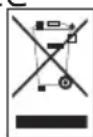
This product complies with EU WEEE Directive (2012/19/EU). This product bears a classification symbol for waste electrical and electronic equipment
(€/EEE). This product has been manufactured with high quality parts and materials which can be reused and are suitable for recycling. Do not dispose of the waste product with normal domestic and other wastes at the end of its service life. Take it to the collection center for the recycling of electrical and electronic equipment. Please consult your local authorities to learn about these collection centers.
1.3 Compliance with RoHS Directive
The product you have purchased complies with EU RoHS Directive (2011/65/EU). It does not contain harmful and prohibited materials specified in the Directive.
1.4 Package information

Packaging materials of the product are manufactured from recyclable materials in accordance with our National Environment Regulations. Do not dispose of the packaging materials together with domestic or other wastes. Take them to the packaging material collection points designated by the local authorities.
2 Your vacuum cleaner
2.1 Overview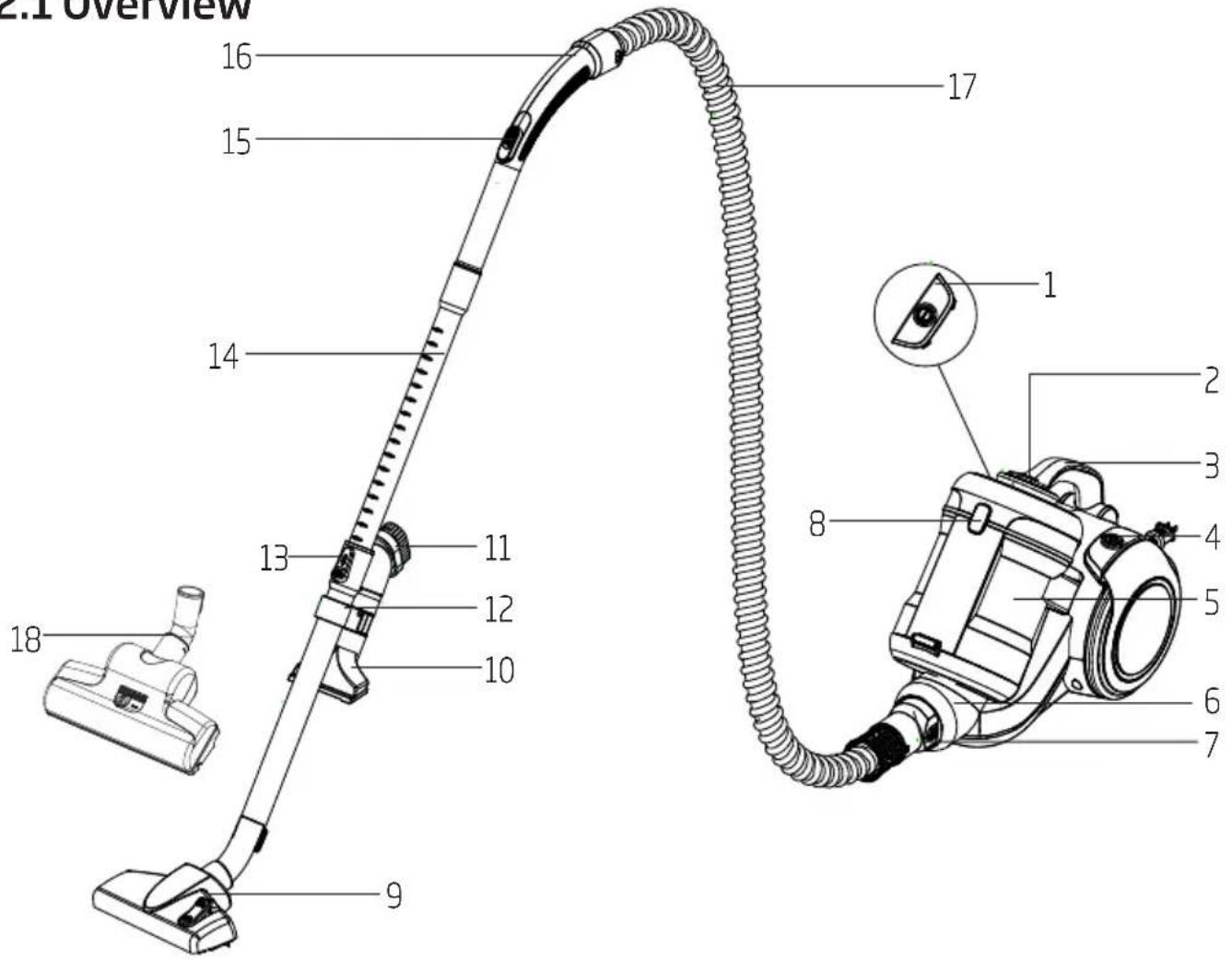
- On/Off button
- Dust container removal button
- Carriage handle
- Cable winding button
- Dust container
- Suction nozzle
- Hose cap
- Opening button for the motor protection filter (MIF) housing
- Parquet/carpet brush
- Upholstery tool
- Dust brush
- Accessory carrier
- Telescopic tube adjustment latch
- Telescopic tube
- Suction power adjustment control
- Handle
- Hose
- Turbo brush
2.2 Technical data
Power: 800 W
Supply voltage:
220-240 V~, 50-60 Hz
Dust container volume: 2.8 L
Operating radius: 11 m
Filter: HEPA13
Dust collecting on carpet: C
Dust collecting on
hard surface : A
Dust emission : A
Energy class : A
Technical and design modification rights are reserved.
3 Usage
3.1 Intended use
The appliance was designed for household use and is not suitable for industrial use.
3.2 Attaching/removing the hose
- To attach the hose (17) push the hose cap in the direction of arrow until it is aligned with the housing.
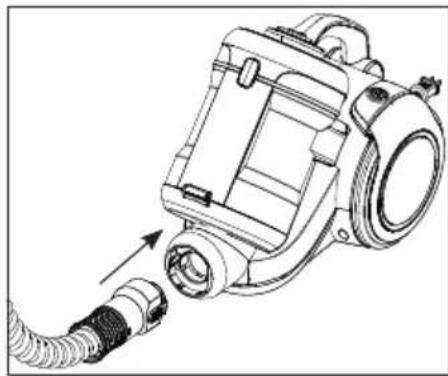
- The tabs on the hose cap (7) must be seated correctly.
- To remove the hose (17), press on the tabs on the hose cap (7) and pull it.
3.3 Attaching/removing the telescopic tube
- Attach the telescopic tube (14) to the handle (16).
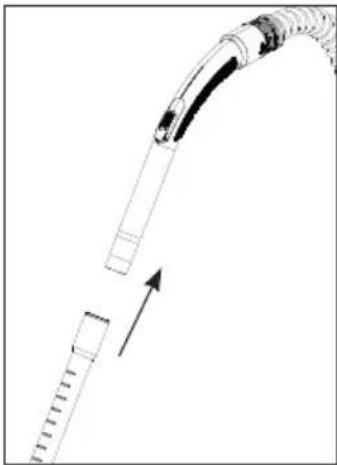
- Pull the telescopic tube (14) from the handle (16) to remove it.
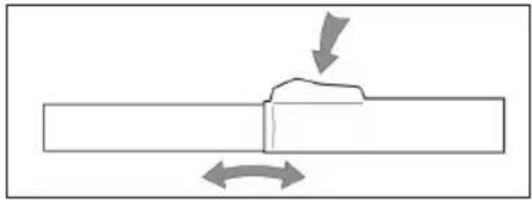
- You can extend or shorten the telescopic tube (14) by sliding the telescopic tube adjustment latch back and forth.
3.4 Attaching/removing the parquet/carpet brush
- Attach the telescopic tube (14) to the parquet/carpet brush (9).
- Pull the telescopic tube (14) from the parquet/carpet brush (9) to remove it.
3.5 Adjusting the parquet/carpet brush
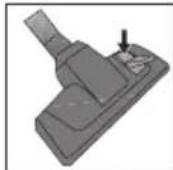
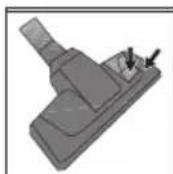
Perform the following actions on the adjustment latch located on the parquet/carpet brush (9);
- Use "position for hard floors and parquet."
- Use position for rugs and carpets.
3.6 Operation
- Plug in the appliance after pulling the power plug located at the back of the appliance.

WARNING: Stop pulling the appliance cable when it comes to the yellow mark located on it. After the yellow mark the red mark comes. Do not pull any more after reaching the red mark.
3 Usage
- Press the on/off button (1) to switch on your appliance.
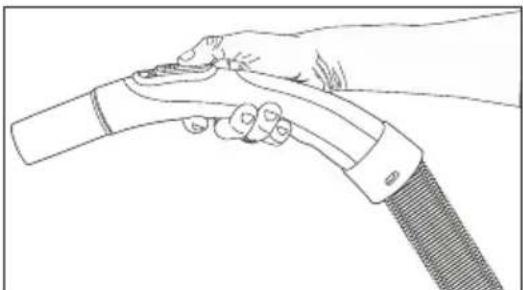
3.6.1 Adjusting the suction power
You can adjust the suction power with the suction power adjustment control (15) on the handle (16). The more you open the control, the more the suction power will be decreased.
3.7 Accessories
Upholstery tool
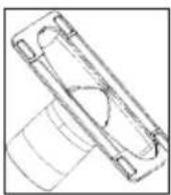
Suitable for cleaning the floorings, stair steps, inside of the cars, sofas, armchairs etc.
Dust brush
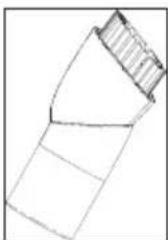
Suitable for cleaning the curtains, and sensitive and fragile objects.

WARNING: Do not perform cleaning by using the end part of the handle (16).
3.8 Turbo brush
The turbo brush (18) allows you to clear the hair on carpets in a faster and more efficient way. Thus you can even remove the hair -which is hard to remove such as dog hair or cat hair- easily.
On surfaces where you have difficulty moving the turbo brush (18), push the slid found on the brush in the arrow direction.
3.9 Warnings regarding the energy label
This is a general-purpose vacuum cleaner. In order to reach the highest energy efficiency and cleaning performance class specified in carpet and parquet cleaning, please use the high-performance parquet/carpet brush (9). The specified values regarding the energy label were determined according to the predefined measurement methods (in line with EN60312-1).
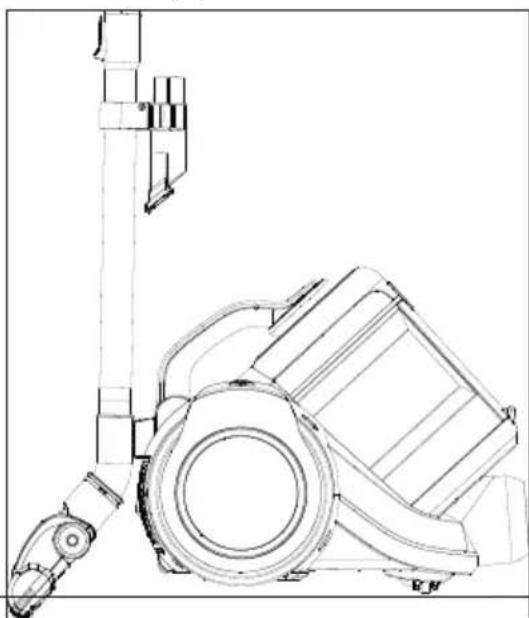
3.10 Switching off the vacuum cleaner and parking feature
- After using the appliance, switch it off by pressing the On/off button (1) and unplug it.
- Insert the hook of the parquet/carpet brush (9) into the parking groove located at the rear section of the appliance.
4 Cleaning and care
Switch off and unplug the appliance before cleaning it.

WARNING: Never use gasoline, solvent, abrasive cleaning agents, metal objects or hard brushes to clean the appliance.
4.1 Dust indicator
If the dust container is full or the hose or the tube is blocked by a large item such as a sock and thus the suction is prevented, the dust indicator next to the on/off button lights red.

WARNING: If the dust container is empty, this means that a large item (such as a sock) is stuck in the hose or the tube and thus the air flow is blocked. In such cases, switch off the appliance and check the components.
4.2 Emptying the dust container
- Press the dust container removal button (2) to remove the dust container (5) and remove the dust container.
- Push the dust container removal latches located at the back of the dust container (5) from both sides.
![graph TD A["Car Body 1"] --> B["Switch"] C["Car Body 2"] --> D["Switch"] B --> E["Arrow Left"] D --> F["Arrow Right"]](/content/2026/04/696212/images/574ea6ee13e36b012d7511f5595ed098492d9ac2ebd7f7640caad6c23e61cf3a.jpg)
- Open the dust container (5) cover and empty the container.
- When you have emptied dust, close the dust container cover (5); a click sound will be heard.
- Insert the dust container (5) back into its location.
4.3 Cleaning the cyclone separator
- Press the dust container removal button (2) and remove the dust container.
- Press the opening button for the motor protection filter (MIF) housing (8) and open the cover.
- Remove the motor protection filter (MIF) located inside.
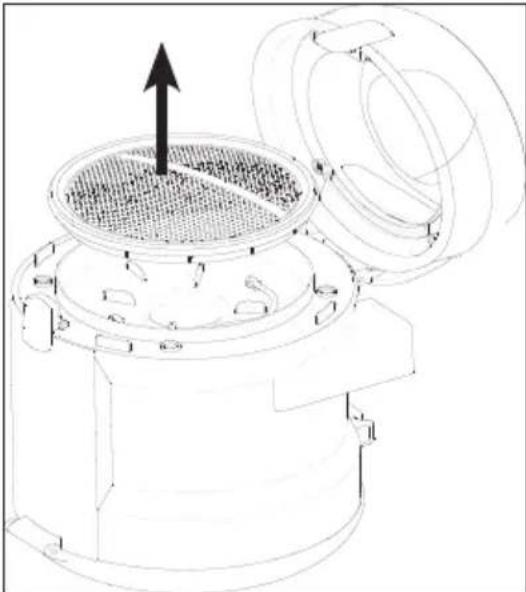
- After removing the motor protection filter, you will see the metal handle on the cyclone separator. Holding this handle, remove the cyclone separator from the dust container (5).
- Clean the cyclone separator and the dust container (5) compartment with a soft brush and wipe them with a damp cloth.

WARNING: Cyclone separator should not be immersed in water.
4 Cleaning and care
4.4 Cleaning the filters
Replace your filters at regular intervals according to the frequency of use. It is recommended that you replace the filters every 6 months for average use.
While you empty the dust accumulated in the dust container to clean the container, you need to clean the motor protection filter, the foam filter and HEPA filter as well.

WARNING: Do not use appliances producing hot air such as hair dryer or heater to dry the filters.

WARNING: Do not install the filters without completely drying them; otherwise, smell of moisture may occur during use, water can leak from the back of the appliance or the filters may get damaged.

WARNING: Attach the filters into their places after they have dried.
4.4.1 Motor protection filter (MIF)
This filter is located on the dust container.
- Press the dust container removal button (2) and remove the dust container (5).
- Press the opening button for the motor protection filter (MIF) housing (8).
- Remove the motor protection filter by pulling it.
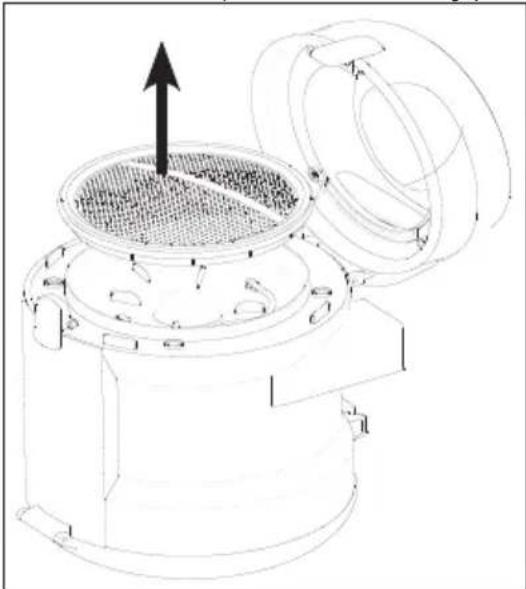
- After shaking it off, wash it under running water, wring it out gently and leave it to dry (for 24 hours minimum).
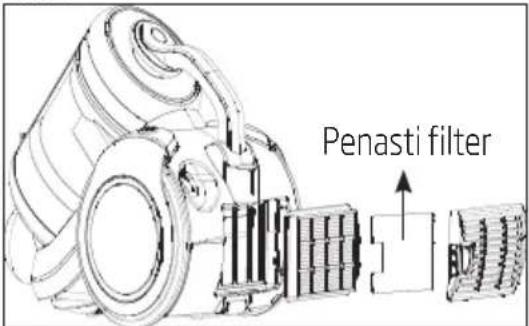
4.4.2 Foam filter
- Push down the rear cover opening latch to open the cover.
- Remove the foam filter behind the cover and wash it.
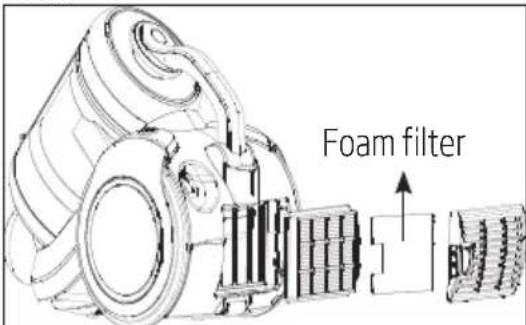
- After shaking it off, wash it under running water, wring it out gently and leave it to dry (for 24 hours minimum).
4 Cleaning and care
4.4.3 HEPA filter
- Push down the rear cover opening latch to open the cover and remove the HEPA filter by pulling it from its handle.
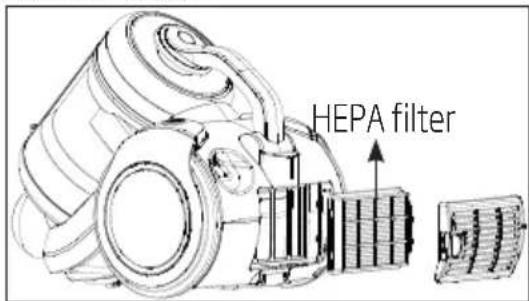
- You can wash the filter under running water after shaking it off.
- If you wash the HEPA filter, dry it at room temperature (for 24 hours minimum). Do not use it before ensuring that it is completely dry.
- For a longer service life, you can clean the HEPA filter by hitting it on a hard surface instead of washing it. Thus the dust accumulated on the HEPA filter will leave the filter as you hit it on a hard floor.
4.5 Storage
- If you do not intend to use the appliance for a long time, store it carefully. • Unplug the appliance.
- Keep the appliance out of the reach of children.
4.6 Handling and transportation
- During handling and transportation, carry the appliance in its original packaging. The packaging of the appliance protects it against physical damages.
- Do not place heavy loads on the appliance or on the packaging. The appliance may get damaged.
- Dropping the appliance may render it non-operational or cause permanent damage.
Dust collecting on carpet: C
Dust collecting on hard surface: A
Dust emission: A
Energy class: A
Technical and design modification rights are reserved.
Technical and design modification rights are reserved.
Furniture brush
3.7 Accessories
The Ground Truth image displays a single, solid horizontal line. According to Rule 2 (UNDERSCORE & LINE RULES), this is a stylistic or background line, not a placeholder underscore. Therefore, the OCR result must ignore it. The provided OCR content is "____", which consists of four underscores. This is an incorrect interpretation of the line as a placeholder, violating the rule that stylistic lines must be ignored. The OCR has hallucinated text (underscores) where none should exist based on the GT's visual context. Hence, the OCR result is inconsistent with the Ground Truth.
3.7 Attachments
Upholstery nozzle

- Shake the filter, wash it under running water, gently squeeze it out, and let it dry (for at least 24 hours).
4.4.2 Foam filter
- Press the rear cover down to release the latch that opens the cover.
- Remove the foam filter behind the cover and wash it.
- Shake the filter, wash it under running water, gently squeeze it out, and let it dry (for at least 24 hours).
3.7 Accessories
Upholstery nozzle
3.7 Accessories
4 Cleaning and care
3.7 Accessories
3.7 Accessories
3.7 Accessories
3.7 Accessories
4 Cleaning and care
- PLEASE READ THIS MANUAL FIRST
- MEANINGS OF THE SYMBOLS
- CONTENTS
- IMPORTANT SAFETY AND ENVIRONMENTAL INSTRUCTIONS
- GENERAL SAFETY
- COMPLIANCE WITH WEEE DIRECTIVE AND DISPOSING OF THE WASTE PRODUCT
- COMPLIANCE WITH ROHS DIRECTIVE
- PACKAGE INFORMATION
- YOUR VACUUM CLEANER
- TECHNICAL DATA
- USAGE
- INTENDED USE
- ATTACHING/REMOVING THE HOSE
- ATTACHING/REMOVING THE TELESCOPIC TUBE
- ATTACHING/REMOVING THE PARQUET/CARPET BRUSH
- ADJUSTING THE PARQUET/CARPET BRUSH
- OPERATION
- ADJUSTING THE SUCTION POWER
- ACCESSORIES
- UPHOLSTERY TOOL
- DUST BRUSH
- TURBO BRUSH
- WARNINGS REGARDING THE ENERGY LABEL
- SWITCHING OFF THE VACUUM CLEANER AND PARKING FEATURE
- CLEANING AND CARE
- DUST INDICATOR
- EMPTYING THE DUST CONTAINER
- CLEANING THE CYCLONE SEPARATOR
- CLEANING THE FILTERS
- MOTOR PROTECTION FILTER (MIF)
- FOAM FILTER
- HEPA FILTER
- STORAGE
- HANDLING AND TRANSPORTATION
- FURNITURE BRUSH
- ATTACHMENTS
- UPHOLSTERY NOZZLE
Brand : BEKO
Model : VCM 7180 T
Category : Vacuum Cleaner