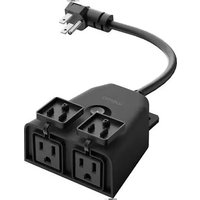
Wemo WiFi Smart Outdoor Plug - Home Automation BELKIN - Free user manual and instructions
Find the device manual for free Wemo WiFi Smart Outdoor Plug BELKIN in PDF.


| Brand | Belkin |
| Model | Wemo WiFi Smart Outdoor Plug |
| Category | Home automation |
| Product type | WiFi outdoor smart plug |
| Number of outlets | 2 |
| Power supply | 120 V~ / 15 A / 60 Hz / 1800 W max |
| Connectivity | WiFi 2.4 GHz 802.11n |
| Required app | Wemo App (Android 4.4+ or iOS 10.0+) |
| Main functions | Remote on/off control via smartphone, scheduling, home automation integration |
| Usage | Outdoor (outlet facing down) or indoor |
| Operating temperature | 0°C to 50°C |
| Approximate dimensions | 10.2 x 6.4 x 5.1 cm |
| Approximate weight | 200 g |
| Protection rating | Weather resistant (not specified) |
| Maintenance and cleaning | Clean with a soft, dry cloth. Do not immerse. |
| Safety | Compliant with UL 60730-1, overload protection, grounded plug |
| Spare parts and repairability | Not user-serviceable. Contact Belkin support if defective. |
| Warranty | 1 year (according to retailer) |
Frequently Asked Questions - Wemo WiFi Smart Outdoor Plug BELKIN
User questions about Wemo WiFi Smart Outdoor Plug BELKIN
0 question about this device. Answer the ones you know or ask your own.
Ask a new question about this device
Download the instructions for your Home Automation in PDF format for free! Find your manual Wemo WiFi Smart Outdoor Plug - BELKIN and take your electronic device back in hand. On this page are published all the documents necessary for the use of your device. Wemo WiFi Smart Outdoor Plug by BELKIN.
USER MANUAL Wemo WiFi Smart Outdoor Plug BELKIN
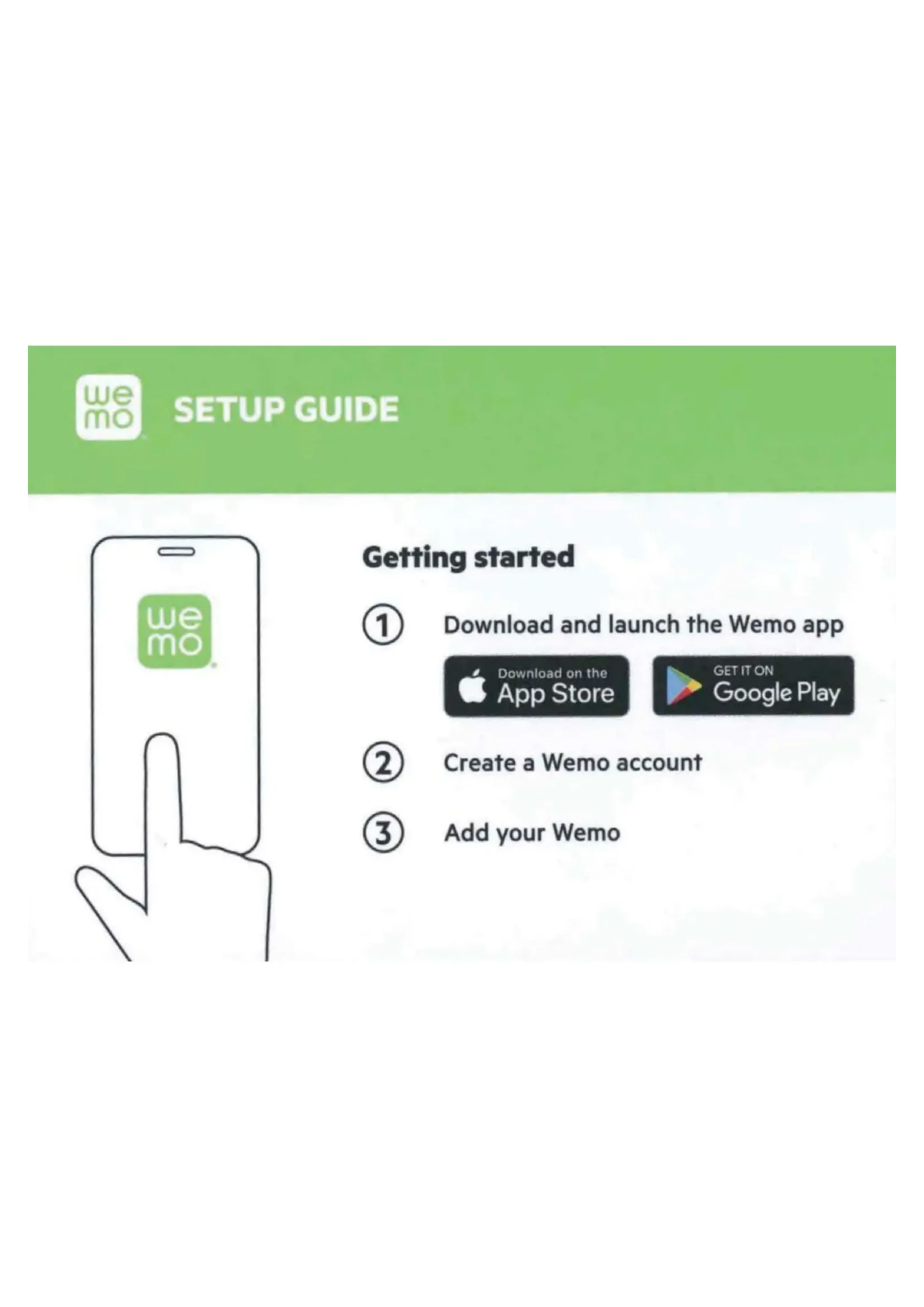
① Download and launch the Wemo app

Download on the App Store

GET IT ON Google Play
② Create a Wemo account
③ Add your Wemo
My Wemo Codes
Hang on to this guide. The code may come in handy if you ever need to set up your Wemo again.
Wemo.Outdoor 643
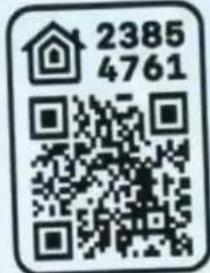
Wemp ID
HomeKit code
What does the light color tell me?
OFF
Wemo is off.
SOLID WHITE
Wemo is on and working normally.
BLINKING WHITE
Wemo is starting up or is updating its firmware.
ORANGE
Wi-Fi signal is weak. Move your Wemo closer to your router.
BLINKING ORANGE
Wemo is not connected to Wi-Fi. Unplug your router and Wemo and plug them back in.
WHITE AND ORANGE
Your Wemo is ready for setup.
Got questions?
Visit wemo.com/support or call us at 1-844-745-WEMO for support.
For warranty information, go to wemo.com/warranty
SAFETY WARNING
Wemos are not designed for use with water pumps or heating appliances. Do not use Wemos with anything that might be dangerous if left unattended.
8820-03072 Rev. A00

The following paragraphs are required by the FCC and prove that this product meets all regulatory limits with regard to radio interference and radiation exposure. If you use this product as intended, you will have no issues with either.
FCC Compliance Statement
We, Belkin International, Inc., of 12045 E. Waterfront Drive, Playa Vista, CA 90094, declare under our sole responsibility that the product, WSP090, to which this declaration relates, complies with Part 15 of the FCC Rules. Operation is subject to the following two conditions: (1) this device may not cause harmful interference, and (2) this device must accept any interference received, including interference that may cause undesired operation.
This equipment has been tested and found to comply with the limits for a Class B digital device, pursuant to Part 15 of the FCC Rules. These limits are designed to provide reasonable protection against harmful interference in a residential installation.
This equipment generates, uses, and can radiate radio frequency energy and, if not installed and used in accordance with the instructions, may cause harmful interference to radio communications. However, there is no guarantee that interference will not occur in a particular installation. If this equipment does cause harmful interference to radio or
television reception, which can be determined by turning the equipment off and on, the user is encouraged to try to correct the interference by one of the following measures:
- Reorient or relocate the receiving antenna.
- Increase the distance between the equipment and the receiver.
- Connect the equipment to an outlet on a circuit different from that to which the receiver is connected.
- Consult the dealer or an experienced radio/TV technician for help.
FCC Caution
Any changes or modifications not expressly approved by the party responsible for compliance could void the user's authority to operate this equipment.
Radiation Exposure Statement
This equipment complies with FCC radiation exposure limits set forth for an uncontrolled environment.
This equipment should be installed and operated with a minimum distance of 20cm between the radiator and your body.
Innovation, Science and Economic Development (ISED) Canada Compliance Statement
CAN ICES-3 (B)/NMB-3 (B)
This device complies with ISED's licence-exempt RSS standards. Operation is subject to the following two conditions: (1) This device may not cause interference, and (2) this device must accept any interference, including interference that may cause undesired operation of the device.
The device could automatically discontinue transmission in case of absence of information to transmit, or operational failure. Note that this is not intended to prohibit transmission of control or signaling information or the use of repetitive codes where required by the technology.
This device and its antennas(s) must not be co-located or operating in conjunction with any other antenna or transmitter except in accordance with ISED multi-transmitter product procedures.
This device has been designed to operate with an antenna having a maximum gain of 1.8 dBi at 2.4 GHz. Antenna having a higher gain is strictly prohibited per regulations of ISED. The required antenna impedance is 50 ohms.
The maximum antenna gain to comply with the EIRP limit provided in the table below.
| Antenna No. | Antenna Type | 2.4 GHz Antenna Gain (dBi) |
| 1 Wi-Fi | Internal antenna | 1.8 dBi |
Radiation Exposure Statement
This equipment complies with RSS-102 radiation exposure limits set forth for an uncontrolled environment. This equipment should be installed and operated with minimum distance 20 cm between the radiator and your body.
Safety Caution:
Important safety and handling information before use. When using this product, basic precautions should always be followed, including, but not limited to, the following.
- Please read the operating instructions and information on the minimum and maximum operating temperatures supplied with this product.
- The device is recommended for outdoor use and damp locations.
- Do not immerse this device in water.
- Power outlet on the device shall be used within its published outlet rating on the label.
- Do not place near heat sources or heat-producing devices.
- Do not expose this product to mechanical shock such as crushing, bending, puncturing, or shredding. Avoid dropping or placing heavy objects on this product.
- Do not use this product if visible defects are observed or if it has been damaged or modified. Contact the customer service support of Belkin for assistance.
- Do not attempt to disassemble, open, microwave, incinerate, paint, or insert foreign objects into this product.
- Attempting to open or service the unit voids all warranties, express or implied. If you experience problems with the device, discontinue use, unplug the device from wall outlet, and contact Belkin for assistance.
- Warning: To reduce the risk of fire or electric shock, care shall be taken so that objects do not fall and liquids are not spilled into the enclosure through the openings.
- Warning: To reduce the risk of electric shock, this product is equipped with a cord having grounding type plug. This plug must be plugged into an outlet that is properly installed and grounded. Contact a qualified electrician to install a proper outlet if doubt exists as to whether the product is properly grounded. Do not change the plug in any way.
- The supply cord of this control can be replaced only by the manufacturer or their accredited service agent.
- Unplug this device during lightning storms or when unused for long periods of time.
- The socket outlet must be near the product's intended use and easily accessible.
- To reduce the risk of injury, close supervision is necessary when this product is used near or by children.
System Requirements:
Wi-Fi router
Android 4.4 and later; iOS v10.0 or higher
General Specifications:
Electrical Rating: 120V\~/ 15A/ 60Hz / 1800W
Number of Power Outlets: 2
Wi-Fi: 2.4GHz 802.11n
Product Function
You can remotely control the ON/OFF through the app.
Operating Conditions:
For outdoor (to mount plug vertically with sockets facing downward) and indoor use.
Operating Temperature: 0–50°C
UL 60730-1 Statement
This equipment has been tested and found to comply with UL 60730-1 conditions below,
Type 1 action
Pollution Degree 3
Rated impulse voltage: 1500V

- What does the light color tell me?
- OFF
- SOLID WHITE
- BLINKING WHITE
- ORANGE
- BLINKING ORANGE
- WHITE AND ORANGE
- Got questions?
- SAFETY WARNING
- FCC Compliance Statement
- FCC Caution
- Radiation Exposure Statement
- Innovation, Science and Economic Development (ISED) Canada Compliance Statement
- Safety Caution:
- System Requirements:
- General Specifications:
- Product Function
- Operating Conditions:
- UL 60730-1 Statement
Brand : BELKIN
Model : Wemo WiFi Smart Outdoor Plug
Category : Home Automation