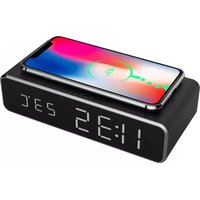
DAC-WPC-01 - Digital Alarm Clock Gembird - Free user manual and instructions
Find the device manual for free DAC-WPC-01 Gembird in PDF.


| Product type | Digital alarm clock with wireless charger |
| Brand | Gembird |
| Model | DAC-WPC-01 |
| Dimensions (approx.) | 15 x 8 x 5 cm |
| Weight | 200 g |
| Power supply | Micro USB 5V (cable included) |
| Display | Digital LED (time, date, temperature) |
| Clock functions | 12h/24h display, time/date setting |
| Alarms | 3 independent alarms (A1, A2, A3) with snooze |
| Temperature | Celsius/Fahrenheit display (switchable) |
| Wireless charging | Built-in Qi charging pad (compatible smartphones) |
| Power saving | Sleep mode with automatic display shutdown after 30 sec |
| Display modes | 3 modes: time/date alternation, fixed display, temporary display |
| Maintenance | Clean with a soft dry cloth, avoid liquids |
| Safety | Use only the supplied adapter, do not expose to water |
| Spare parts | Not available separately |
| Repairability | Not user serviceable. Contact customer support |
| Warranty | 2 years |
Frequently Asked Questions - DAC-WPC-01 Gembird
User questions about DAC-WPC-01 Gembird
0 question about this device. Answer the ones you know or ask your own.
Ask a new question about this device
Download the instructions for your Digital Alarm Clock in PDF format for free! Find your manual DAC-WPC-01 - Gembird and take your electronic device back in hand. On this page are published all the documents necessary for the use of your device. DAC-WPC-01 by Gembird.
USER MANUAL DAC-WPC-01 Gembird
natural_image
Digital phone with charging tray and digital clock display showing 11:35, 23°C (no text or symbols on device body)DIGITAL ALARM CLOCK WITH WIRELESS CHARGING FUNCTION DIGITALE WEKKER MET DRAADLOZE LAADFUNCTIE VOOR SMARTPHONE RÉVEIL NUMÉRIQUE AVEC FONCTION DE CHARGEMENT SANS FIL DIGITALER WECKER MIT KABELLOSER LADEFUNKTION CYFROWY BUDZIK Z FUNKCJĄ BEZPRZEWODOWEGO ŁADOWANIA
Features
Digital alarm clock with wireless charging function
☐Built-in wireless charging module for easy charging of your iPhone X/XS/XR, iPhone 8, Galaxy S8/S7/S6 and other devices with wireless charging function
Large LCD display shows time, date and temperature
☐Dual alarm function allows to set 2 separate wake-up alarms
Specifications
Input power: 5V/1.5A
☐Wireless Output: 5V/1A 5W






gembird®
DAC-WPC-01 DIGITAL ALARM CLOCK WITH WIRELESS CHARGING FUNCTION
PRODUCT OVERVIEW
English
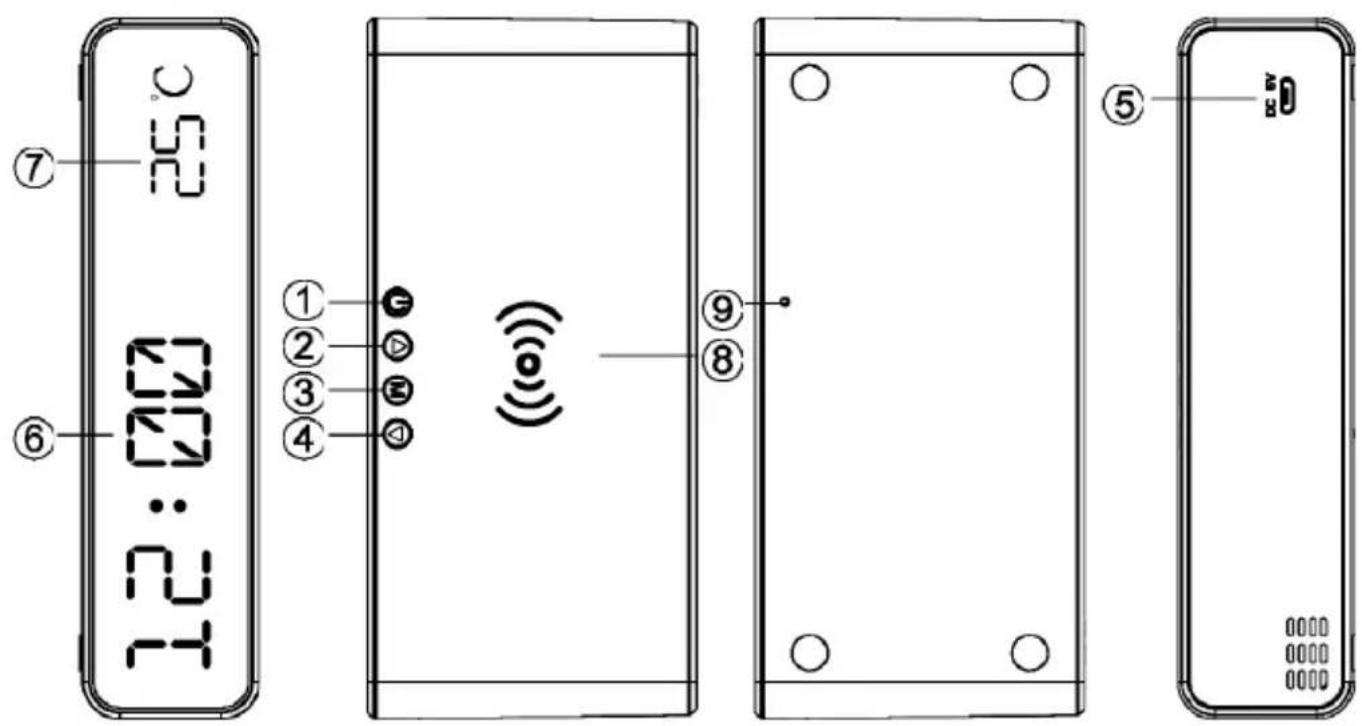
- ON/OFF
- UP
- MENU
- DOWN
-
Micro USB Input
-
Time Display
- Temperature Display
- Wireless Charging Pad
- Reset

gembird®
DAC-WPC-01 DIGITAL ALARM CLOCK WITH WIRELESS CHARGING FUNCTION
POWER
Press to power on. The LED display will show Time and Temperature.
DISPLAY
Press to switch between different display modes (time/date/alarm1/2/3).
SET TIME
Press until the display shows the time.
Long press until the time is blinking. The display panel will shows 12H mode or 24H mode.
Press to select 12H or 24H mode and press to confirm the mode (if 12H mode is selected, then “PM/AM” will light up at the left corner of display).
Press to adjust the Hour first.
Press to confirm the Hour and minutes will blink.
Press to adjust the minutes.
Press to confirm the minutes.
SETDATE
Press until the display shows the date.
Long press until the year is blinking.
Press to change the year.



gembird®
DAC-WPC-01 DIGITAL ALARM CLOCK WITH WIRELESS CHARGING FUNCTION
Press to confirm the year and month will start blinking.
Press to change the month.
Press to confirm the month and day will start blinking.
Press to change the day.
Press to confirm the date.
SET ALARM
This alarm clock has 3 separate alarm settings, A1, A2 and A3, which can be set individually.
Press until the display shows"--A1", "--A2" or "--A3".
Long press until the alarm time is blinking.
Press to adjust the Hour first.
Press to confirm the Hour and minutes will blink.
Press to adjust the minutes.
Press to confirm the minutes.
Press to determine the clock.
ENABLE or DISABLE ALARM

gembird®
DAC-WPC-01 DIGITAL ALARM CLOCK WITH WIRELESS CHARGING FUNCTION

Press until the display shows "--A1", "--A2" or "--A3".
"--A1" means alarm 1 is disabled. "0NA1" means alarm 1 is enabled.


Press to enable or disable the selected alarm (1, 2, or 3).

When one of the alarm times is enables, the display will show the alarm icon in the lower left corner of display.
On the set alarm time(s), the alarm buzzer will start beeping and the alarm will be blinking. Press any button to stop the sound. If no button is pressed, the sound will stop after 60 seconds.
TEMPERATURE

Press for 2 seconds to switch between Fahrenheit / Celsius.
POWER-SAVING
When power-saving is enabled, the clock display will automatically turn off after 30 seconds. Press any button to turn it on again.

Short press to turn on/off the power-saving ("ONSd" means the power saving mode is turned on and "—Sd" means it is turned off).
DISPLAY SETTINGS
The display has 3 settings. Depending on the selected setting, the display will show either the time, the date or alternate between date and time.

Press button to select DP--1/DP--2/DP—3.
DP-1: Display will alternate between time and date automatically every 4 seconds.
DP-2: User can fix to show date or time.

DP-3: Display shows time. Press to show date for 4 seconds.

gembird®
DAC-WPC-01 DIGITAL ALARM CLOCK WITH WIRELESS CHARGING FUNCTION
DAC-WPC-01 DIGITAL ALARM CLOCK WITH WIRELESS CHARGING FUNCTION
POWER
DAC-WPC-01 DIGITAL ALARM CLOCK WITH WIRELESS CHARGING FUNCTION
DAC-WPC-01 DIGITAL ALARM CLOCK WITH WIRELESS CHARGING FUNCTION

druk op totdat de display “--A1”, “- A2” of “- A3”.
DAC-WPC-01 DIGITAL ALARM CLOCK WITH WIRELESS CHARGING FUNCTION
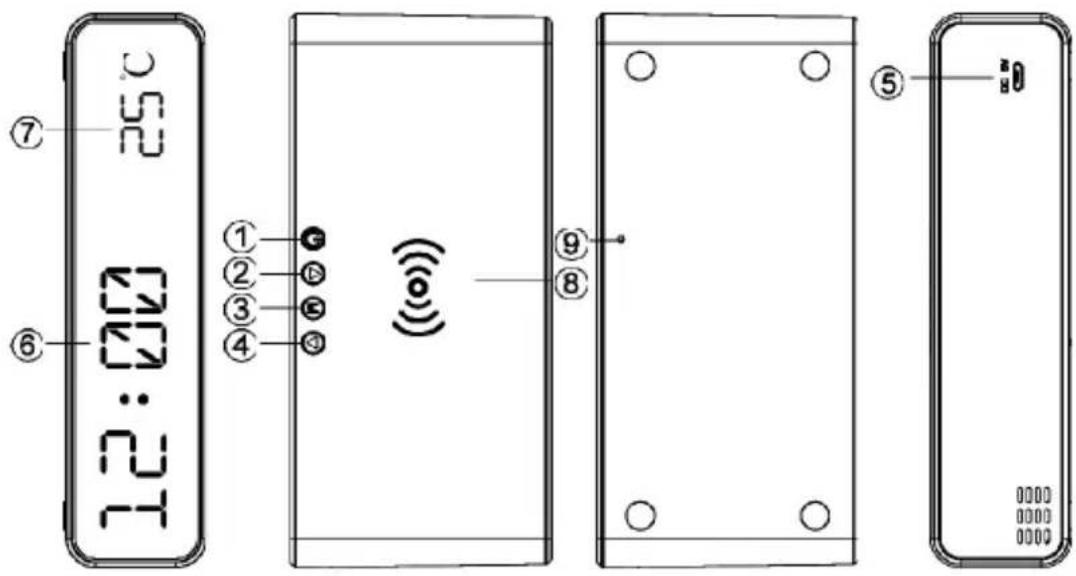
PRÉSENTATION DU PRODUIT
Francais
DAC-WPC-01 DIGITAL ALARM CLOCK WITH WIRELESS CHARGING FUNCTION
PUISSANCE
DAC-WPC-01 DIGITAL ALARM CLOCK WITH WIRELESS CHARGING FUNCTION
DAC-WPC-01 DIGITAL ALARM CLOCK WITH WIRELESS CHARGING FUNCTION
DAC-WPC-01 DIGITAL ALARM CLOCK WITH WIRELESS CHARGING FUNCTION
DAC-WPC-01 DIGITAL ALARM CLOCK WITH WIRELESS CHARGING FUNCTION
LEISTUNG

DAC-WPC-01 DIGITAL ALARM CLOCK WITH WIRELESS CHARGING FUNCTION

DAC-WPC-01 DIGITAL ALARM CLOCK WITH WIRELESS CHARGING FUNCTION

DAC-WPC-01 DIGITAL ALARM CLOCK WITH WIRELESS CHARGING FUNCTION
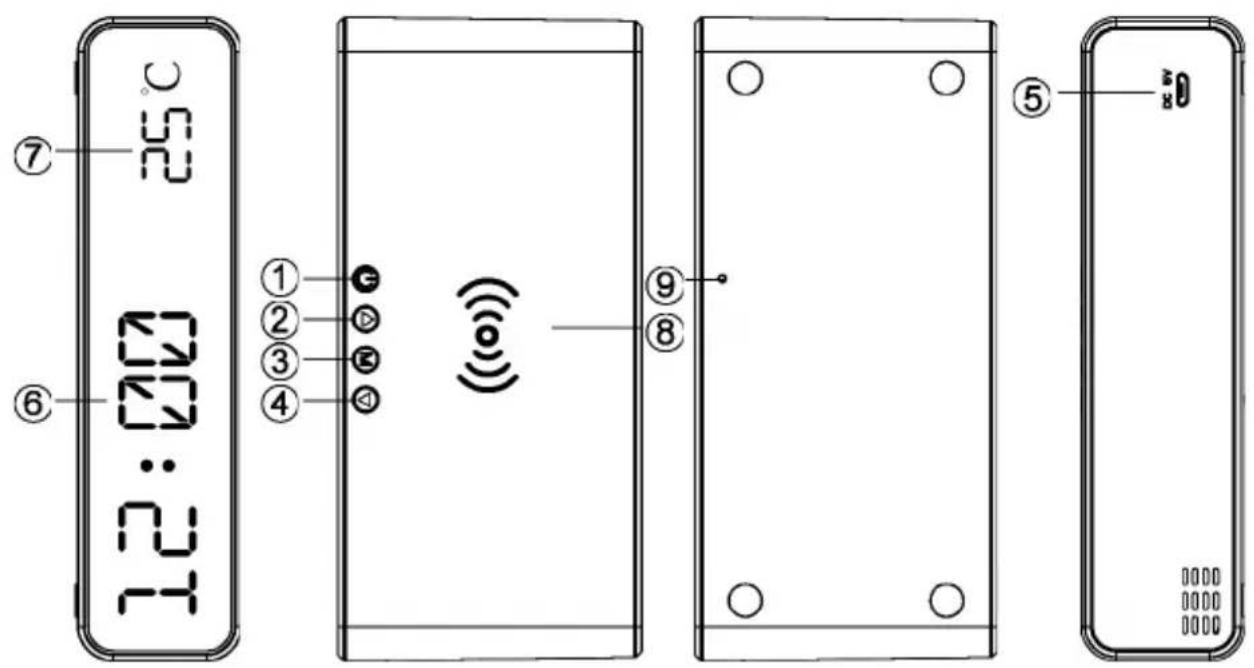
PRZEGLĄD PRODUKTÓW
Polski
DAC-WPC-01 DIGITAL ALARM CLOCK WITH WIRELESS CHARGING FUNCTION
MOC
DAC-WPC-01 DIGITAL ALARM CLOCK WITH WIRELESS CHARGING FUNCTION
DAC-WPC-01 DIGITAL ALARM CLOCK WITH WIRELESS CHARGING FUNCTION

GEMBIRD EUROPE B.V. http://www.gembird.eu All brands and logos are registered trademarks of their respective owners
Brand : Gembird
Model : DAC-WPC-01
Category : Digital Alarm Clock