SJ-FF560E0A - Fridge SHARP - Free user manual and instructions
Find the device manual for free SJ-FF560E0A SHARP in PDF.


User questions about SJ-FF560E0A SHARP
0 question about this device. Answer the ones you know or ask your own.
Ask a new question about this device
Download the instructions for your Fridge in PDF format for free! Find your manual SJ-FF560E0A - SHARP and take your electronic device back in hand. On this page are published all the documents necessary for the use of your device. SJ-FF560E0A by SHARP.
USER MANUAL SJ-FF560E0A SHARP
SJ-FF560E0A-EU SJ-FF560E0I-EU
Fridge-freezers
User Manual
CHAPTER -2: YOUR FRIDGE FREEZER....6
CHAPTER -3: USING YOUR FRIDGE FREEZER 7
CHAPTER -4: FOOD STORAGE GUIDE....11
CHAPTER -5: TROUBLESHOOTING....12
CHAPTER -6: TIPS FOR SAVING ENERGY ....13
Your fridge freezer conforms to current safety requirements. Inappropriate use can lead to personal injury and damage to property. To avoid the risk of damage read this manual carefully before using your fridge freezer for the first time. It contains important safety information on the installation, safety, use and maintenance of your Fridge Freezer. Retain this manual for future use.
FIRE
Warning; Risk of fire / flammable materials
CHAPTER -1: GENERAL WARNINGS

WARNING: Keep the ventilation openings of the Fridge clear from obstruction.

WARNING: Do not use mechanical devices or other means to accelerate the defrosting process.

WARNING: Do not use other electrical appliances inside the Fridge.

WARNING: Do not damage the refrigerant circuit.

WARNING: When positioning the appliance, ensure the supply cord is not trapped or damaged.

WARNING: Do not locate multiple portable socket-outlets or portable power supplies at the rear of the appliance.

WARNING: To avoid personal injury or damage this appliance must be installed in accordance with the manufacturer instructions.

The small quantity of refrigerant used in this fridge is eco-friendly R600a (an isobutene) and is flammable and osive if ignited in enclosed conditions.
* While carrying and positioning the fridge, do not damage the cooler gas circuit.
* Do not store any containers with flammable materials, such as spray cans or fire extinguisher refill cartridges in the vicinity of the fridge.
* This appliance is intended to be used in household and similar applications such as;
- staff kitchen areas in shops, offices and other working environments which can be equated with ordinary household
- farm houses and by clients in hotels, motels and other residential type environments which can be equated with ordinary household
- bed and breakfast type environments which can be equated with ordinary household
- catering and similar non-retail applications which can be equated with ordinary household
* Your fridge requires a 220-240V, 50Hz mains supply. Do not use any other supply. Before connecting your fridge, ensure that the information on the data plate (voltage and connected load) matches the mains electricity supply. If in doubt, consult a qualified electrician)
* This appliance can be used by children aged from 8 years and above and persons with reduced physical, sensory or mental capabilities or lack of experience and knowledge if they have been given supervision or instruction concerning use of the appliance in a safe way and understand the hazard involved. Children shall not play with the appliance. Cleaning and user maintenance, shall not be made by children without supervision.
* Children aged from 3 to 8 years are allowed to load and unload refrigerating appliances. Children are not expected to perform cleaning or user maintenance of the appliance, very young children (0-3 years old) are not expected to use appliances, young children (3-8 years old) are not expected to use appliances safely unless continuous supervision is given, older children (8-14 years old) and vulnerable people can use appliances safely after they have been given appropriate supervision or instruction concerning use of the appliance. Very vulnerable people are not expected to use appliances safely unless continuous supervision is given.
* A damaged power cord /plug can cause fire or give you an electric shock. When damaged it must be replaced, this should only be done by qualified personnel.
* This appliance is not intended for use at altitudes exceeding 2000 m.
To avoid contamination of food, please respect the following instructions:
* Opening the door for long periods can cause a significant increase of the temperature in the compartments of the appliance.
* Clean regularly surfaces that can come in contact with food and accessible drainage systems.
* Store raw meat and fish in suitable containers in the refrigerator, so that it is not in contact with or drip onto other food.
* Two-star frozen-food compartments are suitable for storing pre-frozen food, storing or making ice cream and making ice cubes.
* One-, two- and three-star compartments are not suitable for the freezing of fresh food.
* If the refrigerating appliance is left empty for long periods, switch off, defrost, clean, dry, and leave the door open to prevent mould developing within the appliance.
CHAPTER -1: SAFETY INSTRUCTIONS
Disposal
- All packaging and materials used are environmentally friendly and recyclable. Please dispose of any packaging in an environmentally friendly manner. Consult your local council for further details.
- When the appliance is ready to be scrapped, cut off the electrical supply cable and destroy the plug and cable. Disable the door catch in order to prevent children getting trapped inside.
- A cut-off plug inserted into a 16 amp socket is a serious safety (shock) hazard. Please ensure the cut-off plug is disposed of safely.
For Denmark products:
The appliance is equipped with a plug approved in the EU (EU-Schuko Plug) and can be used in Finland, Norway and Sweden. In Denmark, the appliance is only approved for use with a wall outlet type E or type CEE7 // 7-S with a ground leg. If there is only wall outlet type K at the connection point, Replacing EU-Schuko plug with the Danish plug must be performed by only an authorized service personnel. Alternatively, connect a suitable and approved power adapter to transition between Schuko plug and Danish earth system. This adapter (min. 10 amps and up to max. 13 amps) can be ordered via at well assorted whitegoods dealer or authorized electrician. Only with one of these methods it can be ensured that the appliance is the correct safety ground. In the absence of earthing installation, an authorised electrician should carry out an earthing installation. In the case of use without earthing installed, we will not be responsible for any loss of use that may occur.
Disposal of your old appliance
This symbol on the product or package shows that the product should not be treated as domestic waste. Instead, it should be taken to applicable waste collection sites that recycle electrical and electronic equipment. Recycling materials will help preserve our natural resources. For more detailed information regarding recycling this product, please contact your local authority, domestic waste disposal service, or the shop where you purchased the product.
Please ask your local authority about the disposal of WEEE for reuse, recycle and recovery purposes.
Notes:
- Please read the instruction manual carefully before installing and using your appliance. We are not responsible for damage resulting from misuse.
- Follow all instructions for your appliance, and keep this manual handy in order to resolve any problems that may occur in the future.
- This appliance is produced to be used in homes and can only be used in domestic environments and for the specified purposes. It is not suitable for commercial use. Such use will nullify the warranty and our company will not be responsible for any losses that occur.
- This appliance is produced for home use and it is only suitable for cooling / storing foods. It is not suitable for commercial or use and / or for storing any substances except for food. Our company is not responsible for any losses due to improper use.

Safety warnings
- Do not use an extension cord to connect your fridge freezer to the mains electricity supply.
- Do not use plug adapter.
- A damaged power cord / plug can cause fire or give you an electric shock. if damaged it must be replaced; this should only be done by qualified personnel.
- Never kink the power cord.
- Never touch the power cord / plug with wet hands as this could cause electric shock.
- Do not place glass bottles or beverage cans in the freezer compartment. Bottles or cans may explode.
- When removing ice made in the freezer compartment, do not touch it because it ice may cause frostbite and / or cuts due to ice formed with sharp edge.
- Do not remove items from the freezer if your hands are damp or wet. This could cause skin abrasions or frostbite.
- Do not refreeze food once it has thawed.
Installation Information
Before unpacking and manoeuvring your fridge freezer please take some time to familiarise yourself with the following points.
- Position your fridge freezer out of direct sunlight and away from any heat source such as a radiator.
- Your appliance should be at least 50 cm away from stoves, gas ovens and heater cores, and should be at least 5 cm away from electrical ovens.
- Do not expose your fridge freezer to moisture or rain.
- Your fridge freezer should be positioned at least 20mm away from another freezer.
- Clearance of at least 150 mm is required at the top of your appliance. Do not place anything on top of your appliance.
- For safe operation, it is important that your fridge freezer is seated securely and balanced. The adjustable feet are used to level your fridge freezer. Make sure that your appliance is level before placing any foodstuffs inside it.
- We recommend that you wipe all shelving and trays with a cloth soaked in warm water mixed with a teaspoon of bicarbonate of soda before use. After cleaning, rinse with warm water and dry
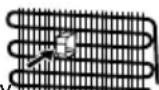
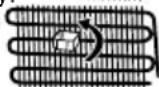
- Install using the plastic distance guides, which can be found at the rear of the appliance. Turn 90 ^1 degrees (as shown in the diagram). This will keep the condenser from touching the wall.
- Refrigerator should be placed against a wall with a free distance not exceeding 75 mm.
CHAPTER -1: SAFETY INSTRUCTIONS
Before Using your Fridge Freezer

- Before setting up your fridge freezer, check for any visible damage. Do not install or use your fridge freezer if it is damaged
- When using your fridge freezer for the first time, keep it in an upright position for at least 3 hours before plugging into the mains. This will allow efficient operation and prevents damage to the compressor.
- You may notice a light odour when using your fridge freezer for the first time. This is perfectly normal and will fade away as the fridge starts to cool.
NO FROST technology
Differs from many other standard fridge freezers. Other appliances may experience ice in the freezer compartment due to the opening of the doors and humidity caused by the food. In such appliances defrosting is required. They have to be turned off periodically, the food inside moved and the ice removed.
Your "no frost" fridge freezer prevents such problems by evenly distributing in the fridge and freezer compartments through the use of a fan. This cools your food evenly and uniformly, preventing humidity and freezing.
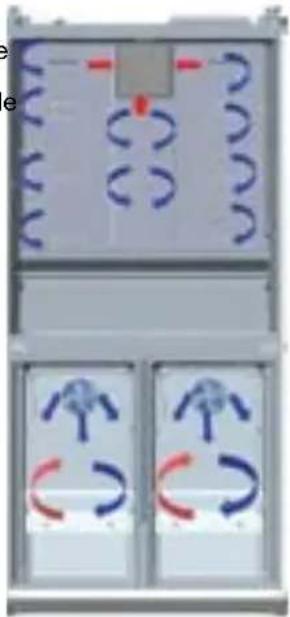
natural_image
Diagram of a device with three panels showing circular and curved components, no readable text or symbols present.Blue arrows: Blow cold air
Red arrows: Returning hot air
CHAPTER -2: YOUR FRIDGE FREEZER
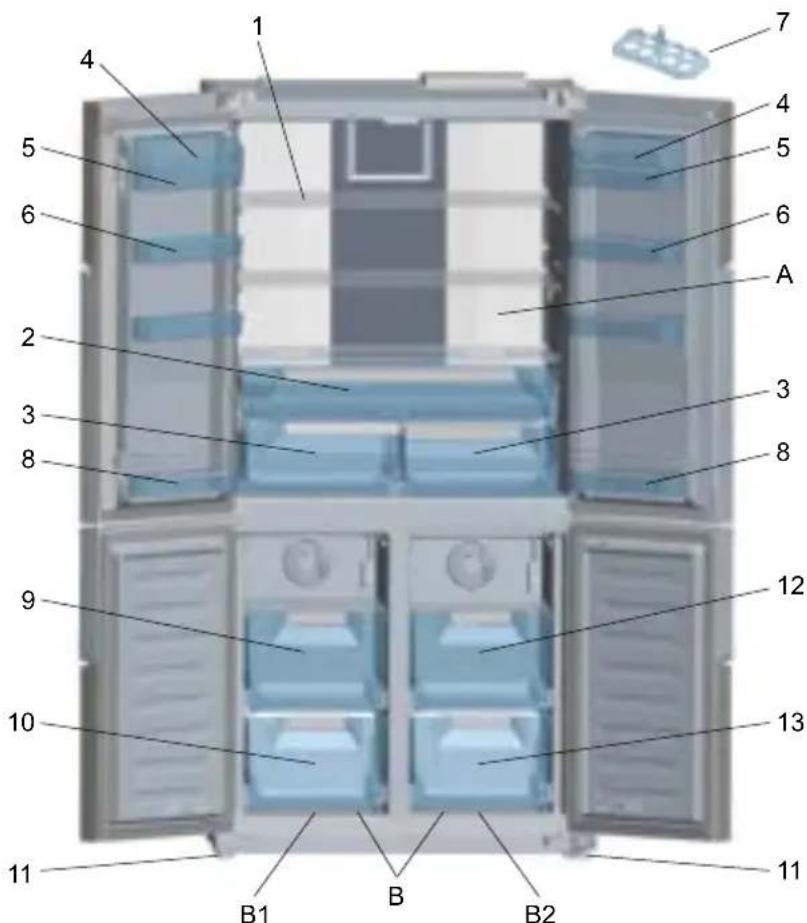
This appliance is not intended to be used as a built-in appliance.
text_image
1 2 3 4 5 6 7 8 9 10 11 B1 B B2 A 3 4 5 6 12 13 11A) Fridge compartment
B) Fridge / Freezer compartment
B1. Zone-1 / B2. Zone-2
1) Fridge compartment shelves
2) ChillGUDZHU
3) Crispers
4) Cheese-Butter shelf covers *
5) Cheese, butter shelf
6) Door shelves
7) Eggcups
8) Door bottle shelves
9) Fridge / Freezer top baskets
10) Fridge / Freezer bottom baskets
11) Adjustable feet
12) Freezer top baskets
13) Freezer bottom baskets
* In some models
natural_image
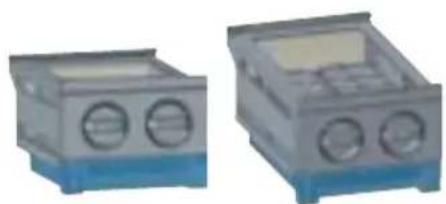
Two identical electronic device enclosures with blue bases and circular vented ports (no visible text or symbols)Ice-matic (In some models)
This figure has been drawn for information purposes to show the various parts and accessories in the appliance. Parts may vary according to the model of the appliance.
CHAPTER -2: YOUR FRIDGE FREEZER
General notes:
Fresh Food Compartment (Fridge): Most efficient use of energy is ensured in the configuration with the drawers in the bottom part of the appliance, and shelves evenly distributed, position of door bins does not affect energy consumption.
Freezer Compartment (Freezer): Most Efficient use of energy is ensured in the configuration with the drawers and bins are on stock position.
CHAPTER -3: USING YOUR FRIDGE FREEZER
General features of your appliance
The LED lights are designed to come on gradually and will take a few seconds to reach 100% brightness.
Electronic display
- Fridge Compartment Temperature indicator
2.Left Freezer Compartment Temperature indicator - Right Freezer Compartment Temperature indicator
- Super cooling light
- Super freezing light
- Qdrink alarm counter
- Qdrink light
- Economy mode
- Holiday mode
- Night sensor
- Child lock
- Demo mode
- Low voltage warning
- Alarm
- Screensaver button
- Zone 2 (Right freezer) button
- Mode button
- Cooler button
- Qdrink mode button
- Zone 1 (Left freezer) button

text_image
6 7 min 8 9 10 4 5 sc sf 11 12 13 14 15 16 mode g drink s.saver 17 cooler zone 1 zone 2 18The values on the screen indicate temperature values specified by the consumer.
The display is designed to avoid error if unintentionally touched. To interact with the display touch and button for 2 seconds, an audible beep will sound and to indicate it is ready for use.
CHAPTER -3: USING YOUR FRIDGE FREEZER
Cooling beverages [q.drink]
To activate q.drink mode press the q.drink button. The time is set in increments of 5 minutes (up to a maximum of 30). The time selected is shown in the q.drink alarm counter - when the time has completed an audible beep will sound.
Important: It should not be confused with the cooling mode.
Please adjust the time according to the number of bottles you are placing in the freezer compartment. You can extend the time of the feature if the temperature of the bottles are not cool enough but it is important to check the temperature of the bottles regularly as they may explode if left too long.
Economic mode [eco]
Ensures that your refrigerator runs within ideal temperatures. In order to activate “ECO” mode, just press [mode] button until “eco and e” light is on.
Holiday mode (H)
(Umbrella & Sun Icon) Use this mode if you are going away for a period of time and do not need to use the fridge compartment. Press the holiday mode button until the holiday icon and H light appear.
Quick freezing (sf / super freeze)
Designed to quickly freeze meals and large amounts of food quickly. Press the [zone1] or [zone2] button until "sf" is displayed on the screen and you hear an audible beep. Please note this mode will automatically revert to the standard set temperature after 24 hours if not deactivated before - or when the freezer has reached the sufficient temperature.
Quick cooling (sc / super cool)
Quick Cooling is designed to cool large amounts of food quickly when placed in the fridge section. Press the cooler button until you see the "sc" letters in the display and you hear and audible beep. This mode will automatically revert to the standard temperature setting after a period to 4-6 hours or when the refrigerator has reached the required temperature.
Cooler [cooler]
Sets the fridge temperature in values of 1 from 2 - 8 Celsius.
Freezer / Cooler 1 [ZONE 1]
It is temperature setting button for the bottom-left compartment. By pressing [zone 1] button freezing value of bottom-left part can be set as -16, -17, -18, -19, -20, -21, -22, -23, -24 Celsius temperature values. If you do not want to use bottom-left part as cooler, press [zone1] button for 3 seconds to switch to this mode, and set to 2, 3, 4, 5, 6, 7, 8 Celsius temperature values.
Freezer [ZONE 2]
It is temperature setting button for the bottom-right compartment. By pressing [zone 2] button freezing value of bottom-right part can be set as -16, -17, -18, -19, -20, -21, -22, -23, -24 Celsius temperature values.
Child lock
Activate the Child Lock by pressing the [cooler] and [zone 2] buttons simultaneously, this will deactivate the display. To remove the Child Lock repeat the process.
Screensaver [s.saver]
Use the Screensaver mode to save energy. Hold the [s.saver] button down for 3 seconds, to deactivate repeat the process.
Night sensor
Press the [mode] and [s.saver] buttons for 3 seconds to activate. This will turn the fridge lights off and save energy. To deactivate repeat the process.
Alarm
If the alarm light comes on it means there is something wrong with the fridge freezer and you will need to contact the Sharp service team. This indicator will continue to show until a qualified service engineer has seen the product.
Compartment On-Off mode
To turn off Zone1, Zone2 and the cooler at the same time;
- Press and hold the [mode] and [cooler] buttons simultaneously for 3 seconds. All figures indicating the part turned off will disappear on the digital indicator panel.
or
- Press and hold the [mode] and [zone 2] buttons simultaneously for 3 seconds. All figures indicating the part turned off will disappear on the digital indicator panel.
To turn off the Zone1 compartment,
press and hold the [mode] and [zone 1] buttons simultaneously for 3 seconds. All figures indicating the part turned off will disappear on the digital indicator panel.
To reactivate the turned-off compartment, use the same combination of buttons.
Using a Freezer Compartment as Cooler Compartment Based On Demand
The bottom left compartment on the appliance can be used either as freezer or as a cooler.
Press and hold the [zone 1] button for 3 seconds to change the bottom-left compartment from a freezer to a cooler.
Important : If the Zone1 compartment will be converted from a freezer to a cooler:
CHAPTER -3: USING YOUR FRIDGE FREEZER
- Empty the food from the Zone1 compartment and leave the door closed for four hours. Then food can be placed in the compartment.
- Baskets and/or shelves removed from the compartment should be re-fitted.
- Similarly, in order to utilize any of bottom compartments used as cooler as freezers again, press and hold the related compartment button for 3 seconds.
Important : If the Zone1 compartment will be converted from cooler to freezer:
- Empty the food from the Zone1 compartment and leave the door closed for two hours. Then food can be placed in the compartment.
- When the zone 1 compartment is used as a cooler and the appliance is switched to Holiday or Economic setting, the zone 1 compartment will keep on running as cooler.
Warnings for temperature settings
- The ambient temperature, temperature of the freshly stored food and how often the door is opened, affects the temperature in the refrigerator compartment. If required, change the temperature setting.
- It is not recommended that you operate your fridge in environments colder than 10^ .
- The thermostat setting should be set by taking into consideration how often the fresh food and freezer doors are opened and closed, how much food is stored in the refrigerator and the environment in which and the positioning of the appliance.
- We recommend that when first using the fridge freezer it should be left running for 24 hours uninterrupted to ensure it is completely cooled. Do not open the fridge doors, or put food inside for this period.
- Your fridge freezer has a 5 minute built in delay function, designed to prevent damage to the compressor. When power is applied to your fridge freezer, it will begin to operate normally after 5 minutes.
- Your fridge is designed to operate in the ambient temperature intervals stated in the standards, according to the climate class stated in the information label. It is not recommended that your fridge is operated in the environments which are out of the stated temperature intervals in terms of cooling efficiency.
- This appliance is designed for use at an ambient temperature within the 10 °C - 43 °C range.
Climate class and meaning:
T (tropical): This refrigerating appliance is intended to be used at ambient temperatures ranging from 16 °C to 43 °C.
ST (subtropical): This refrigerating appliance is intended to be used at ambient temperatures ranging from 16 °C to 38 °C.
N (temperate): This refrigerating appliance is intended to be used at ambient temperatures ranging from 16 °C to 32 °C.
SN (extended temperate): This refrigerating appliance is intended to be used at ambient temperatures ranging from 10 °C to 32 °C.
Note: If the ambient temperature is higher than 42^ C, the compartment temperature cannot be set to -23^ C or -24^ C. It can only be set to -16^ C, -17^ C, -18^ C, -19^ C, -20^ C, -21^ C or -22^ C.
Temperature indicator
In order to help you better set your refrigerator, we have equipped it with a temperature indicator located in the coldest area.
To better store the food in your refrigerator, especially in the coldest area, make sure the message “OK” appears on the temperature indicator. If « OK » does not appear, this means temperature has not been set properly
It may be difficult to see the indicator, make sure it is properly lit. Each time the temperature setting device is changed, wait for the stabilisation of the temperature inside the appliance before proceeding, if necessary,
with a new temperature setting. Please change the position of the temperature setting device progressively and wait at least 12 hours before starting a new check and potential change.
NOTE: Following repeated openings (or prolonged opening) of the door or after putting fresh food into the appliance, it is normal for the indication "OK" not to appear in the temperature setting indicator. If there is an abnormal build up of ice crystals (bottom wall of the appliance) on the refrigerator compartment, evaporator (overloaded appliance, high room temperature, frequent door openings), put the temperature setting device on a lower position until compressor off periods are obtained again.


Store food in the coldest area of the refrigerator.
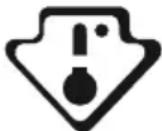
Your foods will be better stored if you put them in the most appropriate cooling area. The coldest area is just above the crisper.
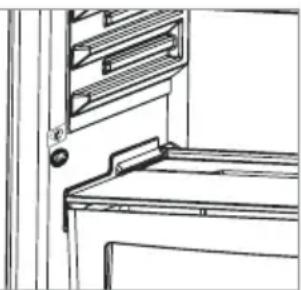
The following symbol indicates the coldest area of your refrigerator. To be sure to have a low temperature in this area, make sure the shelf is located at the level of this symbol, as shown in the illustration.
The upper limit of the coldest area is indicated by the lower side of the sticker (head of the arrow). The coldest area upper shelf must be at the same level with the arrow head. The coldest area is below this level.
As these shelves are removable, make sure they are always at the same level with these zone limits described on the stickers, in order to guarantee temperatures in this area.
natural_image
Line drawing of a cabinet interior with shelves and door (no text or symbols)Accessories
Icematic (In some models)
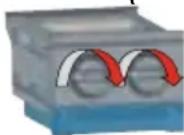
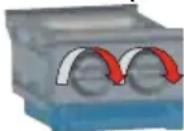
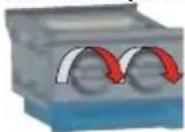
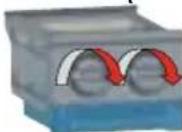
• Take out the ice making tray
- Fill the water to the line.
- Place the ice making tray in its original position
- When ice cubes are formed, twist the lever to drop ice cubes into the icebox.
CHAPTER -3: USING YOUR FRIDGE FREEZER
Note:
- Do not fill the icebox with water in order to make ice. It may be broken.
- The movement of the ice maker may be difficult while the refrigerator is running. In such a case, it should be cleaned after removing the glass shelves.
Zero Degree Zone / Breakfast Compartment
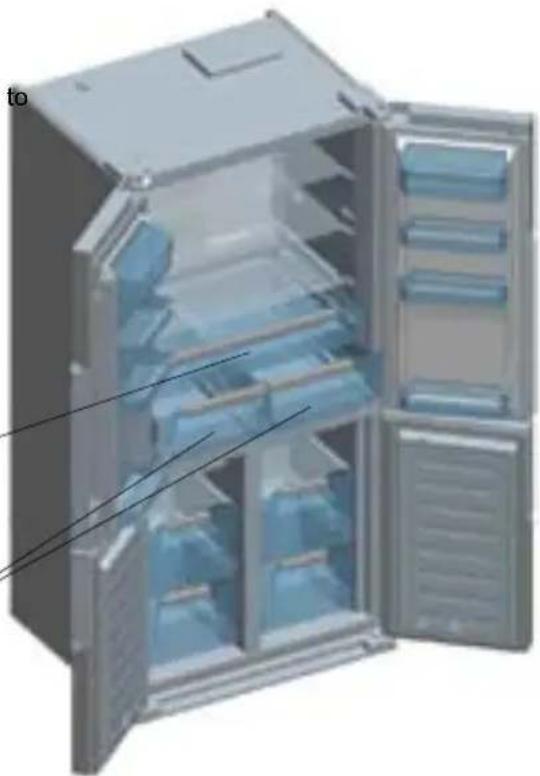
When this compartment is used as 0°C compartment (chiller), it ensures that your food is preserved at 0°C. You can keep the frozen foods that you take out of the deepfreeze compartment in order defrost them or you can keep the meats and cleaned fishes (in plastic bags or packets) etc. which you will use within 1-2 days without need for freezing.
Note: Water is frozen in 0°C but the foods including salt or sugar can be frozen in colder environments.
! Please do not put the food you would like frozen or iceboxes in this partition.
natural_image
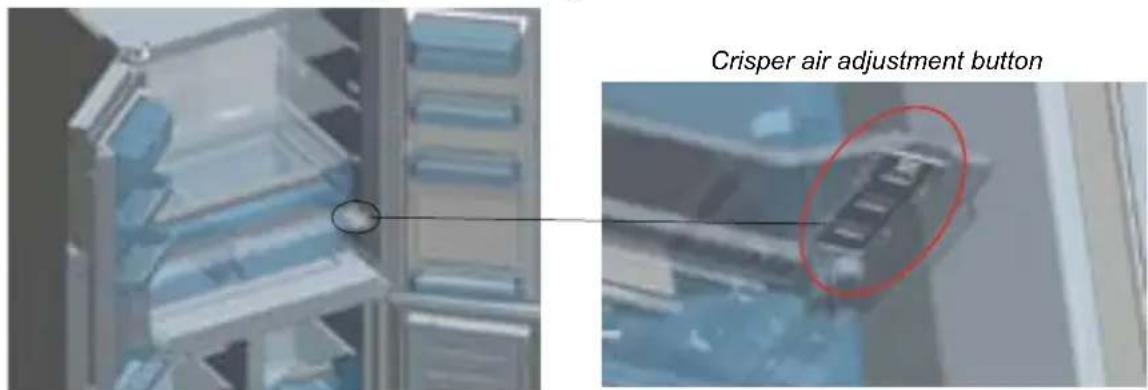
3D illustration of an open refrigerator with blue internal compartments and ventilation grilles (no text or symbols)Crisper air flow adjustment
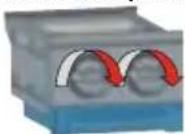
If the salad crispers are full turn the knob (located between the chiller and the crisper) to the open position. This will increase the air flow and ensure food stays fresher for longer.
text_image
Crisper air adjustment buttonVisual and text descriptions on the accessories section may vary according which model you have..
Cleaning
- Before cleaning your fridge freezer, turn your mains supply off and remove the plug from the socket.
- Do not wash your fridge freezer by pouring water on to it.
- Use a warm, soapy cloth or sponge to wipe the interior and exterior of your fridge freezer.
- Carefully remove all shelves and drawers by sliding upwards or outwards and clean with soapy water. Do not wash in a washing machine or dishwasher.
- Do not use solvents, abrasive cleaners, glass cleaners or all purpose cleaning agents to clean your fridge freezer. This may cause damage to the plastic surfaces and other components with the chemicals they contain.
- Clean the condenser at the back of your fridge freezer at least once a year with a soft brush or vacuum cleaner.
Make sure that your fridge is unplugged while cleaning.
Cleaning evaporation bowl
Your fridge defrosts automatically. Water produced by defrosting flows to the evaporating container passing through the water collecting groove, and vaporizes here by itself.
Replacing LED Lighting
If your fridge freezer has LED lighting contact the Sharp help desk as this should be changed by authorized personnel only.
CHAPTER -4: FOOD STORAGE GUIDE
The Fridge Compartment:
• Take care when storing tropical fruit such as pineapples as they can quickly deteriorate in lower temperatures.
- Divide and separate food into smaller pieces before storage.
- Cover or wrap food to prevent odours. We recommend that you store meat loosely covered as this allows air to circulate around the meat causing the surface to dry slightly, helping to prevent the growth of bacteria.
- Do not store food close so that it blocks the crisper air adjustment button.
- For normal working conditions, it will be sufficient to adjust the temperature setting of your refrigerator to +4^ .
- The temperature of the fridge compartment should be in the range of 0-8 °C, fresh foods below 0 °C are iced and rotted, bacterial load increases above 8 °C, and spoils.
- Do not put hot food in the refrigerator immediately, wait for the temperature to pass outside. Hot foods increase the degree of your refrigerator and cause food poisoning and unnecessary spoiling of the food.
- Meat, fish, etc. should be store in the chiller compartment of the food, and the vegetable compartment is preferred for vegetables. (if available)
• To prevent cross contamination, meat products and fruit vegetables are not stored together.
- Foods should be placed in the refrigerator in closed containers or covered to prevent moisture and odors.
The table below is a quick guide, showing you the most efficient way to store the major food groups in your refrigerator compartment.
| Food Storage Duration Location | ||
| Fruits and Vegetables 1 week Loose in Vegetable Holder | ||
| Fish and Meat 2-3 Days Wrapped on | Glass Shelf | |
| Fresh Cheese 3-4 Days Top Door Shelf | ||
| Butter and Margarine 1 Week Top Door Shelf | ||
| Bottles, Yogurt and Milk Refer to Packaging | Top Door Shelf | |
| Eggs | 1 month | In Egg Holder |
The Freezer Compartment:
You should use the freezer compartments for storing food for long periods and making ice. Aim to freeze fresh food as quickly as possible so that it keeps its taste and appearance. We recommend that you place food you would like to freeze in the upper tray of the freezer compartment for 24 hours before placing it next to other frozen foods. It is important that you do not exceed the maximum freezing capacity of your Fridge Freezer, this will help to ensure that your food freezes as quickly as possible.
The storage durations of frozen food can be changed by a variety of factors, such as; the frequency of the doors opening and closing, thermostat settings, food types and the period of time that elapsed from when the food was acquired to the time it entered the freezer. It is important that you follow the packaging on frozen foods and do not exceed the storage duration. The table below contains some recommendations on freezing.
| Food | Preparation | Storage Duration (Months) | Thawing Period at Room Temperature (Hours) |
| Beef Steak | Cut into single Portions | 6-10 | 1-2 or until completely thawed |
| Lamb | Cut into single Portions | 6-8 | 1-2 or until completely thawed |
| Minced Meat | Packed in convenient Portions | 1-3 | 2-3 or until completely thawed |
| Sausage | Must be packed | 1-2 | Until completely thawed |
| Chicken and Turkey | Packed in convenient portions | 1-2 | 10-12 or until completely thawed |
| Freshwater Fish (such as trout) | Cleaned well inside and scaled. Washed and dried. Cut off head and tail where necessary | 2 | Until completely thawed |
| Lean Fish (such as Sea Bass) | 4-8 | Until completely thawed | |
| Fatty fish (such as Mackerel) | 2-4 | Until completely thawed | |
| Peas | Shelled and washed | 12 | May Be Used From Frozen |
WARNING: Do not re-freeze frozen food once it has thawed. It may be a danger to your health.
CHAPTER -5: TROUBLESHOOTING
Your Fridge Freezer is equipped with a built in fault detection system, which is able to give you guidance should your fridge freezer not operate as expected. In the event of an error a symbol will be displayed on the control panel. The most common error symbols are shown below. If your fridge freezer displays a symbol not shown below contact the Sharp help-desk.
ERROR DISPLAY ERROR TYPE REMARK DO'S
 and audible warning and audible warning | Error warning | Part of your Fridge Freezer may not be working properly, or there could be a cooling problem. | Contact the Sharp Help-desk |
  or or | Freezer compartment is not cold enough. | This could be the result of a power supply disruption or failure of the cooling equipment. | Use the SUPERFREEZE mode, or set the freezer compartment to a lower temperature until the warning symbol disappears. Do not place fresh food in the freezer compartment when this warning symbol is showing. |
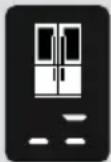 | Fridge compartment is not cold enough | This could be the result of a power supply disruption or failure of the cooling equipment. | Use the SUPERCOOL mode or set the refrigerator to a lower temperature until the warning symbol disappears. Do not open the door while the warning system is displayed. |
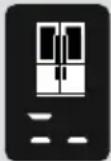 | The refrigerator compartment is too cool. | Food in the refrigerator is at risk of being frozen. | Cancel the SUPERCOOL function if it is active. Decrease the temperature of the fridge compartment. |
 | The supply voltage has dropped below 170V. | This symbol is intended for advice and to act as a precaution. It will disappear once the supply voltage rises above 170V. | - |
Troubleshooting information
If you are experiencing a problem with your refrigerator, please check the following before contacting the after-sales service.
If your fridge is not operating;
• Is there a power failure?
- Is the plug connected to the socket correctly?
- Is the fuse of the socket to which the plug is connected or the main fuse blown?
- Is there any failure at the socket? To check this, plug your refrigerator into a known working socket.
If your fridge is not cooling enough;
• Is the temperature adjustment right?
- Is the door of your fridge opened frequently and left open for a long while?
• Is the door of fridge closed properly?
- Did you put a dish or food on your fridge so that it contacts the rear wall of your fridge so as to prevent the air circulation?
• Is your fridge filled excessively?
- Is there adequate distance between your fridge and the rear and side walls?
- Is the ambient temperature within the range of values specified in the operating manual?
If the food in your refrigerator compartment is over cooled
• Is the temperature adjustment right?
- Are there many food recently put inside the freezer compartment? If so, your fridge may over cool the food inside the refrigerator compartment as it will operate longer to cool these food.
If your fridge is operating too loudly;
To maintain the set cooling level, compressor may be activated from time to time. Noises from your fridge at this time are normal and due to its function. When the required cooling level is reached, noises will be decreased automatically.
CHAPTER -5: TROUBLESHOOTING
If the noises persist;
- Is your appliance stable? Are the legs adjusted?
• Is there anything behind your fridge? - Are the shelves or dishes on the shelves vibrating? Re-place the shelves and/or dishes if this is the case.
- Are the items placed on your fridge vibrating?
Normal Noises;
Cracking (Ice cracking) Noise:
• During automatic defrosting.
- When the appliance is cooled or warmed (due to expansion of appliance material).
Short cracking: Heard when the thermostat switches the compressor on/off.
Compressor noise (Normal motor noise): This noise means that the compressor operates normally Compressor may cause more noise for a short time when it is activated.
Bubbling noise and splash: This noise is caused by the flow of the refrigerant in the tubes of the system.
Water flow noise: Normal flow noise of water flowing to the evaporation container during defrosting. This noise can be heard during defrosting.
Air Blowing Noise (Normal fan noise): This noise can be heard in No-Frost fridge during normal operation of the system due to the circulation of air.
If humidity builds up inside the fridge;
- Has the food been properly packaged? Have the containers been well dried before they were put into the refrigerator?
- Are the doors of the refrigerator opened very frequently? When the door is opened, the humidity found in the air in the room enters the refrigerator. Especially if the humidity rate in the room is too high, the more frequently the door is opened the faster will be the humidification.
If the doors are not opened and closed properly;
- Do the food packages prevent closing of the door?
- Are the door compartments, shelves and drawers placed properly?
- Are door gaskets broken or torn?
• Is your fridge on a level surface?
If the edges of fridge cabinet that the door joint contact are warm;
Especially in summer (hot weather), the surfaces that the joint contact may get warmer during the operation of the compressor, this is normal.
IMPORTANT NOTES:
- The compressor protection thermal fuse will cutout after sudden power breakdowns or after unplugging the appliance, because the gas in the cooling system is not stabilised. This is quite normal, and the fridge will restart after 4 or 5 minutes.
- The cooling unit of your refrigerator is hidden in the rear wall. Therefore, water droplets or ice may occur on the rear surface of your fridge due to the operation of the compressor in specified intervals. This is normal. There is no need to perform a defrosting operation unless the ice is excessive.
- If you will not use your fridge for a long time (e.g. in summer holidays) unplug it. Clean your fridge according to Part 4 and leave the door open to prevent humidity and smell.
- The appliance you have purchased is designed for home type use and can be used only at home and for the stated purposes. It is not suitable for commercial or common use. If the consumer use the appliance in a way that does not comply with these features, we emphasise that the producer and the dealer shall not be responsible for any repair and failure within the guarantee period.
- If the problem persists after you have followed all the instructions above, please consult an authorised service provider.
CHAPTER -6: TIPS FOR SAVING ENERGY
- Always allow foodstuffs to cool before storing in the appliance.
- Thaw food in the fridge compartment, this helps save energy.
CHAPTER -7: TECHNICAL DATA
The technical information is situated in the rating plate on the internal side of the appliance and on the energy label. The QR code on the energy label supplied with the appliance provides a web link to the information related to the performance of the appliance in the EU EPREL database.
Keep the energy label for reference together with the user manual and all other documents provided with this appliance.
It is also possible to find the same information in EPREL using the link https://eprel.ec.europa.eu and the model name and product number that you find on the rating plate of the appliance.
See the link www.theenergylabel.eu for detailed information about the energy label.
CHAPTER -8: CUSTOMER CARE AND SERVICE
Always use original spare parts.
When contacting our Authorised Service Centre, ensure that you have the following data available: Model, Serial Number and Service Index.
The information can be found on the rating plate. You can find the rating label inside the fridge zone on the left lower side.
The original spare parts for some specific components are available for a minimum of 7 or 10 years, based on the type of component, from the placing on the market of the last unit of the model.
Visit our website to:
www.sharphomeappliances.com
Inhalt
KAPITEL 1: ALLGEMEINE WARNHINWEISE ....15
KAPITEL 2: IHR KÜHL-/GEFRIERSCHRANK ....19
natural_image
Three-panel diagram showing abstract curved shapes with arrows, no text or symbols presentKAPITEL 2: IHR KÜHL-/GEFRIERSCHRANK
natural_image
Two identical gray and blue industrial electrical enclosures with circular vented slots (no text or symbols visible)natural_image
Line drawing of a refrigerator with a door and shelf (no text or symbols)die Abbildung an.
natural_image
3D illustration of an open refrigerator with blue shelves and doors (no text or symbols visible)www.sharphomeappliances.com
Sommaire
PARTIE -1: AVERTISSEMENTS GÉNÉRAUX....29
PARTIE -2: PARTIES ET PIÈCES DE VOTRE RÉFRIGÉRATEUR-CONGÉLATEUR...34
PARTIE -3: UTILISATION DE L'APPAREIL....35
PARTIE -4: DISPOSITION DES ALIMENTS....39
PARTIE -5: AVANT D'APPELER LE SERVICE APRÈS-VENTE....41
PARTIE -6: ASTUCES D'ÉCONOMIE D'ÉNERGIE 43
natural_image
Three-panel diagram showing abstract curved shapes with red arrows, no text or symbols presentnatural_image
Two identical gray electronic device enclosures with blue bases and circular vent indicators (no text or symbols visible)natural_image
Line drawing of a cabinet or rack structure with no visible text or symbolsnatural_image
3D illustration of an open refrigerator with blue internal compartments and open doors (no text or symbols)natural_image
Close-up of a mechanical device with blue components and a circled detail (no visible text or symbols)natural_image
Close-up of a mechanical component with a red oval highlighting a specific part (no visible text or symbols)natural_image
Three-panel diagram showing abstract curved shapes with red arrows, no text or symbols presentHOOFDSTUK -2: ONDERDELEN EN STUKKEN VAN UW KOELKAST
natural_image
Two identical gray industrial electrical enclosures with blue bases and circular vent gauges (no visible text or symbols)Ice-matic (In sommige modellen)
natural_image
Line drawing of a refrigerator interior with no text or symbolsde afbeelding.
natural_image
3D illustration of an open refrigerator with blue liquid-filled doors and ventilation grilles (no text or symbols visible)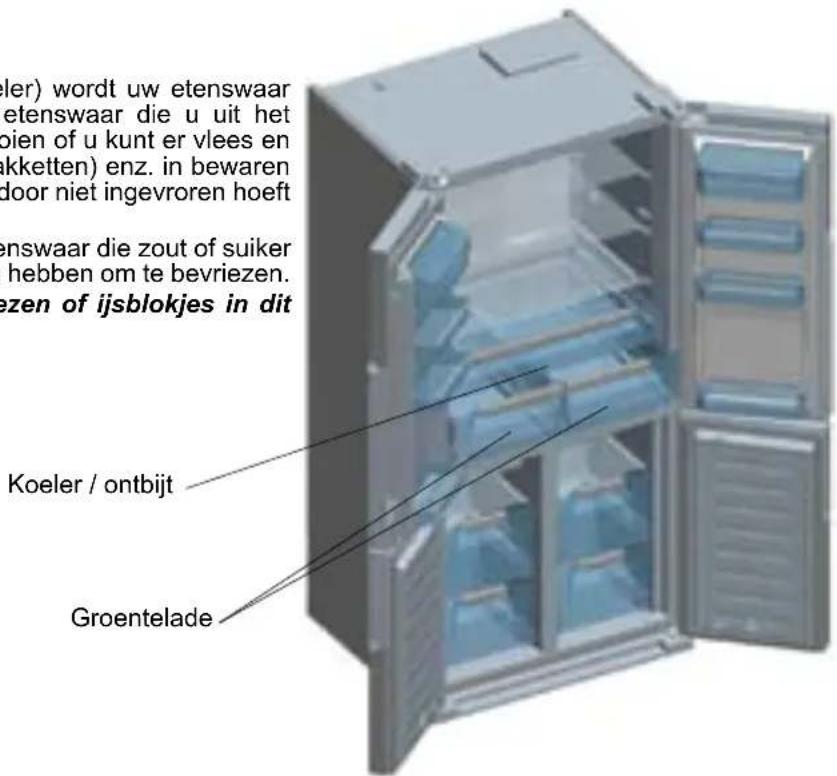
natural_image
Interior view of a modern kitchen or refrigerator with shelves and a highlighted door (no visible text or symbols)natural_image
Close-up of a car with a red oval highlighting the front portion of a vehicle (no visible text or symbols)www.sharphomeappliances.com
Índice
CAPÍTULO 1: ADVERTENCIAS GENERALES....60
CAPÍTULO 2: SU FRIGORÍFICO 64
CAPÍTULO 3: USO DEL FRIGORÍFICO 65
natural_image
Diagram of two heat exchanger-like structures with internal flow indicators (no text or labels)text_image
ion s frio s;CAPÍTULO 2: SU FRIGORÍFICO
natural_image
Two identical gray electronic device enclosures with blue bases and circular vent holes (no text or symbols visible)natural_image
Line drawing of a cabinet or rack with a door and shelf, no text or symbols present
CAPÍTULO 3: USO DEL FRIGORÍFICO
Accesorios
natural_image
3D illustration of an open refrigerator with blue liquid compartments and ventilation grilles (no text or symbols)natural_image
Close-up of a refrigerator interior with blue shelves and a highlighted glass door (no visible text or symbols)natural_image
Close-up of a mechanical component with a red oval highlighting a specific part (no visible text or symbols)www.sharphomeappliances.com
Conteúdos
CAPÍTULO -1: AVISOS GERAIS 75
CAPÍTULO -2: O SEU FRIGORÍFICO....79
text_image
Diagram illustrating heat transfer in a coiled heat exchanger with labeled components and directional arrowsCAPÍTULO -1: AVISOS GERAIS
natural_image
Diagram showing three panels of a device with curved and straight lines, no readable text or symbols present.CAPÍTULO -2: O SEU FRIGORÍFICO
natural_image
Two identical gray industrial electrical enclosures with blue bases and circular vent holes (no text or symbols visible)natural_image
Technical line drawing of a door frame with a handle and clasp (no text or symbols)natural_image
3D illustration of an open refrigerator with blue internal compartments and open doors (no text or symbols visible)natural_image
Illustration of a mechanical device with blue components and a circled area, no visible text or symbolsnatural_image
Close-up of a mechanical component with a red oval highlighting a specific part (no visible text or symbols)Visite o nosso website para: www.sharphomeappliances.com
Indhold
KAPITEL -1: GENERELLE ADVARSLER....89
KAPITEL -2: DIT K∅LEFRYSESKAB....93
KAPITEL -3: SÅDAN ANVENDES DIT K∅LEFRYSESKAB....94
KAPITEL -4: GUIDE TIL OPBEVARING AF MADVARER....98
KAPITEL -5: FEJLFINDING....99
KAPITEL -6: TIP TIL ENERGIBESPARELSE....100
natural_image
Diagram of two coiled heat exchangers with directional arrows indicating flow (no text or labels)KAPITEL -1: GENERELLE ADVARSLER
natural_image
Three-panel diagram showing abstract curved shapes with red arrows, no text or symbols presentnatural_image
Two identical electronic device modules with blue bases and circular vented ports (no text or symbols visible)Ice-matic (På visse modeller)
natural_image
Line drawing of a cabinet or rack unit with no visible text or symbolsKAPITEL -3: SÅDAN ANVENDES DIT K∅LEFRYSESKAB
Køler / Morgenmad
natural_image
3D illustration of an open refrigerator with blue doors and internal compartments (no text or symbols)natural_image
3D rendered image of a refrigerator interior with blue shelves and a highlighted section (no text or symbols visible)natural_image
Close-up of a mechanical component with a red oval highlighting a specific part (no visible text or symbols)www.sharphomeappliances.com
Innhold
KAPITTEL 1: GENERELLE ADVARSLER....102
KAPITTEL 2: KOMBISKAPET DITT....106
KAPITTEL 3: BRUKE KOMBISKAPET DITT....107
KAPITTEL 4: RETNINGSLINJER FOR OPPBEVARING AV MAT ....110
KAPITTEL 5: FEILS∅KING....112
KAPITTEL 6: TIPS FOR ENERGISPARING....113
natural_image
Diagram of a mechanical or electrical component with three panels showing curved and straight components, no text or symbols present.natural_image
Two identical gray electronic device enclosures with blue bases and circular vented ports (no text or symbols visible)Ice-matic (I noen modeller)
KAPITTEL 2: KOMBISKAPET DITT
Generelle merknader
Rask innfrying (sf / super freeze)
natural_image
Line drawing of a refrigerator interior showing front and side views (no text or symbols)Tilbehør
Icematic (I noen modeller)
natural_image
Close-up of a mechanical device with blue components and a highlighted circular area (no visible text or symbols)natural_image
Close-up of a vehicle with a red oval highlighting the front portion of a road (no visible text or symbols)Installationsinformation
natural_image
Three-panel diagram showing abstract curved shapes with red arrows, no text or symbols presentBlå pilar: Blåser kall luft
natural_image
Two identical gray plastic electronic device enclosures with blue bases and circular vent holes (no text or symbols visible)Ice-matic (I vissa modeller)
KAPITEL -3: ANVÄNDA DIN KYL OCH FRYS
KAPITEL -3: ANVÄNDA DIN KYL OCH FRYS
Frys [zone 2],
KAPITEL -3: ANVÄNDA DIN KYL OCH FRYS
natural_image
Line drawing of a cabinet interior with shelves and door (no text or symbols)Tillbehör
Icematic (I vissa modeller)
KAPITEL -3: ANVÄNDA DIN KYL OCH FRYS
Kylare/frukost
natural_image
3D rendering of a refrigerator interior with blue shelves and a highlighted door (no text or symbols visible)natural_image
Close-up of a mechanical component with a red oval highlighting a specific part (no visible text or symbols)www.sharphomeappliances.com
Sisältö
LUKU 1: YLEISET VAROITUKSET....128
LUKU 2: JÄÄKAAPPIPAKASTIMESI....132
LUKU 3: JÄÄKAAPPIPAKASTIMEN KÄYTTÄMINEN....133
LUKU 4: RUOAN SÄILYTYSOPAS....136
LUKU 5: VIANMÄÄRITYS....137
LUKU 6: ENERGIANSÄÄSTÖVINKKEJÄ....139
natural_image
Three-panel diagram showing abstract curved shapes with red and blue arrows, no readable text or symbolsnatural_image
Two identical gray and blue electronic device modules with circular cutouts (no visible text or symbols)Ice-matic (Joissakin malleissa)
LUKU 2: JÄÄKAAPPIPAKASTIMESI
natural_image
Line drawing of a cabinet or storage unit with a door and shelf (no text or symbols)Lisävarusteet
Icematic (Joissakin malleissa)
natural_image
3D illustration of an open refrigerator with blue liquid-filled doors and ventilation grilles (no text or symbols visible)Jäähdytyslokero
Vihanneslokerot
LUKU 3: JÄÄKAAPPIPAKASTIMEN KÄYTTÄMINEN
natural_image
Close-up of a metallic refrigerator interior with blue shelves and a red circular highlight on the door (no visible text or symbols)natural_image
Close-up of a building interior with a red-circled detail highlighting a specific structure (no visible text or symbols)LUKU 5: VIANMÄÄRITYS
LUKU 5: VIANMÄÄRITYS
LUKU -7: TEKNISET TIEDOT
www.sharphomeappliances.com
Sisukord
- PEATÜKK: ÜLDHOIATUSED....141
- PEATÜKK: TEIE SÜGAVKÜLMIKUGA KÜLMIK....145
- PEATÜKK: SÜGAVKÜLMIKUGA KÜLMIKU KASUTAMINE 146
- PEATÜKK: TOIDU HOIUSTAMISE JUHIS ....149
- PEATÜKK: TÖRGETE KÖRVALDAMINE 150
- PEATÜKK: NÕUANDED ENERGIA KOKKUHOIDMISEKS....152
natural_image
Three-panel diagram showing abstract curved shapes with directional arrows, no readable text or symbolsnatural_image
Two identical gray electronic device modules with blue bases and circular cutouts, shown from different angles (no text or symbols visible)Ice-matic (Osadel mudelitel)
natural_image
Line drawing of a refrigerator interior showing front and side views (no text or symbols)Tarvikud
Icematic (Osadel mudelitel)
natural_image
3D illustration of an open refrigerator with blue internal compartments and ventilation grilles (no text or symbols)3. PEATÜKK: SÜGAVKÜLMIKUGA KÜLMIKU KASUTAMINE
sharphomeappliances.com


