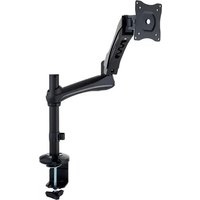
SA 6131 B - Projector Accessory Gravity - Free user manual and instructions
Find the device manual for free SA 6131 B Gravity in PDF.


User questions about SA 6131 B Gravity
0 question about this device. Answer the ones you know or ask your own.
Ask a new question about this device
Download the instructions for your Projector Accessory in PDF format for free! Find your manual SA 6131 B - Gravity and take your electronic device back in hand. On this page are published all the documents necessary for the use of your device. SA 6131 B by Gravity.
USER MANUAL SA 6131 B Gravity
natural_image
Technical line drawing of a robotic arm with mounting base and vertical support (no text or symbols)MONITOR MOUNT
TABLETOP-MOUNT, SWIVEL ARM
SA 6131 B
SAFETY INFORMATION | SICHERHEITSHINWEISE | INSTRUCTIONS DE SÉCURITÉ INSTRUCCIONES DE SEGURIDAD | INDICAZIONI SULLA SICUREZZA
EN SAFETY INFORMATION
- Please read this User's Manual carefully before you begin with the installation and setting-up.
- Keep all information and instructions in a safe place.
- Follow the instructions.
- Please pay particular attention to the safety warnings. Never remove safety warnings or other information from the product.
- When setting up the product, be careful and protect yourself from injuries.
- Please ensure that the product is on a flat surface, as the equipment might tip over.
- Make sure that all screws are tight and check them from time to time. Do not over-tighten the screws.
- This product is intended solely for indoor use. Using it outdoors can cause damage to the product and result in personal injury.
- Do not make any modifications to the product.
- When recycling, observe the applicable safety regulations for your country. Please separate plastic and paper/cardboard when recycling.
- Plastic bags must be kept out of reach of children.
- If you have any questions about this User's Manual or the safety instructions, please contact your specialist dealer/distributor.
The SA 6131 B is an elegant steel and die cast aluminium construction monitor mount arm. It is adjustable in all directions and features an ingenious counterbalance design for easy screen height adjustment. The integrated cable management system ensures a clean and uncluttered installation. The producer screen arm ships with desk clamp and grommet for a wide variety of secure mounting options.
• Solid and durable construction
- Sleek design
• Highly adjustable
- Safe and stable fixture
DE EINFÜHRUNG
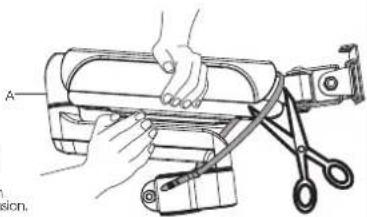
- Armily hold the two halves of the spring arm together and have another person cut off the cable tie from around the spring arm.
- Slowly release the pressure on the spring arm and allow it to gradually stretch to its full extension.
natural_image
Illustration of hands operating a cylindrical device with a tool, no text or symbols present4
text_image
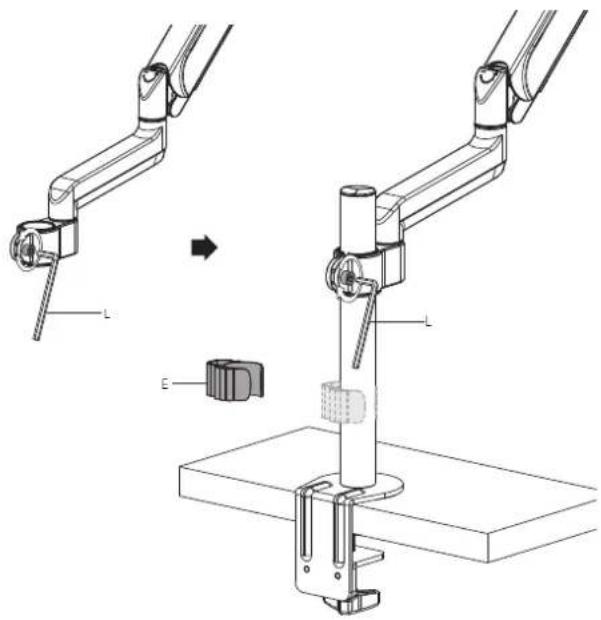
Technical diagram showing mechanical assembly steps with labeled parts L and E, including a directional arrow indicating transformation.5
text_image
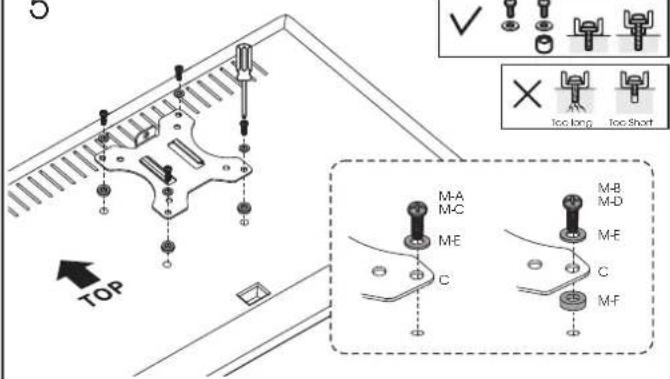
TOP M-A M-C ME C M-B M-D M-E C M-F6
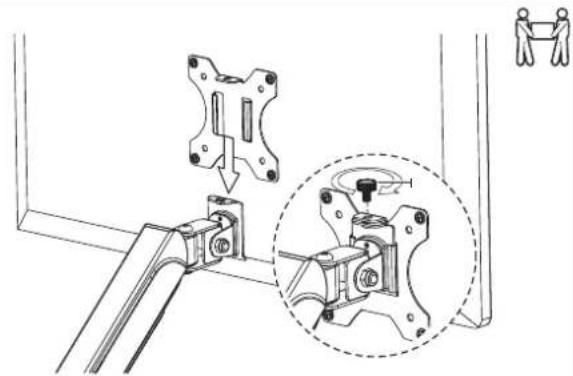
natural_image
Technical line drawing of a mechanical assembly with a close-up inset showing a rotating component (no text or symbols)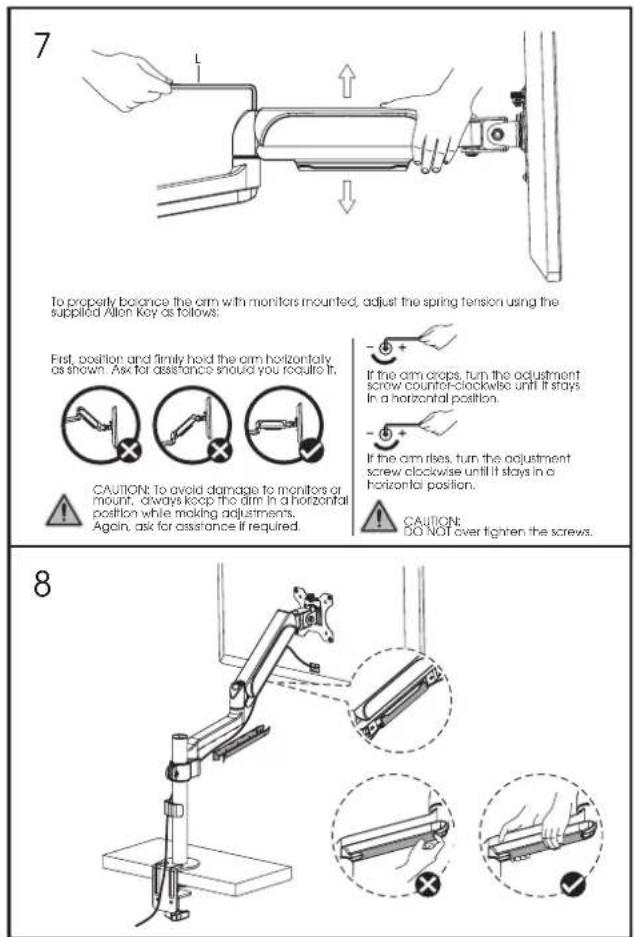
To properly balance the arm with monitors mounted, adjust the spring tension using the supplied Allen Key as follows:
First, position and firmly hold the arm horizontally as shown. Ask for assistance should you require it.
CAUTION: To avoid damage to monitors or mount, always keep the dim in a horizontal position while making adjustments. Again, ask for assistance if required.
If the arm crops, turn the adjustment screw counter-clockwise until it stays in a horizontal position.
If the arm rises, turn the adjustment screw clockwise until it stays in a horizontal position.
CAUTION: DO NOT over tighten the screws.
TECHNICAL DATA | TECHNISCHE DATEN | CARACTÉRISTIQUES TECHNIQUES DATOS TÉCNICOS | SPECIFICHE TECNICHE
EN TECHNICAL DATA
Product number GSA6131B
| Product type Stands and Tripods | |
| Type Other Stands and Tripods | |
| Material Aluminum, Steel | |
| Color Black | |
| Mounting option Barrier strip, Table mount | |
| Suitable for screen size 13" - 27" | |
| Number of screens 1 | |
| Screen weight max. 9 kg | |
| Also suitable for curved screens Yes | |
| Vesa standard 100 x 100 mm, 75 x 75 mm | |
| TILT movement -40° +40° | |
| Swivel | 180° |
| Rotate | 360° |
| Max. lenght of arm | 527 mm |
| Max. height of arm | 650 mm |
| Height admission pole | 310 mm |
| Height adjustment | Continuous |
| Cable management | Yes |
| Weight | 3.22 kg |
DE TECHNISCHE DATEN
You can find our current warranty conditions and limitations of liability at: http://www.adamhall.com/media/shop/downloads/documents/manufacturersdeclarations.pdf. To request warranty service for a product, please contact Adam Hall GmbH, Adam-Hall-Str1, 61267 Neu Anspach Email: Info@adamhall.com | +49 (0)6081 / 9419-0.

CORRECT DISPOSAL OF THIS PRODUCT
(valid in the European Union and other European countries with a differentiated waste collection system) This symbol on the product, or on its documents indicates that the device may not be treated as household waste. This is to avoid environmental damage or personal injury due to uncontrolled waste disposal. Please dispose of this product separately from other waste and have it recycled to promote sustainable economic activity. Household users should contact either the retailer where they purchased this product, or their local government office, for details on where and how they can recycle this item in an environmentally friendly manner. Business users should contact their supplier and check the terms and conditions of the purchase contract. This product should not be mixed with other commercial waste for disposal.
(Valid in the European Union and other European countries with waste separation)
http://www.adamhall.com/media/shop/downloads/documents/manufacturersdeclarations.pdf.
EN Read the entire instruction manual before you start installation and assembly. If you have any questions regarding any of the instructions or warnings, please contact your local distributor for assistance.

CAUTION: Use with products heavier than the rated weights indicated may result in instability causing possible injury.
- Please closely follow the assembly instructions. Improper installation may result in damage or serious personal injury.
• Safety gear and proper tools must be used. This product should only be installed by professionals.
• Make sure that the supporting surface will safely support the combined weight of the equipment and all attached hardware and components.
• Use the mounting screws provided and DO NOT OVER TIGHTEN mounting screws.
• This product contains small items that could be a choking hazard if swallowed. Keep these items away from children.
• This product is intended for indoor use only. Using this product outdoors could lead to product failure and personal injury.
IMPORTANT: Ensure that you have received all parts according to the component checklist prior to installation. If any parts are missing or faulty, contact your place of purchase for a replacement.
MAINTENANCE: Check that the product is secure and safe to use at regular intervals (at least every three months).