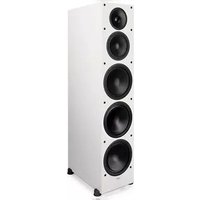
Monitor SE 8000F - Loudspeaker Paradigm - Free user manual and instructions
Find the device manual for free Monitor SE 8000F Paradigm in PDF.


| Product type | Floor-standing speaker |
| Brand | Paradigm |
| Model | Monitor SE 8000F |
| Category | Speaker |
| Speaker type | High-frequency driver (ferrofluid) and woofer |
| Tweeter technology | Ferrofluid |
| Recommended placement | 20 cm (8 in) from rear wall, avoid corners, tweeter at ear level |
| Wiring | Binding posts accept banana plugs, pins, spades, bare wire; polarity: red (+) and black (-) |
| Minimum wire gauge | 16 AWG up to 4.5 m, 14 AWG up to 9 m, 12 AWG beyond |
| Maintenance | Clean with a soft damp cloth, avoid strong detergents |
| Protection | Avoid moisture, do not place wet objects on the speaker |
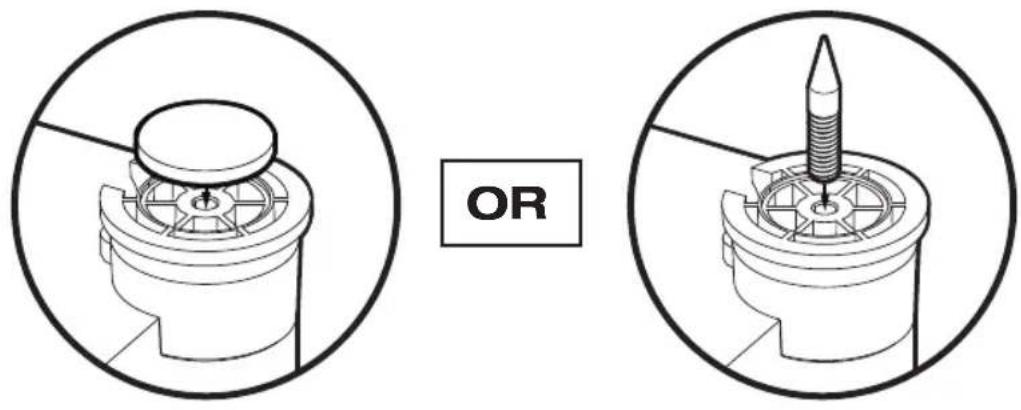
| Included accessories | Rubber caps, floor spikes (cleats) |
| Options | Paradigm speaker stands (sold separately) |
| Warranty | Limited 5 years from date of purchase |
| Warranty conditions | Normal residential use, non-transferable, proof of purchase required |
| Repairability | Contact an authorized Paradigm dealer |
| Recycling | Compliant with WEEE directive |
| Break-in | Allow to run for a few hours before critical listening |
| Minimum operating temperature | 10 °C (50 °F) for ferrofluid |
| Listening precautions | Reduce volume if distortion occurs, do not exceed cone excursion limits |
Frequently Asked Questions - Monitor SE 8000F Paradigm
User questions about Monitor SE 8000F Paradigm
0 question about this device. Answer the ones you know or ask your own.
Ask a new question about this device
Download the instructions for your Loudspeaker in PDF format for free! Find your manual Monitor SE 8000F - Paradigm and take your electronic device back in hand. On this page are published all the documents necessary for the use of your device. Monitor SE 8000F by Paradigm.
USER MANUAL Monitor SE 8000F Paradigm
MONITOR SE
natural_image
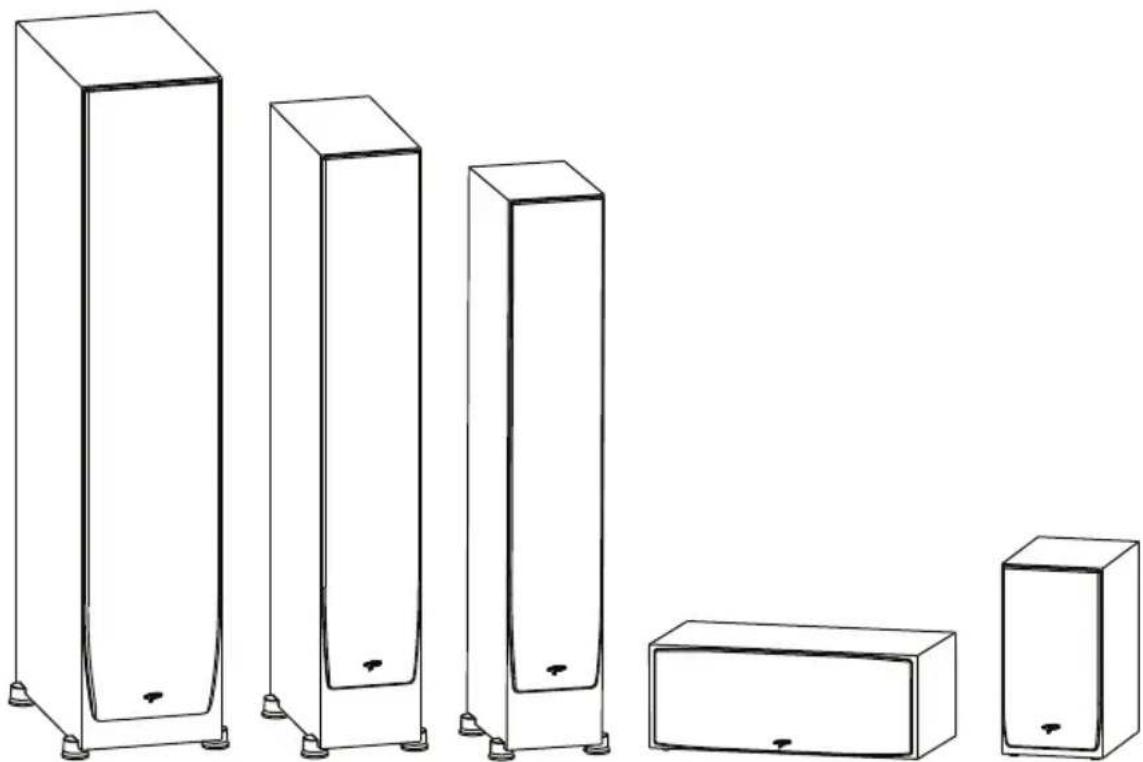
Line drawing of six different electronic components or devices, including rectangular and rectangular blocks with mounting feet (no text or symbols)Owner's Manual

RECYCLING AND REUSE GUIDELINES (Europe)
In accordance with the European Union WEEE (Waste Electrical and Electronic Equipment) directive effective August 13, 2005, we would like to notify you that our speakers may contain regulated materials which, upon disposal, require special reuse and recycling processing. For this reason Paradigm Electronics Inc. (the manufacturer of Paradigm speakers and Anthem electronic products) has arranged with its distributors in European Union member nations to collect and recycle this product at no cost to you. To find your local distributor please contact the dealer from whom you purchased this product or go to our website at www.paradigm.com.
Please note that only the product falls under the WEEE directive. When disposing of packaging and other shipping material we encourage you to recycle through the normal channels.
To ensure proper installation and enjoy all of the exceptional sound these speakers are designed to provide, please read this manual and follow all instructions. If you have further questions contact your Authorized Paradigm Dealer or visit the Q&A page on our website at www.paradigm.com.
TABLE OF CONTENTS
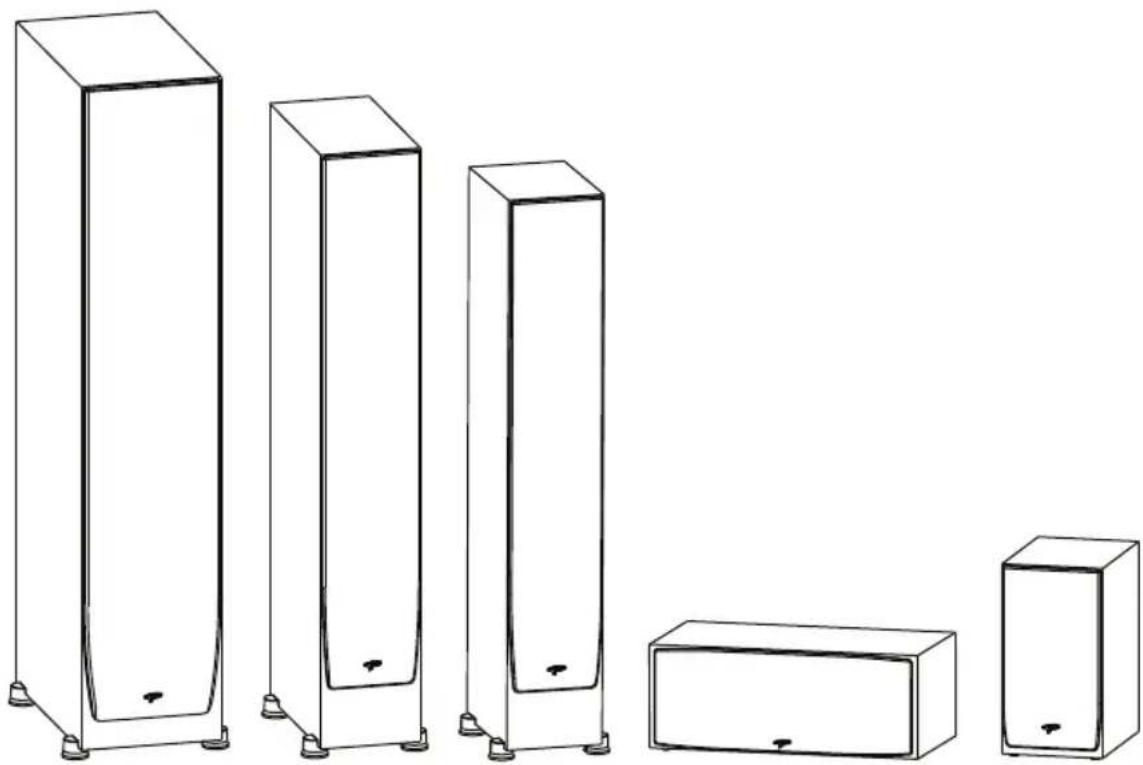
FloorstandingSpeakers-AttachingRubber Pads or Carpet Spikes 3
Bookshelf / Center Channel Speakers - Attaching Rubber Pads.... 4
Your New Speakers 5
Preventing Speaker Damage 6
Room Acoustics 8
Placement: Front L & R Speakers ...... 9
Placement: The Center Speaker 13
Wiring 14
Speaker Connection 15
Fine Tuning 16
Troubleshooting Guide 17
Limited Warranty 18
FLOORSTANDING SPEAKERS — ATTACHING RUBBER PADS OR CARPET SPIKES
Floor (Wood or Tile) Carpet
BOOKSHELF / CENTER CHANNEL SPEAKERS — ATTACHING RUBBER PADS
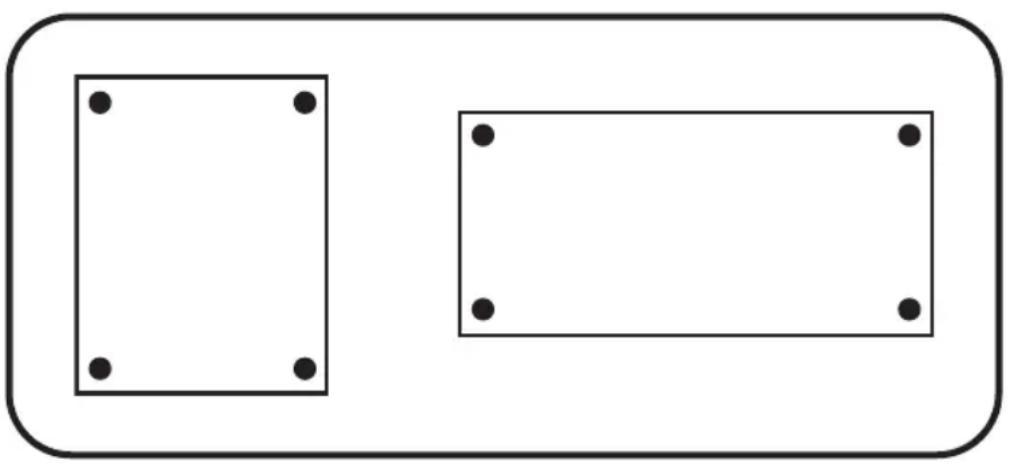
Self-adhesive rubber pads (included) must be applied to the bottom corners of bookshelf and center channel speakers (as shown) when placed on a shelf or other flat surface.
natural_image
Two rectangular shapes with black dots at corners, one larger and one smaller, both enclosed in a rounded rectangle (no text or symbols)Bottom View of Bookshelf / Center Channel Speaker.
YOURNEWSPEAKERS
Break-In
Although Paradigm Monitor SE Series speakers sound great “out of the carton,” they will sound even better when broken in. Allow them to operate for several hours before you listen critically.
High-frequency drivers use ferro-fluid that can thicken at temperatures below 10^ C ( 50^ F). If your speakers have been transported or stored in the cold let them warm to room temperature before use.
Cleaning
Do not use a strong or abrasive cleaner on your speakers. Clean them with a damp soft cloth, but do not get them wet. Do not place wet objects, such as drinking glasses or potted plants, on top of the speakers. If allowed to soak in, even a small amount of water may permanently damage the speaker enclosure.
PREVENTING SPEAKER DAMAGE
To prevent damage to your speakers, please read the following guidelines before making any connections.
Amplifier Distortion—The #1 Culprit!
Amplifier distortion is the principle cause of speaker damage. When listening at higher volume levels, your amplifier may run out of clean power and begin to produce a distorted signal if levels are increased any further. This will damage any brand of speaker very quickly. (See your Authorized Paradigm Dealer for amplifier recommendations).
More Powerful Amplifiers are Safer
When choosing an amplifier, always select an amplifier with a power rating greater than that of the speaker. Using a 100 Watts per channel amplifier on a 50 Watts speaker allows the amplifier adequate headroom in order to provide a distortion free signal. Conversely, using a 40 Watts per channel amplifier on a 50 Watts speaker limits the amplifier's headroom. This causes the amplifier to enter its distortion level much sooner, potentially damaging the speaker.
Volume Control
Do not be fooled by the Volume Control of your receiver/preamplifier. It only adjusts listening level—it is not a “power-output” dial. The amount of amplifier power actually used at a given Volume Control setting depends solely on the nature of the music you are listening to. At a given Volume Control setting a quiet section of music will use less amplifier power than a loud section. With typical pop-rock, jazz or large scale classical music the rated output power of many receivers/amplifiers is often reached when the Volume Control is between the “11” and “1” o’clock settings (with bass/ treble and loudness controls not used—otherwise rated power may be reached at even lower Volume Control settings).
Remember, all amplifiers produce distortion when operated beyond their rated output power. The resulting distortion will damage all speakers! Exercise caution! If you listen at loud levels, be careful to listen for the point of audible distortion—if the speakers begin to sound distressed, turn the Volume Control down or your speakers and/or amplifier(s) will be damaged! This type of damage constitutes abuse and is not covered by the warranty. If louder volumes are desired, obtain a more powerful amplifier.
PREVENTING SPEAKER DAMAGE (cont'd)
There is a Limit!
Although more powerful amplifiers are safer, there is a point at which you could have more power than the speaker can handle. At that point you will overpower the speaker and damage it. Exercise caution! At loud levels do not increase bass/treble controls from zero and ensure that all loudness/ contour/bass EQ buttons are off (otherwise rated output power will be reached at lower volume control settings). If you listen at loud levels, watch for excessive visible cone excursion (grille movement) from the woofer—then turn the Volume Control down.
The Right Amount of Power
A power-range rating is given as a guide to indicate the approximate minimum and maximum power input of your Paradigm speakers. Amplifiers that exceed your speaker's power-range rating are recommended. Their greater power reserves provide better sound. However, exercise caution! Use the speakers within their power-range rating to prevent damage (keep listening levels below the point of excessive woofer cone excursion).
ROOM ACOUSTICS
Monitor SE Series speakers are designed to provide exceptional sound in a wide variety of domestic settings. However, it is important to note that listening room construction, dimensions and furnishings all play a part in the quality of sound you will ultimately achieve. Your listening room will impose its own character on the performance capabilities of any speaker system. The extra care you take in correctly positioning the speakers will result in greater listening enjoyment. Keep the following guidelines in mind when deciding on the best speaker placement:
- Mid and high frequencies are affected by the amount of soft furnishings in your room—curtains, carpets, sofas, wall coverings, etc. An excess of such items can result in a somewhat dull sound. The same room without any soft furnishings can produce an overall bright sound. The typical quantity of soft furnishings found in most living environments provides the right acoustic characteristics to allow the speakers to sound balanced;
- Concrete floors and walls tend to aggravate low-frequency standing wave problems and are less preferred;
- Rooms where height, width and length are similar should be avoided as they can exhibit significant low-frequency standing wave problems. This may result in reduced clarity. If no other room is possible, experiment with speaker placement to minimize acoustic problems.
PLACEMENT: Front Left & Right
natural_image
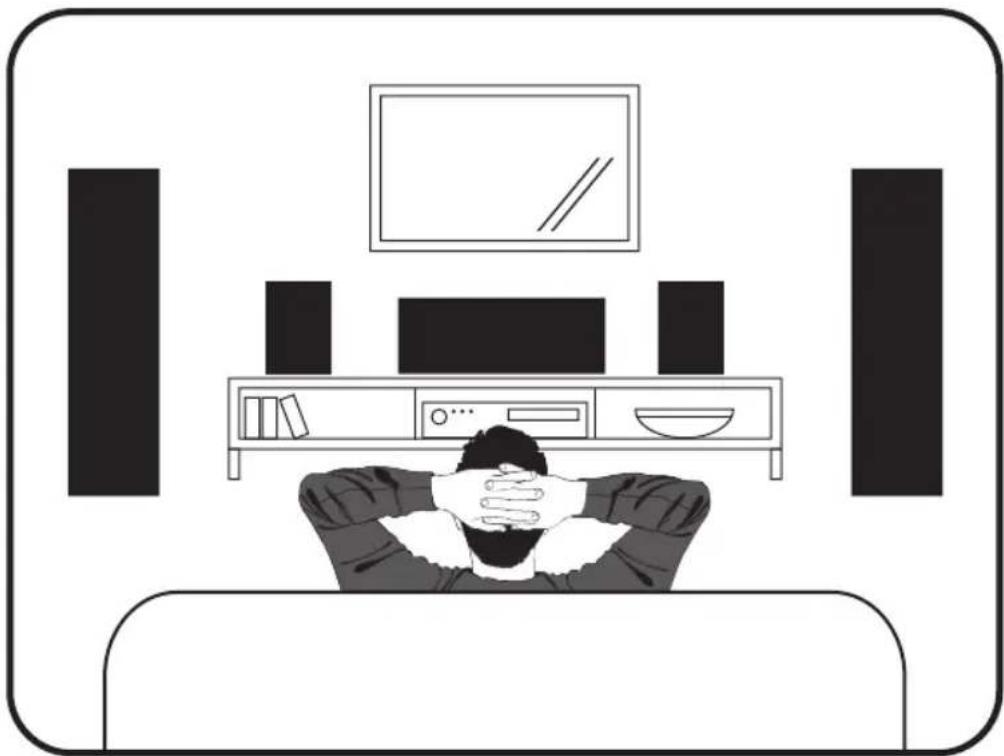
Illustration of a person resting on a couch in a living room with TV and sound equipment (no text or symbols)Ideal placement of front and center speakers
Monitor SE Series front speakers are designed to allow flexible placement while providing a very large window of sound throughout your listening room. To ensure the best performance possible we strongly recommend that you observe the placement guidelines on the following pages ...
Accurate Timbre
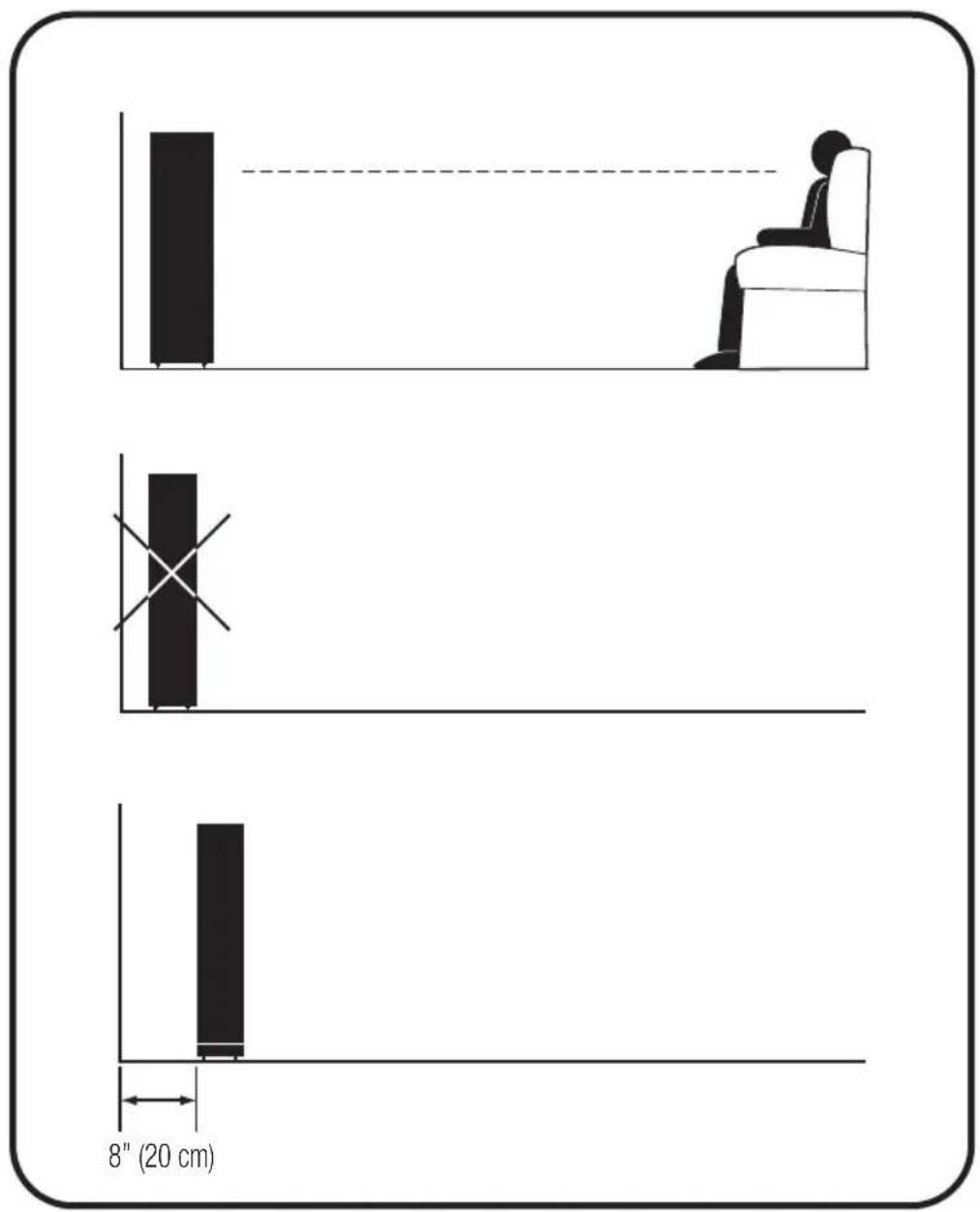
For the most accurate and natural timbre, place front speakers so that their high-frequency drivers are approximately at ear level, as shown.
Placing bookshelf models on Paradigm speaker stands (sold separately) or bookshelves raises their high-frequency drivers to approximately ear level, thereby ensuring the best performance possible.
Balanced Bass
Placing front speakers in corners will over-emphasize bass and reduce overall clarity. Avoid corner placement. Position front speakers 8 in (20 cm) or more from the wall behind the speaker and as much as possible from either side wall, as shown in. This will ensure better bass performance and optimal midrange clarity.
Optimal Imaging
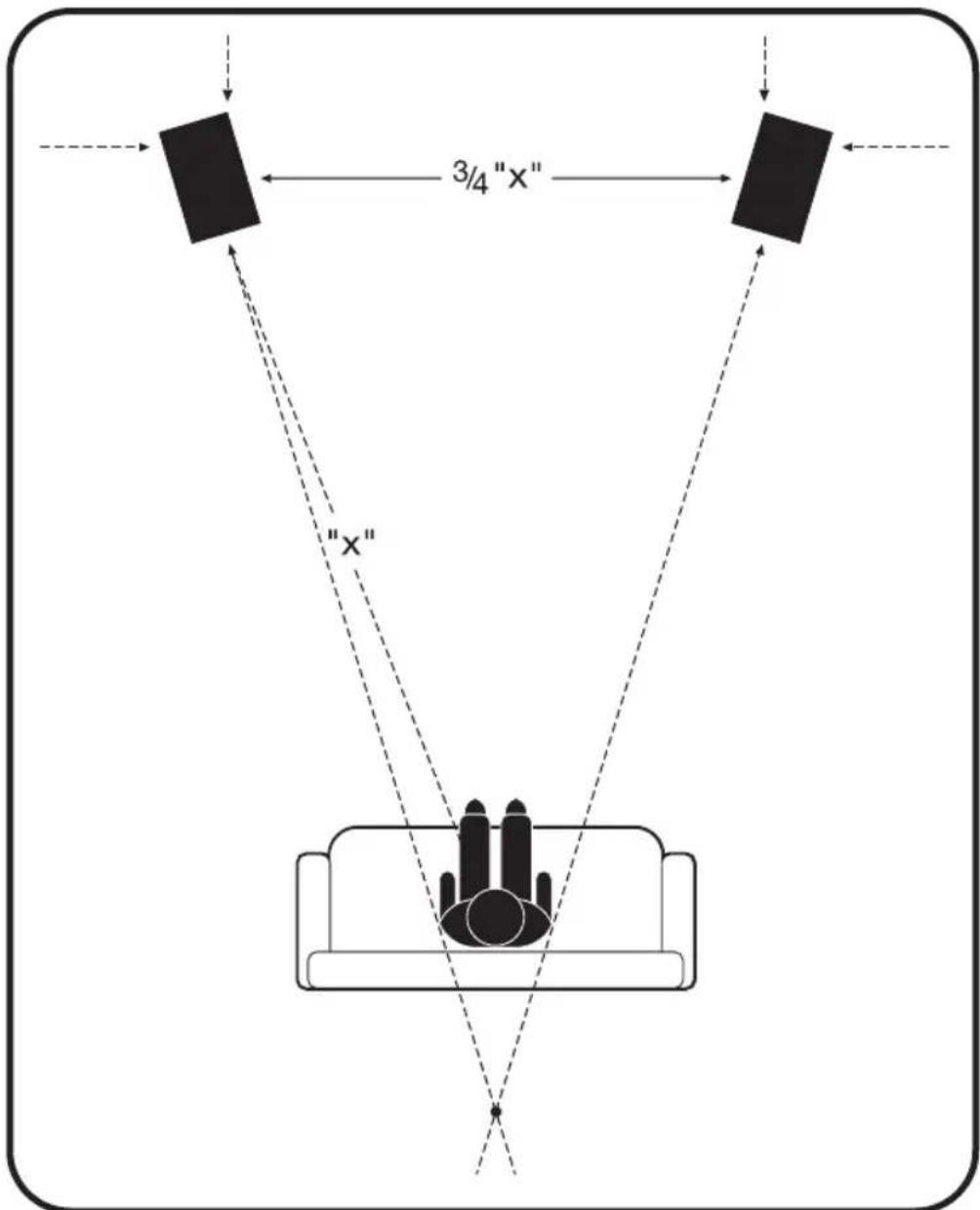
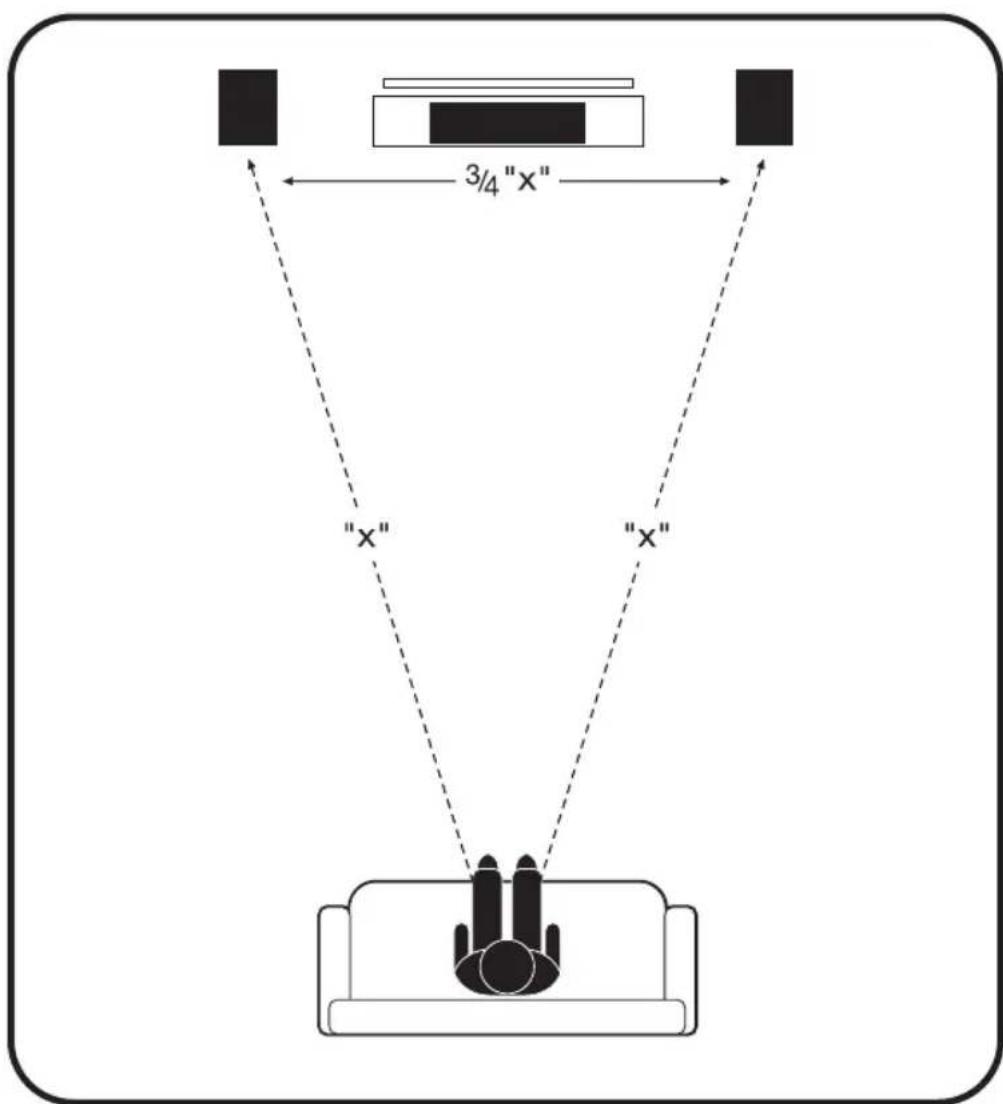
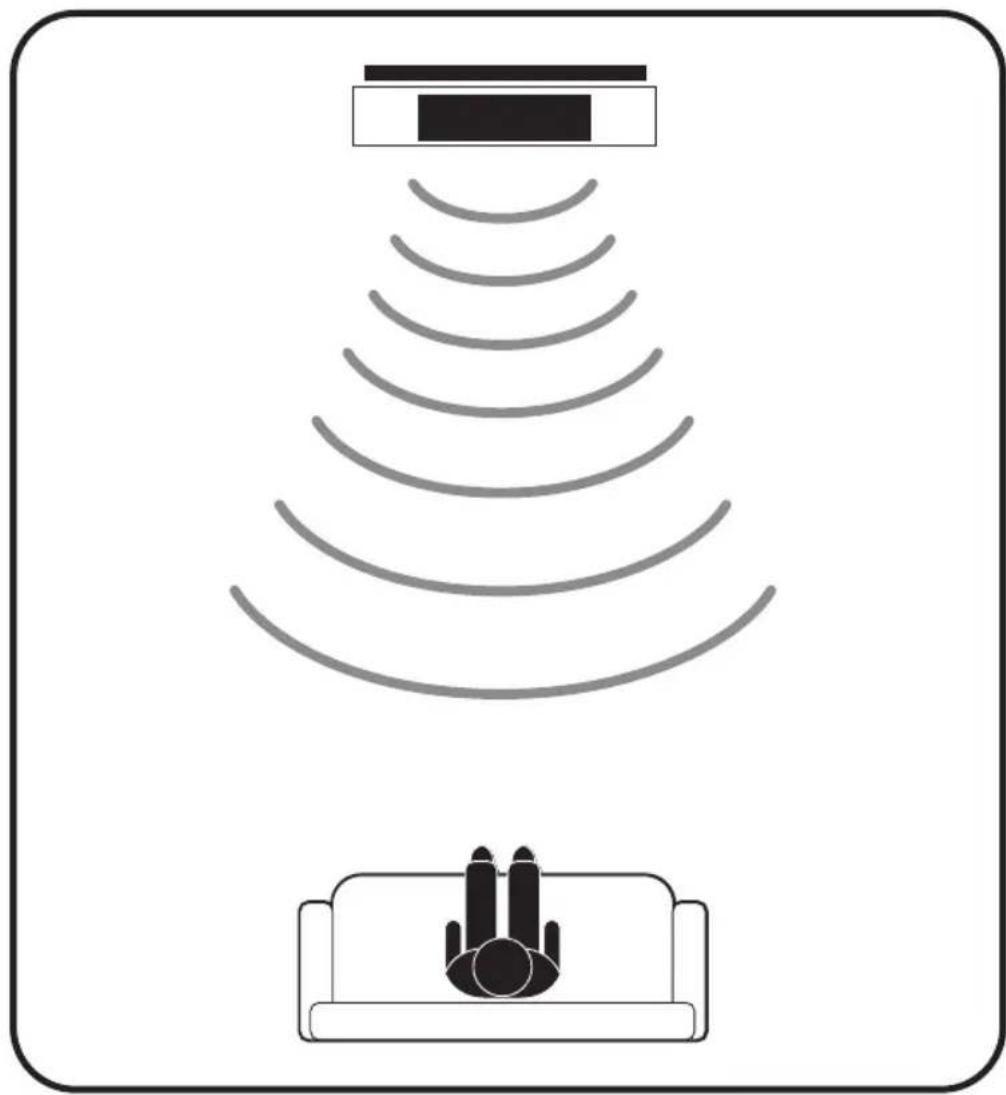
Measure the distance from your main listening area to the front speakers ("X"). For best imaging, place speakers from three-quarters of that distance up to that same distance from each other (3/4 of "X" to "X"), as shown. To further optimize imaging, toe speakers slightly inward so they point toward the listening position with their axes crossing just behind it, as shown.
natural_image
Diagram showing a sensor emitting sound waves from a device, with no text or symbols present.PLACEMENT: The Center Speaker
The Monitor SE Series center speaker is designed to cover a large, wide listening area, allowing listeners throughout the room to hear center-channel information with unprecedented clarity and intelligibility.
Placing your center-channel speaker below the TV will ensure the best possible clarity and intelligibility. Position the speaker flush with the front of the TV or speaker shelf to minimize unwanted sound reflections. Make sure the center-channel speaker is approximately the same distance away from the primary listening position as your front speakers. (Some A/V receivers and processors can electronically adjust for differences in distance.)
WIRING

Turn your amplifier(s) OFF before connecting your speakers. This will avoid damage which could result from accidental shorting of speaker cables.
| MINIMUM GAUGE REQUIREMENTS | ||
| LENGTH | DIAMETER GAUGE | |
| Under 4.5 m (15 ft) | 1.3 mm (0.05 in) | 16 awg |
| Under 9 m (30 ft) | 1.6 mm (0.06 in) | 14 awg |
| Over 9 m (30 ft) | 2.0 mm (0.08 in) | 12 awg |
For optimum sound, the use of high quality speaker cable is essential. The chart below identifies the minimum gauge requirements for various lengths. See your Authorized Paradigm Dealer for recommendations.
SPEAKER CONNECTION
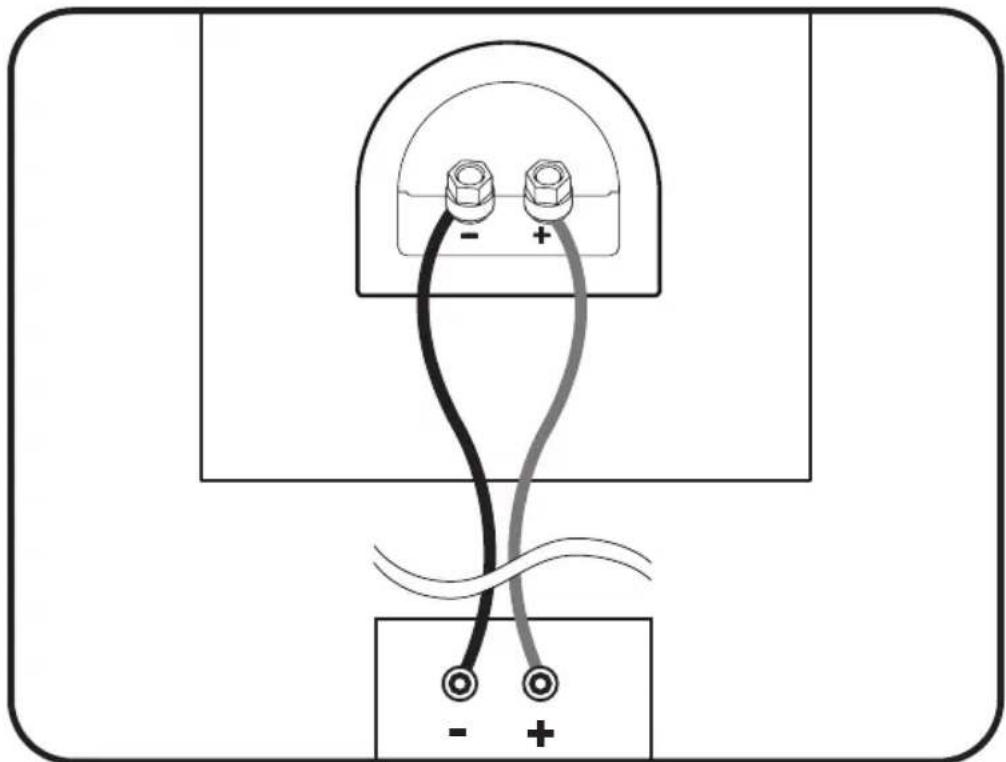
Your speakers' binding posts can be used with banana, pin or spade connectors, as well as with bare wire. Tighten the posts firmly by hand but do not over tighten!
Correct polarity (or phase) is critical for proper soundstage imaging and bass performance. Connect one speaker at a time to ensure proper connection of every channel. The red (+) amplifier terminal must be connected to the red (+) speaker terminal. The same applies to the black (-) terminals. Make sure all wires are firmly fastened. Repeat this connection procedure for each speaker in your system.
NOTE: If you hear a distinct lack of bass and a dislocated stereo image then one or more of your speakers may be connected out of phase (polarity is reversed). Re-check to ensure that each speakers' cable is connected with correct polarity: red (+) to red (+) and black (−) to black (−).
natural_image
Pure electrical circuit lines without any symbolsFINE TUNING
Once you have your speakers positioned in the room and have set speaker distances and calibrated speaker levels through your Audio/Video Processor or A/V Receiver it's time for a little fine tuning.
Since Paradigm speakers provide exceptional performance in a variety of room settings, fine tuning is simply a matter of making slight adjustments (if necessary) to their placement in the room.
Start with the front speakers and listen to familiar music in stereo. The soundstage will be both wide and deep, but this can be tuned to your personal preference by adjusting the toe-in (the amount the speakers are turned toward the listening area). More toe-in will increase image depth and localization, less toe-in will increase image width. Adjust the toe-in in small increments, listening each time, until you achieve the soundstage balance you prefer. Toe-in is not applicable to the other speakers in your system since their position and sound distribution pattern is fixed.
Fine tuning for center speakers is a matter of making volume level adjustments that may be required for a particular multi-channel music or movie program. If necessary, adjust your Audio/Video Processor's or A/V Receiver's volume levels to ensure there is a cohesive overall soundstage.
To fine tune surround/rear speakers, please follow the illustrations in the earlier section.
To fine tune the subwoofer, please refer to the Owner's Manual that was included with your subwoofer.
TROUBLESHOOTING GUIDE
No Sound
Make sure receiver, preamp or amplifier is plugged in and turned on. Check power outlet at the wall is working. Are headphones plugged in, or is system on Mute? Re-check all connections.
No Sound from One or More Speakers
Check your balance. Check that all power cords are properly plugged in and functioning. Swap a non-working speaker with one that works to determine if the problem is with the speaker or something else (i.e. wiring, amplifier).
Lack of Bass or Dislocated Image
One or more speakers may be connected out of phase (their polarity is reversed). Re-check to ensure that each speaker's cable is connected with correct polarity: red (+) to red (+) and black (-) to black (-).
LIMITED WARRANTY
Paradigm speakers covered in this manual are warranted to be and remain free of manufacturing and/or material defects for a period of five (5) years from the date of original purchase. Within the time period specified, repair, replacement or adjustment of parts for manufacturing and/or material defects will be free of charge to the original owner.
Thermal or mechanical abuse/misuse is not covered under the Paradigm warranty.
Limitations:
- Warranty begins on date of original retail purchase from an Authorized Paradigm Dealer only. It is not transferable;
- Warranty applies to product in normal home use only. If product is subjected to any of the conditions outlined in the next section, warranty is void;
- Warranty does not apply if the product is used in professional or commercial applications.
Warranty is Void if:
- The product has been abused (intentionally or accidentally);
- The product has been used in conjunction with unsuitable or faulty equipment;
- The product has been subjected to damaging signals, derangement in transport, mechanical damage or any abnormal conditions;
- The product (including cabinet) has been tampered with or damaged by an unauthorized service facility;
- The serial number has been removed or defaced.
Owner Responsibilities:
- Provide normal/reasonable operating care and maintenance;
- Provide or pay for transportation charges for product to service facility;
- Provide proof of purchase (your sales receipt given at time of purchase from your Authorized Paradigm Dealer must be retained for proof-of-purchase date).
Should servicing be required, contact your nearest Authorized Paradigm Dealer, Paradigm Electronics Inc. or Import Distributor (outside the U.S. and Canada) to arrange, bring in or ship prepaid, any defective unit. Visit our website, www.paradigm.com for more information.
Paradigm Electronics Inc. reserves the right to improve the design of any product without assuming any obligation to modify any product previously manufactured.
This warranty is in lieu of all other warranties expressed or implied, of merchantability, fitness for any particular purpose and may not be extended or enlarged by anyone. In no event shall Paradigm Electronics Inc., their agents or representatives be responsible for any incidental or consequential damages. Some jurisdictions do not allow limitation of incidental or consequential damages, so this exclusion may not apply to you.
Retain this manual and your sales receipt for proof of warranty term and proof of purchase.

MONITOR SE
natural_image
Line drawing of six different electronic devices or storage units with mounting bases (no text or symbols)natural_image
Two rectangular shapes with black dots at corners, one larger and one smaller, enclosed in a rounded rectangle (no text or symbols)natural_image
Illustration of a person relaxing in bed with hands on head, watching TV on screen (no text or symbols)Image optimale
natural_image
Diagram showing a sensor emitting sound waves from a sofa, with no text or symbols present.natural_image
Pure electrical circuit lines without any symbolsRÉGLAGE FIN


- MONITOR SE
- RECYCLING AND REUSE GUIDELINES (Europe)
- TABLE OF CONTENTS
- FLOORSTANDING SPEAKERS — ATTACHING RUBBER PADS OR CARPET SPIKES
- BOOKSHELF / CENTER CHANNEL SPEAKERS — ATTACHING RUBBER PADS
- YOURNEWSPEAKERS
- Break-In
- Cleaning
- PREVENTING SPEAKER DAMAGE
- Amplifier Distortion—The #1 Culprit!
- More Powerful Amplifiers are Safer
- Volume Control
- PREVENTING SPEAKER DAMAGE (cont'd)
- There is a Limit!
- The Right Amount of Power
- ROOM ACOUSTICS
- PLACEMENT: Front Left & Right
- Ideal placement of front and center speakers
- Accurate Timbre
- Balanced Bass
- Optimal Imaging
- PLACEMENT: The Center Speaker
- WIRING
- SPEAKER CONNECTION
- FINE TUNING
- TROUBLESHOOTING GUIDE
- No Sound
- No Sound from One or More Speakers
- Lack of Bass or Dislocated Image
- LIMITED WARRANTY
- Thermal or mechanical abuse/misuse is not covered under the Paradigm warranty.
- Limitations:
- Warranty is Void if:
- Owner Responsibilities:
- Image optimale
- RÉGLAGE FIN
Brand : Paradigm
Model : Monitor SE 8000F
Category : Loudspeaker