HOOVER HOCE4T618EWBK - Fridge

HOCE4T618EWBK - Fridge HOOVER - Free user manual and instructions

Find the device manual for free HOCE4T618EWBK HOOVER in PDF.
📄 266 pages English EN Download 💬 AI Question
Notice HOOVER HOCE4T618EWBK - page 4
Pick your language and provide your email: we'll send you a specifically translated version.

User questions about HOCE4T618EWBK HOOVER

0 question about this device. Answer the ones you know or ask your own.

Ask a new question about this device

The email remains private: it is only used to notify you if someone responds to your question.

No questions yet. Be the first to ask one.

Download the instructions for your Fridge in PDF format for free! Find your manual HOCE4T618EWBK - HOOVER and take your electronic device back in hand. On this page are published all the documents necessary for the use of your device. HOCE4T618EWBK by HOOVER.

USER MANUAL HOCE4T618EWBK HOOVER

Discover extra contents and create your inventory list

HOOVER HOCE4T618EWBK - 1

HOOVER HOCE4T618EWBK - 2

text_image QR code image containing encoded data, no visible human-readable text

EN 1

BG....11

CS 21

DA 31

DE 41

EL 51

ES 61

FI....71

FR....81

HR 91

HU 101

IT 111

NL 121

NO.... 131

PL.... 141

PT 151

RO 161

RU 171

SK 181

SL.... 191

SR 201

SV 211

UK 221

AR....231

Summary

PRODUCT DESCRIPTION....2

Space requirements....2

USE 3

Use....3

Customized temperature....3

Fine Tuning 4

Super Cool function .... 4

Super Freeze function....4

Eco mode....5

Holiday function....5

Defrosting....5

Demo mode....5

Error codes 5

Water Dispenser....6

APP CONNECTION 7

IN APP PAIRING PROCEDURE 7

Step 1....7

Step 2....7

Step 3....7

WiFi Use 8

DOOR REVERSIBILITY....9

TROUBLESHOOTING

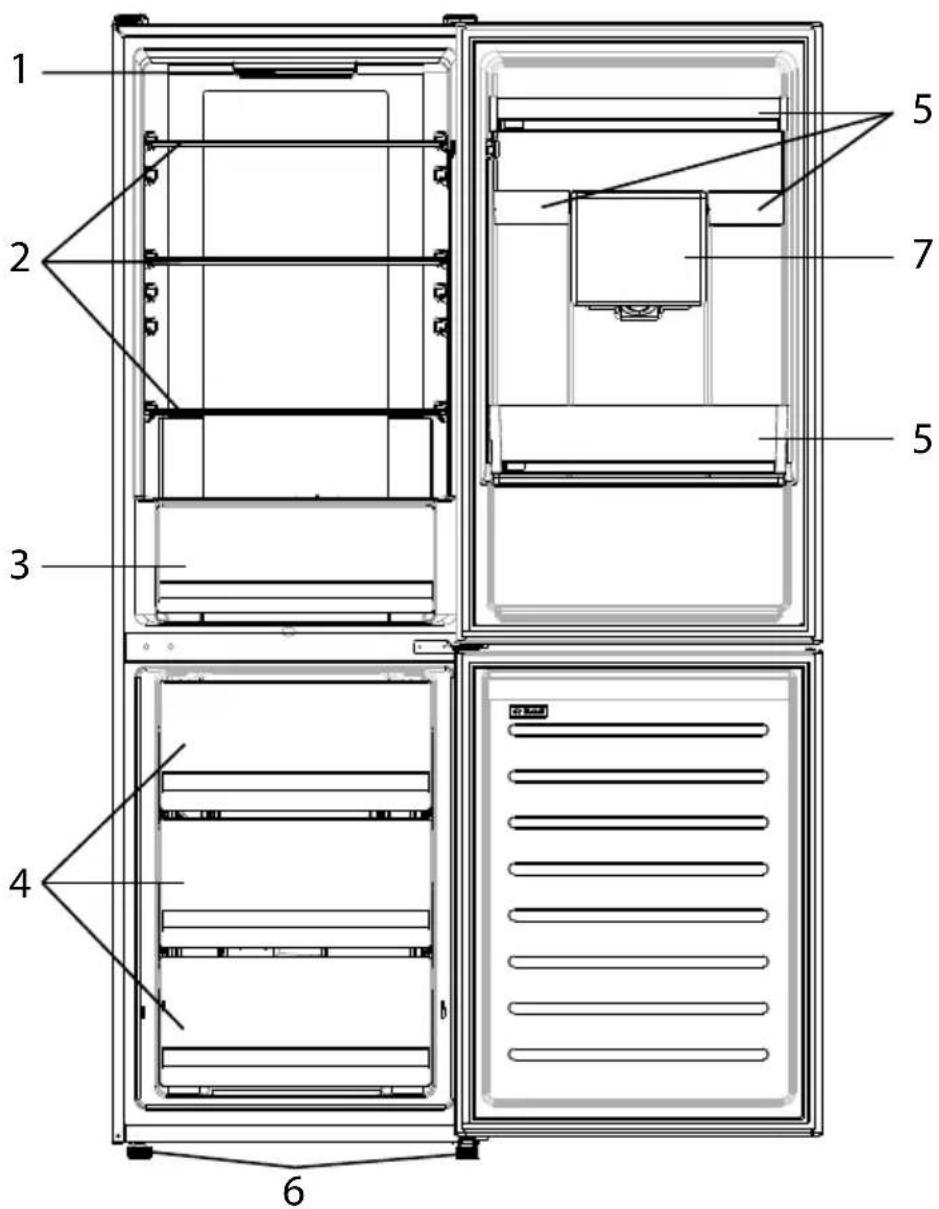
PRODUCT DESCRIPTION
HOOVER HOCE4T618EWBK - TROUBLESHOOTING - 1

text_image 1 2 3 4 5 5 7 6
  1. Control panel and light
  2. Movable Shelves
  3. Crisper
  4. Freezer drawers
  5. Balconies
  6. Leveling feet
  7. Water Dispenser

* The most energy-saving configuration requires drawers, food box and shelves to be positioned in the product, please refer to the above pictures.
** The pictures above are only for reference. The actual configuration will depend on the physical product or statement by the distributor.

Space requirements

The unit's door must be able to fully open as shown. Spare enough space for convenient opening of the doors and drawers.

Keep a distance of at least 50 mm between the side walls of the product and adjacent parts.

Width: min. 920 mm

Depth: min. 1137 mm
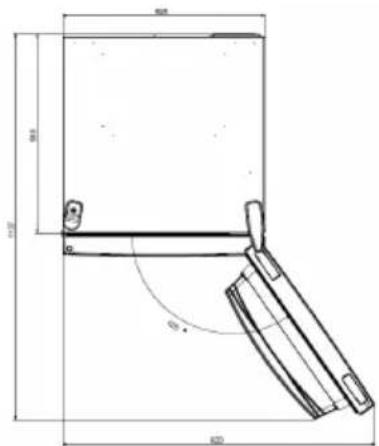
HOOVER HOCE4T618EWBK - Space requirements - 1

text_image 50mm 40mm 60mm

USE
HOOVER HOCE4T618EWBK - Space requirements - 2

text_image ① SET ② ⑤ ③ ④ Super Cool 2°C 4°C 6°C 8°C hOn

① ON/OFF key, used to switch on/off the appliance.
② SET key, used to select the fridge temperature or the special functions like.
③ WiFi Icon, shows if the appliance is connected to the app.
④ Super Cool Icon, shows if the function is activated.
⑤ Temperature levels, show which is the selected temperature.

Use

• Plug on the appliance. The appliance will turn on automatically.
• The temperature will automatically set at 4 °C in the fridge and -18 °C in the freezer.
- To change the temperature, with the fridge door open, press the SET key. When the setting increases, the corresponding LED light will turn on. An acoustic signal is made every time the SET key is pressed and the temperature is changed.
• In case of power loss, the last cooling level set will be restored.
- To restore the default setting, at the screen lit, keep pressed the TEMP button, and then press ON/OFF button 5 times in 5 seconds.
- Under the normal operating condition (in spring and autumn), it is recommended to set the temperature at 4 °C. In summer when the ambient temperature is high, it is recommended to set temperature at 6\~8 °C, so as to guarantee the fridge and freezer temperatures and reduce the refrigerator continuous running time; and in winter when the ambient temperature is low, it is recommended to set temperature at 2\~4 °C to avoid frequent start/stop of the refrigerator.

Customized temperature

From the app, it is possible to customize the temperature of the fridge compartment. The temperature can be set with 1 °C sensitivity and it is possible to select a temperature from 2 °C to 8 °C in the fridge. An acoustic signal is made every time the temperature is changed. When the temperature is selected by the app, there is no indication on the control panel, all the temperature LED lights are turned off, while only the WiFi icon is turned on.

Fine Tuning

The fine tuning selection mode gives to possibility to set the temperatures by sublevels; each temperature level has three sublevels.

How to use the fine tuning function:

  • Press the SET key for 8 seconds to enter fine tuning selection mode. When the appliance enters the mode, an acoustic signal is made and the LED of currently selected cooling level blinks.
  • By short pressing the SET key within 5 seconds, the fine tuning setting increases and, at each pressing, an acoustic signal is made.
  • During fine tuning, the LED of the selected cooling level is fixed, while the LED of the selected sublevel blinks.
  • If no key is pressed for 5 seconds, the system automatically exits from fine tuning selection mode. The fine tuning setting is saved and the LED of the selected fridge temperature is fixed.
  • If the fine tuning is activated again, the setting will start from the previously stored level.

Super Cool function

It is suggested to switch on the Super Cool function if a large quantity of food should be stored (for example after the purchase). The Super-Cool function accelerates the cooling of fresh food and protects the goods already stored from undesirable warming. When the function is activated, the temperature of the fridge is automatically set at 2 °C.

How to use the Super Cool function:

  • The function can be activated by pressing many times the SET key until the Super Cool LED is turned ON or by selecting it from the app. If the function is activated, the corresponding icon on the control panel will be turned on.
    • To exit the Super Cool function, press the SET key again.
    • The Super Cool function automatically ends after 30 hours running.
  • When the Super Cool ends, the corresponding icon of the control panel turns off and the previously set cooling level is restored.

Super Freeze function

The super freezing function accelerates the freezing of fresh food and protects the goods already stored from undesirable warming. If a large amount of food has to be freeze, it is recommended to set the Super Freeze function on 24h before the usage. When the function is activated, the temperature is automatically set at -25 °C.

How to use the Super Freeze function:

  • The function can be launched only by selecting it from the app. If the function is activated, it will be shown by the app; there is no indication on the control panel.
    • To exit the Super Freeze function, turn it off from the app.
  • The Super Freeze function automatically ends when the function has lasted for more than 50 hours.

Eco mode

The Eco mode can be activated to optimize the performance of the appliance, whereas obtaining the best food storage. When the function is activated, the temperature is automatically set at 5 °C in the fridge, and at -18 °C in the freezer.

How to use the Eco mode:

  • The function can be activated only by selecting it from the app. If the function is activated, it will be shown by the app; there is no indication on the control panel.
  • To exit the Eco mode, turn it off from the app; the previously selected temperature will be restored.
    • The Eco mode automatically ends when another function is chosen from the control panel.

Holiday function

The Holiday function can be used to reduce the energy consumption of the appliance, when it is not used regularly. The function will turn off the LED lights (even if the door is open) and the fridge will work on low power consumption mode), whereas the freezer will keep working normally.

How to use the Holiday function:

  • The function can be activated only by selecting it from the app. If the function is activated, it will be shown by the app; there is no indication on the control panel.
  • To exit the Holiday function, turn it off from the app; the previously selected temperature will be restored.
  • The Holiday function automatically ends when another function is chosen from the control panel.

Defrosting

The defrosting of the refrigerator and freezer compartment are done automatically: no manual operation is needed.

Slider

Near the vegetable basket there is a slider that allows you to adjust the humidity inside it: moving it to the right decreases the humidity, moving it to the left increases the humidity.

Demo mode

Keep the refrigerated door open, press and hold the on / off key, and click the set key five times. The refrigerator will enter the Demo mode. To exit the mode, keep pressed the door switch and press again the SET key for 5s.

Error codes

If - 6 °C LED light is flashing, it means there has been a fan error. Please, contact the technical assistance to help solve the problem

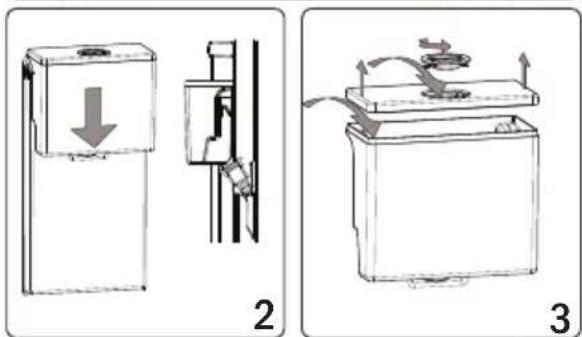
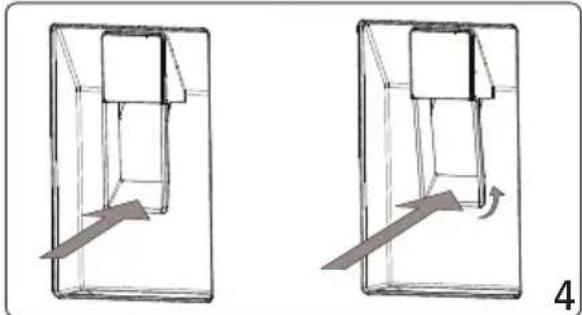
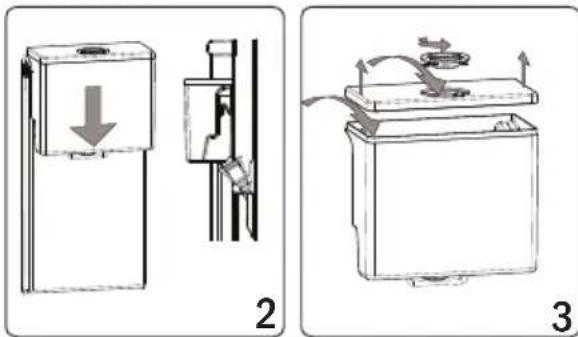
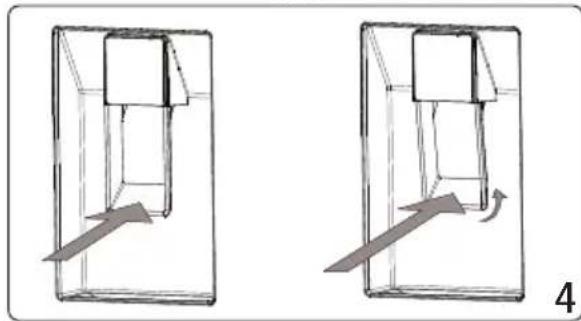
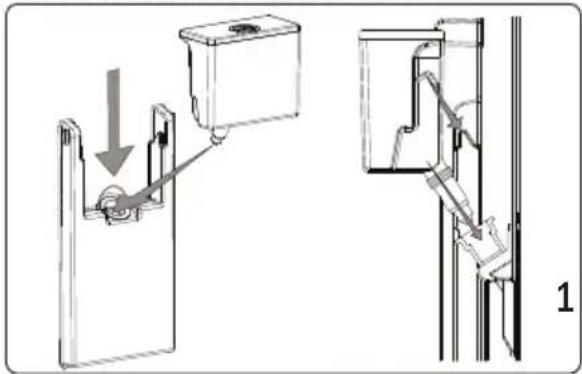
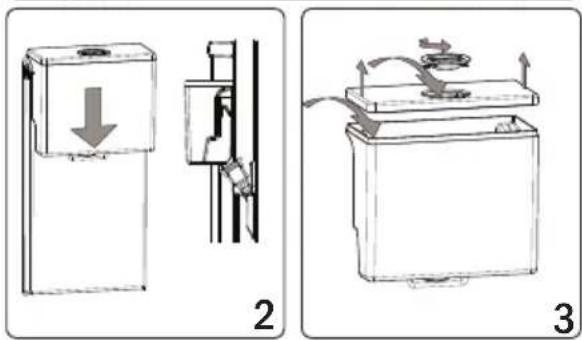
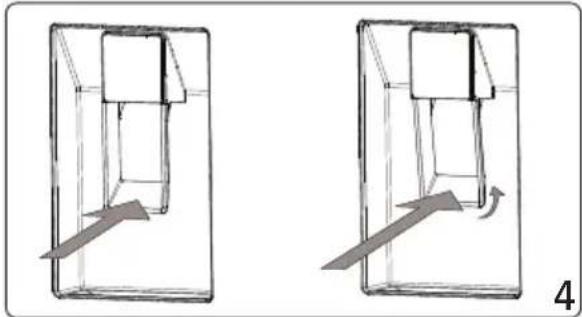
The Water Dispenser Mounting the Water Tank
HOOVER HOCE4T618EWBK - The Water Dispenser Mounting the Water Tank - 1
natural_image Technical diagram showing a mechanical assembly with a component and a separate view of a vertical structure (no text or symbols present)

HOOVER HOCE4T618EWBK - The Water Dispenser Mounting the Water Tank - 2
text_image Technical diagram showing two mechanical device configurations with labeled parts and directional arrows indicating motion or movement.

HOOVER HOCE4T618EWBK - The Water Dispenser Mounting the Water Tank - 3

natural_image Two identical diagrams showing a container with internal components and an arrow indicating motion, labeled '4' (no text or symbols on the diagrams themselves)
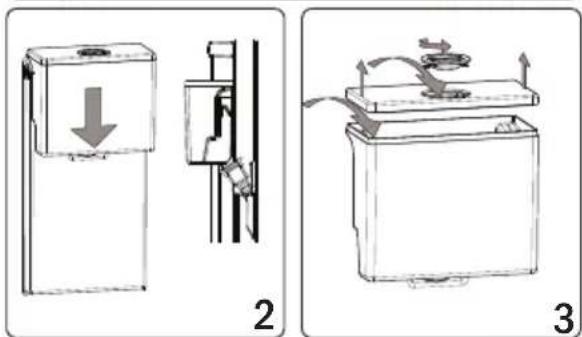
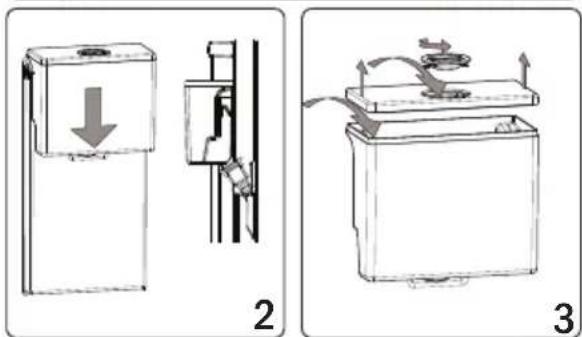
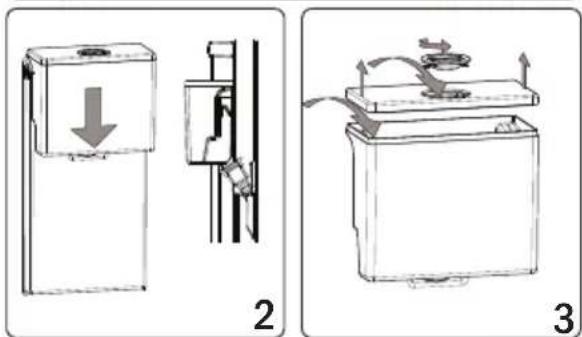
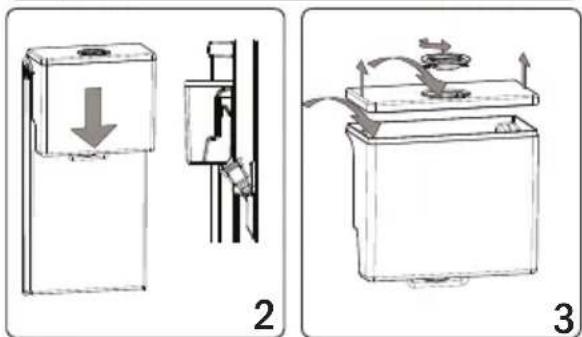
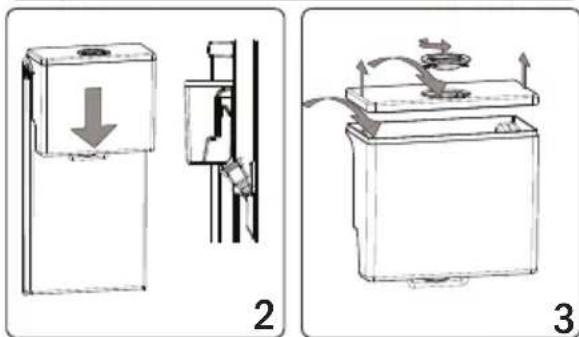
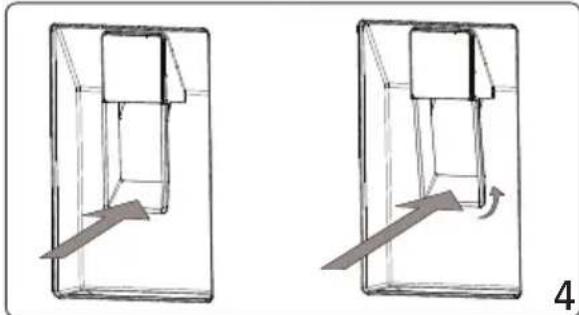
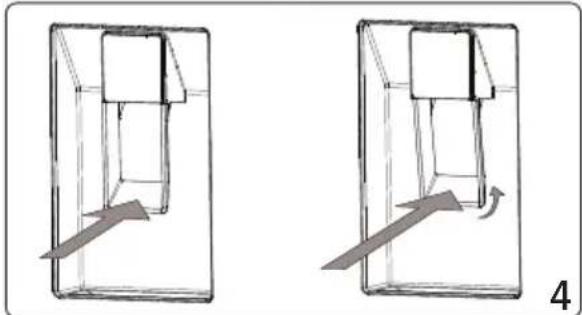
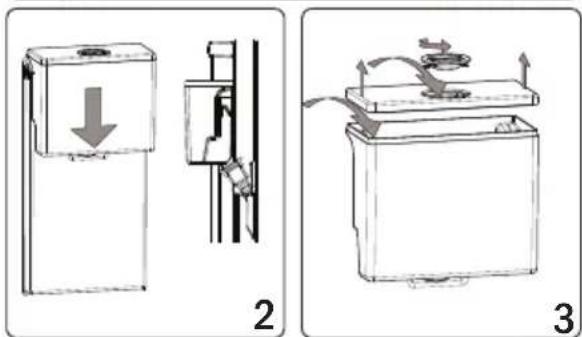
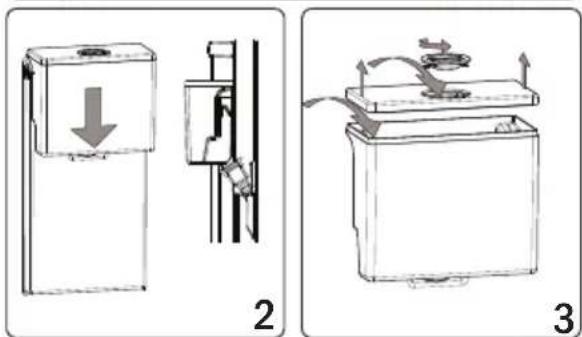
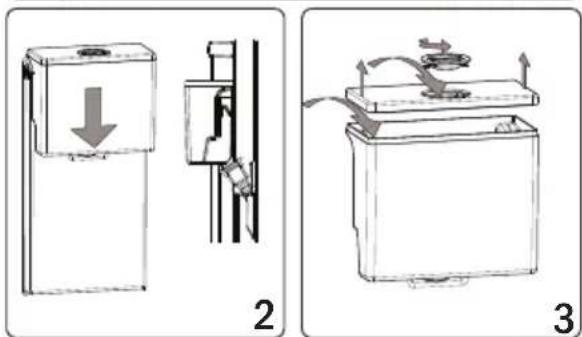
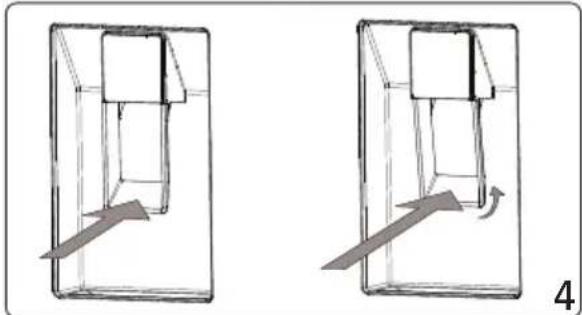
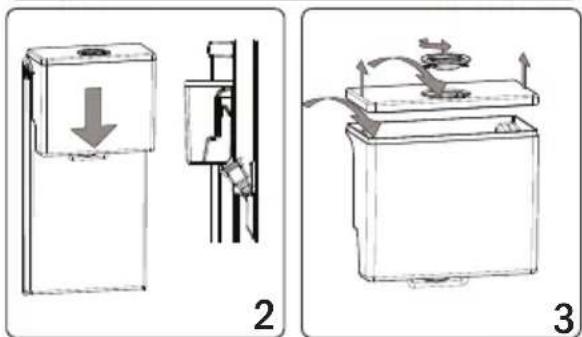
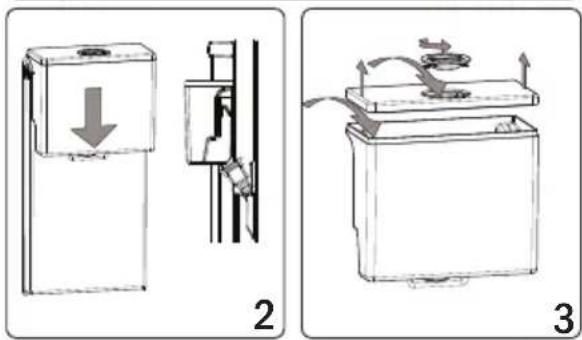
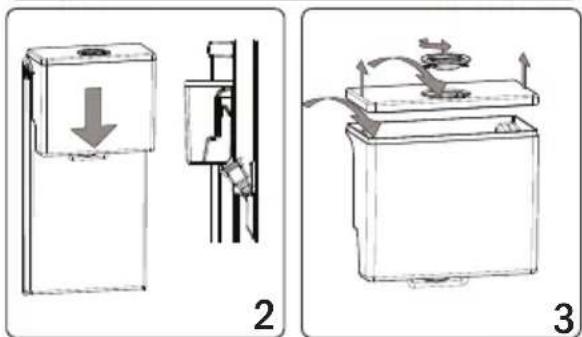
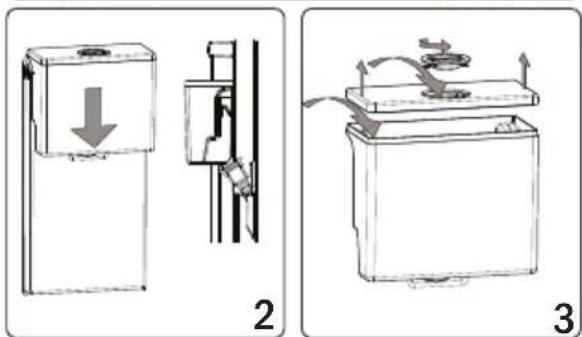
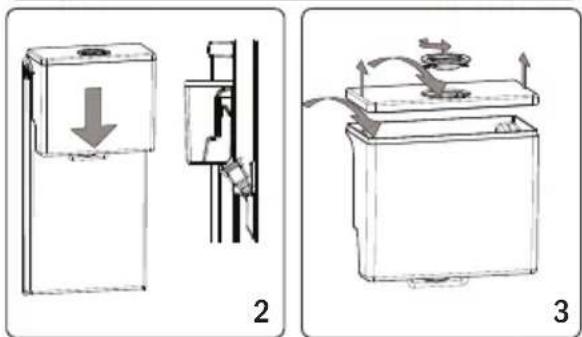
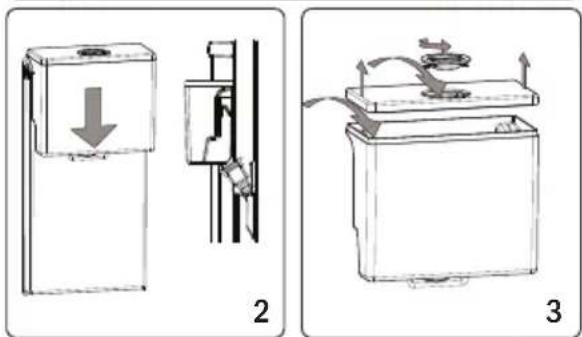
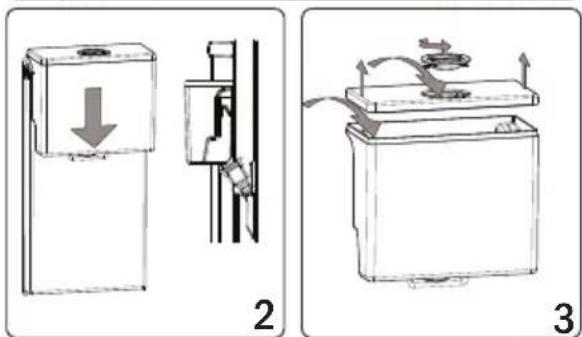
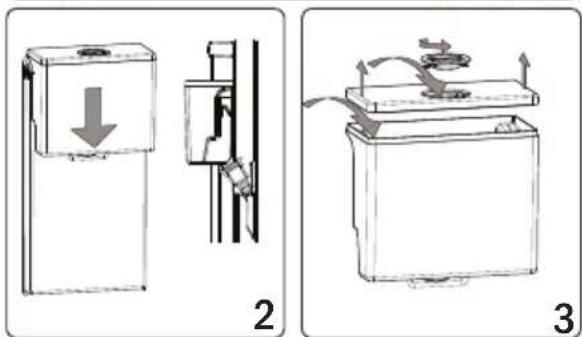
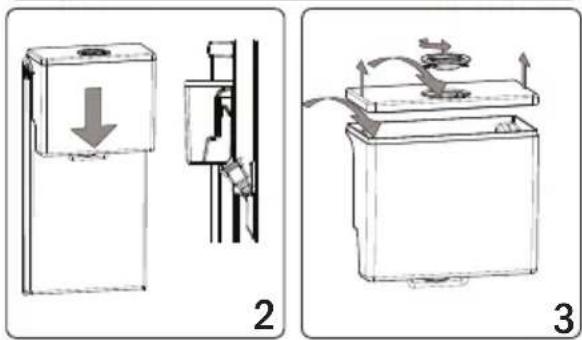
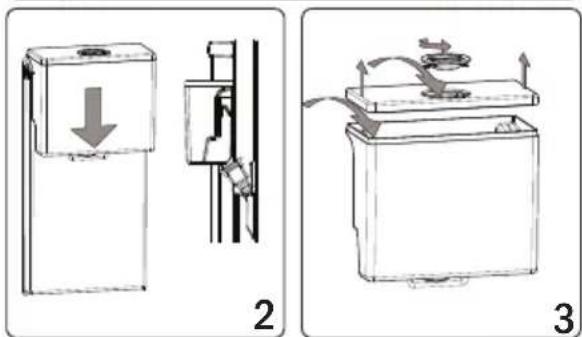
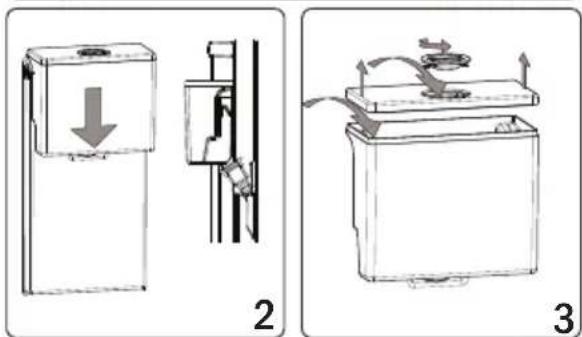
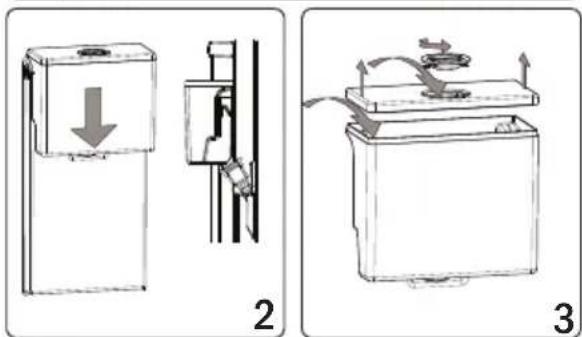
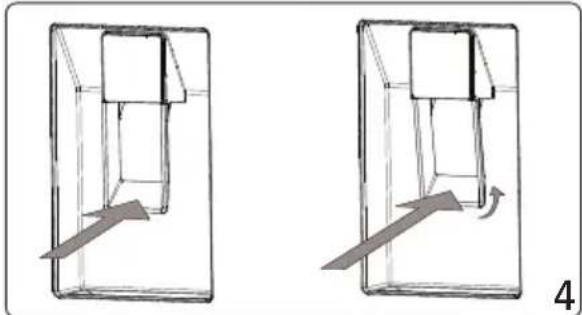
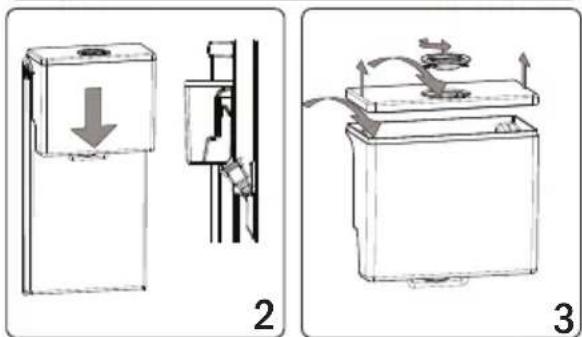
  1. Place the water tank in the plastic holder on the door, in the direction of the arrow on the diagram.
  2. After you have mounted the water tank, push it down to firmly secure it in the holder.
  3. Add your drinks with the help of the water tank top cover. Pull up the water tank cover to remove it.
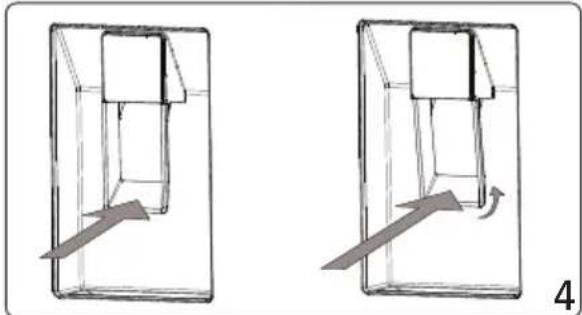
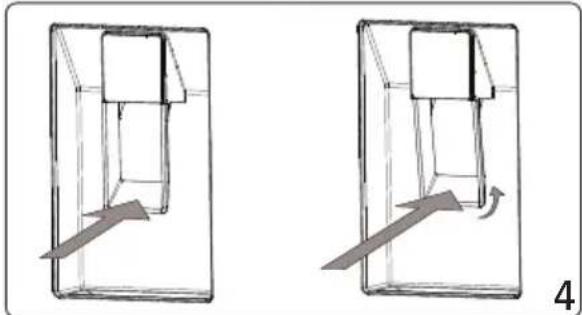
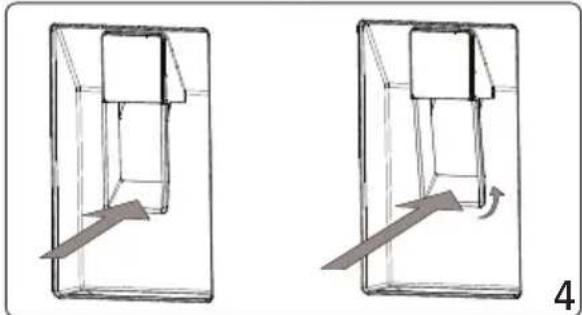
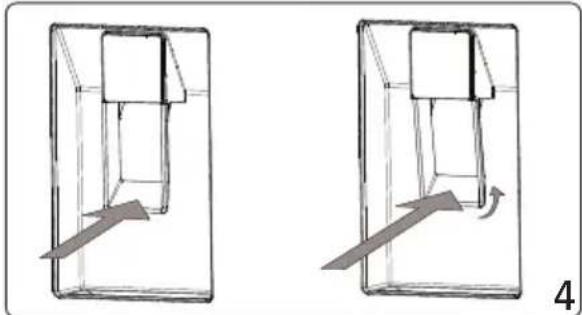
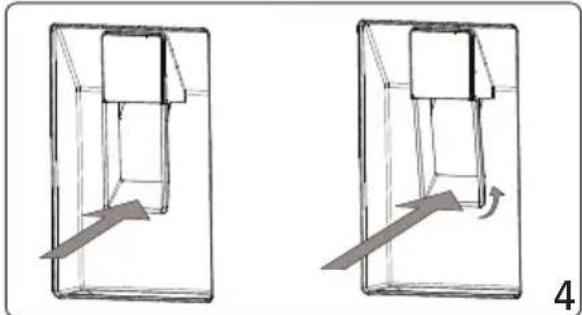
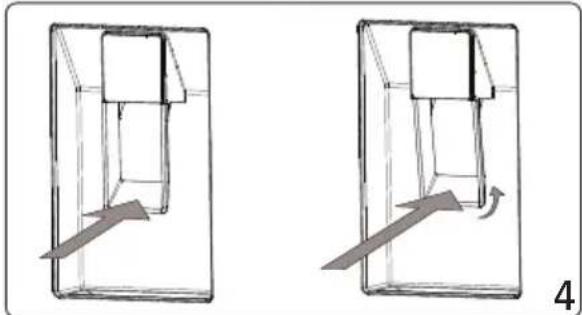
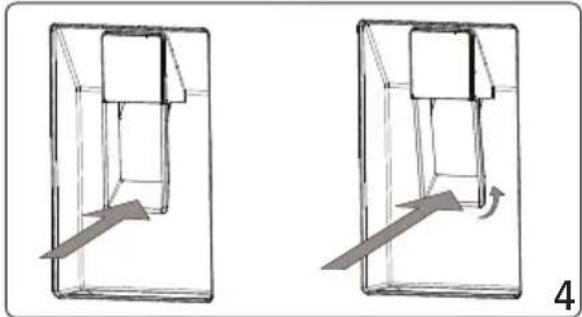
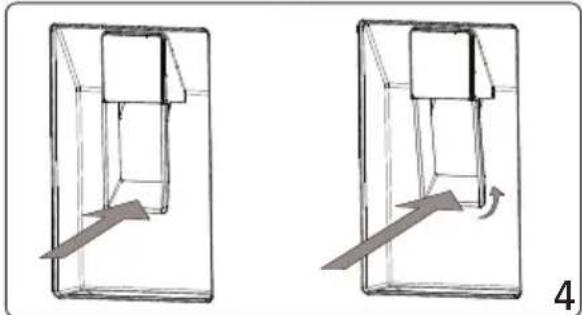
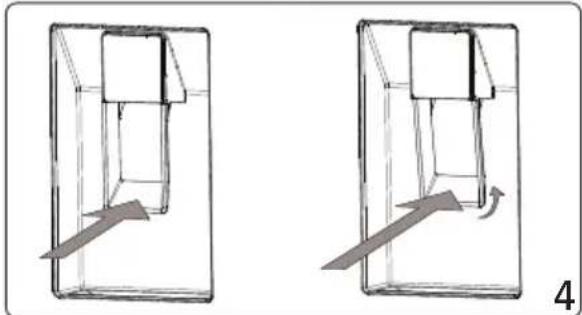
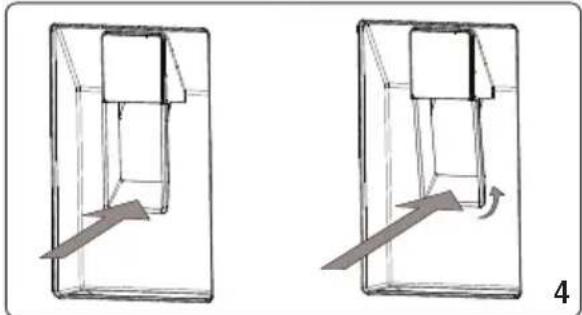
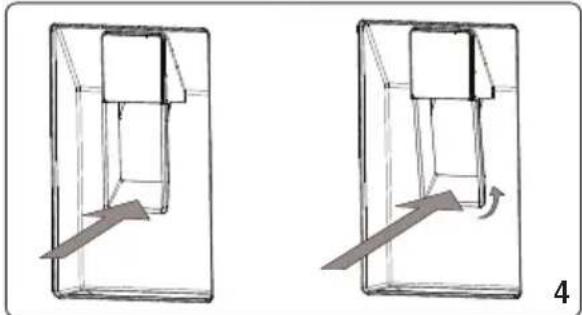
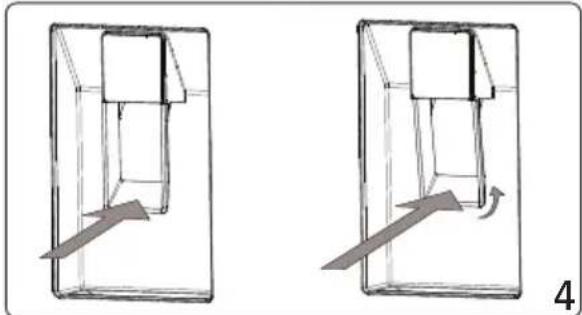
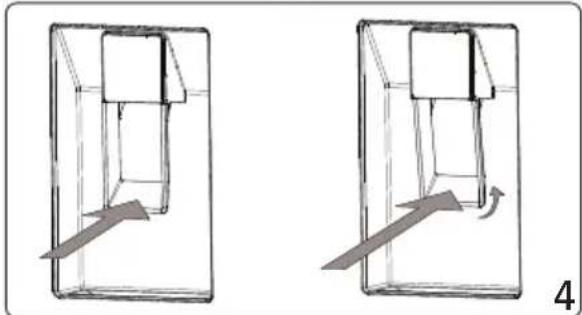
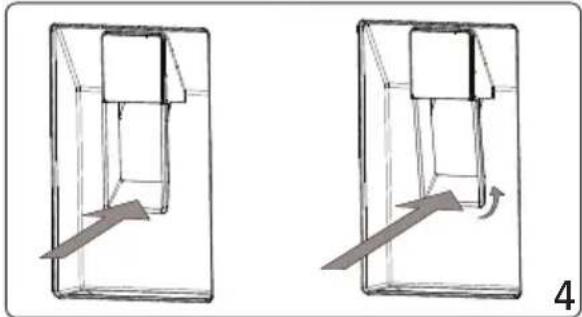
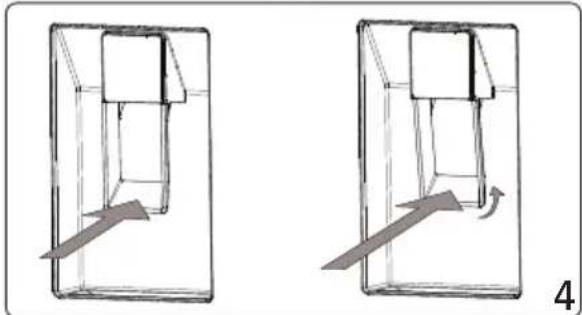
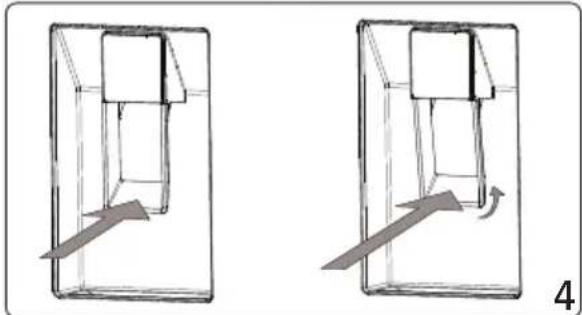
  4. Gently press the valve lever to serve your drinks.

Filling the Water Tank

  • Remove the top cover of the water tank.
  • Fill the tank up only with drinking water.
  • Mount the top cover back on the water tank.

HOOVER HOCE4T618EWBK - Filling the Water Tank - 1

Important: Do not use the water dispenser for anything except water.

Important: If you leave water in the tank for a long time, it will cause an odor. In this case, clean the tank and keep using it.

Important: Clean the water tank before using it for the first time.

Cleaning the Water Tank

  • Lift the water tank.
  • Remove the tank cover.
  • Clean the tank with warm water and reassemble the pieces that you have removed.

Stowing the Water Tank

• Install the water tank as shown.
- Make sure that the tap and the hole match each other while installing.
- Water flow may not be as expected if the tank has not been installed properly. Also check that the gaskets have been assembled properly.

HOOVER HOCE4T618EWBK - Stowing the Water Tank - 1

Please hold the glass momentarily after distribution to avoid drips.

APP CONNECTION

IN APP PAIRING PROCEDURE

Step 1

• Download the hOn app on the stores

HOOVER HOCE4T618EWBK - Step 1 - 1

text_image QR code image containing encoded data, no visible human-readable text

HOOVER HOCE4T618EWBK - Step 1 - 2

text_image GET IT ON Google Play Download on the App Store EXPLORE IT ON AppGallery

Step 2

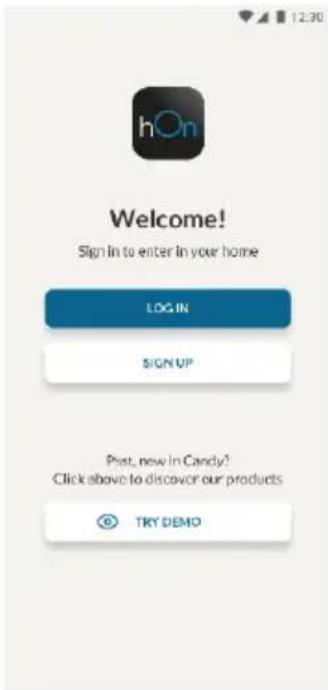
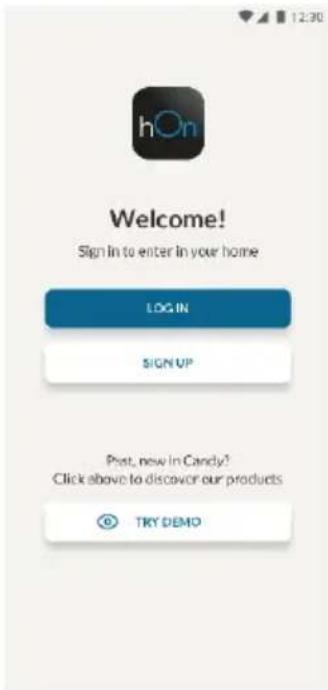
• Create your account on the hOn App or log in if you already have an account
HOOVER HOCE4T618EWBK - Step 2 - 1

text_image 12:30 hOn Welcome! Sign In to enter in your home LOG IN SIGN UP Post, new in Candy? Click above to discover our products TRY DEMO

Step 3

• Follow pairing instructions in the hOn App

WiFi Use

To activate the Wi-Fi, long press the SET key for 2 seconds, the Wi-Fi icon will turn on and an acoustic signal is made.

If the Wi-Fi has not been configured yet, when the refrigerator turns on, it will automatically enter the configuration mode and keep this status for 30 minutes. To use the configuration mode:

  • Press the SET key for 2s but less than 8s, the refrigerator enters the Wi-Fi configuration mode and an acoustic signal is made. The Wi-Fi icon starts blinking.
  • Follow in app instructions to configure the Wi-Fi (see above).
  • Once the Wi-Fi is configured and the connection established, the Wi-Fi icon is on and fixed.
  • After 30 minutes without performing any operation, the Wi-Fi will automatically exit the configuration mode.
  • If the Wi-Fi has already been configured, it will automatically reconnect according to the configuration information.

Radio-module - Technical data

Frequency rate (OFR)2400 MHz-2843.5 MHz
Channel frequencies2412...2472 MHz(step size 5 MHz)
Maximum power(EIRP)100 mW

Radio equipment type is in compliance with Directive 2014/53/EU.

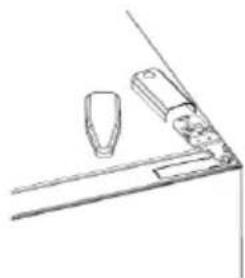
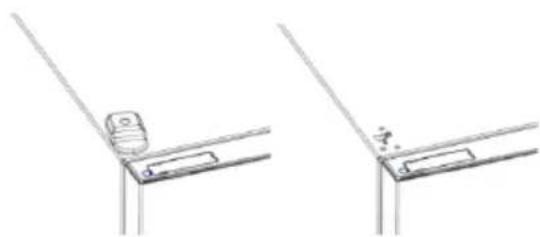
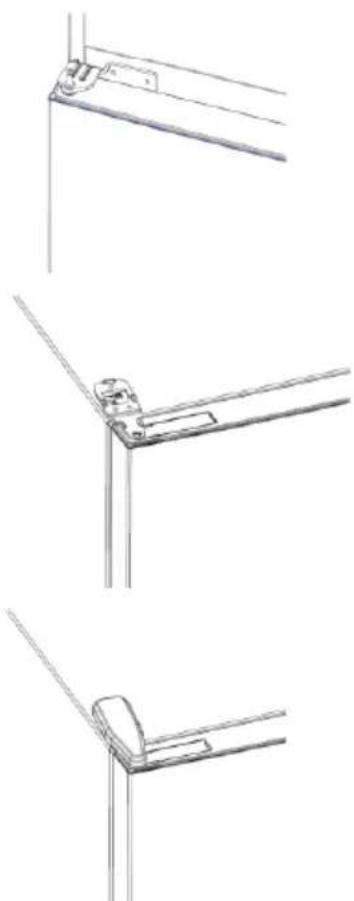
DOOR REVERSIBILITY

Tools needed: Electric screwdriver

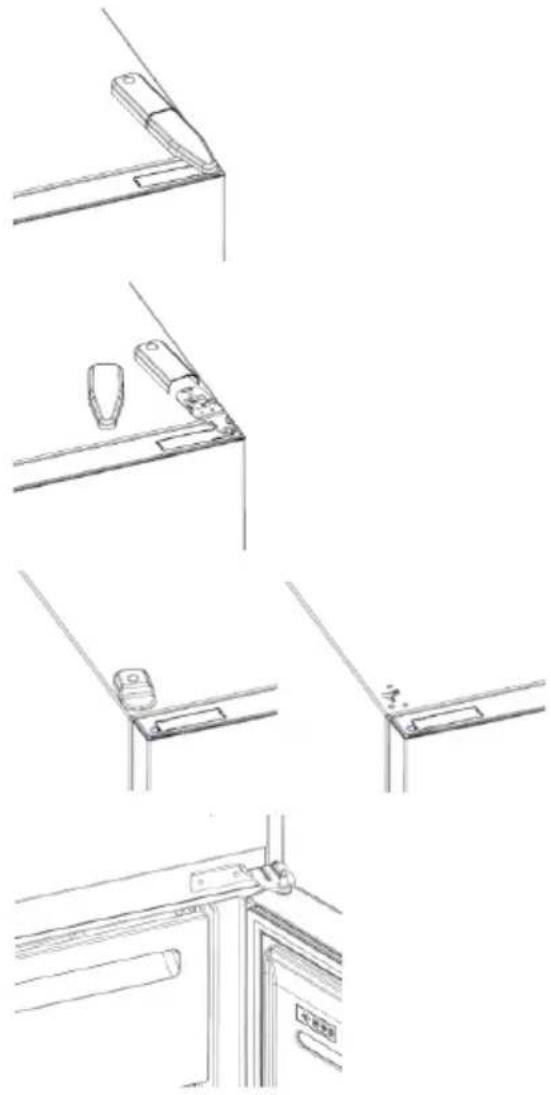
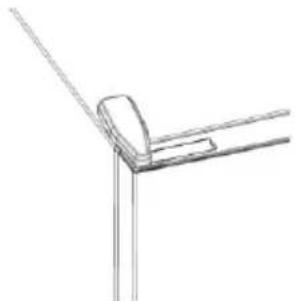
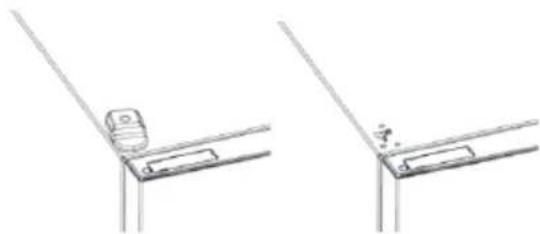
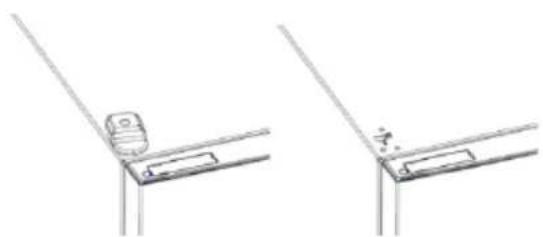
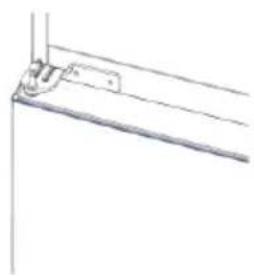
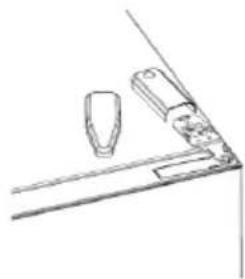
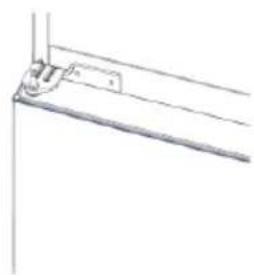
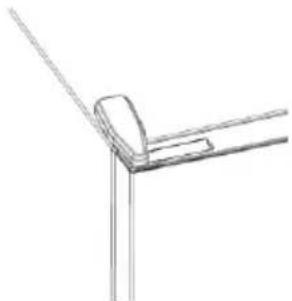
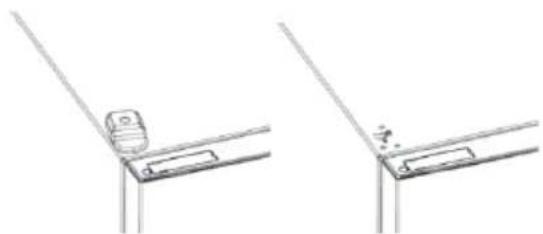
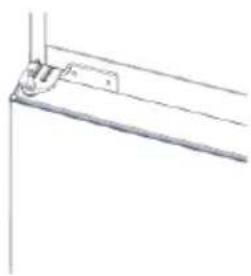
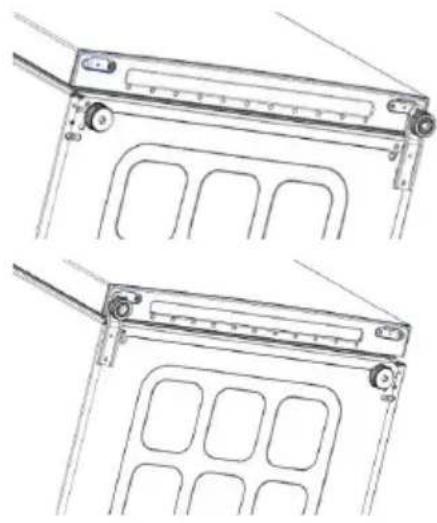
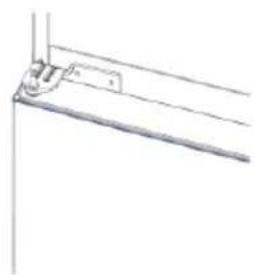
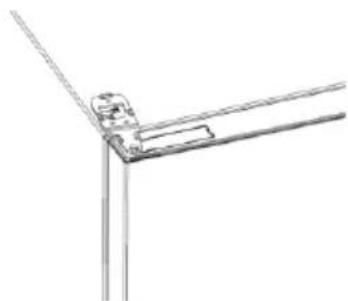
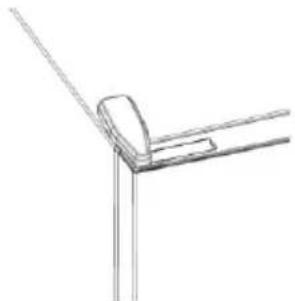
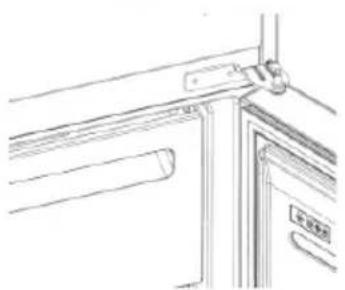
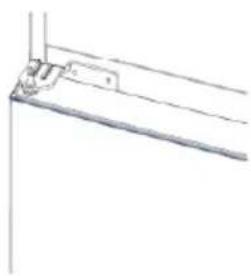
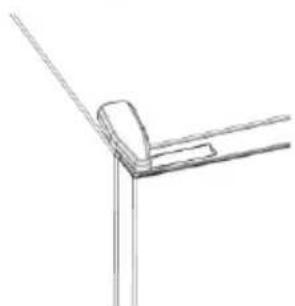
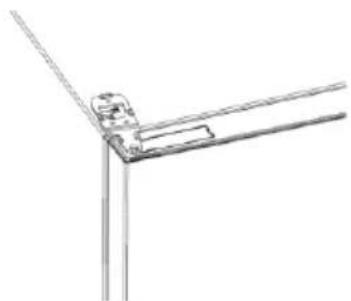
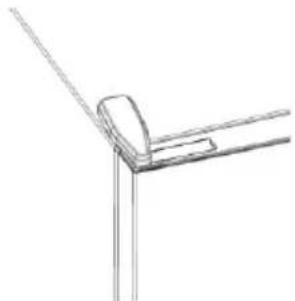
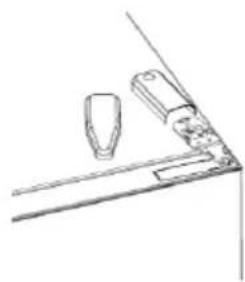
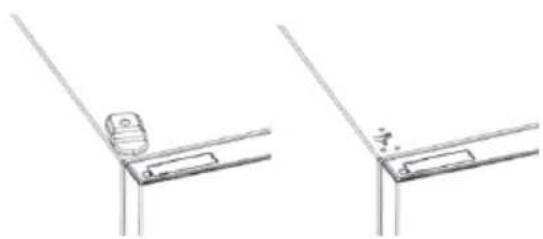
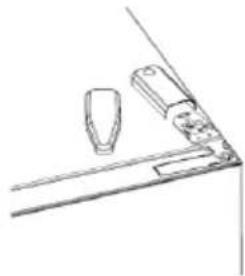
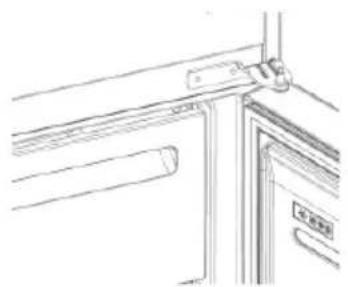
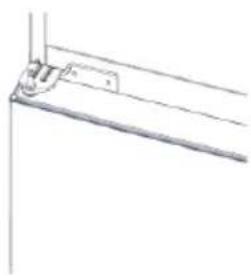
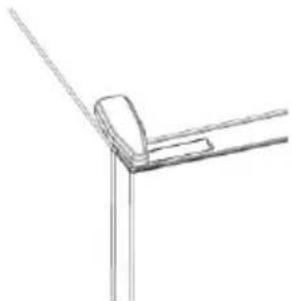
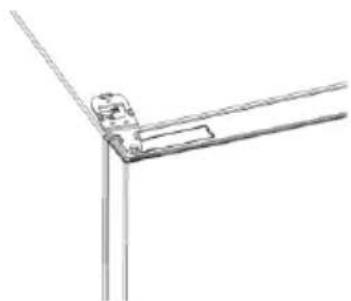
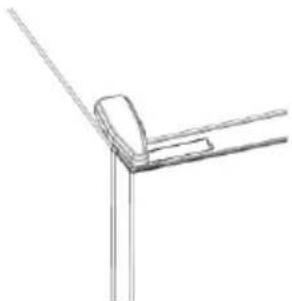
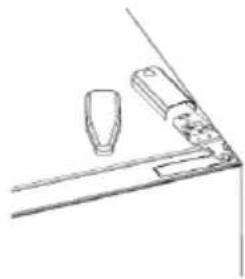
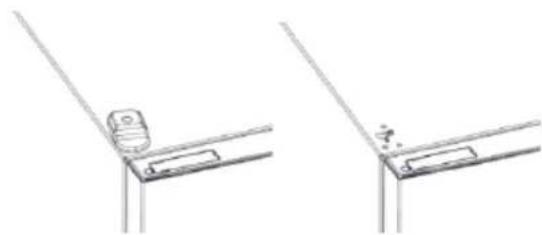
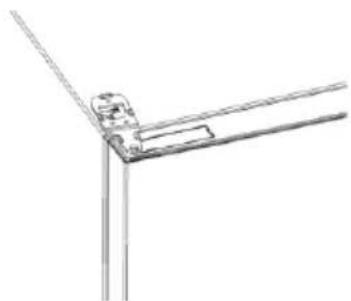
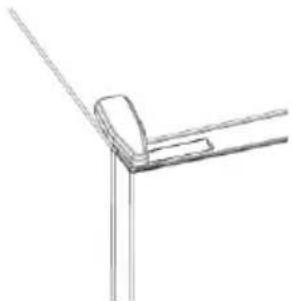
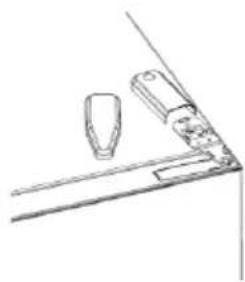
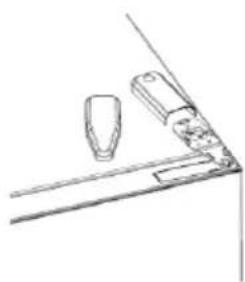
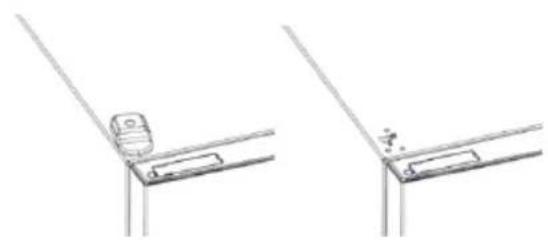
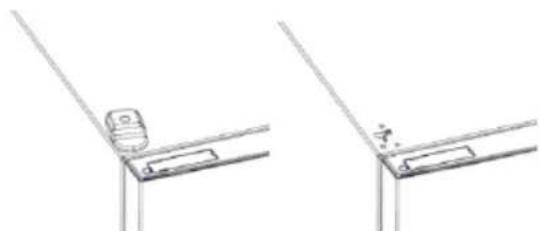
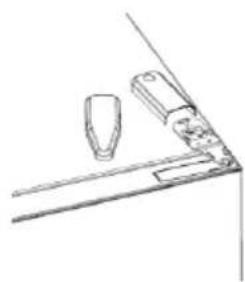
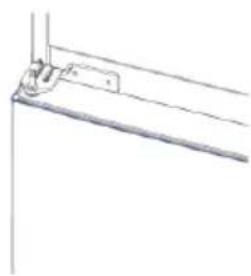
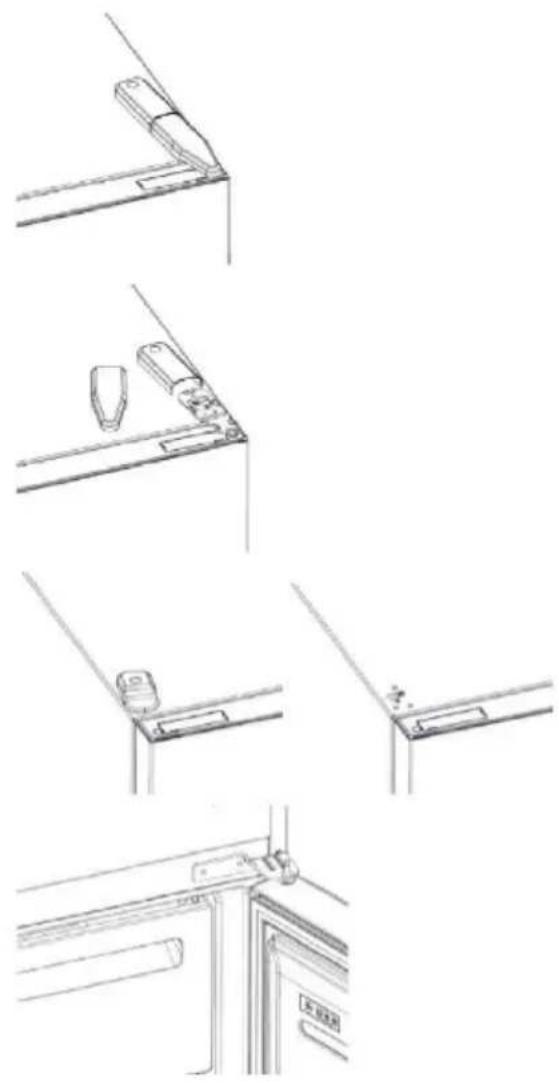
  1. Remove the top hinge cover
  2. Unscrew the top hinge
  3. Remove the top hinge cover (left)
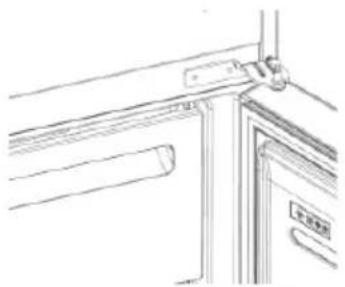
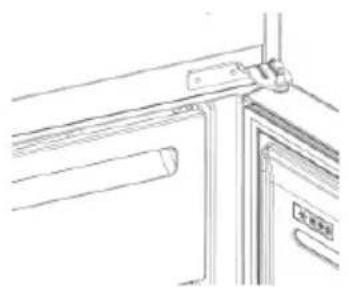
  4. Remove middle hinge

HOOVER HOCE4T618EWBK - DOOR REVERSIBILITY - 1

natural_image Line drawings of a door frame assembly with bracket, handle, and door lock (no text or symbols)
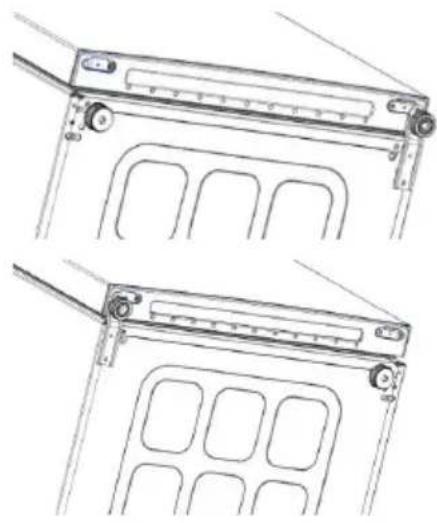
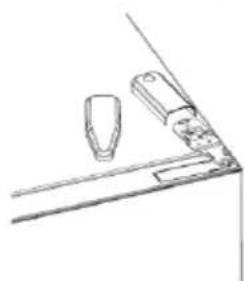
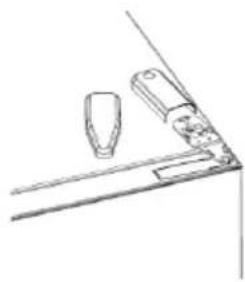
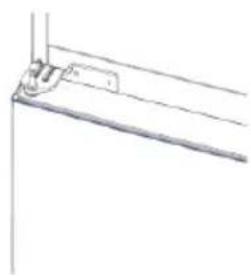
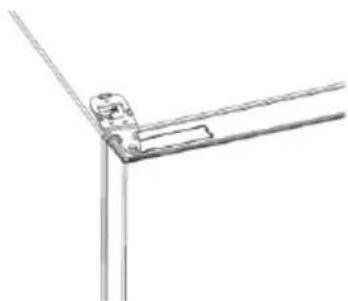
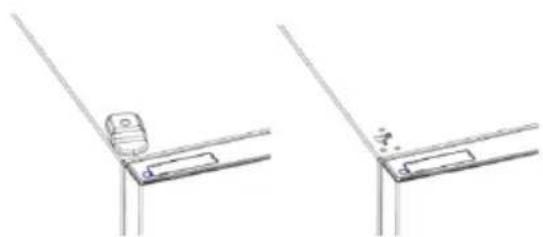
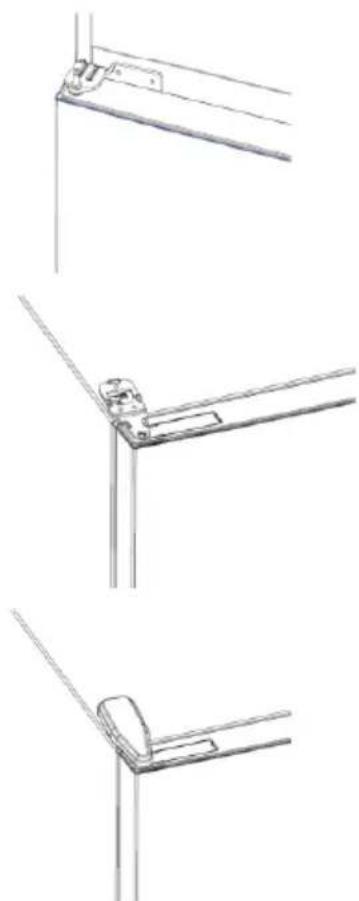
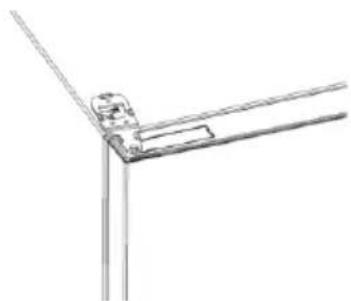
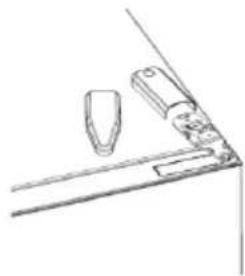
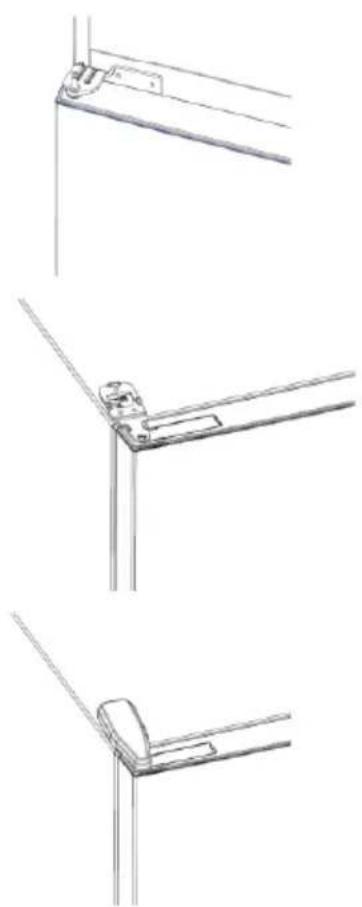
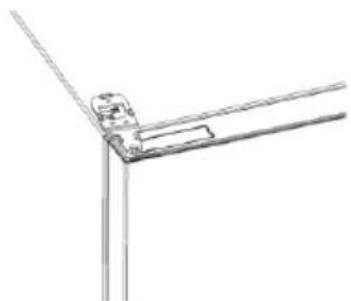
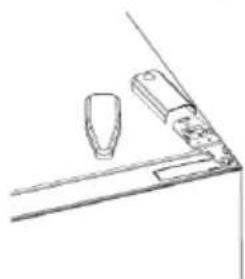
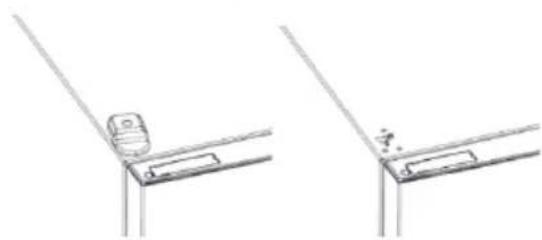
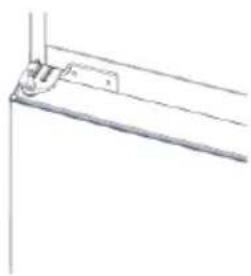
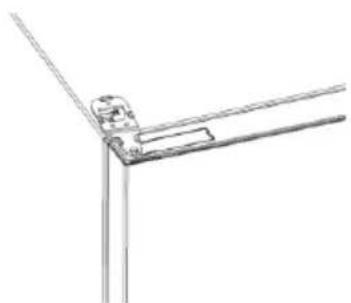
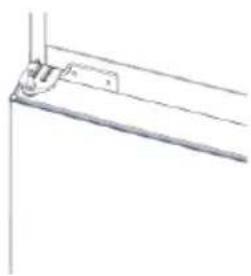
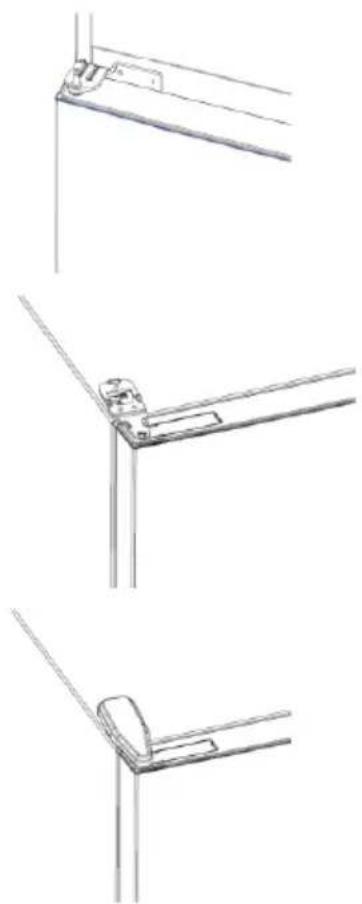
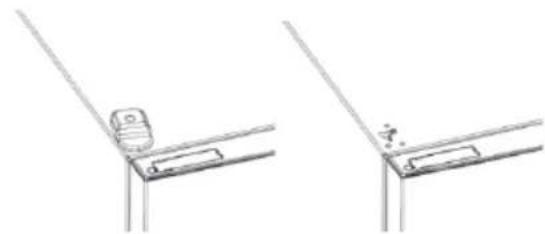
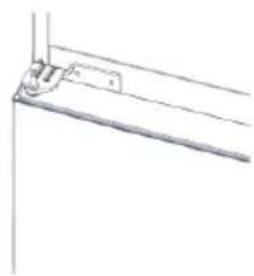
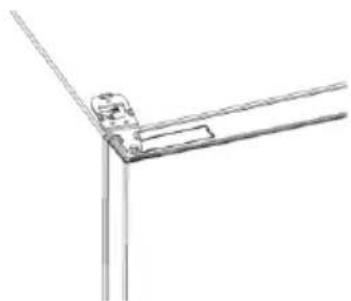
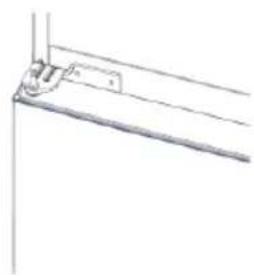
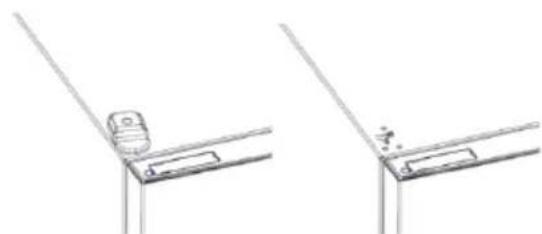
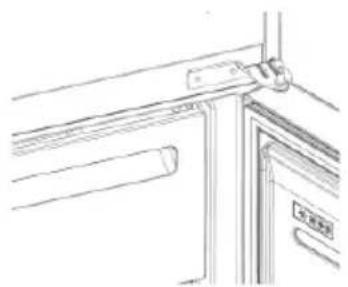
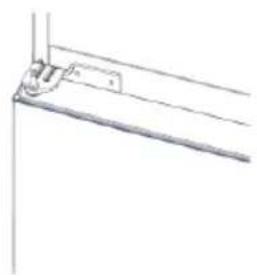
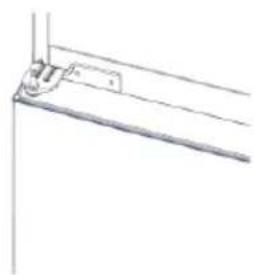
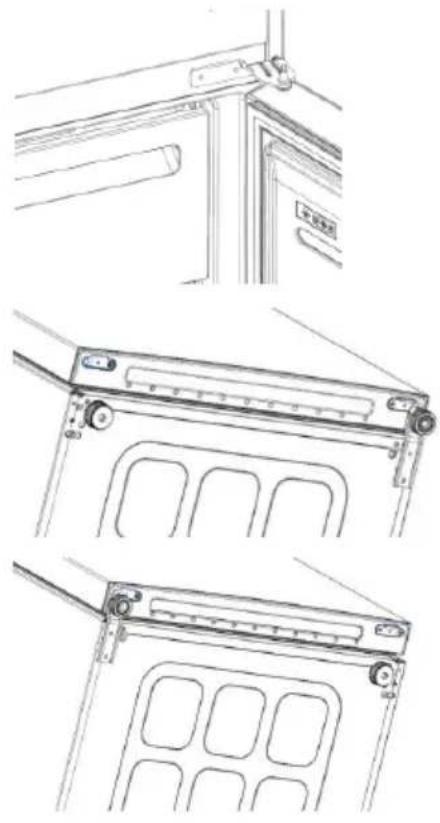
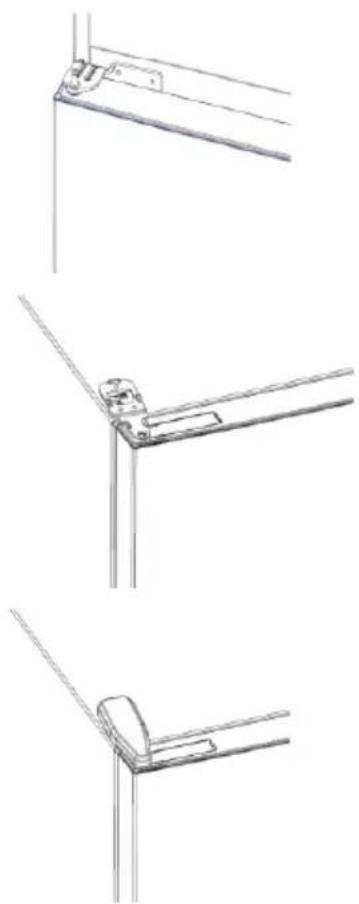
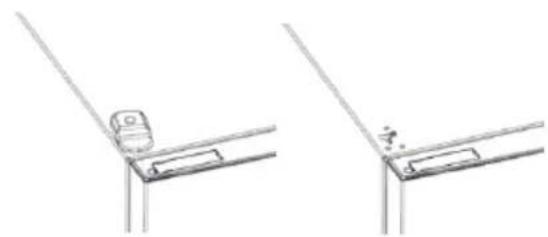
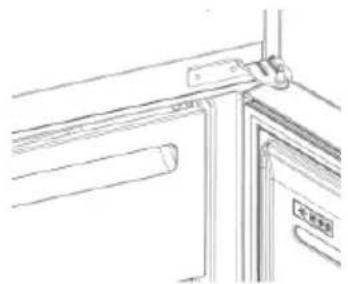
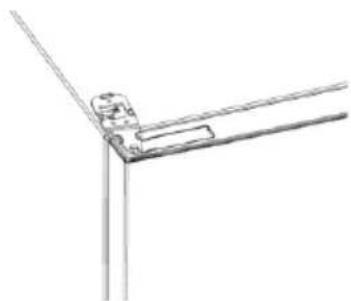
  1. Remove lower hinge
  2. Mount hinge foot
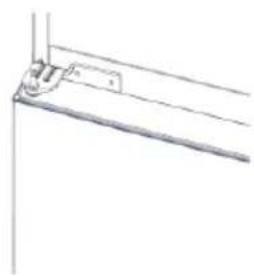
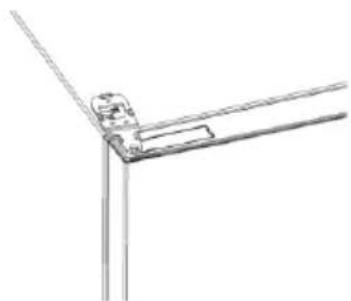
  3. Mount middle hinge
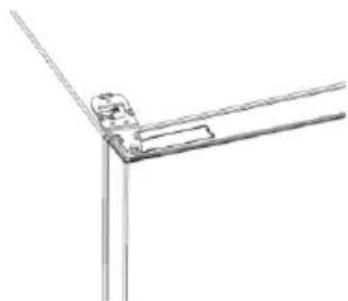
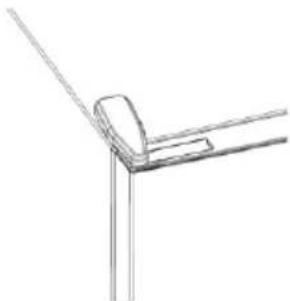
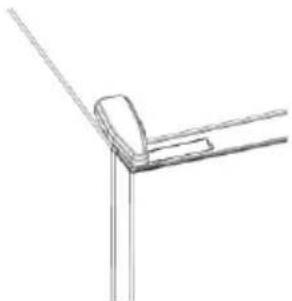
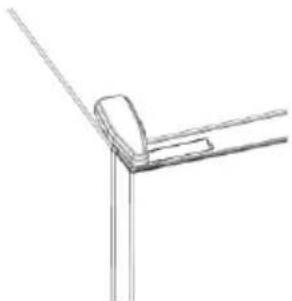
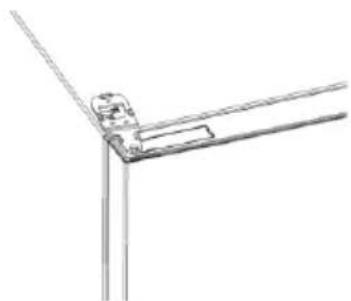
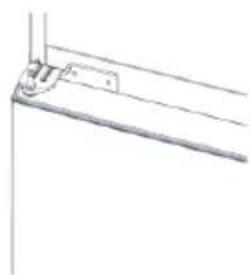
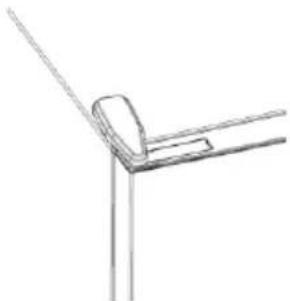
  4. Mount the upper hinge plate
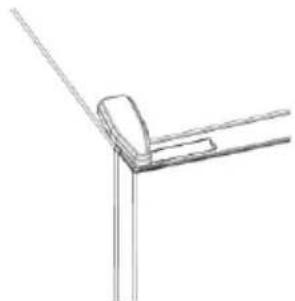
  5. Mount the upper hinge cover

HOOVER HOCE4T618EWBK - DOOR REVERSIBILITY - 2

natural_image Technical line drawing of two mechanical components with mounting brackets and internal compartments (no text or symbols)

HOOVER HOCE4T618EWBK - DOOR REVERSIBILITY - 3

natural_image Pure technical line drawing of a mechanical bracket or support structure without any text, numbers, or symbols

HOOVER HOCE4T618EWBK - DOOR REVERSIBILITY - 4

natural_image Pure technical line drawing of a mechanical joint or bracket (no text or symbols)

HOOVER HOCE4T618EWBK - DOOR REVERSIBILITY - 5

natural_image Pure technical line drawing of a corner joint or bracket (no text or symbols)

TROUBLESHOOTING

The inside light bulb does not turn on.No electricity.The power cable is not properly plugged in.Check if the appliance is switched off (see Temperature Adjustment).Check the power socket is working correctly (e.g. with another electric device).
Holiday Mode is activated.Deactivate Holiday mode.
The internal temperature of the refrigerator and/or freezer is not cold enough.The doors are not closed.Check that the door and gaskets close properly.
The doors are frequently opened.Avoid opening the doors unnecessarily for some time.
Incorrect temperature setting.Check the temperature setting and, if possible, set a lower temperature (see Temperature Adjustment).
The refrigerator and/or freezer are too full.Wait for the temperature of the refrigerator/ freezer to stabilise.Avoid filling the refrigerator and freezer excessively.
The surrounding temperature is too low.Move the unit to a warmer place or heat the current room.
Warm items have been stored.Always allow items to cool before storing them.
The food in the refrigerator freezes.Incorrect temperature setting.Check the temperature setting and, if possible, increase the temperature.
Food in contact with the back wall.Keep the food away from the refrigerator's back wall.
The bottom of the refrigerator compartment is wet or water droplets are present.The drain hose could be clogged.Clean the drain hose with a stick or similar item to allow the water to drain.
Presence of drops of water or frost on the rear wall of the refrigerator.Depending on the function, drops of water or frost form on the rear wall of the refrigerator during operation.It is not a defect.
Warm items have been stored.Always allow items to cool before storing them.
There are open food containers or liquids.Always cover food and liquids.
The doors are not closed.Check that the door and gaskets close properly.
The doors are frequently opened.Avoid opening the doors unnecessarily for some time.
Presence of water in the vegetable drawer.Lack of air circulation.Verify that your appliance is not too full.
Vegetables and fruit with too much moisture.Wrap the fruit and vegetables in plastic materials, e.g. cling film, bags or containers.
The motor runs continuously.The doors are not closed.Make sure the doors are closed and check the seals close properly.
The doors are opened frequently.Avoid opening the doors unnecessarily for some time.
Ambient temperature is very high.Verify that the ambient temperature is in the range set out in the specifications on the appliance tag.Set the display screen/themostat to a warmer temperature.
The appliance has been off (no power) for some time.It normally takes the appliance 8-12h to cool completely.
The frozen food is thawing.Surrounding temperature is too low.Move the unit to a warmer place or heat the current room.
The freezer door is not closed.Make sure the door is closed and that the gasket is sealing properly.
Fridge door alarm.Fridge door alarm (acoustic beep) activates whenever the door is left open for more than 3 minutes.Avoid leaving the door open when not needed. The beep ceases when the door is closed.
The appliance makes noises such as gurgling, buzzing, clicking, creaking.No breakdowns. An engine is running, e.g. refrigeration unit, fan. The refrigerant flows into the pipes. Motor, switches and solenoid valves are switched on or off.No action needed.
The appliance is not located on level ground.Adjust the feet to level the appliance.
The appliance touches an object around it.Remove objects around the appliance.
The appliance does not cool, the temperature and lighting indicators are on.Demo mode is activated.Deactivate DEMO mode.
Strong ice and frost in the freezer compartment.The items were not adequately packaged.Always pack the items well.
A door/drawer of the appliance is not tightly closed.Close the door/drawer.
The door/drawer has been opened too frequently or for too long.Do not open the door/drawer too frequently.
The door/drawer gasket is dirty, worn, cracked or mismatched.Clean the door/drawer gasket or replace it with a new one.
Something on the inside prevents the door/drawer from closing properly.Reposition the shelves, door racks or internal containers to allow the door/drawer to close.
The sides of the appliance are warm.This is normal.

Резюме

ОПИСАНИЕ НА ПРОДУКТА 12

Изисквания за пространство 12

УПОТРЕБА 13

Употреба 13

Персонализирана температура.... 13

natural_image Technical diagram showing a mechanical assembly with a valve and housing, no text or symbols present

HOOVER HOCE4T618EWBK - УПОТРЕБА 13 - 1

natural_image Technical line drawings of a refrigerator and battery casing components, showing internal structure and assembly (no text or symbols)

HOOVER HOCE4T618EWBK - УПОТРЕБА 13 - 2

natural_image Two identical diagrams showing a container with internal components and an arrow indicating motion, labeled '4' (no text or symbols on the diagrams themselves)
text_image QR code image containing encoded data, no visible human-readable text

HOOVER HOCE4T618EWBK - УПОТРЕБА 13 - 3

text_image GET IT ON Google Play Download on the App Store EXPLORE IT ON AppGallery

Стъпка 2

text_image 12:30 hOn Welcome! Sign in to enter in your home LOG IN SIGN UP Post, now in Candy? Click above to discover our products. TRY DEMO

Стъпка 3

natural_image Pure technical line drawing of a mechanical joint or bracket (no text or symbols)

HOOVER HOCE4T618EWBK - Стъпка 3 - 1

natural_image Simple line drawing of a mechanical component or bracket with no text or symbols

HOOVER HOCE4T618EWBK - Стъпка 3 - 2

natural_image Technical line drawing of two mechanical bracket components (no text or symbols)
natural_image Technical line drawings of three different mechanical or architectural components (no text or symbols)

HOOVER HOCE4T618EWBK - Стъпка 3 - 3

natural_image Technical line drawings of three different metal bracket mounting configurations (no text or symbols)

ОТСТРАНЯВАНЕ НА НЕИЗПРАВНОСТИ

natural_image Technical diagram showing a mechanical assembly with a valve and housing, no text or symbols present

HOOVER HOCE4T618EWBK - Стъпка 3 - 4

natural_image Technical line drawings of a refrigerator and battery casing components, showing internal structure and assembly (no text or symbols)

HOOVER HOCE4T618EWBK - Стъпка 3 - 5

natural_image Two identical diagrams showing a container with internal components and an arrow indicating motion, no text or symbols present.

PROPOJENÍ S APLIKACÍ

POSTUP PÁROVÁNÍ S APLIKACÍ

Krok 1

text_image QR code image containing encoded data, no visible human-readable text

HOOVER HOCE4T618EWBK - Krok 1 - 1

text_image GET IT ON Google Play Download on the App Store EXPLORE IT ON AppGallery

Krok 2

text_image 12:30 hOn Welcome! Sign In to enter in your home LOG IN SIGN UP Post, new in Candy? Click above to discover our products TRY DEMO

Krok 3

natural_image Pure technical line drawing of a mechanical bracket or angle (no text or symbols)

HOOVER HOCE4T618EWBK - Krok 3 - 1

natural_image Simple line drawing of a kitchen counter with two items on a shelf (no text or symbols)

HOOVER HOCE4T618EWBK - Krok 3 - 2

natural_image Technical line drawing showing two views of a mechanical bracket or bracket assembly (no text or symbols)

PRODUKTBESKRIVELSE....32

Arealkrav 32

BRUG....33

Brug 33

Tilpasset temperatur ....33

Finjustering....34

natural_image Technical diagram showing a mechanical assembly with a valve and housing, no text or symbols present

HOOVER HOCE4T618EWBK - BRUG....33 - 1

natural_image Technical line drawings of a refrigerator and battery casing components, showing internal structure and assembly (no text or symbols)

HOOVER HOCE4T618EWBK - BRUG....33 - 2

natural_image Two identical diagrams showing a container with internal components and an arrow indicating motion, no text or symbols present.

FREMGANGSMÅDE VED PARRING I APP

Trin 1

• Download hOn-appen i butikkerne

HOOVER HOCE4T618EWBK - Trin 1 - 1

text_image QR code image containing encoded data, no visible human-readable text

HOOVER HOCE4T618EWBK - Trin 1 - 2

text_image GET IT ON Google Play Download on the App Store EXPLORE IT ON AppGallery

Trin 2

text_image 12:30 hOn Welcome! Sign In to enter in your home LOG IN SIGN UP Post, new in Candy? Click above to discover our products TRY DEMO

Trin 3

natural_image Line drawings of kitchen appliances and fixtures (no text or symbols)
natural_image Technical line drawing of a mechanical device with multiple ports and mounting brackets (no text or symbols)

HOOVER HOCE4T618EWBK - Trin 3 - 1

natural_image Pure technical line drawing of a mechanical bracket or support structure without any text, numbers, or symbols

HOOVER HOCE4T618EWBK - Trin 3 - 2

natural_image Pure technical line drawing of a mechanical joint or bracket (no text or symbols)

HOOVER HOCE4T618EWBK - Trin 3 - 3

natural_image Simple line drawing of a corner bracket with diagonal lines (no text or symbols)

FEJLFINDING

natural_image Technical diagram showing a mechanical assembly with a valve and housing, no text or symbols present

HOOVER HOCE4T618EWBK - Trin 3 - 4

natural_image Technical line drawings of a refrigerator and battery casing components, showing internal structure and assembly (no text or symbols)

HOOVER HOCE4T618EWBK - Trin 3 - 5

natural_image Two identical diagrams of a container with internal structures and directional arrows, no text or symbols present.
text_image QR code image containing encoded data, no visible human-readable text

HOOVER HOCE4T618EWBK - Trin 3 - 6

text_image GET IT ON Google Play Download on the App Store EXPLORE IT ON AppGallery

Schritt 2

text_image 12:30 hOn Welcome! Sign In to enter in your home LOG IN SIGN UP Post, now in Candy? Click above to discover our products TRY DEMO

Schritt 3

natural_image Line drawings of a kitchen door frame with handlebars and a glass container (no text or symbols)
natural_image Technical line drawing of a mechanical device with two views (top and side), showing internal compartments and mounting brackets (no text or symbols)

HOOVER HOCE4T618EWBK - Schritt 3 - 1

natural_image Pure technical line drawing of a mechanical bracket or mounting detail (no text or symbols)

HOOVER HOCE4T618EWBK - Schritt 3 - 2

natural_image Pure technical line drawing of a mechanical joint or bracket (no text or symbols)

HOOVER HOCE4T618EWBK - Schritt 3 - 3

natural_image Pure technical line drawing of a corner joint or bracket (no text or symbols)

FEHLERBEHEBUNG

natural_image Technical diagram showing a mechanical assembly with a component and a separate view of a vertical structure (no text or symbols present)

HOOVER HOCE4T618EWBK - Schritt 3 - 4

natural_image Technical line drawings of a refrigerator and battery casing with directional arrows indicating movement (no text or symbols)

HOOVER HOCE4T618EWBK - Schritt 3 - 5

natural_image Two identical diagrams showing a container with internal components and an arrow indicating motion, no text or symbols present.
text_image QR code image containing encoded data, no visible human-readable text

HOOVER HOCE4T618EWBK - Schritt 3 - 6

text_image GET IT ON Google Play Download on the App Store EXPLORE IT ON AppGallery

Βήμα 2

text_image hOn Welcome! Sign Is to enter in your home LOG IN SIGN UP Post, now in Candy? Click above to discover our products TRY DEMO

Βήμα 3

natural_image Pure technical line drawing of a mechanical joint or bracket (no text or symbols)

HOOVER HOCE4T618EWBK - Βήμα 3 - 1

natural_image Simple line drawing of a mechanical or architectural component with no text or symbols

HOOVER HOCE4T618EWBK - Βήμα 3 - 2

natural_image Technical line drawing showing two mechanical bracket assembly configurations (no text or symbols)
natural_image Technical line drawings of three different mechanical or architectural components (no text or symbols)

HOOVER HOCE4T618EWBK - Βήμα 3 - 3

natural_image Technical line drawings of three different metal bracket mounting features (no text or symbols)
natural_image Technical line drawing showing a mechanical assembly with a component and a separate view (no text or symbols)

HOOVER HOCE4T618EWBK - Βήμα 3 - 4

natural_image Technical line drawings of a refrigerator and battery casing components, showing internal structure and assembly (no text or symbols)

HOOVER HOCE4T618EWBK - Βήμα 3 - 5

natural_image Two identical diagrams showing a container with internal components and an arrow indicating motion, labeled '4' (no text or symbols on the diagrams themselves)
text_image QR code image containing encoded data, no visible human-readable text

HOOVER HOCE4T618EWBK - Βήμα 3 - 6

text_image GET IT ON Google Play Download on the App Store EXPLORE IT ON AppGallery

Paso 2

text_image 12:30 hOn Welcome! Sign In to enter in your home LOG IN SIGN UP Post, new in Candy? Click above to discover our products TRY DEMO

Paso 3

natural_image Line drawings of five different door or cabinet components, showing front, side, top, front, and side views (no text or symbols)
natural_image Technical line drawing of two mechanical components with mounting brackets and internal compartments (no text or symbols)

HOOVER HOCE4T618EWBK - Paso 3 - 1

natural_image Pure technical line drawing of a mechanical bracket or mounting detail (no text or symbols)

HOOVER HOCE4T618EWBK - Paso 3 - 2

natural_image Pure technical line drawing of a mechanical joint or bracket (no text or symbols)

HOOVER HOCE4T618EWBK - Paso 3 - 3

natural_image Pure technical line drawing of a corner joint or bracket (no text or symbols)
natural_image Technical diagram showing a mechanical assembly with a valve and housing, no text or symbols present

HOOVER HOCE4T618EWBK - Paso 3 - 4

natural_image Technical line drawings of a refrigerator and battery casing components, showing internal structure and assembly (no text or symbols)

HOOVER HOCE4T618EWBK - Paso 3 - 5

natural_image Two identical diagrams showing a container with internal components and an arrow indicating motion, no text or symbols present.
text_image QR code image containing encoded data, no visible human-readable text

HOOVER HOCE4T618EWBK - Paso 3 - 6

text_image GET IT ON Google Play Download on the App Store EXPLORE IT ON AppGallery

Vaihe 2

text_image 12:30 hOn Welcome! Sign In to enter in your home LOG IN SIGN UP Post, new in Candy? Click above to discover our products TRY DEMO

Vaihe 3

natural_image Pure technical line drawing of a mechanical clamp or bracket (no text or symbols)

HOOVER HOCE4T618EWBK - Vaihe 3 - 1

natural_image Simple line drawing of a mechanical or architectural component with no text or symbols

HOOVER HOCE4T618EWBK - Vaihe 3 - 2

natural_image Technical line drawing showing two views of a bracket or mounting detail with no text or symbols
natural_image Technical line drawings of three different door frame structures (no text or symbols)

HOOVER HOCE4T618EWBK - Vaihe 3 - 3

natural_image Three technical line drawings of a vertical metal bracket with mounting feet, shown from different angles (no text or symbols present)

VIANETSINTÄ

natural_image Technical diagram showing a mechanical assembly with a valve and housing, no text or symbols present

HOOVER HOCE4T618EWBK - Vaihe 3 - 4

natural_image Technical line drawings of a refrigerator and battery casing components, showing internal structure and assembly (no text or symbols)

HOOVER HOCE4T618EWBK - Vaihe 3 - 5

natural_image Two identical diagrams showing a container with internal components and an arrow indicating motion, no text or symbols present.
text_image QR code image containing encoded data, no visible human-readable text

HOOVER HOCE4T618EWBK - Vaihe 3 - 6

text_image GET IT ON Google Play Download on the App Store HUAWEI EXPLORE IT ON AppGallery

Étape 2

text_image 12:30 hOn Welcome! Sign In to enter In your home LOG IN SIGN UP Post, now in Candy? Click above to discover our products TRY DEMO

Étape 3

natural_image Line drawings of a door frame assembly with bracket, handle, and door lock (no text or symbols)
natural_image Technical line drawing of two mechanical components with mounting brackets and internal compartments (no text or symbols)

HOOVER HOCE4T618EWBK - Étape 3 - 1

natural_image Pure technical line drawing of a mechanical bracket or support structure without any text, numbers, or symbols

HOOVER HOCE4T618EWBK - Étape 3 - 2

natural_image Pure technical line drawing of a mechanical joint or bracket (no text or symbols)

HOOVER HOCE4T618EWBK - Étape 3 - 3

natural_image Pure technical line drawing of a corner joint or bracket (no text or symbols)

DÉPANNAGE

natural_image Technical diagram showing a mechanical assembly with a component and a separate view of a vertical structure (no text or symbols present)

HOOVER HOCE4T618EWBK - Étape 3 - 4

natural_image Technical line drawings of a refrigerator and battery casing components, showing internal structure and assembly (no text or symbols)

HOOVER HOCE4T618EWBK - Étape 3 - 5

natural_image Two identical diagrams showing a container with internal components and an arrow indicating motion, no text or symbols present.
text_image QR code image containing encoded data, no visible human-readable text

HOOVER HOCE4T618EWBK - Étape 3 - 6

text_image GET IT ON Google Play Download on the App Store EXPLORE IT ON AppGallery

2. korak

text_image 12:30 hOn Welcome! Sign In to enter in your home LOG IN SIGN UP Post, new in Candy? Click above to discover our products TRY DEMO

3. korak

- Pridržavajte se uputa za uparivanje u aplikaciji hOn

Uporaba mreže Wi-Fi

Da biste aktivirali mrežu Wi-Fi, dugo pritisnite tipku SET 2 sekunde i uključuje se ikona mreže Wi-Fi te odašilje zvučni signal.

Ako se mreža Wi-Fi još nije konfigurirala kada se hladnjak uključuje, automatski prelazi u način konfiguriranja i ostaje u tom statusu 30 minuta. Za uporabu načina konfiguriranja:

  • Pritisnite tipku SET 2 s, ali ne kraće od 8 s, hladnjak prelazi u način konfiguriranja mreže Wi-Fi i odašilje se zvučni signal. Ikona mreže Wi-Fi počinje treperiti.
  • Pridržavajte se uputa u aplikaciji za konfiguriranje mreže Wi-Fi (pogledajte gore).
  • Nakon što se konfigurira mreža Wi-Fi i uspostavi veza, uključuje se ikona mreže Wi-Fi i fiksno ostaje uključena.
  • Nakon 30 minuta bez izvođenja bilo kakve radnje, mrežom Wi-Fi automatski se izlazi iz načina konfiguriranja.
  • Ako se mreža Wi-Fi već konfigurirala, automatski se ponovno povezuje u skladu s informacijama o konfiguriranju.

Radio-modul - Tehnički podaci

Učestalost (OFR)2400 MHz-2843.5 MHz
Frekvencije kanala2412...2472 MHz(veličina koraka 5 MHz)
Maksimalna snaga(EIRP)100 mW
natural_image Line drawings of kitchen appliances and fixtures in various orientations (no text or symbols)
  1. Uklonite donju šarku
  2. Postavite postolje šarke
  3. Postavite srednju šarku
  4. Postavite ploču gornje šarke
  5. Postavite poklopac gornje šarke

HOOVER HOCE4T618EWBK - Uporaba mreže Wi-Fi - 1

natural_image Technical line drawing of a mechanical device with two views (top and side), showing internal compartments and mounting brackets (no text or symbols)

HOOVER HOCE4T618EWBK - Uporaba mreže Wi-Fi - 2

natural_image Pure technical line drawing of a mechanical bracket or support structure without any text, numbers, or symbols

HOOVER HOCE4T618EWBK - Uporaba mreže Wi-Fi - 3

natural_image Pure technical line drawing of a corner joint or bracket (no text or symbols)

HOOVER HOCE4T618EWBK - Uporaba mreže Wi-Fi - 4

natural_image Pure technical line drawing of a corner joint or bracket (no text or symbols)

RJEŠAVANJE PROBLEMA

Ne uključuje se žarulja unutarnjeg osvjetljenja.Nema struje.Kabel napajanja nije propisno ukopčan.Provjerite da uređaj nije isključen (pogledajte Podešavanje temperature).Provjerite radi li električna uličnica ispravno (npr. s drugim električnim uređajem).
Aktiviran je način rada Holiday.Deaktivirajte način rada Holiday.
Unutarnja temperatura hladnjaka i/ili zamrzivača nije dovoljno niska.Vrata nisu zatvorena.Provjerite zatvaraju li se vrata i brtve pravilno.
Vrata se često otvaraju.Izbjegavajte nepotrebno otvaranje vrata neko vrijeme.
Neodgovarajuća postavka temperature.Provjerite postavku temperature i po mogućnosti smanjite je (pogledajte odjejak Podešavanje temperature).
Hladnjak i/ili zamrzivač je/su prepuni.Pričekajte da se temperatura hladnjaka/zamrzivača stabilizira.Izbjegavajte prekomjemo punjenje hladnjaka i zamrzivača.
Temperatura okoline je preniska.Premjestite uređaj na toplije mjesto ili zagrijte prostoriju.
Pohranjene su tople namirnice.Uvijek pričekajte da se namirnice ohlade prije nego ih spremite.
Hrana u hladnjaku se zamrzava.Neodgovarajuća postavka temperature.Provjerite postavku temperature i, ako je moguće, povećajte je.
Hrana dodiruje stražnju stijenku.Držite hranu dalje od stražnje stijenke hladnjaka.
Donji dio odjeljka hladnjaka je mokar ili su prisutne kapljice vode.Odvodno crijevo možda je začepljeno.Očistite odvodno crijevo štapom ili sličnim predmetom kako biste omogućili odvod vode.
Kapljice vode ili mraz na stražnjoj stijenci hladnjaka.Ovisno o funkciji, kapljice vode ili mraz formiraju se na stražnjoj stijenci hladnjaka tijekom rada.To nije znak kvara.
Pohranjene su tople namirnice.Uvijek pričekajte da se namirnice ohlade prije nego ih spremite.
Otvoreni su spremnici hrane ili tekućine.Uvijek prekrijte hranu i tekućine.
Vrata nisu zatvorena.Provjerite zatvaraju li se vrata i brtve pravilno.
Vrata se često otvaraju.Izbjegavajte nepotrebno otvaranje vrata neko vrijeme.
U ladici s povrćem ima vode.Nema cirkulacije zraka.Provjerite da uređaj nije prepun.
Povrće i voće sadrži previše vlage.Zamotajte voće i povrće u plastične materijale, npr. prianjajuću foliju, vrećice ili spremnike.
Motor radi neprekidno.Vrata nisu zatvorena.Provjerite jesu li vrata zatvorena i jesu li brtve propisno zatvorena.
Vrata se često otvaraju.Izbjegavajte nepotrebno otvaranje vrata neko vrijeme.
Temperatura okoline vrlo je visoka.Provjerite je li temperatura okoline u rasponu navedenom u specifikacijama na oznaci uređaja.Postavite zaslon/termostat na višu temperaturu.
Uređaj je isključen (nema napajanja) već neko vrijeme.Obično je potrebno 8 do 12 sati da se uređaj potpuno ohladi.
Zamrznuta hrana se odmrzava.Temperatura okoline je preniska.Premjestite uređaj na toplije mjesto ili zagrijte prostoriju.
Vrata zamrzivača nisu čvrsto zatvorena.Provjerite jesu li vrata zatvorena i ispravnost brtve.
Alarm za vrata hladnjaka.Alarm za vrata hladnjaka (zvučni signal) aktivira se uvijek kada su vrata otvorena dulje od 3 minute.Ne ostavljajte vrata otvorena kada to nije potrebno. Zvučni signal prestaje nakon zatvaranja vrata.
Uređaj proizvodi zvukove kao što su grgljanje, zujanje, klikanje, škripanje.Nema kvarova. Motor radi, npr. rashladna jedinica, ventilator. Rashladno sredstvo ulazi u cijevi. Motor, prekidači i elektromagnetski ventili uključeni su ili isključeni.Nije potrebno ništa poduzimati.
Uređaj se ne nalazi na ravnom tlu.Podesite nožice za niveliranje uređaja.
Uređaj dodiruje predmet u svojoj okolini.Uklonite predmete oko uređaja.
Uređaj se ne hladi, indikatori temperature i osvjetljenja uključeni su.Aktiviran je demonstracijski način rada.Deaktivirajte demonstracijski način rada.
Mnogo je leda i mraza u odjeljku zamrzivača.Namirnice nisu primjereno zapakirane.Uvijek dobro zapakirajte namlmice.
Ladica ili vrata uređaja nisu dobro zatvorena.Zatvorite vrata/ladicu.
Vrata/ladica su/je otvarana prečesto ili predugo.Ne otvarajte vrata/ladicu prečesto.
Brtva vrata/ladice je prjava, istrošena, napuknuta ili nepravilno postavljena.Očistite brtvu vrata/ladice ili je zamijenite novom.
Nešto u unutrašnjosti onemogućuje pravilno zatvaranje vrata/ladice.Premjestite police, police na vratima ili unutarnje spremnike kako bi se vrata/ladica mogla zatvoriti.
Bočne strane uređaja su tople.To je normalno.

Összegzés

TERMÉKLEÍRÁS....102

Helyigény....102

HASZNÁLAT....103

Használat ....103

natural_image Technical diagram showing a mechanical assembly with a valve and housing, no text or symbols present

HOOVER HOCE4T618EWBK - HASZNÁLAT....103 - 1

natural_image Technical line drawings of a refrigerator and battery casing components, showing internal structure and assembly (no text or symbols)

HOOVER HOCE4T618EWBK - HASZNÁLAT....103 - 2

natural_image Two identical diagrams showing a container with internal components and an arrow indicating motion, no text or symbols present.
text_image QR code image containing encoded data, no visible human-readable text

HOOVER HOCE4T618EWBK - HASZNÁLAT....103 - 3

text_image GET IT ON Google Play Download on the App Store EXPLORE IT ON AppGallery

2. lépés

text_image 12:30 hOn Welcome! Sign In to enter in your home LOG IN SIGN UP Post, new in Candy? Click above to discover our products TRY DEMO

3. lépés

natural_image Pure technical line drawing of a mechanical joint or bracket (no text or symbols)

HOOVER HOCE4T618EWBK - lépés - 1

natural_image Simple line drawing of a mechanical or architectural component with no text or symbols

HOOVER HOCE4T618EWBK - lépés - 2

natural_image Technical line drawing showing two views of a mechanical bracket or bracket with a small object on the side (no text or symbols present)

HOOVER HOCE4T618EWBK - lépés - 3

natural_image Line drawing of a door frame with handle and door, no text or symbols present
natural_image Technical line drawing of two mechanical components with mounting brackets and internal compartments (no text or symbols)

HOOVER HOCE4T618EWBK - lépés - 4

natural_image Pure technical line drawing of a mechanical bracket or support structure without any text, numbers, or symbols

HOOVER HOCE4T618EWBK - lépés - 5

natural_image Pure technical line drawing of a mechanical joint or bracket (no text or symbols)

HOOVER HOCE4T618EWBK - lépés - 6

natural_image Pure technical line drawing of a corner joint or bracket (no text or symbols)

HIBAELHÁRÍTÁS

natural_image Technical line drawing showing a mechanical assembly with a component and a separate view (no text or symbols)

HOOVER HOCE4T618EWBK - lépés - 7

natural_image Technical line drawings of a refrigerator and its internal components, showing part assembly and mounting (no text or symbols)

HOOVER HOCE4T618EWBK - lépés - 8

natural_image Two identical diagrams showing a container with internal structures and directional arrows, no text or symbols present.
text_image QR code image containing encoded data, no visible human-readable text

HOOVER HOCE4T618EWBK - lépés - 9

text_image GET IT ON Google Play Download on the App Store EXPLORE IT ON AppGallery

Fase 2

text_image 12:30 hOn Welcome! Sign In to enter in your home LOGIN SIGN UP Post, now in Candy? Click above to discover our products TRY DEMO

Fase 3

natural_image Line drawings of a door frame assembly with no text or symbols
natural_image Technical line drawing of a mechanical device with two views (top and side), showing internal compartments and mounting points (no text or symbols)

HOOVER HOCE4T618EWBK - Fase 3 - 1

natural_image Pure technical line drawing of a mechanical bracket or mounting detail (no text or symbols)

HOOVER HOCE4T618EWBK - Fase 3 - 2

natural_image Pure technical line drawing of a mechanical joint or bracket (no text or symbols)

HOOVER HOCE4T618EWBK - Fase 3 - 3

natural_image Pure technical line drawing of a corner joint or bracket (no text or symbols)

SOLUZIONE DEI PROBLEMI

PRODUCTBESCHRIJVING....122

natural_image Technical diagram showing a mechanical assembly with a valve and housing, no text or symbols present

HOOVER HOCE4T618EWBK - PRODUCTBESCHRIJVING....122 - 1

natural_image Technical line drawings of a refrigerator and battery casing components, showing internal structure and assembly (no text or symbols)

HOOVER HOCE4T618EWBK - PRODUCTBESCHRIJVING....122 - 2

natural_image Two identical diagrams showing a container with internal components and an arrow indicating motion, no text or symbols present.
text_image QR code image containing encoded data, no visible human-readable text

HOOVER HOCE4T618EWBK - PRODUCTBESCHRIJVING....122 - 3

text_image GET IT ON Google Play Download on the App Store EXPLORE IT ON AppGallery

Stap 2

text_image 12:30 hOn Welcome! Sign In to enter in your home LOG IN SIGN UP Post, new in Candy? Click above to discover our products TRY DEMO

Stap 3

natural_image Line drawings of kitchen appliances and fixtures (no text or symbols)
natural_image Technical line drawing of two mechanical components with mounting brackets and internal compartments (no text or symbols)

HOOVER HOCE4T618EWBK - Stap 3 - 1

natural_image Pure technical line drawing of a mechanical bracket or support structure without any text, numbers, or symbols

HOOVER HOCE4T618EWBK - Stap 3 - 2

natural_image Pure technical line drawing of a mechanical joint or bracket (no text or symbols)

HOOVER HOCE4T618EWBK - Stap 3 - 3

natural_image Pure technical line drawing of a corner joint or bracket (no text or symbols)

PROBLEMEN OPLOSSEN

PRODUKTBESKRIVELSE....132

Plassbehov 132

BRUK 133

Bruk 133

Tilpasset temperatur 133

Finjustering....134

natural_image Technical diagram showing a mechanical assembly with a valve and housing, no text or symbols present

HOOVER HOCE4T618EWBK - BRUK 133 - 1

natural_image Technical line drawings of a refrigerator and battery casing components, showing internal structure and assembly (no text or symbols)

HOOVER HOCE4T618EWBK - BRUK 133 - 2

natural_image Two identical diagrams of a container with internal structures and directional arrows, no text or symbols present.
text_image QR code image containing encoded data, no visible human-readable text

HOOVER HOCE4T618EWBK - BRUK 133 - 3

text_image GET IT ON Google Play Download on the App Store EXPLORE IT ON AppGallery

Trinn 2

- Opprett kontoen din på hOn-appen, eller logg på hvis du allerede har en konto

HOOVER HOCE4T618EWBK - Trinn 2 - 1

text_image 12:30 hOn Welcome! Sign In to enter in your home LOG IN SIGN UP Post, new in Candy? Click above to discover our products TRY DEMO

Trinn 3

natural_image Pure technical line drawing of a mechanical joint or bracket (no text or symbols)

HOOVER HOCE4T618EWBK - Trinn 3 - 1

natural_image Simple line drawing of a mechanical or architectural component with no text or symbols

HOOVER HOCE4T618EWBK - Trinn 3 - 2

natural_image Technical line drawing showing two views of a bracket or hinge with a small object on the left side (no text or symbols)
natural_image Technical line drawings of three different door frame structures (no text or symbols)

HOOVER HOCE4T618EWBK - Trinn 3 - 3

natural_image Three technical line drawings of a vertical metal bracket with mounting feet, shown from different angles (no text or symbols present)

FEILS∅KING

OPIS PRODUKTU....142

natural_image Technical diagram showing a mechanical assembly with an arrow indicating direction, no text or symbols present

HOOVER HOCE4T618EWBK - OPIS PRODUKTU....142 - 1

natural_image Technical line drawings of a refrigerator and battery casing components, showing internal structure and assembly (no text or symbols)

HOOVER HOCE4T618EWBK - OPIS PRODUKTU....142 - 2

natural_image Two identical diagrams showing a container with internal components and an arrow indicating motion, labeled '4' (no text or symbols on the diagrams themselves)
text_image QR code image containing encoded data, no visible human-readable text

HOOVER HOCE4T618EWBK - OPIS PRODUKTU....142 - 3

text_image GET IT ON Google Play Download on the App Store EXPLORE IT ON AppGallery

Krok 2

text_image 12:30 hOn Welcome! Sign In to enter in your home LOG IN SIGN UP Post, new in Candy? Click above to discover our products TRY DEMO

Krok 3

natural_image Pure technical line drawing of a mechanical bracket or angle (no text or symbols)

HOOVER HOCE4T618EWBK - Krok 3 - 1

natural_image Simple line drawing of a mechanical component with two cylindrical parts and a base (no text or symbols)

HOOVER HOCE4T618EWBK - Krok 3 - 2

natural_image Technical line drawing showing two views of a bracket or support structure with no visible text or symbols

HOOVER HOCE4T618EWBK - Krok 3 - 3

natural_image Line drawing of a door with a handle and door panel, no text or symbols present
natural_image Technical line drawing of two mechanical components with mounting brackets and internal compartments (no text or symbols)

HOOVER HOCE4T618EWBK - Krok 3 - 4

natural_image Pure technical line drawing of a mechanical bracket or mounting detail (no text or symbols)

HOOVER HOCE4T618EWBK - Krok 3 - 5

natural_image Pure technical line drawing of a mechanical joint or bracket (no text or symbols)

HOOVER HOCE4T618EWBK - Krok 3 - 6

natural_image Pure technical line drawing of a corner joint or bracket (no text or symbols)

ROZWIĄZYWANIE PROBLEMÓW

natural_image Technical diagram showing a mechanical assembly with a downward arrow and labeled component '1' (no text or symbols present)

HOOVER HOCE4T618EWBK - Krok 3 - 7

natural_image Technical line drawings of a refrigerator and battery casing components, showing internal structure and assembly (no text or symbols)

HOOVER HOCE4T618EWBK - Krok 3 - 8

natural_image Two identical diagrams of a container with internal structures and directional arrows, no text or symbols present.
text_image QR code image containing encoded data, no visible human-readable text

HOOVER HOCE4T618EWBK - Krok 3 - 9

text_image GET IT ON Google Play Download on the App Store EXPLORE IT ON AppGallery

Passo 2

text_image 12:30 hOn Welcome! Sign In to enter in your home LOG IN SIGN UP Post, new in Candy? Click above to discover our products TRY DEMO

Passo 3

natural_image Line drawings of kitchen appliances and fixtures (no text or symbols)
natural_image Technical line drawing of a mechanical device with two views (top and side), showing internal compartments and mounting brackets (no text or symbols)

HOOVER HOCE4T618EWBK - Passo 3 - 1

natural_image Pure technical line drawing of a mechanical bracket or support structure without any text, numbers, or symbols

HOOVER HOCE4T618EWBK - Passo 3 - 2

natural_image Pure technical line drawing of a mechanical joint or bracket (no text or symbols)

HOOVER HOCE4T618EWBK - Passo 3 - 3

natural_image Pure technical line drawing of a corner joint or bracket (no text or symbols)
natural_image Technical diagram showing a mechanical assembly with an arrow indicating direction, no text or symbols present

HOOVER HOCE4T618EWBK - Passo 3 - 4

natural_image Technical line drawings of a refrigerator and battery casing, showing internal components and movement directions (no text or symbols)

HOOVER HOCE4T618EWBK - Passo 3 - 5

natural_image Two identical diagrams showing a container with internal components and an arrow indicating motion, no text or symbols present.
text_image QR code image containing encoded data, no visible human-readable text

HOOVER HOCE4T618EWBK - Passo 3 - 6

text_image GET IT ON Google Play Download on the App Store EXPLORE IT ON AppGallery

Pasul 2

text_image 12:30 hOn Welcome! Sign In to enter in your home LOG IN SIGN UP Post, now in Candy? Click above to discover our products. TRY DEMO

Pasul 3

natural_image Line drawings of a door frame assembly with no text or symbols
natural_image Technical line drawing of two mechanical components with mounting brackets and internal compartments (no text or symbols)

HOOVER HOCE4T618EWBK - Pasul 3 - 1

natural_image Pure technical line drawing of a mechanical bracket or mounting detail (no text or symbols)

HOOVER HOCE4T618EWBK - Pasul 3 - 2

natural_image Pure technical line drawing of a mechanical joint or bracket (no text or symbols)

HOOVER HOCE4T618EWBK - Pasul 3 - 3

natural_image Pure technical line drawing of a corner joint or bracket (no text or symbols)

DEPANARE

natural_image Technical diagram showing a mechanical assembly with a valve and housing, no text or symbols present

HOOVER HOCE4T618EWBK - Pasul 3 - 4

natural_image Technical line drawings of a refrigerator and battery casing components, showing internal structure and assembly (no text or symbols)

HOOVER HOCE4T618EWBK - Pasul 3 - 5

natural_image Two identical diagrams showing a container with internal components and an arrow indicating motion, labeled '4' (no text or symbols on the diagrams themselves)
text_image QR code image containing encoded data, no visible human-readable text

HOOVER HOCE4T618EWBK - Pasul 3 - 6

text_image GET IT ON Google Play Download on the App Store EXPLORE IT ON AppGallery

War 2

text_image 12:30 hOn Welcome! Sign in to enter in your home LOG IN SIGN UP Post, now in Candy? Click above to discover our products. TRY DEMO

War 3

natural_image Pure technical line drawing of a mechanical component without any text, numbers, or symbols

HOOVER HOCE4T618EWBK - War 3 - 1

natural_image Simple line drawing of a mechanical or architectural component with two cylindrical parts and a base (no text or symbols)

HOOVER HOCE4T618EWBK - War 3 - 2

natural_image Technical line drawing showing two views of a bracket or support structure with no visible text or symbols

HOOVER HOCE4T618EWBK - War 3 - 3

natural_image Pure technical line drawing of a door frame with no text or symbols
natural_image Technical line drawing of a mechanical device with two views (top and side), showing internal compartments and mounting brackets (no text or symbols)

HOOVER HOCE4T618EWBK - War 3 - 4

natural_image Pure technical line drawing of a mechanical bracket or support structure without any text, numbers, or symbols

HOOVER HOCE4T618EWBK - War 3 - 5

natural_image Pure technical line drawing of a mechanical joint or bracket (no text or symbols)

HOOVER HOCE4T618EWBK - War 3 - 6

natural_image Pure technical line drawing of a corner joint or bracket (no text or symbols)
natural_image Technical diagram showing a mechanical assembly with a valve and housing, no text or symbols present

HOOVER HOCE4T618EWBK - War 3 - 7

natural_image Technical line drawings of a refrigerator and its internal components, showing part assembly and mounting (no text or symbols)

HOOVER HOCE4T618EWBK - War 3 - 8

natural_image Two identical diagrams showing a container with internal structures and directional arrows, no text or symbols present.
text_image QR code image containing encoded data, no visible human-readable text

HOOVER HOCE4T618EWBK - War 3 - 9

text_image GET IT ON Google Play Download on the App Store EXPLORE IT ON AppGallery

Krok 2

text_image 12:30 hOn Welcome! Sign In to enter in your home LOG IN SIGN UP Post, new in Candy? Click above to discover our products TRY DEMO

Krok 3

natural_image Pure technical line drawing of a mechanical joint or bracket (no text or symbols)

HOOVER HOCE4T618EWBK - Krok 3 - 1

natural_image Simple line drawing of a mechanical component or bracket with two cylindrical parts and a base (no text or symbols)

HOOVER HOCE4T618EWBK - Krok 3 - 2

natural_image Technical line drawing showing two views of a bracket or support structure with no visible text or symbols

HOOVER HOCE4T618EWBK - Krok 3 - 3

natural_image Line drawing of a door handle assembly with no visible text or symbols
natural_image Technical line drawing of a mechanical device with mounting brackets and internal compartments (no text or symbols)

HOOVER HOCE4T618EWBK - Krok 3 - 4

natural_image Pure technical line drawing of a mechanical bracket or mounting bracket without any text, numbers, or symbols

HOOVER HOCE4T618EWBK - Krok 3 - 5

natural_image Pure technical line drawing of a mechanical joint or bracket (no text or symbols)

HOOVER HOCE4T618EWBK - Krok 3 - 6

natural_image Pure technical line drawing of a corner joint or bracket (no text or symbols)

RIEŠENIE PROBLÉMOV

natural_image Technical diagram showing a mechanical assembly with a component and a separate view of a vertical structure (no text or symbols present)

HOOVER HOCE4T618EWBK - Krok 3 - 7

natural_image Technical line drawings of a refrigerator and battery casing components, showing internal structure and assembly (no text or symbols)

HOOVER HOCE4T618EWBK - Krok 3 - 8

natural_image Two identical diagrams showing a container with internal components and an arrow indicating motion, no text or symbols present.
text_image QR code image containing encoded data, no visible human-readable text

HOOVER HOCE4T618EWBK - Krok 3 - 9

text_image GET IT ON Google Play Download on the App Store EXPLORE IT ON AppGallery

2. korak

text_image 12:30 hOn Welcome! Sign In to enter in your home LOG IN SIGN UP Post, new in Candy? Click above to discover our products TRY DEMO

3. korak

natural_image Pure technical line drawing of a mechanical component or bracket (no text or symbols)

HOOVER HOCE4T618EWBK - korak - 1

natural_image Simple line drawing of a mechanical or architectural component with no text or symbols

HOOVER HOCE4T618EWBK - korak - 2

natural_image Technical line drawing of two mechanical bracket components with no visible text or symbols

HOOVER HOCE4T618EWBK - korak - 3

natural_image Line drawing of a door frame with handle and door, no text or symbols present
natural_image Technical line drawing of two mechanical components with mounting brackets and internal compartments (no text or symbols)

HOOVER HOCE4T618EWBK - korak - 4

natural_image Pure technical line drawing of a mechanical bracket or support structure without any text, numbers, or symbols

HOOVER HOCE4T618EWBK - korak - 5

natural_image Pure technical line drawing of a mechanical joint or bracket (no text or symbols)

HOOVER HOCE4T618EWBK - korak - 6

natural_image Pure technical line drawing of a corner joint or bracket (no text or symbols)

ODPRAVLJANJE TEŽAV

text_image 500 110° 40° 40°

UPOTREBA
HOOVER HOCE4T618EWBK - korak - 7

text_image ① SET ⑤ ③ ④ Super Cool 2°C 4°C 6°C 8°C hOn ① ② ⑤ ③ ④

① Taster ON/OFF se koristi za uključivanje/isključivanje aparata.
② Taster SET, koristi se za odabir temperature frižidera ili za posebne funkcije.
③ Ikonica Wi-Fi, pokazuje da li je aparat povezan sa aplikacijom.
④ Ikonica Super Cool pokazuje da li je funkcija aktivirana.
⑤ Nivoi temperature pokazuju koja je temperatura izabrana.

Upotreba

  • Uključite aparat. Aparat će se automatski uključiti.
    • Temperatura će se automatski postaviti na 4 °C u frižideru i -18 °C u zamrzivaču.
  • Da biste promenili temperaturu, sa otvorenim vratima frižidera pritisnite taster SET. Kada se podešavanje poveća, uključiće se odgovarajuće LED svetlo. Akustični signal se stvara svaki put kada se pritisne taster SET i kada se temperatura promeni.
    • U slučaju nestanka struje, frižider će se vratiti na poslednji skup nivoa hlađenja.
  • Da biste vratili standardno podešavanje, dok je ekran osvetljen, držite pritisnutim dugme TEMP i zatim pritisnite dugme ON/OFF 5 puta u 5 sekundi.
  • U normalnom radnom stanju (u proleće i jesen), preporučuje se postavljanje temperature na 4 °C. Leti ili kada je ambijentalna temperatura visoka, preporučuje se postavljanje temperature na 6 – 8 °C, da bi se garantovale temperature frižidera i zamrzivača i smanjilo neprekidno vreme rada frižidera; a zimi ili kada je ambijentalna temperatura niska, preporučuje se postavljanje temperature na 2 – 4 °C kako bi se izbeglo često uključivanje/zaustavljanje frižidera.

Prilagodena temperatura

Iz aplikacije je moguće prilagoditi temperaturu odeljka frižidera. Temperatura se može podesiti sa osetljivošću od 1 °C, a u frižideru je moguće odabrati temperaturu od 2 °C do 8 °C. Pri svakoj promeni temperature emituje se zvučni signal. Kada aplikacija odabere temperaturu, na kontrolnoj tabli nema indikacije, sva LED svetla za temperaturu su isključena, dok je uključena samo ikonica Wi-Fi.

natural_image Technical diagram showing a mechanical assembly with a valve and housing, no text or symbols present

HOOVER HOCE4T618EWBK - Prilagodena temperatura - 1

natural_image Technical line drawings of a refrigerator and battery casing with internal components (no text or symbols)

HOOVER HOCE4T618EWBK - Prilagodena temperatura - 2

natural_image Two identical diagrams showing a container with internal components and an arrow indicating motion, labeled '4' (no text or symbols on the diagrams themselves)
text_image QR code image containing encoded data, no visible human-readable text

HOOVER HOCE4T618EWBK - Prilagodena temperatura - 3

text_image GET IT ON Google Play Download on the App Store EXPLORE IT ON AppGallery

2. korak

text_image 12:30 hOn Welcome! Sign In to enter in your home LOG IN SIGN UP Post, new in Candy? Click above to discover our products TRY DEMO

3. korak

• Pratite uputstva za uparivanje u hOn aplikaciji

natural_image Pure technical line drawing of a mechanical bracket or angle (no text or symbols)

HOOVER HOCE4T618EWBK - korak - 1

natural_image Simple line drawing of a mechanical bracket or bracket with two protruding components (no text or symbols)

HOOVER HOCE4T618EWBK - korak - 2

natural_image Technical line drawing showing two views of a mechanical bracket or bracket assembly (no text or symbols)
  1. Uklonite srednju š arku
  2. Uklonite donju š arku
  3. Postavite stopicu š arke
  4. Postavite srednju š arku
  5. Postavite pločicu gornje š arke
  6. Postavite poklopac gornje š arke

HOOVER HOCE4T618EWBK - korak - 3

natural_image Technical line drawings of three different mechanical or architectural components (no text or symbols)

HOOVER HOCE4T618EWBK - korak - 4

natural_image Technical line drawings of three different metal bracket mounting configurations (no text or symbols)

REŠAVANJE PROBLEMA

Unutrašnja sijalica se ne uključuje.Nema struje.Kabl za napajanje nije pravilno priključen.Proverite da li je uređaj isključen (pogledajte Podešavanje temperature).Proverite da li utičnica radi ispravno (npr. sa drugim električnim uređajem).
Režim Holiday je aktiviran.Deaktivirajte režim Holiday.
Unutrašnja temperatura frižidera i/ili zamrzivača nije dovoljno hladna.Vrata nisu zatvorena.Proverite da li su vrata i zaptivke pravilno zatvoreni.
Vrata se često otvaraju.Izbegavajte neko vreme nepotrebno otvaranje vrata.
Pogrešno podešavanje temperature.Proverite podešavanje temperature i, ako je moguće, podesite nižu temperaturu (pogledajte Podešavanje temperature).
Frižider i/ili zamrzivač su previše puni.Sačekajte da se temperatura frižidera/ zamrzivača stabilizuje.Izbegavajte prekomerno punjenje frižidera i zamrzivača.
Temperatura okoline je previše niska.Pomerite jedinicu na toplije mesto ili zagrejte prostoriju u kojoj se trenutno nalazi.
Topli artikli su uskladišteni.Uvek ostavite article da se ohlade pre skladištenja.
Hrana u frižideru se zamrzava.Pogrešno podešavanje temperature.Proverite podešavanje temperature i, ako je moguće, povečajte temperaturu.
Hrana je u kontaktu sa zadnjim zidom.Držite hranu daje od zadnjeg zida frižidera.
Dno odeljka frižidera je mokro ili su prisutne kapljice vode.Možda je zapušeno odvodno crevo.Očistite odvodno crevo štapićem ili sličnim predmetom kako biste omogućili odvod vode.
Prisustvo kapljica vode ili mraza na zadnjem zidu frižidera.U zavisnosti od funkcije, kapljice vode ili mraza se tokom rada formiraju na zadnjem zidu frižidera.To nije kvar.
Topli artikli su uskladišteni.Uvek ostavite article da se ohlade pre skladištenja.
Postoje otvorene posude za hranu ili tečnosti.Uvek pokrijte hranu i tečnosti.
Vrata nisu zatvorena.Proverite da li su vrata i zaptivko pravilno zatvoreni.
Vrata se često otvaraju.Izbegavajte neko vreme nepotrebno otvaranje vrata.
Prisustvo vode u fioci za povrće.Nedostatak cirkulacije vazduha.Uverite se da uređaj nije previše pun.
Povrće i voće sadrži previše vlage.Voće i povrće umotajte u plastične materijale, npr. plastičnu foliju, keso ili posude.
Motor radi neprekidno.Vrata nisu zatvorena.Proverite da li su vrata zatvorena i da li su zaptivke pravilno zatvorene.
Vrata se često otvaraju.Izbegavajte neko vreme nepotrebno otvaranje vrata.
Temperatura okruženja je veoma visoka.Proverite da li je temperatura okruženja u opsegu navedenom u specifikacijama na nalepnici uređaja.Podesite displej/termostat na višu temperaturu.
Uređaj je isključen (nema struje) već neko vreme.Obično je potrebno 8-12 sati da se uređaj potpuno ohladi.
Zamrznuta hrana se otaça.Temperatura okoline je previše niska.Pomerite jedinicu na toplije mesto ili zagrejte prostoriju u kojoj se tronutno nalazi.
Vrata zamrzivača nisu zatvorena.Proverite da li su vrata zatvorena i da li zaptivka pravilno zaptiva.
Alarm za vrata frižidera.Alarm za vrata frižidera (zvučni signal) se aktivira kad god su vrata otvorena duže od 3 minuta.Ne ostavljajte vrata otvorena kada to nije potrebno. Zvučni signal prostaje kada se zatvore vrata.
Uređaj proizvodi zvukove kao što su klokotanje, zujanje, škljocanje, škripanje.Nema kvarova. Motor radi, npr. rashladna jedinica, ventilator. Rashladno sredstvo teče u cevima. Motor, prekidači i elektromagnetni ventili su uključeni ili isključeni.Nikakva radnja nije potrebna.
Uređaj se nalazi na neravnoj površini.Podesite stopice za nivellisanje uređaja.
Uređaj dodiruje neki predmet do njega.Uklonite predmete oko uređaja.
Uređaj ne hladi, indikatori temperature i osvetljenja su uključeni.Aktiviran je Demo režim.Deaktivirajte DEMO režim.
Velike količine leda i mraza su se formirale u zamrzivaču.Artikli nisu adekvatno upakovani.Uvek dobro upakujte predmete.
Vrata/fioka uređaja nije dobro zatvorena.Zatvorite vrata/fioku.
Vrata/fioka je otvorena prečesto ili predugo.Ne otvarajte vrata/fioku prečesto.
Zaptivka vrata/fioke je prljava, istrošena, napukla ili neodgovarajuća.Očistite zaptivku vrata/fioke ili je zamenite novom.
Nešto iznutra sprečava da se vrata/fioka pravilno zatvore.Promenite položaj polica, polica za vrata ili unutrašnjih posuda kako biste omogućili zatvaranje vrata/fioke.
Bočne strane uređaja su tople.Ovo je normalna pojava.

Sammanfattning

PRODUKTBESKRIVNING 212

APP-ANSLUTNING....217

I APP-HOPKOPPLINGSLÄGE 217

Steg 1....217

Steg 2....217

Steg 3....217

natural_image Technical diagram showing a mechanical assembly with a component and a separate view of a vertical structure (no text or symbols present)

HOOVER HOCE4T618EWBK - Sammanfattning - 1

natural_image Technical line drawings of a refrigerator and battery casing components, showing internal structure and assembly (no text or symbols)

HOOVER HOCE4T618EWBK - Sammanfattning - 2

natural_image Two identical diagrams of a container with internal structures and directional arrows, no text or symbols present.
text_image QR code image containing encoded data, no visible human-readable text

HOOVER HOCE4T618EWBK - Sammanfattning - 3

text_image GET IT ON Google Play Download on the App Store EXPLORE IT ON AppGallery

Steg 2

text_image 12:30 hOn Welcome! Sign In to enter in your home LOG IN SIGN UP Post, new in Candy? Click above to discover our products TRY DEMO

Steg 3

natural_image Pure technical line drawing of a mechanical bracket or angle (no text or symbols)

HOOVER HOCE4T618EWBK - Steg 3 - 1

natural_image Simple line drawing of a mechanical or architectural component with no text or symbols

HOOVER HOCE4T618EWBK - Steg 3 - 2

natural_image Technical line drawing showing two mechanical joint configurations (no text or symbols)

HOOVER HOCE4T618EWBK - Steg 3 - 3

natural_image Line drawing of a door with handle and door panel, no text or symbols present
natural_image Technical line drawing of a mechanical device with multiple slots and mounting brackets (no text or symbols)

HOOVER HOCE4T618EWBK - Steg 3 - 4

natural_image Pure technical line drawing of a mechanical bracket or support structure without any text, numbers, or symbols

HOOVER HOCE4T618EWBK - Steg 3 - 5

natural_image Pure technical line drawing of a mechanical joint or bracket (no text or symbols)

HOOVER HOCE4T618EWBK - Steg 3 - 6

natural_image Simple line drawing of a corner bracket with diagonal lines (no text or symbols)

FELSÖKNING

natural_image Technical diagram showing a mechanical assembly with a valve and housing, no text or symbols present

HOOVER HOCE4T618EWBK - Steg 3 - 7

natural_image Technical line drawings of a refrigerator and battery casing with internal components (no text or symbols)

HOOVER HOCE4T618EWBK - Steg 3 - 8

natural_image Two identical diagrams showing a container with internal components and an arrow indicating motion, no text or symbols present.
text_image QR code image containing encoded data, no visible human-readable text

HOOVER HOCE4T618EWBK - Steg 3 - 9

text_image GET IT ON Google Play Download on the App Store EXPLORE IT ON AppGallery

Крок 2

text_image 12:30 hOn Welcome! Sign in to enter in your home LOG IN SIGN UP Post, now in Candy? Click above to discover our products. TRY DEMO

Крок 3

natural_image Pure technical line drawing of a mechanical joint or bracket (no text or symbols)

HOOVER HOCE4T618EWBK - Крок 3 - 1

natural_image Simple line drawing of a mechanical or architectural component with no text or symbols

HOOVER HOCE4T618EWBK - Крок 3 - 2

natural_image Technical line drawing showing two views of a mechanical bracket or bracket assembly (no text or symbols)
natural_image Technical line drawings of three different household appliances or fixtures (no text or symbols present)

HOOVER HOCE4T618EWBK - Крок 3 - 3

natural_image Technical line drawings of three different metal bracket mounting brackets (no text or symbols)
natural_image Technical diagram showing a mechanical assembly with a downward arrow and component details (no text or symbols)

HOOVER HOCE4T618EWBK - Крок 3 - 4

text_image Technical diagram showing two mechanical assembly steps with labeled components and directional arrows

HOOVER HOCE4T618EWBK - Крок 3 - 5

natural_image Two identical diagrams showing a container with internal components and directional arrows, no text or symbols present.

ملء خزان المياه

text_image GET IT ON Google Play Download on the App Store EXPLORE IT ON AppGallery

HOOVER HOCE4T618EWBK - Крок 3 - 6

text_image QR code image containing encoded data, no visible human-readable text

2 alخطوة

perm Patient's help, you want to go to your own help.
HOOVER HOCE4T618EWBK - Крок 3 - 7

text_image 12:30 hOn Welcome! Sign in to enter in your home LOG IN SIGN UP Post, now in Candy? Click above to discover our products TRY DEMO

3 alخطوة

2014/53 Household EU. Household Household
HOOVER HOCE4T618EWBK - Крок 3 - 8

natural_image Line drawings of kitchen appliances and fixtures (no text or symbols)
Manual assistant
Powered by Anthropic
Waiting for your message
Product information

Brand : HOOVER

Model : HOCE4T618EWBK

Category : Fridge