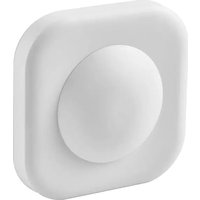
VALLHORN 405.043.48 - Motion detector IKEA - Free user manual and instructions
Find the device manual for free VALLHORN 405.043.48 IKEA in PDF.


| Product type | Motion sensor |
| Brand | IKEA |
| Model | VALLHORN 405.043.48 |
| Model type | E2134 |
| Power Supply | 2 AAA/HR03 batteries (1.2 V, LADDA recommended) |
| Wireless range | 10 m in free field |
| Detection angle | 60° - 120° |
| Detection range | Approx 10 m |
| Radio frequency | 2405-2480 MHz |
| Output power | 3 dBm |
| Protection rating | IP44 |
| Operating temperature | -5 °C to 40 °C |
| Operating modes | Day / Night |
| Timer adjustment | Yes, adjustable lighting duration |
| Max number of paired products (without gateway) | 10 |
| Compatibility | DIRIGERA hub, TRÅDFRI gateway, IKEA Home smart app |
| Reset | 4 quick presses on pairing button |
| Maintenance | Dry soft cloth, no abrasive products |
| Safety | Do not expose to sun/heat, identical batteries, recycling |
| Recommended batteries | LADDA (rechargeable) |
| Batteries included | No, sold separately |
| Batteries replaceable | Yes, by the user |
| Certifications | FCC Class B, IC exempt from license |
Frequently Asked Questions - VALLHORN 405.043.48 IKEA
User questions about VALLHORN 405.043.48 IKEA
0 question about this device. Answer the ones you know or ask your own.
Ask a new question about this device
Download the instructions for your Motion detector in PDF format for free! Find your manual VALLHORN 405.043.48 - IKEA and take your electronic device back in hand. On this page are published all the documents necessary for the use of your device. VALLHORN 405.043.48 by IKEA.
USER MANUAL VALLHORN 405.043.48 IKEA
VALLHORN motion sensor works with smart lights and plugs from IKEA. It can be used with DIRIGERA hub to control smart products via the IKEA Home smart app.
IKEA Home smart app
For Apple devices, download the app using the App Store. For Android devices, download the app using Google Play store.
Note: If you have a TRÅDFRI gateway please use IKEA Home smart 1 app. For the best experience, please upgrade to DIRIGERA hub.
Getting started with DIRIGERA hub
Download the IKEA Home smart app and follow the instructions on screen. With DIRIGERA, you can connect as many products as you want to one motion sensor.
Getting started without DIRIGERA hub
- Make sure the smart product you want to connect is installed and powered on.
- Hold the motion sensor close to the smart product (less than 5 cm away).
- Press and hold the Pairing button for at least 10 seconds. A red LED will steadily shine under the lens of the motion sensor. The smart product will pulse with a white LED once connected.
Good to know
Without DIRIGERA, you can connect a maximum of 10 smart products to one motion sensor. Remember to add one product at a time. If your products are close together, disconnect the ones you have already connected while adding the next product.
Get to know your product
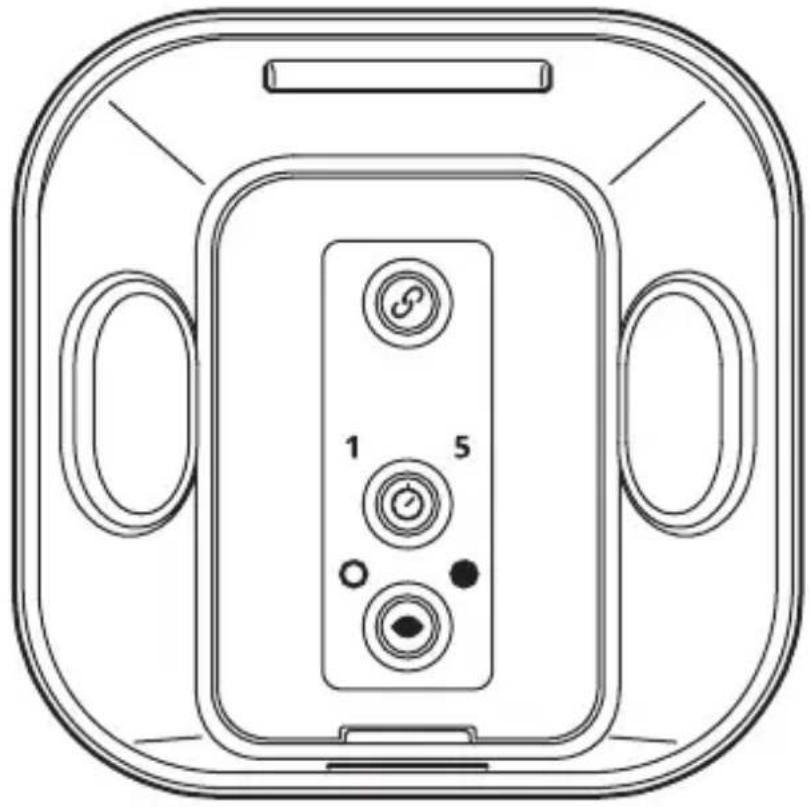

Pairing button

Choose how many minutes the connected lights and plugs will be on.

Choose between light and dark mode. In light mode, the detected motion will turn on lights in any surrounding. In the dark mode, the detected motion will turn on the lights only in the dark surrounding.
Changing the batteries
A red LED light will light up under the lens of the motion sensor to show that new batteries are needed. Open the battery lid and replace with two new AAA/HR03 batteries. We recommend using LADDA rechargeable batteries. Please note they are sold separately.
Factory reset
To reset and remove all connected products, quick-press the Pairing button 4 times (within 5 seconds). Follow steps 1-3 to reconnect your smart products.
Care instructions
To clean the product, wipe it with a soft dry cloth. Do not use abrasive cleaning agents, chemical solvents or other equipment that may damage the products.
IMPORTANT!
- Operating temperature: -5°C to 40°C .
- Do not leave the sensor in direct sunlight or close to any heat source to prevent overheating.
- Different building materials and placement of the units can affect the wireless connectivity range.
WARNING!
Risk of explosion if either battery is replaced by an incorrect type. Do not mix batteries of different capacities, types or date stamps. Dispose of used batteries according to instructions.
Technical data
Model: VALLHORN motion sensor
Type: E2134
Input: 2.4V, 2 x LADDA batteries HR03/AAA 1.2V
Range: 10 m in open air.
Sensor view angle: 60° - 120°
Sensor range: About 10 m
Operating frequency: 2405-2480 MHz
Output power: 3 dBm
IP-class: IP44
Manufacturer: IKEA of Sweden AB
Address: Box 702, SE-343 81 Älmhult, SWEDEN
This device complies with Part 15 of the FCC Rules/Innovation Science and Economic Development Canada's licence-exempt RSS standard(s). Operation is subject to the following two conditions:
(1) this device may not cause harmful interference, and (2) this device must accept any interference received, including interference that may cause undesired operation of the device.
WARNING:
Any changes or modifications to this unit not expressly approved by the party responsible for compliance could void the user's authority to operate the equipment.
This device contains licence-exempt transmitter(s)/receiver(s) that comply with Innovation, Science and Economic Development Canada's licence-exempt RSS(s). Operation is subject to the following two conditions:
(1) This device may not cause interference.
(2) This device must accept any interference, including interference that may cause undesired operation of the device.
NOTE:
This equipment has been tested and found to comply with the limits for a Class B digital device, pursuant to part 15 of the FCC Rules. These limits are designed to provide reasonable protection against harmful interference in a residential installation.
This equipment generates, uses and can radiate radio frequency energy and, if not installed and used in accordance with the instructions, may cause harmful interference to radio communications. However, there is no guarantee that interference will not occur in a particular installation. If this equipment does cause harmful interference to radio or television reception, which can be determined by turning the equipment off and on, the user is encouraged to try to correct the interference by one or more of the following measures:
- Reorient or relocate the receiving antenna.
- Increase the separation between the equipment and receiver.
- Connect the equipment into an outlet on a circuit different from that to which the receiver is connected.
- Consult the dealer or an experienced radio/TV technician for help.
The crossed-out wheeled bin symbol indicates that the item should be disposed of separately from household waste. The item should be handed in for recycling in accordance with local environmental regulations for waste disposal. By separating a marked item from household waste, you will help reduce the volume of waste sent to incinerators or land-fill and minimize any potential negative impact on human health and the environment. For more information, please contact your IKEA store.
Français

Bouton d'appairage

Fabricant: IKEA of Sweden AB
Adresse: Box 702, SE-343 81 Älmhult, SUÈDE

- IKEA HOME SMART APP
- GETTING STARTED WITH DIRIGERA HUB
- GETTING STARTED WITHOUT DIRIGERA HUB
- GOOD TO KNOW
- GET TO KNOW YOUR PRODUCT
- CHANGING THE BATTERIES
- FACTORY RESET
- CARE INSTRUCTIONS
- IMPORTANT
- WARNING
- TECHNICAL DATA
- MANUFACTURER: IKEA OF SWEDEN AB
- ADDRESS: BOX 702, SE-343 81 ÄLMHULT, SWEDEN
- NOTE
- FRANÇAIS
- FABRICANT: IKEA OF SWEDEN AB
- ADRESSE: BOX 702, SE-343 81 ÄLMHULT, SUÈDE
Brand : IKEA
Model : VALLHORN 405.043.48
Category : Motion detector