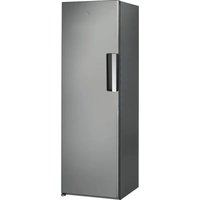
SW8 AM2C XRL 2 - Fridge WHIRLPOOL - Free user manual and instructions
Find the device manual for free SW8 AM2C XRL 2 WHIRLPOOL in PDF.



User questions about SW8 AM2C XRL 2 WHIRLPOOL
0 question about this device. Answer the ones you know or ask your own.
Ask a new question about this device
Download the instructions for your Fridge in PDF format for free! Find your manual SW8 AM2C XRL 2 - WHIRLPOOL and take your electronic device back in hand. On this page are published all the documents necessary for the use of your device. SW8 AM2C XRL 2 by WHIRLPOOL.
USER MANUAL SW8 AM2C XRL 2 WHIRLPOOL
THANK YOU FOR BUYING A WHIRLPOOL PRODUCT In order to receive a more complete assistance, please register your product on www.whirlpool.eu/register

Before using the appliance carefully read the Safety Instruction.
PRODUCT DESCRIPTION
FIRST TIME USE
Wait at least two hours, after the installation, before connecting the appliance to the power supply. Connect the appliance to the power supply and turn the thermostat knob to switch on the appliance.
After turning the appliance on, you must wait for 4-6 hours for the correct storage temperature to be reached for a normally filled appliance. Position the antibacterial anti-odour filter in the fan as demonstrated in the filter packaging (if available).
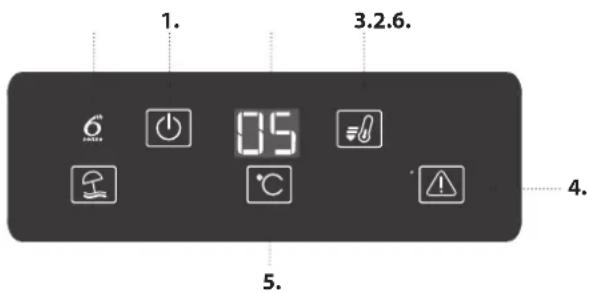
CONTROL PANEL
text_image
1. 3.2.6. 6 05 4. 5.ON/STANDBY
To put the product in Stand-by, press and hold the button ⏻ for 3 seconds. All the icons turn off except On/Standby indicator ⏻. To reactivate the appliance press once (briefly) this button (see the Instructions for Use).
FAST COOL BUTTON
Using Fast Cool function it is possible to increase the cooling capacity in the refrigerator compartment. The use of this function is recommended when placing a very high quantity of food in the refrigerator compartment. Press the Fast Cool button 📄 to activate Fast Cool function. When activated, the Fast Cool indicator turns on. The function is automatically disabled after 6 hours, or can be manually disabled by pressing Fast Cool button 📄 again.
STOP ALARM BUTTON
Press in case of alarm to mute the acoustic alarm.
TEMPERATURE BUTTON
Press the temperature button °C to change the temperature: the value changes cyclically between 8°C ad 2°C.
Note: Displayed set points correspond to the average temperature throughout the whole refrigerator.
6TH SENSE FRESH CONTROL
This function automatically works to ensure the optimal conditions to preserve the stored food. To deactivate the "6th Sense Fresh Control", press and hold Fast Cool and Stop Alarm buttons at the same time for 3 seconds until an audible signal sounds and "6th Sense Fresh Control" icon turns off as confirmation that the feature has been deactivated. To reactivate this function repeat the same procedure.
Note: Deactivation of the function switch-off the FAN in the fridge.
- On/standby
- Temperature display
- Fast cool button
- Alarm indicator
- Temperature button
- 6th sense fresh control
FAN
The Fan improves temperature distribution inside the product, allowing better preservation of stored food. By default, the fan is switched on. To switch off the FAN press and hold Fast Cool and Stop alarm buttons at the same time for 3 seconds until an audible signal sounds and "6th Sense Fresh Control" icon will turn off as confirmation that the fan has been switched off. To switch on the FAN repeat the same procedure. As a confirmation audible signal sounds and the icon turns on.
Note: Reasons why switch off the fan look for "ENERGY-SAVING TIPS" in the Instructions for Use.
VACATION BUTTON
This function can be activated to reduce the energy consumption of the appliance during a prolonged period of time. Before activating the feature, all perishable food should be removed from the refrigeration compartment and make sure that the door is closed properly, since the refrigerator will maintain a suitable temperature to prevent the formation of unpleasant odors (+12°C). To activate/ deactivate press the Vacation mode button for 3 seconds. When the function is enabled, the related symbol will light up and the temperature of the refrigerator compartment will be set to a higher setpoint (the temperature display will show the new temperature setpoint of +12°C). Changing the temperature setpoint will automatically deactivate the function.
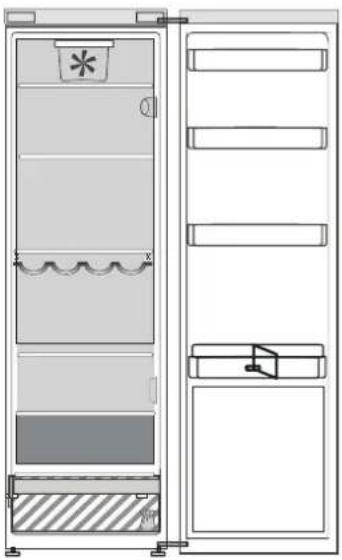
HOW TO STORE FOOD AND BEVERAGE
natural_image
Technical line drawing of a dual-panel refrigerator with no visible text or symbolsZERO DEGREES DRAWER\*
The Zero Degrees Drawer is specifically designed to maintain a low temperature and a suitable humidity level, in order to keep foods fresher for longer (e.g. meat, fish, fruit and winter vegetables).
ACTIVATING AND DEACTIVATING THE BOX
To activate / deactivate the box, press the button as illustrated in the figure.
When the box has been activated, the symbol lights up.
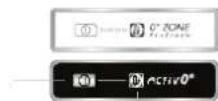
The temperature inside the box, when active, is approximately 0^ . The following factors are vital for the "Zero Degrees" box to work properly:
- the refrigerator compartment must be switched on
- the temperature of the refrigerator compartment must be between +2°C and +5°C
- the box must be inserted to enable activation
- no special functions must have been selected (Standby, Vacation – where applicable).
If one of these special functions has been selected, the "Zero Degrees" box must be deactivated manually, and any fresh food inside it removed. If manual deactivation does not take place, the box will be deactivated automatically after 8 hours.
Legend
FREEZER ZONE
TEMPERATE ZONE
Suggested for the storage of tropical fruit, cans, drinks, eggs, sauces, pickles, butter, jam
COOL ZONE
Suggested for the storage of cheese, milk, daily food, delicatessen, yogurt
COOLEST ZONE
Suggested for the storage of cold cuts, desserts, fish and meat

FRUIT & VEGETABLE DRAWER
Note:
- if the symbol does not light up when the function is activated, check that the drawer is properly inserted; if the problem persists, contact your nearest authorized After-sales Service
- if the function is active and the drawer open, the symbol on the control panel may be deactivated automatically. If the drawer is inserted, the symbol will become active again
- irrespective of the state of the function, a slight noise may be heard: this is normal and is not a cause for concern.
- when the function is not active, the temperature in the drawer depends on the general temperature inside the refrigerator.
In this case, we recommend it is used to store fruit and vegetables which are not sensitive to cold temperatures (fruits of the forest, apples, apricots, carrots, spinach, lettuce, etc.).
Important: when the function is activated and there are foodstuffs with a high water content, condensation may form on shelves. In this case, disable the function temporarily.
What to do if... Possible reasons Solutions
| The appliance doesn't work. | There may be an appliance power supply problem. | Make sure:there is not a power failure;the plug is properly inserted in the power socket and the double-pole switch (if present) is in the correct position (on);the household electrical system protection devices function;the power cable is not broken; |
| The inside light does not work. | It may be necessary to replace the light bulb. | Disconnect the appliance from the power supply and contact the Technical Assistance Service if you need a replacement. |
| The internal temperature of the compartments is not cold enough. | The reasons could vary (see "Solution") column. | Check that:the doors are closed properly;the appliance is not installed near a heat source;the temperature is appropriately set;the circulation of air through the ventilation grilles on the base of the appliance is not obstructed. |
| There is water on the bottom of the refrigerator compartment. | The defrost water drain is blocked. | Clean the defrosting water drain (see section "Cleaning and Maintenance"). |
| The front edge of the appliance that the door gaskets seal against is hot. | This is not a problem. It prevents condensation from forming. | A solution is not needed. |
| The temperature of the refrigerator compartment is too cold. | The set temperature is too cold. Try to set a less cold temperature.Turn off the fan (if present) described in the paragraph "FAN". | |
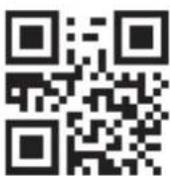
You can download the Safety Instructions, User Manual, Product Fiche and Energy data by:
- Visiting our website docs.whirlpool.eu
- Using QR Code
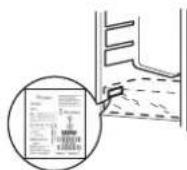
- Alternatively, contact our After-sales Service (See phone number in the warranty booklet). When contacting our After-sales Service, please state the codes provided on your product's identification plate.
POPIS VÝROBKU
PRVNÍ POUŽITÍ
natural_image
Technical line drawing of a dual-chamber refrigerator with front panel and side panels (no text or symbols)PŘIHRÁDKA S NULVOU TEPLOTOU\*
natural_image
Technical line drawing of a dual-panel refrigerator with no visible text or symbolsForklaring
FRYSEZONE
TEMPERERET OMRÅDE
natural_image
Technical line drawing of a double door with internal compartments and a star-shaped label (no text or symbols)NULLKRAADILINE SAHTEL\*
natural_image
Technical line drawing of a double door with internal compartments and a star-shaped label (no text or symbols)NOLLATILALAATIKKO\*
natural_image
Technical line drawing of a refrigerator with doors, seats, and a decorative window (no text or symbols)Légende
ZONE CONGÉLATEUR
ZONE TEMPÉRÉE