305694 - Remote trigger Brandson - Free user manual and instructions
Find the device manual for free 305694 Brandson in PDF.


| Product type | Garage door remote control with duplication function |
| Brand | Brandson |
| Model | 305694 |
| Power supply | 1 A27 12V battery (LR27A) |
| Frequency | 433.92 MHz |
| Max. transmission power | -19.51 dBm |
| Outdoor range | Approx. 50-80 m (without obstacles) |
| Range inside vehicle | Approx. 10-15 m |
| Number of buttons | 4 (A, B, C, D) |
| Indicator | Status LED |
| Functions | Code duplication, memory erasure, recovery of the last erased code |
| Battery replacement | Unscrew the back, observe polarity |
| Care and cleaning | Clean with a soft, dry cloth, no chemicals |
| Safety | Do not open, do not short-circuit, indoor use only, keep out of reach of children |
| Reparability | No spare parts, any repair voids the warranty |
| Compliance | Directive 2014/53/EU, WEEE: DE 67896761 |
| Package contents | Remote control, instruction manual, 1 A27 12V battery |
Frequently Asked Questions - 305694 Brandson
User questions about 305694 Brandson
0 question about this device. Answer the ones you know or ask your own.
Ask a new question about this device
Download the instructions for your Remote trigger in PDF format for free! Find your manual 305694 - Brandson and take your electronic device back in hand. On this page are published all the documents necessary for the use of your device. 305694 by Brandson.
USER MANUAL 305694 Brandson
MON-FRI 9:30am - 18pm CET

https://downloads.ganzeinfach.de/
Garagentoröffner
Mod.-Nr.: 305694
Table of contents
- Deutsch .... 3
- English 9
- Français 15
- Italiano 21
- Español....27
Thank you for choosing an Brandon product. Please read the following user manual carefully so as to get the most from the product you have purchased.
1. Scope of delivery
- Garage door opener
- User manual
- 1x 12V A27 / LR27A
2. Technical data
| Power supply One 12V A27 | |
| Frequency 433.92 MHz | |
| Max. transmission power -19.51 dBm | |
| Battery type LR27A, 12 V | |
| Range | • about 50-80 meters in open, without obstacles• about 10-15 meters in the car |
3. Product details
Front side
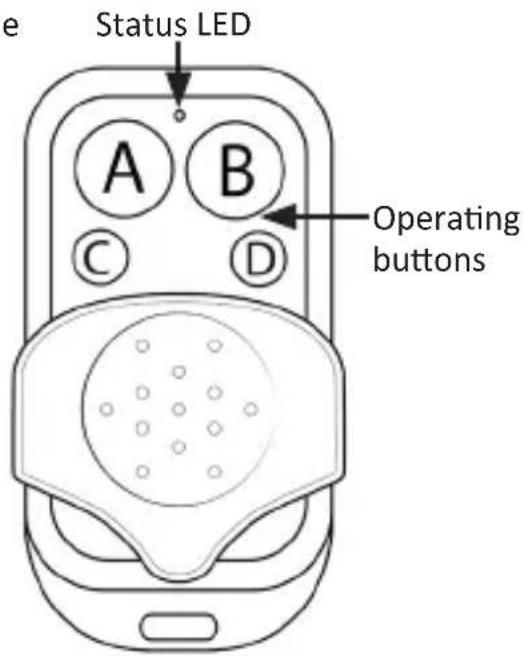
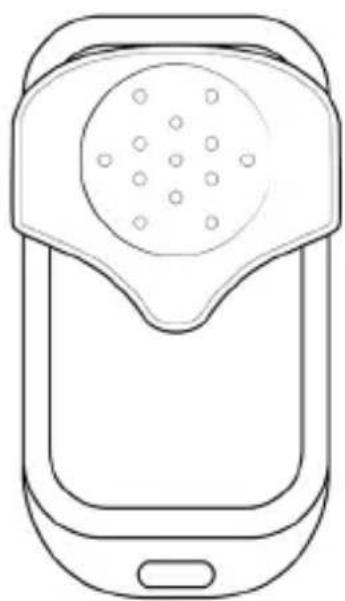
natural_image
Line drawing of a mobile phone with a circular device and ports (no text or symbols)Back side
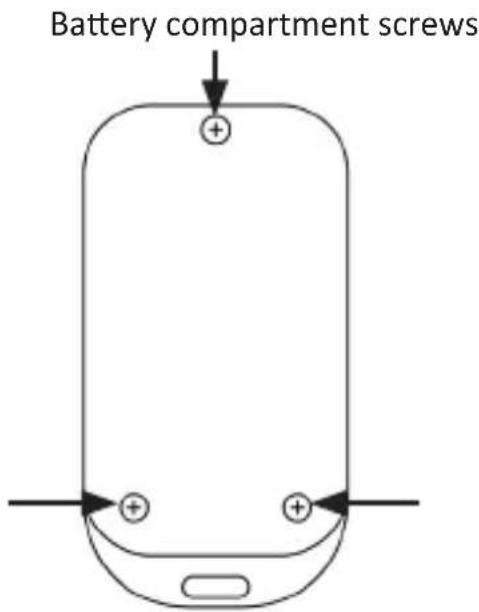
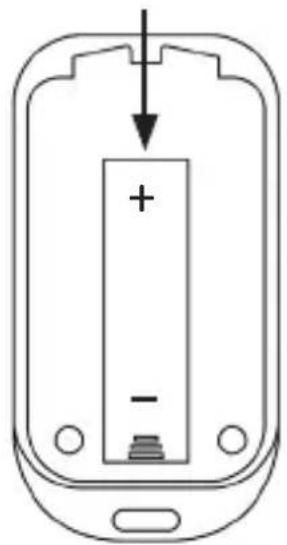
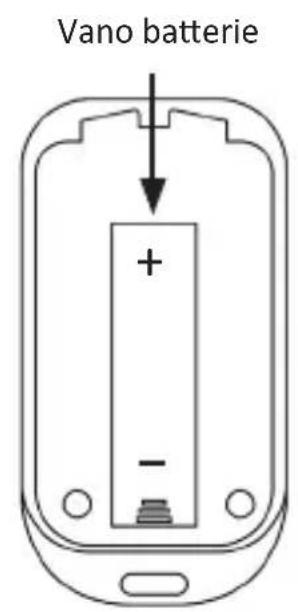
Battery compartment
natural_image
Diagram of a mobile phone casing with battery and indicator lights (no text or symbols)4. Clearing the memory (recommended each time before reprogramming)
-
Press the A and B buttons simultaneously until the LED flashes three times.
-
Release the B button (press and hold the A button), and press the B button three times. The LED flashes rapidly.
-
Release both the buttons. The garage door opener is ready for copying.
5. Duplication
When duplicating, place the duplicator as close as possible to the desired original transmitter (a little to the side, pos. 1 or pos. 2 or pos. 3) if there are problems with the connection.
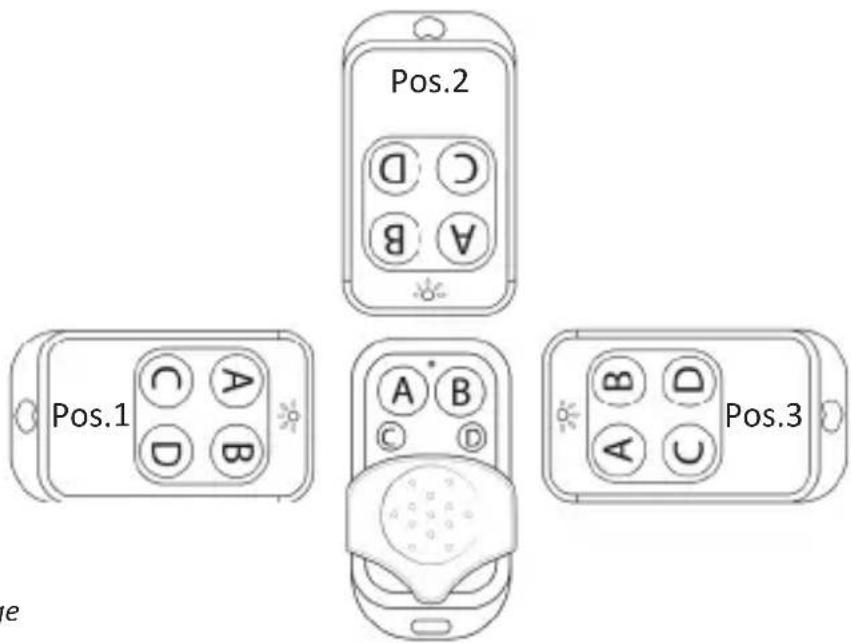
Symbolic image
6. Duplicating the individual buttons
Alternative A: Press and hold the desired button of the garage door opener to which you want to copy the signal. Then quickly press the button of the original transmitter. The status led flashes briefly. Please press and hold the button until the LED of the garage door opener flashes twice. This means that the duplication was successful.
Alternative B: Keep the desired button of the original transmitter pressed and then press the button to which you want to copy the signal. The status led flashes briefly. Please press and hold the button until the LED of the garage door opener flashes twice. This means that the duplication was successful.
Repeat the above step for the other buttons. The device is now ready to be used. The status LED flashes once a signal is emitted when the button is pressed.
If the process was unsuccessful, repeat the steps again. It is advisable to clear the memory of the remote control again.
7. Recovering the last deleted code
If you accidentally delete the code, you can restore it again by pressing and holding the two buttons "C" and "D" simultaneously on the remote control. After 10 seconds, the LED flashes twice and goes off. This indicates that the old code has been restored.
Note: For remote controls with fixed code and programming code, the duplicator works after duplication.
8. Replacing the battery
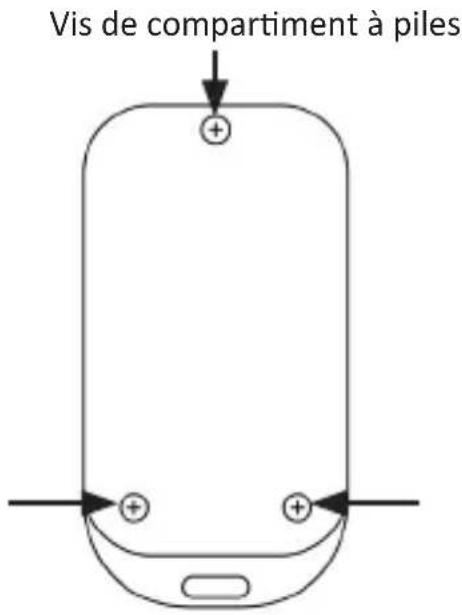
Unscrew the back of the device using a suitable screwdriver. Remove the empty battery and replace it with a 12V A27 battery. Always pay attention to the correct polarity of the battery.

9. Safety instructions and disclaimer
Never try to open the device to carry out repairs or modifications. Do not short-circuit the product. The device is not approved for outdoor use. Therefore please use it only in dry surroundings. Protect it from high humidity, water and snow. Keep the product away from high temperatures.
Do not expose the device to sudden changes in temperature or heavy vibrations, as this could damage the electronic components. Check the device for damage before using it. The product should not be used if it was subject to impact or has been damaged in some other manner. Please comply with the local regulations and restrictions.
Do not use the product for purposes other than those described in the user manual. This product is not a toy. Keep it out of the reach of children or mentally disabled persons. Any repair or modification to the product, which is not carried out by the original supplier, will void any warranty and guarantee claims. The product should only be used by those who have read and understood this user manual. The specifications of the product may be changed without any special prior notification.

10. Disposal instructions
In line with the European WEEE directive, electrical and electronic products should not be disposed of along with domestic waste. Their components have to be sent separately for recycling or disposal, as improper disposal of toxic and dangerous components may permanently damage the environment.
According to the electrical and electronic equipment act (ElektroG), you are obliged (as a consumer) to return (free of charge) electrical and electronic devices to the manufacturer, the point of sale or public collection points at the end of their service life. The relevant local laws regulate the details in this regard. The symbol displayed on the product, in the user manual or/and on the packaging refers to these regulations. With this manner of sorting, recycling and disposal of used products, you make an important contribution towards protecting our environment.

11. Instructions for battery disposal
In conjunction with the sale of batteries along with the supply of devices that include batteries, the supplier is obliged to point out the following to the customer: The customer is legally obliged to return used batteries. He can return used batteries which the supplier offers or has offered as new batteries in his assortment free of charge to the supplier's dispatch warehouse (shipping address). The symbols shown on the batteries indicate the following: Pb = battery contains more than 0.004 percent lead by weight, Cd = battery contains more than 0.002 percent cadmium by weight, Hg = battery contains more than 0.0005 percent mercury by weight.

The symbol of the crossed-out dustbin means that the battery should not be disposed of in household waste.

WEEE directive: 2012/19/EU WEEE Register no.: DE 67896761
The company WD Plus GmbH hereby certifies that the device 305694 complies with the fundamental requirements and all other relevant stipulations of the directive 2014/53/EU. A complete conformity statement can be obtained from: WD Plus GmbH, Wohlenbergstraße 16, 30179 Hannover; http://downloads.ganzeinfach.de/search/model/305694
natural_image
Line drawing of a mobile phone with a circular device and ports (no text or symbols)Verso
natural_image
Line drawing of a mobile phone with a circular device and handle (no text or symbols)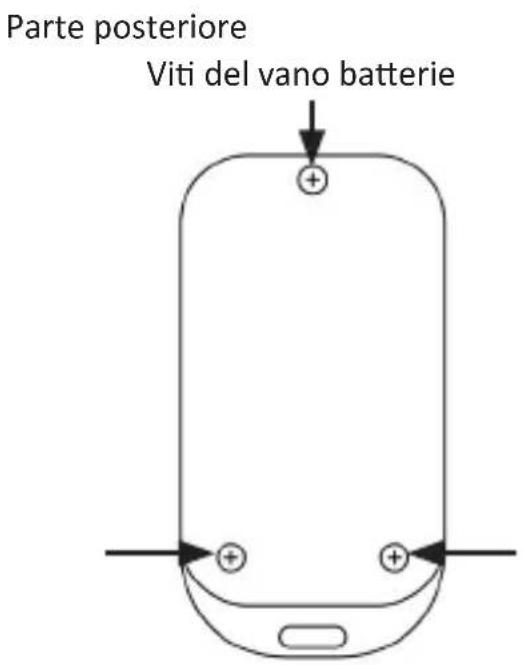
natural_image
Line drawing of a mobile phone with a circular device and handle (no text or symbols)natural_image
Simple line drawing of a smartphone with two input charges and a top control panel (no text or symbols)- Table of contents
- Scope of delivery
- Technical data
- Product details
- Clearing the memory (recommended each time before reprogramming)
- Duplication
- Duplicating the individual buttons
- Recovering the last deleted code
- Replacing the battery
- Safety instructions and disclaimer
- Disposal instructions
- Instructions for battery disposal
Brand : Brandson
Model : 305694
Category : Remote trigger