306665 - Lint remover Mybeo - Free user manual and instructions
Find the device manual for free 306665 Mybeo in PDF.


User questions about 306665 Mybeo
0 question about this device. Answer the ones you know or ask your own.
Ask a new question about this device
Download the instructions for your Lint remover in PDF format for free! Find your manual 306665 - Mybeo and take your electronic device back in hand. On this page are published all the documents necessary for the use of your device. 306665 by Mybeo.
USER MANUAL 306665 Mybeo
text_image
QR code image containing encoded data, no visible human-readable textENG: Current drivers, user manuals and other relevant documents for this product can be found on our homepage.
natural_image
Circular diagram with concentric rings and scattered dots, no text or symbols present5. Verwendungszweck
natural_image
Circular diagram with concentric rings and a central dot pattern, no text or symbols presentnatural_image
Technical line drawing of a mechanical component with no visible text or symbols- When using this device, basic safety precautions should always be taken, including the following: Read all the safety instructions thoroughly before using the product.
- Use the lint remover only for the intended purpose.
- The device is intended only for clothes!
- Read through the user manual carefully before using the device and keep it safely for later use.
- Please do not immerse the device in water or other liquids to protect against electric shock.
- Close supervision is required for any device that is used by children or near children. Do not leave the product unsupervised!
- Children should not play with the device!
- Do not open the blade safety cap during use and do not remove it.
- The blade unit is sharp! There is a risk of injury!
- If the device is not working properly, switch it off immediately and remove the batteries. Contact an authorised customer service representative.
- Do not leave the device unattended when switching it on.
- The device should not be used if it has been dropped at some time, if there are any visible signs of damage. The product should be sent back to the manufacturer or an authorized service centre before using it further.
- This device is not intended to be used by individuals (including children)
with reduced physical, sensory, or mental capabilities or lack of experience and knowledge unless they are supervised by a person responsible for their safety or have been instructed.
- Do not use the device if there are visible signs of damage or if the blade unit or the blade guard is faulty.
- Ensure that sharp objects do not come into contact with the blades during use.
- Do not switch on the device during cleaning and maintenance.
- Keep your fingers and hands away when cleaning and maintaining the blades.
Thank you for choosing a mybeo product. Please read the following user manual carefully so that you can enjoy the purchased product for a long time. Before using the product, first check that the delivered item is complete, accurate and undamaged.
1. Scope of delivery
- Lint remover
- USB charging cable
- User manual
2. Technical data
| Battery type Two 1.2V 600 | mAh Ni-MH 2/3 AA |
| Weight approx. 165 g | |
| Ambient temperature 0-40°C | |
| Features • Status LED | • Safety switch |
3. Important precautions
To use your device sensibly and properly, please read this manual carefully and make sure that you understand the product before using it.
- The device should not be used further if it has been dropped and /or, there are visible signs of damage. It should be sent back to the manufacturer or an authorized service centre before using it further.
- Ensure that children do not play with the device!
- Never immerse the device in water.
- Do not switch on the product during cleaning and maintenance.
- Caution! The blades are sharp! There is a risk of injury!
4. Product details
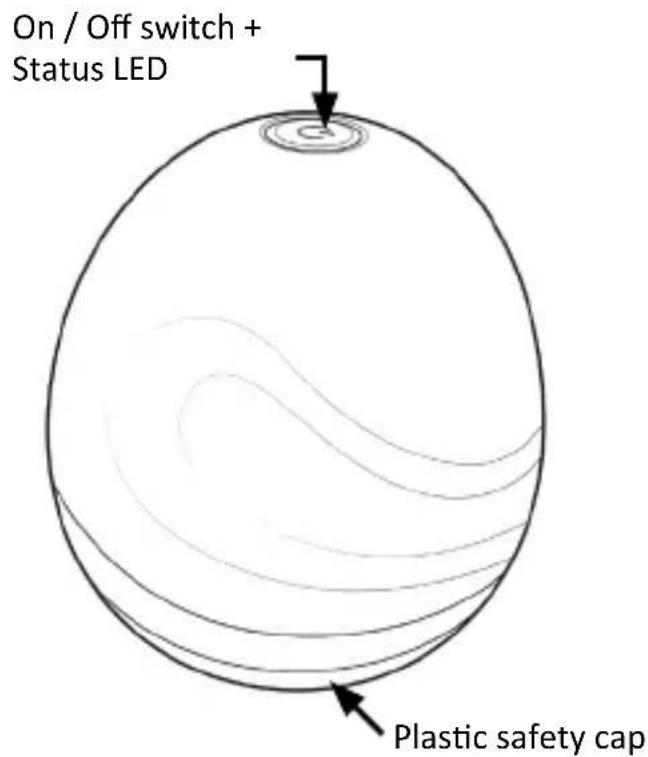
text_image
On / Off switch + Status LED Plastic safety cap
text_image
Blade unit + Safety cap of blade unit5. Intended use
The lint remover is intended to remove lint, hair or dust from the clothes.
6. Initial use
Take the device out of the package and remove all the packaging material. Charge the lint remover fully before using it.
- Place the clothes, from which the lint needs to be removed, on a flat surface.
- Remove the plastic cap from the device. This is attached with a magnet as a protective cap for the blade unit.
-
Switch on the device using the On / Off switch. The blades rotate in the blade unit.
-
Gently guide the device with the blade unit in the fabric direction over the clothes from which the lint needs to be removed. Do not apply pressure. The lint is removed and collects in the lint container. The lint container is located under the cap of the blade unit.
- Switch off the device after use using the On / Off switch.
Caution! If the motor becomes weak or stops completely, this may be because the lint container is full.
Empty the lint container regularly and clean the blade of the blade unit. More information regarding this is given in the following chapters of this user manual.
Note: You may hear a rattling noise when the blades touch any surface. But, this is normal.
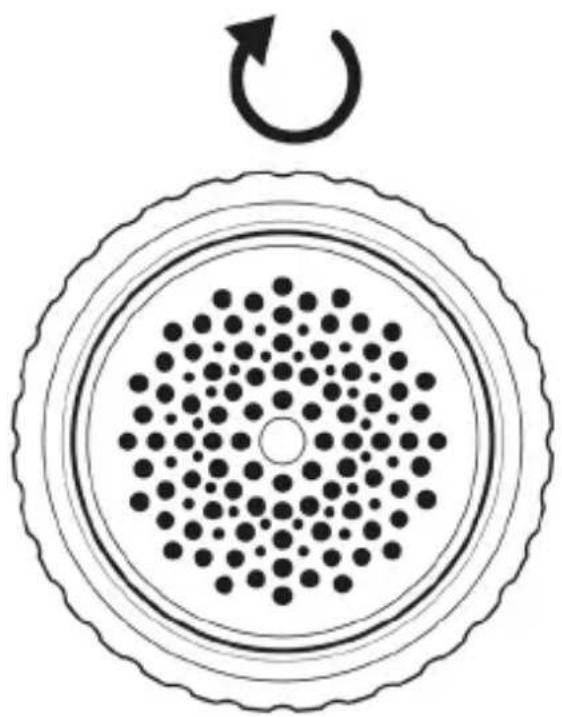
7. Lint container
The lint container of this device is located under the cap of the blade unit. Un-screw it and remove the lint.
natural_image
Circular diagram with concentric rings and a central dot pattern, no text or symbols present8. Cleaning / replacing the blade unit
To clean or replace the blade unit, remove the safety cap of the blade unit. Then remove the lid of the blade unit.
Now clean the blade unit or remove the old one to insert a new blade unit.
After cleaning or replacing, replace the cap of the blade unit, and then mount the safety cap of the blade unit.
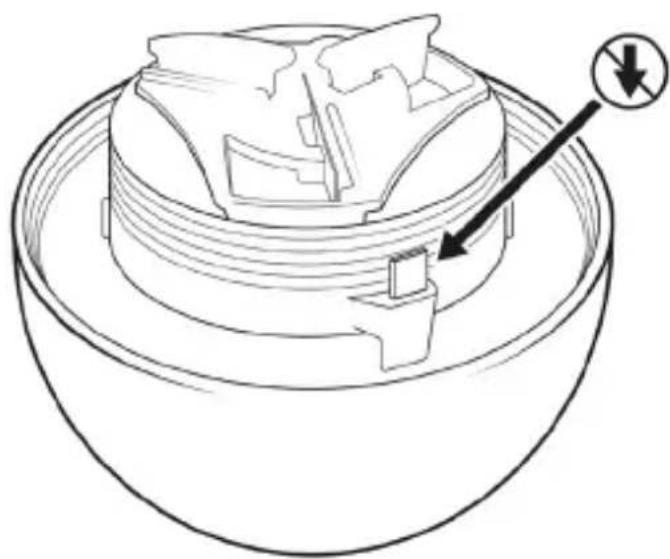
Caution! Make sure that the device is always switched off and never touch the safety switch on the thread of the lid while cleaning the blade unit!
9. Cleaning and Care
natural_image
Technical line drawing of a mechanical component with no visible text or symbols- Switch off the device if you want to clean it!
- The product should not be treated with liquids or immersed in liquids.
- Wipe the device only with a dry lint-free cloth.
- Do not use any strong or aggressive cleaning agents. Do not use vinegar or any other descaling agents to clean the water tank!
10. Safety instructions and disclaimer
Please do not try to open the device to carry out repairs or modifications. Avoid contact with the mains voltage. Do not short-circuit the product. The device is not waterproof. Please use it only in dry surroundings. Protect it from high humidity, water and snow. Do not expose the device to high temperatures.
Do not expose the device to sudden changes in temperature or strong vibrations, as this could damage the electronic components. Check the device for any damage before using it. The device should not be used if it was subject to impact or has been damaged in some other manner. Please comply with the local regulations and restrictions. Do not use the device for purposes other than those described in the user manual.
This product is not a toy. Keep it out of the reach of children or mentally disabled persons. Any repair or modifications to the device, which is not carried out by the original supplier will void any warranty and guarantee claims. The device should only be used by those who have read and understood this user manual. The specifications of the device may be changed without special prior notice.

11. Disposal instructions
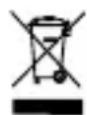
In line with the European WEEE directive, electrical and electronic devices should not be disposed of along with domestic waste. Their components have to be separately sent for recycling or disposal, because improper disposal of toxic and dangerous components may permanently damage the environment. According to the electrical and electronic equipment act (ElektroG), you are obliged (as a consumer) to return (free of charge) electrical and electronic devices to the manufacturer, the point of sale or public collection points at the end of their service life. The relevant local laws regulate the details in this regard. The symbol displayed on the product, in the user manual or/and on the packaging refers to these regulations. With this manner of sorting, recycling and disposal of used devices, you make an important contribution towards protecting our environment. For information on authorised collection points in your area, please contact your local city or municipal administration.
12. Instructions for battery disposal
In conjunction with the sale of batteries along with the supply of devices that include batteries, the supplier is obliged to point out the following to the customer:
The customer is legally obliged to return used batteries. He can return used batteries which the supplier offers or has offered as new batteries in his assortment free of charge to the supplier's dispatch warehouse (shipping address). The symbols shown on the batteries indicate the following: Pb = battery contains more than 0.004 percent lead by weight, Cd = battery contains more than 0.002 percent cadmium by weight, Hg = battery contains more than 0.0005 percent mercury by weight.
The symbol of the crossed-out dustbin means that the battery may not be disposed of in household waste.

WEEE directive: 2012/19/EU
WEEE Register no.: DE 67896761
The company WD Plus GmbH hereby certifies that the device 303980 / 306665 / 306666 complies with the fundamental requirements and the other relevant stipulations. A complete conformity statement can be obtained from: WD Plus GmbH, Wohlenbergstraße 16, 30179 Hanover

ATTENTION !

natural_image
Circular diagram with concentric rings and a central dot pattern, no text or symbols presentnatural_image
Technical line drawing of a mechanical component with no visible text or symbolsnatural_image
Circular diagram with concentric rings and a central dot pattern, no text or symbols presentnatural_image
Technical line drawing of a mechanical component with no visible text or symbols9. Pulizia e cura
natural_image
Circular diagram with concentric rings and a central dot pattern, no text or symbols presentnatural_image
Technical line drawing of a mechanical component with no visible text or symbolsMO-FR 9:30am - 18pm CET