Pure One X Pet - Vacuum Cleaner TINECO - Free user manual and instructions
Find the device manual for free Pure One X Pet TINECO in PDF.


| Brand | Tineco |
| Model | Pure One X Pet |
| Product Type | Cordless Stick Vacuum |
| Power Consumption | 260 W |
| Voltage | 21.6 V |
| Dustbin Capacity | 0.4 L |
| Runtime (AUTO mode) | Approx. 45 minutes |
| Runtime (MAX mode) | Approx. 12 minutes |
| Charging Time | 3 to 4 hours |
| Main Filter | Washable HEPA Filter |
| Pre-filter | Washable, replace every 6 months |
| Smart Sensor | Dust sensor with color indicator (AUTO) |
| Cleaning Modes | AUTO and MAX |
| Connectivity | Wi-Fi, Tineco app |
| Included Accessories | LED anti-tangle electric brush, mini turbo brush, 2-in-1 combo brush, soft dusting brush, large soft turbo LED brush roll, flexible extension tube, pre-filter cleaning tool, hair/thread cleaning tool |
| Power Source | Built-in rechargeable lithium-ion battery |
| Charger | AC adapter 100-240 V~ |
| Warranty | 2-year limited (parts and labor) |
| Use | Domestic indoor use only |
| Battery Indicator | Blue/red LED indicator |
| Brush Roll Type | Anti-tangle roller |
| HEPA Filter Cleaning | Wash under running water, dry completely, replace every 12 months |
Frequently Asked Questions - Pure One X Pet TINECO
User questions about Pure One X Pet TINECO
0 question about this device. Answer the ones you know or ask your own.
Ask a new question about this device
Download the instructions for your Vacuum Cleaner in PDF format for free! Find your manual Pure One X Pet - TINECO and take your electronic device back in hand. On this page are published all the documents necessary for the use of your device. Pure One X Pet by TINECO.
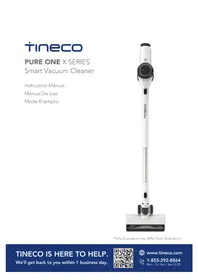
USER MANUAL Pure One X Pet TINECO
Smart Vacuum Cleaner
Instruction Manual
Manual De Uso
Mode D'emploi

*Actual product may differ from illustration.

[Non-Text]
[Non-Text]
[Non-Text]
[Non-Text]
[Non-Text]
[Non-Text]
[Non-Text]
[Non-Text]
[Non-Text]
[Non-Text]
[Non-Text]
[Non-Text]
[Non-Text]
[Non-Text]
[Non-Text]
[Non-Text]
[Non-Text]
[Non-Text]
[Non-Text]
[Non-Text]
[Non-Text]
[Non-Text]
[Non-Text]
[Non-Text]
[Non-Text]
[Non-Text]
[Non-Text]
[Non-Text]
[Non-Text]
[Non-Text]
[Non-Text]
[Non-Text]
[Non-Text]
[Non-Text]
[Non-Text]
[Non-Text]
[Non-Text]
[Non-Text]
[Non-Text]
[Non-Text]
[Non-Text]
[Non-Text]
[Non-Text]
[Non-Text]
[Non-Text]
[Non-Text]
(1) 2017年1月1日至2018年1月1日,公司与关联方累计发生关联交易的总金额为人民币45,639.87万元。
|
|
|
|
|
|
[Non-Text]
CONTENTS
Important Safety Instructions....2
Specifications....5
Overview......6
Accessories....7
Assembly 9
Operation....11
Maintenance 16
Troubleshooting....20
Warranty 21
Important Safety Instructions
Z
SAVE THESE INSTRUCTIONS
Household use only.
When using an electrical appliance, basic precautions should always be followed, including the following:
READ ALL INSTRUCTIONS BEFORE USING (THIS APPLIANCE). Failure to follow the warnings and instructions may result in electric shock, fire and/or serious injury.
WARNING – To reduce the risk of fire, electric shock, or injury:
-
This appliance can be used by children aged from 8 years and above and persons with reduced physical, sensory or mental capabilities or lack of experience and knowledge if they have been given supervision or instruction concerning use of the appliance in a safe way and understand the hazards involved. Children should not play with the appliance. Cleaning and user maintenance shall not be performed by children without supervision.
-
The appliance is not to be used by persons (including children) with reduced physical, sensory or mental capabilities, or lack of experience and knowledge, unless they have been given supervision or instruction.
-
For INDOOR use ONLY. Do not use the appliance outdoors, nor in commercial or industrial environments. Do not use the appliance on wet surfaces or surfaces with standing water.
-
Do not allow to be used as a toy. Close attention is necessary when used by or near children, pets or plants.
-
Use only as described in this manual. Use only manufacturer's recommended attachments.
-
Do not use with a damaged cord or plug. If appliance has been dropped, damaged, left outdoors, dropped into water, or is not working as it should, return it to a service center.
-
Do not handle charger, including charger plug, and charger terminals with wet hands.
-
Do not block openings. Stop use if openings become blocked. Clean and remove any blocked objects according to the manual instructions.
-
Keep hair, loose clothing, fingers, and all parts of your body away from openings and moving parts.
-
Use extra care when cleaning on stairs.
-
Do not use to pick up flammable or combustible liquids, such as gasoline, or use in areas where they may be present.
-
Do not pick up anything that is burning or smoking, such as cigarettes, matches, or hot ashes.
-
Do not use without a filter.
-
Prevent unintentional activation. Ensure the switch is in the off position before connecting to the battery pack, picking up or carrying the appliance. Carrying the appliance with your finger on the switch or powering on the appliance with the switch on may cause accidents.
-
Disconnect the battery pack from the appliance before making any adjustments, changing accessories, storing the appliance. Such preventive safety measures reduce the risk of starting the appliance accidentally.
- For the purposes of recharging the battery, only use the detachable supply unit provided with this appliance. A charger that is suitable for one type of battery pack may create a risk of fire when used with another battery pack.
- Use appliances only with specifically designated Tineco battery packs. Use of any other battery packs may create a risk of injury and fire.
- When battery pack is not in use, keep it away from other metal objects, like paper clips, coins, keys, nails, screws or other small metal objects, that can make a connection from one terminal to another. Shorting the battery terminals together may cause burns or a fire.
- Under improper usage, liquid may be ejected from the battery; avoid contact. If contact accidentally occurs, flush with water. If liquid comes into eye contact, seek medical help. Liquid ejected from the battery may cause irritation or burns.
- Do not use a battery pack or appliance that is damaged or modified. Damaged or modified batteries may exhibit unpredictable behavior resulting in fire, explosion or risk of injury.
- Do not expose a battery pack or appliance to fire or excessive heat. Exposure to fire or temperatures above 266° F ( 130° C) may cause an explosion.
- Follow all charging instructions and do not charge the battery pack or appliance outside of the temperature range specified in the instructions. Charging improperly or at temperatures outside of the specified range may damage the battery and increase the risk of fire.
- Have servicing performed by a qualified repair person using only identical replacement parts. This will ensure that the safety of the product is maintained.
- This appliance contains battery cells that are non-replaceable. Do not modify or attempt to repair the appliance or the battery pack except as indicated in the instructions for use and care.
- Always turn off this appliance before connecting or disconnecting the motorized nozzle.
- Do not charge or store the appliance outdoors or inside a car. Only charge, store or use the battery in a dry indoor area where the temperature is higher than 39.2° F ( 4° C) but lower than 104° F ( 40° C). The charger is for indoor use only.
FCC Supplier's Declaration of Conformity
Tineco / PURE ONE X SERIES
This appliance complies with part 15 of the FCC Rules. Operation is subject to the following two conditions:
(1) This appliance may not cause harmful interference, and (2) this appliance must accept any interference received, including interference that may cause undesired operation.
Tineco INTELLIGENT, INC.
1700 WESTLAKE AVENUE N., SUITE 200, SEATTLE, WA, 98109, USA
WWW.TINECO.COM
1-855-292-8864
Changes or modifications not expressly approved by the party responsible for compliance could void the user's authority to operate the equipment.
Note: This equipment has been tested and found to comply with the limits for a Class B digital appliance, pursuant to Part 15 of the FCC Rules. These limits are designed to provide reasonable protection against harmful interference in a residential installation. This equipment generates uses and can radiate radio frequency energy and, if not installed and used in accordance with the instructions, may cause harmful interference to radio communications. However, there is no guarantee that interference will not occur in a particular installation. If this equipment does cause harmful interference to radio or television reception, which can be determined by turning the equipment off and on, the user is encouraged to try to correct the interference by one or more of the following measures:
(1) Reorient or relocate the receiving antenna.
(2) Increase the separation between the equipment and receiver.
(3) Connect the equipment into an outlet on a circuit different from that to which the receiver is connected.
(4) Consult the dealer or an experienced radio/TV technician for help.
FCC Radiation Exposure Statement
This equipment complies with FCC radiation exposure limits set forth for an uncontrolled environment.
Note
The manufacturer is not responsible for any radio or TV interference caused by unauthorized modifications to this equipment, such modifications could void the user's authority to operate this equipment.
IC Note
This appliance contains licence-exempt transmitter(s)/receiver(s) that comply with Innovation, Science and Economic Development Canada's licence-exempt RSS(s). Operation is subject to the following two conditions:
(1) this appliance may not cause interference.
(2) this appliance must accept any interference, including interference that may cause undesired operation of the appliance.
-This Class B digital apparatus complies with Canadian ICES-003.
-This equipment complies with ISED RSS-102 radiation exposure limits set forth for an uncontrolled environment. This equipment should be installed and operated with a minimum distance of 20cm between the radiator and any part of your body.
Specifications
| Product PURE ONE X SERIES | |
| Voltage 21.6V | == |
| Rated Power 260W | |
| Dustbin Capacity 0.4L | |
| Charging Time 3-4 hrs | |
| AC Input 100-240V~ |
Disposal
- The battery contains materials that are harmful to the environment and must be removed from the appliance before it is discarded.
- When removing the battery, the appliance must be powered off.
- Batteries, chargers, accessories and packaging should be sorted for environmental friendly recycling. Do not put them into fire, water or soil. Do not dispose of batteries and chargers into household waste!
- If battery leakage contacts skin or clothing, immediately flush with water to avoid irritation and seek medical help.
Overview
Z

A B C D E F G H
A. Dust sensor
B. Dust empty release button
C. Dustbin
D. AUTO/MAX button
E. Trigger lock
F. Dustbin release button
G. Trigger
H. HEPA Filter
Accessories
Note:
- Test an accessory on a small, inconspicuous area before use on sensitive surfaces.
- To identify what should be included with your purchase, please refer to the "Included Accessories" located on the packaging box.
- As shown below, there are many components compatible with this model. If you require more accessories, please go to www.tineco.com or store.tineco.com.
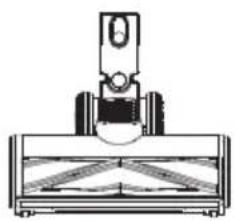
Anti-tangle LED power brush
Ideal for both hard floors and carpets. Picks up ground-in dirt with no hair wrap.

Mini power brush
For vacuuming upholstered furniture, mattresses etc. Vacuums pet hair and removes ingrained dirt.
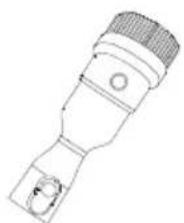
2-in-1 dusting brush
Switches between a wide and a soft brush by pressing the release button. The soft brush is most effective on hard-surface furniture while the wide brush is effective for upholstered furniture, curtains, etc.

Crevice tool
For corners, nooks, and other hard-to-reach places such as around car seats, picture frames, and cupboards.

Soft dusting brush
Angled bristles on a slender, oval-shaped rim provide anti-static, cushioned contact. Suitable for dusting shelves, lighting, delicate surfaces, electronics and more.

Flexible long crevice tool
Easy to bend, easy to reach tight spots. Suitable for cleaning dust behind and beneath furniture, around refrigerators, and many other tight gaps.

Full-size LED soft-roller power brush
Perfect for hard floors, especially sensitive wood floor.
Picks up coarse and fine dirt at the same time.

Multi-angle folding tube
An articulated joint makes it adjustable to allow for flexibility when cleaning from high to low.

Flexible extension hose
Excellent extension and flexibility to access hard-to-reach spaces; perfect for in-care use.
Compatible with all non-motorized Tineco accessories.
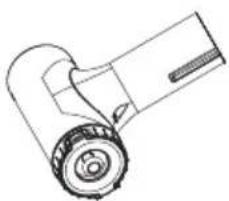
Pre-filter cleaning tool
A dirty filter is a leading cause of suction loss, and this device is designed to make your filter last much longer. Place the dirty filter inside the pre-filter cleaning tool and close the lid. Run the appliance in MAX mode, and rotate the side cover.

Hair cleaning tool
Use the end with the small blade to remove hair and debris wrapped around the roller.
Use the end with the brush to clean the brush window, and the dustbin, as required.
Assembly
Tube Installation
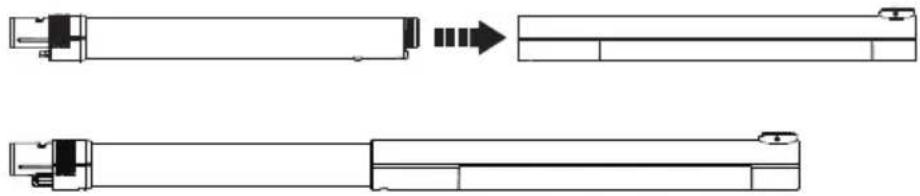
Insert tube.


Insert to the main body. Press the release button to remove the tube.
Brush Installation


Insert the power brush. Press the release button to remove the power brush.
Dustbin Installation

To clean the dustbin more thoroughly, press the dustbin release button to detach from the appliance.
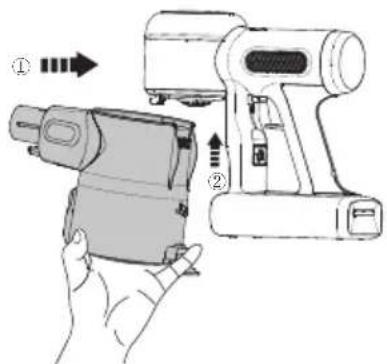
When re-attaching the dustbin, hold on an angle and slot the top of the dustbin into the hook on the main body. Push upwards until the hook is fixed into the slot on the dustbin and then it clicks back into place.
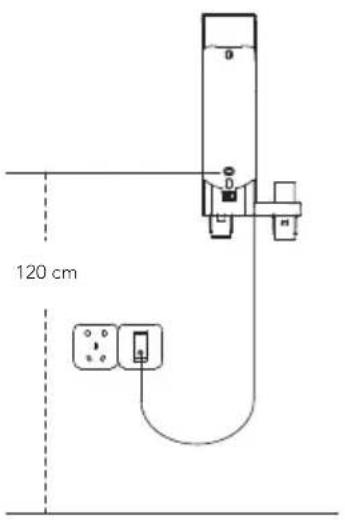
Wall-mounted Dock Installation

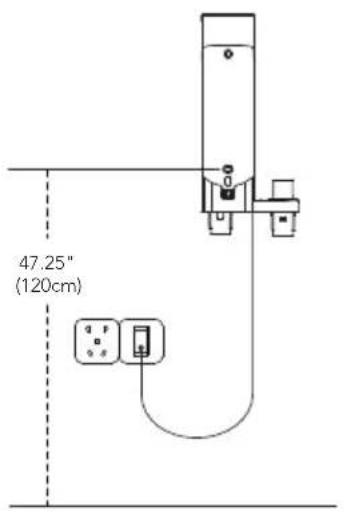
Determine the best wall location for mounting the dock. We recommend placing it 47.25" (120cm) from the lower screw hole to the floor (may need to be adjusted based on the actual situation).
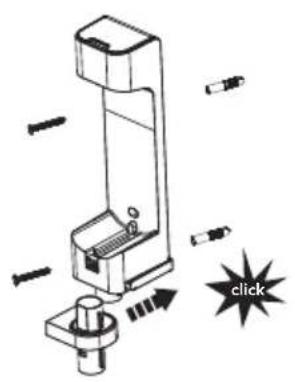
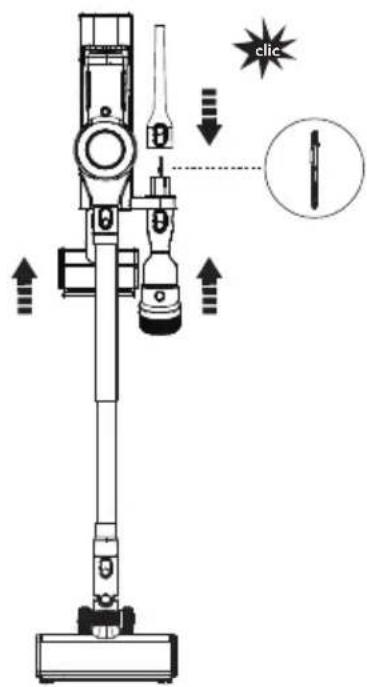
Assemble the two bracket components, with a "click" to signify correct assembly. Once this is complete, use the screws provided by Tineco to affix the dock to the wall.

Warning:
- Ensure the wall surrounding the mounting area is free of gas, water pipes, electrical cables and wires.
- To avoid the dock falling, ensure it is firmly installed.
Operation
Preparing for Use
Note:
- Before the first use, please charge the appliance (see "Charging the Battery") for 3-4 hours in an area where the ambient temperature is between 39.2°F (4°C) and 104°F (40°C) .
- Select an accessory and attach it to the appliance before use (see "Accessories").
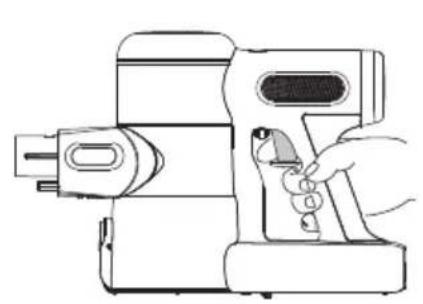

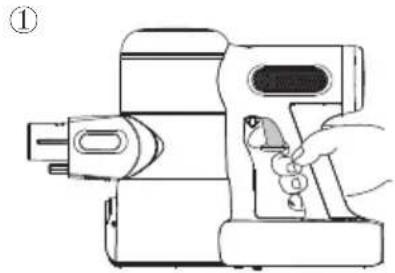
Pull the trigger to activate the suction. Pull the trigger lock to hold the trigger for continuous power mode.
- Place the appliance on the wall-mounted dock for convenient storage and recharging after use.


Place the main body on the dock. To avoid bristle damage, always place attachments on the dock after use.
Cleaning Mode Selection
Z
AUTO Mode
- In AUTO mode, the indicator color changes according to the amount of dust detected. When blinking red indicates dust is detected, the brighter red light indicates more dust, whereas blinking blue indicates no dust is detected. This mode automatically provides the best cleaning solution.
To enter AUTO mode:
The default setting on startup is AUTO. The appliance then takes 3 seconds to initially detect blockages or dust. If no dust is detected, power is reduced to conserve energy.

When in MAX mode, press the AUTO/MAX button to enter AUTO mode.
MAX Mode

In AUTO mode, press the AUTO/MAX button to enter MAX mode.
APP
- All the functions can be performed using the Tineco app. Download the Tineco app from the App Store, Google Play and Tineco Official Site.
![graph TD A["App Downloads"] --> B["www.tineco.com"] B --> C["Support"] C --> D["App Downloads"]](/content/2026/04/683891/images/980760d1bdb2b2e33494f3d5f70d7e3330a05c3b95431936b421e41bb3cea6e1.jpg)
![graph TD A["Download on the App Store"] --> C["Tineco"] B["GET IT ON Google Play"] --> C C --> D["Mobile device with download icon"] C --> E["Mobile device with Google Play icon"]](/content/2026/04/683891/images/5c42f17cae886701514ecc32f4aa1d1f5887e5c16e58e57b659f83f95161fe0d.jpg)
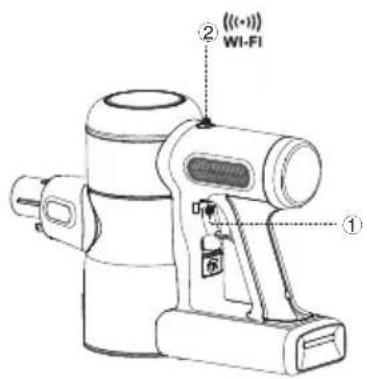
- Pull the trigger to ensure the appliance battery has sufficient charge.
- Long press to activate WiFi connection (blinking blue light), follow the guide in App for more details.
App Function Introduction

Battery
Battery level in real time.

Cleaning report
Displays the dust amount, working hours and working status.

Suction adjustment
When in manual mode, swipe the phone screen to adjust suction power.

Reminder of filter status
Records the severity of the dirty filter and provides a cleaning reminder as required.

Contact us
You can contact the Customer Service about any problems during the working hours.

Feedback
If you have any comments, please send us your feedback.
Emptying the Dustbin

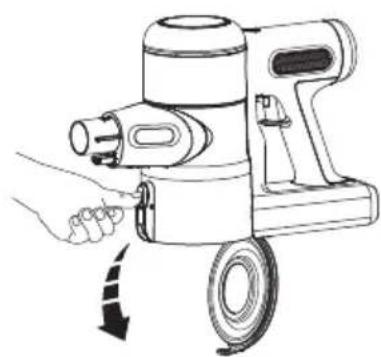
Press the release button on the side of the dustbin to empty the contents.

Close and click the dustbin flap back into place.
Charging the Battery

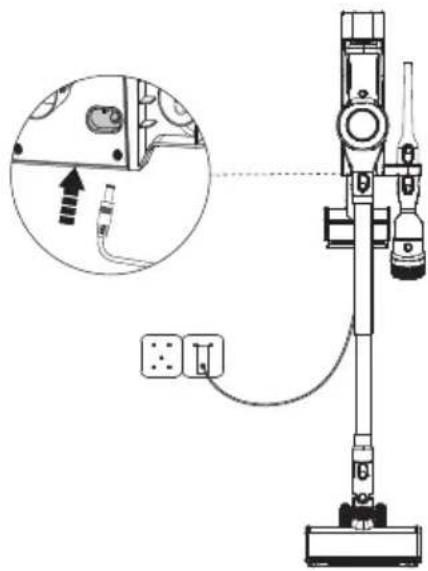
Place the main body on the dock, plug in the adaptor and charging port. The main body indicator blinking blue indicates that it is charging correctly.

Warning:
- Only use the Tineco-provided adapter to charge the appliance.
- During long periods of not being used, store the appliance in a cool, dry place. Ensure the battery is fully charged every 3 months.
- Do not expose appliance to sunlight or freezing temperature. Recommended temperature range: 39.2°F (4°C)\~104°F (40°C).
Runtime
- When in AUTO mode, the runtime is approximately 45 minutes. When MAX power is used, the runtime is approximately 12 minutes.
- Estimated runtime data was obtained by a Tineco Laboratory using one battery and non-motorized accessories.
Charging Time
• A full charge takes approximately 3-4 hours.
- Estimated data was obtained by a Tineco Laboratory using ambient temperatures between 39.2°F (4°C) to 104°F (40°C) .
Indicator
When in Use

Slowly blinking red light for 6s: low power.
Rapidly blinking red light: see troubleshooting.
Connect to Network

Blinking blue light: Connecting to the network.
Solid blue light: Successfully connected.
During Charging

Breathing blue light: charging.
Fully Charged

In 5 minutes: solid blue light.

After 5 minutes: light off.
Maintenance
Note:
- Clean the dustbin and filters after each use.
- Use the cleaning tool to thoroughly clean the pre-filter when the indicator blinking red rapidly. To maintain high performance, wash and dry the pre-filter monthly, replacing it every 6 months.
Wash and dry the HEPA filter every 3 months, replacing it every 12 months.
Dustbin and Mesh Filter
1

Press the dustbin release button to remove the dustbin.
2

Clean with a damp cloth, taking care to prevent water entering the appliance main body and battery.
3
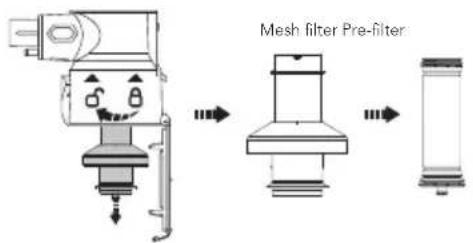

Turn counter-clockwise to remove the filters. Clean the dustbin and mesh filter with a damp cloth. Air dry completely before reinstalling.
5

After cleaning, insert the clean pre-filter into the mesh filter properly and it clicks into place. Install the clean filter and dustbin back into the main body, then close the dustbin flap.
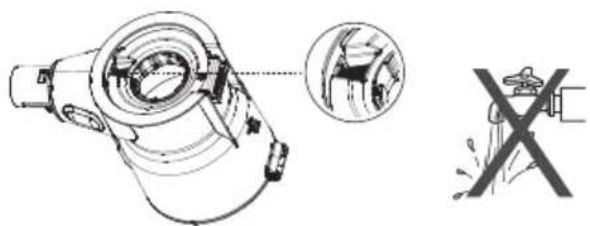

Warning:
Do not wash the dustbin as it contains a dust sensor. If it comes into contact with water, please dry it with a hair dryer.
Pre-filter

Ensure the appliance is switched off before cleaning, and remove the dirty pre-filter from the mesh filter-holder.

Do not turn the appliance upside down when removing or installing the filter to prevent dust from entering the motor.

Replace a clean filter to the main body. Put the dirty pre-filter into the cleaning tool and connect the cleaning tool to the main body.

Run the appliance in MAX mode, and rotate the side cover to clean the dirty pre-filter.
HEPA Filter

Turn the HEPA to the left and gently pull out for cleaning. Do not use the appliance without first installing the HEPA filter.
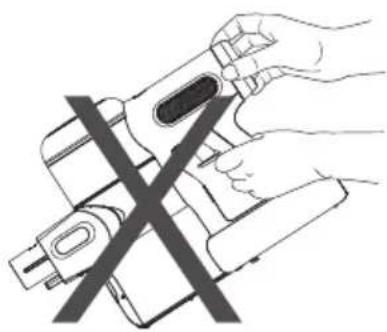
Do not place the appliance as above when removing or installing the HEPA filter, to prevent dust from entering the motor.

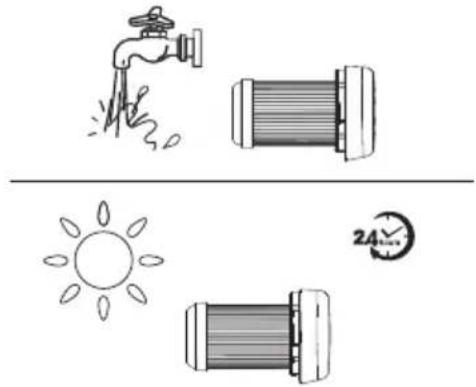
The HEPA filter can be washed under running water and must be completely dry before reinstalling.

* The HEPA is detachable. Simply rotate to remove and replace.
Dust Sensor
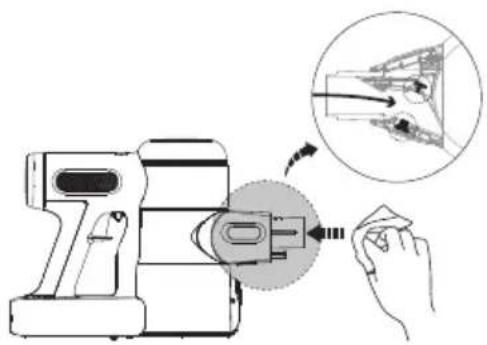
To avoid dust accumulation which can affect cleaning performance, wipe the suction mouth with a damp cloth.
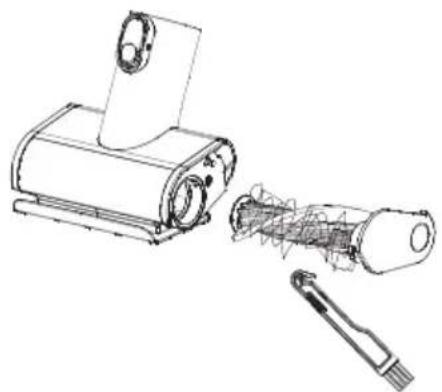
Mini Power Brush


Press against the roller end cover downward. Pull out the brush roller.

Remove the debris wrapped around the roller with the Tineco Hair Cleaning Tool.

Fully reinsert the brush roller at an angle and push upward until it clicks securely back into place.
Brush Roller

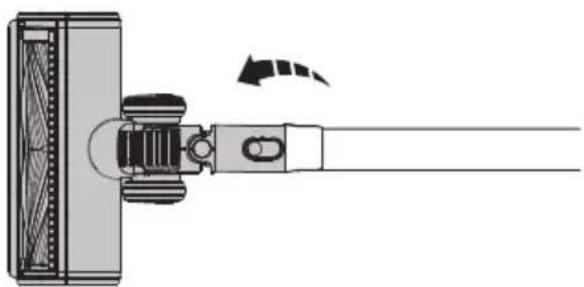
Slide the switch to open the brush roller end cover, and rotate it clockwise to be able to pull out the brush roller.

After removing the brush roller, gently clean the brush window, suction mouth and the row of plastic teeth.

Fully reinsert the brush roller into the brush window and the end cover can be rotated counter-clockwise until it clicks securely back into place.

Warning:
The power brush contains electrical components which must not be soaked or washed with water.
Troubleshooting
| Problem Possible cause Solution | ||
| The appliance does not turn on | No power Charge the battery | |
| Auto protection for overheating Restart after cooling down | ||
| The appliance is blocked (i.e. the tube, suction mouth or some other parts) | Check and remove blockages | |
| Weak suction power | Dustbin and filters are full Clean the dustbin and filters | |
| The pre-filter is not installed Install the pre-filter | ||
| The appliance is blocked (i.e. the tube, suction mouth or some other parts) | Remove blockages | |
| The brush roller tangled with hairs or fibers | Clean the brush roller | |
Rapidly blinking red for 6s then off  during charging during charging | Charging error | Check if the adaptor is in good condition |
| The adaptor is not designed for this appliance | Use the original adaptor | |
Rapidly blinking red and shut  down down | Air channel completely blocked Remove blockages | |
Rapidly blinking red  | Brush roller tangled Clean the brush roller | |
| Air channel partly blocked Remove blockages | ||
| Solid red during use [SWWZ] | Dust sensor blocked Remove blockages | |
| Dustbin not installed properly Install the dustbin properly | ||
| Appliance shut down during use [WDW] | Battery is overheated Restart after cooling down | |
Slowly blinking red  | No power Charge the battery | |
| Battery won't charge | The adaptor is not correctly inserted | Reinsert the adaptor correctly |
| The adaptor is not designed for this appliance | Use the original adaptor | |
| Abnormal motor sounds | The appliance is blocked (i.e. the tube, suction mouth or some other parts) | Remove blockages |
Note:
If the above troubleshooting guide fails to provide a solution, please visit our website www.tineco.com for further support.
Warranty
2-YEAR LIMITED WARRANTY
- Only applies to purchases made from authorized retailers of Tineco.
- Is subject to the adherence of the requirements outlined in this instruction manual, and is subject to further conditions outlined below.
- This warranty is governed by and construed under the laws of the country in which the purchase took place. We provide 2-year warranty or a warranty period as stipulated by applicable local law, whichever is longer.
WHAT IS COVERED?
- Your Tineco appliance has a 2-year warranty against original defects in material and workmanship, when used for private household purposes in accordance with the Tineco Instruction Manual. Motorized accessories and battery bought separately come with a 1-year warranty.
- This warranty provides, at no extra cost to you, all labor and parts necessary to ensure your appliance is in proper operating condition during the warranty period.
- This warranty will only be valid if the appliance is used in the country in which it was sold.
WHAT IS NOT COVERED?
Tineco shall not be liable for costs, damages or repairs incurred as a result of:
- Appliances purchased from an unauthorized dealer.
- Careless operation or handling, misuse, abuse and/or lack of maintenance or use not in accordance with the Tineco Instruction Manual.
- Use of the appliance other than for normal domestic purposes, e.g. for commercial or rental purposes.
- Use of parts not in accordance with the Tineco Instruction Manual.
- Use of parts and accessories other than those produced or recommended by Tineco.
- External factors unrelated to product quality and use, such as weather, modifications, accidents, electrical outages, power surges or acts of God.
• Repairs or alterations carried out by unauthorized parties or agents.
- Failing to clear blockage and other hazardous material from the appliance.
- Normal wear and tear, including normal wearing parts, such as clear bin, belt, filter, HEPA, brush bar, and power cord (or where external damage or abuse is diagnosed), carpet or floor damage due to use not in accordance with manufacturer's instructions or failure to turn the brush bar off when necessary.
- Reduction in battery discharge time due to battery age or use.
WARRANTY LIMITATIONS
- Any implied warranties relating to your appliance including but not limited to warranty of merchantability or warranty of fitness for a particular purpose, are limited to the duration of this warranty.
- Warranty coverage applies to the original owner and to the original battery only and is not transferable.
- This limited warranty gives you specific legal rights. You may also have other rights which vary by region.
- Manufacturer's warranties may not apply in all cases, depending on factors such as use of the product, where the product was purchased, or who you purchased the product from.
Please review the warranty carefully, and contact the manufacturer if you have any questions.
WARRANTY SERVICE
Register: We highly recommend that upon purchase, you register your appliance on the Tineco official website (www.tineco.com) and enjoy exclusive benefits. To register, please enter the whole serial number (found on the base of the main body).
Failure to register your product won't diminish your warranty rights.

How to Claim: Please retain your proof of purchase. To make a claim under our Limited Warranty, you need to provide your serial number and the original purchase receipt with the purchase date and order number on it.
All work will be carried out by Tineco or an authorized agent.
Any replaced defective parts will become the property of Tineco.
Service under this warranty will not extend the period of this warranty.
Contact our Customer Service
Hotline: 1-855-292-8864
or Visit Tineco website
www.tineco.com
for expert customer service.
CONTENIDO
A B C D E F G H
Boquilla para ranuras

Inserte el tubo.




Advertencia:
A B C D E F G H
Suceur plat
Long suceur plat flexible
Tube flexible multi-angle
Insérez le tube.


Installation de la station murale



Avertissement :
Retirez le rouleau brosse.



- SMART VACUUM CLEANER
- CONTENTS
- IMPORTANT SAFETY INSTRUCTIONS
- Z
- SAVE THESE INSTRUCTIONS
- HOUSEHOLD USE ONLY
- WARNING – TO REDUCE THE RISK OF FIRE, ELECTRIC SHOCK, OR INJURY
- FCC SUPPLIER'S DECLARATION OF CONFORMITY
- FCC RADIATION EXPOSURE STATEMENT
- NOTE
- IC NOTE
- SPECIFICATIONS
- DISPOSAL
- OVERVIEW
- ACCESSORIES
- ANTI-TANGLE LED POWER BRUSH
- MINI POWER BRUSH
- 2-IN-1 DUSTING BRUSH
- CREVICE TOOL
- SOFT DUSTING BRUSH
- FLEXIBLE LONG CREVICE TOOL
- FULL-SIZE LED SOFT-ROLLER POWER BRUSH
- MULTI-ANGLE FOLDING TUBE
- FLEXIBLE EXTENSION HOSE
- PRE-FILTER CLEANING TOOL
- HAIR CLEANING TOOL
- ASSEMBLY
- TUBE INSTALLATION
- BRUSH INSTALLATION
- DUSTBIN INSTALLATION
- WALL-MOUNTED DOCK INSTALLATION
- WARNING
- OPERATION
- PREPARING FOR USE
- CLEANING MODE SELECTION
- AUTO MODE
- MAX MODE
- APP
- APP FUNCTION INTRODUCTION
- EMPTYING THE DUSTBIN
- CHARGING THE BATTERY
- RUNTIME
- CHARGING TIME
- INDICATOR
- WHEN IN USE
- CONNECT TO NETWORK
- DURING CHARGING
- FULLY CHARGED
- MAINTENANCE
- DUSTBIN AND MESH FILTER
- PRE-FILTER
- HEPA FILTER
- DUST SENSOR
- BRUSH ROLLER
- TROUBLESHOOTING
- WARRANTY
- 2-YEAR LIMITED WARRANTY
- WHAT IS COVERED
- WHAT IS NOT COVERED
- WARRANTY LIMITATIONS
- WARRANTY SERVICE
- CONTENIDO
- BOQUILLA PARA RANURAS
- ADVERTENCIA
- SUCEUR PLAT
- LONG SUCEUR PLAT FLEXIBLE
- TUBE FLEXIBLE MULTI-ANGLE
- INSTALLATION DE LA STATION MURALE
- AVERTISSEMENT
Brand : TINECO
Model : Pure One X Pet
Category : Vacuum Cleaner