RIF63DSCCS - Cooker ROSIERES - Free user manual and instructions
Find the device manual for free RIF63DSCCS ROSIERES in PDF.


User questions about RIF63DSCCS ROSIERES
0 question about this device. Answer the ones you know or ask your own.
Ask a new question about this device
Download the instructions for your Cooker in PDF format for free! Find your manual RIF63DSCCS - ROSIERES and take your electronic device back in hand. On this page are published all the documents necessary for the use of your device. RIF63DSCCS by ROSIERES.
USER MANUAL RIF63DSCCS ROSIERES
natural_image
Empty white square with a thin black border (no text or symbols)
natural_image
Abstract geometric icon with rectangles and circles on a dark gray background (no text or symbols)
natural_image
Simple geometric shape: a vertical rectangle with a rounded corner, no text or symbols present.
natural_image
Simple line drawing of a oven with a handle and lid, enclosed in a square frame (no text or symbols)
natural_image
Line drawing of a kitchen oven with a double-line grille (no text or symbols)4 Safety informations
9 Product introduction
10 Before starting
13 Operation of product
21 Cooking guidelines
22 Care and cleaning
23 Failure display and inspection
25 Environmental protection & disposal
26 Installation
WELCOME
Thank you for choosing our product. To ensure your safety and get the best results, please read this manual carefully, including the safety instructions, and keep it for future reference. Before installing the hob, note the serial number, which you might need for repairs. Check for any damage during transportation and consult a technician if you're unsure before using it. Keep packaging materials away from children.
NOTE: Please note that the hob's accessories may vary depending on the model you purchased.
1.1 GENERAL WARNINGS
- Read these instructions carefully before installing or using this appliance.
- WARNING: If the surface is cracked, switch off the appliance to avoid the possibility of electric shock.
- NEVER try to extinguish a fire with water, but switch off the appliance and then cover flame e.g. with a lid or a fire blanket.
- WARNING: Danger of fire: do not store items on the cooking surfaces.
- WARNING: Use only hob guards designed by the manufacturer of the cooking appliance or indicated by the manufacturer of the appliance in the instructions for use as suitable or hob guards incorporated in the appliance. The use of inappropriate guards can cause accidents.
1.1.1 Use Limitations
- This appliance is not intended for use by persons (including children) with reduced physical, sensory or mental capabilities, or lack of experience and knowledge, unless they have been given supervision or instruction concerning use of the appliance by a person responsible for their safety.
• Children should be supervised to ensure that they do not play with the appliance.
- This appliance can be used by children aged from 8 years and above and persons with reduced physical, sensory or mental capabilities, or lack of experience and knowledge, if they have been given supervision or instruction concerning use of the appliance in a safe way and understand the hazard involved.
• Children shall not play with the appliance.
- Cleaning and user maintenance shall not be made by children without supervision.
- This appliance complies with electromagnetic safety standards. However, persons with cardiac pacemakers or other lectrical implants (such as insulin pumps) must consult with their doctor or implant manufacturer. Before using this appliance to make sure that their implants will not be affected by the electromagnetic field. Failure to follow this advice may result in death.
1.1.2. Use in Accordance With The Intended Use
- This appliance is intended to be used in household and similar applications such as:
- staff kitchen areas in shops, offices and other working environments;
- farm houses;
- by clients in hotels, motels and other residential type environments;
- bed and breakfast type environments.
- Never use your appliance as a work or storage surface.
- Never use your appliance for warming or heating the room.
1.2. INSTALLATION
- If the supply cord is damaged, it must be replaced by the manufacturer, its service agent or similarly qualified persons in order to avoid a hazard.
- Connection to a good earth wiring system is essential and mandatory.
- This appliance is to be properly installed and earthed only by a suitably qualified person.
- Disconnect the appliance from the mains electricity supply before carrying out any work or maintenance on it.
• In order to avoid a hazard, could result in injury or cuts.
- Please make this information available to the person responsible for installing the appliance as it could reduce your installation costs.
- Failure to install the appliance correctly could invalidate any warranty or liability claims.
1.3 ELECTRICAL WARNINGS
- This appliance should be connected to a circuit which incorporates an isolating switch providing full disconnection from the power supply for all poles under overvoltage category III conditions. Means for disconnection must be in accordance with the writing rules.
- WARNING: in order to avoid any danger caused by the accidental resetting of the thermal interruption device, the appliance should not be powered by an external switching device, such as a timer, or be connected to a circuit that is regularly switched on and off.
- The appliance is not intended to be operated by means of an external timer or separate remote-control system.
• Alterations to the domestic wiring system must only be made by a qualified electrician. - Failure to follow this advice may result in electrical shock or death.
1.4 USE & MANTEINANCE
- WARNING: The appliance and its accessible parts become hot during use. Care should be taken to avoid touching heating elements. Children less than 8 years of age shall be kept away unless continuously supervised.
- WARNING: Unattended cooking on a hob with fat or oil can be dangerous and may result in fire.
- CAUTION: The cooking process has to be supervised. A short term cooking process has to be supervised continuously.
- Disconnect the appliance from the mains electricity supply before carrying out any work or maintenance on it.
- No combustible material or products should be placed on this appliance at any time.
-
Metallic objects such as knives, forks, spoons and lids should not be placed on the hob surface since they can get hot.
• A steam cleaner is not to be used. -
Do not use a steam cleaner to clean your cooktop.
- Do not store items on the cooking surfaces.
- Do not let your body, clothing or any item other than suitable cookware contact the Induction glass until the surface is cool.
- Handles of saucepans may be hot to touch. Check saucepan handles do not overhang other cooking zones that are on. Keep handles out of reach of children Failure to follow this advice could result in burns and scalds.
- The razor-sharp blade of a cooktop scraper is exposed when the safety cover is retracted. Use with extreme care and always store safely and out of reach of children. Failure to use caution could result in injury or cuts.
- Do not place or leave any magnetisable objects (e.g. credit cards, memory cards) or electronic devices (e.g. computers, MP3 players) near the appliance, as they may be affected by its electromagnetic field.
- Do not repair or replace any part of the appliance unless specifically recommended in the manual. All other servicing should be done by a qualified technician.
- Do not place or drop heavy objects on your cooktop.
- Do not use pans with jagged edges or drag pans across the Induction glass surface as this can scratch the glass.
- Do not use scourers or any other harsh abrasive cleaning agents to clean your cooktop, as these can scratch the Induction glass.
- Do not use adapters for cooking vessels.
- WARNING: when one or more cooking zone shut down, the presence of residual heat is indicated by a visual signal on the corresponding zone display, by way of the H symbol. When this symbol is active, be careful not to touch the hob, or there is a risk of burns.
1.5 WARNINGS Wireless Temperature Probe
This product is exclusive for hobs appliances. It should only be used as described in this User Manual.
- DO NOT TOUCH Preci Prob WITH BARE HANDS JUST AFTER COOKING. Always wear oven gloves to remove Preci Probe from the food after cooking.
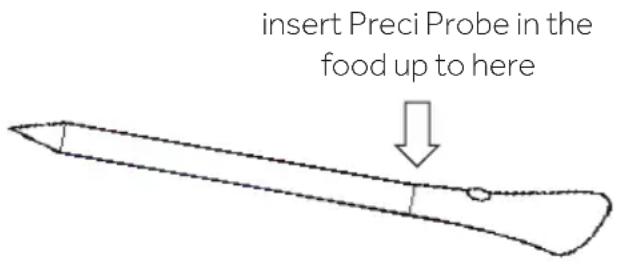
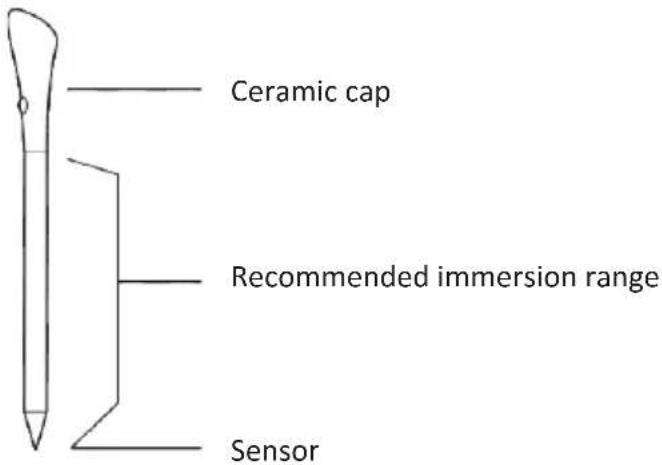
- It is required to FULLY INSERT Preci Probe metal bar properly into the food until the BLACK ceramic EDGE of it during cooking.
- Do not use Heat Feel Sensor in a microwave oven.
- Heat Feel Sensor can be cleaned and washed but do not immerse it long in water.
- This product is not intended for use by persons with ages 12 and under.
- The supplier will not be liable for any damage of Heat Feel Sensor due to misuse of the device.
- Clean the Heat Feel Sensor before the use.
- Probe can work in this range of temperature: 10^ to an internal maximum temperature of 100^ of the metal part. Ceramic part can reach 350^ .
- If the Heat Feel Sensor temperature exceeds 100°C, cooking will stop and the Heat Feel Sensor must be removed from the oven as soon as possible, wearing gloves, to avoid damage to the probe.
2. PRODUCT INTRODUCTION
2.1 TOP VIEW OF THE PRODUCT
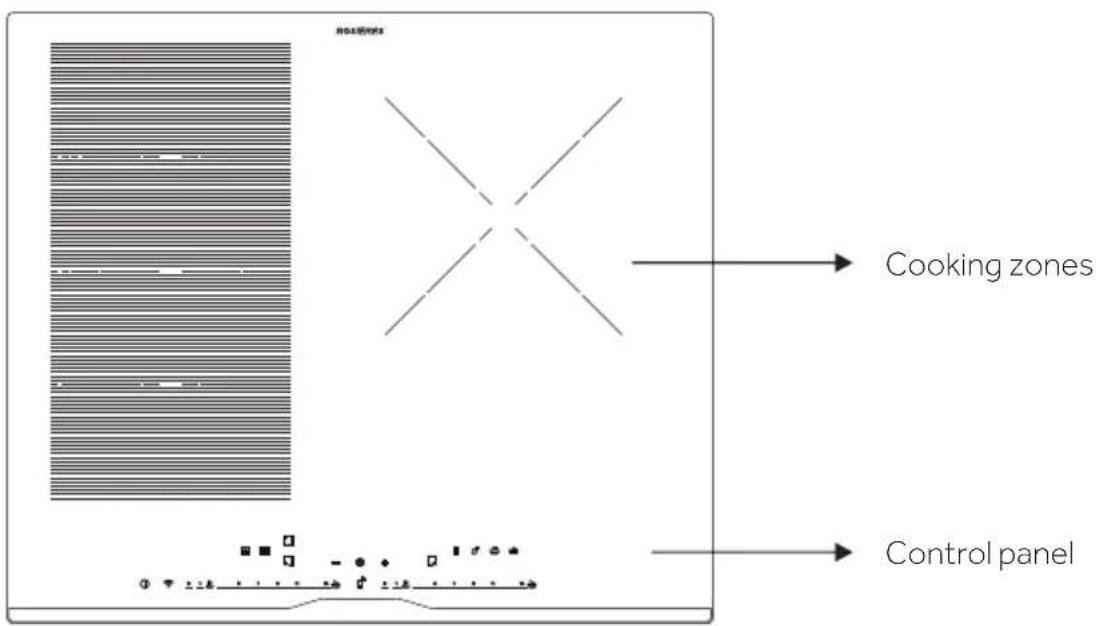
2.2. CONTROL PANEL
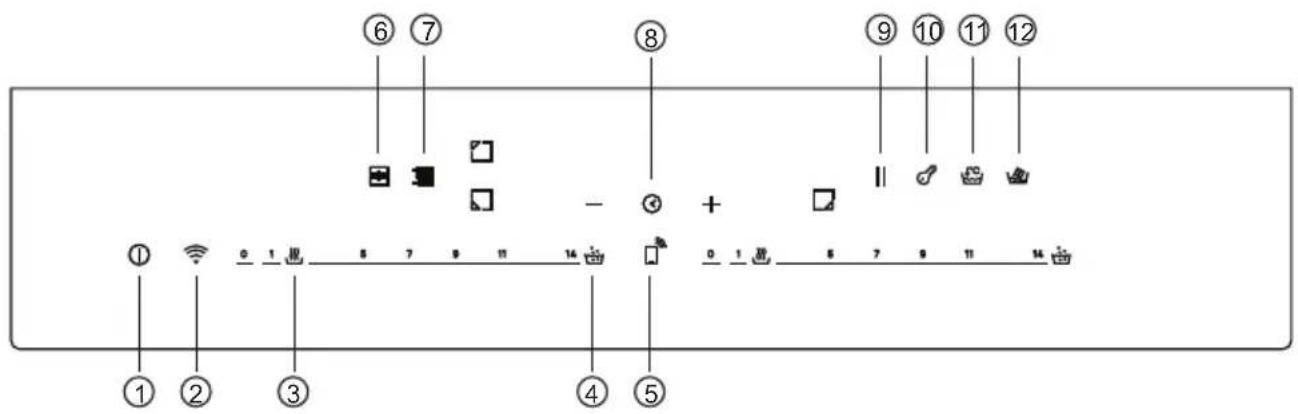
- ON/OFF
- WIFI
- Keep Warm
-
Simmering
-
Remote Control
- Full Zone
- Varrycook
-
Timer
-
Pause
- Child lock
11.Boiling - Melting
3. BEFORE STARTING
3.1 GENERAL INFORMATIONS
Before you begin, is important to know: all functions of this hob are designed in order to comply with the most stringent safety regulations.
For this reason:
- Some functions will be activated, or will be automatically deactivated in absence of pots on the burners or when they are not correctly positioned.
- In other cases, functions will be automatically deactivated after a few seconds when it requires more then one step (e.g. "Turn the hob on" without "selecting the cooking zone".
- In case of longtime use, the appliance may not immediately shut down, even with all the cooking zones off, because it is in the cooling phase; the H symbol appears on the cooking zone display until it is cooled.
Safe activation: the product is activated with the presence of pots on the cooking one. The heating process does not start or is interrupted if there are no pots or if these are removed.
Pot detector: After the hob is switched on, the product automatically detects the presence of pots on the cooking zones, even before activating them.
Safety shut down: for safety reasons, each cooking zone has a maximum operating time, with depends of the maximum power level set (p.13).
3.2. POWER MANAGEMENT
When product is first used, the hob is set to maximum reachable power. Different power limits can be chosen accordingly with home main supply system by using power management function.
How to set the power management
It is possible to set a maximum power absorption level for the Induction hob, choosing up to different power ranges.
Induction hobs are able to limit themselves automatically in order to work at lower power level, to avoid the risk of overloading.
To enter Power Managemet Function:
- Turn on the hob, then press at the same time Varycook and Timer ⏻.
- The timer indicator will show "P8" which means power level 8. The default mode is on 7.4 kW.
To switch to another level
- Scroll left and right the slider to change the power management level.
- There are 8 power levels, from "P1" to "P8". The timer indicator will show one of them:
| P1 P2 | P3 P4 | P5 P6 | P7 P8 | ||||
| 2kW | 2,5kW | 3kW | 3,5kW | 4,5kW | 5,5kW | 6,8kW | 7,4kW |
Confirmation and Exit Power Management Function
For confirmation, turn off the hob. The power level will be saved automatically. Selected value is permanently stored and remain even after power down of the main supply.
To change the power level repeat the operations described above.
NOTE: depending on the power management selection, some poor levels and functions of the cooking zones could be automatically limitd not to exceed the selected value. In particular, in case of a power management level set less than 4,5kw, Boost function, Varycook and some cooking preparations with the app, could not be selected.
In particular last power level selection can be refused/adjusted according with the available amount of residual power from the previous setting.
3.3. CHOOSING THE RIGHT COOKWARE
3.3.1. Characteristics of the cookware
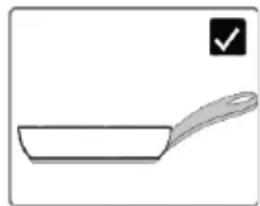
Use only pots with the induction symbol.
- Only pots with a perfectly flat bottom. Otherwise, the following situations may occur:
- Not pot detection;
- Low performance;
- Unwanted noise.
natural_image
Simple line drawing of a frying pan with a handle and checkmark icon (no text or symbols)- Only pots with a smooth base, to avoid scratching the hob surface;
NOTE: avoid a much as possible moving pot operations on the glass surface just to minimize scratches.
Magnet test
Induction cooking uses magnetism to generate heat; pots must therefore contain iron. If you already have a cookware you can check if the material is magnetic by using a magnet. Pots are suitable if they are magnetically attracted by the magnet.
Cookwares made from the following materials are not suitable: pure stainless steel, aluminium or cropper without a magnetic base, glass, wood, porcelain, ceramic, earthenware.
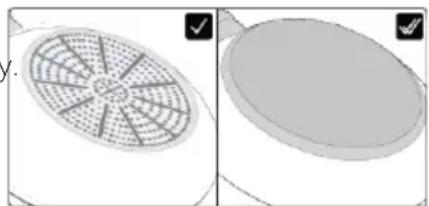
3.3.2 Higher quality cookwares
All cookwares with the induction symbol are generally accepted.
Depending on the type of bottom, however, the behavior may vary In particular last power level selection can be refused/adjusted according with the available amount of residual power from the previous setting.
When using large cookware with a smaller ferromagnetic element,
only the ferromagnetic element heats up. Consequently, heat might not be uniformly distributed.
natural_image
Two 3D-rendered objects: a fan-shaped grid on the left and a circular object on the right, both without any text or symbols.3.3.3. Dimension & placement
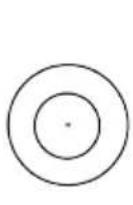
Always use the cooking zone that best matches the bottom diameter of the pan.
Place the pot making sure it is well centered in the cooking area.
NOTE: it's recommended not to use pan that exceed the perimeter of the cooking zone.
For the correct working of the hob, it's necessary to use pots with the bottom diameter inside the range described in the following table.
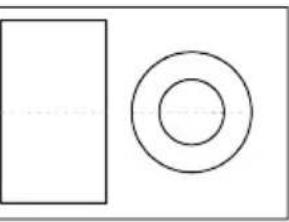 | 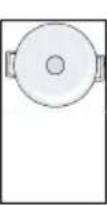 | 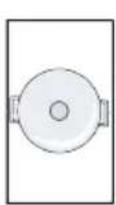 | 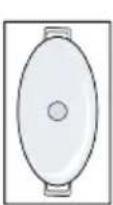 |  |
min.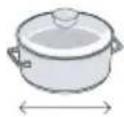 max. max. | 90 mm | 160 mm | 160 mm | 120 mm |
| 180 mm | 220 mm | 200 x 380 mm | 280 mm |
NOTE: by using a cookware smaller than the minimum required, it could not be detected. While using one bigger than the maximum required, malfunctions or low performances may occur.
ATTENTION: do not put the pot on/near the control panel during cooking or cooling down.
4. OPERATION OF PRODUCT
4.1 HOW THE PRODUCT WORKS

SWITCHING ON/OFF THE HOB
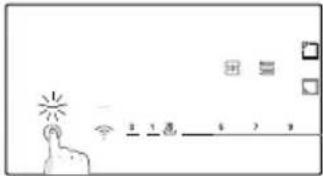
To switching on/off the hob, press and hold for a while. A dedicated sound will indicate the status of the appliance.


SELECT THE COOKING ZONE AND SET THE POWER
The hob can automatically detect the pot once it is placed on the cooking zone by lighting the related zone indicator. There will not be a power level activation at this stage.
If no pot is present, zone can be selected directly by pressing the zone indicator.
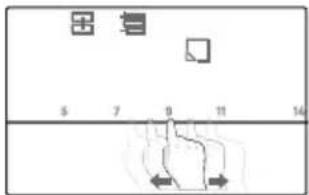
The power can be set:
Sliding the finger on the slider;
Pressing directly on the right level.
vs
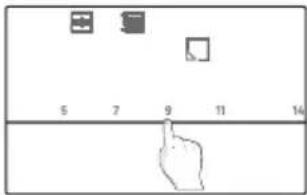
User can change power level during cooking, repeating the same process.
The digits will show the power level set: each cooking zone has a different number of power levels that goes from 1 (min) to 14 (max). Each level has an automatic shut down that could vary from 1 th to 8h.
| Power level | 1 2 3 4 5 6 7 8 9 10 11 12 | 13 14 | |||||||||
| Time (h) | 8 8 5 4 3 3 2 2 2 2 2 2 2 1 |
BOOST FUNCTION: it is also possible to choose the rapid heating by pressing the slider in correspondence of the 15.
- The function can be used in any cooking zone;
- After 10 minutes, the boost function automatically to level 14.
ATTENTION: after switching on the cooktop or after ending all cookings, if then any power level is set within one minute, the hob switches off.
If the display shows ✕, this means that:
• The pot is not positioned in the selected cooking zone;
• The pan is not correctly positioned/not placed at all on the hob;
• Pot isn't suitable for the induction;
- Dimensions of the pot are smaller than minimum pot diameter requested in the selected zone (p.12).
• If suitable pot is not placed within 1 minute cooking zone switches off.
H: once this symbol appears on the digits means that the cooking zone is still hot. When the surface is cooled down to a safe temperature the symbols disappears.
|| PAUSE
All the hob can be put in pause by pressing the related key instead of being shut off.
To activate this function press ||. All the zone indicators will show || and cooking is stopped. To deactivate press || and previous power settings will be restored.
WARNING: When entering Pause mode, all the control except the ON/OFF control are disabled. In this way the induction hob can always be turned off with the ON/OFF control in case of emergency.
TIMER
Timer can be set in two different ways:
- Minute minder: when the time is set the cooking zone will not switched off.
- Stop Cooking Mode: after the time is set the selected cooking zone will switch off. Timer count until 60 min.
Stop cooking Mode: to select timer for one zone, select the related zone and press. On the digit display "min" appears and, by scrolling the slider left and right, adjust the desired timing. A maximum of four timers can be set at the same time one for each zone. Before to edit the timer value always select the desired cooking zone.
KEY LOCK
Hob can be locked by pressing ⚙ to prevent unattended use. When the appliance is locked, all the controls except the ON/OFF bottom are disabled. To activate/deactivate the function press and hold ⚙ for a while.
SPECIAL FUNCTIONS
The hob has 3 special functions positioned on the slider which correspond to 3 power levels;
Direct access:
SIMMERING: function used for creams, sauce or generic low temperature liquid.
MELTING: function used mainly for melting chocolates.
Accessible by the slider:
KEEP WARM: function ysed for maintaining the food heated after cooking.
BOILING: function used for water boilign and boil maintenance.
NOTE: any time cooking related to each function can be adjusted by selecting different power levels closed to the suggested one

FULL ZONE
The Full zone is a cooking area that is a combination of more cooking zones in front and rear positions by creating a unique vertical zone. The Full zone, when activated, is controlled with one power level only.
To activate the function press ☐. Only the upper digits will show feedbacks. The lower digits are switched off.
To deactivate press-1.
Pots shall be placed as indicate in the below picture.

VARYCOOK ZONE
This function is used to pre-set fixed power levels in three different areas according with the position of the pot: high (l.14), medium (l.10), low (l.1).
- If the pot is on the front of Varycook zone, the power level is set to l.1;
- If the pot is on the middle of Varycook zone, the power level is set to l.10;
• If the pot is on the rear of Varycook zone, the power level is set to l.14.
To activate the function press ☐. Only the upper digits will show feedbacks. The lower digits are switched off.
4.2. CONNECT TO hOn APP
Your appliance may be connected to your home wireless network and operated remotely using the app. Connect your appliance to ensure it stays up to date with the latest software and features.
NOTE
- Once the hob is turned on, the WIFI icons blinks for 30 minutes. During this period it's possible to enroll the product.
• Ensure your home Wi-Fi network is turned on.
• You will be given step by step guidance on both your appliance and mobile device.
• It may take up to 10 minutes to connect your hob. - For further guidance and troubleshooting, please refer to the app.
Download hOn App on your smartphone.




New User Registration
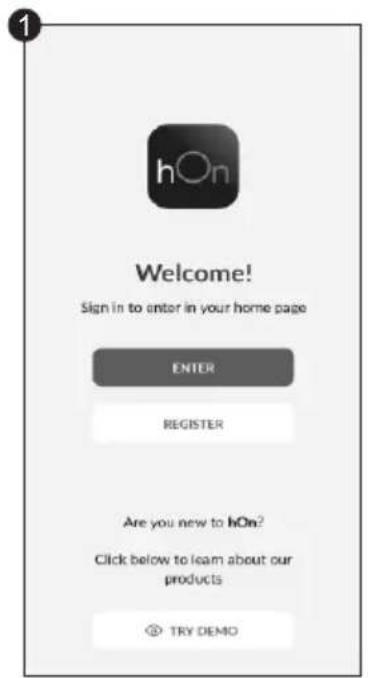
Click on "Register"
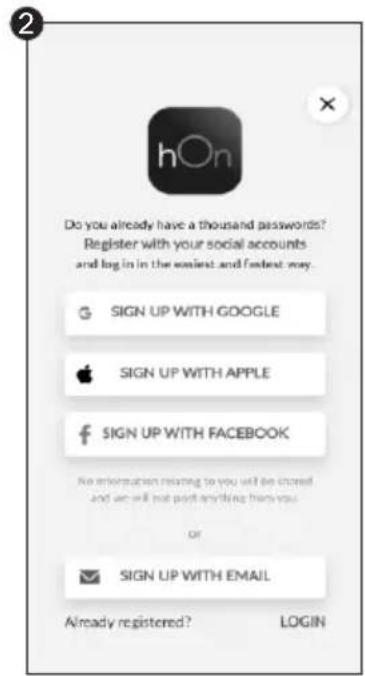
You can register through social accounts or sign up with your personal email
Quick Pair Enrollment
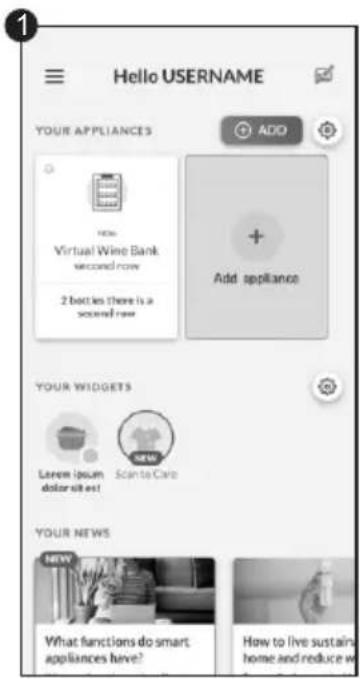
Select "Add appliance
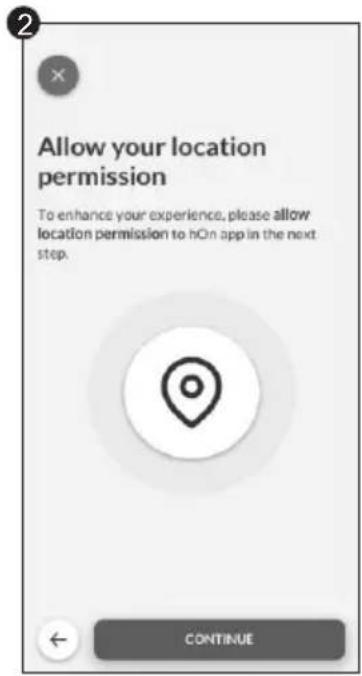
Allow your location permission
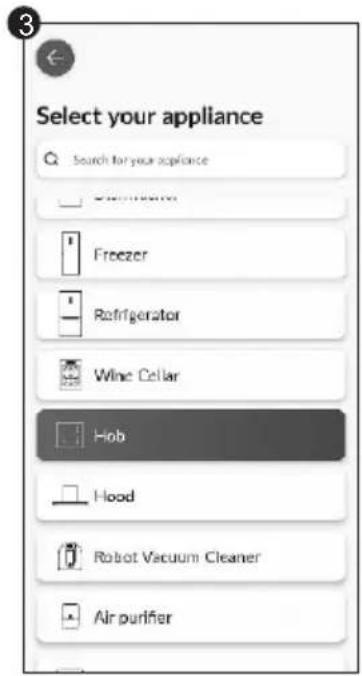
Select Hob from the appliance category
Quick Pair Enrollment
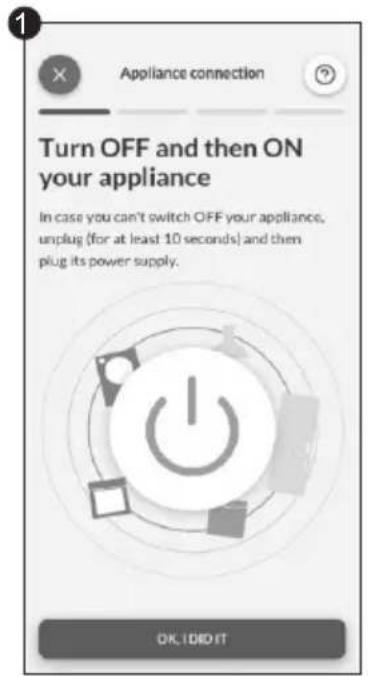
Turn on your appliance; if it is already on, turn it off and on again
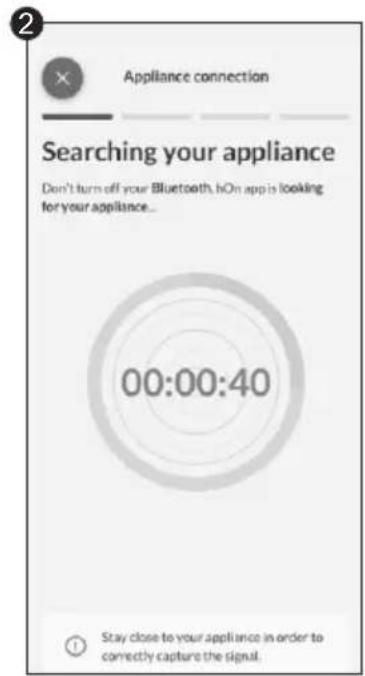
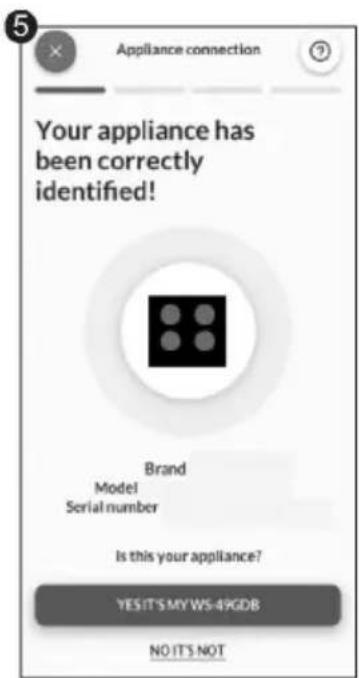
After turning on, the hOn app will start searching for your home appliance
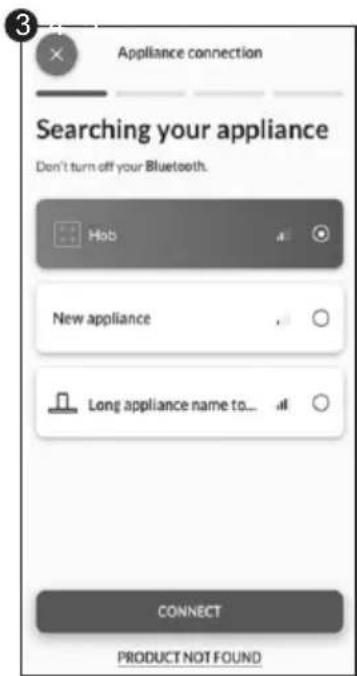
Select your home appliance, tap on "connect" and wait a few seconds
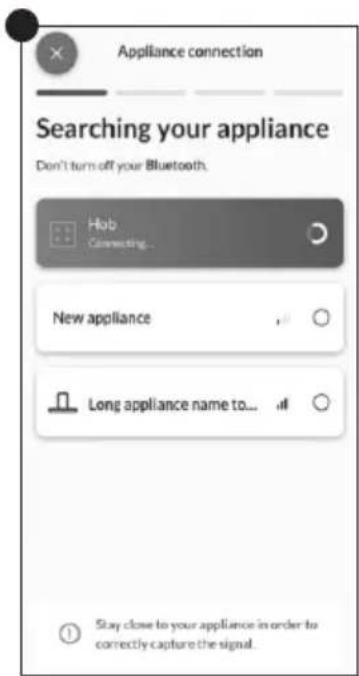
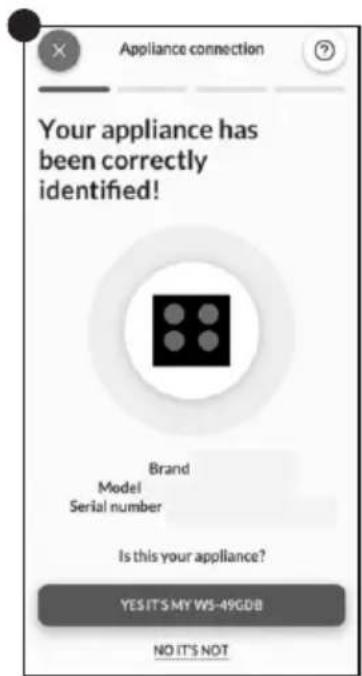
Your Hob will be found and you can display and set functions/recipes through hOn
Choose from the hOn App recipes menu or special programs menu. Follow step by step the indications on the App and when you have finished send the parameters to the hob that will cook for you.
When the hob receives the command from the app, the hob will beep for 2 times and blink for one second to indicate that the instructions have been received.
To start the recipe, press the "My Chef" button.
If you want to get out of " My Chef " function press 3 sec.
*Cooking results may vary due to used cookware.
WIRELESS PARAMETERS
| Technology | Wi-Fi | Bluetooth |
| Standard | IEEE 802.11b/g/n | Bluetooth v4.2, BR / EDR, BLE |
| Frequency Band (s) [MHZ] | 2401÷2483 | 2402÷2480 |
| Maximum Power [mW] | 100 | 10 |
Hereby, Candy Hoover Group Srl declares that the radio equipment is in compliance with Directive 2014/53/EU and with the relevant statutory requirements for the UK market. The full text of the declaration of conformity is available at the following internet address: www.candy-group.com
PRECI PROBE MODEL Et180 WIRELESS PARAMETERS:
| Technology | Bluetooth |
| Standard | Bluetooth v4.0 BLE |
| Frequency Band (s) [MHZ] | 2400÷2480 |
| Maximum Power [mW] | 2.5 -(4dBm) |
4.3 ACCESSORIES
4.3.1. PRECI PROBE & LADLE-Intelligent Wireless Food Thermometer (available depending on the model)
Thank you for purchasing Haier Preci Probe. Please note it works only with Haier induction hob and before using it please read the following instruction and safety notes included in the user manual.
Introduction: Preci Probe is a wireless food thermometer that gives home chefs real-time status inside the food to avoid undercook or overcook disasters and ensuring the perfect result every time. It connects directly to the product. Details and the real-time status of the food can be read from your phone, giving you the best result at your fingertips. For further information on pairing and use tips, please refer to the instructions below.
CHARGE THE PRECIPROBE BEFORE USING:
• Put Preci Probe into the charger and close the cover;
- Connect the charger to a USB power source, such as USB adapter or USB socket of PC/notebook with the USB cable. The charger may not be working properly with power bank because of its auto switch-off function;
- LED of the charger will turn on and is flashing during charging. It will turn off when Preci Probe is fully charged.
PAIR THE PRECI PROBE WITH THE INDUCTION HOB:
• Make sure the hob is turned on and your Preci Probe is fully charged;
- Go on the hOn APP from your portable device;
- Go to the Recipes section and choose a recipe that uses Preci Probe;
- Once you start the recipe by pushing the "Cook with me [replace with ICON REMOTE CONTROL]" button on the appliance, the Preci Probe will connect automatically;
• The applists all available probes that can be selected for the recipe:
- ThehobdisplaywillindicatethenameoftheselectedPreciProbe(ex "1A");
• Now follow the instructions from the hOn APP;
- When using the app if the probe is under 20% of charge the Timer display will indicate "CH".
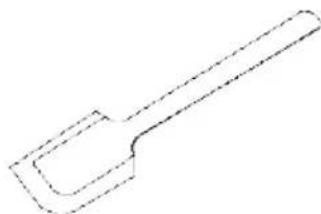
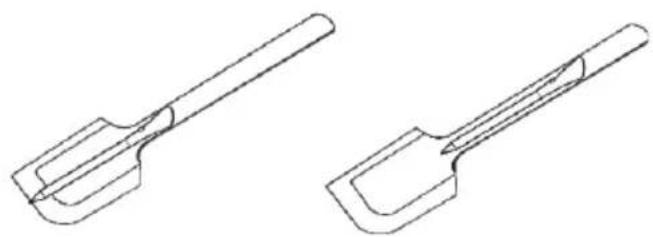
LADLE
Use the ladle with the probe to stir food during your cooking.
• Clean the ladle before the first use.
- Do not use the ladle on an open flame.
- Do not cut the ladle.
- Do not put the ladle in direct contact with the hot accessible parts of the hob.
• Tolerated temperature range: 40°C+220°C
natural_image
Simple line drawing of a spatula or plunger (no text or symbols)Position 1
Position 2
natural_image
Two technical line drawings of a mechanical tool or tool with curved surfaces and a handle (no text or symbols)4.4 COOKING PREPARATIONS WITH THE APP
Preci Probe as thermometer
Set in the hOn App the target temperature you want to reach, insert the Preci Probe inside the food or with its accessory inside liquids and you will see the temperature raising from the app until reaching the target temperature.
It will help you to accurately maintain the temperature for all kind of food. You cannot use it when the Assisted Cooking function operates.
Assisted Cooking: "Cook with me" function
Choose from the hOn App recipes or special programs, follow step by step the preparation and then the hob will automatically set the parameters for the chosen cooking method.
Sous Vide
Type of cooking in which the food is placed in a vacuum bag and cooked in a low temperature water bath.
The food prepared in this way will be more juicy and tender and will keep the nutritional properties intact, making them heal their and tastier.
Go on the hOn App select the category of food, select this type of cooking, insert the bas with the food in the pot with water and the induction hob will set the correct cooking temperature for a perfect result.
Grill
Select the category of food from the hOn App, select this type of cooking and the induction hob will automatically bring the grill to the correct temperature in a predetermined time.
Simmering
The simmering function is ideal for cooking sauces, stews, braised dishes and all preparations with an average long cooking time.
The automatic function you find on the hOn App will gently bring the food to a slightly boiling temperature, keep in git for all the duration of cooking.
Steaming
With the steaming function you can steam food such as vegetables, meat or fish in pots equipped with a steamer basket. Steam cooking is faster than boiling, as it is not immersed in a liquid it disperses less nutrients contained in the food and preserves its vitamin content, improving its taste and structure which will be more compact and pleasant.
If necessary, contact the authorized service center.
5.1 POWER TABLE
| POWER LEVEL | TYPE OF COOKING SUGGESTED USE | |
| 14/15 BOOSTER | Fast Heating, Booster | Ideal for stir-frying, searing, bringing soup to the boil, boiling water |
| 11-13 | Frying, Grilling, Keep Boiling | Ideal for starting cooking, sautéing, cooking pasta, deep frying, grilling |
| 5-10 | Stewing, Cooking | Ideal for preheat stewing, keep gentle boiling, cooking, long & continuos frying (rice, roast, pancakes*) |
| 3-4 | Simmering, Keep Warm, Slow Cooking | Ideal for slow cooking recipes, gentle simmering, cream sauces and liquid |
| 1-2 | Melting, Keep Liquid, Defrosting | Delicate warming for small amounts of food, slow warming, melting & keep liquid chocolate** |
| OFF | - | - |
*Continuos frying pancake at level 5-6.
**Meling Level 2, when begins to melt, move to level 1 to keep liquid.
5.2. COOKING TABLE
| FOOD CATEGORY | RECIPE | Preheat | Cooking | |
| Heating Phase | Power Level Power Level | |||
| Pasta & rice | Pasta | Heating Water | 14 - 15 | 6 - 11 |
| Rice Pudding | Heating Milk | 13 - 15 | 6 - 8 | |
| Boiled Rice | Heating Water | 14 - 15 | 6 - 8 | |
| Risotto | Stir-frying & Roasting | 13 - 15 | 6 - 8 | |
| Meat | Roast Meat | Stir-frying & Roasting | 10 - 13 | 6 - 11 |
| Grilled Steak | Preheat Grill | 10 - 13 | 10 - 13 | |
| Sausages & Hamburger | Preheat Grill | 10 - 11 | 10 - 13 | |
| Chicken Pieces | Preheat Pan | 10 - 11 | 6 - 10 | |
| Breaded Steak | Preheat Pan | 6 - 11 | 10 - 13 | |
| Fish | Grilled Fish | Preheat Grill | 10 - 13 | 8 - 10 |
| Fillet Fish | Stir-frying | 10 - 13 | 8 - 10 | |
| Shrimps & Prawns | Stir-frying | 10 - 13 10 - 13 | ||
| Vegetables & legumes | Fresh Frying Potatoes | Heating Oil* | 14 | 11 - 14 |
| Frozen Frying Potatoes | Heating Oil* | 14 | 11 - 14 | |
| Grilled vegetables | Preheat Grill | 6 - 11 | 10 - 13 | |
| Peppers, Zucchini & Eggplant | Preheat Pan | 6 - 11 | 10 - 13 | |
| Eggs & Egg products | Hard Boiled Eggs | Heating Water | 14 - 15 | 6 - 8 |
| Fried Eggs | Stir-frying | 10 - 13 | 8 - 10 | |
| Pancakes | Preheat Pan | 6 - 11 | 5 - 7 | |
| Sauces, Creams & Dessert | Tomato Sauces | Heating Sauces | 4 - 6 2 - 4 | |
| Melted Cheese | Melting | 6 - 11 | 2 - 5 | |
| Cream & Custard | Heating Cream | 4 - 6 2 - 4 | ||
| Melted Chocolate | Melting | 1 - 2 1 | ||
| Butter | Melting | 1 - 3 1 - 3 | ||
6. CARE & CLEANING
6.1 GENERAL RACCOM ANDATIONS
Regular cleaning can extend the lifecycle of your appliance.
- Clean the hob after each use;
• Always use cookware with a clean base; - Scratch on the surface have no effect on how the operates;
• Use a special cleaner suitable for the surface of the hob;
• Use a special scraper for the glass.
6.2. CLEANING THE HOB
Before proceeding with the cleaning, make sure that the cooking zones are turned off. Always remember to follow the recommended cleaning instructions and avoid using abrasive products that could damage the surface of the cooktop.
a) FATTY SOIL
This produre is recommended for these kind of scenarios; splatters caused by frying or grilling meat.
- Let the hob cool down.
- Absorb any excess liquid around he pot with kitchen paper, then remove the pot.
- Clean the cooking surface with a cloth and detergent solution.
- If necessary, clean the hob a second time using hot water and cleaner for induction hob glasses.
b) SUGARY SOIL
This procedure is recommended for foods that, due to their high sugar content, need to be promptly removed to prevent damage to the hob surface (syrups, jams, or preserves.
- When the hob is still warm, absorb any excess liquid around the pot with kitchen paper, then remove the pot.
- If necessary, we recommend using a scraper at an acute angle to remove any remaining residue.
- Clean the cooking surface with a detergent solution and dry it with the kitchen paper.
• If necessary, clean the hob a second time using hot water and cleaner for induction hob gasses.
c) STARCHY SOIL
This procedure is recommended for these kinds of foods: pasta, rice and potatoes.
- Absorb any excess liquid around the pot with kitchen paper, then remove the pot.
- Let the hob cool down.
• Use a damp cloth to moisten any starch residues. Allow it to sit for a couple of minutes. - Clean the cooking surface with a cloth and detergent solution.
• After cleaning, wipe the hob dry with a soft cloth.
• If necessary, clean the hob a second time using hot water and cleaner for induction hob gasses.
NOTE: Please consider these instructions also for; water rings, limescale rings, fat stains.
d) SHINY METALLIC DISCOLORATION
Use a solution of water with vinegar and clean the glass surface with a cloth.
7. FAILURE DISPLAY & INSPECTION
7.1 TROUBLESHOOTING
| Problem | Possible causes | What to do |
| The induction hob cannot be turned on. | No power. | Make sure the induction hob is connected to the power supply. Check whether there is a power outage in your home or area. If the problem persists, call a qualified technician. |
| The touch controls are unresponsive. | The controls are locked. | Unlock the controls by checking the section 'How product works'. |
| The touch controls are difficult to operate. | There might be water residue on the controls, or you might not be applying the correct pressure to the bottoms. | Make sure the touch control area is dry and use the right pression when touching the controls. |
| The glass is being scratched. | Rough-edged cookware. Unsuitable, abrasive scourer or cleaning products being used. | Use cookware with flat and smooth bases. See 'Choosing the right cookware' and "Care and cleanig" sections. |
| Some pans make crackling or clicking noises. | This may be caused by the construction of your cookware (layers of different metals vibrating differently). | This is normal for cookware and does not indicate a fault. |
| The induction hob makes a low humming noise when used on a high heat setting. | This is caused by the technology of induction cooking. | This is normal, but the noise should quieten down or disappear completely when you decrease the heat setting. |
| Fan noise coming from the induction hob. | A cooling fan built into your induction hob has come on to prevent the electronics from overheating. It may continue to run even after you've turned the induction hob off. | This is normal and needs no action. Do not switch the power to the induction hob off at the wall while the fan is running. |
| Pans do not become hot and "U" appears in the dis play. | The induction hob cannot detect the pan because it is not suitable for induction cooking. The induction hob cannot detect the pan because it is too small for the cooking zone or not properly centred on it. | Use cookware suitable for induction cooking. See section 'Choosing the right cookware'. Centre the pan and make sure that its base matches the size of the cooking zone. |
| The induction hob or a cooking zone has turned itself off unexpectedly, a tone sounds and an error code is displayed (typically alternating with one or two digits in the cooking timer display). | Technical fault. | Please note down the error letters and numbers, switch the power to the induction hob off at the wall, and contact a qualified technician. |
7.1.2 ERROR CODES
| ERROR CODE | RULE OF DISPLAY | ACTIONS | |
| E0 | Call ASA | ||
| Front left | |||
| E1 | Call ASA | ||
| Front left | |||
| E2 | Call ASA | ||
| Front left | Perform manual configuration via user manual | ||
| E3 | Call ASA | ||
| Call ASA | |||
| Front left | Call ASA | ||
| E4 | left | right | Call ASA |
| Call ASA | |||
| Call ASA | |||
| Check mains voltage via user manual, if ok call ASA | |||
| Check mains voltage via user manual, if ok call ASA | |||
| Check mains phase signal and frequency, if ok call ASA | |||
| Check mains cable & differential thermostat, if ok call ASA | |||
| E5 | Wait for cooldown, clean and/or remove foreign bodies | ||
| Front left | Call ASA | ||
| E6 | Cz4 | Cz1 | Call ASA |
| Cz3 Cz2 | Check installation requirements via user manual, if ok call ASA | ||
| E7 | Cz4 | Cz1 | Call ASA |
| Call ASA | |||
| Cz3 Cz2 | Call ASA | ||
| E8 | Cz4 | Cz1 | Check installation requirements via user manual, if ok call ASA |
| Check installation requirements via user manual, if ok call ASA | |||
| Cz3 Cz2 | |||
| E9 | Perform manual configuration via user manual | ||
| Front left | Call ASA | ||
*ASA = Service Center
8. ENVIRONMENTAL PROTECTION & DISPOSAL
8.1 SAVING AND RESPECTING THE ENVIROMENT
Recommendations for best results;
Use pots and pans with a bottom diameter equal to that of the cooking zone;
Use only pots and pans with flat bottoms;
Where possible, keep the lid on pots during cooking;
Cook vegetables, potatoes, etc. with a minimal amount of water to reduce cooking time;
Use a pressure cooker as it further reduces the energy registered company.
consumption and cooking time.
Place the pot in the center of the cooking zone outlined of the hob.
8.2 WASTE MANAGEMENT AND ENVIRONMENTAL
PROTECTION
This appliance is labelled in accordance with European
Directive 2012/19/EU
regarding electric and electronic appliances (WEEE). The WEEE contain both polluting substances
(that can have a negative effect on the environment) and base elements (that can be reused).
It is important that the WEEE undergo specific treatments to correctly remove and dispose of the pollutants and recover all the materials. Individuals can play an important role in ensuring that the WEEE do not become an environmental problem; it is essential to follow a few basic rules:
- The WEEE should not be treated as domestic waste;
- The WEEE should be taken to dedicated collection areas managed by the town council or a
registered company.
In my countries, domestic collections may be available for large WEEEs. When you buy a new appliance, the old one can be returned to the vendor who must accept it free of charge as a one off, as long as the appliance is of an equivalent type and has he same function as the purchased appliance.
9. INSTALLATION
Electrical installation
Power supply cable: The device is equipped with a power supply cable that must be connected to the domestic power grid. Identify the various connection options based on the type of domestic power supply from the corresponding diagram. The data plate also indicates the allowable connection voltage for this device and its corresponding power consumption.
220-240V/380-415V 2N\~ 220-240V
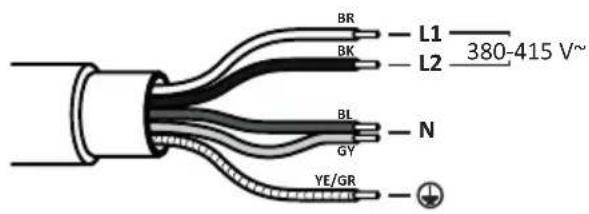
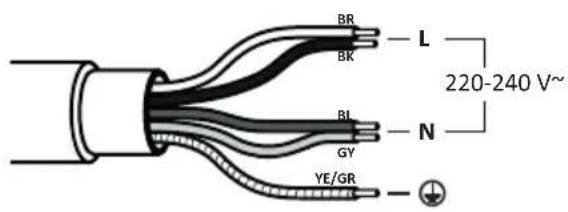
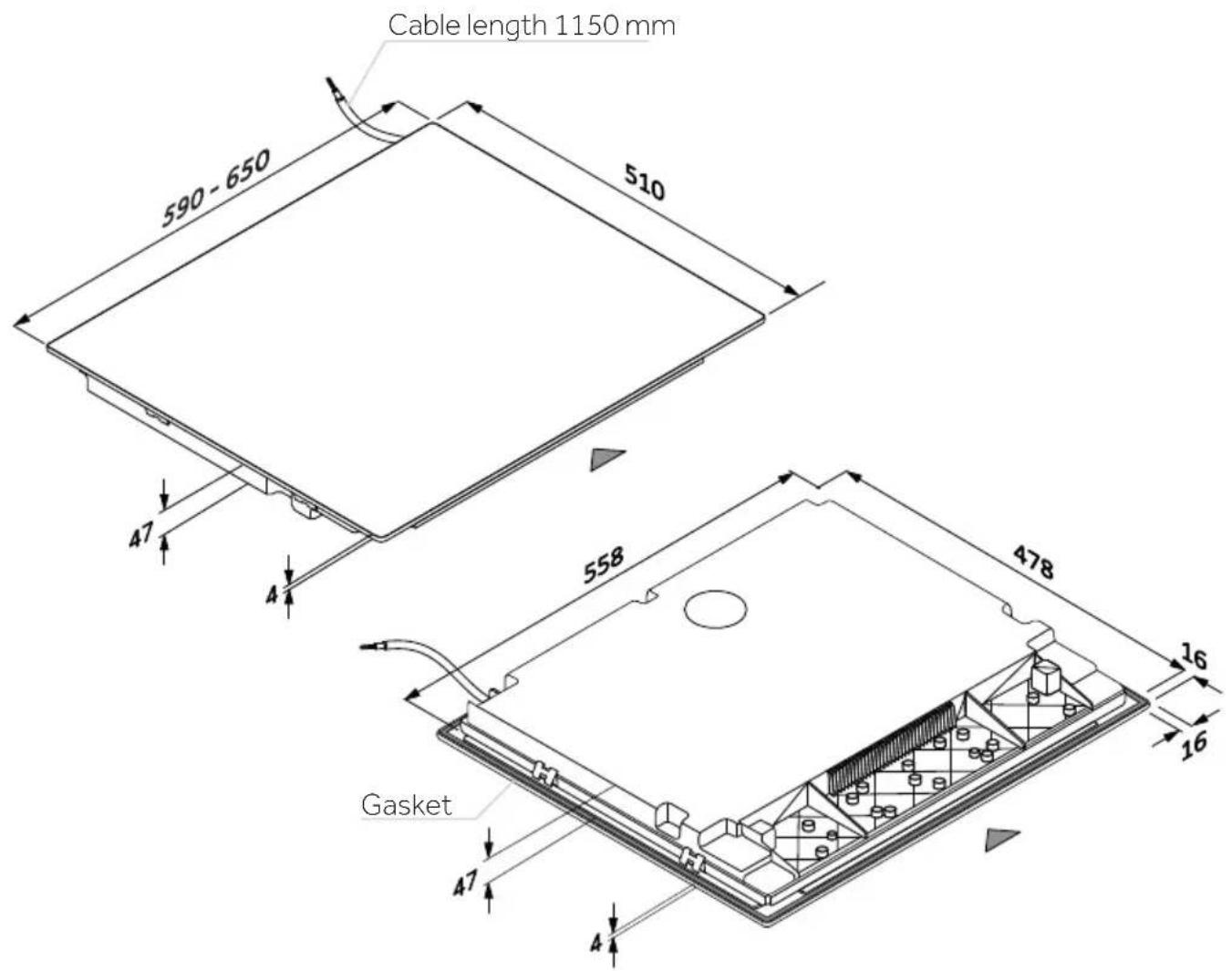
HOB 60-65 cm
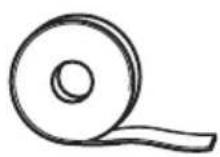
Tools

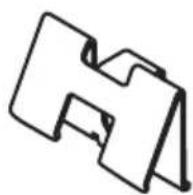
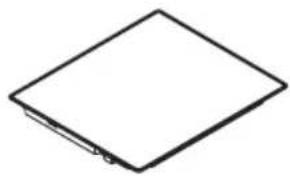
natural_image
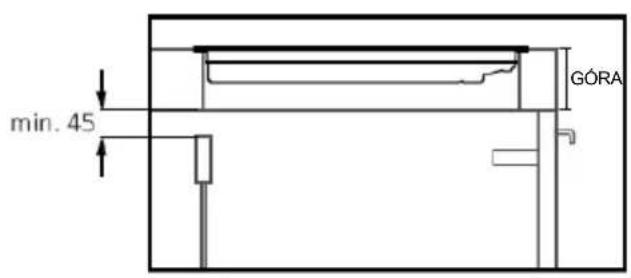
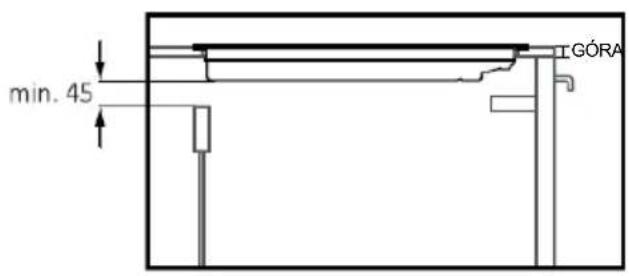
Simple line drawing of a diamond-shaped object with a small protrusion at the bottom right corner (no text or symbols)SECTIONS - WIDTH 60 and 65
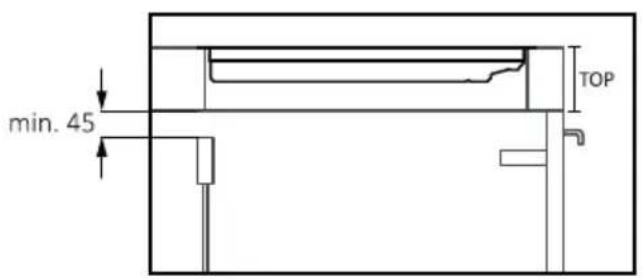
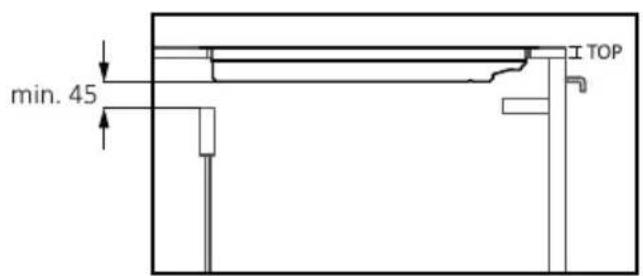
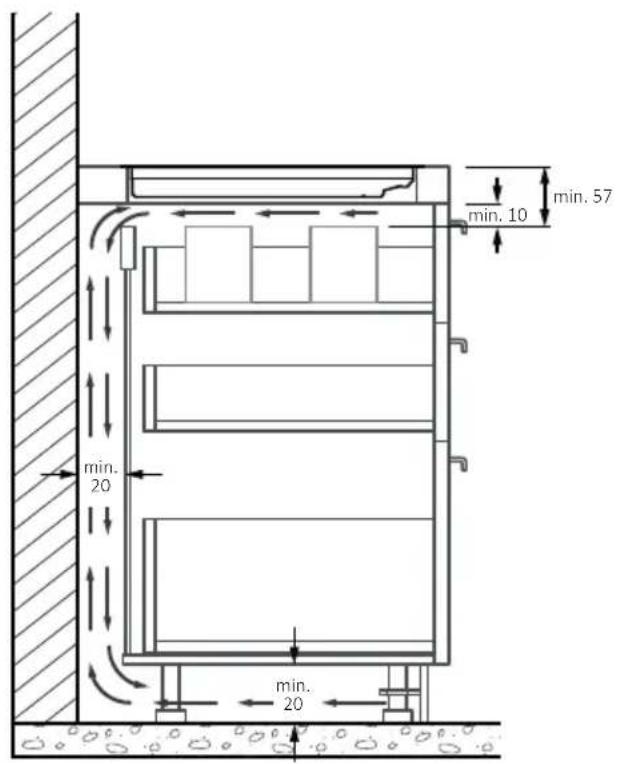
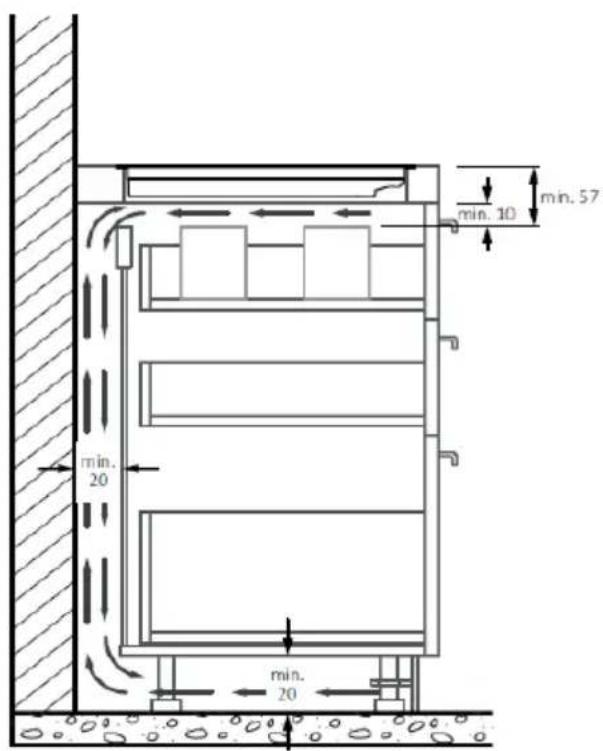
*For proper operation of the appliance, ensure proper airflow beneath the cooktop according to the intallation guidelines.
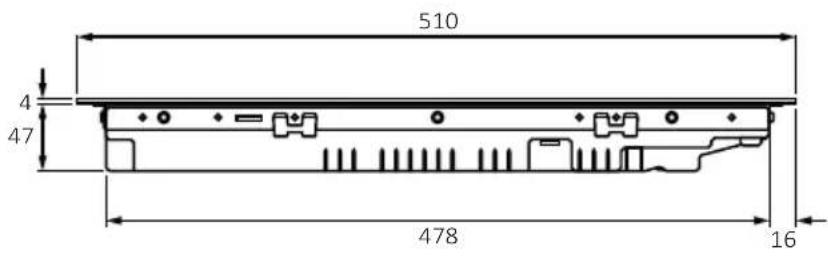
Side view
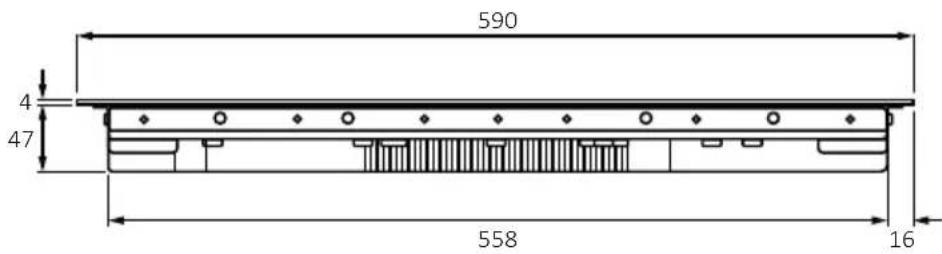
Side view
HOB 65 cm
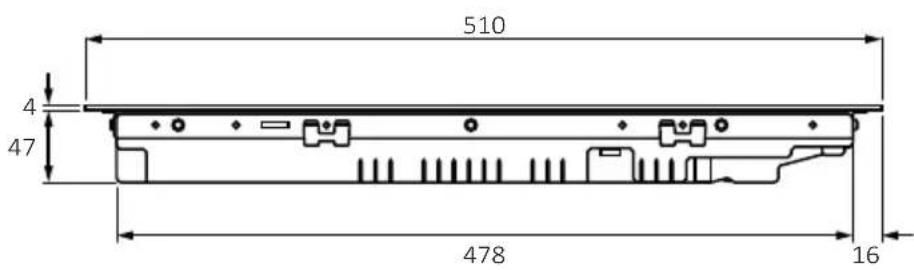
Side view
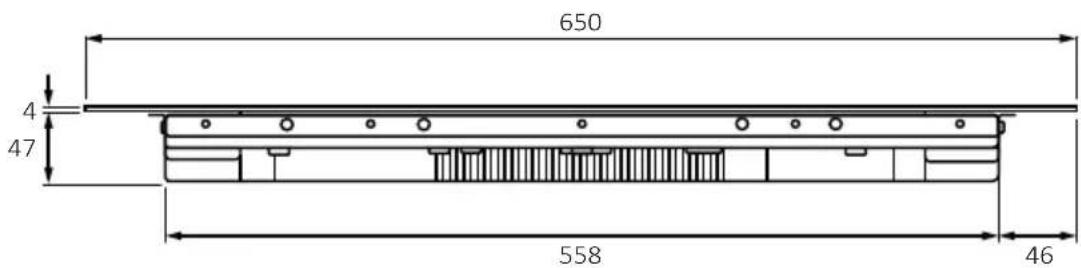
Side view
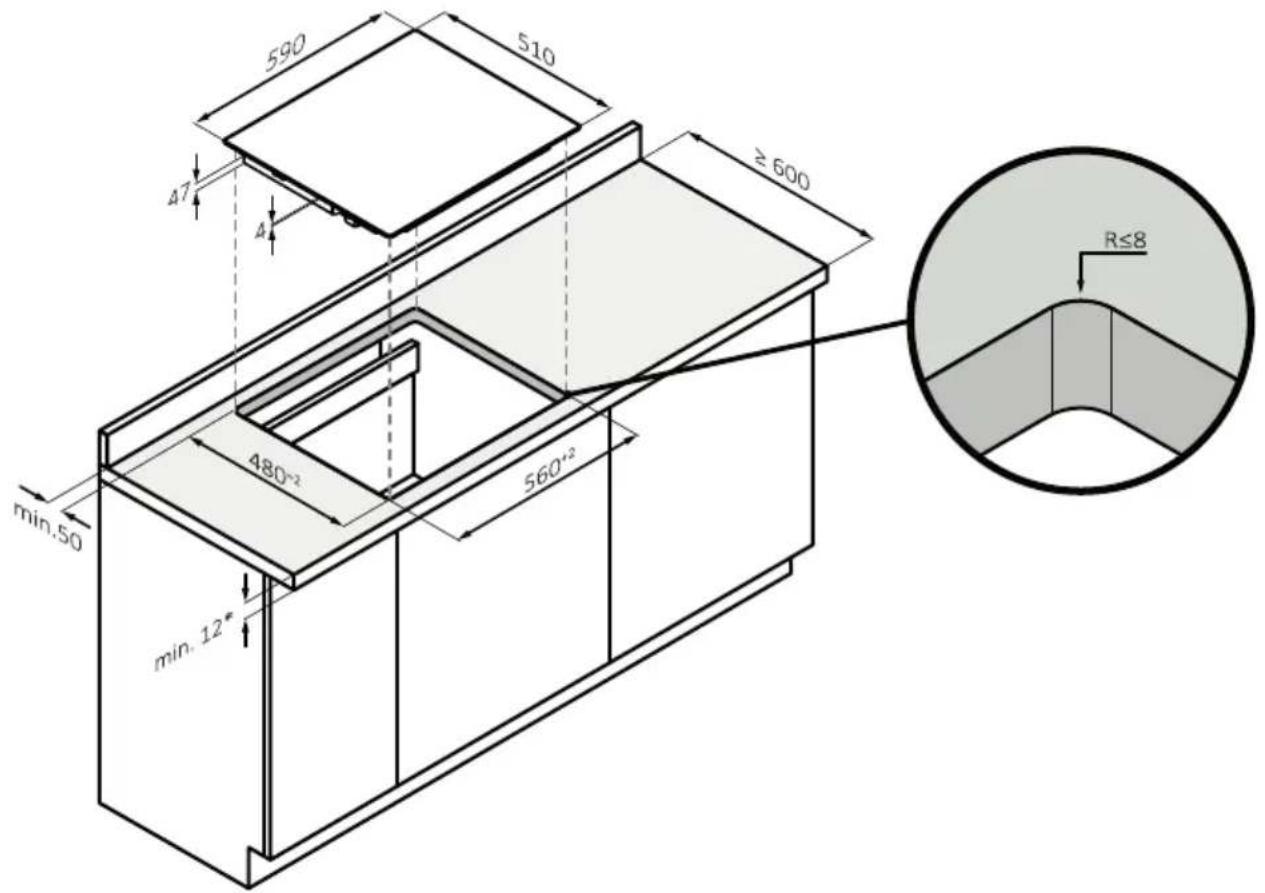
FLUSH BUILT-IN MEASUREMENTS OF 60
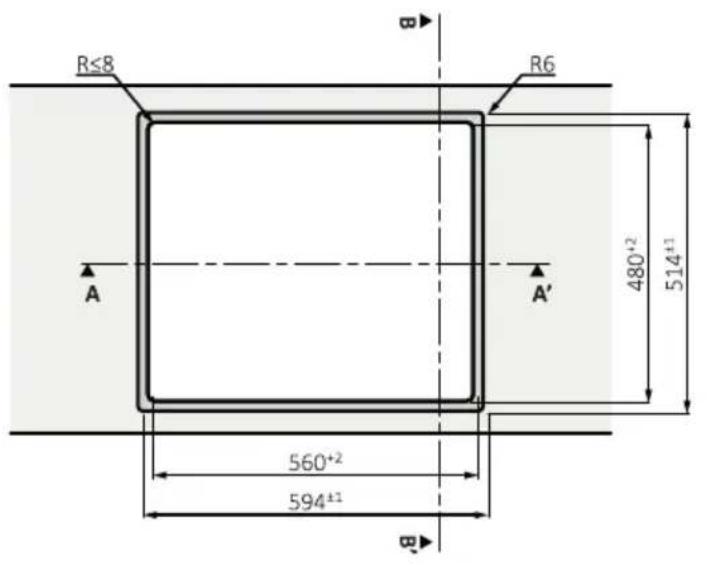
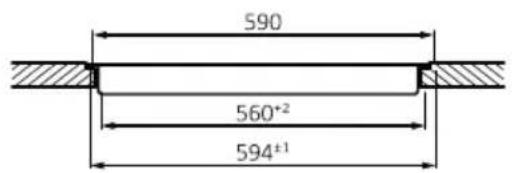
Section AA'
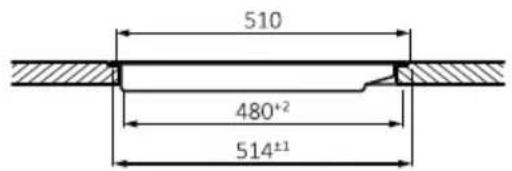
Section BB'
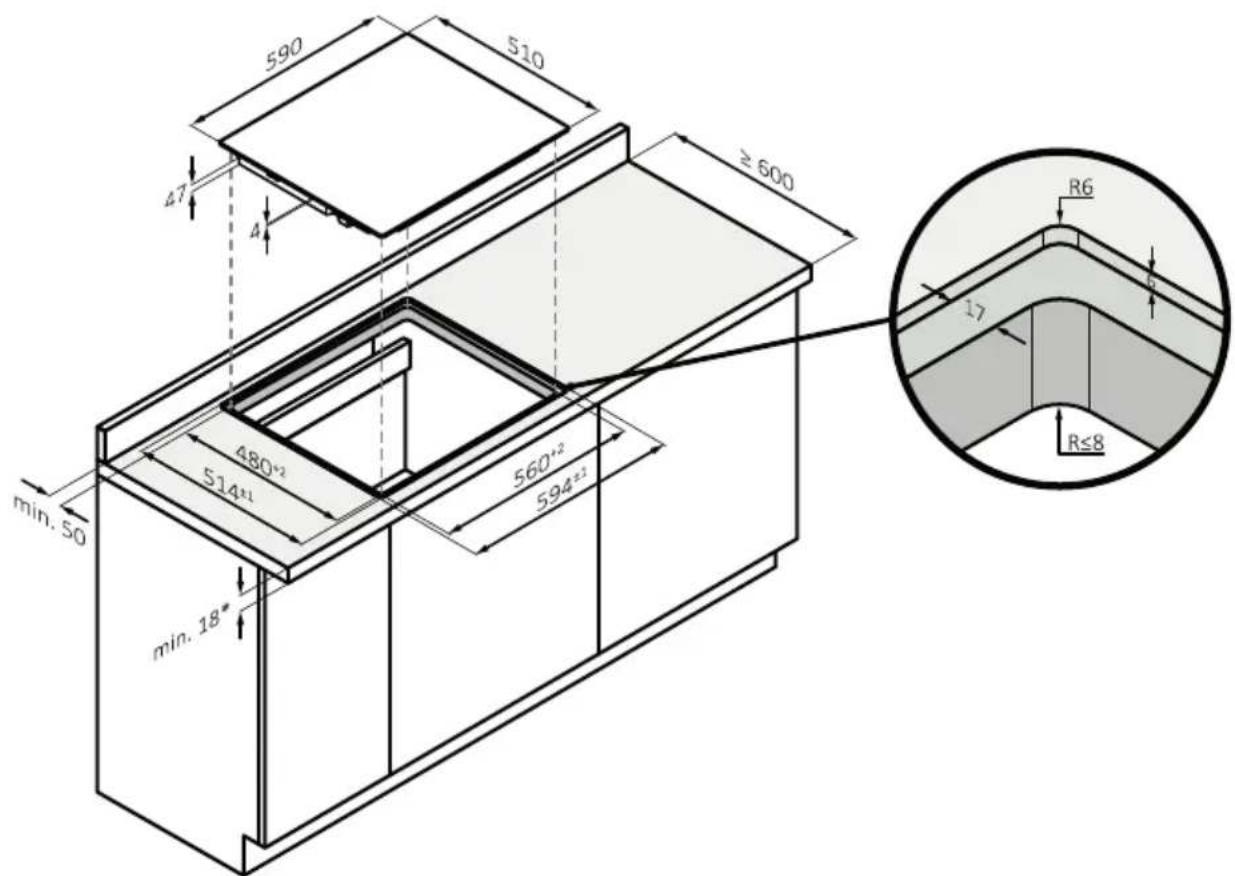
STANDARD BUILT-IN MEASUREMENTS 65 TOP
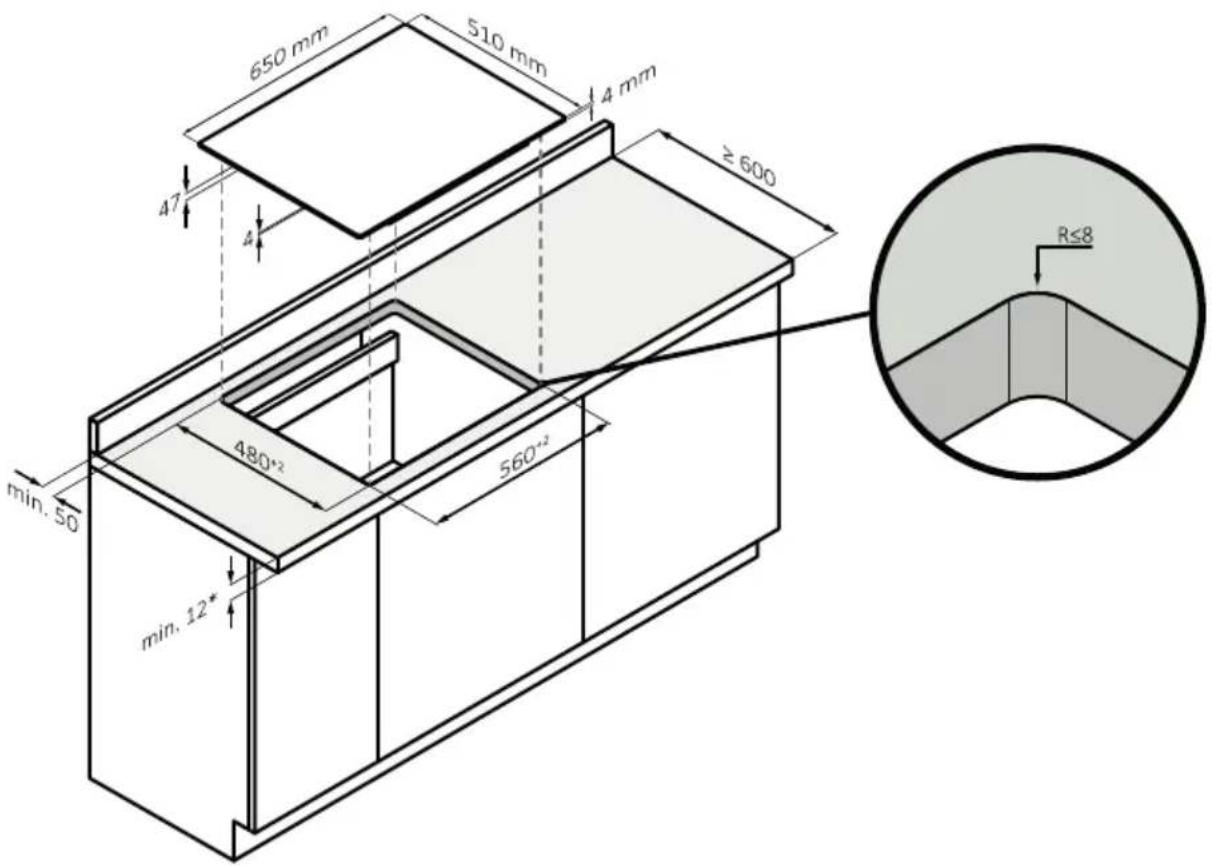
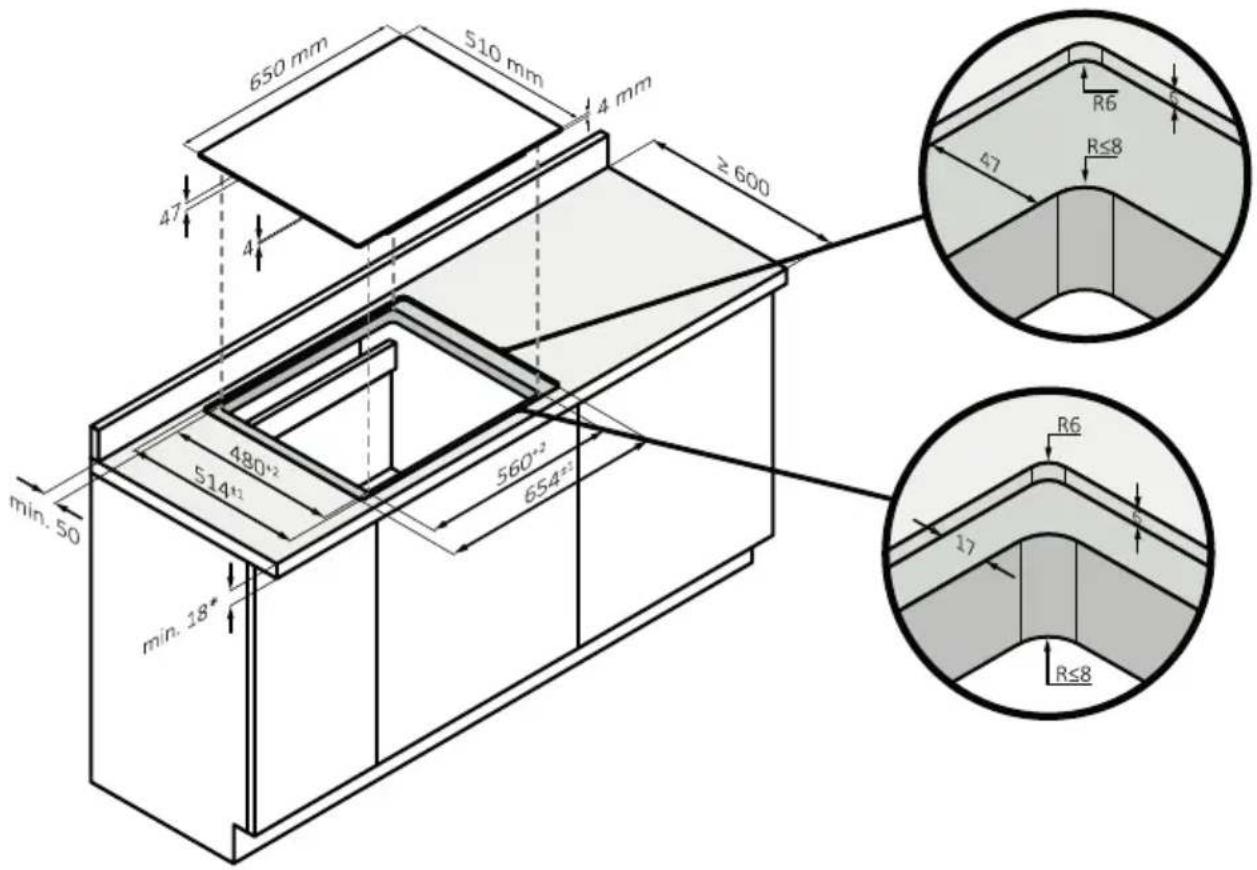
FLUSH RECESSING MEASUREMENTS OF 65
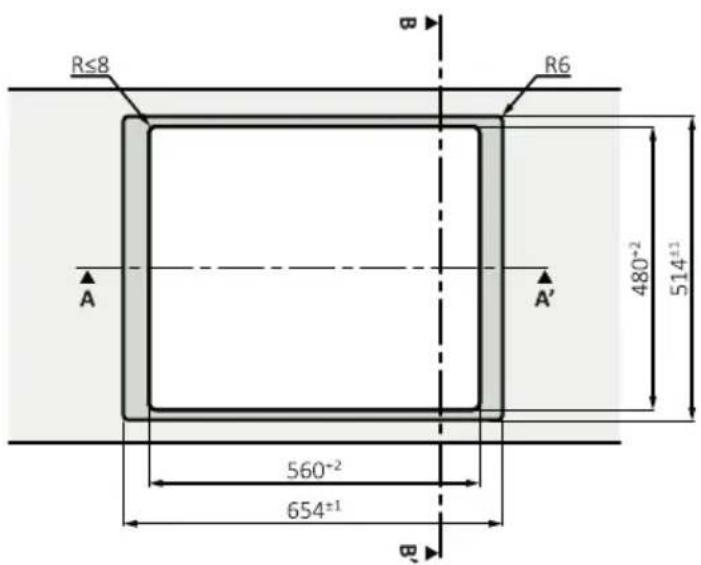
top view
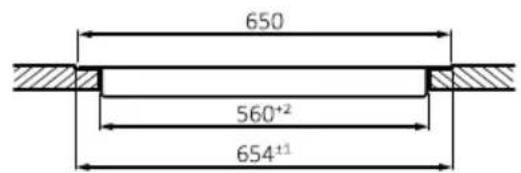
Section AA'
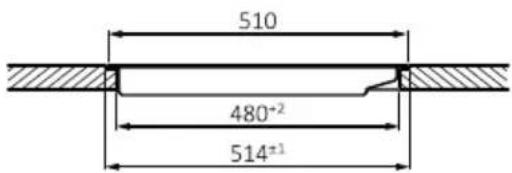
Section BB'
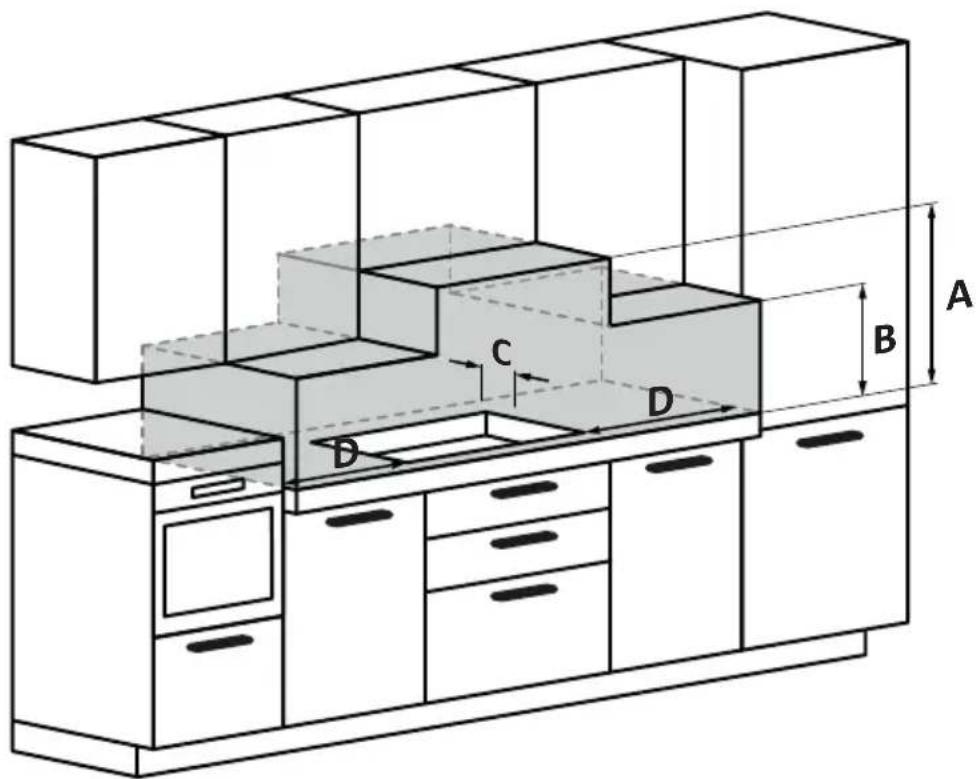
A: We recommend a distance of at least 650mm, but it is preferable to consult the hood user manual;
B: Consider providing a functional space for handling kitchen tools and any steam and condensation produced during food preparation;
C: 35 mm from the recessed hole to the backrest/backrest panel;
D: 35 mm from adjacent furniture (for 60 cm hob);
D: 55 mm from adjacent furniture (for 65 cm hob).
natural_image
Simple line drawing of a frying pan with a handle and checkmark icon (no text or symbols)natural_image
Two 3D-rendered objects: a circular fan with radial blades and a flat plate, both without any text or symbols.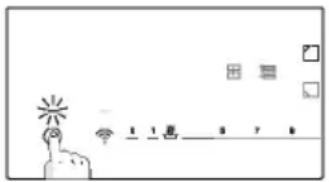
88 SÉLECTIONNER LA ZONE DE CUISSON ET RÉGLER LA PUISSANCE



natural_image
Simple line drawing of a spatula (no text or symbols)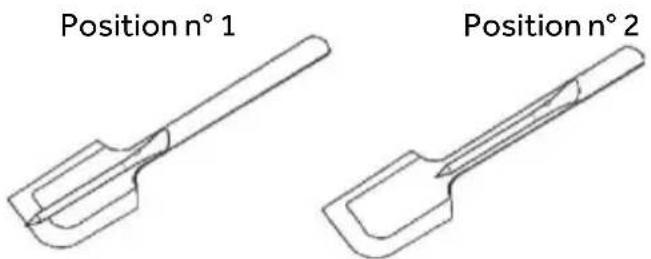
natural_image
Simple line drawing of a trash bin with crossed lines indicating no waste or discharge (no text or symbols)natural_image
Simple line drawing of a blank diamond shape with no text or symbolsnatural_image
Simple line drawing of a frying pan with a handle and checkmark icon (no text or symbols)natural_image
Two 3D-rendered objects: a fan with radial blades and a circular base, both without any text or symbols.88 WYBIERZ STREFĘ GOTOWANIA I USTAW MOC




natural_image
Simple line drawing of a spatula (no text or symbols)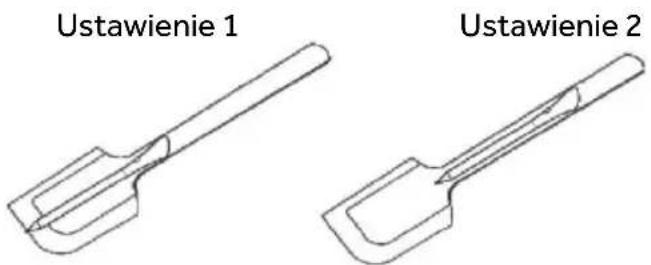
natural_image
Simple line drawing of a trash bin with two crossed lines indicating no waste or prohibition (no text or symbols)natural_image
Simple line drawing of a tilted square frame (no text or symbols)SEKCJE - SZEROKOŚĆ 60 i 65
SFISNSNNDNNN Supernova Ums
70041098-22/01/2024
- WELCOME
- GENERAL WARNINGS
- Use Limitations
- Use in Accordance With The Intended Use
- INSTALLATION
- ELECTRICAL WARNINGS
- USE & MANTEINANCE
- WARNINGS Wireless Temperature Probe
- PRODUCT INTRODUCTION
- TOP VIEW OF THE PRODUCT
- CONTROL PANEL
- BEFORE STARTING
- GENERAL INFORMATIONS
- For this reason:
- POWER MANAGEMENT
- How to set the power management
- To enter Power Managemet Function:
- To switch to another level
- Confirmation and Exit Power Management Function
- CHOOSING THE RIGHT COOKWARE
- Characteristics of the cookware
- Magnet test
- Higher quality cookwares
- Dimension & placement
- OPERATION OF PRODUCT
- HOW THE PRODUCT WORKS
- SWITCHING ON/OFF THE HOB
- SELECT THE COOKING ZONE AND SET THE POWER
- || PAUSE
- TIMER
- KEY LOCK
- SPECIAL FUNCTIONS
- Direct access:
- Accessible by the slider:
- FULL ZONE
- VARYCOOK ZONE
- CONNECT TO hOn APP
- NOTE
- New User Registration
- Quick Pair Enrollment
- WIRELESS PARAMETERS
- PRECI PROBE MODEL Et180 WIRELESS PARAMETERS:
- ACCESSORIES
- PRECI PROBE & LADLE-Intelligent Wireless Food Thermometer (available depending on the model)
- CHARGE THE PRECIPROBE BEFORE USING:
- PAIR THE PRECI PROBE WITH THE INDUCTION HOB:
- LADLE
- COOKING PREPARATIONS WITH THE APP
- Preci Probe as thermometer
- Assisted Cooking: "Cook with me" function
- Sous Vide
- Grill
- Simmering
- Steaming
- POWER TABLE
- COOKING TABLE
- CARE & CLEANING
- GENERAL RACCOM ANDATIONS
- CLEANING THE HOB
- a) FATTY SOIL
- b) SUGARY SOIL
- c) STARCHY SOIL
- d) SHINY METALLIC DISCOLORATION
- FAILURE DISPLAY & INSPECTION
- ERROR CODES
- ENVIRONMENTAL PROTECTION & DISPOSAL
- SAVING AND RESPECTING THE ENVIROMENT
- WASTE MANAGEMENT AND ENVIRONMENTAL
- PROTECTION
- INSTALLATION
- Electrical installation
- Tools
- SECTIONS - WIDTH 60 and 65
- HOB 65 cm
- SÉLECTIONNER LA ZONE DE CUISSON ET RÉGLER LA PUISSANCE
- WYBIERZ STREFĘ GOTOWANIA I USTAW MOC
Brand : ROSIERES
Model : RIF63DSCCS
Category : Cooker