ACB09W24A - Air Conditioning Fuave - Free user manual and instructions
Find the device manual for free ACB09W24A Fuave in PDF.


User questions about ACB09W24A Fuave
0 question about this device. Answer the ones you know or ask your own.
Ask a new question about this device
Download the instructions for your Air Conditioning in PDF format for free! Find your manual ACB09W24A - Fuave and take your electronic device back in hand. On this page are published all the documents necessary for the use of your device. ACB09W24A by Fuave.
USER MANUAL ACB09W24A Fuave
natural_image
Technical line drawing of a white air conditioner unit with a grid vent and mounting feet (no text or symbols)AIRCO
AIR CONDITIONING
KLIMAANLAGE
CLIMATISEUR
Gebruiksaanwijzing
User manual
24
Benutzerinformation
Type of refrigerant:
R290, 120g
Net weight:
22kg
Dimensions:
31×31×64cm
B0000
Fuave is a registered
trademark of Coolblue B.V.
Weena 664
3012CN, Rotterdam
The Netherlands
Made in China



FUAVE
FUAVE ACB09W24A (WHITE)
Product ID:
941116
Power supply:
220-240V\~50Hz
Rated power:
950W
BTU/hour:
9000BTU
Air displacement:
270m3/h
Decibels:
65dB
Type of refrigerant:
R290, 120g
Net weight:
22kg
Dimensions:
31×31×64cm
Fuave is a registered
trademark of Coolblue B.V.
Weena 664
3012CN, Rotterdam
The Netherlands
Made in China



Inhoudsopgave
Voorwoord
4
1. Veiligheid 5
text_image
Diagram of an air conditioner unit with numbered parts labeled for identification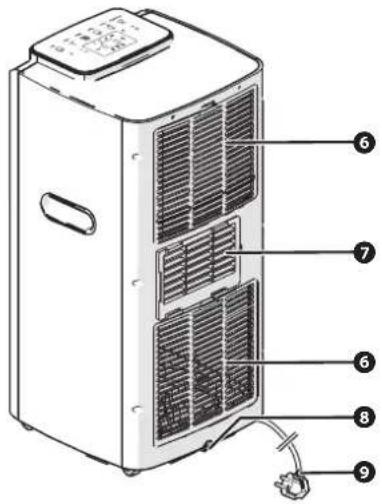
text_image
Technical diagram of a refrigerant air conditioner unit with numbered components labeled 6, 7, 8, and 9.text_image
Diagram showing six labeled parts of a mobile phone and cable assembly, including coiled tube, container, and handheld device.natural_image
3D illustration of a coiled cylindrical pipe with flanged ends and directional arrows indicating flow or movement (no text or symbols)natural_image
Diagram of a coiled tube with a flanged side, showing internal structure and directional arrows (no text or symbols)natural_image
Line drawing of a portable air conditioner unit with coiled tubing and ventilation slots (no text or symbols)natural_image
Diagram of a coiled hose with a curved arrow indicating rotation or movement (no text or symbols)natural_image
Two line drawings of a remote control device with arrows indicating movement or change (no text or symbols)text_image
Diagram of a mobile device control panel with numbered labels pointing to function keys like +, -, and navigation buttons.natural_image
Line drawing of a multi-chamber electric heater unit with ventilation grilles and heat sinks (no text or symbols)natural_image
Diagram of a grid-patterned panel or panel with an arrow indicating a directional change (no text or symbols present)natural_image
Diagram of a grid-patterned panel with an arrow pointing to its side (no text or symbols present)natural_image
Line drawing of a multi-tiered server or rack unit with ventilation grilles and heat sinks (no text or symbols)1.1. Safety warnings and regulations 26
1.2. Safety instruction: Installation 27
1.3. Safety instruction: Use 27
1.4. Safety instruction: Batteries 29
1.5. Safety instruction: Electrical safety 29
1.6. Safety instruction: Repairs 30
1.7. Explanation of graphic symbols on the product and packaging 31
2. Product features
32
2.1. System overview 32
2.2. Technical data 32
2.3. Warranty 32
3. Installation
33
3.1. Important information 33
3.2. Unpacking the appliance 33
3.3. Installing the appliance 34
4. Use
36
4.1. Important information 36
4.2. To effectively use the appliance 36
4.3. Main control components 37
4.4. Switching the appliance on and off 37
4.5. Use of the functions 38
4.6. Water drainage 39
4.7. Instructions in case of knocking the appliance over 40
5. Cleaning and maintenance
40
5.1. Important information 40
5.2. Cleaning the housing 40
5.3. Cleaning the air filter 41
6. Faults and solutions
42
6.1. Troubleshooting 42
6.2. Error messages on the display 43
6.3. Overheating protection 43
7. Taking out of service 44
[Non-Text]
8. Safe disposal
44
8.1. Dispose of the appliance as waste 44
8.2. Disposal of the packaging material as waste 44
8.3. Dispose of the batteries as waste 44
Foreword
About this document
• This manual contains all information for the correct, efficient and safe use of the appliance.
• This manual is intended for the end user and/or buyer of this appliance.
• Installation of the appliance, use and all cleaning and maintenance activities as described in the instructions may be carried out by the end user, unless clearly indicated to the contrary.
- Make sure you have read and understood the instructions in this manual completely before installing or using the appliance. This prevents fire, explosions, electric shocks and/or other hazards that may result in physical injury and/or material damage.
- Please retain this document for future use as long as you use and/or own the appliance and pass it on to subsequent users of the appliance.
- Coolblue B.V. cannot in any way be held liable for material or immaterial damage to you or to others, the appliance, your other belongings or belongings of others caused by not following the instructions in this manual. The warnings and safety instructions in this manual do not cover all possible circumstances and situations.
- The Fuave air conditioning is also called appliance in this manual.
- If you contact our customer service, make sure you have the model number ready. The information can be found on the type plate or on the front of this manual.
• You can also find the latest version of this manual online, at www.coolblue.nl/en if you search by item number.
Original instructions
This user manual was originally written in Dutch. All other languages are translated documents. In case of translation errors, the Dutch version shall prevail.
Used symbols
| SYMBOL DESCRIPTION | |
 DANGER! DANGER! | Indicates fire hazard and/or flammable materials. |
 WARNING! WARNING! | Indicates a hazardous situation which, if not avoided, could result in serious immaterial damage to you or others. |
 | Indicates a hazardous situation which, if not avoided, could result in light immaterial damage to you or others. |
 | Indicates a situation related to material damage. |
 | Indicates useful, additional information. |
Copyright
The data depicted in this manual, including texts, photographs, graphic drawings, trademarks, (trade) names and logos, are the property of Coolblue B.V. and are protected by copyright, trademark law and/or any other intellectual property right, unless these data belong to a third party. You are never allowed to reproduce, transfer, distribute, store or make the contents of the manual available to third parties, in whole or in part, without the prior written consent of Coolblue B.V. and/or the third party to whom the data belong.
Compliance
ACB09B24A
Coolblue B.V. hereby declares that the appliance complies with Regulation (EU) 206/2012. The full text of the EU declaration of conformity can be consulted at: www.coolblue.nl/product/941117
ACB09W24A
Coolblue B.V. hereby declares that the appliance complies with Regulation (EU) 206/2012. The full text of the EU declaration of conformity can be consulted at: www.coolblue.nl/product/941116
Contact details
Fuave is a registered brand of Coolblue B.V.
Customer service can be reached at: www.coolblue.nl/en/customer-service
Coolblue B.V.
Weena 664
3012 CN Rotterdam
The Netherlands
Made in China
1. Safety
Read this manual and safety instructions carefully and make sure you understand the contents before using the appliance with the appropriate parts. Failure to comply with all instructions can cause material damage and/or serious injury.
1.1. Safety warnings and regulations

DANGER!
- Danger of entrapment due to tilting the appliance. This appliance may be used by children from eight years of age and above and by persons with reduced physical, sensory or mental capabilities or lack of experience and knowledge, provided that they are under supervision or have been trained in the safe use of the appliance and that they understand the associated dangers.
- Danger of entrapment due to tilting the appliance. This appliance and its components are not toys, so children should not play with the appliance or its components.

WARNING!
- Fire hazard due to highly flammable materials. The appliance must be stored in a room free of naked flames, gas-powered appliances or electric heaters.
- Risk of suffocation. Children, legally incompetent persons and domestic animals must be supervised while using the appliance. The appliance contains small parts. Children must be supervised to ensure that they do not play with the appliance.
- Risk of suffocation. Keep packaging materials out of reach of children. Packaging materials are not toys.
Electrocution hazard due to short circuit.
- This appliance is only suitable for domestic use or similar environments.
- This appliance is for indoor use only. This appliance should not be used outdoors.
• Cleaning and user maintenance must not be carried out by children without supervision.

- Risk of injury from lifting heavy objects. The maximum permitted load that may be carried by one person is 25 kg. Therefore, always lift the appliance with two people.

Risk of damage to the device.
- This appliance must not be used by children under 8 years of age.
- This appliance should only be used to cool, heat, dehumidify a room or as a fan.
- The appliance must be stored in such a way so as to prevent mechanical failure.
- Ensure that the appliance is upright at all times, including during transport. If the appliance is still (partly) horizontal or tilted more than 35^ , wait two hours before use. The compressor needs that time to be able to operate properly.
- Store the appliance out of reach of unauthorised persons and do not allow anyone unfamiliar with the appliance and these instructions to use it.
1.2. Safety instruction: Installation

DANGER!
- Fire hazard due to short circuit. Install the appliance in accordance with the installation instructions. Incorrect installation can cause water leakage, electric shocks, fire and/or property damage.
- Fire hazard due to short circuit. Ensure that the plug and socket are clearly visible and accessible at all times.

Risk of damage to the appliance. Use only the accessories provided for the installation.
1.3. Safety instruction: Use
1.3.1. Safety of persons

DANGER!
- Explosion hazard due to flammable substances. When the appliance is installed, used or stored in a non-ventilated room, the room must be designed in such a way as to prevent the accumulation of leaked refrigerant. This can lead to a risk of fire or an explosion due to the ignition of the refrigerant, caused by electric heaters, furnaces or other sources of ignition. Please note that refrigerant can be odourless.
- Explosion hazard due to flammable substances. The closed cooling system of this appliance contains a quantity of the R290 refrigerant. R290 is a refrigerant that complies with European environmental regulations. Do not use any other refrigerants.

WARNING!
- Always be alert and act with caution. Do not use electrical appliances if you suffer from impaired concentration or lack of awareness, or if you are under the influence of drugs, alcohol or medication. Even the slightest distraction can lead to serious accidents and injuries when using electrical appliances.
- Always operate and use the appliance as described in these instructions for use. Assume that anything not specified here is also not possible.
- Risk of suffocation. This appliance must not be used or stored in rooms smaller than 15m^2 .
1.3.2. Safety in use

DANGER!
- Danger of entrapment due to tilting the appliance. The appliance is fitted with wheels for easy relocation. Do not place the appliance on a deep pile carpet or roll it over objects, to avoid tipping.
Explosion hazard due to flammable materials.
- Always ensure sufficient ventilation during use. Without sufficient ventilation, negative pressure is created in an airtight room with a working local air conditioner. Negative pressure can disrupt the safe operation of water-heating appliances, extraction hoods, mechanical ventilation systems, ovens, fireplaces and gas heaters. Exhaust gases, odours and the like normally discharged externally by these appliances may (partly) enter the space due to negative pressure.
- A mobile air conditioner needs air to dissipate the heat externally. Therefore, never use a mobile air conditioner in an airtight room.
- Do not use the appliance in the vicinity (at least one metre away) of highly flammable or explosive substances or fuels.
- Never expose the appliance to a naked flame.
Fire hazard due to overheating.
- Do not use the appliance close to a fire source, close to splashing oil, direct sunlight or splashing water.
- Unplug the appliance if you hear strange noises, smell an odour or see smoke.
- Do not place objects on the appliance and never cover the appliance. Never block the grilles for incoming and outgoing air, not even partially. This can cause fire!

WARNING!
Electrocution hazard due to short circuit.
- Do not use the appliance in damp or wet environments, such as the bathroom and laundry area, or near a bath, shower or pool.
- Do not spill water, oil or any liquid on or in the appliance.
- Do not pour water or other liquids over the appliance.
- Do not operate the appliance if you notice damage to the appliance, the power cable or the plug, or if does not work properly, has fallen or otherwise malfunctions. Contact customer service for further information (see Foreword for contact details).
• Empty the water reservoir before moving the appliance to prevent leaks. - Do not insert fingers or objects such as pens through the grilles in the appliance and especially warn children of these dangers.
- If the appliance is not in use, or when cleaning it, carrying out maintenance or moving it, first switch it off and then remove the plug from the socket.
Risk of damage to the device.
- Follow the maintenance instructions for trouble-free use and long service life.
- Do not expose the appliance to direct sunlight to avoid discolouration of the housing.
- Do not use paint, cleaning sprays, anti-insect sprays, etc. on or near the appliance. This may cause deformation of the housing or electrical damage.
• Always move and/or relocate the appliance calmly. - Do not climb, sit or stand on the appliance.
- Keep an eye on the appliance for 30 minutes after it is switched on again following a shutdown due to the activation of the overheating protection. If the appliance shows malfunctions or reactivates the overheating protection, contact customer service.
1.4. Safety instruction: Batteries

DANGER!
Risk of fire and explosion. Do not short-circuit batteries and do not immerse them in liquids. This causes a risk of explosion, fire, heat, smoke and/or gas development.
Fire hazard due to short circuit.
- Different types of batteries or new and used batteries may not be used together.
- Clean the battery contacts and also those of the appliance before installing the battery.
- If the battery has accidentally fallen into the water, remove it immediately. Put the battery in a safe, open spot and stay away from it until it is completely dry. Do not reuse the dried battery, but dispose of it as instructed in Dispose of the batteries as waste.
Risk of chemical combustion.
- Keep batteries out of reach of children. Ingestion of batteries can lead to chemical burns, soft tissue perforation and severe burns. Serious burns may occur within two hours after ingestion. Seek immediate medical attention if you suspect a battery has been swallowed.
- Dispose of used batteries immediately. Keep new and used batteries away from children. If you think that batteries have been swallowed or placed in a part of the body, you must seek medical attention immediately.
- Remove leaking, deformed or corroded batteries from the product and dispose of them properly with appropriate protective equipment. If a battery is leaking: avoid contact with skin, eyes and mucous membranes. If necessary, rinse affected areas with water and seek immediate medical attention.
- Depleted batteries should be immediately removed from the appliance and disposed of properly. Depleted batteries can corrode, releasing chemicals that damage your health and the appliance. If you do not use it for a long time, remove the batteries from the appliance to prevent them from leaking.
- Do not deform, burn or disassemble batteries and never drill with a sharp object. Extreme heat can lead to explosion and/or leakage of corrosive fluid. Mechanical damage can result in the release of gaseous substances, which can be highly irritating, flammable or toxic.
- Do not allow children to replace batteries without adult supervision.

Risk of damage to the device.
- Never use batteries if they are dented, leaking or damaged.
- When installing the batteries, pay attention to the correct polarity. The orientation of the positive (+) and negative (−) terminals of the battery must correspond to the + and − on the battery compartment.
- Store unused batteries in their original packaging, away from metal objects. If already unpacked, do not mix batteries.
1.5. Safety instruction: Electrical safety

DANGER!
Fire hazard.
- To prevent hazards due to accidental resetting of the thermal protection, this appliance must not be powered via an external switching device, such as a timer, or connected to a circuit that is regularly switched on and off by the energy supplier.
- Only connect the appliance to a fixed power socket. Do not use a plug adapter, junction box or table socket etc.
- Avoid using extension cables as much as possible. If this is unavoidable, use a cord with sufficient capacity (at least 3 × 1.5 ~mm^2 ) and make sure the extension cable is not placed in a passageway, to avoid tripping.
- Before use, check that the socket you want to use has no defects, and an earth leakage circuit breaker is connected in accordance with the legal regulations. If this is not clear, contact a qualified electrician.
- Before use, check that the voltage on the socket you want to use matches that on the type plate of the appliance (220-240 V; 50 Hz). Damage caused by faulty voltage is not covered by the guarantee.
- Fully unroll the appliance's power cable before plugging it into the socket. This is to prevent heat generation in the cable.
- Do not pass the power cable under a carpet or cover it with mats, runners and the like. This can lead to unforeseen heat generation.
- Regularly check the appliance for damage to the power cable and plug. If there is visible damage, a strong smell, or parts become excessively hot, stop using it immediately and remove the plug from the socket.

WARNING!
Electrocution hazard due to short circuit.
- If there are any questions regarding the instructions for electrical safety, contact a qualified electrician.
- The appliance, plug and/or cable must be repaired and/or replaced by an electrician or an equivalent qualified person. Repairs by amateurs invalidate the guarantee and can cause dangerous situations!
- Only use the appliance's factory-fitted plug and never change it. The plug must match the type of socket used to reduce the risk of electric shocks.
- Do not remove the earth contacts from the plug.
- Never pull the power cable to carry or move the appliance or to disconnect the plug. Keep the power cable away from heat, oil, sharp edges and moving parts. Do not make any changes to the power cable or submerge it in water or other liquids. Do not turn or kink the power cable, do not roll up the power cable too tightly after use and do not wind it up around the appliance; this may damage the insulation layer! Damaged or tangled power cables increase the risk of electric shocks.
- Do not touch the appliance, plug or mains cable with wet or damp hands.
- Do not perform any repairs to the appliance that are not described in this manual. The appliance may only be repaired by an authorised service technician.
1.6. Safety instruction: Repairs

WARNING!
- Risk of burns. Wait until all hot parts of the appliance have cooled down before starting cleaning and maintenance.
- Cutting hazard. Take care when changing the filters. The parts can be sharp.
Electrocution hazard due to short circuit.
- It is not permitted to open, change or repair the appliance yourself. Do not drill holes into the appliance anywhere to avoid dangerous situations. The appliance, plug and/or cable must be repaired and/or replaced by an electrician or an equivalent qualified person. Repairs by amateurs invalidate the guarantee and can cause dangerous situations!
- Repairs and maintenance to the closed cooling system and all other possible work on the appliance not described in this manual may not be carried out by the end user. Contact customer service for further information. See Foreword for contact details.
- Never spray the appliance and make sure no water gets into it.
• Cleaning and user maintenance must not be carried out by children without supervision. - Before cleaning and maintenance, switch off the appliance with the on/off button and remove the plug from the socket. Insert the plug into the plug holder so that it is not accidentally plugged into the socket during the work.

- Risk of damage to the appliance. Never use aggressive or abrasive cleaners, gasoline, detergents, chemically impregnated wipes or other cleaning solutions. These can damage the housing and appliance.
- Risk of damage to the appliance. Carry out cleaning and maintenance as indicated. This extends the life of the appliance and will keep it working properly.
1.7. Explanation of graphic symbols on the product and packaging
SYMBOL MEANING
 | Indicates that this appliance requires maintenance and that the instructions for use must be consulted. |
 | Indicates that the instructions for use must be read carefully before continuing to use the appliance. |
 | This symbol on the appliance, accessories or packaging indicates that this appliance must not be disposed of with ordinary household waste but must be returned to a collection point. |
 | This symbol indicates that the appliance must not be lifted by one person alone. |
 | This symbol indicates whether packaging is (partly) recyclable. |
 | This symbol indicates that expanded polystyrene packaging material has been used. |
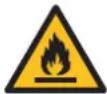 | Warns of fire hazard due to flammable material.This appliance contains a flammable refrigerant. If the refrigerant leaks and is exposed to an external source of ignition, there is a risk of fire. |
2. Product features
2.1. System overview
This appliance works with a compressor, an evaporator, refrigerant and fans to cool or dehumidify a room and can also be used as a fan.
For cooling and dehumidification, air is sucked into the back of the appliance and passed through an air filter. The air filter needs regular maintenance.
The refrigerant is pumped in a closed system between the compressor and the evaporator to extract heat or moisture from the air in the room. The cooled or dry air is then blown back into room by the fan through the air outlet at the top of the appliance. The hot air produced in this process is directed out via the hot air outlet located at the rear of the appliance, and the corresponding air outlet duct that needs to be attached to it.
During the operation, appliance produces condensate water that is collected in the water tank. This tank must be emptied in good time.
2.2. Technical data
The technical data are also indicated on the type plate on the appliance (also printed on page 2).
| Article number ACB09W24A ACB09B24A | ||
| Dimensions (l x w x h) 31 × 31 × 64 cm 31 × 31 × 64 cm | ||
| Weight 22 kg 22 kg | ||
| Power supply 220 – 240V ~ 50Hz | 220 – 240V ~ 50Hz | |
| Power | 950 W | 950 W |
| Energy class | A | A |
| Colour | White Black | |
| Cord length | 1.8 m | 1.8 m |
| Length of discharge hose | 1.5 m | 1.5 m |
| Diameter of discharge hose | 10 cm | 10 cm |
| Maximum cooling power | 9000 BTU | 9000 BTU |
| Maximum area | 17 - 26 m^2 | 17 - 26 m^2 |
| Maximum space | 37 m^3 | 37 m^3 |
| Airflow 270 m | ^3/h | 270 m^3/h |
| Type of refrigerant | R290 | R290 |
| Weight of refrigerant | 120 g | 120 g |
| Maximum noise level | 65 dB | 65 dB |
| Battery type remote control | AAA batteries 1.5 V (2x) (not included) | AAA batteries 1.5 V (2x) (not included) |
2.3. Warranty
This appliance comes with a guarantee period of two years after purchase. For more information on guarantee conditions, please visit www.coolblue.nl/en/customer-service. In any case, you must have the proof of purchase with purchase and/or delivery date in order to be able to claim the guarantee.
3. Installation
3.1. Important information
Read and follow all the instructions in section 1. Safety.
- Risk of damage to the device. Ensure that the appliance is upright at all times, including during transport. If the appliance is still (partly) horizontal or tilted more than 35^ , wait two hours before use. The compressor needs that time to be able to operate properly.
3.2. Unpacking the appliance

WARNING!
- Risk of suffocation. Keep packaging materials out of reach of children. Packaging materials are not toys.
- Remove all packaging material and any transport attachments present (e.g. tape, tie-wraps, cable ties and protective film).
- Check that all parts are present and that there is no damage to the appliance or accessories.
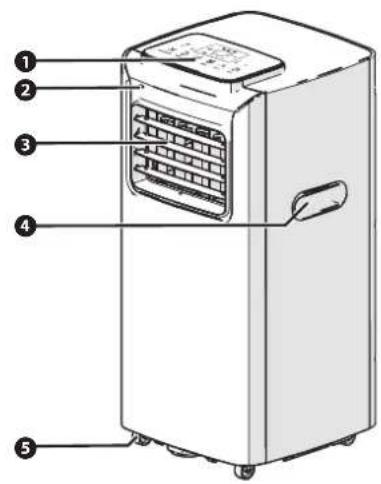
Parts of the appliance
text_image
Diagram of an air conditioner unit with numbered labels pointing to the front panel.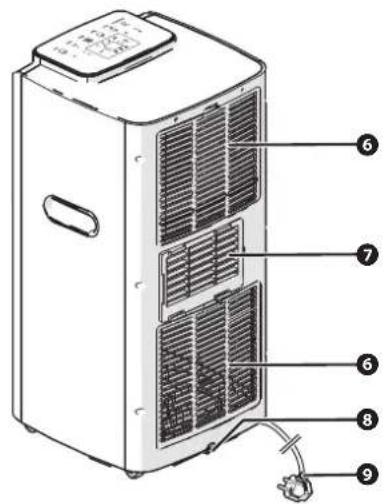
text_image
Technical diagram of a refrigerant unit with numbered components for identification① Operating panel
② Remote control signal receiver
3 Air outlet
4 Handle
⑤ Wheels
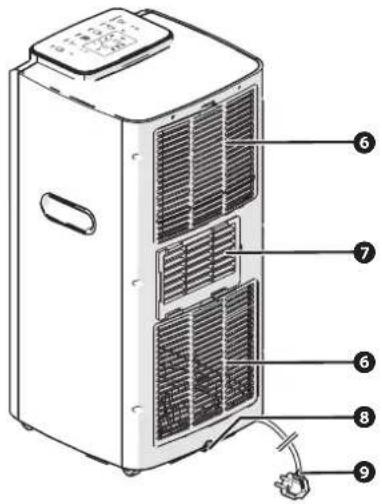
6 Air intake with cover plate and air filter
⑦ Hot air outlet and attachment for the air outlet duct
8 Main drain
9 Power cord
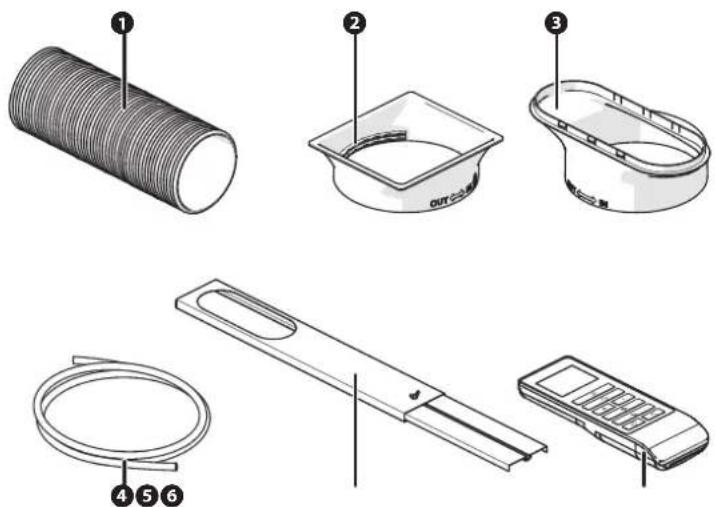
Accessories
text_image
Diagram showing six labeled parts of a cleaning or assembly device, including a coiled tube, plastic cup, and remote control.① Air outlet duct
2 Connector
3 Adapter
4 Water drainage hose
⑤ Window seal set
6 Remote control
3.3. Installing the appliance
3.3.1. Requirements on the location of installation
Place the appliance at a location that satisfies the following conditions:
• A firm, flat, stable, heat- and moisture-resistant surface with a maximum angle of inclination of 5^ .
- At least 45 cm of free space at the top of the appliance.
• A socket within 150 cm.
• A socket within 180 cm.
- Not in direct sunlight
- Not directly next to heat sources, such as heaters or stoves.
- At least one metre from televisions or radios to prevent electromechanical interference.
3.3.2. Installing the appliance
Install the air outlet duct to the appliance to vent the hot air outwards. You can choose from the following options:
• The window seal set.
- Leave the air outlet duct hanging out of the window. This option is less efficient.
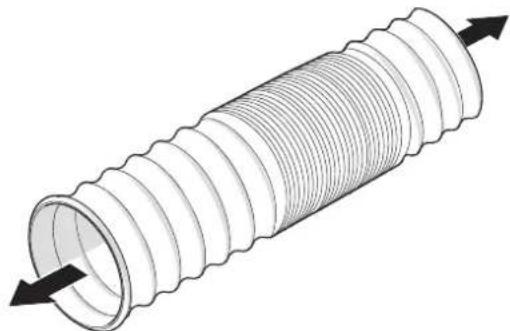
natural_image
3D illustration of a coiled pipe with directional arrows indicating flow or movement (no text or symbols)- Extend the air outlet duct by pulling out both sides.
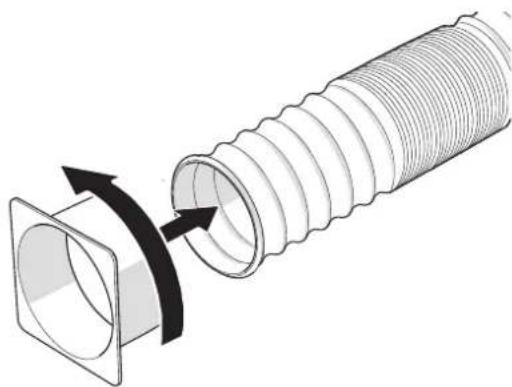
natural_image
Diagram of a coiled hose with a flanged side, showing internal threading and a curved arrow indicating rotation (no text or symbols)- Screw the connector to one end of the air outlet duct.
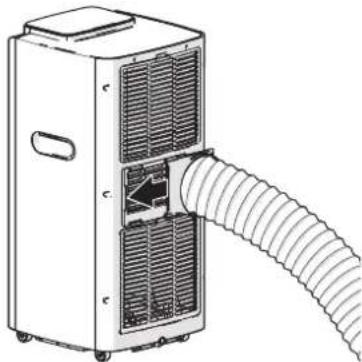
natural_image
Line drawing of a portable air conditioner unit with coiled tubing and ventilation slots (no text or symbols)-
Slide the hot air outlet connector. You will hear a click when the connector is securely in place.
-
Without window seal set: Hang the air outlet duct out of the window and go to step 7..
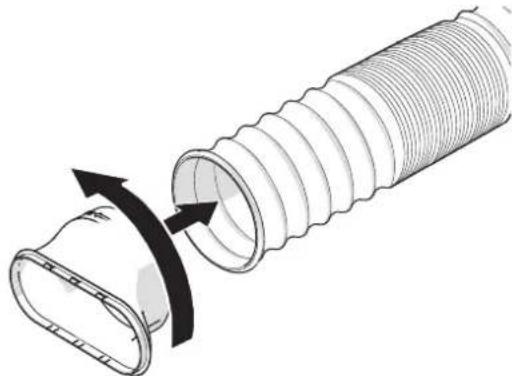
natural_image
Diagram of a pipe assembly with a curved pipe opening and directional arrows indicating flow (no text or symbols)-
Installing the window seal set: Screw the adapter to the other end of the air outlet duct.
-
Follow the instructions in the window seal set manual to install the window seal set.
-
Shortens the length of the air outlet duct by pushing both sides inwards for greater efficiency.

Avoid kinks or bends in the air outlet duct. Kinks in the air outlet duct can cause leakage and overheating.
- Plug the power cable into a wall socket.
There is a sound signal. The ON/OFF indicator lights up. The appliance is in standby mode.
3.3.3. Preparing the remote control for use

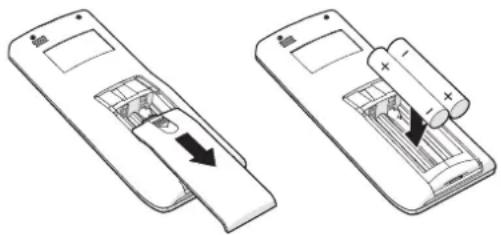
Risk of damage to the appliance. When installing the batteries, pay attention to the correct polarity. The orientation of the positive (+) and negative (−) terminals of the battery must correspond to the + and − on the battery compartment.
natural_image
Two diagrams showing a remote control panel with battery and battery stack, no text or symbols present- Slide the battery cover of the remote control.
- Place the batteries in the battery compartment.
- Slide the battery cover back onto the remote control.
4. Use
4.1. Important information
- Read and follow all the instructions in section 1. Safety.
- Do not use the appliance until installed as instructed!
- Do not leave a working appliance unattended, even for a moment!
- Remember your burglary prevention! After all, the window is open when using the appliance.
4.2. To effectively use the appliance
The maximum area that this appliance can effectively cool is influenced by various factors.
The following factors may limit the cooling capacity of the appliance, thus reducing the area it can cool:
• a high outside temperature
• direct sunlight in the room
• the presence of many and/or large windows
- a flat roof
• the presence of many people in the room
• the presence of numerous electrical equipment in the room
• insulation of the room
When these factors are less prevalent (so-called low heat loads), the appliance can cool a larger area; conversely, when these factors are more pronounced (so-called high heat loads), the cooling capacity of the appliance is reduced, limiting the area it can cool.
To use the appliance as effectively as possible:
- Do not place the appliance near a heat source or in direct sunlight.
- Close doors and windows and keep curtains or shutters closed during the sunniest hours of the day.
- Keep the filters clean.
• Moderate the temperature setting when the room has reached the desired conditions.
4.3. Main control components
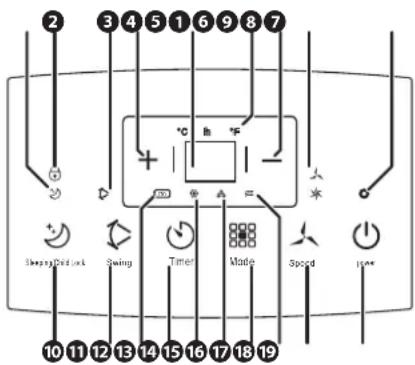
The control panel
text_image
2 3 4 5 1 6 9 8 7 + - + - Sleep/Comfort Swing Timer Made Speed 10 11 12 13 14 15 16 17 18 19① Sleep mode indicator
② Child lock indicator
3 Oscillation indicator
4 Plus button
5 LCD display
6 Temperature indicators
7 Minus button
8 Fan speed indicators
9 On/Off indicator
10 Sleep mode/child lock button
11 Oscillation button
12 Smart function indicator
13 Timer
14 Cooling function indicator
15 Dehumidification Indicator
16 Function button
17 Fan function indicator
18 Fan speed button
19 On/Off switch
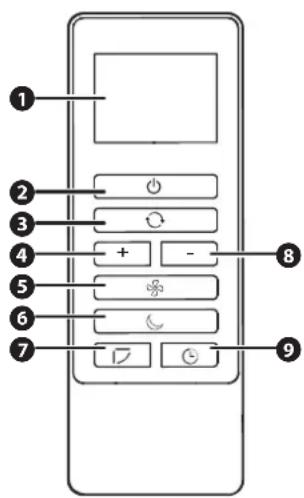
The remote control
text_image
Diagram of a mobile device control panel with numbered labels pointing to function keys like +, -, and navigation buttons.① LCD display
② On/Off switch
3 Function button
4 Plus button
5 Fan speed button
6 Sleep mode/child lock button
⑦ Oscillation button
8 Minus button
9 Timer
4.4. Switching the appliance on and off
Turning on the appliance
Press the on/off button to turn on the appliance.
The LCD display shows the room temperature.
The appliance switches on at the first use to the automatic function.
After the first time, the appliance will always power on with the same settings as when it was last turned off.
Turning off the appliance
- Press the on/off button to turn off the appliance.
The on/off indicator and the LCD screen go off. - Remove the mains plug from the socket.
4.5. Use of the functions
The functions in the table below can be selected with both the control panel and the remote control.
BUTTON DESCRIPTION
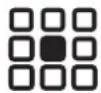
Press the function button several times to select the desired function.
The function indicator of the chosen function lights up:
- Smart function indicator
• Cooling function indicator
• Dehumidification Indicator - Fan function indicator
Cooling function
The cooling function cools and dehumidifies the room.
- Set the desired temperature between 15^ C and 31^ C with the plus and minus buttons.
- Select the desired fan speed using the fan speed button.

It is recommended not to set the temperature below the outside temperature.
Fan function
The fan function will ventilate the room. The air outlet duct does not need to be connected for this function.
Select the desired fan speed using the fan speed button.
Dehumidification function
The dehumidification function dehumidifies the room. The fan speed and temperature cannot be adjusted in this function.
Smart function
The smart function switches between the cooling function and the fan function. The fan speed and temperature cannot be adjusted in this function.
- The fan function is activated when room temperature is below 24^ .
• The cooling function is activated when the room temperature is above 24 °C.
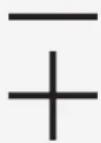
Press the plus or minus button to set the temperature or timer time.
Press and hold the plus and minus buttons for three seconds to adjust the temperature unit.

Press the fan speed button several times to select the desired fan speed.
The fan function indicator of the chosen fan speed lights up.
| BUTTON DESCRIPTION | |
 | You can use the timer function in two ways: to turn the appliance on or off over time.Turn the appliance on.Select the desired function using the function button.Select the desired temperature and fan speed.Only for setting the timer to turn the appliance on: Press the on/off button to turn off the appliance.Press the timer button to set the timer. The timer indicator and the number of hours on the LCD screen will flash.Press the plus and minus buttons to set the time. The LCD screen displays the time in hours.Wait five seconds. The timer indicator stops flashing and lights up. The timer is now activated.NOTEPress the timer button or the on/off button to cancel the timer. |
 | Sleep functionPress the sleep mode button to activate the sleep function. The sleep mode indicator on the appliance lights up, the brightness of the LCD screen is lowered and the fan speed is set to the lowest position.The sleep function can only be activated if the cooling function is active.Progress of the cooling function with sleep mode function activated:After 1 hour: The temperature increases by 1 °C.After 2 hours: The temperature increases by 2 °C.After 6 hours: The appliance will automatically switch off.NOTEPress the sleep mode/child lock button to cancel the sleep function.Child lockWhen the child lock is switched on, the functions of the other buttons are locked. Press and hold the sleep mode/child lock button for three seconds to switch the child lock on or off. The child lock indicator lights up when the child lock is switched on. |
 | Press the oscillation button to automatically move the air outlet louvres up and down or to turn off the oscillation. |
4.6. Water drainage
There are two ways to drain the condensate water in the appliance:
- Manually emptying the water tank;
- Constant water drainage with the water drainage hose.
Emptying the water tank
- Press the on/off switch to switch off the device.
Wait three to five minutes for the coolant to reach the correct pressure. - Remove the mains plug from the socket.
- Place a collection tray under the main drain.
- Remove the plug from the main drain.
Water flows from the appliance into the collection tray. Wait until no more water comes out of the appliance. - Put the plug back in the main drain.
Installing the water drain hose
It is advisable to use the water drain hose when a function that dehumidifies the air is selected on the appliance.
- Press the on/off switch to switch off the device.
Wait three to five minutes for the coolant to reach the correct pressure. - Remove the mains plug from the socket.
- Place a collection tray under the main drain.
- Remove the plug from the main drain.
Water can come out of the drain which is collected with the collection tray.
-
Insert one end of the water drain hose into the main drain.
-
Place the other end of the water drain hose in a soil drain or bucket. Make sure that the entire length of the water drain hose is positioned below the level of the water drain to which it is connected, so that the water can be drained properly.
4.7. Instructions in case of knocking the appliance over

WARNING!
Electrocution hazard due to short circuit. Do not touch the appliance, plug or mains cable with wet or damp hands.
If the appliance falls over during use, do the following:
- Press the on/off switch to switch off the device.
- Remove the mains plug from the socket.
- Place the appliance in an upright position.
- Inspect the appliance carefully to verify whether it is damaged.
• If the appliance has no damage: Wait two hours before using the appliance again.
• If you suspect that the appliance has been damaged: Please contact customer service.
5. Cleaning and maintenance
5.1. Important information
Carry out cleaning and maintenance as indicated. This extends the life of the appliance and will keep it working properly.

WARNING!
- Electrocution hazard due to short circuit. Cleaning and user maintenance must not be carried out by children without supervision.
- Electrocution hazard due to short circuit. Before cleaning and maintenance, switch off the appliance with the on/off button and remove the plug from the socket. Insert the plug into the plug holder so that it is not accidentally plugged into the socket during the work.
- Risk of burns. Wait until all hot parts of the appliance have cooled down before starting cleaning and maintenance.
5.2. Cleaning the housing

WARNING!
• Electrocution hazard due to short circuit. Never spray the appliance and make sure no water gets into it.

NOTICE!
- Risk of damage to the appliance. Never use aggressive or abrasive cleaners, gasoline, detergents, chemically impregnated wipes or other cleaning solutions. These can damage the housing and appliance.
- Press the on/off switch to switch off the device.
- Remove the mains plug from the socket.
- Use a soft damp cloth to wipe the housing.
- Then wipe the appliance dry with a soft cloth.
5.3. Cleaning the air filter
Clean the filters once a week.
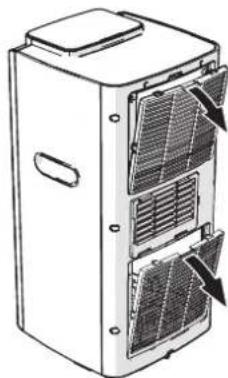
natural_image
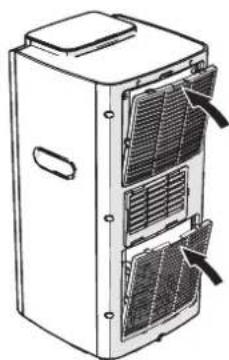
Line drawing of a multi-chamber industrial refrigerator with ventilation grilles and heat sinks (no text or symbols)- Remove the air filter covers from the appliance.
natural_image
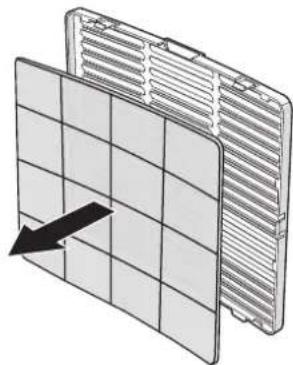
Diagram of a grid-patterned panel or panel with an arrow pointing to one panel (no text or symbols present)-
Remove the air filters from the covers.
-
Clean the air filters with a vacuum cleaner.
-
If necessary, rinse the air filters with hot water (not warmer than 40^ C) if they are very dirty.
-
Allow the air filters to air dry.
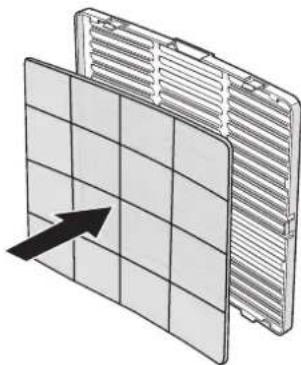
natural_image
Diagram of a grid-patterned panel with an arrow pointing to its side (no text or symbols present)- Put the air filters back into the covers.
natural_image
Line drawing of a multi-tiered server or rack unit with ventilation grilles and heat sinks (no text or symbols)- Click the covers with the air filters into the appliance.
6. Faults and solutions

WARNING!
- Electrocution hazard due to short circuit. Do not perform any repairs to the appliance that are not described in this manual. The appliance may only be repaired by an authorised service technician.
6.1. Troubleshooting
| PROBLEM POSSIBLE CAUSE POSSIBLE SOLUTION | ||
| The appliance refuses to turn on. The power cable is not connected to a power socket. | Plug the power cable into a wall socket. | |
| The power cable is not correctly connected to a power outlet. | ||
| There is no voltage on the socket. Insert the power cable into another power socket. In the event of a faulty socket, please contact an authorised service technician. | ||
| Internal protection is activated. Wait 30 minutes. Press the on/off button to turn on the appliance.If the problem persists and the above solution does not help, please contact Customer Service. | ||
| The batteries in the remote control are empty. | ||
| The appliance works, but for a short time. | There is a kink or large bend in the air outlet duct. | Keep the air outlet duct short and avoid large bends. Large bends can prevent the air from being vented. |
| Something blocks the air outlet. Check the air intake, air outlet and air outlet duct for blockages.Remove any blockades. | ||
| The set temperature is almost the same as the room temperature. | Press the minus button to lower the set temperature. | |
| The appliance works, but it doesn't cool the room. | Windows, doors and/or curtains are open. | Close the windows, doors and/or curtains in the room where the appliance is located. |
| There are heat sources in the room. Switch off the heat sources or remove the heat sources from the room. | ||
| The air outlet duct is not connected to the appliance. | Install the air outlet duct. Follow the instructions in section 3.3.2. Installing the appliance. | |
| The appliance is not suitable for the room. | Check that the appliance is suitable for the number of square metres of space in section 2.2. Technical data. | |
| A bad smell comes out of the appliance. | The air filters are clogged. Clean the air filters. Follow the instructions in section 5.3. Cleaning the air filter. | |
| The appliance will not operate until three minutes after it is switched on. | The internal protection of the compressor slows down the start-up of the appliance by three minutes. | Wait until the appliance is switched on. The three-minute delay is normal. |
6.2. Error messages on the display
| ERROR MESSAGE POSSIBLE CAUSE POSSIBLE SOLUTION | ||
| E2 The room temperature sensor is | damaged. | Please contact customer service. |
| E3 The oil line evaporator sensor is | damaged. | |
| E4 The water tank is full. Empty the water | tank. Follow the | instructions in section 4.6. Water drainage. |
6.3. Overheating protection
The appliance is equipped with an overheating protection device that automatically switches it off under the following conditions:
• The cooling function is activated and the room temperature is less than 15^ C.
• The cooling function is activated and the room temperature is above 43^ C.
• Dehumidification is activated and the room temperature is less than 15 °C.
When the appliance is switched off by the overheating protection, do the following:
- Remove the mains plug from the socket.
- Allow to cool for 30 minutes.
- If necessary, remove the cause of overheating:
- Check the air intakes and outlets and the air outlet duct for blockages. Remove the blockages.
- Check that there is at least 60 cm of free space on the sides of the appliance.
- Get the appliance ready for use again. Follow the instructions in section 3.3.2. Installing the appliance.

NOTICE!
- Risk of damage to the appliance. Keep an eye on the appliance for 30 minutes after it is switched on again following a shutdown due to the activation of the overheating protection. If the appliance shows malfunctions or reactivates the overheating protection, contact customer service.
7. Taking out of service
CAUTION!
- Risk of injury from lifting heavy objects. The maximum permitted load that may be carried by one person is 25 kg. Therefore, always lift the appliance with two people.
NOTIC!
- Risk of damage to the device. Ensure that the appliance is upright at all times, including during transport. If the appliance is still (partly) horizontal or tilted more than 35^ , wait two hours before use. The compressor needs that time to be able to operate properly. - Risk of damage to the device. Store the appliance out of reach of unauthorised persons and do not allow anyone unfamiliar with the appliance and these instructions to use it.
If the appliance is stored for a longer period, the following measures must be taken:
- Press the on/off switch to switch off the device.
Wait three to five minutes for the coolant to reach the correct pressure.
-
Remove the mains plug from the socket.
-
Unplug the connector on the side.
-
Remove the water from the water tank. Follow the instructions in section Emptying the water tank.
-
Place a collection tray under the main drain.
NOTE
Keep the plug out of the main drain for the following steps.
- Place the appliance in a dry area.
- Plug the power cable into a wall socket.
- Press the on/off button to turn on the appliance.
- Use the function button to select the fan function.
- Leave the appliance on for 12 hours so that the inside of the appliance can dry.
- Press the on/off switch to switch off the device.
Wait three to five minutes for the coolant to reach the correct pressure. - Clean the air filters. Follow the instructions in section 5.3. Cleaning the air filter.
- Put the plug back into the main drain.
- Remove the batteries from the remote control.
- Store the appliance in its original packaging in a dry and ventilated space.
8. Safe disposal
8.1. Dispose of the appliance as waste
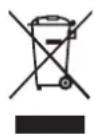
This symbol on the product indicates that this product must not be treated as normal household waste, but should be collected separately. Return the product to a collection point for recycling waste electrical and electronic equipment if you live within the EU or in other European countries that have separate collection systems for waste electrical and electronic equipment. By properly disposing of the product as waste, you help to avoid potential environmental and public health risks that could otherwise arise from mishandling discarded equipment. Recycling materials contributes to the conservation of our natural resources.
8.2. Disposal of the packaging material as waste
Dispose of the packaging material through your local recycling facility. By properly disposing of packaging material and packaging waste, you help prevent potential risks to the environment and public health. The symbol on the packaging indicates that the packaging is made of cardboard.
8.3. Dispose of the batteries as waste
The appliance contains batteries. Batteries may not be disposed of in ordinary household waste. The batteries may contain toxic substances and are subject to specific regulations. Always return batteries to a designated collection point.
Inhalt
Vorwort
46
1. Sichereit 47
1.4. Safety instruction: Batteries

GEFAHR!
text_image
Diagram of an air conditioner unit with numbered labels pointing to the front panel and side panel.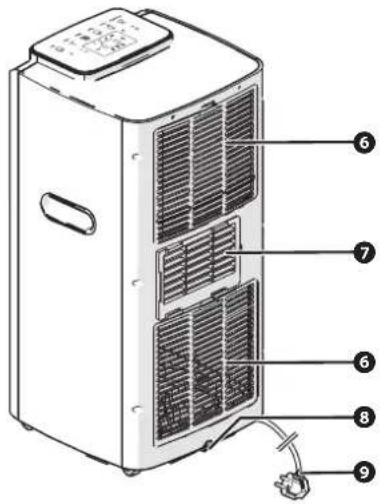
text_image
Technical diagram of a refrigerant air conditioner unit with numbered labels pointing to internal components.text_image
Diagram showing six labeled parts of a mechanical or electronic component, including a coiled tube, container, housing, cable, and remote control.natural_image
3D illustration of a coiled pipe with flanged ends and directional arrows indicating flow or movement (no text or symbols)natural_image
Diagram of a coiled hose with a flanged side panel, showing internal threading and a curved arrow indicating rotation (no text or symbols)natural_image
Line drawing of a large industrial air conditioning unit with coiled ducts and ventilation grilles (no text or symbols)natural_image
Diagram of a pipe assembly with a curved pipe and flange, showing internal components and directional arrows (no text or labels)natural_image
Two views of a remote control device showing internal components and battery insertion (no text or symbols)text_image
Diagram of a mobile device control panel with numbered labels pointing to function buttons and navigation icons① LCD-Display
2 Ein-/Aus-Taste
3 Funktionstaste
4 Plus-Taste
natural_image
Line drawing of a multi-chamber refrigerator with ventilation grilles and ventilation slots (no text or symbols)natural_image
Diagram of a grid-patterned panel or panel with an arrow indicating direction, no text or symbols present.natural_image
Diagram of a grid-patterned panel with an arrow pointing to its side (no text or symbols present)natural_image
Line drawing of a multi-tiered server or rack unit with ventilation grilles and heat sinks (no text or symbols)1.4. Safety instruction: Batteries

DANGER!
text_image
Diagram of an air conditioner unit with numbered labels pointing to the front panel and side panel.