LR-131325.1 - Lint remover Emerio - Free user manual and instructions
Find the device manual for free LR-131325.1 Emerio in PDF.


| Product Type | Lint Shaver |
| Brand | Emerio |
| Model | LR-131325.1 |
| Power Supply | 2 AA batteries (not included) |
| Cutting Heights | 3 settings |
| Speeds | 2 levels |
| Lint Reservoir | Removable, capacity 80% |
| Blades | Sharp removable blades |
| Usage | Domestic only |
| Safety | Do not use near water, do not immerse |
| Cleaning | Brush provided, soft cloth, no abrasive products |
| Maintenance | Clean the reservoir and blades regularly |
| Warranty | 2 years from purchase date |
| Accessories Included | Cleaning brush |
| Material | Plastic, metal blades |
Frequently Asked Questions - LR-131325.1 Emerio
User questions about LR-131325.1 Emerio
0 question about this device. Answer the ones you know or ask your own.
Ask a new question about this device
Download the instructions for your Lint remover in PDF format for free! Find your manual LR-131325.1 - Emerio and take your electronic device back in hand. On this page are published all the documents necessary for the use of your device. LR-131325.1 by Emerio.
USER MANUAL LR-131325.1 Emerio
natural_image
Close-up of a black and transparent plastic device with a honeycomb-like pattern on top (no text or symbols visible)Lint remover (EN)
Instruction manual – English ...... - 2 -
Instruction manual – English
SAFETY INSTRUCTIONS
Before use make sure to read all of the below instructions in order to avoid injury or damage, and to get the best results from the appliance. Make sure to keep this manual in a safe place. If you give or transfer this appliance to someone else make sure to also include this manual.
In case of damage caused by user failing to follow the instructions in this manual the warranty will be void. The manufacturer/importer accepts no liability for damages caused by failure to follow the manual, a negligent use or use not in accordance with the requirements of this manual.
-
Read and save these instructions. Attention: pictures in the IM are for reference only.
-
For home use only. Do not use for industrial purposes. Do not use the appliance for any other purposes than described in this instruction manual.
-
Do not take this product to a bathroom or use near water.
-
Do not leave the appliance switched on when not in use.
-
Do not use other attachments than those supplied.
-
Do not attempt to repair, adjust or replace parts in the appliance.
-
Do not place or store the appliance where it can fall or be pulled into a bath or sink.
-
Do not use as a shaver for human body.
-
Do not use on clothes while wearing.
-
Do not use it for plush clothes, clothes with nap, embroidery, etc.
-
Do not apply excessive pressure on the appliance. Improper use may damage clothes.
-
Do not immerse the appliance in water or any other liquid.
-
Do not allow any water to come in contact with the appliance.
-
Keep the appliance out of the reach of children.
-
Always ensure hands are dry before operating the appliance.
-
The appliance contains sharp blades. Take care to avoid contacting with the skin, during use and maintenance.
-
Be sure that the switch is turned off before attempting to clean the blades.
Safety instructions for battery
-
Different types of batteries or new and used batteries are not to be mixed.
-
Batteries are to be inserted with the correct polarity.
-
Exhausted batteries are to be removed from the appliance and safely disposed of.
-
If the appliance is to be stored unused for a long period, the batteries should be removed.
-
The supply terminals are not to be short-circuited.
PARTS DESCRIPTION
-
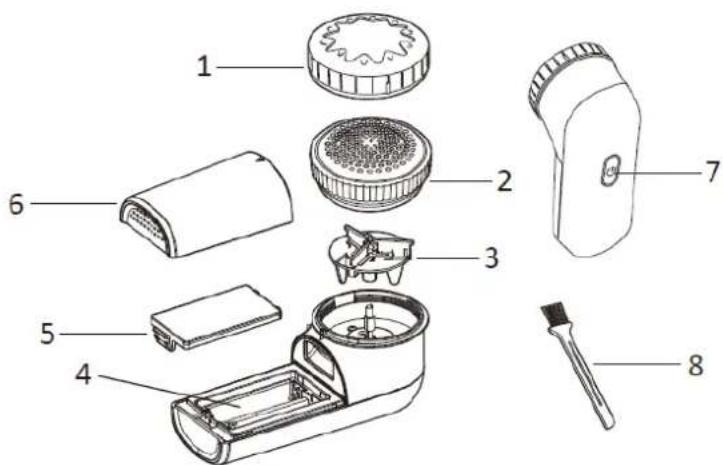
Height adjustment cap
-
Shaving head
-
Blade
-
Battery compartment
-
Battery compartment cover
-
Detachable lint container
-
On/off button
-
Brush
USE
-
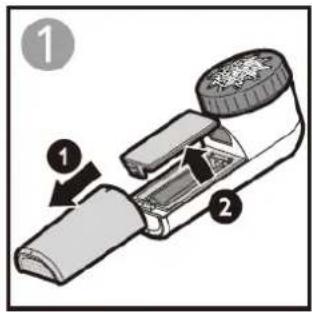
Open the battery compartment cover. Insert two AA batteries (not included). Please follow correct battery polarities otherwise the set will not work. Close the battery compartment cover.
-
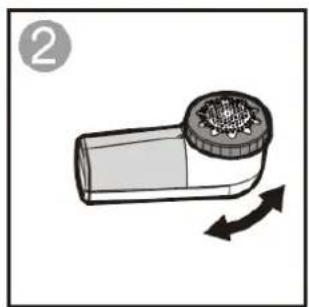
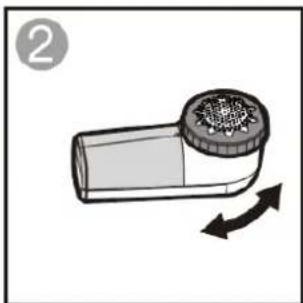
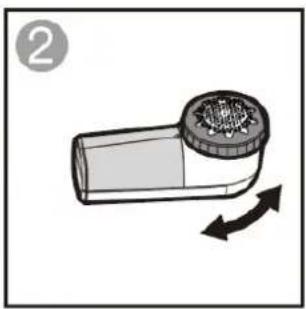
Choose one of the three cutting heights: Slightly turn the height adjustment cap to set your desired trim height.
-
Place the clothes on a flat surface so that the appliance can be moved smoothly. Press the on/off button to turn on the appliance; a second press activates a higher speed level. Press the button again to turn off the appliance.
-
When the lint container is 80% full, turn off the appliance, slide the container down and empty it.
natural_image
Illustration of a cylindrical device with a lid and arrow indicating rotation (no text or symbols)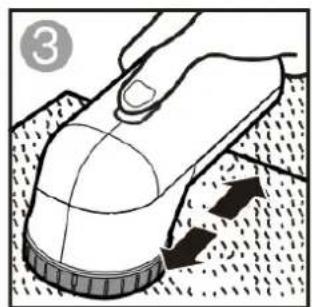
natural_image
Illustration of a hand pressing down on a computer mouse with a dotted pattern (no text or symbols)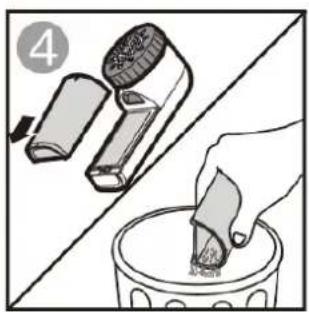
natural_image
Illustration showing a hand using a brush to clean or brush another (no text or symbols present)Caution:
Do not press strongly on the clothes as the head of the lint remover can be damaged.
Do not use the appliance for removing lint on terry cloth, fluffy fabrics, embroideries, etc.
While removing lint, smooth out any gathers to avoid damaging the fabric.
Be careful when using near buttons, zippers, joints, stitches, glued prints, etc.
CLEANING AND MAINTENANCE
-
Remove batteries before cleaning or if the unit is not used for a long time.
-
Clean the detachable lint container regularly.
-
Wipe over the body using a soft damp cloth. Do not use hard abrasives or cleaners.
-
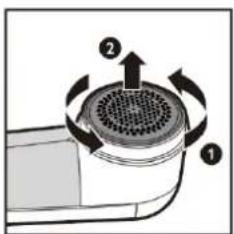
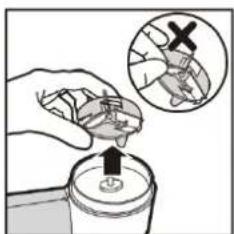
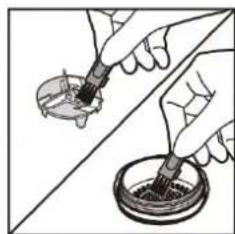
Carefully pull the height adjustment cap outwards and then rotate the shaving head off the body. Take out the blades by holding the plastic area, don't pull the blades. Clean the blades, shaving head and inner compartment of the device with the soft brush. Note: Be careful, the blade is sharp.
After cleaning, replace the blade, shaving head and height adjustment cap. The protrusion on the appliance must fit into the recess in the height adjustment cap.
natural_image
Illustration of hands using a tool to apply liquid onto a circular container (no text or symbols visible)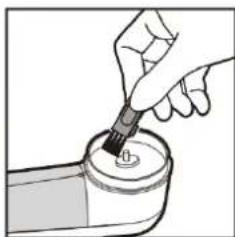
natural_image
Illustration of a hand using a pipette to apply liquid into a container (no text or symbols visible)
natural_image
Pure diagram of a mechanical or electrical component with no text, numbers, or symbols-
Never immerse the device in water or other liquids. Never hold the device under running water.
-
Never use solvents, abrasive cleaners, hard brushes, metal or sharp objects for cleaning.
GUARANTEE AND CUSTOMER SERVICE
Before delivery our devices are subjected to rigorous quality control. If, despite all care, damage has occurred during production or transportation, please return the device to your dealer.
For the purchased device we provide 2 years guarantee, commencing from the day of sale. If you have a defective product, you can directly go back to the point of purchase.
Defects which arise due to improper handling of the device and malfunctions due to interventions and repairs by third parties or the fitting of non-original parts are not covered by this guarantee. Always keep your receipt,
without the receipt you can't claim any form of warranty. Damage caused by not following the instruction manual, will lead to a void of warranty, if this results in consequential damages then we will not be liable. Neither can we hold responsible for material damage or personal injury caused by improper use if the instruction manual is not properly executed. Damage to accessories does not mean free replacement of the whole appliance. In such case please contact our service department. Broken glass or breakage of plastic parts is always subject to a charge. Defects to consumables or parts subjected to wearing, as well as cleaning, maintenance or the replacement of said parts are not covered by the warranty and are to be paid.
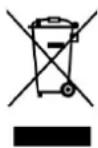
The crossed out wheelie bin symbol means that this product shall not be disposed of with normal household waste. Electronic and Electrical Equipment not included in the selective sorting process are potentially dangerous for the environment and human health due to the presence of hazardous substances. Please dispose of responsibly at an approved waste or recycling facility.


BATTERY MUST BE RECYCLED OR DISPOSED OF PROPERLY. DO NOT OPEN. DO NOT DISPOSE
OR IN FIRE OR SHORT CIRCUIT.
Manufactured by: Emerio B.V.
Oudeweg 115, 2031 CC Haarlem, The Netherlands
BENUTZUNG
UTILISATION
natural_image
Illustration of a smoking can with a circular cap and directional arrows indicating movement (no text or symbols)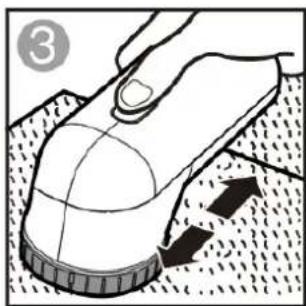
natural_image
Illustration of a hand pressing down on a computer mouse with a dotted pattern (no text or symbols)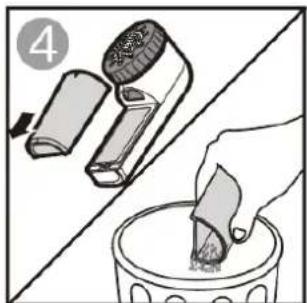
natural_image
Illustration showing a hand using a brush to clean or remove a container, with no text or symbols present.Attention :
GEBRUIK

natural_image
Illustration of a cylindrical device with a mesh cap and directional arrows indicating rotation (no text or symbols)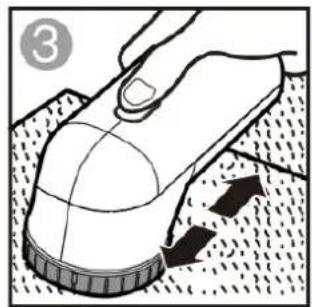
natural_image
Illustration of a hand using a computer mouse to touch a surface, with no visible text or symbols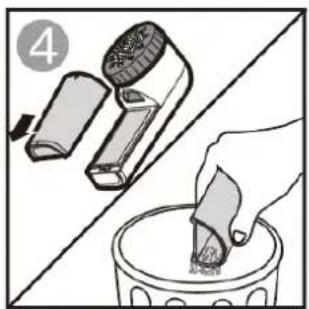
natural_image
Illustration showing a hand pouring liquid into a container with a brush (no text or symbols)OPGELET:
UŻYTKOWANIE
natural_image
Illustration of a handheld device with a circular top and arrow indicating rotation (no text or symbols)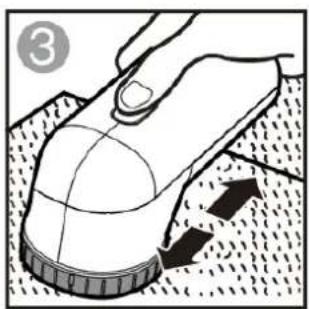
natural_image
Illustration of a hand using a computer mouse to touch a textured surface (no text or symbols)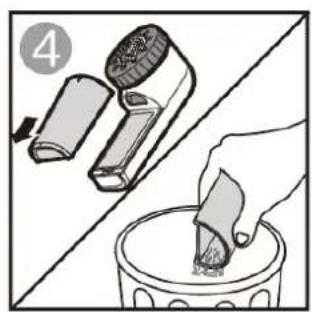
natural_image
Illustration showing a hand using a brush to clean or brush another (no text or symbols present)Ostrożnie:

Brand : Emerio
Model : LR-131325.1
Category : Lint remover