TX-244 - Surveillance Camera TECHNAXX - Free user manual and instructions
Find the device manual for free TX-244 TECHNAXX in PDF.


Pick your language and provide your email: we'll send you a specifically translated version.
| Product Type | Outdoor surveillance camera |
| Brand | Technaxx |
| Model | TX-244 |
| Video resolution | 2560 x 1440 pixels (Full HD) |
| Viewing angle | Horizontal 110°, vertical 62° |
| Motion detection | PIR sensor up to 8 m |
| Night vision | 8 IR LEDs (850 nm, range 8-10 m) + 1 white LED (1 W, 140 lm, 6000 K, range 10 m) |
| Power supply | Lithium-polymer battery 3.7 V, 5200 mAh, rechargeable via solar panel (1.6 W) or USB adapter 5 V/1 A |
| Battery life | Up to 6 months in standby, up to 7 hours of continuous recording |
| Storage | MicroSD card (HC/XC) up to 128 GB (FAT32/exFAT, class 10) |
| Connectivity | Wi-Fi 2.4 GHz 802.11 b/g/n, max range 15 m |
| Protection rating | IP65 (dust and water) |
| Dimensions (camera) | 9.0 x 6.0 x 5.8 cm |
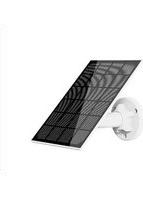
| Dimensions (solar panel) | 14.1 x 8.5 x 1.2 cm |
| Weight (camera) | 214 g |
| Weight (solar panel) | 121 g |
| Two-way communication | Built-in microphone and speaker |
| App | Technaxx Security Premium (iOS, Android, PC) |
| Alarm function | Push notification on smartphone |
| Video compression | H.264/H.265 |
| Maintenance | Clean with a dry, lint-free cloth. Avoid extreme temperatures and shocks. |
| Safety | Do not touch with wet hands, use only the specified voltage, follow safety instructions. |
| Package contents | Camera, solar panel, USB cable, mounting brackets, screws and wall plugs, user manual |
Frequently Asked Questions - TX-244 TECHNAXX
Why does the battery drain quickly?
This may be due to a high number of false positives (false triggers) or a weak Wi-Fi signal. Lower the PIR sensor sensitivity in the app or move the camera closer to the router/NVR to improve transmission.
What to do if I forget my app password?
Use the Forgot Password option on the app login screen. A reset email or SMS will be sent to you.
Why does the device report a memory card error?
Make sure the MicroSD card is FAT32 (4-32 GB) or exFAT (64-128 GB) and does not exceed 128 GB. If the problem persists, format the card via the app or a computer.
Why is playback intermittent?
Continuous video recording reduces the lifespan of the MicroSD card. The device only records during motion detections, which creates intermittent files. This is normal to save space and extend the card's lifespan.
How to check if the network connection between the camera and router is normal?
Manually trigger the PIR sensor in front of the camera and wait 10 seconds. If the camera LED flashes red, the connection is unstable. If the LED is steady, the connection is good.
When should the camera be paired with the TX-128 monitor?
Code pairing is necessary when adding a new camera to the TX-128 system, or after resetting the camera to factory defaults. Follow the procedure in the manual: reset the camera, then use the 'Match Code' menu on the monitor.
How to reset the camera to factory settings?
Press and hold the reset button (using a paperclip) for 3 seconds. A voice message will confirm the reset. The camera will restart and be ready for new setup.
Can I use the camera without a MicroSD card?
Yes, but local recording will not be possible. You can still view live and use two-way communication features via the app. However, to record detection videos, a MicroSD card is necessary.
How to optimize battery life?
Place the solar panel in a sunny location. Reduce PIR sensitivity, decrease recording duration (10 s instead of 30 s), and avoid areas with many false triggers. The Best Power Saving mode in the app also helps.
What to do if the camera does not connect to Wi-Fi?
Check that your router broadcasts on the 2.4 GHz band (the camera does not support 5 GHz). Make sure the password is correct and the camera is within 15 m of the router. Reset the camera and try setup again via the app.
User questions about TX-244 TECHNAXX
0 question about this device. Answer the ones you know or ask your own.
Ask a new question about this device
No questions yet. Be the first to ask one.
Download the instructions for your Surveillance Camera in PDF format for free! Find your manual TX-244 - TECHNAXX and take your electronic device back in hand. On this page are published all the documents necessary for the use of your device. TX-244 by TECHNAXX.
USER MANUAL TX-244 TECHNAXX
Instructions relatives aux voyants
Panneau solaire


Table of contents
Click a title to access it
Manual assistant
Powered by Anthropic
Waiting for your message
Product information
Brand : TECHNAXX
Model : TX-244
Category : Surveillance Camera