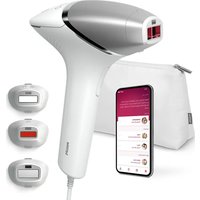
Lumea BRI946 - IPL hair remover PHILIPS - Free user manual and instructions
Find the device manual for free Lumea BRI946 PHILIPS in PDF.


| Product type | IPL hair removal device |
| Brand | Philips |
| Model | Lumea BRI946 |
| Technology | Intense pulsed light (IPL) with integrated UV filter |
| Number of light intensities | 5 levels |
| Included attachments | Body, face (with red filter), precision |
| SmartSkin sensor | Analyzes skin tone and suggests an adapted intensity |
| Usage modes | Place-and-flash and glide-and-flash |
| Pulse duration | Between 1 and 2.5 milliseconds |
| Flash interval | Approximately 2 to 3.5 seconds |
| Emitted wavelengths | 565 to 1400 nm |
| Maximum optical exposure | Body attachment: 5.6 J/cm²; face: 5.9 J/cm²; precision: 6.5 J/cm² |
| Power supply | Mains adapter 100-240 V, 50/60 Hz, output 19.5 V / 3.33 A |
| Adapter reference | AD2069x20020HF (x depends on plug) |
| Operating temperature | 5 °C to 35 °C |
| Storage conditions | -25 °C to 70 °C, up to 90% relative humidity |
| Cleaning | Soft damp cloth; do not immerse |
| Safety | Skin contact required; detection of too dark skin tone; automatic shutdown |
| Repairability | Repair only by a Philips authorized service center |
| Warranty | International warranty (see leaflet) |
| Number of manual pages | 184 |
Frequently Asked Questions - Lumea BRI946 PHILIPS
User questions about Lumea BRI946 PHILIPS
0 question about this device. Answer the ones you know or ask your own.
Ask a new question about this device
Download the instructions for your IPL hair remover in PDF format for free! Find your manual Lumea BRI946 - PHILIPS and take your electronic device back in hand. On this page are published all the documents necessary for the use of your device. Lumea BRI946 by PHILIPS.
USER MANUAL Lumea BRI946 PHILIPS
natural_image
White Philips hair dryer with purple and silver casing, no visible text or symbols on body
natural_image
Illustration of an open book with a grid pattern on the left and a closed page on the right (no text or symbols)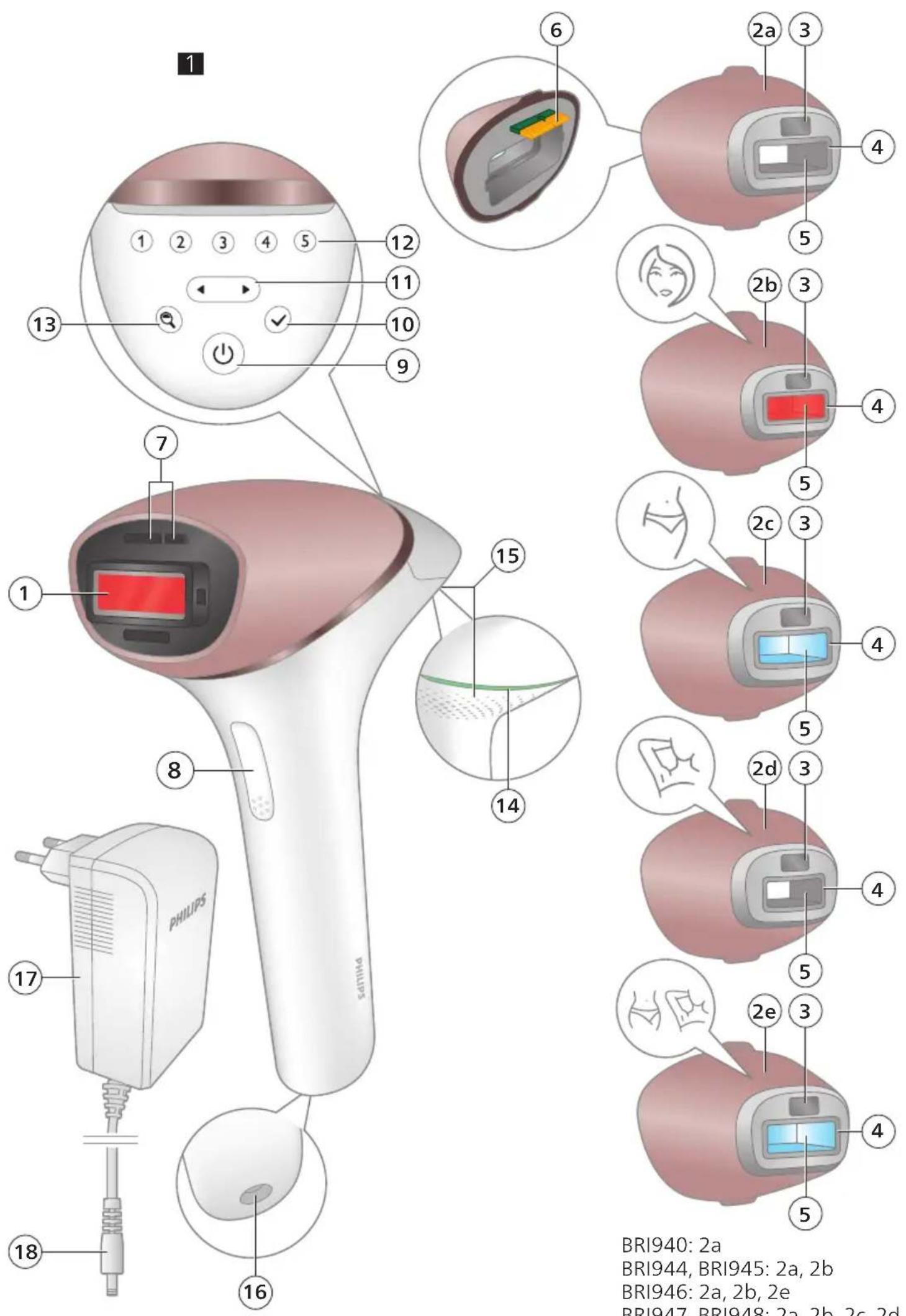
BRI940: 2a
BRI944, BRI945: 2a, 2b
BRI946: 2a, 2b, 2e
BRI947, BRI948: 2a, 2b, 2c, 2d
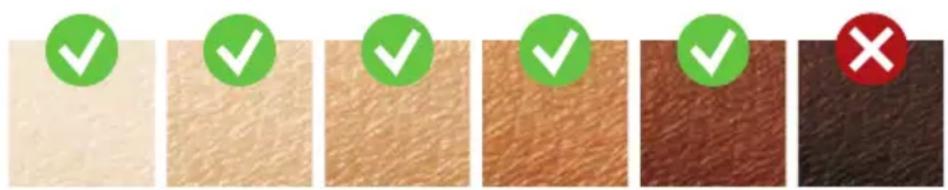
Suitable skin tones / Geeignete Hauttöne / Tonos adecuados de piel / Teints de peau compatibles / Toni di pelle adatti / Geschikte huidtinten / Tons de pele adequados
Suitable body hair colors / Geeignete Körperhaarfarben / Colores de vello corporal adecuados / Couleurs de poils du corps adaptées / Adatto ai seguenti colori di peli / Geschikte kleuren lichaamshaar / Cores de pelo adequadas

English 6 Deutsch 30 Español 58 Français 83 Italiano 108 Nederlands 133 Português 159
Contents
Welcome 6
Device overview 7
Contraindications 7
Important safety instructions ____ 9
How IPL works 11
Recommended treatment schedule 12
What to expect ____ 13
How to use your Lumea ____ 13
Learning more about your Lumea 19
Attachments 19
SmartSkin sensor 20
Selecting the light intensity 21
Two treatment modes: Stamp & Flash and Slide & Flash 21
Using your Lumea before and after sun exposure or tanning ____ 22
Traveling with the device 22
After use 23
Troubleshooting 24
Warranty and support 26
Recycling 26
Technical specifications 27
Electromagnetic compatibility – Compliance information ____ 27
Explanation of symbols 27
Welcome
Welcome to the world of Philips Lumea! You are only a few weeks away from silky-smooth skin.
Lumea uses Intense Pulsed Light (IPL) technology, known as one of the most effective methods to continuously prevent hair growth. In close collaboration with expert scientists and dermatologists, we adapted this light-based technology, originally used in professional beauty salons, for easy and effective use in the comfort of your home. Lumea is gentle and offers convenient and effective treatment at a light intensity that you find comfortable. Unwanted hairs are finally a thing of the past.
Lumea can be used on the body and on the female face (below the cheekbone).
To fully benefit from the support that Philips offers, register your product at
www.philips.com/support. For further information, please go to
www.philips.com/Lumea to find our experts' advice, tutorial videos and FAQs
and make the most of your Lumea.
Note: Keep these instructions with your product at all times.
Device overview
1 Light exit window (with integrated UV filter)
2 Attachments
a Body attachment b Face attachment (BRI944, BRI945, BRI946, BRI947, BRI948)
c Bikini attachment (BRI947, BRI948)
d Underarm attachment (BRI947, BRI948)
e Precision attachment (BRI946)
3 SmartSkin sensor
4 Integrated safety system
5 Reflector inside the attachment
6 Electronic contacts
7 Opening for electronic contacts
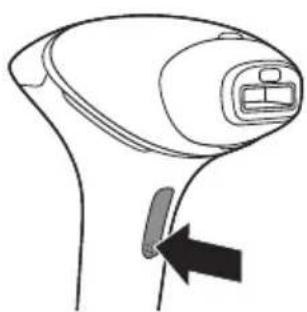
8 Flash button
9 On/off button
10 Confirmation button
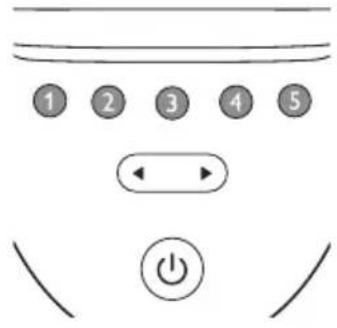
11 Toggle buttons
12 Intensity lights
13 SmartSkin button
14 'READY to flash' light
15 Air vents
16 Device socket
17 Adapter
18 Small plug
19 Pouch (not shown)
20 Cleaning cloth (not shown)
Contraindications
Conditions
Never use the device:
- If you are under the age of 18 years or above 65 years.
- If you have skin tone marked with ✗ in the 'Suitable skin tones' table at the start of the user manual.
- If you are pregnant or breastfeeding as the device was not tested on pregnant or breastfeeding women.
- If you have any active implants such as a pacemaker, neurostimulator, insulin pump, etc.
Medications/History
Never use the device if you take any of the medications listed below:
- If your skin is currently being treated with or has been treated in the last 7 days with Alpha-Hydroxy Acids (AHAs), Beta-Hydroxy Acids (BHAs), topical tretinoin and azelaic acid.
- If you have taken any form of isotretinoin Accutane or Roaccutane in the last six months. This treatment can make skin more susceptible to tears, wounds and irritations.
- If you are taking photosensitizing agents or medications, check the package insert of your medicine and never use the device if it is stated that it can cause photo-allergic reactions, photo-toxic reactions or if you have to avoid sun when taking this medicine.
- If you take anticoagulation medications, including heavy use of aspirin, in a manner which does not allow for a minimum 1-week washout period prior to each treatment.
Never use the device:
- If you have received radiation therapy or chemotherapy within the past 3 months.
- If you are on painkillers which reduce the skin's sensitivity to heat.
- If you take immunosuppressive medications.
Pathologies/Disorders
Never use the device:
- If you have diabetes or other systemic or metabolic diseases.
- If you have congestive heart disease.
- If you have a disease related to photosensitivity, such as polymorphic light eruption (PMLE), solar urticaria, porphyria, etc.
- If you have a history of collagen disorder, including a history of keloid scar formation or a history of poor wound healing.
- If you have epilepsy with flashlight sensitivity.
- If your skin is sensitive to light and easily develops a rash or an allergic reaction.
- If you have a skin disease such as active skin cancer, you have a history of skin cancer or any other localized cancer in the areas to be treated.
- If you have a history of vascular disorder, such as the presence of varicose veins or vascular ectasia in the areas to be treated.
- If you have any bleeding disorder.
- If you have a history of immunosuppressive disease (including HIV infection or AIDS).
- If you have a skin pigmentation disorder such as vitiligo.
Skin conditions
Never use the device:
- If you have infections, eczema, burns, inflammation of hair follicles, open lacerations, abrasions, herpes simplex (cold sores), wounds or lesions and haematomas (bruises) in the areas to be treated.
- On irritated (red or cut), sunburned, tanned or fake-tanned skin.
- On the following areas: on moles, freckles, large veins, darker pigmented areas, scars, skin anomalies without consulting your doctor. This can result in a burn and a change in skin tone, which makes it potentially harder to identify skin-related diseases.
- On the following areas: warts, tattoos or permanent make-up.
Location/Areas
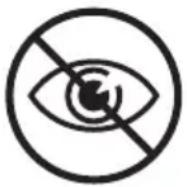
Never use the device on the following areas:
- Around the eyes and on or near the eyebrows. Lumea can only be used on the body and on the female face (below the cheekbone).
- On the lips, scalp, perineum, nipples, areolas, labia minora, vagina, anus and the inside of the nostrils and ears.
- On areas where you use long-lasting deodorants. This can result in skin reactions.
- Over or near anything artificial like silicone implants, subcutaneous injection ports (insulin dispenser) or piercings.
- Men must not use the device on the face and neck including all beard-growing areas, nor on the whole genital area. The hairs in these areas have different characteristics. The skin may get burnt (with pain, prolonged skin redness and pigmentary changes).
Note: This list is not exhaustive. If you are not sure whether you can use the device, we advise you to consult your doctor.
Important safety instructions
Warnings
Please read and follow these instructions to optimize the use of the device and prevent/minimize the risk of injury, skin reactions and side effects.
- Before you use Lumea, you should clean your skin and make sure it is hair-free, entirely dry and free from any lotion or gel.
- Keep the device and the adapter dry.
- The device is not washable. Never immerse the device in water and do not rinse it under the tap.
- Water and electricity are a dangerous combination. Do not use this device in wet surroundings (e.g. near a filled bath, a running shower or a filled swimming pool). Moisture can damage the device and lead to a potential safety hazard.
- Always check the device before you use it. Do not use the device or adapter if it is damaged. Always replace a damaged part with one of the original type.
- If the device or adapter is broken or damaged, do not touch any inner part to avoid electric shock.
- Do not use the device if the UV filter of the light exit window and/or attachment is broken, as safe operation cannot be guaranteed under these circumstances.
- Do not attempt to open or repair your device. Opening Philips Lumea may expose you to dangerous electrical components and to pulsed light energy, either of which may cause bodily and/or eye injury.
- Always return the device to a service center authorized by Philips for examination or repair. Repair by unqualified people could cause an extremely hazardous situation for the user.
- No modification of this equipment is allowed. Do not modify, override or cut off any part of the device (e.g. adapter or the cord), as this causes a hazardous situation.
- Do not look at the flash while using the device. Use the device in a well-lit room so that the light is less glaring to your eyes. While not necessary for safety, you may wear sunglasses or goggles for your convenience if you find the light uncomfortable or too bright.
- Do not flash the same spot multiple times during a treatment. The surface of the attachment should overlap the previous spot to make sure you flash the complete skin area, but treating the same area multiple times does not increase efficacy.
- For hygienic reasons, the device should only be used by one person.
- Do not use hair removal creams in the area (to be) treated with the device, as chemicals may cause skin reactions.
- Do not use any pencil or pen to mark the areas to be treated. This may cause burns on your skin.
- The device can be stored at a temperature between -25 °C and 70 °C. Use the device at a temperature between 5 °C and 35 °C. The device will not work properly outside of this temperature range. This may cause burns on your skin.
- Hair removal by intense pulsed light sources can cause increased hair growth in some individuals. Based upon currently available data, the highest risk groups for this response are females of Mediterranean, Middle Eastern, and South Asian heritage treated on the face and neck.
- If you experience skin irritation or skin redness after treatment, wait until it disappears before applying any product to your skin. If you experience skin irritation after applying a product to your skin, wash it off with water. If you still get skin reactions, stop using the device and consult your doctor.
- If shaving, epilating or waxing causes skin irritation, we advise you not to use the device until the skin irritation has disappeared.
- This device is not intended for use by persons with reduced physical, sensory or mental capabilities, or lack of experience and knowledge, unless they have been given supervision or instruction concerning use of the device by a person responsible for their safety.
- Keep Lumea out of the reach of children.
- Children should be supervised to ensure that they do not play with the device. Supervision is required to avoid potential risks such as exposure to the light output, electrocution, strangulation from the cables or choking on the attachments.
- Always avoid exposure to natural sunlight and artificial sunlight up to 4 weeks before your Lumea treatment and 48 hours afterward. Sensitive or tanned skin is more likely to result in burns or pigmentation changes. Protect your skin from sunlight with clothing or apply sun-blocking products of not less than SPF50 on the non-covered treatment areas. Read the instructions in chapter 'Using your Lumea before and after sun exposure or tanning' to learn how to use your Lumea safely.
- Do not use your Lumea within 2 weeks after using artificial tanning products (such as creams, sprays or pills). Artificially tanned skin is more likely to result in burns or pigmentation changes. Read the instructions in chapter 'Using your Lumea before and after sun exposure or tanning' to learn how to use your Lumea safely.
- If you notice a skin tone change since the last treatment, we advise you to perform a skin test and to wait 24 hours before your next treatment. If after this period skin reactions occur or persist, use a lower device setting which did not lead to skin reactions or stop using the device when already at the lowest setting (①).
- Always check the device before you use it. Make sure that the SmartSkin sensor window is clean when using the device, to avoid improper operation (see 'D Clean & store after treatment').
- The light exit window and the inner parts of the attachment can become very hot (>210 °C) during usage. Always let the light exit window, as well as the inner parts of the attachment, cool down before you touch them.
- This device has a detachable power supply unit. Only use the adapter provided with this device. Do not use an extension cord. The reference number (AD2069x20020HF) can be found on your device. The 'x' in this number refers to the plug type for your country.
- Follow the recommended treatment schedule. Increasing the frequency, especially in the initial phase, can increase the risk of skin reactions.
How IPL works
natural_image
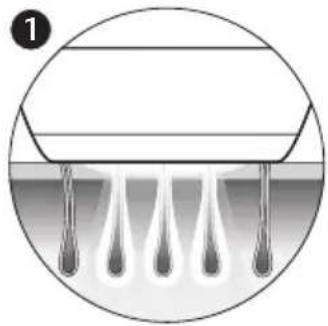
Diagram of a mechanical or fluidic component with droplets and a central horizontal bar, enclosed in a circular boundary (no text or symbols)With Intense Pulsed Light technology, gentle pulses of light are applied to the skin and absorbed by the hair root. The lighter the skin and the darker the hair, the better the pulses of light are absorbed.
natural_image
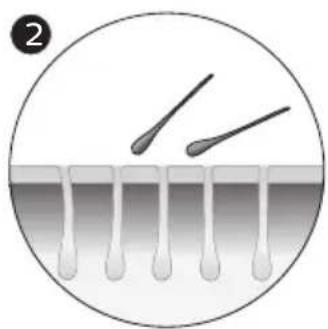
Diagram showing two droplets approaching a surface with droplets on the membrane (no text or symbols)The pulses of light stimulate the hair follicle to go into a resting phase. As a consequence, the hair sheds naturally and hair growth is prevented.

natural_image
Diagram of a droplet formation process inside a circular container (no text or symbols)The cycle of hair growth consists of different phases. IPL technology is only effective when the hair is in its growing phase. Not all hairs are in the growing phase at the same time. This is why we recommend you to follow the initial treatment phase (4 treatments, every treatment 2 weeks apart) and then the follow-up treatment phase (touch-ups every 4 weeks) to make sure all hairs are effectively treated in the growing phase.
Tip: To assure long lasting hair removal, touch-ups every 4 weeks are recommended.
Suitable body hair colors
Treatment with Lumea is not effective if you have light blond, grey, red or white hairs as hairs with these colors do not absorb enough light.
Note: To check if your body hair color allows usage of the device, consult the hair color table on the foldout page.
Recommended treatment schedule
Initial phase
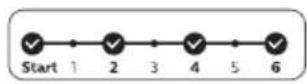
To achieve effective hair reduction, follow the initial treatment schedule. Initial treatment schedule
For the first 4 treatments, use Lumea once every 2 weeks to ensure that all hairs are treated.
- Perform a treatment within 3 days before or after the planned treatment date.
- If you have not treated yourself within 3 days before or after the planned treatment date, restart the initial phase. Plan in 4 treatments, 1 treatment every 2 weeks.
Note: If you do not restart the initial phase, you may not see effective hair reduction.
Note: Replacing one of the IPL treatments with another hair removal method (waxing, epilating, etc.) will not help to reach the desired hair reduction.
If you want to remove hairs in between the Lumea treatments, you can use your normal hair removal method (excluding hair removal creams).
Touch-up phase
After the initial phase (4 treatments), we recommend touch-ups every 4 weeks.
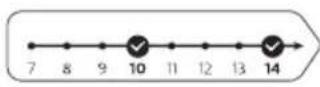
Touch-up treatment schedule
Perform a treatment every 4 weeks. Repeat this 8 times to achieve effective hair reduction. This is to maintain results and enjoy smooth skin for months.
- We advise you to perform a treatment within 4 days before or after the planned treatment date.
- The results may vary based on your individual hair growth and also across different body areas.
- If you have completed the touch-up phase and you see the need to continue treatment (hair starts coming back), we advise you to restart the initial phase.
Note: Using the device more often does not increase efficacy.
Tip: Mark the treatment schedule on your calendar to remind yourself of the planned treatments.
What to expect
During initial phase
- After the first treatment, it can take 1 to 2 weeks for the hairs to fall out. In the first weeks following the initial treatments, you still see some hairs growing. These are likely to be hairs that were not in their growing phase during the first treatments.
- After 2-3 treatments, you should see a noticeable reduction in hair growth. However, to effectively treat all hairs, it is important to keep on treating according to the recommended treatment schedule.
- After 4 treatments, you should see a significant reduction of hair growth in the areas that you treated with Lumea. A reduction of hair density should be visible as well.
During touch-up phase
- Keep on treating with frequent touch-ups (every 4 weeks) to maintain the result.
How to use your Lumea
A Remove hair & clean your skin
natural_image
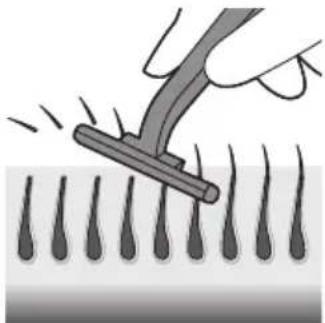
Illustration of a hand using a tool to brush through droplets onto a surface (no text or symbols)1 Remove hair before every treatment as long as hair is still visible. You can either shave, epilate or wax. Make sure you start to treat before new hair is visible on your skin. If you choose to wax, wait 24 hours before you use Lumea.
Note: If shaving, epilating or waxing causes skin irritation, we advise you not to use the device until the skin irritation has disappeared.
natural_image
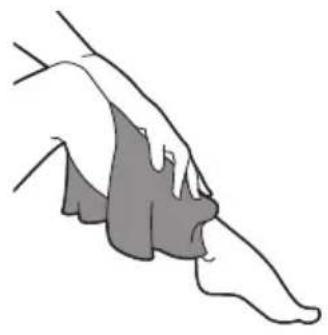
Illustration of a human foot and ankle joint (no text or symbols)2 Clean and dry your skin. Make sure that it is free from any lotion or gel.
B Test skin
24 hours before treatment
1 Test your skin to find the correct light setting:
- For every new body area and/or new attachment. - After sun exposure or tanning (see 'Using your Lumea before and after sun exposure or tanning').
natural_image
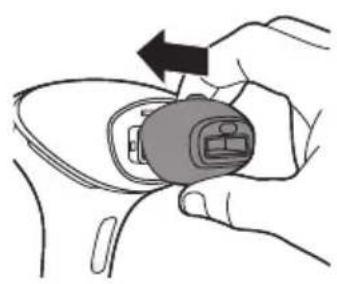
Illustration of a hand holding a small device with an arrow indicating rotation (no text or symbols)2 Select the correct attachment to test your skin (see 'Attachments').
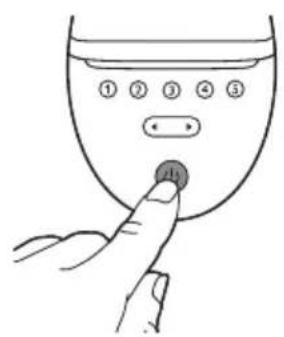
3 Press the on/off button ⏻ to turn on the device. 4 Choose an area for your skin test.
natural_image
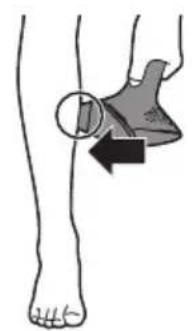
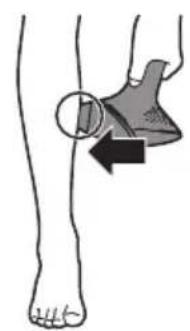
Illustration of a human leg with a shaded area and arrow indicating movement or pressure point (no text or symbols)5 Press the device firmly onto your skin and hold it in place. The integrated safety system prevents unintentional flashing without full skin contact.

6 Confirm that the 'READY to flash' light lights up white to ensure that there is full contact with your skin.
- If the 'READY to flash' light is orange, your skin is too dark to treat. Try Lumea on a lighter body area.
7 Try each setting on your skin and find your comfortable setting. If the flash feels uncomfortable and you experience pain, lower the setting. If you still experience an uncomfortable feeling while using the lowest setting (①), please stop using the device.
- When the 'READY to flash' light is white, press the flash button on the handle once, to treat one spot with setting ①.
The device makes a soft popping sound. The flash gives you a warm sensation.
- You will see a flash of light.
Note: You can toggle through the light intensity settings by pressing the toggle button.
- Move to next area. Treat one spot with setting ②
- Move to next area. Treat one spot with setting ③
- Move to next area. Treat one spot with setting ④
- Move to next area. Treat one spot with setting ⑤
8 Wait 24 hours.
Note: Even though you found your comfortable setting during the skin test, it may occur that skin reactions show within 24 hours after usage.

9 Check your skin for any reactions (e.g. redness, irritation, rash).
If there are no skin reactions after 24 hours, start the treatment with the highest comfortable setting.
If the highest comfortable setting resulted in a skin reaction, choose a lower setting that did not result in any skin reactions.
If you did not test a lower setting, repeat the skin test.
C Treatment
IMPORTANT: First finish sections A (Remove hair & clean your skin) and B (Test skin 24 hours before treatment) before starting treatment.
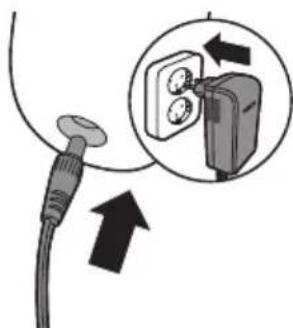
1 Connect the power adapter to the device and plug into a power outlet.
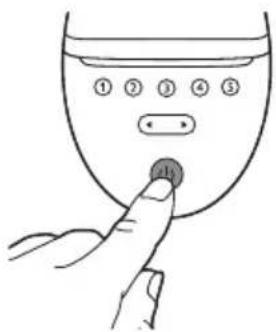
2 Press the on/off button ⏻ to turn on the device.
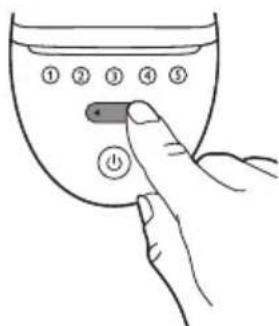
3 Choose the setting you selected after the skin test (section B, step 9).
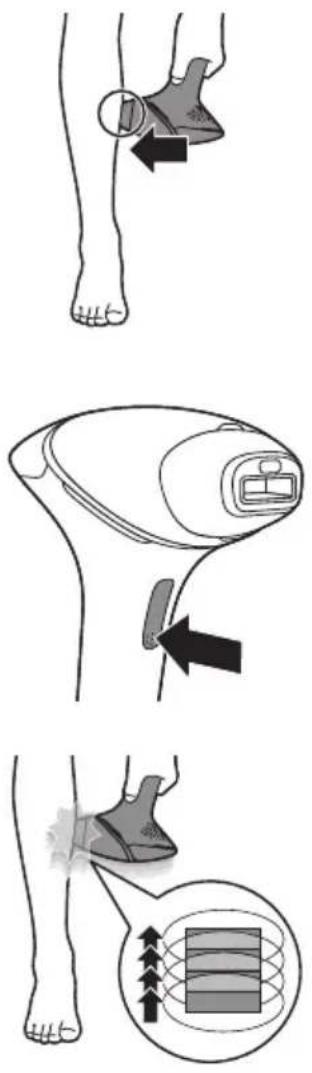
4 Press the device firmly onto your skin and hold it in place. The 'READY to flash' light should light up white.
5 Press the flash button to release a flash on your skin. The flash treats the skin in that spot.
The device makes a soft popping sound. The flash gives you a warm sensation.
After each flash, it takes up to 3.5 seconds until the device is ready to flash again. You can release a flash when the 'READY to flash' light lights up white.
6 Move to an adjacent spot and press the flash button again. The surface of the attachment that is in contact with your skin is slightly larger than the light exit window.
Do not flash the same spot multiple times during a treatment. The surface of the attachment should overlap the previous spot to make sure you flash the complete skin area, but treating the same area multiple times does not increase efficacy.
7 Continue until you have treated the full area. There are two treatment modes (see 'Two treatment modes: Stamp & Flash and Slide & Flash').
8 Turn off the device when you finished the treatment.
9 Remove hair before every next treatment, as long as hair is still visible.
Note: Do not try the device on difficult or sensitive areas (ankle and bony area).
D Clean & store after treatment

1 Unplug the device from the power outlet.
2 Let the device cool down.
natural_image
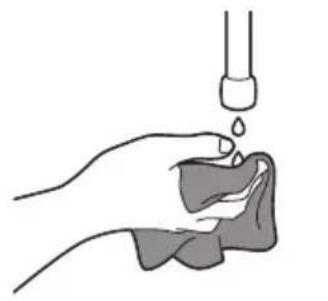
Illustration of a hand holding a small object with liquid being poured into it, no text or symbols present3 Moisten the soft cloth supplied with a few drops of water.

natural_image
Illustration of a hand holding a device with an arrow indicating rotation (no text or symbols)4 Take the attachment off the device.
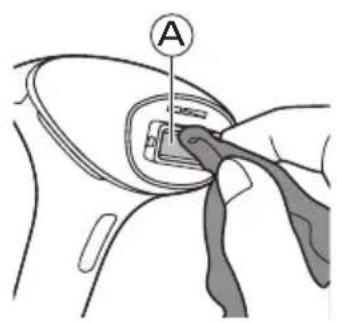
5 Clean the light exit window of the device (A).
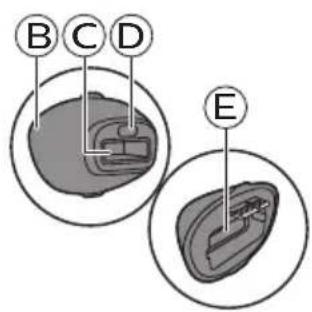
6 Clean all surfaces of the attachment, including the metal reflector and window of the attachment (parts B, C, D, E).
7 Let all parts dry thoroughly.
8 Store in a dust-free and dry place.
Learning more about your Lumea
Attachments
For optimal results, it is important to use the correct attachment intended for the specific body area you want to treat. Lumea offers full-body treatment with several attachments designed for use on specific body areas. SenseIQ technology adapts the treatment program when a different attachment is connected.
Note: The device may not work anymore and show an error when there is dirt on the attachment connector. Clean the contact leads when this occurs.
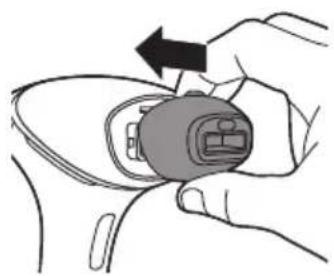
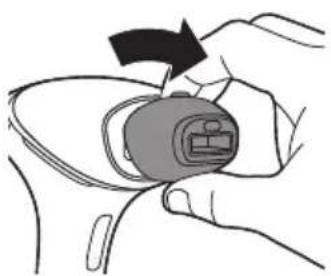
To place the attachment, simply snap it onto the light exit window.
natural_image
Illustration of a hand holding a small electronic device with an arrow indicating rotation (no text or symbols present)To remove the attachment, pull it off the light exit window.
natural_image
Illustration of a hand holding a device with an arrow indicating rotation (no text or symbols)Body attachment
The body attachment has the largest treatment window and a curved-in design to effectively cover and treat areas below the neckline, especially large areas such as legs, arms and stomach.
Face attachment (BRI944, BRI945, BRI946, BRI947, BRI948)

natural_image
Simple line drawing of a stylized human face inside a circle (no text or symbols)The face attachment has a precise flat design with extra integrated red glass filter for safe and precise treatment on the sensitive skin above the upper lip, chin and sideburns. The device is only intended for removing unwanted body hair from areas below the cheekbones. When you use the device on areas with sharp contours like the jawline and chin, it may be difficult to establish full skin contact and release a flash.
Tip: Place your tongue between your upper lip and your teeth or puff out your cheeks to make the treatment easier.
Underarm attachment (BRI947, BRI948)

natural_image
Simple line drawing of a stylized object inside a circle (no text or symbols)The underarm attachment has a specifically curved-out design to treat underarm hairs that might be hard to reach.
Bikini attachment (BRI947, BRI948)
natural_image
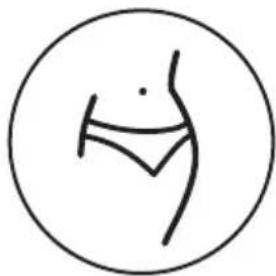
Simple line drawing of a human torso inside a circle (no text or symbols)The bikini attachment has a specialized design for effective treatment of the bikini area. It has a curved-out design and has a higher light intensity compared to body attachment. Hair in this area tends to be thicker and stronger than leg hair.
Precision attachment (BRI946)
natural_image
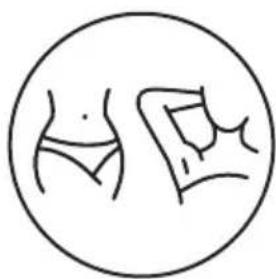
Simple line drawing of a human torso and abdomen inside a circle (no text or symbols)The precision attachment has a curved-out design for use on bikini and underarm areas. It has a medium sized window with a glass window. It is designed for precise and effective coverage of bikini and underarm areas.
SmartSkin sensor
Lumea offers SenseIQ technology for a personalized hair removal treatment. The integrated SmartSkin sensor measures the skin tone at the start of each session and during the session. This provides two features:
1 The SmartSkin sensor prevents you to treat areas of your skin that are too dark: if it detects a skin tone that is too dark for treatment with Lumea, the 'READY to flash' light starts blinking orange. It does not flash when you press the flash button. The device automatically disables. This prevents you from developing skin reactions.
2 The SmartSkin sensor will help you to select the light intensity setting that is comfortable for your skin. For this you can use the SmartSkin button 🔒.
Selecting the light intensity
natural_image
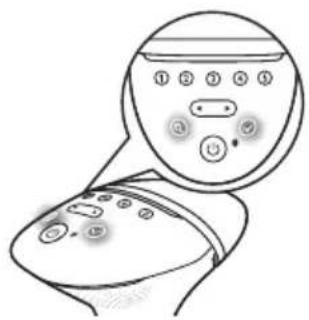
Line drawing of a medical device with a circular dial and control buttons (no text or symbols)Lumea provides 5 different light intensities, you will always be able to change to a light intensity setting you find comfortable.
1 Press the on/off button ⏻ to turn on the device. The device starts to operate at light intensity setting 1.
Note: To adjust the light intensity setting manually without using the SmartSkin button, use the toggle button until you have reached the required setting. The corresponding intensity light level lights up white.
2 Press the SmartSkin button 🔒 and put the device to your skin.
3 After the device has scanned your skin, the light intensity indicators will blink white to indicate which intensities are most comfortable based on your skin tone.
4 Press the confirmation button √ to confirm that you want to use the indicated setting.
Lumea automatically uses the highest indicated intensity, which is shown by a blinking intensity indicator.
Lumea gives you the freedom to select the light intensity that you find most comfortable. Skin sensitivity can differ per person. Therefore, the skin test is the most important guide for selecting your light intensity setting (see 'B Test skin 24 hours before treatment').
5 Using Lumea should never be uncomfortably painful. If you experience discomfort, reduce the light intensity setting. You can do this by using the toggle buttons.
Note: The device is automatically disabled when your skin tone is too dark (dark, marked with ✗ in the 'Suitable skin tones' table at the start of the user manual), to prevent you from developing skin reactions. The 'READY to flash' light will blink orange to indicate if the skin tone is too dark.
6 After moving to another body area or sun exposure or tanning (see 'Using your Lumea before and after sun exposure or tanning'), perform a skin test to determine a comfortable light intensity setting. To re-activate the setting indication feature, press the SmartSkin button
Note: Perform a skin test before you start to treat another body area or after a skin tone change. Determine the light intensity setting for each body area separately.
Two treatment modes: Stamp & Flash and Flash
natural_image
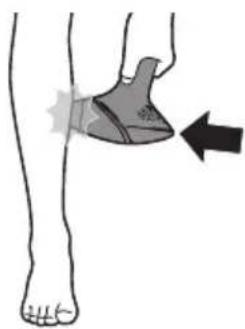
Illustration of a human leg with a foot and a shaded ankle device, showing a force or movement (no text or symbols)Your Philips Lumea has two treatment modes for more convenient use on different body areas:
- The Stamp & Flash mode is ideal to treat small or curvy areas like knees and underarms. Simply press and release the flash button to release a single flash.
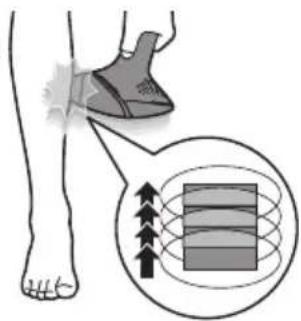
- The Slide & Flash mode offers convenient use on larger areas like legs. Keep the flash button pressed while you slide the device over your skin to release several flashes in a row.
Using your Lumea before and after sun exp or tanning
Tanning with
natural_image
Illustration of a person holding a stringed object with an X mark, no text or symbols presentnatural or artificial sunlight
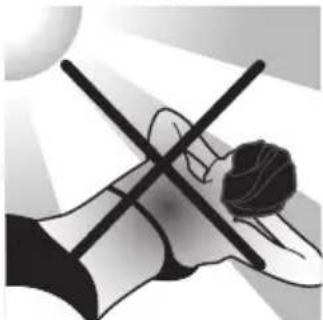
Exposing your skin to natural or artificial sunlight may result with tanning which influences the sensitivity and color of your skin. Therefore the following is important:
- Do not expose your skin to sunlight unprotected when using Lumea. During the entire IPL treatment period, and especially in the first 48 hours after treatment, protect your skin from sunlight with clothing or apply sun-blocking products of not less than SPF50 on the non-covered treatment areas.
- Do not start or resume using Lumea within 4 weeks after exposing your skin to sunlight unprotected (natural sunlight or tanning bed).
- Do not use Lumea on sunburned body areas.
Tanning with
creams, sprays or pills
If you have used artificial tanning (creams, sprays or pills), wait at least 2 weeks before you use the device. Perform a skin test before starting or resuming your treatment with Lumea (see 'B Test skin 24 hours before treatment').
Traveling
with the device
When you travel with the device, check with the airplane carrier to confirm that the device can be carried and/or used on the airplane.
After use
Aftercare
After use, you can apply lotions, creams, deodorant, moisturizer or cosmetics to the treated areas.
Warning: If you experience skin irritation or skin redness after treatment, wait until it disappears before applying any product to your skin. If you experience skin irritation after applying a product to your skin, wash it off with water. If you still get skin reactions, stop using the device and consult your doctor.
Common skin reactions
Your skin may show slight redness and/or may prickle, tingle or feel warm. This reaction disappears quickly.
Dry skin and itching may occur due to shaving or a combination of shaving and light treatment. You can cool the area with an ice pack or a wet face cloth. If dryness persists, you can apply a non-scented moisturizer on the treated area.
Rare side effects
Burns, excessive redness (e.g. around hair follicles) and swelling: these reactions occur rarely. They are the result of using a light intensity that is too high for your skin tone. If these reactions do not disappear within 3 days, we advise you to consult a doctor. Wait with the next treatment until the skin has healed completely and make sure you use a lower light intensity.
- Skin discoloration: this occurs very rarely. Skin discoloration manifests itself as either a darker patch (hyperpigmentation) or a lighter patch (hypopigmentation) than the surrounding area. This is the result of using a light intensity that is too high for your skin tone. If the discoloration does not disappear within 2 weeks, we advise you to consult a doctor. Do not treat discolored areas until the discoloration has disappeared and your skin has regained its normal skin tone.
- Skin infection is very rare but is a possible risk following a (micro)wound, a skin burn, skin irritation, etc.
- Epidermal heating (a sharply defined brownish area which often occurs with darker skin tones and is not accompanied with skin dryness): this reaction occurs very rarely. In case this reaction does not disappear within 1 week, we advise you to consult a doctor. Wait with the next treatment until the skin has healed completely and make sure you use a lower light intensity.
- Blistering (looks like small bubbles on the surface of the skin): this occurs very rarely. In case this reaction does not disappear within 1 month or when the skin gets infected, we advise you to consult a doctor. Wait with the next treatment until the skin has healed completely and make sure you use a lower light intensity.
- Scarring: often the secondary effect of a burn, which can take longer than a month to heal.
- Folliculitis (swelling around hair follicles combined with pustule formation): this reaction occurs very rarely and is the result of bacteria penetrating the damaged skin. In case this reaction occurs, we advise you to consult a doctor as folliculitis may need antibiotic ointment.
- Pain: this can occur during or after treatment if you use the device on skin that is not hair-free, if you use the device at a light intensity that is too high for your skin tone, if you flash the same area more than once and if you use the device on open wounds, inflammations, infections, tattoos, burns, etc.
Troubleshooting
Problem Possible cause Solution
| The device/adapter becomes warm during use. | It is normal for the device and adapter to become warm (but not too hot to touch) during use. | Use the device in a slightly cooler environment and/ or let it cool down before continuing use. |
| The fan is not working. Check if the attachment is well connected. Clean the connectors on the attachment if needed. In case the attachment is well connected and it is possible to produce flashes with the device, contact the Consumer Care Center in your country, your Philips dealer or a Philips service center. | ||
| The cooling airflow of the fan is blocked by hands or a towel. | Make sure the cooling airflow of the fan is unblocked. | |
| When I place the device on the skin, it does not release a flash. The 'READY to flash' light blinks orange. | Your skin tone in the area to be treated is too dark. | Treat other body areas with lighter skin tones with Lumea. |
| The 'READY to flash' light blinks orange and all 5 intensity lights blink as well. | The device needs to be reset. | To reset the device, take the plug out of the socket, wait for 30 minutes to let the device cool down. The device should function normally again. In case it does not work again, contact the Consumer Care Center in your country. |
| The 'READY to flash' light does not light up white. | The device is not completely in contact with your skin. | Place the device at a 90-degree angle on the skin so that the integrated safety system is in contact with your skin. |
| The device produces a strange smell. | The light exit window or the SmartSkin sensor is dirty. | Clean the light exit window and the SmartSkin sensor carefully. |
| You have not removed the hairs on the area to be treated properly. These hairs may get burned and can cause the smell. | Pretreat your skin before you use Lumea. | |
Problem Possible cause Solution
| The device does not flash, the fan is not switched on and all 5 intensity lights blink. | The attachment is not attached properly. | Make sure you attach the attachment completely. If necessary, clean the electronic contacts on the attachment. |
| The skin feels more sensitive than usual during treatment. I experience discomfort when I use the device. | The light intensity setting you use is too high. | Check if you have selected a comfortable light intensity setting. If necessary, select a lower setting. |
| You did not remove the hairs on the areas to be treated. | Pretreat your skin before you use Lumea. | |
| The UV filter of the light exit window is broken. | If the UV filter is broken, do not use the device anymore. Contact the Consumer Care Center in your country, your Philips dealer or a Philips service center. | |
| You treated an area for which the device is not intended. | Never use the device on irritated (red or cut), sunburned, tanned or fake-tanned skin.Never use the device if you have infections, eczema, burns, inflammation of hair follicles, open lacerations, abrasions, herpes simplex (cold sores), wounds or lesions and haematomas (bruises) in the areas to be treated.Never use the device on the following areas: on moles, freckles, large veins, darker pigmented areas, scars, skin anomalies without consulting your doctor. Never use the device on warts, tattoos or permanent make-up, around the eyes and on or near the eyebrows, on the lips, perineum, scalp, nipples, areolas, labia minora, vagina, anus and the inside of the nostrils and ears. Men must not use it on the face and neck including all beard growing areas and whole genital area. This can result in a burn and a change in skin color, which makes it potentially harder to identify skin-related diseases. | |
| The treatment is still painful at the lowest setting (1). | Lumea may not be suitable for your skin. Contact the Consumer Care Center in your country, your Philips dealer or a Philips service center. | |
| There is no glass window in my attachment. | This is normal. No action required: there is no glass window in the body and underarm attachments. Only the face attachment has a red glass filter. The precision and bikini attachments have a transparent glass window. | |
| The skin reaction after treatment lasts longer than usual. | You have used a light intensity setting which is too high for you. | Select a lower intensity next time (see 'Selecting the light intensity'). |
Problem Possible cause Solution
| The flash is very bright to my eyes. Do I need to wear goggles? | No, Philips Lumea does not hurt your eyes. | The scattered light produced by the device is harmless to your eyes. Do not look at the flash while using the device. It is not necessary to wear goggles during use. Use the device in a well-lit room so that the light is less glaring to your eyes. Be sure to make good skin contact to avoid scattered light. |
| The results of the treatment are not satisfactory. | You have used a light intensity setting which is too low for you. | Select a higher setting next time. |
| You did not cover all areas to be treated. | The surface of the attachment should overlap the previous spot to make sure you flash the complete skin area, but treating the same area multiple times does not increase efficacy. | |
| The device is not effective on your body hair color. | If you have light blond, grey, red or white hair, the treatment is not effective. | |
| You do not use the device as often as recommended. | To remove all hairs successfully, we advise you to follow the recommended treatment schedule. You can reduce the time between treatments, but do not treat more often than once every two weeks. | |
| You respond more slowly to IPL treatment. | Continue using the device for at least 6 months, as hair growth can still decrease over the course of this period. |
Warranty and support
If you need information or support, please visit www.philips.com/support or read the international warranty leaflet.
Recycling
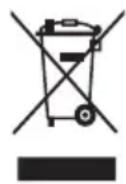
- This symbol means that this product shall not be disposed of with normal household waste (2012/19/EU).
- Follow your country's rules for the separate collection of electrical and electronic products. Correct disposal helps prevent negative consequences for the environment and human health.
Technical specifications
| Transport and storage conditions | Lumea remains operational within its specification in NORMAL USE after transport or storage in the following environmental conditions: -25 °C to 70 °C up to 90 % RH, non-condensing, 700 hPa to 1060 hPa |
| Operating conditions Lumea complies with its specifications when operated in NORMAL USE under the following environmental operating conditions: 5 °C to 35 °C up to 90 % RH, non-condensing, 700 hPa to 1060 hPa | |
| Emitted wavelengths 565 to 1400 nm | |
| Pulse duration Between 1–2.5 milliseconds, for all settings | |
| Flash interval Between 2–2.5 seconds | |
| Optical exposure Body attachment: 2.5–5.6 J/cm2 Underarm attachment: 2.5–6.5 J/cm2 Bikini attachment: 2.5–6.5 J/cm2 Precision attachment: 2.5–6.5 J/cm2 Face attachment: 2.4–5.9 J/cm2 | |
| Adapter input 100–240 V 50/60 Hz 1.5 A | |
| Adapter output 19.5 V 3.33 A 65.0 W | |
| Average active efficiency ≥88.0 % | |
| Efficiency at low load (10 %) | ≥79.0 % |
| No-load power consumption | <0.21 W |
| Adapter type number The reference number (AD2069x20020HF) can be found on your device. The letter 'x' denotes type of plug, it can be: 0, 1, 2, 3, 5, 7, 9, or H. | |
Electromagnetic compatibility – Compliance information
This device complies with all applicable standards and regulations regarding exposure to electromagnetic fields.
Explanation of symbols
The warning signs and symbols are essential to ensure that you use this product safely and correctly and to protect you and others from injury. Below you find the meaning of the warning signs and symbols on the label and in the user manual.

This symbol identifies the manufacturer of the product: Philips Consumer Lifestyle B.V., Tussendiepen 4, 9206 AD Drachten, The Netherlands.

This symbol means that you have to read the user manual carefully before you use the device. Save the user manual for future reference.
This symbol means that the user should consult the instructions for use for important safety information such as cautions that cannot, for a variety of reasons, be presented on the device itself.
This symbol means that the user should consult the instructions for use for important safety information such as contraindications and warnings that cannot, for a variety of reasons, be presented on the device itself.
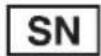
This symbol indicates the serial number of the device.
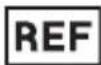
This symbol identifies the catalogue number of the device.
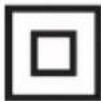
This symbol identifies that the equipment meets the safety requirements specified for Class II equipment.
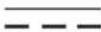
This symbol indicates that the equipment is suitable for direct current only.

This symbol indicates that the equipment is suitable for alternating current only.
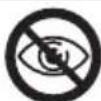
This symbol indicates that the device should not be used around the eyes and on or near the eyebrows.
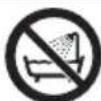
This symbol means: 'Do not use this device in a bathtub, shower or water-filled reservoir.'

This symbol means that the transformer is designed to be short-circuit proof.
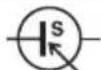
This symbol means that the transformer is considered a Switch Mode Power Supply (SMPS) unit.
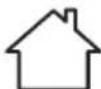
This symbol means that the device is designed for indoor use.
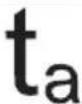
This symbol indicates the rated maximum ambient temperature at which the transformer may be operated continuously under normal conditions of use.

This symbol indicates that the device is intended to be usable up to the maximum altitude of 3000 m.

This recycling symbol identifies the material of which an item is made, to facilitate recycling or other reprocessing. The symbol may include a number and/or abbreviation.
| This symbol identifies the switch or switch position by means of which part of the equipment is switched on in order to bring it into the stand-by condition, and to identify the control to shift to or to indicate the state of low power consumption. | |
| IP22 | This symbol indicates the protection against ingress of solid foreign objects ≥12.5 mm and against harmful effects due to the ingress of vertical dripping water when tilted at 15 degrees. |
| IP30 | This symbol indicates the protection against ingress of solid foreign objects ≥2.5 mm and that there is no protection for harmful effects due to the ingress of water. |
| This symbol indicates the energy efficiency level. | |
| This symbol indicates that the adapter should not be used if the plug pins are damaged. | |
| This symbol means an object is capable of being recycled - not that the object has been recycled or will be accepted in all recycling collection systems. | |
| This symbol indicates WEEE, waste electrical and electronical equipment. Electrical waste products should not be disposed of with household waste. Please recycle where facilities exist. Check with your local authority or retailer for recycling advice (see 'Recycling'). | |
| The symbol for the Green Dot ('Der Grüne Punkt' in German). The Green Dot is the license symbol of a European network of industry-funded systems for recycling the packaging materials of consumer goods. | |
| This symbol is applied to products to indicate that they conform with relevant EU directives regarding health and safety or environmental protection. | |
| The FSC (Forest Stewardship Council) logo signifies that the product comes from responsible sources—environmentally appropriate, socially beneficial and economically viable. | |
| Certification mark for Australia and New Zealand that shows that this product conforms with relevant safety and Electromagnetic Compatibility (EMC) requirements. | |
| This symbol indicates that this product meets the relevant UK statutory requirements regarding safety and environmental protection. |
UK Importer:
Philips Electronics UK Limited
Ascent 1, Aerospace Boulevard
Farnborough GU14 6XW
United Kingdom
Inhalt
Willkommen 30
Produktüberblick 31
Gegenanzeigen 31
natural_image
Diagram of a mechanical component with droplets and a circular outline, no text or symbols presentnatural_image
Diagram showing two droplets approaching a surface with droplets, no text or symbols presentnatural_image
Diagram of a droplet formation process inside a circular container (no text or symbols)natural_image
Illustration of a hand using a tool to brush through droplets onto a surface (no text or symbols)natural_image
Illustration of a human foot and ankle joint (no text or symbols)natural_image
Illustration of a hand holding a connector with an arrow indicating rotation (no text or symbols)natural_image
Illustration of a human foot with a shaded knee joint and arrow indicating movement (no text or symbols)natural_image
Line drawing of a handheld device with a button and arrow pointing to the left side (no text or symbols)natural_image
Simple clock icon with a circular arrow, no text or symbols present24 hours
natural_image
Line drawing of a handheld device with a black arrow pointing to a button (no text or symbols)
natural_image
Illustration of a foot and ankle with a shaded shoe and a magnified inset showing magnetic field lines around a rectangular object (no text or symbols)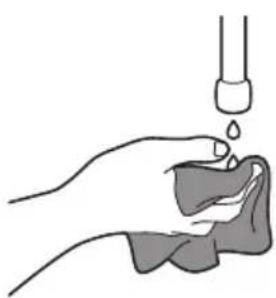
natural_image
Illustration of a hand holding a small object with liquid being poured into it (no text or symbols)natural_image
Illustration of a hand holding a small electronic device with an arrow indicating rotation (no text or symbols)natural_image
Illustration of a hand holding a device with an arrow indicating rotation (no text or symbols)natural_image
Illustration of a hand holding a device with an arrow indicating rotation (no text or symbols)natural_image
Simple line drawing of a stylized human face inside a circle (no text or symbols)natural_image
Simple line drawing of a stylized object inside a circle (no text or symbols)natural_image
Simple line drawing of a human torso inside a circle (no text or symbols)natural_image
Simple line drawing of a person's abdomen and back, enclosed in a circle (no text or symbols)natural_image
Line drawing of a medical device with a circular dial and control panel, no text or symbols presentnatural_image
Illustration of a foot and ankle with a shaded area and arrow indicating movement or pressure (no text or symbols)natural_image
Illustration of a person holding a cross-shaped object, possibly a musical instrument or device, with no visible text or symbols.natural_image
Diagram of a mechanical component with multiple droplets suspended from a central body, enclosed in a circular frame (no text or symbols)natural_image
Diagram showing two droplets approaching a surface with droplets on the ridges (no text or symbols)natural_image
Diagram of a droplet formation inside a circular container, showing liquid droplets and a horizontal strip (no text or symbols)natural_image
Illustration of a hand using a tool to brush through droplets on a surface (no text or symbols)natural_image
Illustration of a human foot and ankle joint (no text or symbols)natural_image
Illustration of a hand holding a small electronic device with an arrow indicating rotation (no text or symbols present)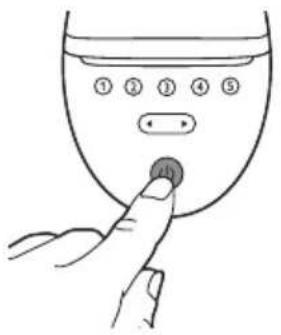
natural_image
Illustration of a human leg with a shaded knee joint and arrow indicating movement (no text or symbols)natural_image
Line drawing of a handheld device with a black arrow pointing to a button (no text or symbols)natural_image
Simple clock icon with a circular arrow, no text or symbols present24 hours
natural_image
Illustration of a hand holding a pipette above a cloth or fabric (no text or symbols)natural_image
Illustration of a hand holding a small electronic device with an arrow indicating rotation (no text or symbols)natural_image
Illustration of a hand holding a small electronic device with an arrow indicating rotation (no text or symbols present)natural_image
Illustration of a hand holding a small electronic component with an arrow indicating rotation (no text or symbols)natural_image
Simple line drawing of a stylized human face inside a circle (no text or symbols)natural_image
Simple line drawing of a stylized object inside a circle (no text or symbols)natural_image
Simple line drawing of a human torso inside a circle (no text or symbols)natural_image
Simple line drawing of a human torso and abdomen inside a circle (no text or symbols)natural_image
Illustration of a human leg with a foot and a shaded knee area, showing a force or movement (no text or symbols)natural_image
Illustration of a person crossing a horizontal line with a circular background (no text or symbols)natural_image
Diagram of a medical or laboratory procedure showing liquid droplets entering a container (no text or symbols)natural_image
Diagram showing three droplets approaching a surface with liquid droplets (no text or symbols)natural_image
Diagram of a medical or laboratory procedure showing liquid droplets in a container with a curved structure (no text or symbols)natural_image
Illustration of a hand using a tool to brush through droplets onto a surface (no text or symbols)natural_image
Illustration of a human foot and ankle joint (no text or symbols)natural_image
Illustration of a hand holding a small electronic device with an arrow indicating left motion (no text or symbols)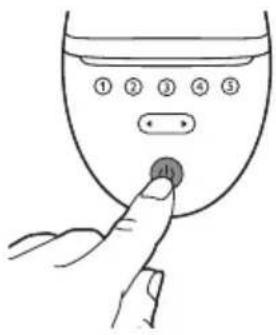
natural_image
Illustration of a human foot with a shaded ankle joint and arrow indicating movement (no text or symbols)natural_image
Line drawing of a handheld device with a black arrow pointing to a button (no text or symbols)
natural_image
Simple clock icon with a circular arrow, no text or symbols present24 hours
C Séance
et rangement
natural_image
Illustration of a hand holding a small object with liquid being poured into it, no text or symbols presentnatural_image
Illustration of a hand holding a small device with an arrow indicating rotation (no text or symbols)natural_image
Illustration of a hand holding a device with an arrow indicating rotation (no text or symbols)natural_image
Illustration of a hand holding a small electronic device with an arrow indicating rotation (no text or symbols)natural_image
Simple line drawing of a stylized human face inside a circle (no text or symbols)natural_image
Simple line drawing of a stylized object inside a circle (no text or symbols)natural_image
Simple line drawing of a human torso inside a circle (no text or symbols)natural_image
Simple line drawing of a person's abdomen and hip, enclosed in a circle (no text or symbols)natural_image
Line drawing of a medical device with a circular inset showing a control panel (no text or symbols)natural_image
Illustration of a human leg with a shaded area and arrow indicating movement or pressure point (no text or symbols)natural_image
Illustration of a hand holding a stringed object with a circular object inside, no text or symbols presentnatural_image
Diagram of a mechanical or fluidic component with droplets and a central horizontal bar, enclosed in a circular boundary (no text or symbols)natural_image
Diagram showing two droplets approaching a surface with droplets on the ridges (no text or symbols)natural_image
Diagram of a droplet formation inside a circular container, showing liquid droplets and a horizontal plate (no text or symbols)natural_image
Illustration of a hand using a tool to brush through droplets on a surface (no text or symbols)natural_image
Illustration of a human foot and ankle joint (no text or symbols)natural_image
Illustration of a hand holding a device with an arrow indicating rotation (no text or symbols present)natural_image
Illustration of a human foot with a shaded knee joint and arrow indicating movement (no text or symbols)natural_image
Line drawing of a handheld device with a black arrow pointing to a button (no text or symbols)
natural_image
Simple clock icon with a circular arrow, no text or symbols present24 hours
natural_image
Illustration of a hand holding a pipette above a cloth or fabric sample (no text or symbols)natural_image
Illustration of a hand holding a small electronic device with an arrow indicating rotation (no text or symbols)natural_image
Illustration of a hand holding a small electronic device with an arrow indicating rotation (no text or symbols present)natural_image
Illustration of a hand holding a small electronic device with an arrow indicating rotation (no text or symbols present)natural_image
Simple line drawing of a stylized human face inside a circle (no text or symbols)natural_image
Simple line drawing of a stylized object inside a circle (no text or symbols)natural_image
Simple line drawing of a human torso inside a circle (no text or symbols)natural_image
Simple line drawing of a human torso and abdomen inside a circle (no text or symbols)Sensore SmartSkin
natural_image
Illustration of a human leg with a foot and a shaded knee joint, showing a force or movement indicator (no text or symbols present)natural_image
Illustration of a foot and ankle with a shoe and magnified view showing internal layered structure (no text or symbols)natural_image
Illustration of a person lying on a surface with a cross symbol crossed, no text or symbols presentnatural_image
Diagram of a container with liquid droplets inside, enclosed in a circular frame (no text or symbols)natural_image
Diagram showing two droplets approaching a surface with droplets, no text or symbols presentnatural_image
Diagram of a pipette or pipette with liquid droplets inside a circular frame (no text or symbols)natural_image
Illustration of a hand using a tool to brush through droplets onto a surface (no text or symbols)natural_image
Illustration of a human foot and arm in contact, showing the lower leg area (no text or symbols)natural_image
Illustration of a hand holding a small electronic device with an arrow indicating rotation (no text or symbols present)natural_image
Illustration of a human leg with a shaded knee joint and arrow indicating movement (no text or symbols)natural_image
Line drawing of a handheld device with a black arrow pointing to a button (no text or symbols)natural_image
Simple clock icon with an arrow indicating rotation (no text or symbols)natural_image
Illustration of a human leg with a shaded area and arrow indicating movement or pressure point (no text or symbols)natural_image
Line drawing of a handheld device with a black arrow pointing to a button (no text or symbols)natural_image
Illustration of a foot and ankle with a shaded area and a magnified inset showing internal mesh structure (no text or symbols)natural_image
Illustration of a hand holding a droplet over a cloth, with a pipette above (no text or symbols)natural_image
Illustration of a hand holding a device with an arrow indicating rotation (no text or symbols)natural_image
Illustration of a hand holding a small electronic device with an arrow indicating rotation (no text or symbols present)natural_image
Illustration of a hand holding a small electronic device with an arrow indicating rotation (no text or symbols)Lichaamsopzetstuk
natural_image
Simple line drawing of a stylized human face inside a circle (no text or symbols)natural_image
Simple line drawing of a stylized object inside a circle (no text or symbols)natural_image
Simple line drawing of a human torso inside a circle (no text or symbols)natural_image
Simple line drawing of a human figure inside a circle (no text or symbols)natural_image
Line drawing of a medical device with a magnified view of its internal components (no text or symbols)natural_image
Illustration of a human leg with a shaded knee joint and an arrow indicating movement or force (no text or symbols)natural_image
Abstract illustration of a human figure with crossed lines, possibly symbolizing a cross or crossed line (no text or symbols present)natural_image
Diagram of a mechanical or fluidic component with droplets suspended from a central body, enclosed in a circular frame (no text or symbols)natural_image
Diagram showing three droplets approaching a surface with liquid droplets (no text or symbols)natural_image
Diagram of a medical or laboratory procedure showing liquid droplets in a container with a curved structure (no text or symbols)natural_image
Illustration of a hand using a tool to brush through droplets onto a surface (no text or symbols)natural_image
Illustration of a human foot and ankle joint (no text or symbols)natural_image
Illustration of a hand holding a small electronic device with an arrow indicating rotation (no text or symbols)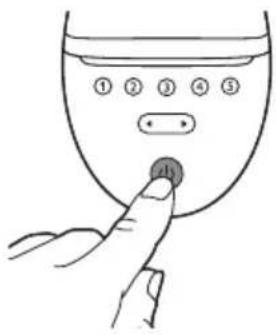
natural_image
Illustration of a human leg with a shaded knee joint and arrow indicating movement (no text or symbols)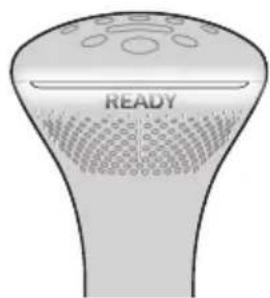
natural_image
Line drawing of a handheld device with a black arrow pointing to a button (no text or symbols)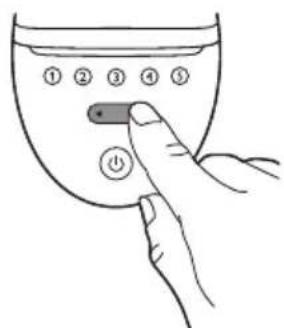
natural_image
Simple clock icon with a circular arrow, no text or symbols present24 hours