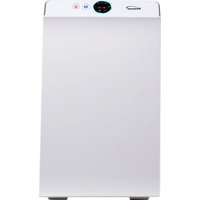
AP-4100W - Air purifier Brentwood - Free user manual and instructions
Find the device manual for free AP-4100W Brentwood in PDF.


| Product Type | Air Purifier |
| Brand | Brentwood |
| Model | AP-4100W |
| Use | Indoor household use only |
| Filtration System | 3-stage: pre-filter, activated carbon filter, true HEPA filter |
| HEPA Filter | Removes 99.97% of particles 0.3 µm |
| Activated Carbon Filter | Absorbs smoke, odors, volatile organic compounds |
| Pre-filter | Captures large particles (lint, pet hair, dust) |
| Speeds | Low, Medium, High (Low, Mid, High) |
| Sleep Mode | Yes (low speed, lights off except power) |
| Timer | 1 to 12 hours |
| Remote Control | Yes (button cell battery included) |
| Air Quality Sensor | Automatic detection with circular color display |
| Power Supply | 120 V~, 60 Hz (polarized plug) |
| Pre-filter Cleaning | Washable with water, dry completely before reinstalling |
| Multi-layer Filter Cleaning | Vacuum or replace (do not wash with water) |
| Filter Replacement | Every 3 months (or as needed) |
| Safety Distance | At least 1.5 m from electronic devices |
| Space Around Unit | 10 to 15 cm (4-6 inches) for air circulation |
| Safety Instructions | Do not use outdoors, nor in presence of flammable gases |
| Warranty | Household use only, no user-serviceable parts |
Frequently Asked Questions - AP-4100W Brentwood
User questions about AP-4100W Brentwood
0 question about this device. Answer the ones you know or ask your own.
Ask a new question about this device
Download the instructions for your Air purifier in PDF format for free! Find your manual AP-4100W - Brentwood and take your electronic device back in hand. On this page are published all the documents necessary for the use of your device. AP-4100W by Brentwood.
USER MANUAL AP-4100W Brentwood
Brentwood® Appliances
© 2021 Brentwood Appliances, Inc.
HEPA AIR PURIFIER PURIFICADOR DE AIRE CON FILTRO HEPA PURIFICATEUR D'AIR AVEC FILTRE HEPA
ITEM NO.: AP-4100W
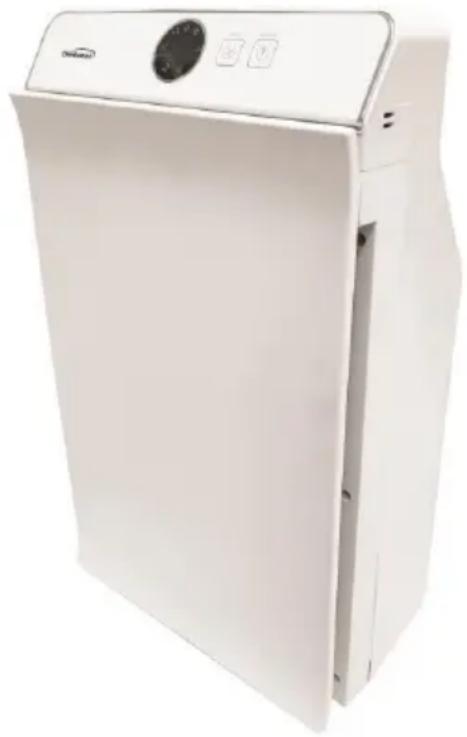
natural_image
White industrial air purifier unit with control panel and buttons (no visible text or symbols)Operating and Safety Instructions FOR INDOOR HOUSEHOLD USE ONLY
When using this or any other electrical appliance, always follow these basic safety precautions, especially when children are present.
READ ALL INSTRUCTIONS BEFORE USE
⚠ WARNING- To reduce the risk of fire, electric shock, serious personal injury and property damage please note the following:
- This product is not intended for use by children. Keep the product out of reach of children and pets. Extra caution is necessary when using this appliance near children. Children should be supervised to ensure that they do not play with the appliance.
- Use the appliance only for purposes described in the instruction manual.
- Incorrect operation and improper use can damage the appliance and cause injury to the user.
- No liability can be accepted for any damage caused by non-compliance with these instructions or any other improper use or mishandling of appliance.
- Always ensure that the voltage on the rating label corresponds to the main voltage in your home.
- Before use, please remove the plastic bags and other packaging or wrappings of filter screen.
- The appliance is intended for household use only. Commercial use invalidates the warranty, and the supplier cannot be held responsible for injury or damage caused when using the appliance for any other purpose than that intended.
- Avoid any contact with moving parts.
- To reduce the risk of fire or electric shock, do not use this appliance with any solid-state speed control device.
- Please do not use the air purifier in the kitchen.
- Do not allow the cord to touch hot surfaces or placed near a hot gas, electrical burner, or a heated oven.
- Do not use this appliance in locations containing inflammable or explosive gases. Do not expose it directly to sunlight for a long period of time.
- Do not place the appliance against walls or curtains or other objects which might block the air flow.
- Do not put it in the place where the air inlet and outlet are easy to touch curtains.
- When the filter screen needs to be cleaned and replaced, the power plug must be pulled out from the main power.
- Please keep the indoor air circulation when using together with combustion apparatus because this machine has no carbon monoxide removal function.
- Keep a distance of at least 1.5m away from TV, computer, and other electrical appliances.
-
Do not block any ventilation openings.
-
Do not insert foreign matters into the air inlet grille and air outlet of the air purifier. Do not cover the air inlet or air outlets while the appliance is operating.
- Always ensure the product is unplugged from the electrical outlet and allowed to cool before assembling, disassembling, relocating, or cleaning it.
- Do not leave the product unattended while it is in use. Always unplug the product from the electrical outlet when not in use.
- Do not immerse the Base, Power Cord, or Plug of this product in or expose the Power Cord or Plug to water or other liquids.
- Do not use attachments not recommended or sold by the product manufacturer.
- Use the product in a well-ventilated area. Keep at least 4-6 inches of space on all sides of the product to allow adequate air circulation.
- The air purifier should be placed on a flat and stable surface when operating to avoid overturning. Do not use force to turn the air swing when in operation as it will cause damage to the oscillation gear.
- Do not plug or unplug the product from the electrical outlet with a wet hand.
- Do not let cord hang over edge of table or counter where it may be tripped over or pulled.
- Do not operate the product if it has a damaged or cut Power Cord or plug, if wires are exposed, if it malfunctions, if it is dropped or damaged, or if the Motor Housing is dropped in or exposed to water.
- This product has no user-serviceable parts. Do not attempt to examine or repair this product yourself. Please review the Warranty Policy on Page 8.
- Do not put any stress on the power cord where it connects to the product, as the power cord could fray and break.
SPECIAL INSTRUCTIONS: A short power supply cord is provided to reduce the risk of becoming entangled in or tripping over a longer cord. An extension cord is not recommended for use with this product, but if one must be used:
— The marked electrical rating must be at least as great as that of the product.
- If the product is of a 3-prong grounding type, the extension cord must be a grounding-type 3-wire cord.
- Arrange the extension cord so that it will not drape over the countertop or tabletop where it can be tripped over or pulled.
WARNING: If this product is equipped with a polarized plug to reduce the risk of electrical shock.
This is a safety feature. The plug will fit into a polarized outlet only one way. If you are unable to insert the plug into the electrical outlet, try reversing the plug. If the plug still does not fit, contains qualified electrician. Never use the plug with an extension cord unless you can fully insert the plug into the extension cord. Do not alter the plug. Do not attempt to defeat the safety purpose of the polarized plug.

WARNING: Chemical Burn Hazard. Keep batteries away from children.
- This product contains a lithium button/coin cell battery. If a new or used lithium button/coin cell battery is swallowed or enters the body, it can cause severe internal burns and can lead to death in as little as 2 hours. Always completely secure the battery compartment. If the battery compartment does not close securely, stop using the product, remove the batteries, and keep it away from children. If you think batteries might have been swallowed or placed inside any part of the body, seek immediate medical attention.
- The cells shall be disposed of properly, including keeping them away from children; and
• Even used cells may cause injury.
SAVE THESE INSTRUCTIONS FOR FUTURE REFERENCE
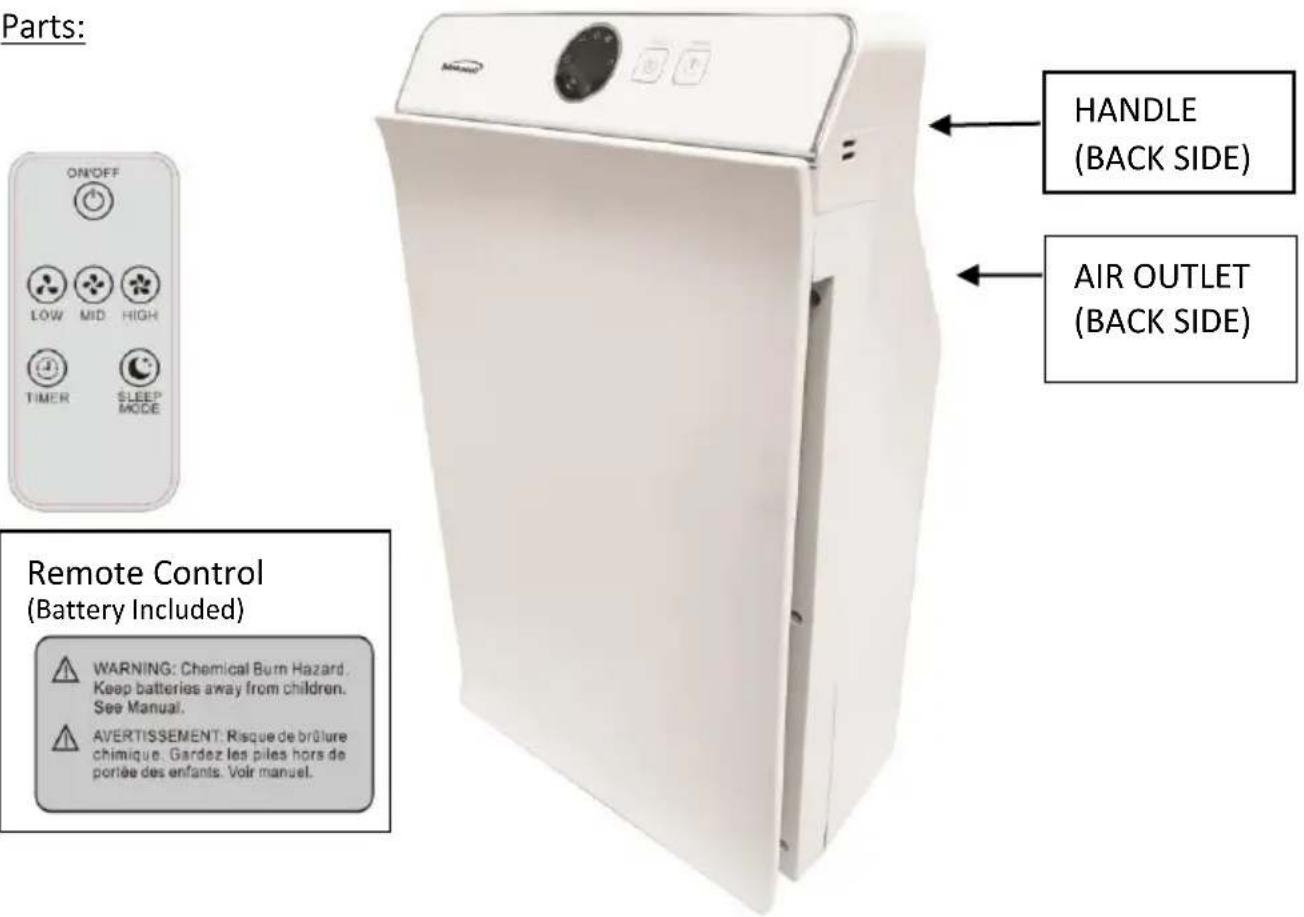
3-STAGE FILTRATIONS
1. True HEPA Filter
- Removes 99.97% of airborne particles 0.3 micrometers in diameter.
- Filters small particles – bacteria, viruses, allergens, smoke, dust, mold spores, mites, pollen, and dander
2. High Efficiency Activated Carbon Filter
• Physically absorbs unwanted fumes and odor
- Filters compounds – ammonia, formaldehyde, benzene, hydrogen sulfide, and volatile organic compounds
3. Pre-Filter
• Captures large particles – lint, dust, fibers, pet fur, and human hair.
• Maximizes the life of both the Carbon and HEPA filters
BEFORE FIRST USE
IMPORTANT: Please check all packaging material carefully before discarding as there may be accessory parts contained within the packaging material.
- Take out the air purifier from the carton and the plastic bag protecting the body.
- Referring to the replacement method of the filter screen, take out the filter screen and remove the packing materials.
- Plug the air purifier in the power supply, press the 'ON/OFF' key, the power indicator continuously lights on in red, and the machine will start. By default, it runs at 'Mid Speed' and in the 'Automatic' gear, and the colorful digital circle display lights on. At this time, the air sensor will automatically detect the air quality and automatically select the air speed according to the air quality.
- Press 'Air Speed' key to choose between 'Low Speed', 'Mid Speed' and 'High Speed.'
- Press the 'Timer Key' of the remote control to enter the timer function. In this function, you can choose any timer setting between 1-12 hours.
- Press the 'Sleep' key on the remote control and select 'Sleep Mode'. The default air speed of the purifier is 'Low', all LED lights are off except the 'Sleep Mode' indicator light and the power indicator light.
REPLACEMENT AND INSTALLATION OF FILTER SCREEN:
The following operations can only be carried out after the power supply has been cut off.
1. Remove the Panel
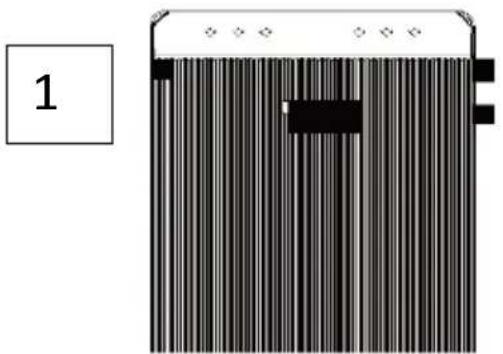
- Hold both sides of bottom of the panel by hand, then pull the two magnetic catches at the bottom corner of the panel with slight force (position 1 in the figure), then lift the panel up, and pull off the two buckle positions above the panel (position 2 in the figure), as shown in the following photos.
natural_image
Diagram of a barcode scanner with vertical stripes and a labeled page number 1 (no text or symbols on the scanner itself)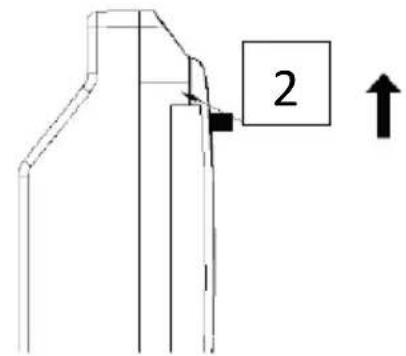
2. Replace the Filter Screen
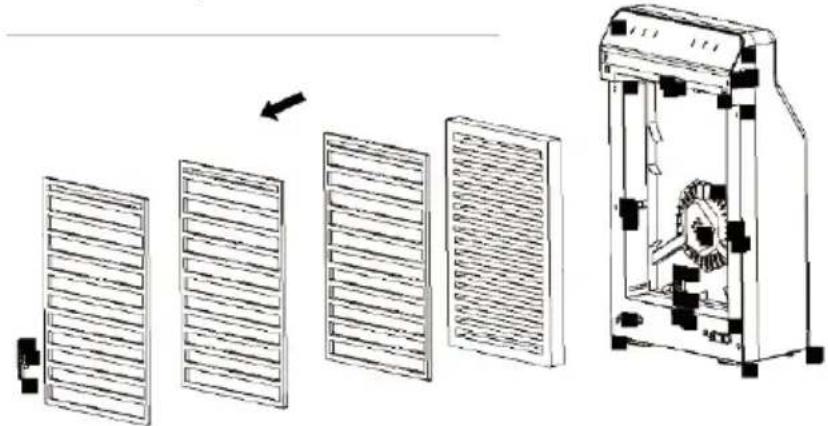
• The plastic bag must be removed on the new filter screen before use.
• Pull out the four filter screen pressure blocks (upper, lower, left and right)
• Take out the filter screen
- Remove the plastic bag and install the filter screen
• Install the filter screen pressure block
3. Panel Mounting
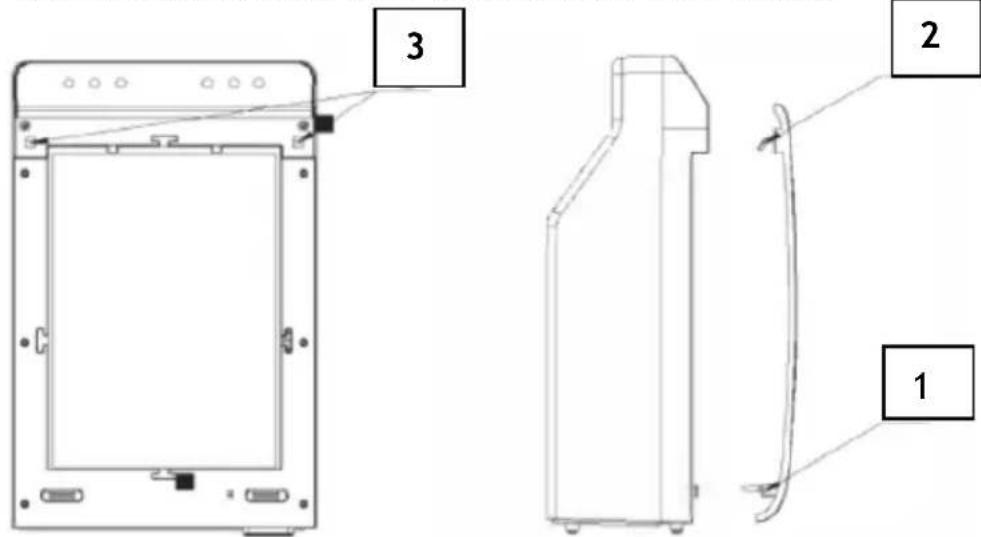
- First install the buckle position (2 in the figure) on the panel into the buckle hole (3 in the figure) on the main body, and then release the handle to let the magnetic force of the magnet absorb the panel (1 in the figure), as shown in the following figure.
- Pack the old, polluted filter in a plastic bag and safely discard.
4. Cleaning method
- Be sure to unplug the power plug before cleaning.
- Do not use corrosive chemicals such as gasoline, thinner and alcohol to clean the outside of the unit. Wipe with a damp cloth using only water.
- The front panel can be removed and cleaned with water. The coarse filter screen can be washed repeatedly with water. Once it is completely dry reinstall. This will not affect the dedusting effect.
- Do not use water to clean the multi-layer filter. Only a vacuum cleaner should be used to absorb dust from the existing filter. The HEPA filter should be replaced every 6-12 months for optimum performance.
FAULTS AND CAUSES
| PHENOMENON | CHECKING ITEM | SOLVE |
| NOT TURNING | IF THE POWER CABLE | RE-SET THE POWER CABLE |
| POOR EFFECT OF SMOKE AND ODOR REMOVAL | HEPA | CLEAN OR CHANGE THE HEPA |
Do not attempt to disassemble or repair the machine. Please read the warranty on Page 8.
ONE YEAR LIMITED WARRANTY
Write down the following information about your appliance to better help you obtain assistance or service if you ever need it.
CUSTOMER RECORD
Date of Purchase ____ Store/Dealer ____
Model/Item No: ____
THIS WARRANTY APPLIES TO PRODUCTS PURCHASED AND USED IN THE CONTINENTAL U.S. AND CANADA ONLY. This is the only express warranty for this product and is in lieu of any other warranty or condition. This product is warranted to be free from defects in material and workmanship for a period of one (1) year from the date of original purchase. During this period, your exclusive remedy is repair or replacement of this product, at our option; however, you are responsible for all costs associated with returning the product to us and our returning a product or component under this warranty to you. If the product or component is no longer available, we will replace with a similar one of equal or greater value. This warranty does not cover glass, filters, wear from normal use, use not in conformity with the printed directions, or damage to the product resulting from accident, alteration, abuse, or misuse.
THIS WARRANTY EXTENDS ONLY TO THE ORIGINAL CONSUMER PURCHASER. KEEP THE ORIGINAL SALES RECEIPT, AS PROOF OF PURCHASE IS REQUIRED TO MAKE A WARRANTY CLAIM.
This warranty is void if the product is used for other than single-family household use or subjected to any voltage and waveform other than what is specified on the rating label (E.G., 120V\~60Hz). We exclude all claims for special, incidental, and consequential damages caused by breach of express or implied warranty. All liability is limited to the amount of the purchase price. Every implied warranty, including any statutory warranty or condition of merchantability or fitness for a particular purpose, is disclaimed except to the extent prohibited by law, in which case such warranty or condition is limited to the duration of this written warranty. This warranty gives you specific legal rights. You may have other legal rights that vary depending on where you live. Some states do not allow limitations on implied warranties or special, incidental, or consequential damages, so the foregoing limitations may not apply to you. To make a warranty claim do not return this appliance to the store.
TO OBTAIN WARRANTY SERVICE AND/OR TROUBLESHOOTING INFORMATION:
Call Customer Service at 1-888-903-0060 in the U.S.
Monday through Friday: 9:00 am – 5:00 pm PT
U.S. Customers Please Email: warranty@brentwoodus.com
Canadian Customers Please Email: canada.warranty@brentwoodus.com
Go online at www.brentwoodus.com
PRECAUCIONES IMPORTANTES

© 2021 Brentwood Appliances, Inc.
- Brentwood® Appliances
- HEPA AIR PURIFIER PURIFICADOR DE AIRE CON FILTRO HEPA PURIFICATEUR D'AIR AVEC FILTRE HEPA
- READ ALL INSTRUCTIONS BEFORE USE
- SAVE THESE INSTRUCTIONS FOR FUTURE REFERENCE
- 3-STAGE FILTRATIONS
- True HEPA Filter
- High Efficiency Activated Carbon Filter
- Pre-Filter
- BEFORE FIRST USE
- REPLACEMENT AND INSTALLATION OF FILTER SCREEN:
- Remove the Panel
- Replace the Filter Screen
- Panel Mounting
- Cleaning method
- ONE YEAR LIMITED WARRANTY
- CUSTOMER RECORD
- PRECAUCIONES IMPORTANTES
Brand : Brentwood
Model : AP-4100W
Category : Air purifier