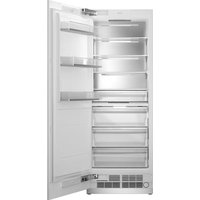
REF30RCBPNV - Refrigerator BERTAZZONI - Free user manual and instructions
Find the device manual for free REF30RCBPNV BERTAZZONI in PDF.


| Brand | Bertazzoni |
| Model | REF30RCBPNV |
| Product Type | Built-in Refrigerator |
| Dimensions (H x W x D) | 2123 x 756 x 635 mm |
| Weight | Approximately 150 kg (estimated) |
| Power Supply | 115 V, 60 Hz, 15 A, grounded outlet |
| Refrigerant | R600a (isobutane), flammable |
| Capacity | Not specified |
| Key Features | Integrated ice maker and water dispenser, stainless steel doors, forced air cooling system |
| Installation | Built-in, requires water supply and dedicated circuit, anti-tip bracket provided |
| Maintenance and Cleaning | Clean ventilation grille regularly, use a soft cloth and mild soap, avoid abrasive products |
| Safety | Do not block grilles, do not use extension cord, have installation done by a professional |
| Spare Parts and Reparability | Contact Bertazzoni authorized after-sales service |
| General Information | Made in Italy, Italian design, warranty according to manufacturer's terms |
Frequently Asked Questions - REF30RCBPNV BERTAZZONI
User questions about REF30RCBPNV BERTAZZONI
0 question about this device. Answer the ones you know or ask your own.
Ask a new question about this device
Download the instructions for your Refrigerator in PDF format for free! Find your manual REF30RCBPNV - BERTAZZONI and take your electronic device back in hand. On this page are published all the documents necessary for the use of your device. REF30RCBPNV by BERTAZZONI.
USER MANUAL REF30RCBPNV BERTAZZONI
| EN | INSTALLATION MANUALBUILT-IN COLUMNS | 3 |
| FR | MANUEL D'INSTALLATIONRÉFRIGÉRATEURS ENCASTRABLES | 67 |
| ES | MANUAL DE INSTALACIÓNCOLUMNAS INTEGRADAS | 133 |
FROM THE DESK OF OUR PRESIDENT
Dear new owner of a Bertazzoni appliance,
I want to thank you for choosing one of our beautiful products for your home.
My family started manufacturing kitchen appliances in Italy in 1882, building a reputation for quality of engineering and passion for good food.
Today, our products stand out because of their unique blend of authentic Italian design and superior appliance technology. It is our mission to make products that function perfectly and bring joy to their owners.
By making beautiful products we respond to our customers' flair for good design. By making them versatile and easy-to-use, cooking with Bertazzoni becomes a real pleasure.
This manual will help you learn to use and care for your Bertazzoni appliance in the safest and most effective way, so that it can give you the highest satisfaction for years to come.
Enjoy!
Paolo Bertazzoni
President
MANUAL VALIDITY
The following manual is valid for all the product codes mentioned below:
• REF30RCBPNV
• REF24RCBPNV
• REF18FCBIPLV
• REF18FCBIPRV
• REF24FCBIPNV
GENERAL INFORMATION 7
MANUAL INFORMATION 7
SAFETY INFORMATION 8
CARING FOR THE ENVIRONMENT 8
BEFORE INSTALLATION 8
INSTALLATION 9
CUTOUT DIMENSIONS 9
PRODUCT DIMENSIONS 10
ANTI-TIP BRACKET LOCATION 11
MINIMUM HEIGHT ADJUSTMENT FOR LEVELING 11
FOOD LOAD BEARING CAPACITY OF THE DOOR BINS 12
CUSTOM DOOR PANEL (FOR PANEL-READY MODELS) 13
ELECTRICAL REQUIREMENTS 14
PLUMBING REQUIREMENTS 16
INSTALLATION 18
TOOL LIST 19
ALTERNATIVES FOR INSTALLATION 19
UNPACKING 20
REMOVING THE CONNECTORS ON THE SIDE WALL OF THE UNIT 21
REMOVING THE INSTALLATION HARDWARE 22
REMOVING THE VENT HOLE ASSEMBLY 23
INSTALLATION INSTRUCTION 24
MOUNTING THE ANTI-TIP BRACKETS 24
PREPARING THE WATER HOSE AND THE ELECTRICAL CONNECTION 27
INSTALLATION IN THE CABINET 28
SCREWING IN THE SIDE BRACKETS 34
SECURING THE UPPER BRACKET 35
INSTALLING THE BOTTOM CABINET 35
ATTACHING THE AIR VENT GRILLE 36
ATTACHING THE DECORATIVE TRIM COVERS 37
OVERLAY PANEL INSTALLATION AND PREPARATION 38
HINGE ADJUSTMENT AND REVERSING THE DOOR SWING 49
CABINET CUTOUT DIMENSIONS 58
LOCATION OF THE ELECTRICAL WIRING 59
LOCATION OF THE WATER SYSTEM 60
INSTALLING THE UPPER AND LOWER BRACKETS 62
These instructions are suitable for different types of appliances, so they may contain descriptions of functions which your appliance may not include or support.
The images and illustrations in this document refer to various models and may differ slightly from the product purchased.
The manufacturer does not accept any liability for personal injury or damage to property arising from incorrect installation or misuse of the appliance.
The manufacturer reserves the right to modify the various models as required to comply with the technical regulations in force.
In the event of complaints, please contact customer service. Read the instructions provided in this manual thoroughly before installing and/or using the appliance. This will help you get to know your new appliance. Keep this document at hand so that you can consult it at any moment, and pass it on to any subsequent owners.
Read the safety messages provided in the introduction to this manual and give due consideration to the safety notes, such as: "Attention", "Warning" and "Danger" which appear in the text.

DANGER
This symbol indicates a situation that is a danger to you and others. Read it carefully and make sure that you have perfectly understood the causes of potential dangerous or fatal accidents.

WARNING
This symbol indicates safety information. Read it carefully and make sure that you have perfectly understood the causes of potentially dangerous accidents.

CAUTION
This symbol indicates a procedure which could put the appliance's structure or components at risk. Take particular care over these procedures.

NOTE
This symbol highlights methods or procedures for correct use of the appliance.
The Model, Sales Code and Serial Number are printed on the nameplate. Refer to the Specifications section of this manual for nameplate location.

NOTE
You are advised to make a note of the appliance's data and serial numbers so they are immediately available if required.

NOTE
State the information provided on the nameplate to improve the efficiency of the after-sales and parts services. For warranty purposes, you will also need the date of installation and name of your authorized Bertazzoni dealer.

WARNING
When using your appliance, follow basic precautions. Read all instructions before using the appliance. Save these instructions and pass them on to any future user.
SAFETY INFORMATION

WARNING
This installation manual is intended to aid installation teams. The User Manual provided with the product must also be taken into account.
You may be seriously injured and your product damaged if you ignore the warnings provided in this manual. Please read the following carefully.

WARNING
R600a refrigerant
This product contains R600a isobutane refrigerant, which is a very eco-friendly natural gas. However, it is also flammable.
If the product has been transported horizontally, you must wait for a minimum of 12 hours before plugging it in.
The following instructions must be followed during installation:
- The dimensions of the installation area must be adequate.
- The dimensions, features and position of the object used to support and secure the product in said area must be suitable.
- Minimum clearances between product parts and surrounding structures must be adequate.
• Minimum dimensions and proper positioning of ventilation holes must be heeded. - The product must be connected to a non-GFCI protected dedicated circuit, and there must be a suitable water line connection (for models with ice maker and water dispenser).
- The product must be able to be disconnected from the power supply after installation.
- The socket or fuse must be accessible, so as to be able to shut off power to the product.
- Extension cords and ungrounded adapters may not be used. The dimensions of the installation area must be adequate.

CAUTION
You must wear protective gloves and eye protection when installing the product. You must also wear hearing protection when using a drill or similar tools.

CAUTION
Make sure that the electrical circuit is suitable for the product.

CAUTION
The product must be installed by a qualified technician according to the installation instructions.

WARNING
The product may tip over, because it is quite heavy. Precautions must be taken to prevent this from occurring.
The product's doors must be kept closed until it reaches its destination; it must be transported in the manner described in the installation instructions.
CARING FOR THE ENVIRONMENT
The packing materials have been designed to protect the product during transport.
Our appliances are packaged in non-polluting and recyclable materials in accordance with National Environmental Regulations:
- Dispose of packaging in an environmentally friendly manner.
- Please ask your dealer to inquire at your local authority about current means of disposal.
All plastic packing materials, bags, etc. must be disposed of safely and kept out of the reach of children.
BEFORE INSTALLATION
Proceed with installation of the product according to the instructions below. Be sure to take into account national and local code requirements regarding installations.
Please comply with the following:
- For the USA, The National Electrical Code, ANSI/ NFPA 70 (latest version)/State or Municipal directives and/or regional directives.
- For Canada, The Canadian Electrical Code, C22.1 (latest version)/State or Municipal directives and/or regional directives.
The instructions below refer to a built-in installation.
In a built-in installation, the appliance is installed in a cabinet niche or framed in with panels.
Niche Dimensions
- The niche dimensions below must be checked before beginning the installation.

Fig. 1
| CATEGORY | REF18FCBIPRV / REF18FCBIPLV | REF24FCBIPNV | REF24RCBPNV | REF30RCBPNV | |
| A width | 18" (457 mm) | 24" (609 mm) | 24" (609 mm) | 30" (762 mm) | |
| B | depth | 25" (635 mm) | 25" (635 mm) | 25" (635 mm) | 25" (635 mm) |
| C | height | 84" (2134 mm) | 84" (2134 mm) | 84" (2134 mm) | 84" (2134 mm) |
Make sure that the cabinetry inside which you will install the appliance has been securely mounted in your kitchen.
Your cabinet must be properly secured to the floor and to the wall using appropriate mounting hardware.
For the best installation, clearances between the cabinet and the appliance must be in compliance with the measurements specified in the installation instructions.
The side walls must be free of obstructions and their surfaces must be flat. The minimum thickness of the side walls must be 5/8" (16 mm). The minimum thickness of the door panels to be attached to the appliance must be 34 " (19 mm).

NOTE
There is a stainless steel door and stainless toe kick option. Please consult your Authorized Service Provider.
Ventilation openings where the air enters and exits the unit must never be obstructed. The user is responsible for periodically cleaning off the dust and debris that can accumulate on the grill over time.
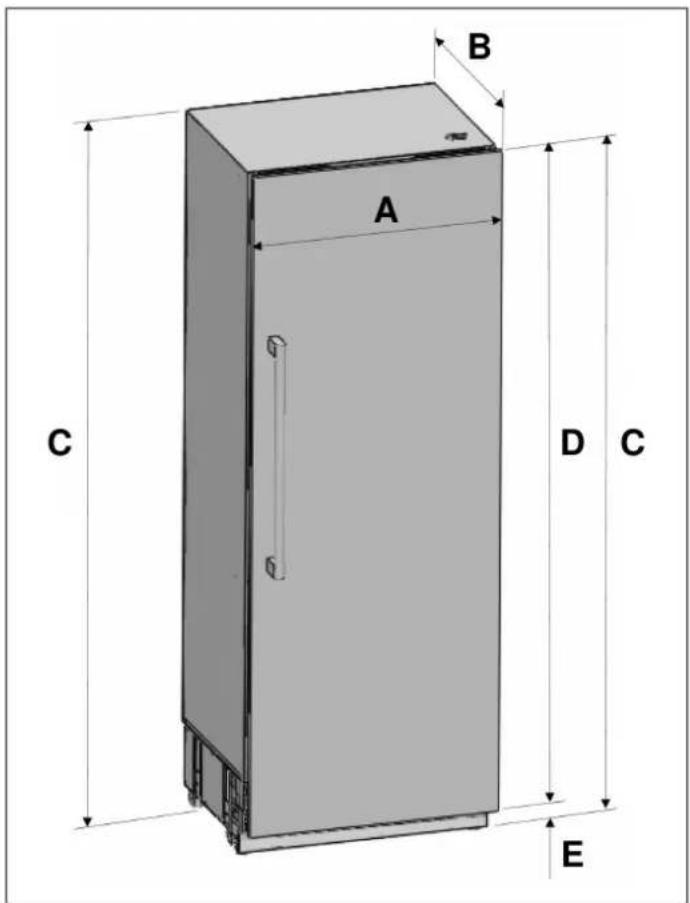
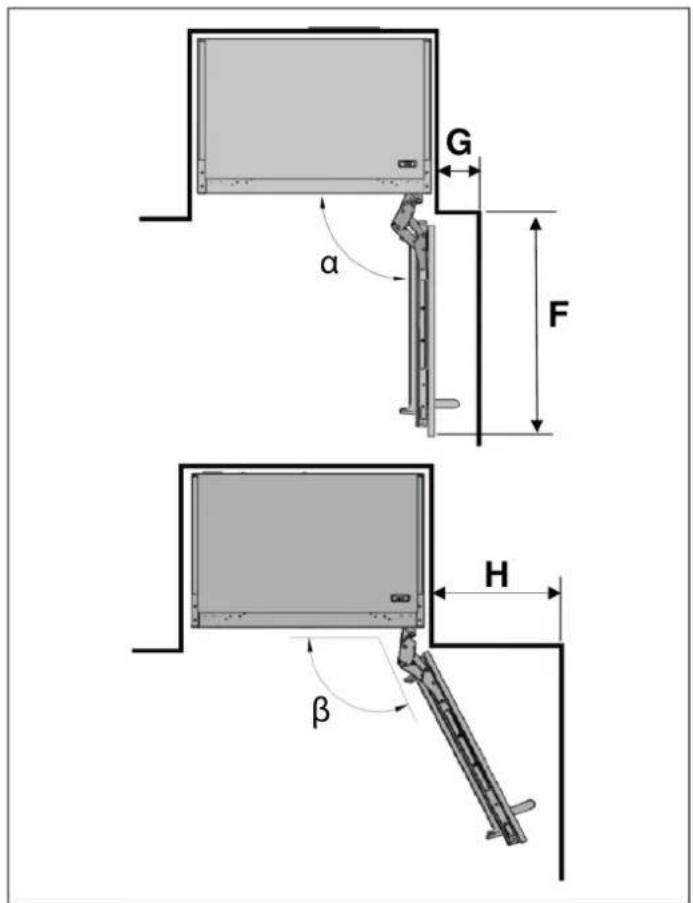
Fig. 2 Fig. 3
α 90°
β 115°
| CATEGORY | REF18FCBIPRV / REF18FCBIPLV | REF24FCBIPNV REF24RCBPNV | REF30RCBPNV DESCRIPTION |
| A | 17 3/4" (451 mm) 23 3/4" (603 mm) 29 3/4" (756 mm) | ||
| B | without panel: 235/16" (592 mm), with panel: 24 1⁄4" (616 mm) | ||
| C | 83 9/16" (2123 mm) | ||
| D | 79 15/16" (2030 mm) | ||
| E | 3 5/8" (93 mm) | ||
| F | 20" (508 mm) | 26" (660 mm) | 32" (813 mm) |
| G | 4 3/8" (110 mm) | ||
| H | 11" (280 mm) 14" (356 mm) 16" (406 mm) | ||
natural_image
Technical diagram of a mechanical assembly with dimension lines (no text or symbols)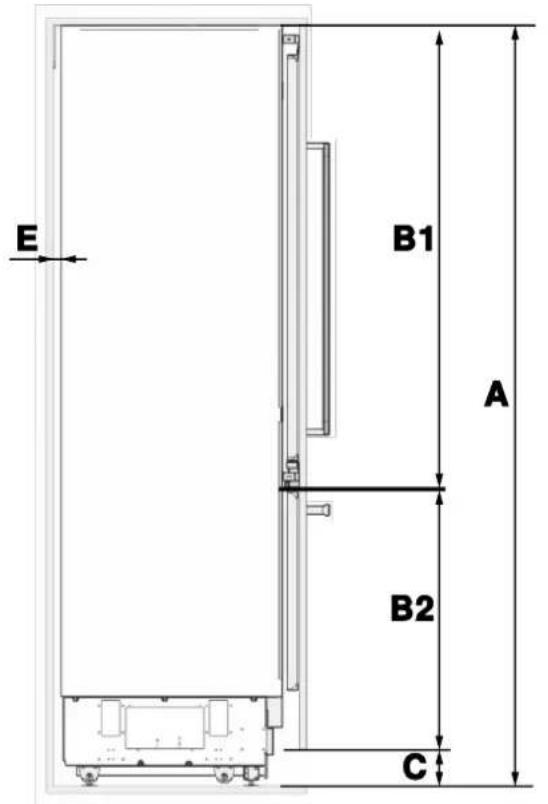
Fig. 4
A B C D E F G H
| 84" (2134 mm) | 79 15/16"(2030 mm) | 4" (101 mm) 1/8" (3 mm) |
Remaining
space after
installation:
1/16" (2
mm)
22 5/8"
(574 mm)
1 5/8" (42
mm)
3/4" (19 mm)
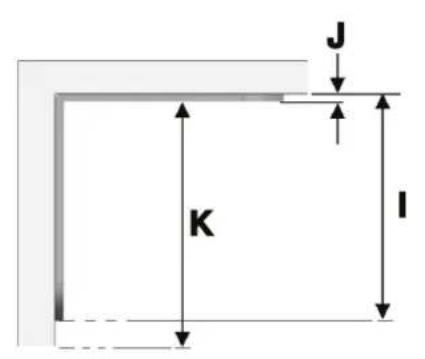
ANTI-TIP BRACKET LOCATION
| IJK | |
| 84" (2134 mm) 5/32" (4 mm) | 83 7/8" (2130 mm) |
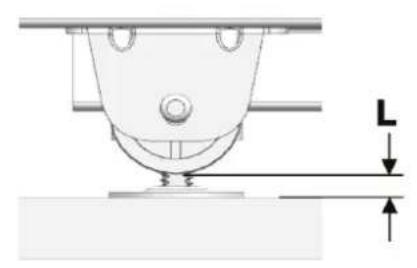
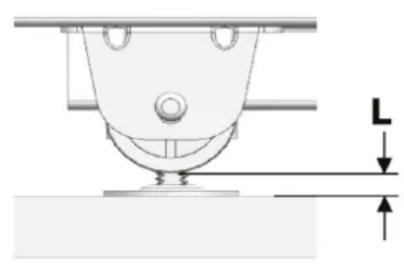
MINIMUM HEIGHT ADJUSTMENT FOR LEVELING
| L | |
| Front | 5/16" (8 mm) |
| Rear | 1/4" (7 mm) |
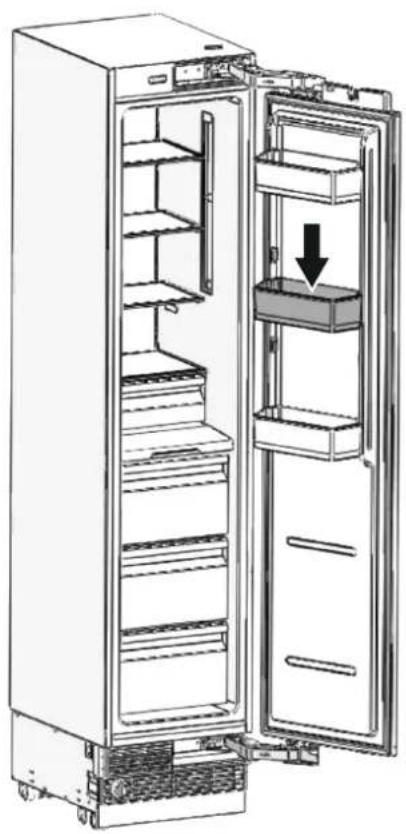
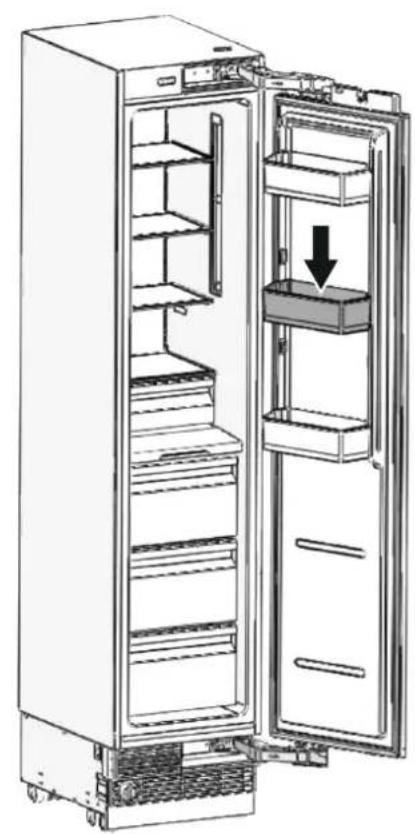
FOOD LOAD BEARING CAPACITY OF THE DOOR BINS
natural_image
Diagram of an open refrigerator with shelves and door, showing internal structure and a downward arrow indicating a component (no text or symbols present)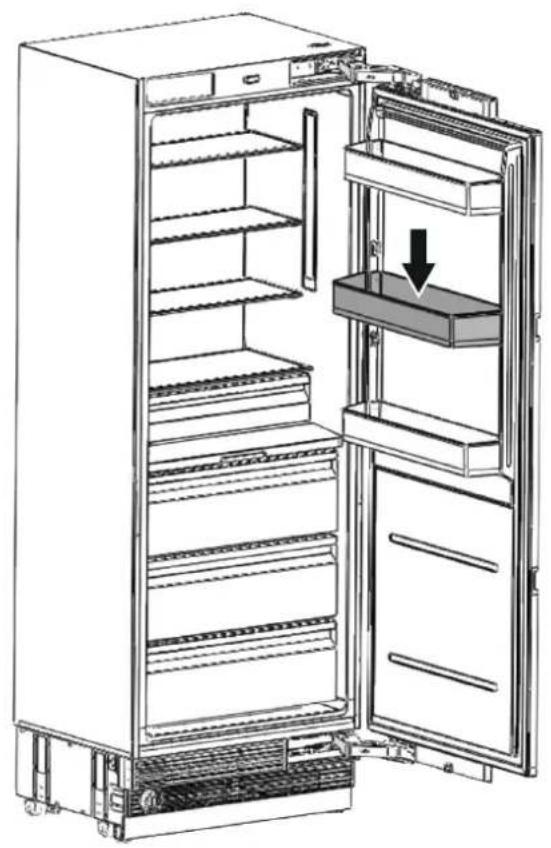
natural_image
Line drawing of an open refrigerator with a downward arrow indicating the interior portion (no text or symbols present)Fig. 5
| CATEGORY | REF18FCBIPRV / REF18FCBIPLV | REF24FCBIPNV REF24RCBPNV REF30RCBPNV | ||
| Max. load | 22 lbs (10 kg) | 33 lbs (15 kg) | 33 lbs (15 kg) | 33 lbs (15 kg) |

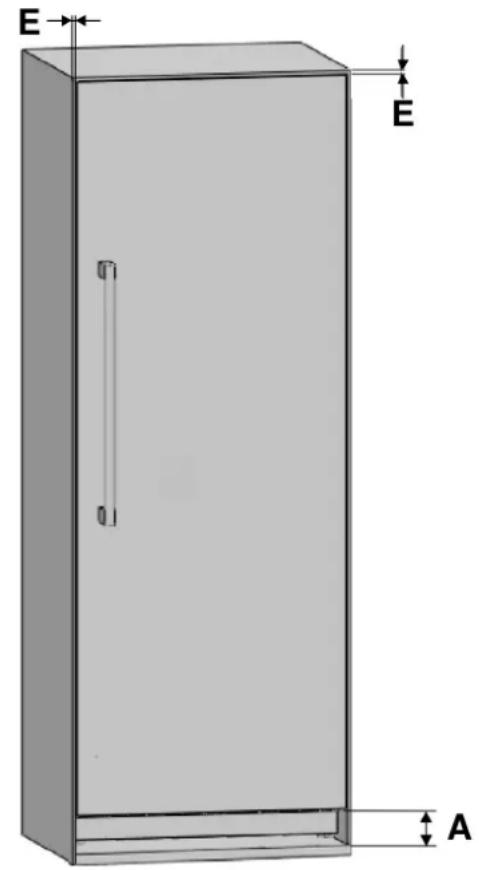
Fig. 6
• x: WOOD DOOR PANEL
• y: WOOD CABINET
Based on the cabinet cutout height, the kitchen toe kick can be installed with following heights:
CATEGORY A B
| standard | 4" (101 mm) 84" (2134 mm) |
| minimum | 3 3/4" (96 mm) 83 13/16" (2129 mm) |
| maximum | 5 3/8" (136 mm) 85 3/8" (2169 mm) |
CATEGORY C D E F
| REF18FCBIPRV / REF18FCBIPLV | 18" (457 mm) 17 3/4" (451 mm) | |
| REF24FCBIPNV | 24" (609 mm) 23 3/4" (603 mm) | 1/8" (3 mm) 79 15/16" (2030 mm) |
| REF24RCBPNV | 24" (609 mm) 23 3/4" (603 mm) | |
| REF30RCBPNV | 30" (762 mm) 29 3/4" (756 mm) |
The location of the electrical outlet in the cabinet where the product is to be installed must be within the area shown in the figure.

CAUTION
Do not use extension cords or two-prong adapters and do not remove the ground terminal of the grounding cable.

CAUTION
A qualified electrician must ensure that the poles of the socket are connected correctly.
Verify that the grounding of the socket is correct.

Fig. 7
A 4" (102 mm)
B 5" (127 mm)
C 11" (280 mm)
D 2" (50.8 mm)

WARNING
Do not connect the appliance to electronic energy saver plugs.
The socket must comply with the following data:
ELECTRICAL REQUIREMENTS
| Plug type NEMA | |
| Power cord 3-prong | |
| Voltage 115 V | |
| Frequency 60 Hz | |
| Fuse | 15 A |
The product must be able to be disconnected from the power supply after installation.
The product must be connected to a non-GFCI protected dedicated circuit, and there must be a suitable water line connection (for models with ice maker and water dispenser).
After installation, wait at least 3 hours before connecting the appliance to the electrical power to avoid damaging the compressor.

IMPORTANT
Do not use extension cords and/or multiple adapters for the power supply connection.
If the electrical wiring or the electric power supply of the house requires alteration, the necessary procedures must be performed by a qualified electrician.
Please heed the following rules:
- The electrical outlet or panel must be easily accessible in case of an emergency; it must not be hidden behind the product.
- Neither the plug nor the cable may touch the back surface of the appliance. Otherwise, it may be damaged by the appliance's vibrations.
- Do not connect other equipment plugs behind this appliance. If the humidity level is high where the appliance is being used, its exterior surfaces may become corroded. To prevent corrosion, keep the installation room dry and well-cleaned.
To prevent the risk of electric shock:
- Connect the plug to a grounded outlet.
- Do not remove plug's grounding prong.
- Do not use adapters.
- Do not use extension cords.

CAUTION
Do not connect the grounding cable to the gas line. Please have the grounding checked by a qualified electrician if you are not sure about the grounding of the appliance. Do not install a fuse on the neutral line or on the grounding circuit.

CAUTION
Failure to follow these instructions may result in fire, electric shock or death. Connecting the appliance's grounding conductor in the wrong place may lead to electric shock. Please have the grounding checked by a qualified electrician or service technician if you have any doubt about the proper grounding of the appliance. Installation, repairs and other procedures performed by unqualified persons may give rise to hazards. Before installing the appliance, make sure that the voltage, load and circuit current parameters on the data plate are in compliance with the power supply in your house.
Models equipped with an Ice Maker and/or a Water Dispenser require a connection to the domestic water supply system.

NOTE
Take the necessary measures to prevent the risk of freezing of the hoses. The operating water temperature range is between a minimum of 34^ F ( 1^ C) and a maximum of 100^ F ( 38^ C).
The system pressure must be:
• Min. 25 psi (1.7 bar)
• Max. 80 psi (5.5 bar)
Any pressure outside of this range may cause the water system to malfunction or leak. If the water pressure exceeds the maximum value, install a pressure limiting valve to your mains system. If the water mains pressure is lower than the minimum value, it is possible to use an auxiliary pump.
If you do not know how to check the water pressure, please consult a professional plumber.

WARNING
This appliance should only be connected to a drinking water system.

WARNING
The location of the water line connection must be within the area shown in the figure below.

WARNING
The refrigerator's water system must be connected to the house's main water supply.

WARNING
The user must be able to switch it on/off using the valve when necessary.

WARNING
Make sure that installation is performed correctly and in accordance with all the instructions in the specific installation manual provided with the appliance.

WARNING
Do not attempt to use a locally sourced threaded garden hose adapter or braided supply line. It will strip the threads on the appliance's water connection solenoid.

NOTE
A bypass plug is recommended for the water filtering system if a reverse osmosis system is used.

WARNING
Make sure that there is no water leakage when establishing the water connections. Otherwise, water may damage the cabinetry. The water supply line must located in the cabinet where the appliance is to be installed. The user must be able to switch it on/off using the valve when necessary.
You will need a hose with a minimum length of 60" (1.5 m) and a diameter of 14 " (6.4 mm) for the appliance's water connections during installation. A connector that has a thread with an external diameter of 14 " (6.4 mm) must be used to connect the end of the hose to the product.
Before completing the installation, make sure that water flows and that there is no water leakage.

Fig. 8
A 2" (50.8 mm)
B 10" (254 mm)
C 4" (102 mm)
D 1/4" (6 mm)
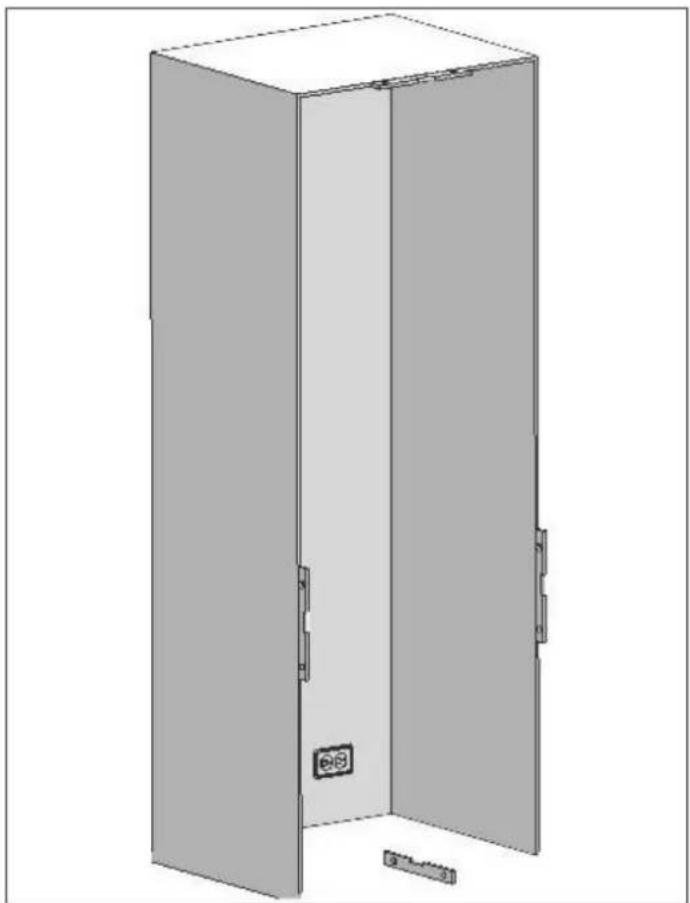
natural_image
3D technical line drawing of a cabinet or enclosure with no visible text, numbers, or symbolsFig. 9

WARNING
• The level of the floor where the product is to be installed must be checked with a bubble level.
- The cabinet flanges must be checked with a bubble level to ensure that they are perfectly vertical.
- If the appliance is not perfectly level and vertical, problems may arise with the installation.
Make sure that the installation is performed correctly, in accordance with all the instructions in the specific installation manual provided with the appliance.

WARNING
Always connect the water before connecting the power.
For a correct installation, please follow the instructions below:
- The floor on which the product is to be installed must be capable of bearing 1,200 lbs (544 kg) minimum.
- The kitchen floor and the bottom of the product must be equally level. Otherwise, problems may occur with the appliance's air flow.
- There must be no obstructions at the rear and on the side walls of the product's installation location that would prevent its installation.
• The electrical outlet must be in the correct place. - The dimensions of the cabinet where the appliance is to be installed must be in strict conformity with the dimensions provided in the manual.
- Do not install the appliance adjacent to another fridge/freezer. Otherwise, condensation and damage may occur. For a side-by-side installation, use the proper connection kit.
- The level of the floor where the product is to be installed must be checked with a bubble level.
- The installation location must not be exposed to direct sunlight and must be away from heat sources (ovens, radiators, etc.).
- The ambient temperature must be between 50°F (10°C) and 110°F (43°C). Otherwise, malfunctions may occur when the appliance is running.
- If it is not possible to avoid installing the product near a heat source, the minimum clearances provided below must be maintained between the appliance and the given source:
• 1 1/4" (32 mm) from electric ranges or ovens
- 12" (305 mm) from gas or fuel-powered hobs or ovens.
• Position the appliance with the aid of a second person.
- Never use the open door to lever the appliance into place when fitting.
- Avoid exerting too much pressure on the door when open.
- Do not use the appliance outdoors.
• Installation and servicing should be carried out by qualified personnel in accordance with current standards.
- Ensure that an authorized technician performs the electrical connection.
- If the power supply cable is damaged, ensure against hazards by contacting technical support immediately and they will replace it, so as to prevent any risk.
• Always put on the necessary/required Personal Protective Equipment (PPE) before performing any work on the appliance (installation, maintenance, positioning, or movement). - Before performing any operation involving the appliance, switch off the power supply.
- This appliance can be used up to a maximum altitude of 4,000 metres above sea level.
Do not try to repair the appliance yourself or without the assistance of a qualified technician.
Do not install/use the appliance outdoors.
- To ensure the appliance is stable, install and secure it correctly as described in the instructions provided in this manual.

CAUTION
Make sure that the power supply cable does not become caught or damaged when positioning the appliance.

CAUTION
Do not install your refrigerator:
• in an outdoor space,
• in a location with dripping water,
- in a location where the temperature is lower than 50°F (10°C).
The permitted room temperature depends on the climate class:
| CLIMATE CLASS | PERMITTED ROOM TEMPERATURE |
| SN (Sub Normal) | + 50°F to + 90°F |
| N (Normal) | + 60°F to + 90°F |
| ST (Sub Tropical) | + 60°F to + 100°F |
| T (Tropical) | + 60°F to + 110°F |
Information on the climate class can be found on the rating plate.
TOOL LIST
The tools to be used when installing the product are as follows:
Cordless drill

Safety goggles

12.7 mm (1/2") spanner

Hammer
Ladder

∅ 2.4 mm drill bit
∅ 8.0 mm drill bit

Box cutter

Safety gloves Tape measure

Phillips-head bit

6.4 mm (1/4") hex bit

Bubble level
Appliance
trolley

Tape

T25 Torx Bits

ALTERNATIVES FOR INSTALLATION
The appliance can be installed in a variety of ways depending on the kitchen design. It must be installed in a location where it is certain that the door can be opened and closed properly. If the doors cannot open up to at least 90 degrees the appliance drawers will not be able to be opened.
- Single-fridge cabinet placement methods
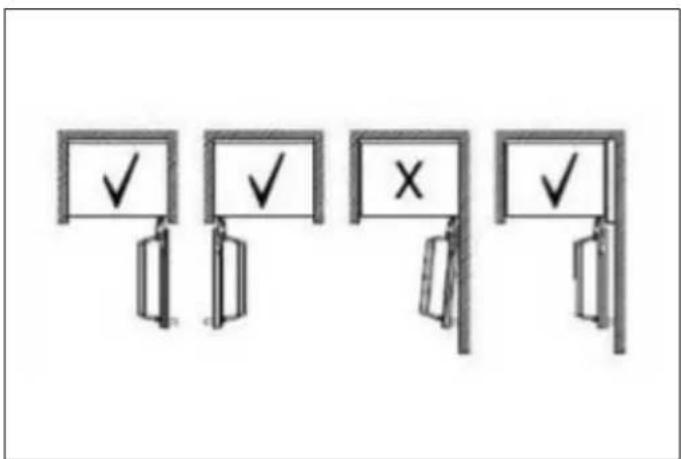
Fig. 10
Dual-fridge cabinet placement methods.
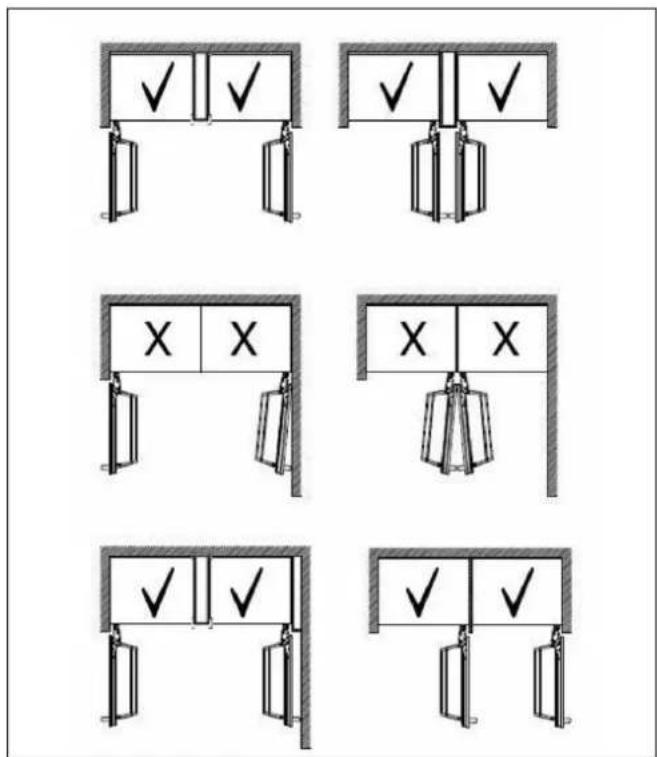
Fig. 11
UNPACKING

WARNING
At least two people must carry the refrigerator.

- Use a box cutter to remove the tape.
- Cut the cardboard packaging along the dotted lines using a box cutter and remove it.
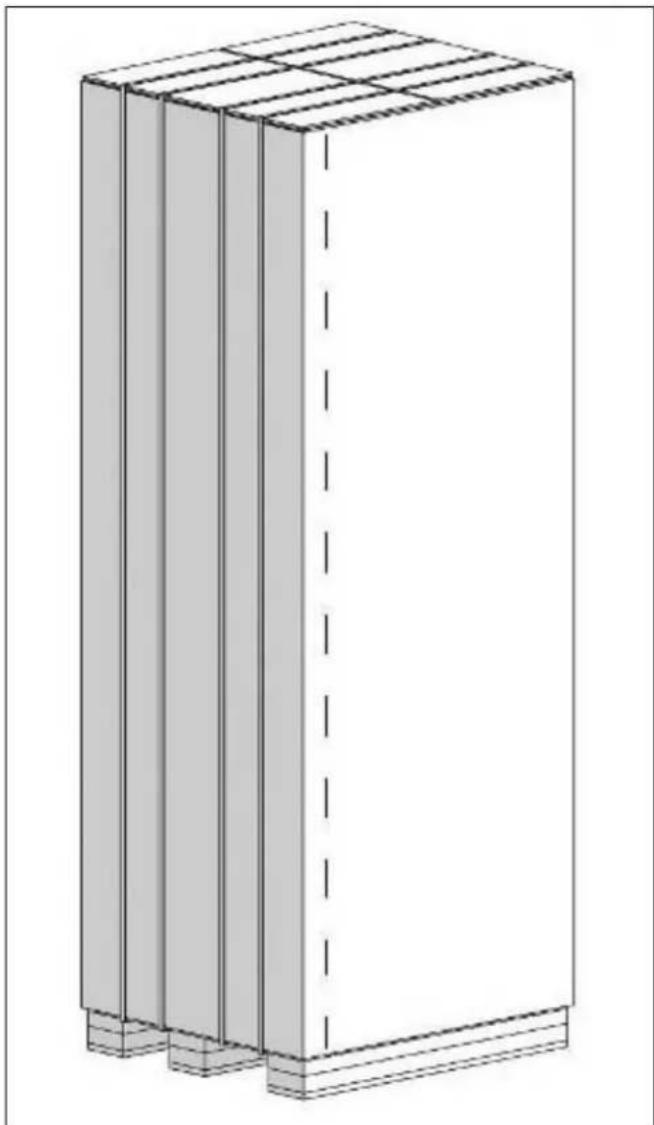
natural_image
3D architectural rendering of a rectangular building with vertical supports and horizontal beams (no text or symbols)Fig. 12
- Remove the polystyrene packing material.
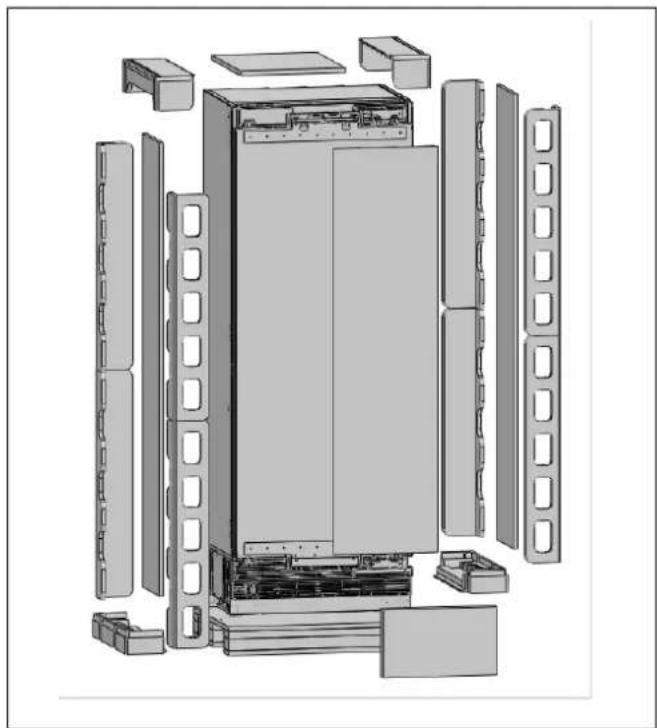
natural_image
Exploded view diagram of a refrigerator internal structure (no text or labels)Fig. 13

CAUTION
Do not discard the foam insulation pad included with freezer and wine columns with the rest of the packaging. It is required when installing two or more columns side-by-side. Failure to use the insulation pad may result in unwanted condensation.

CAUTION
Do not remove the tape from the upper door of the appliance until the refrigerator is placed in the cabinet.
Tipping risk.
REMOVING THE CONNECTORS ON THE SIDE WALL OF THE UNIT
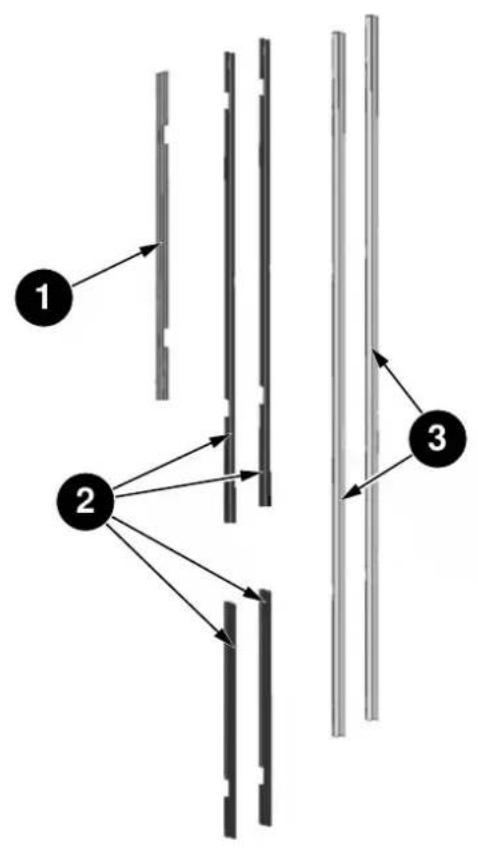
flowchart
graph TD
    A["1"] --> B["2"]
    B --> C["3"]
    style A fill:#f9f,stroke:#333
    style B fill:#ccf,stroke:#333
    style C fill:#cfc,stroke:#333
Fig. 14
| NO. | PART NAME SPECS | REF18FCBIPRV / REF18FCBIPLV | REF24FCBIPNV / REF24RCBPNV | REF30RCBPNV | |
| PVC extrusion L=457 1 | |||||
| 1 | Trim furniture top | PVC extrusion L=609 1 | |||
| PVC extrusion L=761 1 | |||||
| 2 | Trim furniture side | PVC extrusion L=1.259 2 2 2 | |||
| PVC extrusion L=617 2 2 2 | |||||
| 3 | Trim door side PVC extrusion L=1.781 2 2 2 | ||||
REMOVING THE INSTALLATION HARDWARE
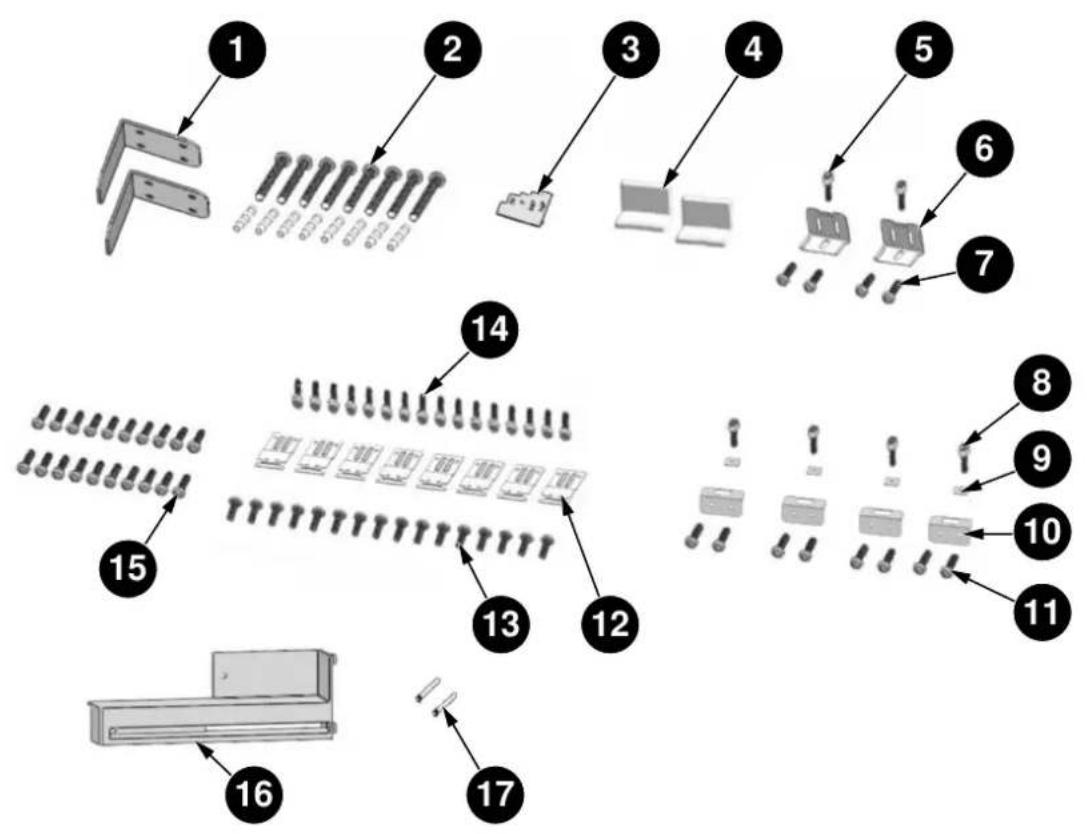
flowchart
graph TD
    A["1"] --> B["2"]
    B --> C["3"]
    C --> D["4"]
    D --> E["5"]
    E --> F["6"]
    F --> G["7"]
    G --> H["8"]
    H --> I["9"]
    I --> J["10"]
    J --> K["11"]
    K --> L["12"]
    L --> M["13"]
    M --> N["14"]
    N --> O["15"]
    O --> P["16"]
    P --> Q["17"]
Fig. 15
| NO. | PART NAME SPECS | REF18FCBIPRV / REF18FCBIPLV | REF24FCBIPNV / REF24RCBPNV REF30RCBPNV | DESCRIPTION | |
| 1 | Anti-tip bracket T4.0, Cr+zn-coating | 8 | 8 | ||
| 2 | Anti-tip bracket screws | M8xL60 8 8 | |||
| 3 | Position adjustment jig | PS 1 1 | |||
| 4 | Cover furniture door bracket | ABS | - | 2 | Screws for the refrigerator |
| 5 | Truss washer head | M4x12 | - | 2 | |
| 6 | Bracket furniture door | T1.0, Cr+zn-coating - | 2 | ||
| 7 | Counter sunk head screw | ST4x14 | - | 4 | |
| 8 | Crossed flat head screw | M4x12 4 4 | |||
| 9 | Square washer T1.0, Cr+zn-coating | 4 | 4 | ||
| 10 | Center mounting bracket | T1.0, Cr+zn-coating | 4 | 4 | |
| NO. | PART NAME SPECS | REF18FCBIPRV / REF18FCBIPLV | REF24FCBIPNV / REF24RCBPNV REF30RCBPNV | DESCRIPTION | |
| 11 | Crossed flat head screw | M4x12 8 8 | |||
| 12 | Bracket furniture | T1.0, Cr+zn-coating | 8 | 8 | |
| 13 | Counter sunk head screw | ST M4x14 16 16 | Screws for wood furniture | ||
| 14 | Crossed flat head screw | M4x12 16 16 | |||
| 15 | Counter sunk head screw | ST M4x14 16 20 | Furniture door hanging bracket | ||
| 16 | Air vent hinge part | ABS | - | 1 | Door opening direction change |
| 17 | 90° limit pin | ∅4 1 1 | Door 90° opening use | ||
REMOVING THE VENT HOLE ASSEMBLY
- Remove 5 screws to take out the Vent Hole Assembly.

natural_image
Technical diagram of a refrigerant unit with airflow arrows indicating internal components (no text or symbols)Fig. 16
MOUNTING THE ANTI-TIP BRACKETS

WARNING
If the unit cannot be secured to the cabinetry (which in turn must be secured to wall) to prevent tipping, make sure to use the supplied anti-tip brackets in order to prevent the appliance from tipping over.

WARNING
Make sure that there is no electrical or water connection in the adjacent cabinets into which the mounting screws will be screwed to secure the refrigerator.

WARNING
Please remember to use the necessary protective equipment when drilling holes in the wall and performing the installation.
- Use a tape measure to mark the wall for installation of the anti-tip brackets.


Fig. 17
• 1 Anti-tip bracket, on the wall
| CATEGORY | REF18FCBIPRV / REF18FCBIPLV | REF24FCBIPNV REF24RCBPNV REF30RCBPNV | ||
| A | 18" (457 mm) | 24" (609 mm) | 24" (609 mm) | 30" (762 mm) |
| B | 11 5/8" (295 mm) | 17 5/8" (447 mm) | 17 5/8" (447 mm) | 23 5/8" (600 mm) |
| C | 3 3/16" (81 mm) | 3 3/16" (81 mm) | 3 3/16" (81 mm) | 3 3/16" (81 mm) |
- For the most secure installation, use a stud-finder to secure the anti-tip brackets in wall studs. If no studs are present at the correct installation location, follow the instructions below.

WARNING
Always make sure that the area to be drilled into is free of any waterlines or electrical circuits, which could cause damage, injury, or death.
- Use a drill to create holes for wall anchors (#2) at the marked points ∅ 5/16" (∅ 8 mm).

natural_image
Four black-and-white icons representing different types of tools or products: a power tool, a screwdriver, a pair of eyeglasses, and a glove (no text or symbols)
Fig. 18
- Use a hammer to install the wall anchors (#2) if no stud is present.

natural_image
Pure diagram of a mechanical or electrical component with no text, numbers, or symbolsFig. 19
- Install the brackets (#1) in place, using 4 screws for each. - You must use both (two) brackets to ensure that the appliance is safely supported.


Fig. 20
A Thickness

NOTE
If you are not confident that the supplied connectors and anti-tip brackets are mounted on the wall as securely as they should be, you can use alternative anti-tip methods.
If there is a cabinet panel behind the back wall of the refrigerator, make sure that it is securely fastened to the wall. For this, you need to be sure that the back wall of the cabinet panel is affixed to a wall stud.
Alternative anti-tip method:
If the anti-tip brackets cannot be mounted securely, you must use the alternative method below. For this method, you can use wooden boards to avoid the risk of tipping over.
They must be installed as illustrated in the figure below.
There must be no clearance between the appliance and the wooden support.
The minimum section dimensions of the wooden support must be 3" x 4" (76 mm x 102 mm). The width of the support must be equal to the clearance where it will be installed. This can be achieved using one 4" x 4" (102 mm x 102 mm) or two 2" x 4" (51 mm x 102 mm) pieces of framing lumber.
The calculation of blocking depth is based on a standard niche depth. If the depth of the niche is greater than 24" (610 mm), ensure the blocking overlaps the upper rear fridge body by 2" (51 mm).
Position the wooden support, mark the location on the rear wall, select suitable screws and mount it securely.

WARNING
The quantity and type of screws or fasteners to be used for affixing wooden blocking must be suitable for ensuring a secure connection to the rear wall.

Fig. 21
A 3" x 4" (76 mm x 102 mm)
PREPARING THE WATER HOSE AND THE ELECTRICAL CONNECTION
Inspect all water connections for leaks. Water leaks can cause significant damage over time. It is recommended to use a 1/4" (6.4 mm) water line with a minimum length of 60" (1.5 metres) with a threaded 1/4" (6.4 mm) female connector end. Before finishing the installation, turn the water on to ensure that water is flowing and that there are no leaks.
A connector that has a thread with an external diameter of 1/4" (6.4 mm) must be used to connect the end of the hose to the product.
Allow for sufficient slack in the water supply line, providing a minimum of 10" (254 mm) of length from the base of the unit once it is installed in the niche. This provides some allowance for connections and adjustments if needed.
The product must be connected to a 3-prong outlet on a dedicated 15 amp circuit; local electrical and building codes should be respected.
You can choose method A or method B below to prevent the power cord from getting wedged in.
- Method A: Position the water hose and the mains power connections on the back of the refrigerator.
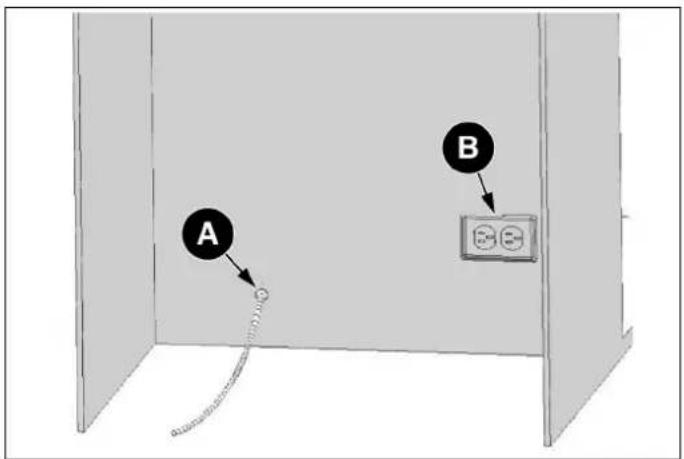
Fig. 22
• A Water line location
• B Power cord location
Method B: Position the water hose and mains power connections on the sides of the cutout.
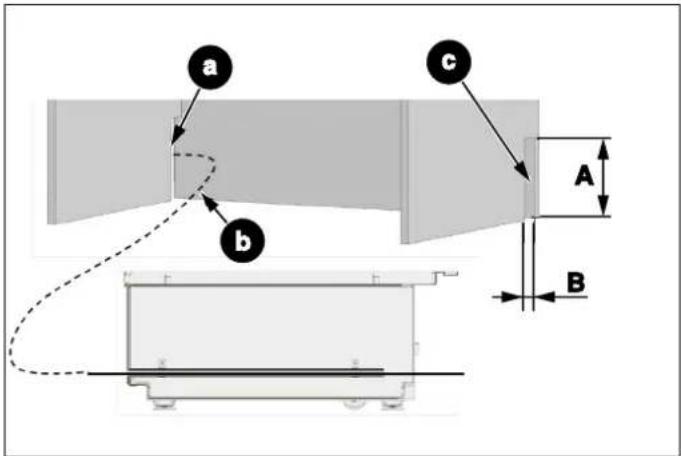
Fig. 23
a. Keep open for water line
b. Water hose
c. Keep open for power cord
A. 8" (203 mm)
B. 2" (51 mm)
INSTALLATION IN THE CABINET
Taking the Refrigerator from the Wooden Pallet
- Remove the brackets which secure the refrigerator to the wooden pallet as shown below.


natural_image
Technical diagram of a mechanical assembly with circular component and mounting base (no visible text or symbols)Fig. 24
- Slowly tilt the refrigerator back and remove it from the pallet, taking care not to damage the underside of the unit. When transporting the unit, always carry it from the sides to ensure that the unit's feet remain on the base of the appliance dolly.

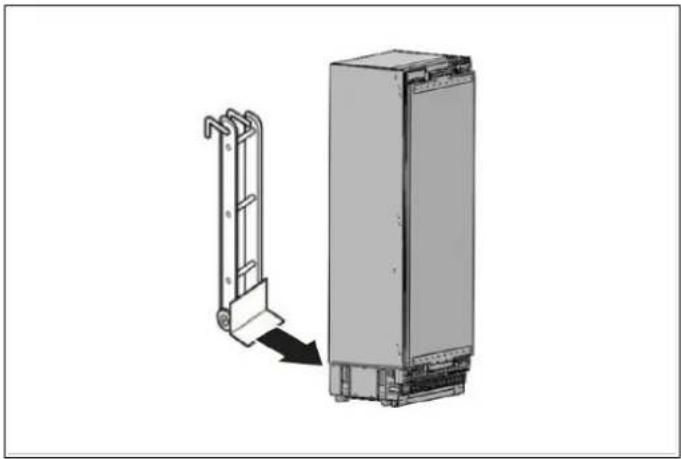
natural_image
Diagram showing a mechanical device with a bracket and a vertical panel, no text or symbols presentFig. 25

NOTE
Exercise extreme caution when handling the unit, as the underside of the fridge has components vital to its proper operation; damage to these components could result in a malfunction or potential leakage of condensate and damage to floors.

CAUTION
The risk of tipping over is high from this point forward. You should not open the doors until the product is placed into the cabinet.
Placing the refrigerator into the cabinet niche.
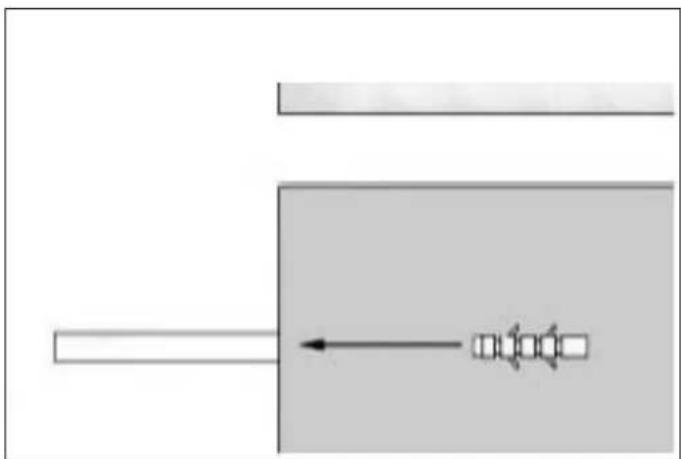
- Insert the water supply hose into the channel opening at the back of the unit and pull it through to the front of the unit to ensure that the water connection can be made once the unit is installed in the niche.
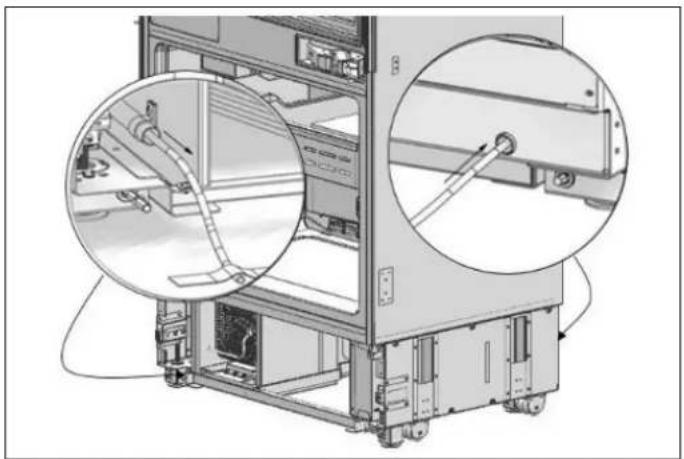
natural_image
Technical illustration of a server rack with zoomed-in views showing internal components (no text or symbols)Fig. 26

NOTE
Use the method below to prevent the cord from getting wedged in.
Connect the electrical plug to the power outlet. Turn on the unit to ensure it has power (to see if the product is operating, check if the lamps in the freezer compartment are on or off).
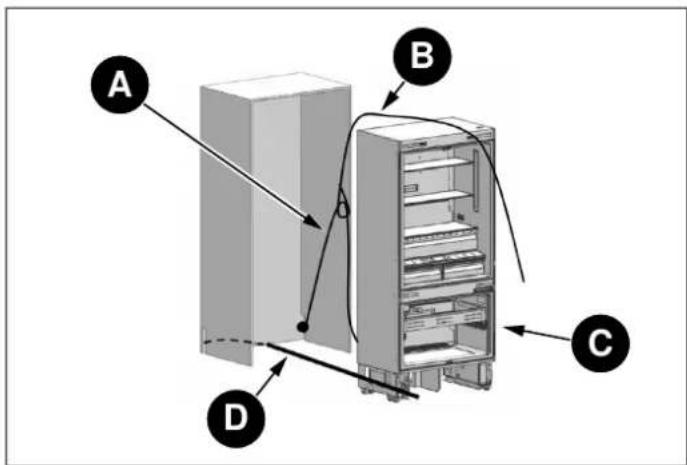
Fig. 27
A Power cord
B Nylon cord
C Move to wall
• D Water hose
Connect the electrical plug to the power outlet. Turn on the unit to ensure it has power. (To see if the product is operating, check if the lamps in the freezer compartment are on or off).

NOTE
Protect the front edges of the cabinet niche with masking tape; this will help protect them from damage when pushing the unit back into the niche. Use some packing tape to secure the excess electrical cord to the back of unit to prevent slack from catching under the unit during installation.

NOTE
The unit's plug must be accessible after installation. If the plug is not accessible after installation, the power must have a dedicated circuit breaker which can be accessed to cut power off using the main switch.

WARNING
• Make sure that the power cord does not get wedged in when placing the product.
- Push the product carefully towards the cabinet to position it; the unit should slide into the niche with relative ease. If you experience resistance while placing the product in the cabinet:
• The floor might be uneven.
- The adjustable feet might be loose (please see the relevant section to learn how to adjust the adjustable feet).
- You must attach the freezer door temporarily to align the product before placing it.

NOTE
Use the upper edges of the fridge and freezer doors to align the unit in the niche opening.
Adjustment of other edges is explained in the following pages.

Fig. 28
A 1/8" (3 mm)
B 4" (102 mm)
Adjusting the height of the refrigerator within the niche.
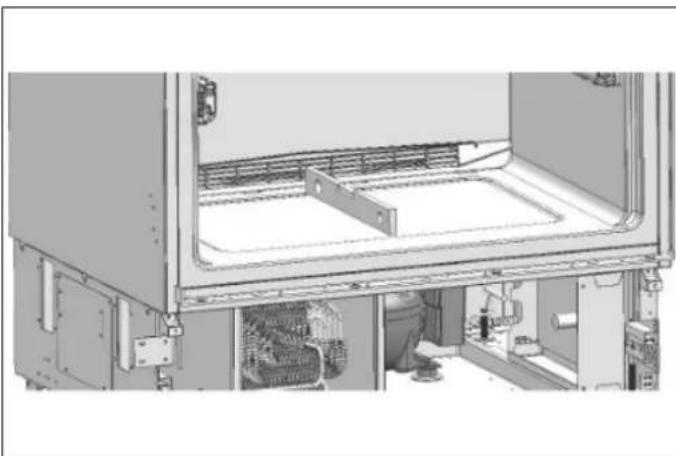
- Use the adjustable leg mechanism to raise, lower and level the unit in the niche as per the diagram below.

WARNING
Once the unit is pushed into the niche, raise the front feet first; this will reduce the risk of the unit tipping forward during the height adjustment process.
The maximum height that the adjustable feet can reach is 1 9/16" (40 mm)

Fig. 29
- A/D -Turn the adjusting rod clockwise to lift the front
B/C –Turn the adjusting rod clockwise to lift the rear
For each 360 degree rotation, the legs are raised 1/16" (1,5 mm).
We recommend raising the front legs by 5/16" (8 mm) and the rear legs by 9/32" (7 mm): rotate the front feet 5.5 times and the rear feet 4.5 times.
natural_image
Interior view of a server rack unit with visible internal components and ventilation ducts (no text or labels)Fig. 30
• After adjusting the adjustable feet, check that the appliance is level both side-to-side and back-to-front by placing a level on the floor of the freezer compartment (the drawer should be removed for this).
Adjusting the refrigerator based on the cabinet niche.
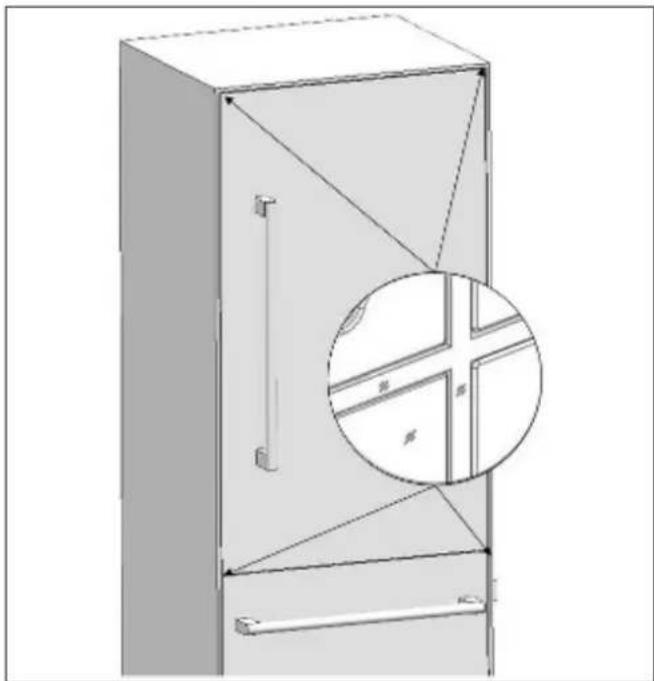
- For products with supplied stainless steel panel doors, the position of the unit is adjusted so that the door and the cabinet surface are flush and a min. 1/8" (3,2 mm) distance from panels and gables is ensured.
natural_image
Technical line drawing of a cabinet or enclosure with internal components and a magnified inset showing internal structure (no text or symbols)Fig. 31
- For panel-ready units, the refrigerator should be installed at a depth that takes into consideration the custom overlay panel thickness, so as to ensure a flush installation, if desired.

NOTE
It is important to align the upper edge of the freezer drawer when aligning the unit, as its height and position are fixed. All of the other panels can be adjusted using the adjustment mechanisms built into the mounting hardware. As shown below, an installation depth template tool is provided for your convenience.
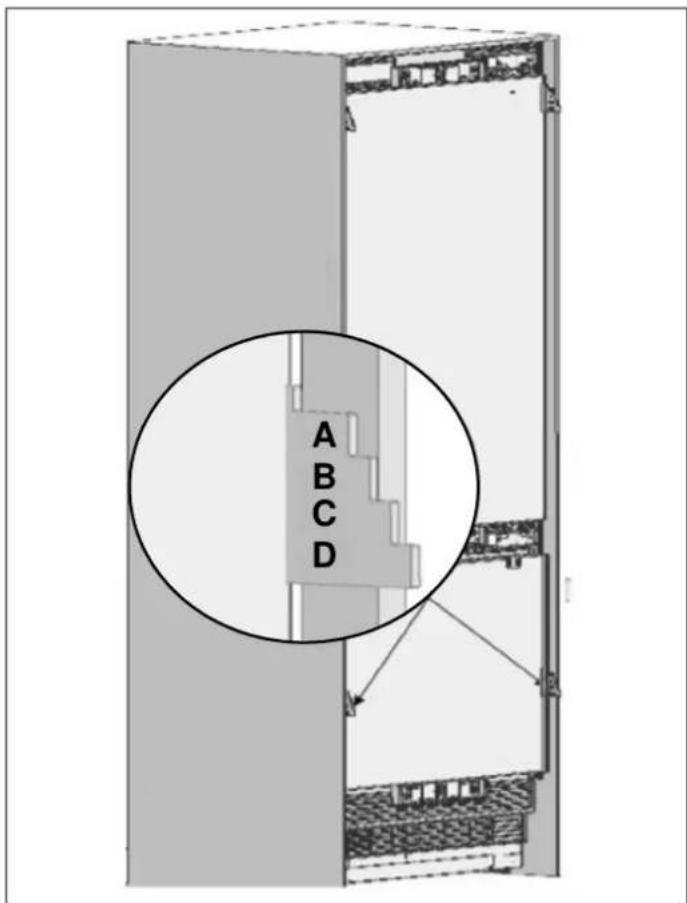
Fig. 32
- The position of the level adjustment part (#3) must be adjusted based on the thickness of the door. It can adjust the level for 4 different door thicknesses.

Fig. 33
a. Refrigerator
b. Cabinet side panel
A 3/4" (19 mm)
B 15/16" (24 mm)
C 1 1/4" (32 mm)
D 1 1/2" (38 mm)

NOTE
The niche must be designed to accommodate the minimum depth requirement plus the thicker door panel, if desired. Regardless of door thickness, the maximum panel weights must always be respected, or the product warranty will be void.
SCREWING IN THE SIDE BRACKETS
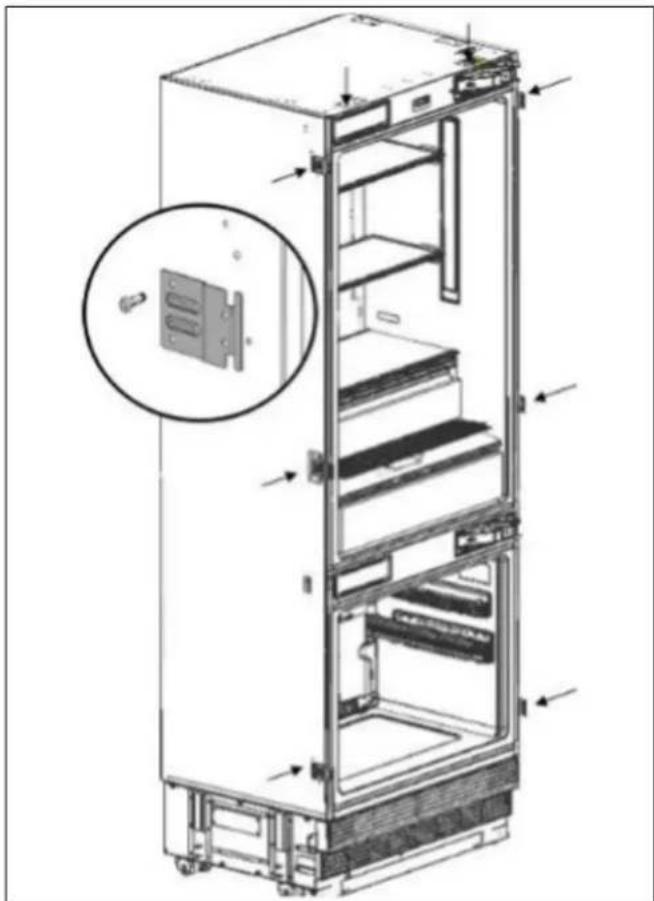
- Mount the brackets (#12) on the unit, with 2 on the top and 3 on each side. Use screws (#14) to tighten them in place.
• Use 12 long screws (#13) to join the unit to the cabinet.

WARNING
Before screwing the side brackets into the cabinet gables, ensure the screw is shorter than the gable thickness, otherwise the finished side may be damaged.
Before beginning to screw on the side and upper brackets, make sure that the unit is connected to power, that water (if applicable) is being supplied to the appliance and that the water connection has been tested for leaks.
natural_image
Technical illustration of a refrigerator internal structure with an inset showing a close-up of the door panel (no text or symbols present)Fig. 34

NOTE
Drilling a pilot hole in the side gable for reference could make the mounting process easier.

natural_image
Interior view of a refrigerator showing open doors, shelves, and internal compartments (no text or labels)Fig. 35
SECURING THE UPPER BRACKET
- Attach the upper bracket to the cabinet using 4 screws (#13).

NOTE
Drilling a pilot hole in the side gable for reference could make the mounting process easier.

natural_image
Line drawing of a refrigerator interior showing front and rear compartments with no text or symbolsFig. 36
INSTALLING THE BOTTOM CABINET
Complete the water connection
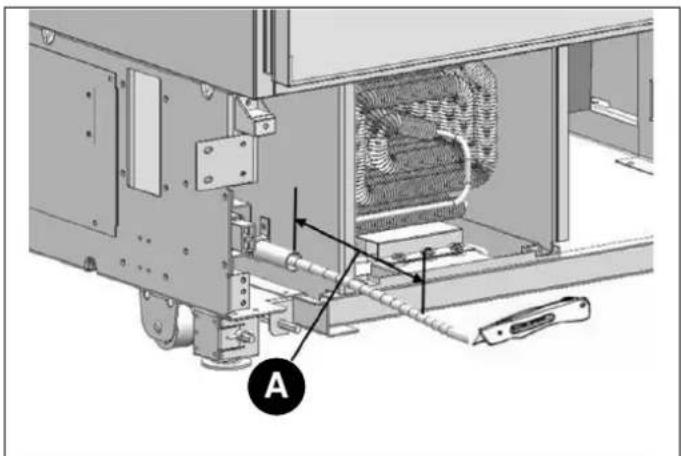
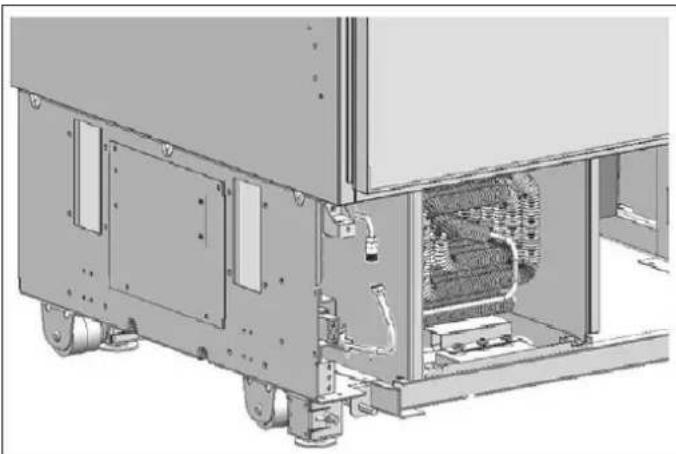
- Use a cutter to cut of any excess waterline length, allowing sufficient slack of 10" (254 mm) to ensure an easy bend and clear connection, with no tension or potential kinks in the supply line that runs to the connector.
natural_image
Technical diagram of an industrial machine with labeled component A, showing internal components and wiring (no readable text or symbols)Fig. 37
A 10" (254 mm) - Use 2 wrenches to firmly connect both the hose that runs from the mains and the connection to the valve on the refrigerator.

WARNING
The hose that runs from the mains connection must be one piece. Do not use extension hoses.

WARNING
Make sure that the power is cut off when establishing the appliance's water connection.

WARNING
The water valve must be closed when connecting the water hose.

WARNING
It is recommended to keep the water valve accessible after product installation.

WARNING
The pressure of the water system must be between 25-80 psi (1.7-5.5 bar).

NOTE
Once the connection is complete, you must open the water valve and make sure that there is no leakage.
natural_image
Technical line drawing of an industrial machine with internal components and mounting brackets (no text or symbols)Fig. 38
ATTACHING THE AIR VENT GRILLE
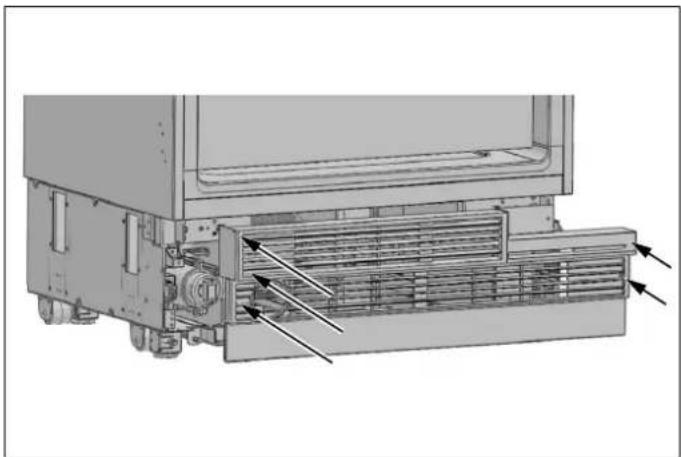
- Use 5 screws to attach the vent aperture component.

natural_image
Technical diagram of a mechanical device showing internal components and airflow direction (no text or symbols)Fig. 39

NOTE
The lower grill can be adjusted forward or backward of 15/16" (24 mm) to accommodate the cabinet toe kick. Also, a piece of decorative cabinet toe kick material can be affixed to the lower grill to match the cabinets, provided there is no obstruction to vent grills and air flow.

WARNING
If installing a one-piece cabinet toe kick across the front of the fridge, you must ensure proper air flow and no obstruction to the vent grills.
ATTACHING THE DECORATIVE TRIM COVERS
- The decorative side trim is a soft plastic material with a barbed end intended to be inserted between the cabinet gable and the appliance body (#2), onto the right/left connection brackets. Some trimming may be required to ensure the trim pieces can fit around the brackets; the thickness of the barbed end may also require trimming depending on the width of the gap between the side body and the cabinet gable.

natural_image
Technical line drawing of a refrigerator with door and shelf, showing front and side views (no text or symbols)Fig. 40
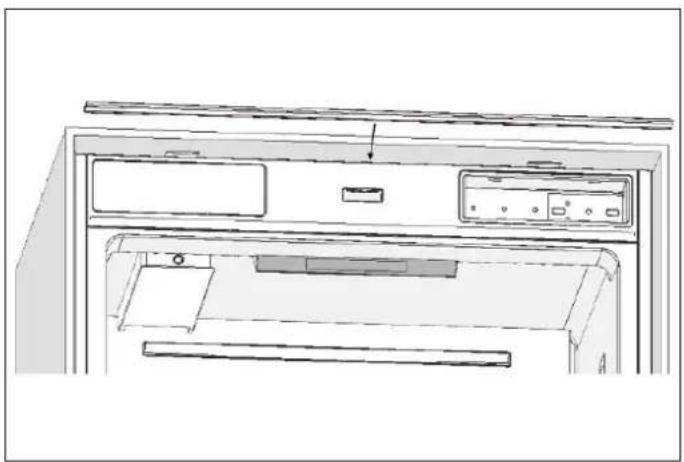
- Push in the finished trim (#1) on the upper connection bracket.
natural_image
Line drawing of a front view of a computer monitor with control panel and drive buttons (no text or symbols)Fig. 41
OVERLAY PANEL INSTALLATION AND PREPARATION
This section contains information about preparing the cabinet doors and mounting them on the product.

WARNING
Maximum weights of the panels to be mounted on the unit are as follows:
• Refrigerator Column Door: 66 lbs (30 kg)
• Freezer Column Door: 66 lbs (30 kg)

Fig. 42
a. Cabinet front
b. Front panel
A. 1/8" (3 mm)
B. 3/4" (19 mm)
C. 15/16" (24 mm)
D. 1 1/4" (32 mm)
E. 1 1/2" (38 mm)
F. 3/16" (5 mm)
θ. 115°
CHOOSING THE DOOR THICKNESS
- The door of your refrigerator can open to 115° maximum. If you want the doors to open to this degree, you can choose from the thicknesses shown in the image above.

WARNING
If the door thickness is more than 1 1/2" (38 mm), the door should not open more than 90°. You must use a limiting pin on the hinge.
A limiting pin (#17) is provided with the unit to prevent the door from opening beyond 90° if necessary; it can be installed on the hinge. Door thickness allowances when using the limiting pin are shown in the diagram below.
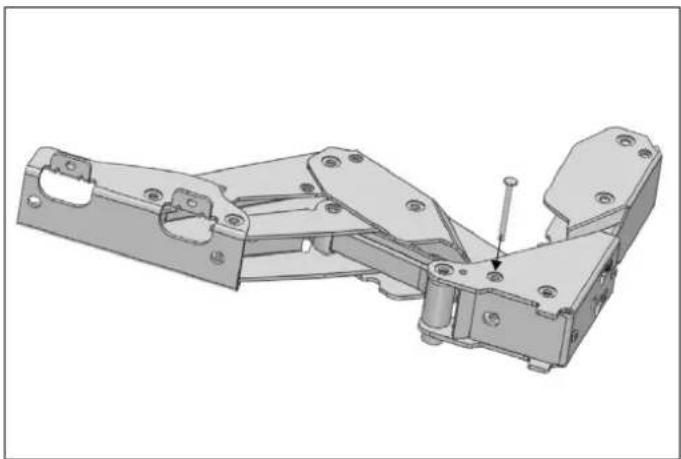
natural_image
3D mechanical assembly diagram showing a bracket with mounting holes and a small pin (no text or symbols)Fig. 43
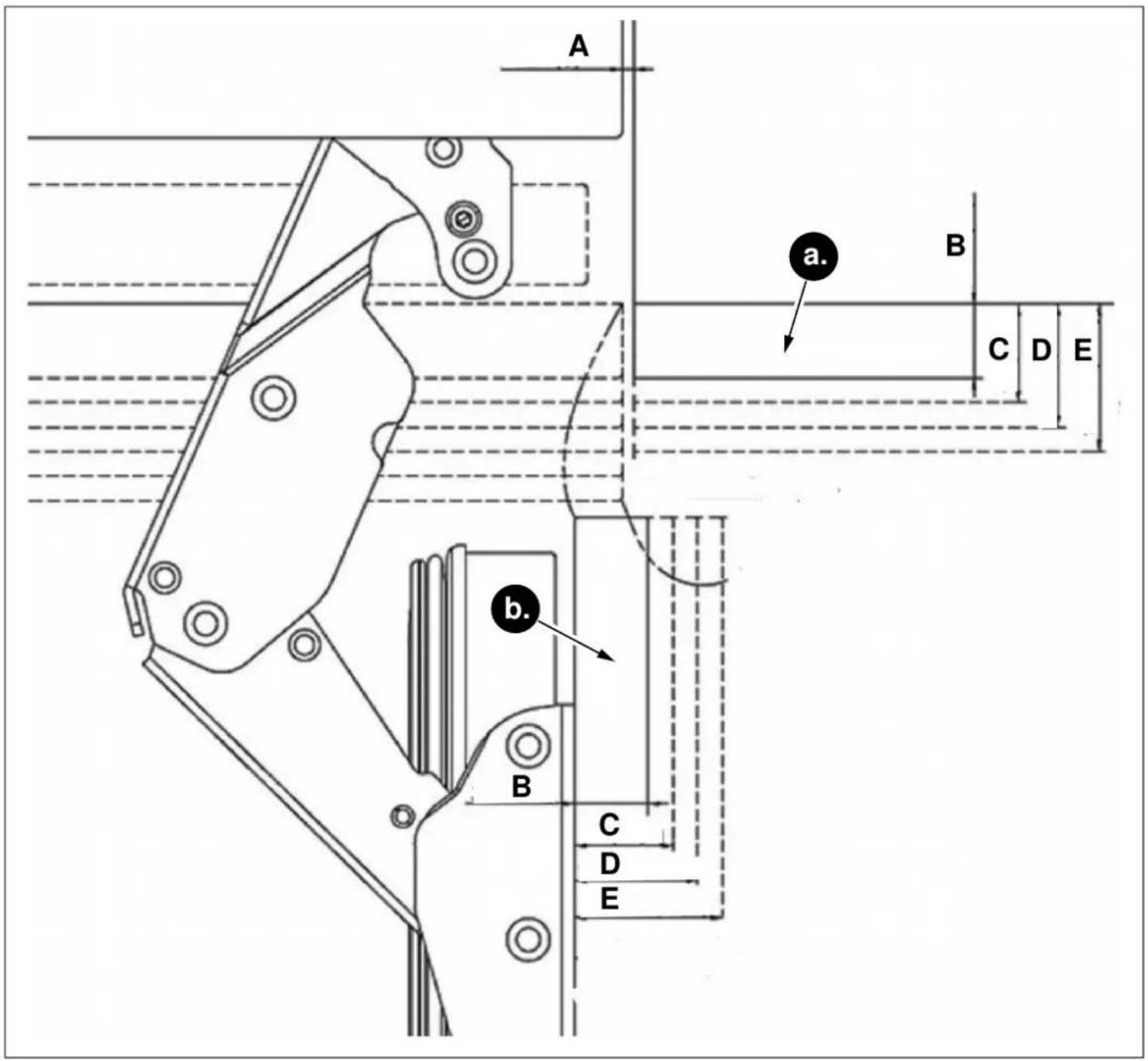
Fig. 44
a. Cabinet front
b. Front panel
A. 1/8" (3 mm)
B. 3/4" (19 mm)
C. 15/16" (24 mm)
D. 1 1/4" (32 mm)
E. 1 1/2" (38 mm)
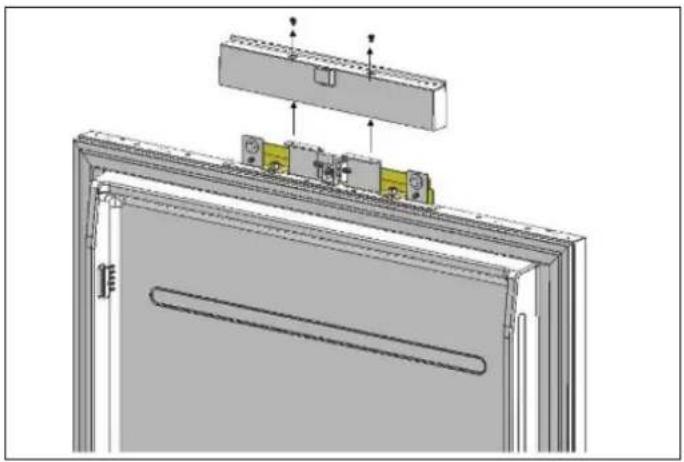
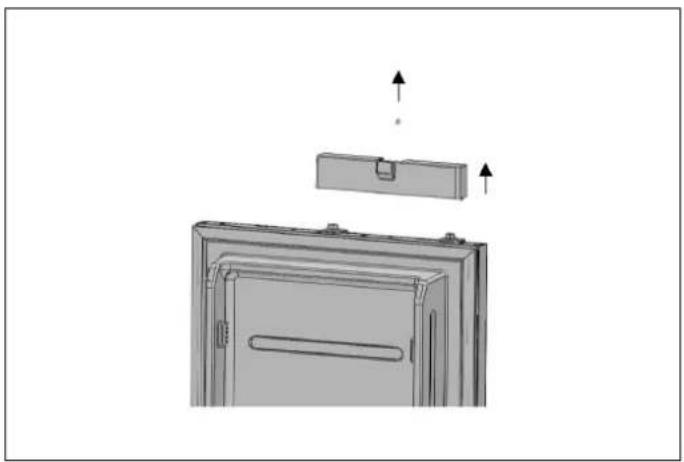
REMOVING THE OVERLAY PANEL MECHANISM COVERS
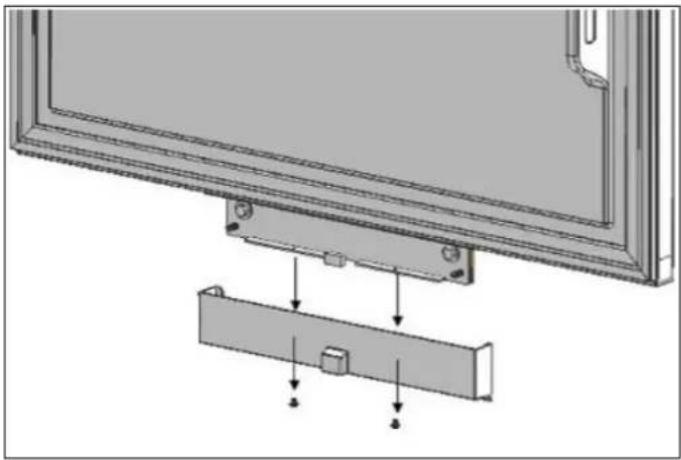
- Remove the upper screws to remove the upper cover.
natural_image
Technical diagram of a door frame assembly with mounting brackets and internal components (no text or symbols)Fig. 45 REF18FCBIPRV / REF18FCBIPLV RE-F24FCBIPNV REF24RCBPNV

natural_image
Diagram of a refrigerator interior showing front panel, door, and side shelf with upward arrows indicating movement (no text or symbols)Fig. 46 REF30RCBPNV

WARNING
There is a magnet on the upper cover of the door hanging bracket. This is a functional component for product operation, because it activates the door open reed switch. Please ensure the covers do not get switched; put each back on the same bracket it was removed from. Do not exchange the lower cover with the upper cover. The magnet must remain in the upper part.
- Remove the two screws to remove the door hanging bracket for the lower mechanism cover.
natural_image
Technical diagram showing a mounted device with mounting brackets and a separate panel, no text or symbols presentFig. 47
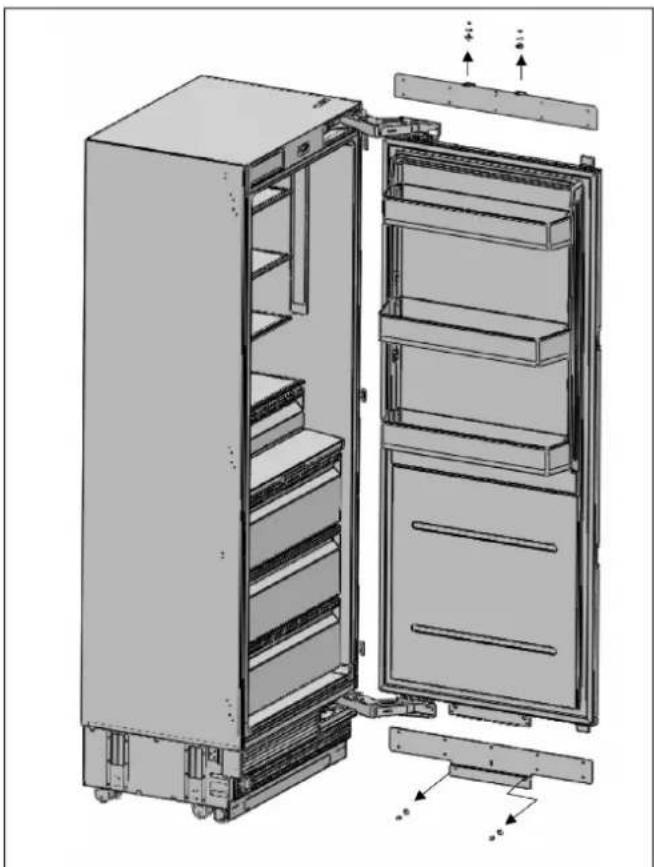
REMOVING THE PANEL BRACKETS
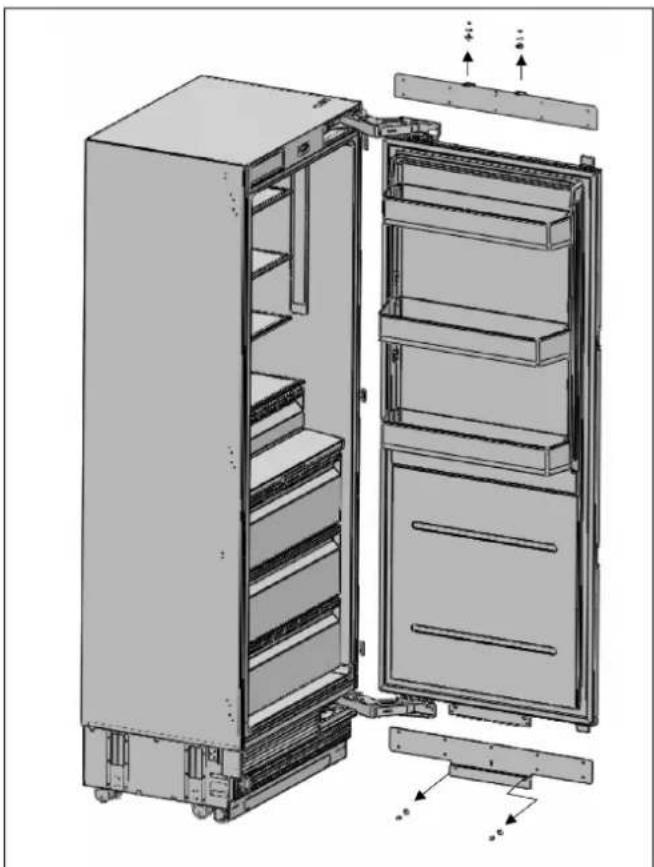
- Remove the upper and lower adjustable panel mounting brackets from the door panel adjustment mechanisms, as shown below.

natural_image
Exploded view diagram of an open refrigerator showing internal compartments and doorways (no text or labels)Fig. 48 REF18FCBIPRV / REF18FCBIPLV
natural_image
Technical illustration of an open refrigerator with visible door, shelves, and cooling unit (no text or labels)Fig. 49 REF24FCBIPNV REF24RCBPNV REF30RCBPNV
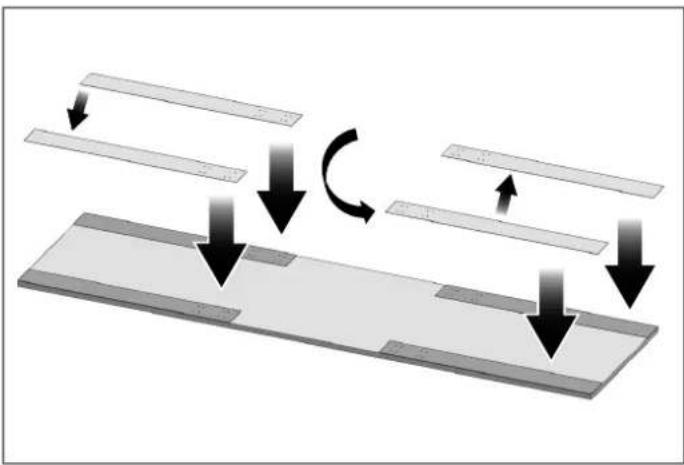
PREPARING THE OVERLAY PANELS

NOTE
When marking, you can use the door/ drawer panel preparation template provided with the product.
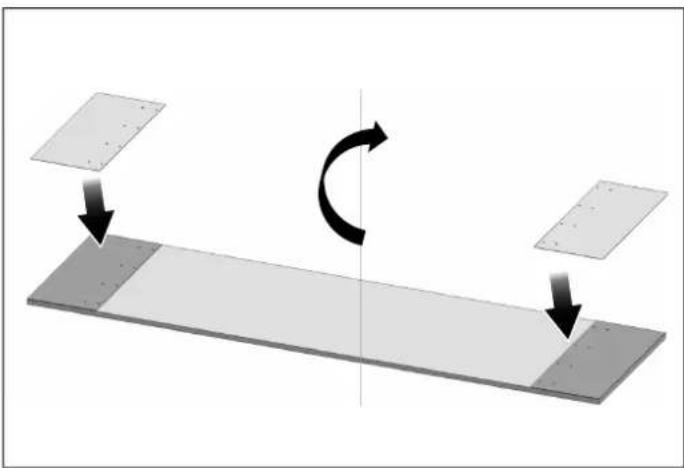
natural_image
Diagram showing a rotating mechanical component with two plates and directional arrows indicating rotation (no text or symbols)Fig. 50 REF18FCBIPRV / REF18FCBIPLV

natural_image
Diagram showing a mechanical or structural assembly with downward arrows indicating motion, no text or symbols present.Fig. 51 REF18FCBIPRV / REF18FCBIPLV
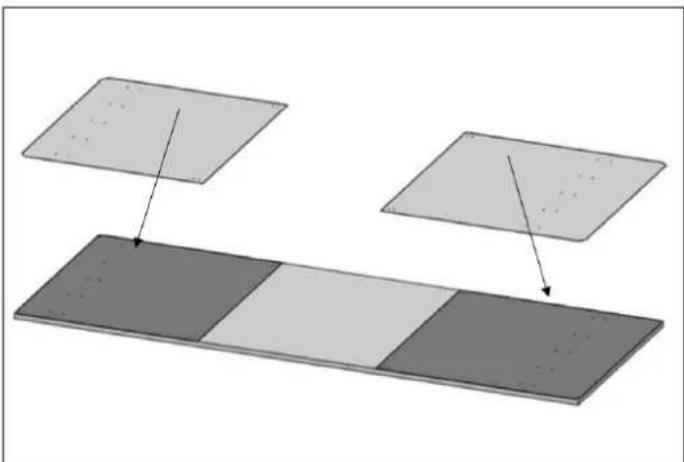
natural_image
Diagram showing two rectangular panels with different shades of gray and arrows pointing to each panel (no text or symbols present)Fig. 52 REF24FCBIPNV REF24RCBPNV REF30RCBPNV

WARNING
The handle mounting holes will have to be adjusted based on the handles to be used in the kitchen design.

WARNING
The minimum door thickness must be 3/4" (19 mm).
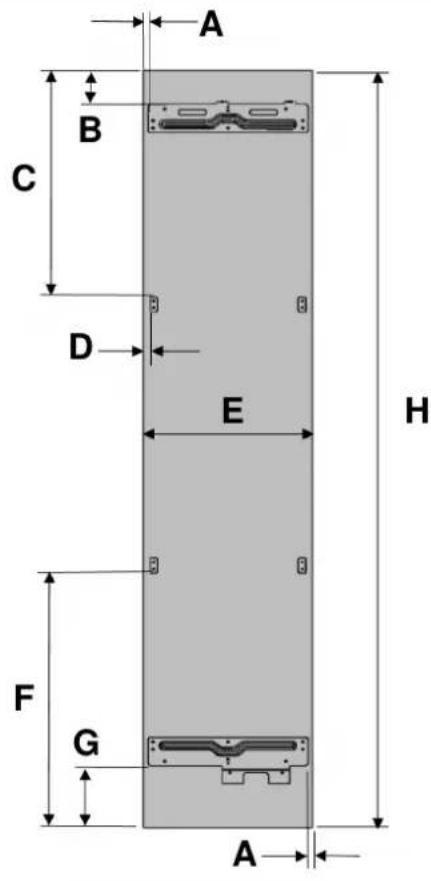

Fig. 53 REF18FCBIPRV / REF18FCBIPLV Fig. 54 REF24FCBIPNV REF24RCBPNV REF30RCBPNV
| CATEGORY | REF18FCBIPRV / REF18FCBIPLV | REF24FCBIPNV REF24RCBPNV REF30RCBPNV | ||
| A | 3/8" (10 mm) | 3/8" (10 mm) | 3/8" (10 mm) | 3/8" (10 mm) |
| B | 3 3/8" (85 mm) | |||
| C | 23 7/16" (595.5 mm) | |||
| D | 7/10" (18.2 mm) | |||
| E | 17 3/4" (451 mm) | 23 3/4" (603 mm) | 23 3/4" (603 mm) | 29 3/4" (756 mm) |
| F | 27 5/16" (693.5 mm) | |||
| G | 6 7/8" (175 mm) | |||
| H | 79 15/16" (2030 mm) | |||

WARNING
• To prevent damage to the finished surface of the panel, use screws suitable for the door panel thickness.
Install the panel brackets using screws (#15). You can also use the template (#6) provided with the product to align these parts. It is recommended to keep this template for future reference.
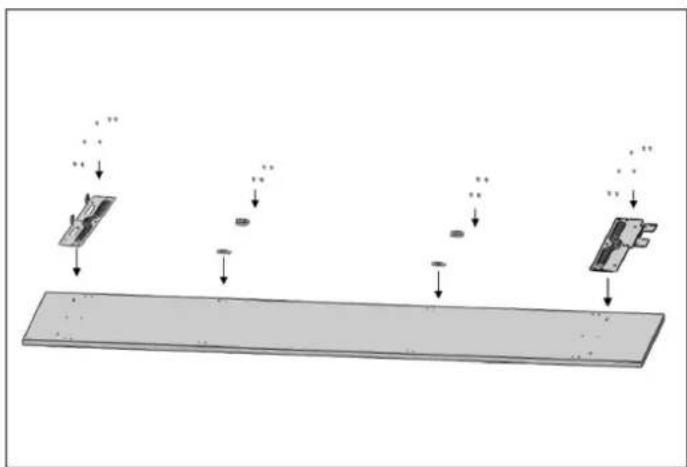
flowchart
graph TD
    A["Top Input"] --> B["Process Step 1"]
    B --> C["Process Step 2"]
    C --> D["Output"]
    style A fill:#f9f,stroke:#333
    style D fill:#bbf,stroke:#333
Fig. 55 REF18FCBIPRV / REF18FCBIPLV

Fig. 56 REF24FCBIPNV REF24RCBPNV REF30RCBPNV
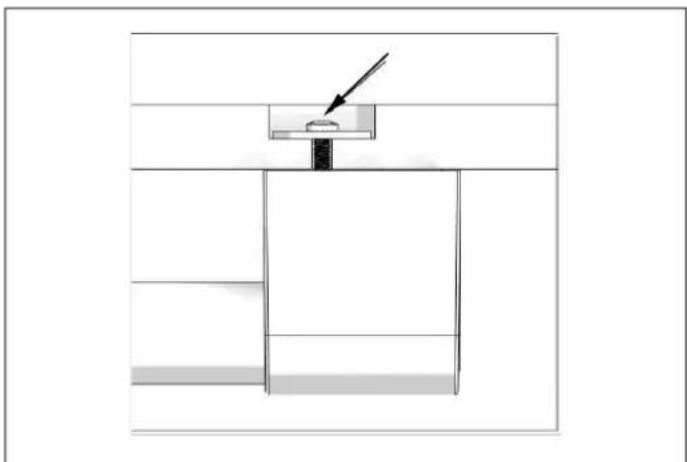
Attach the door handle to the upper door panel prior to installing the panel on the fridge. Use handle hardware that will ensure a secure connection to the panel and that will lie flush against or, in any case, not protrude from the back of the overlay panel. This may require countersinking the handle hardware into the back of the panel, as shown below. The door handle mounting screws must not protrude either.
natural_image
Simple line drawing of a mechanical setup with a piston and lever, no text or symbols presentFig. 57 REF18FCBIPRV / REF18FCBIPLV

WARNING
The handle mounting holes will have to be adjusted based on the handles to be used in the kitchen design.

WARNING
The minimum door thickness must be 3/4" (19 mm).

WARNING
To prevent damage to the finished surface of the panel, use screws suitable for the door thickness.
INSTALLING THE OVERLAY PANELS
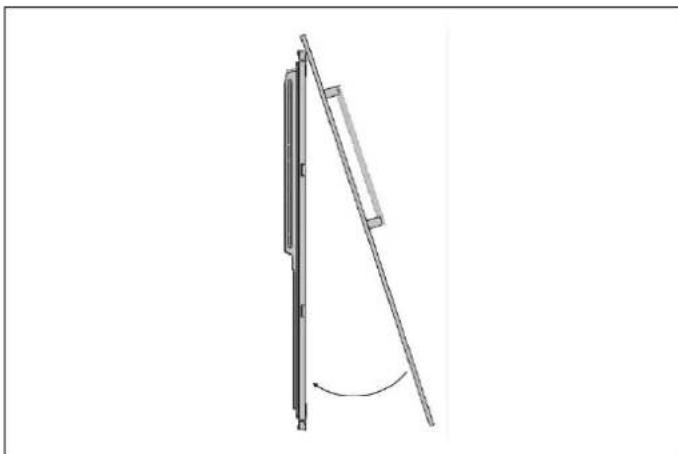
- Attach the furniture door to the door
natural_image
Diagram of a mechanical lever mechanism with a curved arrow indicating rotation (no text or symbols present)Fig. 58
ALIGNING THE UPPER PART OF THE CUSTOM DOOR PANEL WITH BOLTS
- The custom panel for the refrigerator must be flush with the cabinet doors beside it.
To achieve this, it is necessary to adjust the 3D direction using two fixing bolts.
First, check the position of the refrigerator door in relation to the kitchen cabinets.
The distance between the door and the cabinets beside it should be 1/8" (3 mm), assuming that the door dimensions are correct.
You can now adjust the door according to this distance.

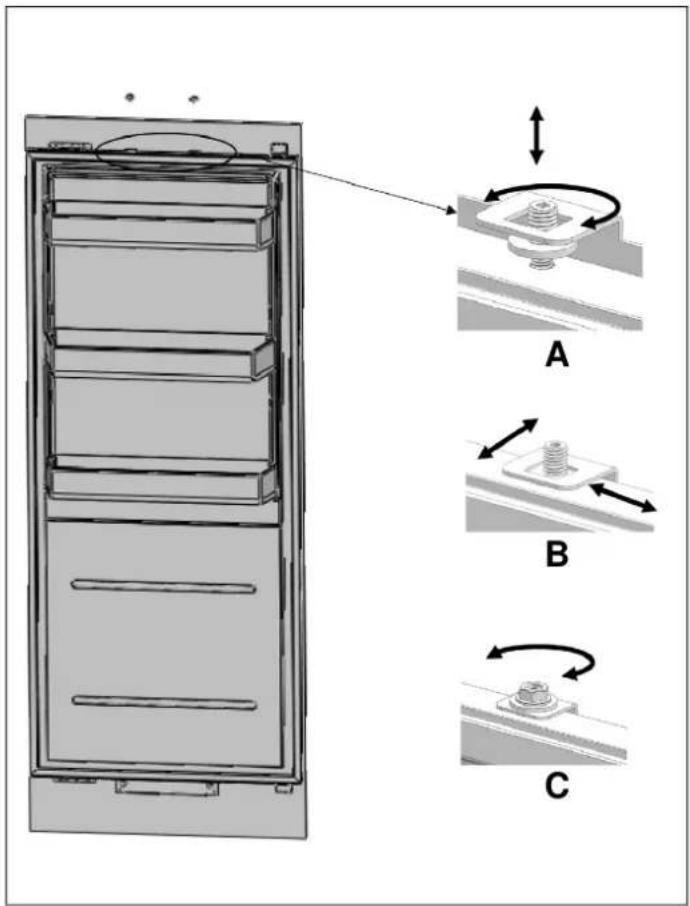
Fig. 59 REF24FCBIPNV REF24RCBPNV REF30RCBPNV
A Up & Down
• B Front & back / Left & right
• C Fixing furniture door completely
ALIGNING THE LOWER PART OF THE CUSTOM DOOR PANEL WITH BOLTS.

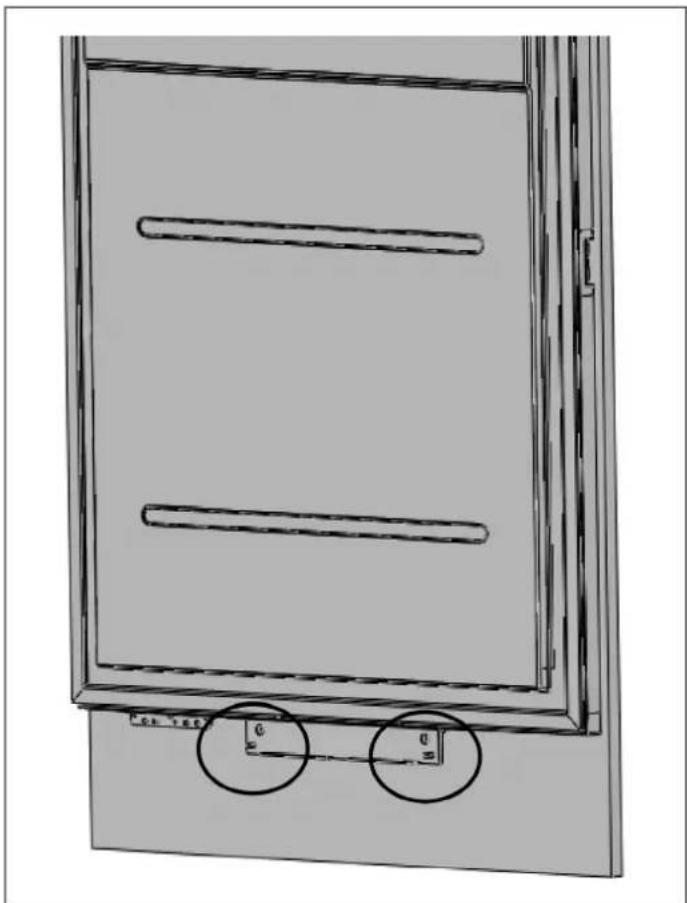
natural_image
Technical line drawing of a door frame with two horizontal bars and two circular annotations indicating measurement points (no text or symbols present)Fig. 60
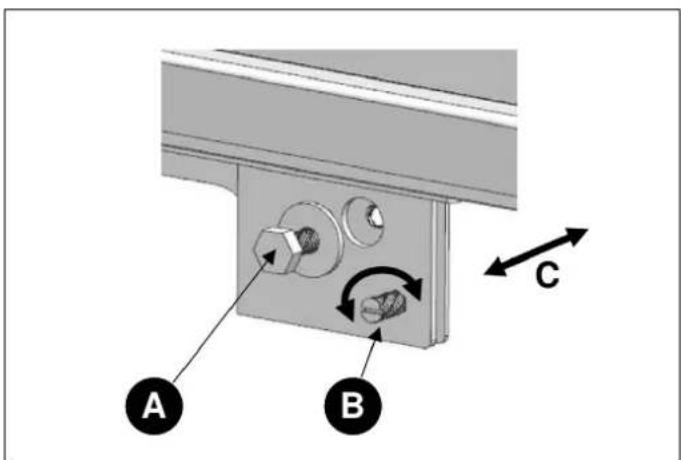
Fig. 61
A Up & Down
B Fixing furniture door completely
C Front & back
- Use the bracket furniture door (Item No6) to join the furniture door
• Use 2 screws (Item No7) and 1screw (Item No5) to fix.
natural_image
Three icons: a tool, a screwdriver, and a hammer, each enclosed in rounded squares (no text or symbols)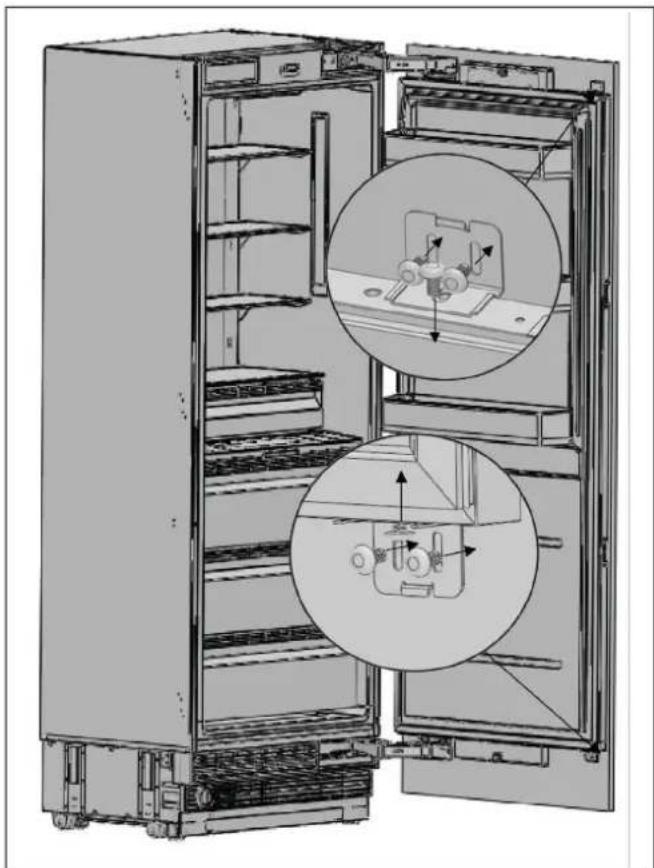
natural_image
Interior view of a refrigerator showing open doors and internal components with circular insets (no text or symbols)Fig. 62 REF24FCBIPNV REF24RCBPNV REF30RCBPNV
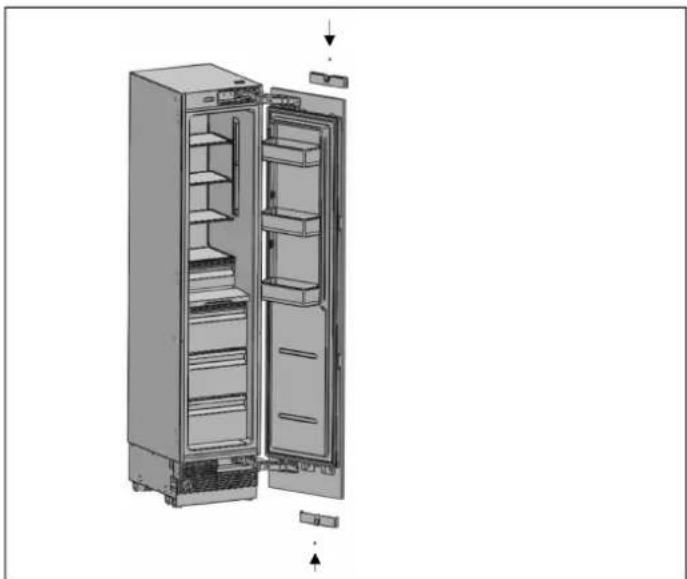
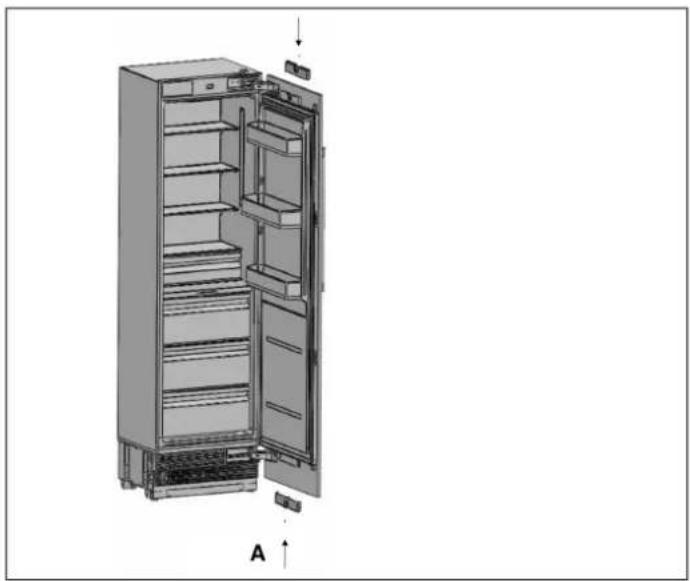
- Clip the cover furniture door bracket.
- Attach and screw the upper/lower decoration covers.

natural_image
Interior view of a refrigerator showing open doors, shelves, and a close-up of the door (no text or symbols visible)Fig. 63 REF24FCBIPNV REF24RCBPNV REF30RCBPNV
natural_image
Exploded view diagram of a refrigerator showing internal compartments and doorways (no text or labels)Fig. 64 REF18FCBIPRV / REF18FCBIPLV

natural_image
3D diagram of a refrigerator interior showing internal compartments and doorways (no text or labels)Fig. 65 REF24FCBIPNV REF24RCBPNV
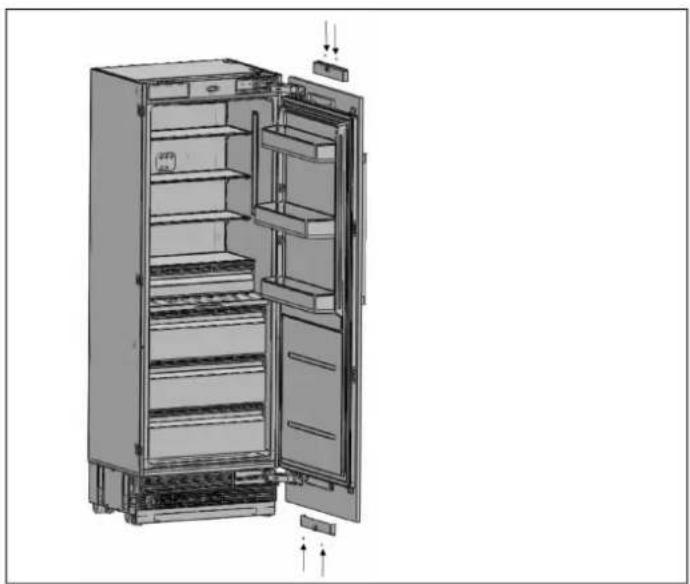
natural_image
Technical illustration of an open refrigerator with visible door, shelves, and cooling unit (no text or labels)Fig. 66 REF30RCBPNV

WARNING
You must keep these parts for future use.
You will need them if you want to change the door directions.
• After the top and bottom door panel brackets are secured by installing screws, use screw (Item No8) and square washer (Item No9) to secure the center mounting bracket.
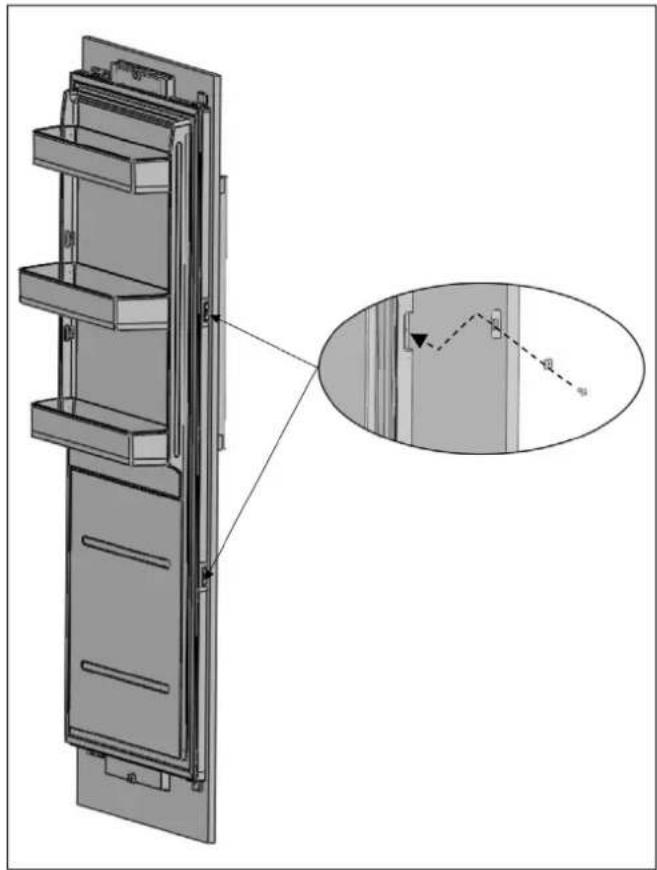
natural_image
Technical line drawing of a multi-panel refrigerator with an inset detail showing a close-up of the front panel (no text or symbols present)Fig. 67
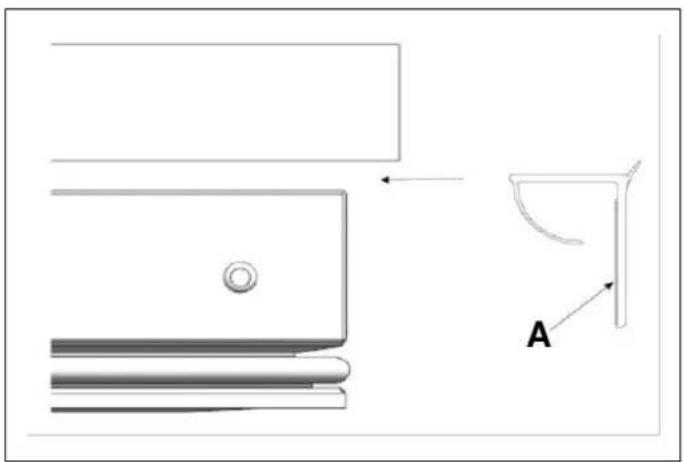
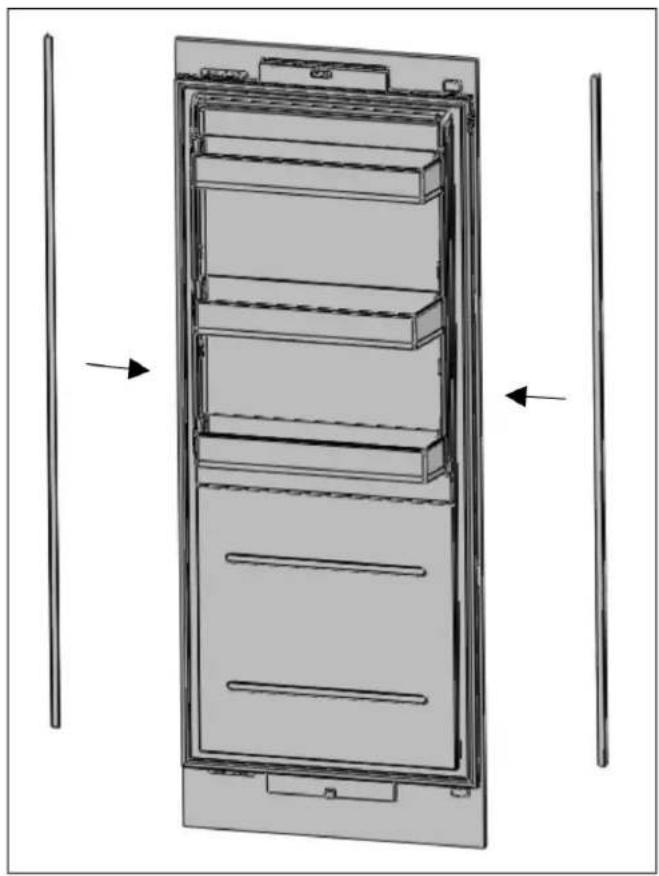
- Attach the Trim door side (Item No3)
natural_image
Technical line drawing of a mechanical component with labeled section A (no text or symbols beyond label)Fig. 68
A Tape double
natural_image
Technical line drawing of a multi-tiered refrigerator with vertical supports and an arrow indicating direction (no text or symbols)Fig. 69
HINGE ADJUSTMENT AND REVERSING THE DOOR SWING
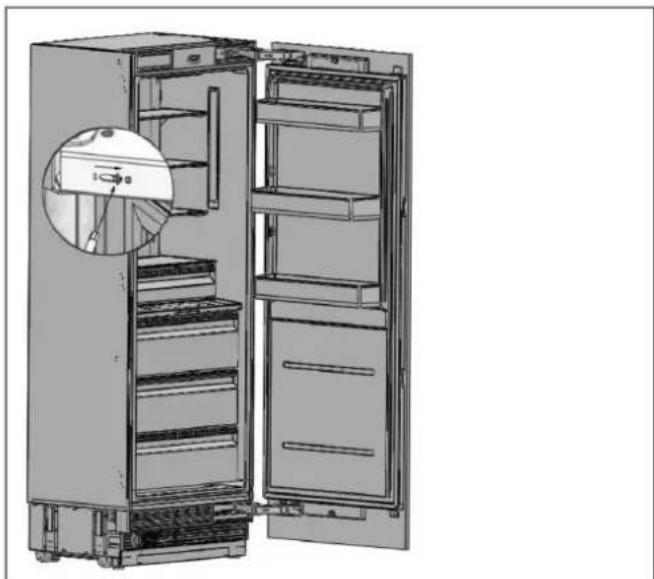
ADJUSTING THE SPRING TENSION OF THE HINGES
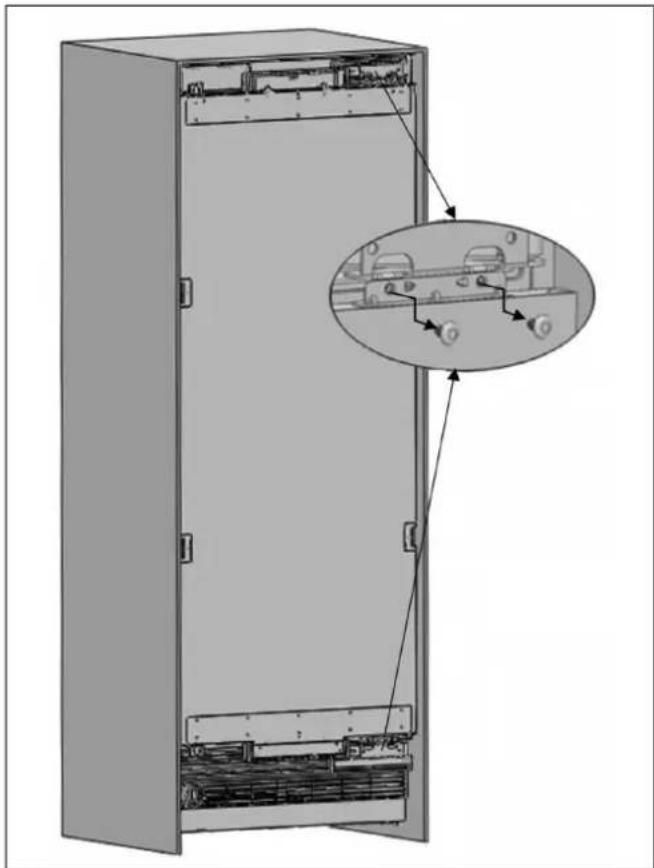
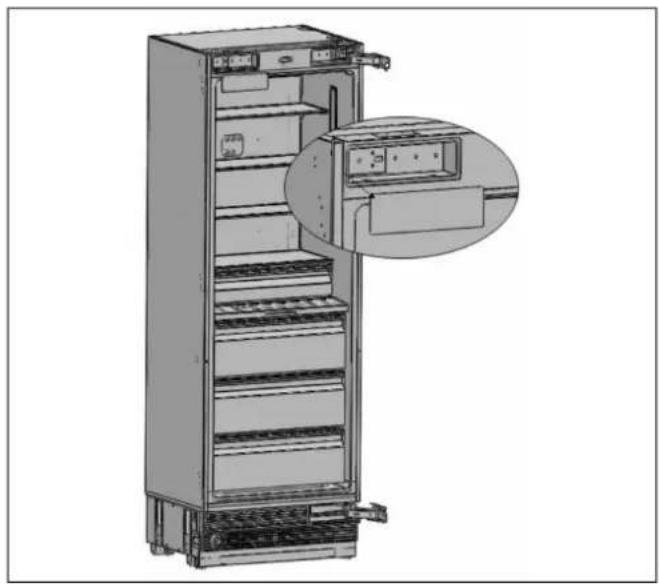
- Use a drill to adjust the tension of the upper and lower hinges of the fridge door. Set the hinge adjustment screw to position "I" from position "O".

natural_image
Interior view of a refrigerator showing open doors, shelves, and a circular inset detail (no text or symbols)Fig. 70

WARNING
The door must be fully open during this adjustment.

WARNING
The hinge tension adjustment must be performed only after the door panel has been adjusted.
REMOVING THE DOOR PANEL
- Set the tension level of the hinge to "0".
natural_image
Technical line drawing of an open refrigerator with a circular inset showing the interior portion (no text or symbols)Fig. 71

CAUTION
Failure to set the hinge to "0" before continuing the installation may result in injury.
- Remove the side closing seals.

natural_image
Technical line drawing of a door frame with two vertical supports and horizontal bars, no text or symbols presentFig. 72
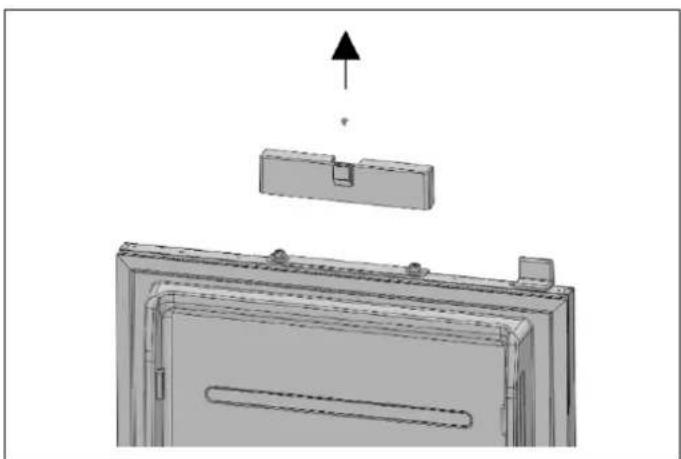
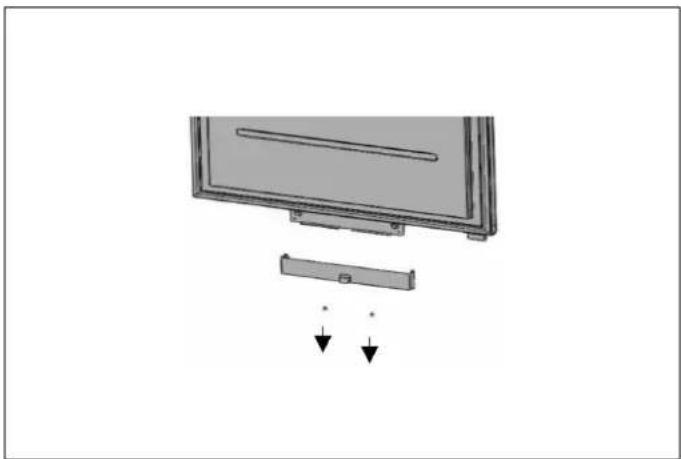
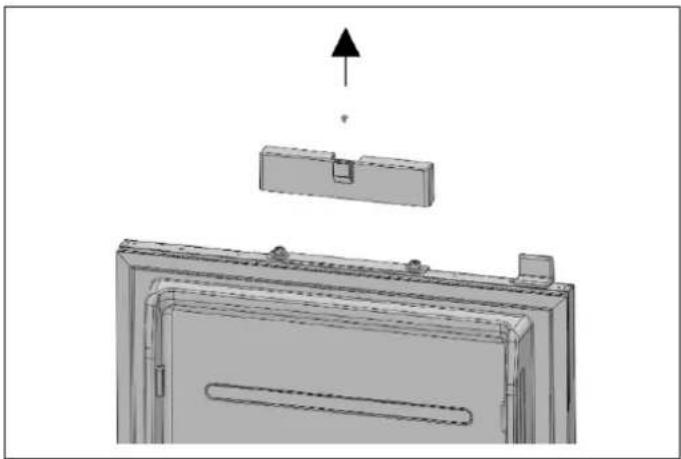
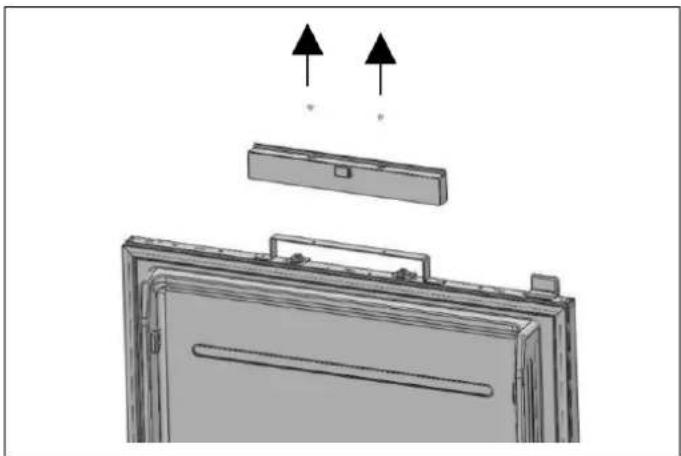
- Loosen the 2 screws in the upper cover of the fridge door and remove it.
• Take out the upper adjustment kits.

natural_image
Diagram of a door with an open lid and a handle, showing a mechanical assembly (no text or symbols)Fig. 73 REF18FCBIPRV / REF18FCBIPLV
natural_image
3D technical diagram of a mechanical assembly with an upward arrow indicating force or direction (no text or symbols present)Fig. 74 REF24FCBIPNV REF24RCBPNV

natural_image
Diagram of a device with two arrows pointing to a component, showing internal structure and mounting points (no text or symbols)Fig. 75 REF30RCBPNV
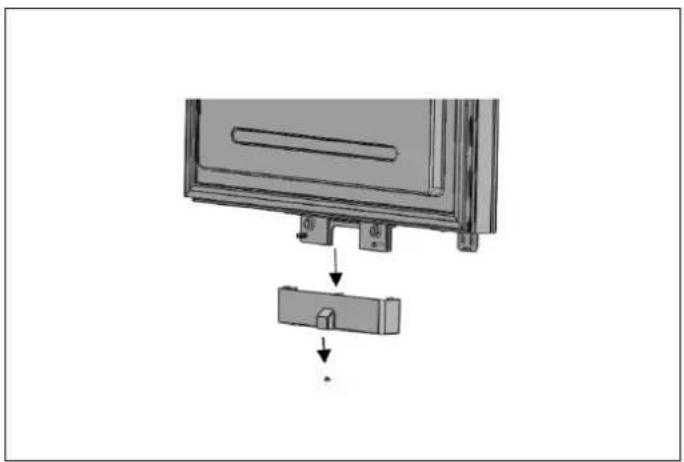
- Loosen the 2 screws in the upper cover of the fridge door and remove it.

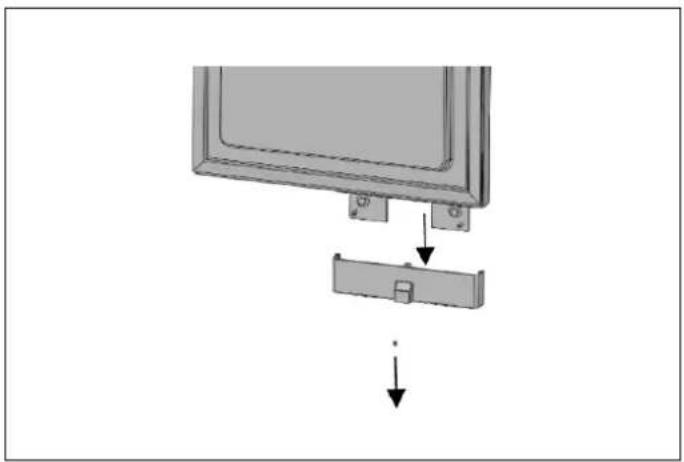
natural_image
Diagram showing a monitor with a close-up of its side panel and a separate clip, connected by arrows indicating assembly or disassembly (no text or symbols present)Fig. 76 REF18FCBIPRV / REF18FCBIPLV
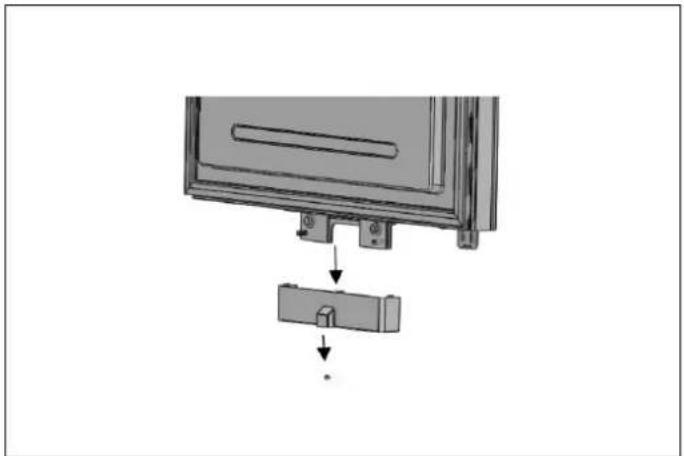
natural_image
Diagram showing a device with a lock and a separate component, no text or symbols presentFig. 77 REF24FCBIPNV REF24RCBPNV
natural_image
Diagram of a monitor with an attached cable and two arrows indicating downward motion (no text or symbols)Fig. 78 REF30RCBPNV
Remove the lower and upper bracket screws from the fridge.
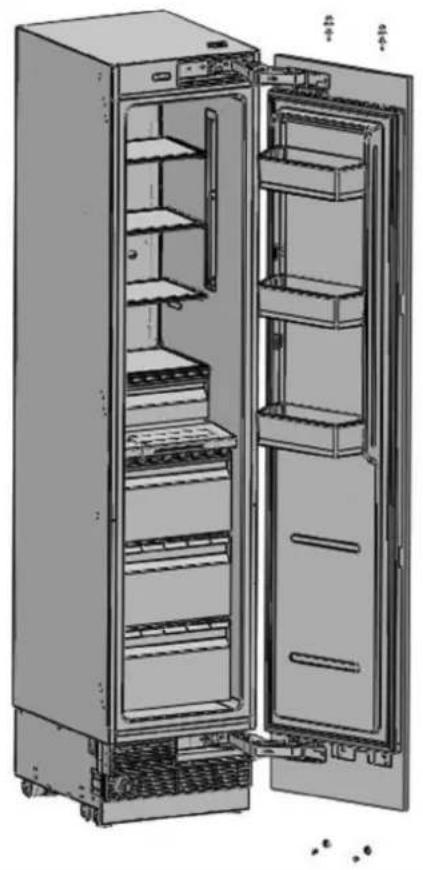
natural_image
Interior view of a refrigerator with open doors and shelves (no text or symbols visible)
natural_image
Technical diagram showing two views of a mechanical assembly with arrows indicating direction (no text or symbols present)Fig. 79 REF18FCBIPRV / REF18FCBIPLV

natural_image
Interior view of a refrigerator showing open doors, shelves, and storage compartments (no text or labels visible)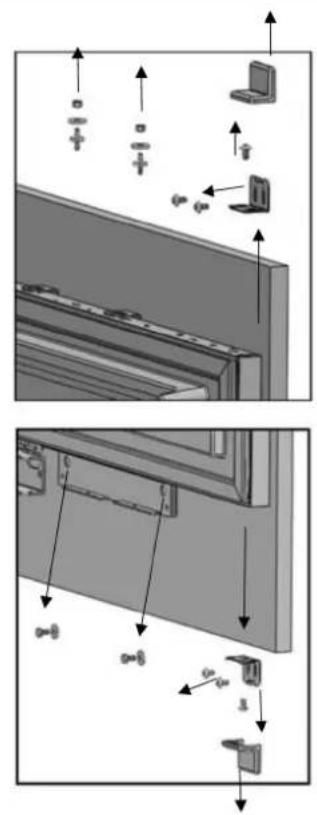
Fig. 80 REF24FCBIPNV REF24RCBPNV REF30RCBPNV
- Remove the screw from the upper and from the lower fridge mechanism.

WARNING
The fridge door panel will be released when these screws are removed. You must take measures to prevent the door from falling.
You can tape the cabinet door to the inner door or ask a second person to help.
• Take off the fridge cabinet door and lay it upside down on a table top.
- You must attach the cabinet door by rotating it 180° with respect to its current position.
REMOVING AND PREPARING THE INNER DOOR
- Remove the hinge connection screws from the hinge brackets.

CAUTION
The door will be released when these screws are removed. You must take measures to prevent the door from falling. You can tape the cabinet door to the inner door or ask a second person to help.
natural_image
Technical diagram of an open electrical cabinet with internal components and a magnified inset showing internal wiring (no text or symbols present)Fig. 81
Take off the fridge door and lay it on a table top, then remove the mounting components and screw them to the opposite side of the door.
- Use 2 screws to attach the door hanging bracket.

natural_image
Technical line drawing of a vertical cabinet or enclosure with horizontal ribs and diagonal braces, no text or symbols present.Fig. 82
REPLACING THE HINGES
- Remove the Hinge Caps located at the other side where you will fix the hinges.
natural_image
Illustration of a multi-tiered refrigerator with an inset close-up showing the interior panel (no text or symbols visible)Fig. 83
- Remove the lower right hinge by loosening its 2 screws and fix it to its slot at the upper left side.

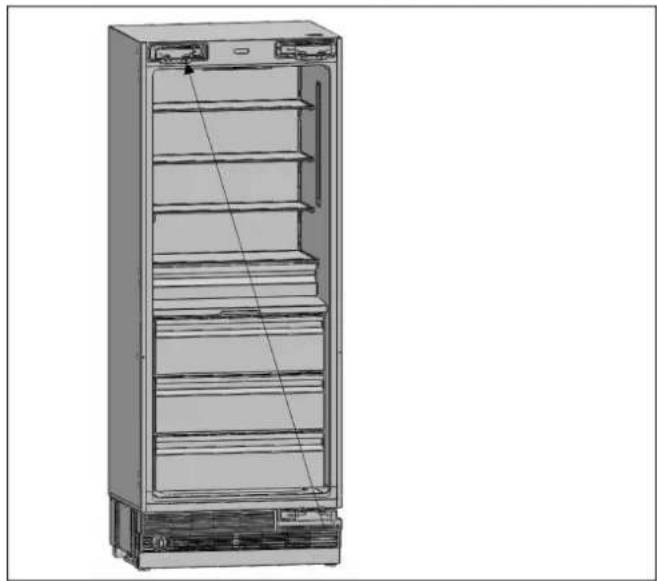
natural_image
Line drawing of a multi-tier refrigerator cabinet with open doors and side panels (no text or symbols)Fig. 84
AIR VENT UPPER PART DIRECTION CHANGE
- Remove the air vent part and change direction as shown in the figure.

natural_image
Technical illustration of a mechanical device showing front and side views of internal components (no text or symbols)Fig. 85
HOW TO CHANGE AIR VENT UPPER PART DIRECTION
• Air vent upper part for the right hinge

Fig. 86
A Air vent cover
• B Air vent hinge part right
• Air vent upper part for the left hinge
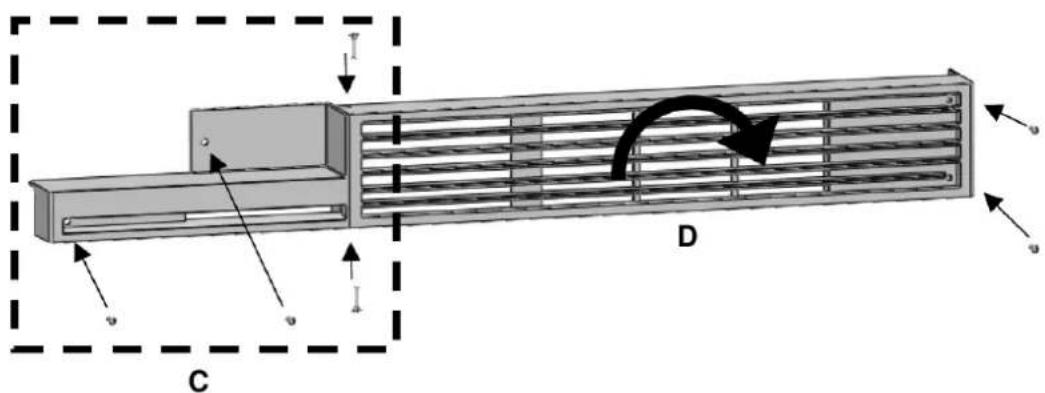
Fig. 87
• C Air vent hinge part left
• D Rotate air vent cover by 180°
- Remove the upper right hinge by loosening its 2 screws and fix it to its slot at the lower left side.

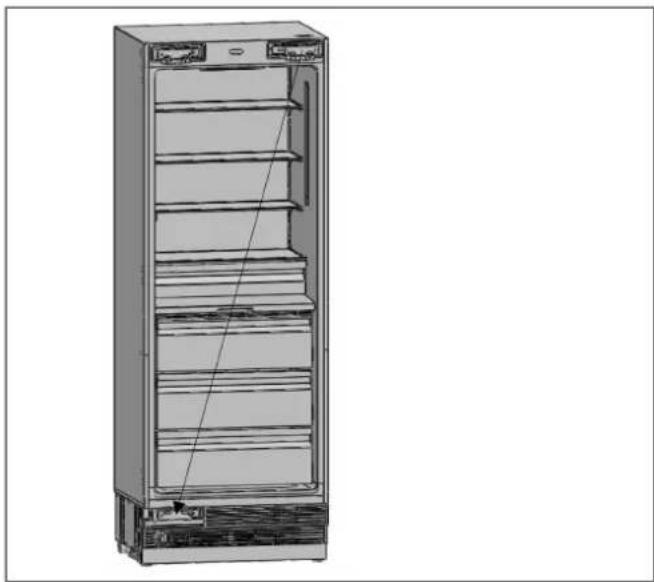
natural_image
3D line drawing of a refrigerator cabinet with shelves and doors, no text or symbols presentFig. 88
- Attach the Hinge Slot Caps removed from the left side to the Hinge Caps to the right side.

natural_image
Diagram of a refrigerator interior showing the exterior and front views of the cabinet (no text or labels)Fig. 89
REINSTALLING THE DOOR
Place the inner door on the refrigerator using the door seal to help hold the door in place and fasten it back onto the hinges using 4 screws.

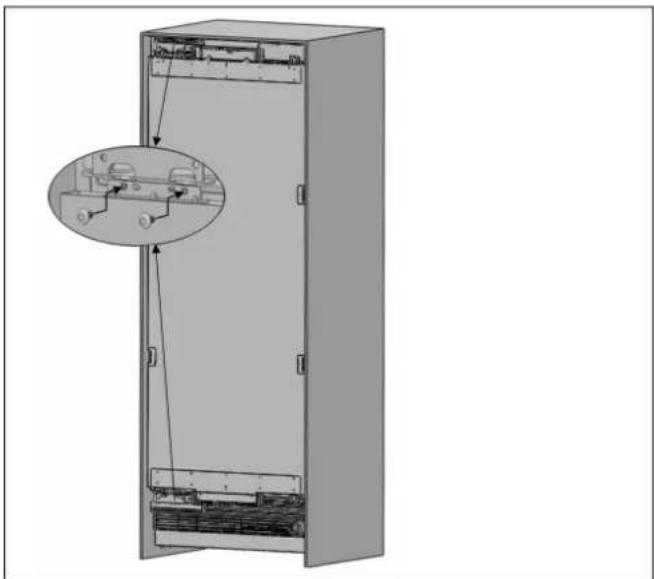
natural_image
Technical diagram of an open refrigerator with internal components and a magnified inset showing internal wiring (no text or symbols)Fig. 90
- All freezer columns include one connection trim kit (CTXV).
CABINET CUTOUT DIMENSIONS
Please check cabinet cutout dimensions below before starting the installation.

Fig. 91
CONFIGURATION A B C
| 18"+24"(45+60 cm) 42"(1066 mm) 84"(2134 mm) 25"(635 mm) |
| 18"+30"(45+75 cm) 48"(1219 mm) 84"(2134 mm) 25"(635 mm) |
| 24"+24"(60+60 cm) 48"(1219 mm) 84"(2134 mm) 25"(635 mm) |
| 24"+30"(60+75 cm) 54"(1371 mm) 84"(2134 mm) 25"(635 mm) |
| 30"+30"(75+75 cm) 60"(1524 mm) 84"(2134 mm) 25"(635 mm) |
LOCATION OF THE ELECTRICAL WIRING
- Location of the electrical wiring must be within the range given below.

WARNING
Do not use extension cables or two-pin adaptors and do not remove the ground terminal of the grounding cable.

WARNING
A qualified electrician must ensure that the poles of the socket are connected correctly. Verify that the grounding of the socket is correct.
For technical aspects, refer to the ELECTRICAL REQUIREMENTS chapter.

Fig. 92
| CONFIGURATION A B C D | E | ||||
| 18"+24" (45+60 cm) | 13" (330 mm) | 2" (50.8 mm) | 11" (280 mm) | 5" (127 mm) | 4" (102 mm) |
| 18"+30" (45+75 cm) | 19" (482 mm) | 2" (50.8 mm) | 11"(280 mm) | 5" (127 mm) | 4" (102 mm) |
| 24"+24" (60+60 cm) | 13" (330 mm) | 2" (50.8 mm) | 11"(280 mm) | 5" (127 mm) | 4" (102 mm) |
| 24"+30" (60+75 cm) | 19" (482 mm) | 2" (50.8 mm) | 11"(280 mm) | 5" (127 mm) | 4" (102 mm) |
| 30"+30" (75+75 cm) | 19" (482 mm) | 2" (50.8 mm) | 11"(280 mm) | 5" (127 mm) | 4" (102 mm) |
LOCATION OF THE WATER SYSTEM
Location of the water system should be as in the image below.
For technical aspects, refer to the PLUMBING REQUIREMENTS chapter.
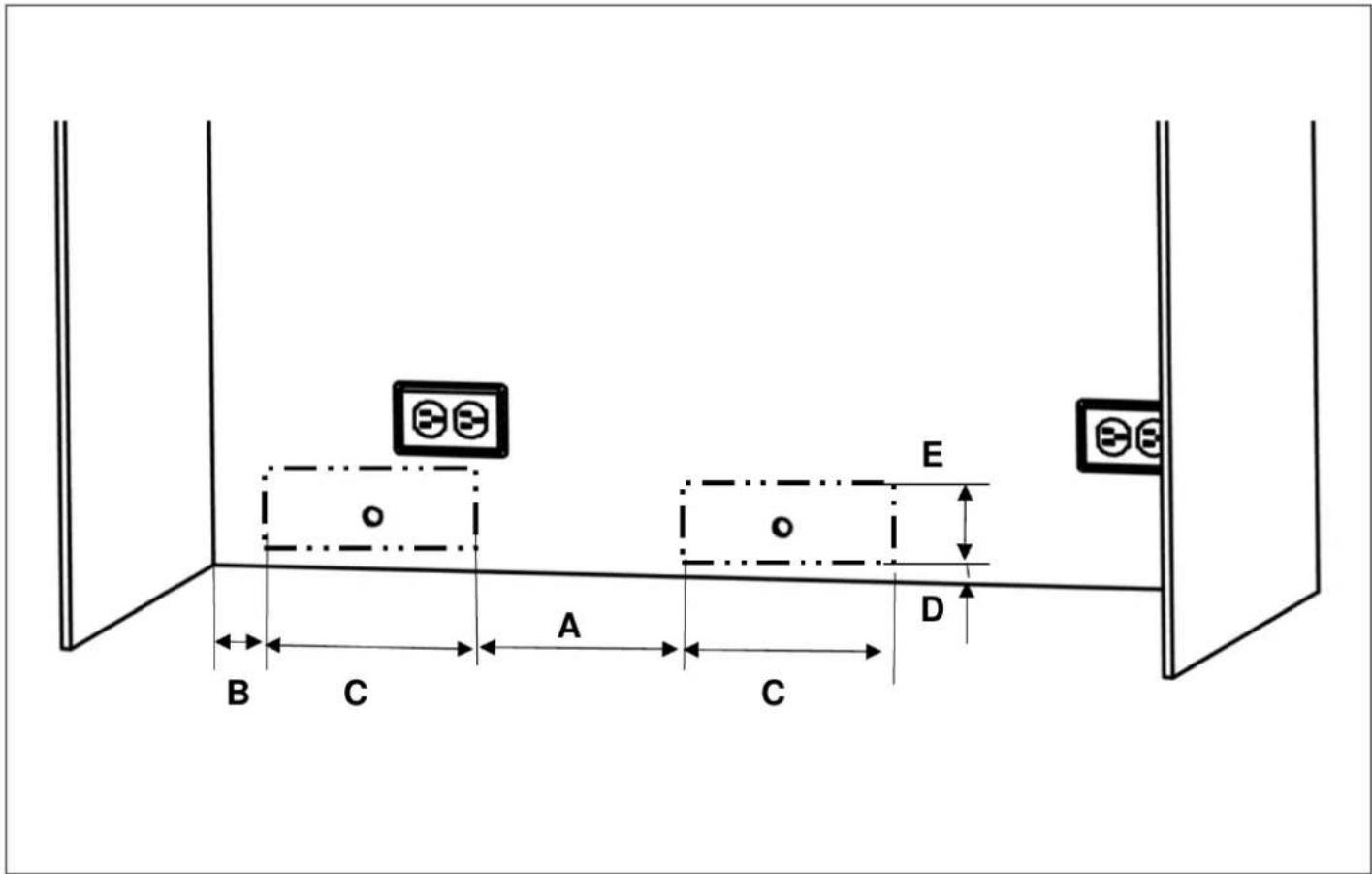
Fig. 93
CONFIGURATION A B C D E
| 18"+24" (45+60 cm) 8" (203 mm) 2" (50.8 mm) 10" (254 mm) 7/8" (21 mm) 4" (102 mm) | |||||
| 18"+30" (45+75 cm) 8" (203 mm) 2" (50.8 mm) 10" (254 mm)) 7/8" (21 mm)) | 4" (102 mm)) | ||||
| 24"+24" (60+60 cm) | 14" (356 mm) | 2" (50.8 mm) | 10" (254 mm)) | 7/8" (21 mm)) | 4" (102 mm)) |
| 24"+30" (60+75 cm) | 14" (356 mm) | 2" (50.8 mm) | 10" (254 mm)) | 7/8" (21 mm)) | 4" (102 mm)) |
| 30"+30" (75+75 cm) | 20" (508 mm) | 2" (50.8 mm) | 10" (254 mm)) | 7/8" (21 mm)) | 4" (102 mm)) |
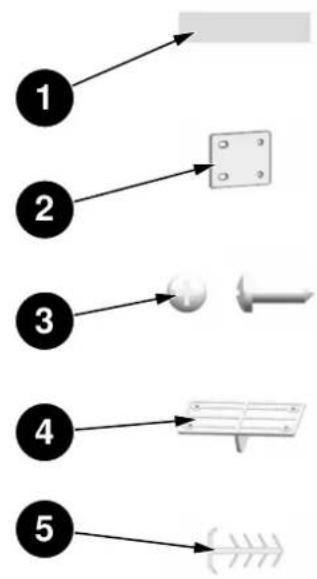
flowchart
graph TD
    A["1"] --> B["2"]
    B --> C["3"]
    C --> D["4"]
    D --> E["5"]

Fig. 94
| NO PART NAME SPEC | Q'TY | ||
| 1 | Insulating Foam | Sponge, gray,T3.0*400*1750 | 1 |
| 2 Lower Bracket | T2.0, Cr+zn-coating | 1 | |
| 3 Screws M4*12 16 | |||
| 4 | Upper Brackets | POM | 3 |
| 5 | Central Trim PVC extrusion L=1876 | 1 | |
INSTALLING THE UPPER AND LOWER BRACKETS
• Install the Upper and Lower Brackets, as per the pictures below:

natural_image
Technical line drawing of a refrigerator with labeled components and an inset view showing internal wiring (no text or symbols present)Fig. 95
A Lower bracket
B Upper brackets
- Attach the Insulating Foam centered to the side of one of the refrigerator units, as per the picture below:
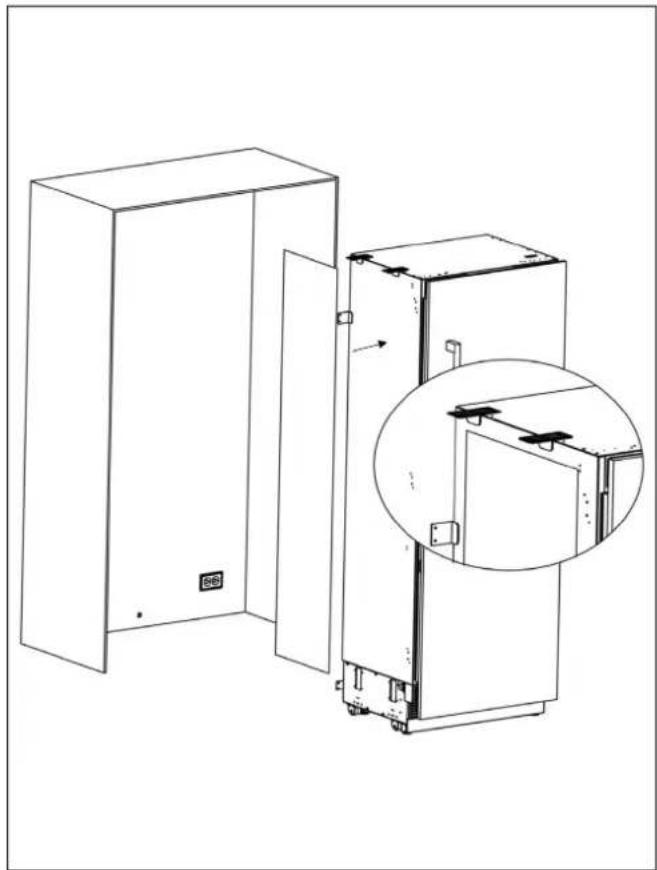
natural_image
Technical line drawing of a cabinet with an inset close-up showing internal components (no text or symbols)Fig. 96
- Position the two refrigerators side-by-side, ensuring they are properly aligned.

WARNING
The insulating foam must be attached to the side of the unit that will be placed next to the other appliance, fitting it securely between the two units. Failure to do so may lead to condensation buildup.
- Once aligned, use screws to attach the Upper Brackets to both refrigerators. Refer to the pictures below for guidance:
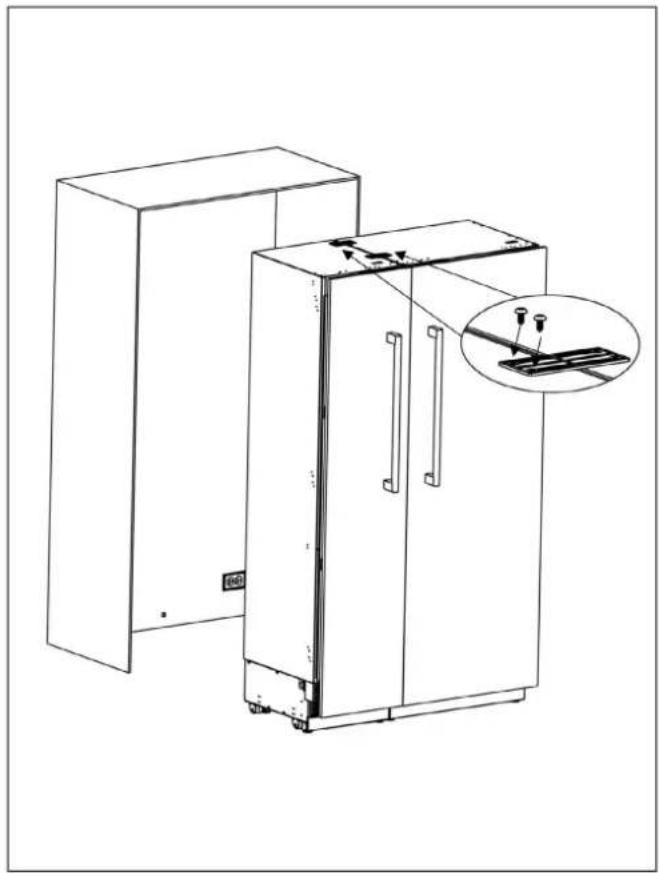
natural_image
Line drawing of a two-tier refrigerator with an inset showing a close-up of the front panel (no text or symbols present)Fig. 97
Once the refrigerators are properly aligned, secure the connecting brackets at the back and the front, joining the two refrigerators together.
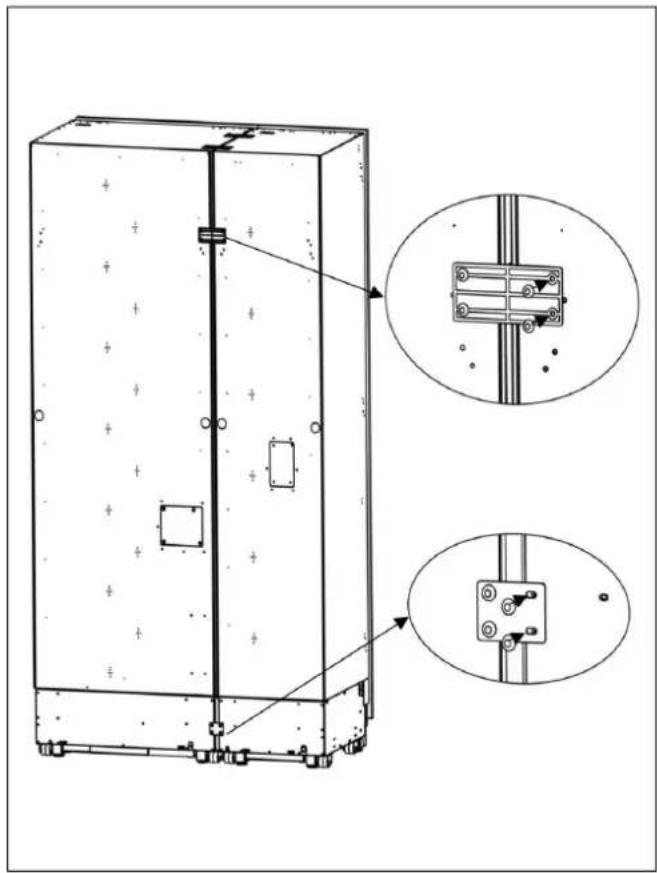
natural_image
Technical line drawing of a cabinet with mounting holes and internal components, showing two views of the cabinet's side view (no text or symbols present)Fig. 98
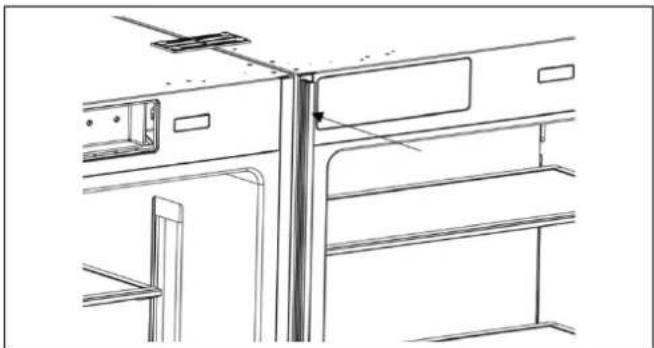
natural_image
Technical line drawing of a cabinet or enclosure with structural components (no text or symbols)- Connect the power supply to the refrigerators.
- Install the water connections for the refrigerators, following the manufacturer's instructions.
• Gently push the refrigerators into their final position, making sure they are level and stable.
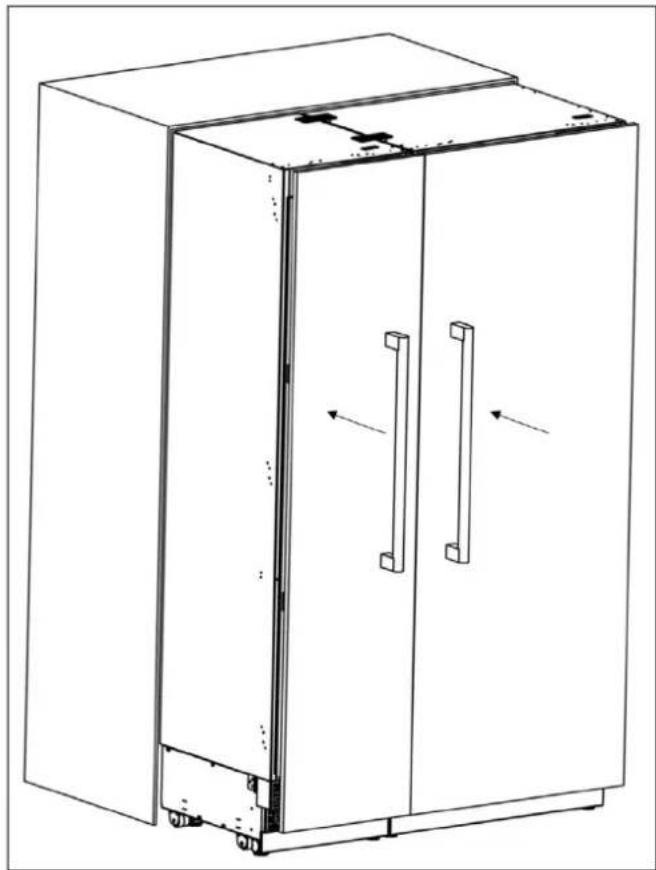
natural_image
Line drawing of a two-door refrigerator with handlebars and ventilation slots (no text or symbols)Fig. 99
- Using a drill and the bit shown below, engage each of the refrigerator's adjuster shafts in turn and level the refrigerator.
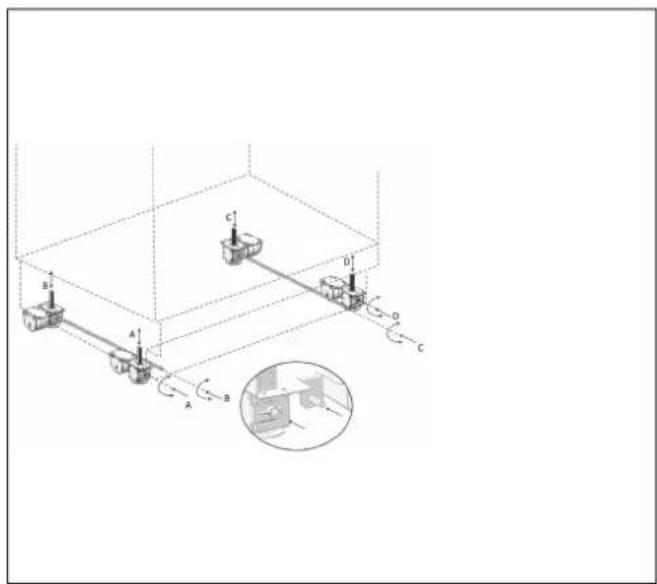
Fig. 100
Raise the front feet to reduce any risk of the cabinet falling frontward.
A/D –Rotate the shaft clockwise to raise the front feet
B/C – Rotate the shaft clockwise to raise the rear feet.
INSTALLING THE CONNECTION BRACKETS ON THE REFRIGERATOR'S SIDE WALLS
• Install the connection brackets to the refrigerator using 12 screws.


natural_image
Line drawing of an open refrigerator with doors open and shelves closed, showing internal compartments and ventilation slots (no text or labels)Fig. 101
INSTALLING THE CONNECTION BRACKETS ON THE REFRIGERATOR'S TOP WALL
- Attach the connection brackets to the refrigerator using 4 screws.

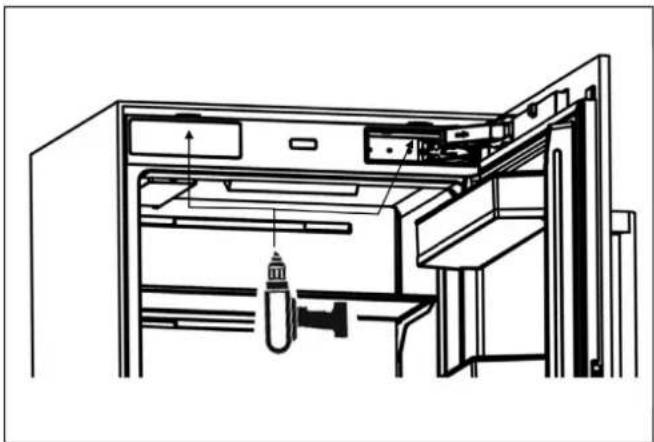
natural_image
Technical line drawing of an open refrigerator interior with handle, drawer, and door (no text or symbols)Fig. 102
INSTALLING THE LATERAL AND UPPER TRIMS
• Install the lateral trims onto the right and left connection brackets.
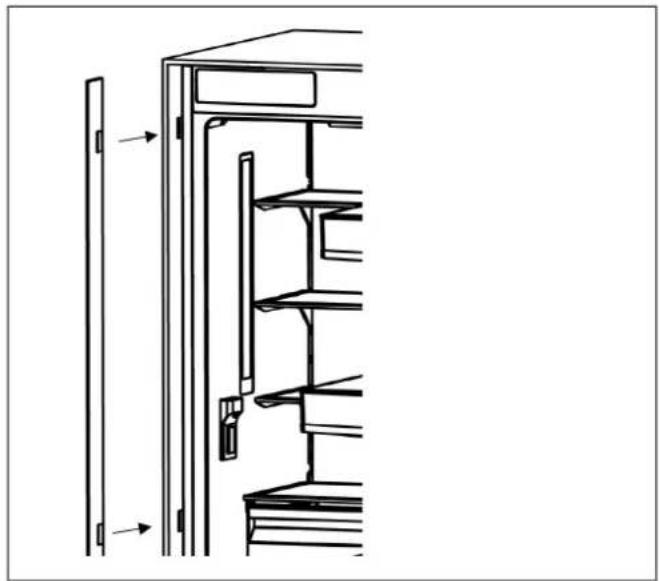
natural_image
Technical line drawing of a refrigerator interior with shelves and doors, showing structural components (no text or symbols)Fig. 103

natural_image
Diagram of a refrigerator interior showing front and side views with no text or symbolsFig. 104
• Install the upper trim onto the upper connection brackets.

natural_image
Technical line drawing of a refrigerator interior showing front and rear compartments with no text or symbolsFig. 105
- Ensure that the refrigerators are properly aligned before inserting the Center Trim (part #5).
- Gently push the Center Trim between the refrigerators to securely fit it in place.

natural_image
Technical line drawing of a cabinet or enclosure with structural components (no text or symbols)Fig. 106

natural_image
Line drawing of a two-decker cabinet with two doors and two handles (no text or symbols)Fig. 107
DU BUREAU DE NOTRE PRÉSIDENT
DIMENSIONS DU PRODUIT 74
EMPLACEMENT DE LA BRIDE ANTIBASCULEMENT 76
RÉGLAGE MINIMUM DE LA HAUTEUR POUR LA MISE À NIVEAU 76
CAPACITÉ DE CHARGEMENT DES BALCONNETS DE PORTE DU RÉFRIGÉRATEUR 76
PANNEAU DE PORTE PERSONNALISÉ (POUR LES MODÈLES AVEC PANNEAU PERSONNALISÉ) 77
EXIGENCES ÉLECTRIQUES 78
EXIGENCES EN MATIÈRE DE PLOMBERIE 80
INSTALLATION 82
LISTE DES OUTILS 83
ALTERNATIVES POUR L'INSTALLATION 83
DÉBALLAGE 84
RETRAIT DES CONNECTEURS SUR LA PAROI LATÉRALE DE L'UNITÉ 85
RETRAIT DU MATÉRIEL D'INSTALLATION 86
RETRAIT DE L'ENSEMBLE ÉVENTS D'AÉRATION 87
INSTRUCTIONS D'INSTALLATION 88
MONTAGE DES SUPPORTS ANTI-BASCULEMENT 88
PRÉPARATION DU TUYAU D'EAU ET DU RACCORDEMENT ÉLECTRIQUE 92
INSTALLATION DANS L'ARMOIRE 93
VISSAGE DES SUPPORTS LATÉRAUX 99
SÉCURISATION DU SUPPORT SUPÉRIEUR 100
INSTALLATION DE L'ARMOIRE INFÉRIEURE 100
FIXATION DE LA GRILLE D'AÉRATION 101
FIXATION DES REVÊTEMENTS DE GARNITURE 102
INSTALLATION ET PRÉPARATION DES PANNEAUX DE RECOUVREMENT 103
RÉGLAGE DE LA CHARNIÈRE ET INVERSION DU SENS D'OUVERTURE DE LA PORTE 115
INSTALLATION DE LA CONFIGURATION CÔTE À CÔTE 124
DIMENSIONS DE DÉCOUPE DE L'ARMOIRE 124
EMPLACEMENT DU CÂBLAGE ÉLECTRIQUE 125
EMPLACEMENT DU SYSTÈME D'ALIMENTATION EN EAU 126
INSTALLATION DES ATTACHES SUPÉRIEURES ET INFÉRIEURES 128
natural_image
Technical diagram of a mechanical assembly with no visible text or symbolsFig. 4
A B C D E F G H
| 84"(2 134 mm) | 79 15/16"(2030 mm) | 4" (101 mm) 1/8" (3 mm) | Espace résiduel après installation :3/4" (19 mm) | 1/16" (2mm) | 22 5/8"(574 mm) | 1 5/8" (42mm) |
EMPLACEMENT DE LA BRIDE ANTIBASCULEMENT
| IJK | |
| 84" (2 134 mm) 5/32" (4 mm) | 83 7/8" (2130 mm) |
RÉGLAGE MINIMUM DE LA HAUTEUR POUR LA MISE À NIVEAU
| L | |
| Avant | 5/16" (8 mm) |
| Arrière | 1/4" (7 mm) |
CAPACITÉ DE CHARGEMENT DES BALCONNETS DE PORTE DU RÉFRIGÉRATEUR
natural_image
Diagram of an open refrigerator with shelves and door, showing internal structure and a downward arrow indicating a drop (no text or symbols present)
natural_image
Line drawing of an open refrigerator with a downward arrow indicating the interior compartment (no text or symbols present)Fig. 5
| CATÉGORIE | REF18FCBIPRV / REF18FCBIPLV | REF24FCBIPNV REF24RCBPNV REF30RCBPNV | ||
| Charge maximale | 22 lbs (10 kg) | 33 lbs (15 kg) | 33 lbs (15 kg) | 33 lbs (15 kg) |
PANNEAU DE PORTE PERSONNALISÉ (POUR LES MODÈLES AVEC PANNEAU PERSONNALISÉ)


natural_image
3D line drawing of a cabinet with open door and internal panel (no text or symbols)Fig. 9

MISE EN GARDE
Fig. 10
Fig. 11
DÉBALLAGE

MISE EN GARDE
natural_image
3D architectural rendering of a rectangular building with vertical supports and horizontal beams (no text or symbols)Fig. 12
natural_image
Exploded view diagram of a refrigerator internal structure (no text or labels)Fig. 13

ATTENTION!
natural_image
Technical diagram of an air conditioner unit with airflow arrows indicating airflow direction (no text or symbols present)Fig. 16
MONTAGE DES SUPPORTS ANTI- BASCULEMENT

MISE EN GARDE
natural_image
Pure diagram of a mechanical or electrical component with no text, numbers, or symbolsFig. 19
A 3" x 4" (76 mm x 102 mm)
PRÉPARATION DU TUYAU D'EAU ET DU RACCORDEMENT ÉLECTRIQUE
natural_image
Technical diagram of a mechanical assembly with circular component and mounting base (no visible text or symbols)Fig. 24
natural_image
Diagram showing a mechanical device with a vertical frame and a rectangular block, no text or symbols presentFig. 25

NOTE
natural_image
Technical diagram of a server rack with zoomed-in views showing internal components (no text or symbols)Fig. 26

NOTE
Fig. 29
natural_image
Interior view of a technical enclosure or enclosure with internal components and structural elements (no visible text or symbols)Fig. 30
natural_image
Technical line drawing of a cabinet or enclosure with internal components and a magnified inset showing internal structure (no text or symbols)Fig. 31
natural_image
Technical line drawing of a refrigerator internal structure with an inset showing a close-up of the front panel (no text or symbols present)Fig. 34

NOTE
natural_image
Interior view of a refrigerator showing open doors, shelves, and internal compartments (no text or labels)Fig. 35
SÉCURISATION DU SUPPORT SUPÉRIEUR
natural_image
Line drawing of a cabinet interior showing internal compartments and doorways (no text or symbols)Fig. 36
INSTALLATION DE L'ARMOIRE INFÉRIEURE
natural_image
Technical diagram of an industrial machine with labeled component A, showing internal components and wiring (no readable text or symbols)Fig. 37
natural_image
Technical line drawing of an industrial machine with internal components and mounting brackets (no text or symbols)Fig. 38
FIXATION DE LA GRILLE D'AÉRATION
natural_image
Technical diagram of an air conditioner unit with cooling fins and ventilation slots (no text or labels)Fig. 39

NOTE
natural_image
Technical line drawing of a door panel and refrigerator interior (no text or symbols)Fig. 40
natural_image
Line drawing of a computer front panel with ventilation slots and a control panel (no text or symbols)Fig. 41
INSTALLATION ET PRÉPARATION DES PANNEAUX DE RECOUVREMENT
natural_image
3D mechanical assembly diagram showing a bracket with mounting holes and a small pin (no text or symbols)Fig. 43
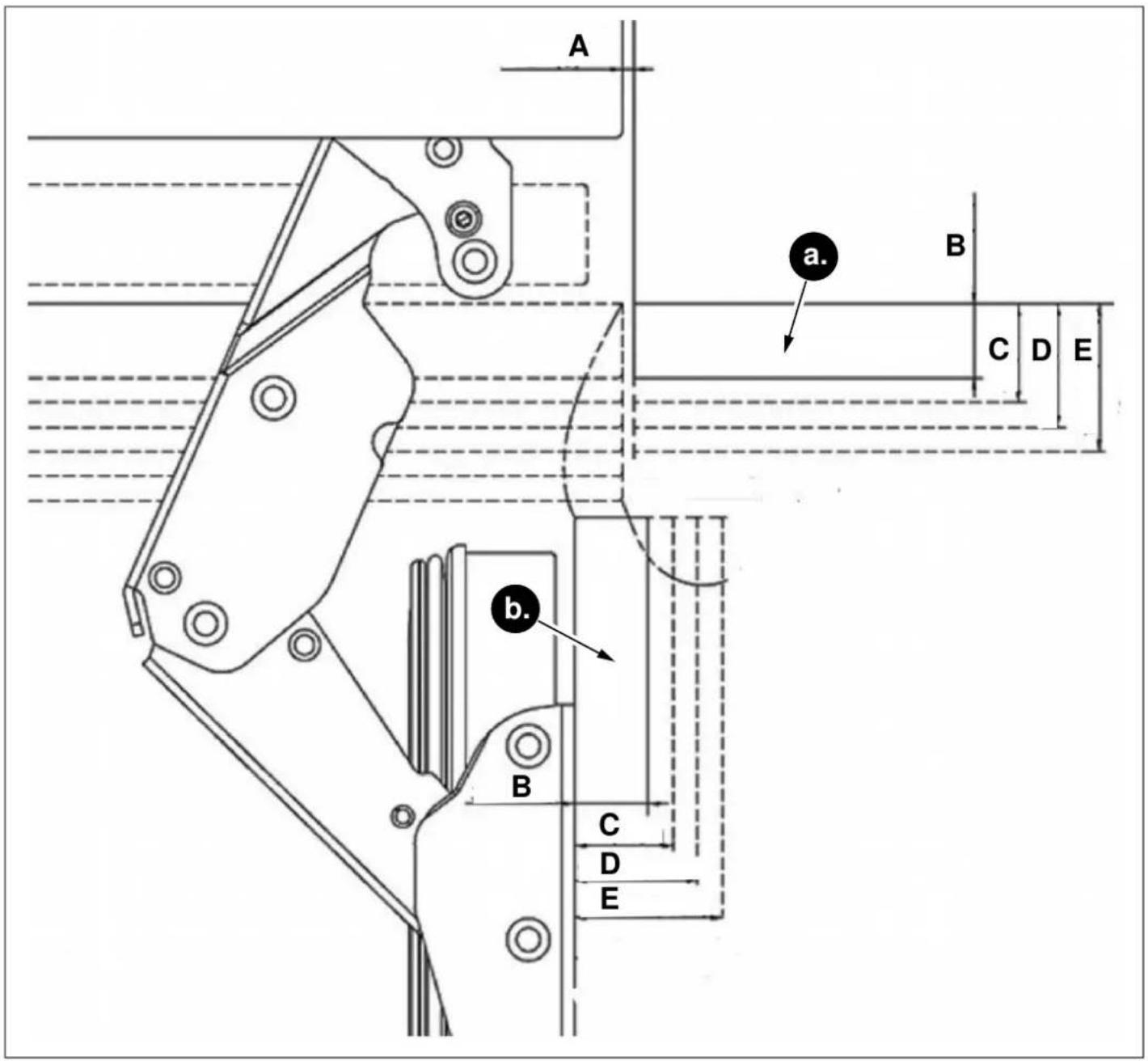
Fig. 44
a. Avant de l'armoire
b. Panneau avant
A. 1/8" (3 mm)
B. 3/4" (19 mm)
C. 15/16" (24 mm)
D. 1 1/4" (32 mm)
E. 1 1/2" (38 mm)
RETRAIT DES COUVERCLES DU MÉCANISME DES PANNEAUX DE REVÊTEMENT
natural_image
Technical diagram of a door frame assembly with mounting bracket and control panel (no text or symbols)Fig. 45 REF18FCBIPRV / REF18FCBIPLV REF24FCBIPNV REF24RCBPNV
natural_image
Diagram of a refrigerator interior showing front and side views with arrows indicating movement (no text or symbols)Fig. 46 REF30RCBPNV

MISE EN GARDE
natural_image
Technical diagram showing a mounted device with mounting brackets and a separate panel, no text or symbols present.Fig. 47
RETRAIT DES SUPPORTS DE PANNEAU
natural_image
Exploded view diagram of an open refrigerator showing internal compartments and doorways (no text or labels)Fig. 48 REF18FCBIPRV / REF18FCBIPLV
natural_image
Technical illustration of an open refrigerator with visible door, shelves, and cooling unit (no text or labels)Fig. 49 REF24FCBIPNV REF24RCBPNV REF30RCBPNV
PRÉPARATION DES PANNEAUX DE REVÊTEMENT

NOTE
natural_image
Diagram showing a rotating mechanical component with two plates and directional arrows indicating rotation (no text or symbols)Fig. 50 REF18FCBIPRV / REF18FCBIPLV
natural_image
Diagram showing a mechanical or structural assembly with downward arrows indicating motion, no text or symbols present.Fig. 51 REF18FCBIPRV / REF18FCBIPLV

natural_image
Diagram showing two rectangular panels with different shades of gray, one above a dark segment and the other below, with no visible text or symbols.Fig. 52 REF24FCBIPNV REF24RCBPNV REF30RCBPNV

MISE EN GARDE
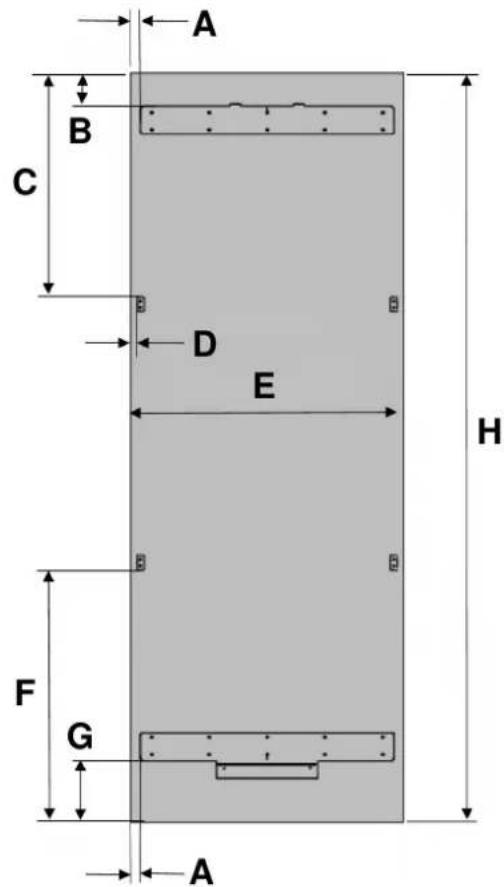
Fig. 53 REF18FCBIPRV / REF18FCBIPLV Fig. 54 REF24FCBIPNV REF24RCBPNV REF30RCBPNV
| CATÉGORIE | REF18FCBIPRV / REF18FCBIPLV | REF24FCBIPNV REF24RCBPNV REF30RCBPNV | ||
| A | 3/8" (10 mm) | 3/8" (10 mm) | 3/8" (10 mm) | 3/8" (10 mm) |
| B | 3 3/8" (85 mm) | |||
| C | 23 7/16" (595,5 mm) | |||
| D | 7/10" (18,2 mm) | |||
| E | 17 3/4" (451 mm) | 23 3/4" (603 mm) | 23 3/4" (603 mm) | 29 3/4" (756 mm) |
| F | 27 5/16" (693,5 mm) | |||
| G | 6 7/8" (175 mm) | |||
| H | 79 15/16" (2030 mm) | |||

MISE EN GARDE
Fig. 56 REF24FCBIPNV REF24RCBPNV REF30RCBPNV
natural_image
Simple line drawing of a mechanical setup with a piston and lever, no text or symbols presentFig. 57 REF18FCBIPRV / REF18FCBIPLV

MISE EN GARDE
natural_image
Technical line drawing of a mechanical component with a curved arrow indicating rotation (no text or symbols)Fig. 58
ALIGNEMENT DE LA PARTIE SUPÉRIEURE DU PANNEAU DE PORTE PERSONNALISÉ À L'AIDE DE BOULONS
Fig. 59 REF24FCBIPNV REF24RCBPNV REF30RCBPNV
natural_image
Technical line drawing of a door frame with two horizontal bars and two circular annotations indicating measurement points (no text or symbols present)Fig. 60
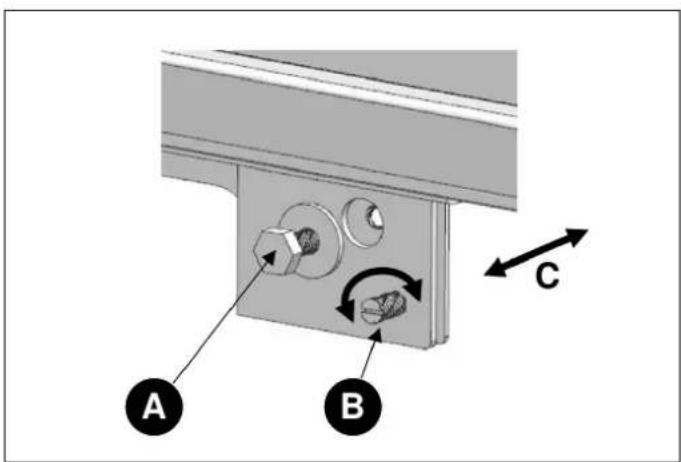
Fig. 61
natural_image
Interior view of a refrigerator showing open doors and internal compartments with mechanical components (no text or symbols visible)Fig. 62 REF24FCBIPNV REF24RCBPNV REF30RCBPNV
natural_image
Interior view of a refrigerator showing open doors, shelves, and a close-up of the front panel (no text or symbols visible)Fig. 63 REF24FCBIPNV REF24RCBPNV REF30RCBPNV

natural_image
Exploded view diagram of an open refrigerator showing internal compartments and doorways (no text or labels)Fig. 64 REF18FCBIPRV / REF18FCBIPLV
natural_image
3D diagram of a refrigerator interior showing open doors and internal shelves (no text or labels)Fig. 65 REF24FCBIPNV REF24RCBPNV

natural_image
3D rendering of an open refrigerator with visible door, shelves, and ventilation slots (no text or labels)Fig. 66 REF30RCBPNV

MISE EN GARDE
natural_image
Technical diagram of a multi-panel refrigerator with an inset showing a close-up view of the front panel (no text or symbols present)Fig. 67
natural_image
Technical line drawing of a mechanical component with labeled section A (no text or symbols beyond label)Fig. 68
natural_image
Technical line drawing of a multi-tiered refrigerator with two vertical supports and an arrow indicating direction (no text or symbols)Fig. 69
RÉGLAGE DE LA CHARNIÈRE ET INVERSION DU SENS D'OUVERTURE DE LA PORTE
RÉGLAGE DE LA TENSION DU RESSORT DES CHARNIÈRES
natural_image
Technical illustration of an open refrigerator with visible door, shelves, and internal compartments (no text or labels)Fig. 70

MISE EN GARDE
natural_image
Technical line drawing of an open refrigerator with internal compartments and a circular inset showing a fan or lid (no text or symbols)Fig. 71

ATTENTION!
natural_image
Technical diagram of a door frame with two vertical supports and horizontal bars, no text or symbols presentFig. 72
natural_image
3D diagram of a door with an arrow indicating upward motion, showing internal components and mounting bracket (no text or symbols)Fig. 73 REF18FCBIPRV / REF18FCBIPLV
natural_image
3D technical diagram of a mechanical assembly with an upward arrow indicating force or direction (no text or symbols present)Fig. 74 REF24FCBIPNV REF24RCBPNV
natural_image
Diagram of a device with two arrows pointing to a component, showing internal structure and mounting points (no text or symbols)Fig. 75 REF30RCBPNV
natural_image
Diagram showing a monitor mounted on a bracket with an arrow indicating downward motion (no text or symbols present)Fig. 76 REF18FCBIPRV / REF18FCBIPLV
natural_image
Diagram showing a device with a lock and a separate component, no text or symbols presentFig. 77 REF24FCBIPNV REF24RCBPNV

natural_image
Diagram of a monitor with an attached cable and two arrows indicating downward motion (no text or symbols)Fig. 78 REF30RCBPNV
natural_image
Interior view of a refrigerator with open doors and shelves (no text or symbols visible)
natural_image
Technical diagram showing two views of a mechanical assembly with arrows indicating direction (no text or symbols present)Fig. 79 REF18FCBIPRV / REF18FCBIPLV

natural_image
Interior view of a refrigerator showing open doors, shelves, and storage compartments (no text or labels visible)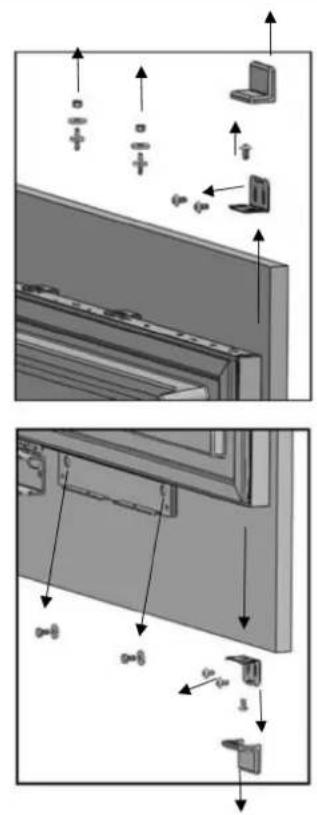
Fig. 80 REF24FCBIPNV REF24RCBPNV REF30RCBPNV
natural_image
Technical diagram of an open electrical cabinet with internal components and a magnified inset showing internal wiring (no text or labels)Fig. 81
natural_image
Technical line drawing of a rectangular enclosure with horizontal and vertical lines, no text or symbols presentFig. 82
REEMPLACEMENT DES CHARNIÈRES
natural_image
Diagram of a refrigerator with an open door and internal compartments, showing no text or symbols.Fig. 83
natural_image
Line drawing of a refrigerator cabinet with multiple shelves and doors (no text or symbols)Fig. 84
CHANGEMENT DE L'ORIENTATION DE LA PARTIE SUPÉRIEURE DE L'ÉVENT D'AÉRATION
natural_image
Technical illustration of a mechanical device showing front and side views of internal components (no text or symbols)Fig. 85
CHANGEMENT DE L'ORIENTATION DE LA PARTIE SUPÉRIEURE DE L'ÉVENT D'AÉRATION
Fig. 87
natural_image
3D line drawing of a multi-tier refrigerator cabinet with visible shelves and doorways (no text or labels)Fig. 88
natural_image
Interior view of a refrigerator with open doors and a highlighted door (no text or symbols visible)Fig. 89
RÉINSTALLATION DE LA PORTE
natural_image
Diagram of a cabinet interior with internal components and a magnified inset showing internal wiring (no text or symbols)Fig. 90
flowchart
graph TD
    1["1"] --> A["Square component"]
    2["2"] --> A
    3["3"] --> B["Head and nut"]
    4["4"] --> C["Grid-like structure"]
    5["5"] --> D["Arrow pointing left"]

Fig. 94
| NON | NOM DE LA PIÈCE SPÉCIFICATIONS | QTÉ | |
| 1 Mousse isolante | Mousse, grise,T3.0*400*1750 | 1 | |
| 2 | Supports inférieurs | T2.0, revêtement Cr+zn | 1 |
| 3 Vis | M4*12 | 16 | |
| 4 | Attaches supérieures POM | 3 | |
| 5 | Garniture centrale Extrusion de PVC L=1876 1 | ||
INSTALLATION DES ATTACHES SUPÉRIEURES ET INFÉRIEURES
natural_image
Technical line drawing of a refrigerator with labeled components and an inset view showing internal components (no text or symbols present)Fig. 95
natural_image
Technical line drawing of a cabinet with an inset close-up showing internal components (no text or symbols)Fig. 96
natural_image
Line drawing of a cabinet with an inset showing a close-up of the front panel (no text or symbols present)Fig. 97
natural_image
Technical line drawing of a cabinet or enclosure with mounting holes and internal components, showing two views of the assembly (no text or symbols present)Fig. 98

natural_image
Technical line drawing of a cabinet or enclosure structure with mounting brackets and structural elements (no text or symbols)natural_image
Line drawing of a two-door refrigerator with handlebars and wheels, showing internal structure and directional arrows (no text or symbols)Fig. 99
Fig. 100
natural_image
Line drawing of an open refrigerator with shelves and doors open, showing internal compartments and ventilation slots (no text or labels)
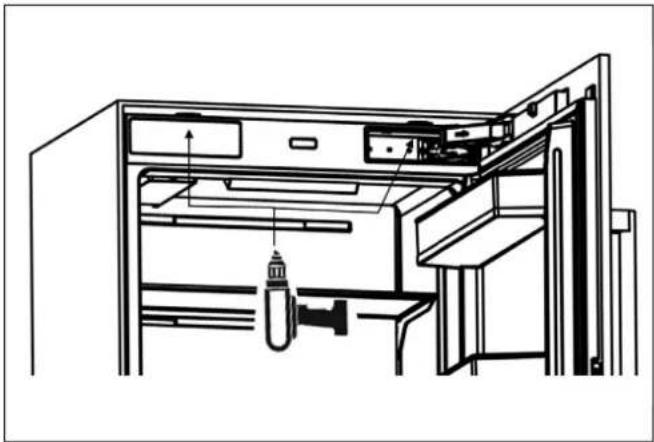
natural_image
Technical line drawing of an open refrigerator with internal compartments and a hanging tool (no text or symbols)Fig. 102
Fig. 101
INSTALLATION DES GARNITURES LATÉRALES ET SUPÉRIEURES
natural_image
Technical line drawing of a refrigerator interior with shelves and doors, showing structural components (no text or symbols)Fig. 103

natural_image
Diagram of a refrigerator interior showing front and side views with no text or symbolsFig. 104
natural_image
Technical line drawing of a mechanical device with internal components and mounting brackets (no text or symbols)Fig. 105
natural_image
Technical line drawing of a cabinet or rack structure with mounting brackets and structural elements (no text or symbols)Fig. 106
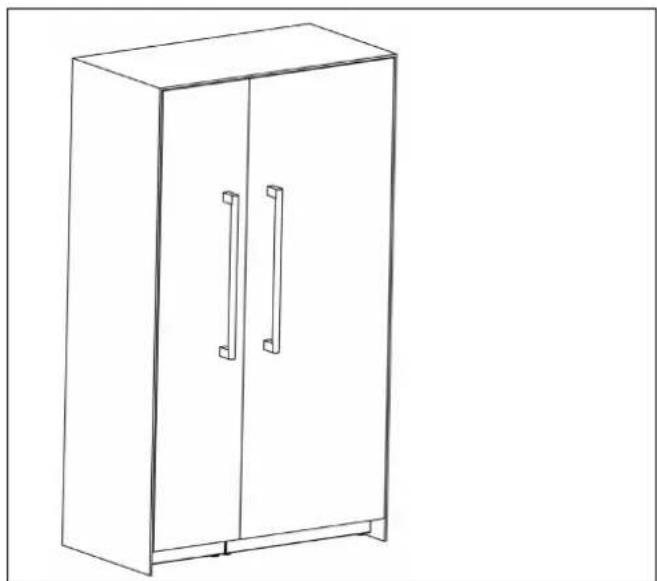
natural_image
Line drawing of a two-decker cabinet with two doors and two handles (no text or symbols)Fig. 107
natural_image
Mechanical assembly diagram showing a component with a downward force arrow and dimension L (no text or symbols)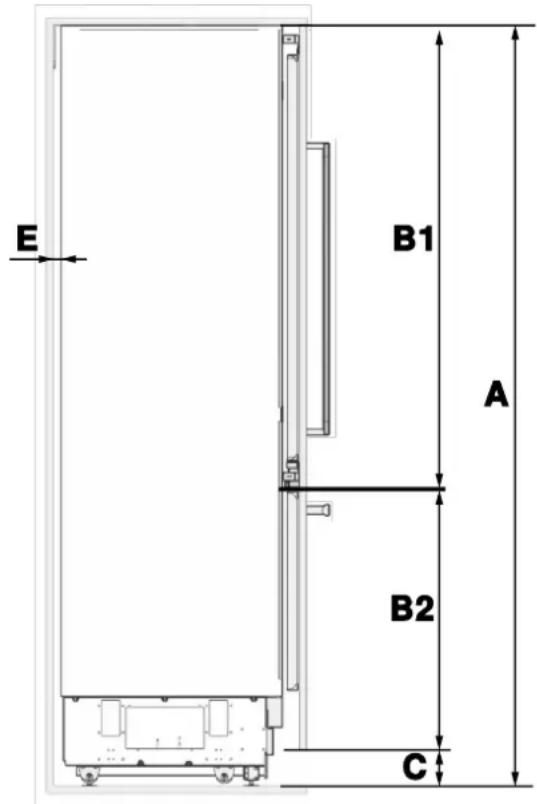
Fig. 4
A B C D E F G H
| 84 pulg.(2134 mm) | 79 15/16pulg.(2030 mm) | 4 pulg.(101 mm) | 1/8 pulg.(3 mm) | Espacio restante tras la instalación:3/4 pulg.(19 mm) | 1/16 pulg.(2 mm) | 22 5/8 pulg.(574 mm) | 1 5/8 pulg.(42 mm) |
natural_image
Diagram of an open refrigerator with shelves and door, showing internal compartments and a downward arrow indicating a component (no text or symbols present)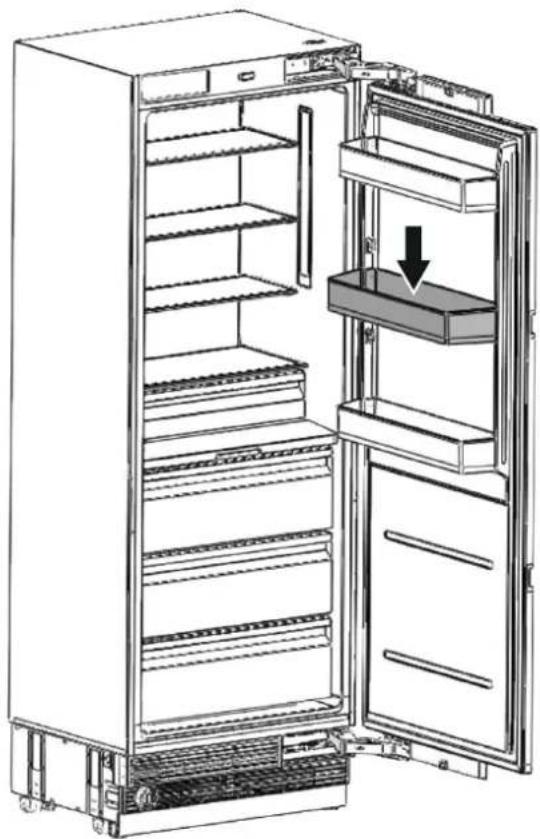
natural_image
Line drawing of an open refrigerator with a downward arrow indicating the interior portion (no text or symbols present)Fig. 5
| CATEGORÍA | REF18FCBIPRV / REF18FCBIPLV | REF24FCBIPNV REF24RCBPNV REF30RCBPNV | ||
| Carga máxima | 22 lb (10 kg) | 33 lb (15 kg) | 33 lb (15 kg) | 33 lb (15 kg) |


Fig. 6
• x: PANEL DE PUERTA DE MADERA
• y: ARMARIO DE MADERA
natural_image
3D line drawing of a cabinet with open door and internal compartments (no text or symbols)Fig. 9

ADVERTENCIA
Fig. 10
Fig. 11
DESEMBALAJE

ADVERTENCIA
natural_image
3D architectural rendering of a rectangular building with vertical supports and horizontal beams (no text or symbols)Fig. 12
natural_image
Exploded view diagram of a refrigerator internal structure (no text or labels)Fig. 13

ATENCIÓN
natural_image
Technical diagram of a refrigerated air conditioner unit with cooling fins and ventilation slots (no text or labels)Fig. 16
MONTAJE DE LOS SOPORTES ANTIVUELCO

ADVERTENCIA
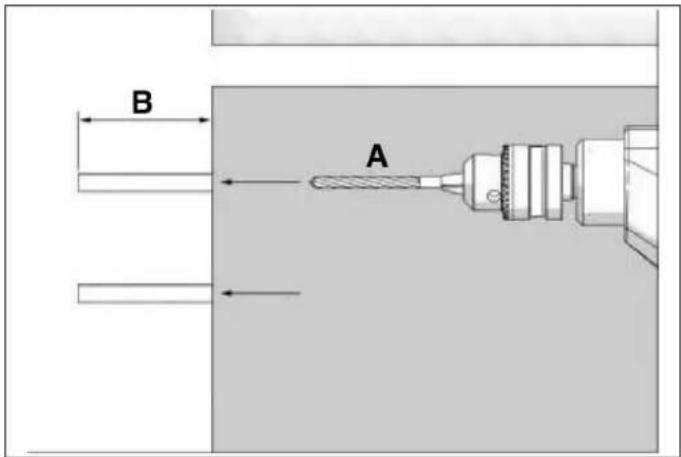
Fig. 18
natural_image
Three black-and-white icons: a hammer, a nail, and a glove, arranged in rounded squares (no text or symbols)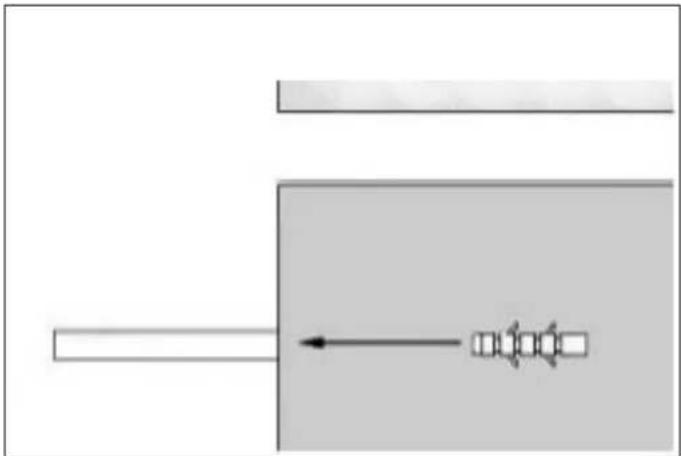
natural_image
Pure diagram of a mechanical or electrical component with no text, numbers, or symbolsFig. 19
natural_image
Technical diagram of a mechanical assembly with circular component and mounting base (no visible text or symbols)Fig. 24
natural_image
Diagram showing a mechanical device with a bracket and a vertical panel, no text or symbols presentFig. 25

NOTA
natural_image
Technical illustration of a server rack with zoomed-in cable connections (no text or symbols)Fig. 26

NOTA
Fig. 29
natural_image
Interior view of a technical enclosure or enclosure with internal components and structural elements (no visible text or symbols)Fig. 30
natural_image
Technical line drawing of a cabinet or enclosure with internal components and a magnified inset showing internal structure (no text or symbols)Fig. 31
natural_image
Technical illustration of a refrigerator internal structure with an inset showing a close-up of the front panel (no text or symbols present)Fig. 34

NOTA
natural_image
Interior view of a refrigerator showing open doors, shelves, and internal compartments (no text or labels visible)Fig. 35
natural_image
Line drawing of a cabinet interior showing front and rear compartments with no text or symbolsFig. 36
natural_image
Technical diagram of an industrial machine with labeled component A, showing internal components and wiring (no readable text or symbols)Fig. 37
natural_image
Technical line drawing of an industrial machine with internal components and mounting brackets (no text or symbols)Fig. 38
natural_image
Technical diagram of an air conditioner unit showing internal airflow path and component structure (no text or labels)Fig. 39

NOTA
natural_image
Technical line drawing of a door panel and refrigerator interior (no text or symbols)Fig. 40
natural_image
Line drawing of a computer front panel with ventilation slots and a control panel (no text or symbols)Fig. 41
natural_image
Mechanical assembly diagram showing a bracket with mounting holes and a tool inserted (no text or symbols present)Fig. 43
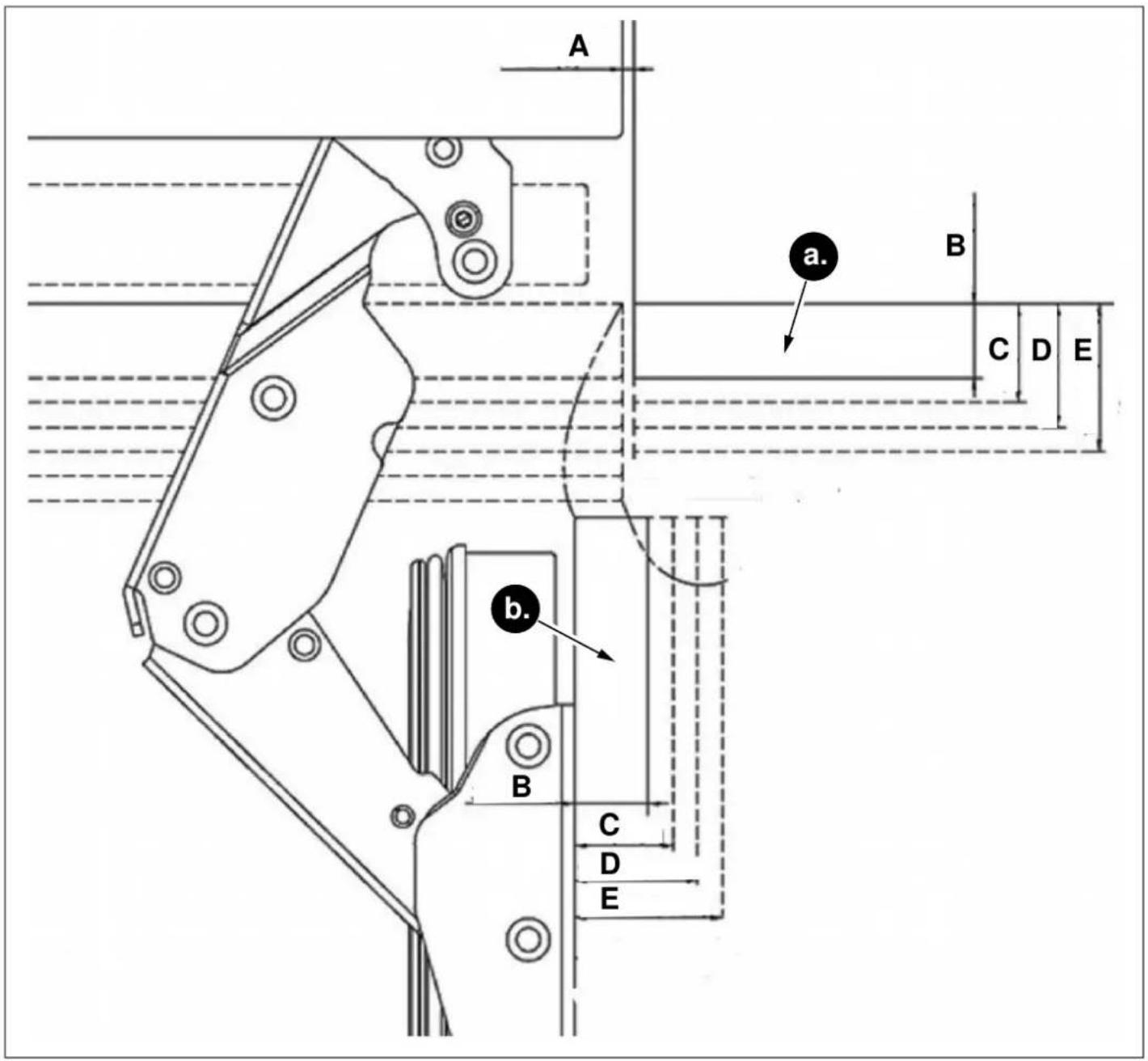
Fig. 44
a. Frontal del armario
b. Panel delantero
A. 1/8 pulg. (3 mm)
B. 3/4 pulg. (19 mm)
C. 15/16 pulg. (24 mm)
D. 1 1/4 pulg. (32 mm)
E. 1 1/2 pulg. (38 mm)
RETIRADA DE LAS CUBIERTAS DEL MECANISMO DEL PANEL SUPERPUESTO
natural_image
Technical diagram of a door frame assembly with mounting bracket and control panel (no text or symbols)Fig. 45 REF18FCBIPRV / REF18FCBIPLV REF24FCBIPNV REF24RCBPNV
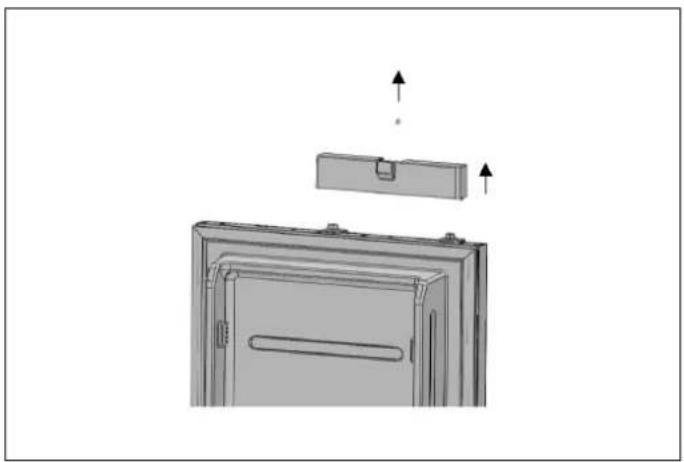
natural_image
Diagram of a refrigerator interior showing front and side views with arrows indicating movement (no text or symbols)Fig. 46 REF30RCBPNV

ADVERTENCIA
natural_image
Technical diagram showing a mounted device with mounting brackets and a separate panel, no text or symbols presentFig. 47
DESMONTAJE DE LOS SOPORTES DEL PANEL
natural_image
Exploded view diagram of an open refrigerator showing internal compartments and doorways (no text or labels)Fig. 48 REF18FCBIPRV / REF18FCBIPLV
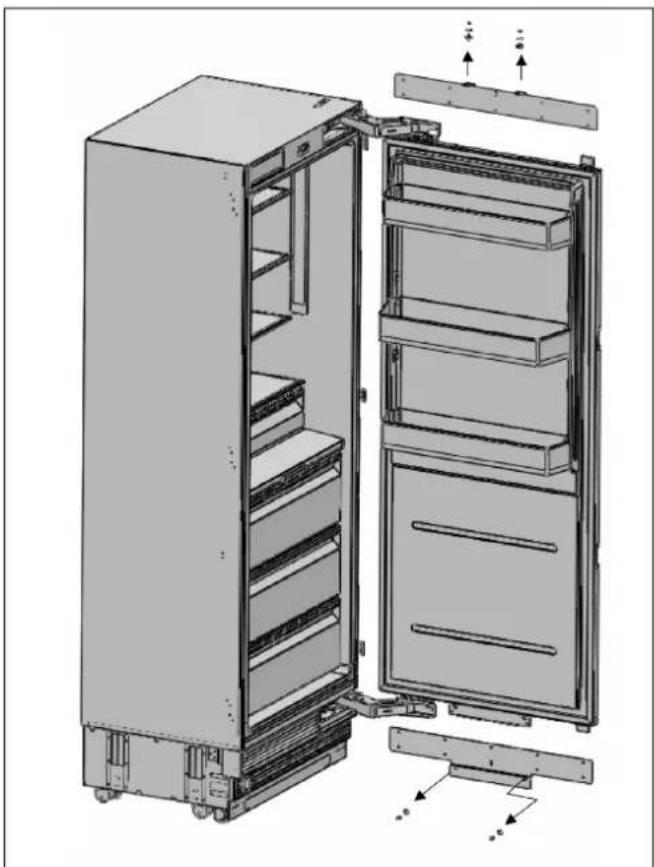
natural_image
Technical illustration of an open refrigerator with visible door, shelves, and cooling unit (no text or labels)Fig. 49 REF24FCBIPNV REF24RCBPNV REF30RCBPNV
natural_image
Diagram showing a rotating mechanical component with two plates and directional arrows indicating rotation (no text or symbols)Fig. 50 REF18FCBIPRV / REF18FCBIPLV

natural_image
Diagram showing a mechanical or structural assembly with downward arrows indicating motion, no text or symbols present.Fig. 51 REF18FCBIPRV / REF18FCBIPLV
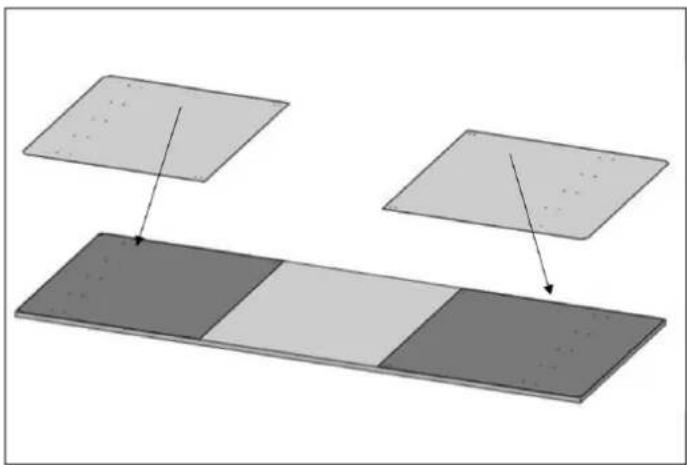
natural_image
Diagram showing two rectangular panels with different shades of gray, one above a dark panel and the other below (no text or symbols)Fig. 52 REF24FCBIPNV REF24RCBPNV REF30RCBPNV

ADVERTENCIA
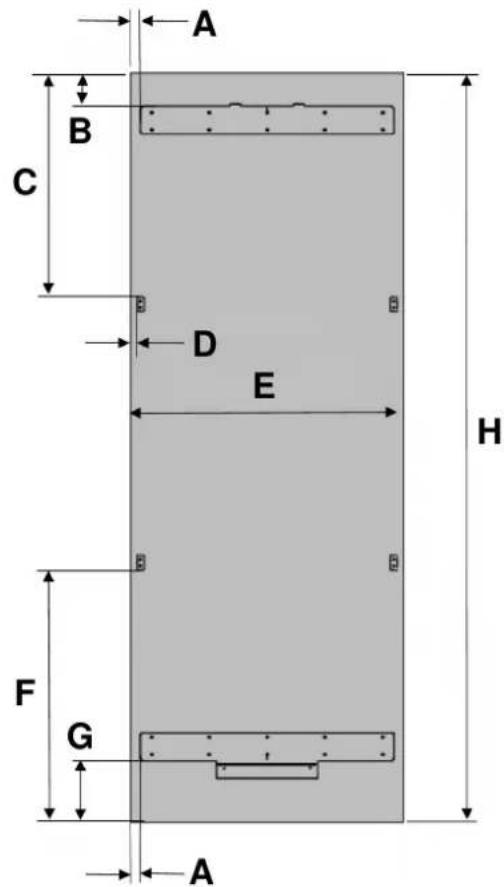
Fig. 53 REF18FCBIPRV / REF18FCBIPLV Fig. 54 REF24FCBIPNV REF24RCBPNV REF30RCBPNV
| CATEGORÍA | REF18FCBIPRV / REF18FCBIPLV | REF24FCBIPNV REF24RCBPNV REF30RCBPNV | ||
| A | 3/8" (10 mm) | 3/8" (10 mm) | 3/8" (10 mm) | 3/8" (10 mm) |
| B | 3 3/8 pulg. (85 mm) | |||
| C | 23 7/16" (595.5 mm) | |||
| D | 7/10 pulg. (18.2 mm) | |||
| E | 17 3/4 pulg. (451 mm) | 23 3/4 pulg. (603 mm) | 23 3/4 pulg. (603 mm) | 29 3/4 pulg. (756 mm) |
| F | 27 5/16" (693.5 mm) | |||
| G | 6 7/8 pulg. (175 mm) | |||
| H | 79 15/16 pulg. (2030 mm) | |||

ADVERTENCIA
Fig. 56 REF24FCBIPNV REF24RCBPNV REF30RCBPNV
natural_image
Simple line drawing of a mechanical setup with a piston and lever, no text or symbols presentFig. 57 REF18FCBIPRV / REF18FCBIPLV

ADVERTENCIA
natural_image
Pure technical line drawing of a mechanical component or bracket (no text or symbols)Fig. 58
Fig. 59 REF24FCBIPNV REF24RCBPNV REF30RCBPNV
natural_image
Technical line drawing of a door frame with two horizontal bars and two circular annotations indicating measurement points (no text or symbols present)Fig. 60
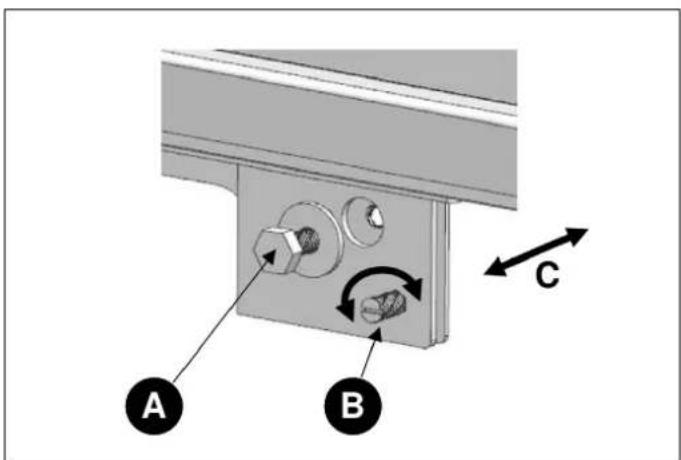
Fig. 61
natural_image
Three icons: a tool, a screwdriver, and a hammer, each enclosed in rounded squares (no text or symbols)
natural_image
Interior view of a refrigerator showing open doors and internal compartments with mechanical components (no text or symbols visible)Fig. 62 REF24FCBIPNV REF24RCBPNV REF30RCBPNV
natural_image
Interior view of a refrigerator showing open doors, shelves, and a close-up of the door (no text or symbols visible)Fig. 63 REF24FCBIPNV REF24RCBPNV REF30RCBPNV
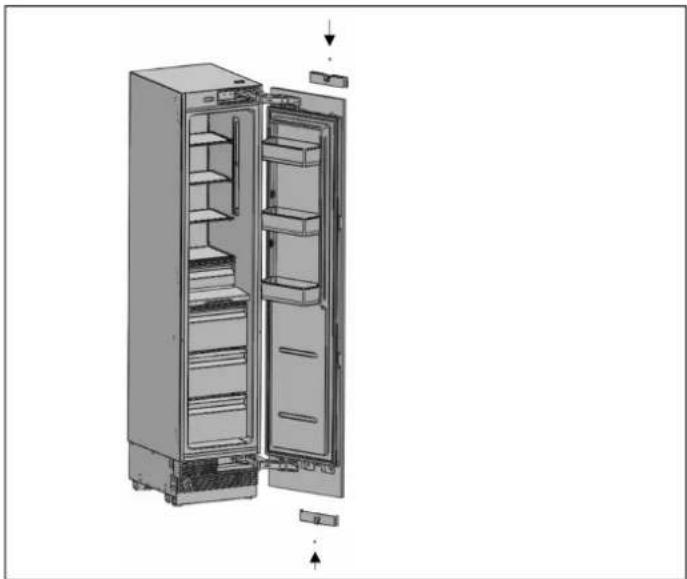
natural_image
Exploded view diagram of a refrigerator showing internal compartments and doorways (no text or labels)Fig. 64 REF18FCBIPRV / REF18FCBIPLV
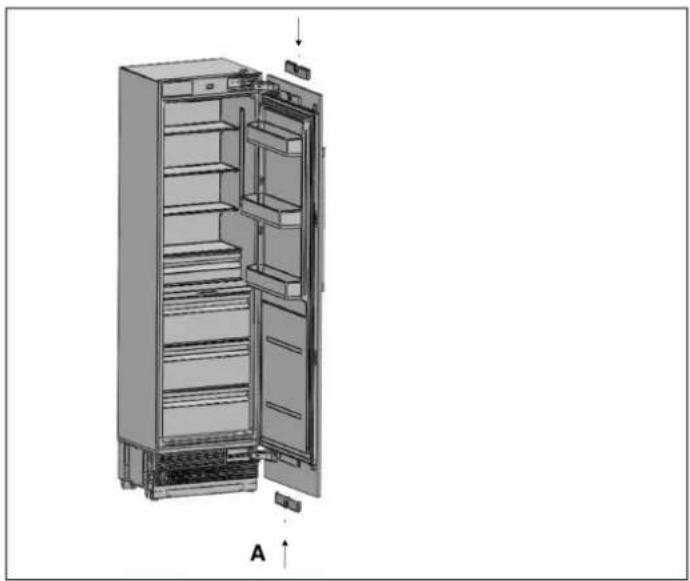
natural_image
3D diagram of a refrigerator interior showing open doors and internal shelves (no text or labels)Fig. 65 REF24FCBIPNV REF24RCBPNV

natural_image
3D rendering of an open refrigerator with visible door, shelves, and cooling unit (no text or symbols)Fig. 66 REF30RCBPNV

ADVERTENCIA
natural_image
Technical diagram of a multi-panel refrigerator with an inset showing a close-up view of the front panel (no text or symbols present)Fig. 67
natural_image
Technical diagram showing a mechanical component with a labeled section A, no text or symbols presentFig. 68
A Cinta doble
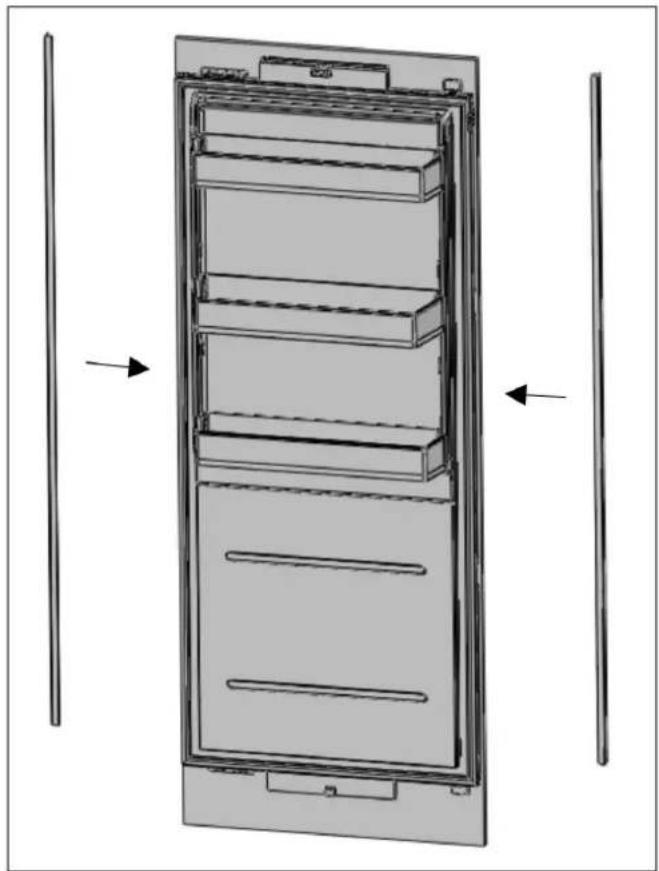
natural_image
Technical line drawing of a multi-tiered refrigerator with two vertical supports and an arrow indicating direction (no text or symbols)Fig. 69
natural_image
Technical illustration of an open refrigerator with a circular inset showing internal components (no text or symbols)Fig. 70

ADVERTENCIA
natural_image
Technical line drawing of an open refrigerator with a circular inset showing the interior portion (no text or symbols)Fig. 71

ATENCIÓN
natural_image
Technical diagram of a door frame with two vertical supports and horizontal bars, no text or symbols presentFig. 72
natural_image
Diagram of a door with an open lid and a handle, showing a mechanical assembly (no text or symbols)Fig. 73 REF18FCBIPRV / REF18FCBIPLV
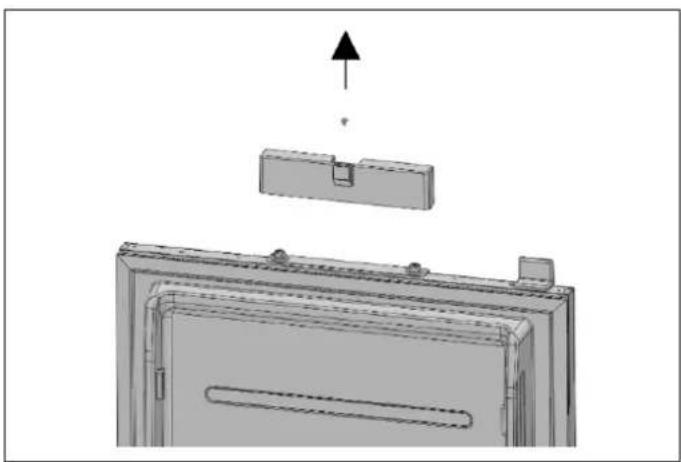
natural_image
3D technical diagram of a mechanical assembly with an upward arrow indicating force or direction (no text or symbols present)Fig. 74 REF24FCBIPNV REF24RCBPNV

natural_image
Diagram of a door with two arrows indicating upward motion, showing internal components and structure (no text or symbols)Fig. 75 REF30RCBPNV
natural_image
Diagram showing a monitor mounted on a wall with a separate panel and a downward arrow indicating motion (no text or symbols)Fig. 76 REF18FCBIPRV / REF18FCBIPLV
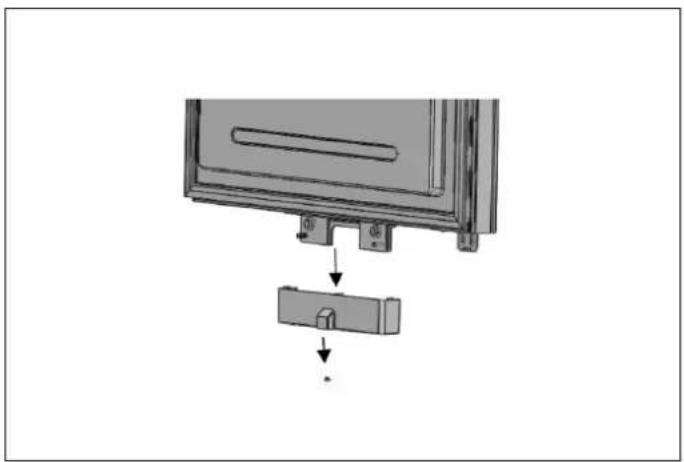
natural_image
Diagram showing a device with a lock and a separate component, no text or symbols presentFig. 77 REF24FCBIPNV REF24RCBPNV
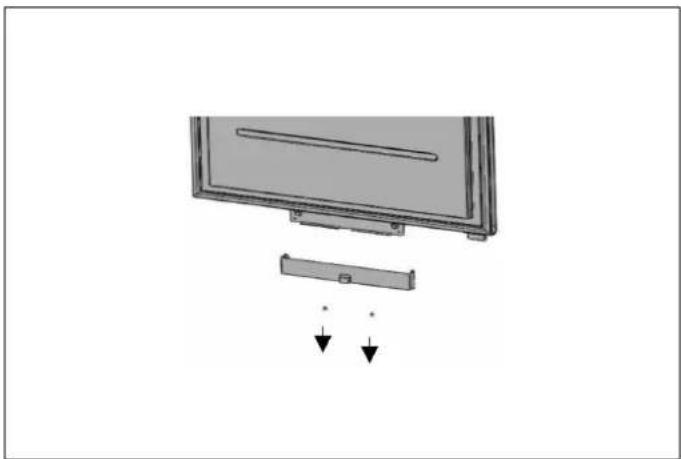
natural_image
Diagram of a monitor with a cable attachment and two arrows indicating downward motion (no text or symbols)Fig. 78 REF30RCBPNV
natural_image
Interior view of a refrigerator with open doors and shelves (no text or symbols visible)
natural_image
Technical diagram showing two views of a mechanical assembly with arrows indicating direction (no text or symbols present)Fig. 79 REF18FCBIPRV / REF18FCBIPLV
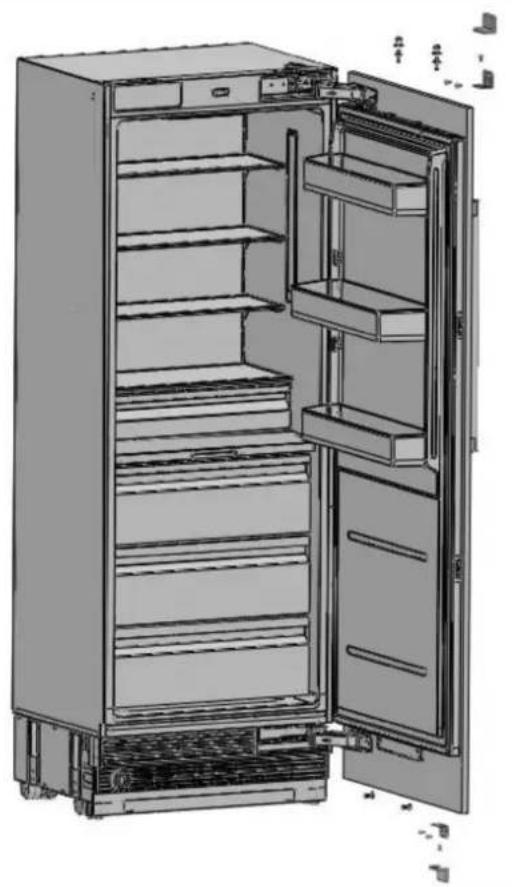
natural_image
Interior view of a fully stocked refrigerator with open doors and shelves (no text or symbols visible)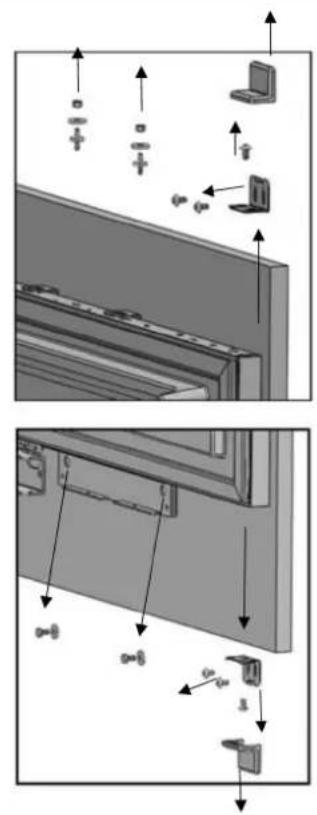
Fig. 80 REF24FCBIPNV REF24RCBPNV REF30RCBPNV
natural_image
Technical diagram of an open industrial refrigerator with internal components and a magnified inset showing internal wiring (no text or labels)Fig. 81
natural_image
Technical line drawing of a rectangular enclosure with horizontal and diagonal lines indicating internal structure (no text or symbols)Fig. 82
natural_image
Illustration of a multi-tiered refrigerator with an inset close-up showing the interior panel (no text or symbols visible)Fig. 83
natural_image
Line drawing of a multi-tier refrigerator cabinet with open doors and internal compartments (no text or symbols)Fig. 84
natural_image
Technical illustration of a mechanical device showing front and side views of a chassis (no text or symbols present)Fig. 85
Fig. 87
natural_image
3D line drawing of a multi-tier refrigerator cabinet with visible shelves and doorways (no text or labels)Fig. 88
natural_image
Diagram of a multi-tiered refrigerator with an open door and internal compartments (no text or labels)Fig. 89
natural_image
Diagram of an open electrical cabinet with internal components and a magnified inset showing internal wiring (no text or symbols)Fig. 90
natural_image
Technical line drawing of a refrigerator with labeled components and an inset view showing internal components (no text or symbols present)Fig. 95
• A Soporte inferior
• B Soportes superiores
natural_image
Technical line drawing of a cabinet with an inset close-up showing internal components (no text or symbols)Fig. 96
natural_image
Line drawing of a two-tiered refrigerator with an inset showing a close-up of the front panel (no text or symbols present)Fig. 97
natural_image
Technical line drawing of a cabinet or enclosure with mounting holes and internal components, showing two views of the assembly (no text or symbols present)Fig. 98
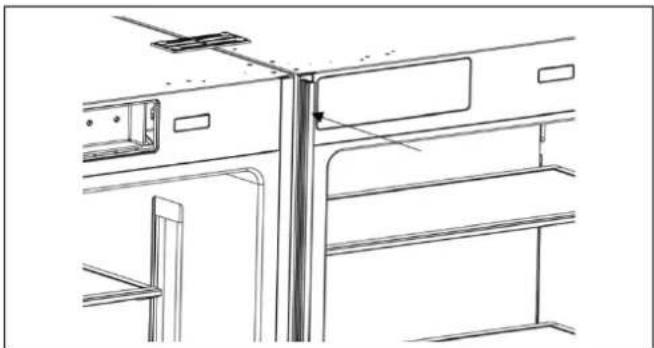
natural_image
Technical line drawing of a cabinet or enclosure with structural components (no text or symbols)natural_image
Technical line drawing of a two-door refrigerator with handlebars and side-mounted wheels (no text or symbols)Fig. 99
Fig. 100
natural_image
Line drawing of an open refrigerator with shelves and doors open (no text or symbols)Fig. 101
natural_image
Technical line drawing of a refrigerator interior showing internal compartments and a hanging tool (no text or symbols)Fig. 102
natural_image
Technical line drawing of a refrigerator interior with shelves and doorways (no text or symbols)Fig. 103
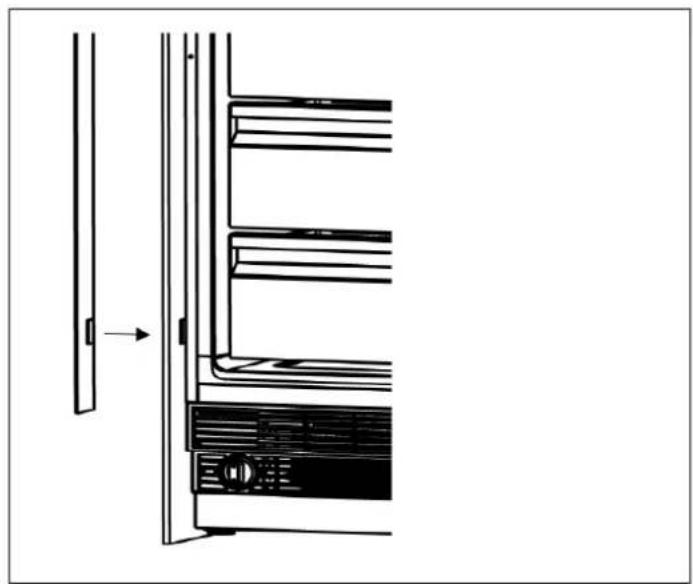
natural_image
Diagram of a refrigerator interior showing front and side views with no text or symbolsFig. 104
natural_image
Technical line drawing of a mechanical device with internal components and mounting brackets (no text or symbols)Fig. 105
natural_image
Technical line drawing of a cabinet or rack structure with no visible text or symbolsFig. 106
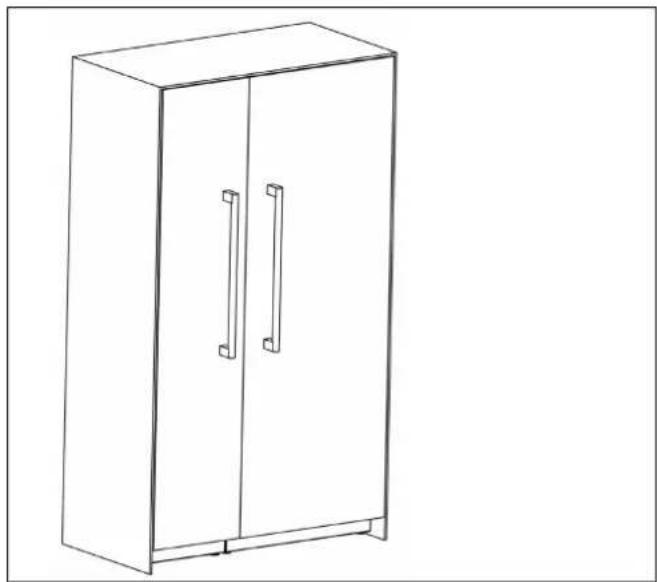
natural_image
Line drawing of a two-decker cabinet with two doors and two handles (no text or symbols)Fig. 107
www.bertazzoni.com
Via Palazzina, 8
42016 Guastalla RE
© 2025 BERTAZZONI. All rights reserved.
- FROM THE DESK OF OUR PRESIDENT
- MANUAL VALIDITY
- DANGER
- WARNING
- CAUTION
- NOTE
- SAFETY INFORMATION
- R600a refrigerant
- CARING FOR THE ENVIRONMENT
- BEFORE INSTALLATION
- Niche Dimensions
- FOOD LOAD BEARING CAPACITY OF THE DOOR BINS
- IMPORTANT
- TOOL LIST
- ALTERNATIVES FOR INSTALLATION
- UNPACKING
- REMOVING THE CONNECTORS ON THE SIDE WALL OF THE UNIT
- REMOVING THE VENT HOLE ASSEMBLY
- MOUNTING THE ANTI-TIP BRACKETS
- Alternative anti-tip method:
- PREPARING THE WATER HOSE AND THE ELECTRICAL CONNECTION
- INSTALLATION IN THE CABINET
- Taking the Refrigerator from the Wooden Pallet
- Adjusting the refrigerator based on the cabinet niche.
- SCREWING IN THE SIDE BRACKETS
- SECURING THE UPPER BRACKET
- INSTALLING THE BOTTOM CABINET
- Complete the water connection
- ATTACHING THE AIR VENT GRILLE
- ATTACHING THE DECORATIVE TRIM COVERS
- OVERLAY PANEL INSTALLATION AND PREPARATION
- CHOOSING THE DOOR THICKNESS
- REMOVING THE OVERLAY PANEL MECHANISM COVERS
- REMOVING THE PANEL BRACKETS
- PREPARING THE OVERLAY PANELS
- INSTALLING THE OVERLAY PANELS
- ALIGNING THE UPPER PART OF THE CUSTOM DOOR PANEL WITH BOLTS
- HINGE ADJUSTMENT AND REVERSING THE DOOR SWING
- ADJUSTING THE SPRING TENSION OF THE HINGES
- REMOVING THE DOOR PANEL
- REMOVING AND PREPARING THE INNER DOOR
- REPLACING THE HINGES
- AIR VENT UPPER PART DIRECTION CHANGE
- HOW TO CHANGE AIR VENT UPPER PART DIRECTION
- REINSTALLING THE DOOR
- CABINET CUTOUT DIMENSIONS
- LOCATION OF THE ELECTRICAL WIRING
- LOCATION OF THE WATER SYSTEM
- INSTALLING THE UPPER AND LOWER BRACKETS
- INSTALLING THE CONNECTION BRACKETS ON THE REFRIGERATOR'S SIDE WALLS
- INSTALLING THE CONNECTION BRACKETS ON THE REFRIGERATOR'S TOP WALL
- INSTALLING THE LATERAL AND UPPER TRIMS
- DU BUREAU DE NOTRE PRÉSIDENT
- PANNEAU DE PORTE PERSONNALISÉ (POUR LES MODÈLES AVEC PANNEAU PERSONNALISÉ)
- MISE EN GARDE
- DÉBALLAGE
- ATTENTION!
- MONTAGE DES SUPPORTS ANTI- BASCULEMENT
- PRÉPARATION DU TUYAU D'EAU ET DU RACCORDEMENT ÉLECTRIQUE
- SÉCURISATION DU SUPPORT SUPÉRIEUR
- INSTALLATION DE L'ARMOIRE INFÉRIEURE
- FIXATION DE LA GRILLE D'AÉRATION
- INSTALLATION ET PRÉPARATION DES PANNEAUX DE RECOUVREMENT
- RETRAIT DES COUVERCLES DU MÉCANISME DES PANNEAUX DE REVÊTEMENT
- RETRAIT DES SUPPORTS DE PANNEAU
- PRÉPARATION DES PANNEAUX DE REVÊTEMENT
- ALIGNEMENT DE LA PARTIE SUPÉRIEURE DU PANNEAU DE PORTE PERSONNALISÉ À L'AIDE DE BOULONS
- RÉGLAGE DE LA CHARNIÈRE ET INVERSION DU SENS D'OUVERTURE DE LA PORTE
- RÉGLAGE DE LA TENSION DU RESSORT DES CHARNIÈRES
- REEMPLACEMENT DES CHARNIÈRES
- CHANGEMENT DE L'ORIENTATION DE LA PARTIE SUPÉRIEURE DE L'ÉVENT D'AÉRATION
- RÉINSTALLATION DE LA PORTE
- INSTALLATION DES ATTACHES SUPÉRIEURES ET INFÉRIEURES
- INSTALLATION DES GARNITURES LATÉRALES ET SUPÉRIEURES
- ADVERTENCIA
- DESEMBALAJE
- ATENCIÓN
- MONTAJE DE LOS SOPORTES ANTIVUELCO
- NOTA
- RETIRADA DE LAS CUBIERTAS DEL MECANISMO DEL PANEL SUPERPUESTO
- DESMONTAJE DE LOS SOPORTES DEL PANEL
Brand : BERTAZZONI
Model : REF30RCBPNV
Category : Refrigerator