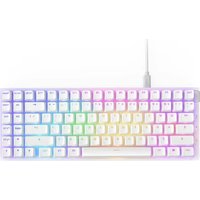
Function 2 - Keyboard NZXT - Free user manual and instructions
Find the device manual for free Function 2 NZXT in PDF.


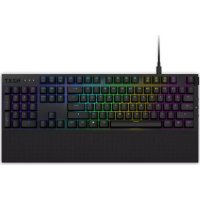
| Product Type | Optical Gaming Keyboard |
| Brand | NZXT |
| Model | Function 2 |
| Available Sizes | Standard size and MiniTKL |
| Switches | Hot-swappable linear optical (yellow 35g, red 45g included) |
| Polling Rate | Up to 8,000 Hz (adjustable via NZXT CAM software) |
| Actuation Point | 1.0 mm default, adjustable to 1.5 mm |
| Backlighting | Per-key RGB, customizable |
| Wrist Rest | Magnetic, included |
| Adjustable Feet | Two tilt levels (medium and high) |
| Connectivity | USB-C (detachable cable) |
| Configuration Software | NZXT CAM (free, downloadable) |
| Onboard Profiles | 4 saveable profiles |
| Macros and Key Remapping | Yes, via NZXT CAM |
| Power | Via USB port (5V/500mA) |
| Maintenance and Cleaning | Use a soft, dry cloth. Do not use liquids. Remove keycaps and switches for deep cleaning. |
| Safety | Compliant with CE, FCC, RoHS directives |
| Spare Parts and Repairability | Additional optical switches available, USB cable, wrist rest. Order at support.nzxt.com. |
| Box Contents | Keyboard, USB cable, wrist rest, keycap puller, switch puller, 4 yellow switches, 4 red switches |
Frequently Asked Questions - Function 2 NZXT
User questions about Function 2 NZXT
0 question about this device. Answer the ones you know or ask your own.
Ask a new question about this device
Download the instructions for your Keyboard in PDF format for free! Find your manual Function 2 - NZXT and take your electronic device back in hand. On this page are published all the documents necessary for the use of your device. Function 2 by NZXT.
USER MANUAL Function 2 NZXT
natural_image
Isometric line drawing of a multi-level computer RAM unit with grid layout and control panel (no text or symbols)FUNCTION 2
OPTICAL GAMING KEYBOARD
TABLE OF CONTENTS
VERSION 1.2, 2023/08/30
INTRODUCTION FUNCTION 01
ABOUT THE FUNCTION 2 KEYBOARD....02
PACKAGE CONTENTS & DESCRIPTION 04
NZXT FUNCTION 2 KEYBOARD 06
SETTING UP THE KEYBOARD 08
CHANGING KEYCAPS AND KEYSWITCHES 13
USING THE NZXT FUNCTION 2 KEYBOARD WITH CAM SOFTWARE . 19
USING THE KEYBOARD IN HARDWARE MODE....24
NZXT GLOBAL WARRANTY POLICY 26
REGULATORY STATEMENT 29
Congratulations on owning your very own NZXT Function 2 Keyboard! Whether you are a professional streamer or a casual player, we're excited to welcome you to the family of NZXT peripherals.
Experience lightning-fast performance with the NZXT Function 2—an optical gaming keyboard equipped with linear optical switches and an 8,000 Hz polling rate to ensure every key press is registered with speed and precision. Savor the satisfying sound and tactile feedback of each keystroke, and switch up the feel at any time by easily hot-swapping with the included extra switches.
Experience lightning-fast performance in a compact design with the NZXT Function 2 MiniTKL. This space-saving keyboard packs the full tenkeyless key count into the smallest footprint possible. Linear optical switches and an 8,000 Hz polling rate ensure unmatched in-game responsiveness. Enjoy the sound and feel of every keystroke, and customize it by hot-swapping with the extra switches.
natural_image
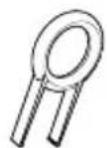
Line drawing of a standard computer keyboard with no visible text or symbolsD Keycap Removal Tool
×1
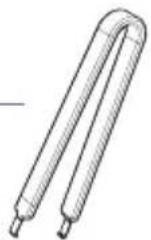
E Keyswitch Removal Tool
×1
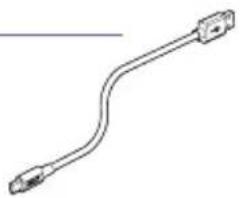
B USB Cable
×1
natural_image
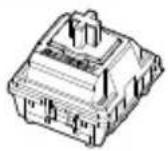
Pure diagram of a USB cable with two connectors (no text or symbols)F 35g Yellow Linear Optical Switches
×4
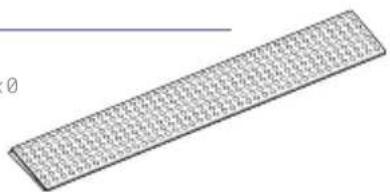
C Wrist Rest
Function 2 x1
Function 2 MiniTKL x0
natural_image
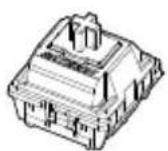
Pure 3D grid pattern of repeating triangular elements without any text, numbers, or symbolsG 45g Red Linear Optical Switches
×4

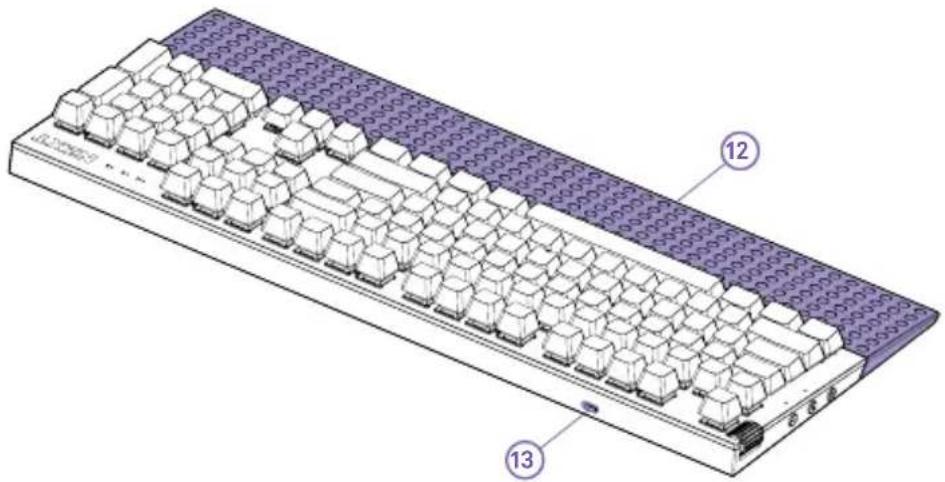
- Volume Wheel
- Speaker Deafen/Mute Button
- Winlock Button
- Brightness Button
- Profile 1 (FN + F1 Key)
- Profile 2 (FN + F2 Key)
- Profile 3 (FN + F3 Key)
- Profile 4 (FN + F4 Key)
- Numlock Indicator
- Caps lock Indicator
- Scroll Lock Indicator
- Wrist Rest
- USB-C Port
- Rueda de volumen
- Botón para silenciar las bocinas
- Botón de bloqueo de la tecla de Windows
- Botón de ajuste de brillo
- Perfil 1 (teclas FN + F1)
- Perfil 2 (teclas FN + F2)
- Perfil 3 (teclas FN + F3)
- Perfil 4 (teclas FN + F4)
- Indicador de bloqueo del teclado numérico
- Indicador de bloqueo de mayúsculas
- Indicador de bloqueo del desplazamiento
- Reposamuñecas
-
Puerto USB tipo C
-
Ruota del volume
- Altoparlante tasto Mute
- Tasto Winlock
- Tasto Luminosità
- Profilo 1 (tasto FN + F1)
- Profilo 2 (tasto FN + F2)
- Profilo 3 (tasto FN + F3)
- Profilo 4 (tasto FN + F4)
-
Indicatore Blocco numeri
-
Indicatore Blocco maiuscole
- Indicatore Blocco scorrimento
- Poggiapolsi
-
Porta USB-C
-
ボリュームホイール
- スピーカー消音/ミュート ボタン
- Winlockボタン
- 明るさボタン
- ブロファイル 1 (FN + F1 キー)
- プロファイル 2 (FN + F2 キー)
- ブロファイル 3 (FN + F3 キー)
- プロファイル 4 (FN + F4 キー)
-
Numlockインジケータ
-
Caps lockインジケータ
- Scroll Lockインジケータ
- リストレ スト
-
USB-Cポート
-
Molette de réglage du volume
- Bouton de haut-parleur muet/mise en sourdine
- Bouton Winlock
- Bouton de réglage de la luminosité
- Profil 1 (Fn + touche F1)
- Profil 2 (Fn + touche F2)
- Profil 3 (Fn + touche F3)
- Profil 4 (Fn + touche F4)
- Indicateur de verrouillage numérique
- Indicateur de verrouillage des majuscules
- Indicateur de verrouillage du défilement
- Repose-poignets
-
Port USB-C
-
Roda de volume
- Botão de silenciar o altifalante
- Botão Winlock
- Botão de brilho
- Perfil 1 (FN + tecla F1)
- Perfil 2 (FN + Tecla F2)
- Perfil 3 (FN + Tecla F3)
- Perfil 4 (FN + Tecla F4)
- Indicador de Numlock
- Indicador de Caps lock
- Indicador Scroll Lock
- Apoio de pulso
-
Porta USB-C
-
音量滚轮
- 扬声器静音键
- Winlock 键
- 亮度键
5.配置文件1(FN+F1键) - 配置文件 2 (FN + F2键)
- 配置文件 3 (FN + F3键)
- 配置文件 4 (FN + F4 键)
-
数字锁定指示灯
10.大写锁定指示灯
11.滚动锁定指示灯
12.腕垫
13.USB-C端口 -
Lautstärkerad
- Lautsprecher-Stummschalttaste
- Winlock-Taste
- Helligkeitstaste
- Profil 1 (Taste FN + F1)
- Profil 2 (Taste FN + F2)
- Profil 3 (Taste FN + F3)
- Profil 4 (Taste FN + F4)
- Numlock-Anzeige
- Anzeige für die Feststelltaste
- Anzeige für die Rollen-Taste
- Handballenauflage
-
USB-C-Anschluss
-
볼륨 훨
2.스피커 음소거 버튼 - 원락 버튼
- 밝기 버튼
- 프로필 1(FN + F1 키)
- 프로필 2(FN + F2 키)
7.프로필 3(FN+F3 키) - 프로필 4(FN + F4 키)
9.Numlock표시등
10.Caps Lock 표시등
11.스크롤 잠금 표시등
12.손목 받침대 -
USB-C 포트
-
音量键
-
揚聲器全部靜音 / 自我靜音鍵
- Winlock 鍵
4.亮度键 - 設定檔 1 (FN + F1 鍵)
- 設定檔 2 (FN + F2 鍵)
- 設定檔 3 (FN + F3 鍵)
-
設定檔 4 (FN + F4 鍵)
9.數字指示燈 -
大寫鎖定指示燈
- 滾動鎖定指示燈
12.手腕垫
13.USB-C插槽
SETTING UP THE KEYBOARD
Connect the USB-C Cable to the port on the rear of the keyboard, and the other end to any available USB 2.0 (or faster) port on your PC.
flowchart
graph TD
    A["Start State"] --> B["State at C"]
    B --> C["Final State"]
STEP 2
Function 2 only
Attach the wrist rest to the front of the keyboard. The wrist rest is magnetic—it will connect and center itself automatically.
natural_image
Three technical line drawings of a mechanical device with multiple ports and connectors, shown from top to bottom (no text or symbols)
STEP 3
Deploy the angled rear feet on the bottom of the keyboard if you want a greater amount of typing angle. There are two nested feet for medium or high degrees of typing angle.
The polling rate is set to 1000Hz by default, but you can adjust it with the NZXT Cam software to better suit your needs. With options ranging from 125Hz to 8000Hz, you can customize your keyboard for optimal performance whether you're a gamer or a professional.
The NZXT Swift Linear Optical Switches have a default actuation point of 1.0mm, but you can adjust to 1.5mm with the NZXT Cam software.
CHANGING KEYCAPS AND KEYSWITCHES
Using the included keycap puller tool, affix the tool over the top of the keycap and gently pull to remove. If the keyswitch comes out along with the keycap, follow the below guide for reinstallation.
STEP 1
STEP 2
REMOVING/REINSTALLATION OF KEYSWITCHES
Using the included keyswitch removal tool, grip the keyswitch from the top, orienting the ends of the tool along the back and front of the keyswitch. There are two tabs that retain the keyswitch into the plate, and when depressed, allow removal. Note that the tool should not scrape the top plate, and it is unnecessary to grip underneath the switch. Grip the sides of the plastic housing only, near the bottom.
STEP 2
In order to reinstall keyswitches into the keyboard first make sure that all of the pins are straight and not kinked or folded against the bottom housing of the switch. Visually check that the two metal prongs on the keyswitch correspond with the two sockets on the keyswitch socket on the keyboard. Insert the switch into the keyboard socket firmly using direct overhead pressure. The sides of the switch housing should be against the top plate of the keyboard when inserted correctly.
natural_image
Illustration of a computer keyboard with an inset close-up showing a central component (no text or symbols)Go to nzxt.com/software/cam for the latest version of CAM
B. SETUP OF CAM PROFILES AND STORING ON THE KEYBOARD
The Function Keyboard has four onboard profiles that can be setup and stored via CAM software. After profile information is stored, it is not necessary to run CAM to operate stored lighting, macros, etc.
C. CONTROLLING PROFILE SWITCHING
Depressing the FN (short for "Function") key + one of the F1, F2, F3, or F4 keys will change to the profile stored at that number value (1 through 4, respectively).
D. LIGHTING MODES
There are four default lighting modes stored on profiles #1 through #4 and can be accessed by depressing the FN key + F1, F2, F3, or F4.
E. CUSTOMIZING RGB LIGHTING
By using CAM/Keyboard/Lighting, users are able to customize lighting per key, and set up lighting under profiles (if desired), as described in SECTION B.
F. CUSTOMIZING KEYBOARD MACROS
By using CAM/Keyboard/Macros, users are able to create both simple and complex macros, and store them under profiles (if desired), as described in SECTION B.
G. REBINDING KEYS
By using CAM/Keyboard/Key Remapping, users are able to create new and customized key bindings, and store them under profiles (if desired), as described in SECTION B
There are four default lighting modes stored on profiles #1 through #4 and can be accessed by depressing the FN key + F1, F2, F3, or F4. If customized lighting has been set up, and assigned custom lighting to one of the onboard profiles, custom lighting will activate when switching to a custom profile.
B. SWITCHING TO STORED PROFILES (1-4)
Depressing the FN (short for "Function") key + one of the F1, F2, F3, or F4 keys will change to the profile stored at that number value (1 through 4, respectively).
This NZXT Global Warranty Policy governs the sale of products by NZXT to you.

I. WARRANTY LENGTH
New NZXT Product Warranty Length
KEYBOARD 2 Years
Any replacement product will be covered under warranty for the remainder of the warranty period or thirty days, whichever is longer. Proof of purchase is required for warranty service.
II. WHO IS PROTECTED
The Warranty covers only NZXT products purchased by the original consumer.
III. WHAT IS AND IS NOT COVERED
Please note that our warranty is not an unconditional guarantee. If the product, in NZXT's reasonable opinion, malfunctions within the warranty period, NZXT will provide you at its sole discretion with a repaired or replacement product, either new or refurbished, with a similar function that is equal or greater in value depending on supply. Our warranty does not cover the following:
- any product or serial number/warranty sticker modification applied without permission from NZXT;
- any damage that is not a manufacturing defect;
- damage, deterioration or malfunction resulting from: accident, abuse, misuse, neglect, fire, water, lightning, or other acts of nature, unauthorized product modification or failure to follow instructions included with the product;
- improper installation, unauthorized alterations or modifications, or repair or attempted repair by anyone not authorized by NZXT;
- shipping or transport damage (claims must be made with the carrier);
- normal wear and tear.
NZXT does not warrant that this product will meet your requirements. It is your responsibility to determine the suitability of this product for your purpose. For NZXT Store orders, we cover two way return shipping for all exchanges and returns. For all other authorized dealers, NZXT Support does not cover return shipping and only covers one way shipping from NZXT back to the end user for exchanges. Two way expedited shipping is provided for all PSUs covered under the Less Than Three program, indiscriminate of purchase location, provided the location is an approved NZXT reseller.
IV. EXCLUSION OF DAMAGES (DISCLAIMER)
NZXT's sole obligation and liability under this warranty is limited to the repair or replacement of a defective product with either a new or refurbished product with a similar function that is equal or greater in value at our option. NZXT shall not, in any event, be liable for any incidental or consequential damage, including but not limited to damages resulting from interruption of service and loss of data, business, or for liability in tort relating to this product or resulting from its use or possession.
V. LIMITATIONS OF IMPLIED WARRANTIES
There are no other warranties, expressed or implied, including but not limited to those of merchantability or fitness for a particular purpose. The duration of implied warranties is limited to the warranty length specified in Paragraph I.
VI. TO OBTAIN TECHNICAL SUPPORT
If you have already referenced your product owner's manual and still need help, you may contact us by phone at +1 (800) 228-9395, by email at service@nzxt.com, or visit the NZXT Support site at nzxt.com/customer-support.
VII. HOW TO OBTAIN A WARRANTY SERVICE FROM NZXT
To receive a warranty service for your product when purchased directly from NZXT, you must submit a request via the NZXT Support site outlining the problem. If a technician deems the product defective or requiring testing, you will be required to provide a copy of your proof of purchase, which will enable you to submit a Return Merchandise Authorization "RMA" request.
Once approved, you'll receive an RMA number, upon which you will be asked to ship the defective item back to NZXT with the RMA number clearly marked or labelled on the package. NZXT recommends that appropriate measures are taken to safeguard the product from damage during shipping.
VIII. APPLICABLE LAW AND ADDITIONAL LEGAL RIGHTS FOR CONSUMERS
This warranty gives you specific legal rights. These conditions are governed and construed in accordance with the laws of California (with exception of its conflict of law provisions), and the application of the United Nations Convention of Contracts for the International Sale of Goods is expressly excluded. The non-exclusive jurisdiction of the courts of California is agreed, which means that you may bring a claim to enforce your consumer protection rights in connection with this Global Warranty in the country which you have your habitual residence where you may have additional rights. These rights may vary.
For original consumers who are covered by consumer protection laws or regulations in their country, state, or province of purchase or, if different, their country, state, or province of residence, the benefits conferred by this warranty are in addition to all rights and remedies conveyed by such consumer protection laws and regulations. To the extent that liability under such consumer laws can be limited, NZXT's liability is limited, and its sole option, to repair or replacement, either new or refurbished, with a similar function that is equal or greater in value depending on supply.
In the United Kingdom:
• For NZXT products sold to customers in the UK, during the expected lifespan of your product your legal rights entitle you to the following:
Up to 30 days: if your goods are faulty, then you can get an immediate refund.
Up to six months: if your goods can't be repaired or replaced, then you're entitled to a full refund, in most cases.
Up to six years: if your goods do not last a reasonable length of time you may be entitled to some money back.
- If the person seeking to rely on the guarantee is not the original consumer, the NZXT Warranty will cover the product in relation to that person provided that they are able to provide proof of the transfer of the benefit of the guarantee from the original consumer.
- The implied warranties under the Consumer Rights Act 2015 says that your goods must be as described, fit for all purposes for which such goods are usually supplied, and of satisfactory quality.
In the EU:
- If you are a consumer and have your habitual residence in the EU, you additionally enjoy the protection afforded to you by provisions that cannot be derogated from by agreement by virtue of the law where you have your habitual residence.
IX. WARRANTY SERVICE FROM RESELLERS
In the event that a warranty service is sought, you must provide proof of purchase (store receipt or invoice) in order to receive the service and if deemed necessary, repair or replacement product.
In North America:
Within the first 60 days after purchase, please return your product (or for power supplies installed within our enclosures, just the failed power supply) to your dealer or reseller for a replacement. If the product is still within warranty and you can no longer return it to your dealer, please contact NZXT Customer Support (see above) for assistance and instructions. NZXT will not accept returns without prior approval and an RMA number.
In Europe:
Within the first year after purchase, please return your product (or for power supplies installed within our enclosures, just the failed power supply) to your dealer or reseller for a replacement. If the product is still within warranty and you can no longer return it to your dealer, please contact NZXT Customer Support (see above) for assistance and instructions. NZXT will not accept returns without prior approval.

In Australasia:

Within the first two years after purchase, please return your product (or for power supplies installed within our enclosures, just the failed power supply) to your dealer or reseller for a replacement. If the product is still within warranty and you can no longer return it to your dealer, please contact NZXT Customer Support (see above) for assistance and instructions. NZXT will not accept returns without prior approval.
The cost of shipping will be borne at the first instance by you; however, if the purchased item is defective, NZXT will reimburse reasonable postage or transportation of costs.
Outside North America, Europe, and Australasia:
If your product needs to be returned within the warranty period, please contact the retailer or distributor from whom you purchased the product.
X. NZXT.COM STORE RETURNS/EXCHANGE POLICY
Eligible products under this NZXT Warranty qualify for a full refund or exchange only with an authorized RMA number and if the item is returned to the NZXT.com store inventory within 30 days of purchase. Returns are not allowed beyond 30 days of the purchase date. The NZXT.com Store reserves the right to deny any return or exchange. Refunds will be credited to the original method of payment. To initiate a return, simply submit a request via NZXT support site.
Visit nzxt.com/warranty and support.nzxt.com for information on warranty coverage and service.
Visite el sitio Web nzxt.com/warranty y support.nzxt.com para obtener información sobre la cobertura y el servicio de la garantía.
Visitez nzxt.com/warranty et support.nzxt.com pour les informations de la couverture de la garantie et du service.
Informationen zu Geltungsbereich und Service der Garantie finden Sie unter support.nzxt.com und nzxt.com/warranty.
Visitare il sito nzxt.com/warranty e support.nzxt.com per informazioni sulla copertura e sul servizio della garanzia.
Visite nzxt.com/warranty e support.nzxt.com para obter informações sobre a cobertura da garantia e assistência.
제품 보증 범위와 서비스 정보를 확인하시러면 nzxt.com/warranty 또는 support.nzxt.com을 방문해 주시기 바랍니다.
保証範囲およびサービスに関する情報については、support.nzxt.comとnzxt.com/warrantyにアクセスしてください。
请造访 nzxt.com/warranty 和 support.nzxt.com 了解保修范围和服务的信息。
請訪問 nzxt.com/warranty 和 support.nzxt.com 了解產品保固範圍和更多服務訊息。
NZXT, Inc. | 15736 E. Valley Blvd, City of Industry, CA 91744, USA
NZXT UK Ltd. | First Floor 5 Fleet Place London EC4M 7RD, GB United Kingdom
+1 (800) 228-9395 / service@nzxt.com / nzxt.com
REGULATORY STATEMENT


UKCA DECLARATION OF CONFORMITY
The object of the declaration described above is in conformity with the relevant UK harmonisation legislation:
• Electromagnetic Compatibility Regulations 2016
• Electrical Equipment (Safety) Regulations 2016
• The Restriction of the Use of Certain Hazardous Substances in Electrical and Electronic Equipment Regulations 2012
ROHS STATEMENT
This product is compliant to implemented RoHS (Restriction of Hazardous Substances) type regulations worldwide
REACH STATEMENT
EU REACH SVHC Disclosure on Candidate List
REACH (Registration, Evaluation, Authorization and Restriction of Chemicals, EC 1907/2006) is the European Union's (EU) chemical substances regulatory framework. REACH requires NZXT Inc. to provide customers with sufficient information on Substances of Very High Concern (SVHC) contained in products in concentration above 0.1% weight by weight (w/w) to allow safe use of the product.
DECLARATION OF CONFORMITY
The device complies with the requirements set out in the Council Directives relevant Union harmonisation legislation:
• EMC Directive 2014/30/EU
• LVD Directive 2014/35/EU
• RoHS Directive 2011/65/EU & (EU) 2015/863
DÉCLARATION DE CONFORMITÉ
KONFORMITETSDEKLARATION
To protect the global environment and as an environmentalist, NZXT must remind you that:
Under the European Union (“EU”) Directive on Waste Electrical and Electronic Equipment, Directive 2002/96/EC, which takes effect on August 13, 2005, products of “electrical and electronic equipment” cannot be discarded as municipal waste anymore and manufacturers of covered electronic equipment will be obligated to take back such products at the end of their useful life. NZXT will comply with the product take back requirements at the end of life of NZXT-branded products that are sold into the EU. You can return these products to local collection points.
This device complies with Part 15 of the FCC Rules. Operation is subject to the following two conditions: (1) This device may not cause harmful interference, and (2) this device must accept any interference received, including interference that may cause undesired operation. CAN ICES-003(B) / NMB-003(B)
TEMPERATURE AND RATING INFORMATION:
Operating Temperature 0\~40 °C
Input DC 5V, 900mA
限用物质及元素列表/限用物質及元素清單

ROHS COMPLIANCE
产品名称:鍵盤
(型号:KB-2202,KB-001NB-US,KB-001NB-UK,KB-001NB-DE,KB-001NB-ND,KB-001NW-US,KB-001NW-UK,KB-001NW-DE,KB-001NW-ND)
If you have any questions or problems with the NZXT product you purchased, please don't hesitate to contact us using our support system. service@nzxt.com support.nzxt.com
Please include a detailed explanation of your problem and your proof of purchase. For comments and suggestions, you can e-mail our design team, designer@nzxt.com.
Lastly we would like to thank you for your support by purchasing this product. For more information about NZXT, please visit us online. NZXT Website: NZXT.com
SOPORTE Y SERVICIO
NZXT, Inc. | 15736 E. Valley Blvd, City of Industry, CA 91744, USA
NZXT UK Ltd. | First Floor 5 Fleet Place London EC4M 7RD, GB United Kingdom
+1 (800) 228-9395 / service@nzxt.com / nzxt.com
- FUNCTION 2
- TABLE OF CONTENTS
- D Keycap Removal Tool
- E Keyswitch Removal Tool
- B USB Cable
- F 35g Yellow Linear Optical Switches
- C Wrist Rest
- G 45g Red Linear Optical Switches
- SETTING UP THE KEYBOARD
- STEP 2
- Function 2 only
- STEP 3
- CHANGING KEYCAPS AND KEYSWITCHES
- STEP 1
- REMOVING/REINSTALLATION OF KEYSWITCHES
- WARRANTY LENGTH
- New NZXT Product Warranty Length
- WHO IS PROTECTED
- WHAT IS AND IS NOT COVERED
- EXCLUSION OF DAMAGES (DISCLAIMER)
- LIMITATIONS OF IMPLIED WARRANTIES
- TO OBTAIN TECHNICAL SUPPORT
- HOW TO OBTAIN A WARRANTY SERVICE FROM NZXT
- APPLICABLE LAW AND ADDITIONAL LEGAL RIGHTS FOR CONSUMERS
- In the United Kingdom:
- In the EU:
- WARRANTY SERVICE FROM RESELLERS
- In North America:
- In Europe:
- In Australasia:
- Outside North America, Europe, and Australasia:
- NZXT.COM STORE RETURNS/EXCHANGE POLICY
- REGULATORY STATEMENT
- UKCA DECLARATION OF CONFORMITY
- ROHS STATEMENT
- REACH STATEMENT
- DECLARATION OF CONFORMITY
- DÉCLARATION DE CONFORMITÉ
- KONFORMITETSDEKLARATION
- TEMPERATURE AND RATING INFORMATION:
- 限用物质及元素列表/限用物質及元素清單
- ROHS COMPLIANCE
- SOPORTE Y SERVICIO
Brand : NZXT
Model : Function 2
Category : Keyboard