Captura UB0302E - Vacuum Cleaner Vacmaster - Free user manual and instructions
Find the device manual for free Captura UB0302E Vacmaster in PDF.


| Product Type | Upright Bagged Vacuum |
| Brand | Vacmaster |
| Model | Captura UB0302E |
| Rated Voltage | 120 V AC |
| Rated Frequency | 60 Hz |
| Rated Current | 8.0 A |
| Cleaning Modes | 2 modes: Mode I (bare floors and small rugs) and Mode II (carpets and rugs, with roller brush) |
| Roller Brush | Rotating in Mode II, status indicator light (green = normal, red = jam or overheating) |
| Bag Full Indicator | CHECK BAG light: green (normal airflow), red (full bag or blockage) |
| Thermal Protection | Yes, automatic motor shutdown in case of overheating, reset after 50 minutes |
| Bypass Valve | Yes, provides cooling air if airflow is blocked |
| Suction Control | Yes, slide to decrease or increase suction |
| Foam Filter | Yes, washable in warm soapy water, dry 24 h, replace if worn (ref. 561060125) |
| HEPA Exhaust Filter | Washable HEPA cartridge in cold water, dry 24 h, replace if worn (ref. 561055118) |
| Dust Bag | Disposable, pack of 6 (ref. 521355) |
| Included Accessories | 3-in-1 multi-purpose tool (crevice tool, dusting brush, furniture brush) |
| Flexible Hose | Yes, with upper and lower connections |
| Handle | Detachable for above-floor cleaning (ref. 571034101) |
| Warranty | 1 year against defects in material and workmanship (excluding filters and belts) |
| Use | Household use only |
| Spare Parts Available | Filters, bags, hose, handle, 3-in-1 tool via www.vacmaster.com or 1-866-384-8432 |
Frequently Asked Questions - Captura UB0302E Vacmaster
User questions about Captura UB0302E Vacmaster
0 question about this device. Answer the ones you know or ask your own.
Ask a new question about this device
Download the instructions for your Vacuum Cleaner in PDF format for free! Find your manual Captura UB0302E - Vacmaster and take your electronic device back in hand. On this page are published all the documents necessary for the use of your device. Captura UB0302E by Vacmaster.
USER MANUAL Captura UB0302E Vacmaster
natural_image
Line drawing of a vacuum cleaner with handle and ventilation slots (no text or symbols)Bagged Upright Vacuum Cleaner
Suzhou Cleva Electric Appliance Co., Ltd.
No.8 Ting Rong Street
Suzhou Industrial Park, Suzhou
Jiangsu Province, China
Made in China
TABLE OF CONTENTS
SECTION
PAGE
Important Safety Instructions....3
Warranty....4
Technical Data....4
Getting To Know Your Vacuum....5
General Assembly Instructions.... 7
Operating Instructions....10
Maintaining Your Vacuum....18
Troubleshooting....25
Thank you for purchasing this Vacmaster ^® vacuum cleaner. With it you are obtaining a high-quality product that is engineered for optimal performance.
FOR YOUR SAFETY
Read and understand this manual before use.
Keep this manual and your sales check (receipt) in a safe place for future reference.
IMPORTANT SAFETY INSTRUCTIONS
When using an electrical appliance, basic precautions should always be followed, including the following:
READ ALL INSTRUCTIONS BEFORE USING THIS VACUUM CLEANER
Failure to follow the warnings and instructions may result in electric shock, fire and/or serious injury.

WARNING - To reduce the risk of fire, electric shock, or injury:
- Do not leave appliance when plugged in. Unplug from outlet when not in use and before servicing.
- Do not use outdoors or on wet surfaces.
- Do not allow to be used as a toy. Close attention is necessary when used by or near children.
- Use only as described in this manual. Use only manufacturer's recommended attachments.
- Do not use with damaged cord or plug. If appliance is not working as it should, has been dropped, damaged, left outdoors, or dropped into water, contact with customer service.
- Do not pull or carry by cord, use cord as a handle, close a door on cord, or pull cord around sharp edges or corners. Do not run appliance over cord. Keep cord away from heated surfaces.
- Do not unplug by pulling on the cord. To unplug, grasp the plug, not the cord.
- Do not handle plug or appliance with wet hands.
- Do not put any objects into openings. Do not use with any opening blocked; keep free of dust, lint, hair, and anything that may reduce air flow.
- Keep hair, loose clothing, fingers, and all parts of body away from openings and moving parts.
- Turn off all controls before unplugging.
- Use extra care when cleaning on stairs.
- Do not put vacuum cleaner on chairs, tables, etc. Keep unit on the floor.
- Do not use vacuum cleaner to pick up flammable or combustible liquids, such as gasoline, or use in areas where they may be present.
- Do not pick up anything that is burning or smoking, such as cigarettes, matches, or hot ashes.
- Do not use vacuum cleaner without dust bag and/or filters in place.
SAVE THESE INSTRUCTIONS
Household use only
WARRANTY
FOR ONE YEAR from the date of sale, this product is warranted against defects in material or workmanship when it is assembled, operated and maintained according to all supplied instructions.
WITH PROOF OF SALE, a defective appliance will be replaced free of charge. For warranty coverage details to obtain free replacement, visit the web page: www.vacmaster.com or call 1-866-384-8432.
- This warranty does not cover filters or belt, which are expendable parts that can wear out from normal use within the warranty period.
- This warranty is void if this product is ever used for other than private household purposes.
- This warranty gives you specific legal rights, and you may also have other rights which vary from state to state.
TECHNICAL DATA
Bagged Upright Vacuum Cleaner
Model: UB0302E
Rated Voltage: 120V AC
Rated Frequency: 60Hz
Nominal Current: 8.0A
GETTING TO KNOW YOUR VACUUM

Replacement Parts
| Item Part No. | |
| Foam Filter | 561060125 |
| HEPA Media Exhaust Filter | 561055118 |
| 3-in-1 Combination Tool | 571034106 |
| Dust Bag (6-pack) | 521355 |
| Flexible Hose | 571034107 |
| Handle | 571034101 |
| Filter Kit (HEPA Exhaust + Foam Filter) | 561060184 |
Available online at www.vacmaster.com or call 1-866-384-8432.
GENERAL ASSEMBLY INSTRUCTIONS
- Insert the handle into the main body until you hear a 'click'.

natural_image
Technical line drawing showing a mechanical device with a lever and base, connected to a separate component (no text or symbols present)- Insert the right-angle end of the flexible hose into the main body as shown until you hear a 'click'. Then run the flexible hose over the hose storage. Insert the other end of the hose into the lower hose connection as shown until you hear a 'click'.
NOTE: It is recommended to slightly rotate the hose end when inserting the hose. Make sure both hose ends are clicked into place.

- Insert the combination tool onto the accessory storage as shown.
natural_image
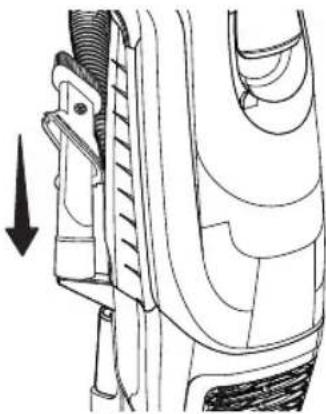
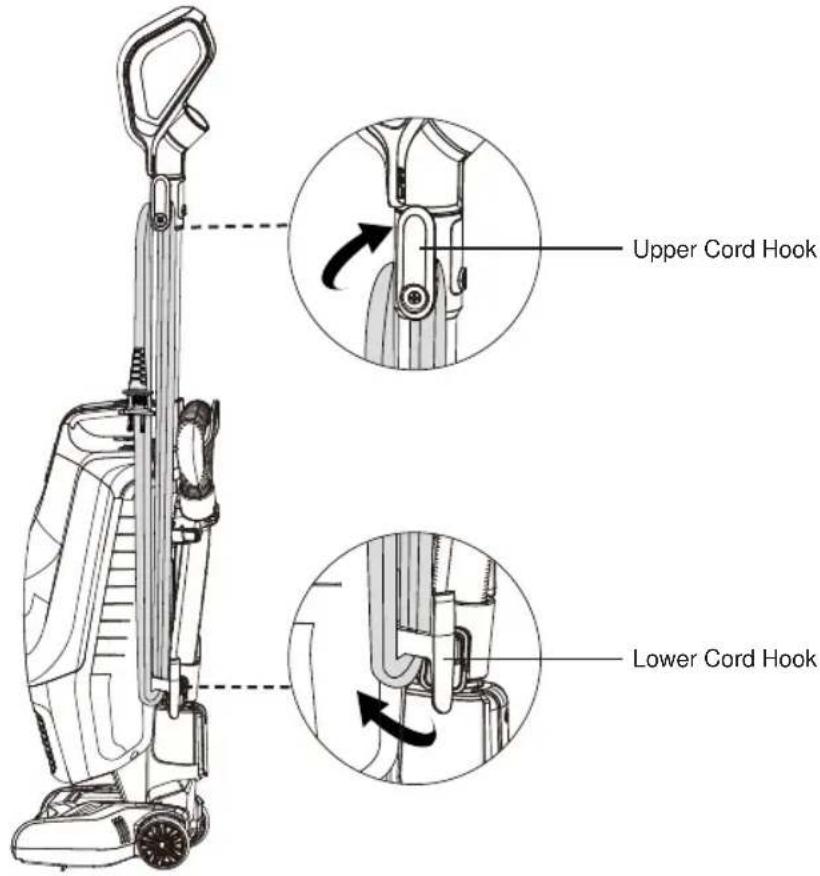
Technical line drawing of a mechanical component with an arrow indicating direction (no text or symbols present)- Make sure the upper and lower cord hooks are in the proper position as shown. Wrap the power cord loosely around the upper and lower cord hooks.
NOTE: Make sure to wrap the power cord around the upper cord hook first, and then around the lower cord hook to avoid damaging the power cord.
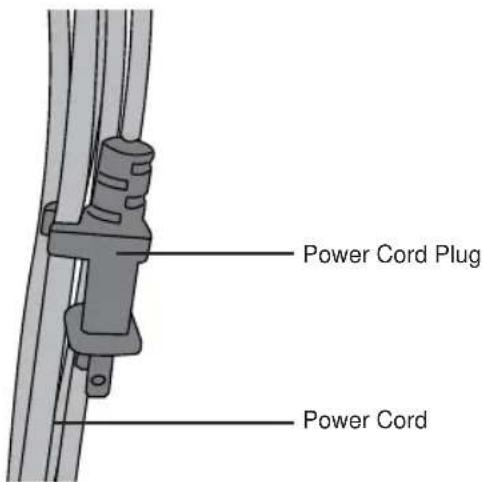
- Lock power cord plug onto the power cord.

WARNING
Wrapping the cord too tightly with excessive stress on the cord may cause cord damage. A damaged cord is an electrical shock hazard and could cause personal injury or damage.
OPERATING INSTRUCTIONS
Using Your Upright Vacuum Cleaner
NOTE: Make sure the vacuum cleaner is completely assembled. Do not operate vacuum cleaner without dust bag in place.
NOTE: Make sure the flexible hose is installed correctly into the main body (page 7).
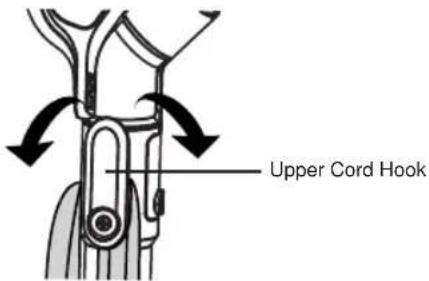
- Turn the upper cord hook to either side and down to release the power cord.
- Detach the power cord plug from the power cord.
- Be sure the power cord is locked into the upper locking notch as shown. This will help manage the power cord when operating the vacuum cleaner.

- Plug the power cord into an outlet located near the floor.

natural_image
Illustration of a plug plugged into a socket with arrows indicating direction (no text or symbols)
WARNING
To reduce the risk of electric shock, this appliance has a polarized plug (one blade is wider than the other). This plug will fit in a polarized outlet only one way. If the plug does not fit fully in the outlet, reverse the plug. If it still does not fit, contact a qualified electrician to install the proper outlet. Do not change the plug in any way.
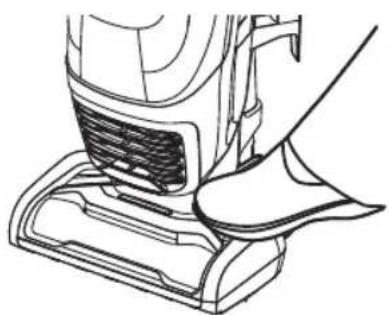
- Release the handle by placing a foot on the nozzle and pulling back to change the handle position.
natural_image
Line drawing of a vacuum cleaner's side panel with a hand adjusting the component (no text or symbols)- Turn on the vacuum cleaner by pressing the On/Off switch to the "I" position for cleaning bare floors and small area rugs.
NOTE: The brushroll does not rotate when the vacuum cleaner is in the "I" position.

- Press the switch to the "II" position for cleaning carpets or rugs.
NOTE: The brushroll rotates when the vacuum cleaner is in the "II" position.
- Once you have completed vacuuming, switch to the "O" position and unplug the power cord from the power outlet.
NOTE: Select the right mode when using this vacuum cleaner. Do not press the switch to the "II" position when cleaning the bare floor, otherwise it could potentially damage the floor.
- To store power cord after use, turn the upper cord hook to the upright position. Then wrap cord loosely around cord hooks.

CAUTION
Do not allow the vacuum cleaner to remain in one spot for any length of time when the brushroll is turning. Damage to carpet may occur.

CAUTION
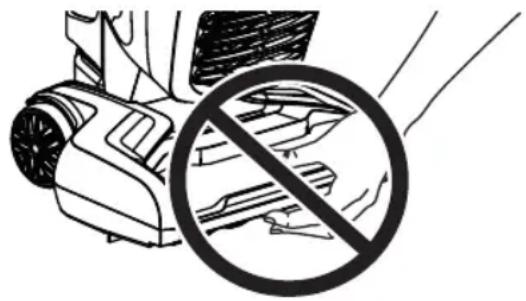
Moving parts! To reduce the risk of personal injury, DO NOT touch the brushroll in the floor nozzle when the vacuum is on. Contacting the brushroll while it is rotating can cause injuries. Disconnect electrical supply before servicing or cleaning the vacuum cleaner. Use caution when operating near children.
natural_image
Illustration of a robotic car with a circular prohibition symbol (no text or symbols present)CHECK BAG INDICATOR
When the vacuum cleaner is running with normal air flow, the CHECK BAG indicator is green. The indicator turns to dark red whenever the airflow becomes blocked.
If that occurs, check the disposable dust bag, the filter, and the air path for possible clog locations shown in Removing Clogs (page 23).
NOTE: The indicator may activate when using certain attachments due to reduced airflow through attachment.
BRUSHROLL STATUS INDICATOR LIGHT
| Brushroll Status Indicator Light | Status |
| Green, Continuous The brushroll is spinning and working as it should. | |
| Red, Continuous | There is a jam in the brushroll area. Turn off and unplug the vacuum, and remove any blockages in the nozzle. |
| The brushroll motor is overheated. Turn off and unplug the vacuum. Check and clear the air path to make sure it is free of obstructions. Check and change the dust bag if full. Then plug in vacuum and turn it on. | |
| No Light The brushroll | is off. |

Using Your Vacuum Cleaner with Accessory
- Place the vacuum cleaner in the upright locked position.
- Press the hose release button and pull up to release the lower hose end from the lower hose connection.

- Insert the hose end into the upper hose connection as shown until you hear a 'click'.

natural_image
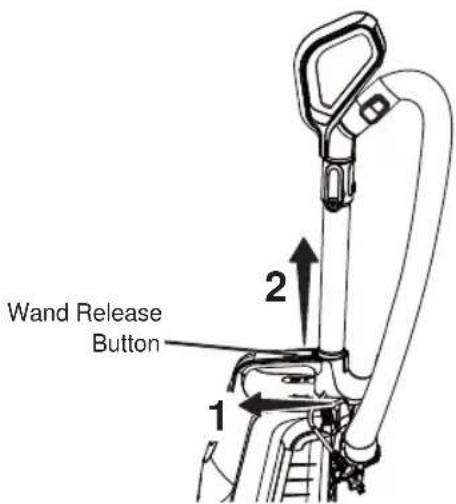
Line drawing of a handheld device with a close-up inset showing a close-up of its handle and seat (no text or symbols)- Slide the wand release button and lift up the handle for above floor cleaning.
- Choose the desired accessory and insert it into the handle.
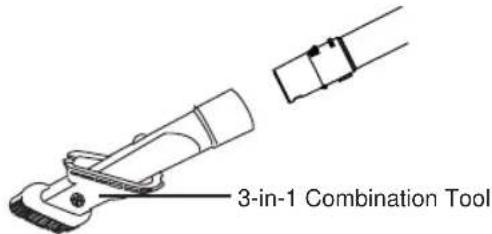
- Turn on the vacuum cleaner by pressing the switch to the "I" position.
- Once you have completed vacuuming, switch to the "O" position and unplug the power cord from the power outlet.
IMPORTANT: Make sure to re-insert the hose end into the lower hose connection before using the vacuum in upright mode.

CAUTION
When using accessories, be careful not to overextend the hose when reaching to avoid tipping the vacuum over.

CAUTION
DO NOT pull the vacuum cleaner around the room by the hose. Property damage or personal injury could result.
Accessory
3-IN-1 COMBINATION TOOL
The 3-in-1 combination tool can be attached to the handle. Slide the collar of the tool over the open end of the handle.
Use the 3-in-1 combination tool in crevice tool mode for cleaning in tight spaces such as furniture, between cushions, and stairs.

natural_image
Technical line drawing of a mechanical clamp or connector (no text or symbols)Set the combination tool in dusting brush mode by pressing the release button and sliding the dusting brush side of the brush tool to the end of the combination tool. Use in dusting brush mode for cleaning loose surfaces such as drapes.

Press the release button to remove the brush tool. Set the combination tool in upholstery brush mode as shown. Use in upholstery brush mode for cleaning fabric surfaces such as fabric sofa.

To return the combination tool to crevice tool mode, press the release button and slide the brush tool down the combination tool.
NOTE: Always clean accessory before using on fabrics.
Thermal Protector
This vacuum cleaner has a thermal protector which automatically trips to protect the vacuum cleaner suction motor. If a clog prevents the normal flow of air to the motor, the thermal protector turns the motor off automatically. This allows the motor to cool in order to prevent possible damage to the vacuum cleaner.
To reset thermal protector: Turn the vacuum cleaner off and unplug the power cord from the outlet to allow the vacuum cleaner to cool and the thermal protectors to reset.

CAUTION
Always return the vacuum cleaner to the upright position before using the hose and accessory. Failure to do so may result in overheating of the brushroll motor and can cause the thermal protectors to trip.
Check for and remove clogs, and replace dust bag if necessary. Also check and clean any clogged filters. Wait approximately 50 minutes before restarting vacuum cleaner.
By-Pass Valve
This vacuum cleaner has a By-Pass Valve which prevents motor overheating and damage. The valve opens to provide cooling air when a clog prevents normal air flow to the vacuum cleaner suction motor. You will notice a change of sound as air rushes through the valve opening.
To correct the problem: Remove any clogs, check and replace filters if needed, check and install new dust bag if needed.
NOTE: The By-Pass Valve may open when using attachments or when cleaning new carpet due to reduced airflow or air path is blocked, caused by the attachments themselves or by new carpet lint filling the dust bag quickly.
Brushroll Reset
The brushroll has built-in protection against motor damage should the brushroll jam. If the brushroll slows down or stops, the brushroll overload protector shuts off the brushroll motor and the brushroll status indicator light emits a red light. The vacuum cleaner suction motor will continue to run.

To solve the problem: Turn off and unplug vacuum cleaner, remove obstruction, then plug the vacuum cleaner back in and turn on the vacuum cleaner.
NOTE: Once the brushroll motor shuts down, clear jam from brushroll and then restart the vacuum cleaner. If the problem persists, call 1-866-384-8432 for assistance.
Suction Control
To assist with push/pull force of the vacuum on surfaces like thick carpet, the suction control valve can be opened to help reduce suction. Note that for best cleaning results, the suction control valve must be fully closed.
- Slide to the right to open the suction control and decrease suction. Opening suction control decreases suction for draperies and lightweight rugs.
- Slide to the left to close the suction control and increase suction. Closing suction control increases suction for upholstery and carpets.

natural_image
Simple line drawing of a desktop computer with monitor and tower (no text or symbols)Decrease Suction

natural_image
Simple line drawing of a desktop computer with monitor and keyboard (no text or symbols)Increase Suction
Storing your vacuum
- Ensure the hose is locked into place and the accessory is stored on-board.
- Gather the cord and wrap it loosely around the upper and lower cord hooks. Lock the power cord plug onto the power cord.
- Store the vacuum cleaner in a dry, indoor area, on the floor with the handle locked in the upright position.
MAINTAINING YOUR VACUUM

CAUTION
To reduce the risk of shock, turn off and disconnect the power cord before performing any service or maintenance.
NOTE: Use dry cloth to clean the outside of the unit. Do not allow any kind of liquid to enter the unit. Wash the accessory in warm soapy water, rinse and air dry for 24 hours. Do not clean in dishwasher.
Replacing the Dust Bag
For best cleaning results, the dust bag should be changed often. The CHECK BAG indicator will turn to red when the bag needs to be changed or the airflow is blocked.
NOTE: Always pay attention to the CHECK BAG indicator.
- Pull bag chamber cover release handle out and up, hold the cover using the handle. NOTE: Do not press the dust bag release button when releasing bag chamber cover, or the dust bag will drop down automatically.

- Tilt the bag chamber as shown. Press dust bag release button and the dust bag drops down automatically.
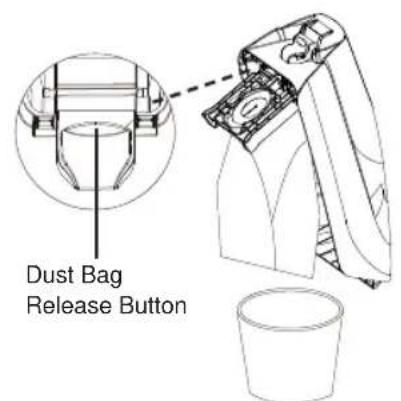
- To install a new dust bag, insert the dust bag collar into bracket until you hear a 'click', and then rotate bracket down until another 'click' can be heard. Tuck the bag into the dust bag chamber. Be sure all sides of the dust bag are flat within the bag chamber.


- Place the tab on the dust bag chamber cover in the slot on the vacuum cleaner. Push the dust bag chamber cover into place until a 'click' is heard.
NOTE: Make sure the dust bag is locked into place before pushing the dust bag chamber cover. The dust bag chamber cover can't be assembled successfully if dust bag is missing or not installed into place.

Cleaning the Foam Filter
Check the foam filter frequently and clean when dirty.
When the cleaning of the foam filter no longer restores vacuum cleaner suction to full power, or the filter is worn or broken, replace the filter.
Regularly clean and replace the filter to keep the vacuum's suction power optimal.
-
Remove the dust bag as outlined in the Replacing the Dust Bag (page 18).
-
Remove the foam filter cover and the foam filter.

natural_image
Technical line drawing of a mechanical device with internal components and a directional arrow (no text or symbols)
- Wash the filter in warm soapy water, rinse and dry thoroughly by squeezing the excess water out of the filter and allowing to air dry for 24 hours.
NOTE: DO NOT operate without foam filter installed.
IMPORTANT: The filter must dry completely before reuse.
- Reinstall the foam filter into the foam filter cover and slide it to the slots until it is in place. Press the cover to lock it into place until a 'click' can be heard.
NOTE: Replace the foam filter if it is worn or broken.
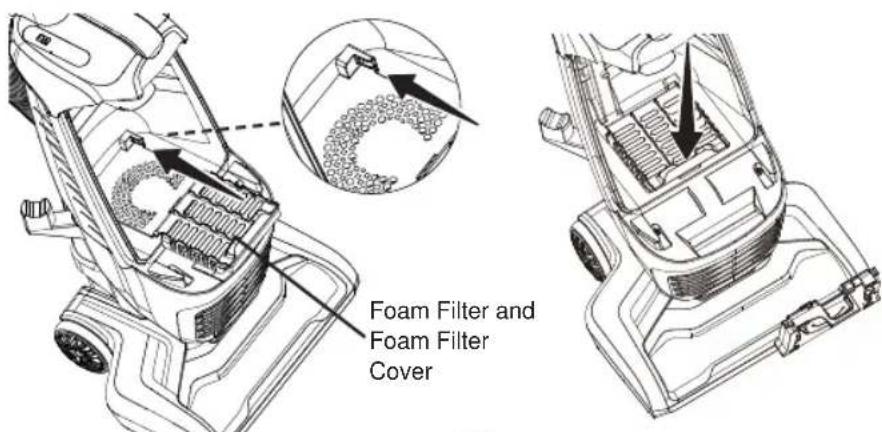
- Reinstall the dust bag as outlined in the Replacing the Dust Bag (page 19).
Cleaning the HEPA Media Exhaust Filter
It is recommended to clean the HEPA media exhaust filter with cold water every year.
NOTE: When the cleaning of the filter no longer restores vacuum cleaner suction to full power, or the filter is worn or broken, replace the exhaust filter.
- Remove exhaust filter cover by pulling the square hole outward at the bottom of the cover.
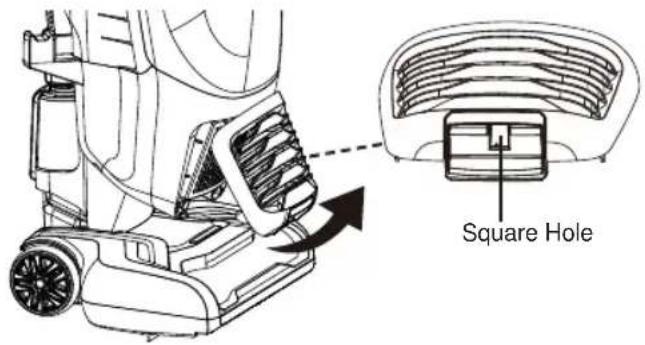
- Remove the HEPA media exhaust filter from vacuum cleaner.
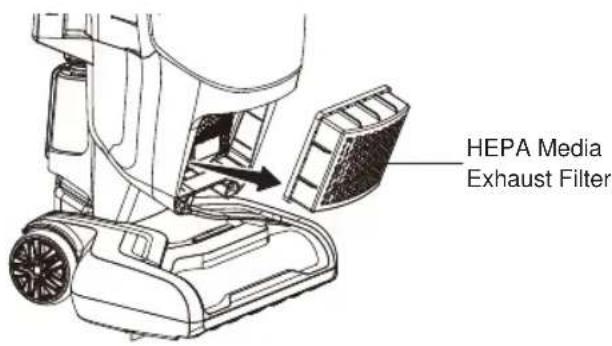
- Wash with cold water only, DO NOT use detergent or soap. Allow to air dry.
Allow parts to dry 24 hours before putting back into vacuum cleaner.
NOTE: DO NOT operate without HEPA media exhaust filter installed.
IMPORTANT: The filter must dry completely before reuse.
- Reinstall the HEPA media exhaust filter into the vacuum cleaner.

- Insert the exhaust filter cover tabs into the upper slots and lock the exhaust filter cover into place by pressing the bottom of the cover until a click is heard.
NOTE: Make sure the exhaust filter cover is properly installed.

Cleaning the Brushroll

WARNING
Always unplug the power cord from an electrical outlet before performing maintenance to the vacuum cleaner.
To maintain efficient cleaning, the brushroll must be kept free of carpet fiber, string, or hair build-up. If the brushroll is jammed, unplug and turn vacuum cleaner over and check brushroll for fiber and hair build-up. Use scissors to remove any build-up entangled around the brushroll. Cleaning the brushroll periodically is recommended for best performance.

natural_image
Line drawing of a hand using a tool to adjust internal components of an electric motor (no text or symbols present)Removing Clogs

WARNING
Disconnect electrical supply before removing clogs. Failure to do so could result in electrical shock or personal injury.
Checking the hose for clogs:
If there is noticeable abnormal noise when using the vacuum or the suction power suddenly drops, it is necessary to check the hose for clogs.
Frequently check the air path to make sure it is free of obstructions.
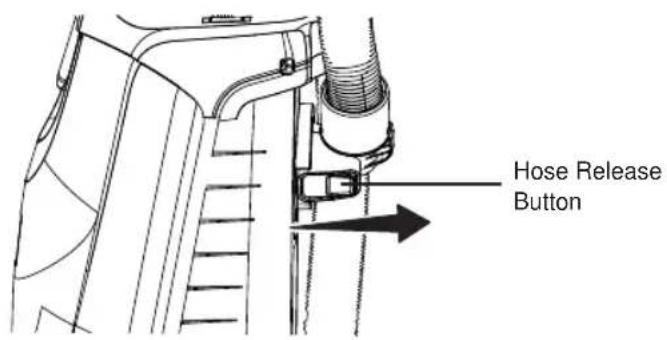
- Press the hose release button and remove the hose from the main body. Release the other end of the hose from the lower hose connection.
-
Check and remove any clogs in the flexible hose.
-
Reinstall the flexible hose to the vacuum cleaner. See GENERAL ASSEMBLY INSTRUCTIONS (page 7).
Checking connection hose for clogs:
- Release the hose end from the lower hose connection.
- Check and remove any clogs in the connection hose.
- Reattach the flexible hose onto the lower hose connection.

TROUBLESHOOTING
Should you have any problem(s) with your vacuum cleaner, review the table below for solutions to minor performance issues.

WARNING
Disconnect electrical supply before performing maintenance to the vacuum cleaner. Failure to do so could result in electrical shock or personal injury.
| PROBLEM P | POSSIBLE CAUSE SOLUTION | |
| Vacuum cleaner will not run. | The plug is not plugged into the wall outlet. | Be sure power cord plug is fully plugged into outlet. |
| The On/Off switch is not pressed to start the vacuum cleaner. | Press the On/Off switch to “I” or “II” position. | |
| Defective wall outlet. | Check with a good appliance or lamp. Have outlet properly serviced. | |
| The vacuum body is overheated. | Unplug the power cord and let the vacuum cool down for 50 minutes. | |
| The motor is damaged. Call 1-86 | 6-384-8432 for assistance. | |
| Poor job of dirt pick-up. | The hose and accessories are not installed correctly. | Check the hose and accessories for correct installation and ensure they are snapped firmly in place. |
| The hose is not installed in the correct place when using the upright mode. | Check and ensure the hose is installed correctly into the main body (page 7). | |
| Dust bag is not installed correctly. | Check dust bag for correct installation and ensure it is snapped firmly in place. | |
| Full or clogged dust bag. Change | the dust bag. | |
| There is a clog in the air path. | Check and remove all clogs. Follow instructions on page 23. | |
| Suction control is in open position. | Adjust the suction control to increase suction. Follow instructions on page 17. | |
| PROBLEM | POSSIBLE CAUSE SOLUTION | |
| Poor job of dirt pick-up. | The foam filter or HEPA media exhaust filter needs to be cleaned or replaced. | Clean or replace the foam filter or HEPA media exhaust filter. Follow the foam filter cleaning or HEPA media exhaust filter cleaning instructions on page 20 or 21. |
| The hose is worn. | Replace the hose. Purchase online at www.vacmaster.com or call 1-866-384-8432. | |
| The connection hose is worn. Call | 1-866-384-8432 for assistance. | |
| The brushroll is worn. Call 1-866-384-8432 for assistance. | ||
| The belt is worn or broken. Call 1-866-384-8432 for assistance. | ||
| Dust escapes from vacuum. | Dust bag or dust bag chamber cover is not installed correctly. | Check the dust bag or dust bag chamber cover for correct installation and ensure they are snapped firmly in place. Follow instructions on page 19. |
| HEPA media exhaust filter is installed incorrectly. | Check exhaust filter for correct installation. Follow instructions on page 21. | |
| The dust bag is worn or broken. | Check and replace the dust bag. | |
| Foam filter or HEPA media exhaust filter is worn or broken. | Check and replace the foam filter or the HEPA media exhaust filter. | |
| Brushroll does not turn. | Handle is in fully upright position. | Move handle from the fully upright position. |
| Wrong mode selected. | Press the switch to the “II” position to start the brushroll. | |
| Brushroll is jammed. | Remove obstruction. Follow instructions on page 22. | |
| Brushroll is not installed correctly. | Call 1-866-384-8432 for assistance. | |
| Brushroll does not turn. | The brushroll motor is overheated. | Turn off and unplug vacuum cleaner. Check and clear the air path to make sure it is free of obstructions. Check and change the dust bag if full. Then plug in vacuum and turn it on. |
| The belt is not routed correctly. | Call 1-866-384-8432 for assistance. | |
| Fault in PCB section of the motorized nozzle. | Call 1-866-384-8432 for assistance. | |
| Sound changes. | Exhaust filter cover is installed incorrectly. | Position exhaust filter cover correctly and snap firmly into place. Follow instructions on page 22. |
| Air path is blocked. | Check for and remove any clogs and clean the air path. Follow instructions on page 23. | |
| Accessories in use restrict air flow. | Check accessories for fuzz, lint, pet hair or other debris. | |
| Vacuum turns off on its own. | The power cord plug is loose from the outlet when using the vacuum. | Reinsert the power cord plug fully into the outlet. Avoid pulling or dragging the power cord when using the vacuum. |
| Thermal protector is activated. | Turn the vacuum cleaner off and unplug it. Check the air path and dust bag. Allow the vacuum cleaner to cool for a minimum of 50 minutes. Plug in vacuum and turn it on. | |
| The motor is damaged. Call 1-86 | 6-384-8432 for assistance. | |
| PROBLEM POSSIBLE CAUSE SOLUTION | ||
| CHECK BAG Indicator activates. | Full or clogged dust bag. Change bag. | |
| Dirty filters. Clean/change filters. | ||
| Blocked airflow passage. | Turn off and unplug vacuum cleaner. Clear blockage from airflow passage. Plug in vacuum and turn it on. | |
| Certain attachment tools. | This is normal. The indicator will turn to green when tool is removed. | |
| Brushroll status indicator light emits red. | There is a jam in the brushroll area. | Turn off and unplug the vacuum. Remove any blockages in the brushroll. See page 22. |
| The brushroll is worn or broken. | Call 1-866-384-8432 for assistance. | |
| Faulty brushroll motor or PCB section of the motorized nozzle. | Call 1-866-384-8432 for assistance. | |
| The brushroll motor is overheated. | Turn off and unplug the vacuum. Check and clear the air path to make sure it is free of obstructions. Check and change the dust bag if full. Then plug in vacuum and turn it on. | |
| Dust bag chamber cover can't be installed. | Dust bag is missing. Install the dust bag. | |
| Dust bag collar is not installed into bracket correctly or the bracket is not rotated down into place. | Insert the dust bag collar into bracket until you hear a ‘click’. Rotate bracket down until another ‘click’ can be heard. Follow instructions on page 19. | |
| The bracket is broken. Call 1-866-384-8432 for assistance. | ||
SOMMAIRE
SECTION
PAGE
INSTRUCTIONS RELATIVES AU MONTAGE GÉNÉRAL
natural_image
Diagram showing a mechanical device with a lever and base, connected by a dashed line indicating alignment or connection (no text or symbols present)natural_image
Technical line drawing of a mechanical component with an arrow indicating direction (no text or symbols present)natural_image
Illustration of a plug plugged into a wall socket with directional arrows indicating electrical flow (no text or symbols)
AVERTISSEMENT
natural_image
Line drawing of a vacuum cleaner's side panel with a foot adjusting the seat (no text or symbols)natural_image
Illustration of a robotic device with a circular prohibition symbol (no text or symbols present)VOYANT DE VÉRIFICATION DE L'ÉTAT DU SAC
natural_image
Line drawing of a robotic vacuum cleaner with a mounted blade and fan (no text or symbols)natural_image
Technical line drawing of a mechanical device with an inset showing a close-up of the component (no text or symbols present)natural_image
Technical line drawing of a mechanical clamp or connector (no text or symbols)natural_image
Simple line drawing of a computer monitor with an arrow pointing downward (no text or symbols)natural_image
Simple line drawing of a computer monitor on a keyboard with an arrow pointing to it (no text or symbols)natural_image
Technical line drawing of a lawn mower with visible blades and handle (no text or labels)
natural_image
Line drawing of a hand using a tool to adjust internal components of an electronic device (no text or symbols present)Élimination Des Obstructions

AVERTISSEMENT
natural_image
Diagram showing a hand operating a device with a dashed line indicating alignment or connection (no text or symbols present)natural_image
Technical line drawing of a mechanical component with an arrow indicating direction (no text or symbols present)natural_image
Illustration of a plug with two slots and arrows indicating electrical or mechanical components (no text or symbols)
ADVERTENCIA
natural_image
Line drawing of a vacuum cleaner's side panel with a foot adjusting the seat (no text or symbols)natural_image
Illustration of a robotic car with a circular prohibition symbol (no text or symbols present)natural_image
Line drawing of a mechanical device with a mounted fan and base (no text or symbols)natural_image
Line drawing of a mechanical device with an inset showing a close-up of the handle and belt (no text or symbols)natural_image
Technical line drawing of a mechanical clamp or bracket (no text or symbols)natural_image
Simple line drawing of a desktop computer with monitor, tower, and keyboard (no text or symbols)Reducir la succión

natural_image
Simple line drawing of a desktop computer with monitor and keyboard (no text or symbols)Aumentar la succión
natural_image
Line drawing of a hand using a tool to adjust or install a mechanical device component (no text or symbols visible)- TABLE OF CONTENTS
- SECTION
- PAGE
- FOR YOUR SAFETY
- IMPORTANT SAFETY INSTRUCTIONS
- READ ALL INSTRUCTIONS BEFORE USING THIS VACUUM CLEANER
- WARNING - To reduce the risk of fire, electric shock, or injury:
- SAVE THESE INSTRUCTIONS
- WARRANTY
- TECHNICAL DATA
- GENERAL ASSEMBLY INSTRUCTIONS
- WARNING
- OPERATING INSTRUCTIONS
- Using Your Upright Vacuum Cleaner
- CAUTION
- CHECK BAG INDICATOR
- Using Your Vacuum Cleaner with Accessory
- Accessory
- 3-IN-1 COMBINATION TOOL
- Thermal Protector
- By-Pass Valve
- Brushroll Reset
- Suction Control
- Storing your vacuum
- MAINTAINING YOUR VACUUM
- Replacing the Dust Bag
- Cleaning the Foam Filter
- Cleaning the HEPA Media Exhaust Filter
- Cleaning the Brushroll
- Removing Clogs
- Checking the hose for clogs:
- Checking connection hose for clogs:
- TROUBLESHOOTING
- SOMMAIRE
- INSTRUCTIONS RELATIVES AU MONTAGE GÉNÉRAL
- AVERTISSEMENT
- VOYANT DE VÉRIFICATION DE L'ÉTAT DU SAC
- Élimination Des Obstructions
- ADVERTENCIA
Brand : Vacmaster
Model : Captura UB0302E
Category : Vacuum Cleaner