C7CGAAS4TW3 - Coffee machine GE - Free user manual and instructions
Find the device manual for free C7CGAAS4TW3 GE in PDF.


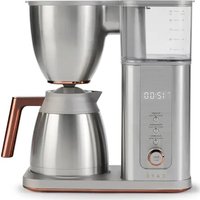
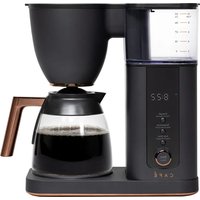
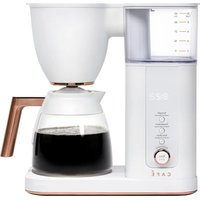
| Product type | Coffee maker with built-in Grind and Brew grinder |
| Carafe capacity | 4 to 10 cups |
| Single serve capacity | 6 to 24 oz (170 to 680 ml) |
| Grinder | Built-in, conical stainless steel burr grinder, 6 grind levels from fine to coarse |
| Brew temperature | Adjustable from 185°F (85°C) to 205°F (96°C) |
| Available coffee strengths | Light, Medium, Bold, Gold (SCA Gold Cup certified) |
| Water reservoir | Removable, with charcoal water filter |
| Water filter | Charcoal, recommended to replace every 2 months or after 25 gallons (92 L) brewed |
| Display | Digital screen with clock, strength indicators, temperature, quantity, Wi-Fi, reminders |
| Delayed brew | Yes, programmable up to 24 hours in advance |
| Connectivity | Built-in Wi-Fi, compatible with SmartHQ app |
| Special functions | Adjustable bloom time, scheduled brew (up to 7 days via app) |
| Maintenance and cleaning | Automatic descaling cycle, grinder cleaning, descaling and filter replacement alerts |
| Removable parts | Brew basket, metal filter, carafe with lid, water reservoir, spray head |
| Power supply | 120V, 60Hz, polarized plug |
| Warranty | 1 year limited |
| Certifications | SCA Gold Cup, FCC Part 15, IC RSS |
| Included accessories | Charcoal water filter, metal filter, carafe, water reservoir |
| Safety | Auto shut-off after brew, carafe detection, child safety (supervision required) |
| High altitude use | Do not use Gold setting above 5000 ft (1524 m) |
Frequently Asked Questions - C7CGAAS4TW3 GE
User questions about C7CGAAS4TW3 GE
0 question about this device. Answer the ones you know or ask your own.
Ask a new question about this device
Download the instructions for your Coffee machine in PDF format for free! Find your manual C7CGAAS4TW3 - GE and take your electronic device back in hand. On this page are published all the documents necessary for the use of your device. C7CGAAS4TW3 by GE.
USER MANUAL C7CGAAS4TW3 GE
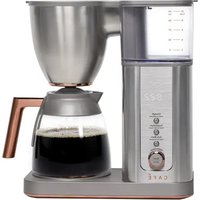
It's time appliances had a personality. Yours.
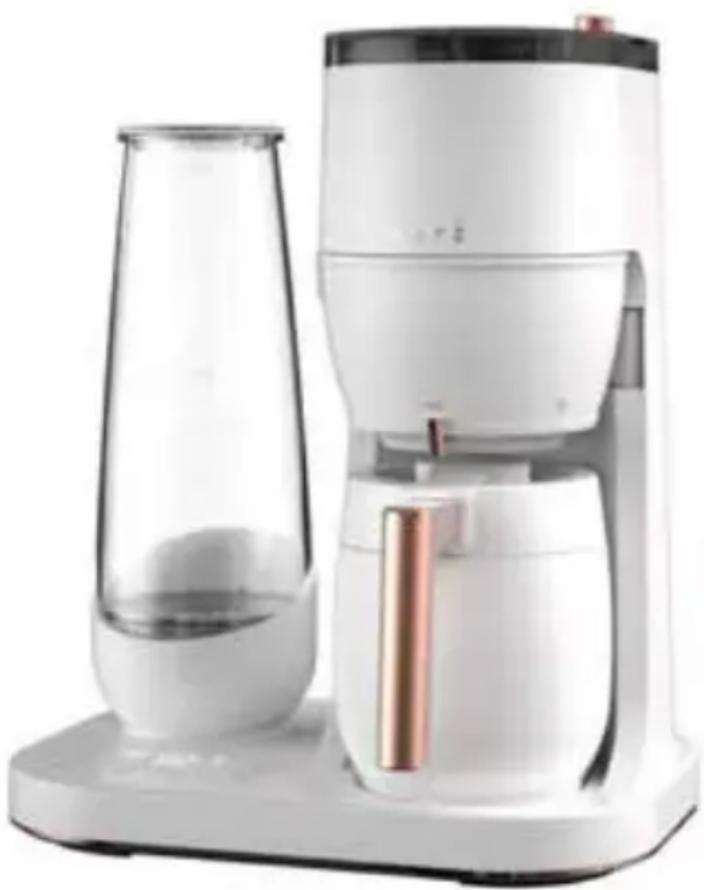
natural_image
Modern white and black digital kitchen brush unit with glass and copper-colored lid (no visible text or symbols)Grind and Brew
OWNER'S MANUAL
ENGLISH/FRANÇAIS
THANK YOU FOR MAKING CAFÉ A PART OF YOUR HOME.
We take pride in the craftsmanship, innovation and design that goes into every Café product, and we think you will too. Among other things, registration of your appliance ensures that we can deliver important product information and warranty details when you need them.
Register your Café appliance now online. Helpful websites are available in the Consumer Support section of this Owner's Manual. You may also mail in the pre-printed registration card included in the packing material.
CAFE
DISTINCT BY DESIGN™
Table of Contents
Model: C7CGAAS
SAFETY INFORMATION 4
COMPONENTS 6
OVERVIEW OF CONTROLS 7
INTRODUCTION 8
BEFORE FIRST USE 8
Inserting Charcoal Water Filter 9
Adding Beans to the Bean Hopper 10
Filling the Water Reservoir 10
HOW TO BREW A GOOD CUP OF COFFEE....11
BREWING 13
Strength 13
Grind Size....13
Temperature 14
Brew Volume 14
Delay Brew 1
SETUP 15
Brew With Pre-ground Coffee 15
WiFi 16
Set Clock 16
SMART HQ FEATURES 17
CARE AND CLEANING....18
REGULATORY INFORMATION....20
TROUBLESHOOTING TIPS 21
NOTES 23
LIMITED WARRANTY....26
CONSUMER SUPPORT 27
IMPORTANT SAFETY INFORMATION
READ ALL INSTRUCTIONS BEFORE USING THE APPLIANCE
IMPORTANT SAFEGUARDS: When using electrical appliances, basic safety precautions should always be followed including the following:
- Read all instructions before using the appliance.
■ Use only a 120 V, 60 Hz standard electrical supply that is properly grounded in accordance with the National Electric Code and local codes and ordinances.
■ Do not touch hot surfaces directly. Use handles and knobs.
■ To protect against electric shock, do not place cord, plug, or base unit in water or other liquids.
■ Product is for household use only. Do not use outdoors.
■ To avoid a possible burn hazard, make sure the carafe is clean, empty and the lid is locked prior to brewing. - Do not let cord hang over edge of table or counter, or touch a hot surface.
■ Scalding may occur if the lid is removed during the brewing cycle.
■ Appliances should not be used by or near children.
■ To reduce the risk of fire or electric shock, do not attempt to disassemble, repair, modify, or replace any part of your product.
■ Use this product only for its intended purpose as described in this user manual.
■ Use of any accessories not recommended by the manufacturer can cause injuries. - Keep ventilation openings in the appliance enclosures or in the built-in structure, clear of obstruction.
■ Do not place on or near a hot gas or electric burner, or in a heated oven.
■ To disconnect, make sure no coffee brewing, then remove the plug from wall outlet.
This appliance has a polarized plug (one blade is wider than the other). To reduce the risk of electric shock, this plug is intended to fit into a polarized outlet only one way. If the plug does not fit fully into the outlet, reverse the plug. If it still does not fit, contact a qualified electrician. Do not attempt to modify the plug in any way.
■ Unplug from outlet when not in use and before cleaning. Allow to cool before putting on or taking off parts, and before cleaning the appliance.
- Do not operate any appliance with a damaged cord, if the appliance malfunctions, or has been damaged in any manner, return appliances to the nearest authorized service facility for examination, repair, or adjustment.
This appliance is not intended for use by persons (including children) with reduced physical, sensory, or mental capabilities, or lack of experience and knowledge, unless they are closely supervised and instructed concerning use of the appliance by a person responsible for their safety. Close supervision is necessary when any appliance is used by or near children. Children should be supervised to ensure that they do not play with the appliance.
■ There is a potential injury from misuse. Please handle it with care.
■ Turn the appliance OFF, then unplug from the outlet when not in use, before assembling or disassembling parts and before cleaning. To unplug, grasp the plug and pull from the outlet. Never pull from the power cord.
■ Avoid contacting moving parts. Do not attempt to defeat any safety interlock mechanisms.
READ AND SAVE THESE INSTRUCTIONS
IMPORTANT SAFETY INFORMATION
READ ALL INSTRUCTIONS BEFORE USING THE APPLIANCE
■ Check hopper for presence of foreign objects before using.
- To disconnect, turn any control to "off," then remove plug from wall outlet.
■ Close supervision is necessary when any appliance is used by or near children.
■ Do not use an extension cord or an adaptor plug.
WARNING
WARNING To avoid the risk of injury, do not open the brew chamber during the brew process.
Components
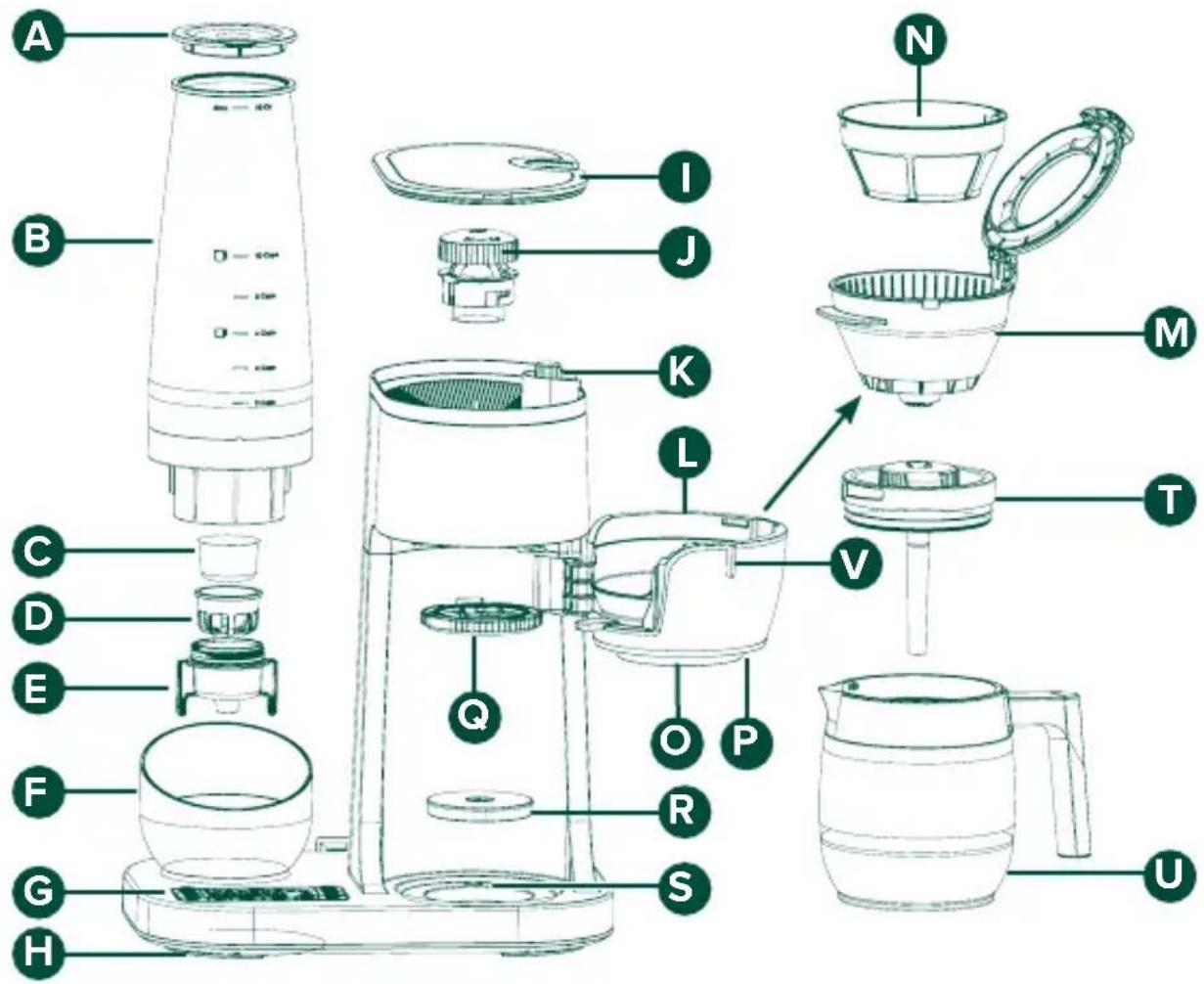
A Water Reservoir Lid
B Water Reservoir
Charcoal Water Filter
D Charcoal Water Filter Cage
Charcoal Water Filter Cartridge
F Water Reservoir Base
G Display and Buttons
H Power Cord (underneath)
1 Bean Hopper Lid
J Grinder Burr
K Grind Size Knob
L Brew Chamber (not removable)
M Brew Basket
N Metal Filter
Brew Spout
P Single Serve switch
Q Showerhead
R Removable tray
S Carafe Sensor
T Carafe Lid
U Carafe
V Brew Basket Tab
Controls
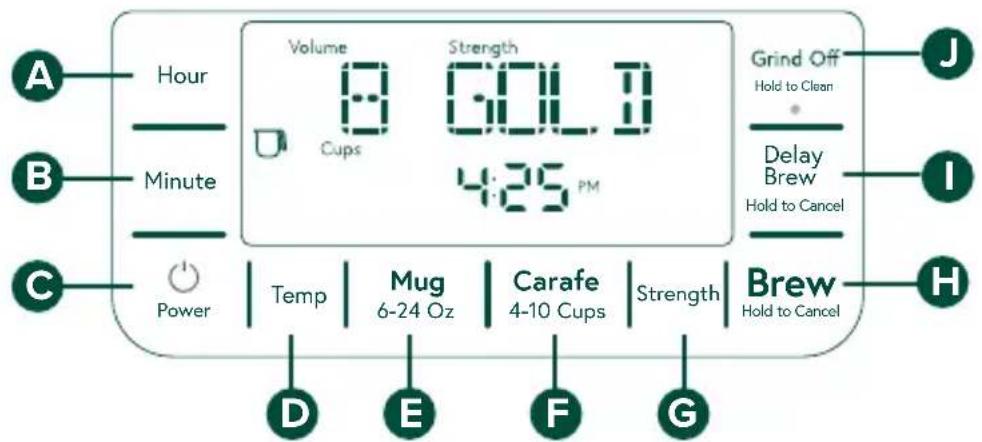

Hour Button
Press the Hour button to edit the hour indicator on the clock. Holding the button will change increments more quickly.
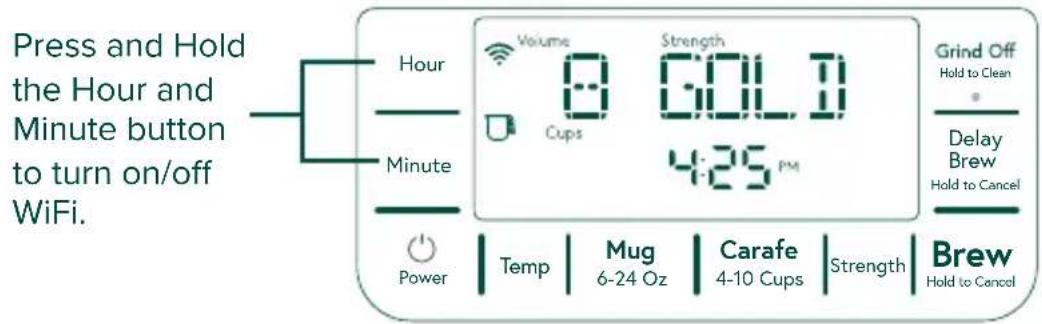
Press and hold Hour and Minute buttons at the same time to turn ON or turn OFF WIFI.

Minute Button
Press the Minute button to edit the minute indicators on the clock. Holding the button will change increments more quickly.

Power Button
Press the Power button to turn ON or OFF the display.

Temperature Button
The Temperature Button changes the temperature by 1 degree increments between 185 – 205 Fahrenheit. Holding this button will switch the degree between Fahrenheit and Celsius.

Mug Button
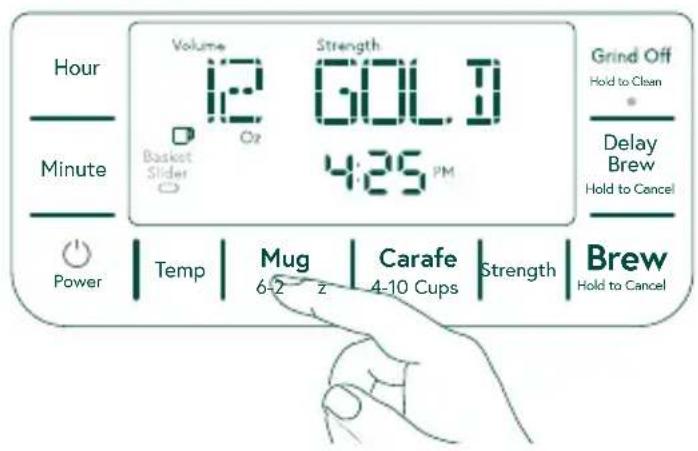
Press the Mug Button to change the brew volume by 2 oz increments. When the Water Filter reminder is illuminated on the display, press and hold the Mug button to reset the reminder after replacing the water filter.

Carafe Button
Press the Carafe Button to change the brew volume in 1 cup increments from 4 cups to 10 cups. When the Descale reminder is illuminated on the display, press and hold the Carafe button to start the descale process.

Strength Button
Press the Strength button to select brew strength. Choose from Light, Medium, Bold, and Gold (SCA certified strength setting).

Brew Button
Press the Brew button to initiate a brew cycle. Hold the button for 3 seconds to cancel the brew.

Delay Brew Button
Press the Delay Brew button to program or edit a brew cycle for a future time. Once the Delay Brew is set, hold this button for 3 seconds to cancel the brewing if necessary.

Grind Off Button
Press this button to turns grinder Off for pre-ground brewing. LED light turns on when Grinder is Off. To switch the grinder to On, the user needs to press it again.
Hold 3 seconds to begin grinder cleaning instructions.
Introduction
Delight yourself and your guests with the finest, freshest cup of coffee thanks to your Café Specialty Grind and Brew Coffee Maker. This coffee maker is the first drip coffee maker to include a stainless-steel adjustable conical burr grinder and be certified by the Specialty Coffee Association as a “Gold Cup Brewer.” The SCA organization is made up of coffee science experts, and professional coffee tasters who are passionate about good coffee. Meeting their rigorous list of requirements, including brewing temperature, brewing time, total dissolved solids, and more, the Café Specialty Grind and Brew Coffee Maker ensures that every cup you brew is precisely delicious. The built-in stainless-steel conical burr grinder allows you to adjust the grind size for every brew so you can achieve a grind that is perfect for your beans of choice, and your flavor preferences. Choose from 6 different grind levels from fine to coarse.
Whether you are brewing 10 cups for your morning routine, or enjoying 10 ounces as an afternoon splurge. You will savor the flavor of freshly ground beans..
Before First Use
INSTALLATION REQUIREMENTS
■ The product is designed to be installed indoors and is for Household use only. Do not use your coffee maker outdoors.
The product must be installed upright on a flat, level surface that is able to support the total weight when full of water.
- Install the product in a well-ventilated area with an ambient temperature between 55°F and 90°F.
- Do not place the product near heat sources such as ovens or cooktops.
- Do not place the product in direct sunlight to prevent color fading.
■ Make sure the product can not be accessed by children or animals.
PREPARE COFFEE MAKER FOR USE
1 Carefully remove packing material. Do not use sharp tools that can damage the box contents.
2 Ensure all components are present. If any item is missing, please contact us at cafeappliances.com.
3 Place the coffee maker upright on a flat, level surface. Make sure the coffee maker is UNPLUGGED at this time.
4 Wipe the exterior with a warm cloth. Wash the mesh filter, brew basket, and carafe in warm, soapy water with a soft cloth. Do not use abrasive cleansers, pads, or cloths, which can scratch the surface. Rinse and dry thoroughly. Coffee maker parts are NOT dishwasher safe.
5 Plug the coffee maker into an electrical outlet. The clock will flash 12:00 AM when first plugged in.
Before First Use
INSERTING THE CHARCOAL WATER FILTER
It is recommended to use a charcoal filter with the Cafe Specialty Grind and Brew Coffee maker to remove deposits from your water. This helps your coffee maker perform at its best.
1 Carefully remove the charcoal water filter from the packaging and rinse with cold water.
NOTE: Rinsing the charcoal water filter with cold water before the first use helps remove loose charcoal particles.
2 Remove the water reservoir from the base. See Figure: 1.
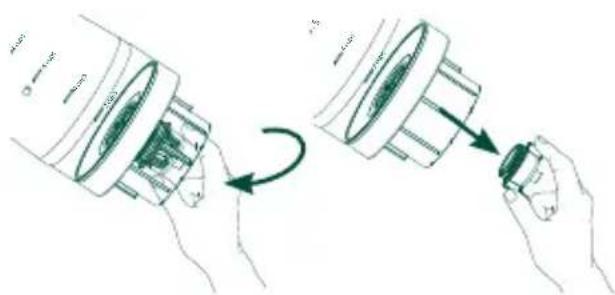
3 Unscrew the charcoal water filter Cartridge, located on the bottom of the water reservoir, by rotating the winged cap counter-clockwise 90° with your hand. See Figure: 2
4 Place the charcoal water filter with the rounded bottom facing down into the charcoal water filter cartridge. See Figure: 3.
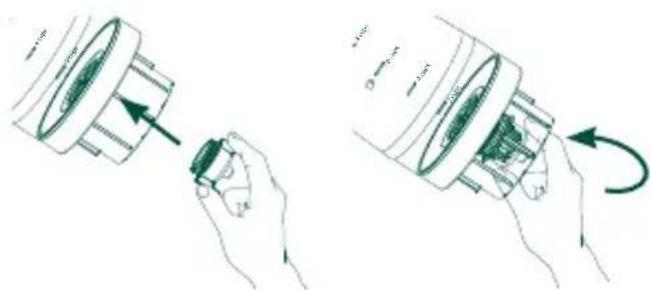
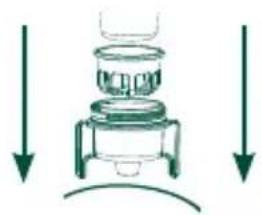
5 Once the filter is in place, return the charcoal water filter cartridge to the bottom of the water reservoir. Secure the cartridge using the winged cap by rotating the cap clockwise 90°.
DO NOT over tighten the cartridge. See Figure: 4
6 Place the water reservoir back into the base.
NOTE: It is recommended to change the charcoal water filter every two months or when Water Filter appears on the display screen. This appears every 25 gallons brewed.
Reorder charcoal water filters from
geappliances.com/ge/parts/.
Have your model number ready.
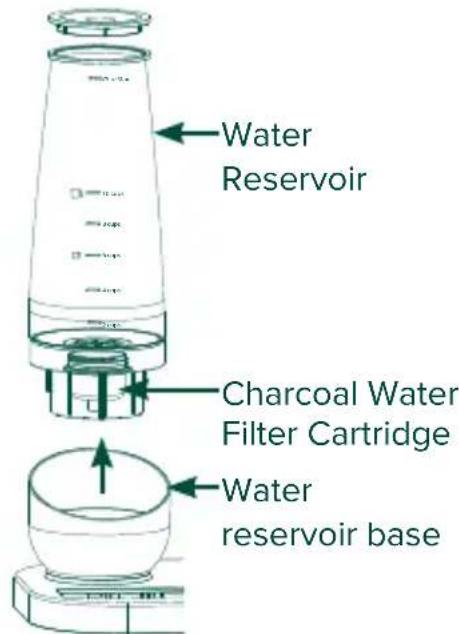
Figure: 1
natural_image
Illustration of a hand holding a camera lens and a small object, showing a circular motion (no text or symbols)Figure: 2

natural_image
Diagram of a laboratory setup with a container and two downward arrows indicating flow or movement (no text or symbols)Figure: 3
natural_image
Illustration of a mechanical device being adjusted for a component, showing hand and close-up views (no text or symbols)Figure: 4
Before First Use
Adding Beans to the Bean Hopper
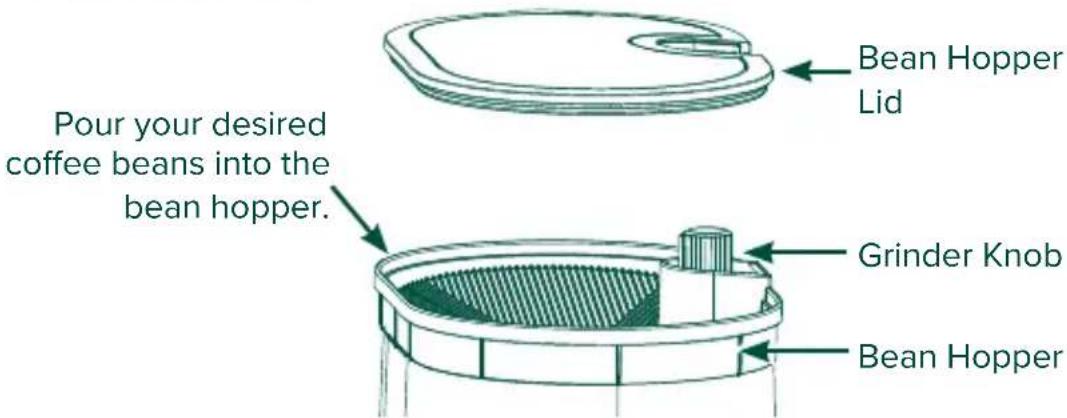
1 Remove the bean hopper lid by lifting it using the tab on the front. There is a vacuum seal, so it may take some force to remove it the first time.
2 Pour your desired beans into the bean hopper. Spread beans out so they evenly cover the bottom surface.
3 When beans have been added, replace the lid on the bean hopper and press down firmly to secure it.
4 Turn the grinder knob to your desired grind size. The grind size will appear on the display screen.
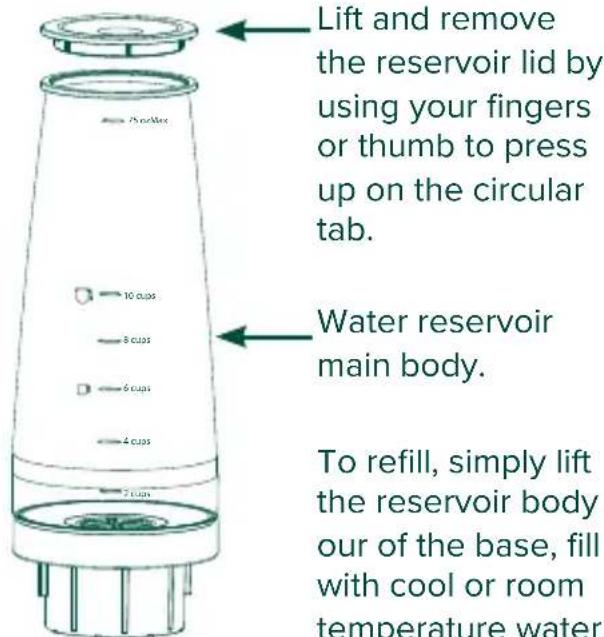
Filling the Water Reservoir
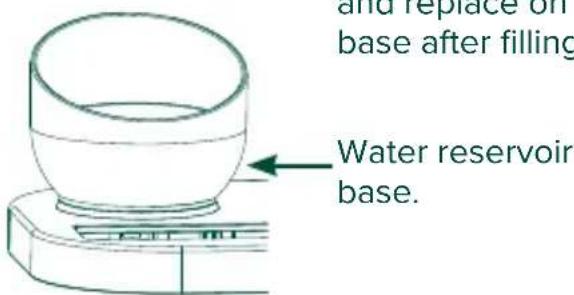
1 Remove the water reservoir from the coffee maker by gently lifting it out of the water reservoir base.
2 Remove the lid by using your fingers or thumb to press up until the lid releases from the water reservoir body.
3 Fill the water reservoir with cool or room temperature water to your desired volume.
4 Replace the lid on the water reservoir and press down until it is secure.
5 Place the water reservoir back into the base.
How to Brew a Good Cup of Coffee
The Café Specialty Grind and Brew Coffee Maker is designed to brew exceptional coffee, but great coffee starts with the freshest beans. We recommend using freshly roasted, quality whole bean coffee. Look for coffee that has a “Roasted On” date labeled or printed on the bag. Coffee can lose its scent and flavor over time, so to ensure you get the freshest cup, start by curating the freshest beans.
1 Choose your favorite beans.
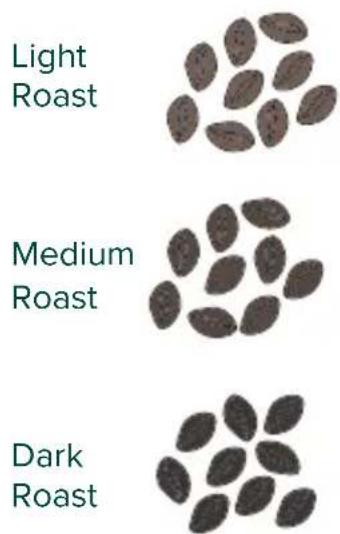
Light Roast: Lighter-bodied, higher acidity, no obvious roast flavor.
Medium Roast: Sweeter than light roast; more body exhibiting more balance in acid, aroma, and complexity. Smoother than the traditional American “medium” roast but may display fewer of the distinctive taste characteristics of the original coffee.
Full Roast: Somewhat spicy; complexity is traded for heavier body or mouth feel. Aromas and flavors of roast become more evident. See Dark Roast Image.
Double Roast: Smokey-sweet; light bodied, but quite intense. None of the inherent flavors of the bean are recognizable. See Dark Roast Image.
2 Select brew temperature.
185°F 195°F Gold 205°F
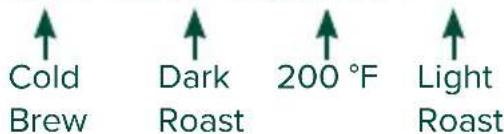
Brew lighter roasts at a slightly higher temperature to help speed up the extraction process. Brew darker roast at a lower temperature to avoid over-extraction and minimize bitter flavors.
Our Cafe Specialty Grind and Brew Coffee Maker allows you to precisely and accurately adjust brew temperature between 185°F and 205°F.
When the Gold Cup strength setting is selected, the brew temperature will default to 200^ F per Specialty Coffee Association standards.
3 Select your grind size.
A medium grind size (grind level 3 or 4) is recommended for SCA Gold Cup brewing.
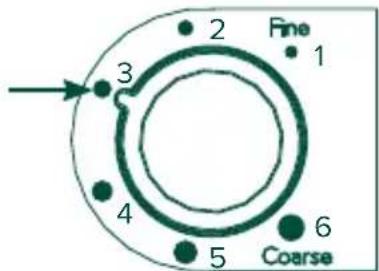
When selecting grind size, finer grounds have a high surface area, which makes over-extraction quick and easy.
Too fine of a grind may cause over extraction, leaving flavors bitter or ashy, and causing a muddy mouth-feel.
On the other hand, using too coarse of a grind may cause extractions to come out watery or sour, lacking sweetness and complexity.
We recommend a medium grind size (grind level 3 or 4) for SCA Gold Cup brewing.
How to Brew a Good Cup of Coffee
4 Choose your strength
We recommend GOLD or MEDIUM for a smooth and rich flavor.

CERTIFIED HOME BREWER
GOLD: An optimized brew, certified by the Specialty Coffee Association to be perfectly balanced. This selection will brew your coffee to the rigorous standards of the SCA, meeting requirements for total dissolved solids and extraction percentage. For GOLD brews, the temperature is not adjustable.
LIGHT: A brew designed to create lighter flavors with slightly more acidity.
MEDIUM: A balanced brew that is slightly sweeter, with a smoother body and some distinctive characteristics of the original coffee.
BOLD: A full-bodied, flavorful brew with more intense aromas, and clearer elements of the original roast.
5 Start your brew cycle.
flowchart
graph TD
    A["GRINDING"] --> B["HEATING"]
    B --> C["INFUSING"]
    C --> D["BREWING"]
    D --> E["READY"]
6 Save a favorite brew, and enjoy!

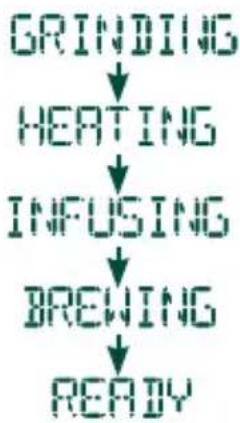
One you have chosen your brew preferences, start your brew with the Brew Button. The screen will display each stage of the brewing process: Starting, Grinding, Heating, Infusing, Brewing, and then Ready. The brew process takes about 4-6 minutes from start to finish, but time varies based on grind size, brew volume, and brew temperature.
Once you find your perfect brew, you can save up to three of your favorite brew cycles using the SmartHQ app. Access these preferred brew cycles easily using the Favorites button on the machine control.
Download the SmartHQ App from the App store and connect your unit to to access remote control and monitoring, receive machine alerts, download new features or content, or order replacement filters and accessories.
NOTE: If you are brewing at a high elevation over 5000 feet, do not use the Gold Strength setting.
Brewing
Strength
To customize the brew strength, press the Strength button. Continue to press the Strength button to toggle through Strength selections. Choose from Light, Medium, Bold, and Gold (SCA Certified Strength Setting).
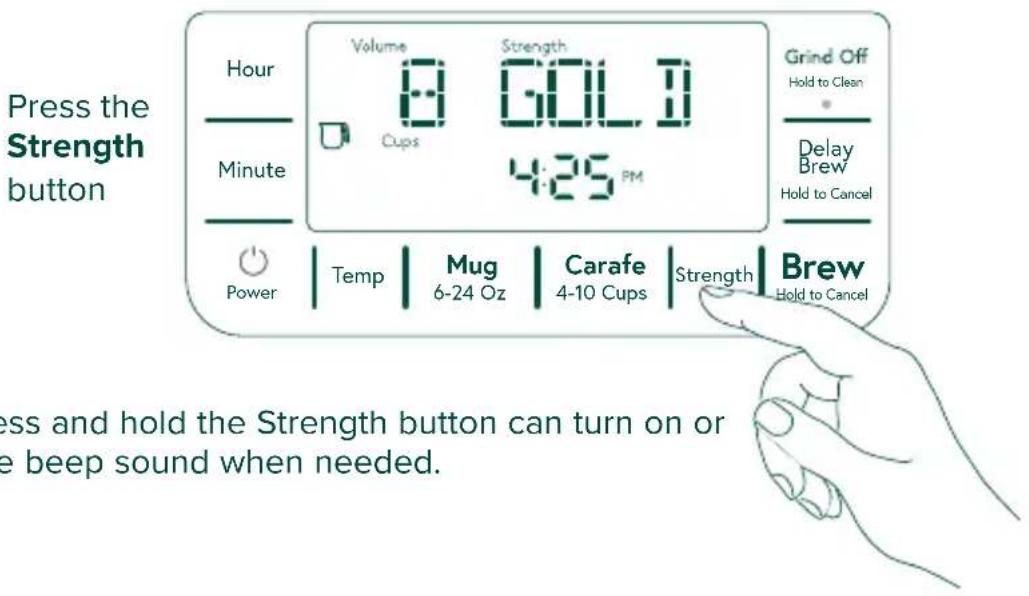
NOTE: Press and hold the Strength button can turn on or turn off the beep sound when needed.
Grind Size
To adjust grind size, turn the knob next to the bean hopper to select from 6 grind settings, fine to coarse.
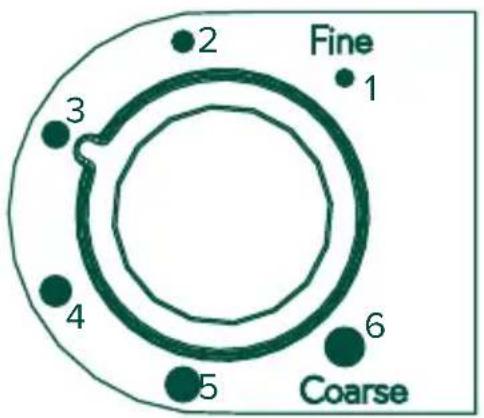
NOTE: It is recommended to use grind 3 to 4 to balance the flavor and extraction.
Brewing
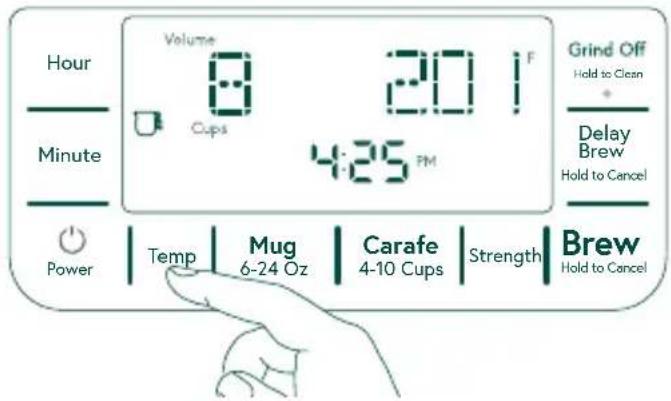
Temperature
To adjust the Brew Temperature, press the Temperature button to change the brew temperature to your desire temperature. Holding the Temp button will switch the degree unit between Fahrenheit and Celsius.
Press the Temp button
Brew Volume
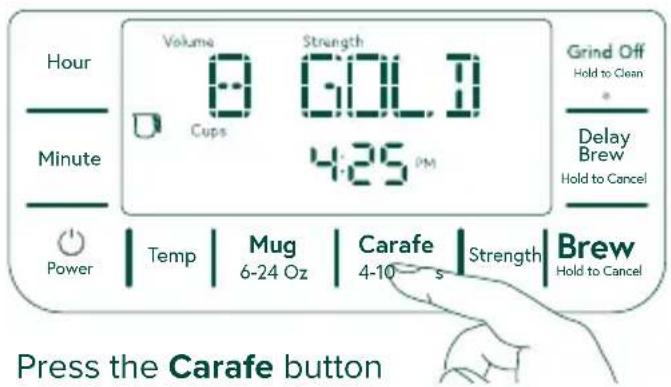
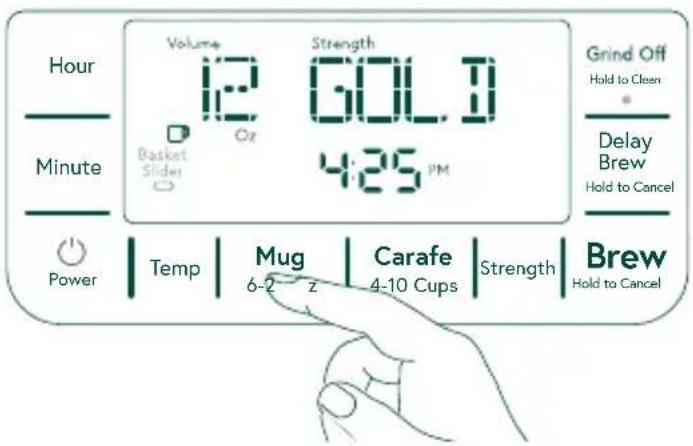
This brewer can brew from 4-10 cups in Carafe mode, or 6-24 oz of coffee in Single Serve Mode.
To select your brew volume with cups, press the Carafe button to select a size from 4-10 cups
For single serve mode, press the Mug button to select brew size from 6-24 oz.
Place your mug under the coffee spout, and rotate the Brew basket slider near the coffee spout to the Single Serve position.
Brewing
Delay Brew
To program a brew for a future time, press the Delay Brew button. Once the delay brew activated, press the Hour and Minute button to set the future brew time. Hold for 3 seconds to cancel an activated Delay brew.
The Delay Brew feature will brew the current Volume, Strength, and Temperature settings shown on the control display. These settings can be changed at any point up to the future scheduled Delay Brew time.

SetUp
Brew With Pre-ground Coffee
This coffee maker has a built-in stainless steel conical burr grinder to deliver the freshest brews. The grinder can be turned off and bypassed, however, for use with any of your favorite pre-ground coffee.
To turn off (bypass) the Grinder, Press the Grinder Off button. Once the grinder is turned off, the “Grind Off” notification will illuminate on display and the dot light of the Grind Off button will be on. The grinder is set to off, it will stay at Off unless the user presses it again to turn it on.
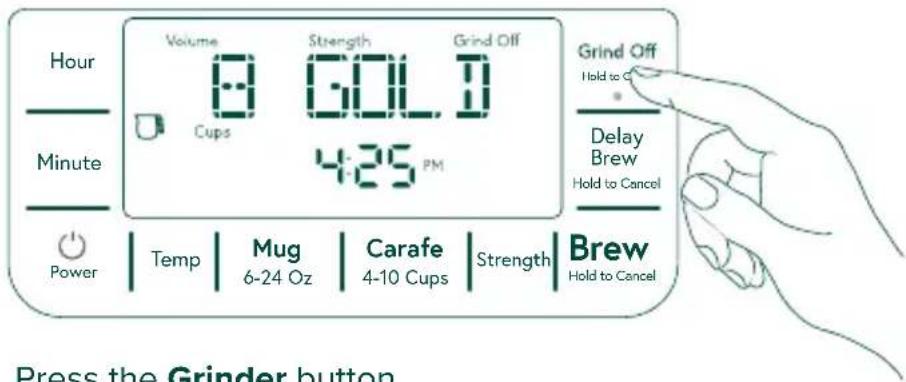
Press the Grinder button
SetUp
WiFi
Enjoy a whole new level of convenience with WiFi connected features, alerts, and programmability through the SmartHQ mobile app. To get started, download the SmartHQ app from the Apple app store, or Google Play.
Follow the instructions on the app to pair with the machine. Once the app is installed, the app will sense the machine nearby via bluetooth.
To turn on WiFi, press and hold the Hour and Minute buttons together for 3 seconds.
To turn off the WiFi, press and hold the Hour and Minute buttons together for 3 seconds again. Once this is confirmed, the display will blink "WIFI OFF" for 3 seconds and WiFi icon will turn off.
Set Clock
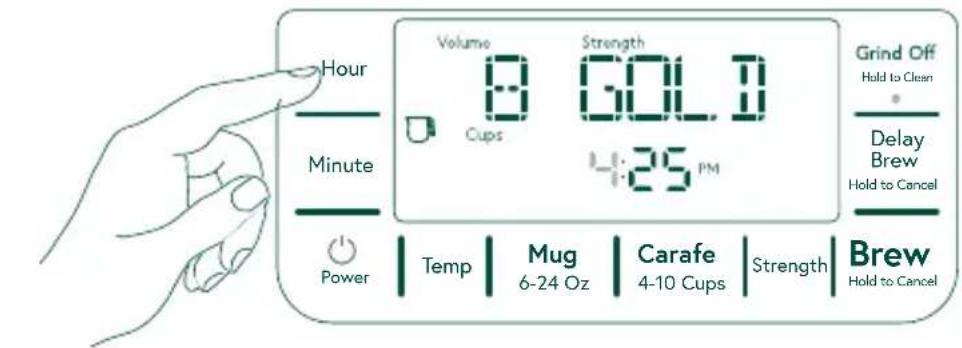
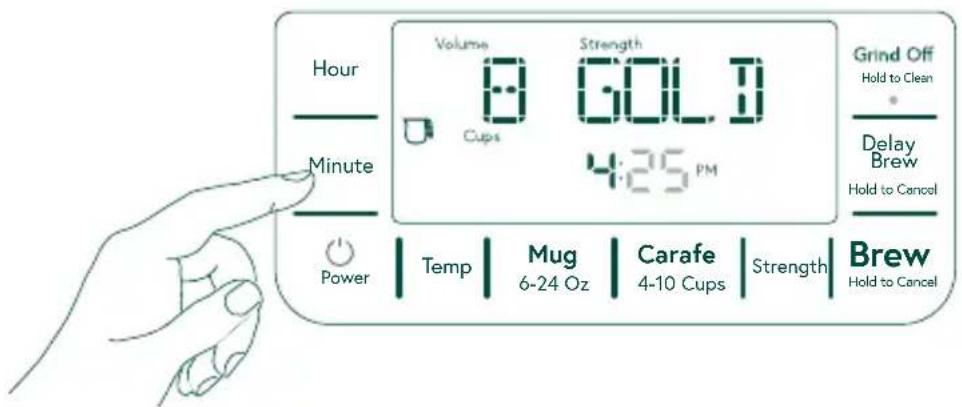
To set clock, press Hour or Minute buttons, the number begins blinking to indicate starting changes. Continue to press the button to start changing the number. The number increments will increase faster if the button is held down.
SmartHQ App Features
Bloom Time
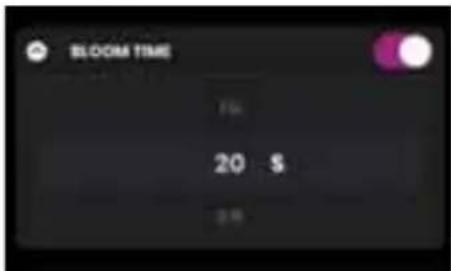
When roasted coffee beans are freshly ground, they can release trapped gasses, notably carbon dioxide, which can make your coffee taste sour. To alleviate this, your coffee maker has a bloom function that automatically pours a small amount of hot water on the coffee grinds before brewing, which helps the carbon dioxide to escape. This allows the remainder of the brewing process to continue extracting only the desired aromatics and oils in your coffee, to give you the freshest cup possible.
The SmartHQ mobile app allows you to customize the time allotted for the bloom process so you can fine-tune your brewing process. Following instructions for adjusting bloom in the mobile app.
Scheduled Brew
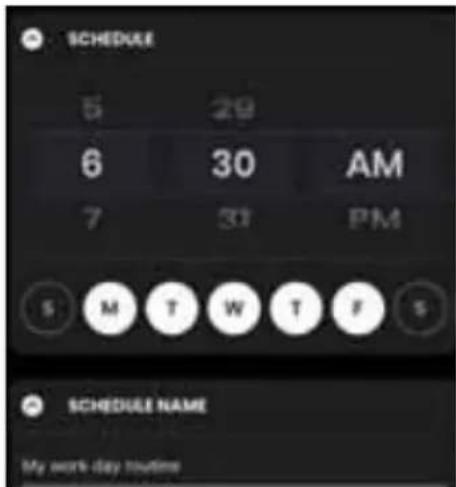
Using the SmartHQ Mobile app, you can set up a schedule of brews that span a few days or a whole week so your coffee is ready when you are.
To start, always make sure you have enough beans and water in the bean hopper and water reservoir for your scheduled brew, and place the gold tone, or paper coffee filter in the brew basket the night before, or before the scheduled brew times. Follow the instructions in the mobile app to program scheduled brews ahead of time for up to 7 days.
Care and Cleaning
CAUTION
Always unplug your coffee maker before cleaning.
CLEANING THE OUTSIDE OF THE COFFEE MAKER
Clean the outside of the coffee maker with a soft, damp cloth. Do not use paper towels or abrasive cloths and cleaners as they may scratch the finish.
CLEANING THE BREW BASKET AND MESH BASKET FILTER
Remove the mesh basket filter and brew basket. Discard any ground coffee. After each brew, rinse the mesh basket filter and brew basket under running water. For a deeper clean, wash in warm soapy water with a soft bristled brush. These parts are NOT dishwasher safe.
CLEANING THE CARAFE
After each use, empty the carafe. Rinse the carafe and lid under warm running water. Letting coffee stand overnight in the carafe can lead to staining. For a deeper clean, wash regularly in warm, soapy water and a soft bristled brush. Do not use abrasive cleaners as they may scratch the finish. Rinse and dry thoroughly. The carafe and lid are NOT dishwasher safe.
CLEANING THE GRINDER:
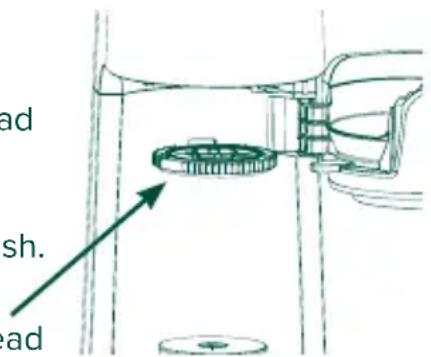
To clean the grinder chute, press and hold Grind Off button to start the cleaning process. Open the brew basket and put a kitchen towel on the carafe sitting area, then use a brush to clean the coffee ground build up inside of the chute.
To clean the upper burr, make sure all the coffee beans have been consumed by the grinder first, then remove the removable from the grinder. Use a brush to clean the grinder, then place the removable back into position, and secure it by rotating clockwise until the arrow points to the lock icon.
NOTE: The machine will not brew if the burr is not secured in the locked position.
REPLACE THE CHARCOAL WATER FILTER
It is recommended to change the charcoal water filter every two months or when Water Filter appears on the display screen. This appears every 25 gallons brewed. See page 9 for instructions on how to change the charcoal water filter.
SHOWERHEAD
The showerhead can be removed by rotating and pulling down. Open the brew chamber and locate the showerhead underneath the grind chamber For a deeper clean, wash regularly in warm, soapy water with a soft bristled brush. Do not use abrasive cleaners as they may scratch the finish. Rinse and dry thoroughly.
Showerhead
Care and Cleaning
RESET WATER FILTER
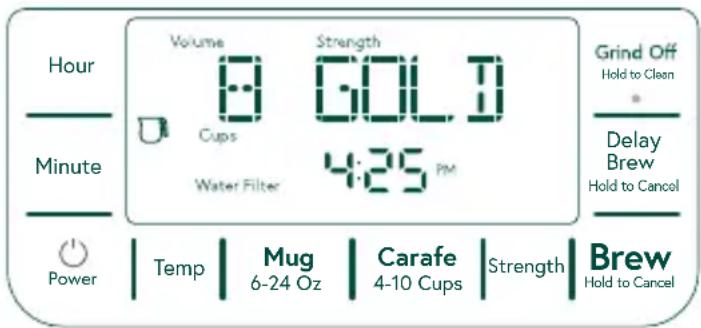
The water filter notification will be illuminated after every 25 gallons water brewed.
Once the Water Filter notification illuminated, please replace the water filter then press and hold Mug button to reset the reminder. The water filter pack can be purchased from GEA parts store https://www.geappliances.com/ge/parts
DESCALING
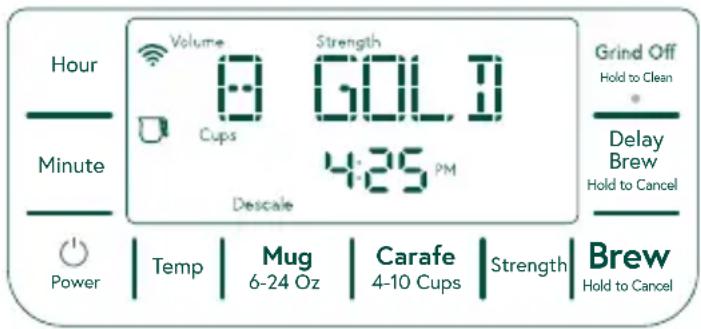
Descale your Grind and Brew when the Descale Indicator appears on the screen. The Descale process cleans the internal components of your coffee maker, protects against hard water build-up, and ensures optimal machine performance.
Once Descale alert is on, press and hold Carafe button will take the user to start the descaling process. The screen will be Scrolling display “add 10 cups solution then press brew”.
Once the brew starts, a 1:00 hr countdown timer will begin for the descaling process. “Descaling” will scroll across the screen while the timer counts down. When this one-hour slow brewing process complete, the screen will Scrolling display “Empty carafe then brew 10 cups water”. Please empty the coffee carafe, also raise water reservoir, and fill with 10 cups of fresh water
Please press the brew button to go through a normal brewing process to flush the system. This is the final steps of descaling. The system will turn off Descale notification and reset descale reminder and be back to standby ready for use.
The descaling process can be canceled by press and Hold Brew button, but the Descale will not reset

Any other servicing should be performed by an authorized service representative.
Regulatory Information
FCC/IC COMPLIANCE STATEMENT:
This device complies with Part 15 of the FCC Rules. Operation is subject to the following two conditions:
-
This device may not cause harmful interference, and
-
This device must accept any interference received, including interference that may cause undesired operation.
Any changes or modifications not expressly approved by the party responsible for compliance could void the user's authority to operate the equipment.
NOTE: This equipment has been tested and found to comply with the limits for a Class B digital device, pursuant to Part 15 of the FCC Rules. These limits are designed to provide reasonable protection against harmful interference in a residential installation. This equipment generates uses and can radiate radio frequency energy and, if not installed and used in accordance with the instructions, may cause harmful interference to radio communications. However, there is no guarantee that interference will not occur in a particular installation. If this equipment does cause harmful interference to radio or television reception, which can be determined by turning the equipment off and on, the user is encouraged to try to correct the interference by one or more of the following measures:
- Reorient or relocate the receiving antenna.
- Increase the separation between the equipment and receiver.
- Connect the equipment into an outlet on a circuit different from that to which the receiver is connected.
- Consult the dealer or an experienced radio/television technician for help.
This device complies with Industry Canada licence-exempt RSS standard(s).
Operation is subject to the following two conditions: (1) This device may not cause interference, and (2) This device must accept any interference, including interference that may cause undesired operation of the device.
Labeling: Changes or modifications to this unit not expressly approved by the manufacturer could void the user's authority to operate the equipment.
ConnectPlus module only (or similar communication module)
RF Exposure - This device is only authorized for use in a mobile application. At least 20 cm of separation distance between the ConnectPlus device and the user's body must be maintained at all times.
FCC ID: ZKJ-WCATA008
IC ID: 10229A-WCATA008
Troubleshooting Tips
| Problem | Possible Cause | Solution |
| Display message: “Add Water” | The water reservoir is completely empty or the mesh filter at the bottom of the reservoir is clogged. | 1. Add water to the water reservoir and install it into the reservoir base. Press the Brew button to resume or re-start brewing.2. Check the water inlet and mesh filter on the bottom of the water reservoir to make sure no plastic, debris, or mineral deposits have accumulated. Remove any obstructions if present.3. Run a DESCALE cycle to help clear any mineral deposits.4. If the above steps to not clear the issue, unplug your coffee maker and contact Café at cafeappliances.com/service for assistance. |
| Display message: “Basket Slider” | This is a reminder to rotate the brew basket slider to the desired position prior to brewing. | This alert is to remind users to rotate the brew basket slider under the brew basket to the Single-Serve position before brewing into a cup or a travel mug so the drip stop valve will stay open. After brewing finish, it is recommend to move the basket slider back to the Carafe position to stop dripping. |
| Display message: “Empty Brew Basket” | The brew basket has not been opened since the last brew, and needs to be cleared of waste grounds. | Please open the brew basket and empty the waste. Return and close the brew basket before the next brew. |
| Display message: “Check GRINDER” | The removable burr is not detected and the grinder is set to ON | 1. Check the removable burr and ensure it is installed and oriented with the lock icons located in the front. Once installed and secure, the “Check GRINDER” alert will turn off. Restart your brew cycle if desired.2. If the error message persists, the grinder can be turned off and bypassed in order to allow brewing with pre-ground coffee. Press the Grind Off button on UI (the grind off notification will illuminate on display and the dot light on Grind Off button will be on) to turn off the grinder in the next brew cycle |
| Display message: “Check BREW BASKET” | The brew basket is open during the brewing process. Brewing will pause. | Make sure the brew basket is closed and secure, then press “Brew” to resume brewing. |
| Display message: “Add Beans” | The machine does not detect the presence of coffee beans during the grinding process. | Add or stir coffee beans to ensure beans are funneling into the burr grinder, especially it is dark roast oily coffee beans. It is recommend to use medium roast coffee beans or mix some medium roast with dark roast beans to reduce the greasy and avoid coffee beans stick together. Then press Brew button to resume the grinding. |
Troubleshooting Tips
| Problem | Possible Cause | Solution |
| Screen says, “Water Filter” | This is a reminder to replace the water filter. It is recommended to replace the water filter after every 25 gallons of coffee brewed. | 1. Remove and replace the used water filter with a new filter. Replacement water filters can be ordered through the GEA parts online store.2. Press and hold Mug button to reset the water filter reminder. |
| Display message: “Descale” | This is a reminder to descale the unit. It is recommended to descale after every 75 gallons of coffee brewed. Descaling breaks down and cleans mineral deposit build-up which can affect the performance of the machine and flavor of the coffee brewed. | 1. Follow the procedure in the Descale section of the manual to complete the descale process. |
| Display message: “Check WATER” | The water reservoir is completely empty or the mesh filter at the bottom of the reservoir is clogged. | 1. Add water to the water reservoir and install it into the reservoir base. Press the Brew button to resume or re-start brewing.2. Check the water inlet and mesh filter on the bottom of the water reservoir to make sure no plastic, debris, or mineral deposits have accumulated. Remove any obstructions if present.3. Run a DESCALE cycle to help clear any mineral deposits.4. If the above steps to not clear the issue, unplug your coffee maker and contact Cafe customer service at cafeappliances.com/service , for assistance. |
| Low Coffee Ground Volume in Brew Basket After Grinding | The grinder chute (the channel under the grinder that conveys coffee grounds to the brew basket) may be clogged. | At standby state, press and hold Grind Off button then follow the instruction on the display to complete cleaning grinder chute from the bottom of grinder chamber with a brush. After open the brew basket, it is recommend to put a kitchen towel on the carafe sitting area to catch the coffee grounds from chute. |
| No Grinding Occurred During Brewing Process | The grinder may be turned off (bypassed) within the Settings menu. | Make sure the Grind Off option is not activated. |
| Display message: “ERROR | Please contact Café customer service at cafeappliances.com/service for assistance. |
Notes
Notes
Notes
Limited Warranty
If your appliance fails to operate properly while in use under normal household conditions within the warranty period, visit cafeappliances.com/support for product care/maintenance self-help.
To initiate a warranty claim, please visit cafeappliances.com/support/returns/, or call 1-800-430-1757. Please have your model number and serial number available. Return and packing instruction information will be provided at that time.
For the Period of: Café Appliances Covers
| One YearFrom the date of the original purchase | If the Coffee Maker fails due to a defect in materials or workmanship, during the limited one-year warranty, GE Appliances will either replace or refurbish your product with a new or remanufactured product, or refund the purchase price of the product at GE Appliances sole discretion. |
What Café Appliances Will Not Cover:
■ Improper installation, delivery or maintenance.
■ Failure of the product if it is abused, misused, or used for other than the intended purpose or used commercially.
■ Damage caused after delivery.
■ Damage to the product caused by accident, fire, floods or acts of God.
■ Incidental or consequential damage caused by possible defects with this appliance.
■ Software bugs that can be corrected with an update via the Café App
■ Labor and other charges to install and/or remove the product
EXCLUSION OF IMPLIED WARRANTIES
Your sole and exclusive remedies are product exchange or refund as provided in this Limited Warranty. Any implied warranties, including the implied warranties of merchantability or fitness for a particular purpose, are limited to one year or the shortest period allowed by law.
For sale in the 50 United States, District of Columbia only:
This limited warranty is extended to the original purchaser for products purchased for home use within the USA. In Alaska and Hawaii, the limited warranty does not include the costs of shipping units. California residents may gave additional return options. Please ask call center for additional information.
Some states do not allow the exclusion or limitation of incidental or consequential damages. This warranty gives you specific legal rights, and you may also have other rights which vary from state to state. To know what your legal rights are, consult your local or state consumer affairs office or your state's Attorney General.
Warrantor: GE Appliances, a Haier company
Louisville, KY 40225
Consumer Support
CAFÉ WEBSITE
Have a question or need assistance with your appliance? Try the Café Appliances Website 24 hours a day, any day of the year! You can also shop for more great Café Appliances products and take advantage of all our on-line support services designed for your convenience. cafeappliances.com
In Canada: cafeappliances.ca
REGISTER YOUR APPLIANCE
Register your new appliance on-line at your convenience! Timely product registration will allow for enhanced communication and prompt service under the terms of your warranty, should the need arise. You may also mail in the pre-printed registration card included in the packing material. cafeappliances.com/register
In Canada, service.geappliances.ca/servicio/en_CA/
PARTS AND ACCESSORIES
Individuals qualified to service their own appliances can have parts or accessories sent directly to their homes
(VISA, MasterCard and Discover cards are accepted). Order on-line today 24 hours every day.
cafeappliances.com/parts
In Canada: geappliances.ca/parts-filters-accessories
Instructions contained in this manual cover procedures to be performed by any user. Other servicing generally should be referred to qualified service personnel. Caution must be exercised, since improper servicing may cause unsafe operation.
CONTACT US
If you are not satisfied with the service you receive from Café Appliances, contact us on our Website with all the details including your phone number, or write to: General Manager,
General Manager, Customer Relations | GE Appliances, Appliance Park | Louisville, KY 40225
cafeappliances.com/contact
CAFE
DISTINCT BY DESIGN™
CAFÉ
DISTINCT BY DESIGN™
natural_image
Modern white and black digital kitchen brush unit with glass and copper-colored lid (no visible text or symbols)IMPORTANT SAFEGUARDS: When using electrical appliances, basic safety precautions should always be followed including the following:

Figure: 2
natural_image
Diagram of a laboratory setup with a container and two downward arrows indicating flow or movement (no text or symbols)Figure: 3
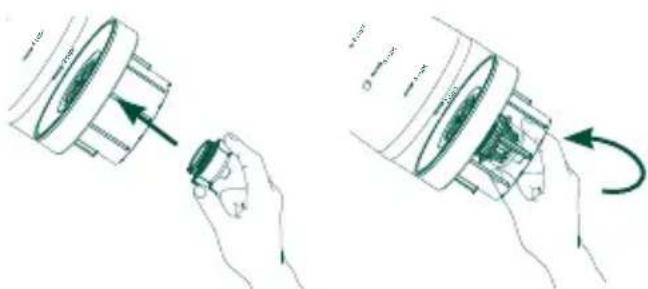
Figure: 4
Before First Use
natural_image
Simple line drawing of a bowl placed on a base with an arrow pointing to it (no text or symbols)GOLD: An optimized brew, certified by the Specialty Coffee Association to be perfectly balanced. This selection will brew your coffee to the rigorous standards of the SCA, meeting requirements for total dissolved solids and extraction percentage. For GOLD brews, the temperature is not adjustable.
LIGHT: A brew designed to create lighter flavors with slightly more acidity.
MEDIUM: A balanced brew that is slightly sweeter, with a smoother body and some distinctive characteristics of the original coffee.
BOLD: A full-bodied, flavorful brew with more intense aromas, and clearer elements of the original roast.
Infusion
Délai d'infusion
Réglages
natural_image
Mechanical assembly diagram showing a gear and shaft assembly with an arrow indicating direction (no text or labels)DÉTARTRAGE

Identification IC: 10229A-WCATA008
Au Canada, visitez service.geappliances.ca/servicio/fr_CA/.
Garantr: GE Appliances, a Haier company
Louisville, KY 40225
Assistance clientèle
SITE WEB CAFÉ
In Canada: cafeappliances.ca
ENREGISTREZ VOTRE ÉLECTROMÉNAGER
cafeappliances.com/parts
Au Canada: geappliances.ca/parts-filters-accessories
General Manager, Customer Relations | GE Appliances, Appliance Park | Louisville, KY 40225
CafeAppliances.com/contact
Au Canada: Director, Customer Relations | MC Commercial Inc. | Suite 300, 5420 North Service Road, Burlington | Ontario L7L 6C7
cafeappliances.ca/support/contact-us
CAFE
DISTINCT BY DESIGN™
- THANK YOU FOR MAKING CAFÉ A PART OF YOUR HOME.
- CAFE
- Table of Contents
- Model: C7CGAAS
- SAFETY INFORMATION 4
- COMPONENTS 6
- OVERVIEW OF CONTROLS 7
- INTRODUCTION 8
- BEFORE FIRST USE 8
- HOW TO BREW A GOOD CUP OF COFFEE....11
- BREWING 13
- SETUP 15
- SMART HQ FEATURES 17
- CARE AND CLEANING....18
- REGULATORY INFORMATION....20
- TROUBLESHOOTING TIPS 21
- NOTES 23
- LIMITED WARRANTY....26
- CONSUMER SUPPORT 27
- IMPORTANT SAFETY INFORMATION
- READ ALL INSTRUCTIONS BEFORE USING THE APPLIANCE
- IMPORTANT SAFEGUARDS: When using electrical appliances, basic safety precautions should always be followed including the following:
- READ AND SAVE THESE INSTRUCTIONS
- WARNING
- Components
- Controls
- Hour Button
- Minute Button
- Power Button
- Temperature Button
- Mug Button
- Carafe Button
- Strength Button
- Brew Button
- Delay Brew Button
- Grind Off Button
- Introduction
- Before First Use
- INSTALLATION REQUIREMENTS
- PREPARE COFFEE MAKER FOR USE
- INSERTING THE CHARCOAL WATER FILTER
- Adding Beans to the Bean Hopper
- Filling the Water Reservoir
- How to Brew a Good Cup of Coffee
- Choose your favorite beans.
- Select brew temperature.
- Select your grind size.
- Choose your strength
- Start your brew cycle.
- Save a favorite brew, and enjoy!
- Brewing
- Strength
- Grind Size
- Temperature
- Brew Volume
- Delay Brew
- SetUp
- Brew With Pre-ground Coffee
- WiFi
- Set Clock
- SmartHQ App Features
- Bloom Time
- Scheduled Brew
- Care and Cleaning
- CAUTION
- CLEANING THE OUTSIDE OF THE COFFEE MAKER
- CLEANING THE BREW BASKET AND MESH BASKET FILTER
- CLEANING THE CARAFE
- CLEANING THE GRINDER:
- REPLACE THE CHARCOAL WATER FILTER
- SHOWERHEAD
- RESET WATER FILTER
- DESCALING
- Regulatory Information
- FCC/IC COMPLIANCE STATEMENT:
- Troubleshooting Tips
- Notes
- Limited Warranty
- What Café Appliances Will Not Cover:
- EXCLUSION OF IMPLIED WARRANTIES
- For sale in the 50 United States, District of Columbia only:
- Consumer Support
- CAFÉ WEBSITE
- REGISTER YOUR APPLIANCE
- PARTS AND ACCESSORIES
- CONTACT US
- CAFÉ
- Infusion
- Délai d'infusion
- Réglages
- DÉTARTRAGE
- Assistance clientèle
- SITE WEB CAFÉ
- ENREGISTREZ VOTRE ÉLECTROMÉNAGER
Brand : GE
Model : C7CGAAS4TW3
Category : Coffee machine