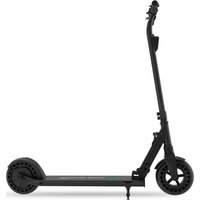
Eco Tour SCO800 - Scooter Prixton - Free user manual and instructions
Find the device manual for free Eco Tour SCO800 Prixton in PDF.


| Product type | Leisure electric scooter |
| Brand | Prixton |
| Model | Eco Tour SCO800 |
| Dimensions (folded) | 980 x 152 x 370 mm |
| Dimensions (unfolded) | 1080 x 425 x 980 mm |
| Weight | 13 kg |
| Maximum load | 100 kg |
| Minimum age of use | 14 years |
| Maximum speed | 24 km/h |
| Range | Up to 12 km |
| Battery type | Lithium-ion 36 V |
| Battery capacity | 4 Ah |
| Charging time | 3 hours |
| Motor power | 300 W |
| Brakes | Mechanical rear brake + electric brake |
| Lighting | Front LED (white) and rear LED (red) |
| Folding system | Double safety lock with red latch |
| Use | On dry and flat ground, household use only |
| Maintenance | Clean with a damp cloth; do not use pressurized water |
| Warranty | 2 years |
Frequently Asked Questions - Eco Tour SCO800 Prixton
User questions about Eco Tour SCO800 Prixton
0 question about this device. Answer the ones you know or ask your own.
Ask a new question about this device
Download the instructions for your Scooter in PDF format for free! Find your manual Eco Tour SCO800 - Prixton and take your electronic device back in hand. On this page are published all the documents necessary for the use of your device. Eco Tour SCO800 by Prixton.
USER MANUAL Eco Tour SCO800 Prixton
natural_image
Side-view line drawing of a modern electric scooter with extended wheels and suspension components (no text or symbols)PATINETE ELÉCTRICO ELECTRIC SCOOTER
natural_image
Electric scooter with extended exhaust pipes and a red curved arrow indicating rotation (no text or symbols on the scooter body)Plegado del scooter
natural_image
Electric scooter with extended exhaust pipes and a red curved arrow indicating rotation (no text or symbols on the scooter body)natural_image
Side profile of a black electric scooter with green buttons and a red arrow indicating motion direction (no text or symbols)natural_image
Close-up of a black mechanical device with a digital display showing time, no visible text or symbols.Imagen 1
natural_image
Close-up of a black cylindrical device with a digital display and a cylindrical component above it, showing motion arrows (no text or symbols visible)Imagen 2
4. Carga del patinete
natural_image
Product photo of a smart scooter with charging station, cable, sensor, and target symbol (no text or labels visible)natural_image
Close-up of a black electric scooter with visible branding and red accent, no readable text or symbols beyond brand name (Scooter, PRIXTON)Puerto de carga
5. Uso previsto
natural_image
Illustration showing four different scenarios of a person using a scooter, head view, and device (no text or symbols)natural_image
Close-up of a black electric scooter wheel with visible battery and sensor components (no text or symbols)Freno trasero
natural_image
Black bicycle-mounted sensor device with adjustable lever and head mount (no text or symbols visible)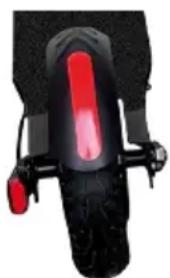
natural_image
Close-up of a black scooter's front wheel with red brake lever (no text or symbols visible)Before operating this vehicle, read all the instructions for safe assembly and operations. User's manual can guide you through the functions and usage of Electric scooter. Before using this Electric scooter, familiarize yourself with how to operate, so that you can keep the Electric scooter in the best condition possible.
This appliance can be used by children aged from 14 years and above and persons with reduced physical, sensory or mental capabilities or lack of experience and knowledge if they have been given supervision or instruction concerning use of the appliance in a safe way and understand the hazards involved.
Children shall not play with the appliance.
Cleaning and user maintenance shall not be made by children without supervision.
Important!
This electric scooter must be charged and stored in a safe way.
For safety reason and protect battery life, never charge the electric scooter in temperatures below 5 °C or above 45 °C. Equally, always disconnect the electric scooter with the power cable once fully charged. Always use the supplied power adapter to charge the electric scooter. Make sure that all screws are properly tightened to avoid unsafe situations.

WARNING
-Please make sure to check that the steering system is correctly adjusted and that all connection components are firmly secured and not broken before riding, refer to handlebar assembly and safety instruction.
-Please read operation guide and warnings of correct techniques for use and braking
-Always wear shoes.
-When self-locking nuts and other self-locking fixings may lose their effectiveness.
-All parts and materia is of electric scooter cannot be changed, modifications are not allowed.
I. Product and Accessories
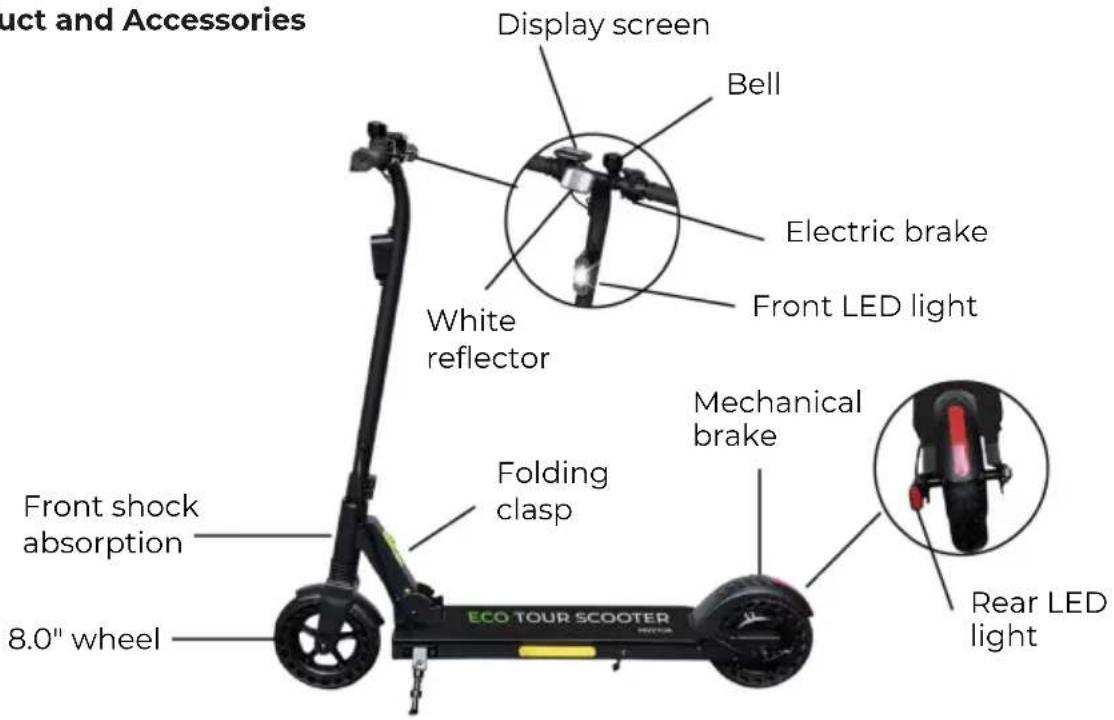
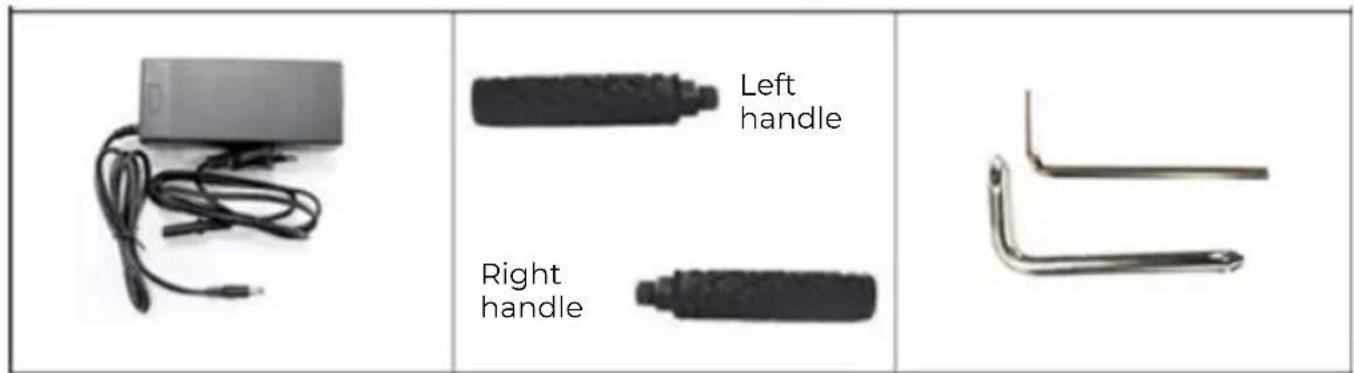
2. Unfolding and folding the scooter
Unfolding the scooter
1) Position the electric scooter on its wheels like below.
2) Push the security lock up, then pull the red unlock clasp as indicated in the arrow below.
3) Raise the handle slowly.
4) The electric scooter is unfolded as soon as you hear the rod clicks into place.
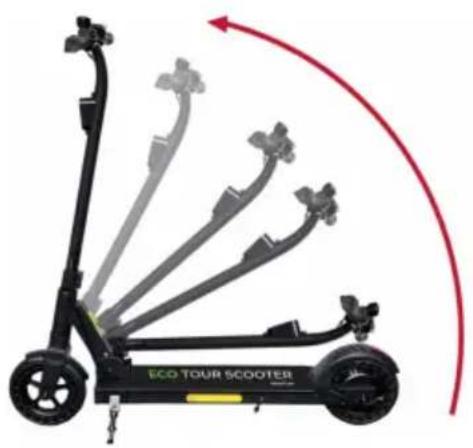
natural_image
Electric scooter with extended fan array and red curved arrow indicating rotation (no text or symbols on the scooter body)Folding the scooter
1) Push the security lock up, then pull the red unlock clasp as indicated in the arrow below.
2) Press the front tu be of the electric scooter downward.
3) The rod clicks audibly into place.
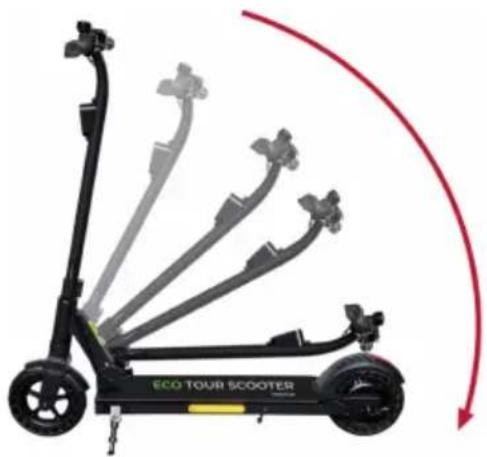
natural_image
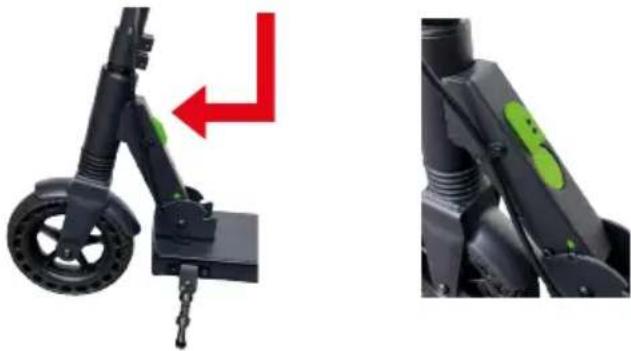
Electric scooter with extended exhaust pipes and a red curved arrow indicating rotation (no text or symbols on the scooter body)4) Dual action safety knob
Fold-Unfold position
natural_image
Close-up of a black electric scooter with green accents and a red arrow indicating motion direction (no text or symbols)Push up and press the red button to fold or unfold the Electric scooter.
3. Handle bar assembly
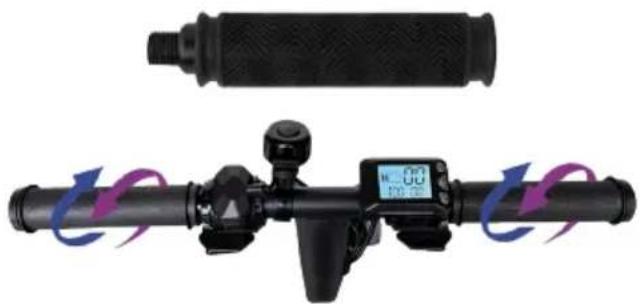
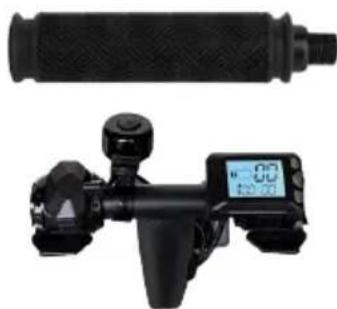
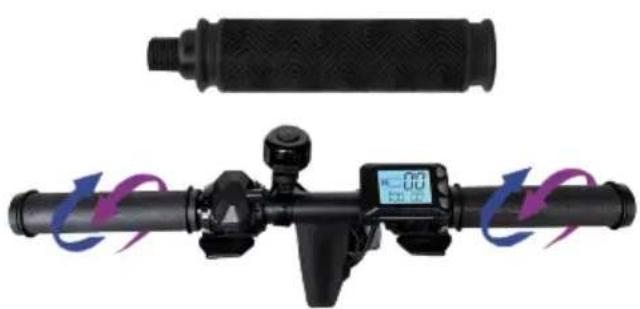
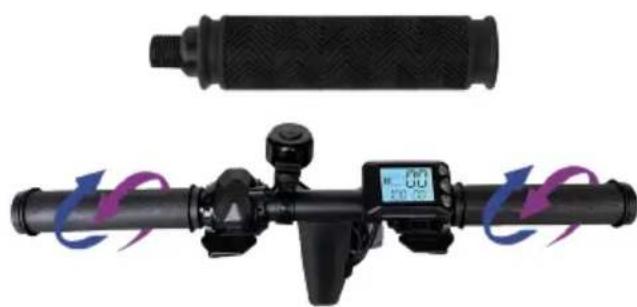
1) Parts inside the packaging: two handlebars
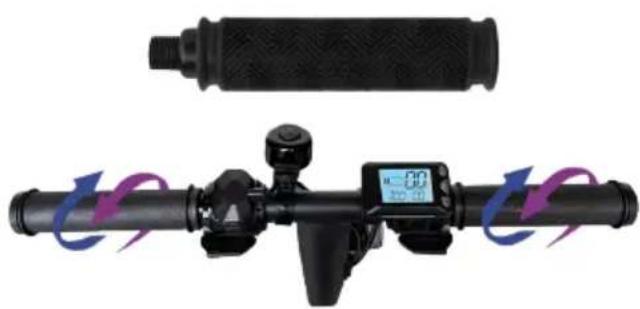
2) Change display angle: Loosen the screw e on the handle bar, and rotate the axle to make the handlebar meter screen upwards while the axle and display screen turn inwards in a horizontal level. Remember to tighten screws again.
3) Before operating the electric scooter, turn the handlebar grips, and carefully check all the components to make sure that the steering is correctly installed as described above, and that all connecting parts are secure and fully functional.
natural_image
Close-up of a black mechanical device with a cylindrical component and a digital display showing time (no visible text or symbols)Figure 1

natural_image
Close-up of a black cylindrical device with a digital display and a cylindrical component above it, showing motion arrows (no text or symbols visible)Figure 2
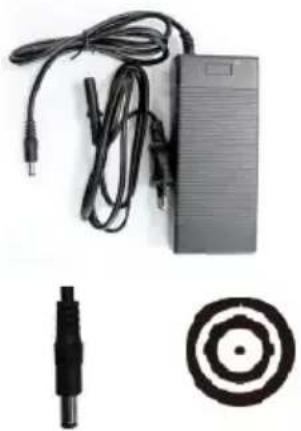
4. Charging the scooter
natural_image
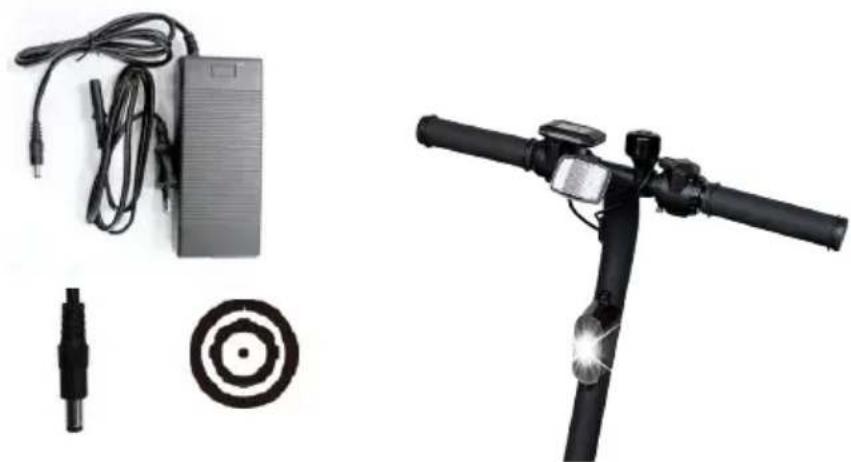
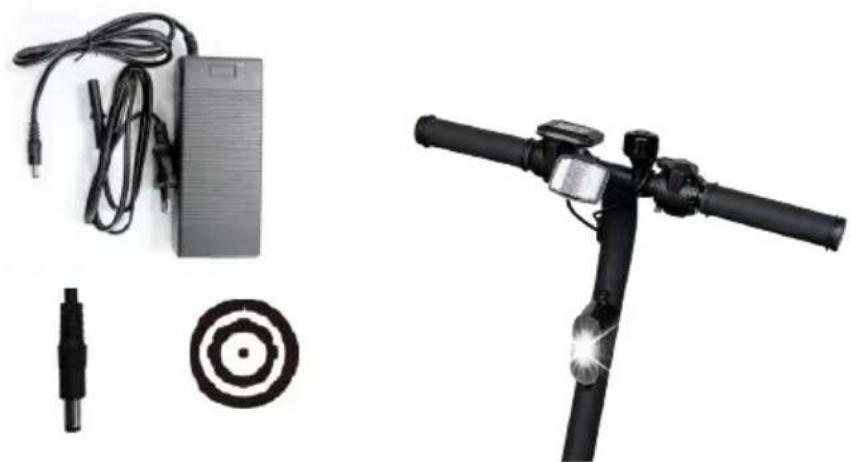
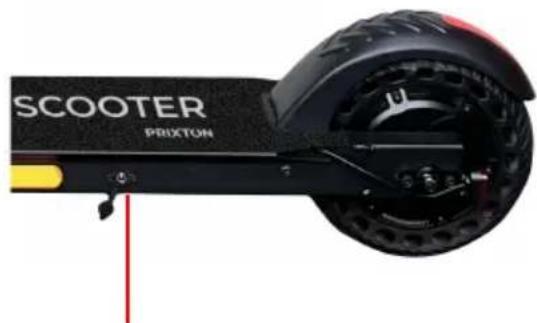
Product photo showing a charging station, cable, sensor, and electric scooter (no text or symbols visible)Connect the supplied power adapter to the charging port of the electric scooter.
natural_image
Exterior view of a black electric scooter with visible branding and wheel (no text-heavy elements)Charging port
s. Intended Use
The Electric scooter is neither a means of transport nor sports equipment, but a device for personal entertainment. The Electric scooter for domestic use only and only by a person aged at least 14 with a maximum weight of 100 kg. The other parameters for the permissible operation of the Electric scooter are defined in the section ("10. List of parameters"). Importantly, the Electric scooter may only be operated in good visibility conditions and only if the physical conditions for stability on the Electric scooter are met (for example, not on one leg/not under the influence of drugs or alcohol). When operating the electric scooter, the operator must wear personal protective equipment specified in the section ("13. Warnings" > 13.2 Preparation").
6. Safety Instruction
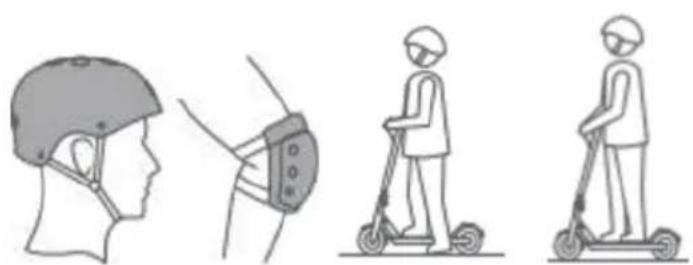
We recommend always wearing helmet and protective gear like elbow, knee and wrist protectors to ensure your personal safety.
natural_image
Illustration showing four different scenarios of a person using a scooter, head profile, and device (no text or symbols)Also make sure you have read the user manual carefully, to ensure you know how to ride it in a safe and fun way.
The Electric scooter is for domestic use only.
It is your responsibility to be aware of and comply with all regulations. If there are no regulations for this Electric scooter in your country, please take care of your own safety and the safety of others. Also pay attention to other people. Always ride safely and only at a speed that allows you to brake safely at any time. A common thing for such products is that there is a risk that you may fall off the product and injure yourself. Always ride as safely as possible.
If lending the electric scooter to friends and family, please make sure they use proper protective gear and know how to ride it.
Before riding the electric scooter, please check that all parts are working as supposed to. If any loose parts, abnormal noise, reduced battery life etc. are detected, please contact your retailer for product service and warranty. Do not repair the electric scooter yourself. Inspect the rear tire, rear brake, and brake pad according to Section 7 of the maintenance specification in this operating instructions. The electric scooter may become unstable if the rear brake is deformed or loose. This is beca use the distance between the brake pad and the rear wheel becomes too small, possibly leading to a blocked rear wheel.
Avoid applying too much force or stepping on the rear fender permanently. This may cause the fender to loosen or damage the spring holding the fender.
As a result, the brake pad constantly touches the wheel and the motor temperature increases due to the additional resistance. The rear tire can also get loose if the brake is in constant braking position.
Avoid constant braking. As a result, the tires will not only wear off, but also become hot. This will soften the rubber and it will no longer have the same grip on the road as usual. Do not touch the tire after braking.
If you hear unusual noises or notice friction when switching on the electric scooter, a bearing may be damaged. A worn bearing may even be indicated by strong vibration of the handlebar. In this case, please contact your retailer since the bearing needs to be replaced and/or the handlebar checked and adjusted.
Ride the electric scooter only on a dry surface since otherwise the riding safety and braking performance may be impaired and the motor or bearings may be damaged. Please do not ride up or down long and steep slopes.
Stop riding when you receive the "Low Battery Warning". The electric scooter then moves only slowly and does not have the same traction as normal and the electric brake does not work. In this case, please use the rear brake to stop the electric scooter. Get off the Electric scooter as soon as the speed allows to do that safely.
Do not use the electric brake and the throttle at the same time.
A normally working Electric scooter operates safely and quietly. If you hear noises or notice bumpy operation, please check wheels, bearings, and brakes. Contact your customer service for repair and maintenance, if necessary.
7. Maintenance
To ensure you get the best possible performance and experience from your electric scooter, it is important to do regular maintenance for important parts of the product.
-Battery maintenance
-Bearings, Screws, Brakes and Wheels
-Storage and Cleaning
Your electric scooter will require some maintenance so please read and familiarize yourself with this guide.
Battery maintenance:
All batteries have a life cycle, and performance will decrease over time, however here are some advice to maximize the life span of the battery.
Make sure that the battery is charged at regular intervals, even if you do not use the electric scooter for a long time. This is to prevent damage to the battery, caused by low voltage over an extended period.
Avoid draining the battery completely. It is best to charge while there is still power on it. This will extend battery life. If the battery is constantly depleted, it will damage the battery (damaged battery caused by wrong handling are not covered by the warranty).
If riding the electric scooter in cold or very hot a reas, the battery time can be lower than when riding in temperatures from 15-25° Celsius. This is not a failure on the batteries, but normal behavior.
Please notice: Even a fully charged battery will run out of power if the electric scooter is not used for a period. Expect a fully charged battery to keep power between 90 and 120 days in off mode, before it is fully discharged. If only partially charged, this period is lower.
Please make sure the battery does not get above 50° Celsius, or below minus 10° Celsius for a longer period. (e.g. don't leave the electric scooter in a hot car in summer, do not put battery into fire etc.) Low temperature (e.g. subzero temperature) can damage the battery cells.
Keep the Electric scooter away from open flame or other sources of heat to prevent the battery from getting too hot. Also make sure not to leave the electric scooter at freezing temperatures. Both heat and excessive cold can cause the battery to discharge.
Only use original charger or an official replacement, as different batteries may require specific charger, and if using other chargers, this could cause damage to the product.
Do not overcharge and discharge the battery.
Please make sure to charge the battery before it is completely out of power, to avoid damaging the battery cells. (damaged battery caused by wrong handling are not covered by the warranty)
It is forbidden to disassemble battery package. This is only to be handled by official service repair centers and professionals.
- Bearings, Screws, brakes and Wheels
Your electric scooter is made up of moving parts, which in time, will be susceptible to wear and tear.
Bearings and screws: The electric scooter has sealed and dustproof bearings so that no lubrication is required. Check the bearings for wear at regular intervals to avoid unsafe riding. Do not jump on and off and do not apply excessive force otherwise to avoid damage to the bearings. This is not a sports electric scooter.
Make sure that ali screws are properly tightened to avoid unsafe situations.
Please check the screws regularly and tighten if they seem loose.
Brakes: Check the brake for wear at regular intervals to avoid unsafe riding. Do not apply excessive force to avoid damage to the brake.
Wheels: Check the wheels for wear at regular intervals to avoid unsafe riding.
Electric scooters come with different wheels but can in general be separated into tires with inflatable inner tu bes and solid wheels.
For inflatable tires, please make sure to keep the right pressure, as hard tires will last longer.
If the wheel seems wobbly even after screws are tightened, the bearings might be worn down and need replacement.

WARNING
-Please make sure to check that the steering system is correctly adjusted and that all connection components are firmly secured and not broken before riding, refer to handle assembly and safety instruction.
-Please read operation guide and warnings of correct techniques for use and braking
-Always wear shoes.
-We highly recommend to always wear helmet/pads for your own protection.
-Self-locking nuts and other self- locking fixings may lose their effectiveness.
-All parts and materials of electric scooter cannot be changed, modifications of the scooter are not allowed. If done, then warranty is void.
- Storage and cleaning
If your Electric scooter gets dirty, please clean it with a damp cloth only, you may not use pressured water-gun or running water, as this could damage vital parts. It is also possible to use a little toothpaste if the dirt is stuck. Remember to clean with damp cloth after this. Please make sure to keep the electric scooter turned off while cleaning it, and make sure to cover the charging input to avoid problems with the electronics.
Make sure to dry the scooter with a towel, should it become wet.
Please notice: Do not use alcohol, gas, kerosene or other corrosive and volatile chemical solvents. This can damage both the appearance and the internal structure of the electric scooter.
Please store your Electric scooter in a dry and cool environment when not in use. Avoid leaving it outdoors, as it is not made for storing in wet areas. Nor is it good to expose to high temperatures caused by direct sun for a long time.
8. Operational control
For better operation, please read the instructions carefully.
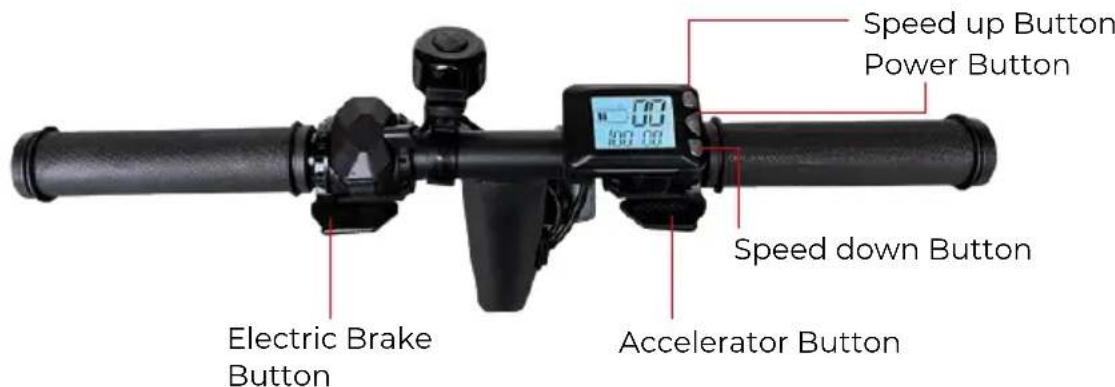
8.1 Button
There are three buttons in the display, ⏻ Power button, ▲ Speed up button and ▼ Speed down button.
8.2 Control and display
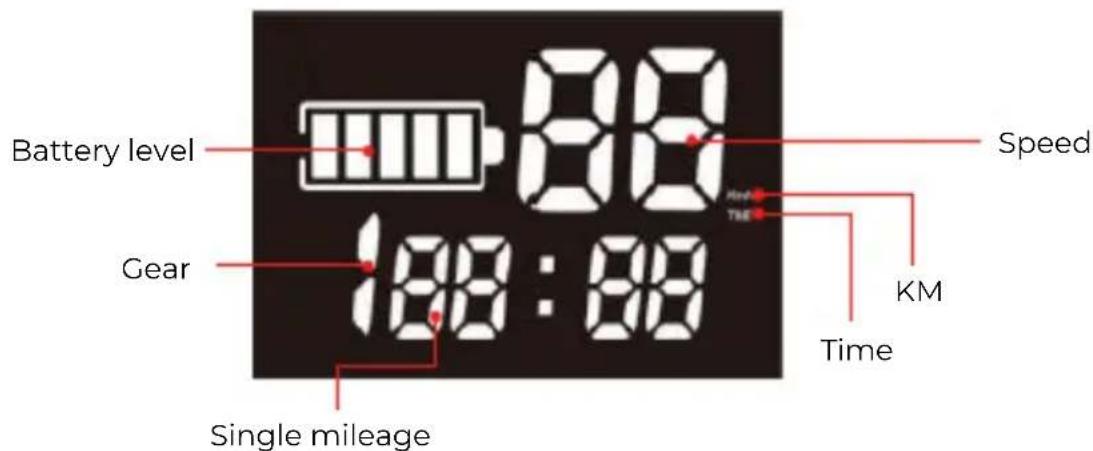
Power On: Long press the power button until the display lights up.
Power Off: Long press the power button until the display goes out and the system is off.
I. Battery power display: it shows the current remaining battery capacity.
- Power off automatically: After the display is idle for more than 5 minutes, the Electric scoo- ter automatically turns off.
Change display information: When the Electric scooter is on, short press the power button, change the showing data on the display, TIME, ODO, DIS and other characters respectively. When it is showing time, it indicates the running time after switching on. The time will be cleared after switching off. When it is showing DIS, it indicates the driving distance after switching on, and it will be cleared after power off. When it is showing ODO, it indicates the total mileage, which will be retained unless it is manually cleared.
Change the gear: Short press ▲ or ▼ button to change the gear level (Gear 3 is fast speed, Gear 2 is medium speed, and Gear lis slow speed).
Acceleration: Gently press the accelerator button to speed up (The depth of the press is related to the gear level you have set).
Deceleration: Gently press the deceleration dial to slow down. The deeper the press, the greater the deceleration (the deceleration is relevant to the formation of the press, and pushing too hard can not increase the braking force and may cause damage to the brake dial).
Clear total mileage: Press ▲ and ▼ buttons at the same time, then press the power button to switch on the Electric scooter, and the total mileage will be cleared.
Important: Press ▲ and ▼ buttons at the same time, then press the power button ⏻ and select P3 mode, when para meter value is O, it will start with zero. When para meter value is I, it will start with non-zero.
(Zero start: When starting, the Electric scooter in a stationary case, press the accelerator to start driving.)
(Non-zero start: When starting, the Electric scooter is static, press the accelerator and the Electric scooter does not work, push the Electric scooter manually to start driving, the Electric scooter works. factory default is non-zero start.)
You have to manually move the Electric scooter with your foot before the accelerator button works.
9. Electric scooter riding
natural_image
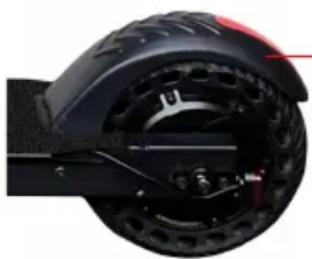
Close-up of a black electric scooter wheel with visible battery and sensor components (no text or symbols)Rear break
I. Press ▲ and ▼ buttons to adjust speed level.
2. Press the accelerator button to accelerate, so you can drive.
3. Press the brake button to brake.
4. When you press the accelerator and electric brake button at the same time, the Electric scooter will automatically brake
5. For safety, the rear wheel brake system must be used when driving at high speed.
6. When driving at night, press the headlight switch button to turn on the headlight.
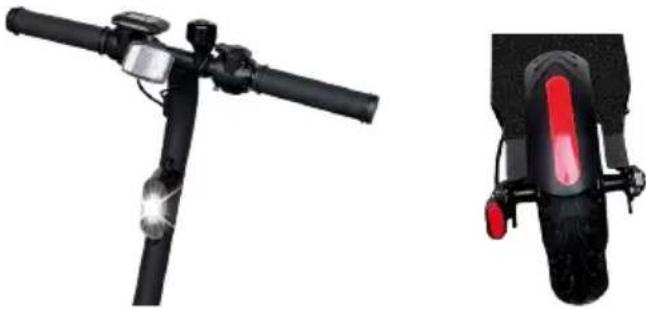
9.1 Front and Back LED Light
This Electric scooter is equipped with the front and back LED lamps. The front lamp lights white and the back lamp lights red.
- Walking mode: 6KM/H, when 1 mode, the front and back light will be flashed.
- 2/3 mode: when 2/3 mode and when brake, front and back light will be on, and can not flash. User can also press the “▲”key by 5S to turn on/off the light.
natural_image
Exterior and side views of a black electric scooter with illuminated lever and rear-mounted sensor (no text or symbols visible)- Lista de parámetros
| Parameter | Range | |
| Size | Folding size (mm) | 980*152*370 |
| Unfolded size (mm) | 1080*425*980 | |
| Quality | Max vehicle payload (kg) | 100 |
| Weight (kg) | 13 | |
| Ride condition | Age | 14+ |
| Electric scooter | Max. speed (horizontal riding km/h) | 24 |
| Distance up to (km) | 12 | |
| Terrain | Level and dry surface | |
| Battery Type: Li-ion battery | Nominal voltage (V) | 36 |
| Input voltage (V) | 42 | |
| Battery capacity (mAh) | 4000 | |
| Motor | Motor Power (W) | 300 |
| Emission sound pressure level (DB) | Emissions < 70 db (A). | |
| Power adapter | Rated input voltage (V) | 100-240 |
| Rated output voltage (V) | 42 | |
| Rated current (A) | 1.5 | |
| Charging Time (h) | 3 |
Input: 100V-240V\~, 50/60Hz, 2A(Max)
Output: 42V 1.5A
Max speed: 24km/h
Weight: 13kg
Max vehicle payload: 100kg
Battery: 36V/4mAh
Power consumption: ≤300W
11. Electric scooter safe parking
Once you have stopped the Electric scooter, get off it and press the side stand down with your right foot to support the Electric scooter. The side stand is located on the left-hand side of the Electric scooter below the foot board.
Before you ride again, push the side stand back up so that it is parallel to the foot board.
12. Safe transportation
Pack the Electric scooter flat, don't drop the Electric scooter during the transportation, don't to put the Electric scooter near fire or explosive materials.
13. Warnings
13.1 Risks of riding

WARNING
First, learn safe riding before you ride the Electric scooter fast.
-Failure to observe, loss of control, falls, and violations of the rules can cause injuries.
-Speed and range depend on the rider's weight, terrain, temperature, and riding style.
-Wear a helmet and protective clothing when riding the Electric scooter.
-Read the operating instructions carefully before riding the Electric scooter.
-For use only in a dry environment.
-The Electric scooter may not be used on public roads.
-Make sure that this product complies with local regulations.
-For domestic use only
13.2 Preparation
-First, charge the battery completely.
-Wear a helmet, knee and elbow pads, as well as earmuffs/earplugs.
-Do not wear loose clothing or open laces that can get caught in the Electric scooter wheels.
13.3 Weight restriction
Reason for the weight restriction:
-Ensuring the rider's safety;
-Avoiding damage due to overload. Maximum capacity: 100kg.

WARNING
Do not try to make a turn too fast.
Lithium battery inside.
If the Electric scooter switches off, the system will block the vehicle automatically. It can be released again by pressing On/Off.
- Use the device only at temperatures between -10 °C and +45 °C.
13.4 Range per charge
The range depends on several factors:
-Topography: On level paths you have a greater range than on u neven ground.
-Weight: The range depends on the rider's weight.
-Temperature: Extreme temperatures reduce the range.
-Maintenance: If the Electric scooter is charged properly and the battery is kept in good condition, the range will be extended.
-Speed and riding style: The range is greater at constant speed than at frequent stops and starts, acceleration and braking.
13.5 Safe riding
This chapter focuses on safety, experience, and warnings. Before operating the vehicle, please read all installation and operating instructions carefully.

WARNING
Familiarize yourself with the vehicle before you use it so that you can keep the Electric scooter in sound condition.
-Observe all safety instructions when riding the Electric scooter.
-The Electric scooter is designed only for personal entertainment. Avoid operating it on public roads/in road traffic.
-Children, elderly people, and pregnant women are not allowed to ride the vehicle.
-People with limited sense of balance are not allowed to ride the Electric scooter.
-Avoid riding the Electric scooter under the influence of alcohol or other substances.
-Do not carry any objects while riding.
-Make sure you have a clear vision in front of you to ride the Electric scooter safely.
-While riding, your feet must always be on the foot board.
-The Electric scooter can accommodate only one person.
-Do not start or stop abruptly.
-Avoid riding on steep slopes.
-Stop riding the Electric scooter if you hit a solid object (such as a wall or other structure) with it.
-Do not ride in dimly lit or dark places.
-Ride the Electric scooter at your own risk, we assume no liability for accidents or damage.
-Ride at a safe speed that allows you to stop at any time.
-Keep the Electric scooter at a sufficient distance from other people and avoid collisions.
-Steer through balance shifting, fast movement can result in falls.
-Do not ride in rain or under other wet conditions. Ride only in dry weather.
-Avoid riding over obstacles, if possible, and avoid snow, ice, and slippery surfaces.
-Avoid riding over textiles, small branches, and stones, if possible.
-Avoid riding in narrow places or in places with obstacles, if possible.
-Jumping on and off the Electric scooter will cause damage that is not covered by the warranty. There is a risk of injury. Injuries and damage due to "trick riding" are not covered by the warranty.
-Stand on the pedal with one foot, push the other foot back on the ground and start sliding. The motor can only start after the vehicle speed reaches 3km/h.
13.6 Charging
-Make sure that the Electric scooter, charger, and DC power input of the device are always dry.
-Note: To charge this Electric scooter, use SOLELY the supplied charger with the following output: 42 V -1.5A.
-Using a different charger may cause damage to the device and other potential risks.
-Use the mains adapter to plug the DC input of the device into a conventional socket.
-There will be no light on the charger before charging, when connected to e-scooter the adapter will light red, and charging has started.
-The red indicator lights up when properly charged; if this is not the case, please check the connections.
-Now you can stop the charging cycle. Overcharge shortens the battery life.
-The charging process takes up to 3 hours. Do not charge the battery for more than 3 hours. After 3 hours, disconnect the charger from the device and the power supply.
Overcharge reduces the battery service life.
-The product must not be charged over extended periods.
-Always keep an eye on the device throughout the charging cycle.
-Charge the device only at temperatures between 0 °C and +45 °C.
-When charging at lower or higher temperatures, there is a risk that the battery performance will be reduced. Therefore, there is a potential risk of injuries and material damage.
-Store and charge the device in an open, dry area away from combustible materials.
-Do not charge the device in direct sunlight or in the vicinity of open flames.
-Do not charge the device immediately after use. Allow the device to cool down for an hour before charging it.
-If the device is left to other people, it must be charged partially (20 - 50%), not fully.
-Do not remove the device from its package to fully charge it and then put it back in the package.
-The device is generally partially charged as shipped from the factory. Keep the device partially charged until it is used.
-Allow the Electric scooter to cool down for at least 1 hour before it can be put in the package.
-Do not leave the device exposed to sunlight in a car.
CAUTION
The Electric scooter must not be used during the charging cycle!
-The LED indicator on the battery charger lights red during the charging process.
-The LED indicator on the charger will light green when the charging process is complete.
-After charging, disconnect the charger from the mains and the Electric scooter.
CAUTION
Connect the DC cable supplied with the Electric scooter only to the DC input!
-Do not insert foreign objects into the DC input.
CAUTION
-Do not remove the protective cap from the DC input!
-Remove the cap only when charging the Electric scooter!
-After charging, disconnect the DC plug and close the DC input again with the cap!
Make sure that neither water nor other liquids penetrate into the inner components of the Electric scooter; otherwise, the electronics/batteries of the device could be permanently damaged. There is a risk of injury.
-Do not open the electric scooter casing, otherwise the warranty is invalidated.
-Make sure to wear helmet and protective clothing before using the Electric scooter.
-Make sure to read manual carefully before using the Electric scooter.
-The Electric scooter is not intended for use on public roads nor in traffic
-The Electric scooter must only be used on dry and level ground
-For domestic use only
-The Electric scooter may not be used by anyone under age of 14 years
IMPORTANT! Read carefully and keep for future reference.
Any load attached to the handlebar will affect the stability of the vehicle.
Accessories and any additional items which are not approved by the manufacturer shall not be used.
WARNING ! As with any mechanical component, a vehicle is subject to high stresses and wear. The various materials and components may react differently to wear or fatigue. If the expected service life for a component has been exceeded, it may break suddenly, therefore risking causing injuries to the user. Cracks, scratches and discoloration in the areas subject to high stresses indicate that the component has exceeded its service life and should be replaced.
Traffic in the city has many obstacles to cross such as curbs or steps. It is recommended to avoid obstacle jumps. It is important to anticipate and adapt your trajectory and speed to those of a pedestrian before crossing these obstacles. It is also recommended to get out of the vehicle when these obstacles become dangerous due to their shape, height or slippage.
WARNING Keep plastic covering away from children to avoid suffocation.
Take the time to learn the basics of the practice to avoid any serious accident that can take place in the first months;
Get closer to your seller so he can refer you to an appropriate training organization.
- In any case, anticipate your trajectory and your speed while respecting the code of the road, the code of the sidewalk and the most vulnerable.
- Notify your presence when approaching a pedestrian or cyclist when you are not seen or heard.
- Cross the protected passages while walking.
- In all cases, take care of yourself and others.
- Do not divert the use of the vehicle.
- This vehicle is not intended for acrobatic use.
- Caution, the brake may become hot in use. Do not touch the brake disc after use.
- Eliminate any sharp edges caused by use.
Power-off the vehicle during charging.
Self-tightening nuts as well as the other self-tightening fastenings may lose their efficiency and that they may need to be retightened;
According to French traffic rules, reflective clothing and helmet is strongly required during cycling.
Warranty policy
This product is guaranteed for 2 years from the date of purchase. When you have a problem that you can not solve, you must access the web www.prixton.com and click on the contact option to send us your assistance form.
These technical and electrical specifications are those of typical units and may be changed without prior notice in order to provide improved equipment.
Simplified eu declaration of conformity
We, La Trastienda Digital located in Avenida Cervantes 49, módulo 25, Basauri 48970, Bizkaia hereby declare that the following goods, imported and selling at European market:
| BRAND | MODEL NAME DESCRIPTION | CATEGORY | |
| PRIXTON | ECO TOURSCO800 | ELECTRIC SCOOTER | LEISURE |
Are in compliance with the EC Council Directive of 2014/53/EU (EM DIRECTIVE) and harmonized standards and with the board of the 16th of April 2014.
The complete text of the UE Declaration of conformity is available anytime at this website address:
www.prixton.com
LA TRASTIENDA DIGITAL
natural_image
Electric scooter with extended exhaust pipes and a red curved arrow indicating airflow direction (no text or symbols on the scooter body)Pliage du scooter
natural_image
Black electric scooter with extended exhaust pipes, shown in a curved arrow indicating rotation (no text or symbols on the scooter body)natural_image
Side profile of a black electric scooter with green sensor module and red directional arrow indicating motion (no text or symbols)natural_image
Close-up of a black mechanical device with a digital display showing time, no visible text or symbols.Figure 1
natural_image
Close-up of a black cylindrical device with a digital display and a cylindrical tool, both with purple and blue curved arrows indicating motion or signal flow (no text or symbols visible)Figure 2
4. Charge du scooter
natural_image
Product photo of a black electronic device with cables, a connector, and a target symbol (no visible text or labels)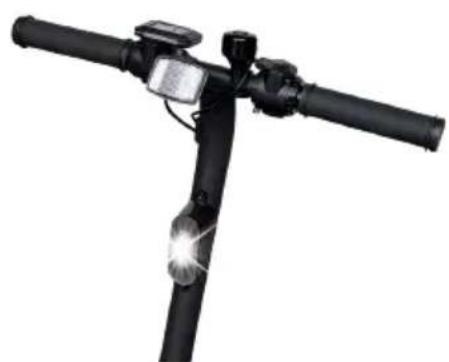
natural_image
Black bicycle bike with overhead sensor and light beam (no text or symbols visible)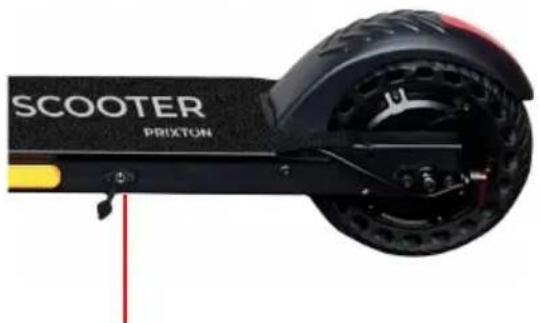
natural_image
Close-up of a black Scooter PRIXTON electric scooter with visible branding and wheel (no text beyond brand name)Port de charge
natural_image
Illustration showing four different scenarios of a person using a smart scooter, head profile, and two motorcyclists (no text or symbols present)natural_image
Close-up of a black electric scooter with visible wheel, sensor, and head assembly (no text or symbols)Frein arrière
natural_image
Exterior view of a black electric scooter with a red LED light on the side (no text or symbols visible)natural_image
Electric scooter with extended exhaust pipes and a red curved arrow indicating airflow direction (no text or symbols on the scooter body)natural_image
Electric scooter with extended exhaust pipes and a red curved arrow indicating rotation (no text or symbols on the scooter body)natural_image
Side-by-side comparison of a black electric scooter with green sensor module, showing front and side views (no text or symbols)natural_image
Close-up of a black mechanical device with a digital display showing time, no visible text or symbols.Figure 1
natural_image
Close-up of a black cylindrical device with a digital display and a cylindrical component above it, both with motion arrows (no visible text or symbols)Figure 2
4. Carica del monopattino
natural_image
Product photo of a black electronic device with cables, a connector, and a target symbol (no visible text or labels)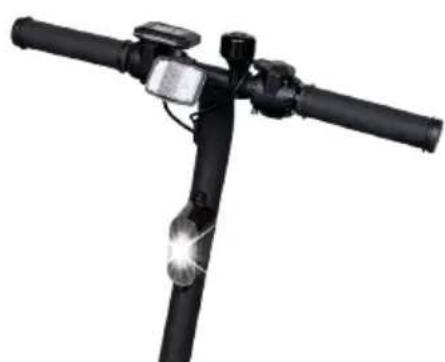
natural_image
Black bicycle bike with overhead sensor and illuminated light beam (no text or symbols visible)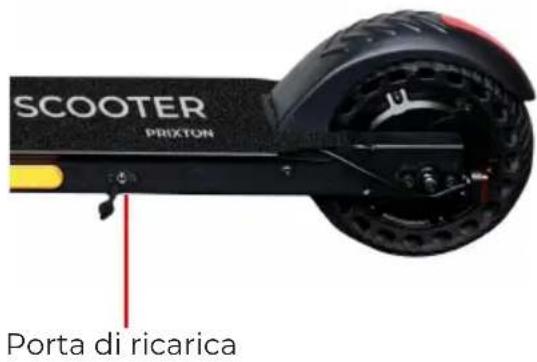
natural_image
Illustration showing three different scenarios of a person wearing helmets and using a scooter (no text or symbols present)natural_image
Close-up of a black electric scooter wheel with visible battery, sensor, and steering wheel (no text or symbols)Freno posteriore
natural_image
Exterior view of a black electric scooter with LED lights and head-mounted sensor (no text or symbols visible)natural_image
Electric scooter with extended exhaust pipes and a red curved arrow indicating rotation (no text or symbols on the diagram itself)Dobrar a trotinete
natural_image
Black and white photo of an RCO Tour Scooter with extended blades, shown in a curved arrow (no text or symbols on the scooter body)natural_image
Close-up of a black electric scooter with green accents and a red arrow indicating motion direction (no text or symbols)Apertar e carregar no botão para dobrar ou desdobrar a scooter eléctrica.
natural_image
Close-up of a black mechanical device with a digital display showing time, no visible text or symbols.Figura 1
natural_image
Close-up of a black cylindrical device with a digital display and a cylindrical tool, both with purple and blue motion arrows indicating rotation (no text or symbols visible)Figura 2
4. Carregar a trotinete
natural_image
Product photo of a black electronic device with cables, a connector, and a circular target-like symbol (no visible text or labels)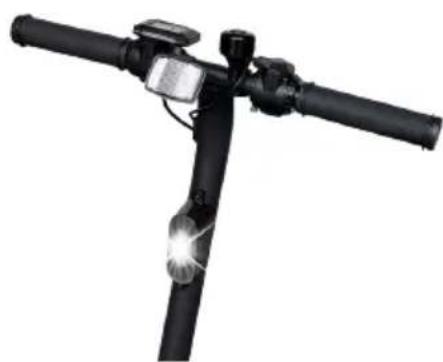
natural_image
Black bicycle light railer with sensor and head-mounted sensor (no text or symbols visible)natural_image
Close-up of a black electric scooter with visible branding and wheels (no text-heavy elements)natural_image
Illustration showing four different scenarios of a person wearing helmets and using a smart controller device (no text or symbols present)natural_image
Close-up of a black electric scooter with visible wheel, sensor, and head assembly (no text or symbols)Travão traseiro
natural_image
Black bicycle bike with overhead sensor and head-mounted sensors (no text or symbols visible)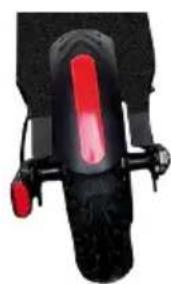
natural_image
Close-up of a red and black bicycle wheel with attached lever (no visible text or symbols)natural_image
Electric scooter with extended exhaust pipes and a red curved arrow indicating rotation (no text or symbols on the scooter body)natural_image
Electric scooter with extended arm and visible exhaust cone, shown in black and gray tones (no text or symbols on the scooter body)natural_image
Side view of a black electric scooter with green sensor module and red directional arrow (no text or symbols)natural_image
Close-up of a black mechanical device with a digital display showing time, no visible text or symbols.Figure 1

natural_image
Close-up of a black cylindrical device with a digital display and a cylindrical component above it, showing motion arrows (no text or symbols visible)Figure 2
natural_image
Black-and-white photo of various electronic devices including a charging unit, connector, and a smart streetlight (no text or symbols visible)natural_image
Illustration showing three different scenarios of a person wearing helmets and using a device to interact with a scooter (no text or symbols present)natural_image
Close-up of a black electric scooter with visible wheel, suspension, and brake mechanism (no text or symbols)Hinterradbremse
natural_image
Exterior view of a black electric scooter with attached sensor and rear-mounted head (no text or symbols visible)10. Parameterverzeichnis
- Plegado del scooter
- Carga del patinete
- Uso previsto
- Important!
- WARNING
- Unfolding and folding the scooter
- Unfolding the scooter
- Folding the scooter
- Handle bar assembly
- Charging the scooter
- s. Intended Use
- Safety Instruction
- Maintenance
- Battery maintenance:
- - Bearings, Screws, brakes and Wheels
- - Storage and cleaning
- Operational control
- Button
- Control and display
- Electric scooter riding
- Front and Back LED Light
- Electric scooter safe parking
- Safe transportation
- Warnings
- Risks of riding
- Preparation
- Weight restriction
- Range per charge
- Safe riding
- Charging
- CAUTION
- Warranty policy
- Simplified eu declaration of conformity
- Pliage du scooter
- Charge du scooter
- Carica del monopattino
- Dobrar a trotinete
- Carregar a trotinete
- Parameterverzeichnis
Brand : Prixton
Model : Eco Tour SCO800
Category : Scooter