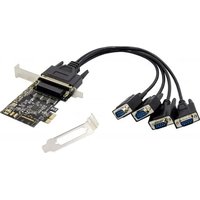
EMRICK12B - Expansion card CONCEPTRONIC - Free user manual and instructions
Find the device manual for free EMRICK12B CONCEPTRONIC in PDF.


| Product Type | Computer expansion card |
| Brand | Conceptronic |
| Model | EMRICK12B |
| Interface | PCI Express (PCIe) |
| Main function | Adding serial ports (RS-232) to a computer |
| Power supply | Powered by PCIe bus |
| Compatible operating systems | Windows (drivers provided on CD) |
| Installation | Insert into a free PCIe slot, install drivers from the CD |
| Package contents | PCIe serial card, driver CD, quick installation guide |
| Maintenance and cleaning | Unplug before cleaning, use a dry lint-free cloth |
| Safety | Do not expose to water, moisture or heat; do not open |
| Disposal | Do not dispose of with household waste, recycle at appropriate collection point |
| Certifications | CE, UKCA |
| Required slot type | Available PCIe slot (standard size) |
| Plug and Play | Yes, after driver installation |
| Operating temperature | 0 °C to 50 °C (estimated) |
| Operating humidity | 20% to 80% RH (non-condensing, estimated) |
| Warranty | Check Conceptronic website for details |
| Customer service | Technical support via www.conceptronic.net and email: support@concepttronic.net |
Frequently Asked Questions - EMRICK12B CONCEPTRONIC
User questions about EMRICK12B CONCEPTRONIC
0 question about this device. Answer the ones you know or ask your own.
Ask a new question about this device
Download the instructions for your Expansion card in PDF format for free! Find your manual EMRICK12B - CONCEPTRONIC and take your electronic device back in hand. On this page are published all the documents necessary for the use of your device. EMRICK12B by CONCEPTRONIC.
USER MANUAL EMRICK12B CONCEPTRONIC
Operating Temperature
-10°C \~ 55°C
Storage Temperature
-40°C \~ 70°C
Relative Humidity
5\~95% RH (no condensation)
Dimensions
85 x 69 x 3 mm
Weight
250g
Features
■ Compliant with PCI Express 2.0 Gen 1.
■ Single-lane (x1) PCI-Express End-point controller with PHY integrated.
■ Compliant with PCI Power Management 1.2.
■ On-chip 256-byte depth FIFO in transmit, receive path of each port.
■ Supports hardware and software flow control.
■ Supports Slow IrDA mode (up to 115200bps) on all serial ports.
■ Supports 5, 6, 7, 8 and 9-bit serial format.
■ Supports remote wakeup and power management features.
Package Contents
■ EMRICK12B
■ Driver CD
■ Low profile bracket
■ Quick Installation Guide
English
Congratulations on the purchase of your Conceptronic EMRICK12B.
When problems occur, we advise you to visit our support site (go to www.conceptronic.net and click on 'Support'). If you have other questions about your product and cannot find it on our website, please contact us at support@concepttronic.net.
For more information about Conceptronic products, please visit the Conceptronic website: www.conceptronic.net.
Installation & usage
■ Turn Off the power to your computer.
■ Unplug the power cord and remove your computer's cover.
■ Remove the slot bracket from an available PCIe slot.
- To install the card, carefully align the card's bus connector with the selected PCIe slot on the motherboard. Push the board down firmly.
- Replace the slot bracket's holding screw to secure the card.
■ Replace the computer cover and reconnect the power cord.
Your computer will show the "New Hardware Wizard" on your screen. You can ignore this "New Hardware Wizard" by clicking "Cancel".
- Insert the CD-ROM in the optical drive of your computer. The AutoPlay option will be shown automatically. Click on “Run Autorun.exe” to start the autorun menu.
■ Select “Install Drivers” and follow the onscreen instructions to install the required drivers for the serial PCIe card.
■ When the driver installation is complete, restart your computer to ensure the drivers are correctly loaded.
Safety & Warnings instructions
Read the operating instructions carefully and especially observe the safety information. If you do not follow the safety instructions and information on proper handling in this manual, we assume no liability for any resulting personal injury or damage to property. Such cases will invalidate the warranty/guarantee.
- Keep the device away from water, humidity, fire or hot environments.
- Keep your device and all its parts and accessories out of the reach of small children.
■ Do not leave the packaging material lying around carelessly. This may become dangerous playing material for children.
■ Avoid dropping, throwing or crushing the device.
■ Do not open, change or damage the device.
■ Disconnect the product from the mains before cleaning.
■ Clean the product with a dry, fibre-free cloth.

Disposal of waste electrical equipment: Dispose of the product at a recycling point. Do not dispose of together with household waste. Incorrect storage/disposal can harm the environment and/or cause injury.

CE / UKCA marking: Conceptronic declares that this product complies with the directives listed in the section 'Declaration of Conformity'.
Deutsch
Conceptronic: www.conceptronic.net.
Digital Data Communications GmbH - Im Defdahl 10 F, 44141 Dortmund, Germany CONCEPTRONIC® is a registered trademark of Digital Data Communications GmbH © Copyright Digital Data Communications GmbH. All Rights Reserved.
Brand : CONCEPTRONIC
Model : EMRICK12B
Category : Expansion card