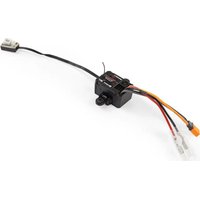
Firma 25A - Remote control toy SPEKTRUM - Free user manual and instructions
Find the device manual for free Firma 25A SPEKTRUM in PDF.


| Product Type | Speed controller (ESC) and 2-in-1 receiver for radio-controlled vehicles |
| Brand | Spektrum |
| Model | Firma 25A |
| Category | Radio-controlled toy (14 years and older) |
| Dimensions (L × W × H) | 39.2 × 29.9 × 35.2 mm |
| Weight | 32.5 g |
| Number of channels | 3 (no servo output for throttle) |
| Frequency band | 2.4 GHz SLT |
| Servo output voltage | 6 V up to 3 A |
| Battery input connector | IC2 |
| Input voltage range | 2-3S Li-Po (7.4 - 11.1 V nominal) |
| Maximum continuous current | 25 A |
| Peak current (surge) | 180 A |
| Motor connectors | Female bullet connectors 3.5 mm |
| Compatible motors | Sensorless brushless |
| Water resistance | Waterproof electronics, suitable for wet conditions (no immersion) |
| Built-in safety | Throttle goes to neutral position in case of radio link loss |
| Programming | Via push button or SPMXCA200 programming module |
| Gyroscope (DSC) | Dynamic stability control, 4 adjustable levels |
| Maintenance in wet conditions | Drying, rinsing wheels, checking contacts |
| Warranty | 6 months (limited, according to legal provisions) |
Frequently Asked Questions - Firma 25A SPEKTRUM
User questions about Firma 25A SPEKTRUM
0 question about this device. Answer the ones you know or ask your own.
Ask a new question about this device
Download the instructions for your Remote control toy in PDF format for free! Find your manual Firma 25A - SPEKTRUM and take your electronic device back in hand. On this page are published all the documents necessary for the use of your device. Firma 25A by SPEKTRUM.
USER MANUAL Firma 25A SPEKTRUM
Firma 25A 2-in-1 Brushless ESC / SLT Protocol Receiver with Gyro
NOTICE
All instructions, warranties and other collateral documents are subject to change at the sole discretion of Horizon Hobby, LLC. For up-to-date product literature, visit horizonhobby.com or towerhobbies.com and click on the support or resources tab for this product.
Meaning of Special Language
The following terms are used throughout the product literature to indicate various levels of potential harm when operating this product:
WARNING: Procedures, which if not properly followed, create the probability of property damage, collateral damage, and serious injury OR create a high probability of superficial injury.
CAUTION: Procedures, which if not properly followed, create the probability of physical property damage AND a possibility of serious injury.
NOTICE: Procedures, which if not properly followed, create a possibility of physical property damage AND a little or no possibility of injury.

WARNING: Read the ENTIRE instruction manual to become familiar with the features of the product before operating. Failure to operate the product correctly can result in damage to the product, personal property and cause serious injury.
This is a sophisticated hobby product. It must be operated with caution and common sense and requires some basic mechanical ability. Failure to operate this Product in a safe and responsible manner could result in injury or damage to the product or other property. This product is not intended for use by children without direct adult supervision. Do not attempt disassembly, use with incompatible components or augment product in any way without the approval of Horizon Hobby, LLC. This manual contains instructions for safety, operation and maintenance. It is essential to read and follow all the instructions and warnings in the manual, prior to assembly, setup or use, in order to operate correctly and avoid damage or serious injury.
Age Recommendation: Not for children under 14 years. This is not a toy.
NOTICE: This product is only intended for use with unmanned, hobby-grade, remote-controlled vehicles and aircraft. Horizon Hobby disclaims all liability outside of the intended purpose and will not provide warranty service related thereto.
Your new Spektrum™ 25A Waterproof 2-in-1 ESC and receiver has been designed and built to allow you to operate the product in many “wet conditions”, including puddles, creeks, wet grass, snow and even rain.
While waterproof, this component has not been designed to be immersed in water for long periods of time and should NOT be treated like a submarine. In addition, most metal parts, including any screws and nuts, as well as the contacts in the electrical cables, will be susceptible to corrosion if additional maintenance is not performed after running in wet conditions.
To maximize the long-term performance of your ESC and to keep the warranty intact, it should only be used as described in the “Usage Conditions” section of this manual. Additionally, the procedures described in the “Wet Conditions Maintenance” section must be performed regularly if you choose to run in wet conditions. If you are not willing to perform the additional care and maintenance required, then you should not operate your vehicle in those conditions.

CAUTION: Failure to exercise caution while using this product and comply with the following precautions could in product malfunction and/or void the warranty.
General Precautions
- Read through the wet conditions maintenance procedures and make sure you have all the tools you will need to properly maintain your ESC.
- Do not operate your ESC where it could come in contact with salt water (ocean water or water on salt-covered roads), contaminated or polluted water. Salt water is very conductive and highly corrosive, so use caution.
Usage Conditions
Your ESC will operate successfully in any of the following, individual-usage scenarios:
- 2 hours continuous operation in damp grass or vegetation.
- 2 hours continuous operation in heavy fog (95% humidity, saturated air, condensing water).
- 1 hour continuous operation in light rain (<0.10 in/2.5mm per hour).
- 15 minutes continuous operation in heavy rain (>0.30 in/7.6mm per hour).
- 1 hour continuous operation in light sleet (<0.10 in/2.5mm per hour).
- 1 hour continuous operation in light snow (<0.25 in/6.35mm per hour).
- 45 minutes continuous operation in standing or running fresh water (the water level should always remain below the vehicle frame), or constant splashing water, without any immersion of waterproof component(s).
- 5 minutes continuous operation in standing or running fresh water (the water level should never rise higher than 0.5 in (about 10mm) above the vehicle frame), constant splashing water, or frequent, intermittent immersion of waterproof component(s).
- 1 hour continuous operation in damp sand, dirt, mud or snow (the material level should always be below the vehicle frame), constant splatter without any immersion or coverage of waterproof component(s).
Furthermore, when appropriate maintenance procedures (as described below) are performed promptly following exposure, the ESC will remain best protected from corrosion or other long-term, water-related damage.
Wet Conditions Maintenance
- Gently rinse the mud and dirt off the ESC with a garden hose.
- Remove the battery pack(s) and dry the contacts.
- If you have an air compressor or a can of compressed air available, blow off the ESC to help remove any water that may have gotten into small crevices or corners. Dry any water that may be inside a recessed connector housing.
- Let the ESC air dry before you store it. Water may continue to seep or evaporate out of tight areas for a few hours.
NOTICE: Never use a pressure washer to clean your vehicle.
Contents
Features....7
Diagram 8
Installation....9
Binding 10
ESC and Transmitter Calibration 11
Operation 12
Failsafe 12
ESC Programming....13
Programmable Items....14
Programmable Values 15
Dynamic Stability Control (DSC)....16
LED Indicators 17
Receiver Troubleshooting Guide 18
Telemetry Troubleshooting Guide....19
ESC Troubleshooting Guide 19
1-Year Limited Warranty 21
Warranty and Service Contact Information 25
FCC Information....25
Compliance Information for Canada....26
Compliance Information for the European Union 27
Firma 25 Amp ESC with Receiver
This 2-in-1 ESC and receiver combination is compatible with Spektrum SLT surface transmitters.
There are two servo ports (Steering, Aux 1). The throttle is internally connected to the ESC and does not have a servo port.
Specifications SPMXSBER1025G
| Type | SLT Receiver/ESC 2-in-1 |
| Dimensions (L × W × H) | 1.54 x 1.18 x 1.39in(39.2 x 29.9 x 35.2mm) |
| Channels 3 (No Throttle Servo Output) | |
| Weight 1.15oz (32.5g) | |
| Band 2.4GHz | |
| Servo Output Voltage 6V up to 3A | |
| Battery Input Connector IC2 | TM |
| Voltage Range 2–3S Li-Po | |
| Max Current 25A Continuous/ 180A Burst | |
| Motor Connectors 3.5mm Female Motor Bullets | |
| Compatible Motors(Based on Battery Voltage) | Brushless Sensorless |
Diagram
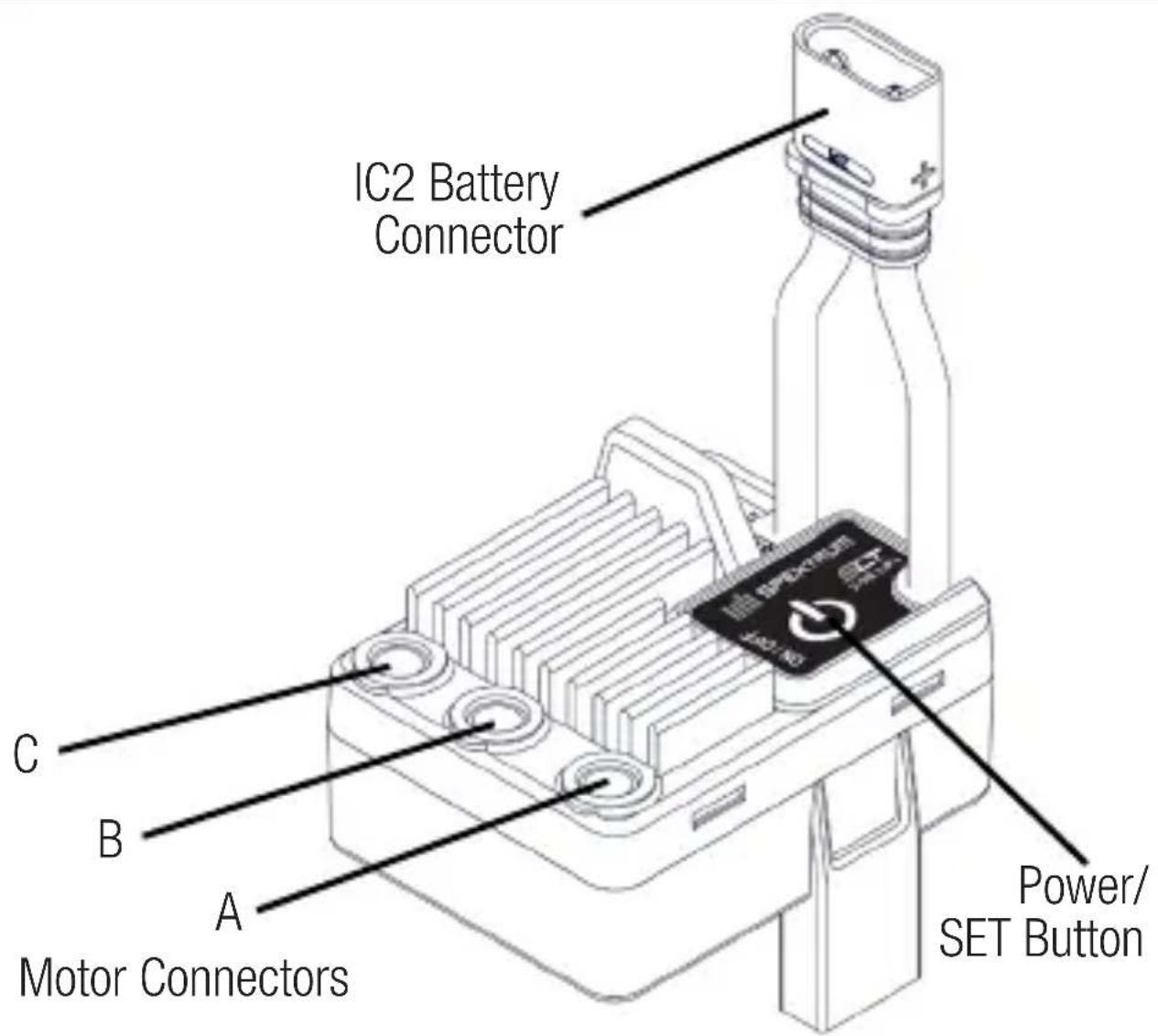
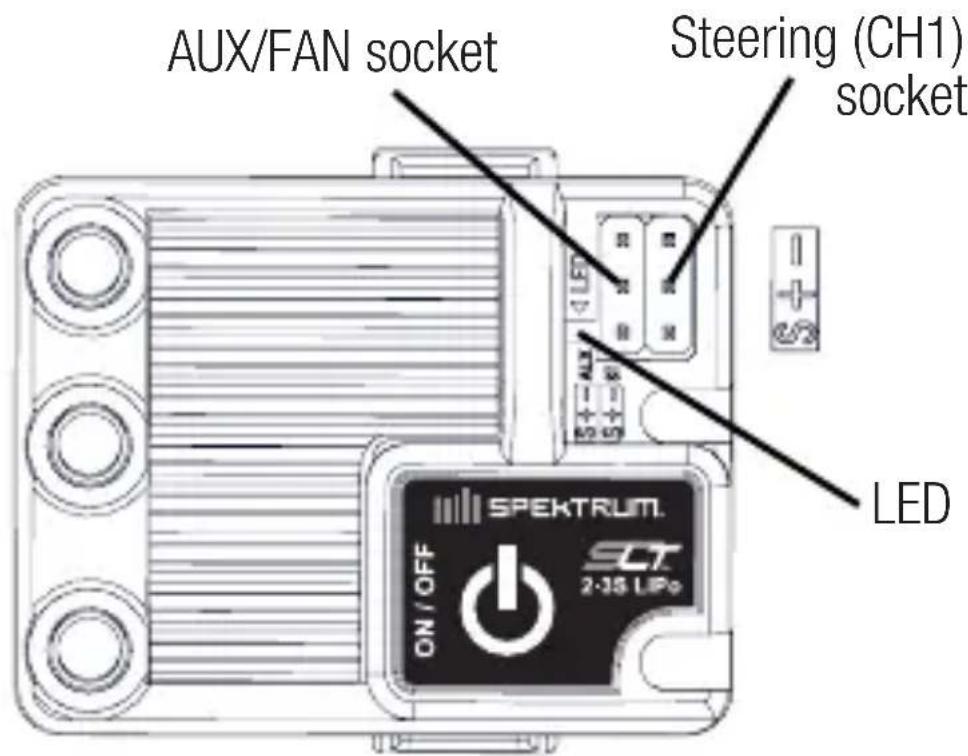
NOTICE: Always disconnect the battery from the 2-in-1 when you have finished operating your vehicle. If you power off the vehicle with the power button but leave the battery connected, the ESC will continue to draw current, resulting in possible damage to the battery through over-discharge.
NOTICE: Do not connect a dedicated receiver battery to the servo or programming ports. When the ESC/receiver is turned On it will provide the servo ports with 6V regulated power from the main battery. If a dedicated receiver battery is connected to the servo ports, the ESC/receiver may be damaged.
Installation
- Determine how to mount the 2-in-1 as specified by your vehicle's instruction manual. Ensure all wiring connections can be reached prior to mounting.
- Connect the three motor wires to the 2-in-1 motor connectors in any order.
- If you need to reverse the motor direction, swap any two of the three motor wires to the 2-in-1.
- Secure all wiring and ensure the 2-in-1 has good airflow.
This receiver can bind to SLT transmitters.
- Begin with no battery connected.
- Throttle should be at neutral to set failsafe.
- Connect a battery to the 2-in-1 and power it on.
- Press and hold the bind button on the 2-in-1 for 3 seconds.
- The red LED will turn off and the blue LED will flash rapidly, indicating the 2-in-1 is in bind mode.
- Power on the transmitter.
- The bind process is complete when the red and blue LED on the 2-in-1 remain illuminated.
When using a new 2-in-1 it is important to calibrate it so the ESC matches the throttle range on your transmitter. If you install a new radio system, or make changes to your throttle/brake values in your transmitter, you must redo the ESC calibration process. Failure to calibrate the ESC to your radio system will result in the 2-in-1 not working correctly. Set the fail safe on your radio to a neutral position to ensure the motor stops in the event of a signal loss.
-
Power ON your transmitter, and begin with throttle values at 100% for dual rates and travel, and at neutral for trim and sub-trim. Verify there are no ABS braking functions activated before proceeding with calibration. For transmitters without an LCD, turn the D/R knob to the max setting, and center the throttle trim.
-
Connect a battery to the 2-in-1.
-
Press and hold the programming button on the switch case, power on the 2-in-1. The red LED on the 2-in-1 will start to flash and the motor will beep. Release the programming button (The ESC will enter the programming mode if the programming button is not released within 3 seconds).
-
With the throttle trigger and trim in the neutral position, press and release the programming button. The blue LED will flash once and the motor will emit one tone.
-
Pull the throttle trigger to full throttle, and press and release the programming button. The blue LED will flash twice and the motor will emit two tones.
-
Push the throttle trigger to full reverse, and press and release the programming button. The blue LED will flash three times and the motor will emit three tones.
- If the calibration is successful, the blue LED will light for 1 second and the motor will beep for 1 second; if the calibration fails, the blue LED will flash 5 times quickly and motor will emit 5 tones.
- Power OFF the system with the ON/OFF button.
- Power ON the system with the ON/OFF button. The system is ready for operation.
Operation
- Power on the transmitter.
- Power on the receiver.
- The green LED on the 2-in-1 will be illuminated when it is connected to your transmitter.
- Disconnect your battery from the 2-in-1 after operation.
Failsafe
In the unlikely event that the radio link is lost during use, the 2-in-1 will drive the throttle channel to the neutral (throttle off) position. If the 2-in-1 is powered on prior to turning on the transmitter, it will enter failsafe mode, leaving throttle off. When the transmitter is turned on, normal control will resume.
The ESC in the 2-in-1 may be programmed via the push button on the switch.
To change settings with the programming button:
- Power ON your transmitter. Connect a battery to the ESC and power it ON. The transmitter and receiver must be bound.
-
Press and hold the programming button, after 6 seconds the LED will change from red to blue flashing to indicate programming mode. The blue LED will cycle through programming parameters. Keep the button pressed until you reach the parameter you want to alter, then release.
-
The blue LED blinks (and the motor beeps) to indicate the programming item. When you release the programming button to select a programming parameter, the LED will begin to flash red to indicate the options available under the selected parameter.
1 red LED blink for item one, 2 red LED blinks for item 2 etc. For item 5 and above, one long LED blink for item 5, one long LED blink and 1 short LED/blinks for item 6 etc. For items 10 and above, 2 long LED blinks for item 10, 2 long LED blinks and 1 short LED/blinks for item 11 etc.
-
Click the programming button when you want to enter a programming item.
-
The blue LED blinks to indicate the programming value within the item selection. Click the programming button when you want to select a programming value.
-
Power off the ESC.
-
Begin the process again to change any other programming values.
Programmable Items
- Running Mode
- Drag Brake Force (%)
- Low Voltage Cutoff (Volts)
- Start Mode (Punch)(Level)
- Max Brake Force (%)
- Max Reverse Force (%)
- Neutral Range (%)
- Timing
- Motor Rotation
- DSC Mode
- DSC Direction
123456789
| 1. | Fwd/Brk | Fwd/Rev/Brk | |||||||
| 2. | 0 | 6 8 10 | 12 1 | 4 16 | |||||
| 3. | 3.2 | 3.3 3.4 | 3.5 | 3.6 | 3.7 Auto | ||||
| 4. | 1 2 | 3 4 5 | 6 7 8 | ||||||
| 5. | 25 | 37.5 | 50 | 62.5 | 75 | 87.5 | 100 | Disable | |
| 6. | 25 50 | 5 100 | |||||||
| 7. | 6 | 12 | |||||||
| 8. | 0 | 3.75 | 7.5 | 11.25 | 15 | 18.75 | 22.5 | 26.25 | 50 |
| 9. | CCW | CW | |||||||
| 10. | Off | 1 2 | |||||||
| 11. | Nor | Rev | |||||||
Blacked out cells with white text represent the default settings.
In Stabilization Mode, the 2-in-1 senses the rate of change of the yaw angle and applies corrections to the steering servo, making the vehicle's operation more stable. Throttle output of the ESC is directly linked to the transmitter throttle trigger.
The switch and sensitivity of the stabilization mode can be set through item 10 of the programming menu, or via the DSC programming function on the transmitter. There are 4 levels of gyro settings in menu item 10:
-
Gyro off:
The servo control is controlled directly from the transmitter. -
Gyro mode 1:
The gyro sensitivity is low WITH steering priority.
- Gyro mode 2:
The gyro sensitivity is high WITH steering priority.
- Gyro mode 3:
The gyro sensitivity is medium NO steering priority.
The switch and sensitivity setting in stabilization mode can also be quickly set through the transmitter. When the STL2 transmitter and the receiver are connected, click the power button of the STL2 transmitter to quickly set the stabilization mode. The setting value is the same as item 10 of the parameter table. When the 2-in-1 accepts the quick sensitivity setting command from the SLT2 remote control, the red light will flash. The number of flashes indicates the current setting level.
The gyro adjustment in the stability mode has a direction. When adjusting ST to REV, it is necessary to set the gyro's REV through menu item 11.
Upon powering ON the 2-in-1, the LED will blink and the motor will emit a series of beeps to indicate its status.
| Red LED Status Blue LED Status | |
| When the LED remains lit the ESC is in operation | When the LED remains lit the receiver is receiving complete data packets. |
| 1 flash per second indicates low voltage protection | Irregular flickering indicates some data packets are being lost |
| 2 flashes per second indicates full throttle or full brake | Blinks for 0.2 seconds every 3 seconds indicates the receiver is not connected |
| 4 flashes per second indicates over temperature protection | Rapid flash indicates the receiver is in bind mode. |
Receiver Troubleshooting Guide
Problem Possible Cause Solution
| The system will not connect | Your transmitter and receiver are too close together | Move transmitter 8 to 12 feet away from receiver |
| You are near metal objects | Move to an area with less metal | |
| The receiver is bound to a different model memory | Make sure the correct model memory is active in your transmitter | |
| Your transmitter was placed into bind mode and is no longer bound to your receiver | Rebind your transmitter and receiver, and then re-calibrate | |
| The receiver goes into failsafe a short distance away from the transmitter | Check for damage on the receiver antenna | Make sure your receiver antenna is protected and located as high as practical |
| Replace the receiver or contact Horizon Product Support | ||
| The receiver stops responding during operation | Low receiver battery voltage. If the battery voltage is low, it may drop below 3.5V momentarily, causing the receiver to brown-out, then reconnect | Charge the receiver or vehicle battery. Spektrum receivers require at least 3.5V to operate |
| Loose or damaged wires or connectors between battery and receiver | Check the wires and connection between the battery and receiver. Repair or replace wires and/or connectors |
ESC Troubleshooting Guide
| Problem Possible Cause Solution | ||
| ESC ON - No motor function, audible tone or LED | Battery/connection issue | Recharge/replace battery. Secure all connections |
| Damaged ESC/ switch | Repair/replace ESC switch/ ESC | |
| Damaged motor Repair/replace | ||
| Motor- Stops and LED blinks | Low voltage protection | When the ESC LED blinks, recharge/replace battery |
| Overheat protec- tion | When the LED blinks, let motor/ESC cool, change set up or gearing to avoid overheating | |
| Motor- Accelerates irregularly | Battery issue | Repair damaged wiring/ replace battery |
| Incorrect gearing A | Adjust/replace gearing | |
| Worn or damaged motor | Repair/replace motor | |
| Motor- Does not turn continuously in response to throttle | ESC/motor dam- aged | Repair/replace wiring or motor/ESC |
| Motor- Slows but will not stop | Incorrect transmitter/ESC calibration | Adjust throttle travel/other throttle settings on the transmitter/ESC. Repeat the ESC Calibration Procedure |
Problem Possible Cause Solution
| Steering servo- Oper-ates; motor does not run | Damaged motor | Test the motor apart from the vehicle system, repair/replace motor as needed |
| Incorrect transmitter/ESC calibration | Adjust throttle travel/other throttle settings on the transmitter/ESC. Repeat the ESC Calibration Procedure | |
| Steering/motor-not functioning | Low battery voltage | Recharge/replace |
| Wrong model memory selected on transmitter | Select correct model set-tings on your transmitter, refer to transmitter and/or receiver manual | |
| Receiver not bound to trans-mitter | Bind transmitter to receiver, refer to transmitter and/or receiver manual | |
| Vehicle-Does not operate at full speed | Battery issue Recharge/replace | |
| Incorrect transmitter/ESC calibration | Adjust throttle travel/other throttle settings on the transmitter/ESC. Repeat the ESC Calibration Procedure | |
1-Year Limited Warranty
What this Warranty Covers - Horizon Hobby, LLC, (Horizon) warrants to the original purchaser that the product purchased (the "Product") will be free from defects in materials and workmanship for a period of 1 year from the date of purchase.
What is Not Covered
This warranty is not transferable and does not cover (i) cosmetic damage, (ii) damage due to acts of God, accident, misuse, abuse, negligence, commercial use, or due to improper use, installation, operation or maintenance, (iii) modification of or to any part of the Product, (iv) attempted service by anyone other than a Horizon Hobby authorized service center, (v) Product not purchased from an authorized Horizon dealer, (vi) Product not compliant with applicable technical regulations, or (vii) use that violates any applicable laws, rules, or regulations.
OTHER THAN THE EXPRESS WARRANTY ABOVE, HORIZON MAKES NO OTHER WARRANTY OR REPRESENTATION, AND HEREBY DISCLAIMS ANY AND ALL IMPLIED WARRANTIES, INCLUDING, WITHOUT LIMITATION, THE IMPLIED WARRANTIES OF NON-INFRINGEMENT, MERCHANTABILITY AND FITNESS FOR A PARTICULAR PURPOSE. THE PURCHASER ACKNOWLEDGES THAT THEY ALONE HAVE DETERMINED THAT THE PRODUCT WILL SUITABLY MEET THE REQUIREMENTS OF THE PURCHASER'S INTENDED USE.
Purchaser's Remedy
Horizon's sole obligation and purchaser's sole and exclusive remedy shall be that Horizon will, at its option, either (i) service, or (ii) replace, any Product determined by Horizon to be defective. Horizon reserves the right to inspect any and all Product(s) involved in a warranty claim. Service or replacement decisions are at the sole discretion of Horizon. Proof of purchase is required for all warranty claims. SERVICE OR REPLACEMENT AS PROVIDED UNDER THIS WARRANTY IS THE PURCHASER'S SOLE AND EXCLUSIVE REMEDY.
Limitation of Liability
HORIZON SHALL NOT BE LIABLE FOR SPECIAL, INDIRECT, INCIDENTAL OR CONSEQUENTIAL DAMAGES, LOSS OF PROFITS OR PRODUCTION OR COMMERCIAL LOSS IN ANY WAY, REGARDLESS OF WHETHER SUCH CLAIM IS BASED IN CONTRACT, WARRANTY, TORT, NEGLIGENCE, STRICT LIABILITY OR ANY OTHER THEORY OF LIABILITY, EVEN IF HORIZON HAS BEEN ADVISED OF THE POSSIBILITY OF SUCH DAMAGES. Further, in no event shall the liability of Horizon exceed the individual price of the Product on which liability is asserted. As Horizon has no control over use, setup, final assembly, modification or misuse, no liability shall be assumed nor accepted for any resulting damage or injury. By the act of use, setup or assembly, the user accepts all resulting liability. If you as the purchaser or user are not prepared to accept the liability associated with the use of the Product, purchaser is advised to return the Product immediately in new and unused condition to the place of purchase.
Law
These terms are governed by Illinois law (without regard to conflict of law principals). This warranty gives you specific legal rights, and you may also have other rights which vary from state to state. Horizon reserves the right to change or modify this warranty at any time without notice.
WARRANTY SERVICES
Questions, Assistance, and Services
Your local hobby store and/or place of purchase cannot provide warranty support or service. Once assembly, setup or use of the Product has been started, you must contact your local distributor or Horizon directly. This will enable Horizon to better answer your questions and service you in the event that you may need any assistance. For questions or assistance, please visit our website at www.horizonhobby.com, submit a Product Support Inquiry, or call the toll free telephone number referenced in the Warranty and Service Contact Information section to speak with a Product Support representative.
Inspection or Services
If this Product needs to be inspected or serviced and is compliant in the country you live and use the Product in, please use the Horizon Online Service Request submission process found on our website or call Horizon to obtain a Return Merchandise Authorization (RMA) number. Pack the Product securely using a shipping carton. Please note that original boxes may be included, but are not designed to withstand the rigors of shipping without additional protection. Ship via a carrier that provides tracking and insurance for lost or damaged parcels, as Horizon is not responsible for merchandise until it arrives and is accepted at our facility. An Online Service Request is available at http://www.horizonhobby.com/content/service-center_render-service-center. If you do not have internet access, please contact Horizon Product Support to obtain a RMA number along with instructions for submitting your product for service. When calling Horizon, you will be asked to provide your complete name, street address, email address and phone number where you can be reached during business hours. When sending product into Horizon, please include your RMA number, a list of the included items, and a brief summary of the problem. A copy of your original sales receipt must be included for warranty consideration. Be sure your name, address, and RMA number are clearly written on the outside of the shipping carton.
NOTICE: Do not ship LiPo batteries to Horizon. If you have any issue with a LiPo battery, please contact the appropriate Horizon Product Support office.
Warranty Requirements
For Warranty consideration, you must include your original sales receipt verifying the proof-of-purchase date. Provided warranty conditions have been met, your Product will be serviced or replaced free of charge. Service or replacement decisions are at the sole discretion of Horizon.
Non-Warranty Service
Should your service not be covered by warranty, service will be completed and payment will be required without notification or estimate of the expense unless the expense exceeds 50% of the retail purchase cost. By submitting the item for service you are agreeing to payment of the service without notification. Service estimates are available upon request. You must include this request with your item submitted for service. Non-warranty service estimates will be billed a minimum of 12 hour of labor. In addition you will be billed for return freight. Horizon accepts money orders and cashier's checks, as well as Visa, MasterCard, American Express, and Discover cards. By submitting any item to Horizon for service, you are agreeing to Horizon's Terms and Conditions found on our website http://www.horizonhobby.com/content/service-center_render-service-center.
ATTENTION: Horizon service is limited to Product compliant in the country of use and ownership. If received, a non-compliant Product will not be serviced. Further, the sender will be responsible for arranging return shipment of the unserviced Product, through a carrier of the sender's choice and at the sender's expense. Horizon will hold non-compliant Product for a period of 60 days from notification, after which it will be discarded.
10/15
Warranty and Service Contact Information
| Country of Purchase | Horizon Hobby | Contact Information Address | |
| United States of America | Horizon Service Center (Repairs and Repair Requests) | servicecenter.horizonhobby.com/RequestForm/ | 2904 Research Rd. Champaign, Illinois, 61822 USA |
| Horizon Product Support (Product Technical Assistance) | productsupport@horizon-hobby.com.877-504-0233 | ||
| Sales | websales@horizonhobby.com | ||
| 800-338-4639 | |||
| European Union | Horizon Technischer Service Sales: Horizon Hobby GmbH | service@horizonhobby.de | Hanskampring 9D 22885 Barsbüttel, Germany |
| +49 (0) 4121 2655 100 | |||
FCC Information
Supplier's Declaration of Conformity
Firma 25A 2-in-1 Brushless ESC / SLT Protocol Receiver with Gyro SPMXSBER1025G

This device complies with part 15 of the FCC Rules. Operation is subject to the following two conditions:
(1) This device may not cause harmful interference, and (2) this device must accept any interference received, including interference that may cause undesired operation.

CAUTION: changes or modifications not expressly approved by the party responsible for compliance
could void the user's authority to operate the equipment.
NOTE: This equipment has been tested and found to comply
with the limits for a Class B digital device, pursuant to part 15 of the FCC Rules. These limits are designed to provide reasonable protection against harmful interference in a residential installation. This equipment generates, uses and can radiate radio frequency energy and, if not installed and used in accordance with the instructions, may cause harmful interference to radio communications. However, there is no guarantee that interference will not occur in a particular installation. If this equipment does cause harmful interference to radio or television reception, which can be determined by turning the equipment off and on, the user is encouraged to try to correct the interference by one or more of the following measures:
- Reorient or relocate the receiving antenna.
- Increase the separation between the equipment and receiver.
- Connect the equipment into an outlet on a circuit different from that to which the receiver is connected.
- Consult the dealer or an experienced radio/TV technician for help.
Horizon Hobby, LLC
2904 Research Rd.,
Champaign, IL 61822
Email: compliance@horizonhobby.com
Web: HorizonHobby.com
Compliance Information for Canada
CAN ICES-3 (B)/NMB-3(B)
This device complies with Industry Canada licence-exempt RSS standard(s).
Operation is subject to the following two conditions:
(1) this device may not cause interference,
(2) this device must accept any interference, including
interference that may cause undesired operation of the device.
Compliance Information for the European Union
CE
EU Compliance Statement: Firma 25A 2-in-1 Brushless ESC / SLT Protocol Receiver with Gyro
SPMXSBER1025G Hereby, Horizon Hobby, LLC declares that the device is in compliance with the following: EU Radio Equipment Directive 2014/53/EU; RoHS 2 Directive 2011/65/EU; RoHS 3 Directive - Amending 2011/65/EU Annex II 2015/863.
The full text of the EU declaration of conformity is available at the following internet address: https://www.horizonhobby.com/content/support-render-compliance.
WEEE Notice

natural_image
Symbol of a trash bin crossed with no text or numbers, representing environmental restriction (no text present)This appliance is labeled in accordance with European Directive 2012/19/EU concerning waste of electrical and electronic equipment (WEEE). This label indicates that this product should not be disposed of with household waste. It should be deposited at an appropriate facility to enable recovery and recycling.
EU Manufacturer of Record:
Horizon Hobby, LLC 2904 Research Road Champaign, IL 61822 USA EU Importer of Record: Horizon Hobby, GmbH Hanskampring 9 22885 Barsbüttel Germany

HINWEIS
Firma 25A 2-in-1 Brushless ESC / SLT Protocol Receiver with Gyro SPMXSBER1025G
natural_image
Symbol of a trash bin crossed with no text or numbers, representing environmental restriction (no text present)natural_image
Symbol of a trash bin crossed with diagonal lines, no text or numbers presentDIRECTIVE DEEE :
22885 Barsbüttel Germany
AVVISO
Firma 25A 2-in-1 Brushless ESC / SLT Protocol Receiver with Gyro SPMXSBER1025G

natural_image
Simple line drawing of a trash bin with two crossed lines indicating no waste or prohibition (no text or symbols)22885 Barsbüttel Germany

© 2025 Horizon Hobby, LLC.
Firma, the Firma Logo, IC2, and the Horizon Hobby logo are trademarks or registered trademarks of Horizon Hobby, LLC.
The Spektrum trademark is used with permission of Bachmann Industries, Inc.
All other trademarks, service marks and logos are property of their respective owners.
US 9,930,567. US 10,419,970.
SPMXSBER1025G
Created 10/2025 1372100

- Firma 25A 2-in-1 Brushless ESC / SLT Protocol Receiver with Gyro
- NOTICE
- Meaning of Special Language
- Age Recommendation: Not for children under 14 years. This is not a toy.
- General Precautions
- Usage Conditions
- Wet Conditions Maintenance
- Contents
- Firma 25 Amp ESC with Receiver
- Installation
- Operation
- Failsafe
- Programmable Items
- Receiver Troubleshooting Guide
- ESC Troubleshooting Guide
- 1-Year Limited Warranty
- What is Not Covered
- Purchaser's Remedy
- Limitation of Liability
- Law
- WARRANTY SERVICES
- Questions, Assistance, and Services
- Inspection or Services
- Warranty Requirements
- Non-Warranty Service
- FCC Information
- Supplier's Declaration of Conformity
- Firma 25A 2-in-1 Brushless ESC / SLT Protocol Receiver with Gyro SPMXSBER1025G
- Compliance Information for Canada
- CAN ICES-3 (B)/NMB-3(B)
- Compliance Information for the European Union
- CE
- EU Compliance Statement: Firma 25A 2-in-1 Brushless ESC / SLT Protocol Receiver with Gyro
- WEEE Notice
- EU Manufacturer of Record:
- HINWEIS
- DIRECTIVE DEEE :
- AVVISO
Brand : SPEKTRUM
Model : Firma 25A
Category : Remote control toy