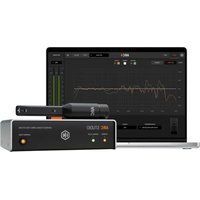
ARC 4 - Audio software IK Multimedia - Free user manual and instructions
Find the device manual for free ARC 4 IK Multimedia in PDF.


| Product type | Room acoustic correction audio interface |
| Brand | IK Multimedia |
| Model | ARC Studio (compatible with ARC 4 software) |
| Dimensions (approx.) | 140 x 100 x 45 mm |
| Weight (approx.) | 0.5 kg |
| Power supply | 5V 3A power adapter (included) |
| Connectivity | Balanced XLR input, balanced XLR output, USB-C, DC IN |
| Conversion resolution | 24 bits / 96 kHz |
| Dynamic range | 120 dB (A-weighted) |
| Frequency response | 2 Hz – 45 kHz (-2 dB) |
| THD+N | -107 dB (1 kHz @ -1 dBFS) |
| Crosstalk | -122.5 dB (1 kHz) |
| Input impedance (balanced) | 20 kΩ |
| Output impedance (balanced) | 50 Ω |
| Maximum output level | +17 dBu |
| Main functions | Room acoustic correction via microphone measurement, bypass/activation, calibration storage |
| LED indicators | Power, Signal/Clip (green/red), Correction (on/off) |
| Maintenance | Wipe with a dry cloth. Do not use liquid or flammable cleaners. |
| Safety | Do not expose to moisture, dust, vibrations, or direct sunlight. Use only the provided power supply. |
| Spare parts / repairability | Contact IK Multimedia support or the retailer for any service. No consumer spare parts. |
| Box contents | ARC Studio, calibration microphone, USB-C to USB-A cable, 5V 3A power supply, registration card |
Frequently Asked Questions - ARC 4 IK Multimedia
User questions about ARC 4 IK Multimedia
0 question about this device. Answer the ones you know or ask your own.
Ask a new question about this device
Download the instructions for your Audio software in PDF format for free! Find your manual ARC 4 - IK Multimedia and take your electronic device back in hand. On this page are published all the documents necessary for the use of your device. ARC 4 by IK Multimedia.
USER MANUAL ARC 4 IK Multimedia
Advanced Room Correction System
USER MANUAL
Table of Contents
Contents 2
1 - ARC Studio device 3
1.1 – What's inside the box 3
1.2 – Register your ARC Studio 3
1.3 – Main Features 3
1.4 – Precautions 3
1.5 – Installation and setup 5
1.5.1 – Front Panel 5
1.5.2 - Rear Panel 6
1.6 – Audio Specifications 7
2 – Support 8
1 - ARC Studio device
1.1 – What's inside the box
- ARC Studio
• ARC calibration microphone with stand clip (depending by the version)
• USB-C to USB-A cable
• 5V 3A Power Supply - Registration card
1.2 – Register your ARC Studio
By registering, you can access technical support, activate your warranty, and receive free JamPoints™, which will be added to your account. JamPoints™ allows you to obtain discounts on future IK purchases! Registering also keeps you informed of all the latest software updates and IK products.
Register at: www.ikmultimedia.com/registration
1.3 - Main Features
• High-end A to D and D to A premium, mastering grade converters
• 120 dB I/O, real, analog to analog performance
• Ultra-low THD and Jitter
- USB-C connection
• Electronically Balanced XLR audio I/O
1.4 – Precautions
Locations
Using the unit in the following locations can result in a malfunction:
• In direct sunlight
- Location of extreme temperature or humidity
• Excessively dusty or dirty locations
• Locations of excessive vibration
- Close to magnetic fields
Power Supply
Use only the Power supply provided with the unit and connect the cable to the correct port on the device.
Interference with other electrical devices
Radios and televisions placed nearby may experience reception interference. Operate the unit at a suitable distance from radios and televisions.
Handling
To avoid breakage, do not apply excessive force on the button.
Care
If the exterior becomes dirty, wipe it with a clean and dry cloth. Do not use liquid cleaners such as benzene or thinner, or cleaning compounds of flammable polishes.
Keep this manual
After reading, keep this manual for later reference.
Keep foreign matter out of your unit
Never set any container with liquid in it near this unit. If liquid gets into the unit, it could cause a breakdown, fire, or electrical shock. Be careful not to let metal objects get into the equipment. If something does slip into the unit, unplug the Power and/or the USB cable, then contact your nearest IK Multimedia dealer or the store where the equipment was purchased.
Specification subject to change
The information contained in this manual is believed to be correct at the time of printing. However, IK Multimedia reserves the right to change or modify any of the specifications without notice or obligation to update existing units.
1.5 – Installation and setup
1.5.1 - Front Panel
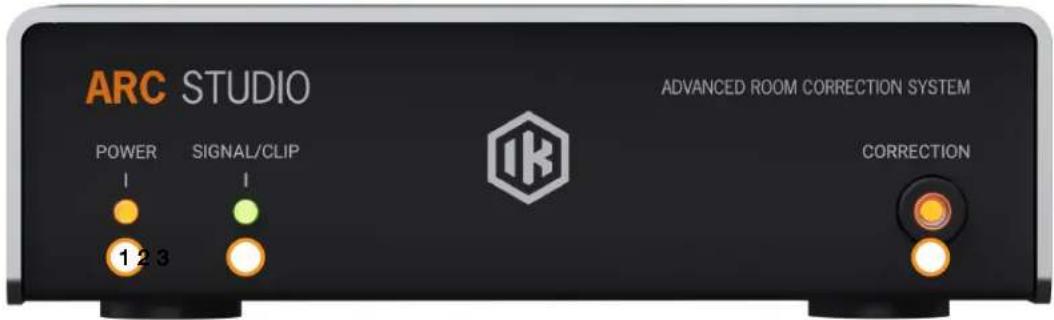
- POWER LED: This LED is lit when the unit is powered on
- SIGNAL/CLIP LED: During normal operation, this LED displays the input signal level:
Green: audio signal is present
Red: audio signal is clipping
When calibration is stored in the unit using the ARC 4 application, this leads to blinks to indicate the calibration loading status:
Green: calibration file successfully stored
Red: storing procedure error
- CORRECTION: This button enables or disables the audio processing. When CORRECTION is off, the unit is bypassed and the input signal is routed directly to the output.
Keeping this button pressed during power-up makes the unit boot into DFU mode.
1.5.2 - Rear Panel
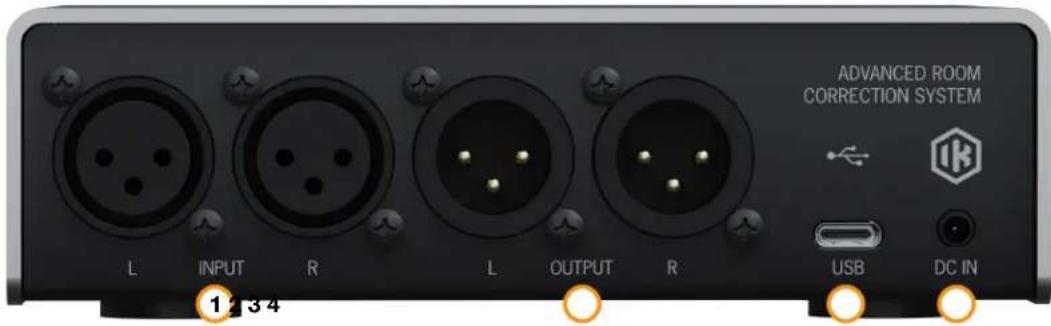
- INPUT: XLR balanced inputs connectors.
- OUTPUT: XLR balanced output connectors.
- USB: Type C USB port for connecting ARC Studio to a Mac/PC.
- DC IN: barrel jack for connecting the power supply unit (5V, 3A).
1.6 – Audio Specifications
• Audio conversion and internal processing sampling rate: 96 kHz
• Audio conversion resolution: 24-bit
• Internal processing resolution: 32-bit float
• Frequency Response: 2 Hz - 45.0 kHz (- 2.0 dB)
• Dynamic Range: 120 dB (A-weighted)
• THD (20-20 kHz): 0.00035%
• THD+N (1 kHz@-1dBFS): -107 dB
• Channel Crosstalk (1 kHz): -122.5 dB
• Max Phase Deviation: +7° 20Hz, +16° 22kHz
• Input Impedance (balanced): 20 kOhm
• Output Impedance (balanced): 50 Ohm
• Maximum output level: +17 dBu
2 - Support
For any questions you may have, please refer to the FAQ webpage at: www.ikmultimedia.com/faq
Here you will find answers to the most commonly asked questions.
To submit a Technical Support Form, go to: www.ikmultimedia.com/support
For warranty information, please visit: www.ikmultimedia.com/warranty
For other requests such as Product, Sales, or Web info, please go to: www.ikmultimedia.com/contact-us
User Area
The User Area is a special section of our website specifically designed for our users.
Here you can easily edit your personal data, manage your product authorizations and licenses, and download the latest IK products updates.
Access your User Area to:
• Edit your Personal data.
• View and download the latest product updates, free content, and Sound Libraries.
• Access any current Promotions.
• View exclusive offers and pricing.
- Manage your earned JamPoints.
• View your Orders.
- Download firmware and hardware drivers.
• Access the IK Forum and more.
To access the User Area go to: www.ikmultimedia.com/userarea
To access your User Area, please login with your User Name and Password created upon registration and emailed to your registered email address. If you need to update your Password, you may do so at the User Area login.
IK Multimedia Production Srl
IK Multimedia US, LLC
590 Sawgrass Corporate Pkwy.
Sunrise, FL 33325
USA
IK Multimedia Asia
TB Tamachi Bldg. 1F, MBE #709
4-11-1 Shiba
Minato-ku, Tokyo 108-0014
Japan
www.ikmultimedia.com
ARC ^™ , ARC System ^™ , ARC Studio ^™ are trademarks property of IK Multimedia Production. All rights reserved.
All other product names and images, trademarks and artists names are the property of their respective owners, which are in no way associated or affiliated with IK Multimedia. Product names are used solely for the purpose of identifying the specific products that were studied during IK Multimedia's sound model development and for describing certain types of tones produced with IK Multimedia's digital modeling technology. Use of these names does not imply any cooperation or endorsement.
Mac and the Mac logo are trademarks of Apple Computer, Inc., registered in the U.S. and other countries. Windows and the Windows logo are trademarks or registered trademarks of Microsoft Corporation in the United States and/or other countries. The Audio Units logo is a trademark of Apple Computer, Inc. VST is a trademark of Steinberg Media Technologies GmbH.
All specifications are subject to change without further notice.
Document Version: 1.0
Latest Update: 2024/02/06
© 2007-2024 IK Multimedia. All rights reserved.
ARC Studio
IK Multimedia US, LLC
590 Sawgrass Corporate Pkwy.
Sunrise, FL 33325
USA
IK Multimedia Asia
TB Tamachi Bldg. 1F, MBE #709
4-11-1 Shiba
Minato-ku, Tokyo 108-0014
Japan
www.ikmultimedia.com
ARC ^™ , ARC System ^™ , ARC Studio ^™ are trademarks property of IK Multimedia Production. All rights reserved.
All other product names and images, trademarks and artists names are the property of their respective owners, which are in no way associated or affiliated with IK Multimedia. Product names are used solely for the purpose of identifying the specific products that were studied during IK Multimedia's sound model development and for describing certain types of tones produced with IK Multimedia's digital modeling technology. Use of these names does not imply any cooperation or endorsement.
Mac and the Mac logo are trademarks of Apple Computer, Inc., registered in the U.S. and other countries. Windows and the Windows logo are trademarks or registered trademarks of Microsoft Corporation in the United States and/or other countries. The Audio Units logo is a trademark of Apple Computer, Inc. VST is a trademark of Steinberg Media Technologies GmbH.
All specifications are subject to change without further notice.
Document Version: 1.0
Latest Update: 2024/02/06
© 2007-2024 IK Multimedia. All rights reserved.
ARC Studio
Advanced Room Correction System
ユーザーマニュアル
目次
目次 2
1 - ARC Studio 3
www.ikmultimedia.com/support
保証については、こちらをご覧ください。
www.ikmultimedia.com/warranty
IK Multimedia US, LLC
590 Sawgrass Corporate Pkwy.
Sunrise, FL 33325
USA
IK Multimedia Asia
TB Tamachi Bldg. 1F, MBE #709
4-11-1 Shiba
Minato-ku, Tokyo 108-0014
Japan
www.ikmultimedia.com
© 2007-2024 IK Multimedia. All rights reserved.

- Table of Contents
- Contents 2
- - ARC Studio device 3
- – Support 8
- - ARC Studio device
- – What's inside the box
- – Register your ARC Studio
- - Main Features
- – Precautions
- Locations
- Power Supply
- Handling
- Care
- Keep this manual
- Keep foreign matter out of your unit
- Specification subject to change
- - Rear Panel
- – Audio Specifications
- - Support
- User Area
- IK Multimedia Production Srl
- IK Multimedia US, LLC
- IK Multimedia Asia
- www.ikmultimedia.com
- ARC Studio
- 目次
- 目次 2
- - ARC Studio 3
Brand : IK Multimedia
Model : ARC 4
Category : Audio software