
Mic 2 - Microphone DJI - Free user manual and instructions
Find the device manual for free Mic 2 DJI in PDF.
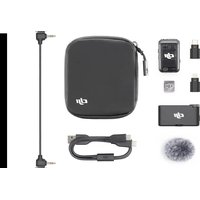


| Product Type | Wireless microphone with receiver, transmitters, and charging case |
| Brand and Model | DJI Mic 2 |
| Power | Rechargeable lithium-ion battery; 6-hour battery life (transmitter), 18 hours with charging case |
| Main Features | 32-bit floating-point internal recording, intelligent noise reduction, range up to 250 m (FCC), mono/stereo recording, backup track, 8 GB internal storage (14 hours at 24-bit) |
| Connectivity | 2.4 GHz wireless, Bluetooth, USB-C and Lightning adapters, 3.5 mm output |
| Compatibility | Smartphones (iOS/Android), cameras, computers, Osmo Action 4, Osmo Pocket 3, Osmo Mobile 6 |
| Recording Capacity | Up to 2 transmitters simultaneously, 8 GB internal recording per transmitter |
| Maintenance and Cleaning | Clean with a soft, dry cloth; avoid exposure to water and humidity |
| Safety | Keep magnetic clip away from credit cards, pacemakers, RAM chips, and hard drives |
| Spare Parts and Repairability | Accessories available separately (magnetic clip, wind muff, adapters); warranty extension via QR code |
| General Information | Four purchase options: 2 TX + RX + case pack, 1 TX + RX pack, transmitter only (Shadow Black or Pearlescent White) |
Frequently Asked Questions - Mic 2 DJI
User questions about Mic 2 DJI
0 question about this device. Answer the ones you know or ask your own.
Ask a new question about this device
Download the instructions for your Microphone in PDF format for free! Find your manual Mic 2 - DJI and take your electronic device back in hand. On this page are published all the documents necessary for the use of your device. Mic 2 by DJI.
USER MANUAL Mic 2 DJI
| Application Scenarios | Items |
| Title-single | SKU 1 - DJI Mic 2 (2 TX + 1 RX + Charging Case) |
| SKU 2 - DJI Mic 2 (1 TX + 1 RX) | |
| SKU 3 - DJI Mic 2 Transmitter (Shadow Black) | |
| SKU 4 DJI Mic 2 Transmitter (Pearl White) | |
| Variation Name | Mic 2 (2 TX + 1 RX + Charging Case) |
| Mic 2 (1 TX + 1 RX) | |
| Mic 2 Transmitter (Shadow Black) | |
| Mic 2 Transmitter (Pearl White) | |
| BP 1 High-Quality Audio Recording | |
| BP 2 All-In-One, Ready to Use | |
| BP 3 14-Hour Internal Recording & 32-bit Float Internal Recording | |
| Bullet Points for DJI Mic 2 (2 TX + 1 RX + Charging Case) | BP 4 Intelligent Noise Cancelling, Crystal-Clear Vocals |
| BP 5 250m (820 ft.) Range [6] | |
| BP 6-1 18-Hour Battery | |
| SKU 1 - DJI Mic 2 (2 TX + 1 RX + Charging Case) | |
| BP 1 High-Quality Audio Recording | |
| BP 2 14-Hour Internal Recording & 32-bit Float Internal Recording | |
| BP 3 Intelligent Noise Cancelling, Crystal-Clear Vocals | |
| Bullet Points for DJI Mic 2 (1 TX + 1 RX) | BP 4250m (820 ft.) Range [6] |
| BP 5Magnetic Attachment | |
| BP 6Seamless Compatibility | |
| SKU 2 -DJI Mic 2 (1 TX + 1 RX) | |
| BP 1High-Quality Audio Recording | |
| BP 2Intelligent Noise Cancelling, Crystal-Clear Vocals | |
| BP 3Magnetic Attachment | |
| Bullet Points for 1 Transmitter | BP 4Bluetooth Connection |
| BP 56-Hour Battery | |
| SKU 3 - DJI Mic 2 Transmitter (Shadow Black) | |
| SKU 4 - DJI Mic 2 Transmitter (Pearl White) |
Product Description
Note
| EN |
| DJI Mic 2 (2 TX + 1 RX + Charging Case), All-in-one Wireless Microphone, Intelligent Noise Cancelling, 32-bit Float Internal Recording, 250m (820 ft.) Range, Microphone for iPhone, Android, Camera |
| DJI Mic 2 (1 TX + 1 RX), Wireless Microphone with Intelligent Noise Cancelling, 32-bit Float Internal Recording, Optimized Sound, 250m (820 ft.) Range, Microphone for iPhone, Android, Camera, Vlogs |
| DJI Mic 2 Transmitter (Shadow Black), Wireless Microphone with Intelligent Noise Cancelling, 14-Hour Internal Recording, 6-Hour Battery, Magnetic Attachment, Bluetooth Microphone, YouTube, Vlogs |
| DJI Mic 2 Transmitter (Pearl White), Wireless Microphone with Intelligent Noise Cancelling, 14-Hour Internal Recording, 6-Hour Battery, Magnetic Attachment, Bluetooth Microphone, YouTube, Vlogs |
| Mic 2 (2 TX + 1 RX + Charging Case) |
| Mic 2 (1 TX + 1 RX) |
| Mic 2 Transmitter (Shadow Black) |
| Mic 2 Transmitter (Pearl White) |
| Crystal-Clear Audio Makes You Sound Like a Pro - This wireless microphone delivers high-quality audio with brighter, clearer, and more enjoyable vocal recording, making it ideal for interviews, vlogs, and much more. |
| Ready When You Are - The transmitters and receiver are pre-linked and ready to go, letting you easily save time and improve efficiency. Features USB-C and Lightning adapters for more scenarios. |
| No More Worrying About Lost Audio - This wireless lavalier microphone's transmitters can each be used as standalone recorders with up to 14 hours of internal recording [4]. And 32-bit float ensures clear audio even if audio levels spike.Less Noise, Better Vocals - Intelligent noise cancelling makes vocals more clear, even when conducting interviews or shooting videos in locations with erratic and unpredictable sounds. |
| Extended Range, Expanded Possibilities - Experience stable wireless audio recording within a 250-meter range (FCC) [6], allowing you to shoot and record more flexibly in more scenarios. |
| Up to 18 Hours of Operation - Say goodbye to battery anxiety. Whether you're livestreaming or making videos in remote locations with fewer charging options, this Bluetooth microphone has got your back. |
| Includes a receiver, two transmitters (Shadow Black), a charging case, and more for up to 18 hours of use and videos with multiple speakers or stereo sound requirements. |
| Crystal-Clear Audio Makes You Sound Like a Pro - This wireless microphone delivers high-quality audio with brighter, clearer, and more enjoyable vocal recording, making it ideal for interviews, vlogs, and much more. |
| No More Worrying About Lost Audio - This wireless lavalier microphone's transmitters can each be used as standalone recorders with up to 14 hours of internal recording [4]. And 32-bit float ensures clear audio even if audio levels spike. |
| Less Noise, Better Vocals - Intelligent noise cancelling makes vocals more clear, even when conducting interviews or shooting videos in locations with erratic and unpredictable sounds. |
| Extended Range, Expanded Possibilities - Experience stable wireless audio recording within a 250-meter range (FCC) [6], allowing you to shoot and record more flexibly in more scenarios. |
| Compact, Magnetic, and Discrete - The compact TX has a unique clip and magnet design, providing added flexibility for discrete placement and more professional-looking videos. |
| Compatible with Your Devices - DJI Mic 2 comes with USB-C, Lightning, and 3.5mm adapters and works with most smartphones, cameras, and laptops. It can be connected quickly and easily. |
| Includes a receiver, one transmitter (Shadow Black), a carrying pouch, and more. Can be worn magnetically or clamped and comes with multiple adapters. This small and flexible combo is ideal for solo creators. |
| Crystal-Clear Audio Makes You Sound Like a Pro - This wireless microphone delivers high-quality audio with brighter, clearer, and more enjoyable vocal recording, making it ideal for interviews, vlogs, and much more. |
| Less Noise, Better Vocals - Intelligent noise cancelling makes vocals more clear, even when conducting interviews or shooting videos in locations with erratic and unpredictable sounds. |
| Compact, Magnetic, and Discrete - The compact TX has a unique clip and magnet design, providing added flexibility for discrete placement and more professional-looking videos. |
| Super Convenient Bluetooth Connection - The transmitter can directly link to smartphones, Osmo Pocket 3, and DJI Action 4 via Bluetooth for simplified and ultra-efficient creation. For your normal use, please check the list of adaptability before purchasing. |
| Last Longer, Record More - The extended 6-hour operation time of this Bluetooth microphone gives you ample recording and livestreaming possibilities, even in remote locations with limited charging options. |
| Includes one transmitter (Shadow Black) and more. The transparent black design of the transmitter gives it a sleek, stylish, and high-tech look. Connects directly to mobile phones, Pocket 3, and Action 4 via Bluetooth. Ideal for solo creators. |
| Includes one transmitter (Pearl White) and more, offering an elegant alternative for those seeking a chic colorway. Connects directly to mobile phones, Pocket 3, and Action 4 via Bluetooth. Ideal for solo creators. |
Overview:
Capture authentic sounds with the upgraded, ready-to-use DJI Mic 2. With its premium features, including high-quality audio recording, intelligent noise canceling, and support for 32-bit float internal recording, DJI Mic 2 empowers you to produce balanced and detail-rich audio content perfect for vlogs, interviews, livestreams, and more.
DJI Mic 2 comes in four purchasing options:
- Mic 2 (2 TX + 1 RX + Charging Case) - includes 2 TX, 1 RX, a Charging Case, and more for extended use and videos with multiple speakers.
- Mic 2 (1 TX + 1 RX) - Includes a receiver, one transmitter (Shadow Black), a carrying pouch, and more. Ideal for solo creators.
- Mic 2 Transmitter (Shadow Black) - Includes one transmitter (Shadow Black) and more. Connects directly to mobile phones, Pocket 3, and Action 4 via Bluetooth. Ideal for solo creators.
- Mic 2 Transmitter (Pearl White) - Includes one transmitter (Pearl White) and more. Connects directly to mobile phones, Pocket 3, and Action 4 via Bluetooth. Ideal for solo creators.
- There are also several accessories that make your DJI Mic 2 experience even more efficient and convenient.
Notes:
* After purchasing, scan the QR code inside the package and register to enjoy a 1-year extended warranty.
** During the product warranty period, if a product malfunctions due to quality issues, it can be replaced free of charge.
- Both the DJI Mic 2 (2 TX + 1 RX + Charging Case) combo and the DJI Mic 2 (1 TX + 1 RX) combo come with transmitter(s) in Shadow Black. DJI Mic 2 Transmitter (Pearl White) is sold separately.
- Intelligent noise cancelling of DJI Mic 2 cannot be enabled when the transmitter is connected to a smartphone via Bluetooth.
- Internal recording of DJI Mic 2 cannot be used when the transmitter is connected to a smartphone via Bluetooth.
- Each transmitter has 8 GB of internal storage to store up to 14 hours of uncompressed 48kHz 24-bit audio.
- For more details on compatibility, refer to the official compatibility list.
- Measured with FCC compliance in an unobstructed environment without interference (160 m under CE). This data is for reference only. Actual transmission distance may vary depending on environment.
- Tested with both transmitters connected to the
Mic 2 Transmitter (Pearl White)
| EN | ||
| question | answer question | |
| What can I use DJI Mic 2 with? | You can use DJI Mic 2 with a range of devices, including cameras, smartphones (via USB-C/Lightning port or direct Bluetooth connection), computers, Osmo Action 4 (via USB-C port or Bluetooth), Osmo Pocket 3 (via USB-C port or Bluetooth), and Osmo Mobile 6. | Womit kann ich das DJI Mic 2 verwenden? |
| What are the differences between the different DJI Mic 2 combos? How should I choose? | DJI Mic 2 (2 TX + 1 RX + Charging Case) includes a charging case, one receiver, and two Shadow Black transmitters, suitable for two-person audio recording, and providing extended battery life.<br>DJI Mic 2 (1 TX + 1 RX) includes one receiver and one Shadow Black transmitter, suitable for single-person audio recording of individual creators.<br>The DJI Mic 2 Transmitter (Pearl White) and DJI Mic 2 Transmitter (Shadow Black) can be used with mobile phones, Osmo Action 4, and Osmo Pocket 3. | Wo liegen die Unterschiede zwischen den verschiedenen DJI Mic 2-Kombinationen ? Wie sollte ich wählen? |
| Do I need to activate DJI Mic 2? | No. DJI Mic 2 is ready to use without activation. You can scan the QR code on the package to register for a one-year warranty extension. | Muss ich DJI Mic 2 aktivieren? |
| How do I update the firmware of the DJI Mic 2 transmitters and receiver? | 1. Download the firmware update package from the Downloads page of DJI Mic 2;2. Ensure that the receiver is powered off and the transmitter is on. Connect the transmitter or receiver to your computer using a standard USB-C cable;3. Put the downloaded firmware update package (file with .bin suffix) under the root directories of the transmitters and receiver;4. Disconnect from your computer, and the transmitters and receiver will start the firmware update automatically.* If the update fails, download and copy the firmware again and reboot the transmitters and receiver. Repeat until the firmware is updated successfully.** Remove the mobile phone adapter from the receiver before connecting it to the computer for firmware update. | Wie aktualisiere ich die Firmware der DJI Mic 2 Sender und Empfänger? |
| How do I link DJI Mic 2's transmitters with the receiver? | The transmitters and receiver are already linked by default. If you need to link them again, you can do so in the following ways:Method 1: Put the transmitters and receiver into the charging case and they will link automatically;Method 2: Power on the transmitters and the receiver, swipe down on the receiver's main screen, select Receiver Settings, and swipe left to choose Link Device. Press and hold the linking button on one transmitter, and follow the on-screen instructions to complete linking. When the status indicator on the transmitter blinks green quickly, it indicates the linking is in progress. When the status indicator blinks green slowly, it indicates it has been linked and is waiting for another transmitter to be linked. When the status indicator turns solid green, the linking is completed.To end linking during the process, tap Stop Linking. | Wie kopple ich die DJI Mic 2Sender mit demEmpfänger? |
| How many recording modes does DJI Mic 2 provide? | DJI Mic 2 provides three recording modes: S (Stereo), M (Mono), and Ms (Mono Safety Track).S: Stereo mode.Audio from the two transmitters is recorded via separate channels.M: Mono mode. Under Mono mode, the audio recorded by the two transmitters will be in one channel.Ms: Mono with Safety Track mode. A backup soundtrack will be recorded at -6 dB in case the main track gets distorted due to a sudden increase in the audio volume of the source.* If you use Ms (Mono Safety Track) mode, you will need to separate the tracks during post-production. | Wie viele Aufnahmemodi bietet das DJI Mic 2? |
| What functions does the DJI Mic 2 Charging Case provide? | The DJI Mic 2 Charging Case can be used for linking the transmitters with the receiver, as well as storing the transmitters, the receiver, and mobile phone adapters (USB-C and Lightning). It can also charge two transmitters and one receiver two times. | Welche Funktionen bietet die DJI Mic 2Ladeschale? |
| Are the DJI Mic 2's USB-C and Lightning adapters interchangeable with the mobile phone adapters of DJI Mic and DJI Pocket 2? | No. | Sind die USB-C- und Lightning-Adapter des DJI Mic 2 mit den Handy-Adaptern des DJI Mic und des DJI Pocket 2 austauschbar? |
| Are DJI Mic 2's transmitters and receiver compatible with the transmitters and/or receiver of DJI Mic? | No. | Sind Sender und |
| What is the maximum transmission distance between DJI Mic 2's transmitters and receiver? | 250 m with FCC compliance and 160 m under CE (in an unobstructed environment without interference). | Wie groß ist der |
| How long does it take to fully charge the transmitters and receiver using the DJI Mic 2 Charging Case? How long does it take to fully charge the charging case? | It is recommended to use a 5V/2A charger to charge DJI Mic 2's transmitters, receiver, and charging case. At room temperature, it takes about 1 hour and 10 minutes to fully charge the transmitters and the receiver using the charging case. It takes about 2 hours and 40 minutes to fully charge the charging case. | Wie lange dauert es, die Sender und Empfänger mit der DJI Mic 2 Ladeschale vollständig zu laden? Wie lange dauert es, die Ladeschale vollständig zu laden? |
| What are the updates of DJI Mic 2 compared to DJI Mic? | You can refer to the comparison page for details. | Was ist neu an DJI Mic 2 im Vergleich zu DJI Mic? |
| What is the magnetic force of the DJI Mic 2 Clip Magnet? | 33 N.* DJI Mic 2 uses multi-pole magnetization and has enough strength to lift an iron block weighing up to 3.3 kg. | Wie stark ist die Magnetkraft des DJI Mic 2 Clip-Magnets? |
| Will the DJI Mic 2 Clip Magnet affect my bank cards? | It is recommended to keep the DJI Mic 2 Clip Magnet away from bank cards, pacemakers, RAM chips, and hard discs. | Beeinträchtigt der DJI Mic 2 Clip-Magnet meine Bankkarten? |
| What should I be aware of when using the DJI Mic 2 Clip Magnet? | 1. DO NOT use when wearing heavy clothes (sweaters, down jackets, etc.). The transmitters could fall off due to lack of magnetism.2. Use with caution during vigorous exercise, for example, jumping, sprinting, etc. | Was ist bei der Verwendung des DJI Mic 2 Clip-Magnets zu beachten? |
| Where can I mount the DJI Mic 2 transmitter? | It is recommended to use the back clip of the DJI Mic 2 transmitter to secure it to places like your collar, or you can mount the transmitter using the DJI Mic 2 Clip Magnet. | Wo kann ich den DJI Mic 2 Sender anbringen? |
| How do DJI Mic 2 transmitters receive audio signals? Is the polar pattern directional or omnidirectional? | Omnidirectional. | Wie empfangen die DJI Mic 2 Sender das Audiosignal? Ist die Richtcharakteristik direktional oder omnidirektional? |
| How many operating modes do DJI Mic 2 transmitters support? | 1. Transmitters connecting to the receiver via a 2.4G frequency band.2. Bluetooth mode. | Wie viele Betriebsarten unterstützen die DJI Mic 2 Sender? |
| When the transmitter is connected to a mobile phone via Bluetooth, does it support audio recording for livestreaming? How do I connect the transmitter to a mobile phone via Bluetooth? | 1. It depends on the compatibility of the livestreaming app and the mobile phone operating system. You can test it with Bluetooth earphones or headsets. If you cannot record audio with the earphones or headset for livestreaming, the transmitter does not support this function when connecting to a mobile phone via Bluetooth.2. To connect, power on the transmitter, press and hold the record button for three seconds to switch the transmitter to Bluetooth connection mode, and enable Bluetooth on your mobile phone. Press and hold the linking button for two seconds and the mobile phone will automatically search for available Bluetooth devices. Select DJI Mic 2 when it appears to complete linking. Certain mobile phones will prompt a Bluetooth pairing request. Confirm the access to complete the linking. When the transmitter's status indicator turns solid blue, the linking is completed. If the mobile phone's Bluetooth cannot find DJI Mic 2, reboot Bluetooth on the mobile phone and link again. | Unterstützt der Sender, wenn er über Bluetooth mit einem Mobiltelefon verbunden ist, auch Audioaufnah men für Livestreaming? Wie kopple ich den Sender über Bluetooth mit einem Mobiltelefon? |
| What is the internal storage of the DJI Mic 2 transmitters? Do the transmitters support external SD cards for storage? | DJI Mic 2 transmitters each have 8GB of built-in storage that can record 24-bit audio for up to 14 hours or 32-bit audio for up to 11 hours. Transmitters do not support external storage. | Wie groß ist der interne Speicher der DJI Mic 2 Sender? Unterstützen die Sender externe SD-Karten als Speicher? |
| What is the format of the audio files internally recorded by the DJI Mic 2 transmitter? How can I export audio files from a transmitter? | During internal recording, a file is saved every 30 minutes. When 32-bit float recording is enabled, a file is saved every 23 minutes, and the files are in WAV format. Recorded files can be exported by connecting the transmitter to a computer using the included USB cable. | In welchem Format werden die Audiodateien intern vom DJI Mic 2 Sender aufgezeichnet? Wie kann ich Audiodateien von einem Sender exportieren? |
| How do I delete audio files from a DJI Mic 2 transmitter? | Connect the transmitter(s) to your computer and delete the files you wish to remove.You can also format the transmitters using the receiver.When the storage space of the DJI Mic 2 transmitters runs out, the recording will stop. | Wie lösche ich Audiodateien von einem DJI Mic 2 Sender? |
| What devices can the DJI Mic 2 transmitter connect to via Bluetooth? How many transmitters can be connected at the same time? | The DJI Mic 2 transmitter currently only supports Bluetooth connection with Osmo Action 4, Osmo Pocket 3, and smartphones. Osmo Action 4 and smartphones can connect to one transmitter via Bluetooth at a time, while Osmo Pocket 3 can connect to two transmitters via Bluetooth at the same time.* When the DJI Mic 2 transmitter is connected to a smartphone via Bluetooth, intelligent noise cancelling and internal recording cannot be used. | Mit welchen Geräten kann der DJI Mic 2 Sender über Bluetooth gekoppelt werden? Wie viele Sender können gleichzeitig gekoppelt werden? |
| How many transmitters can the DJI Mic 2 receiver link with? | It can link with up to two DJI Mic 2 transmitters at the same time. | Mit wie vielen Sendern kann der DJI Mic 2 Empfänger verbunden werden? |
| Can the DJI Mic 2 receiver transmit audio data to devices with XLR input ports? | No. | Kann der DJI Mic 2 Sender auch Audiodaten an Geräte mit XLR-Eingang übertragen? |
| How do I monitor audio during recording with DJI Mic 2? Can I adjust the monitoring volume during monitoring? | Link the DJI Mic 2 receiver and transmitters, plug a 3.5mm jack earphone/headset into the black 3.5mm monitoring port of the DJI Mic 2 receiver for monitoring. Monitoring volume can be adjusted during monitoring by swiping down on the main screen of the DJI Mic 2 receiver then entering Receiver Settings, swiping left, and tapping the monitoring volume icon to make adjustments. | Wie wird während der Aufnahme mit DJI Mic 2 das Audio überprüft? Kann ich die Lautstärke während der Überprüfung regeln? |
| Can I lock the screen of the DJI Mic 2 receiver? If so, how? | Yes. You can lock the receiver screen by pressing the power button once. The screen will prompt "Screen locked." To unlock for touch control, press the power button again. When navigating in sub-menus, you can also return to the main interface by pressing the power button once. | Kann ich den Bildschirm des DJI Mic 2 Empfängers sperren? Falls ja, wie? |
| When the DJI Mic 2 Receiver is connected to a mobile phone, can I play back recorded audio on the mobile phone? | You can play back recorded audio on a mobile phone without removing the receiver. | Kann ich aufgezeichnete Audiodateien auf dem Mobiltelefon abspielen, wenn der DJI Mic 2 Empfänger mit dem Mobiltelefon gekoppelt ist? |
| Can DJI Mic 2 charge both a mobile phone and the receiver simultaneously? | Yes. When the DJI Mic 2 receiver is connected to your phone via mobile phone adapter, you can use a charging cable to charge both the mobile phone and the receiver through the receiver's USB-C port. | Kann das DJI Mic 2 ein Mobiltelefon und den Empfänger gleichzeitig laden? |
| Is Stereo mode supported when DJI Mic 2 is connected with an iPhone using the Lightning phone adapter? | Yes. | Wird der Stereomodus unterstützt, wenn das DJI Mic 2 über den Lightning- Handy- Adapter mit einem iPhone verbunden ist? |
| Does the DJI Mic 2 receiver output digital or analog signals? | The DJI Mic 2 receiver's OUT port outputs analog signals for camera connections. <br> The DJI Mic 2 Mobile Phone Adapter (USB-C and Lightning) and USB-C ports output digital signals. <br> | Gibt der DJI Mic 2 Empfänger digitale oder analoge Signale aus? |
| What is DJI Mic 2's function of auto power-on/off in sync with camera? How do I use it? | When the DJI Mic 2 receiver is connected to a camera via 3.5mm TRS cable, you can enable this function and the receiver automatically powers on and off in sync with the camera. When the camera is powered off or audio recording is not enabled during filming, the receiver will automatically power off. When the camera is powered on, the receiver will automatically power on.To enable this feature, swipe down on the DJI Mic 2 receiver's main screen, enter Receiver Settings, swipe left, tap Power On/Off with Camera Simultaneously, and select ON. | Welche Funktion hat das automatische Ein-/Ausschalten des DJI Mic 2 in Verbindung mit der Kamera? Wie benutze ich das? |
| How do I use the camera gain recommendation feature? | Swipe down on the receiver's main screen to find Receiver Settings, then swipe left to find Recommended Camera Settings. Select the brand and camera model, and adjust the camera gain to the recommended gain. For more details, refer to the Instructions on Recommended Gain for Camera Setup. Connect the receiver to the camera's microphone port using a 3.5mm TRS cable, and the receiver's screen will display the current camera model in the upper left corner. If your camera is not listed in the recommended settings, choose None for the camera brand and adjust the receiver's gain based on audio monitoring. | Wie verwende ich die Verstärkungs empfehlung für die Kamera? |
| What features does the DJI Lavalier Mic provide? | The unique rotating design allows for flexible recording, while its cable routing design prevents accidental unplugging. Compact and easily concealable, it is ideal for interviews, vlogs, livestreaming, and more. | Welche Funktionen bietet das DJI Lavalier Mic? |
| Is the DJI Lavalier Mic compatible with DJI Mic? | Yes. | Ist das DJI Lavalier Mic mit dem DJI Mic kompatibel? |

Brand : DJI
Model : Mic 2
Category : Microphone