ZANUSSI ZFP616K - Basket

ZFP616K - Basket ZANUSSI - Free user manual and instructions

Find the device manual for free ZFP616K ZANUSSI in PDF.
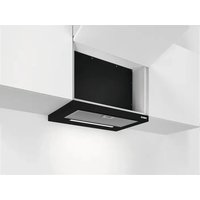
📄 128 pages English EN Download 💬 AI Question 10 questions ⚙️ Specs
Notice ZANUSSI ZFP616K - page 24
Pick your language and provide your email: we'll send you a specifically translated version.
Product type Extractor hood
Brand Zanussi
Model ZFP616K
Dimensions (W x D x H) 60 x 50 x 10 cm
Weight 10 kg
Power supply 220-240 V, 50 Hz
Number of speeds 3
Lighting LED (replacement by technician)
Grease filter type Metal, dishwasher safe
Charcoal filter Optional, replace every 4 months
Features Extractor tray, manual controls, speed memory
Daily use Pull the tray out more than 5 cm to access controls
Maintenance Monthly cleaning of grease filters
Safety Instructions in the separate installation manual
Repairability LED bulb replaceable by a technician; filters available
Environmental protection Recycling through appropriate channels

Frequently Asked Questions - ZFP616K ZANUSSI

How to use the Zanussi ZFP616K hood?
Pull the hood's tray out more than 5 cm to reveal the control panel. Press the 0|1 button to start the fan. Select the desired speed (1, 2 or 3). To turn off, press the button again or close the tray. The hood remembers the last speed used.
How to clean the grease filter?
Press the lever of the filter fixing clip under the hood. Gently tilt the front of the filter downwards then pull it out. Clean the filter with a sponge and non-abrasive detergent, or in the dishwasher at low temperature on a short cycle. Refit the filter by following the steps in reverse.
When to replace the charcoal filter?
The charcoal filter must be replaced at least every four months. The frequency may vary depending on the type of cooking and how regularly the grease filter is cleaned. Follow the instructions provided with the filter.
How to turn on the hood light?
Press the light button (bulb symbol) on the control panel. The light operates independently of the fan. Closing the tray does not affect the light.
The hood does not turn on, what should I do?
Check that the tray is pulled out more than 5 cm to expose the controls. Make sure the appliance is plugged in and the circuit breaker has not tripped. If the problem persists, contact a qualified technician.
Why is the hood not working at all?
First check the power supply. If the appliance is powered but does not respond, the problem may be with the motor or the electronic circuit. In that case, call a professional.
How to adjust the fan speed?
On the control panel, press the buttons marked 1 (low), 2 (medium) or 3 (high). Use speed 1 for simmering, 2 for normal cooking, and 3 for frying or large quantities.
Can I wash the grease filters in the dishwasher?
Yes, the metal grease filters can be washed in the dishwasher. Use a short cycle at low temperature. Any discolouration does not affect performance.
How to replace the LED bulb?
The LED bulb can only be replaced by a qualified technician. In case of malfunction, refer to the 'Maintenance' chapter of the safety manual and contact the after-sales service.
What to do in case of a hood breakdown?
First consult the user manual for basic solutions. If the problem persists, contact the Zanussi after-sales service. Do not attempt to repair the appliance yourself, except for operations described in the manual.

User questions about ZFP616K ZANUSSI

0 question about this device. Answer the ones you know or ask your own.

Ask a new question about this device

The email remains private: it is only used to notify you if someone responds to your question.

No questions yet. Be the first to ask one.

Download the instructions for your Basket in PDF format for free! Find your manual ZFP616K - ZANUSSI and take your electronic device back in hand. On this page are published all the documents necessary for the use of your device. ZFP616K by ZANUSSI.

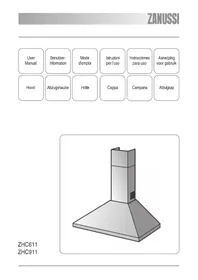
USER MANUAL ZFP616K ZANUSSI

natural_image Simple line drawing of a chimney with three dots on the base (no text or symbols)

ZFP616K ZFP619K

www.zanussi.com/support

natural_image Pure technical line drawing of a mechanical component or bracket with no text, numbers, or symbols
natural_image Diagram of a solar panel with two downward arrows indicating direction, placed on a grid-patterned surface (no text or symbols)

www.zanussi.com/support

Změny vyhrazeny.

OBSAH

  1. BEZPEČNOSTNÍ INFORMACE A INSTALACE.... 6
  2. POPIS SPOTŘEBIČE......6
  3. DENNÍ POUŽÍVÁNÍ......7
  4. ČIŠTĚNÍ A ÚDRŽBA....7
  5. POZNÁMKY K OCHRANĚ ŽIVOTNÍHO PROSTŘEDÍ...... 9

1. BEZPEČNOSTNÍ INFORMACE A INSTALACE

ZANUSSI ZFP616K - BEZPEČNOSTNÍ INFORMACE A INSTALACE - 1

VAROVÁNÍ!

natural_image Pure technical line drawing of a mechanical component with no text or symbols
natural_image Diagram of a grid-patterned panel with two downward arrows, no text or symbols present

www.zanussi.com/support

natural_image Technical line drawing of a mechanical component with an arrow indicating direction (no text or symbols)
natural_image Diagram of a solar panel with two downward arrows indicating direction, no text or symbols present

www.zanussi.com/support

natural_image Pure technical line drawing of a mechanical component or housing with no text, numbers, or symbols
natural_image Diagram of a solar panel with two downward arrows indicating direction, placed on a grid-patterned surface (no text or symbols)
natural_image Symbol of a trash bin crossed with a diagonal line, representing no waste or discharge (no text or labels)
natural_image Recycling symbol with three arrows forming a triangle (no text or labels)

www.zanussi.com/support

natural_image Pure technical line drawing of a mechanical component with no text or symbols
natural_image Diagram of a grid-patterned panel with two black arrows indicating direction, no text or symbols present

Get usage advice, brochures, trouble shooter, service and repair information:

www.zanussi.com/support

Subject to change without notice.

CONTENTS

  1. SAFETY INFORMATION AND INSTALLATION......23
  2. PRODUCT DESCRIPTION.... 23
  3. DAILY USE....24
  4. CARE AND CLEANING.... 24
  5. ENVIRONMENTAL CONCERNS....26

1. SAFETY INFORMATION AND INSTALLATION

ZANUSSI ZFP616K - SAFETY INFORMATION AND INSTALLATION - 1

WARNING!

Refer to the separate Installation Instructions booklet for Safety Information and Installation. Read carefully the Safety chapters before any use or maintenance of the appliance.

2. PRODUCT DESCRIPTION

2.1 Control panel overview

ZANUSSI ZFP616K - Control panel overview - 1

flowchart
graph TD
    A["1"] --> B["0|1"]
    B --> C["2"]
    C --> D["4"]
    E["2"] --> F["3"]
    F --> G["3"]

Function Description

1 First Speed The fan switches to first speed level.
2 Lamp Turns the lights on and off.
3 Third Speed The fan switches to third speed level.
4 Second Speed The fan switches to second speed level.

3. DAILY USE

3.1 Using the hood

Check the recommended speed according to the table below.

0|1While heating up food, cooking with covered pots.
2While cooking with covered pots on multiple cooking zones or burners, gentle frying.
3While boiling and frying big quantities of food without a lid, cooking on multiple cooking zones or burners.

ZANUSSI ZFP616K - Using the hood - 1

It is recommended to leave the hood operating for approximately 15 minutes after cooking.

To operate the hood:

  1. Pull out the drawer of the hood more than 5 cm.
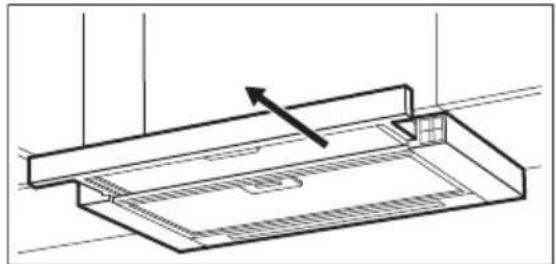
ZANUSSI ZFP616K - To operate the hood: - 1

natural_image Pure technical line drawing of a mechanical component with no text or symbols

The control panel is exposed.

  1. To activate the function press the 0|1 button.

  2. If needed, change the speed by pressing the desired button.

ZANUSSI ZFP616K - To operate the hood: - 2

The hoods light works independently to other hood functions. To illuminate the cooking surface press the light button Closing the drawer has no effect on the hood light.

To turn off the fan press or close the hood drawer.

ZANUSSI ZFP616K - To operate the hood: - 3

The hood remembers last setting of fan speed on closing the drawer. The hood will operate on this fan speed level when drawer is pulled out again.

4. CARE AND CLEANING

4.1 Notes on cleaning

ZANUSSI ZFP616K - Notes on cleaning - 1
Cleaning Agents

Do not use abrasive detergents and brushes.

Clean the surface of the appliance with a soft cloth with warm water and a mild detergent.

After cooking some parts of appliance can get hot. To avoid stains appliance must be cooled down and dried with clean cloth or paper towels.

Clean stains with a mild detergent.

ZANUSSI ZFP616K - Notes on cleaning - 2
Keep the hood clean

Clean the appliance and grease filters each month. Clean the interior and grease filters carefully from fat. Fat accumulation or other residue may cause fire.

Grease filters can be washed in a dishwasher.

The dishwasher must be set to a low temperature and a short cycle. The grease filter may discolour, it has no influence on the performance of the appliance.

ZANUSSI ZFP616K - Notes on cleaning - 3
Charcoal filter

The time of saturation of the charcoal filter varies depending on the type of cooking and the regularity of cleaning the grease filter.

4.2 Cleaning the grease filter

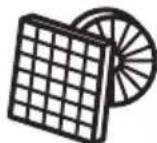
Filters are mounted with the use of clips and pins on the opposite side.

To clean the filter:

  1. Press the handle of the mounting clip on the filter panel underneath the hood.
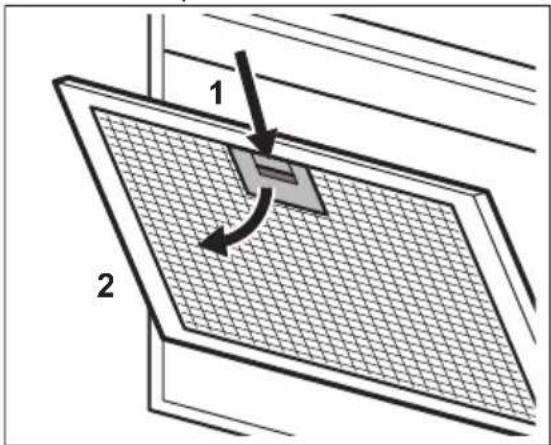
1 2

  1. Slightly tilt the front of the filter downwards, then pull.

Repeat the first two steps for all filters.

  1. Clean the filters using a sponge with non abrasive detergents or in a dishwasher.

ZANUSSI ZFP616K - To clean the filter: - 2

The dishwasher must be set to a low temperature and a short cycle. The grease filter may discolour, it has no influence on the performance of the appliance.

  1. To mount the filters back follow the first two steps in reverse order.

Repeat the steps for all filters if applicable.

4.3 Replacing the charcoal filter - optional

ZANUSSI ZFP616K - Replacing the charcoal filter - optional - 1

WARNING!

Depending on type, filter can be or cannot be regenerated. Refer to the leaflet provided with the filter.

To replace the filter:

  1. Remove the grease filters from the appliance.
    Refer to "Cleaning the grease filter" in this chapter.
  2. Pull the tabs towards the bottom part of the filter.
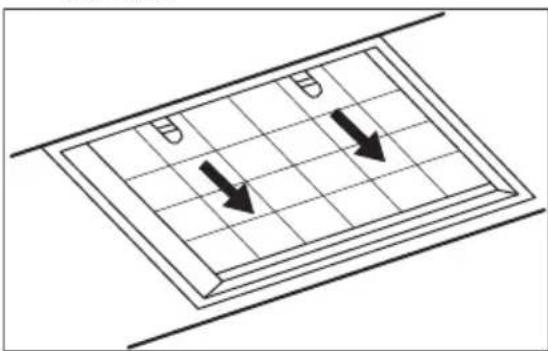
ZANUSSI ZFP616K - WARNING! - 1

natural_image Diagram of a grid-patterned structure with two downward arrows, no text or symbols present
  1. Slightly tilt the front of the filter downwards, then pull.
  2. To install a new filter, perform the same steps in reverse order.

In any case, it is necessary to replace the filters at least every four months.

4.4 Replacing the lamp

This appliance is supplied with a LED lamp. This part can be replaced by a technician

only. In case of any malfunction refer to

"Service" in the "Safety Instructions" chapter.

5. ENVIRONMENTAL CONCERNS

Recycle materials with the symbol Put the packaging in relevant containers to recycle it. Help protect the environment and human health by recycling waste of electrical and electronic appliances. Do not dispose of

appliances marked with the symbol ☒ with the household waste. Return the product to your local recycling facility or contact your municipal office.

www.zanussi.com/support

natural_image Pure technical line drawing of a mechanical component with no text or symbols
natural_image Diagram of a grid-patterned panel with two downward arrows, no text or symbols present

www.zanussi.com/support

natural_image Pure technical line drawing of a mechanical component with no text or symbols
natural_image Diagram of a grid-patterned panel with two downward arrows, no text or symbols present

www.zanussi.com/support

natural_image Pure technical line drawing of a mechanical component with no text or symbols
natural_image Diagram of a grid-patterned panel with two downward arrows indicating direction (no text or symbols)

www.zanussi.com/support

natural_image Technical line drawing of a mechanical component with an arrow indicating direction (no text or symbols)
natural_image Diagram of a solar panel with two downward arrows indicating direction, placed on a grid-patterned surface (no text or symbols)

www.zanussi.com/support

3. SVAKODNEVNA UPORABA

3.1 Uporaba nape

natural_image Pure technical line drawing of a mechanical component with no text or symbols
natural_image Diagram of a grid-patterned panel with two downward arrows, no text or symbols present
  1. Lagano nagnite prednji dio filtra prema dolje, a zatim ga povucite.
  2. Da biste instalirali novi filtar, izvršite iste korake obrnutim redoslijedom. U svakom slučaju, potrebno je zamijeniti filtre najmanje svaka četiri mjeseca.

4.4 Zamjena žarulje

Ovaj uređaj opremljen je LED žaruljom. Ovaj dio može zamijeniti samo tehničar. U slučaju bilo kakve neispravnosti, pogledajte "Servis" u poglavlju "Sigurnosne upute".

5. BRIGA ZA OKOLIŠ

Reciklirajte materijale sa simbolom 🚙 Ambalažu za recikliranje odložite u prikladne spremnike. Pomozite u zaštiti okoliša i ljudskog zdravlja, kao i u recikliranju otpada od električnih i elektroničkih uređaja. Uređaje

www.zanussi.com/support

natural_image Pure technical line drawing of a mechanical component with no text or symbols
natural_image Diagram of a grid-patterned panel with two downward arrows, no text or symbols present

www.zanussi.com/support

natural_image Pure technical line drawing of a mechanical component with no text or symbols
natural_image Diagram of a grid-patterned structure with two downward arrows, no text or symbols present

www.zanussi.com/support

natural_image Pure technical line drawing of a mechanical component with no text or symbols
natural_image Diagram of a solar panel with two downward arrows indicating direction, placed on a grid-patterned surface (no text or symbols)

www.zanussi.com/support

Galimi pakeitimai.

TURINYS

  1. SAUGOS INFORMACIJA IR IRENGIMAS....59
  2. GAMINIO APRAŠYMAS....59
  3. KASDIENIS NAUDOJIMAS....60
  4. VALYMAS IR PRIEŽIŪRA....60
  5. APLINKOS APSAUGA....62

1. SAUGOS INFORMACIJA IR İRENGIMAS

ZANUSSI ZFP616K - SAUGOS INFORMACIJA IR İRENGIMAS - 1

ISPÈJIMAS!

natural_image Pure technical line drawing of a mechanical component with no text or symbols
natural_image Diagram of a grid-patterned structure with two downward arrows, no text or symbols present

www.zanussi.com/support

natural_image Pure technical line drawing of a mechanical component with no text or symbols
natural_image Diagram of a solar panel with two downward arrows indicating direction, no text or symbols present
natural_image Pure technical line drawing of a mechanical component with no text or symbols
natural_image Diagram of a grid-patterned structure with two downward arrows, no text or symbols present

www.zanussi.com/support

natural_image Pure technical line drawing of a mechanical component with no text or symbols
natural_image Diagram of a solar panel with two downward arrows indicating direction, placed on a grid-patterned surface (no text or symbols)

www.zanussi.com/support

Med forbehold om endringer.

INNHOLD

  1. SIKKERHETSINFORMASJON OG INSTALLASJON.... 75
  2. PRODUKTBESKRIVELSE....75
  3. DAGLIG BRUK....76
  4. STELL OG RENGJ∅RING....76
  5. BESKYTTELSE AV MILJ∅ET....78

1. SIKKERHETSINFORMASJON OG INSTALLASJON

ZANUSSI ZFP616K - SIKKERHETSINFORMASJON OG INSTALLASJON - 1

ADVARSEL!

natural_image Pure technical line drawing of a mechanical component with no text or symbols

Kontrollpanelet er eksponert.

natural_image Diagram of a solar panel with two downward arrows indicating direction, no text or symbols present

www.zanussi.com/support

natural_image Technical line drawing of a mechanical component with an arrow indicating direction (no text or symbols)
natural_image Diagram of a grid-patterned panel with two black arrows indicating direction, no text or symbols present

www.zanussi.com/support

2 Lâmpada Liga e desliga as luzes.

natural_image Technical line drawing of a mechanical component with an arrow indicating direction (no text or symbols)
natural_image Diagram of a grid-patterned structure with two downward arrows, no text or symbols present

www.zanussi.com/support

natural_image Pure technical line drawing of a mechanical component or housing with no text, numbers, or symbols
natural_image Diagram of a solar panel with two downward arrows indicating direction, no text or symbols present
natural_image Pure technical line drawing of a mechanical component or housing assembly without any text, numbers, or symbols
natural_image Diagram of a grid-patterned panel with two black arrows indicating direction, no text or symbols present

www.zanussi.com/support

natural_image Technical line drawing of a mechanical component with an arrow indicating direction (no text or symbols)
natural_image Diagram of a grid-patterned panel with two downward arrows, no text or symbols present

www.zanussi.com/support

Pridržujemo si pravico do sprememb.

KAZALO

  1. VARNOSTNE INFORMACIJE IN NAMESTITEV....99
  2. OPIS IZDELKA....99
  3. VSAKODNEVNA UPORABA.... 100
  4. VZDRŽEVANJE IN ČIŠČENJE....100
  5. SKRB ZA OKOLJE....102

1. VARNOSTNE INFORMACIJE IN NAMESTITEV

ZANUSSI ZFP616K - VARNOSTNE INFORMACIJE IN NAMESTITEV - 1

OPOZORILO!

natural_image Pure technical line drawing of a mechanical component or assembly without any text, numbers, or symbols
natural_image Diagram of a grid-patterned panel with two downward arrows, no text or symbols present

2. PËRSHKRIM I PRODUKTIT

natural_image Technical line drawing of a mechanical component with an arrow indicating direction (no text or symbols)

Paneli i kontrollit éshtë i ekspozuar.

natural_image Diagram of a solar panel with two downward arrows indicating direction, no text or symbols present
natural_image Pure technical line drawing of a mechanical component or housing with no text, numbers, or symbols
natural_image Diagram of a grid-patterned panel with two downward arrows indicating direction (no text or symbols)

www.zanussi.com/support

natural_image Pure technical line drawing of a mechanical component with no text or symbols
natural_image Diagram of a grid-patterned structure with two downward arrows, no text or symbols present

www.zanussi.com/support

natural_image Technical line drawing of a mechanical component with an arrow indicating direction (no text or symbols)
natural_image Diagram of a solar panel with two downward arrows indicating direction, no text or symbols present

www.zanussi.com/support

natural_image Technical line drawing of a mechanical component with an arrow indicating direction (no text or symbols)
natural_image Diagram of a solar panel with two downward arrows indicating direction, placed on a grid-patterned surface (no text or symbols)
natural_image Diagram of a solar panel with two downward arrows indicating direction, no text or symbols present
natural_image Pure technical line drawing of a mechanical component or assembly (no text or symbols)

لوحة التحكم مكشوفة.

www.zanussi.com/support

Manual assistant
Powered by Anthropic
Waiting for your message
Product information

Brand : ZANUSSI

Model : ZFP616K

Category : Basket