EAVH16S18DA9WG - Heat pump DAIKIN - Free user manual and instructions
Find the device manual for free EAVH16S18DA9WG DAIKIN in PDF.


| Product type | Air-to-water heat pump |
| Brand | Daikin |
| Model | EAVH16S18DA9WG |
| Refrigerant | R32 (GWP 675) |
| Main functions | Heating, Cooling (reversible model), Domestic hot water |
| User interface | LCD screen with left/right wheels, status LED indicator |
| Operating modes | Heating, Cooling, Automatic, Vacation, Silent |
| Programming | Weekly programmer for indoor temperature, departure temperature and DHW |
| Temperature control | Adjustable indoor set point and departure temperature |
| Anti-freeze protection | Yes, enable/disable |
| Powerful DHW operation | Yes, rapid heating of domestic hot water tank |
| Disinfection mode | Yes, for DHW tank |
| Minimum water pressure | 1 bar (check regularly) |
| Maintenance and cleaning | Clean interface with a soft damp cloth. Annual maintenance by an installer. |
| Safety | Flammable refrigerant R32. Do not puncture the circuit. In case of leak, extinguish any flame, ventilate and contact a professional. |
| Electrical supply | Refer to unit nameplate |
| Estimated heating capacity | Up to 16 kW (depending on model) |
| Provided documents | General safety instructions, user manual, user reference guide (digital format) |
Frequently Asked Questions - EAVH16S18DA9WG DAIKIN
User questions about EAVH16S18DA9WG DAIKIN
0 question about this device. Answer the ones you know or ask your own.
Ask a new question about this device
Download the instructions for your Heat pump in PDF format for free! Find your manual EAVH16S18DA9WG - DAIKIN and take your electronic device back in hand. On this page are published all the documents necessary for the use of your device. EAVH16S18DA9WG by DAIKIN.
USER MANUAL EAVH16S18DA9WG DAIKIN
natural_image
Line drawing of two rectangular industrial appliances with cooling fans and ventilation grilles (no text or symbols)Operation manual
Daikin Altherma 3 H F+W
Betriebsanleitung
Daikin Altherma 3 H F+W
2 About the system 3
2.1 Components in a typical system layout .... 3
3 Operation 3
3.1 User interface: Overview 3
3.2 Possible screens: Overview 4
3.2.1 Home screen.... 4
3.2.2 Main menu screen 5
3.2.3 Setpoint screen.... 5
3.2.4 Detailed screen with values 5
3.3 Turning operation ON or OFF 6
3.3.1 Visual indication....6
3.3.2 To turn ON or OFF....6
3.4 Space heating/cooling control 7
3.4.1 Setting the space operation mode 7
3.4.2 To change the desired room temperature....7
3.4.3 To change the desired leaving water temperature..... 7
3.5 Domestic hot water control....8
3.5.1 Reheat mode 8
3.5.2 Scheduled mode....8
3.5.3 Scheduled + reheat mode....8
3.5.4 Using DHW powerful operation....8
3.6 Advanced usage....9
3.7 Schedule screen: Example....9
3.8 Menu structure: Overview user settings 12
3.9 Installer settings: Tables to be filled in by installer 13
3.9.1 Configuration wizard 13
3.9.2 Settings menu.... 13
4 Energy saving tips 13
5 Maintenance and service 13
5.1 Overview: Maintenance and service 13
5.2 To find the contact/helpdesk number 14
6 Troubleshooting 14
6.1 To display the help text in case of a malfunction.... 14
6.2 Symptom: You are feeling too cold (hot) in your living room..... 14
6.3 Symptom: The water at the tap is too cold 14
6.4 Symptom: Heat pump failure.... 14
6.5 Symptom: The system is making gurgling noises after commissioning.... 15
7 Disposal 15
8 Glossary 15
1 About this document
Thank you for purchasing this product. Please:
- Read the documentation carefully before operating the user interface to ensure the best possible performance.
- Request the installer to inform you about the settings that he used to configure your system. Check if he has filled in the installer settings tables. If not, request him to do so.
- Keep the documentation for future reference.
Target audience
End users
Documentation set
This document is part of a documentation set. The complete set consists of:
- General safety precautions:
- Safety instructions that you must read before operating your system
- Format: Paper (in the box of the indoor unit)
- Operation manual:
- Quick guide for basic usage
- Format: Paper (in the box of the indoor unit)
- User reference guide:
- Detailed step-by-step instructions and background information for basic and advanced usage
- Format: Digital files on http://www.daikineurope.com/support-and-manuals/product-information/
Latest revisions of the supplied documentation may be available on the regional Daikin website or via your installer.
The original documentation is written in English. All other languages are translations.
Breadcrumbs
Breadcrumbs (example: [4.3]) help you to locate where you are in the menu structure of the user interface.
| 1 | To enable the breadcrumbs: In the home screen or main menu screen, press the help button. The breadcrumbs appear in the top left corner of the screen. | ? |
| 2 | To disable the breadcrumbs: Press the help button again. | ? |
This document also mentions these breadcrumbs. Example:
| 1 | Go to [4.3]: Space heating/cooling > Operation range. |
This means:
| 1 Starting from the home screen, turn the left dial and go to Space heating/cooling. | ○···○ |
| 4Space heating/cooling |
| 2 Press the left dial to enter the submenu. | @...○ |
| 3 Turn the left dial and go to Operation range. | ○···○ |
| 4 Press the left dial to enter the submenu. | ○···○ |
2 About the system
Depending on the system layout, the system can:
- Heat up a space
- Cool down a space (if a heating/cooling heat pump model is installed)
- Produce domestic hot water (if a DHW tank is installed)
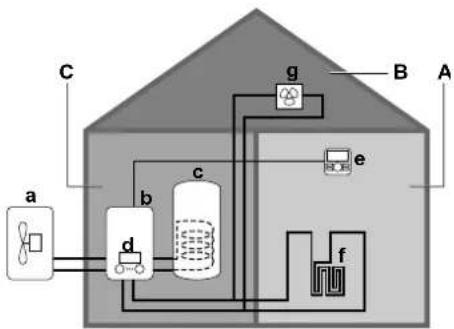
2.1 Components in a typical system layout
flowchart
graph TD
    A["a"] --> B["d"]
    B --> C["b"]
    C --> D["c"]
    D --> E["g"]
    E --> F["f"]
    F --> G["e"]
    G --> H["B"]
    H --> I["A"]
    style A fill:#f9f,stroke:#333
    style I fill:#ccf,stroke:#333
A Main zone. Example: Living room.
B Additional zone. Example: Bedroom.
C Technical room. Example: Garage.
a Outdoor unit heat pump
b Indoor unit heat pump
c Domestic hot water (DHW) tank
d User interface of the indoor unit
e User interface used as room thermostat
f Underfloor heating
g Radiators, heat pump convectors, or fan coil units

INFORMATION
The indoor unit and the domestic hot water tank (if installed) can be separated or integrated depending on the indoor unit type.
3 Operation
3.1 User interface: Overview
The user interface has the following components:
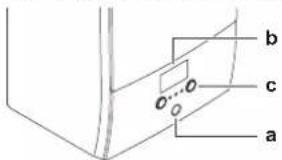
a Status indicator
b LCD screen
c Dials and buttons
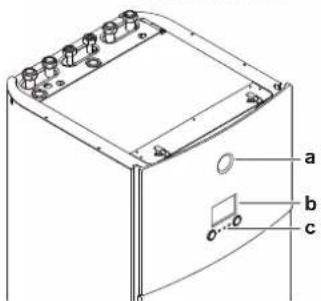
a Status indicator
b LCD screen
c Dials and buttons
Status indicator
The LEDs of the status indicator light up or blink to show the operating mode of the unit.
| LED Mode | Description | |
| Blinking blue Standby The unit is not in operation. | ||
| Continuous blue Operation The unit is in operation. | ||
| Blinking red Malfunction A malfunction occurred.See "6.1 To display the help text in case of a malfunction" [▶ 14] for more information. | ||
LCD screen
The LCD screen has a sleeping function. After 15 min of non-interaction with the user interface, the screen darkens. Pressing any button or rotating any dial awakens the display.
Dials and buttons
You use the dials and buttons:
- To navigate through the screens, menus and settings of the LCD screen
- To set values
natural_image
Simple geometric lines inside a rectangle (no text or symbols)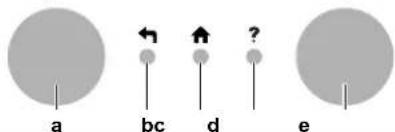
| Item | Description | |
| a | Left dial | The LCD shows an arc on the left side of the display when you can use the left dial.▪ [IMAGE]: Turn, then press the left dial. Navigate through the menu structure.▪ [IMAGE]: Turn the left dial. Choose a menu item.▪ [IMAGE]: Press the left dial. Confirm your choice or go to a submenu. |
| b | Back button | ←: Press to go back 1 step in the menu structure. |
| c | Home button | →: Press to go back to the home screen. |
| d | Help button | Press to show a help text related to the current page (if available). |
| e | Right dial | The LCD shows an arc on the right side of the display when you can use the right dial.▪ [IMAGE]: Turn, then press the right dial. Change a value or setting, shown at the right side of the screen.▪ [IMAGE]: Turn the right dial. Navigate through the possible values and settings.▪ [IMAGE]: Press the right dial. Confirm your choice and go to the next menu item. |
3 Operation
3.2 Possible screens: Overview
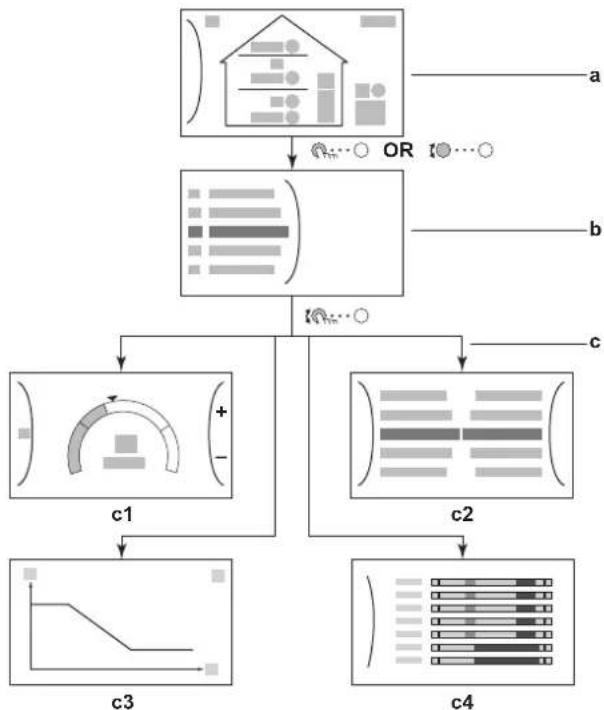
The most common screens are as follows:
flowchart
graph TD
    A["Input Data"] --> B["Data Processing"]
    B --> C1["Component 1: +/-"]
    B --> C2["Component 2: horizontal bars"]
    B --> C3["Component 3: linear trend graph"]
    B --> C4["Component 4: vertical bar chart"]
    C1 --> D1["c1"]
    C2 --> D2["c2"]
    C3 --> D3["c3"]
    C4 --> D4["c4"]
    A --> E["a"]
    B --> F["b"]
    C1 --> G["c1"]
    C2 --> H["c2"]
    C3 --> I["c3"]
    C4 --> J["c4"]
    style A fill:#f9f,stroke:#333
    style B fill:#ccf,stroke:#333
    style C1 fill:#cfc,stroke:#333
    style C2 fill:#cfc,stroke:#333
    style C3 fill:#fcc,stroke:#333
    style C4 fill:#fcc,stroke:#333
a Home screen
b Main menu screen
c Lower level screens:
c1: Setpoint screen
c2: Detailed screen with values
c3: Screen with weather-dependent curve
c4: Screen with schedule
3.2.1 Home screen
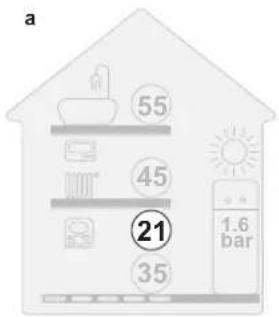
Press the button to go back to the home screen. You see an overview of the unit configuration and the room and setpoint temperatures. Only symbols applicable for your configuration are visible on the home screen.
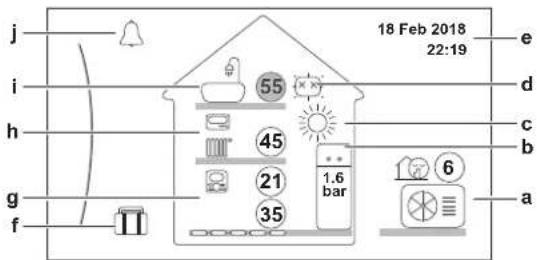
| Possible actions on this screen | |
| !○··○ | Go through the list of the main menu. |
| ? | Go to the main menu screen. |
| Enable/disable breadcrumbs. | |
| Item Description | |
| 21 21 | The temperatures are shown in circles. If the circle is grey, the corresponding operation (example: space heating) is currently not active. |
| Outdoor unita2 a3a1 | a1 Outdoor unit |
| a2 Quiet mode active | |
| a3 Measured ambient temperature | |
| Item Description | ||
| Indoor unit / domestic hot water tankb2b1 | b1 | indoor unit: : Floor-standing indoor unit with integrated tank : Wall-mounted indoor unit with separated tank : Wall-mounted indoor unit |
| b2 | Water pressure | |
| Space operation mode | c | : Cooling: Heating |
| Disinfection / Powerful | d | : Disinfection mode active: Powerful operation active |
| Date / time e | Current date and time | |
| Holiday | f | : Holiday mode active |
| Main zoneg3 g4g1 g2 | g1 | Heat emitter type: : Underfloor heating : Fancoil unit : Radiator |
| g2 | Leaving water temperature setpoint | |
| g3 | Room thermostat type: : Daikin user interface used as room thermostat : External control : Hidden: Leaving water temperature control | |
| g4 | Measured room temperature | |
| Additional zoneh3 h1 h2 | h1 | Heat emitter type: : Underfloor heating : Fancoil unit : Radiator |
| h2 | Leaving water temperature setpoint | |
| h3 | Room thermostat type: : External control : Hidden: Leaving water temperature control | |
| Domestic hot wateri1 i2 | i1 | : Domestic hot water |
| i2 | Measured tank temperature | |
| Malfunction | j | A malfunction occurred See "6.1 To display the help text in case of a malfunction" [▶ 14] for more information. |
3.2.2 Main menu screen
Starting from the home screen, press ( ) or turn ( ) the left dial to open the main menu screen. From the main menu, you can access the different setpoint screens and submenus.
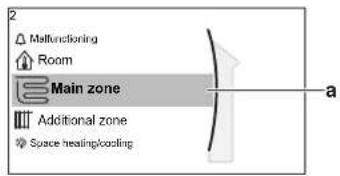
a Selected submenu
| Possible actions on this screen | |
| Go through the list. | |
| Enter the submenu. | |
| ? | Enable/disable breadcrumbs. |
| Submenu Description | ||
| [0] | orMalfunctioning | Restriction: Only displayed if a malfunction occurs.See "6.1 To display the help text in case of a malfunction" [▶ 14] for more information. |
| [1] | Room | Restriction: Only displayed if a room thermostat is connected to the indoor unit.Set the room temperature. |
| [2] | Main zone | Shows the applicable symbol for your main zone emitter type.Set the leaving water temperature for the main zone. |
| [3] | Additional zone | Restriction: Only displayed if there are two leaving water temperature zones. Shows the applicable symbol for your additional zone emitter type.Set the leaving water temperature for the additional zone (if present). |
| [4] | Space heating/ cooling | Shows the applicable symbol for your unit.Put the unit in heating mode or cooling mode. You cannot change the mode on heating only models. |
| [5] | Tank | Restriction: Only displayed if a domestic hot water tank is present.Set the domestic hot water tank temperature. |
| [7] | User settings | Gives access to user settings such as holiday mode and quiet mode. |
| [8] | Information | Displays data and information about the indoor unit. |
| [9] | Installer settings | Restriction: Only for the installer.Gives access to advanced settings. |
| [A] | Commissioning | Restriction: Only for the installer.Perform tests and maintenance. |
| [B] | User profile | Change the active user profile. |
| [C] | Operation | Turn heating/cooling functionality and domestic hot water preparation on or off. |
3.2.3 Setpoint screen
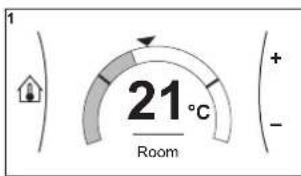
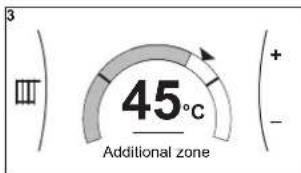
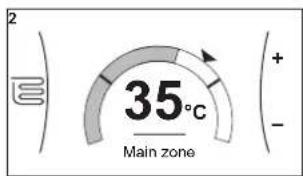
The setpoint screen is displayed for screens describing system components that need a setpoint value.
Examples
[1] Room temperature screen
[3] Additional zone screen
[2] Main zone screen
[5] Tank temperature screen
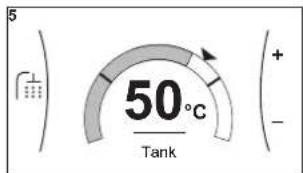
Explanation
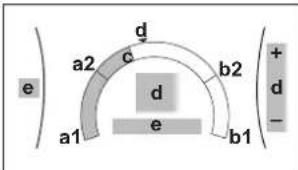
| Possible actions on this screen | |
| ○···○ | Go through the list of the submenu. |
| ○···○ | Go to the submenu. |
| ○···○ | Adjust and automatically apply the desired temperature. |
| Item Description | ||
| Minimum temperature limit a1 Fix | fixed by the unit | |
| a2 Restricted by the installer | ||
| Maximum temperature limit b1 Fix | fixed by the unit | |
| b2 Restricted by the installer | ||
| Current temperature c Measured by the unit | ||
| Desired temperature d Turn the right dial to increase/decrease. | ||
| Submenu e Turn or press the left dial to go to the submenu. | ||
3.2.4 Detailed screen with values
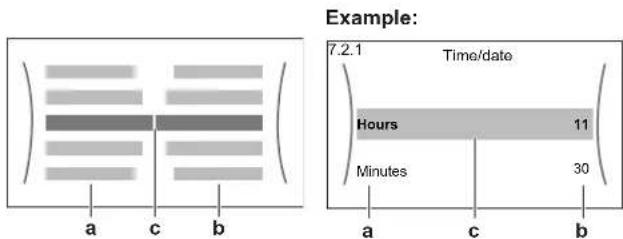
a Settings
b Values
c Selected setting and value
3 Operation
| Possible actions on this screen | |
| ○···○ | Go through the list of settings. |
| ○···○ | Change the value. |
| ○···○ | Go to the next setting. |
| ○···○ | Confirm changes and proceed. |
3.3 Turning operation ON or OFF
3.3.1 Visual indication
Certain functionalities of the unit can be enabled or disabled separately. If a functionality is disabled, the corresponding temperature icon in the home screen will be greyed out.
Room temperature control
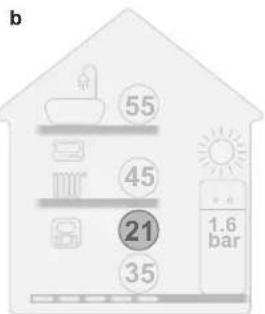
a Room temperature control ON b Room temperature control OFF
Space heating/cooling operation
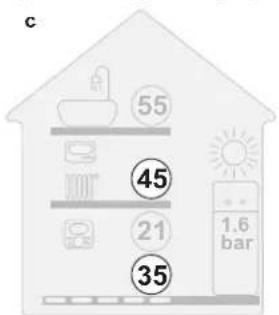
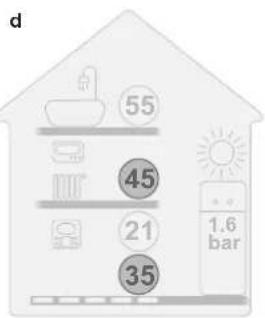
c Space heating/cooling operation ON d Space heating/cooling operation OFF
Tank heating operation
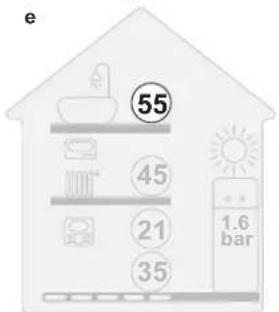
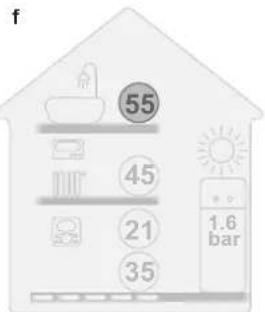
e Tank heating operation ON f Tank heating operation OFF
3.3.2 To turn ON or OFF
Room temperature control
![1 Go to [C.1]: Operation > Room. C.1 Operation Room On Space heating/cooling On 2 Set operation to On or Off. ○…○](/content/2026/04/667647/images/8e446a8e173656942ab24a1e6ac6ca4b17d30c8284d4a257df4558ddeeca5acb.jpg)
Space heating/cooling operation
NOTICE
Room frost protection. Even if you turn OFF space heating/cooling operation ([C.2]: Operation > Space heating/cooling), room frost protection operation -if enabled- can still activate. However, for leaving water temperature control and external room thermostat control, the protection is NOT guaranteed.
NOTICE
Water pipe freeze prevention. Even if you turn OFF space heating/cooling operation ([C.2]: Operation > Space heating/cooling), water pipe freeze prevention – if enabled– will remain active.
![1 Go to [C.2]: Operation > Space heating/cooling. C.2 Operation Room On Space heating/cooling On Tank Off 2 Set operation to On or Off. ○…○](/content/2026/04/667647/images/0a12c3992ef3ecde60a7f9bef670a0f757bc670233b4a376ba65045163b0e20b.jpg)
Tank heating operation
NOTICE
Disinfection mode. Even if you turn OFF tank heating operation ([C.3]: Operation > Tank), disinfection mode will remain active. However, if you turn it OFF while disinfection is running, an AH error occurs.
![1 Go to [C.3]: Operation > Tank. C.3 Operation Space heating/cooling On Tank Off 2 Set operation to On or Off. ○…○](/content/2026/04/667647/images/5d589946737d9a16e7ea072778840012b2bef131e9fb74c5e33b2509aa87236d.jpg)
3.4 Space heating/cooling control
3.4.1 Setting the space operation mode
About space operation modes
Your unit can be a heating or a heating/cooling model:
- If your unit is a heating model, it can heat up a space.
- If your unit is a heating/cooling model, it can both heat up and cool down a space. You have to tell the system which operation mode to use.
To tell the system which space operation to use, you can:
| You can... Location | |
| Check which space operation mode is currently used. | Home screen |
| Set the space operation mode permanently. | Main menu |
| Restrict automatic changeover according to a monthly schedule. |
To set the space operation mode
| 1 | Go to [4.1]: Space heating/cooling > Operation mode | ### |
| 2 | Select one of the following options:• Heating: Only heating mode• Cooling: Only cooling mode• Automatic: The operation mode changes automatically between heating and cooling based on the outdoor temperature. Restricted per month according to the Operation mode schedule [4.2]. | ### |
To restrict automatic changeover according to a schedule
Conditions: You set the space operation mode to Automatic.
| 1 | Go to [4.2]: Space heating/cooling > Operation mode schedule. | |
| 2 | Select a month. | |
| 3 | For each month, select an option:Reversible: Not restrictedHeating only: RestrictedCooling only: Restricted | |
| 4 | Confirm the changes. |
3.4.2 To change the desired room temperature
During room temperature control, you can use the room temperature setpoint screen to read out and adjust the desired room temperature.
| 1 Go to [1]: Room. | |
2 Adjust the desired room temperature.
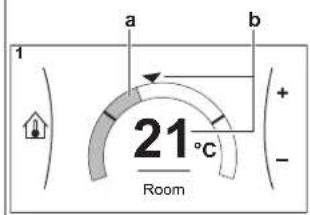
a Actual room temperature b Desired room temperature

If scheduling is on after changing the desired room temperature
- The temperature will stay the same as long as there is no scheduled action.
- The desired room temperature will return to its scheduled value whenever a scheduled action occurs.
You can avoid scheduled behaviour by (temporarily) turning off scheduling.
To turn off room temperature scheduling
| 1 Go to [1.1]: Room > Schedule. | ###...○ |
| 2 Select No. | ###...○ |
3.4.3 To change the desired leaving water temperature

INFORMATION
The leaving water is the water that is sent to the heat emitters. The desired leaving water temperature is set by your installer in accordance with the heat emitter type. Only adjust the leaving water temperature settings in case of problems.
You can use the leaving water temperature setpoint screen to read out and adjust the desired leaving water temperature.
![1 Go to [2]: Main zone or [3]: Additional zone. 2 Main zone 3 Additional zone](/content/2026/04/667647/images/4d428cc42370b0194dee4a80a316df527b1e97d7407dfdad99456ce3b54daddd.jpg)
3 Operation
2 Adjust the desired leaving water temperature.

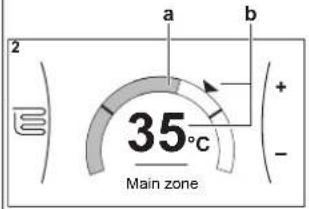
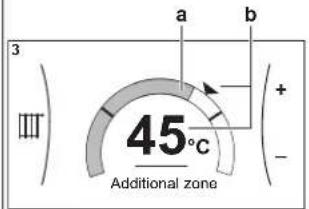
a Actual leaving water temperature
b Desired leaving water temperature
3.5 Domestic hot water control
3.5.1 Reheat mode
In reheat mode the DHW tank continuously heats up to the temperature shown on the home screen (example: 50°C) when the temperature drops below a certain value.
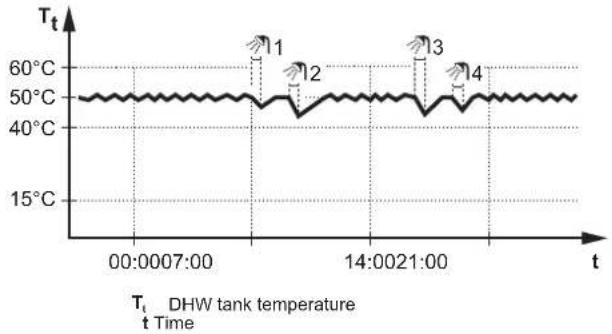
line
| t | Tt | | -------------- | ------ | | 00:00:07:00 | ~50°C | | 14:00:21:00 | ~50°C | | 14:00:21:30 | ~50°C | | 14:00:21:40 | ~50°C |
INFORMATION
Risk of space heating capacity shortage for domestic hot water tank without internal booster heater: In case of frequent domestic hot water operation, frequent and long space heating/cooling interruption will happen when selecting the following:
Tank > Heat up mode > Reheat only.

INFORMATION
When the DHW tank mode is reheat, the risk for capacity shortage and comfort problem is significant. In case of frequent reheat operation, space heating/cooling function is regularly interrupted.
3.5.2 Scheduled mode
In scheduled mode the DHW tank produces hot water corresponding to a schedule. The best time to allow the tank to produce hot water is at night, because the space heating demand is lower.
Example:
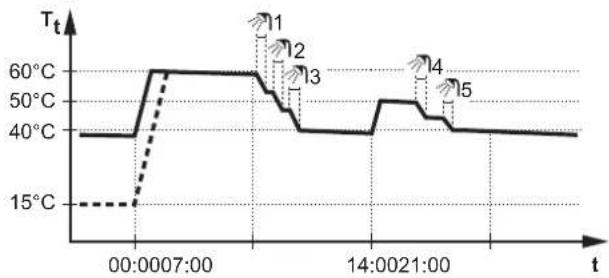
line
| Time | Tt | | ------------- | ---- | | 00:00:07:00 | 60°C | | 14:00:21:00 | 40°C |T_t DHW tank temperature t Time
- Initially, the DHW tank temperature is the same as the temperature of the domestic water entering the DHW tank (example: 15°C).
- At 00:00 the DHW tank is programmed to heat up the water to a preset value (example: Comfort = 60°C).
- During the morning, you consume hot water and the DHW tank temperature decreases.
- At 14:00 the DHW tank is programmed to heat up the water to a preset value (example: Eco = 50°C). Hot water is available again.
- During the afternoon and evening, you consume hot water again and the DHW tank temperature decreases again.
- At 00:00 the next day, the cycle repeats.
3.5.3 Scheduled + reheat mode
In scheduled + reheat mode, the domestic hot water control is the same as in scheduled mode. However, when the DHW tank temperature drops below a preset value (=reheat tank temperature – hysteresis value; example: 35°C), the DHW tank heats up until it reaches the reheat set point (example: 45°C). This ensures that a minimum amount of hot water is available at all times.
Example:
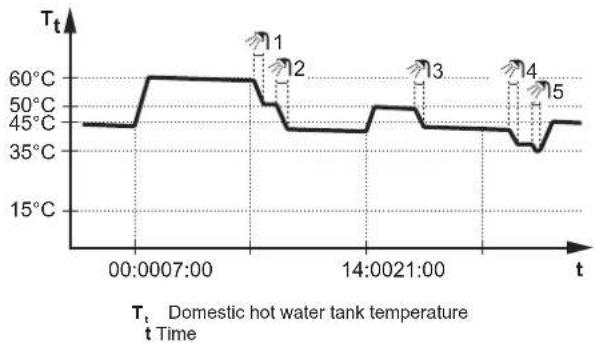
line
| Time | Temperature (°C) | | ---------------- | ---------------- | | 00:0007:00 | 45°C | | 12:00 | 60°C | | 14:0021:00 | 45°C | | Final | 35°C |3.5.4 Using DHW powerful operation
About powerful operation
Powerful operation allows the domestic hot water to be heated by the backup heater or booster heater. Use this mode on days when there is more hot water usage than usual.
To check if powerful operation is active
If 🖼 is displayed on the home screen, powerful operation is active.
Activate or deactivate Powerful operation as follows:
| 1 | Go to [5.1]: Tank > Powerful operation | R_m ·s O |
| 2 | Turn powerful operation Off or On. | R_m ·s O |
Usage example: You immediately need more hot water
You are in the following situation:
- You already consumed most of your domestic hot water.
- You cannot wait for the next scheduled action to heat up the domestic hot water tank.
Then you can activate powerful operation. The domestic hot water tank will start heating up the water to the Comfort temperature.

INFORMATION
When powerful operation is active, the risk of space heating/cooling and capacity shortage comfort problems is significant. In case of frequent domestic hot water operation, frequent and long space heating/cooling interruptions will happen.
3.6 Advanced usage
The amount of information you can read out and edit in the menu structure depends on your user permission level:
- User: Standard mode
- Advanced user: You can read out and edit more information
To change the user permission level
You can change the user permission level as follows:
| 1 Go to [B]: User profile. | |
| 2 Enter the applicable pin code for the user permission level. | - |
| ·Browse through the list of digits and change the selected digit. | ○···· |
| ·Move the cursor from left to right. | ○···· |
| ·Confirm the pin code and proceed. | ○···· |
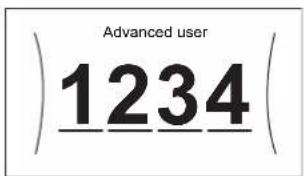
User pin code
The User pin code is 0000.
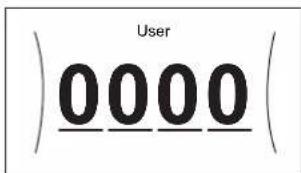
Advanced user pin code
The Advanced user pin code is 1234. Additional menu items for the user are now visible.
3.7 Schedule screen: Example
This example shows how to set a room temperature schedule in heating mode for the main zone.

INFORMATION
The procedures to program other schedules are similar.
To program the schedule: overview
Example: You want to program the following schedule:
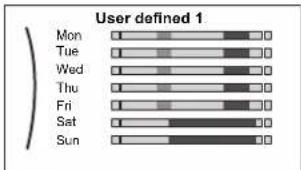
Prerequisite: The room temperature schedule is only available if room thermostat control is active. If leaving water temperature control is active, you can program the main zone schedule instead.
1 Go to the schedule.
2 (optional) Clear the content of the whole week schedule or the content of a selected day schedule.
3 Program the schedule for Monday.
4 Copy the schedule to the other weekdays.
5 Program the schedule for Saturday and copy it to Sunday.
6 Give the schedule a name.
To go to the schedule
| 1 Go to [1.1]: Room > Schedule. | _m ·s |
| 2 Set scheduling to Yes. | _m ·s |
| 3 Go to [1.2]: Room > Heating schedule. | _m ·s |
To clear the content of the week schedule
| 1 Select the name of the current schedule.User defined 1MonTueWedThuFriSatSun | QQm··○ | |
| 2 Select Delete.DeleteRenameSelect | QQm··○ | |
| 3 Select OK to confirm. | QQm··○ |
To clear the content of a day schedule
| 1 Select the day of which you want to clear the content. For example Friday | |
3 Operation
| 2 Select Delete. | 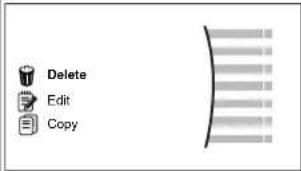 |
| 3 Select OK to confirm. | |
To program the schedule for Monday
1 Select Monday.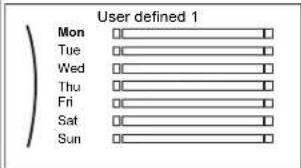 | [IMAGE] |
2 Select Edit.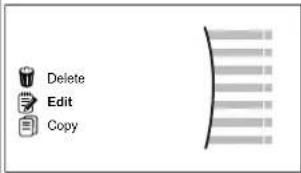 | [IMAGE] |
3 Use the left dial to select an entry and edit the entry with the right dial. You can program up to 6 actions each day. On the bar, a high temperature has a darker colour than a low temperature.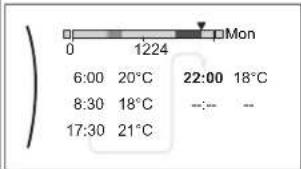 Note:To clear an action, set its time as the time of the previous action. Note:To clear an action, set its time as the time of the previous action. | [IMAGE] |
| 4 Confirm the changes.Result:The schedule for Monday is defined. The value of the last action is valid until the next programmed action. In this example, Monday is the first day you programmed. Thus, the last programmed action is valid up to the first action of next Monday. | [IMAGE] |
To copy the schedule to the other weekdays
1 Select Monday.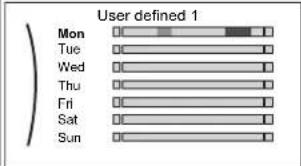 | [IMAGE] |
2 Select Copy.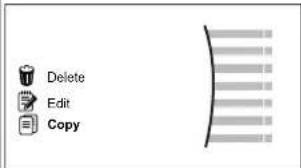 Result: Next to the copied day, "C" is displayed. Result: Next to the copied day, "C" is displayed. | [IMAGE] |
3 Select Tuesday.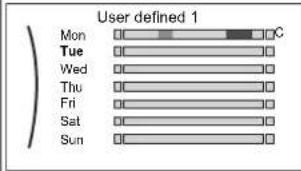 | [IMAGE] | |
4 Select Paste.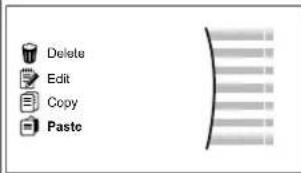 Result: Result: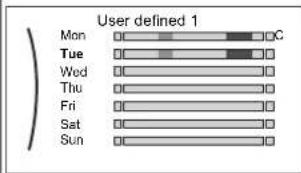 | [IMAGE] | |
5 Repeat this action for all other weekdays.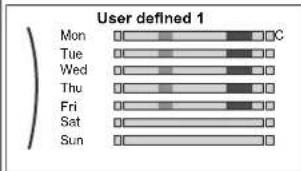 | — |
To program the schedule for Saturday and copy it to Sunday
| 1 Select Saturday. | 10...○ |
| 2 Select Edit. | 10...○ |
| 3 Use the left dial to select an entry and edit the entry with the right dial. | 10...○○...○ |
| 4 Confirm the changes. | 10...○ |
| 5 Select Saturday. | 10...○ |
| 6 Select Copy. | 10...○ |
| 7 Select Sunday. | 10...○ |
| 8 Select Paste.Result: | 10...○ |
To rename the schedule
1 Select the name of the current schedule.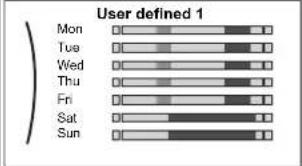 | [8Kg7] |
2 Select Rename.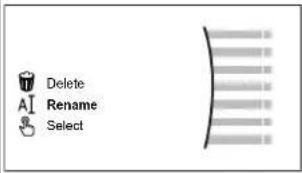 | |
| 3 (optional) To delete the current schedule name, browse through the character list until ← is displayed, then press to remove the previous character. Repeat for each character of the schedule name. | ○····○ |
| 4 To name the current schedule, browse through the character list and confirm the selected character. The schedule name can contain up to 15 characters. | ○····○ |
| 5 Confirm the new name. | ○····○ |

INFORMATION
Not all schedules can be renamed.
3.8 Menu structure: Overview user settings
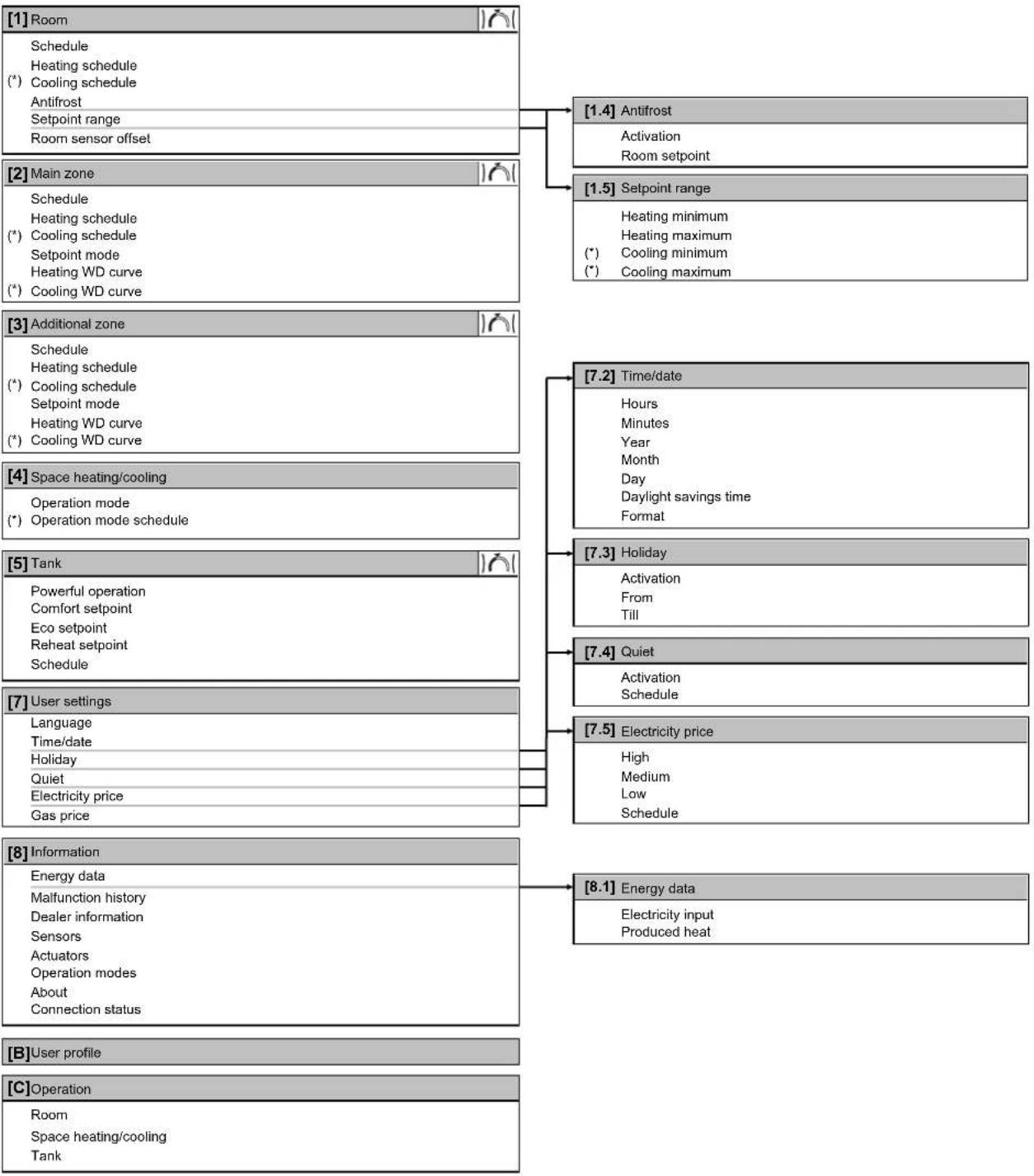
flowchart
graph TD
    A["[1"] Room] --> B["Schedule"]
    B --> C["Heating schedule"]
    C --> D["(*) Cooling schedule"]
    D --> E["Antifrost"]
    E --> F["Setpoint range"]
    F --> G["Room sensor offset"]

    H["[2"] Main zone] --> I["Schedule"]
    I --> J["Heating schedule"]
    J --> K["(*) Cooling schedule"]
    K --> L["Setpoint mode"]
    L --> M["Heating WD curve"]
    M --> N["(*) Cooling WD curve"]

    O["[3"] Additional zone] --> P["Schedule"]
    P --> Q["Heating schedule"]
    Q --> R["(*) Cooling schedule"]
    R --> S["Setpoint mode"]
    S --> T["Heating WD curve"]
    T --> U["(*) Cooling WD curve"]

    V["[4"] Space heating/cooling] --> W["Operation mode"]
    W --> X["(*) Operation mode schedule"]

    Y["[5"] Tank] --> Z["Powerful operation"]
    Z --> AA["Comfort setpoint"]
    AA --> AB["Eco setpoint"]
    AB --> AC["Reheat setpoint"]
    AC --> AD["Schedule"]

    AE["[7"] User settings] --> AF["Language"]
    AF --> AG["Time/date"]
    AG --> AH["Holiday"]
    AH --> AI["Quiet"]
    AI --> AJ["Electricity price"]
    AJ --> AK["Gas price"]

    AL["[8"] Information] --> AM["Energy data"]
    AM --> AN["Maifunction history"]
    AN --> AO["Dealer information"]
    AO --> AP["Sensors"]
    AP --> AQ["Actuators"]
    AQ --> AR["Operation modes"]
    AR --> AS["About"]
    AS --> AT["Connection status"]

    AU["[B"] User profile] --> AV["C"] Operation
    AV --> AW["Room"]
    AW --> AX["Space heating/cooling"]
    AX --> AY["Tank"]

    A1["[1.4"] Antifrost] --> AZ["Activation"]
    AZ --> BA["Room setpoint"]

    A2["[1.5"] Setpoint range] --> BA
    BA --> BB["Heating minimum"]
    BB --> BC["Heating maximum"]
    BC --> BD["(*) Cooling minimum"]
    BD --> BE["(*) Cooling maximum"]

Setpoint screen
(*) Only applicable for reversible models, or heating only models + conversion kit

INFORMATION
Depending on the selected installer settings and unit type, settings will be visible/invisible.
3.9 Installer settings: Tables to be filled in by installer
3.9.1 Configuration wizard
| Setting Fill in... | ||
| System | ||
| Indoor unit type (read only) | ||
| Backup heater type [9.3.1] | ||
| Domestic hot water [9.2.1] | ||
| Emergency [9.5] | ||
| Number of zones [4.4] | ||
| Backup heater | ||
| Voltage [9.3.2] | ||
| Configuration [9.3.3] | ||
| Capacity step 1 [9.3.4] | ||
| Additional capacity step 2 [9.3.5] (if applicable) | ||
| Main zone | ||
| Emitter type [2.7] | ||
| Control [2.9] | ||
| Setpoint mode [2.4] | ||
| Schedule [2.1] | ||
| Additional zone (only if [4.4] = 1) | ||
| Emitter type [3.7] | ||
| Control (read only) [3.9] | ||
| Setpoint mode [3.4] | ||
| Schedule [3.1] | ||
| Tank | ||
| Heat up mode [5.6] | ||
| Comfort setpoint [5.2] | ||
| Eco setpoint [5.3] | ||
| Reheat setpoint [5.4] | ||
3.9.2 Settings menu
| Setting Fill in... | ||
| Main zone | ||
| Thermostat type [2.A] | ||
| Additional zone (if applicable) | ||
| Thermostat type [3.A] | ||
| Information | ||
| Dealer information [8.3] | ||
4 Energy saving tips
Tips about room temperature
- Make sure the desired room temperature is NEVER too high (in heating mode) or too low (in cooling mode), but ALWAYS according to your actual needs. Each saved degree can save up to 6% of heating/cooling costs.
-
Do NOT increase/decrease the desired room temperature to speed up space heating/cooling. The space will NOT heat up/cool down faster.
-
When your system layout contains slow heat emitters (example: underfloor heating), avoid large fluctuation of the desired room temperature and do NOT let the room temperature drop too low/ rise too high. It will take more time and energy to heat up/cool down the room again.
-
Use a weekly schedule for your normal space heating or cooling needs. If necessary, you can easily deviate from the schedule:
-
For shorter periods: You can overrule the scheduled room temperature until the next scheduled action. Example: When you have a party, or when you are leaving for a couple of hours.
- For longer periods: You can use the holiday mode.
Tips about DHW tank temperature
- Use a weekly schedule for your normal domestic hot water needs (only in scheduled mode).
- Program to heat up the DHW tank to a preset value (Comfort = higher DHW tank temperature) during the night, because then space heating demand is lower.
-
If heating up the DHW tank once at night is not sufficient, program to additionally heat up the DHW tank to a preset value (Eco = lower DHW tank temperature) during the day.
-
Make sure the desired DHW tank temperature is NOT too high. Example: After installation, lower the DHW tank temperature daily by 1°C and check if you still have enough hot water.
- Program to turn ON the domestic hot water pump only during periods of the day when instant hot water is necessary. Example: In the morning and evening.
5 Maintenance and service
5.1 Overview: Maintenance and service
The installer has to perform a yearly maintenance. You can find the contact/helpdesk number via the user interface.
As end user, you have to:
- Keep the area around the unit clean.
- Keep the user interface clean with a soft damp cloth. Do NOT use any detergents.
- Regularly check if the water pressure is above 1 bar.
Refrigerant
This product contains fluorinated greenhouse gases. Do NOT vent gases into the atmosphere.
Refrigerant type: R32
Global warming potential (GWP) value: 675

NOTICE
Applicable legislation on fluorinated greenhouse gases requires that the refrigerant charge of the unit is indicated both in weight and CO_2 equivalent.
Formula to calculate the quantity in CO_2 equivalent tonnes: GWP value of the refrigerant × total refrigerant charge [in kg] / 1000
Please contact your installer for more information.

WARNING: FLAMMABLE MATERIAL
The refrigerant inside this unit is mildly flammable.

WARNING
The appliance shall be stored in a room without continuously operating ignition sources (example: open flames, an operating gas appliance or an operating electric heater).

WARNING
- Do NOT pierce or burn refrigerant cycle parts.
- Do NOT use cleaning materials or means to accelerate the defrosting process other than those recommended by the manufacturer.
- Be aware that the refrigerant inside the system is odourless.

WARNING
The refrigerant inside the unit is mildly flammable, but normally does NOT leak. If the refrigerant leaks in the room and comes in contact with fire from a burner, a heater, or a cooker, this may result in fire, or the formation of a harmful gas.
Turn off any combustible heating devices, ventilate the room, and contact the dealer where you purchased the unit.
Do NOT use the unit until a service person confirms that the part from which the refrigerant leaked has been repaired.
5.2 To find the contact/helpdesk number
1 Go to [8.3]: Information > Dealer information.
6 Troubleshooting
Contact
For the symptoms listed below, you can try to solve the problem yourself. For any other problem, contact your installer. You can find the contact/helpdesk number via the user interface.
6.1 To display the help text in case of a malfunction
In case of a malfunction, the following will appear on the home screen depending on the severity:
- : Error
- ⚠️: Malfunction
You can get a short and a long description of the malfunction as follows:
| 1 | Press the left dial to open the main menu and go to Malfunctioning.Result:A short description of the error and the error code is displayed on the screen. | |
| 2 | Press in the error screen.Result:A long description of the error is displayed on the screen. | ? |
6.2 Symptom: You are feeling too cold (hot) in your living room
| Possible cause | Corrective action |
| The desired room temperature is too low (high). | Increase (decrease) the desired room temperature. See "To change the desired room temperature" [▶7].If the problem recurs daily, do one of the following:• Increase (decrease) the room temperature preset value. See the user reference guide.• Adjust the room temperature schedule. See "3.7 Schedule screen: Example" [▶9]. |
| The desired room temperature cannot be reached. | Increase the desired leaving water temperature in accordance with the heat emitter type. See "To change the desired leaving water temperature" [▶7]. |
| The weather-dependent curve is set incorrectly. | Adjust the weather-dependent curve. See the user reference guide. |
6.3 Symptom: The water at the tap is too cold
| Possible cause | Corrective action |
| You ran out of domestic hot water because of unusual high consumption. | If you immediately need domestic hot water, activate the DHW tank Powerful operation. However, this consumes extra energy. See "Using DHW powerful operation" [▶8].If the problems recurs daily, do one of the following:Increase the DHW tank temperature preset value. See the user reference guide.Adjust the DHW tank temperature schedule.Example: Program to additionally heat up the DHW tank to a preset value (Eco setpoint = lower tank temperature) during the day.See "3.7 Schedule screen: Example" [▶9]. |
| The desired DHW tank temperature is too low. |
6.4 Symptom: Heat pump failure
When the heat pump fails to operate, the backup heater and/or booster heater can serve as an emergency heater and either automatically or non-automatically take over the heat load.
- When auto emergency is set to Automatic and a heat pump failure occurs:
- For EHVH/X: The backup heater will automatically take over the heat load and domestic hot water production
- For EHBH/X: The backup heater will automatically take over the heat load, and the booster heater in the optional tank will automatically take over the domestic hot water production.
- When auto emergency is set to Manual and a heat pump failure occurs, the domestic hot water and space heating operation will stop and need to be recovered manually via the user interface. To recover operation manually, go to the Malfunctioning main menu screen, where the user interface will then ask you to confirm whether the backup heater and/or booster heater can take over the heat load or not.
When the heat pump fails, or will appear on the user interface.
| Possible cause Corrective action | |
| Heat pump is damaged. See "6.1 | To display the help text in case of a malfunction" [▶ 14]. |

INFORMATION
When the backup heater or booster heater takes over the heat load, electricity consumption will be considerably higher.
6.5 Symptom: The system is making gurgling noises after commissioning
| Possible cause Corrective action | |
| There is air in the system. Purge air from the system. (a) | |
| Various malfunctions. | Check if or is displayed on the home screen of the user interface. See "6.1 To display the help text in case of a malfunction" [▶ 14] for more information about the malfunction. |
(a) We recommend to purge air with the air purge function of the unit (to be performed by the installer). If you purge air from the heat emitters or collectors, mind the following:

WARNING
Air purging heat emitters or collectors. Before you purge air from heat emitters or collectors, check if it is displayed on the home screen of the user interface.
- If not, you can purge air immediately.
- If yes, make sure that the room where you want to purge air is sufficiently ventilated. Reason: Refrigerant might leak into the water circuit, and subsequently into the room when you purge air from the heat emitters or collectors.
7 Disposal

NOTICE
Do NOT try to dismantle the system yourself: dismantling of the system, treatment of the refrigerant, oil and other parts MUST comply with applicable legislation. Units MUST be treated at a specialised treatment facility for reuse, recycling and recovery.
8 Glossary
DHW = Domestic hot water
Hot water used, in any type of building, for domestic purposes.
LWT = Leaving water temperature
Water temperature at the water outlet of the unit.
Inhaltsverzeichnis
line
| Time | Tt | | ------------- | ---- | | 00:00:07:00 | 60°C | | 14:00:21:00 | 40°C |line
| Time | Tt | | ----------------- | ---- | | 00:00:07:00 | 45°C | | 14:00:21:00 | 45°C | | 14:00:21:00 | 35°C |line
| t | Tt | | -------------- | ---- | | 00:00:07:00 | 60°C | | 14:00:21:00 | 40°C |line
| Time | Tt | | ----------------- | ---- | | 00:00:07:00 | 45°C | | 14:00:21:00 | 35°C |line
| Time | Tt | | ------------- | ---- | | 00:00:07:00 | 60°C | | 14:00:21:00 | 40°C |line
| t | Tt | | -------------- | ---- | | 00:00:07:00 | 45°C | | 14:00:21:00 | 45°C | | 14:00:21:00 | 60°C | | 14:00:21:00 | 50°C | | 14:00:21:00 | 45°C | | 14:00:21:00 | 45°C | | 14:00:21:00 | 35°C |WAARSCHUWING: ONTVLAMBAAR MATERIAAL
line
Fecha/Hora | Period | Value | |---|---| | Hour | 11 | | Minutos | 30 | a | (not labeled) c | (not labeled) b | (not labeled)line
| Time | Tt | | ------------- | ---- | | 00:00:07:00 | 60°C | | 14:00:21:00 | 40°C |line
| t | Tt | | -------------- | ---- | | 00:00:07:00 | 45°C | | 14:00:21:00 | 50°C | | 14:00:21:00 | 60°C | | 14:00:21:00 | 45°C | | 14:00:21:00 | 35°C |bar
| Chart | Category | Value | |---|---|---| | e | Home Count | 55 | | e | Number of Items | 45 | | e | Quantity | 21 | | e | Bar Length | 1.6 | | f | Home Count | 55 | | f | Number of Items | 45 | | f | Quantity | 21 | | f | Bar Length | 35 |line
| Time | Tt | | ------------- | ---- | | 00:00:07:00 | 60°C | | 14:00:21:00 | 40°C |T, Temperatura serbatoio ACS t Ora
line
| t | Tt | | -------------- | ---- | | 00:00:07:00 | 45°C | | 14:00:21:00 | 45°C |line
| Time | Tt | | ------------- | ---- | | 00:00:07:00 | 60°C | | 14:00:21:00 | 40°C |T, Temperatura do depósito de AQS t Hora
line
| Time | Tt | | ----------------- | ---- | | 00:00:07:00 | 45°C | | 14:00:21:00 | 45°C | | 14:00:21:00 | 60°C | | 14:00:21:00 | 50°C | | 14:00:21:00 | 45°C | | 14:00:21:00 | 45°C | | 14:00:21:00 | 35°C |natural_image
Simple geometric lines inside a rectangle, no text or symbols present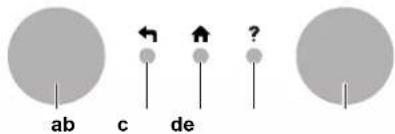
a Statusindikator
b LCD-skärm
c Vred och knappar
Statusindikator
line
| t | Tt | | -------------- | ---- | | 00:00:07:00 | 60°C | | 14:00:21:00 | 40°C |a Statusindikator
b LCD-skjerm
c Dreieskiver og knapper
Statusindikator
line
| Time | Tt | | ---------- | ---- | | 00:00:07:00 | 50°C | | 14:00:21:00 | 50°C |T, Tanktemperatur for husholdningsvarmtvannet t Klokkeslett

INFORMASJON
line
| t | Tt | | -------------- | ---- | | 00:00:07:00 | 60°C | | 14:00:21:00 | 40°C |T, Tanktemperatur for husholdningsvarmtvannet t Klokkeslett
line
| t | Tt | | -------------- | ---- | | 00:00:07:00 | 45°C | | 14:00:21:00 | 45°C |T. Temperatur for varmtvannstank for husholdningsbruk t Klokkeslett
3.5.4 Bruke husholdningsvarmtvann med kraftig drift
Om kraftig drift
Kraftig drift tillater at husholdningsvarmtvannet varmes opp av ekstravarmeren eller tilleggsvarmeren. Bruk denne modusen på dager när forbruket av varmtvann er større enn vanlig.
a Ukazatel stavu
b LCD obrazovka
c Otočné ovladače a tlačítka