
CBT5518DWK - Fridge CANDY - Free user manual and instructions
Find the device manual for free CBT5518DWK CANDY in PDF.


User questions about CBT5518DWK CANDY
0 question about this device. Answer the ones you know or ask your own.
Ask a new question about this device
Download the instructions for your Fridge in PDF format for free! Find your manual CBT5518DWK - CANDY and take your electronic device back in hand. On this page are published all the documents necessary for the use of your device. CBT5518DWK by CANDY.
USER MANUAL CBT5518DWK CANDY
PRODUCT DESCRIPTION 2
USE....3
Use 3
Customized temperature 4
Super Cool function....4
Super Freeze function 5
Eco mode....5
Holiday function....6
Defrosting....6
Demo mode....6
WI-FI USE....7
In app pairing procedure....7
Step 1....7
Step 2 ....7
Step 3 7
Wi-Fi Use 8
PRODUCT DESCRIPTION
text_image
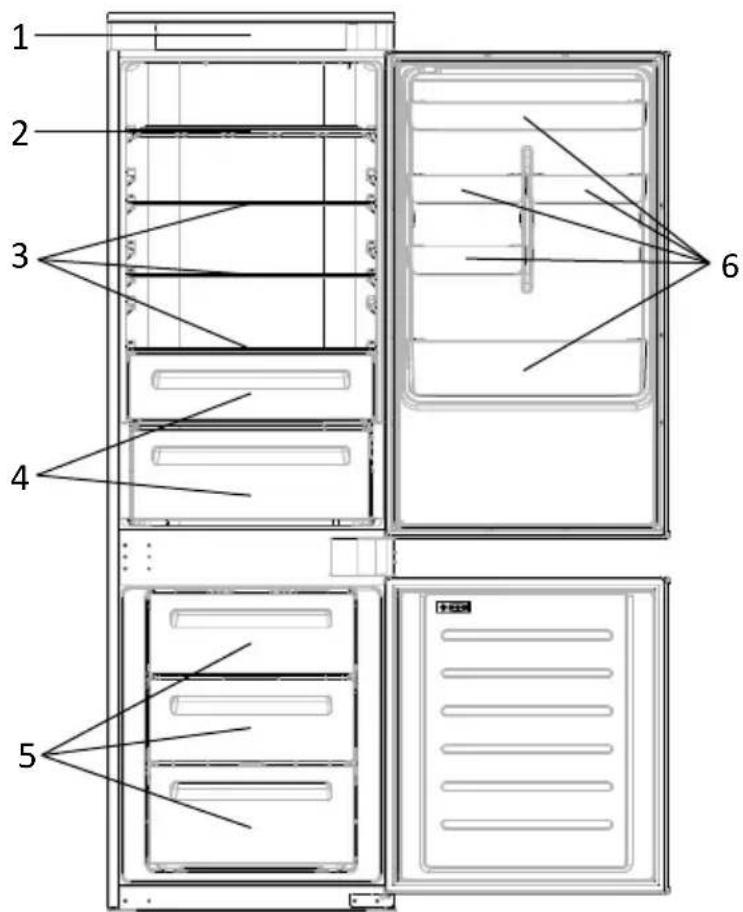
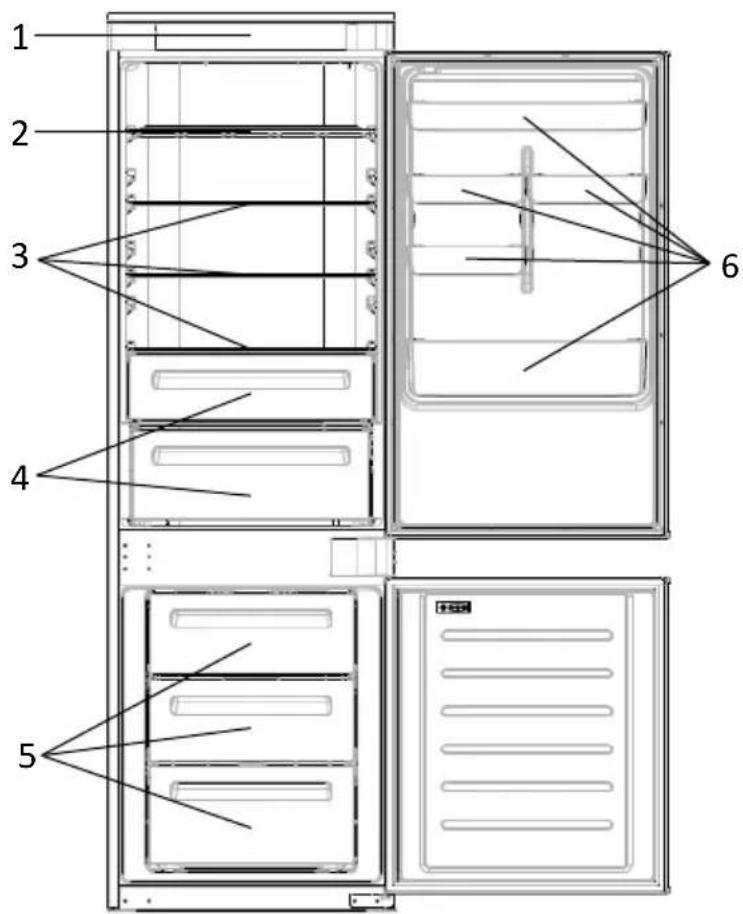
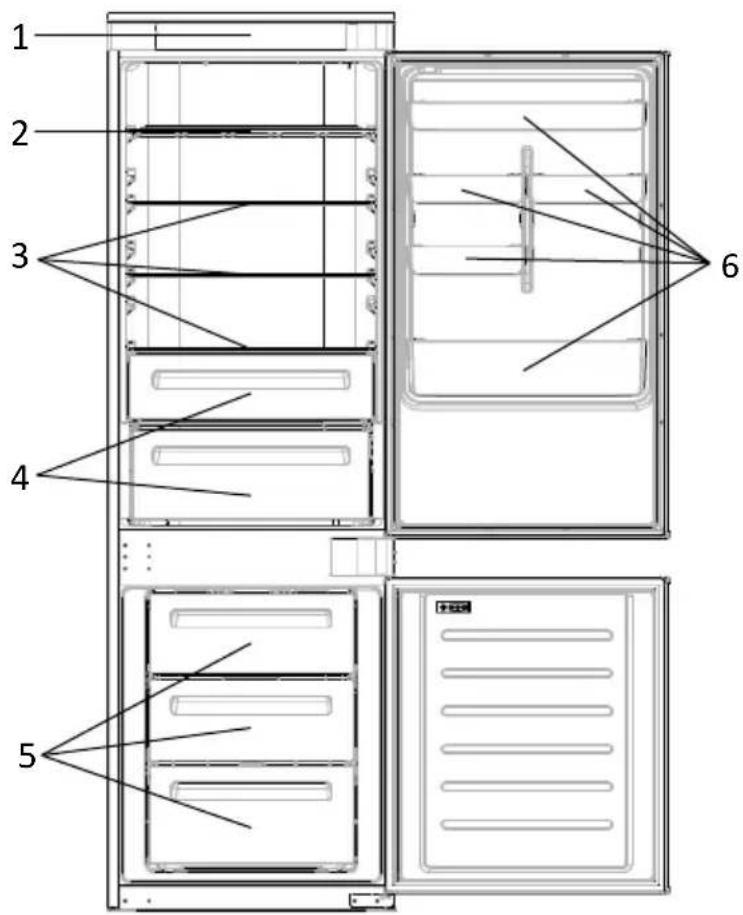
1 2 3 4 5 6- Control Panel
- Wine Rack
- Shelves
- Crisper
- Freezer Boxes
- Door Rack
* The most energy-saving configuration requires drawers, food box and shelves to be positioned in the product and fan to be off, please refer to the above pictures.
** The pictures above are only for reference. The actual configuration will depend on the physical product or statement by the distributor.
Space requirements
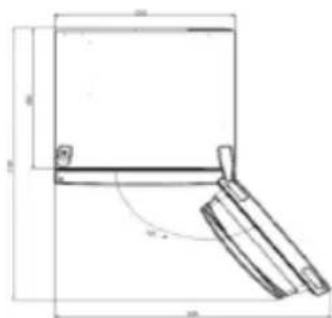
The unit's door must be able to fully open as shown. Spare enough space for convenient opening of the doors and drawers.
Keep a distance of at least 50 mm between the side walls of the product and adjacent parts.
Width: min. 920 mm
Depth: min. 1137 mm
text_image
40 10USE
text_image
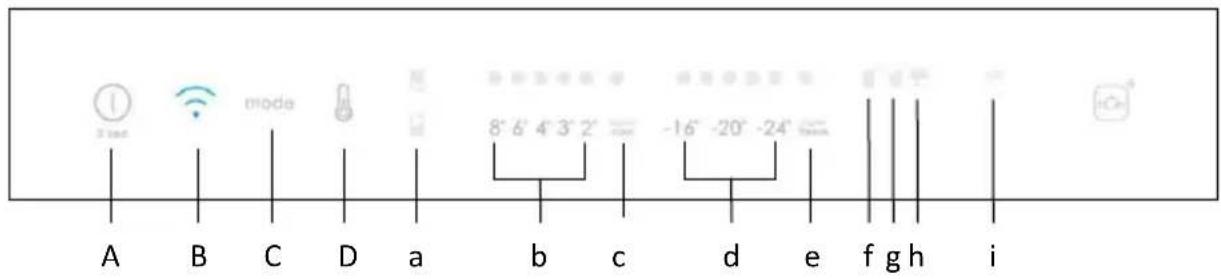
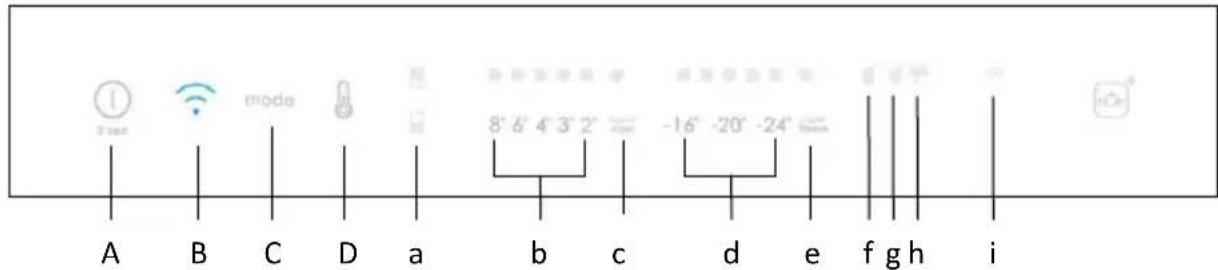
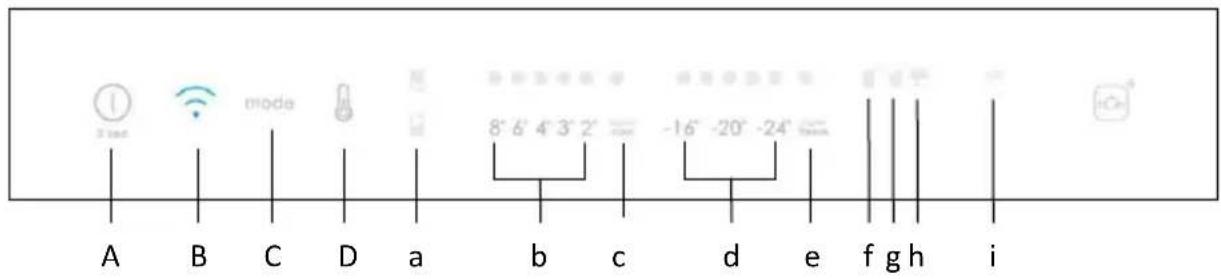
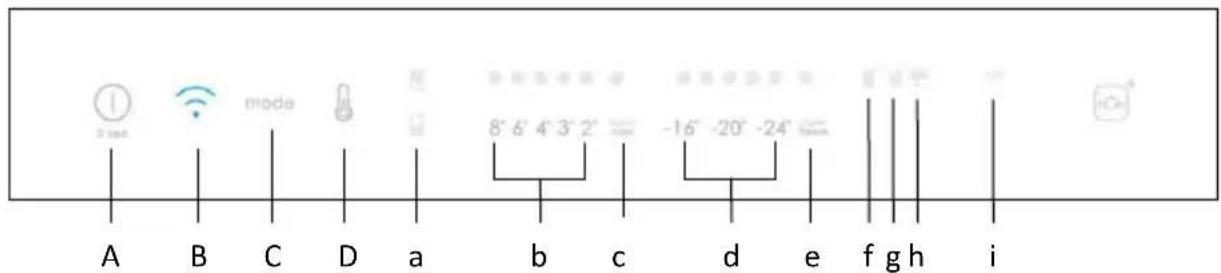
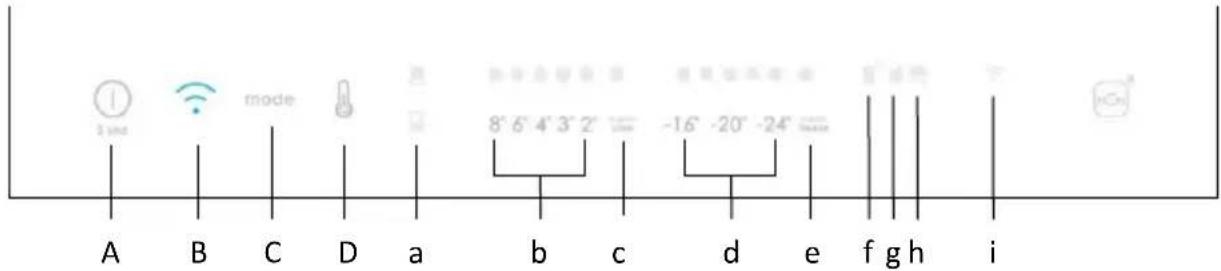
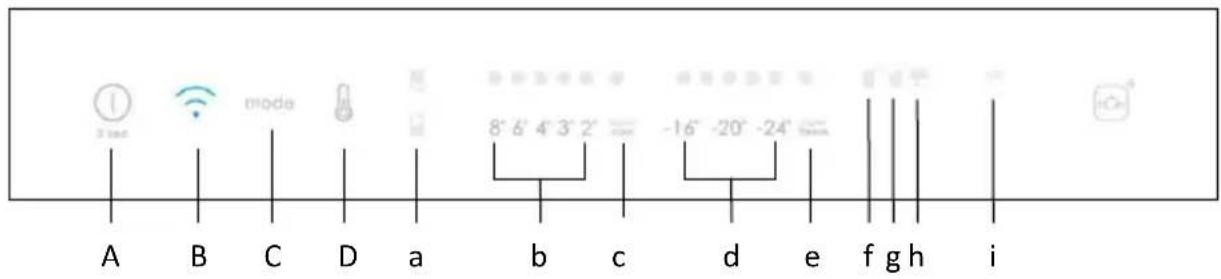
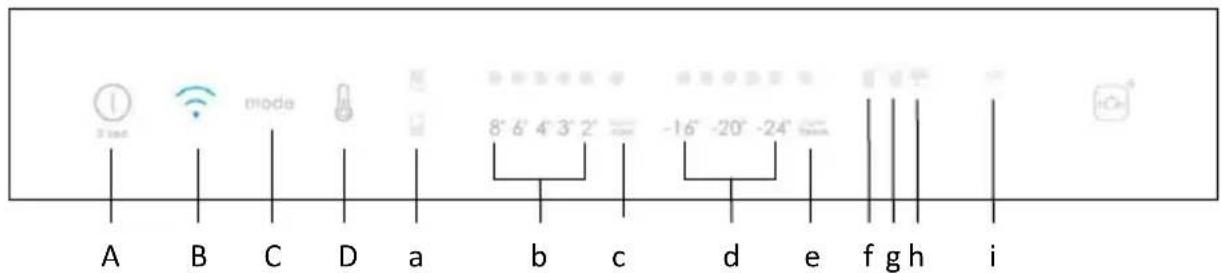
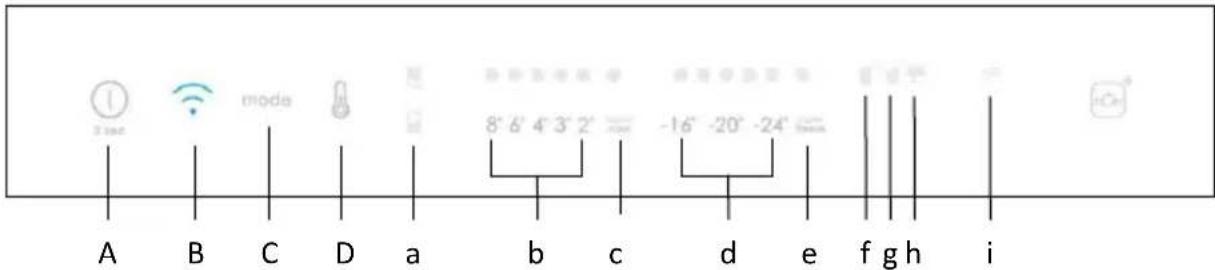
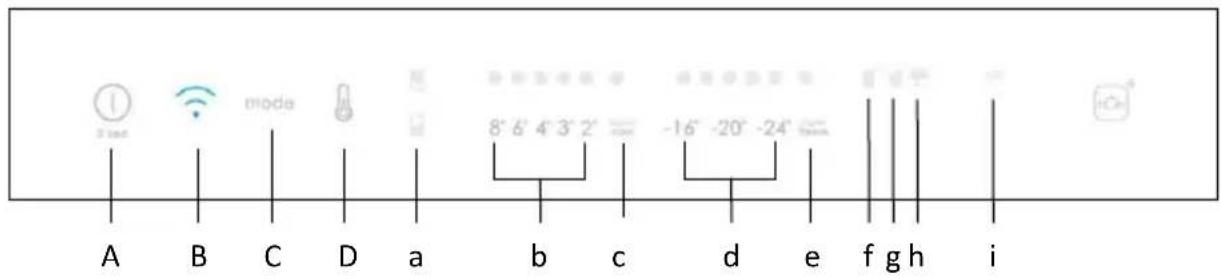
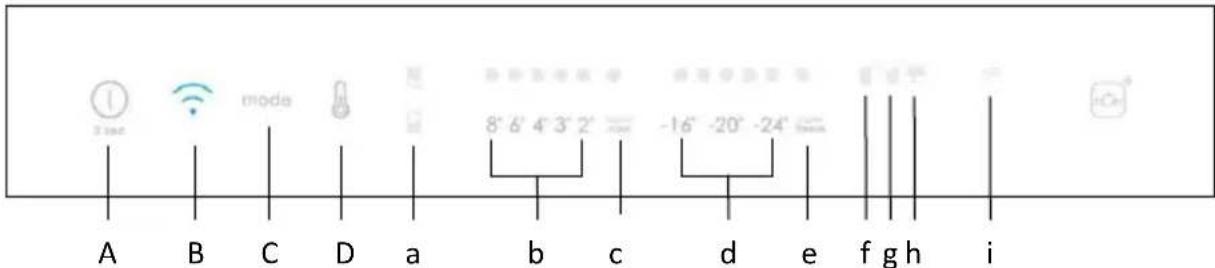
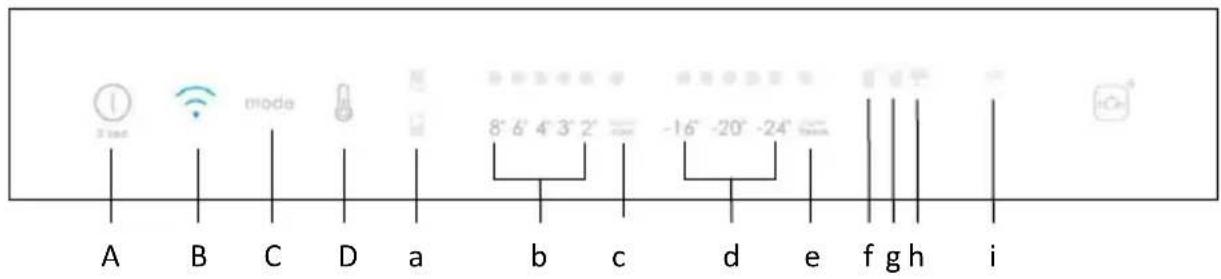
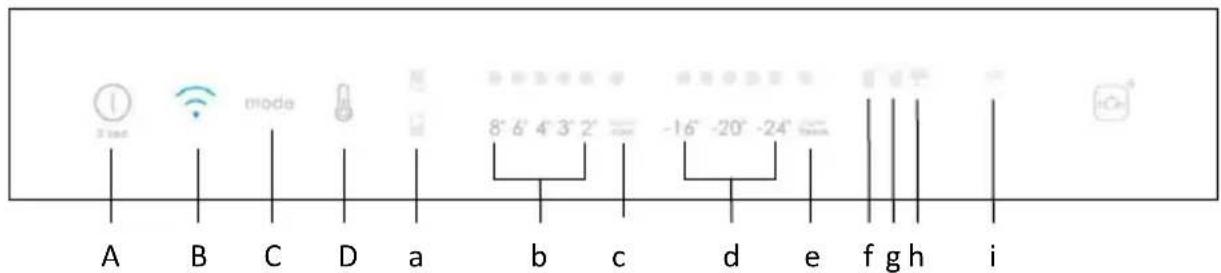
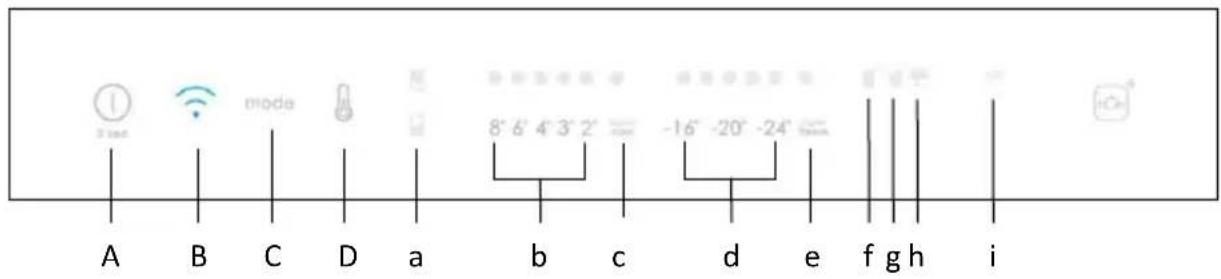
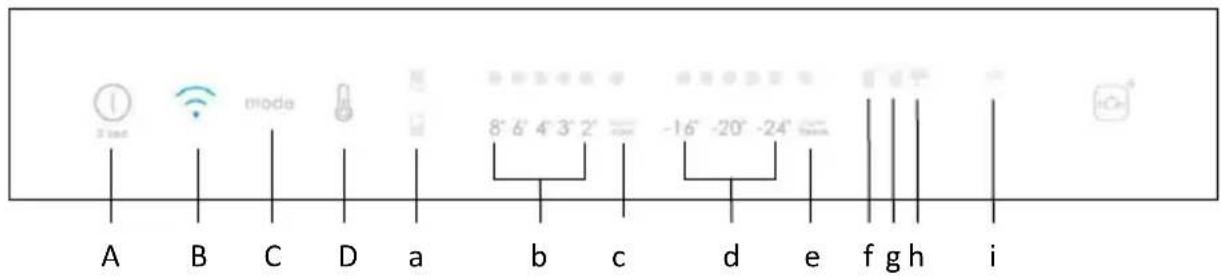
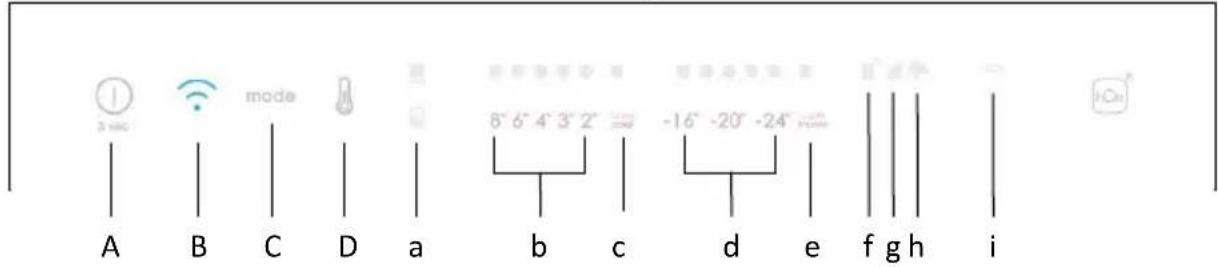
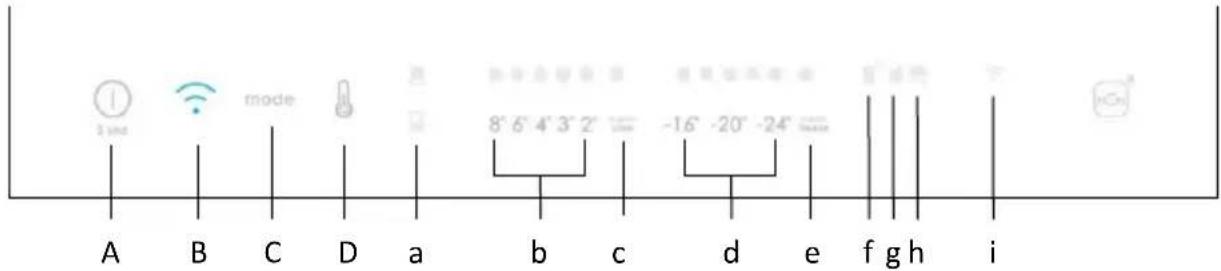
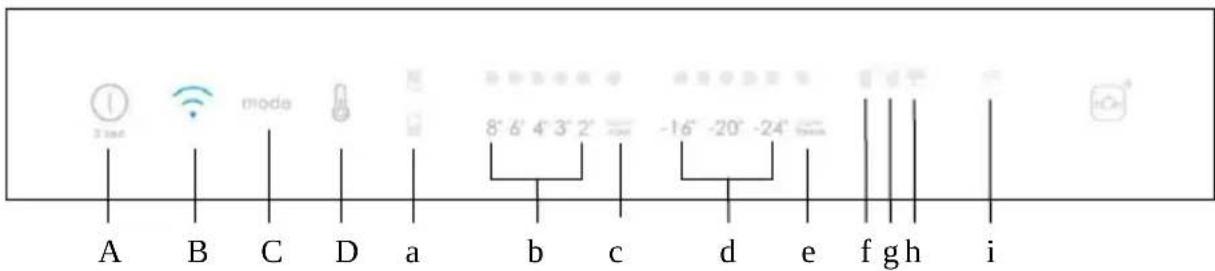
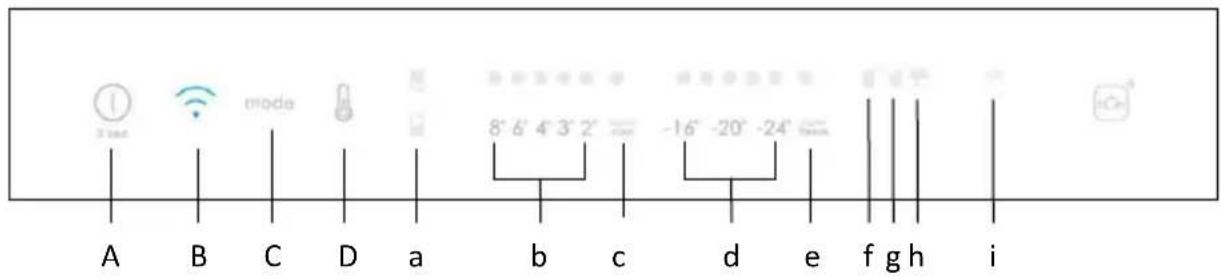
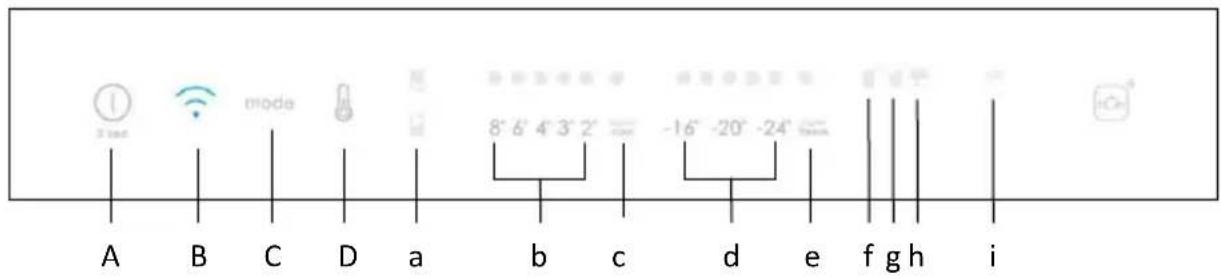
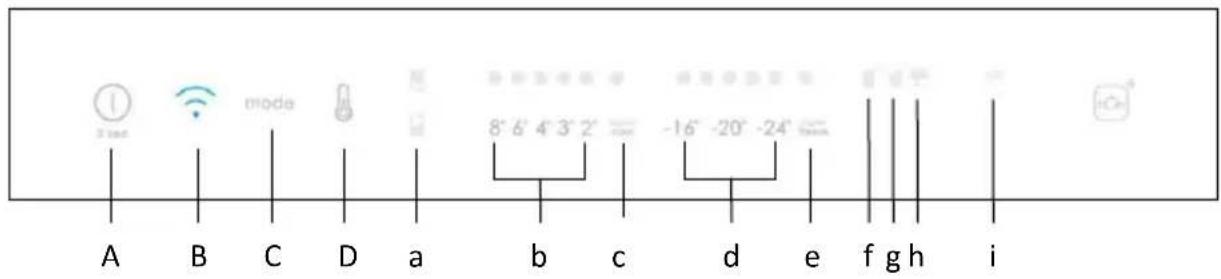
A B C D a b c d e f g h iA. ON/OFF key, used to switch on/off the appliance
B. Wi-Fi key, used to switch on/off the Wi-Fi
C. Mode key, used to selected the special functions (Eco and holiday)
D. TEMP key, used to selected the fridge and freezer temperature
a. Fridge /freezer area icon, shows which compartment of the appliance is selected
b. Fridge temperature levels, show which is the selected temperature
c. Super Cool icon, shows if the Super Cool function is activated
d. Freezer temperature levels, show which is the selected temperature in the freezer
e. Super Freeze icon, shows if the Super Freeze function is activated
f. Customized temperature icon, show if the temperature has been selected by app
g. Eco mode icon, shows whether the eco mode is activated
h. Holiday function icon, show whether the holiday function is activated
i. Wi-Fi icon, shows whether the Wi-Fi is working and the appliance is connected
Use
- Plug on the appliance and it automatically turns on.
- The temperature will automatically set at 4 °C in the fridge and -18 °C in the freezer.
NOTE: wait at least 2/3 hours before putting food in the appliance, so as to ensure the temperature inside the fridge.
- To change the temperature, press the TEMP key for 5 seconds, an acoustic signal is made and the icon of the selected compartment (fridge or freezer) as well as all the temperature LEDs of the corresponding compartment turn on for 2s, after 2s the selection of the compartment is confirmed. With the selected compartment icon on, quick press the TEMP key to change the temperature.
When the setting increases, the corresponding LED light will turn on. An acoustic signal is made every time the TEMP key is pressed and the temperature is changed, after 5 seconds the selection is confirmed. After 30s without operation the fridge/freezer icons and the LEDs of the selected temperatures turn off. When the TEMP key is touched again, the icon of the last are selected (Fridge or freezer) turns on.
• In case of power loss, the last cooling level set will be restored.
• To restore the default setting, keep pressed the door switch inside the
refrigerator and simultaneously press the ON/OFF key for 5 seconds.
- Under the normal operating condition (in spring and autumn), it is recommended to set the temperature at 4 °C. In summer when the ambient temperature is high, it is recommended to set temperature at 6\~8 °C, so as to guarantee the fridge and freezer temperatures and reduce the refrigerator continuous running time; and in winter when the ambient temperature is low, it is recommended to set temperature at 3\~4 °C to avoid frequent start/stop of the refrigerator.
Customized temperature
From the app it is possible to customize the temperature for both fridge and freezer. The temperature can be set with 1 °C sensitivity. It is possible to select a temperature from 2 °C to 8 °C in the fridge, and from -16 °C to -24 °C in the freezer.
When the temperature is selected by the app, the customized temperature icon turns on, while all the temperature LED lights of the affected compartment are turned off (i.e. if the refrigerator temperature is selected from the app, LEDs from 2 °C to 8 °C are turned off. If the freezer temperature is selected from the app, LEDs from -16 °C to -24 °C are turned off).
If only a single area (freezer or fridge) has the customized temperature, the temperature selection of the other area is not changed and the LED light of the selected temperature of that area remains on. An acoustic signal is made every time the temperature is changed.
Super Cool function
It is suggested to switch on the Super Cool function if a large quantity of food should be stored (for example after the purchase). The Super-Cool function accelerates the cooling of fresh food and protects the goods already stored from undesirable warming. When the function is activated, the temperature of the fridge is automatically set at 2^ C.
How to use the Super Cool function:
- The function can be activated by long pressing TEMP key to select the fridge compartment, and then quick pressing the TEMP key until the Super Cool icon led is turned on, or it can be turned on from the app. When the function is activated, the Super Cool LED is always ON.
• To exit the Super Cool function, press the TEMP key or turn it off from the app. - The Super Cool function automatically ends when the function has lasted for more than 12 hours.
- When the Super Cool ends, the icon of the control panel is switched off and the previously set cooling level is restored.
Note: Super Cool and Super Freeze function can not be activated simultaneously.
Super Freeze function
The super freezing function accelerates the freezing of fresh food and protects the goods already stored from undesirable warming. If a large amount of food has to be freeze, it is recommended to set the Super-Freeze function on 24h before the usage. When the function is activated, the temperature is automatically set at -28 °C.
How to use the Super Freeze function:
- The function can be launched by long pressing TEMP key to select the freezer compartment, and then quick pressing TEMP key until the Super Freeze icon led is turned on, or it can be turned on from the app. When the function is activated, the Super Freeze LED is always ON.
• To exit the Super Freeze function, press the TEMP key or turn it off from the app. - The Super Freeze function automatically ends when the function has lasted for more than 50 hours.
- When the Super Freeze ends, the icon of the control panel is switched off and the previously set freezing level is restored.
Note: Super Cool and Super Freeze function cannot be activated simultaneously.
Eco mode
The Eco mode can be activated to optimize the performance of the appliance, whereas obtaining the best food storage. The Eco mode will automatically set the temperature at 4 °C in fridge and at -18 °C in the freezer.
How to use the Eco mode:
- The function can be activated from control panel by pressing the “mode” key until the Eco mode icon turns on (an acoustic signal confirms the selection), or by selecting the function from the app. When the function is activated, the Eco mode icon is always ON.
- To exit the Eco turn it off from the app or chose another function from the control panel.
- When the Eco Mode ends, the icon of the control panel is switched off and the previously set cooling levels are restored.
Holiday function
The Holiday function can be used to reduce the energy consumption of the appliance, when it is not used regularly. When the function is on, the LED lights will be off (even if the door is open) and the fridge will work on low power consumption mode, whereas the freezer will keep working normally.
How to use the Holiday function:
- The function can be activated from control panel by pressing the “mode” key until the Holiday icon turns on (an acoustic signal confirms the selection), or by selecting the function from the app. When the function is activated, the Holiday icon is always ON.
- To exit the Holiday function, turn it off from the app or chose another function from the control panel.
- When the Holiday function ends, the icon of the control panel is switched off and the previously set cooling levels are restored.
Defrosting
The defrosting of the refrigerator and freezer compartment are done automatically: no manual operation is needed.
Slider
Near the vegetable basket there is a slider that allows you to adjust the humidity inside it: moving it to the right decreases the humidity, moving it to the left increases the humidity.
Demo mode
To enter the demo mode, with the display unlocked, keep pressed the Wi-Fi key (B) and press the MODE key (C) 5 times within 5 seconds. To exit the demo mode, perform the same operation or power off the refrigerator.
Error Codes
Communication error
[-16°C;-18°C;-20°C;-22°C;-24°C] Lights in the fridge turn on sequentially, it means there has been a communication error between the main control board and the display board. Please, contact the technical assistance to help solve the problem
Fan
[-16°C;-20°C;-22°C;-24°C] lights in the fridge flashing simultaneously if the fan is not working properly. Please, contact the technical assistance to help solve the problem
WI-FI USE
In app pairing procedure
Step 1
- Download the hOn app on the stores

text_image
QR code image containing encoded data, no visible human-readable text
text_image
GET IT ON Google Play Download on the App Store EXPLORE IT ON AppGalleryStep 2
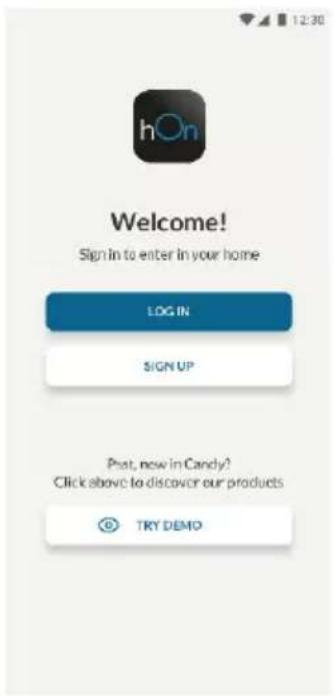
- Create your account on the hOn App or log in if you already have an account
text_image
12:30 hOn Welcome! Sign in to enter in your home LOG IN SIGN UP Post, now in Candy? Click above to discover our products TRY DEMOStep 3
- Follow pairing instructions in the hOn App
Wi-Fi Use
To activate the Wi-Fi, long press the Wi-Fi key for 2 seconds, the Wi-Fi icon will turn on and an acoustic signal is made.
If the Wi-Fi has not been configured yet, when the refrigerator turns on, it will automatically enter the configuration mode and keep this status for 30 minutes. To use the configuration mode:
- Press the Wi-Fi key for 2s, the refrigerator enters the Wi-Fi configuration mode and an acoustic signal is made. The Wi-Fi icon starts blinking.
- Follow in app instructions to configure the Wi-Fi (see above).
- Once the Wi-Fi is configured and the connection established, the Wi-Fi icon is on and fixed.
- After 30 minutes without performing any operation, the Wi-Fi will automatically exit the configuration mode.
- If the Wi-Fi has already been configured, it will automatically reconnect according to the configuration information.
To reset the Wi-Fi, long press the Wi-Fi key and Mode for 2s, the Wi-Fi is reset and an acoustic signal is made. After this, the Wi-Fi will automatically enter the configuration state (Wi-Fi icon will start blinking again).
To turn off the Wi-Fi, press the Wi-Fi key for 3s.
Radio-module - Technical data
| Frequency rate (OFR) | 2400 MHz-2843.5 MHz |
| Channel frequencies | 2412...2472 MHz(step size 5 MHz) |
| Maximum power(EIRP) | 100 mW |
Radio equipment type is in compliance with Directive 2014/53/EU.
Резюме
ОПИСАНИЕ НА ПРОДУКТА.... 10
УПОТРЕБА....11
Употреба....11
Персонализирана температура ....12
text_image
QR code image containing encoded data, no visible human-readable text
text_image
GET IT ON Google Play Download on the App Store EXPLORE IT ON AppGalleryСтъпка 2
text_image
12:30 hOn Welcome! Sign In to enter in your home LOG IN SIGN UP Past, now in Candy? Click above to discavor our products TRY DEMOСтъпка 3
text_image
Technical drawing of a mechanical bracket with dimension labels in millimetersPOUŽÍVÁNÍ
text_image
A B C D a b c d e f g h i mode 8' 6' 4' 3' 2" -16" -20" -24"text_image
QR code image containing encoded data, no visible human-readable text
text_image
GET IT ON Google Play Download on the App Store EXPLORE IT ON AppGalleryKrok 2
text_image
12:30 hOn Welcome! Sign In to enter in your home LOG IN SIGN UP Post, now in Candy? Click above to discover our products TRY DEMOKrok 3
text_image
Technical drawing of a mechanical bracket with dimension labels and angle annotationsBRUG
text_image
A B C D a b c d e f g h i mode 8° 6' 4' 3' 2" -16" -20" -24" itext_image
QR code image containing encoded data, no visible human-readable text
text_image
GET IT ON Google Play Download on the App Store EXPLORE IT ON AppGalleryTrin 2
text_image
12:30 hOn Welcome! Sign In to enter in your home LOG IN SIGN UP Post, now in Candy? Click above to discover our products TRY DEMOTrin 3
text_image
Technical drawing of a mechanical component with dimension annotations in millimetersNUTZUNG
text_image
A B C D a b c d e f g h itext_image
QR code image containing encoded data, no visible human-readable text
text_image
GET IT ON Google Play Download on the App Store EXPLORE IT ON AppGallerySchritt 2
text_image
12:30 hOn Welcome! Sign In to enter in your home LOG IN SIGN UP Post, now in Candy? Click above to discovir our products TRY DEMOSchritt 3
text_image
Technical drawing of a mechanical component with dimension annotations in millimetersΧΡΗΣΗ
text_image
1 unit mode 8° 6' 4' 3' 2' -16° -20° -24" A B C D a b c d e f g h itext_image
QR code image containing encoded data, no visible human-readable text
text_image
GET IT ON Google Play Download on the App Store EXPLORE IT ON AppGalleryΒήμα 2
text_image
12:30 hOn Welcome! Sign in to enter in your home LOG IN SIGN UP Past, now in Candy? Click above to discover our products TRY DEMOΒήμα 3
text_image
Technical drawing of a mechanical component with dimension annotations including 10, 8, and 40mm measurements.USO
text_image
A B C D a b c d e f g h i mode 8° 6' 4' 3' 2" -16" -20" -24" itext_image
QR code image containing encoded data, no visible human-readable text
text_image
GET IT ON Google Play Download on the App Store EXPLORE IT ON AppGalleryPaso 2
text_image
12:30 hOn Welcome! Sign In to enter in your home LOG IN SIGN UP Post, now in Candy? Click above to discover our products TRY DEMOPaso 3
text_image
Technical drawing of a mechanical component with dimension labels and angle annotationKÄYTTÖ
text_image
A B C D a b c d e f g h itext_image
QR code image containing encoded data, no visible human-readable text
text_image
GET IT ON Google Play Download on the App Store EXPLORE IT ON AppGalleryVaihe 2
text_image
12:30 hOn Welcome! Sign In to enter in your home LOG IN SIGN UP Post, now in Candy? Click above to discover our products TRY DEMOVaihe 3
text_image
Technical drawing of a mechanical bracket with dimension labels in millimetersUTILISATION
text_image
A B C D a b c d e f g h i mode 8' 6' 4' 3' 2' -16' -20' -24'text_image
QR code image containing encoded data, no visible human-readable text
text_image
GET IT ON Google Play Download on the App Store EXPLORE IT ON AppGalleryÉtape 2
text_image
12:30 hOn Welcome! Sign In to enter in your home LOG IN SIGN UP Post, now in Candy? Click above to discover our products TRY DEMOÉtape 3
UPORABA MREŽE WI-FI....79
U postupku uparivanja aplikacije 79
-
korak....79
-
korak....79
-
korak....79
Uporaba mreže Wi-Fi 80
OPIS PROIZVODA
text_image
1 2 3 4 5 6text_image
Technical drawing of a mechanical component with dimension annotations in millimetersUPORABA
text_image
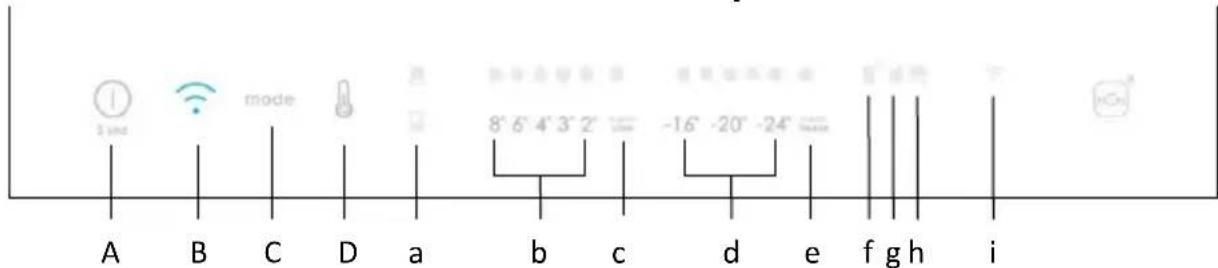
A B C D a b c d e f g h i mode 8° 6' 4' 3' 2" -16" -20" -24" iA. Tipka za UKLJUČIVANJE/ISKLJUČIVANJE, koja se upotrebljava za uključivanje/isključivanje uređaja
B. Tipka za Wi-Fi, koja se upotrebljava za uključivanje/isključivanje mreže Wi-Fi
C. Tipka Mode, koja se upotrebljava za odabir posebnih funkcija (Eco i praznici)
D. Tipka TEMP, koja se upotrebljava za odabir temperature hladnjaka i zamrzivača
a. Ikona prostora hladnjaka /zamrzivača pokazuje koji je odjeljak uređaja odabran
b. Razine temperature hladnjaka pokazuju koja je odabrana temperatura
c. Ikona super hlađenja pokazuje je li se funkcija super hlađenja aktivirala
d. Razine temperature zamrzivača pokazuju koja je odabrana temperatura u zamrzivaču
e. Ikona super zamrzavanja pokazuje je li se funkcija super zamrzavanja aktivirala
f. Prilagođena ikona temperature pokazuje je li temperatura odabrana putem aplikacije
g. Ikona načina Eco pokazuje je li aktiviran način rada Eco
h. Ikona funkcije praznika pokazuje je li se funkcija praznika aktivirala
i. Ikona mreže Wi-Fi pokazuje radi li mreža Wi-Fi i je li se uređaj povezao
Uporaba
- Priključite uređaj i on se automatski uključuje.
- Temperatura se automatski postavlja na 4 °C u hladnjaku i -18 °C u zamrzivaču. NAPOMENA: pričekajte najmanje 2/3 sata prije stavljanja hrane u uređaj da biste zajamčili temperaturu unutar hladnjaka.
text_image
QR code image containing encoded data, no visible human-readable text
text_image
GET IT ON Google Play Download on the App Store EXPLORE IT ON AppGallery2. korak
text_image
12:30 hOn Welcome! Sign In to enter in your home LOG IN SIGN UP Post, now in Candy? Click above to discover our products TRY DEMO3. korak
- Pridržavajte se uputa za uparivanje u aplikaciji hOn
Uporaba mreže Wi-Fi
Da biste aktivirali mrežu Wi-Fi, dugo pritisnite tipku Wi-Fi 2 sekunde i uključuje se ikona mreže Wi-Fi te odašilje zvučni signal.
Ako se mreža Wi-Fi još nije konfigurirala kada se hladnjak uključuje, automatski prelazi u način konfiguriranja i ostaje u tom statusu 30 minuta. Za uporabu načina konfiguriranja:
- Pritisnite tipku Wi-Fi na 2s, hladnjak ulazi u konfiguriranje Wi-Fi i odašilje se zvučni signal. Ikona mreže Wi-Fi počinje treperiti.
- Pridržavajte se uputa u aplikaciji za konfiguriranje mreže Wi-Fi (pogledajte gore).
- Nakon što se konfigurira mreža Wi-Fi i uspostavi veza, uključuje se ikona mreže Wi-Fi i fiksno ostaje uključena.
- Nakon 30 minuta bez izvođenja bilo kakve radnje, mrežom Wi-Fi automatski se izlazi iz načina konfiguriranja.
- Ako se mreža Wi-Fi već konfigurirala, automatski se ponovno povezuje u skladu s informacijama o konfiguriranju.
Da biste ponovno postavili mrežu Wi-Fi, dugo pritisnite tipku Wi-Fi – Mode na 2s, mreža se Wi-Fi ponovno postavi i odašilje se zvučni signal. Nakon toga mreža Wi-Fi automatski prelazi u stanje konfiguriranja (ikona mreže Wi-Fi ponovno treperi).
Da biste isključili mrežu Wi-Fi, pritisnite tipku Wi-Fi na 3s.
Radio-modul - Tehnički podaci
| Učestalost (OFR) | 2400 MHz-2843.5 MHz |
| Frekvencije kanala | 2412...2472 MHz(veličina koraka 5 MHz) |
| Maksimalna snaga(EIRP) | 100 mW |
text_image
Technical drawing of a mechanical component with dimension labels in millimetersHASZNÁLAT
text_image
A B C D a b c d e f g h itext_image
QR code image containing encoded data, no visible human-readable text
text_image
GET IT ON Google Play Download on the App Store EXPLORE IT ON AppGallery2. lépés
text_image
12:30 hOn Welcome! Sign In to enter in your home LOG IN SIGN UP Post, now in Candy? Click above to discover our products TRY DEMO3. lépés
text_image
Technical drawing of a mechanical assembly with dimension labels and angle annotationsUTILIZZO
text_image
A B C D a b c d e f g h i mode 8° 6' 4' 3' 2" -16" -20" -24" itext_image
QR code image containing encoded data, no visible human-readable text
text_image
GET IT ON Google Play Download on the App Store EXPLORE IT ON AppGalleryFase 2
text_image
12:30 hOn Welcome! Sign In to enter in your home LOG IN SIGN UP Post, now in Candy? Click above to discover our products TRY DEMOFase 3
PRODUCTBESCHRIJVING....98
GEBRUIK 99
Gebruik....99
text_image
Technical drawing of a mechanical bracket with dimension annotations in millimetersGEBRUIK
text_image
A B C D a b c d e f g h itext_image
QR code image containing encoded data, no visible human-readable text
text_image
GET IT ON Google Play Download on the App Store EXPLORE IT ON AppGalleryStap 2
text_image
12:30 hOn Welcome! Sign In to enter in your home LOG IN SIGN UP Post, now in Candy? Click above to discover our products TRY DEMOStap 3
text_image
Technical drawing of a mechanical bracket with dimension annotations in millimetersBRUK
text_image
A B C D a b c d e f g h i mode 8° 6' 4' 3' 2" -16" -20" -24" iI app-paringsprosedyren
Trinn 1
text_image
QR code image containing encoded data, no visible human-readable text
text_image
GET IT ON Google Play Download on the App Store EXPLORE IT ON AppGalleryTrinn 2
- Opprett kontoen din på hOn-appen, eller logg på hvis du allerede har en konto

text_image
12:30 hOn Welcome! Sign In to enter in your home LOG IN SIGN UP Post, now in Candy? Click above to discover our products TRY DEMOTrinn 3
text_image
Technical drawing of a mechanical bracket with dimension labels and angle annotationsUŻYTKOWANIE
text_image
A B C D a b c d e f g h itext_image
QR code image containing encoded data, no visible human-readable text
text_image
GET IT ON Google Play Download on the App Store EXPLORE IT ON AppGalleryKrok 2
text_image
12:30 hOn Welcome! Sign In to enter in your home LOG IN SIGN UP Post, now in Candy? Click above to discover our products TRY DEMOKrok 3
Função Holiday....127
Descongelamento 127
Modo demo....127
text_image
Technical drawing of a mechanical component with dimension labels and angle annotationsUTILIZAÇÃO
text_image
3 sec A B C D a b c d e f g h i mode 8° 6' 4' 3' 2" -16° -20° -24"text_image
QR code image containing encoded data, no visible human-readable text
text_image
GET IT ON Google Play Download on the App Store EXPLORE IT ON AppGalleryPasso 2
text_image
12:30 hOn Welcome! Sign In to enter in your home LOG IN SIGN UP Post, now in Candy? Click above to discover our products TRY DEMOPasso 3
text_image
3 sec mode 8' 6' 4' 3' 2' -16" -20" -24" A B C D a b c d e f g h itext_image
QR code image containing encoded data, no visible human-readable text
text_image
GET IT ON Google Play Download on the App Store EXPLORE IT ON AppGalleryPasul 2
text_image
12:30 hOn Welcome! Sign In to enter in your home LOG IN SIGN UP Post, now in Candy? Click above to discover our products TRY DEMOPasul 3
text_image
Technical drawing of a mechanical component with dimension labels and angle annotationsИСПОЛЬЗОВАНИЕ
text_image
1 unit mode 8° 6' 4' 3' 2' -16° -20° -24" A B C D a b c d e f g h itext_image
QR code image containing encoded data, no visible human-readable text
text_image
GET IT ON Google Play Download on the App Store EXPLORE IT ON AppGalleryWar 2
text_image
12:30 hOn Welcome! Sign In to enter in your home LOG IN SIGN UP Past, now in Candy? Click above to discavor our products TRY DEMOWar 3
text_image
Technical drawing of a mechanical bracket with dimension labels and angle annotationsPOUŽITIE
text_image
3 sec mode 8° 6' 4' 3' 2' -16° -20° -24° f gh itext_image
QR code image containing encoded data, no visible human-readable text
text_image
GET IT ON Google Play Download on the App Store EXPLORE IT ON AppGalleryKrok 2
text_image
12:30 hOn Welcome! Sign In to enter in your home LOG IN SIGN UP Post, now in Candy? Click above to discover our products TRY DEMOKrok 3
text_image
Technical drawing of a mechanical component with dimension annotations in millimetersUPORABA
text_image
A B C D a b c d e f g h i mode 8° 6' 4' 3' 2" -16" -20" -24" iA. Tipka za VKLOP/IZKLOP za vklop/izklop aparata
text_image
QR code image containing encoded data, no visible human-readable text
text_image
GET IT ON Google Play Download on the App Store EXPLORE IT ON AppGallery2. korak
text_image
12:30 hOn Welcome! Sign In to enter in your home LOG IN SIGN UP Post, now in Candy? Click above to discover our products TRY DEMO3. korak
UPOTREBA WI-FI MREŽE 168
U postupku uparivanja aplikacija 168
-
korak....168
-
korak....168
-
korak....168
Upotreba Wi-Fi mreže 169
OPIS PROIZVODA
text_image
1 2 3 4 5 6- Kontrolna tabla
- Vinska vitrina
- Police
- Sveže namirnice
- Kutije zamrzivača
- Polica u vratima
* Za konfiguraciju sa najvećom uštedom energije treba smestiti ladice, kutiju za hranu i police unutar proizvoda, a ventilator treba da se isključi. Pogledajte gore navedene slike.
** Gore navedene slike služe samo za referencu. Stvarna konfiguracija će zavisiti od fizičkog proizvoda ili izjave distributera.
Zahtevi prostora
text_image
Technical drawing of a mechanical bracket with dimension labels and angle annotationsUPOTREBA
text_image
A B C D a b c d e f g h i mode 8° 6' 4' 3' 2" -16" -20" -24" iA. Taster ON/OFF se koristi za uključivanje / isključivanje aparata
UPOTREBA WI-FI MREŽE
U postupku uparivanja aplikacija
1. korak
text_image
QR code image containing encoded data, no visible human-readable text
text_image
GET IT ON Google Play Download on the App Store EXPLORE IT ON AppGallery2. korak
text_image
12:30 hOn Welcome! Sign In to enter in your home LOG IN SIGN UP Post, now in Candy? Click above to discover our products TRY DEMO3. korak
- Pratite uputstva za uparivanje u hOn aplikaciji
Upotreba Wi-Fi mreže
Da biste aktivirali funkciju Wi-Fi, pritisnite i držite taster Wi-Fi 2 sekunde, ikonica Wi-Fi će se uključiti i emituje se zvučni signal.
text_image
Technical drawing of a mechanical bracket with dimension labels and angle annotationsANVÄNDNING
text_image
A B C D a b c d e f g h i mode 8° 6' 4' 3' 2" -16" -20" -24" itext_image
QR code image containing encoded data, no visible human-readable text
text_image
GET IT ON Google Play Download on the App Store EXPLORE IT ON AppGallerySteg 2
text_image
12:30 hOn Welcome! Sign in to enter in your home LOG IN SIGN UP Post, now in Candy? Click above to discover our products TRY DEMOSteg 3
text_image
Technical drawing of a mechanical component with dimension labels and angle annotationЕКСПЛУАТАЦІЯ
text_image
1 am B mode 8° 6' 4' 3' 2" -16° -20° -24° f gh i A B C D a b c d e f g h itext_image
QR code image containing encoded data, no visible human-readable text
text_image
GET IT ON Google Play Download on the App Store EXPLORE IT ON AppGalleryКрок 2
text_image
12:30 hOn Welcome! Sign In to enter in your home LOG IN SIGN UP Past, now in Candy? Click above to discavor our products TRY DEMOКрок 3
text_image
Technical drawing of a mechanical bracket with dimension annotations in millimeterstext_image
GET IT ON Google Play Download on the App Store EXPLORE IT ON AppGallery
text_image
QR code image containing encoded data, no visible human-readable texttext_image
12:30 hOn Welcome! Sign In to enter in your home LOG IN SIGN UP Post, now in Candy? Click above to discover our products TRY DEMO3الخطوة
2014/53 Household EU. Household Education