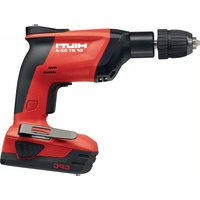
SF BT 22‑A - Screwdriver HILTI - Free user manual and instructions
Find the device manual for free SF BT 22‑A HILTI in PDF.


| Product type | Cordless screwdriver, hand-guided |
| Brand | Hilti |
| Model | SF BT 22‑A |
| Rated voltage | 21.6 V |
| Weight (with B22/8.0 battery) | 2.6 kg (5.7 lb) |
| Torque | ≤ 9 Nm (≤ 7 ftlb) |
| Chuck clamping range | 1.2 mm – 10 mm (3/64 in – 25/64 in) |
| No-load rated speed | Not specified in the instructions |
| Compatible battery type | Hilti Li‑Ion series B 22 |
| Battery technology | Lithium‑ion |
| Charge status indicator | 4 LEDs on battery |
| Electronic protection | Against overload and overheating (automatic shutdown) |
| Anti-start lock | Yes, safety switch |
| Electronic speed variator | Yes, progressive |
| Chuck | Quick-release chuck |
| Handle | Non-slip, with belt hook (optional) |
| Intended use | Drilling blind holes in steel with stepped drill bits TX‑BT and installing threaded studs X‑BT |
| Items supplied | Drill, operating instructions |
| Maintenance and cleaning | Clean with a slightly damp cloth; brush ventilation slots; no silicone |
| Safety instructions | Read the entire manual; wear PPE; do not expose to moisture; use Hilti chargers and batteries |
| Manufacturer warranty | Contact your local Hilti partner |
| Country of origin | Not specified |
Frequently Asked Questions - SF BT 22‑A HILTI
User questions about SF BT 22‑A HILTI
0 question about this device. Answer the ones you know or ask your own.
Ask a new question about this device
Download the instructions for your Screwdriver in PDF format for free! Find your manual SF BT 22‑A - HILTI and take your electronic device back in hand. On this page are published all the documents necessary for the use of your device. SF BT 22‑A by HILTI.
USER MANUAL SF BT 22‑A HILTI
Original operating instructions
1 Information about the documentation
1.1 About this documentation
- Read this documentation before initial operation or use. This is a prerequisite for safe, trouble-free handling and use of the product.
- Observe the safety instructions and warnings in this documentation and on the product.
• Always keep the operating instructions with the product and make sure that the operating instructions are with the product when it is given to other persons.
1.2 Explanation of symbols
1.2.1Warnings
Warnings alert persons to hazards that occur when handling or using the product. The following signal words are used:

DANGER
DANGER!
- Draws attention to imminent danger that will lead to serious personal injury or fatality.

WARNING
WARNING!
- Draws attention to a potential threat of danger that can lead to serious injury or fatality.

CAUTION
CAUTION!
- Draws attention to a potentially dangerous situation that could lead to personal injury or damage to the equipment or other property.
1.2.2 Symbols in the operating instructions
The following symbols are used in these operating instructions:
 | Comply with the operating instructions |
 | Instructions for use and other useful information |
 | Dealing with recyclable materials |
 | Do not dispose of electric equipment and batteries as household waste |
 | Hilti Li-ion battery |
 | Hilti charger |
1.2.3 Symbols in illustrations
The following symbols are used in illustrations:
| 2 | These numbers refer to the illustrations at the beginning of these operating instructions. |
| 3 | The numbering reflects the sequence of operations shown in the illustrations and may deviate from the steps described in the text. |
| 11 | Item reference numbers are used in theoverview illustrationandrefer to the numbers used in the key in theproduct overviewsec-tion. |
| 3! | These characters are intended to specifically draw your attention to certain points when handling the product. |
1.3 Product-dependent symbols
1.3.1 Symbols on the product
The following symbols can be used on the product:
| The power tool supports near-field communication (NFC) technology, which is compatible with iOS and Android platforms. | |
| Hilti Li-ion battery type series used. Observe the information given in the section headed Intended use. | |
| Li-Ion | Li-ion battery |
| Never use the battery as a striking tool. | |
| Do not drop the battery. Never use a battery that has suffered an impact or is damaged in any other way. | |
| n_0 | Rated speed under no load |
| /min | Revolutions per minute |
| --- | Direct current (DC) |
| ∅ | Diameter |
1.4 Product information
HILTI products are designed for professional users and only trained, authorized personnel are permitted to operate, service and maintain the products. This personnel must be specifically informed about the possible hazards. The product and its ancillary equipment can present hazards if used incorrectly by untrained personnel or if used not in accordance with the intended use.
The type designation and serial number are printed on the rating plate.
- Write down the serial number in the table below. You will be required to state the product details when contacting Hilti Service or your local Hilti organization to inquire about the product.
Product information
| Drill SF BT 22-A | |
| Generation: 01 | |
| Serial no.: |
2 Safety
2.1 General power tool safety warnings
WARNING Read all safety warnings, instructions, illustrations and specifications provided with this power tool. Failure to follow all instructions listed below may result in electric shock, fire and/or serious injury.
Save all warnings and instructions for future reference.
The term "power tool" in the warnings refers to your mains-operated (corded) power tool or battery-operated (cordless) power tool.
Work area safety
- Keep work area clean and well lit. Cluttered or dark areas invite accidents.
- Do not operate power tools in explosive atmospheres, such as in the presence of flammable liquids, gases or dust. Power tools create sparks which may ignite the dust or fumes.
- Keep children and bystanders away while operating a power tool. Distractions can cause you to lose control.
Electrical safety
- Power tool plugs must match the outlet. Never modify the plug in any way. Do not use any adapter plugs with earthed (grounded) power tools. Unmodified plugs and matching outlets will reduce risk of electric shock.
- Avoid body contact with earthed or grounded surfaces, such as pipes, radiators, ranges and refrigerators. There is an increased risk of electric shock if your body is earthed or grounded.
- Do not expose power tools to rain or wet conditions. Water entering a power tool will increase the risk of electric shock.
- Do not abuse the cord. Never use the cord for carrying, pulling or unplugging the power tool. Keep cord away from heat, oil, sharp edges or moving parts. Damaged or entangled cords increase the risk of electric shock.
- When operating a power tool outdoors, use an extension cord suitable for outdoor use. Use of a cord suitable for outdoor use reduces the risk of electric shock.
HILTI
If operating a power tool in a damp location is unavoidable, use a residual current device (RCD) protected supply. Use of an RCD reduces the risk of electric shock.
Personal safety
- Stay alert, watch what you are doing and use common sense when operating a power tool. Do not use a power tool while you are tired or under the influence of drugs, alcohol or medication. A moment of inattention while operating power tools may result in serious personal injury.
- Use personal protective equipment. Always wear eye protection. Protective equipment such as a dust mask, non-skid safety shoes, hard hat or hearing protection used for appropriate conditions will reduce personal injuries.
- Prevent unintentional starting. Ensure the switch is in the off-position before connecting to power source and/or battery pack, picking up or carrying the tool. Carrying power tools with your finger on the switch or energising power tools that have the switch on invites accidents.
- Remove any adjusting key or wrench before turning the power tool on. A wrench or a key left attached to a rotating part of the power tool may result in personal injury.
- Do not overreach. Keep proper footing and balance at all times. This enables better control of the power tool in unexpected situations.
- Dress properly. Do not wear loose clothing or jewellery. Keep your hair and clothing away from moving parts. Loose clothes, jewellery or long hair can be caught in moving parts.
If devices are provided for the connection of dust extraction and collection facilities, ensure these are connected and properly used. Use of dust collection can reduce dust-related hazards. - Do not let familiarity gained from frequent use of tools allow you to become complacent and ignore tool safety principles. A careless action can cause severe injury within a fraction of a second.
Power tool use and care
- Do not force the power tool. Use the correct power tool for your application. The correct power tool will do the job better and safer at the rate for which it was designed.
- Do not use the power tool if the switch does not turn it on and off. Any power tool that cannot be controlled with the switch is dangerous and must be repaired.
-
Disconnect the plug from the power source and/or remove the battery pack, if detachable, from the power tool before making any adjustments, changing accessories, or storing power tools. Such preventive safety measures reduce the risk of starting the power tool accidentally.
-
Store idle power tools out of the reach of children and do not allow persons unfamiliar with the power tool or these instructions to operate the power tool. Power tools are dangerous in the hands of untrained users.
- Maintain power tools and accessories. Check for misalignment or binding of moving parts, breakage of parts and any other condition that may affect the power tool's operation. If damaged, have the power tool repaired before use. Many accidents are caused by poorly maintained power tools.
- Keep cutting tools sharp and clean. Properly maintained cutting tools with sharp cutting edges are less likely to bind and are easier to control.
- Use the power tool, accessories and tool bits etc. in accordance with these instructions, taking into account the working conditions and the work to be performed. Use of the power tool for operations different from those intended could result in a hazardous situation.
- Keep handles and grasping surfaces dry, clean and free from oil and grease. Slippery handles and grasping surfaces do not allow for safe handling and control of the tool in unexpected situations.
Battery tool use and care
- Recharge only with the charger specified by the manufacturer. A charger that is suitable for one type of battery pack may create a risk of fire when used with another battery pack.
▶ Use power tools only with specifically designated battery packs. Use of any other battery packs may create a risk of injury and fire. - When battery pack is not in use, keep it away from other metal objects, like paper clips, coins, keys, nails, screws or other small metal objects, that can make a connection from one terminal to another. Shorting the battery terminals together may cause burns or a fire.
▶ Under abusive conditions, liquid may be ejected from the battery; avoid contact. If contact accidentally occurs, flush with water. If liquid contacts eyes, additionally seek medical help. Liquid ejected from the battery may cause irritation or burns. - Do not use a battery pack or tool that is damaged or modified.
Damaged or modified batteries may exhibit unpredictable behaviour resulting in fire, explosion or risk of injury.
- Do not expose a battery pack or tool to fire or excessive temperature.
Exposure to fire or temperature above 130^ C (265 °F) may cause explosion.
- Follow all charging instructions and do not charge the battery pack or tool outside the temperature range specified in the instructions.
Charging improperly or at temperatures outside the specified range may damage the battery and increase the risk of fire.
Service
- Have your power tool serviced by a qualified repair person using only identical replacement parts. This will ensure that the safety of the power tool is maintained.
▶ Never service damaged battery packs. Service of battery packs should only be performed by the manufacturer or authorized service providers.
2.2 Drill safety warnings
Safety instructions when using long drill bits
▶ Never operate at higher speed than the maximum speed rating of the drill bit. At higher speeds, the bit is likely to bend if allowed to rotate freely without contacting the workpiece, resulting in personal injury.
- Always start drilling at low speed and with the bit tip in contact with the workpiece. At higher speeds, the bit is likely to bend if allowed to rotate freely without contacting the workpiece, resulting in personal injury.
- Apply pressure only in direct line with the bit and do not apply excessive pressure. Bits can bend causing breakage or loss of control, resulting in personal injury.
2.3 Additional safety instructions
Personal safety
▶ Use the tool only when it is in technically faultless condition.
▶ Never tamper with or modify the tool in any way.
▶ Always hold the tool with the hand on the grip provided. Keep the grip clean and dry.
- Avoid touching rotating parts - risk of injury!
- Wear suitable protective glasses, a hard hat, ear protection, protective gloves and light respiratory protection while using the power tool.
- Wear protective gloves also when changing the accessory tool. Touching the accessory tool presents a risk of injury (cuts or burns).
- Wear eye protection. Flying fragments present a risk of injury to the body and eyes.
▶ Take breaks between working and do physical exercises to improve the blood circulation in your fingers. Exposure to vibration during long periods of work can lead to disorders of the blood vessels and nervous system in the fingers, hands and wrists.
- Use a dust removal system and suitable vacuum cleaner whenever possible. Dust from materials, such as paint containing lead, some kinds of wood, concrete / masonry / stone containing silica, and minerals as well as metal, may be injurious to health.
- Keep the power tool out of reach of children. The power tool is not intended for use by inexperienced persons who have received no special training.
▶ Observe the national health and safety requirements.
Careful handling and use of batteries
- Do not use the battery as a power source for other unspecified appliances.
- Observe the special guidelines applicable to the transport, storage and use of lithium-ion batteries.
- Do not expose batteries to high temperatures, direct sunlight or fire.
- Do not disassemble, squash or incinerate batteries and do not subject them to temperatures over 80°C (176°F).
- Do not attempt to charge or continue to use damaged batteries.
If the battery is too hot to touch it may be defective. In this case, place the power tool in a non-flammable location, well away from flammable materials, where it can be kept under observation and allowed to cool down. Contact Hilti Service after the battery has cooled down.
3 Description
3.1 Overview of the product 1
① Keyless chuck
⑥ Belt hook
② Motor cooling air intake
⑦ Battery
③ Grip
⑧ Air exit
④ Switch safety lock
⑨ Battery release button
⑤ Control switch (with electronic speed control)
⑩ Battery display
3.2 Intended use
The product described is a hand-held cordless drill designed for drilling blind holes in steel using Hilti TX-BT... stepped drill bits which is a prerequisite for driving Hilti X-BT threaded studs.
• Use only Hilti lithium-ion batteries of the B 22 series with this product.
- Use only Hilti-approved battery chargers to charge these batteries. More information is available from your Hilti Store or from www.hilti.group
3.3 Switch-on interlock
The tool is equipped with a switch safety lock that can be used to lock the control switch, thereby preventing inadvertent starting.
Switch positions
- If the switch safety lock is positioned longitudinally, i.e. in line with the working direction of the drill, the control switch is locked (the switch-on interlock is active).
- If the switch safety lock is pointing to the left relative to the working direction of the drill, the control switch is free to operate (the switch-on interlock is deactivated).
3.4 Overload and overheating protection
The power tool is equipped with an electronic system to protect against overloading and overheating. The power tool switches itself off automatically in the event of overloading or overheating. After releasing the control switch, the power tool may not restart immediately when the switch is pressed again (while the power tool is cooling down).

Activation of the automatic cut-out is indicated by all 4 LEDs on the battery display blinking.
3.5 Li-ion battery display
The charge status of the Li-ion battery and malfunctions of the power tool are indicated by the display on the Li-ion battery. The charge status of the Li-ion battery is displayed after pressing one of the two battery release buttons.
| Status Meaning | |
| 4 LEDs light. Charge status: 75 % | to 100 % |
| 3 LEDs light. Charge status: 50 % | to 75 % |
| 2 LEDs light. Charge status: 25 % | to 50 % |
| 1 LED lights. Charge status: 10 % | to 25 % |
| 1 LED blinks, the power tool is ready for use. | Charge status: < 10 % |
| 1 LED blinks, the power tool is not ready for use. | The battery has overheated or is completely discharged. |
| 4 LEDs blink, the power tool is not ready for use. | The power tool is overloaded or h overheated. |

Battery charge status cannot be displayed while the control switch is pressed and for up to 5 seconds after releasing the control switch. If the battery display LEDs blink, please observe the instructions given in the Troubleshooting section.
3.6 Items supplied
Electric drill, operating instructions.
Other system products approved for use with this product can be found at your local Hilti Store or at: www.hilti.group
4 Technical data
| Rated voltage | 21.6 V |
| Weight including battery B22/8.0 | 5.7 lb(2.6 kg) |
| Torque | ≤ 7 ft|b(≤ 9 Nm) |
| Keyless chuck clamping range | 3/64 in ... 25/64 in |
5 Operation
5.1 Inserting the battery

CAUTION
Risk of injury. The drill may start inadvertently.
Before fitting the battery, check that the drill is switched off and that the switch-on interlock is activated.

CAUTION
Electrical hazard. Dirty contacts may cause a short circuit.
Before inserting the battery, check to ensure that the battery terminals and the contacts on the drill are free from foreign objects.

CAUTION
Risk of injury. If the battery is not fitted correctly it may drop out and fall.
- Check that the battery is securely seated in the drill so that it cannot drop out and fall, thereby presenting a hazard to other persons.
- Push the battery into the drill from the rear until it is heard to engage with a click.
5.2 Removing the battery
▶ Remove the battery.
5.3 Fitting the belt hook (optional) 5

WARNING
Risk of injury! Hazard presented by a falling power tool.
▶ A falling power tool may present a risk of injury to yourself and others. Check that the belt hook is fitted securely before beginning work.

The belt hook allows the drill to be attached to a belt worn by the operator. The belt hook can be fitted to allow attachment on the left or right side of the body.
▶ Fit the belt hook on the appropriate side of the drill.
5.4 Fitting or removing accessory tools 6

CAUTION
Risk of injury. The drill may start inadvertently.
- Make sure that the switch-on interlock has been activated or that the battery has been removed from the drill.
-
Open the keyless chuck.
-
Check that the connection end of the accessory tool is clean and then insert it in the keyless chuck or, respectively, pull the accessory tool out of the keyless chuck.
-
Retighten the keyless chuck.
5.5 Switching on
▶ Press the control switch.

The running speed can be controlled smoothly right up to maximum speed by varying how far the control switch is pressed in.
5.6 Switching off
▶ Release the control switch.
6 Care and maintenance

WARNING
Electrical hazards. Improper repairs to electrical parts may lead to serious injuries.
Electrical parts may be repaired only by trained electrical specialists.

To help ensure safe and reliable operation, use only genuine Hilti spare parts and consumables. Spare parts, consumables and accessories approved by Hilti for use with the product can be found at your local Hilti Center or online at: www.hilti.com
- Keep the tool, especially its grip surfaces, clean and free from oil and grease.
▶ Do not use cleaning agents containing silicone.
▶ Never operate the power tool when the ventilation slots are blocked. Clean the air vents carefully using a dry brush. Do not permit foreign objects to enter the interior of the tool. - Clean the outside of the tool at regular intervals with a slightly damp cloth. Do not use a spray, steam pressure cleaning equipment or running water for cleaning. This may negatively affect the electrical safety of the power tool.
7 Transport and storage of cordless tools and batteries
Transport

CAUTION
Accidental starting during transport!
▶ Always transport your products with the batteries removed!
Remove the battery/batteries.
▶ Never transport batteries loose and unprotected. During transport, batteries should be protected from excessive shock and vibration and isolated from any conductive materials or other batteries that may come in contact with the terminals and cause a short circuit. Comply with the locally applicable regulations for transporting batteries.
- Do not send batteries through the mail. Consult your shipper for instructions on how to ship undamaged batteries.
- Prior to each use and before and after prolonged transport, check the product and the batteries for damage.
Storage

WARNING
Accidental damage caused by defective or leaking batteries!
▶ Always store your products with the batteries removed!
- Store the product and the batteries in a cool and dry place. Comply with the temperature limits stated in the technical data.
- Do not store batteries on the charger. Always remove the battery from the charger when the charging operation has completed.
▶ Never leave batteries in direct sunlight, on sources of heat, or behind glass. - Store the product and batteries where they cannot be accessed by children or unauthorized persons.
- Prior to each use and before and after prolonged storage, check the product and the batteries for damage.
8 Troubleshooting
If the trouble you are experiencing is not listed in this table or you are unable to remedy the problem by yourself, please contact Hilti Service.
| Trouble or fault | Possible cause | Action to be taken |
| The battery doesn’t engage with an audi-ble double click. | The retaining lugs on the-battery are dirty. | Clean the retaining lugs and push the battery in until it engages. ContactHilti Service if the problem persists. |
| The control switch can’t be pressed, i.e. the switch is locked. | The switch-on interlock is activated. | ► Push the switch safety lock to the side (to the left as seen from the working direction). |
| The power tool doesn’t run. | The battery is not fully inserted. | ► Push the battery in until it engages with an audible click. |
| The tool doesn’t work and one LED blinks. | Battery is discharged. ► | Change the battery and charge the empty battery. |
| The tool cuts out while operating, the 4 LEDs on the bat-tery display blink. | The overload cut-out has been activated. | ► Release the control switch and then press it again. |
| The overheating cut-out has been activated. | ► Allow the power tool to cool down. Clean the air vents. | |
| The battery runs down more quickly than usual. | Very low ambient tem-perature. | ► Allow the battery to warm up slowly to room temperature. |
| The tool or battery gets very hot. | The tool is overloaded (application limits ex-ceeded). | ► Pay attention to the power and perfor-mance rating of the product before using it, i.e check its suit-ability for the job on hand. See “Technical data” section. |
9 Manufacturer's warranty
- Please contact your local Hilti representative if you have questions about the warranty conditions.


- Original operating instructions
- Information about the documentation
- About this documentation
- Explanation of symbols
- 1.2.1Warnings
- DANGER
- DANGER!
- WARNING
- WARNING!
- CAUTION
- CAUTION!
- Symbols in the operating instructions
- Symbols in illustrations
- Product-dependent symbols
- Symbols on the product
- Product information
- Safety
- General power tool safety warnings
- Save all warnings and instructions for future reference.
- Work area safety
- Electrical safety
- HILTI
- Personal safety
- Power tool use and care
- Battery tool use and care
- Service
- Drill safety warnings
- Safety instructions when using long drill bits
- Additional safety instructions
- Careful handling and use of batteries
- Description
- Overview of the product 1
- Intended use
- Switch-on interlock
- Switch positions
- Overload and overheating protection
- Li-ion battery display
- Items supplied
- Technical data
- Operation
- Inserting the battery
- Removing the battery
- Fitting the belt hook (optional) 5
- Fitting or removing accessory tools 6
- Switching on
- Switching off
- Care and maintenance
- Transport and storage of cordless tools and batteries
- Transport
- Accidental starting during transport!
- Storage
- Accidental damage caused by defective or leaking batteries!
- Troubleshooting
- Manufacturer's warranty
Brand : HILTI
Model : SF BT 22‑A
Category : Screwdriver