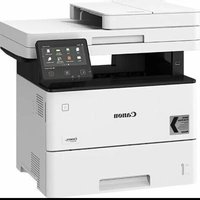
i-SENSYS MF542x - Printer CANON - Free user manual and instructions
Find the device manual for free i-SENSYS MF542x CANON in PDF.


| Product type | Multifunction printer (print, copy, scan, optional fax) |
| Brand | Canon |
| Model | i-SENSYS MF542x |
| Dimensions (W × D × H) | Approx. 500 × 400 × 450 mm |
| Weight | Approx. 15 kg (without consumables) |
| Power supply | 220-240 V, 50/60 Hz |
| Main functions | Duplex printing, copy (N-in-1, zoom, ID card), scan (to email, USB, file server), fax (sequential broadcast, memory reception) |
| Print resolution | 1200 × 1200 dpi (maximum) |
| Supported paper sizes | A4, A5, etc. (cassette and multi-purpose tray) |
| Paper capacity | Standard cassette 250 sheets, multi-purpose tray 100 sheets |
| Connectivity | Wired network (Ethernet), wireless network (Wi-Fi 2.4 GHz), USB 2.0, NFC (depending on model) |
| Consumables | Canon Cartridge 056 toner cartridge (black, standard, high yield, and very high yield capacities) |
| Maintenance and cleaning | Unplug before cleaning; use a damp cloth (water only); do not use flammable products; clean the interior regularly to prevent jams |
| Safety | CE compliance, laser class 1; precautions: do not block ventilation slots, avoid humid/dusty places, use only the supplied power cord |
| Spare parts and repairability | Spare parts and consumables available for at least 7 years after end of sale; contact an authorized Canon dealer for repairs |
| General information | User manual available online (432 pages); full user manual at https://oip.manual.canon; operating temperature: 0-35°C, humidity 35-85% RH |
Frequently Asked Questions - i-SENSYS MF542x CANON
User questions about i-SENSYS MF542x CANON
0 question about this device. Answer the ones you know or ask your own.
Ask a new question about this device
Download the instructions for your Printer in PDF format for free! Find your manual i-SENSYS MF542x - CANON and take your electronic device back in hand. On this page are published all the documents necessary for the use of your device. i-SENSYS MF542x by CANON.
USER MANUAL i-SENSYS MF542x CANON
Please read "Important Safety Instructions" before operating this product. After you finish reading this guide, store it in a safe place for future reference.
The information in this document is subject to change without notice.


https://oip.manual.canon
Quick Setup
Getting Started
Please read "Important Safety Instructions" before operating this product. P.136
After you finish reading this guide, store it in a safe place for future reference. The information in this document is subject to change without notice.
Mise en route
https://oip.manual.canon to read the User's Guide that describes all functions of this machine.
Items Included with the Machine Installing the Machine
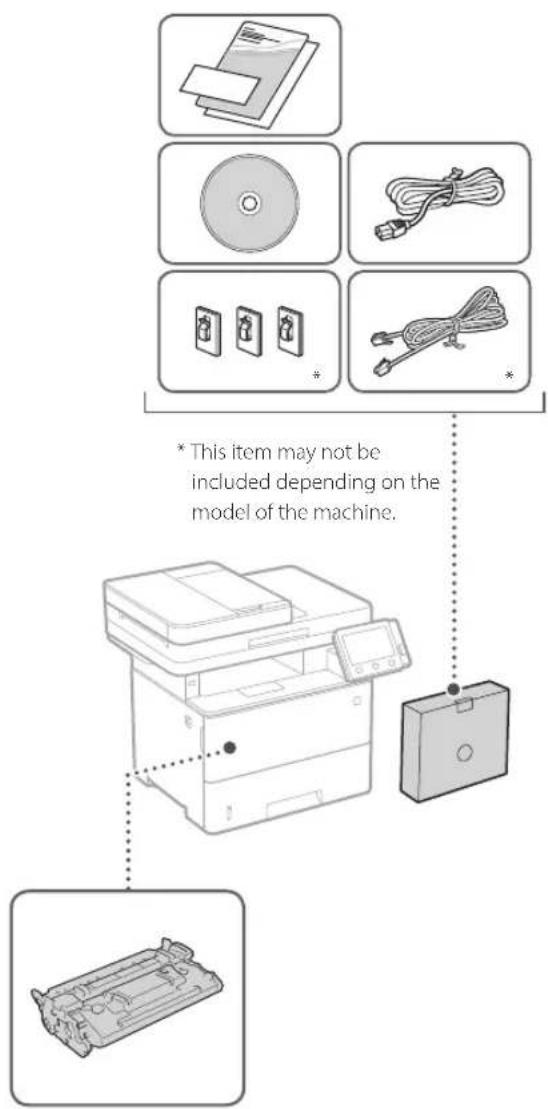
Toner cartridge (included with the machine)
Before starting the installation
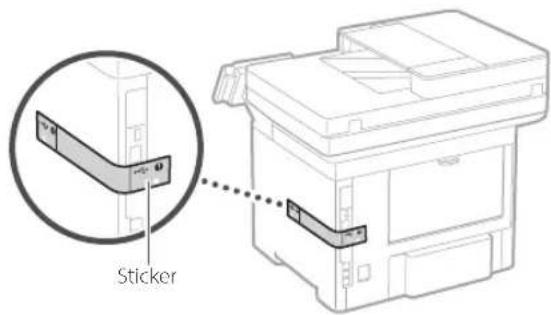
- Remove all of the tape.
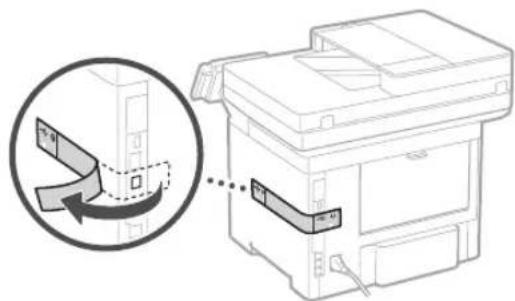
- Do not remove the sticker that covers the USB port.
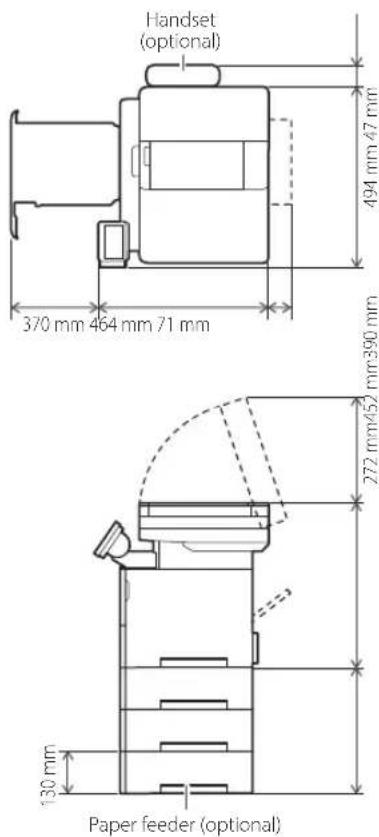
Installation requirements
Provide a space of 100 mm or more around the machine.
1
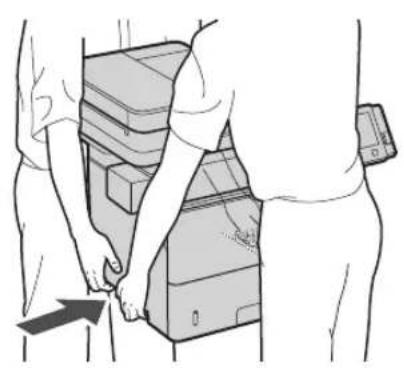
natural_image
Illustration of two people handling stacked electronic devices, one pointing at a device (no text or symbols visible)4
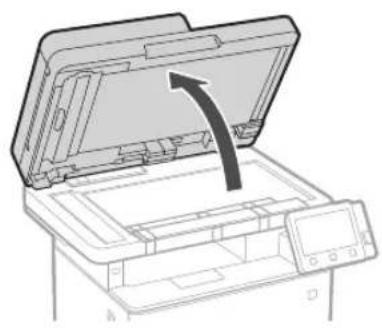
natural_image
Line drawing of a printer with an open lid and arrow indicating compression or shift (no text or symbols)2
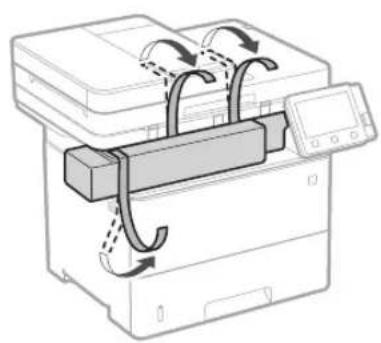
natural_image
Diagram of a printer with internal components and directional arrows indicating motion (no text or symbols)5
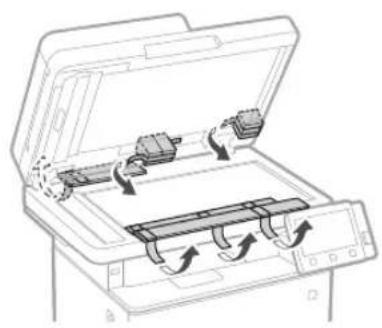
natural_image
Diagram of an open file printer with internal components and scroll arrows indicating motion (no text or symbols)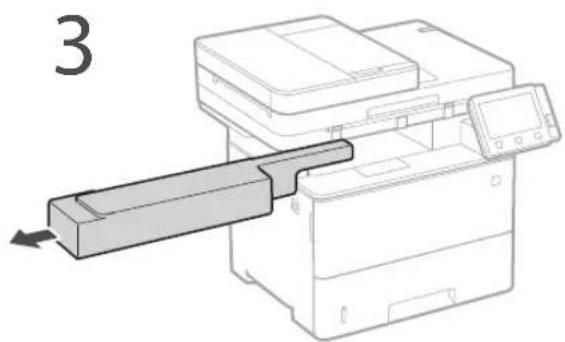
natural_image
Diagram of a printer with a paper feed being inserted, showing internal components and a digital display (no text or symbols)6
natural_image
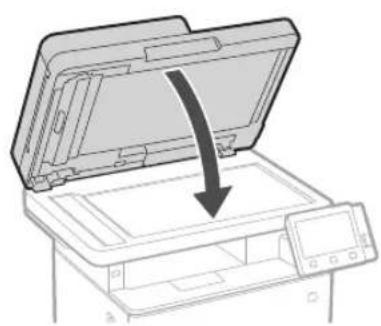
Diagram of a printer with an open lid and a downward arrow indicating compression or disassembly (no text or symbols present)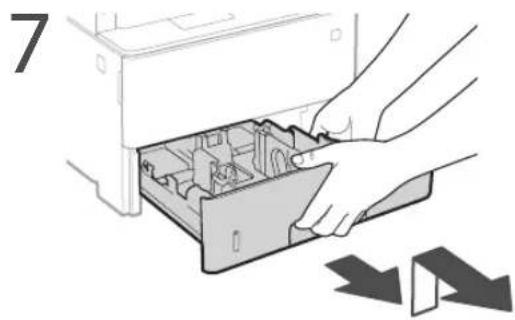
natural_image
Illustration of hands opening a computer case into a drive, with no visible text or symbols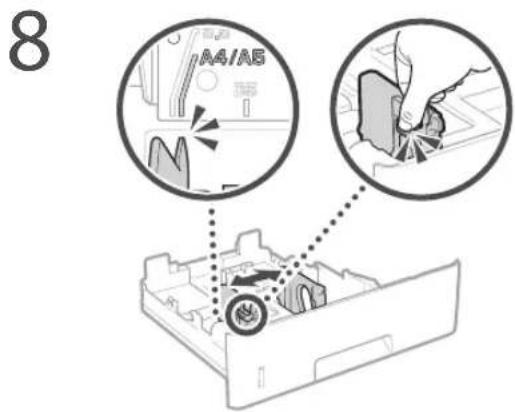
natural_image
Diagram of a device drawer with an arrow indicating direction (no text or symbols)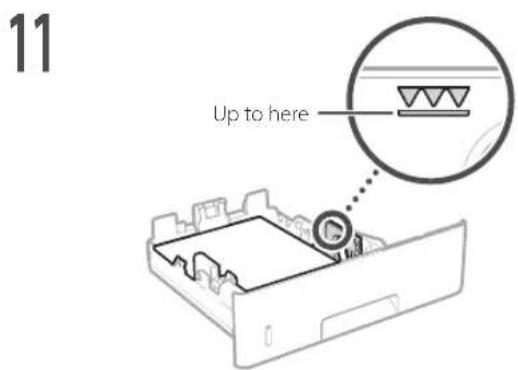
natural_image
Illustration of hands inserting a device into a drawer (no text or symbols visible)13 Attach the handset (optional).
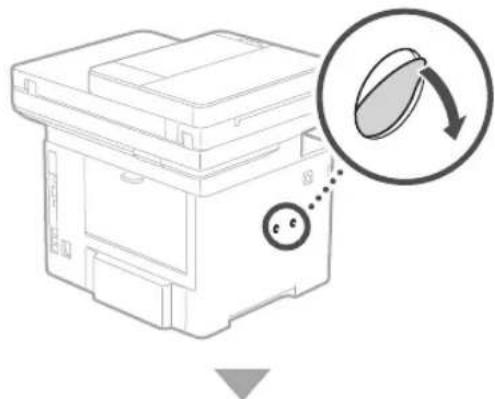
natural_image
Diagram of a printer or scanner device with a magnified inset showing a circular button labeled '←' (no text or symbols on the device itself)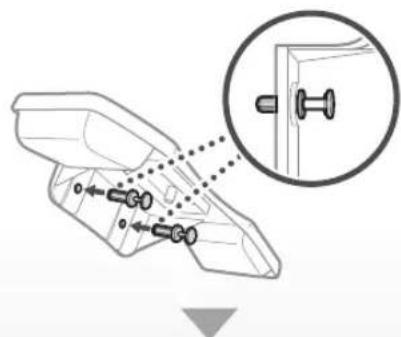
natural_image
Technical line drawing of a mechanical component with a magnified inset showing a pin inserted into a bracket (no text or symbols)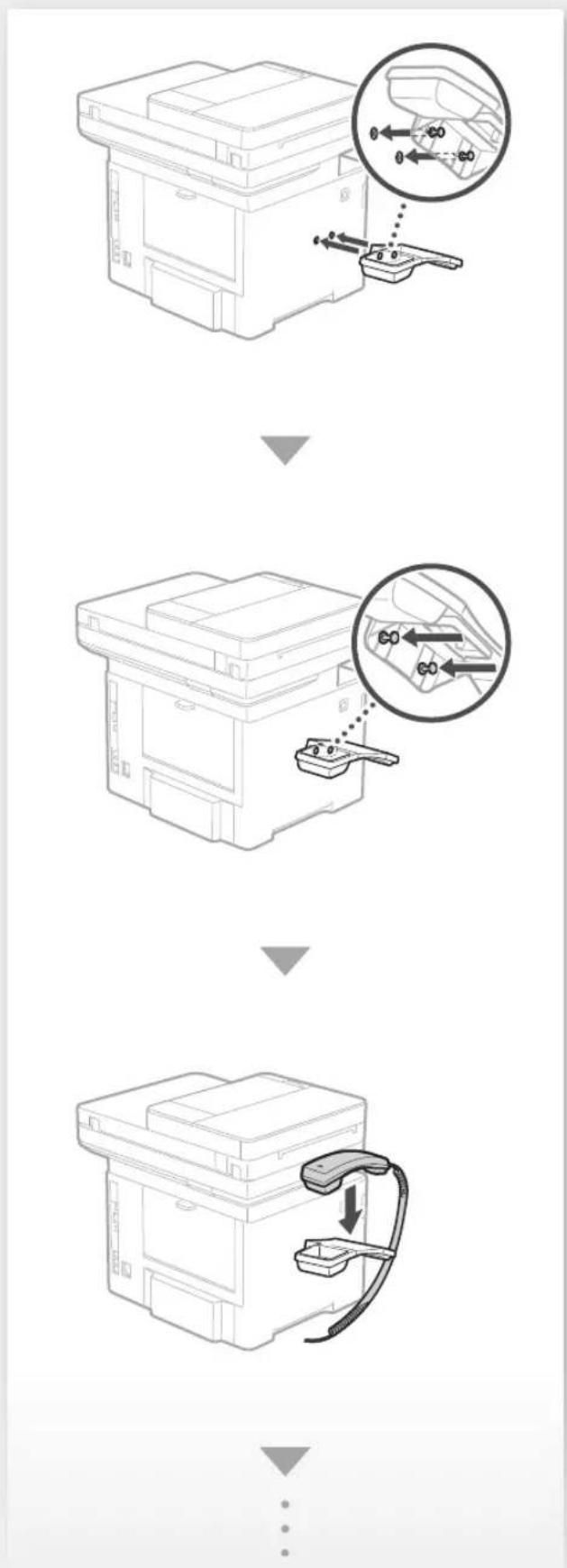

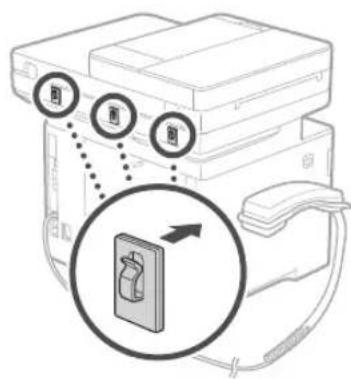

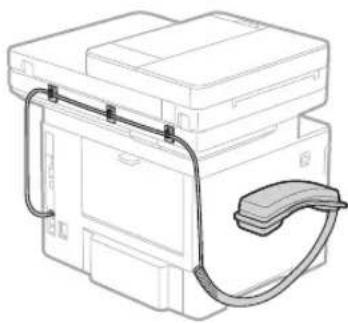
natural_image
Line drawing of a mechanical device with attached cable and housing (no text or symbols)
14 Install the paper feeder (optional).
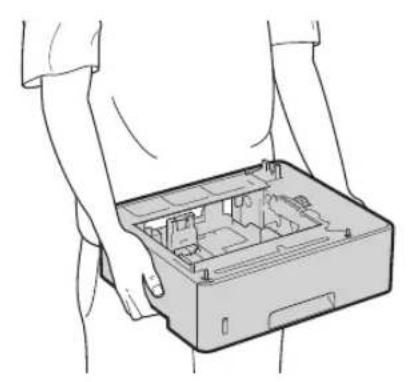
natural_image
Line drawing of hands holding an open computer case with internal components (no text or symbols)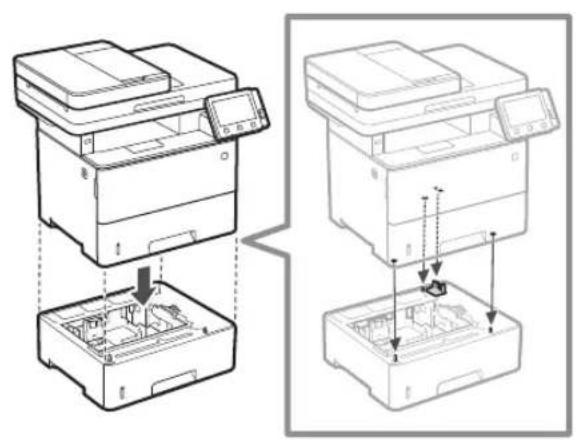
natural_image
Technical line drawing showing two views of a printer's internal structure, one with a downward arrow indicating assembly or disassembly, the other with arrows and a small object (no text or symbols present)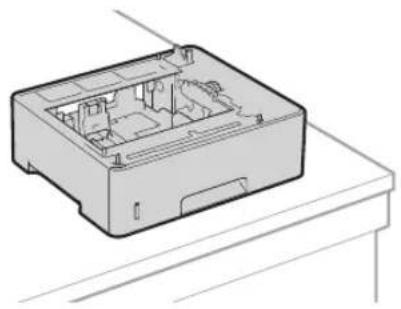
natural_image
Technical line drawing of a computer case with internal compartments and mounting base (no text or symbols)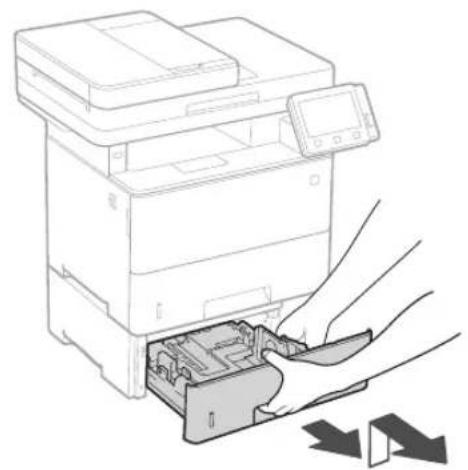
natural_image
Line drawing of a printer with a hand inserting a card into the internal compartment, showing mechanical components and arrows indicating process (no text or symbols)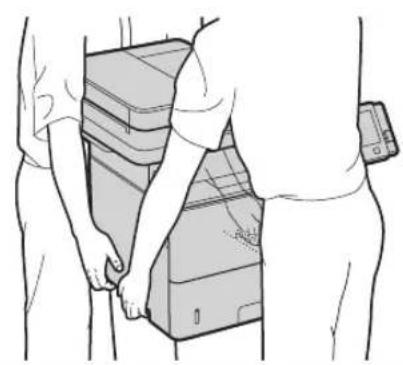
natural_image
Line drawing of two people handling stacked electronic devices (no text or symbols)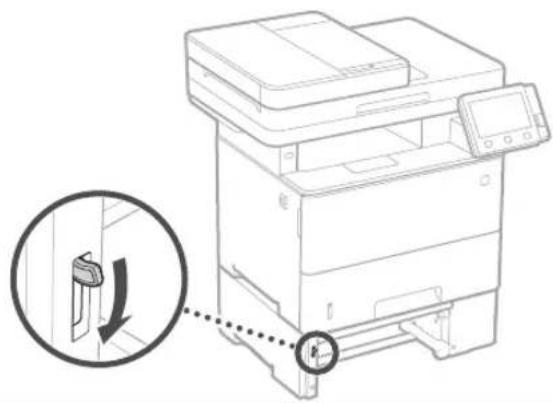
natural_image
Line drawing of a printer with a magnified inset showing a device's left-side adjustment (no text or symbols)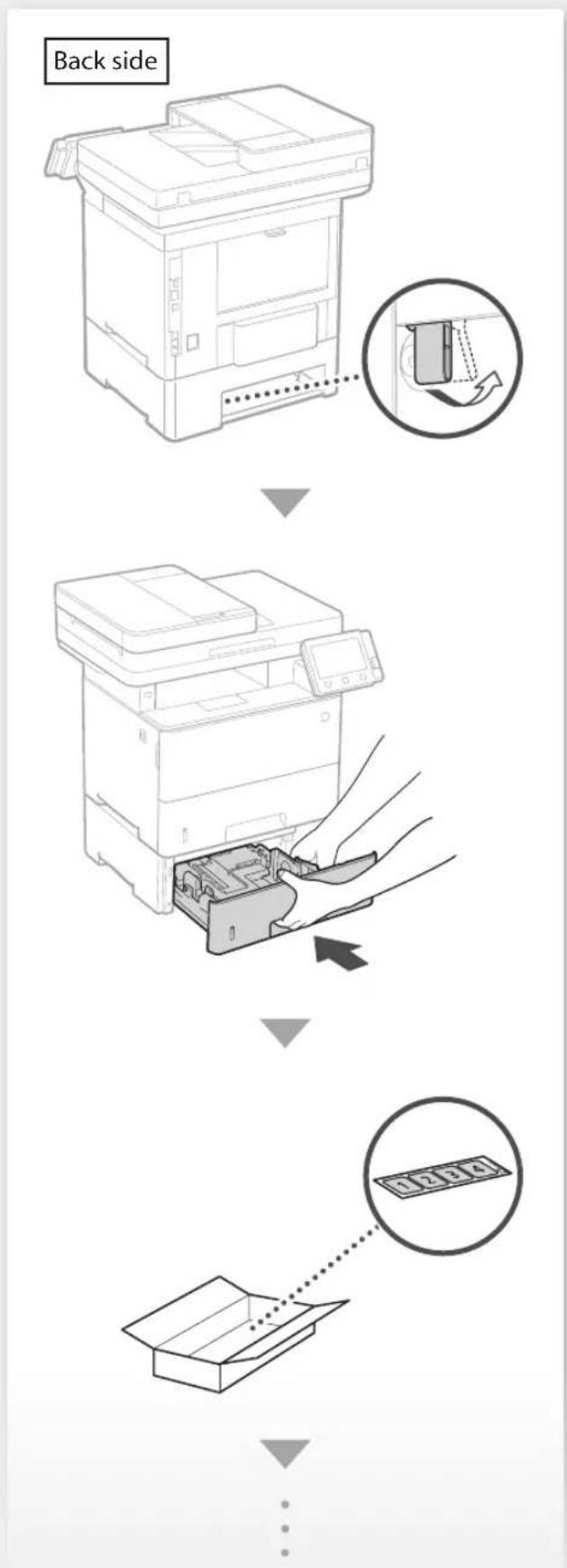
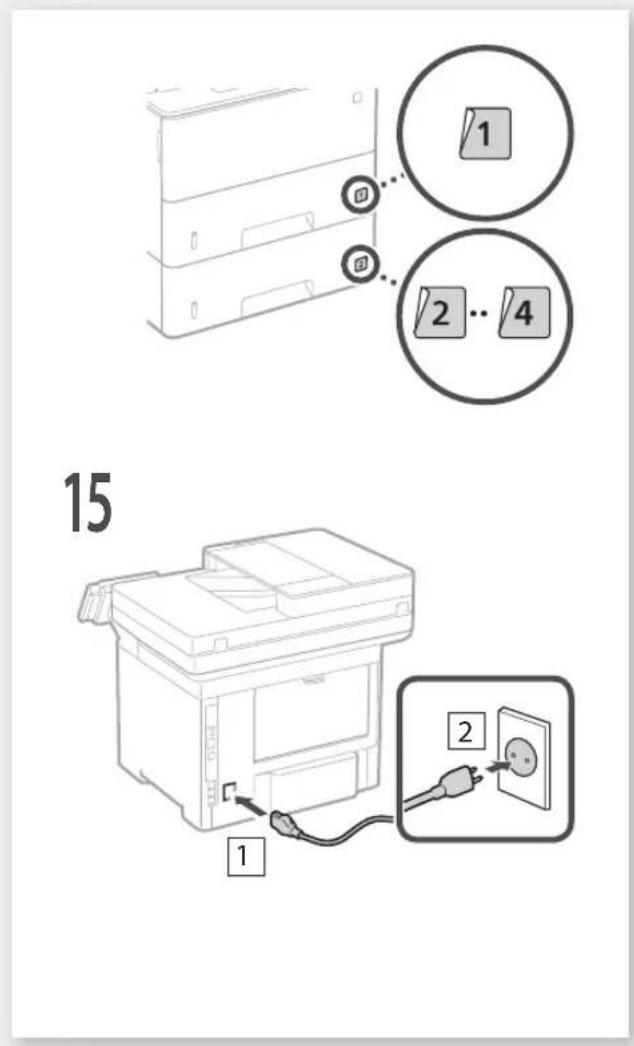
Configuring the Initial Settings of the Machine
About Application Library\*
Application Library is an application that allows you to use useful functions for routine jobs or other convenient functions in a one-touch operation without necessity of making functional settings every time. You can access each registered function by simply pressing the appropriate button displayed in the Home screen. For the respective function, see the description displayed in the Setup Guide.
* This function may not be available, depending on the model of the machine.
natural_image
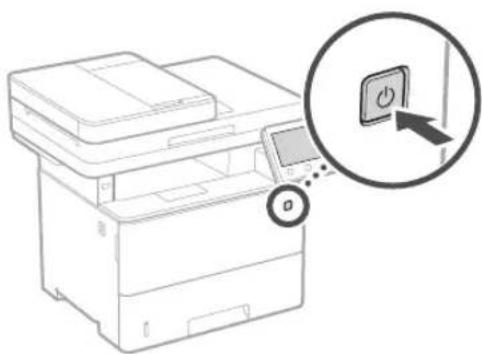
Line drawing of a printer with a magnified inset showing a button labeled 'O' (no text or symbols on the device itself)-
Configure the initial settings, according to the screen.
-
Set the language and country/region.
- Set the time zone and current date/time.
- Configure the settings to prevent unauthorized access.
- For the purpose of confirmation, enter the same PIN twice.
Configuring the Method of Connecting to a Computer
Before starting the configuration
• The machine cannot be connected to both wired and wireless LANs at the same time.
• If the machine is connected to an unsecured network, your personal information might be leaked to a third party. Please be aware and careful of this.
• The machine does not come with a router. Please have one ready, if necessary.
• Even in an environment without wireless LAN router, you can use Access Point Mode to make a wireless connection to the machine directly from your mobile device (Direct Connection).
→ User's Guide
Specifying the connection method
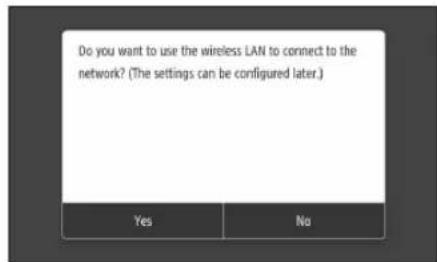
• To connect via wireless LAN :
• To connect via wired LAN or USB :
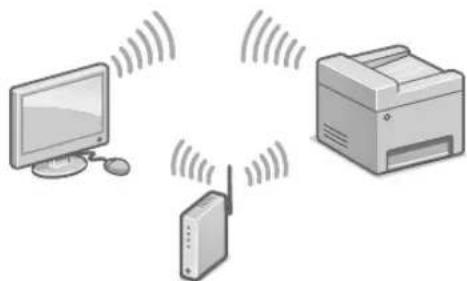
To connect via wireless LAN
natural_image
Illustration of a printer, network device, and computer monitor with signal waves (no text or symbols)- Make sure that the computer is connected to a router properly.
- Check the network settings on the computer.

-
Take note of the SSID and network key.
-
Check the label on the router. ➞ User's Guide
-
The setting operation is easier if the router is provided with a WPS mark. ➕ User's Guide
-
Set the access point and network key according to the screen below.

- Select
. - Select
. - Select
- Select the access point (SSID), and select
. - Select
. - Enter a network key, and select
. - Select
.
- Wait until message
-
Select
.
• The IP address will be automatically configured in a few minutes. -
Install the driver and software.
P.12 "Installing the software"
Now you are finished with the configuration of the initial settings.
If your machine is provided with the fax function, proceed to configuring the fax settings. P.13
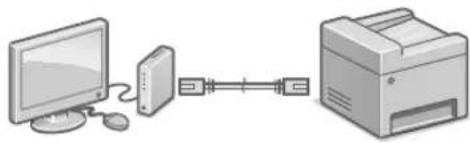
To connect via wired LAN
natural_image
Illustration of a desktop computer connected to a printer via serial links (no text or symbols)The machine does not come with a LAN cable. Please have one ready, if necessary.
- Make sure that the computer is connected to a router properly.
- Check the network settings on the computer.
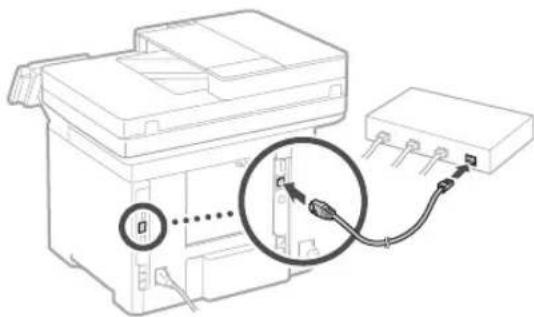
- Connect the LAN cable.
natural_image
Line drawing of a printer with an attached cable and connector, showing no text or symbols• After connecting the cable, wait a few minutes (until the IP address is set automatically).
- If a static IP address has been set on the computer, set the machine's IP address manually.
- Install the driver and software.
P.12 "Installing the software"
Now you are finished with the configuration of the initial settings.
If your machine is provided with the fax function, proceed to configuring the fax settings. P.13
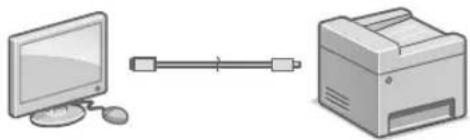
To connect via USB
natural_image
Illustration of a desktop computer connected to a printer (no text or symbols present)- The machine does not come with a USB cable. Please have one ready, if necessary.
• Make sure that the USB cable you use has the following mark.

- Do not connect the USB cable before installing the driver. If you did, disconnect the USB cable from the computer, close the dialog box, and then perform the following procedure from step 1.
- Install the driver and software.

P.12 "Installing the software"
- When a screen with instructions for connecting the USB cable to the machine is displayed, remove the sticker that covers the USB port.
natural_image
Technical line drawing of a mechanical device with an inset showing a curved component (no text or symbols)Now you are finished with the configuration of the initial settings.
If your machine is provided with the fax function, proceed to configuring the fax settings. P.13
Installing the software
• The procedure described here is only applicable when your computer runs on the Windows OS. For more details on the software installation procedure, see the driver's manual.
- For the installation when your computer runs on the macOS, see the driver's manual.
- Your machine may not come with the driver for the macOS, depending on the time of purchase. New drivers are uploaded to the Canon website, and you can download and use the latest one.
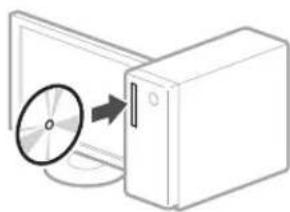
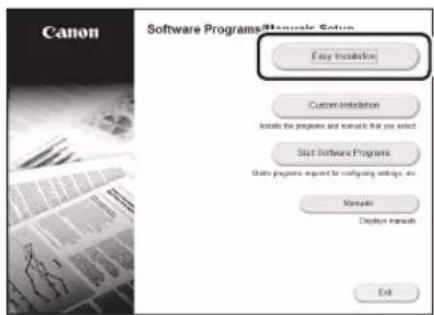
1.
natural_image
Illustration of a CD or DVD disc being inserted into a computer tower (no text or symbols)2.
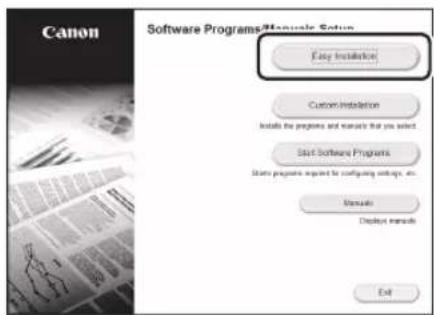
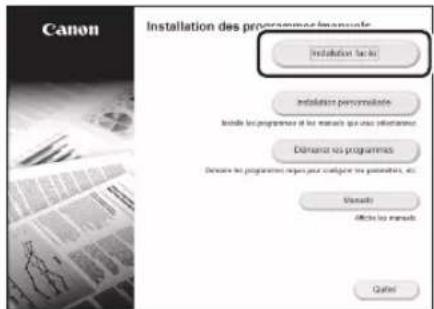
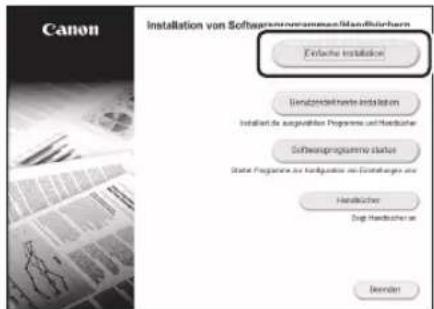
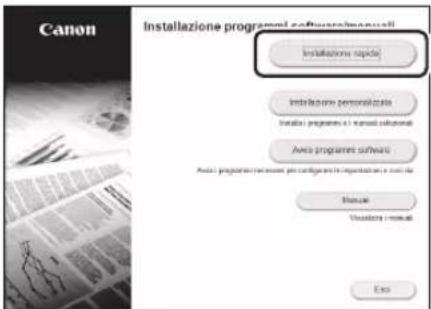
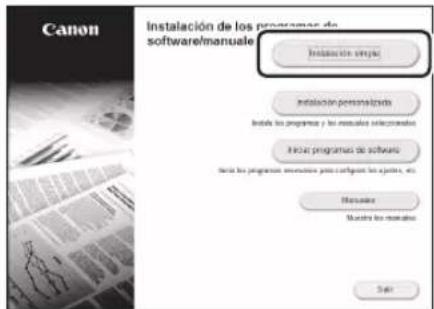
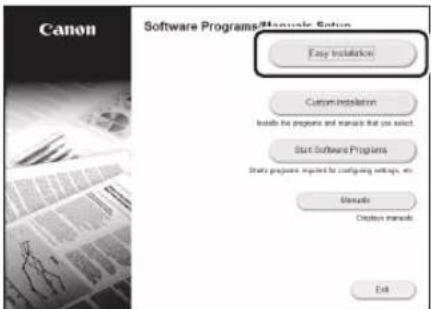
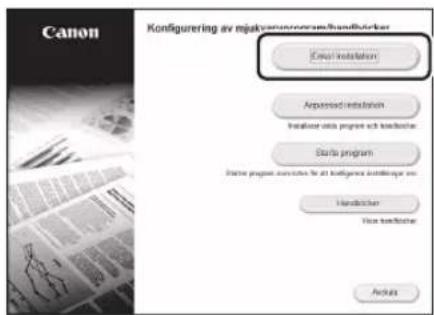
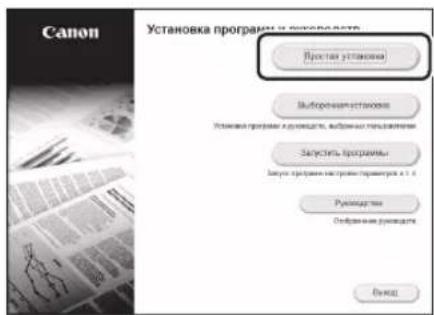
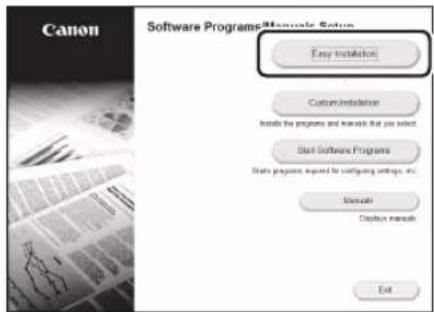
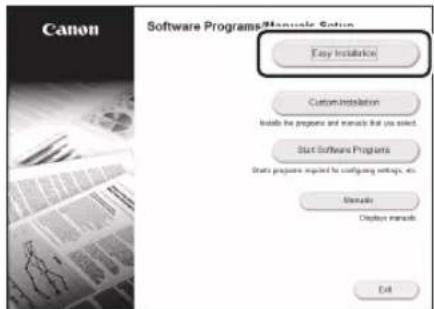
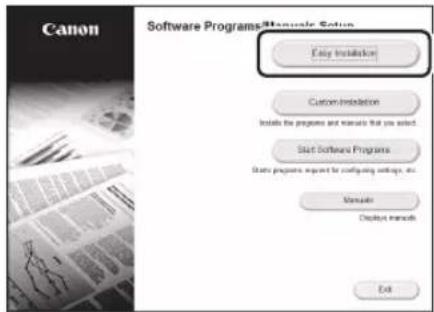
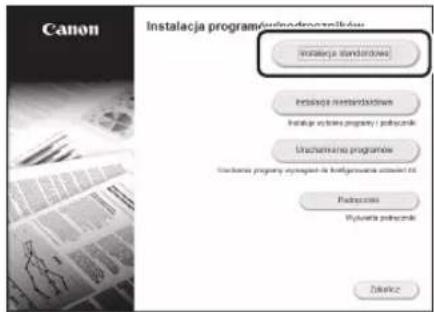
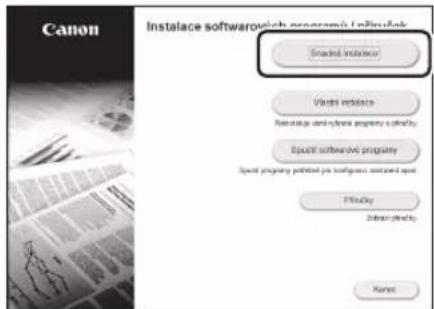
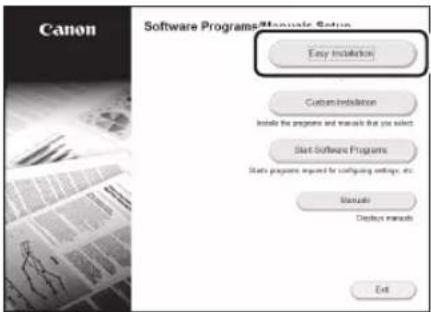
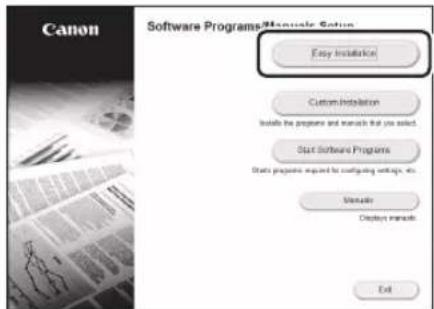
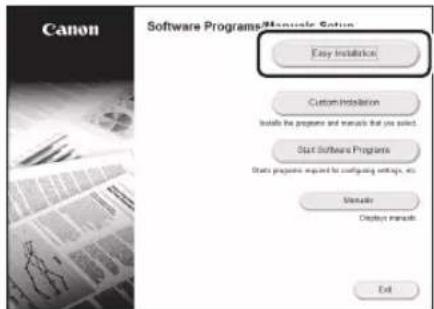
If the screen is not displayed properly, re-insert the CD-ROM/DVD-ROM or search for "D:\MInst.exe" on the Windows platform (This description assumes that "D:" is the CD-ROM/DVD-ROM drive name).
Using the scanner conveniently
Configuring the network settings with "Send Function Setting Tool" allows you to directly send scanned originals with e-mail or I-Fax or store them in a shared folder or on the FTP server.
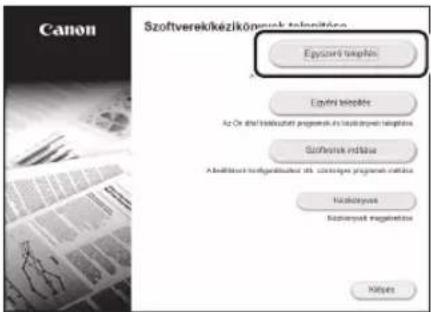
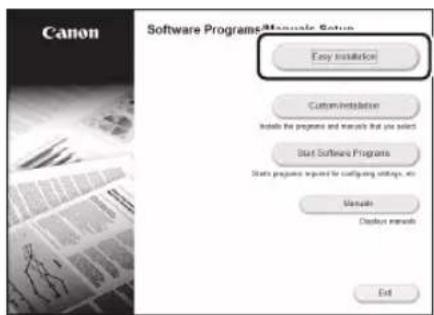
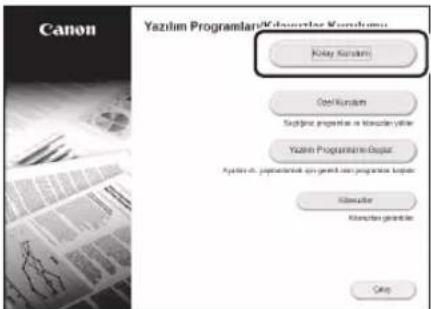
In the screen displayed in step 2, select [Start Software Programs] ▶ [Send Function Setting Tool] to start the Send Function Setting Tool.
For details

"Configuring Initial Settings for Fax Functions" in the User's Guide
En
Configuring Fax Settings
Before starting the configuration
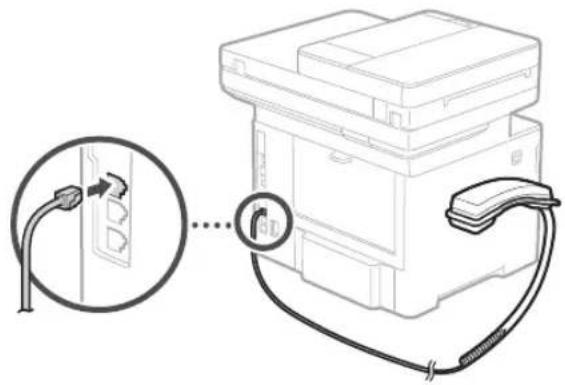
If your machine does not come with a telephone cable, have one ready, as necessary.
Configure the fax settings, according to the screen below.
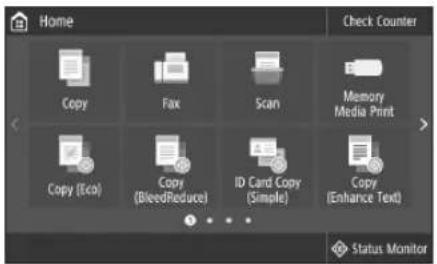
- Select
. - Select
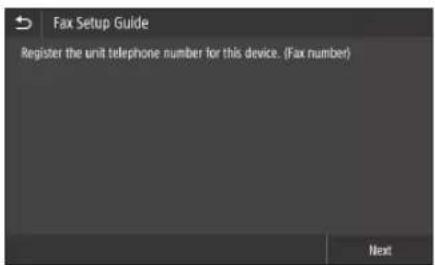
. - Register the machine's telephone number (fax number) and abbreviated user name.
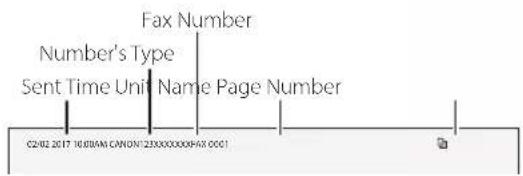
• The information below will be printed at the top part of the paper output from the destination machine as sender information.
- Set the reception mode.
- Make the setting by answering the questions on your purposes of using the fax function.
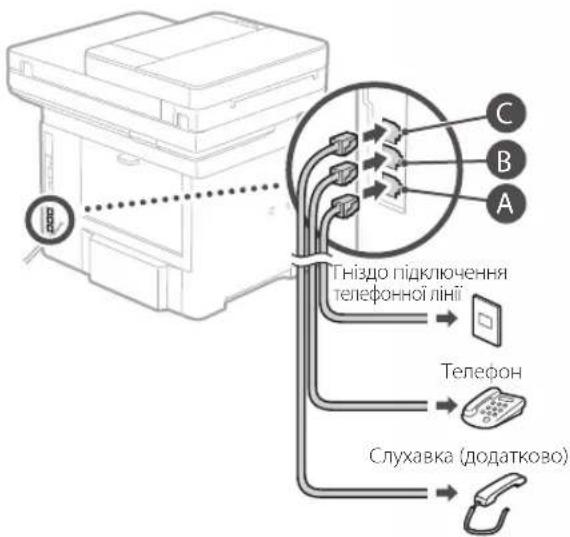
- Connect to a telephone line.
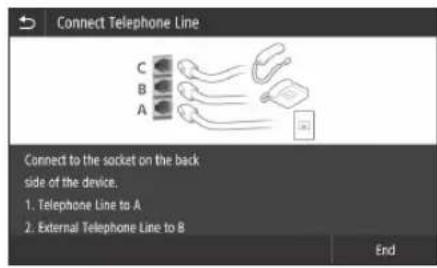
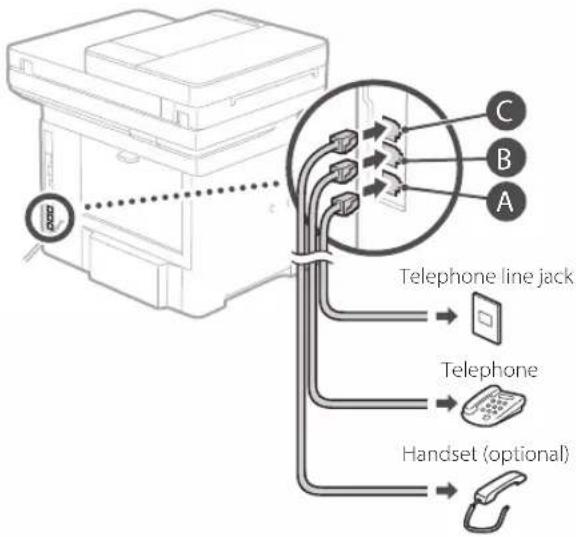
- Select
. - Select
.
Now you are finished with the configuration.
natural_image
Line drawing of a printer with a magnified inset showing a power button (no text or symbols present)natural_image
Illustration of three electronic devices: a monitor, a printer, and a wireless router with signal waves (no text or symbols)natural_image
Illustration of a desktop computer connected to a printer via serial communication (no text or symbols)natural_image
Line drawing of a printer with a close-up cable and connector, no text or symbols presentnatural_image
Illustration of a desktop computer connected to a printer (no text or symbols present)natural_image
Technical line drawing of a mechanical assembly with an inset showing a curved component (no text or symbols)natural_image
Diagram showing a CD or DVD disc being inserted into a server tower (no text or symbols present)2.
natural_image
Line drawing of a printer with a power button icon and control panel, no text or symbols presentnatural_image
Illustration of a printer, tower, and monitor with wireless signal waves (no text or symbols)natural_image
Illustration of a desktop computer connected to a printer via a serial line (no text or symbols)natural_image
Technical line drawing of a mechanical device with a magnified inset showing connection to a terminal block (no text or symbols present)natural_image
Illustration of a computer monitor connected to a printer via a cable (no text or symbols)natural_image
Technical line drawing of a mechanical device with an inset showing a curved component (no text or symbols)natural_image
Illustration of a computer monitor and CD tower with an arrow pointing to a disc (no text or symbols)2.
natural_image
Line drawing of a printer with a power button icon and magnified view of the printer's screen (no text or symbols)natural_image
Illustration of three electronic devices: a monitor, a printer, and a wireless router with signal waves (no text or symbols)natural_image
Illustration of a desktop computer connected to a printer via serial and link (no text or symbols)natural_image
Line drawing of a printer with an attached cable and connector, showing no text or symbolsnatural_image
Illustration of a computer monitor connected to a printer via a cable (no text or symbols)natural_image
Technical line drawing of a mechanical assembly with an inset showing a curved component (no text or symbols)natural_image
Diagram showing a CD or DVD disc being inserted into a server tower (no text or symbols present)2.
natural_image
Line drawing of a printer with a magnified inset showing a power button (no text or symbols present)natural_image
Illustration of a network device with monitor, printer, and wireless signal waves (no text or symbols)natural_image
Illustration of a desktop computer connected to a printer via a serial line (no text or symbols)natural_image
Line drawing of a printer with a cable and connector, showing no text or symbolsnatural_image
Illustration of a desktop computer connected to a printer (no text or symbols present)natural_image
Technical line drawing of a mechanical assembly with an inset showing a curved component (no text or symbols)natural_image
Diagram showing a CD or DVD disc being inserted into a computer tower (no text or symbols present)2.
natural_image
Line drawing of a printer with a magnified inset showing a button labeled 'Power' (no text or symbols on the device itself)natural_image
Illustration of three electronic devices: a monitor, a printer, and a wireless router with signal waves (no text or symbols)natural_image
Illustration of a desktop computer connected to a printer via serial and link (no text or symbols)natural_image
Diagram of a printer with cable and connector, showing internal components and connection (no text or symbols)natural_image
Illustration of a desktop computer connected to a printer (no text or symbols present)natural_image
Technical line drawing of a mechanical assembly with an inset showing a curved component (no text or symbols)natural_image
Diagram showing a CD or DVD disc being inserted into a server tower (no text or symbols present)2.
natural_image
Line drawing of a printer with a magnified inset showing a button labeled 'O' (no text or symbols on the device itself)natural_image
Illustration of three electronic devices: a monitor, a printer with wireless signal, and a router (no text or symbols)natural_image
Illustration of a desktop computer connected to a printer via serial communication (no text or symbols)natural_image
Line drawing of a printer with a close-up cable and connector, no text or symbols presentnatural_image
Illustration of a desktop computer connected to a printer (no text or symbols present)natural_image
Technical line drawing of a mechanical assembly with an inset showing a curved component (no text or symbols)natural_image
Diagram showing a CD or DVD disc being inserted into a server unit (no text or symbols present)2.
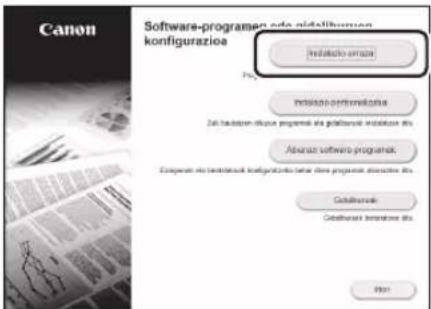
Pantaila behar bezala erakusten ez bada, instalatu CD-ROM/DVD-ROMa edo bilatu "D:\MInst.exe" Windows sisteman (Deskribapen honek CD-ROM/DVD-ROM unitateren hizkia "D:" dela suposatzen du).
Eskanerraren erabilera
natural_image
Line drawing of a printer with a digital display and a magnified inset showing a button (no text or symbols)natural_image
Illustration of three electronic devices: a monitor, a printer with wireless signal lines, and a router (no text or symbols)natural_image
Illustration of a desktop computer connected to a printer via a serial line (no text or symbols)natural_image
Line drawing of a printer with an attached cable and connector, showing no text or symbolsnatural_image
Illustration of a desktop computer connected to a printer (no text or symbols present)natural_image
Technical line drawing of a printer or printer with an inset showing a curved arrow indicating rotation (no text or symbols present)natural_image
Diagram showing a CD or DVD disc being inserted into a computer tower (no text or symbols present)2.
natural_image
Line drawing of a printer with a magnified inset showing a power button (no text or symbols present)natural_image
Illustration of three electronic devices: a monitor, a printer, and a wireless router with signal waves (no text or symbols)natural_image
Illustration of a desktop computer connected to a printer via serial links (no text or symbols)natural_image
Line drawing of a printer with an attached cable and connector, showing no text or symbolsnatural_image
Illustration of a desktop computer connected to a printer (no text or symbols present)natural_image
Technical line drawing of a mechanical assembly with an inset showing a curved component (no text or symbols)natural_image
Diagram showing a CD or DVD disc being inserted into a server unit (no text or symbols present)2.
natural_image
Line drawing of a printer with a magnified inset showing a power button (no text or symbols present)natural_image
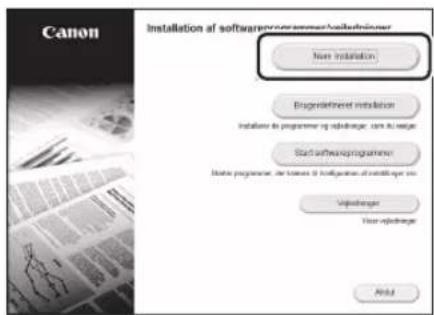
Illustration of a printer, network device, and computer with signal waves (no text or symbols)S.48 "Installation af softwaren"
natural_image
Illustration of a desktop computer connected to a printer via serial links (no text or symbols)natural_image
Line drawing of a printer with an attached cable and connector, showing no text or symbolsS.48 "Installation af softwaren"
natural_image
Illustration of a desktop computer connected to a printer (no text or symbols present)S.48 "Installation af softwaren"
natural_image
Technical line drawing of a mechanical assembly with an inset showing a curved component (no text or symbols)natural_image
Diagram showing a CD or DVD disc being inserted into a computer tower (no text or symbols present)2.
natural_image
Illustration of three electronic devices: a monitor, a printer, and a wireless router with signal waves (no text or symbols)natural_image
Illustration of a desktop computer connected to a printer via a serial line (no text or symbols)natural_image
Line drawing of a printer with a cable and connector, showing no text or symbolsnatural_image
Illustration of a desktop computer connected to a printer (no text or symbols present)natural_image
Technical line drawing of a mechanical assembly with an inset showing a curved component (no text or symbols)natural_image
Illustration of a CD or DVD drive system with an open disk and a server unit (no text or symbols)2.
-
Selecteer
. -
Selecteer
.
natural_image
Line drawing of a printer with a magnified inset showing a button labeled 'O' (no text or symbols on the device itself)natural_image
Illustration of three electronic devices: a monitor, a printer with wireless signal lines, and a router (no text or symbols present)natural_image
Illustration of a desktop computer connected to a printer via serial and link (no text or symbols)natural_image
Line drawing of a printer with an attached cable and connector, showing no text or symbols- Vent i et par minutter etter at kabelen er koblet til (til IP-adressen er automatisk innstilt).
-
Hvis det er angitt en statisk IP-adresse for datamaskinen, må maskinens IP-adresse stilles inn manuelt.
-
Installer driver og programvare.
→ side 56 "Installere programvaren"
natural_image
Illustration of a desktop computer connected to a printer (no text or symbols present)natural_image
Technical line drawing of a mechanical assembly with an inset showing a curved component (no text or symbols)natural_image
Diagram showing a CD or DVD disc being inserted into a computer tower (no text or symbols present)2.
natural_image
Line drawing of a printer with a magnified inset showing a power button (no text or symbols present)natural_image
Illustration of three electronic devices: a monitor, a printer with wireless signal lines, and a server with antenna (no text or symbols)natural_image
Illustration of a desktop computer connected to a printer via a serial line (no text or symbols)natural_image
Line drawing of a printer with a close-up of its cable and connector, no text or symbols presentnatural_image
Illustration of a desktop computer connected to a printer (no text or symbols present)natural_image
Technical line drawing of a mechanical assembly with an inset showing a curved component (no text or symbols)natural_image
Diagram showing a CD or DVD disc being inserted into a computer tower (no text or symbols present)2.
natural_image
Line drawing of a printer with a power button icon and magnified view of the next paper corner (no text or symbols)natural_image
Illustration of a printer, tower, and monitor with wireless signal waves (no text or symbols)natural_image
Illustration of a desktop computer connected to a printer via serial communication (no text or symbols)natural_image
Line drawing of a printer with a magnified cable and connector, no text or symbols presentnatural_image
Illustration of a desktop computer connected to a printer (no text or symbols present)natural_image
Technical line drawing of a mechanical assembly with an inset showing a curved component (no text or symbols)natural_image
Illustration of a CD or DVD drive system with an open disk and a computer tower (no text or symbols)2.

natural_image
Line drawing of a printer with a power button icon and magnified view of the printer's button (no text or symbols present)natural_image
Illustration of a desktop computer, printer, and wireless router with signal waves (no text or symbols)natural_image
Illustration of a desktop computer connected to a printer via a serial line (no text or symbols)natural_image
Line drawing of a printer with an attached cable and connector, showing no text or symbolsnatural_image
Illustration of a desktop computer connected to a printer (no text or symbols present)natural_image
Technical line drawing of a mechanical assembly with an inset showing a curved component (no text or symbols)natural_image
Illustration of a CD or DVD drive with an open disk and a circular disc, no text or symbols present.2.
natural_image
Line drawing of a printer with a power button icon and control panel, no text or symbols presentnatural_image
Illustration of three wireless devices: a monitor, a printer, and a router with signal waves (no text or symbols)natural_image
Illustration of a desktop computer connected to a printer via serial communication (no text or symbols)natural_image
Line drawing of a printer with cable and connector, showing internal components and connection point (no text or symbols)natural_image
Illustration of a computer monitor connected to a printer via a cable (no text or symbols)natural_image
Technical line drawing of a mechanical assembly with an inset showing a curved component (no text or symbols)natural_image
Diagram showing a CD or DVD disc being inserted into a computer tower (no text or symbols present)2.
natural_image
Line drawing of a printer with a magnified inset showing a button labeled 'O' (no text or symbols on the device itself)natural_image
Illustration of three electronic devices: a monitor, a printer, and a wireless router with signal waves (no text or symbols)natural_image
Illustration of a desktop computer connected to a printer via a serial line (no text or symbols)natural_image
Line drawing of a printer with a cable and connector, showing no text or symbolsnatural_image
Illustration of a computer monitor connected to a printer via a cable (no text or symbols)natural_image
Technical line drawing of a mechanical assembly with an inset showing a component being folded (no text or symbols present)natural_image
Diagram showing a CD or DVD disc being inserted into a computer tower (no text or symbols present)2.
natural_image
Line drawing of a printer with a magnified inset showing a button labeled 'O' (no text or symbols on the device itself)natural_image
Illustration of three electronic devices: a monitor, a printer, and a wireless router with signal waves (no text or symbols)natural_image
Illustration of a desktop computer connected to a printer via a serial line (no text or symbols)natural_image
Line drawing of a printer with a cable and connector, showing no text or symbolsnatural_image
Illustration of a desktop computer connected to a printer (no text or symbols present)natural_image
Technical line drawing of a mechanical assembly with an inset showing a curved component (no text or symbols)natural_image
Diagram showing a CD or DVD disc being inserted into a server unit (no text or symbols present)2.
natural_image
Line drawing of a printer with a power button icon pointing to it (no text or symbols present)natural_image
Illustration of three electronic devices: a monitor, a printer, and a wireless router with signal waves (no text or symbols)natural_image
Illustration of a desktop computer connected to a printer via a serial line (no text or symbols)natural_image
Line drawing of a printer with a cable and connector, showing no text or symbolsnatural_image
Illustration of a desktop computer connected to a printer (no text or symbols present)natural_image
Technical line drawing of a mechanical assembly with an inset showing a curved component (no text or symbols)natural_image
Diagram showing a CD or DVD disc being inserted into a server unit (no text or symbols present)2.
natural_image
Line drawing of a printer with a magnified inset showing a button labeled 'O' (no text or symbols on the device itself)natural_image
Illustration of three electronic devices: a monitor, a printer, and a wireless router with signal waves (no text or symbols)natural_image
Illustration of a desktop computer connected to a printer via serial links (no text or symbols)natural_image
Line drawing of a printer with a cable and connector, showing no text or symbolsnatural_image
Illustration of a desktop computer connected to a printer (no text or symbols present)natural_image
Technical line drawing of a mechanical assembly with an inset showing a curved component (no text or symbols)natural_image
Diagram showing a CD or DVD disc being inserted into a server unit (no text or symbols present)2.
natural_image
Line drawing of a printer with a magnified inset showing a button labeled 'O' (no text or symbols on the device itself)natural_image
Illustration of a wireless network device with monitor, printer, and tower (no text or symbols)natural_image
Illustration of a desktop computer connected to a printer via a serial line (no text or symbols)natural_image
Line drawing of a printer with an attached cable and connector, showing no text or symbolsnatural_image
Illustration of a desktop computer connected to a printer (no text or symbols present)natural_image
Technical line drawing of a mechanical assembly with an inset showing a curved component (no text or symbols)natural_image
Illustration of a computer monitor and CD tower with an arrow indicating disc transfer (no text or symbols)2.
natural_image
Line drawing of a printer with a magnified inset showing a button labeled 'O' (no text or symbols on the device itself)natural_image
Illustration of a printer, network device, and computer monitor with signal waves (no text or symbols)natural_image
Illustration of a desktop computer connected to a printer via serial and link (no text or symbols)natural_image
Line drawing of a printer with an attached cable and connector, showing no text or symbolsnatural_image
Illustration of a desktop computer connected to a printer (no text or symbols present)natural_image
Technical line drawing of a mechanical assembly with an inset showing a curved component (no text or symbols)natural_image
Diagram showing a CD or DVD disc being inserted into a computer tower (no text or symbols present)2.
natural_image
Line drawing of a printer with a power button icon pointing to it (no text or symbols present)natural_image
Illustration of three electronic devices: a monitor, a printer, and a wireless router with signal waves (no text or symbols)natural_image
Illustration of a desktop computer connected to a printer via serial links (no text or symbols)Naprava ni opremljena s kablom LAN, zato ga po potrebi zagotovite.
natural_image
Line drawing of a printer with a cable and connector, no text or symbols presentnatural_image
Illustration of a desktop computer connected to a printer (no text or symbols present)- Naprava ni opremljena s kablom USB, zato ga po potrebi zagotovite.
natural_image
Technical line drawing of a mechanical assembly with an inset showing a curved component (no text or symbols)natural_image
Diagram showing a CD or DVD disc being inserted into a computer tower (no text or symbols present)2.
natural_image
Line drawing of a printer with a power button icon and magnified view of the next paper corner (no text or symbols)- Konfigurirajte početne postavke u skladu sa zaslonom.
natural_image
Illustration of a printer, network device, and computer monitor with signal waves (no text or symbols)natural_image
Illustration of a desktop computer connected to a printer via a serial line (no text or symbols)natural_image
Line drawing of a printer with cable and connector, showing no text or symbols- Nakon što ste spojili kabel pričekajte par minuta (dok se adresa IP automatski postavi).
-
Ako je na računalu postavljena statička IP adresa, ručno postavite IP adresu uređaja.
-
Instalirajte upravljački program i softver.

Str.104 „Instaliranje softvera“
natural_image
Illustration of a desktop computer connected to a printer (no text or symbols present)natural_image
Technical line drawing of a mechanical assembly with an inset showing a curved component (no text or symbols)natural_image
Diagram showing a CD or DVD disc being inserted into a server unit (no text or symbols present)2.
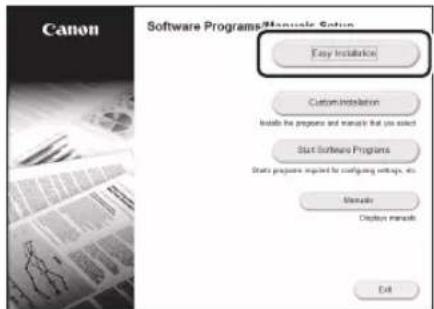
Ako se zaslon ne prikazuje ispravno, ponovno umetnite CD-ROM/DVD-ROMili potražite „D:\MInst.exe“ na sustavu Windows (U ovom se opisu „D:“ odnosi na pogon CD-ROM/DVD-ROM).
Jednostavno korištenje skenera
Konfiguriranje mrežnih postavki pomoću „Send Function Setting Tool“ (Alat za postavljanje funkcija slanja) omogućava vam izravno slanje skeniranih originala putem e-pošte ili I-faksa ili pohranjivanje u dijeljenu mapu na poslužitelju FTP.
Na zaslonu prikazanom u Koraku 2 odaberite [Start Software Programs] (Pokreni softverske programe)
[Send Function Setting Tool] (Alat za postavljanje funkcija slanja) kako biste pokrenuli Send Function Setting Tool (Alat za postavljanje funkcija slanja).
Za detalje

„Konfiguriranje početnih postavki funkcija faksa“ u Korisničkom vodiču
Konfiguriranje postavki faksa
- Odaberite
. - Odaberite
.
natural_image
Line drawing of a printer with a power button icon pointing to it (no text or symbols present)natural_image
Illustration of three electronic devices: a monitor, a printer, and a wireless router with signal waves (no text or symbols)natural_image
Illustration of a desktop computer connected to a printer via a serial line (no text or symbols)natural_image
Diagram of a printer with cable and connector, showing internal components and connection point (no text or symbols)natural_image
Illustration of a desktop computer connected to a printer (no text or symbols present)natural_image
Technical line drawing of a mechanical device with an inset showing a curved component (no text or symbols)natural_image
Diagram showing a CD or DVD disc being inserted into a computer tower (no text or symbols present)2.
natural_image
Line drawing of a printer with a power button icon and magnified view of the button (no text or symbols)natural_image
Illustration of three wireless devices: a monitor, a printer, and a router with signal waves (no text or labels)natural_image
Illustration of a desktop computer connected to a printer via a serial line (no text or symbols)natural_image
Line drawing of a printer with an attached cable and connector, showing no text or symbolsnatural_image
Illustration of a desktop computer connected to a printer (no text or symbols present)natural_image
Technical line drawing of a mechanical assembly with an inset showing a curved component (no text or symbols)natural_image
Diagram showing a CD or DVD disc being inserted into a computer tower (no text or symbols present)2.
natural_image
Line drawing of a printer with a magnified inset showing a power button (no text or symbols present)natural_image
Illustration of three electronic devices: a monitor, a printer with wireless signal lines, and a router (no text or symbols)natural_image
Illustration of a desktop computer connected to a printer via serial links (no text or symbols)natural_image
Line drawing of a printer with a cable and connector, showing no text or symbolsnatural_image
Illustration of a desktop computer connected to a printer (no text or symbols present)natural_image
Technical line drawing of a mechanical assembly with an inset showing a curved component (no text or symbols)natural_image
Illustration of a CD or DVD drive system with an arrow pointing to a CD (no text or symbols present)2.
natural_image
Line drawing of a printer with a power button icon pointing to it (no text or symbols present)natural_image
Illustration of three electronic devices: a monitor, a printer with wireless signal lines, and a router (no text or symbols)natural_image
Illustration of a desktop computer connected to a printer via a serial line (no text or symbols)natural_image
Line drawing of a printer with an attached cable and connector, showing no text or symbolsnatural_image
Illustration of a desktop computer connected to a printer (no text or symbols present)natural_image
Technical line drawing of a mechanical assembly with an inset showing a curved component (no text or symbols)natural_image
Diagram showing a CD or DVD disc being inserted into a computer tower (no text or symbols present)2.
natural_image
Illustration of three electronic devices: a monitor, a printer, and a wireless router with signal waves (no text or symbols)natural_image
Line drawing of a printer with a magnified inset showing a power button (no text or symbols present)natural_image
Illustration of a desktop computer connected to a printer via serial communication (no text or symbols)natural_image
Line drawing of a printer with a cable and connector, showing no text or symbolsnatural_image
Diagram showing a CD or DVD drive interacting with a computer tower (no text or symbols present)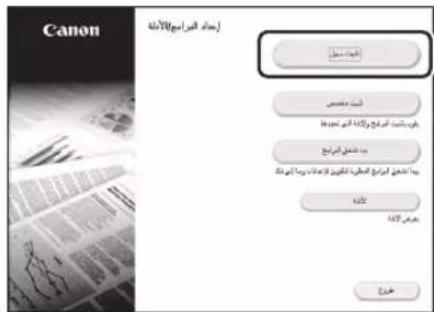
natural_image
Illustration of a desktop computer connected to a printer (no text or symbols present)natural_image
Technical line drawing of a mechanical assembly with an inset showing a curved component (no text or symbols)natural_image
Illustration of a printer, network device, and computer with signal waves (no text or symbols)natural_image
Line drawing of a printer with a magnified inset showing a button labeled 'Power' (no text or symbols on the device itself)natural_image
Illustration of a desktop computer connected to a printer via a serial line (no text or symbols)natural_image
Line drawing of a printer with a cable and connector, showing no text or symbolsnatural_image
Diagram showing a computer monitor with an arrow pointing to a server unit (no text or symbols present)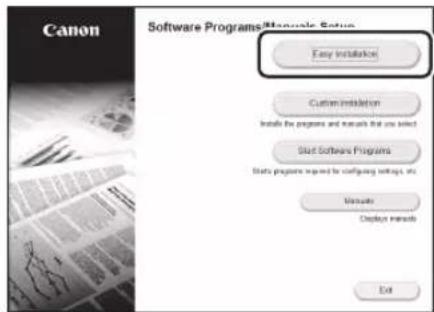
natural_image
Illustration of a desktop computer connected to a printer (no text or symbols present)natural_image
Technical line drawing of a mechanical assembly with an inset showing a component detail (no text or symbols)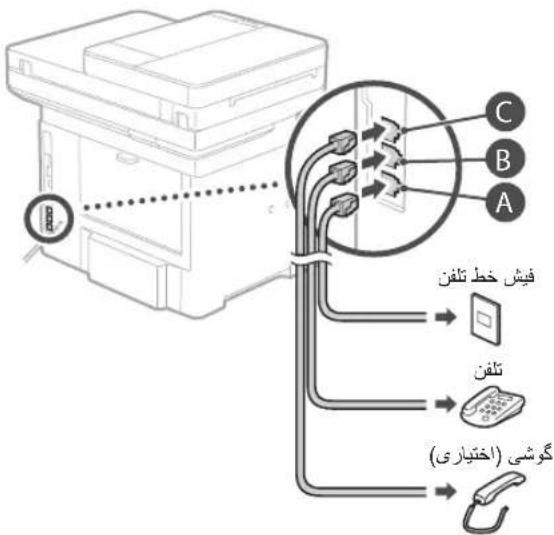
Place the Original Properly
Remember before You Start Operation
Place your original on the platen glass
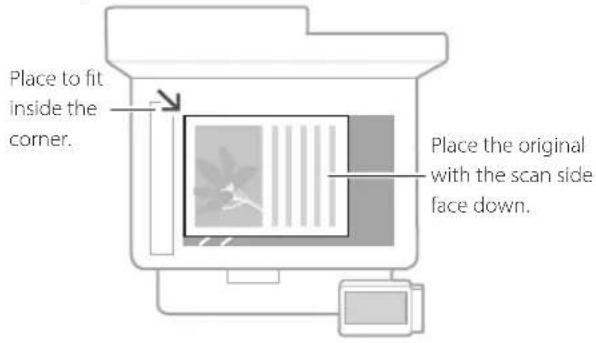


Suitable for scanning book pages, magazine pages and newspaper clips.
Place your originals into the feeder
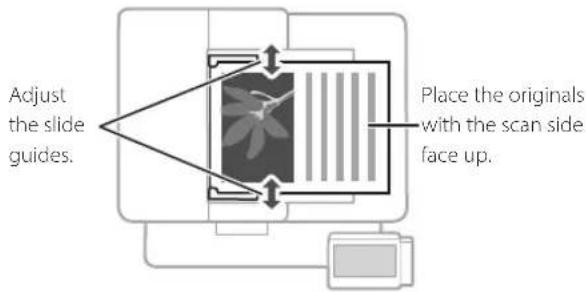
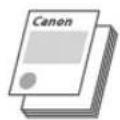
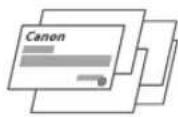
Suitable for continuously scanning many pages of literature, quotation, etc.
Start the Operation from the Operation Panel
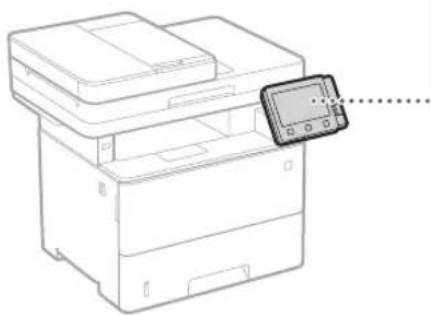
Machine
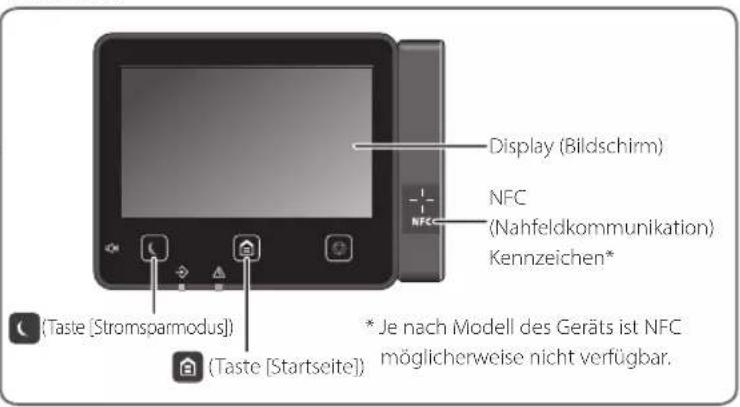
natural_image
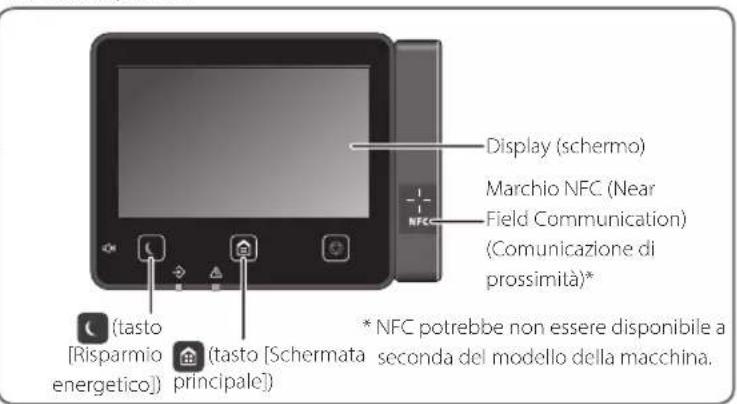
Line drawing of a printer with a close-up of its screen (no text or symbols)Operation Panel
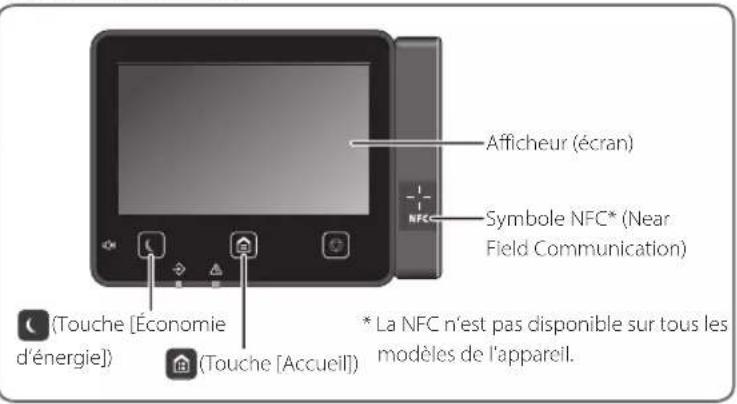
![Display (screen) NFC (Near Field Communication) mark* ([Energy Saver] key) ([Home] key) * NFC may not be available, depending on the model of the machine.](/content/2026/04/666791/images/53ff795dedc54d6b9f2cf9e5a778a86e4c086d46847f681b391baf4faf2e924a.jpg)

Scanning
- Place the original.
- Press 📋, and select
. - Select the type of scan, and enter the necessary information.
- Select
, .
Types of scan
■ Store in computer
■ Store in USB memory device
■ Send e-mail/I-Fax
■ Send to file server
To scan from a computer
■ MF Scan Utility
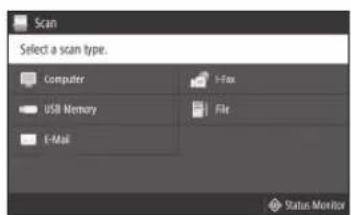
For details
"Scanning" in the User's Guide

Copying
- Place the original.
- Press 🔒, and then select
. - Specify the copy settings, as necessary.
- Enter the desired number of copies.
- Select
.
Useful copy functions
■ Non 1
■ 2-Sided or 1-Sided
■ Enlarging or reducing
■ Copying ID cards
■ Passport Copy

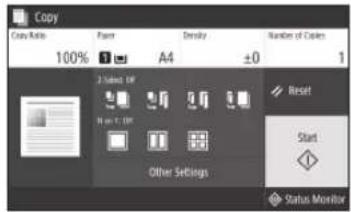
For details
→"Copying" in the User's Guide

Faxing\*
- Place the original.
- Press 📋, and select
. - Enter the destination information.
- Specify the fax settings, as necessary.
- Select
.
Useful fax functions
■ Sequential Broadcast
■ Memory Reception
PC Fax

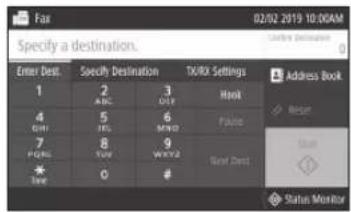
For details
→ "Faxing" in the User's Guide

Printing
- Open the document to print, and select the print function of the application.
- Select the printer driver for the machine, and select [Preferences] or [Properties].
- Specify the paper size.
- Specify the paper source and paper type.
- Specify the print settings, as necessary.
- Select [OK].
- Select [Print] or [OK].
Useful print settings
2-sided
■ Non 1
■ Booklet Printing
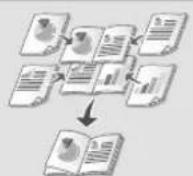
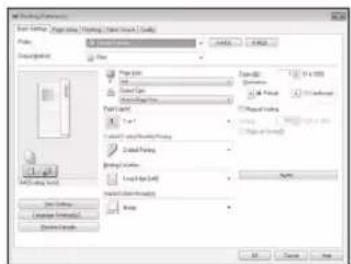
For details
→ "Help" on the printer driver
Loading in the Paper Drawer
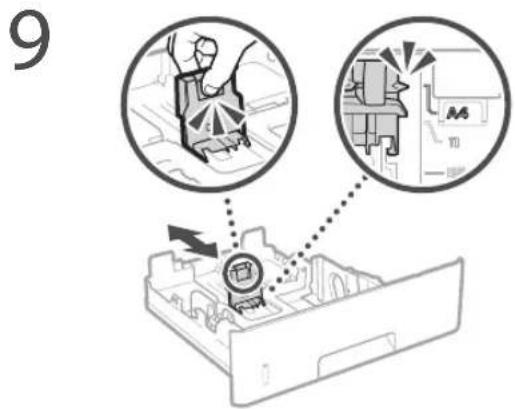
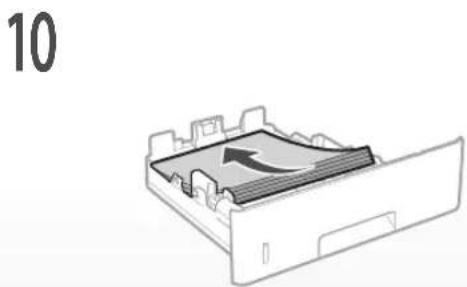
1 Pull out the paper drawer.
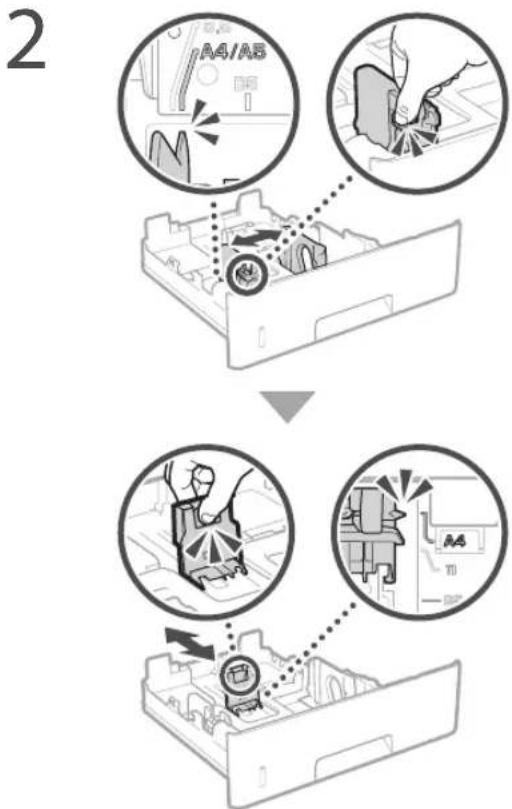
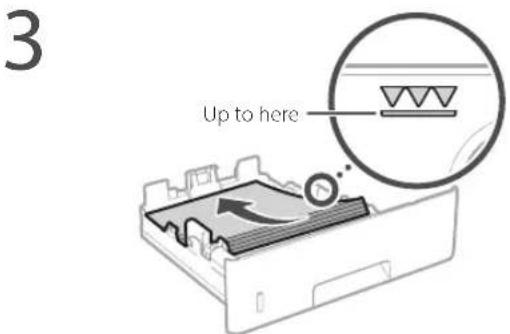
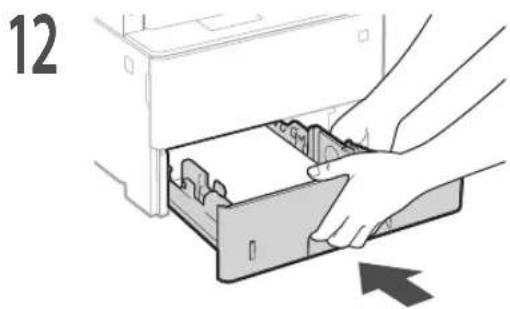
4 Insert the paper drawer into the machine.
If you load a different size or type of paper from the one before, make sure to change the settings.
5 Press and select
6 Specify the size and type of paper, according to the screen.
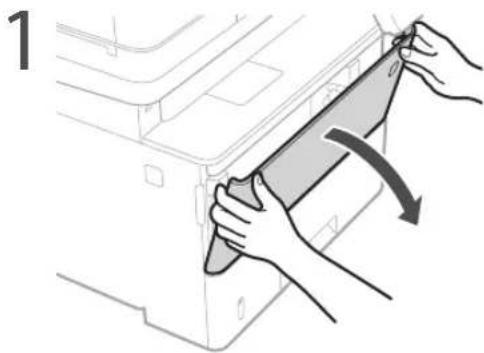
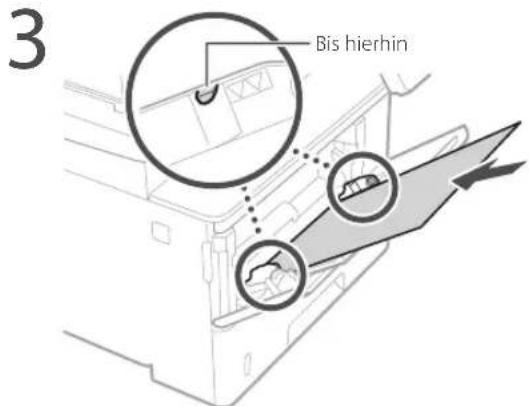
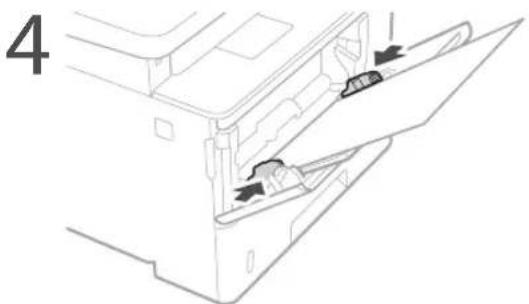
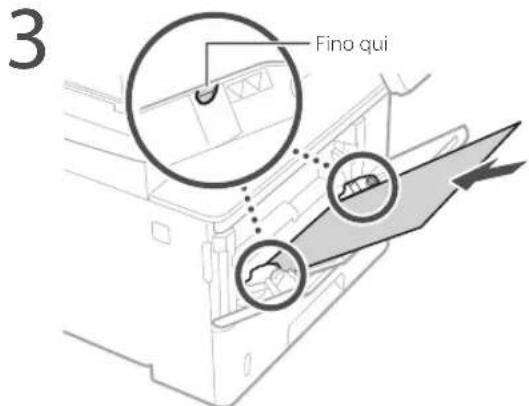
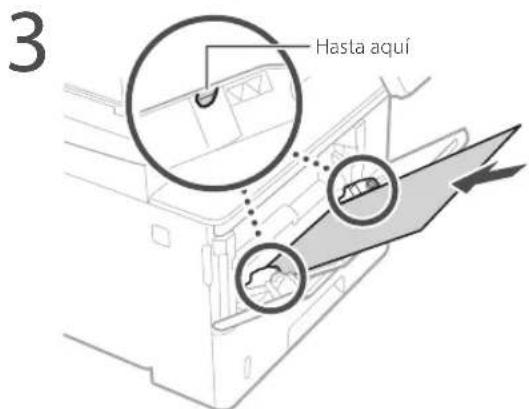
Loading in the Multi-Purpose Tray
natural_image
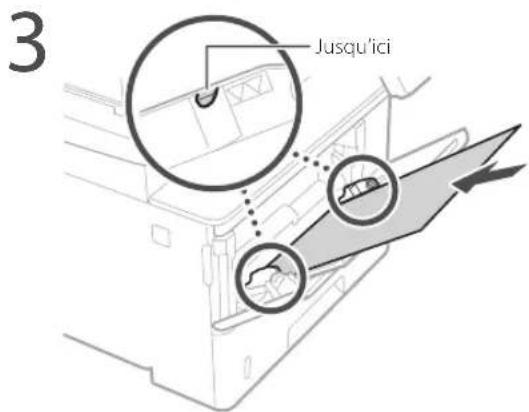
Illustration of hands installing or adjusting a component on a machine (no text or symbols visible)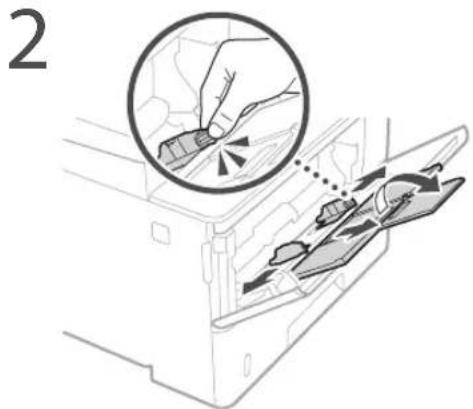

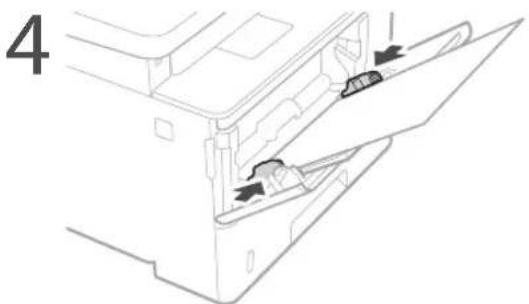
5 Specify the size and type of paper, according to the screen.
The Machine Does Not Seem to Work
Check the following.
• Is the power turned ON?
• Is the machine out of sleep mode?
If both the display and 📁 are not lit, press the power switch.
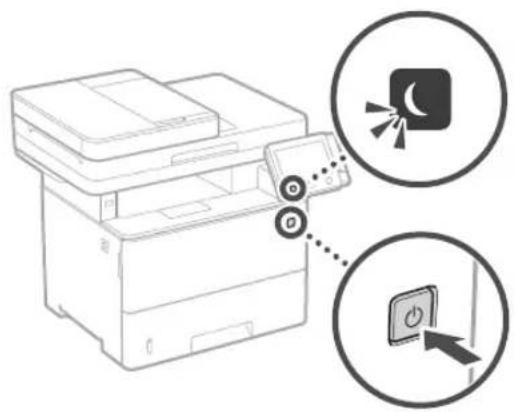
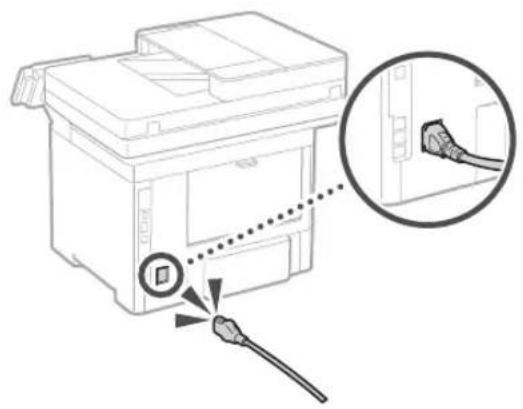
• Is the power cord connected correctly?
natural_image
Diagram of a printer with a cable inserted, showing a close-up of the cable being inserted (no text or symbols present)If the problem persists, see the User's Guide.
Paper Jams Have Occurred
Clear the paper jams, according to the on-screen instructions.
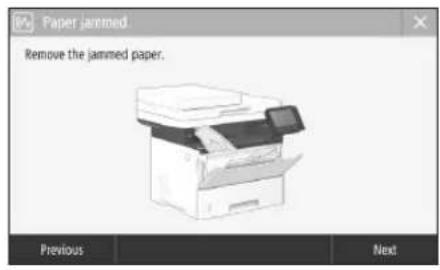
Replacing the Toner Cartridge
Replace the toner cartridge, according to the on-screen instructions.
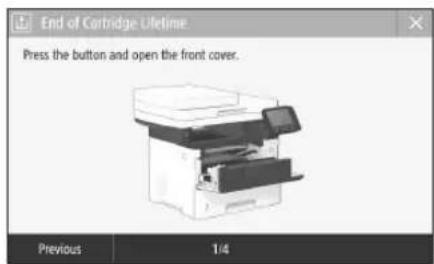
Model number of replacement toner cartridge
- Canon Cartridge 056 L
- Canon Cartridge 056
- Canon Cartridge 056 H
Appendix
Important Safety Instructions
This chapter describes important safety instructions for the prevention of injury to users of this machine and others, and damage to property. Read this chapter before using the machine, and follow the instructions to use the machine properly. Do not perform any operations not described in this manual. Canon will not be responsible for any damages resulting from operations not described in this manual, improper use, or repair or changes not performed by Canon or a third party authorized by Canon. Improper operation or use of this machine could result in personal injury and/or damage requiring extensive repair that may not be covered under your Limited Warranty.
WARNING
Indicates a warning concerning operations that may lead to death or injury to persons if not performed correctly. To use the machine safely, always pay attention to these warnings.
CAUTION
Indicates a caution concerning operations that may lead to injury to persons if not performed correctly. To use the machine safely, always pay attention to these cautions.
IMPORTANT
Indicates operational requirements and restrictions. Be sure to read these items carefully to operate the machine correctly and avoid damage to the machine or property.
Installation
To use this machine safely and comfortably, carefully read the following precautions and install the machine in an appropriate location.
A WARNING
Do not install in a location that may result in a fire or electrical shock
- A location where the ventilation slots are blocked (too close to walls, beds, sofas, rugs, or similar objects)
• A damp or dusty location - A location exposed to direct sunlight or outdoors
• A location subject to high temperatures
• A location exposed to open flames - Near alcohol, paint thinners or other flammable substances
Other warnings
- Do not connect unapproved cables to this machine. Doing so may result in a fire or electrical shock.
- Do not place necklaces and other metal objects or containers filled with liquid on the machine. If foreign substances come in contact with electrical parts inside the machine, it may result in a fire or electrical shock.
- When installing and removing the optional accessories, be sure to turn OFF the power, unplug the power plug, and then disconnect all the interface cables and power cord from the machine. Otherwise, the power cord or interface cables may be damaged, resulting in a fire or electrical shock.
- If any foreign substance falls into this machine, unplug the power plug from the AC power outlet and contact your local authorized Canon dealer.
CAUTION
Do not install in the following locations
The machine may drop or fall, resulting in injury.
• An unstable location
• A location exposed to vibrations
Other cautions
- When carrying this machine, follow the instructions in this manual. If carried improperly, it may fall, resulting in injury
- When installing this machine, be careful not to get your hands caught between the machine and the floor or walls. Doing so may result in injury.
IMPORTANT
Do not install in the following locations
Doing so may result in damage to the machine.
• A location subject to temperature and humidity extremes, whether low or high
• A location subject to dramatic changes in temperature or humidity
• A location near equipment that generates magnetic or electromagnetic waves
• A laboratory or location where chemical reactions occur
• A location exposed to corrosive or toxic gases
- A location that may warp from the weight of the machine or where the machine is liable to sink (a carpet, etc.)
Avoid poorly ventilated locations
This machine generates a slight amount of ozone and other emissions during normal use. These emissions are not harmful to health. However, they may be noticeable during extended use or long production runs in poorly ventilated rooms. To maintain a comfortable working environment, it is recommended that the room where the machine operates be appropriately ventilated. Also avoid locations where people would be exposed to emissions from the machine.
Do not install in a location where
condensation occurs
Water droplets (condensation) may form inside the machine when the room where the machine is installed is heated rapidly, and when the machine is moved from a cool or dry location to a hot or humid location. Using the machine under these conditions may result in paper jams, poor print quality, or damage to the machine. Let the machine adjust to the ambient temperature and humidity for at least 2 hours before use.
In altitudes of above sea level 3,000 m or higher
Machines with a hard disk may not operate properly when used at high altitudes of about 3,000 meters above sea level, or higher.
Connecting the Telephone Line
This machine conforms to a analog telephone line standard. The machine can be connected to the public switched telephone network (PSTN) only. If you connect the machine to a digital telephone line or a dedicated telephone line, it might impede proper operation of the machine and could be the cause of damage. Make sure to confirm a type of telephone line before connecting the machine. Contact your optical fiber line or IP telephone line service providers if you want to connect the machine to those telephone lines.
When using wireless LAN
• Install the machine at a distance of 50 meters or less from the wireless LAN router.
- As far as possible, install in a location where communication is not blocked by intervening objects. The signal may be degraded when passing through walls or floors.
- Keep the machine as far as possible from digital cordless phones, microwave ovens, or other equipment that emits radio waves.
- Do not use near medical equipment. Radio waves emitted from this machine may interfere with medical equipment, which may result in malfunctions and accidents.
If the operating noise concerns you
Depending on the use environment and operating mode, if the operating noise is of concern, it is recommended that the machine be installed in a place other than the office.
Power Supply
WARNING
- Use only a power supply that meets the specified voltage requirements. Failure to do so may result in a fire or electrical shock.
- The machine must be connected to a socket-outlet with grounding connection by the provided power cord.
- Do not use power cords other than the one provided, as this may result in a fire or electrical shock.
- The provided power cord is intended for use with this machine. Do not connect the power cord to other devices.
- Do not modify, pull, forcibly bend, or perform any other act that may damage the power cord. Do not place heavy objects on the power cord. Damaging the power cord may result in a fire or electrical shock.
- Do not plug in or unplug the power plug with wet hands, as this may result in an electrical shock.
- Do not use extension cords or multi-plug power strips with the machine. Doing so may result in a fire or electrical shock.
- Do not wrap the power cord or tie it in a knot, as this may result in a fire or electrical shock.
- Insert the power plug completely into the AC power outlet. Failure to do so may result in a fire or electrical shock.
- Remove the power plug completely from the AC power outlet during a thunder storm. Failure to do so may result in a fire, electrical shock, or damage to the machine.
• Make sure that the power supply for the machine is safe, and has a steady voltage. - Keep the power cord away from a heat source; failure to do this may cause the power cord coating to melt, resulting in a fire or electrical shock.
Avoid the following situations:
If excessive stress is applied to the connection part of the power cord, it may damage the power cord or the wires inside the machine may disconnect. This could result in a fire.
- Connecting and disconnecting the power cord frequently.
-Tripping over the power cord.
- The power cord is bent near the connection part, and continuous stress is being applied to the power outlet or the connection part.
- Applying excessive force on the power plug.
ACAUTION
• Install this machine near the power outlet and leave sufficient space around the power plug so that it can be unplugged easily in an emergency.
IMPORTANT
When connecting power
- Do not connect the power cord to an uninterruptible power source. Doing so may result in malfunction of or damage to the machine at power failure.
- If you plug this machine into an AC power outlet with multiple sockets, do not use the remaining sockets to connect other devices.
- Do not connect the power cord to the auxiliary AC power outlet on a computer.
Other precautions
Electrical noise may cause this machine to malfunction or lose data.
Handling
WARNING
- Immediately unplug the power plug from the AC power outlet and contact an authorized Canon dealer if the machine makes an unusual noise, emits an unusual smell, or emits smoke or excessive heat. Continued use may result in a fire or electrical shock.
- Do not disassemble or modify this machine. There are high-voltage and high-temperature components inside the machine. Disassembly or modification may result in a fire or electrical shock.
- Place the machine where children will not come in contact with the power cord and other cables or gears and electrical parts inside the machine. Failure to do so may result in unexpected accidents.
- Do not use flammable sprays near this machine. If flammable substances come into contact with electrical parts inside this machine, it may result in a fire or electrical shock.
- When moving this machine, be sure to turn OFF the power of this machine, and then unplug the power plug and interface cables. Failure to do so may damage the power cord or interface cables, resulting in a fire or electrical shock.
- When plugging or unplugging a USB cable when the power plug is plugged into an AC power outlet, do not touch the metal part of the connector, as this may result in an electrical shock.
If you are using a cardiac pacemaker
This machine generates a low level magnetic flux and ultrasonic waves. If you use a cardiac pacemaker and feel abnormalities, please move away from this machine and consult your physician immediately.
CAUTION
- Do not place heavy objects on this machine as they may fall, resulting in injury.
- For your safety, please unplug the power cord if the machine will not be used for a long period of time.
- Use caution when opening and closing covers to avoid injury to your hands.
- Keep hands and clothing away from the rollers in the output area. If the rollers catch your hands or clothing, this may result in personal injury.
• The inside of the machine and the output slot are very hot during and immediately after use. Avoid contact with these areas to prevent burns. Also, printed paper may be hot immediately after being output, so use caution when handling it. Failure to do so may result in burns.
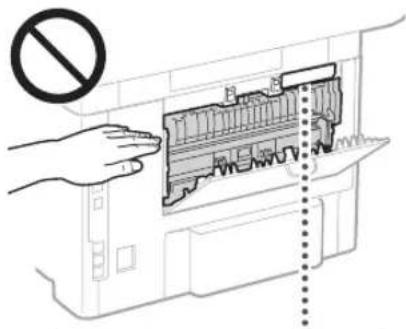
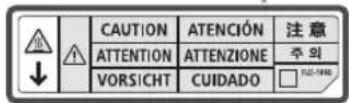
- Be careful not to drop a heavy object, such as a dictionary, on the platen glass. Doing so may damage the platen glass and result in injury.
- Do not carry the machine with any of the paper drawer or optional paper feeder installed. Otherwise, they may fall, resulting in injury.

Feeder
- Do not press down hard on the feeder when using the platen glass to make copies of thick books. Doing so may damage the platen glass and result in personal injury.
- Close the feeder gently to avoid catching your hands, as this may result in personal injury.
- Be careful not to put your hands or fingers into the feeder. Otherwise, you may be injured.
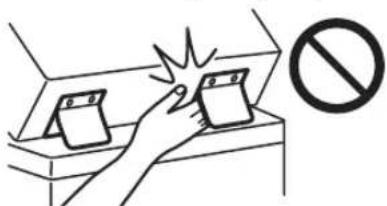
Paper drawer
- Do not insert your hand into the machine while the paper drawer is removed, as this may result in personal injury.
Energy Saver key
- Press (Energy Saver) for safety when the machine will not be used for a long period of time, such as overnight. Also, turn OFF the main power switch, and disconnect the power cord for safety when the machine will not be used for an extended period of time, such as during consecutive holidays.
Laser Safety
This product is confirmed as a Class 1 laser product in IEC60825-1:2014 and EN60825-1:2014.
CLASS 1 LASER PRODUCT
LASER KLASSE 1
APPAREIL À LASER DE CLASSE 1
APPARECCHIO LASER DI CLASSE 1
PRODUCTO LÁSER DE CLASE 1
APARELHO A LASER DE CLASSE 1
LUOKAN 1 LASER-TUOTE
LASERPRODUKT KLASS 1
The laser beam can be harmful to human bodies. Since radiation emitted inside the product is completely confined within protective housings and external covers, the laser beam cannot escape from the machine during any phase of user operation. Read the following remarks and instructions for safety.
- Never open covers other than those instructed in the manuals for this machine.
- If the laser beam should escape and enter your eyes, exposure may cause damage to your eyes.
- Use of controls, adjustments, or performance of procedures other than those specified in this manual may result in hazardous radiation exposure.
Laser Safety Caution
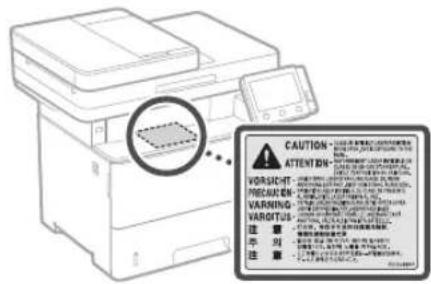
- Follow the caution instructions on labels and the like found on this machine.
- Do not subject the machine to strong shocks or vibration.
- Do not forcibly open and close doors, covers, and other parts. Doing so may result in damage to the machine.
- Do not turn the main power switch OFF or open the covers while the machine is in operation. This may result in paper jams.
- Use a modular cable that is shorter than 3 meters.
- Use a USB cable that is shorter than 3 meters.
Appendix
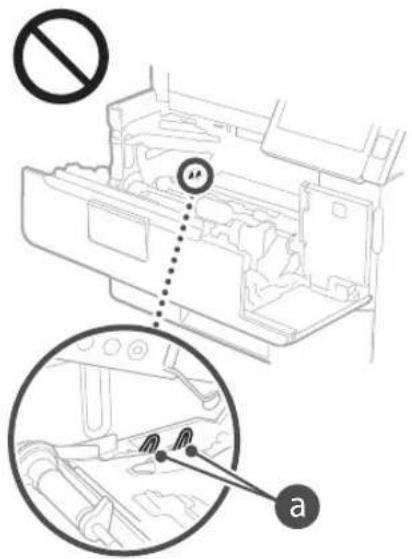
- Do not touch the contacts (a) inside the machine. Doing so may result in damage to the machine.
When transporting the machine
To prevent damage to the machine during transport, perform the following.
- Remove the toner cartridge.
- Securely pack the machine in the original box with packing materials.
Safety-Related Symbols
Power switch: "ON" position
Power switch: "OFF" position
Power switch: "STAND-BY" position
① Push-push switch "ON" "OFF"
Protective earthing terminal
Dangerous voltage inside. Do not open covers other than instructed.
CAUTION: Hot surface. Do not touch.
Class II equipment
Moving parts: Keep body parts away from moving parts
CAUTION: An electrical shock may occur. Remove all the power plugs from the power outlet.
There are sharp edges. Keep body parts away from sharp edges.
[NOTE]
Some of symbols shown above may not be affixed depending on the product.
Maintenance and Inspections
Clean this machine periodically. If dust accumulates, the machine may not operate properly. When cleaning, be sure to observe the following. If a problem occurs during operation, see the User's Guide. If the problem cannot be resolved or you feel the machine requires an inspection, see "When a Problem Cannot Be Solved" in the User's Guide.
WARNING
- Before cleaning, turn OFF the power and unplug the power plug from the AC power outlet. Failure to do so may result in a fire or electrical shock.
- Unplug the power plug periodically and clean with a dry cloth to remove dust and grime. Accumulated dust may absorb humidity in the air and may result in a fire if it comes into contact with electricity.
- Use a damp, well wrung-out cloth to clean the machine. Dampen cleaning cloths with water only. Do not use alcohol, benzine, paint thinner, or other flammable substances. Do not use tissue paper or paper towels. If these substances come into contact with electrical parts inside the machine, they may generate static electricity or result in a fire or electrical shock.
- Check the power cord and plug periodically for damage. Check the machine for rust, dents, scratches, cracks, or excessive heat generation. Use of poorly-maintained equipment may result in a fire or electrical shock.
CAUTION
• The inside of the machine has high-temperature and high-voltage components. Touching these components may result in burns. Do not touch any part of the machine that is not indicated in the manual.
- When loading paper or removing jammed paper, be careful not to cut your hands with the edges of the paper.
Consumables
WARNING
- Do not dispose of used toner cartridges or the like in open flames. Also, do not store toner cartridges or paper in a location exposed to open flames. This may cause the toner to ignite, and result in burns or fire.
- If you accidentally spill or scatter toner, carefully gather the toner particles together or wipe them up with a soft, damp cloth in a way that prevents inhalation. Never use a vacuum cleaner that does not have safeguards against dust explosions to clean up spilled toner. Doing so may cause a malfunction in the vacuum cleaner, or result in a dust explosion due to static discharge.
If you are using a cardiac pacemaker
- The toner cartridge generates a low level magnetic flux. If you are using a cardiac pacemaker and feel abnormalities, please move away from the toner cartridge and consult your physician immediately.
ACAUTION
- Use caution not to inhale any toner. If you should inhale toner, consult a physician immediately.
- Use caution so that toner does not get into your eyes or mouth. If toner should get into your eyes or mouth, immediately wash with cold water and consult a physician.
- Use caution so that toner does not come into contact with your skin. If it should, wash with soap and cold water. If there is any irritation on your skin, consult a physician immediately.
- Keep the toner cartridges and other consumables out of the reach of small children. If toner is ingested, consult a physician or poison control center immediately.
- Do not disassemble or modify the toner cartridge or the like. Doing so may cause the toner to scatter.
- When removing the sealing tape from the toner cartridge, pull it out completely but without using excessive force. Doing otherwise may cause the toner to scatter.
OIMPORTANT
Handling the toner cartridge
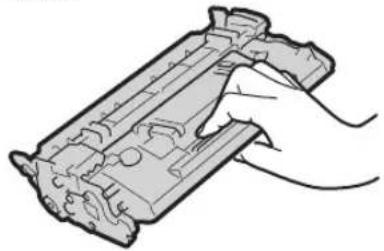
- Be sure to hold the toner cartridge using the handle.
natural_image
Illustration of a hand holding a mechanical component (no text or symbols visible)- Do not touch the toner cartridge memory (a) or the electrical contacts (b). To avoid scratching the surface of the drum inside the machine or exposing it to light, do not open the drum protective shutter (c).
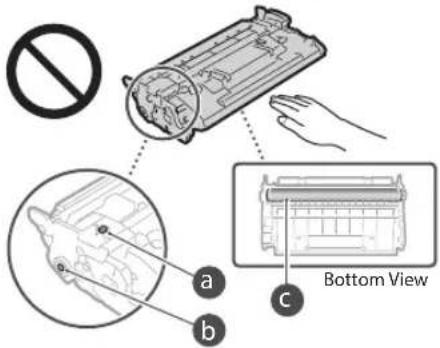
- Except when necessary, do not take out the toner cartridge from the packing material or from this machine.
- The toner cartridge is a magnetic product. Do not move it close to products susceptible to magnetism including floppy disks and disk drives. Doing so may result in data corruption.
Storing the toner cartridge
- Store in the following environment to ensure safe and satisfactory use. Storage temperature range: 0 to 35°C Storage humidity range: 35 to 85% RH (relative humidity/no condensation)*
- Store without opening until the toner cartridge is to be used.
- When removing the toner cartridge from this machine for storage, place the removed toner cartridge in the original packing material.
- When storing the toner cartridge, do not store it upright or upside down. The toner will solidify and may not return to its original condition even if it is shaken.
* Even within the storable humidity range, water droplets (condensation) may develop inside the toner cartridge if there is a difference of temperature inside and outside the toner cartridge. Condensation will adversely affect the print quality of toner cartridges.
Do not store the toner cartridge in the following locations
- Locations exposed to open flames
- Locations exposed to direct sunlight or bright light for five minutes or more
- Locations exposed to excessive salty air
- Locations where there are corrosive gases (i.e. aerosol sprays and ammonia)
- Locations subject to high temperature and high humidity
- Locations subject to dramatic changes in temperature and humidity where condensation may easily occur
• Locations with a large amount of dust
• Locations within the reach of children
Be careful of counterfeit toner cartridges
- Please be aware that there are counterfeit Canon toner cartridges in the marketplace. Use of counterfeit toner cartridge may result in poor print quality or machine performance. Canon is not responsible for any malfunction, accident or damage caused by the use of counterfeit toner cartridge. For more information, see global.canon/ctc.
Availability period of repairing parts and toner cartridges and the like
- The repairing parts and toner cartridges and the like for the machine will be available for at least seven (7) years after production of this machine model has been discontinued.
Toner cartridge packing materials
- Save the packing materials for the toner cartridge. They are required when transporting this machine.
- The packing materials may be changed in form or placement, or may be added or removed without notice.
• After you pull out the sealing tape from the toner cartridge, dispose of it in accordance with the applicable local regulations.
When disposing of a used toner cartridge or the like
- When discarding a toner cartridge or the like, place it in the original packing material to prevent toner from scattering from inside, and dispose of it in accordance with the applicable local regulations.
Notice
Product Name
Safety regulations require the product's name to be registered. In some regions where this product is sold, the following name(s) in parentheses () may be registered instead.
MF543x (F176402)
MF542x (F176400)
EMC requirements of EC Directive
This equipment conforms with the essential EMC requirements of EC Directive. We declare that this product conforms with the EMC requirements of EC Directive at nominal mains input 230 V, 50 Hz although the rated input of the product is 220 to 240 V, 50/60 Hz. Use of shielded cable is necessary to comply with the technical EMC requirements of EC Directive.
EU WEEE and Battery Directives
You can see the WEEE and Battery Directives information in the latest User's Guide (HTML manual) from the Canon website (https://oip.manual.canon).
Wireless LAN Regulatory Information
Regulatory information for users in Jordan MF543x / MF542x includes approved Wireless LAN Module (Model name: AW-NM333). Contains Wireless LAN Module approved by TRC/SS/2018/181
Regulatory information for users in Russia
Regulatory information for users in UAE
MF543x / MF542x includes approved Wireless LAN Module (Model name: AW-NM333).
TRA
REGISTERED No: ER63428/18
DEALER No: DA0060877/11
RE Directive
(Only for European radio equipment)
RE Declaration of Conformity
English (EN) Hereby, Canon Inc. declares that this equipment is in compliance with Directive 2014/53/EU.
The full text of the EU declaration of conformity is available at the following internet address: http://www.canon-europe.com/ce-documentation Wireless LAN Specifications Frequency band(s):2412-2472MHz Maximum radio-frequency power: 16.51 dBm
Legal Limitations on the Usage of Your Product and the Use of Images Using your product to scan, print or otherwise reproduce certain documents, and the use of such images as scanned, printed or otherwise reproduced by your product, may be prohibited by law and may result in criminal and/or civil liability. A non-exhaustive list of these documents is set forth below. This list is intended to be a guide only. If you are uncertain about the legality of using your product to scan, print or otherwise reproduce any particular document, and/or of the use of the images scanned, printed or otherwise reproduced, you should consult in advance with your legal advisor for guidance.
- Paper Money
- Travelers Checks
- Money Orders
- Food Stamps
• Certificates of Deposit - Passports
- Postage Stamps (canceled or uncanceled)
• Immigration Papers
• Identifying Badges or Insignias - Internal Revenue Stamps (canceled or uncanceled)
- Selective Service or Draft Papers
• Bonds or Other Certificates of Indebtedness - Checks or Drafts Issued by Governmental Agencies
• Stock Certificates
• Motor Vehicle Licenses and Certificates of Title
• Copyrighted Works/Works of Art without Permission of Copyright Owner
Disclaimers
• The information in this document is subject to change without notice.
• CANON INC. MAKES NO WARRANTY OF ANY KIND WITH REGARD TO THIS MATERIAL, EITHER EXPRESS OR IMPLIED, EXCEPT AS PROVIDED HEREIN, INCLUDING WITHOUT LIMITATION, THEREOF, WARRANTIES AS TO MARKETABILITY, MERCHANTABILITY, FITNESS FOR A PARTICULAR PURPOSE OF USE, OR NON-INFRINGEMENT. CANON INC. SHALL NOT BE LIABLE FOR ANY DIRECT, INCIDENTAL, OR CONSEQUENTIAL DAMAGES OF ANY NATURE, OR LOSSES OR EXPENSES RESULTING FROM THE USE OF THIS MATERIAL.
About This Manual
Keys and Buttons Used in This Manual
The following symbols and key names are a few examples of how keys to be pressed are expressed in this manual.
• Operation panel keys: [Key icon]
Example:
• Display:
- Buttons and items on the computer display: [Preferences]
Illustrations and Displays Used in This Manual Illustrations and displays used in this manual are which of MF543x unless specified.
Trademarks
Mac is a trademark of Apple Inc. Microsoft, Windows, Windows Vista, Windows Server, Internet Explorer, Excel, and PowerPoint are either registered trademarks or trademarks of Microsoft Corporation in the United States and/or other countries. Other product and company names herein may be the trademarks of their respective owners.
Third Party Software
This Canon product (the "PRODUCT") includes third-party software modules. Use and distribution of these software modules, including any updates of such software modules (collectively, the "SOFTWARE") are subject to license conditions (1) through (9) below.
(1) You agree that you will comply with any applicable export control laws, restrictions or regulations of the countries involved in the event that this PRODUCT including the SOFTWARE is shipped, transferred or exported into any country.
(2) Rights holders of the SOFTWARE retain in all respects the title, ownership and intellectual property rights in and to the SOFTWARE. Except as expressly provided herein, no license or right, expressed or implied, is hereby conveyed or granted by rights holders of the SOFTWARE to you for any intellectual property of rights holders of the SOFTWARE.
(3) You may use the SOFTWARE solely for use with the PRODUCT.
(4) You may not assign, sublicense, market, distribute, or transfer the SOFTWARE to any third party without prior written consent of rights holders of the SOFTWARE.
(5) Notwithstanding the foregoing, you may transfer the SOFTWARE only when (a) you assign all of your rights to the PRODUCT and all rights and obligations under the license conditions to transferee and (b) such transferee agrees to be bound by all these conditions.
(6) You may not decompile, reverse engineer, disassemble or otherwise reduce the code of the SOFTWARE to human readable form.
(7) You may not modify, adapt, translate, rent, lease or loan the SOFTWARE or create derivative works based on the SOFTWARE.
(8) You are not entitled to remove or make separate copies of the SOFTWARE from the PRODUCT.
(9) The human-readable portion (the source code) of the SOFTWARE is not licensed to you.
Notwithstanding (1) through (9) above, the PRODUCT includes third-party software modules accompanying the other license conditions, and these software modules are subject to the other license conditions. Please refer to the other license conditions of third-party software modules described in Appendix of Manual for the corresponding the PRODUCT. This Manual is available at https://oip.manual.canon/.
By using the PRODUCT, you shall be deemed to have agreed to all applicable license conditions. If you do not agree to these license conditions, please contact your service representative.
V_181009
natural_image
Line drawing of a printer with a close-up of its screen (no text or symbols)Panneau de commande
natural_image
Illustration of hands installing or adjusting a component on a machine (no text or symbols visible)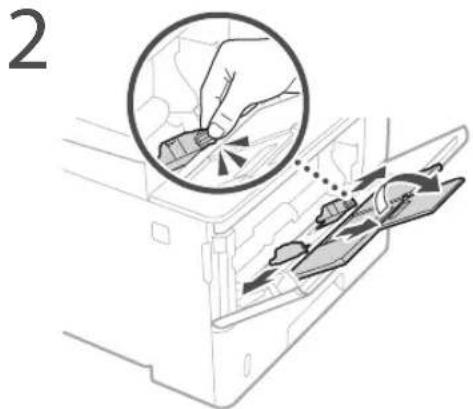
natural_image
Diagram of a printer with a close-up view showing the cable being inserted into a slot (no text or symbols present)Chargeur
Cassette à papier
CLASS 1 LASER PRODUCT
LASER KLASSE 1
APPAREIL À LASER DE CLASSE 1
APPARECCHIO LASER DI CLASSE 1
PRODUCTO LÁSER DE CLASE 1
APARELHO A LASER DE CLASSE 1
LUOKAN 1 LASER-TUOTE
LASERPRODUKT KLASS 1
natural_image
Illustration of a hand holding a mechanical component (no text or symbols visible)Regulatory information for users in Jordan
MF543x / MF542x includes approved Wireless LAN Module (Model name: AW-NM333). Contains Wireless LAN Module approved by TRC/SS/2018/181
Regulatory information for users in Russia
Regulatory information for users in UAE
MF543x / MF542x includes approved Wireless LAN Module (Model name: AW-NM333).
TRA
REGISTERED No: ER63428/18
DEALER No: DA0060877/11
RE Directive
(Only for European radio equipment)
RE Declaration of Conformity
English (EN) Hereby, Canon Inc. declares that this equipment is in compliance with Directive 2014/53/EU.
The full text of the EU declaration of conformity is available at the following internet address: http://www.canon-europe.com/ce-documentation Wireless LAN Specifications Frequency band(s):2412-2472MHz Maximum radio-frequency power: 16.51 dBm
natural_image
Line drawing of a printer with a digital display showing an icon (no text or symbols present)Bedienfeld
natural_image
Illustration of hands installing or adjusting a component inside a machine (no text or symbols visible)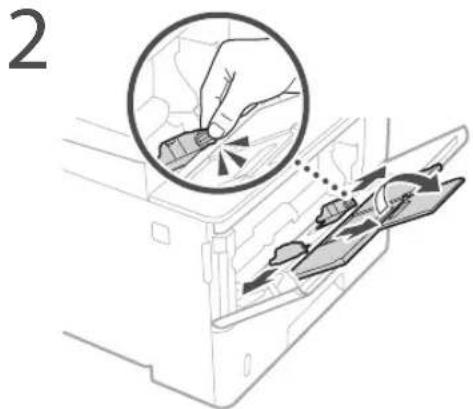
natural_image
Line drawing of a printer with a close-up inset showing cable attachment (no text or symbols)Zufuhr
Papierkassette
CLASS 1 LASER PRODUCT
LASER KLASSE 1
APPAREIL À LASER DE CLASSE 1
APPARECCHIO LASER DI CLASSE 1
PRODUCTO LÁSER DE CLASE 1
APARELHO A LASER DE CLASSE 1
LUOKAN 1 LASER-TUOTE
LASERPRODUKT KLASS 1
natural_image
Illustration of a hand holding a mechanical component (no text or symbols visible)Regulatory information for users in Jordan MF543x / MF542x includes approved Wireless LAN Module (Model name: AW-NM333). Contains Wireless LAN Module approved by TRC/ SS/2018/181
Regulatory information for users in Russia
Regulatory information for users in UAE
MF543x / MF542x includes approved Wireless LAN Module (Model name: AW-NM333).
TRA
REGISTERED No: ER63428/18
DEALER No: DA0060877/11
RE Directive
(Only for European radio equipment)
RE Declaration of Conformity
English (EN) Hereby, Canon Inc. declares that this equipment is in compliance with Directive 2014/53/EU. The full text of the EU declaration of conformity is available at the following internet address: http://www.canon-europe.com/ce-documentation Wireless LAN Specifications Frequency band(s):2412-2472MHz Maximum radio-frequency power: 16.51 dBm
natural_image
Line drawing of a printer with a digital display showing an icon (no text or symbols present)Pannello operativo
natural_image
Illustration of hands installing or adjusting a component on a machine (no text or symbols visible)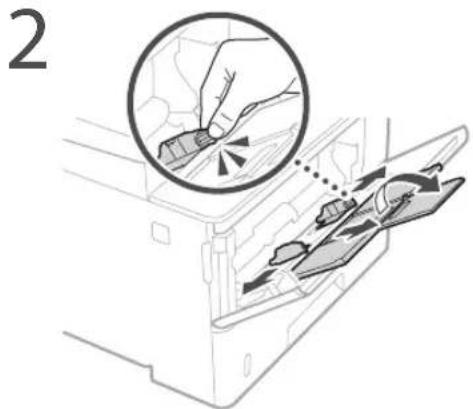

natural_image
Diagram of a printer with a cable inserted, showing a close-up of the cable being inserted (no text or symbols present)Alimentatore
Cassetto carta
CLASS 1 LASER PRODUCT
LASER KLASSE 1
APPAREIL À LASER DE CLASSE 1
APPARECCHIO LASER DI CLASSE 1
PRODUCTO LÁSER DE CLASE
APARELHO A LASER DE CLASSE 1
LUOKAN 1 LASER-TUOTE
LASERPRODUKT KLASS 1
natural_image
Illustration of a hand holding a mechanical component (no text or symbols visible)Regulatory information for users in Jordan MF543x / MF542x includes approved Wireless LAN Module (Model name: AW-NM333). Contains Wireless LAN Module approved by TRC/SS/2018/181
Regulatory information for users in Russia
Regulatory information for users in UAE
MF543x / MF542x includes approved Wireless LAN Module (Model name: AW-NM333).
TRA
REGISTERED No: ER63428/18
DEALER No: DA0060877/11
RE Directive
(Only for European radio equipment)
RE Declaration of Conformity
English (EN) Hereby, Canon Inc. declares that this equipment is in compliance with Directive 2014/53/EU.
The full text of the EU declaration of conformity is available at the following internet address: http://www.canon-europe.com/ce-documentation Wireless LAN Specifications Frequency band(s):2412-2472MHz Maximum radio-frequency power: 16.51 dBm
natural_image
Line drawing of a printer with a close-up of its screen (no text or symbols)Panel de control
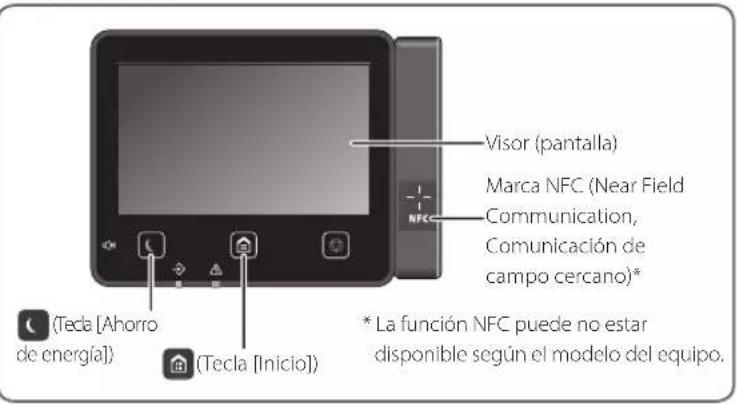
natural_image
Illustration of hands installing or adjusting a component on a machine (no text or symbols visible)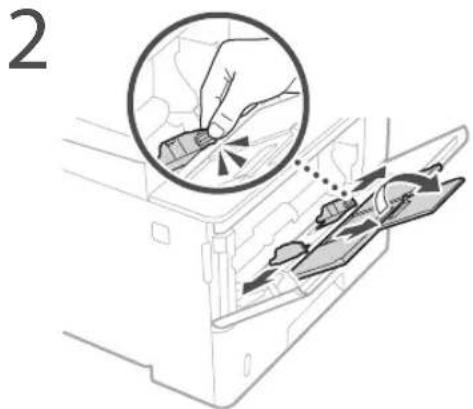
natural_image
Diagram of a printer with cable and connector, showing a close-up view of the cable being inserted (no text or symbols present)Alimentador
natural_image
Illustration of a hand placing two cards into a box with a prohibition symbol (no text or labels)Casete de papel
CLASS 1 LASER PRODUCT
LASER KLASSE 1
APPAREIL À LASER DE CLASSE 1
APPARECCHIO LASER DI CLASSE 1
PRODUCTO LÁSER DE CLASE 1
APARELHO A LASER DE CLASSE 1
LUOKAN 1 LASER-TUOTE
LASERPRODUKT KLASS 1
natural_image
Illustration of a hand holding a mechanical component (no text or symbols visible)Regulatory information for users in Jordan MF543x / MF542x includes approved Wireless LAN Module (Model name: AW-NM333). Contains Wireless LAN Module approved by TRC/ SS/2018/181
Regulatory information for users in Russia
Regulatory information for users in UAE
MF543x / MF542x includes approved Wireless LAN Module (Model name: AW-NM333).
TRA
REGISTERED No: ER63428/18
DEALER No: DA0060877/11
RE Directive
(Only for European radio equipment)
RE Declaration of Conformity
English (EN) Hereby, Canon Inc. declares that this equipment is in compliance with Directive 2014/53/EU. The full text of the EU declaration of conformity is available at the following internet address: http://www.canon-europe.com/ce-documentation Wireless LAN Specifications Frequency band(s):2412-2472MHz Maximum radio-frequency power: 16.51 dBm
natural_image
Line drawing of a printer with a close-up of its screen (no text or symbols)Panell de control
![Adjust Parameters Name: Not specified File Edit View Insert Modify... <|vision_start|> Auto Properties Add to "Import" (1) Add to "Delete" (2) Remove the following: [ ] Add to "Import" (3) [ ] Add to "Delete" (4) [ ] Add to "Import" (5) [ ] Add to "Delete" (6) [ ] Add to "Import" (7) [ ] Add to "Delete" (8) [ ] Add to "Import" (9) [ ] Add to "Delete" (10) [ ] Add to "Import" (11) [ ] Add to "Delete" (12) [ ] Add to "Import" (13) [ ] Add to "Delete" (14) [ ] Add to "Import" (15) [ ] Add to "Delete" (16) [ ] Add to "Import" (17) [ ] Add to "Delete" (18) [ ] Add to "Import" (19) [ ] Add to "Delete" (20) [ ] Add to "Import" (21) [ ] Add to "Delete" (22) [ ] Add to "Import" (23) [ ] Add to "Delete" (24) [ ] Add to "Import" (25) [ ] Add to "Delete" (26) [ ] Add to "Import" (27) [ ] Add to "Delete" (28) [ ] Add to "Import" (29) [ ] Add to "Delete" (30) [ ] Add to "Import" (31) [ ] Add to "Delete" (32) [ ] Add to "Import" (33) [ ] Add to "Delete" (34) [ ] Add to "Import" (35) [ ] Add to "Delete" (36) [ ] Add to "Import" (37) [ ] Add to "Delete" (38) [ ] Add to "Import" (39) [ ] Add to "Delete" (40) [ ] Add to "Import" (41) [ ] Add to "Delete" (42) [ ] Add to "Import" (43) [ ] Add to "Delete" (44) [ ] Add to "Import" (45) [ ] Add to "Delete" (46) [ ] Add to "Import" (47) [ ] Add to "Delete" (48) [ ] Add to "Import" (49) [ ] Add to "Delete" (50) [ ] Add to "Import" (51) [ ] Add to "Delete" (52) [ ] Add to "Import" (53) [ ] Add to "Delete" (54) [ ] Add to "Import" (55) [ ] Add to "Delete" (56) [ ] Add to "Import" (57) [ ] Add to "Delete" (58) [ ] Add to "Import" (59) [ ] Add to "Delete" (60) [ ] Add to "Import" (61) [ ] Add to "Delete" (62) [ ] Add to "Import" (63) [ ] Add to "Delete" (64) [ ] Add to "Import" (65) [ ] Add to "Delete" (66) [ ] Add to "Import" (67) [ ] Add to "Delete" (68) [ ] Add to "Import" (69) [ ] Add to "Delete" (70) [ ] Add to "Import" (71) [ ] Add to "Delete" (72) [ ] Add to "Import" (73) [ ] Add to "Delete" (74) [ ] Add to "Import" (75) [ ] Add to "Delete" (76) [ ] Add to "Import" (77) [ ] Add to "Delete" (78) [ ] Add to "Import" (79) [ ] Add to "Delete" (80) [ ] Add to "Import" (81) [ ] Add to "Delete" (82) [ ] Add to "Import" (83) [ ] Add to "Delete" (84) [ ] Add to "Import" (85) [ ] Add to "Delete" (86) [ ] Add to "Import" (87) [ ] Add to "Delete" (88) [ ] Add to "Import" (89) [ ] Add to "Delete" (90) [ ] Add to "Import" (91) [ ] Add to "Delete" (92) [ ] Add to "Import" (93) [ ] Add to "Delete" (94) [ ] Add to "Import" (95) [ ] Add to "Delete" (96) [ ] Add to "Import" (97) [ ] Add to "Delete" (98) [ ] Add to "Import" (99) [ ] Add to "Delete" (100)](/content/2026/04/666791/images/a74fadab90594930128e7f81d24186ee925b6a1490585c1b3ac1d4891597f698.jpg)
Per obtenir details
"Ajuda" al controlador d'impressora
1 Extraieu el casset de paper.
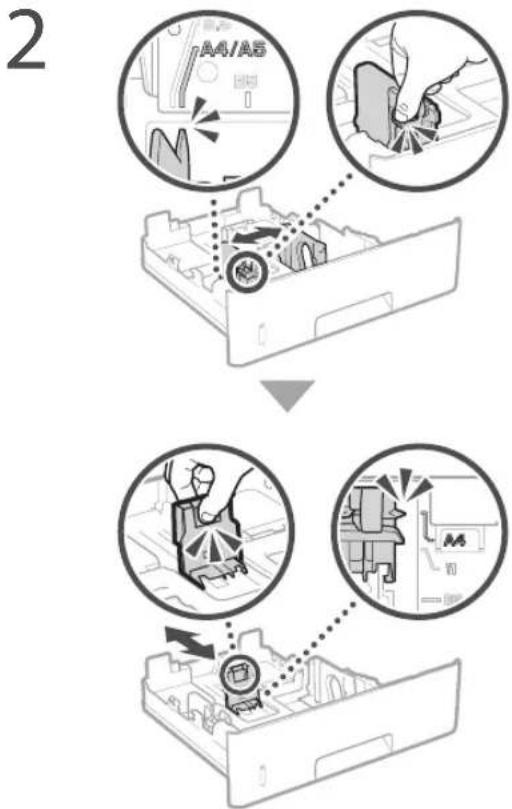
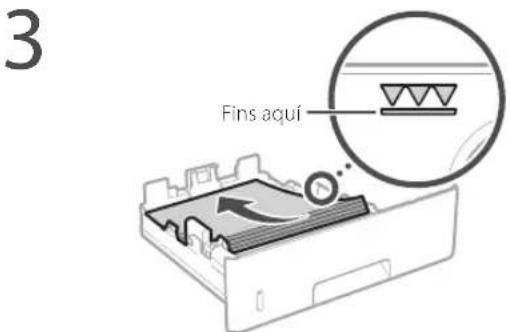
natural_image
Illustration of hands installing or adjusting a component on a machine (no text or symbols visible)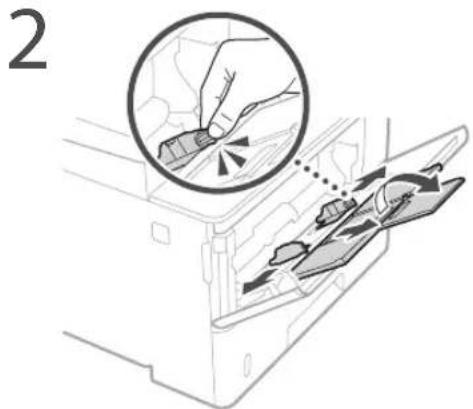
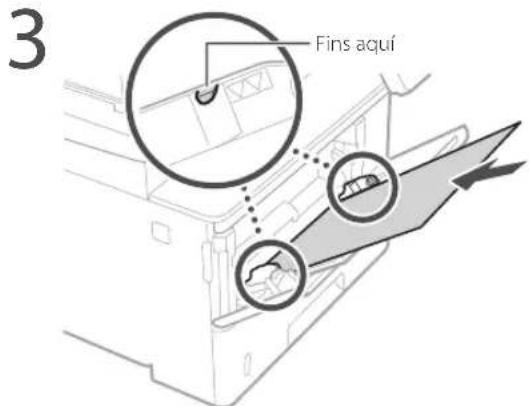
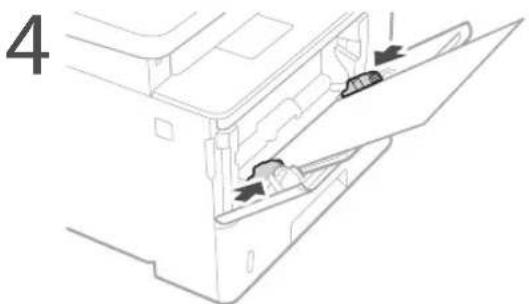
natural_image
Diagram of a printer with a cable inserted, showing a close-up view of the cable being inserted (no text or symbols present)Alimentador
natural_image
Illustration of a hand placing two cards into a box with a prohibition symbol (no text or labels)Casset de paper
CLASS 1 LASER PRODUCT
LASER KLASSE 1
APPAREIL À LASER DE CLASSE 1
APPARECCHIO LASER DI CLASSE 1
PRODUCTO LÁSER DE CLASE 1
APARELHO A LASER DE CLASSE 1
LUOKAN 1 LASER-TUOTE
LASERPRODUKT KLASS 1
natural_image
Illustration of a hand holding a mechanical component (no text or symbols visible)Regulatory information for users in Jordan
MF543x / MF542x includes approved Wireless LAN Module (Model name: AW-NM333). Contains Wireless LAN Module approved by TRC/SS/2018/181
Regulatory information for users in Russia
Regulatory information for users in UAE
MF543x / MF542x includes approved Wireless LAN Module (Model name: AW-NM333).
TRA
REGISTERED No: ER63428/18
DEALER No: DA0060877/11
RE Directive
(Only for European radio equipment)
RE Declaration of Conformity
English (EN) Hereby, Canon Inc. declares that this equipment is in compliance with Directive 2014/53/EU.
The full text of the EU declaration of conformity is available at the following internet address: http://www.canon-europe.com/ce-documentation Wireless LAN Specifications Frequency band(s):2412-2472MHz Maximum radio-frequency power: 16.51 dBm
natural_image
Line drawing of a printer with a digital display showing an icon (no text or symbols present)Eragiketa panela
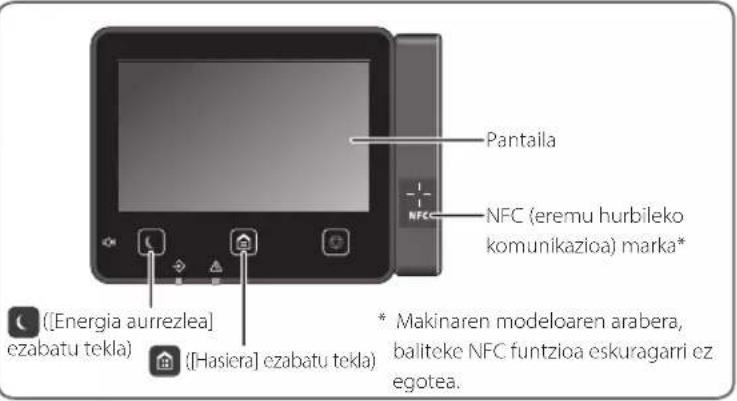
natural_image
Illustration of hands installing or adjusting a component on a machine (no text or symbols visible)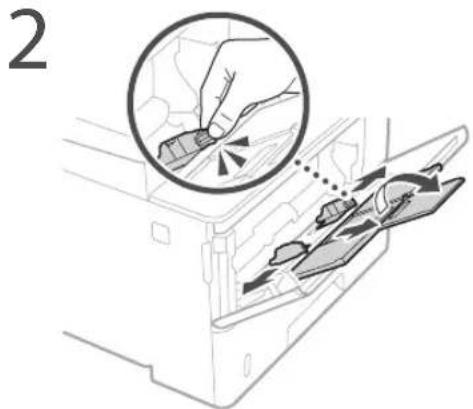
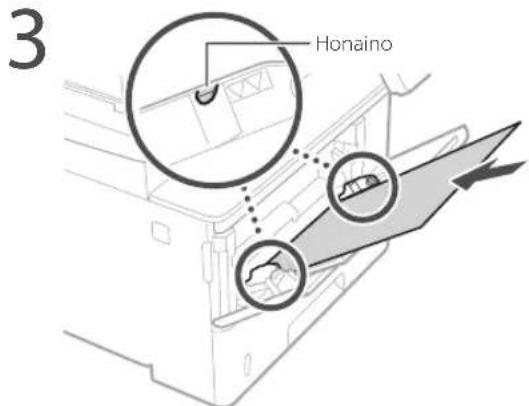
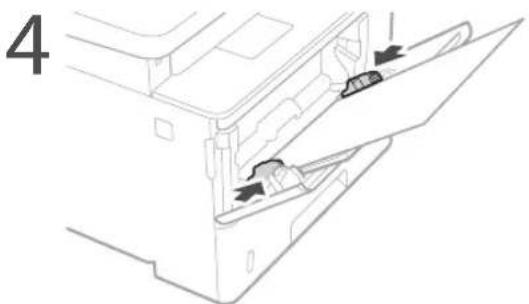
natural_image
Line drawing of a printer with a close-up inset showing cable attachment (no text or symbols)natural_image
Diagram showing a hand opening a device with a prohibition symbol above (no text or labels)
Elikagailua
Paperaren tiradera
CLASS 1 LASER PRODUCT
LASER KLASSE 1
APPAREIL À LASER DE CLASSE 1
APPARECCHIO LASER DI CLASSE 1
PRODUCTO LÁSER DE CLASE
APARELHO A LASER DE CLASSE 1
LUOKAN 1 LASER-TUOTE
LASERPRODUKT KLASS 1
Makina garraiatzean
natural_image
Illustration of a hand holding a mechanical component (no text or symbols visible)Regulatory information for users in Jordan MF543x / MF542x includes approved Wireless LAN Module (Model name: AW-NM333). Contains Wireless LAN Module approved by TRC/SS/2018/181
Regulatory information for users in Russia
Regulatory information for users in UAE MF543x / MF542x includes approved Wireless LAN Module (Model name: AW-NM333).
TRA
REGISTERED No: ER63428/18
DEALER No: DA0060877/11
RE Directive
(Only for European radio equipment)
RE Declaration of Conformity
English (EN) Hereby, Canon Inc. declares that this equipment is in compliance with Directive 2014/53/EU. The full text of the EU declaration of conformity is available at the following internet address: http://www.canon-europe.com/ce-documentation Wireless LAN Specifications Frequency band(s):2412-2472MHz Maximum radio-frequency power: 16.51 dBm
natural_image
Line drawing of a printer with a digital display showing an icon (no text or symbols present)Painel de operações
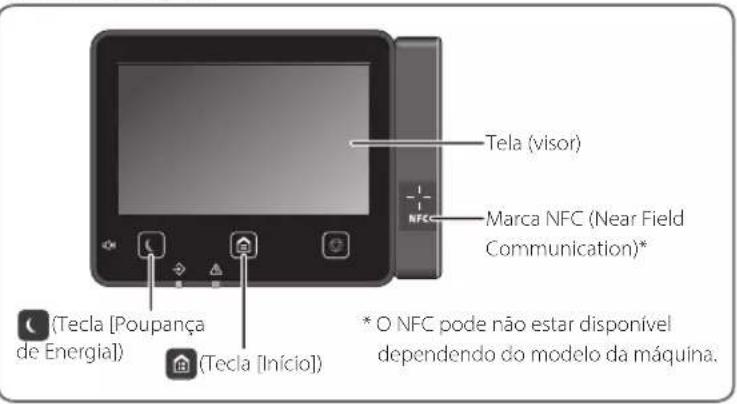
Para detalhes
natural_image
Illustration of hands installing or adjusting a component on a machine (no text or symbols visible)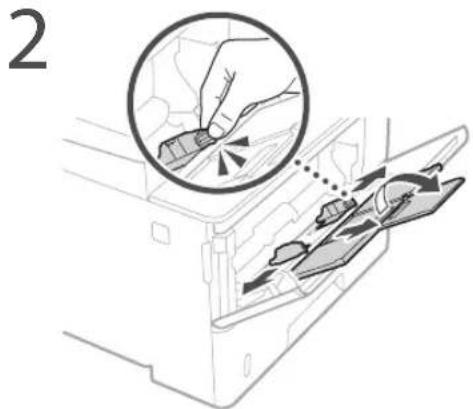
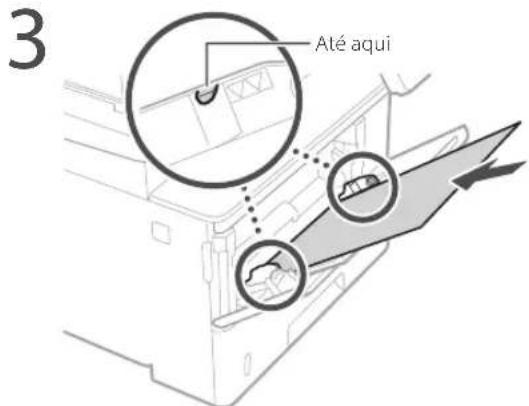
natural_image
Line drawing of a printer with a close-up inset showing the cable being inserted (no text or symbols present)Se o problema persistir, consulte o Manual do utilizador.
natural_image
Diagram of a hand inserting a device into a container with a prohibition symbol (no text or labels)
Alimentador
Gaveta de papel
CLASS 1 LASER PRODUCT
LASER KLASSE 1
APPAREIL À LASER DE CLASSE 1
APPARECCHIO LASER DI CLASSE 1
PRODUCTO LÁSER DE CLASE 1
APARELHO A LASER DE CLASSE 1
LUOKAN 1 LASER-TUOTE
LASERPRODUKT KLASS 1
natural_image
Illustration of a hand holding a mechanical component (no text or symbols visible)Regulatory information for users in Jordan
MF543x / MF542x includes approved Wireless LAN Module (Model name: AW-NM333). Contains Wireless LAN Module approved by TRC/SS/2018/181
Regulatory information for users in Russia
Regulatory information for users in UAE
MF543x / MF542x includes approved Wireless LAN Module (Model name: AW-NM333).
TRA
REGISTERED No: ER63428/18
DEALER No: DA0060877/11
RE Directive
(Only for European radio equipment)
RE Declaration of Conformity
English (EN) Hereby, Canon Inc. declares that this equipment is in compliance with Directive 2014/53/EU.
The full text of the EU declaration of conformity is available at the following internet address: http://www.canon-europe.com/ce-documentation Wireless LAN Specifications Frequency band(s):2412-2472MHz Maximum radio-frequency power: 16.51 dBm
natural_image
Line drawing of a printer with a digital display showing an icon (no text or symbols present)Πίνακας λειτουργίας
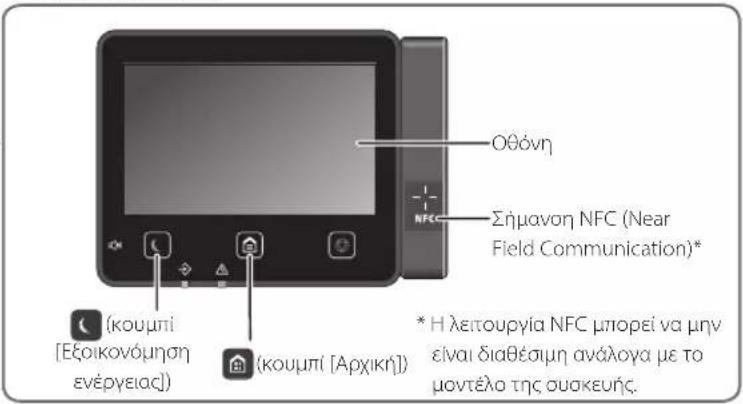
Για λεπτομέρειες
«Help» (Βοήθεια) στο
natural_image
Illustration of hands installing or adjusting a component on a machine (no text or symbols visible)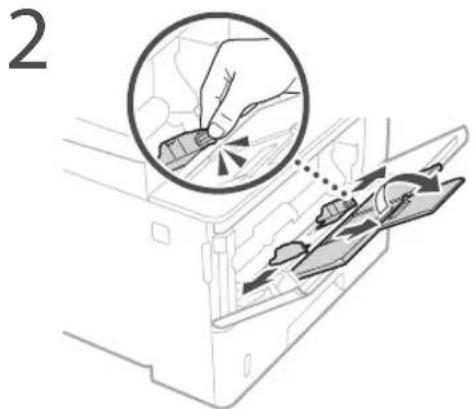
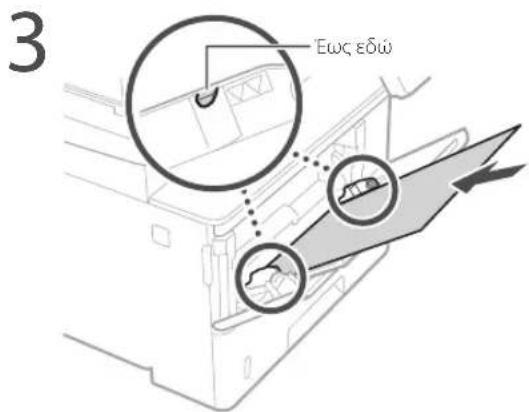
natural_image
Diagram of a printer with a cable inserted, showing a close-up of the cable being inserted (no text or symbols present)Τροφοδότης
Συρτάρι χαρτιού
CLASS 1 LASER PRODUCT
LASER KLASSE 1
APPAREIL À LASER DE CLASSE 1 APPARECCHIO LASER DI CLASSE 1 PRODUCTO LÁSER DE CLASE 1 APARELHO A LASER DE CLASSE 1 LUOKAN 1 LASER-TUOTE LASERPRODUKT KLASS 1
natural_image
Illustration of a hand holding a mechanical component (no text or symbols visible)Regulatory information for users in Jordan MF543x / MF542x includes approved Wireless LAN Module (Model name: AW-NM333). Contains Wireless LAN Module approved by TRC/SS/2018/181
Regulatory information for users in UAE MF543x / MF542x includes approved Wireless LAN Module (Model name: AW-NM333).
TRA
REGISTERED No: ER63428/18
DEALER No: DA0060877/11
RE Directive
(Only for European radio equipment)
RE Declaration of Conformity
English (EN) Hereby, Canon Inc. declares that this equipment is in compliance with Directive 2014/53/EU.
The full text of the EU declaration of conformity is available at the following internet address: http://www.canon-europe.com/ce-documentation Wireless LAN Specifications Frequency band(s):2412-2472MHz Maximum radio-frequency power: 16.51 dBm
natural_image
Line drawing of a printer with a digital display showing an icon (no text or symbols present)Betjeningspanel
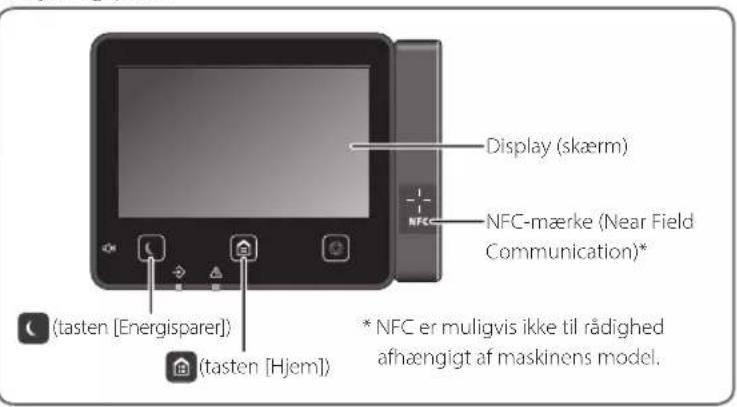
natural_image
Illustration of hands installing or adjusting a component on a machine (no text or symbols visible)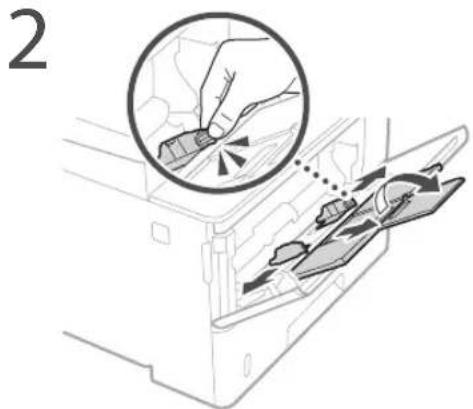
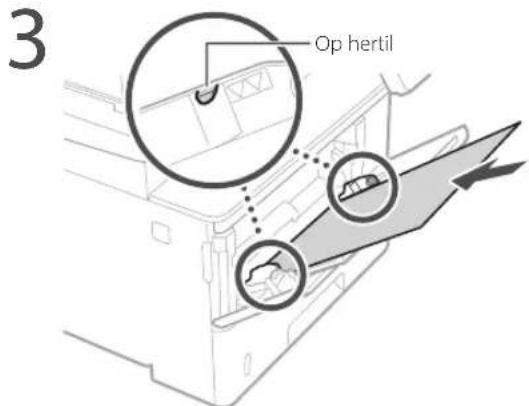
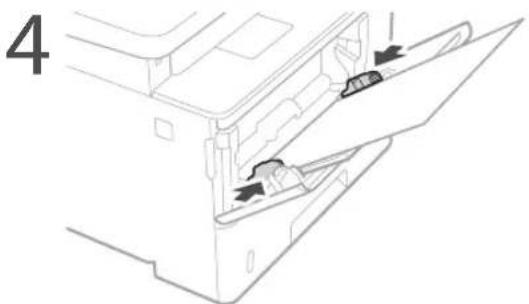
natural_image
Diagram of a printer with a cable inserted, showing a close-up view of the cable being inserted (no text or symbols present)
Fremfører
Papirbakke
- Sæt ikke din hånd ind i maskinen, mens papirbakken er taget ud, da dette kan medføre personskade.
Energisparer-tast
CLASS 1 LASER PRODUCT
LASER KLASSE 1
APPAREIL À LASER DE CLASSE 1
APPARECCHIO LASER DI CLASSE 1
PRODUCTO LÁSER DE CLASE 1
APARELHO A LASER DE CLASSE 1
LUOKAN 1 LASER-TUOTE
LASERPRODUKT KLASS 1
natural_image
Illustration of a hand holding a mechanical component (no text or symbols visible)Regulatory information for users in Jordan
MF543x / MF542x includes approved Wireless LAN Module (Model name: AW-NM333). Contains Wireless LAN Module approved by TRC/SS/2018/181
Regulatory information for users in Russia
Regulatory information for users in UAE
MF543x / MF542x includes approved Wireless LAN Module (Model name: AW-NM333).
TRA
REGISTERED No: ER63428/18
DEALER No: DA0060877/11
RE Directive
(Only for European radio equipment)
RE Declaration of Conformity
English (EN) Hereby, Canon Inc. declares that this equipment is in compliance with Directive 2014/53/EU.
The full text of the EU declaration of conformity is available at the following internet address: http://www.canon-europe.com/ce-documentation Wireless LAN Specifications Frequency band(s):2412-2472MHz Maximum radio-frequency power: 16.51 dBm
natural_image
Line drawing of a printer with a digital display showing an icon (no text or symbols present)Bedieningspaneel

natural_image
Illustration of hands installing or adjusting a component on a machine (no text or symbols visible)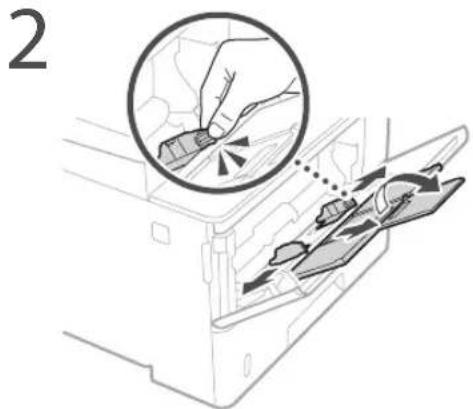
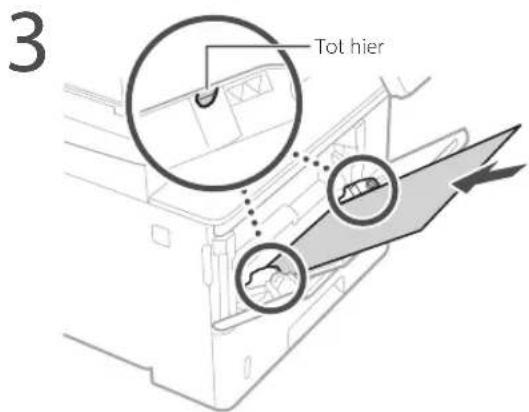
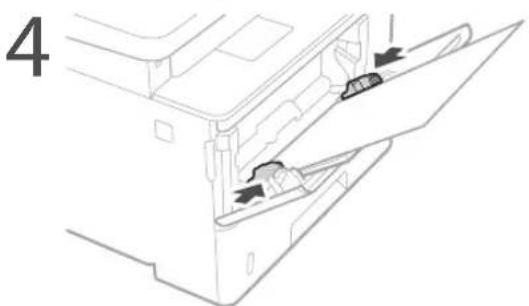
natural_image
Diagram of a printer with a cable inserted, showing a close-up of the cable being inserted (no text or symbols present)
Invoer
Papierlade
CLASS 1 LASER PRODUCT
LASER KLASSE 1
APPAREIL À LASER DE CLASSE 1
APPARECCHIO LASER DI CLASSE 1
PRODUCTO LÁSER DE CLASE 1
APARELHO A LASER DE CLASSE 1
LUOKAN 1 LASER-TUOTE
LASERPRODUKT KLASS 1
natural_image
Illustration of a hand holding a mechanical component (no text or symbols visible)Regulatory information for users in Jordan
MF543x / MF542x includes approved Wireless LAN Module (Model name: AW-NM333). Contains Wireless LAN Module approved by TRC/SS/2018/181
Regulatory information for users in Russia
Regulatory information for users in UAE
MF543x / MF542x includes approved Wireless LAN Module (Model name: AW-NM333).
TRA
REGISTERED No: ER63428/18
DEALER No: DA0060877/11
RE Directive
(Only for European radio equipment)
RE Declaration of Conformity
English (EN) Hereby, Canon Inc. declares that this equipment is in compliance with Directive 2014/53/EU.
The full text of the EU declaration of conformity is available at the following internet address: http://www.canon-europe.com/ce-documentation Wireless LAN Specifications Frequency band(s):2412-2472MHz Maximum radio-frequency power: 16.51 dBm
natural_image
Line drawing of a printer with a digital display showing an icon (no text or symbols present)Betjeningspanel
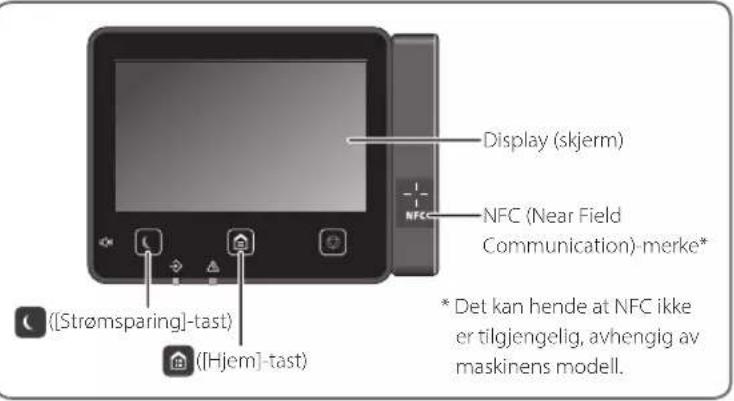
4 Skyv papirskuffen inn i maskinen.
natural_image
Illustration of hands installing or adjusting a component on a machine (no text or symbols visible)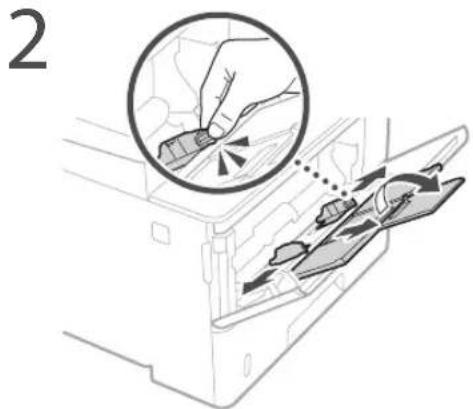
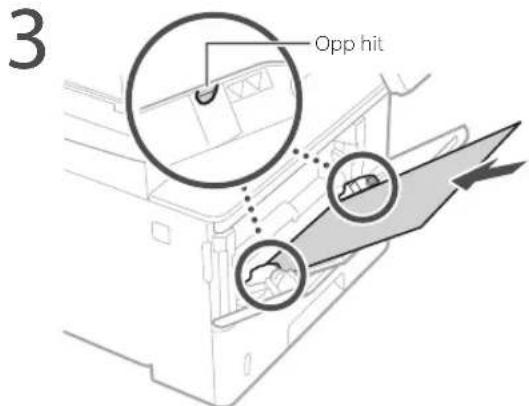
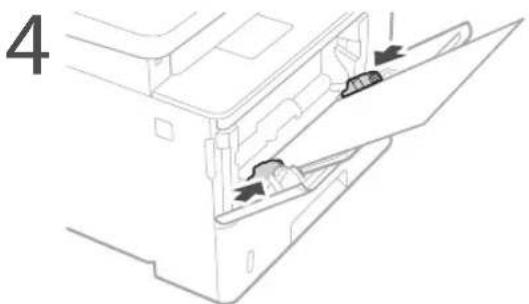
natural_image
Diagram of a printer with a cable inserted into a slot, showing a close-up view of the cable being inserted (no text or symbols present)Se bruksanvisningen hvis problemet vedvarer.
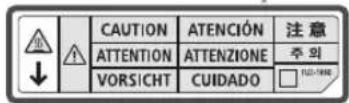
Mater
Papirskuff
CLASS 1 LASER PRODUCT
LASER KLASSE 1
APPAREIL À LASER DE CLASSE 1
APPARECCHIO LASER DI CLASSE 1
PRODUCTO LÁSER DE CLASE 1
APARELHO A LASER DE CLASSE 1
LUOKAN 1 LASER-TUOTE
LASERPRODUKT KLASS 1
Når du transporterer maskinen
natural_image
Illustration of a hand holding a mechanical component (no text or symbols visible)Regulatory information for users in Jordan MF543x / MF542x includes approved Wireless LAN Module (Model name: AW-NM333). Contains Wireless LAN Module approved by TRC/SS/2018/181
Regulatory information for users in Russia
Regulatory information for users in UAE
MF543x / MF542x includes approved Wireless LAN Module (Model name: AW-NM333).
TRA
REGISTERED No: ER63428/18
DEALER No: DA0060877/11
RE Directive
(Only for European radio equipment)
RE Declaration of Conformity
English (EN) Hereby, Canon Inc. declares that this equipment is in compliance with Directive 2014/53/EU. The full text of the EU declaration of conformity is available at the following internet address: http://www.canon-europe.com/ce-documentation Wireless LAN Specifications Frequency band(s):2412-2472MHz Maximum radio-frequency power: 16.51 dBm
natural_image
Line drawing of a printer with a digital display showing an icon (no text or symbols present)Kontrollpanel
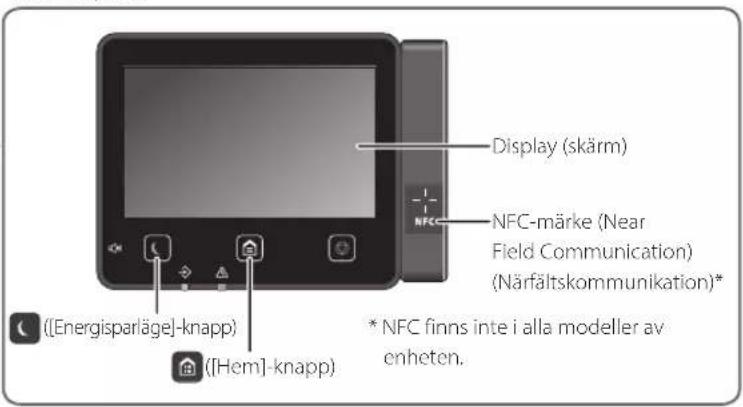
natural_image
Illustration of hands installing or adjusting a component on a machine (no text or symbols visible)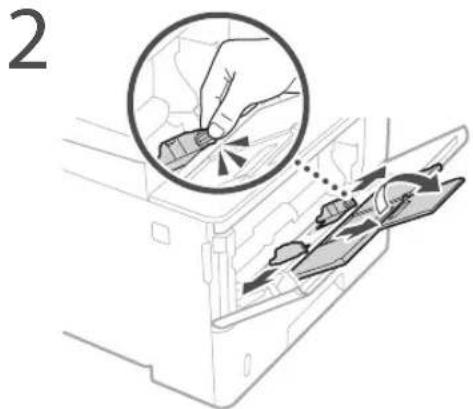
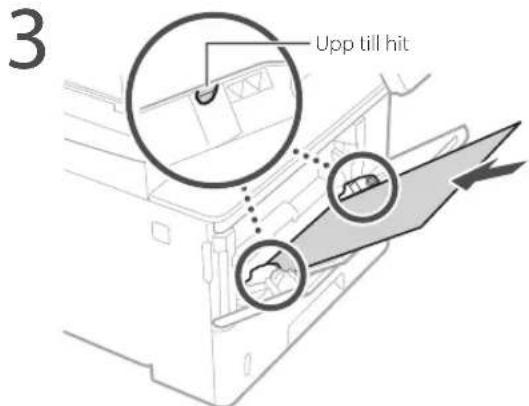
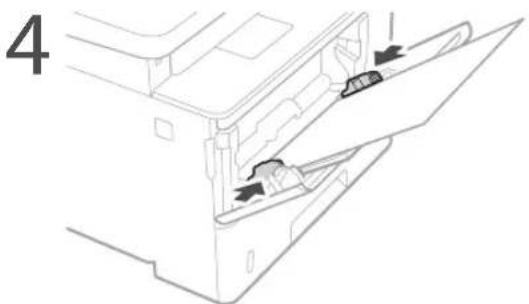
natural_image
Diagram of a printer with a cable inserted, showing a close-up view of the cable being inserted (no text or symbols present)Matare
natural_image
Illustration of a hand holding two cards with a warning symbol (no text or labels)Papperslåda
CLASS 1 LASER PRODUCT
LASER KLASSE 1
APPAREIL À LASER DE CLASSE 1
APPARECCHIO LASER DI CLASSE 1
PRODUCTO LASER DE CLASE 1
APARELHO A LASER DE CLASSE 1
LUOKAN 1 LASER-TUOTE
LASERPRODUKT KLASS 1
natural_image
Illustration of a hand holding a mechanical component (no text or symbols visible)Regulatory information for users in Jordan MF543x / MF542x includes approved Wireless LAN Module (Model name: AW-NM333). Contains Wireless LAN Module approved by TRC/SS/2018/181
Regulatory information for users in Russia
Regulatory information for users in UAE MF543x / MF542x includes approved Wireless LAN Module (Model name: AW-NM333).
TRA
REGISTERED No: ER63428/18
DEALER No: DA0060877/11
RE Directive
(Only for European radio equipment)
RE Declaration of Conformity
English (EN) Hereby, Canon Inc. declares that this equipment is in compliance with Directive 2014/53/EU. The full text of the EU declaration of conformity is available at the following internet address: http://www.canon-europe.com/ce-documentation Wireless LAN Specifications Frequency band(s):2412-2472MHz Maximum radio-frequency power: 16.51 dBm
natural_image
Line drawing of a printer with a digital display showing an icon (no text or symbols present)Käyttöpaneeli
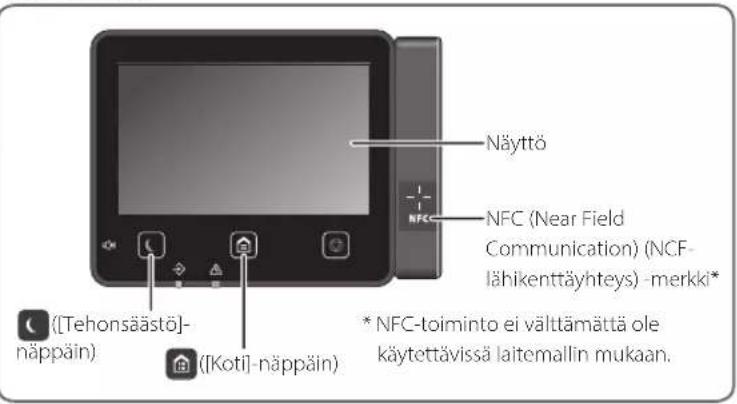
Lisätietoja
natural_image
Illustration of hands installing or adjusting a component on a machine (no text or symbols visible)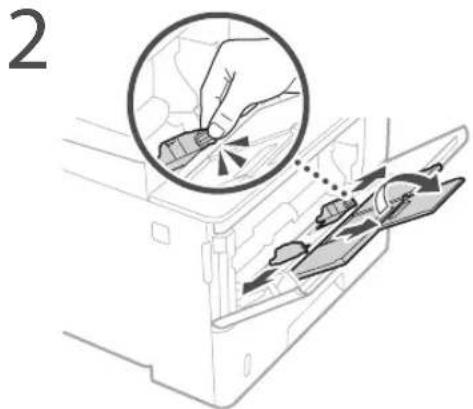
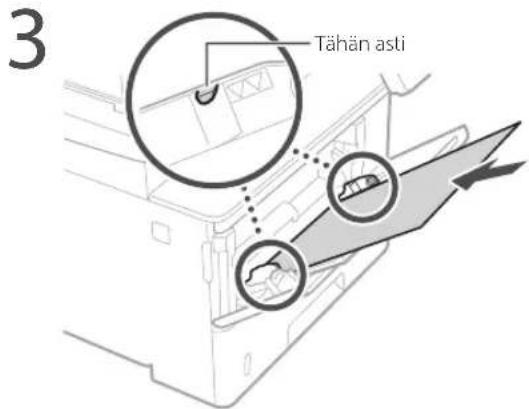
natural_image
Diagram of a printer with a cable inserted into a slot, showing a close-up view of the cable being inserted (no text or symbols present)Syöttölaite
Paperikasetti
CLASS 1 LASER PRODUCT
LASER KLASSE 1
APPAREIL À LASER DE CLASSE 1 APPARECCHIO LASER DI CLASSE 1 PRODUCTO LÁSER DE CLASE 1 APARELHO A LASER DE CLASSE 1 LUOKAN 1 LASER-TUOTE LASERPRODUKT KLASS 1
natural_image
Illustration of a hand holding a mechanical component (no text or symbols visible)Regulatory information for users in Jordan MF543x / MF542x includes approved Wireless LAN Module (Model name: AW-NM333). Contains Wireless LAN Module approved by TRC/SS/2018/181
Regulatory information for users in Russia
Regulatory information for users in UAE MF543x / MF542x includes approved Wireless LAN Module (Model name: AW-NM333).
TRA
REGISTERED No: ER63428/18
DEALER No: DA0060877/11
RE Directive
(Only for European radio equipment)
RE Declaration of Conformity
English (EN) Hereby, Canon Inc. declares that this equipment is in compliance with Directive 2014/53/EU. The full text of the EU declaration of conformity is available at the following internet address: http://www.canon-europe.com/ce-documentation Wireless LAN Specifications Frequency band(s):2412-2472MHz Maximum radio-frequency power: 16.51 dBm
natural_image
Line drawing of a printer with a digital display showing an icon (no text or symbols present)Панель управления
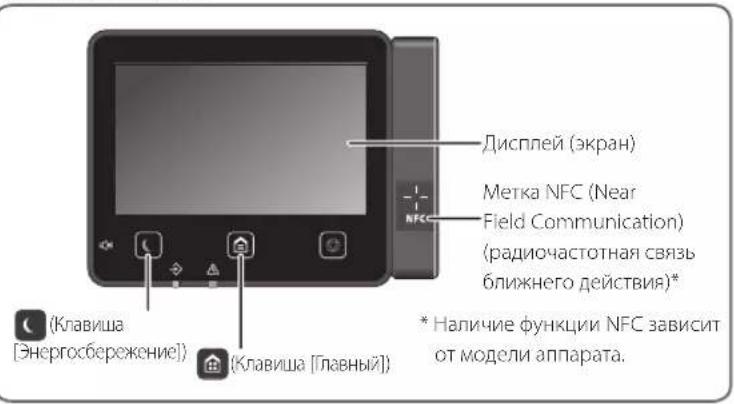
Подробнее
natural_image
Illustration of hands installing or adjusting a mechanical component with an arrow indicating rotation (no text or symbols present)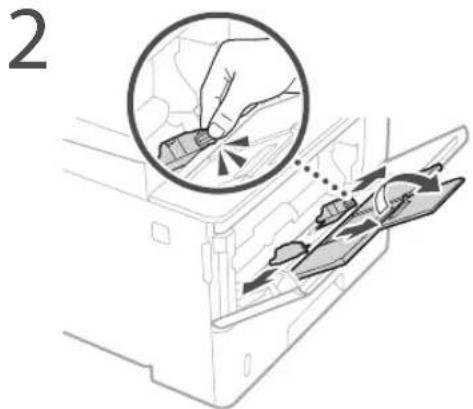
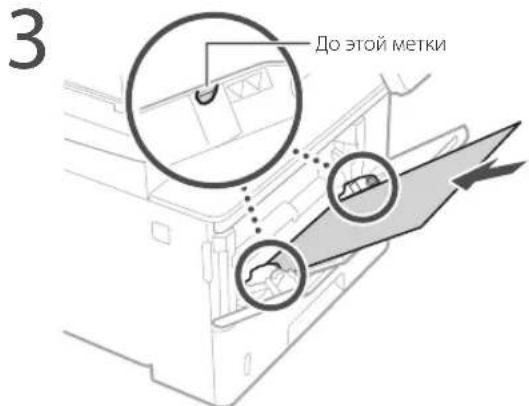
natural_image
Diagram of a printer with a cable inserted into a slot, showing a close-up view of the cable being inserted (no text or symbols present)Устройство подачи
Кассета для бумаги
CLASS 1 LASER PRODUCT
LASER KLASSE 1
APPAREIL À LASER DE CLASSE 1
APPARECCHIO LASER DI CLASSE 1
PRODUCTO LÁSER DE CLASE 1
APARELHO A LASER DE CLASSE 1
LUOKAN 1 LASER-TUOTE
LASERPRODUKT KLASS 1
natural_image
Illustration of a hand holding a mechanical component (no text or symbols visible)Regulatory information for users in Jordan MF543x / MF542x includes approved Wireless LAN Module (Model name: AW-NM333). Contains Wireless LAN Module approved by TRC/SS/2018/181
Regulatory information for users in UAE MF543x / MF542x includes approved Wireless LAN Module (Model name: AW-NM333).
TRA
REGISTERED No: ER63428/18
DEALER No: DA0060877/11
RE Directive
(Only for European radio equipment)
RE Declaration of Conformity
English (EN) Hereby, Canon Inc. declares that this equipment is in compliance with Directive 2014/53/EU. The full text of the EU declaration of conformity is available at the following internet address: http://www.canon-europe.com/ce-documentation Wireless LAN Specifications Frequency band(s):2412-2472MHz Maximum radio-frequency power: 16.51 dBm
natural_image
Line drawing of a printer with a close-up of its screen (no text or symbols)Панель керування
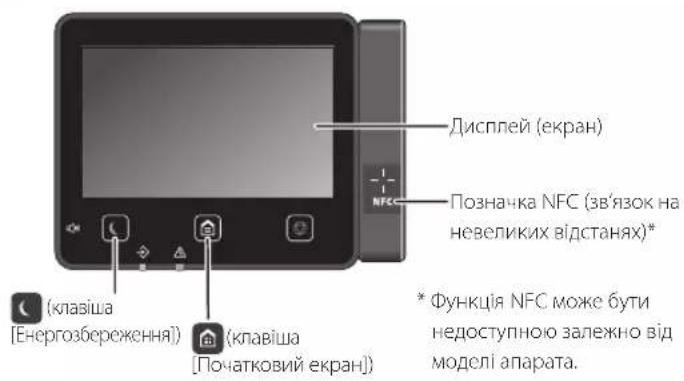
natural_image
Illustration of hands installing or adjusting a component on a machine (no text or symbols visible)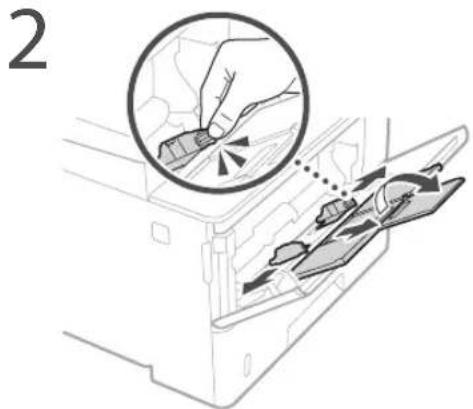
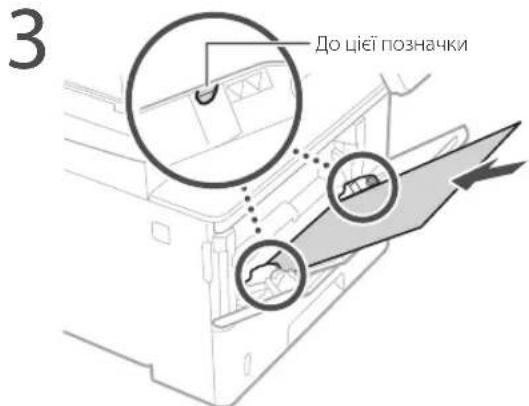
natural_image
Diagram of a printer with a cable inserted, showing a close-up of the cable being inserted (no text or symbols present)
Пристрій подавання
natural_image
Illustration of a hand placing two cards into a box with a prohibition symbol (no text or labels)Шухляда для паперу
CLASS 1 LASER PRODUCT
LASER KLASSE 1
APPAREIL À LASER DE CLASSE 1
APPARECCHIO LASER DI CLASSE 1
PRODUCTO LÁSER DE CLASE 1
APARELHO A LASER DE CLASSE 1
LUOKAN 1 LASER-TUOTE
LASERPRODUKT KLASS 1
natural_image
Illustration of a hand holding a mechanical component (no text or symbols visible)Regulatory information for users in Jordan MF543x / MF542x includes approved Wireless LAN Module (Model name: AW-NM333). Contains Wireless LAN Module approved by TRC/SS/2018/181
Regulatory information for users in UAE MF543x / MF542x includes approved Wireless LAN Module (Model name: AW-NM333).
TRA
REGISTERED No: ER63428/18
DEALER No: DA0060877/11
RE Directive
(Only for European radio equipment)
RE Declaration of Conformity
English (EN) Hereby, Canon Inc. declares that this equipment is in compliance with Directive 2014/53/EU.
The full text of the EU declaration of conformity is available at the following internet address: http://www.canon-europe.com/ce-documentation Wireless LAN Specifications Frequency band(s):2412-2472MHz Maximum radio-frequency power: 16.51 dBm
natural_image
Line drawing of a printer with a digital display showing an icon (no text or symbols present)Vadības panelis
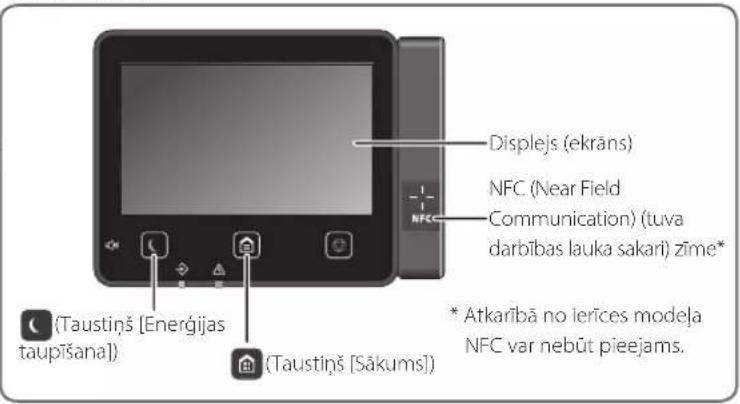
natural_image
Illustration of hands installing or adjusting a component on a machine (no text or symbols visible)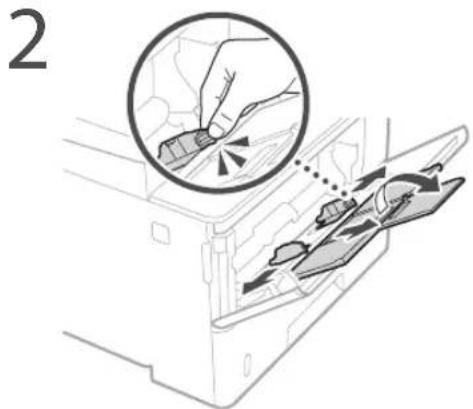
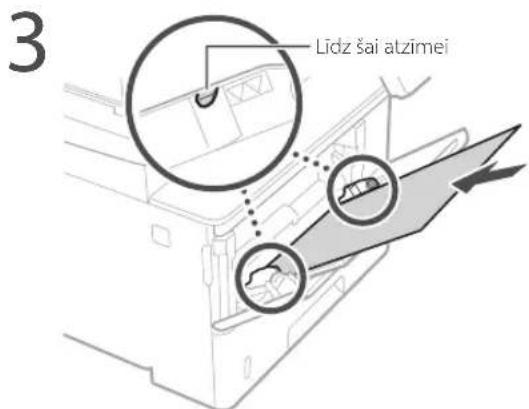
natural_image
Diagram of a printer with a cable inserted, showing a close-up view of the cable being inserted (no text or symbols present)Indicates a warning concerning operations that may lead to death or injury to persons if not performed correctly. To use the machine safely, always pay attention to these warnings.
UZMANIBU!
Padevējs
Papīra atvilkte
CLASS 1 LASER PRODUCT
LASER KLASSE 1
APPAREIL À LASER DE CLASSE 1
APPARECCHIO LASER DI CLASSE 1
PRODUCTO LÁSER DE CLASE 1
APARELHO A LASER DE CLASSE 1
LUOKAN 1 LASER-TUOTE
LASERPRODUKT KLASS 1
natural_image
Illustration of a hand holding a mechanical component (no text or symbols visible)Regulatory information for users in Jordan MF543x / MF542x includes approved Wireless LAN Module (Model name: AW-NM333). Contains Wireless LAN Module approved by TRC/ SS/2018/181
Regulatory information for users in UAE MF543x / MF542x includes approved Wireless LAN Module (Model name: AW-NM333).
TRA
REGISTERED No: ER63428/18
DEALER No: DA0060877/11
RE Directive
(Only for European radio equipment)
RE Declaration of Conformity
English (EN) Hereby, Canon Inc. declares that this equipment is in compliance with Directive 2014/53/EU.
The full text of the EU declaration of conformity is available at the following internet address: http://www.canon-europe.com/ce-documentation Wireless LAN Specifications Frequency band(s):2412-2472MHz Maximum radio-frequency power: 16.51 dBm
natural_image
Line drawing of a printer with a digital display showing an icon (no text or symbols present)Valdymo skydelis
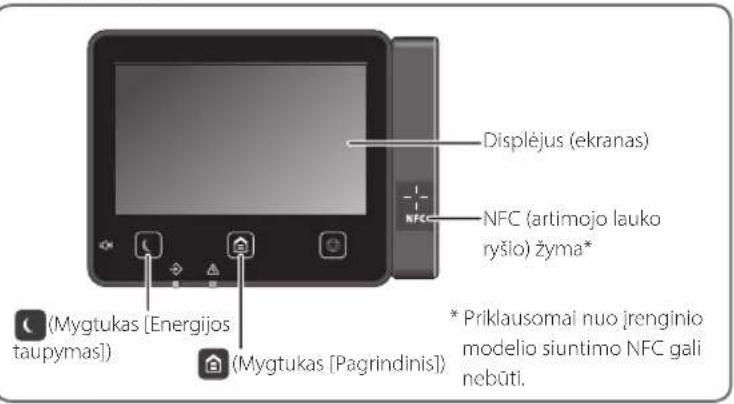
natural_image
Illustration of hands installing or adjusting a component on a machine (no text or symbols visible)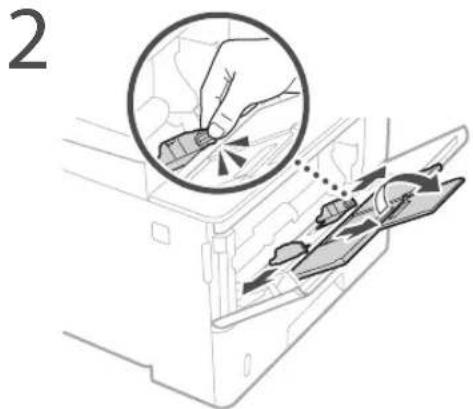
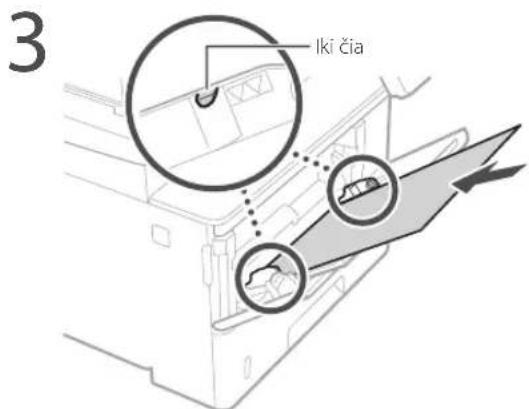
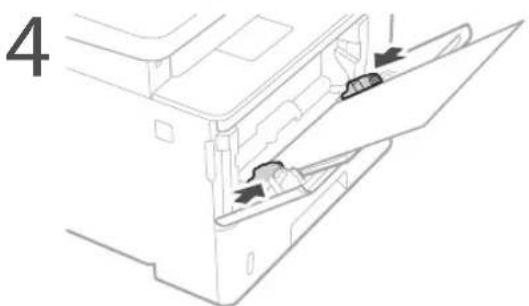
• Ar tinkamai prijungtas maitinimo laidas?
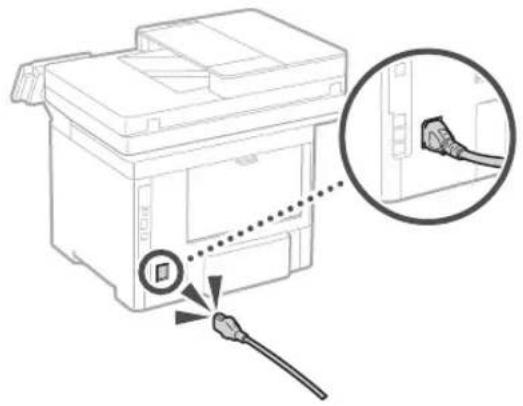
natural_image
Diagram of a printer with a cable inserted into a slot, showing a close-up view of the cable being inserted (no text or symbols present)Tiektuvas
natural_image
Illustration of a hand placing two cards into a box with a prohibition symbol (no text or labels)Popieriaus stalčius
CLASS 1 LASER PRODUCT
LASER KLASSE 1
APPAREIL À LASER DE CLASSE 1 APPARECCHIO LASER DI CLASSE 1 PRODUCTO LÁSER DE CLASE 1 APARELHO A LASER DE CLASSE 1 LUOKAN 1 LASER-TUOTE LASERPRODUKT KLASS 1
Perkeliant aparata
Kad perkeldami aparato nesugadintumete, atlikite toliau nurodylus veiksmus.
natural_image
Illustration of a hand holding a mechanical component (no text or symbols visible)Regulatory information for users in Jordan MF543x / MF542x includes approved Wireless LAN Module (Model name: AW-NM333). Contains Wireless LAN Module approved by TRC/SS/2018/181
Regulatory information for users in Russia
Regulatory information for users in UAE MF543x / MF542x includes approved Wireless LAN Module (Model name: AW-NM333).
TRA
REGISTERED No: ER63428/18
DEALER No: DA0060877/11
RE Directive
(Only for European radio equipment)
RE Declaration of Conformity
English (EN) Hereby, Canon Inc. declares that this equipment is in compliance with Directive 2014/53/EU. The full text of the EU declaration of conformity is available at the following internet address: http://www.canon-europe.com/ce-documentation Wireless LAN Specifications Frequency band(s):2412-2472MHz Maximum radio-frequency power: 16.51 dBm
natural_image
Line drawing of a printer with a digital display showing an icon (no text or symbols present)Juhtpaneel
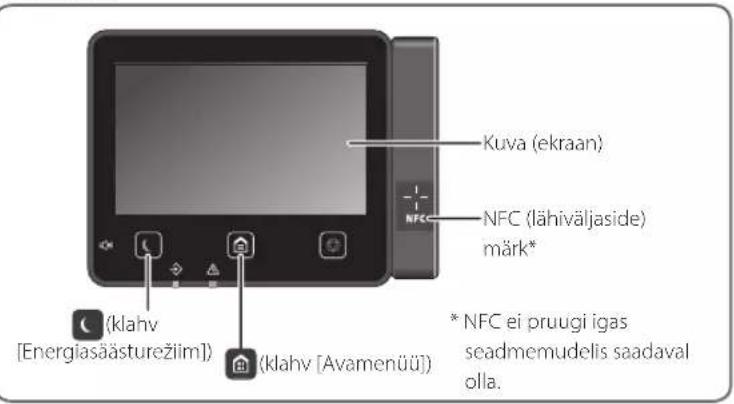
natural_image
Illustration of hands installing or adjusting a component on a machine (no text or symbols visible)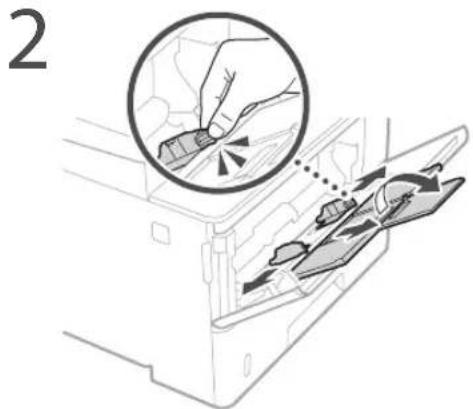
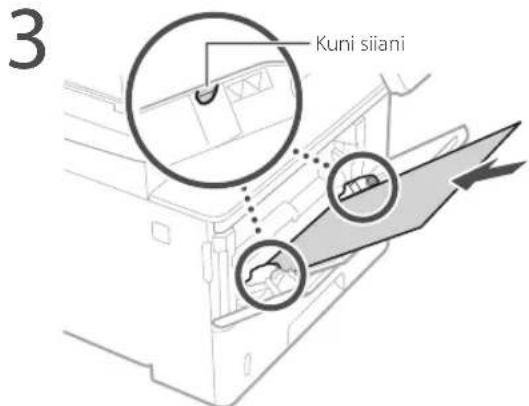
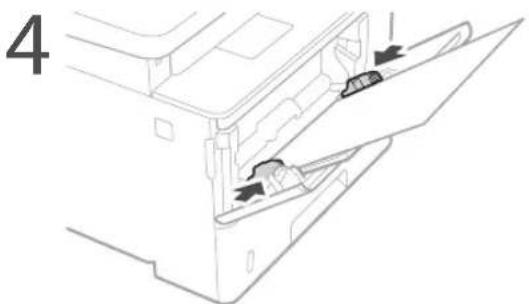
natural_image
Diagram of a printer with a cable inserted, showing a close-up of the cable being inserted (no text or symbols present)
Söötur
Paberisahtel
CLASS 1 LASER PRODUCT
LASER KLASSE 1
APPAREIL À LASER DE CLASSE 1
APPARECCHIO LASER DI CLASSE 1
PRODUCTO LÁSER DE CLASE 1
APARELHO A LASER DE CLASSE 1
LUOKAN 1 LASER-TUOTE
LASERPRODUKT KLASS 1
Seadme transportimine
natural_image
Illustration of a hand holding a mechanical component (no text or symbols visible)Regulatory information for users in Jordan MF543x / MF542x includes approved Wireless LAN Module (Model name: AW-NM333). Contains Wireless LAN Module approved by TRC/SS/2018/181
Regulatory information for users in Russia
Regulatory information for users in UAE MF543x / MF542x includes approved Wireless LAN Module (Model name: AW-NM333).
TRA
REGISTERED No: ER63428/18
DEALER No: DA0060877/11
RE Directive
(Only for European radio equipment)
RE Declaration of Conformity
English (EN) Hereby, Canon Inc. declares that this equipment is in compliance with Directive 2014/53/EU. The full text of the EU declaration of conformity is available at the following internet address: http://www.canon-europe.com/ce-documentation Wireless LAN Specifications Frequency band(s):2412-2472MHz Maximum radio-frequency power: 16.51 dBm
natural_image
Line drawing of a printer with a digital display showing a small screen (no text or symbols)Panel sterujący
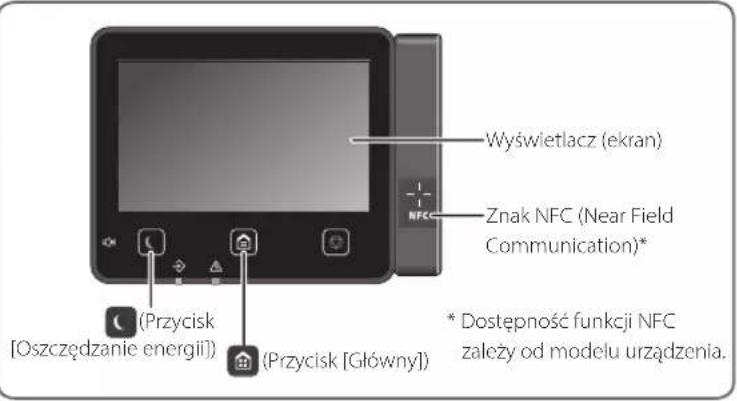
Szczególy
natural_image
Illustration of hands installing or adjusting a component on a machine (no text or symbols visible)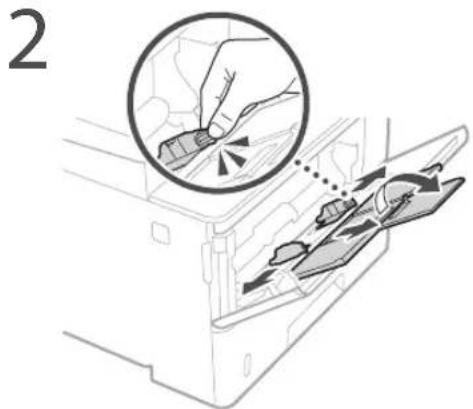
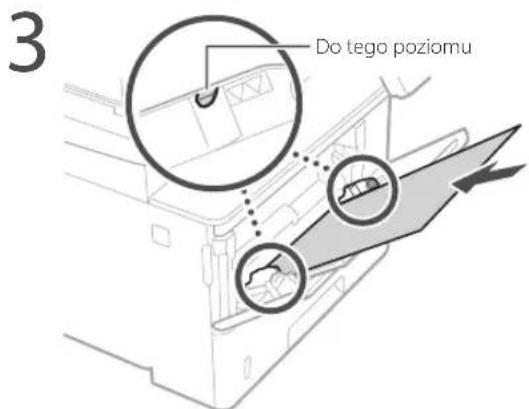
natural_image
Diagram of a printer with a cable inserted, showing a close-up view of the cable being inserted (no text or symbols present)Podajnik
Szuflada na papier
CLASS 1 LASER PRODUCT
LASER KLASSE 1
APPAREIL À LASER DE CLASSE 1 APPARECCHIO LASER DI CLASSE 1 PRODUCTO LÁSER DE CLASE 1 APARELHO A LASER DE CLASSE 1 LUOKAN 1 LASER-TUOTE LASERPRODUKT KLASS 1
natural_image
Illustration of a hand holding a cylindrical electronic component (no text or symbols visible)Regulatory information for users in Jordan MF543x / MF542x includes approved Wireless LAN Module (Model name: AW-NM333). Contains Wireless LAN Module approved by TRC/SS/2018/181
Regulatory information for users in UAE MF543x / MF542x includes approved Wireless LAN Module (Model name: AW-NM333).
TRA
REGISTERED No: ER63428/18
DEALER No: DA0060877/11
RE Directive
(Only for European radio equipment)
RE Declaration of Conformity
English (EN) Hereby, Canon Inc. declares that this equipment is in compliance with Directive 2014/53/EU. The full text of the EU declaration of conformity is available at the following internet address: http://www.canon-europe.com/ce-documentation Wireless LAN Specifications Frequency band(s):2412-2472MHz Maximum radio-frequency power: 16.51 dBm
natural_image
Line drawing of a printer with a digital display showing an icon (no text or symbols present)Ovládací panel
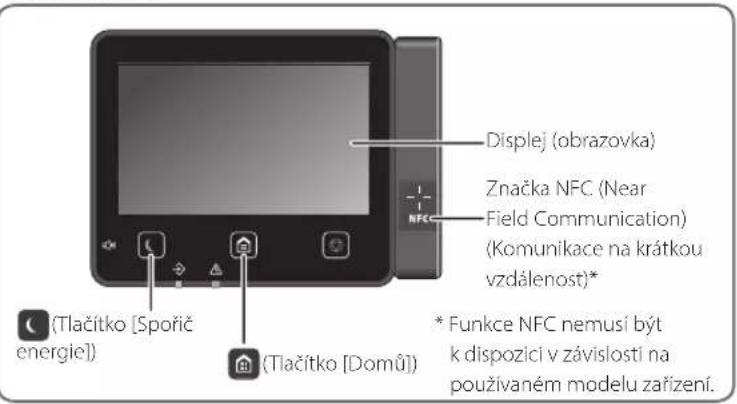
natural_image
Illustration of hands installing or adjusting a component on a machine (no text or symbols visible)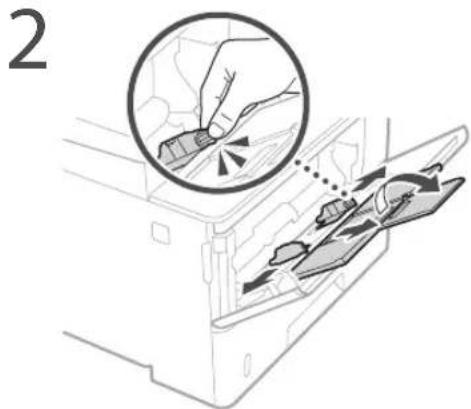
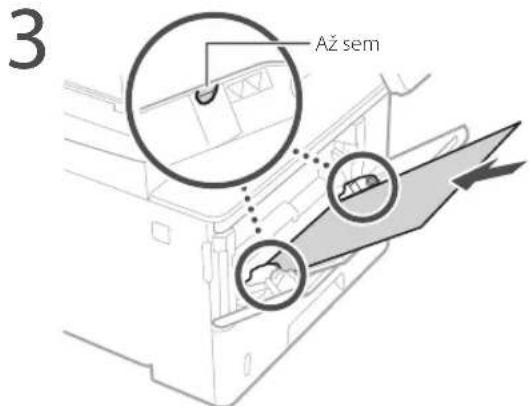
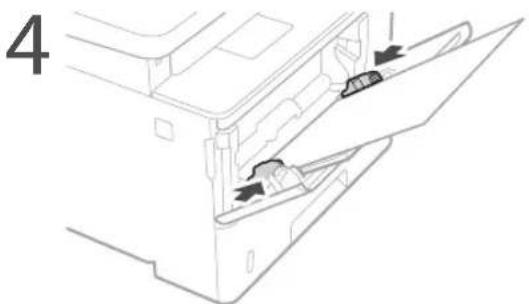
natural_image
Diagram of a printer with a cable inserted into a slot, showing a close-up view of the clip (no text or symbols present)
Podavač
Zásuvka na papír
CLASS 1 LASER PRODUCT
LASER KLASSE 1
APPAREIL À LASER DE CLASSE 1
APPARECCHIO LASER DI CLASSE 1
PRODUCTO LÁSER DE CLASE 1
APARELHO A LASER DE CLASSE 1
LUOKAN 1 LASER-TUOTE
LASERPRODUKT KLASS 1
natural_image
Illustration of a hand holding a mechanical component (no text or symbols visible)Regulatory information for users in Jordan
MF543x / MF542x includes approved Wireless LAN Module (Model name: AW-NM333). Contains Wireless LAN Module approved by TRC/SS/2018/181
Regulatory information for users in Russia
Regulatory information for users in UAE
MF543x / MF542x includes approved Wireless LAN Module (Model name: AW-NM333).
TRA
REGISTERED No: ER63428/18
DEALER No: DA0060877/11
RE Directive
(Only for European radio equipment)
RE Declaration of Conformity
English (EN) Hereby, Canon Inc. declares that this equipment is in compliance with Directive 2014/53/EU.
The full text of the EU declaration of conformity is available at the following internet address: http://www.canon-europe.com/ce-documentation Wireless LAN Specifications Frequency band(s):2412-2472MHz Maximum radio-frequency power: 16.51 dBm
natural_image
Line drawing of a printer with a digital display showing an icon (no text or symbols present)Obslužný panel
![Displej (obrazovka) Značka funkcie NFC (Near Field Communication) (Komunikácia na králku vzdialenost)* *Kláves [Šetrič elektrickej energie]) *Kláves [Úvod]) * Funkcia NFC nemusí byť v závislosti od modelu zariadenia dostupná.](/content/2026/04/666791/images/5babe3affe8bc290c996eaa286912f9d94590edc7fe09010996a1035d06696af.jpg)

Skenovanie
natural_image
Illustration of hands installing or adjusting a component on a machine (no text or symbols visible)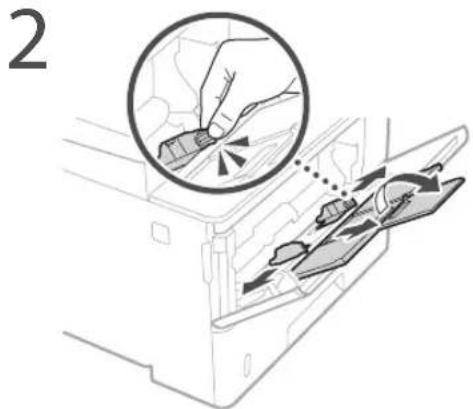
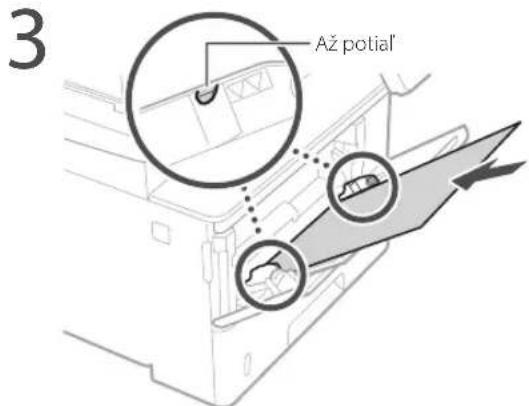
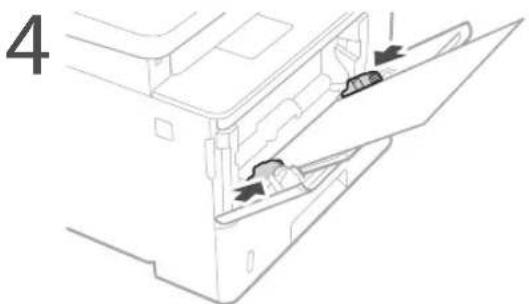
natural_image
Diagram of a printer with a cable inserted, showing a close-up view of the cable being inserted (no text or symbols present)Podávač
natural_image
Illustration of a hand placing two cards into a box with a prohibition symbol (no text or labels)Zásobník na papier
CLASS 1 LASER PRODUCT
LASER KLASSE 1
APPAREIL À LASER DE CLASSE 1
APPARECCHIO LASER DI CLASSE 1
PRODUCTO LÁSER DE CLASE 1
APARELHO A LASER DE CLASSE 1
LUOKAN 1 LASER-TUOTE
LASERPRODUKT KLASS 1
Pri preprave zariadenia
natural_image
Illustration of a hand holding a mechanical component (no text or symbols visible)Regulatory information for users in Jordan
MF543x / MF542x includes approved Wireless LAN Module (Model name: AW-NM333). Contains Wireless LAN Module approved by TRC/SS/2018/181
Regulatory information for users in Russia
Regulatory information for users in UAE
MF543x / MF542x includes approved Wireless LAN Module (Model name: AW-NM333).
TRA
REGISTERED No: ER63428/18
DEALER No: DA0060877/11
RE Directive
(Only for European radio equipment)
RE Declaration of Conformity
English (EN) Hereby, Canon Inc. declares that this equipment is in compliance with Directive 2014/53/EU.
The full text of the EU declaration of conformity is available at the following internet address: http://www.canon-europe.com/ce-documentation Wireless LAN Specifications Frequency band(s):2412-2472MHz Maximum radio-frequency power: 16.51 dBm
natural_image
Line drawing of a printer with a digital display showing an icon (no text or symbols present)Upravljalna plošča
![Zaslon Oznaka NFC NFC (Near Field Communication) (komunikacija s tehnologijo bližnjega polja)* *(tipka [Varčevanje energije]) *(tipka [Domov]) * Funkcija NFC morda ni na voljo, odvisno od modela naprave.](/content/2026/04/666791/images/5be18adf54eb1f814ad41d2ef589b18fd0a2ee6e95e6d1d47e7c6cc9e130d662.jpg)

Skeniranje
Podrobnosti
natural_image
Illustration of hands installing or adjusting a component on a machine (no text or symbols visible)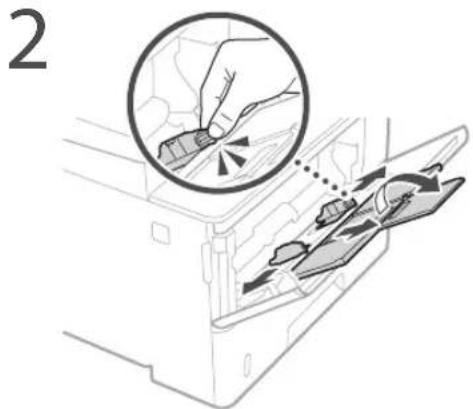
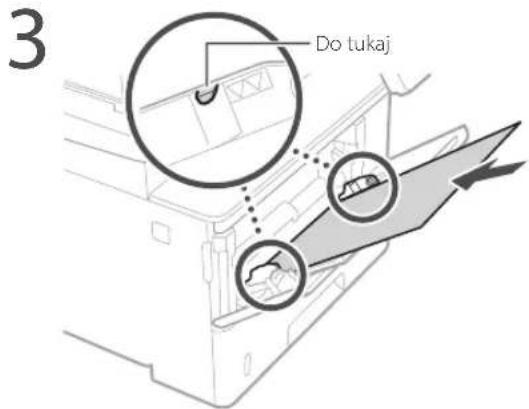
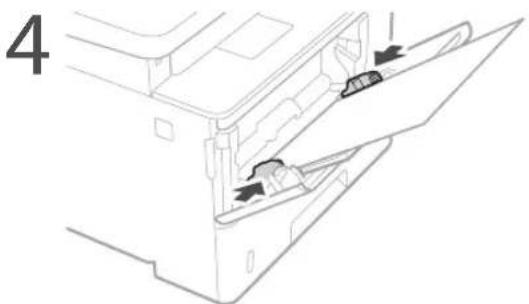
natural_image
Diagram of a printer with a cable inserted into a slot, showing a close-up view of the socket (no text or symbols present)Podajalnik
natural_image
Illustration of a hand placing two cards into a box with a prohibition symbol (no text or labels)Kaseta za papir
CLASS 1 LASER PRODUCT
LASER KLASSE 1
APPAREIL À LASER DE CLASSE 1 APPARECCHIO LASER DI CLASSE 1 PRODUCTO LÁSER DE CLASE 1 APARELHO A LASER DE CLASSE 1 LUOKAN 1 LASER-TUOTE LASERPRODUKT KLASS 1
natural_image
Illustration of a hand holding a mechanical component (no text or symbols visible)Regulatory information for users in Jordan MF543x / MF542x includes approved Wireless LAN Module (Model name: AW-NM333). Contains Wireless LAN Module approved by TRC/SS/2018/181
Regulatory information for users in UAE MF543x / MF542x includes approved Wireless LAN Module (Model name: AW-NM333).
TRA
REGISTERED No: ER63428/18
DEALER No: DA0060877/11
RE Directive
(Only for European radio equipment)
RE Declaration of Conformity
English (EN) Hereby, Canon Inc. declares that this equipment is in compliance with Directive 2014/53/EU.
The full text of the EU declaration of conformity is available at the following internet address: http://www.canon-europe.com/ce-documentation Wireless LAN Specifications Frequency band(s):2412-2472MHz Maximum radio-frequency power: 16.51 dBm
natural_image
Line drawing of a printer with a digital display showing an icon (no text or symbols present)Upravljačka ploča
![Zaslon Oznaka NFC (Near Field Communication) (komunikacija malog dometa)* (Gumb [Ušteda energije]) (Gumb [Početni zaslon]) * NFC možda nije dostupan ovisno o modelu vašeg uređaja.](/content/2026/04/666791/images/4a01813f4aa21a3003e053d09c35bc353131c24206837628c5227e27e4d266c6.jpg)

Skeniranje
- Postavite izvornik.
- Pritisnite 🏠 i odaberite
. - Odaberite vrstu skeniranja i unesite potrebne informacije.
- Odaberite
, ili .
Vrste skeniranja
■ Pohrani na računalu
■ Pohrani na memorijski uređaj USB
■ Pošalji e-poštu/l-Faks
■ Pošalji na datotečni poslužitelj
Za skeniranje s računala
■ MF Scan Utility
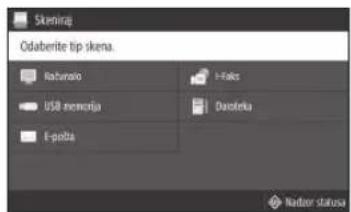
Za detalje
„Skeniranje“ u Korisničkom vodiču

Kopiranje
- Postavite izvornik.
- Pritisnite 🏠 a zatim odaberite
. - Po potrebi odredite postavke kopiranja.
- Upišite željeni broj kopija.
- Odaberite
.
Korisne funkcije kopiranja
natural_image
Illustration of hands installing or adjusting a component on a machine (no text or symbols visible)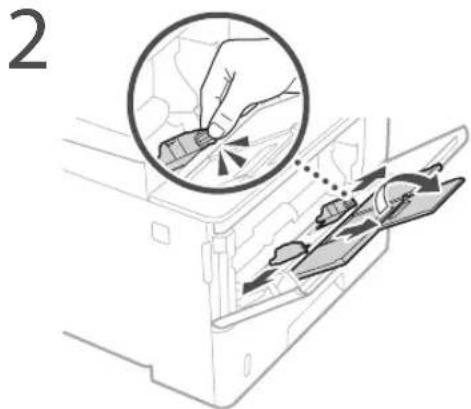
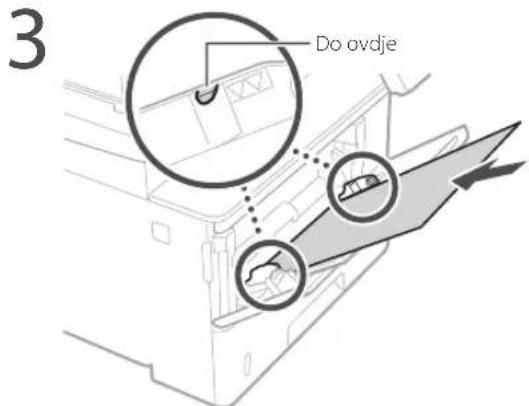
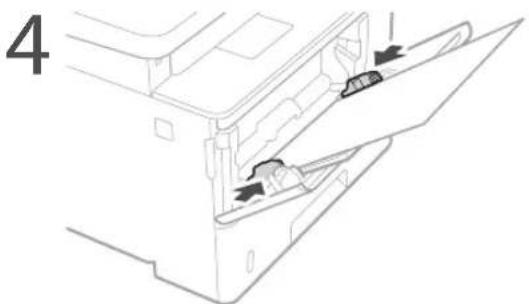
5 Navedite veličinu i vrstu papira sukladno zaslonu.
Ako je došlo do problema
natural_image
Diagram of a printer with a cable inserted, showing a close-up of the cable being inserted (no text or symbols present)Ako problem i dalje postoji, pogledajte Korisnički vodič.
Došlo je do zaglavljivanja papira
Uklonite zaglavljeni papir u skladu s uputama na zaslonu.
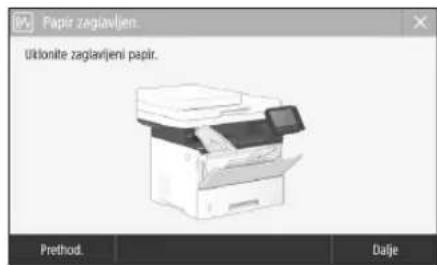
- Pazite da na kopirno staklo ne ispuštate teške predmete, npr. rječnike. Na taj način možete oštetiti kopirno staklo te se ozlijediti.
- Ne prenosite uređaj s postavljenom bilo kojom ladicom za papir ili dodatnim ulagačem papira. U protivnom uređaj može pasti i uzrokovati nastanak ozljede.
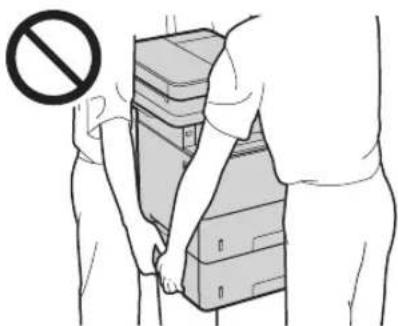
Ulagac
Ladica za papir
- Nemojte stavljati ruke u uređaj kada je ladica za papir uklonjena jer može doći do ozljede.
Gumb Energy Saver (Ušteda energije)
CLASS 1 LASER PRODUCT
LASER KLASSE 1
APPAREIL À LASER DE CLASSE 1
APPARECCHIO LASER DI CLASSE 1
PRODUCTO LÁSER DE CLASE 1
APARELHO A LASER DE CLASSE 1
LUOKAN 1 LASER-TUOTE
LASERPRODUKT KLASS 1
Prijenos uređaja
natural_image
Illustration of a hand holding a mechanical component (no text or symbols visible)Regulatory information for users in Jordan
MF543x / MF542x includes approved Wireless LAN Module (Model name: AW-NM333). Contains Wireless LAN Module approved by TRC/SS/2018/181
Regulatory information for users in Russia
Regulatory information for users in UAE
MF543x / MF542x includes approved Wireless LAN Module (Model name: AW-NM333).
TRA
REGISTERED No: ER63428/18
DEALER No: DA0060877/11
RE Directive
(Only for European radio equipment)
RE Declaration of Conformity
English (EN) Hereby, Canon Inc. declares that this equipment is in compliance with Directive 2014/53/EU.
The full text of the EU declaration of conformity is available at the following internet address: http://www.canon-europe.com/ce-documentation Wireless LAN Specifications Frequency band(s):2412-2472MHz Maximum radio-frequency power: 16.51 dBm
natural_image
Line drawing of a printer with a small electronic device attached to the top-right corner (no text or symbols)Kezelőpanel
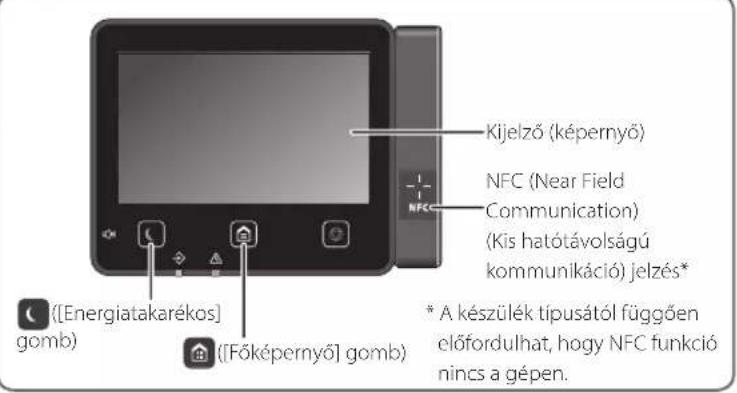
Részletekért lásd
natural_image
Illustration of hands installing or adjusting a component on a machine (no text or symbols visible)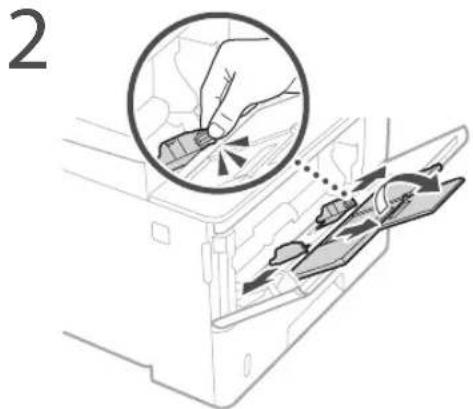
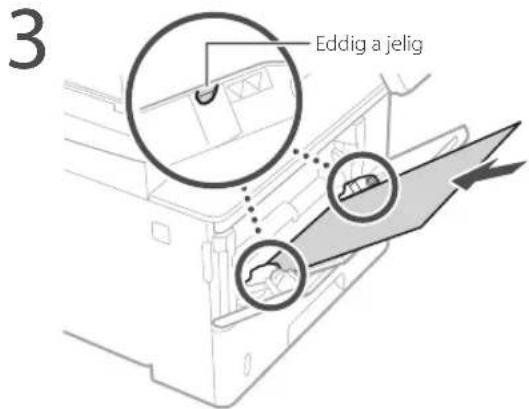
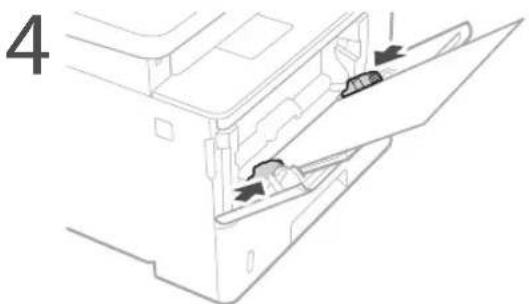
natural_image
Diagram of a printer with a cable inserted into a slot, showing a close-up view of the cable being inserted (no text or symbols present)Adagoló
Papírfiók
CLASS 1 LASER PRODUCT
LASER KLASSE 1
APPAREIL À LASER DE CLASSE 1
APPARECCHIO LASER DI CLASSE 1
PRODUCTO LÁSER DE CLASE 1
APARELHO A LASER DE CLASSE 1
LUOKAN 1 LASER-TUOTE
LASERPRODUKT KLASS 1
natural_image
Illustration of a hand holding a mechanical component (no text or symbols visible)Regulatory information for users in Jordan MF543x / MF542x includes approved Wireless LAN Module (Model name: AW-NM333). Contains Wireless LAN Module approved by TRC/ SS/2018/181
Regulatory information for users in UAE MF543x / MF542x includes approved Wireless LAN Module (Model name: AW-NM333).
TRA
REGISTERED No: ER63428/18
DEALER No: DA0060877/11
RE Directive
(Only for European radio equipment)
RE Declaration of Conformity
English (EN) Hereby, Canon Inc. declares that this equipment is in compliance with Directive 2014/53/EU.
The full text of the EU declaration of conformity is available at the following internet address: http://www.canon-europe.com/ce-documentation Wireless LAN Specifications Frequency band(s):2412-2472MHz Maximum radio-frequency power: 16.51 dBm
natural_image
Line drawing of a printer with a digital display showing an icon (no text or symbols present)Panoul de operare
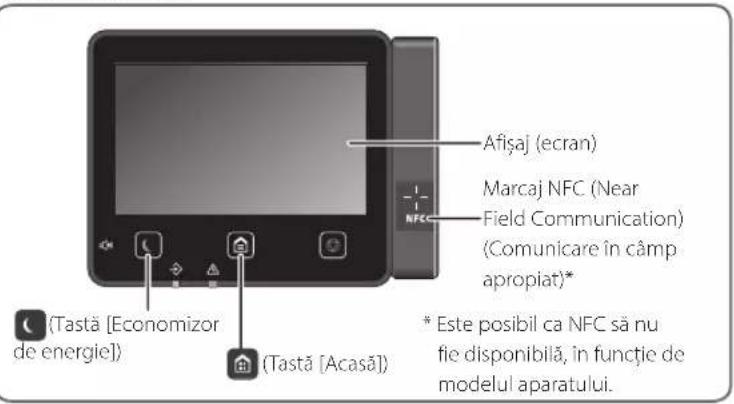
natural_image
Illustration of hands installing or adjusting a component on a machine (no text or symbols visible)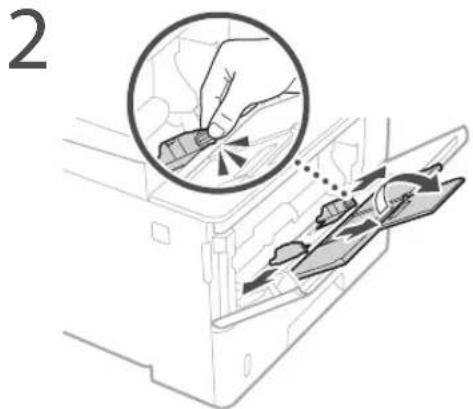
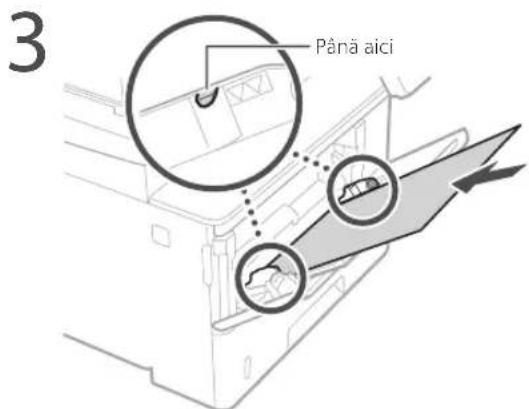
natural_image
Diagram of a printer with a cable inserted into a slot, showing a close-up of the cable being inserted (no text or symbols present)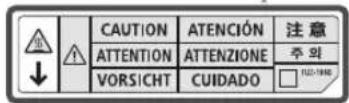
Alimentatorul
CLASS 1 LASER PRODUCT
LASER KLASSE 1
APPAREIL À LASER DE CLASSE 1
APPARECCHIO LASER DI CLASSE 1
PRODUCTO LÁSER DE CLASE 1
APARELHO A LASER DE CLASSE 1
LUOKAN 1 LASER-TUOTE
LASERPRODUKT KLASS 1
natural_image
Illustration of a hand holding a mechanical component (no text or symbols visible)Regulatory information for users in Jordan
MF543x / MF542x includes approved Wireless LAN Module (Model name: AW-NM333). Contains Wireless LAN Module approved by TRC/SS/2018/181
Regulatory information for users in Russia
Regulatory information for users in UAE
MF543x / MF542x includes approved Wireless LAN Module (Model name: AW-NM333).
TRA
REGISTERED No: ER63428/18
DEALER No: DA0060877/11
RE Directive
(Only for European radio equipment)
RE Declaration of Conformity
English (EN) Hereby, Canon Inc. declares that this equipment is in compliance with Directive 2014/53/EU.
The full text of the EU declaration of conformity is available at the following internet address: http://www.canon-europe.com/ce-documentation Wireless LAN Specifications Frequency band(s):2412-2472MHz Maximum radio-frequency power: 16.51 dBm
natural_image
Line drawing of a printer with a digital display showing an icon (no text or symbols present)Работен панел
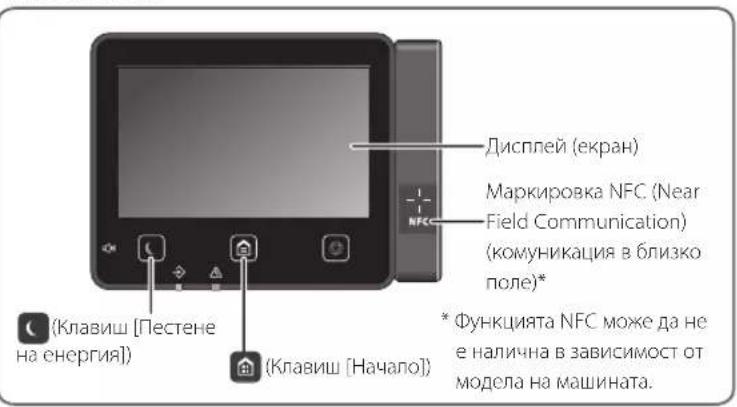
За подробности
natural_image
Illustration of hands installing or adjusting a door panel inside a machine (no text or symbols visible)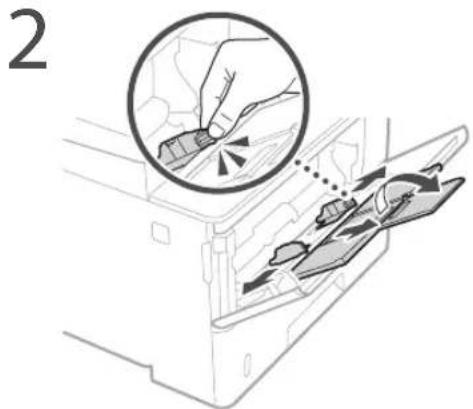
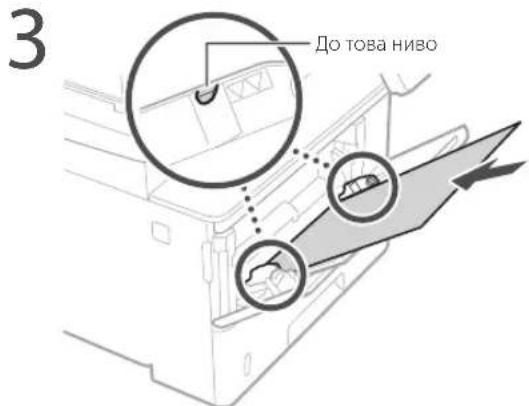
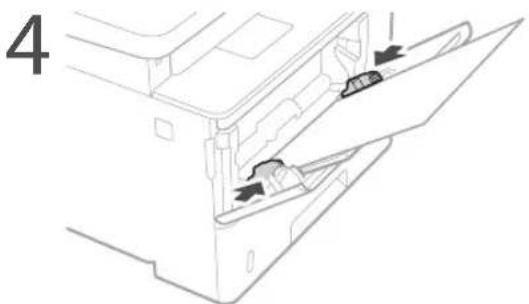
natural_image
Diagram of a printer with a cable inserted into a slot, showing a close-up of the cable being inserted (no text or symbols present)Подаващо устройство
Касета за хартия
CLASS 1 LASER PRODUCT
LASER KLASSE 1
APPAREIL À LASER DE CLASSE 1
APPARECCHIO LASER DI CLASSE 1
PRODUCTO LÁSER DE CLASE
APARELHO A LASER DE CLASSE 1
LUOKAN 1 LASER-TUOTE
LASERPRODUKT KLASS 1
natural_image
Illustration of a hand holding a mechanical component (no text or symbols visible)Regulatory information for users in Jordan MF543x / MF542x includes approved Wireless LAN Module (Model name: AW-NM333). Contains Wireless LAN Module approved by TRC/SS/2018/181
Regulatory information for users in Russia
Regulatory information for users in UAE
MF543x / MF542x includes approved Wireless LAN Module (Model name: AW-NM333).
TRA
REGISTERED No: ER63428/18
DEALER No: DA0060877/11
RE Directive
(Only for European radio equipment)
RE Declaration of Conformity
English (EN) Hereby, Canon Inc. declares that this equipment is in compliance with Directive 2014/53/EU.
The full text of the EU declaration of conformity is available at the following internet address: http://www.canon-europe.com/ce-documentation Wireless LAN Specifications Frequency band(s):2412-2472MHz Maximum radio-frequency power: 16.51 dBm
natural_image
Line drawing of a printer with a digital display showing an icon (no text or symbols present)İşletim Paneli
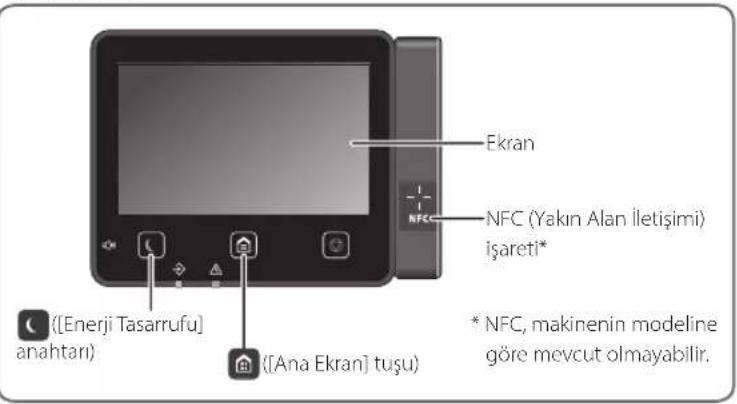
natural_image
Illustration of hands installing or adjusting a component on a machine (no text or symbols visible)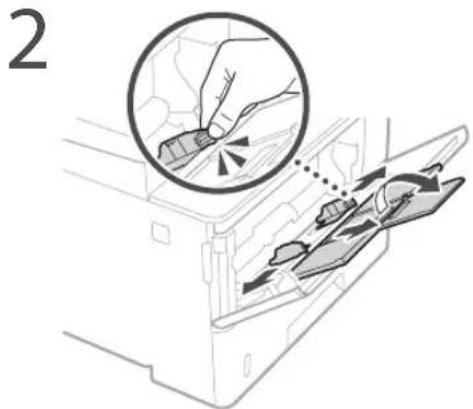
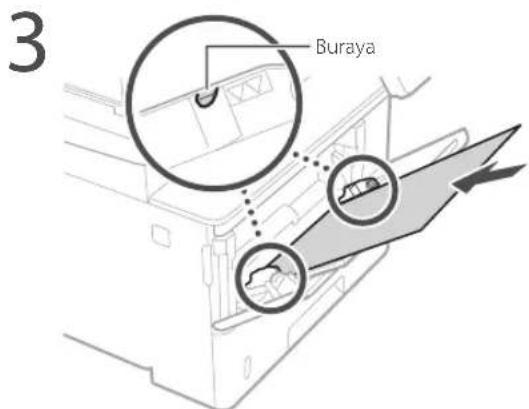
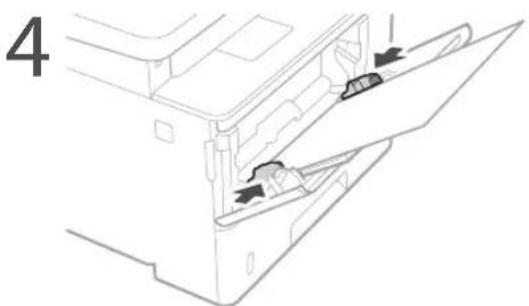
natural_image
Technical line drawing of a mechanical assembly with arrows indicating motion or force (no text or symbols)natural_image
Diagram of a printer with a cable inserted, showing a close-up of the cable being inserted (no text or symbols present)Besleyici
natural_image
Illustration of a hand placing two cards into a box with a prohibition symbol (no text or labels)Kağıt çekmecesi
CLASS 1 LASER PRODUCT
LASER KLASSE 1
APPAREIL À LASER DE CLASSE 1
APPARECCHIO LASER DI CLASSE 1
PRODUCTO LÁSER DE CLASE 1
APARELHO A LASER DE CLASSE 1
LUOKAN 1 LASER-TUOTE
LASERPRODUKT KLASS 1
Makineyi taşırken
natural_image
Illustration of a hand holding a mechanical component (no text or symbols visible)Regulatory information for users in Jordan MF543x / MF542x includes approved Wireless LAN Module (Model name: AW-NM333). Contains Wireless LAN Module approved by TRC/SS/2018/181
Regulatory information for users in UAE MF543x / MF542x includes approved Wireless LAN Module (Model name: AW-NM333).
TRA
REGISTERED No: ER63428/18
DEALER No: DA0060877/11
RE Directive
(Only for European radio equipment)
RE Declaration of Conformity
English (EN) Hereby, Canon Inc. declares that this equipment is in compliance with Directive 2014/53/EU.
The full text of the EU declaration of conformity is available at the following internet address: http://www.canon-europe.com/ce-documentation Wireless LAN Specifications Frequency band(s):2412-2472MHz Maximum radio-frequency power: 16.51 dBm

![File Edit View Insert Modify Share viewing Share view Share name: Share type: Share size: 100% Share length: 50% Share width: 50% Share height: 50% Share color: Share color: Share color: Share color: Share color: Share color: Share color: Share color: Share color: Share color: Share color: Share color: Share color: Share color: Share color: Share color: Share color: Share color: Share color: Share color: Share color: Share color: Share color: Share color: Share color: Share color: Share name: Share type: Share size: Share width: Share length: Share height: Share color: Share color: Share name: Share type: Share size: Share width: Share length: Share height: Share color: Share color: Share name: Share type: Share size: Share width: Share length: Share height: Share color: Share color: Share name: Share type: Share size: Share width: Share length: Share height: Share color: Share color: Share name: Share type: Share size: Share width: Share length: Share height: Share color: Share name: Share type: Share size: Share width: Share length: Share height: Share color: Share name: Share type: Share size: Share width: Share length: Share height: Share color: Share name: Share type: Share size: Share width: Share length: Share height: Share color: Share name: Share type: Share size: Share width: Share length: Share height: Share color: Share name: Share type: Share size: Share width: Share length: Share height: Share color: Share name: Share type: Share size: Share width: Share length: Share height: Share color: Share name: Share type: Share size: Share width: Share length: Share height: Share color: Share name: Share type: Share size: Share width: Share length: Share height: Share color: Share name: Share type: Share size: Share width: Share length: Share height: Share color: Share name: Share type: Share size: Share wide: 2.5 px 2.5 px 2.5 px 2.5 px 2.5 px 2.5 px 2.5 px 2.5 px 2.5 px 2.5 px 2.5 px 2.5 px 2.5 px 2.5 px 2.5 px 3.0 px 3.0 px 3.0 px 3.0 px 3.0 px 3.0 px 3.0 px 3.0 px 3.0 px 3.0 px 3.0 px 3.0 px 3.0 px 3.0 px 3.0 px All rights reserved. [ ] [ ] [ ] [ ] [ ] [ ] [ ] [ ] [ ] [ ] [ ] [ ] [ ] [ ] [ ] [ ] [ ] [ ] [ ] [ ] [ ] [ ] [ ] [ ] [ ] [ ] [ ] [ ] [ ] [ ] [ ] [ ] [ ] [ ] [ ] [ ] [ ] [ ] [ ] [ ] [ ] [ ] [ ] [ ] [ ] [ ] [ ] [ ] [ ] [ ] [ ][ ]](/content/2026/04/666791/images/5e94331f7a3c9419fe5b2855a4a3383d5d35aae150dc0d6b0a0e4c994785a4ea.jpg)
natural_image
Diagram of a printer with a close-up view showing the cable being inserted (no text or symbols present)natural_image
Illustration of a hand holding a mechanical component (no text or symbols visible)RE Directive (Only for European radio equipment) RE Declaration of Conformity
English (EN) Hereby, Canon Inc. declares that this equipment is in compliance with Directive 2014/53/EU. The full text of the EU declaration of conformity is available at the following internet address: http://www.canon-europe.com/ce-documentation Wireless LAN Specifications Frequency band(s):2412-2472MHz Maximum radio-frequency power: 16.51 dBm
Regulatory information for users in Jordan MF543x / MF542x includes approved Wireless LAN Module (Model name: AW-NM333). Contains Wireless LAN Module approved by TRC/SS/2018/181
Regulatory information for users in UAE MF543x / MF542x includes approved Wireless LAN Module (Model name: AW-NM333).
TRA REGISTERED No: ER63428/18 DEALER No: DA0060877/11
تعويض کارتریج تونر
natural_image
Diagram of a printer with a cable inserted, showing a close-up view of the cable being inserted (no text or symbols present)natural_image
Line drawing of a hand holding a mechanical component (no text or symbols)RE Directive (Only for European radio equipment) RE Declaration of Conformity
English (EN) Hereby, Canon Inc. declares that this equipment is in compliance with .Directive 2014/53/EU The full text of the EU declaration of conformity is available at the following :internet address http://www.canon-europe.com/ce-documentation Wireless LAN Specifications Frequency band(s):2412-2472MHz Maximum radio-frequency power: 16.51 dBm
Regulatory information for users in Jordan
MF543x / MF542x includes approved Wireless LAN Module (Model name: AW-NM333). Contains Wireless LAN Module approved by TRC/SS/2018/181
Regulatory information for users in Russia
Regulatory information for users in UAE MF543x / MF542x includes approved Wireless LAN Module (Model name: AW-NM333).
TRA
REGISTERED No: ER63428/18
DEALER No: DA0060877/11
30-2, Shimomaruko 3-chome, Ohta-ku, Tokyo 146-8501, Japan
One Canon Park, Melville, NY 11747, U.S.A.
CANON EUROPA N.V.
Bovenkerkerweg 59, 1185 XB Amstelveen, The Netherlands
2F Jinbao Building No.89, Jinbao Street,
Dongcheng District, Beijing 100005, PRC
CANON SINGAPORE PTE LTD
1 Fusionopolis Place, #15-10, Galaxis, Singapore 138522
CANON AUSTRALIA PTY LTD
Building A, The Park Estate, 5 Talavera Road, Macquarie Park, NSW 2113, Australia
CANON GLOBAL WORLDWIDE SITES
https://global.canon