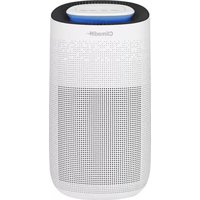
AIRPUR3 - Air purifier CLIMADIFF - Free user manual and instructions
Find the device manual for free AIRPUR3 CLIMADIFF in PDF.


User questions about AIRPUR3 CLIMADIFF
0 question about this device. Answer the ones you know or ask your own.
Ask a new question about this device
Download the instructions for your Air purifier in PDF format for free! Find your manual AIRPUR3 - CLIMADIFF and take your electronic device back in hand. On this page are published all the documents necessary for the use of your device. AIRPUR3 by CLIMADIFF.
USER MANUAL AIRPUR3 CLIMADIFF
NOTICE D'UTILISATION AIRPUR3
natural_image
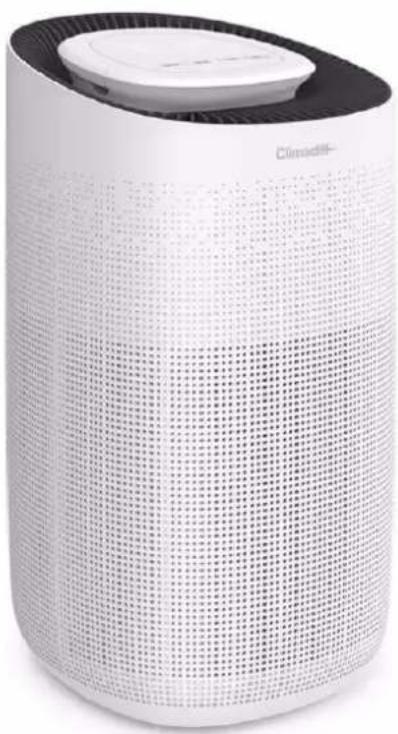
White cylindrical smart air purifier with grid pattern and a black lid (no visible text or symbols)FR - MANUEL D'UTILISATION p. 2
GB - USE INSTRUCTIONS p. 17
text_image
QR code image containing encoded data, no visible human-readable textnatural_image
Line drawing of a portable coffee maker with a cylindrical container and a side panel, showing no text or symbols.text_image
Packagingnatural_image
Line drawing of a device resembling a blender or printer with a cylindrical holder, showing no text or symbols.Thank you for choosing this CLIMADIFF portable air purifier! Read this manual carefully before using the appliance, and keep it for future reference.
1. GENERAL SAFETY INSTRUCTIONS
- Please read all instructions before using the appliance.
- This appliance is exclusively intended for domestic use.
- Do not use this appliance outside.
- Keep the unit away from heated surfaces and fire.
- Do not place anything on top of the unit.
- This appliance is not a substitute for good ventilation, a regular vacuum cleaner, cleaning or use of a cooker hood or fan during cooking.
- Do not use the appliance if the cord or plug is damaged.
- To protect against electrical hazards, do not immerse the device in water or other liquids. Do not use near water.
- Do not attempt to repair or adjust the electrical or mechanical functions of this appliance. This will void your warranty. There are no user serviceable parts inside the appliance. All maintenance should be carried out by qualified personnel.
• Always unplug the appliance after using it. - Always keep regular and orderly placement of wires to avoid stumbling people or pulling out the plug.
Safety of children and other vulnerable persons
- This appliance can be used by children aged from 8 years and above, and by persons with reduced physical, sensory or mental capabilities or lack of experience and knowledge if they have been given supervision or instruction concerning use of the appliance in a safe way and understand the hazards involved.
- Cleaning and user maintenance shall not be made by children, unless they are more than 8 years and they are under supervision.
- Children should be supervised to ensure that they do not play with the appliance.
- Keep the appliance and cord out of reach of children under 8 years old.
Electrical safety
- In order to protect against electric shock, provide an anti-explosive residual current device (RCD).
-
The appliance must be installed in accordance with the regulations for electrical installations.
-
If the wall outlet used to power the unit is in poor condition, the outlet on the unit becomes hot. Make sure that you connect the device to a properly connected wall outlet.
- If the power cord is damaged, it must be replaced by the distributor, after sales service or a person of similar qualification in order to avoid any danger.
- To avoid risk of electric shock, be sure to turn off the power and unplug before cleaning the filter.
- Contact the authorized service center for repair or servicing of this appliance.
- To reduce the risk of electric shock, spontaneous combustion, fire and other personal injury or property damage, follow these instructions:
√ After you have finished using the air purifier, the user must turn off the device.
√ If the unit enters the water, disconnect immediately, do not use the hands to remove it from the water.
To reduce the risk of electric shock, do not remove front or back covers.
Important information concerning installation
- Always place and use the appliance on a dry, level, flat and level surface.
- Please do not install the air purifier in washhouses or other places with water and moist.
- Do not use the appliance near gas appliances, heaters or fireplaces.
- Do not use this unit in a room with large temperature variations as this may cause condensation in the unit.
- Do not use the device in a humid environment or in an environment with high ambient temperatures, such as the bathroom, toilet or kitchen.
- For an optimal functioning, it's recommended to place the appliance in a room where temperature is between 17 and 35^ and where relative humidity is between 20 and 85% .
- Never obstruct air inlets / outlets, or place the appliance on a soft surface such as a bed or sofa, as this may cause the appliance to tip over, blocking the air intake.
- Leave at least 50 cm of clearance behind and on both sides of the appliance and leave at least 50 cm of free space above the appliance.
-
Do not place anything on top of the appliance and do not sit on the appliance.
-
Do not place the appliance directly below an air conditioner to prevent condensation from flowing on the appliance.
- To prevent interference, place the unit at least 2m away from electrical appliances that use radio waves in the air, such as televisions, radios and radio-controlled clocks.
Operating instructions
- The appliance is intended for domestic use only under normal operating conditions.
- Make sure all filters are properly installed before turning on the power.
- Avoid banging against the appliance (especially air intake and exhaust) with hard objects.
- Do not put your fingers or objects in the air outlet.
- Do not use this appliance when using smoke repellents, burning incense or chemical vapors, or in areas with oily residue.
- The device does not remove carbon monoxide (CO) or radon (Rn). It cannot be used as a safety device in case of accident with combustion processes and hazardous chemicals.
- Always lift or move the appliance by the handle on the back of the appliance.
• Always unplug the appliance after use and before cleaning it.
Caution: cleaning and servicing
- Always unplug the air cleaner before moving or cleaning, cleaning the filter and each time the unit is not in use. To disconnect the appliance, be sure to disconnect the plug and not the cord.
- Filters should be cleaning regularly. In general and on condition that the air purifier is used for long time, cleaning strainers once per two weeks is recommended.
- Do not clean the air purifier with water, but wipe with semi-wet soft cloth.
Trouble shooting
- Any electrical work should be carried out by a qualified and skilled technician.
- The appliance should be repaired by an accredited repair centre, using only manufacturer's original spare parts.
The appliance is designed for home use only. The manufacturer declines any liability whatsoever in the case of other use.
2. DESCRIPTION OF THE APPLIANCE
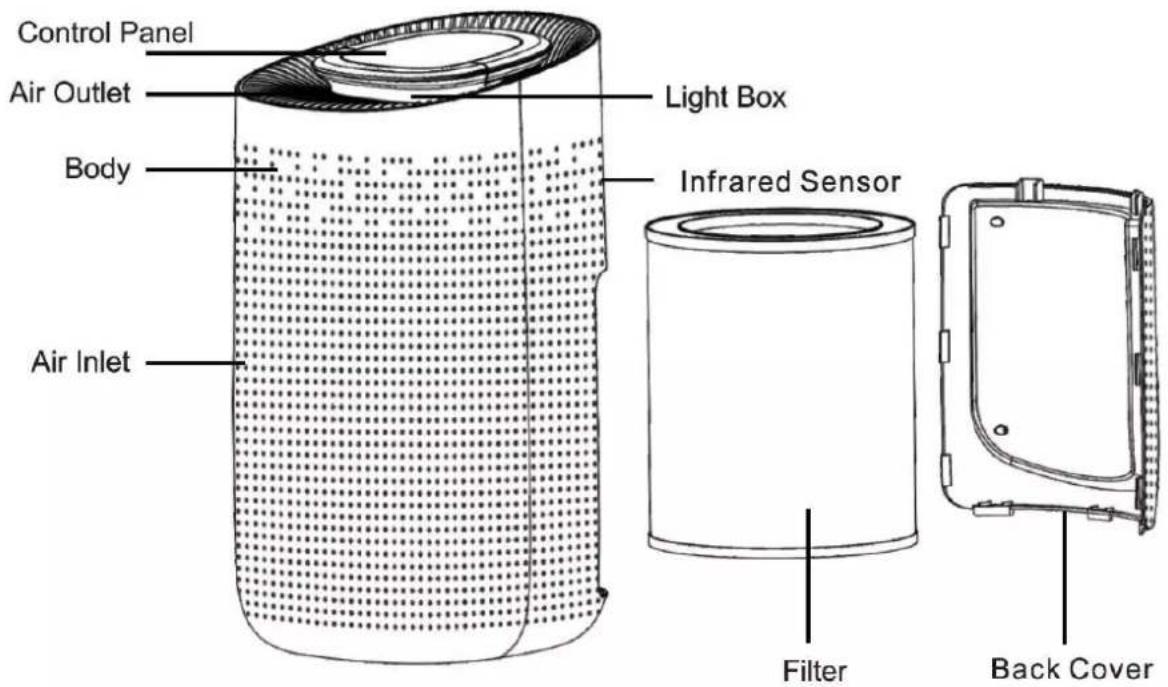
text_image
Control Panel Air Outlet Body Air Inlet Light Box Infrared Sensor Filter Back Cover3. TECHNICAL DATA
Below is an example of the nameplate:
Climadiff
Purificateur d'air
Modèle: AIRPUR3
Puissance: 50 W
Voltage/Fréquence: AC100-240V 50/60Hz
Surface couverte: 50 m²
The nameplate attached under the appliance base includes the entire information specific to your appliance.
We recommend that you make a note of its serial number in this booklet prior to installation, so that you can refer to it later (technical work, request for assistance, etc.).

CAUTION: no assistance can be provided without this information.
4. OPERATING INSTRUCTIONS
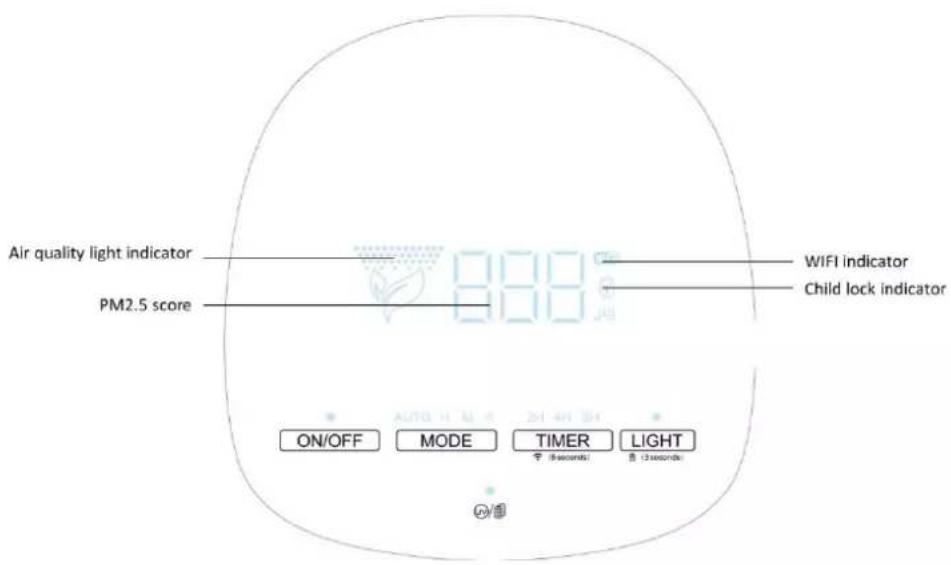
text_image
Air quality light indicator PM2.5 score WIFI indicator Child lock indicator ON/OFF MODE TIMER LIGHT 30 seconds 31 seconds | ON/OFF ButtonPress the power button, the machine turns on at mid default mode meanwhile, the buzzer rings for one time and the indicator will be on. Press again to turn off the machine, all the lights will be off, then the machine is in standby mode. |
  | MODE buttonIn the condition of working, press the MODE button to adjust the wind speed among the circulation of AUTO-H-M-NIGHT MODE, meanwhile, the buzzer rings for one and the indicator will be on. |
   | TIMER buttonIn the condition of working, press the TIMER button to set timer among the circulation of 2H, 4H and 8H. Every time you press the button, the buzzer rings for one time, and the indicator will be on.Notice: Long press the TIMER button for 5 seconds to start WIFI function, and the indicator will be on. If you turn off the machine, the WIF function need to be reset when you turn on again |
 8 (3seconds) 8 (3seconds) | LIGHT buttonIn the condition of working, press the light Button, the indicator will be on Every time you press it, the buzzer will ring for one time, and the light will be changed among Soft – Standard – Off mode.Notice: In the condition of shutdown, the light adjustment can't be operated. During the first 30s preheating period, the light button just could be operated between on and off mode.Notice: In the condition of working, press the LIGHT button for 3s to start the Child lock function, the indicator will be on. Press again for 3s, the buzzer will ring one time then the indicator will be off to unlock the function. Any function can operate in the mode of Child lock function unless you unlock it. |
 | UV buttonIn the condition of working, press the UV button to start UV function, the indicator will be on. Press again to turn off this function, the buzzer will ring for one time when you press it every time.Note: In the condition of working, when the machine detects the filter is saturated after running for 2200 hours, the filter indicator light will keep flashing in red. Long press the filter button for 7s to stop flashing light and to reset after installing a new filter.(The machine still works normally even in the reminder of replacing filter) |
Air quality light indicator:
The machine gives you the air quality thanks to the light color.
Blue: Good air quality
Yellow: Medium air quality
Red: Bad air quality
Download the application
In order to manage your air purifier with your smartphone, you can download an application.
- To do it, download « TUYA SMART » APP, you can use the QR code below

text_image
QR code image containing encoded data, no visible human-readable text-
Open the app and registrer.
-
Tap « + » on the top right corner of the APP and select the correct device: AIR PURIFIER (see image below)
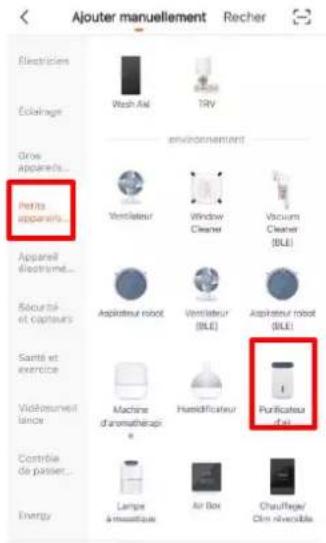
- Follow instruction for configuration.
Note 1 : Make sure your smart device is energized and your mobile phone is connected to your network. If the WIFI indicator of smart device do not flash, please press the TIMER button for more than 5 seconds until the indicator light keeps flashing quickly, it means the devices is ready for configuration.
Note 2 : Please make sure you are connected to a WIFI 2.4GHz.
- Now you can control your smart device via your mobile phone APP anytime and anywhere. Make sur your mobile phone and your air purifier are all connected to the network.
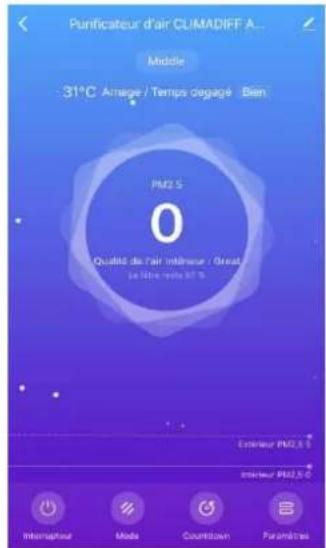
Warning: Always switch off and unplug the appliance before cleaning it or changing the filter. To unplug the unit, be sure to unplug the plug and not the cord. Do not use any tools other than those recommended for the manufacturer.
1. Surface cleaning
Regularly clean the exterior of your air purifier, to prevent dust from accumulating, with a soft or slightly damp cloth. Never use chemical or flammable reagents, such as benzene, alcohol and gasoline. Otherwise, you risk damaging the surface of your device or even the entire operation of the device itself.
2.Cleaning the filters
- If the filter is covered with dust, it may obstruct air circulation and thus reduce the efficiency of the product.
- When the machine detects the filter is saturated after running for 2200 hours, the filter indicator light will keep flashing in red. Long press the filter button for 7s to stop flashing light and to reset after installing a new filter
- CAUTION: it is important to change your filter following the alert. When you turn off the filter change alert, it automatically restarts whether you have changed your used filter or not, it is stopping the alert that starts a new cycle of 2200 hours and not the filter change. After 2200 hours of use, the filter change alert will sound again. To ensure proper use and efficiency of your product, it is essential to change the device filter when the filter change alert indicates it. A used filter can affect the life of your device and no longer purify the ambient air.
3. Remplacing the filter
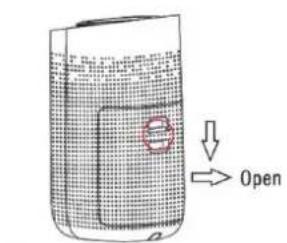
text_image
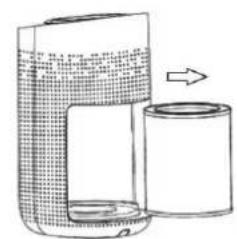
Open① Press the red circle switch to take out the back cover.
natural_image
Line drawing of a portable coffee maker with a cylindrical container and an arrow indicating motion (no text or symbols)② Remove the filter from the machine.
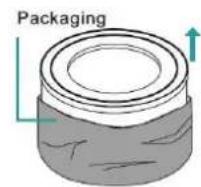
③ Remove the packaging of the new filter.
natural_image
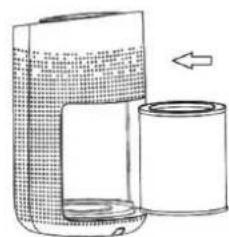
Line drawing of a portable device with a cylindrical container and a side panel, no text or symbols present④Put the filter into the machine.
text_image
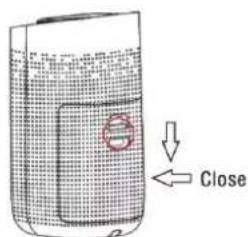
Close⑤ Press the red circle switch button to close the back cover.
NOTICE : Before using the product for the first time, please remove the package of the filter.
4. Post-season storage:
When the mobile air purifier-fan is not used for a long time or it is in the off-season, certain maintenance measures need to be taken.
- Please turn off the product and unplug the plug.
• Wind up the power cord, tie it off and store it. - Place the product in a plastic bag and put it in a dry room.
6. IN THE EVENT OF A BREAKDOWN
Despite the care we take during production, a breakdown can never be totally ruled out. Before contacting your retailer's after-sales department, please check that:
• The appliance is properly plugged in
• There is not a power cut in progress
- The breakdown is not one of those described in the table at the end of this manual
IMPORTANT: if the power cable supplied is damaged, it must be replaced by the manufacturer, a service centre approved by the brand or the retailer. In all events, it must be replaced by qualified personnel in order to avoid any risk of injury.
IF THESE CHECKS REVEAL NOTHING, THEN CONTACT YOUR RETAILER'S AFTER-SALES DEPARTMENT.
CAUTION!
Unplug the appliance before carrying out any maintenance or repair work.
7. TROUBLE SHOOTING
You can solve many common air purifier problems easily, saving you the cost of a possible service call. Try the suggestions below to see if you can solve the problem before calling the servicer.
| PROBLEM | POSSIBLE CAUSE |
| Appliance doesn’t work | Not plugged inNot press the “SPEED” (1/2/3) button on the control panelThe circuit breaker tripped or a blown fuse |
| The appliance is not efficient | Check if nothing is blocking air inlet/outletMake sure that there is no heat source in the roomStrainer are too dirty or need to be changed |
| Significant noise | Is there anything stuck on the fan in the air outlet?Please set a lower grade of wind speed if the noise is too loud, or set low grade of wind speed when using in bedroom at night. |
| Coming out nasty smell | It is the normal phenomenon that the machine emits the smell of plastic for the first time.The machine will emit nasty smell if the filter is dusty, in this case, please clean or replace the filter.If the burning smell emits from the machine, please unplug the power socket and contact with buyer or customer service |
| The reminder of replacing filter is still flashing after user replaced a new one | Please press the Filter button for 7s to reset the machine and the life counter of the filter will start. |
NOTE: all pictures in the manual are for explanation only. The actual shape of the device you purchased may be slightly different, but the operations and functions are the same.
8. ENVIRONMENT
When using this product in European countries, the following instructions must be observed: END OF PRODUCT LIFE: do not dispose of this product with unsorted household waste.
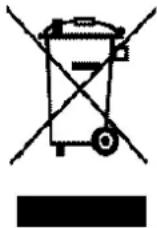
Collecting the product as an order requires special treatment with several possibilities:
A) The municipality has set up collection systems, where electronic waste can be disposed of at no cost to the user.
B) When purchasing a new product, the retailer will take back the old product for free.
C) The manufacturer takes back the device for disposal at no cost to the user.
D) Old products contain valuable resources; they can be sold to scrap dealers. Wild elimination of waste in forests and landscapes is hazardous to health; dangerous substances can leak into soil and water and end up in the food chain.

text_image
CE9. WARNING
As we continuously improve our products for the benefit of our customers, we reserve the right to modify technical characteristics without notice.
Warranties for CLIMADIFF brand products are offered exclusively by selected retailers. No part of these instructions may be considered as a supplementary guarantee.
FRIO ENTREPRISE cannot be held liable for errors or technical or editorial omissions in this document.
Non-binding document.