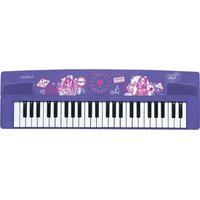
K720VI - Keyboard LEXIBOOK - Free user manual and instructions
Find the device manual for free K720VI LEXIBOOK in PDF.


| Product type | 49-key electronic keyboard |
| Brand | Lexibook |
| Model | K720VI |
| Number of keys | 49 (white and black) |
| Key layout | Black keys in groups of 2 and 3 |
| Power supply | 4 AA/LR6 1.5V batteries (not included) or 6V 250mA AC adapter, center positive (not included) |
| Number of batteries | 4 |
| Battery type | AA / LR6 |
| Recommended AC adapter | 6V, 250mA, center positive |
| Main functions | Piano learning with finger numbering, preloaded songs (Au Clair de la Lune, Beethoven's Ode to Joy) |
| Maintenance and cleaning | Unplug the device before cleaning; use a soft dry cloth; for plastic parts, use a damp cloth with mild soap |
| Safety | Do not mix batteries, respect polarity, remove batteries if not used for extended time, do not short-circuit, do not throw into fire |
| Warranty | 2 years, covers material or assembly defects (excluding misuse or unauthorized intervention) |
| Product reference | K720VI_01 |
| Distributor | LEXIBOOK SA, 2 avenue de Scandinavie, 91953 Courtaboeuf Cedex, France |
| Recommended age | Suitable for children under adult supervision (not a toy) |
Frequently Asked Questions - K720VI LEXIBOOK
User questions about K720VI LEXIBOOK
0 question about this device. Answer the ones you know or ask your own.
Ask a new question about this device
Download the instructions for your Keyboard in PDF format for free! Find your manual K720VI - LEXIBOOK and take your electronic device back in hand. On this page are published all the documents necessary for the use of your device. K720VI by LEXIBOOK.
USER MANUAL K720VI LEXIBOOK
Discovering Your Keyboard
Discover your new keyboard and learn to identify the various parts of your instrument using the diagram on the first page of the booklet.
-
Speakers
-
DEMO ALL button (all melodies)
-
White key (x 29)
-
TEMPO +/- buttons
-
Black key (x 20)
-
RHYTHM buttons
-
ON/OFF button
-
TONE buttons
-
REC button
-
VOLUME +/- buttons
-
PLAY button
-
MP3 input (3.5mm)
-
STOP button
-
MICROPHONE input (3.5mm)
-
DEMO ONE button (one melody)
-
Power supply
When unpacking, ensure that the following elements are included:
1 x 49-key keyboard / 1 x Instruction manual
WARNING: All packaging materials, such as tape, plastic sheets, wire ties and tags are not part of this product and should be discarded for your child's safety.
Posture and Hand Position
To play the keyboard correctly, you must maintain a proper posture and properly place your hands on the keyboard. The quality and ease of play depend on this.
Sit down with your legs in front on a bench or stool. Keep your back straight, facing the centre of the keyboard, and then lean slightly forward while keeping your shoulders relaxed.
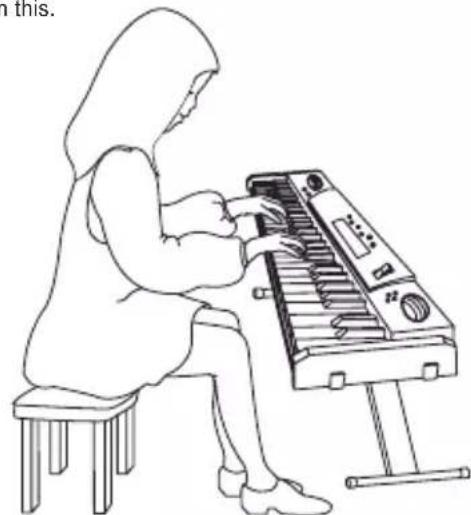
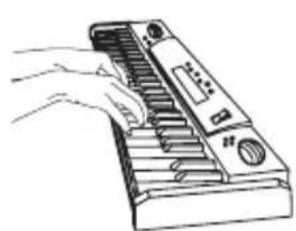
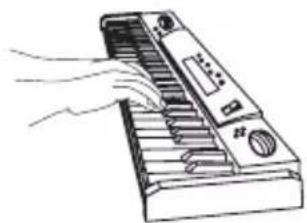
When you place your hands on the keys, your elbows must be slightly in front of you. Your forearm and hands draw a horizontal line when your fingers are resting on the keyboard. Your fingers must be slightly curved.
Keyboard Diagram
The first and last key of the 49-key keyboard are C notes. The K720VI_01 is comprised of white keys and black keys. The black keys are divided into groups of two and three.
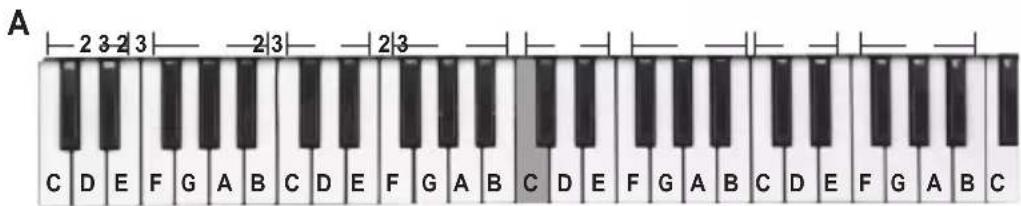
HSITON
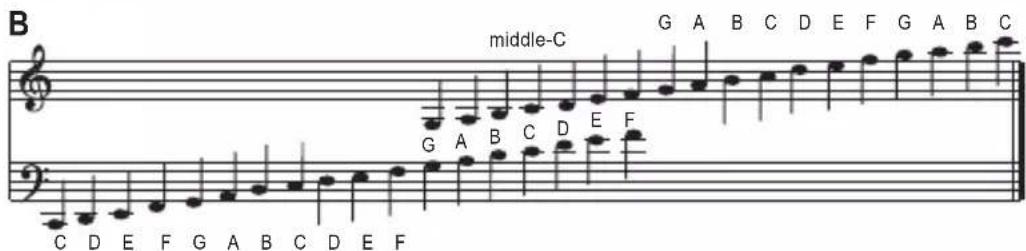
Notes: the greyed note indicates middle C. The C notes are located to the left of the groups of two black keys.
Fingering
The finger numbering system helps you determine where to place your fingers on the keyboard. Each finger is assigned a number.
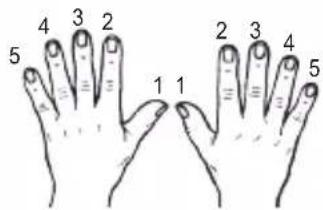
Let's start with an easy exercise.

Left hand Right hand
| LEFT HAND | ||||||||
| Finger | 1 | 2 | 3 | 4 | 5 | 4 | 3 | 2 |
| Key | G | F | E | D | C | D | E | F |
| RIGHT HAND | |||||||||
| Finger | 1 | 2 | 3 | 4 | 5 | 4 | 3 | 2 | 1 |
| Key | C | D | E | F | G | F | E | D | C |
Note: Play with the tips of your fingers.

8

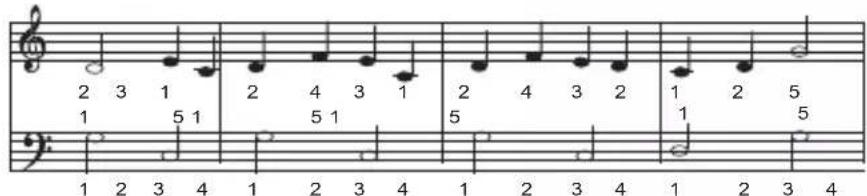
Melody
AU CLAIR DE LA LUNE
Using the diagram on page 8, find the keys that correspond to the notes of this piece, and then play them with your right hand.




Note: the double bar indicates the end of the piece.
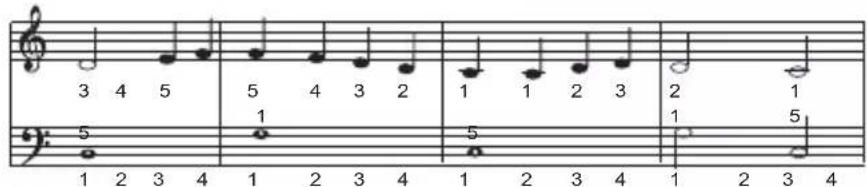
ODE TO JOY by Beethoven


RIGHT HAND
LEFT HAND
RIGHT HAND
LEFT HAND
RIGHT HAND
LEFT HAND

Power sources
The keyboard operates with 4 x AA/LR6 1.5V type batteries (not included) or a 6V 25mA adaptor with positive centre – (not included).
AC operation
- Check that the unit is switched off.
- Insert the AC/DC adaptor's plug into the device's DC jack at the back.
- Then plug the adaptor in an outlet.
HSIN
Batteries installation
- To install the battery, open the battery compartment located at the bottom of the keyboard.
- Insert 4 x AA/LR6 type 1.5V batteries (sold separately) observing the polarity indicated in the battery compartment, and as per the diagram shown.
- Replace the battery compartment cover.
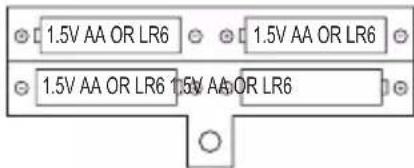
Note: The AC adapter must be disconnected from the DC socket at the bottom of the unit in order for the product to operate on battery power.
Non-rechargeable batteries are not to be recharged. Rechargeable batteries are to be removed from the product before being charged. Rechargeable batteries are only to be charged under adult supervision. Different types of batteries or new and used batteries are not to be mixed. Only batteries of the same or equivalent type as recommended are to be used. Batteries are to be inserted with the correct polarity. Exhausted batteries are to be removed from the product. The supply terminals are not to be short circuited. Do not throw batteries into a fire. Remove the batteries if you are not going to use the unit for a long period of time.
WARNING: Malfunction or loss of memory may be caused by strong frequency interference or electrostatic discharge. Should any abnormal function occur, remove the batteries and insert them again, or unplug the AC adapter from the mains socket and plug it back in.
Maintenance
To prevent fire or shock hazard, disconnect your unit from the power source when cleaning. The finish on your unit may be cleaned with a dust cloth and cared for as other furniture. Use a soft, clean cloth moistened with plain, lukewarm water to clean the exterior of the unit. Use caution when cleaning and wiping the plastic parts. Mild soap and a damp cloth may be used on the front panel.
Warranty
This product is covered by our 2-years warranty.
For any claim under the warranty or after sale service, please contact your distributor and present a valid proof of purchase. Our warranty covers any manufacturing material and workmanship defect, with the exception of any deterioration arising from the non-observance of the instruction manual or from any careless action implemented on this item (such as dismantling, exposition to heat and humidity, etc.). It is recommended to keep the packaging for any further reference.
In a bid to keep improving our services, we could implement modification on the colours and the details of the product shown on the packaging.
NOTE: Please keep this instruction manual, it contains important information.
Reference: K720V1 01
Designed and developed in Europe - Made in China
© 2014 LEXIBOOK®
© Disney
United Kingdom & Ireland
For any further information, please call 0808 100 3015
www.lexibook.com

This product is not a toy.


Descubre tu teclado
LEXIBOOK S.A.
Open access:
hue de Scandinavie,
SUTABOEN FRANCE
Address/Adresse:
Zip code/Code Post
Phone/Telephone
What is your overall impression? Very satisfactory!Tres satisfaisant
Disappointing/Decevant