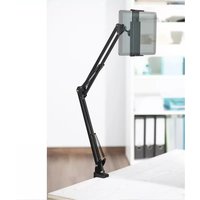
00210577 - Tablet stand HAMA - Free user manual and instructions
Find the device manual for free 00210577 HAMA in PDF.


| Product type | Tablet stand |
| Brand | Hama |
| Model | 00210577 |
| Usage | Domestic non-commercial |
| Clamp width | 13,5 cm - 22 cm |
| Max. adjustable height | 70 cm |
| Max. table/desk thickness | 4 cm |
| Maximum load capacity | 3 kg (estimated) |
| Mounting mechanism | Screw clamping on table/desk/shelf |
| Angle and tilt adjustment | Ball head with clamping screw |
| Height-adjustable arm | Yes, by clamping screw |
| Material | Not specified (plastic/metal depending on model) |
| Package contents | Tablet stand, instruction manual |
| Safety | Do not exceed max. load, avoid unstable surfaces |
| Maintenance | Clean with a dry cloth; avoid abrasive products |
| Warranty | Lost in case of non-compliant modification |
Frequently Asked Questions - 00210577 HAMA
User questions about 00210577 HAMA
0 question about this device. Answer the ones you know or ask your own.
Ask a new question about this device
Download the instructions for your Tablet stand in PDF format for free! Find your manual 00210577 - HAMA and take your electronic device back in hand. On this page are published all the documents necessary for the use of your device. 00210577 by HAMA.
USER MANUAL 00210577 HAMA
natural_image
Mechanical linkage diagram showing two connected components with red circular annotations highlighting rotational motion (no text or symbols present)GB
Operatinginstruction
Thankyouforchoosinga H amaproduct. Takeyourtimeandreadthefollowinginstructionsand informationcompletely. P leasekeeptheseinstructions in a safe place for future reference. If you sell the device, pleasepasstheseoperatinginstructionsontothenew owner.
1. Explanationofwarningsymbolsandnotes
Warning

This symbol is used to indicate safety instructions to draw your attention to specific hazards and risks.
Note

This symbol is used to indicate additional information or important notes.
2.Packagecontents
- Tabletholder
• Theseoperatinginstructions
Note

Please check the package contents for completeness before installing the holder and ensure that there are no faulty ordamaged parts.
3. Safetyinstructions
- The product is intended for private, non-commercial use only.
- Usetheproductonlyfortheintendedpurpose.
- Do not use the product in a damp environment and avoidsplashingwater.
- Donotusetheproductintheimmediatevicinityof heaters,otherheatsourcesorindirectsunlight.
- Donotattachanyadditionalobjectstotheproduct.
-
Keepthepackagingmaterialoutofthereachof childrenduetotheriskofsuffocation.
-
Disposeofpackagingmaterialimmediatelyin accordancewiththelocallyapplicableregulations.
- Do not modify the product in any way. Doing so voids the warranty.
- Observetheotherwarningsandsafetyinstructions.
Warning

- Ensure that the product does not exceed its maximum permittedcarryingcapacityandthatnoload exceedingthemaximumpermitteddimensionsis attached.
• Make sure that the product is loaded symmetrically. - During adjustment, ensure that the product is loaded symmetrically and that the maximum permitted carrying capacity is not exceeded.
• The product is used to set up smartphones, tablet PCs and similar to attach them to table tops and shelving.
4. Installation

Warning-Mounting
- Onlysettheproductuponeven, non-slipsurfaces with a sufficient load-bearing capacity for the product and the device attached to it.
- Donotmounttheproductabovelocationswhere personsmightsitorstand.
- Neverapplyforceduringmounting. This candamage yourdeviceortheholder.
- During mounting, ensure that neither there are no coils, hobsorothersourcesofmoisture a ndheatin theareaoftheholder'smountingorswivelrange.
- Once you have mounted the product and the attached load, check that they are sufficiently secure, resilient and safetouse.
- You should repeat this check at regular intervals (at least every three months).
- Intheeventofdamagetotheproduct, remove the attachedloadandstopusingtheproduct.
4.1 Inserting/ r removingthedevice
- Spreadtheholdingclampsontheholderfare enough apartforyoutobeabletoinsertyourdevice.(Fig.A)
- Hold the device firmly, position it between the holding clampsandthenpresstheholdingclampsgently together.(Fig.B)
- Afterinsertion, check that the device is sitting firmly and securely in the holder.
- To remove your device, hold it firmly and carefully pushtheholdingclampsapart.
4.2 Attachmenttothetabletop/ s h e l f
• Always affix the holder without the device inserted.
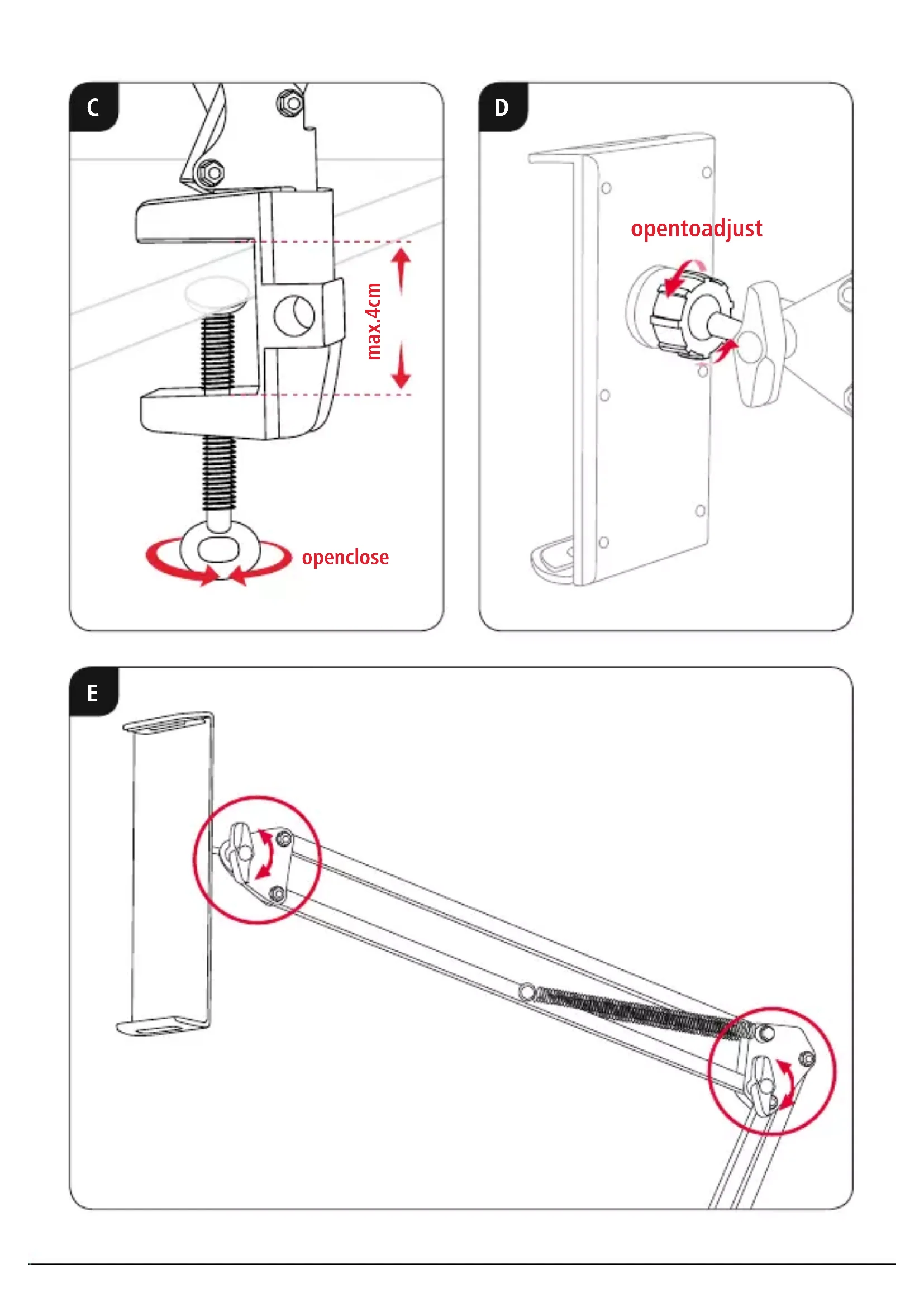
- Slightly open the closure on the holder by turning it anti-clockwise.(Fig.C)
- Positiontheholderintherequiredplaceonthe tabletop.Turntheholdertoadaptittothethickness ofthetabletop.
- Turn the closure clockwise to attach the holder.
- Check that the holder is firmly and securely seated.
5. Adjusting the angle and tilt
Theholdercanbesteplesslyadjustedintermsofangle andtiltwithrespecttotheobserverusinga b allhead.
- Alwaysadjusttheangleandtiltwithoutthedevice inserted.
- Toadjust, loosentheclampscrewontheballhead. (Fig.D)
- Adjust the angle and tilt as required and tightent the clampscrew.
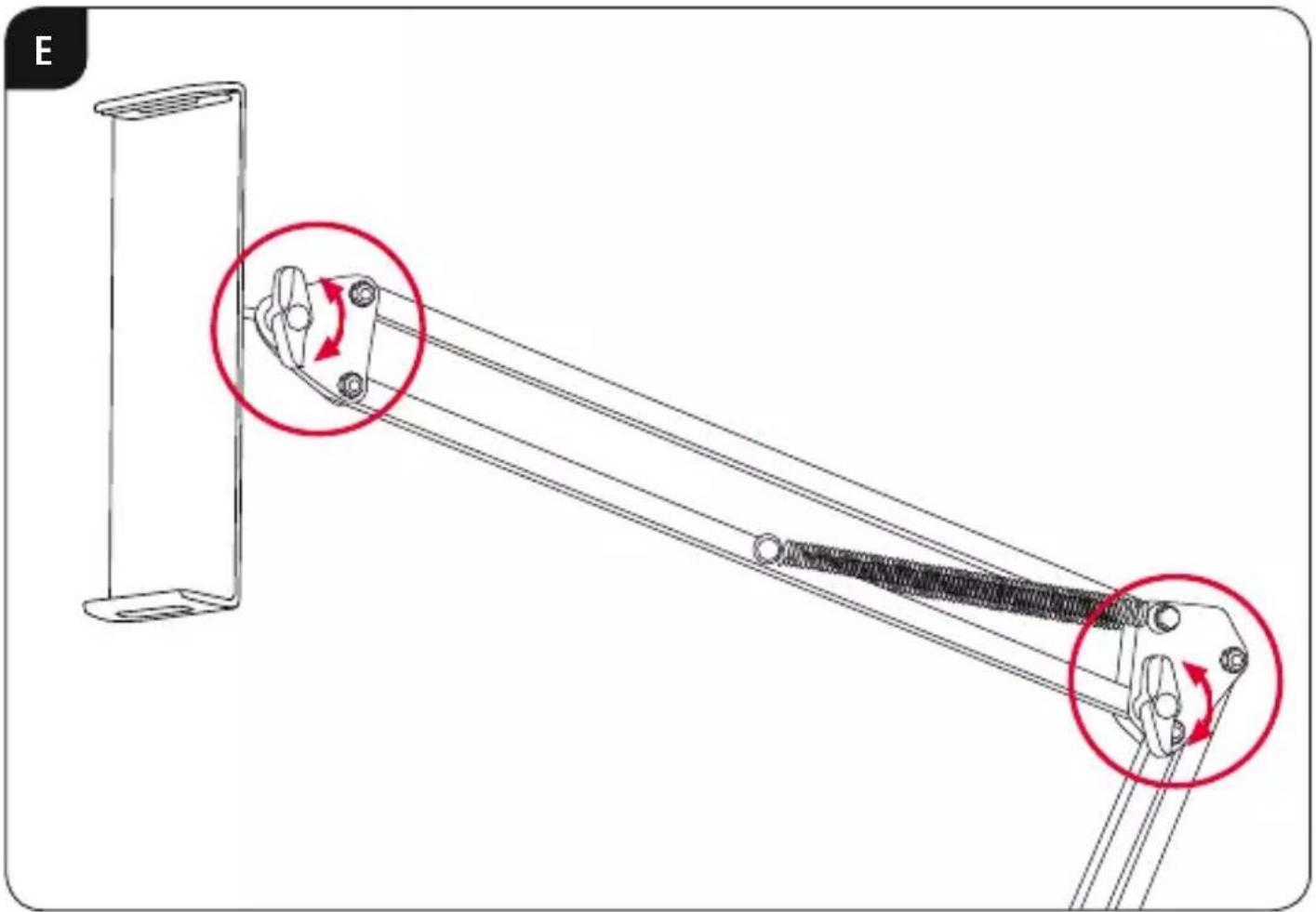
- Theholderarmcanalsobeadaptedtotherequired height.
- Toadjusttheretainingarm, loosentheclamping screws. (Fig. E)
6.Technicaldata
| Tabletholder | |
| Uptomax.tabletopthickness4cm | |
| Adjustableheightmax.70cm | |
| Holdingbracketwidth | min.13.5cm max.22cm |
7.WarrantyDisclaimer
HamaGmbH& C o K G a ssumesnoliabilityandprovides nowarrantyfordamageresultingfromimproper installation/mounting,improperuseoftheproductor from failure to observe the operating instructions and/orsafetynotes.
86652Monheim/Germany
Service& Support
www.hama.com
+499091502-0
D | GB
All listed brands are trademarks of the corresponding companies. Errors and omissions excepted, and subject to technical changes. Our general terms of delivery and payment are applied.