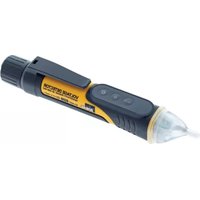
61-647 - Electrical tester RAB - Free user manual and instructions
Find the device manual for free 61-647 RAB in PDF.


| Product Type | Non-contact Voltage Tester (NCVT) |
| Brand | RAB |
| Model | 61-647 |
| Category | Electrical Tester |
| Detected Voltage Range | 50 V to 1000 V AC (50/60 Hz) |
| Dimensions (L x W x H) | 166 mm x 26.3 mm x 31 mm |
| Weight | 0.08 kg (0.16 lb) |
| Power Supply | 2 AAA 1.5 V batteries |
| Protection Rating | IP67 (dust and water resistant) |
| Operating Temperature | 0°C to 40°C (<80% RH) |
| Operating Altitude | 2000 m max |
| Overvoltage Category | CAT IV 1000 V |
| Built-in Flashlight | Yes, >500 lux at 10 cm, auto-off after 5 min |
| Auto Power Off | After 10 minutes of inactivity |
| Low Battery Indication | Green LED flashes + long beep |
| Sound Functions | Audible notification can be enabled/disabled |
| Maintenance and Cleaning | Clean with a damp cloth and mild detergent. Do not use abrasives or solvents. Dry completely before use. |
| Spare Parts and Repairability | No user-serviceable parts. Repair only by qualified service. |
| Warranty | 2 years (depending on conditions) |
| Compliance | IEC 61010-1, CAT IV 1000 V, double insulation |
Frequently Asked Questions - 61-647 RAB
User questions about 61-647 RAB
0 question about this device. Answer the ones you know or ask your own.
Ask a new question about this device
Download the instructions for your Electrical tester in PDF format for free! Find your manual 61-647 - RAB and take your electronic device back in hand. On this page are published all the documents necessary for the use of your device. 61-647 by RAB.
USER MANUAL 61-647 RAB
IDEAL® Test and Measurement
61-657 Dual Range 12 to 1000V NCVT with Flashlight 61-647 Single Range 50 to 1000V NCVT Operation and Safety Manual
natural_image
Two identical black-and-white handheld flashlights with control buttons and indicator lights, no visible text or symbols.Contacting IDEAL INDUSTRIES, INC ....4
Safety Information....5
Warnings....5-6
Cautions....6
Symbols 7
Operation....8-14
Identification and description of operating controls and functions 8-9
Operating Features....10
Tester Operation....11
Checking for The Presence of AC Voltage 12
NCV Sensing Indications Table 13
Functions Operation Table....13
Function Indication Table 14
Electrical Specifications 14
Environmental Specifications....14
Mechanical Specifications 15
EMC / EMI 15
FCC 15
Safety 15
Maintenance and Service 16
Introduction
The IDEAL 61-657 Dual Range and 61-647 Single Range Non-Contact Voltage Testers automatically detect and indicate the presence of voltage within specified ranges. The 61-657 detects both low voltage (12 to 50 V AC) and standard voltage (50-1000V AC) via a selectable setting. The 61-647 detects standard voltage (50-1000V AC). Both testers provide non-contact detection of voltage through an antenna enclosed in plastic at the tip of the tester which senses the presence of the electromagnetic field present around live conductors. Each tester also has a flash light that works independently of the testing function and is activated by an independent On/Off button.


Arc Flash and Shock Hazard, Proper PPE Required. Follow all safety procedures, wear proper PPE in accordance to NFPA 70E. Read and fully understand the instruction manual prior to using this product. Failure to comply can result in serious injury or death.
Contacting IDEAL INDUSTRIES, INC.
To contact IDEAL INDUSTRIES, INC., call one of the following telephone numbers:
IDEAL Industries USA Customer Service
• Phone Number: 800-435-0705
- Email: contactus@idealindustries.com
IDEAL Industries Canada Customer Service
• Phone Number: 905-683-3400
- Email: ideal_Canada@idealindustries.com
IDEAL Industries EMEA
• Phone Number: +44 (0)1925 444 446
- Email: eur.sales@idealindustries.com
IDEAL Industries Australia
• Phone Number: +61 3 9562 0175
- Email: InfoAUS@idealindustries.com
Or visit the IDEAL Electrical Website at www.idealind.com
To register your product, find manuals, watch videos, simply scan this QR code.


Safety Information

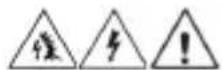
Warning - Identifies conditions and actions that could result in serious injury if the hazard is realized.

Caution - Identifies conditions and actions that could result in tester e, equipment under test damage or data loss if the hazard is realized.
WARNING
Arc Flash and Shock Hazard, Proper PPE Required. Follow all safety procedures, wear proper PPE in accordance to NFPA 70E and follow the guidelines below and the instructions in this manual when operating the tester. Failure to comply can result in serious injury or death.
- Choking Hazard, Small Parts. Keep Away from Children Sharp Objects Hazard, This is not a toy. It is not for use or play by children. Keep Away from Children. Failure to do so can result in serious injury.
- Only experienced or technically competent consumers should use this equipment. When in doubt, call an experienced electrician to make any and all necessary repairs or installations. At all times, perform any necessary work on a de-energized circuit that has had its circuit breaker turned off and has been locked out.
- Use the Tester only as specified in this manual or protection provided by the Tester can be compromised.
- Before using the Tester, visually inspect it to ensure the case or tip are not cracked and the battery cap is securely in place. Do not use if the Tester appears damaged.
- When using the tester, keep fingers behind the tactile barrier at the base of the tester. (see #6 on page 9)
- This Tester is intended for use by qualified electricians and competent consumers. Follow NFPA 70E Standards for Electrical Safety when using this Tester.
- Do not use without the batteries correctly in place and the screw on battery cap secured.
- Do not use Tester if it operates incorrectly as protection may be compromised. When in doubt, have the Tester serviced.
WARNING
Arc Flash and Shock Hazard, Proper PPE Required. Follow all safety procedures, wear proper PPE in accordance to NFPA 70E and follow the guidelines below and the instructions in this manual when operating the tester. Failure to comply can result in serious injury or death.
- Have the Tester serviced only by qualified service personnel.
- Do not use the Tester around explosive gas, dust, or vapor, or during electrical storms, or in wet environments.
- Do not apply more than the rated voltage, as marked on the Tester. Observe CAT Rating of Tester when in use.
- To avoid false readings that can lead to electrical shock and injury, replace the batteries as soon as the low battery indication appears.
- Voltages exceeding 30VAC or 60VDC pose a shock hazard so use caution.
- Do not work alone so that assistance can be rendered in an emergency.
- Use extreme caution when working around bare conductors or bus bars. Contact with the conductor could result in electric shock.
- Adhere to local and national safety codes. Individual protective equipment must be used to prevent shock and arc blast injury where hazardous live conductors are exposed.
- These are IP67 dust & water resistant. Following any contact with water, thoroughly dry prior to subsequent use.
• Cancer and Reproductive Harm - www.P65Warnings.ca.gov


CAUTION
Tester damage can occur if the following guidelines are not adhered to.
- Use the proper settings and voltage ratings for the measurement application.
- Clean the case and accessories with a damp cloth and mild detergents only. Do not use abrasives or solvents. Make sure the tester is completely dry before use.
- Not intended for insertion into electrical outlet slots.
- Do not apply excessive side or torsional loading to the sensing tip as damage may occur.
Symbols & Descriptions
| SYMBOL DESCRIPTION | |
 | Arc Flash and Shock Hazard |
 | Shock Hazard |
 | Warning or Caution |
 | Choking Hazard |
 | AC (Alternating Current) |
 | Earth Ground |
 | IEC Measurement Category IIICAT III has protection against transients in equipment in fixed-equipment installations such as distribution panels feeders, and short branch circuits. Also included are lighting systems in larger buildings. |
| CAT IV | IEC Measurement Category IVCAT IV has protection against transients from the primary supply level such as a Meter or overhead or underground utility service. |
| V | Voltage AC |
 | Double Insulation |
 | Do not dispose of this product as unsorted municipal waste. It must be properly disposed of in accordance with local regulations. Please see www.epa.gov or www.erecycle.org for additional information. |
 | Conforms to applicable North American Safety Standards |
 | Conforms to applicable Australian Safety Standards |
 | Conforms to European Directives |
NOTE: Tester must be used within the designated CAT Rating.
Operation
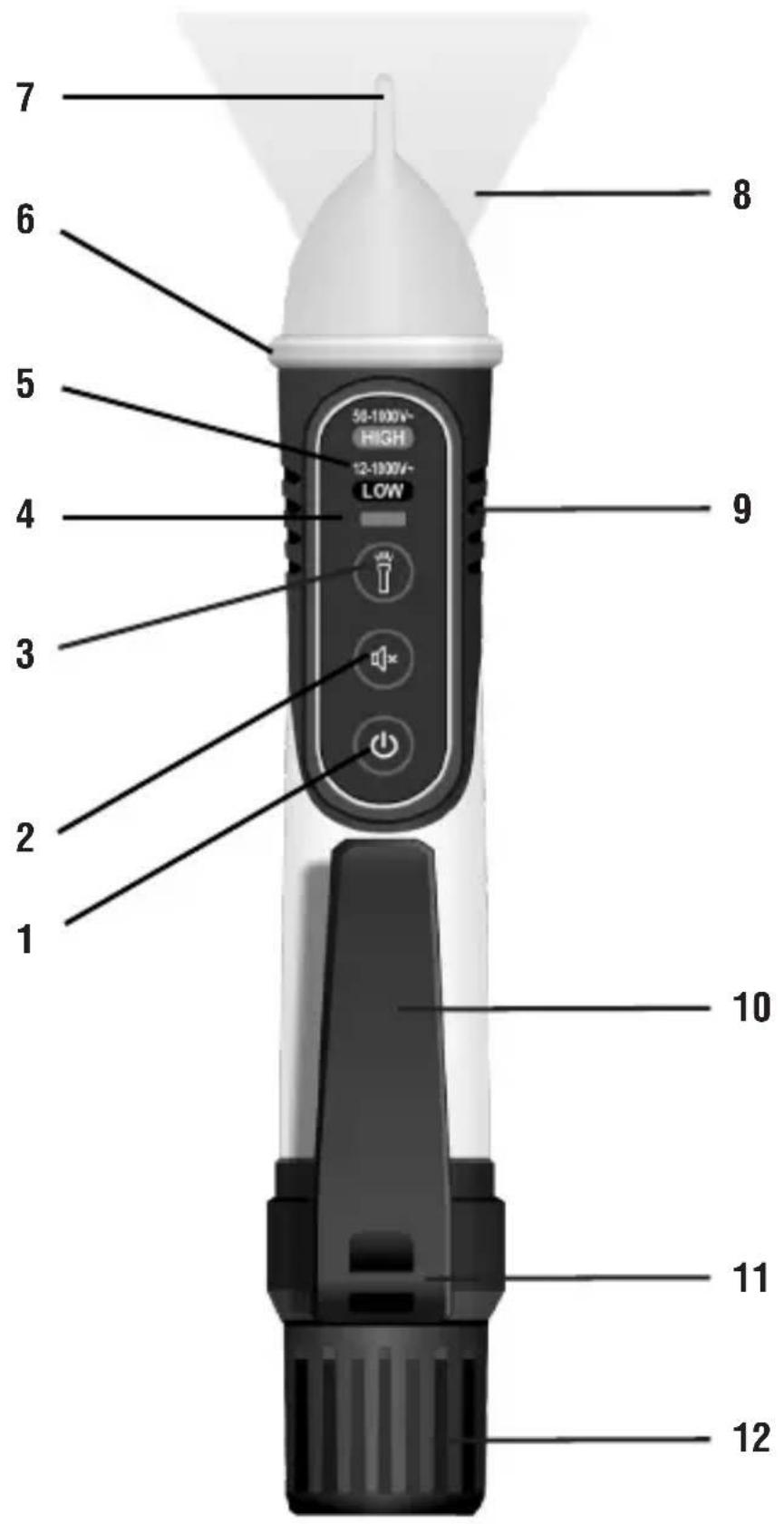
Identification and Description of Operating Functions for the 61-657 Dual Range 12 to 1000V NCVT w/ Flashlight and 61-647 Single Range 50 to 1000V NCVT w/ Flashlight:
- Power On/Off button (Dual Voltage Range Toggle for the 61-657 Only)
- Audible Notification On/Off button
- Flashlight On/Off button
- Dual Voltage Range Indicator Light (61-657 Only)
- Dual Voltage Range Legend (61-657 Only)
- Tactile Barrier
- Non-Contact Voltage Sensing Tip
- Flashlight
- Industrial over-folded grip
- Pocket Clip
- Lanyard Tie off point
- Screw On/Off Battery Replacement Cap
Operating Features
Dual Voltage Range Sensing
The 61-657 is capable of sensing 2 different voltage ranges 50 to 1000V AC or 12 to 1000V AC. The low range setting allows the tester to be used to sense the low voltages (12 to 50V AC) associated with doorbells, thermostats, irrigation wiring, etc. The low range setting also allows sensing of standard voltage in tamper-resistant outlets when the tip is located near the Hot receptacle and/or Hot Connection point on the outlet. (See Tester Operation – Dual Voltage Range Sensing, for more information)
Audible Notification Disable
The tester can be operated with a visual only indication of voltage when working in noise sensitive/noise restricted areas. With the tester On, press the Speaker button for less than 1s. The tester will beep once to indicate the audible warning is muted and only a visual indication will be provided. To restore the audible warning, press the speaker button for less than 1s. The tester will beep twice to indicate the audible warning is active and both a visual and audible indication will be provided. The tester is set to Audible Notification On as the default setting.
Flashlight
An LED Flashlight in the tip operates independently of the tester functions and can be used to illuminate the work area. Press the Flashlight Button to turn it On/Off. The tester is set to Flashlight Off. The Flashlight will Auto Power Off after 5 minutes of no voltage detection. Further voltage detection will reset the APO function to 5 minutes again.
Note: Use of the flashlight will decrease battery life.
Auto Power Off
After 10 minutes of inactivity (no button pressed and no signals detected), the tester will emit one long beep (\~0.5s) and then shut off. Note: if the flashlight is on, it will be also shut off.
Low Battery Indication
If battery voltage is less than around 2.4V, the green led in the tip will flash 3 times and the buzzer will send out one long beep, then turn off the device.
Tester Operation
Turning The Tester On
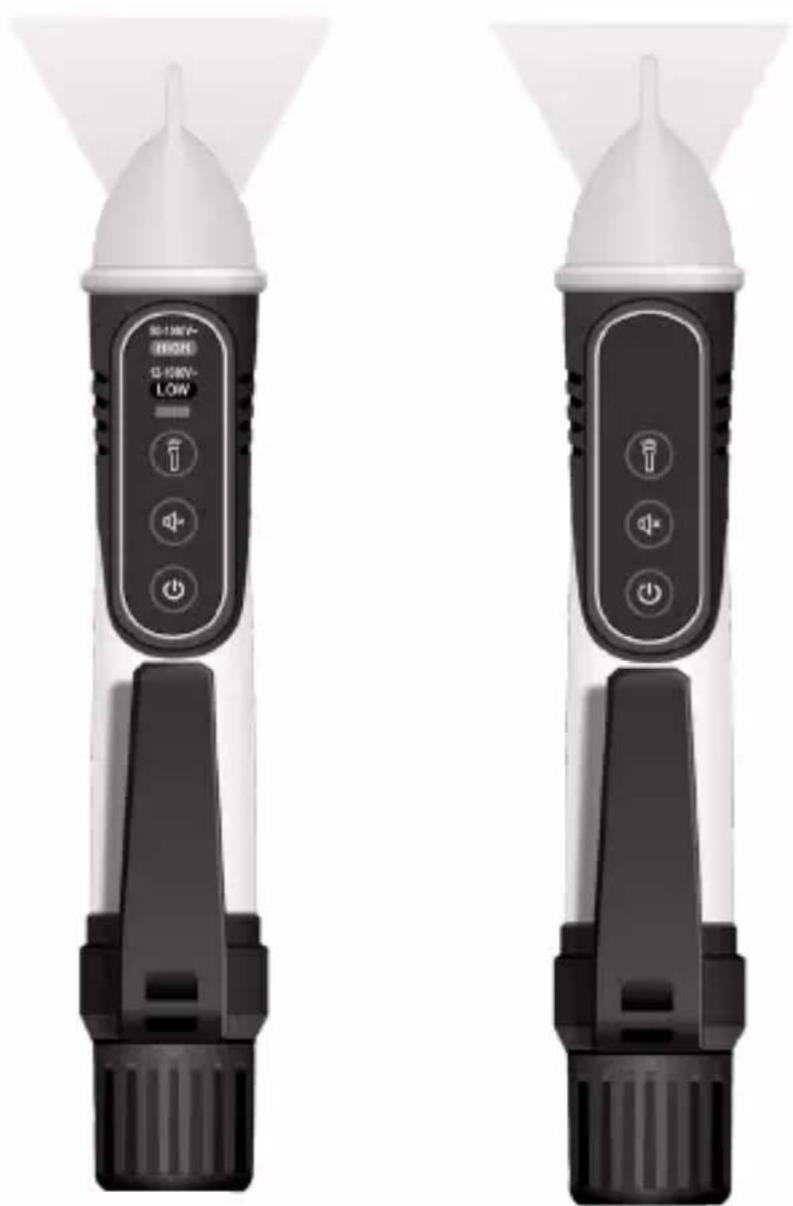
Press the Power On/Off button for less than 1s to turn the tester On. The tester will beep twice, and will light a steady Green LED in the tip of the tester to indicate Power On. The High Voltage Sensing Mode will be activated (Default Range) and indicated by lighting a steady Red Dual Voltage Range Indicator Light.
Steady Green LED in the tip indicates power-on
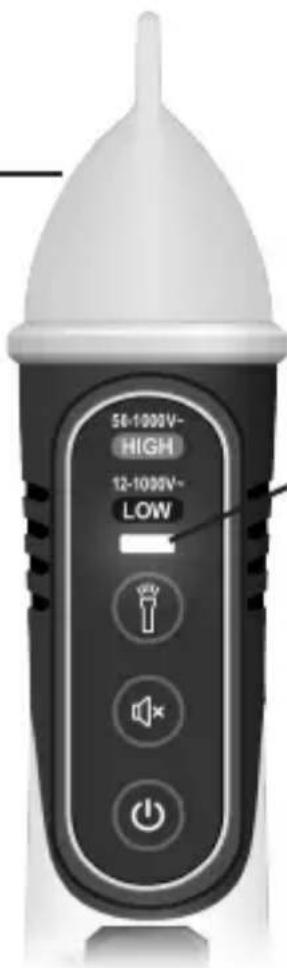
Red light indicates High Voltage Range Sensing (50-1000 V AC)
Blue Light indicates Low Voltage Range Sensing (12-1000 V AC)
Dual Voltage Range Sensing
Short presses on the power button toggles the voltage sensing range between 50 to 1000V AC and 12 to 1000V AC. The tester defaults to the High Voltage Sensing Mode (50 to 1000V AC) when the unit is turned on and is indicated by a steady Red Indicator Light. Pressing the Power button for less that 1s will switch the tester to the Low Voltage Sensing Mode (12 to 1000V AC) and is indicated by a steady Blue Indicator Light.
Turning The Tester Off
Press the Power On/Off button for more than 1s (>2s for the 61-657) to turn the tester Off. Listen for a long steady beep (\~.5s) and watch for LED in the tip to turn off and for the Range Indicator Light to turn Off. The tester is now deactivated and is not operational.
Checking for The Presence of AC Voltage
Prior to use, test on known live circuit to verify tester functionality. Place tip of the tester near an AC voltage source and refer to the NCV Sensing Indications Table for tester indication during operation.
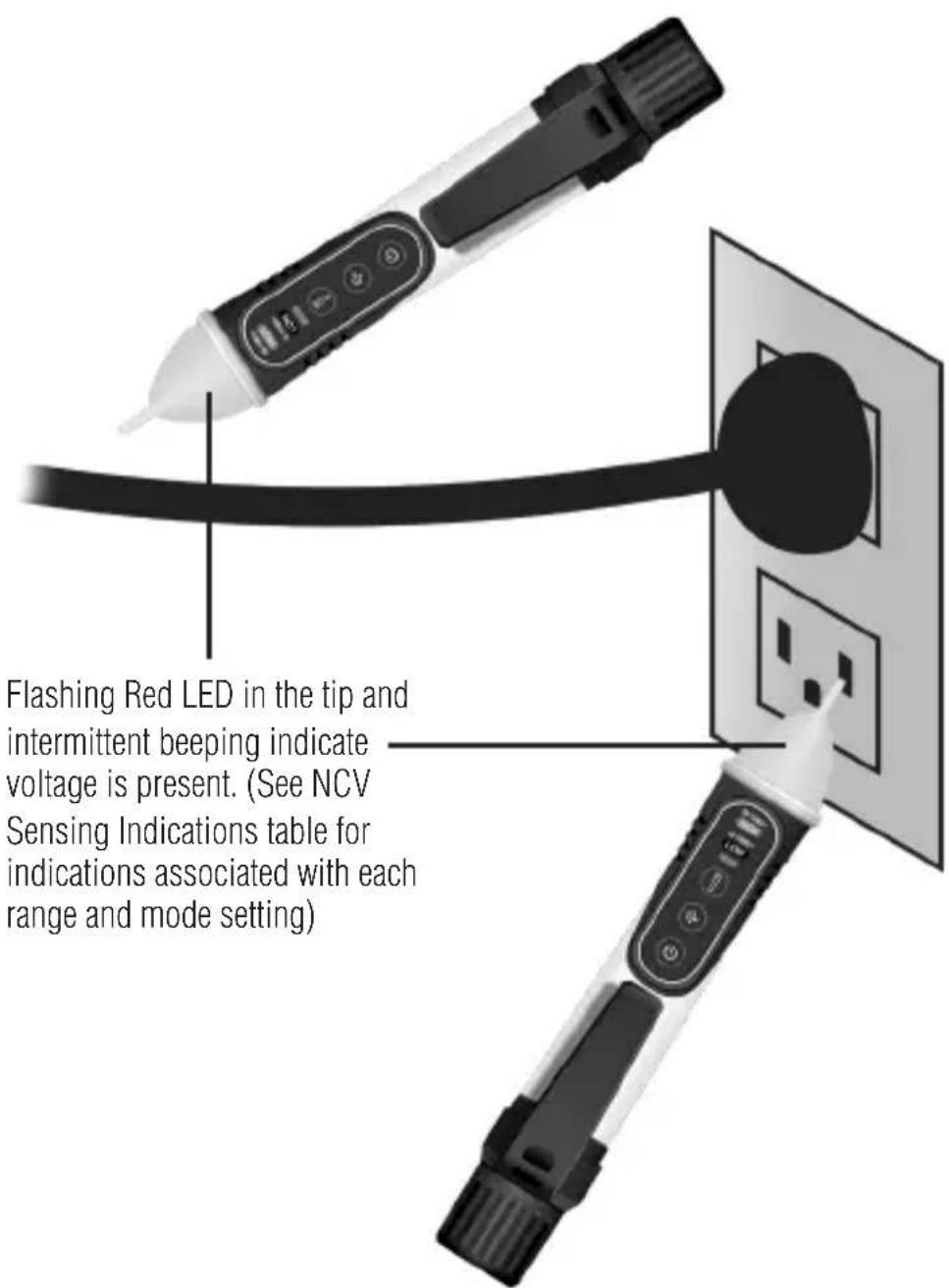
While the NCV is a helpful function, it is ALWAYS RECOMMENDED that the operator verify that any electrical conductor is completely de-energized and that no voltage is present by measuring for voltage AND CONFIRMING THAT NO VOLTAGE IS PRESENT and that all applicable PPE and lock out tag out procedures be followed before attempting any work on ANY electrical distribution system. Voltages with frequencies higher than 60Hz or electrostatic charges may also be detected by the NCV sensing antenna. Due to the variability of designs across device manufactures the 61-647 may not detect the presence of voltage in Tamper Resistant Outlets. The 61-657 should be placed in the low voltage detection mode (blue LED) in order to sense the presence of voltage in Tamper Resistant Outlets.
NCV Sensing Indications Table
| NCV Indications | Ranges (V AC) | ||||
| Mode | 12-25V 26 | 34V 35-45V | 46-54V 55-1000V | ||
| Low(12-1000V AC)(Audible Notification)(61-657 Only) | Red Flashing Light in Tip and beeps @ 2Hz | Red Flashing Light in Tip and beeps from 2Hz to 4Hz | Red Flashing Light in Tip and beeps @ 4Hz | Red Flashing Light in Tip and beeps from 4Hz to 12 Hz | Red Flashing Light in Tip and beeps @ 12Hz |
| High(50-1000V AC)(Audible Notification) | No Light in Tip, No beeps | No Light in Tip, No beeps | Red Flashing Light in Tip and beeps @ 2Hz | Red Flashing Light in Tip and beeps from 2Hz to 12 Hz | Red Flashing Light in Tip and beeps @ 12Hz |
| Low(12-1000V AC)(Audible Notification Disabled)(61-657 Only) | Red Flashing Light in Tip @ 2Hz, No beeps | Red Flashing Light in Tip from 2Hz to 4Hz, No beeps | Red Flashing Light in Tip @ 4Hz, No beeps | Red Flashing Light in Tip from 4Hz to 12Hz, No beeps | Red Flashing Light in Tip @ 12Hz, No beeps |
| High(50-1000V AC)(Audible Not ification Disabled) | No Light in Tip, No beeps | No Light in Tip, No beeps | Red Flashing Light in Tip @ 2Hz, No beeps | Red Flashing Light in Tip from 2Hz to 12Hz, No beeps | Red Flashing Light in Tip @ 12Hz, No beeps |
Note: Indications above may be subject to variability caused by humidity, insulation thickness, distance, and other factors.
Functions Operation Table
| Indication Response D | Default Function Operation | ||
| On Off Meter On RED LED | Push Button | ||
| Audible Beeps On Push Button | |||
| Flashlight Flashlight On Off | Push Button | ||
| Sensing Range Red LED High Range | Push Button | ||
Functions Indication Table
| Function Description | |
| Power On Steady Green light in Tip,2 Short Beeps | |
| Power Off No Light, Long Beep | |
| Tester Auto Power Off Green Light Flashes, 1 Beep | |
| Red LED 50-1000V AC Range | |
| Blue LED 12-1000V AC Range | |
| Audible OFF One Beep | |
| Audible ON Two Beeps | |
| Flashlight Button Flashlight On or Off | |
Electrical Specifications
| Function Range | |
| AC Voltage Sensing High Mode 50V AC to 1000V AC | |
| AC Voltage Sensing Low Mode (61-657 Only) 12V AC to 1000V AC | |
| Frequency 50Hz or 60Hz |
Environmental Specifications
| Operating Temperature: 32°F to 104°F (0°C to 40°C) (<80%RH) | |
| Operating Altitude: | 6500 ft (2000 m) |
| Storage Temperature: | 14°F to 122°F (-10°C to 50°C) (<80%RH) |
Intended for indoor use.
Mechanical Specifications
| Dimensions: (L x W x H) 6.4 in. x 1.0 in. x 1.2 in.(166 mm x 26.3 mm x 31 mm) | |
| Weight: | 0.16 LBS (0.08 KG) |
| Power Source: | (2) 1.5V AAA Batteries |
| Ingress Protection Rating: | IP67 dust and water resistant |
| Flashlight: | >500LUX @ 4.0 in |
EMC/EMI
CISPR 22 3rd Edition. Class B Limits.
EN 55032
CISPR 32
CISPR 11
FCC 15.107 with reference to Section 15.109 (g).
ICES-003
EN 61326-2-2 Sec 6.4.2.101
USA (FCC)
47 CFR 15 subpart B. This product is considered an exempt device per clause 15.103.
Safety
Complies with the following:
IEC 61010-1, Edition 3 (2010-06) +AMD1 (2016-12)
ANSI/UL/IEC EN 61010-1, Edition 3 (2016-04-29)
CSA-C22.2 No. 61010-1-12 Edition 3 (2019-07-19)
IEC 60529
Overvoltage CAT IV 1000V.
Any voltages exceeding the defined maximum voltage measurement categories described above are outside the normal use of the equipment and protection cannot be guaranteed.
Pollution Degree Class 2
Maintenance and Service
Tester Inspection
Before using the Tester, visually inspect it to ensure the case or tip are not cracked and the battery cap is securely in place. Do not use if the Tester appears damaged.
Battery Inspection/Replacement

Maintenance and Storage
When not in use, turn the meter off. If the tester will not be used for more than a month remove the batteries for storage. Clean the case with a damp cloth and mild detergent. Do not use abrasives or solvents. If the meter is exposed to water ensure the tester is completely dry before use. Do not expose to chemicals or solvents.
Service and Replacement Parts
This unit has no user-serviceable parts.
Disposal of Waste, Electrical & Electronic Equipment
In order to preserve, protect and improve the quality of the environment, protect human health and utilize natural resources prudently and rationally, the user should return unserviceable product to relevant facilities in accordance with statutory regulations. The crossed-out wheeled bin indicates the product needs to be disposed separately and not as municipal waste.
Do not dispose of this product as unsorted municipal waste. It must be properly disposed of in accordance with local regulations. Please see www.epa.gov or www.erecycle.org for additional information.
Disposal of Used Batteries/Accumulators
There are no batteries in this product.
TWO YEAR LIMITED WARRANTY
This tester is warranted to the original purchaser against defects in material and workmanship for a period of two (2) years from date of purchase. With proof of purchase from an authorized IDEAL distributor, a defective tester will be repaired or replaced with the same product or a functionally equivalent product, at the option of IDEAL INDUSTRIES, INC. during the warranty period, subject to verification of the defect or malfunction. Warranty does not cover consumables such as fuses, batteries, and excludes defects caused by leakage from batteries, abuse, mishandling, dropping, ordinary wear and tear, misuse, neglect, unauthorized repair, improper use, alterations, accidents or any causes beyond IDEAL's reasonable control. Consequential or incidental damages are not recoverable under this warranty. Some states do not allow the exclusion or limitation of incidental or consequential damages, so the above limitation or exclusion may not apply to you. This LIMITED WARRANTY gives you specific legal rights, which vary from state to state. This warranty constitutes the sole and exclusive remedy of the purchaser and the exclusive liability of IDEAL, and is in lieu of any and all other warranties, and expressly disclaims all other warranties, implied, or statutory as to merchantability, fitness for purpose sold, description, quality productiveness, or any other matter. No agent, distributor or other supplier has the authority to modify or amend this warranty or make other representations or warranties other than those contained in this warranty without express written authorization from IDEAL. For warranty service, call IDEAL customer service at 1-800-435-0705.
Made in China.
IDEAL INDUSTRIES, INC. Syracuse, IL 60178, U.S.A. 800-435-0705 wsw.idealind.com ND 9110-1
natural_image
Collection of various digital and analog multimeters displayed in a grid layout (no visible text or labels)Scan the barcode on the right to see the new IDEAL T&M Product Line

SCAN ME
natural_image
Two identical black-and-white handheld flashlights with control buttons and indicator lights, no visible text or symbols.IDEAL Industries Australia
natural_image
Collection of various digital and analog multimeters displayed in a grid layout (no visible text or labels)
SCAN ME
natural_image
Two black-and-white handheld flashlights with control buttons and indicator lights, no visible text or symbols on the devices themselves.Introduction......40
Contacter IDEAL INDUSTRIES, INC....40
IDEAL Industries Australia

SCAN ME
natural_image
Collection of various digital and analog multimeters displayed in a grid layout (no visible text or labels)
SCAN ME