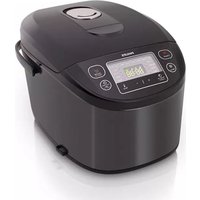
Viva Collection HD3158 - Multi-cooker PHILIPS - Free user manual and instructions
Find the device manual for free Viva Collection HD3158 PHILIPS in PDF.


| Product type | Multi-cooker |
| Brand | Philips |
| Model | Viva Collection HD3158 |
| Capacity | 5.0 L |
| Power | 980 W |
| Power supply | Mains, 220-240 V |
| Cooking functions | Rice/pasta, jam, risotto, yogurt, boiling, sauce, pot-au-feu, baking, reheating, steaming, stewing, slow cook, frying, sauté, manual |
| Keep warm | Yes, automatic after cooking |
| Delayed start | Yes, adjustable from 1 to 24 h |
| Adjustable temperature | Oven mode: 40-160°C, Manual mode: 30-160°C (in 10°C increments) |
| Child lock | Yes, can be activated by delayed start button |
| Included accessories | Ladle, spatula, measuring cup, steam rack, recipe booklet |
| Cooking pot type | Removable pot with non-stick coating |
| Display | LED with time and temperature display |
| Cleaning | Pot, accessories: wash in warm soapy water. Inside: damp cloth. Heating element: wipe damp |
| Safety | Child lock, automatic shut-off in case of problem |
| After-sales service | Philips support (www.philips.com/welcome) |
| Warranty | International warranty (see leaflet) |
| Country of manufacture | Not specified in the manual |
Frequently Asked Questions - Viva Collection HD3158 PHILIPS
User questions about Viva Collection HD3158 PHILIPS
0 question about this device. Answer the ones you know or ask your own.
Ask a new question about this device
Download the instructions for your Multi-cooker in PDF format for free! Find your manual Viva Collection HD3158 - PHILIPS and take your electronic device back in hand. On this page are published all the documents necessary for the use of your device. Viva Collection HD3158 by PHILIPS.
USER MANUAL Viva Collection HD3158 PHILIPS
natural_image
Black Philips rice cooker with digital display and control buttons (no visible text or symbols on main body)2 What's in the box 4
3 Overview 4
Controls overview 5
Functions overview 5
4 Using the multicooker 6
Before first use 6
Preparations before cooking 6
Cooking rice/pasta 7
Making jam 8
Making risotto 8
Making yogurt 9
Boiling 10
Making sauces 10
Making Pot-au-feu 10
Reheating 11
Baking 11
Steaming 12
Stewing/Slow cooking 12
Frying 13
Roasting 13
Manual 14
Keep-warm mode 14
Adjusting the cooking time and
temperature 15
Preset time for delayed cooking 16
Setting up child lock 16
5 Cleaning and Maintenance 17
Interior 17
Exterior 17
Accessories 17
6 Environment 17
7 Guarantee and service 17
8 Specifications 17
9 Troubleshooting 18
1 Your multicooker
Congratulations on your purchase, and welcome to Philips!
To fully benefit from the support that Philips offers, register your product at www.philips.com/welcome.
2 What's in the box
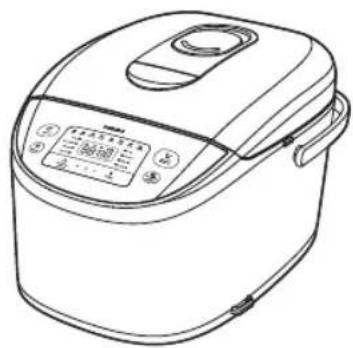
natural_image
Line drawing of a rice cooker with control panel and buttons (no text or symbols)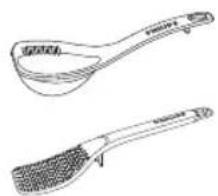
natural_image
Two line drawings of kitchen utensils, one with a curved handle and the other with a mesh handle (no text or symbols)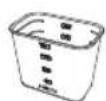
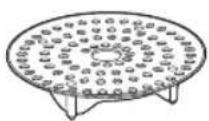
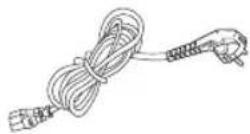

Multicooker main unit
Soup ladle Rice scoop
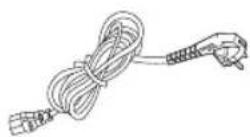
Measuring cup Power cord
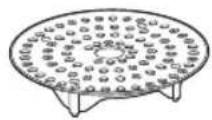
Steam rack User manual
Safety leaflet Warranty card
Recipe
3 Overview
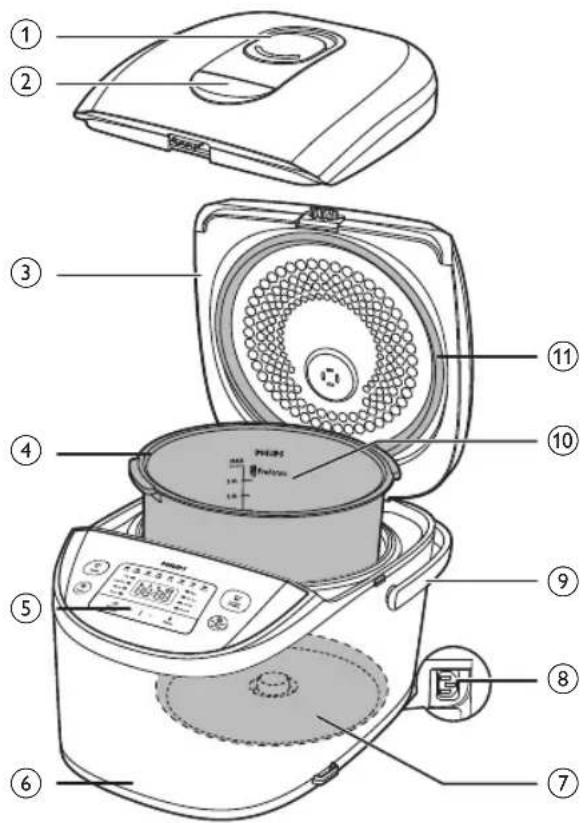
| 1 | Detachable steam vent cap | 7 | Heating element |
| 2 | Lid release button | 8 | Power socket |
| 3 | Top lid | 9 | Cooker handle |
| 4 | Inner pot | 10 | Water level indications |
| 5 | Control panel | 11 | Sealing ring |
| 6 | Main body |
Controls overview
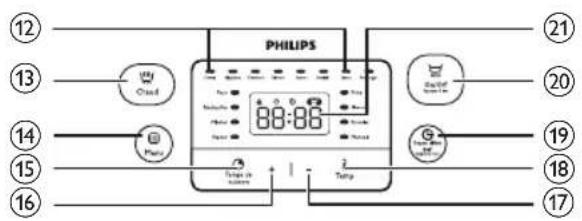
| 12 | Cooking functions | 17 | Decrease button |
| 13 | Keep-warm button | 18 | Cooking time button |
| 14 | Menu button | 19 | Temperature button |
| 15 | Preset button | 20 | Start/Cancel button |
| 16 | Increase button | 21 | Display screen |

Functions overview
| Functions | Default cooking time | Adjustable cooking time | Preset time D | default cooking temperature |
| Rice/pasta (Riz/pâtes) | 40 min | / | 1-24 hr | 130-140°C |
| Jam (Confiture) | 10 min | 5 min - 2 hr | 1-24 hr | 90-100°C |
| Risotto (Risotto) | 35 min | / | 1-24 hr | 130-140°C |
| Yogurt (Yaourt) | 8 hr | 6-12 hr | 1-24 hr | 40±3°C |
| Boil (Bouillir) | 1 hr | 20 min-10 hr | 1-24 hr | 100°C |
| Drink (Sauce) | 10 min | 5-40 min | 1-24 hr | 100°C |
| Jelly meat (Pot-au-feu) | 6 hr | 4-10 hr | 1-24 hr | 90-100°C |
| Bake (Four) | 45 min | 20 min - 2 hr | / | 130°C |
| Reheat (Réchauffer) | 25 min | 5-60 min | / | 85°C |
| Stew (Mijoter) | 1 hr | 20 min - 10 hr | 1-24 hr | 90°C |
| Steam (Vapeur) | 20 min | 5 min - 2 hr | 1-24 hr | 100°C |
| Fry (Frire) | 15 min | 5-60 min | / | 145-150°C |
| Slow cook (Slow cook) | 5 hr | 1-15 hr | 1-24 hr | 80°C |
| Roast (Rissoler) | 1 hr | / | 1-24 hr | 130°C |
| Manual (Manuel) | 2 hr | 5 min - 10 hr | 1-24 hr | 100°C |

Note
- The cooking temperature for the baking and manual functions is adjustable. You can select temperature for the baking function between 40°C to 160°C, and select temperature for the manual function between 30°C to 160°C. The step is 10°C.
- After the cooking has started, you can press and hold the start/cancel button (On/Off) to deactivate the cooking process and the multicooker will enter the standby mode.
4 Using the multicooker
Before first use
1 Take out all the accessories from the inner pot. Remove the packaging material of the inner pot.
2 Clean the parts of the multicooker thoroughly before using it for the first time (see chapter 'Cleaning and Maintenance').

Note
• Make sure all parts are completely dry before you start using the multicooker.
Preparations before cooking
Before using the multicooker, you need to do the following steps:
Rice:
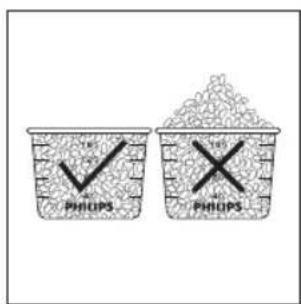
1 Measure the rice using the measuring cup provided.
2 Wash the rice thoroughly.
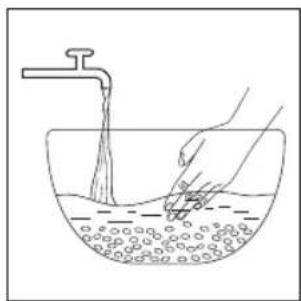
natural_image
Line drawing of a hand washing a bowl with a faucet, showing liquid and bubbles (no text or symbols)3 Put the pre-washed rice in the inner pot.
4 Add water to the level indicated on the scale inside the inner pot and smooth the rice surface.
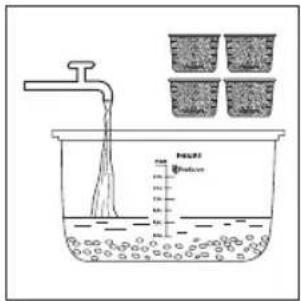
Different dishes:
5 Press the lid release button to open the lid.
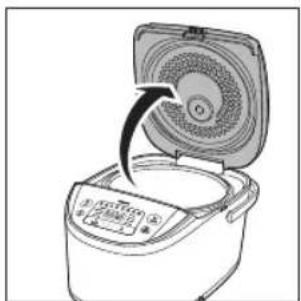
natural_image
Line drawing of a rice cooker with lid open, showing internal components and a black arrow indicating rotation (no text or symbols)6 Wipe the outside of the inner pot dry, then put the inner pot in the multicooker. Check if the inner pot is in proper contact with the heating element.
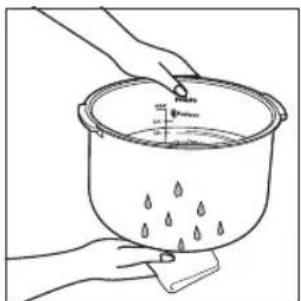
natural_image
Line drawing of hands holding a container with liquid and droplets, no text or symbols present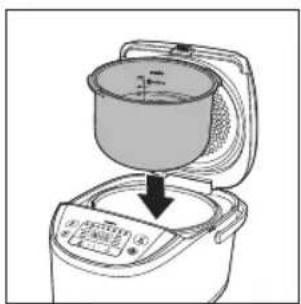
natural_image
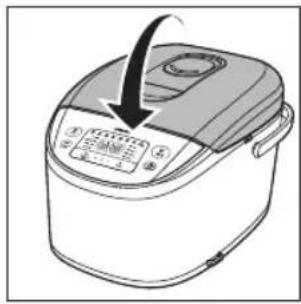
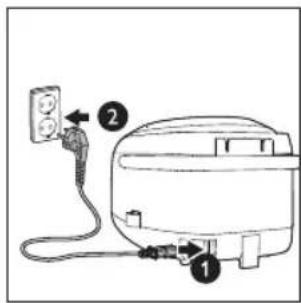
Line drawing of a rice cooker with a bowl placed above it, showing a downward arrow indicating cooling or drying process (no text or symbols)7 Close the lid of the multicooker, and put the plug in the power socket.

Note
- For details about the ratio of rice and water, see the recipe.
- The level marked inside the inner pot is just an indication. You can always adjust the water level for different types of rice and your own preference.
• Make sure that the outside of the inner pot is clean and dry, and that there is no foreign residue on the heating element or the magnetic switch.
Cooking rice/pasta
1 Follow the steps in "Preparations before cooking".
2 Press the menu button (Menu) until the rice/pasta cooking function (Riz/pâtes) is selected.
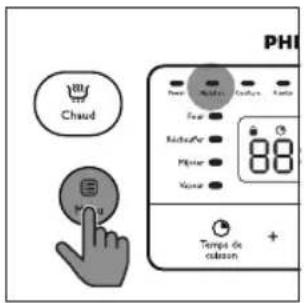
3 Press and hold the start button (On / Off) for 3 seconds to start cooking.

Note
- The cooking time is not displayed straight from the beginning. Small dashes are turning around on the screen during most of the cooking time as long as the multicooker detects water in the preparation. When the water has completely evaporated, the timer shows the remaining cooking time.
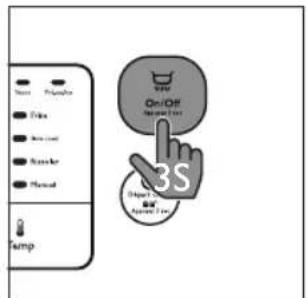
4 When the cooking is finished, you will hear 4 beeps and the selected cooking function light will be off.
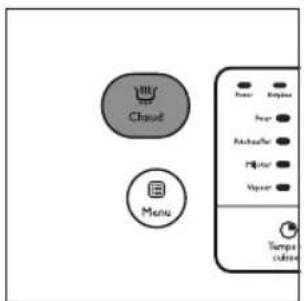
5 The multicooker will be in keep-warm mode automatically.
→ The keep-warm indicator (Chaud) lights up.

Note
- If the voltage is unstable at the area you live, it is possible that the multicooker overflows.
• After the cooking is finished, stir the rice and loosen it immediately to release excessive moisture for fluffy rice. - Depending on the cooking conditions, the bottom portion of the rice may become slightly browned.
Making jam
1 Put food and ingredients into the inner pot.
2 Follow steps 6 and 7 in "Preparations before cooking".
3 Press the menu button (Menu) until the jam function (Confiture) is selected.
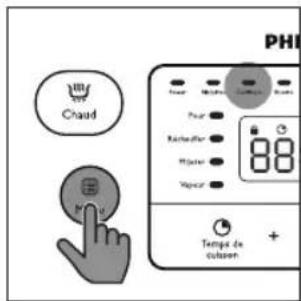
To set a different cooking time, refer to chapter "Adjusting the cooking time and temperature".
4 Press and hold the start button (On / Off) for 3 seconds for 3 seconds to start cooking.
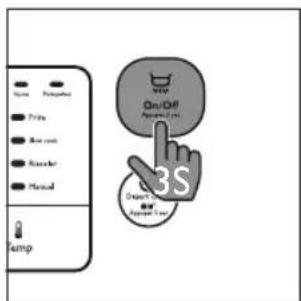
5 When the cooking is finished, you will hear 4 beeps and the selected cooking function light will be off.
6 The multicooker will be in keep warm mode automatically.
8 EN
→ The keep-warm indicator (Chaud) lights up.
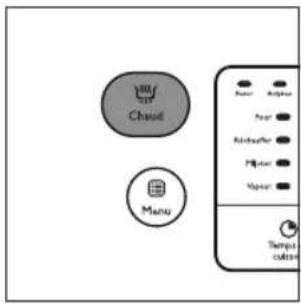
Making risotto
1 Put food and ingredients into the inner pot.
1 Follow steps 6 and 7 in "Preparations before cooking".
2 Press the menu button (Menu) until the risotto function (Risotto) is selected.
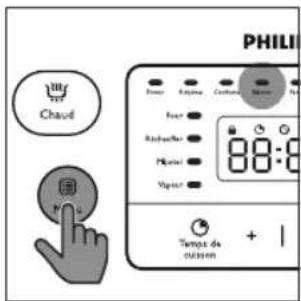
3 Press and hold the start button (On / Off) for 3 seconds to start cooking.

Note
- The cooking time is not displayed straight from the beginning. Small dashes are turning around on the screen during most of the cooking time as long as the multicooker detects water in the preparation. When the water has completely evaporated, the timer shows the remaining cooking time.
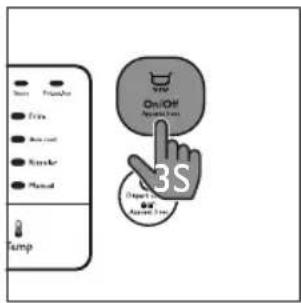
4 When the cooking is finished, you will hear 4 beeps and the selected cooking function light will be off.
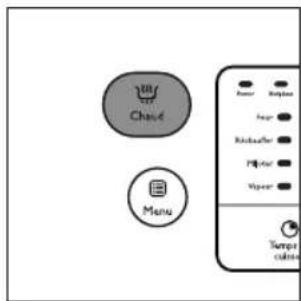
5 The multicooker will be in keep-warm mode automatically.
→ The keep-warm indicator (Chaud) lights up.
Making yogurt
1 Whisk the ingredients for the yogurt well and put them in a glass container.
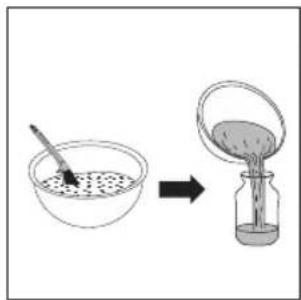
2 Put the glass container in the inner pot. Make sure that the container is sealed.
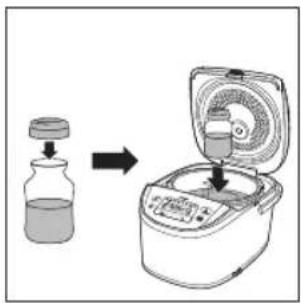
3 Pour some water in the inner pot. Make sure that half of the container is immersed in water.
4 Follow steps 6 and 7 in "Preparations before cooking".
5 Press the menu button (Menu) until the yogurt function (Yaourt) is selected.
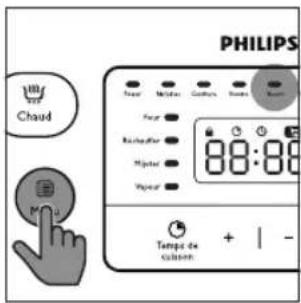
To set a different cooking time, refer to chapter "Adjusting the cooking time and temperature".
6 Press and hold the start button (On / Off) for 3 seconds to start cooking.
7 When the cooking is finished, you will hear 4 beeps and the selected cooking function light will be off.
→ The multicooker will enter the standby mode automatically.
Boiling
1 Put food and ingredients in the inner pot.
2 Follow steps 6 and 7 in "Preparations before cooking".
3 Press the menu button (Menu) until the boiling function (Bouillir) is selected.
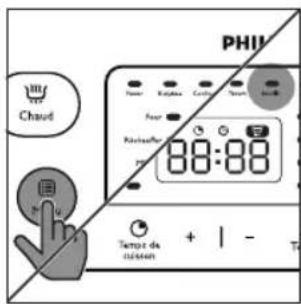
To set a different cooking time, refer to chapter "Adjusting the cooking time and temperature".
4 Press and hold the start button (On/Off) for 3 seconds to start cooking.
5 When the cooking is finished, you will hear a few beeps and the selected cooking function light will be off.
6 The multicooker will be in keep-warm mode automatically.
→ The keep-warm indicator (Chaud) lights up.
Making sauces
1 Put food and ingredients into the inner pot.
2 Follow steps 6 and 7 in "Preparations before cooking".
3 Press the menu button (Menu) until the sauce function (Sauce) is selected.
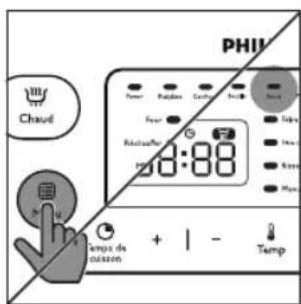
4 Press and hold the start button (On / Off) for 3 seconds to start cooking.
5 When the cooking is finished, you will hear 4 beeps and the selected cooking function light will be off.
6 The multicooker will be in keep-warm mode automatically.
→ The keep-warm indicator (Chaud) lights up.
Making Pot-au-feu
1 Put food and ingredients in the inner pot.
2 Follow steps 6 and 7 in "Preparations before cooking".
3 Press the menu button (Menu) until the pot-au-feu function (Pot-au-feu).
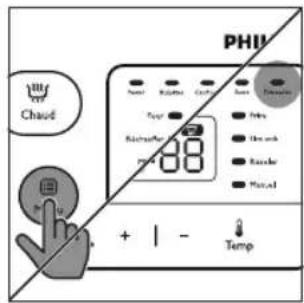
To set a different cooking time, refer to chapter "Adjusting the cooking time and temperature".
4 Press and hold the start button (On / Off) for 3 seconds for 3 seconds to start cooking.
5 When the cooking is finished, you will hear a few beeps and the selected cooking function light will be off.
6 The multicooker will be in keep-warm mode automatically.
→ The keep-warm indicator (Chaud) lights up.
Baking
1 Put food and ingredients in the inner pot.
2 Follow step 6 in "Preparations before cooking".
3 Put the plug in the power socket.

Note
- When baking cake, keep the lid closed during cooking. Baking cake at 130ircC and by 45 minutes usually delivers best cooking result.
- It's recommended to open lid during cooking when the temperature is above 130°C.
4 Press the menu button (Menu) until the baking function (Four) is selected.
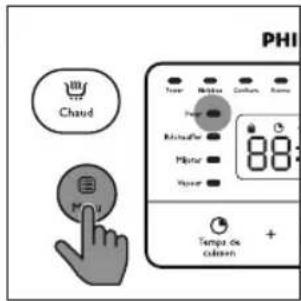
To set a different cooking time and temperature, refer to chapter "Adjusting the cooking time and temperature".
5 Press and hold the start button (On / Off) for 3 seconds to start cooking.
6 When the baking is finished, you will hear 4 beeps and the selected function light will be off.
7 The multicooker will be in keep-warm mode automatically.
→ The keep-warm indicator (Chaud) lights up.

Note
- When removing the inner pot from the multicooker, use a kitchen glove or a cloth, as the inner pot will be very hot.
Reheating
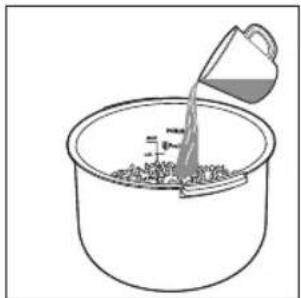
1 Loosen the cooled food and evenly distribute it in the inner pot.
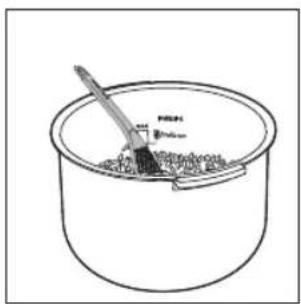
2 Pour some water onto the food to prevent it from becoming too dry. The quantity of the water depends on the amount of food.
natural_image
Line drawing of a bucket pouring liquid into a basin (no text or symbols)3 Follow steps 6 and 7 in "Preparations before cooking".
4 Press the menu button (Menu) until the reheating function (Réchauffer) is selected.
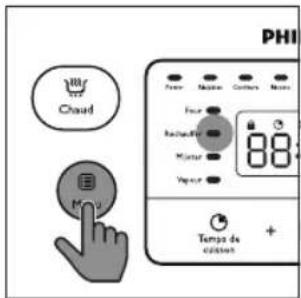
To set a different cooking time, refer to chapter "Adjusting the cooking time and temperature".
5 Press and hold the start button (On / Off) for 3 seconds to start cooking.
6 When the cooking is finished, you will hear 4 beeps and the selected cooking function light will be off.
7 The multicooker will be in keep warm mode automatically.
→ The keep-warm indicator (Chaud) lights up.
Steaming
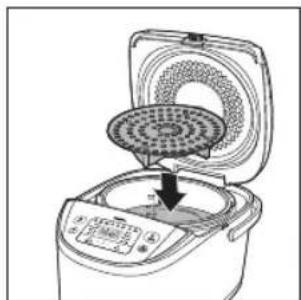
1 Pour some water into the inner pot.
2 Put the steam tray into the inner pot.
natural_image
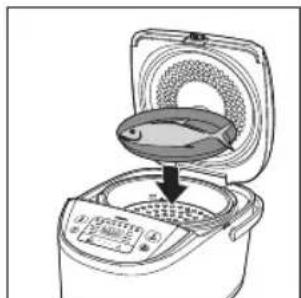
Line drawing of a rice cooker with a circular fan and control panel, showing a downward arrow indicating cooling (no text or symbols)3 Put the food to be steamed on the steam tray.
4 If you are using a separate plate, put it onto the steam tray.
natural_image
Illustration of a rice cooker with a lid and control panel, showing internal components (no text or symbols)5 Follow steps 6 and 7 in "Preparations before cooking".
6 Press the menu button (Menu) until the steaming function (Vapeur) is selected.

To set a different cooking time, refer to chapter "Adjusting the cooking time and temperature".
7 Press and hold the start button (On / Off) for 3 seconds to start cooking.
8 When the cooking is finished, you will hear 4 beeps and the selected cooking function light will be off.
9 The multicooker will be in keep warm mode automatically.
→ The keep-warm indicator (Chaud) lights up.
10 Open the lid and carefully take out the steamed food from the plate or steam basket.

Note
- The quantity of water depends on the amount of food in the steam tray. Do not immerse the steam tray in water.
- Use a kitchen glove or a cloth, as the plate and steam tray will be very hot..
Stewing/Slow cooking
1 Put food and ingredients in the inner pot.
2 Follow steps 6 and 7 in "Preparations before cooking".
3 Press the menu button (Menu) until the stewing function (Mijoter) or the slow cooking function (Slow cook) is selected.
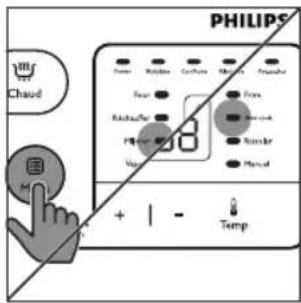
To set a different cooking time, refer to chapter "Adjusting the cooking time and temperature".
4 Press and hold the start button (On / Off) for 3 seconds to start cooking.
5 When the cooking is finished, you will hear a few beeps and the selected cooking function light will be off.
6 The multicooker will be in keep-warm mode automatically.
→ The keep-warm indicator (Chaud) lights up.
Frying
1 Put food and ingredients into the inner pot.
2 Follow step 6 in "Preparations before cooking".
3 Put the plug in the power socket.
4 Press the menu button (Menu) until the frying function (Frire) is selected.
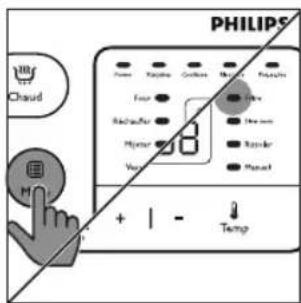
To set a different cooking time, refer to chapter "Adjusting the cooking time and temperature".
5 Press and hold the start button (On / Off) for 3 seconds to start cooking.
6 When the cooking is finished, you will hear 4 beeps and the selected cooking function light will be off.
7 The multicooker will be in keep-warm mode automatically.
→ The keep-warm indicator (Chaud) lights up.

Note
- Do not close the top lid when cooking in the fry mode.
Roasting
1 Put food and ingredients into the inner pot.
2 Follow step 6 in "Preparations before cooking".
3 Put the plug in the power socket.
4 Press the menu button (Menu) until the roasting function (Rissoler) is selected.
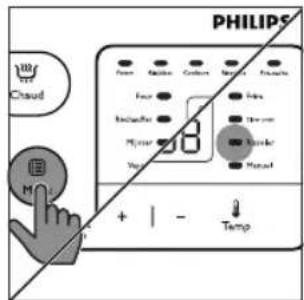
→ To set a different cooking time, refer to chapter "Adjusting the cooking time".
5 Press and hold the start button (On / Off) for 3 seconds to start cooking.
6 There are 2 stages of roasting. For the first stage, cooking time is about 35 minutes, you will hear 5 beeps to remind to turn the food.
7 Press the menu button (Menu) to continue the second stage, if it beeps for 5 minutes without operation, the multicooker will enter into keep warm mode until end of the cooking time.
Manual
You may use the manual mode to cook food with more control over the cooking time and temperature.
1 Put food and ingredients into the inner pot.
2 Follow steps 6 and 7 in "Preparations before cooking".
3 Press the menu button (Menu) until the manual function (Manuel) is selected.
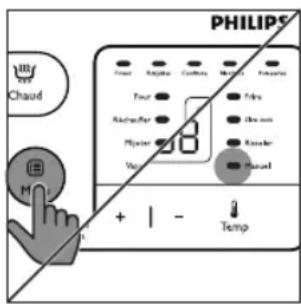
To set a different cooking time and temperature, refer to chapter "Adjusting the cooking time and temperature".
4 Press and hold the start button (On / Off) for 3 seconds to start cooking.
5 When the cooking is finished, you will hear 4 beeps and the selected cooking function light will be off.
6 The multicooker will be in keep-warm mode automatically.
→ The keep-warm indicator (Chaud) lights up.

Note
- If you cook food at a temperature below 70ircC , please turn off the keep-warm mode before start cooking.
- In manual (Manuel) mode, when cooking at a temperature higher than 130ircC , the top lid must be opened during cooking.
Keep-warm mode
The multicooker provides you with easy control over the keep-warm mode.
- After you have selected the cooking function using the menu button (Menu), if you press the start button (On / Off) directly, the keep-warm indicator will light up. After the cooking is finished, the multicooker will switch to keep-warm mode directly.
- After you have selected the cooking function using the menu button (Menu), if you press the keep-warm button first, and then the start button (On / Off), the keep-warm indicator will be off. After the cooking is finished, the multicooker will be in standby mode.

Note
- In standby mode, you can press the keep-warm button (Chaud) to enter keep-warm mode.
- In keep-warm mode, you can press the keep-warm button (Chaud) to enter standby mode.
Adjusting the cooking time and temperature
You can adjust the cooking time for all functions except the rice/pasta, roast, and risotto functions; and you can adjust the cooking temperature for baking and manual functions. Refer to the “Functions overview” table for the time and temperature regulation of each function.
After you have selected the desired cooking function using the menu button, the default cooking time will be displayed on the screen.
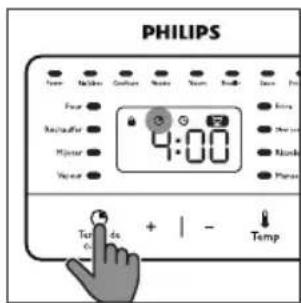
1 To set a different cooking time, press the cooking time button (Temps de cuisson), and the default cooking time starts flashing on the display.
2 Press the increase (+) or the decrease (-) button to set the hour unit.
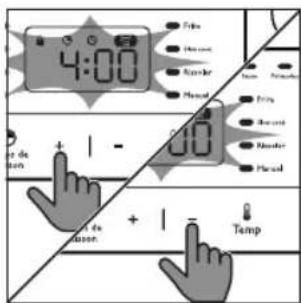
3 After the hour unit is set, wait for a few seconds before the hour unit is confirmed, and the minute unit starts flashing on the display.
4 Press the increase (+) or the decrease (-) button to set the minute unit.
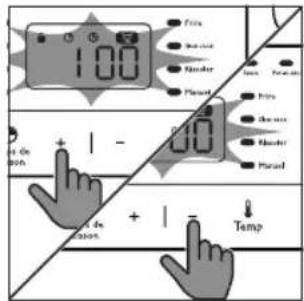
5 To set a different cooking temperature, press the temperature button (Temp), and the default temperature starts flashing on the display.

6 Press the increase (+) or the decrease (-) button to set the desired cooking temperature.
Preset time for delayed cooking
You can preset the delayed cooking time for all cooking modes except the reheating, baking, and frying modes.
1 Follow steps 6 and 7 in "Preparations before cooking".
2 Press the menu button (Menu) until your preferred cooking function is selected.
3 Press the preset time button (Départ différé), and the default preset time starts flashing on the display.
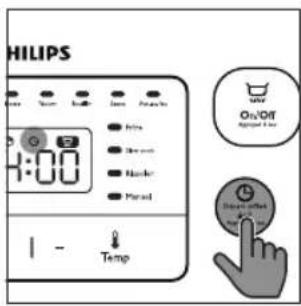
4 Preset the increase button (+) and the decrease button (-) to set the desired preset time.
5 Press and hold the start button (On/Off) to confirm the preset timer.
6 The cooking will be finished when the preset time has elapsed. You will hear 4 beeps and the selected cooking function light will be off.
7 The multicooker will be in keep-warm mode automatically.
→ The keep- warm indicator (Chaud) lights up.

Note
- The preset function is not available in bake (Four), fry (Frire), and reheat (Réchauffer) mode.
- The preset button is not responsive in standby mode.
Setting up child lock
To protect your child from using the multicooker, you may set up the child lock function.
- Press and hold the preset button (Départ différé) for 3 seconds to enter the child lock mode.
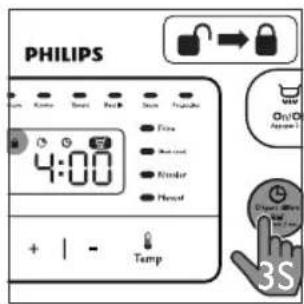
→ The child lock icon lights up on the display.
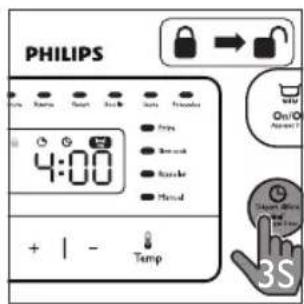
- To unlock, press and hold the preset button (Départ différé) for 3 seconds again.
→ The child lock icon lights off.
5 Cleaning and Maintenance

Note
- Unplug the multicooker before starting to clean it.
- Wait until the multicooker has cooled down sufficiently before cleaning it.
Interior
Inside of the top lid and the main body:
- Wipe with wrung out and damp cloth.
- Make sure to remove all the food residues stuck to the multicooker.
Heating element:
- Wipe with wrung out and damp cloth.
- Remove food residues with wrung out and damp cloth.
Exterior
Surface of the top lid and outside of the main body:
- Wipe with a cloth damped with soap water.
- Only use soft and dry cloth to wipe the control panel.
- Make sure to remove all the food residues around the control panel.
Accessories
Spatula, soup ladle, inner pot, steam rack, yogurt cups, and steam vent cap:
- Soak in hot water and clean with sponge.
6 Environment
Do not throw away the appliance with normal household waste at the end of its life, but hand it in at an official collection point for recycling. By doing this, you can help to preserve the environment.

7 Guarantee and service
If you need service or information, or if you have a problem, visit the Philips website at www.philips.com or contact the Philips Customer Care Center in your country. You can find its phone number in the worldwide guarantee leaflet. If there is no Customer Care Center in your country, go to your local Philips dealer.
8 Specifications
| Model Number HD3158 | |
| Rated power output 980W | |
| Rated capacity 5.0L | |
9 Troubleshooting
If you encounter problems when using this multicooker, check the following points before requesting service. If you cannot solve the problem, contact the Philips Consumer Care Center in your country.
| Problem Solution | |
| “SD” appears on the display when the multicooker is in standby mode. | “SD” is short for “standby” and means that the multicooker is in standby mode. |
| The light on the button does not go on. | There is a connection problem. Check if the power cord is connected to the multicooker properly and if the plug is inserted firmly into the power outlet. |
| The light is defective. Take the appliance to your Philips dealer or a service center authorized by Philips. | |
| The display does not function. | The multicooker is not connected to the power supply. If there is no power supply, the power failure backup function does not work and the display does not function. |
| The battery for the display runs out of power. Take the appliance to your Philips dealer or a service center authorized by Philips to have the battery replaced. | |
| The rice is not cooked. There is not enough water. Add water according to the scale on the inside of the inner pot. | |
| You did not press the start button (On/Off). | |
| Make sure that there is no foreign residue on the heating element and the outside of the inner pot before switching the multicooker on. | |
| The heating element is damaged, or the inner pot is deformed. Take the multicooker to your Philips dealer or a service center authorized by Philips. | |
| The rice is too dry and not well cooked. | Add more water to the rice, and cook for a bit longer. |
| The multicooker does not switch to the keep-warm mode automatically. | You might have pressed the keep-warm button (Chaud) before pressing the start button (On/Off). In this case the multicooker will be in standby mode after the cooking is finished. |
| The temperature control is defective. Take the appliance to your Philips dealer or a service center authorized by Philips. | |
| The rice is scorched. You have not rinse the rice properly. Rinse the rice until the water runs clear. | |
| Water spills out of the multicooker during cooking. | Make sure that you add water to the level indicated on the scale inside the inner pot that corresponds to the number of cups of rice used. |
| I cannot get to the desired cooking function. | Press the menu button (Menu) repeatedly to select the desired function as shown by the indicator. |
| Rice smells bad after cooking | Clean the inner pot with some washing detergent and warm water. |
| After cooking, make sure the steam vent cap, inner lid and inner pot is cleaned thoroughly. | |
| Error message (E1, E2, E3, or E4) appears on the display. | There has been a power failure during cooking. Take the appliance to your Philips dealer or a service center authorized by Philips. |
Contenu
natural_image
Line drawing of a rice cooker with digital display and control buttons (no text or symbols)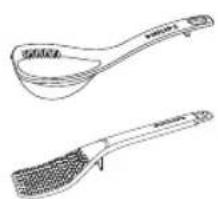
natural_image
Line drawing of two kitchen utensils: a spoon and a textured brush (no text or symbols)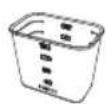

natural_image
Line drawing of a hand washing a bowl with water and a faucet (no text or symbols)Différents plats:
natural_image
Line drawing of hands holding a container with liquid and droplets, no text or symbols present
natural_image
Illustration of a rice cooker with a lid and baseplate, showing a downward arrow indicating cooling or drying process (no text or symbols)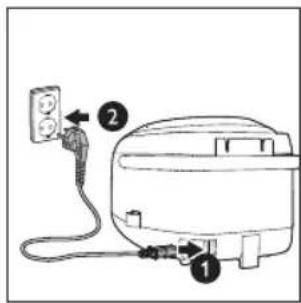

Remarque
natural_image
Simple line drawing of a bucket pouring liquid into a container with granular material (no text or symbols)natural_image
Line drawing of a rice cooker with a circular filter and digital display (no text or symbols)natural_image
Illustration of a rice cooker with a lid and cooling fan, showing internal components (no text or symbols)

- Your multicooker
- Note
- Using the multicooker
- Before first use
- Preparations before cooking
- Cooking rice/pasta
- Making jam
- Making risotto
- Making yogurt
- Boiling
- Making sauces
- Making Pot-au-feu
- Baking
- Reheating
- Steaming
- Stewing/Slow cooking
- Frying
- Roasting
- Manual
- Keep-warm mode
- Adjusting the cooking time and temperature
- Preset time for delayed cooking
- Setting up child lock
- Cleaning and Maintenance
- Interior
- Exterior
- Accessories
- Environment
- Guarantee and service
- Specifications
- Troubleshooting
- Contenu
- Remarque
Brand : PHILIPS
Model : Viva Collection HD3158
Category : Multi-cooker