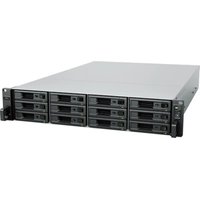
UC3400 - Server SYNOLOGY - Free user manual and instructions
Find the device manual for free UC3400 SYNOLOGY in PDF.



| Product Type | Unified Controller Server |
| Brand | Synology |
| Model | UC3400 |
| Processor | Intel Xeon D-1541 (per controller) |
| RAM | 8 GB DDR4 ECC (per controller, expandable up to 64 GB) |
| Disk Bays | 12 bays for 3.5" or 2.5" SAS drives |
| Network Ports | 2 × 1GbE RJ-45 + 1 × 10GBase-T RJ-45 (per controller) |
| Expansion Ports | 1 external SAS port (per controller) for RXD1219sas expansion units |
| PCIe Slot | 1 × Gen3 x8 (per controller) |
| Dimensions (H × W × D) | 88 × 430.5 × 692 mm (with feet: 88 × 482 × 724 mm) |
| Weight | 19.7 kg |
| Power Supply | Redundant 500 W (2 modules), 100-240 V AC, 50/60 Hz |
| Operating Temperature | 0 °C to 35 °C |
| Storage Temperature | -20 °C to 60 °C |
| Relative Humidity | 5 % to 95 % RH |
| Certifications | FCC Class A, CE Class A, UKCA, BSMI Class A, EAC, VCCI, CCC, RCM, KC |
| Main Features | High Availability (HA) with dual controllers, centralized storage management, capacity expansion, RAID support, system monitoring |
| Maintenance and Cleaning | Disconnect before cleaning; use a damp cloth without chemicals; replace faulty fans and power supplies |
| Safety | ESD precautions, grounding, handle by edges, stable environment, restricted access |
| Spare Parts and Repairability | Fan 60×60×51 mm, 500 W power supply, disk trays (Type R7), controller module, RKS-02 rail kit – available via Synology |
Frequently Asked Questions - UC3400 SYNOLOGY
User questions about UC3400 SYNOLOGY
0 question about this device. Answer the ones you know or ask your own.
Ask a new question about this device
Download the instructions for your Server in PDF format for free! Find your manual UC3400 - SYNOLOGY and take your electronic device back in hand. On this page are published all the documents necessary for the use of your device. UC3400 by SYNOLOGY.
USER MANUAL UC3400 SYNOLOGY
GARANTIE PRODUIT LIMITEE
LA PRESENTE TRADUCTION EST FOURNIE UNIQUÉMENT À TITRE D'INFORMATION. EN CAS DE VARIATION, LA VERSION ANGIAISE EST VALID.
CETTE GARANTIE LIMITÉE (« GARANTIE ») S'APPLIQUE AUX PRODUITS (DéFINIS CI-APRès) DE SYNOLOGY, INC. ET DE SES FILIALES, Y COMPRIS SYNOLOGY AMERICA CORP, (COLLECTIVEMENT, « SYNOLOGY »). VOUS ACCEPTÉZ ET RECONNAISSEZ VOUS SOUMETTRÉ AUX TERMES DE CETTE GARANTIE EN OUVRANT ET/OU EN UTILISANT L'EMBALLAGE CONTENANT LE PRODUIT. VEUILLEZ NOTER QUE CETTE GARANTIE LIMITÉE NE S'APPLIQUE PAS AU LOGICIEL CONTENU DANS LES PRODUITS QUI SERA SOUMIS À SON PROPRE CONTRAT DE LICENCE D'UTILISATEUR FINAL ET QUE SYNOLOGY SE RÉSERVE LE DROIT d'AJUSTER ET/OU DE MODIFIER LA PRESENTE GARANTIE PRODUIT DE TEMPS À AUTRE AINS AVIS PREALABLE. SI VOUS N'ÊTES PAS D'ACCORD AVEC LES TERMES DE CETTE GARANTIE, N'UTILISEZ PAS LE PRODUIT. AU LIEU DE CELA, VOUS POUVEZ RENVOYER LE PRODUIT AU REVENTEUR CHEZ QUI VOUS L'AVEZ ACHÉTE POUR VOUS FAIRE REMBOURSER, EN VERTU DE LA POLITIQUE DE RETOUR APPLICABLE AU REVENTEUR.
VEUILLEZ NOTER QUE LA PRISE EN CHARGE INCLUSE DANS LA GARANTIE DE SYNOLOGY N'EST PAS DISPONIBLE DANS TOUS LES PAYS ET QUE SYNOLOGY PEUT REFUSER DE VOUS FOURNIR CETTE PRISE EN CHARGE PAR LA GARANTIE LIMITEE SI VOUS FAITES UNE DEMANDE DE PRISE EN CHARGE DANS UN PAYS DIFFÉRÉNT DU PAYS DANS LEQUEL LE PRODUIT A ÉTÉ INITIALÉMMENT ACHÉTE. LE PAYS DANS LEQUEL LE PRODUIT A ÉTÉ INITIALÉMMENT ACHÉTE SERA DÉTERMINÉ EN FONCTION DES ARCHIVES INTERNES DE SYNOLOGY.
FCC Declaration of Conformity
This device complies with Part 15 of the FCC Rules. Operation is subject to the following two conditions: (1) this device may not cause harmful interference, and (2) this device must accept any interference received, including interference that may cause undesired operation.
Declaration Letter of REACH & RoHS Compliance
About REACH
In June 2007, the European Union Regulation (EC) 1907/2006 concerning the Registration, Evaluation, Authorization and Restriction of Chemicals (REACH) was first released. Under this Regulation, manufacturers are required to gather information on the properties of their chemical substances, which will allow their safe handling, and to register the information to European Chemicals Agency (ECHA). The aim is to improve the protection of human health and the environment through the better and earlier identification of the intrinsic properties of chemical substances.
About RoHS
RoHS Directive (EU Directive 2002/95/EC) was issued in 2002, restricted the use of the six chemicals lead, cadmium, mercury, and hexavalent chromium, as well as flame retardants polybrominated biphenyls (PBBs) and polybrominated dipheny ethers (PBDEs). Under this directive, manufacturers are required to replace these chemicals in their products with less hazardous alternatives.
Then RoHS 2.0 (Directive 2011/65/EU) has replaced Directive 2002/95/EC since January 3, 2013. In 2015, EU commission publishes Directive (EU) 2015/863 to amend Annex II to EU RoHS 2 (Directive 2011/65/EU) to add 4 phthalates (DEHP, BBP, DBP and DIBP) onto the list of restricted substances from 22 July 2019.
REACH and RoHS Compliance
Synology meets all requirements of the REACH Regulation and is compliant to all implemented RoHS type regulations worldwide. To the best of Synology's knowledge, all Synology products in production (including finished
Synology
products, spare parts, and packaging materials) are in compliance with the requirements of the Regulation and/or Directives. Synology continues to monitor, influence, and develop our processes to comply with any proposed changes to the Regulation and/or Directives.
Brand : SYNOLOGY
Model : UC3400
Category : Server