
FOOT POD - Sports accessory GARMIN - Free user manual and instructions
Find the device manual for free FOOT POD GARMIN in PDF.


| Product Type | ANT+ Foot Pod for Shoe |
| Brand | GARMIN |
| Model | FOOT POD |
| Dimensions (without clip) | 35 mm × 25 mm × 7.5 mm |
| Weight (with battery) | 10 g |
| Power Supply | CR2032 battery (3 V) replaceable by user |
| Battery Life | 400 hours of running time |
| Transmission Range | 3 m minimum |
| Radio Frequency / Protocol | 2.4 GHz ANT+ |
| System Compatibility | ANT+ (Forerunner and other compatible devices) |
| Speed and Distance Accuracy (without calibration) | 95% |
| Speed and Distance Accuracy (with calibration) | 98% |
| Operating Temperature | -10 °C to 60 °C |
| Sensor Accuracy Range | 0 °C to 40 °C |
| Installation | On laces or under the insole (dedicated pocket) |
| Operation | Automatic upon installation or movement |
| Pairing | Wireless ANT+ with a Forerunner device |
| Auto-off | After 30 minutes of inactivity |
| Low Battery Indicator | Message on Forerunner (approximately 5 hours of battery remaining) |
| Battery Replacement | Turn the cover counterclockwise, insert the new battery with positive pole facing inward |
| Warranty | Garmin Standard Limited Warranty |
Frequently Asked Questions - FOOT POD GARMIN
User questions about FOOT POD GARMIN
0 question about this device. Answer the ones you know or ask your own.
Ask a new question about this device
Download the instructions for your Sports accessory in PDF format for free! Find your manual FOOT POD - GARMIN and take your electronic device back in hand. On this page are published all the documents necessary for the use of your device. FOOT POD by GARMIN.
USER MANUAL FOOT POD GARMIN
Activating the Foot Pod
The foot pod is on standby and is ready to send data as soon as you install it or move it.
Installing on shoe laces
- Press the tab on the lace clip. Lift and separate the foot pod from the lace clip.
- Loosen your shoe laces slightly.
- Thread the lace clip through two secure sections of your shoelaces, allowing enough room at the top to tie the shoelaces.
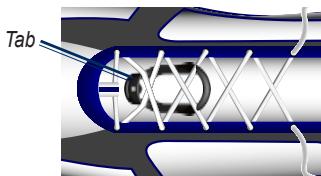
- Tie your shoelaces securely to keep the foot pod from shifting during your workout.
- Snap the foot pod into the lace clip. The arrow on the foot pod must be pointed toward the front of your shoe.
Installing under insole

NOTE: Your compatible shoe will have a pocket under the insole. You may need to remove a foam insert before installing the foot pod.
- Press the tab on the lace clip. Lift and separate the foot pod from the lace clip.
-
Lift the insole of the shoe.
-
Place the foot pod in the pocket with the ANT+™ logo facing up and the notch pointing toward the front of your shoe.
EN
Pairing
Pairing is the connecting of ANT + wireless sensors, for example, connecting your foot pod with a Forerunner.
After you pair the first time, your Forerunner automatically recognizes your foot pod each time it is activated. See your Forerunner owner's manual for information about displaying the foot pod data.
- Move away (20 m) from other sensors while the Forerunner is trying to pair with your foot pod for the first time.
- Bring your foot pod within range (3 m) of the Forerunner.
- Follow the specific pairing instructions in your Forerunner owner's manual.
Calibrating (Optional)
Calibrating your foot pod is optional and can improve accuracy. See your Forerunner owner's manual for calibrating instructions.
Turning Off the Foot Pod
After 30 minutes of inactivity, the foot pod powers off to conserve the battery.
Battery Information
WARNING: Do not use a sharp object to remove user-replaceable batteries. Contact your local waste disposal department to properly recycle the batteries.
When the battery is low, a message appears on your Forerunner. Approximately five hours of battery life remain.
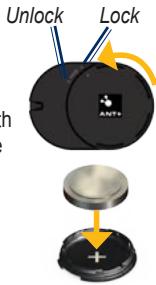
To replace the battery:
- Locate the circular battery cover on the back of the foot pod.
- Twist the cover counter-clockwise until it is loose enough to remove.
- Remove the cover and the battery.
- Place the new battery into the cover with the positive side facing the inside of the cover.
- Replace cover by aligning the dots and rotating clockwise.
Technical Specifications
Physical size: L × W × H : 35 ~mm × 25 ~mm × 7.5 ~mm (excluding clip)
Weight: 10g (including battery)
Water Resistance: 10m
Transmission range: Minimum 3 m (9.8 ft.)
Speed and distance accuracy: Uncalibrated 95% , calibrated 98%
Battery: User-replaceable CR2032 (3 volts) Perchlorate Material - special handling may apply. See www.dtsc.ca.gov/hazardouswaste/perchlorate.
Battery life: 400 hours run time
Operating temperature: From -10^ to 60^ (From 14^ to 140^ )
Sensor Accuracy Range: From 0^ to 40^ (From 32^ to 104^ )
Radio frequency/protocol: 2.4 GHz ANT™
System Compatibility: ANT^+^TM
Limited Warranty
Garmin's standard limited warranty applies to this accessory. For more information, see the Important Safety and Product Information in the Garmin product box.

Garmin® is a trademark of Garmin Ltd. or its subsidiaries, registered in the USA and other countries. This trademark may not be used without the express permission of Garmin. Other trademarks and trade names are those of their respective owners.
For the latest product information and accessories, visit the Garmin Web site at www.garmin.com.
GARMIN
© 2008 Garmin Ltd. or its subsidiaries
Garmin International, Inc.
1200 East 151st Street, Olathe, Kansas 66062, USA
Garmin (Europe) Ltd.
Liberty House, Hounsdown Business Park, Southampton, Hampshire, SO40 9RB UK
Garmin Corporation
No. 68, Jangshu 2nd Road, Shijr, Taipei County, Taiwan
www.garmin.com
€
October 2008
Printed in Taiwan
Part Number 190-00945-91 Rev. B
Brand : GARMIN
Model : FOOT POD
Category : Sports accessory